RSS
 

Archive for April, 2013

How to Choose Your Next EOS Camera: Part One

14 Apr

01.jpg

This article is written by Andrew S. Gibson, the author of Understanding EOS, on sale now at Snap N Deals for a limited time.

In these articles I’m going to take a look at the current range of Canon EOS cameras, giving an overview of each model and the reasons that you may consider buying one.

You may be wondering why I’m writing about Canon EOS cameras – after all there are other brands such as Nikon, Sony, Pentax and Olympus to choose from. The answer is that I’m a Canon EOS user, and I write about EOS cameras for a living. If you want to know anything about other brands, I’m definitely the wrong person to ask.

Maybe other DPS authors will jump in and write similar guides about the brands they’re familiar with (hint, hint). I think it would make a fantastic series.

A note about prices: DPS has an international readership, so I haven’t included prices as they vary so much. The cameras are listed roughly in order of ascending price to give you an idea of where each model fits in the EOS range.

Entry level EOS cameras

Let’s start with ‘entry level’ EOS cameras. Canon calls these enthusiast cameras. They are designed for hobbyists rather than professional photographers. If you are buying a digital SLR for the very first time, or you’re on a tight budget, you will probably buy one of these models.

An idiosyncrasy of entry level EOS cameras is that Canon gives the same model different names depending on which territory they are sold in. Hence the same camera is a 700D in Europe, a Kiss X7i in Japan (where it is marketed to the female demographic) and a Digital Rebel T5i in North America.

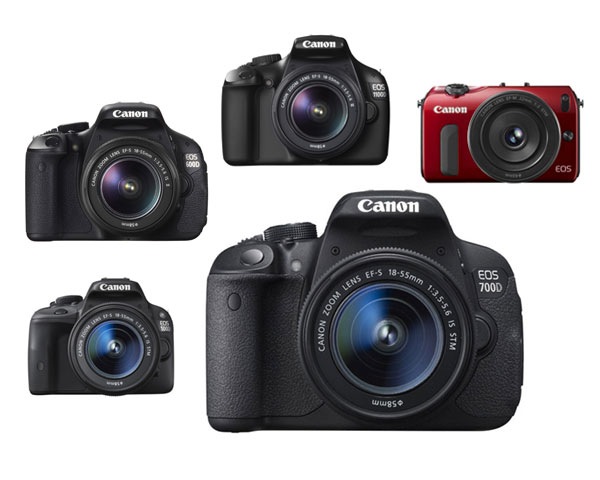
Canon currently has five enthusiast models:
02.jpg

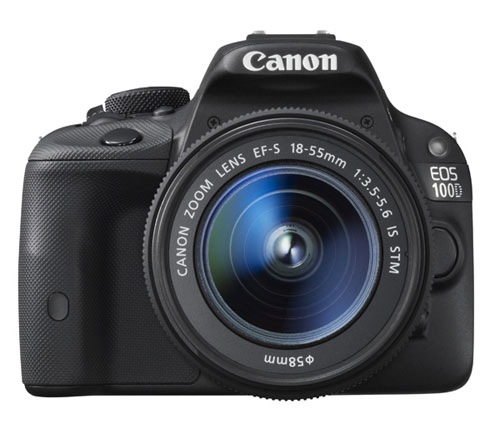
EOS 100D/Rebel SL1/Kiss X7

March 2013

Key specs:

  • 18 megapixel APS-C sensor
  • 9 point AF with 1 cross-type sensor
  • 63 zone evaluative metering
  • Live View and movie mode
  • DIGIC 5 processor
  • Uses SD cards
  • 3 inch fixed touch screen LCD display
  • Built-in flash with no wireless flash control

According to Canon the EOS 100D is the world’s smallest and lightest digital SLR. It’s aimed at photographers who are moving up from compact cameras or smart phones and don’t want to buy a larger camera.

It is ideal for photographers who want a light body to carry around all day, or who need to keep the weight down when travelling overseas. It may also appeal if you like the idea of being able to carry it around in your bag or handbag.

The small body of the EOS 100D will be more inconspicuous when you are travelling than other EOS cameras. This may suit some people, including street photographers.

The spec is similar to the EOS 700D, although it doesn’t have as many features. The main selling point of this model is the size. If size doesn’t matter, then consider a more advanced model – you’ll get more bang for your buck.
03.jpg

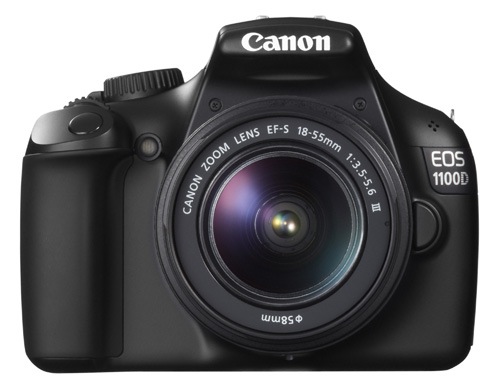
EOS 1100D/Rebel T3/Kiss X50

March 2011

Key specs:

  • 12.3 megapixel APS-C sensor
  • 9 point AF with 1 cross-type sensor
  • 63 zone evaluative metering
  • Live View and movie mode
  • DIGIC 4 processor
  • Uses SD cards
  • 2.7 inch fixed LCD display
  • Built-in flash with no wireless flash control

This is Canon’s least expensive SLR, ideal for anybody on a tight budget. However, it also has the lowest spec and lacks some of the features found on the other models in this list, such as the three inch vari-angle LCD screen and built-in master unit for controlling external Speedlites.

It also has the lowest megapixel count. To be honest, if you buy it you’re probably going to outgrow it fairly soon. It’s also possible that Canon may update this model soon as it’s two years old.

Don’t let that put you off though if you’re on a tight budget – this is a very capable camera for learning on and is by far the cheapest model in this list. Might also make a good gift for a relative or friend who has expressed an interest in photography. Budget allowing, you’ll be better off with a more advanced model.
04.jpg

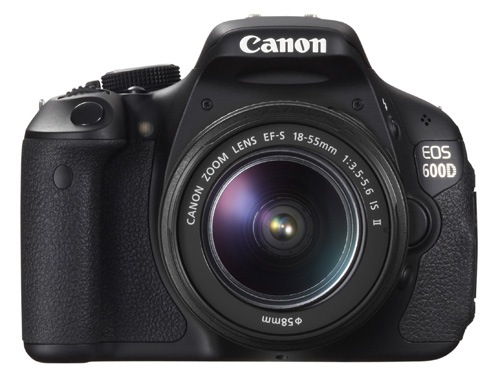
EOS 600D/Rebel T3i/Kiss X5

March 2011

Key specs:

  • 18 megapixel APS-C sensor
  • 9 point AF with 1 cross-type sensor
  • 63 zone evaluative metering
  • Live View and movie mode
  • DIGIC 4 processor
  • Uses SD cards
  • 3 inch vari-angle LCD display
  • Built-in flash with wireless flash control

The EOS 600D is a step up from the EOS 100D and 1100D models. It has a larger body and a high resolution vari-angle LCD screen that you can use with movie mode or for taking photos at awkward angles (ie with the camera at ground level).

Another benefit of the vari-angle screen is that you can turn it around so the screen faces the back of the camera, protecting the LCD surface during travel.

The built-in flash doubles as a wireless master for external Speedlite flash units, so if you want to use (or learn to use) external flash then this is a good camera to buy instead of the EOS 100D or 1100D.

You may be interested in this camera if you are upgrading from an 1100D, or an older model such as the EOS 400D camera. It’s not as advanced as the EOS 700D, but much less expensive.
05.jpg

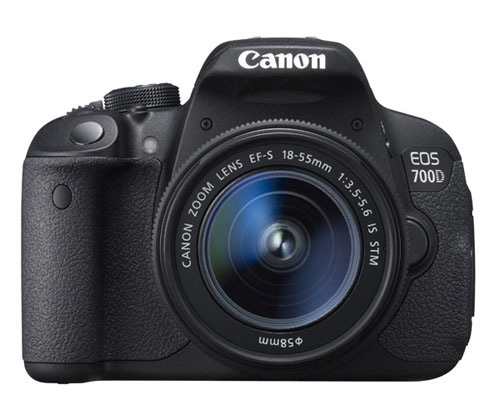
EOS 700D/Rebel T5i/Kiss X7i

March 2013

Key specs:

  • 18 megapixel APS-C sensor
  • 9 point AF with 9 cross-type sensors
  • 63 zone evaluative metering
  • Live View and movie mode
  • DIGIC 5 processor
  • Uses SD cards
  • 3 inch vari-angle touch screen LCD display
  • Built-in flash with wireless flash control

The EOS 700D was announced in March and replaces the EOS 650D (which you may still be able to buy until stock runs out). The EOS 600D remains available as a lower cost alternative to the 700D.

The key differences between this camera and the 600D is that the 700D has a more advanced processing chip, a greater ISO range and hybrid AF that gives better autofocus performance in Live View and movie mode.

You may be interested in this camera if you are upgrading from an 1100D, or an older model such as the EOS 400D camera. It’s an ideal model if you want an advanced EOS camera but don’t like the extra size and weight or need the more advanced features of models like the EOS 6D, 7D or 5D Mark III. It is also cheaper than those cameras.
06.jpg

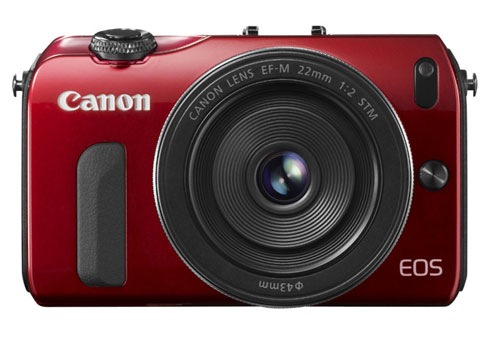
EOS M

July 2012

Key specs:

  • 18 megapixel APS-C sensor
  • 31 point hybrid AF
  • 63 zone evaluative metering
  • Live View and movie mode
  • DIGIC 5 processor
  • Uses SD cards
  • Three inch fixed LCD display
  • Comes supplied with 90EX Speedlite flash unit in most countries when purchased in kit form

The EOS M is Canon’s first compact system camera and marks the company’s entry into the mirrorless camera market. It’s essentially a scaled down EOS 650D without a pentaprism or viewfinder.

Another important difference is that the EOS M has its own lens mount (the EF-M mount). At the moment there is a choice of two EF-M lenses, plus an adapter that lets you mount the EF-S and EF lenses that other EOS cameras use.

The appeal of this camera is the small size and beauty of the design. Coupled with the EF-M 22mm pancake lens it makes a very portable setup that will create high quality images, something that could be ideal for travel or street photography.

However, reviews about the camera’s autofocus performance aren’t encouraging. The lack of a viewfinder means you have to take photos by composing them on the LCD screen, something regular digital SLR users could find hard to get used to.

If size isn’t important, then go for an SLR camera instead. The optical viewfinder and phase detection autofocus make them a much more versatile tool.

Conclusion

That concludes the round up of entry level EOS cameras. I will take a look at the current range of semi-professional and pro cameras in the next article.

Understanding EOS

It’s wise to remember that whichever camera you have, it’s only a tool. Photographers create photos, cameras just take them. An understanding of the principles of light and composition are just as important as which model you own.

07.jpg

This is the principle behind my ebook Understanding EOS, which I wrote to help people learn to use their EOS cameras. It’s available now at Snap N Deals for a special price for a limited period. Whichever EOS camera you own, it’s the essential accessory to help you get the most out of your camera.

Post originally from: Digital Photography Tips.

Check out our more Photography Tips at Photography Tips for Beginners, Portrait Photography Tips and Wedding Photography Tips.

How to Choose Your Next EOS Camera: Part One


Digital Photography School

 
Comments Off on How to Choose Your Next EOS Camera: Part One
Posted in Photography


14 April, 2013 – I Will Not Buy That Camera – I Promise!

14 Apr

We’ve all said it at one time or another… I Will Not Buy That Camera, I Promise!. Well, Mark Dubovoy said it several times to several people over the past few months regarding the Leica M (240). Find out is he kept his promise in his just published review of the new Leica.

If you’re a subscriber to Sean Reid‘s site ReidReviews (or would like to become one), Sean has just published a report on recently field testing the new Leica M (240) and the also new Fuji X100s in Florida.


 "Every time I go back to a module I had already seen, I learn additional things.  I have never seen tutorials that have the excellent mix of what the features are, 
how to use them, enough of the under-the-hood information 
and concepts so that I can utilize the features creatively and efficiently, 
and just enough humor to keep the motivation level high.  Wow!"


The Luminous Landscape – What’s New

 
Comments Off on 14 April, 2013 – I Will Not Buy That Camera – I Promise!

Posted in News


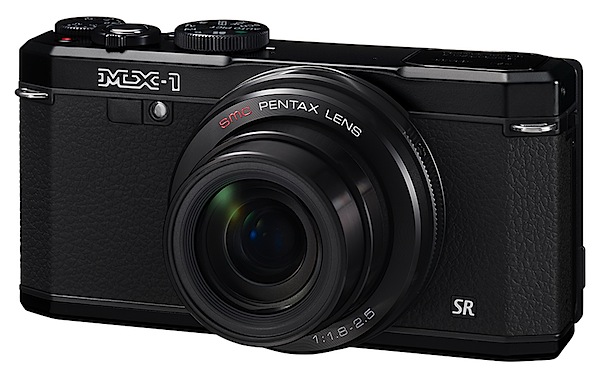
Pentax MX-1 Review

14 Apr

Pentax MX-1.jpg

Many people can be misled by some camera makers’ claims of higher pixel counts, maxi zoom ranges etc … when in fact they’re actually being sold a turkey.

Pentax MX1_SILVER high res.jpg

Pentax MX-1-back.jpg

Pentax MX-1-top.jpg

This is one camera that goes against the trend: it can capture only a 12 megapixel image, has only a 4x zoom and its 35 SLR equivalent range is a meagre 28-112mm … reasonable but not spectacular.

However, look a little deeper into the digits and you discover the CMOS measures 14.9mm diagonally and is capable of capturing a maximum image of 3984×2656 pixels, printing out to a 34x22cm print.

Its video capture is in MPEG4 and runs to Full HD 1920×1080. You cannot shoot a still mid video.

As well, the maximum lens aperture is f1.8, shrinking to only f2.5 when fully zoomed in. Obviously, a dim and dark spaces lover!

Pentax MX-1 Features

For such a small, pocketable camera, the MX-1 is surprisingly heavy. It does have a distinctly retro look and will make long time Pentax users a trifle teary!

The control layout is sensible, well ID’d in largish, white text.
Scene modes.jpg

Top deck: at left, the flash cell; to the right the mode dial which gives access to PASM; 21 scene modes (kids, panorama, sport etc); HDR shooting (based on a three shot capture); user specified mode; movies; and a green mode which takes you an easy, no forethought picture taking mode.

Further right we find power button; shutter button and zoom lever; the familiar red video record button; exposure compensation dial.

Rear: here we find the vari-angle screen (Hooray!) that can be lowered down by approx 45 degrees or raised upward to approx. 90 degrees; an E-dial which varies ISO setting, shutter and aperture settings; an AV/AE-L button that lock exposure settings; trash; replay; info and menu buttons; plus the four way rocker which takes you to still/continuous shooting, flash settings, ISO and macro.

Overall, a quite tidy and easily followed regime of external controls.

Info button.jpg

I found the info button useful to give a current status display and then affords immediate access to such matters as the size of the AF area, image size, AWB etc. This was useful as, for some odd reason, I continually threw the camera into ‘bright’ capture mode instead of normal … the info button reassured me of where I was control-wise.
Menu.jpg

Status.jpg

The rear screen finder menu system is, admittedly, more involved but at least it does give access to an enormous range of options, running from custom image settings (natural, vibrant, bright etc).
The camera is well balanced but I would have liked a speed grip for the right hand to feel more secure.

Chupa chups.JPG

Mercedes.jpg

More: The camera has a novel Handheld Night snap mode helps the photographer capture sharp, blur-free night-time images by shooting multiple images in a run, then synthesizing them into a single image.

Now, a little magic that I have never seen before on a digicam: a level indicator that shows the camera tilt not only left and right but fore and aft also. As I said: Magic!

The MX-1 has a dual shake-reduction system that seems to work its magic with quite a bit more effectiveness than many of its peers.

Digital Filters: with these (15 in all) you can edit captured images to take on a variety of looks: B&W, retro, high contrast, soft, miniature and pos to neg … amongst others. Got me!

The AF system has 25 points.

There’s face detection (32 in all) and pet detection (3 in all). Plus smile capture and blink detection.

Startup Time

From startup it took about three seconds until I could shoot the first shot; follow-ons about a second apart.

Distortion

No sign of any problems at the zoom’s wide or tele ends.

ISO Tests

Pentax MX-1 ISO 100.JPG Pentax MX-1 ISO 400.JPG Pentax MX-1 ISO 800.JPG Pentax MX-1 ISO 1600.JPG Pentax MX-1 ISO 3200.JPG Pentax MX-1 ISO 6400.JPG Pentax MX-1 ISO 12800.JPG

By ISO 3200 the noise and definition had risen to such a degree that IMHO the setting would be unusable.
Staircase.JPG

Pentax MX-1 Review Verdict

Quality: about average.

Why you’d buy the Pentax MX-1: reasonably fast lens; Adobe DNG (RAW) capture; a wide variety of filters and image treatments for the dabbler.

Why you wouldn’t: you really want a DSLR; limited zoom range.

I found a lot to like in the MX-1: it sat well in the hand, the controls were easy to get around. And, it felt like a camera!

Pentax MX-1 Specifications

Image Sensor: 12 million effective pixels.
Sensor: 15mm CMOS.
Lens: f1.8-2.5/6-24mm (28-112mm as 35 SLR equivalent).
Metering: Multi segment, centre-weighted, spot.
Exposure Modes: Auto, Program AE, shutter and aperture priority, manual.
Shutter Speed: 30 to 1/8000 second.
Memory: SD/SDHC/SDXC plus 75.3MB internal memory.
Image Sizes (pixels): Stills: 3984×2656 to 1536×1536.
Movies: 1920×1080 (30fps), 1280×720 (30+60fps).
Viewfinder: 7.6cm LCD screen (920,000).
File Formats: RAW (DNG), JPEG, MPEG4.
ISO Sensitivity: Auto, 100 to 12800.
Interface: USB 2.0, HDMI mini, AV, DC input.
Power: Rechargeable lithium ion battery, DC.
Dimensions: 122.5x60x51.5 WHDmm.
Weight: 391g (inc battery, card).
Price: get a price on the Pentax MX-1 at Amazon.

Post originally from: Digital Photography Tips.

Check out our more Photography Tips at Photography Tips for Beginners, Portrait Photography Tips and Wedding Photography Tips.

Pentax MX-1 Review


Digital Photography School

 
Comments Off on Pentax MX-1 Review

Posted in Photography


13. April 2013

13 Apr

Ein Beitrag von: Bernhard Huber

Ausblick


kwerfeldein – Fotografie Magazin

 
Comments Off on 13. April 2013

Posted in Equipment


Die surrealen Gesichter von Jarek Kubicki

13 Apr

In den Bildern von Jarek Kubicki verschmelzen die Dinge miteinander. Es ist nicht mehr genau zu sagen, welche Teile der Künstler fotografiert hat, was hier gezeichnet wurde und welche Teile Fotomanipulationen sind.

Während klassische Mixed-Media-Kunst, die mit Fotografie arbeitet, gerade die Gegensätze hervorhebt, indem etwa sehr deutlich auf Fotografien geschrieben oder gemalt wird, geht Kubicki den umgekehrten Weg: Wie bei Matte Paintings bilden seine surrealen Fotomanipulationen abgeschlossene, homogene Einheiten von beeindruckender Schönheit.

© Jarek Kubicki

„Ich mache schon seit den 90ern digitale Bilder und am Anfang habe ich ganz klassisch damit experimentiert, traditionelle Kunst, digitale Malerei und Fotografie zu kombinieren“, erzählt mir der 1976 in Polen geborene Künstler, der zuerst an der Fine Arts Highschool in Gdynia seinen Abschluss gemacht hat und danach gleich noch einmal Kunst studiert hat.

„Im Laufe der Zeit hat sich mein Stil aber verändert. Es ist schwer, ihn zu beschreiben. Momentan verwende ich weniger Techniken aus der Fotomontage und versuche, mehr mit der Hand zu machen – das (digitale) Malen spielt dabei neben der Fotografie eine große Rolle.“

© Jarek Kubicki

Seine Arbeiten sind populär. Vor allem in der Metal-Szene verwenden Bands seine Bilder gern als Artworks für ihre Albenveröffentlichungen. Nebenbei macht Jarek vor allem Design. Wichtig ist ihm, dass alles von ihm selbst kommt.

„Alle Materialien, die in meinen Arbeiten vorkommen, sind ausschließlich von mir selbst: Texturen, Bilder, Pinsel. Ich verwende keine Stock-Fotos. Das ist so etwas wie meine Philosophie.“ Ein Beispiel für den Entstehungsprozess der Texturen kann man im Blog von Jarek bewundern.

© Jarek Kubicki

Das sieht nach sehr viel Arbeit aus, was es auch ist: „Der Prozess dauert viele Stunden, vor allem, wenn ich noch eine Fotosession mit einplanen muss. Die Hintergründe meiner Arbeiten sind mir vor allem auch wichtig. Ich kann stundenlang daran arbeiten, die Texturen so anzuordnen, dass sie für mich ein zufriedenstellendes Resultat ergeben.“

Es ist vor allem spannend, wie sich das Verhältnis von Fotografie und anderer Kunst in den Arbeiten von Jarek in Balance hält. „Ich habe riesigen Respekt vor Fotografie und ich sehe sie eigentlich als überlegen an“, sagt er. „Fotografie fängt einen Moment ein, eine Fotomontage rekonstruiert nur Momente.“

© Jarek Kubicki

Die finale Interpretation der Bilder bleibt dabei immer dem Betrachter überlassen: Jarek Kubickis Werke tragen keine Titel, sondern nur Zahlen, auch wenn man viel hinein- oder herauslesen kann. „Ich will den Bildern nicht meine Interpretation überstülpen, auch wenn es die natürlich gibt. Ich glaube, sie zeigen alle emotionale Zustände, Stimmungen.“

Der Rest liegt im Auge des Betrachters.


kwerfeldein – Fotografie Magazin

 
Comments Off on Die surrealen Gesichter von Jarek Kubicki

Posted in Equipment


Greg Heisler BTS: Bono/Gates for Time

13 Apr

This video marks the last of Profoto's Greg Heisler BTS series.

In today's BTS, Heisler does some pretty cool problem-solving before the fact only to get blind-sided with the bison head on the day of the lightning-paced shoot.

Yeah, I said bison head. No, actually Heisler said that…

Read more »


Strobist

 
Comments Off on Greg Heisler BTS: Bono/Gates for Time

Posted in Photography


Metabones delays shipment of ‘Speed Booster’ for Micro Four Thirds

13 Apr

speed-booster-front.png

Metabones has announced the schedule for the Micro Four Thirds version of its innovative ‘Speed Booster’ lens adapter has slipped to the second half of 2013. Like the existing version for mounting Canon EF lenses on Sony NEX cameras, the forthcoming version will allow the use of full-frame lenses, reducing the focal length by a factor of 0.71x and increases the maximum aperture by 1 stop. The Micro Four Thirds version will give a 1.4x overall ‘crop’ – giving a similar field of view to APS-C stills cameras and the Super35mm video format.(via 43rumors)

News: Digital Photography Review (dpreview.com)

 
Comments Off on Metabones delays shipment of ‘Speed Booster’ for Micro Four Thirds

Posted in Uncategorized


The Photography Bible [BOOK REVIEW]

13 Apr

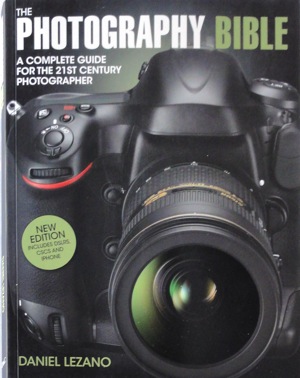
The Photography Bible coverConfession: I’m a sucker for books like this!

‘The Photography Bible brings you up-to-the-minute information on the rapidly changing world of photography, including the latest digital cameras … [and] offers expert photographic advice to help improve your photography ….’

I absolutely love a single book that has the full story. The trouble is that, at the immediate moment the author hands his text file to the book’s publisher, the whole game changes! Camera models change almost overnight and the whole tech story is a very mobile feast!

But, in spite of those cautions, Daniel Lezano’s book does a fine job of packaging most of the data into a single publication.

The opening chapter does a thorough job of describing the current camera types, including generous illustrations and detailed text: from DSLR to Compact System Cameras (MILC) or digi compacts, bridge models, waterproof models … plus a brief rundown on medium format DSLRs, camcorders, the weird Lytro camera and even smart phones with camera capabilities. It should help prospective buyers to narrow down their choices before spending the hard-earned.

Then follows details on camera components: sensors, stabilisers, sensor cleaning systems, LCD screens, Live View, HD video etc.

For the more curious there is some excellent info on the different AF systems which surely, is one of the most misunderstood of camera functions.

Similarly, with such matters as exposure: the role of the lens aperture in exposure and the ‘look’ of an image; differing modes such as auto, Program AE etc; metering systems such as multi zone and spot; how to deal with excessively dark or bright scenes.

My congrats to the author for opening up the subject of resolution and the tricky subject of the ‘megapixel myth’. May I quote? ‘There is a very common misconception that you can determine the quality of a camera simply by judging it on the number of pixels.’ Bravo!

An area that may confuse even the more digitally-educated reader is the subject of sensor types: CMOS and CCD are discussed, along with useful detail on Fujifilm’s X-Trans CMOS and Foveon’s X3 CCD … but I have a disconcerting feeling that tech change is proceeding at such a velocity that there are already sensor types out there that scream for attention.

The book then moves on to subjects that are more in the realm of photo handy hints, such as dealing with white balance, types of memory cards and a useful discussion of how cards are speed rated.

More: file formats; flash and studio lighting; filters; lenses, along with the role of wide and tele focal lengths; printers and scanners; image software and the mysteries of Photoshop; basic composition.

Overall, I found the book to be useful for the newbie to digital photography. I felt, however, it could have gained by including more technical detail on digital hardware, why sensors do what they do along with their foibles, etc.

A good starter. Well illustrated. Clear text.

The book could have benefitted from a chapter on video shooting with digicams, especially now that digi still cameras have developed such enormous capabilities in this area!

Author: Delezano.
Publisher: D&C.
Size: 25x19x1.5cm. 176 pages.
ISBN: 1 4463 0217 0.
Price: Get a price on the Photography Bible at Amazon.

Post originally from: Digital Photography Tips.

Check out our more Photography Tips at Photography Tips for Beginners, Portrait Photography Tips and Wedding Photography Tips.

The Photography Bible [BOOK REVIEW]


Digital Photography School

 
Comments Off on The Photography Bible [BOOK REVIEW]

Posted in Photography


12. April 2013

13 Apr

Ein Beitrag von: Sascha Kilmer

Tranquillity-©-Sascha-Killmer


kwerfeldein – Fotografie Magazin

 
Comments Off on 12. April 2013

Posted in Equipment


Sigma UK to start shipping USB dock and 120-300mm F2.8 from May 2013

13 Apr

120-300mm.png

Sigma UK has announced its new USB dock for lenses will be available from May 2013 at a retail price of £39.99 (including VAT). The company has also announced the 120-300mm F2.8 DG OS HSM lens will start shipping in Canon and Sigma mounts around the same time but has not confirmed the price. Launched at Photokina 2012, the USB dock enables users to easily update lens firmware and fine-tune focus parameters, while the 120-300mm F2.8 lens comes with a button to adjust the focus speed and the focus limiter.

News: Digital Photography Review (dpreview.com)

 
Comments Off on Sigma UK to start shipping USB dock and 120-300mm F2.8 from May 2013

Posted in Uncategorized