RSS
 

Archive for March, 2013

Sigma delays shipping of USB dock and 120-300mm F2.8 DG OS HSM

28 Mar

120-300mm.png

Sigma has announced a delay in the shipping of its new USB dock for lenses and 120-300mm F2.8 DG OS HSM lens for Canon that was expected to retail this month. According to the company, this delay is due to supply issues of the parts. Announced at Photokina 2012, the USB dock enables users to easily update lens firmware and fine-tune focus parameters, while the 120-300mm F2.8 lens comes with a button to adjust the focus speed and the focus limiter. Sigma has not given details about when it will start shipping the products.

News: Digital Photography Review (dpreview.com)

 
Comments Off on Sigma delays shipping of USB dock and 120-300mm F2.8 DG OS HSM

Posted in Uncategorized


10 Tips How to Avoid Blurry Pictures when Shooting from a Kayak

28 Mar

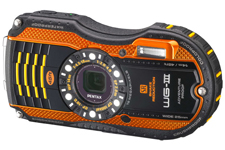
Pentax Optio WG3 waterproof camera Compact waterproof digital cameras like Pentax Optio W-series or Olympus Tough series are popular among paddlers. They may not offer the highest image quality among point-and-shoot cameras, but they still produce decent pictures. Most importantly, you can photograph in conditions where other cameras are better kept in a dry case or box.

However, new camera owners are often getting pretty bad, blurry pictures and are really disappointed with a purchase. Shooting on water from a kayak or canoe requires some extra efforts and practice from a paddling photographer. Here are a few tips which may help. This is an update of my old post written 5 years ago. Cameras are getting better, but, I believe, the tips below are still valid. I have been using Pentax Optio waterproof cameras starting from the original model WP, then W10, W30, and, currently, WG2 is attached to my life jacket.

1. Use the automatic mode

I do not have any special settings for my camera. On water I use exclusively the P (program) mode. Of course, in addition to the P mode I use the movie mode and interval drive mode quite often.

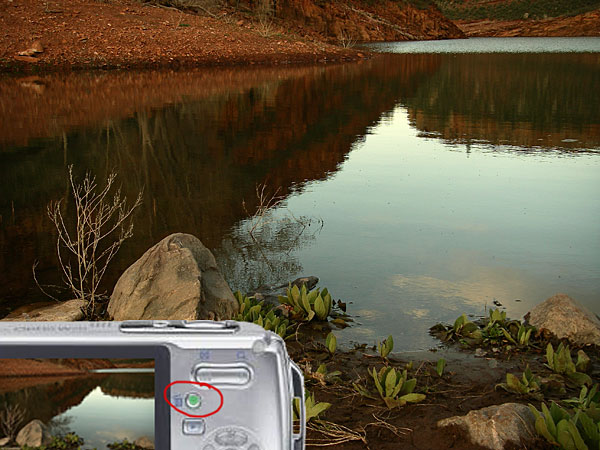
You can program the green button to do useful adjustments without a need to go through a setup menu. I am using two functions assigned to the green button: exposure correction and, much less often, white balance setups. Typically, I underexpose my shots to avoid overexposed areas with wash out details. Coincidentally, it shortens the exposure time which helps to avoid blurry pictures, but this is not a main purpose of this adjustment.

2. Keep the camera steady

This is the most important tip. However, it is not so easy when paddling, especially, when water is not calm. Ideally, you should hold the camera in both hands. In addition, it is quite easy to shake the light and small camera just by pressing a shutter button.

3. Use a paddle shaft to stabilize the camera

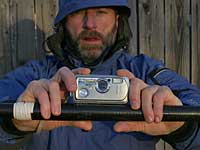
Here is a short video clip demonstrating how I am doing it.

This technique really helped me when I was starting to paddle a tippy Sisson Nucleus kayak. You can achieve two goals: to stabilize the camera and to stabilize your kayak. You have your paddle ready for bracing. This technique does not work with strong, gusty winds.

You can go further with this idea and attach or mount your the camera more permanently to your paddle – see a camera cradle by Mark Sanders.

4. Use a self timer

The 2 second selftimer available in Pentax Optio is very useful to avoid shaking the camera when pressing the shutter button. I recommend it, especially, when you are holding the camera with one hand (shooting on an extended arm or from some unusual angles).

5. Keep your lens clean of condensation, water drops, water residue

I keep my camera in a small neoprene pouch attached to my life jacket and usually do not have problems with water or dirt on my lens. The camera is always on a tether. Shooting with a camera mounted on a deck and exposed to splashes is another story.

6. Pay attention to light and sun position

Try to shade you camera lens from a direct sunlight to avoid a lens flare. Do not shoot against the sun.

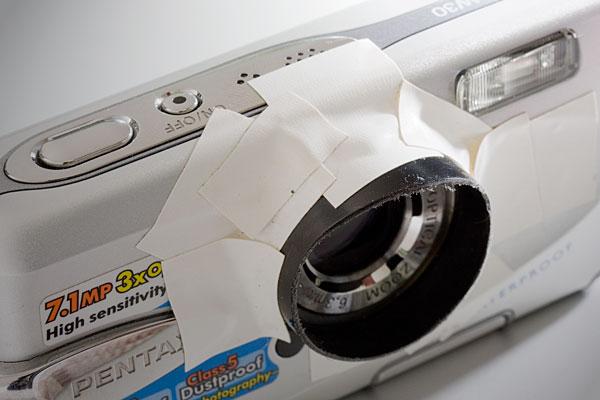
It is possible, at least for Pentax, to glue (epoxy) some step-up rings and to attach lens hood to your camera. I am using much simpler solution: an improvised lens hood attached with an electric tape to the camera.

You can expect the best “sweet” light for shooting when the sun is low, so after the sunrise and before sunset. Do not expect too much from this camera in low light conditions, but do not give up with shooting as soon as the sun is down. Consider shooting some silhouettes or water reflections then.

7. Use flash

Sometimes, I use flash to add light to objects in my fore plan. Usually, a soft flash option works better for a kayak deck. Be aware of any reflective tape on your kayak or gear.

8. Shoot multiple frames

Don’t limit yourself to a single shot for a given scene. Repeat the shot. Try different angles, horizontal and vertical format. You will increase your chances to get that great shot. Digital memory is cheap. You can always erase unsuccessful pictures later.

9. Photoshop …

Downloading pictures from the camera to your computer is not the end of your work as a photographer.
Use Photoshop or other image editing software to post process your pictures. Most often, I rotate my pictures to make horizon horizontal, adjust the exposure with levels, crop and resize them, and, finally, apply some sharpening. You cannot save completely blurred pictures in Photoshop, but you can improve most of them.

10. Practise

There are no reasons not to take and use the camera wherever you go. It is small and waterproof. Experiment and have fun.

Time to to time it is useful to browse through the camera manual. You may find something new and exciting in a jungle of all these options and settings.

More tips?

Could you share tips from your experience with a kayak or canoe photography? Are your on water pictures worse than these shot on land?

Some related articles where I am sharing my experience from paddling and shooting with Pentax Optio WP, W10 and W30 cameras:

  • Pentax Optio W20 Waterproof Camera Review, Tips, and Sample Photos
  • Kayak Photography: Using Your Paddle to Stabilize the Camera – Video Clip
  • 7 Tips on Kayak Photography: How Did You Shoot It?
  • No Viewfinder? 10 Tips on Shooting Pictures without Viewfinder
  • Is Pentax Optio W10/W20 the Paddler’s Camera? Many Boats, Many Cameras …
  • Kayak Photography Links – Tips and Hints for Paddling Photographers


paddling with a camera

 
Comments Off on 10 Tips How to Avoid Blurry Pictures when Shooting from a Kayak

Posted in Photography


iStockphoto founder launches Stocksy, an artist-owned stock photo service

27 Mar

homepage-logo.png

Bruce Livingstone, founder of iStockphoto (which has since been acquired by Getty Images), has launched Stocksy, an artist-owned stock photography co-operative. Under its licensing terms, photographers receive 50% of each royalty transaction. Each photographer also receives equity and is entitled to a share of the co-operative’s annual profits. This launch comes hot on the heels of a recent and controversial deal between Getty Images and Google, in which Google Drive’s image vault gives public access to over 5000 Getty images with very little compensation to the photographers.

News: Digital Photography Review (dpreview.com)

 
Comments Off on iStockphoto founder launches Stocksy, an artist-owned stock photo service

Posted in Uncategorized


Of Love & War: 3D Printing Dazzling Dresses & Daring Guns

27 Mar

[ By WebUrbanist in Gadgets & Geekery & Technology. ]

3d printing

There is almost no industry left untouched by 3D printing, from cars to houses, but now things are really heating up with everything from stunning outfits and home-printable arsenals. These two extreme examples show just how diverse the adopting user groups have become – the technology has become untethered from hobbyists and is now found everywhere from the realms of high-fashion fans to anonymous freedom fighters.

3d printed nylon dress

Francis Bitonti & Michael Schmidt (images by Albert Sanchez and Jeff Meltz) have collaborated on a stunning dress for dancer Dita Von Teese, fully 3D-printed nylon from laser-fused plastic polymers. Stiff components are strung together in a flexible mesh making the resulting outfit fully wearable and definitely breathable. The entire creation was modeled on the body of the wearer, making for a perfect fit.

3d black dress debut

More on the concept: “Mr. Schmidt, in conjunction with Mr. Bitonti, applied the spiral formula to the computer rendering of the dress, in a mesh that would undulate around the body in the most feminine way possible. For this reason, Mr. Schmidt tapped longtime friend and muse Dita Von Teese, whom he deems as the consummate classical beauty. While the shape was built over a nude silk corset, most of the architecture of the silhouette, from the voluminous shoulders to the cinched waist, is the result of the hardened nylon powder. The floor-length gown moves and expands according to Ms. Von Teese’s body contours because of the netting pattern.”

3d printed weapon part

Meanwhile, in the limelight for very different reasons, Cody Wilson is launching Defcad, a search engine for 3D-printable designs including  medical devices, guns and other objects sites like Google and MakerBot can’t or won’t tackle.

3d open source search

From the site: “With 3D printed firearms, pharmaceuticals, automobiles, drones, and medical devices, the stakes will suddenly get much higher. Because 3DP is not about reviving manufacturing jobs or competing with assembly lines on cost. It is not about disrupting manufacturing. It is about disrupting copyright, IP, and regulation. It is about printing items whose prices have been set to infinity. It is about disrupting man-made forms of artificial scarcity. It is about DEFCAD.”

Share on Facebook


[ By WebUrbanist in Gadgets & Geekery & Technology. ]

[ WebUrbanist | Archives | Galleries | Privacy | TOS ]


WebUrbanist

 
Comments Off on Of Love & War: 3D Printing Dazzling Dresses & Daring Guns

Posted in Creativity


How To End Exposure Problems and Master Metering Modes in 5 Minutes

27 Mar

You pull out an impressive piece of equipment. Her eyes widen. Did she lick her lips? The pressure’s on now. Yes, she definitely licked her lips. When you declare with total confidence, to a beautiful woman, that you’re a  photographer, there are potential benefits and downsides. Suddenly she wants you to take photos of her in the night sky, with Continue Reading

The post How To End Exposure Problems and Master Metering Modes in 5 Minutes appeared first on Photodoto.


Photodoto

 
Comments Off on How To End Exposure Problems and Master Metering Modes in 5 Minutes

Posted in Photography


10 Tips To Get Over Photographer’s Block

27 Mar

Going through a creative rut can be frustrating, and sometimes scary, but it is usually temporary. Photographer’s block can happen to you at any time. It’s up to you to turn it into a positive experience and grow in the process.

Get lost on purpose! Don’t think about what you are going to shoot, just get out with your camera. Something will trigger your photographic eye along the way.

Get lost on purpose! Grab your camera with no goal in mind and you will soon see something that triggers your photographic eye.

1-Push yourself, take risks and make mistakes.

The saying is not that we learn from our successes, but that we learn from our mistakes! Experiment with different techniques and genres and don’t be afraid to fail.

2-Get out of your comfort zone.

Try something that seems completely out of character for you. If you are a rather shy person, go out and shoot some street photography or make street portraits of strangers! You never know whether you are going to love it or hate it until you try it.

3-Spend time with other photographers.

More often than not, we are the only ‘photography nut’ in our family. It can be very frustrating at times but we cannot force others to love the craft as much as we do. As long as your family is supportive of your passion, don’t expect them to share your excitement every time you see something that turns you on photographically. Get together with other photographers by joining or creating a photo walk group in your area. You will get your fix and grow as a photographer by seeing and learning something new with each outing.

4-Take a class.

Whether it is in a physical classroom or online, taking a photography class can help you get your groove back. Participating in a workshop, whether it’s a day long in your hometown or a week-long adventure in an exotic location, will definitely help motivate you.

5-Seek inspiration.

Visit museums and art galleries. Look at photography and other art forms such as paintings and sculptures. Pick up a large book of photographs from artists you’ve long admired and slowly page through it, paying attention to the composition, light and story. Look at the work of emerging artists on line. The goal is to immerse yourself in something beautiful.

6-Become a mentor.

Go out with someone who just picked up a camera and help them get started. I can guarantee you that sharing your love for photography and technical knowledge with someone who is just learning will rekindle your creativity. You will learn something in the process and feel really good about yourself.

7-Get lost on purpose!

Don’t think about what you are going to shoot, just get out with your camera. Something will trigger your photographic eye along the way.

8-Pick a theme.

It may be as simple as photographing the color yellow, reflections in puddles or people walking their dogs. Leaving the house with a theme in mind will keep you focussed and turn your photo walk into a treasure hunt.

9-Start a project.

Commit yourself to a long term project such as a 52-week project or a series of self portraits. Get extra motivation by doing it as part of a group via your favorite social media platform.

10-Try new gear!

Borrow or rent a new lens for a weekend. Try something fun like shooting with a fish eye lens or a tilt-shift. Easier yet, you can experiment with a camera phone and fun Apps!

Conclusion

It’s okay to take a little break too! Remember that creativity is a process, not a result. A creative block is not something to fear. It is part of being an artist.

Please share your experience with the readers of Digital Photography School. Thanks!

Post originally from: Digital Photography Tips.

Check out our more Photography Tips at Photography Tips for Beginners, Portrait Photography Tips and Wedding Photography Tips.

10 Tips To Get Over Photographer’s Block


Digital Photography School

 
Comments Off on 10 Tips To Get Over Photographer’s Block

Posted in Photography


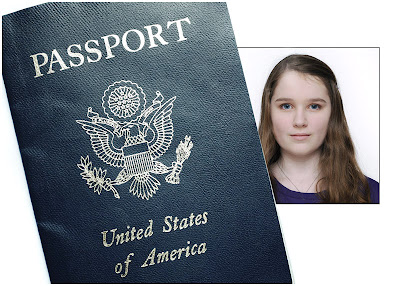
The Simple Light: How to Take a Great Passport Photo

27 Mar

Fact: most people on the planet—including roughly two-thirds of Americans—do not have a passport.

Without a passport, you won't be traveling internationally any time soon. And even if you have no immediate travel plans, just having a passport is kinda like having a muscle car at a red light. You won't always squeal tires when the light turns green, but you know you could.

If you have never held a passport before, it's a neat feeling when it arrives in the mail. For perhaps the first time, you feel like a citizen of the world. Merely having the possibility of international travel is better than not having a passport and being guaranteed you can't go.

Even better, unlike your crappy driver's license or student I.D. mugshot, your passport photo is something you can control. So if you are gonna be a jet-set traveler, you may as well look good doing it.

Read more »
Strobist

 
Comments Off on The Simple Light: How to Take a Great Passport Photo

Posted in Photography


Nice Visual Art photos

27 Mar

Some cool visual art images:

ysinembargomagazine16_high_Página_71
visual art
Image by fernandoprats
"du-champ-i-ssue"
jun.jul.ago.2008 | inviernosurveranonorte

ON PAPER (new! second edition! 25/09!)
PDF (new! second edition! 24/09!)
NAVIGATE it (new! second edition! 24/09!)
Hi-Res PDF (new! second edition! 24/09!)

Un número dedicado a explorar la visión y propuestas de Marcel Duchamp.
No su vida, no su obra; tan sólo algunos de sus conceptos.
Realizado con aportes de artistas, pensadores y diseñadores de todo el mundo
combinados con la explícita intención de producir a su vez un objeto duchampiano.

-el medio como instrumento intelectual que transpasa su especificidad y se burla de ella
-la obra independientemente de su carácter representativo e interpretativo
-”arte”, en términos de convenciones, lo más “amorfo” posible
-”obras” en las que la obra no es una finalidad en sí misma sino una excusa
-interpretaciones o, mejor dicho, lecturas que pueden convivir a pesar de ser aparentemente excluyentes
-objetos “anestesiados estéticamente”, anulados en su probable complacencia de la mirada, “rectificados”,”asistidos” para otorgarles una nueva -a menudo, insólita- significación. Como en la elección de los “ready-mades”: “basada en la indiferencia visual y en la ausencia total del buen o mal gusto”
-obras “definitivamente inacabadas”
-rrose sélavy, su alter(-)ego
-ajedrez, máquinas ópticas, matemáticas, geometría, “artefactos”
-la “pintura mental”, “pintura de precisión”, el rechazo de cualquier elemento en el que la mirada se pueda recrear con fruición

-texto, – bloques, – fotografías, + mixed-media, + pintura, + ilustración.
-toda la revista está en castellano e inglés.

(descárgala gratis y comienza felizmente el verano -o el invierno-)

# # #

This issue plays around the conceptual universe of Marcel Duchamp. Not his life, nor his works, just some of his concepts.

– the medium, as an intellectual tool which goes beyond its specificity mocking it.
– the work, regardless of its representative and interpretative character.
– “art”, in terms of conventions, as “amorphous” as possible.
– “construction”, in which the work is not it’s purpose, but an excuse.
– interpretations, or rather readings which can coexist despite being seemingly exclusive.
– objects “aesthetically anesthetized,” lapsed in their likely sight complacency; “rectified”, “assisted”, to give them a new –often unusual- significance. As with the choice of “ready-mades”: “based on visual indifference and a total absence of good or bad taste”
– works “definitively unfinished”.
– rrose sélavy, his alter (-) ego.
– chess, optic machines, mathematics, geometry, “artifacts”.
– “mental painting,” “precision painting”, the rejection of any element in which sight can be delighted.

– aesthetics: – text, – blocks, – photographs, + mixed-media, + painting, + illustration.
– the whole magazine, in spanish and english.

(download it. it’s free. and start enjoying summer -or winter-)

# # #

edit(ing), direct(ing) + complements
fernandoprats
art direct(ing) + design(ing)
estudi prats
insistAnçao, correct(ing) + additional stuff
r | v
listen(ing)
hernán dardes
musicaliz(ing)
albert jordà
translat(ing)
kiddo | emilia cavecedo
frontcover(ing) concept fot
une autre sensualité
backcover(ing) concept borrador
UU – dou _ ble _you et aa
open(ing) concept
nacho piédrola + salaboli & fp porta

-structure:
accesories, lisa kehoe { kiddo | emilia cavecedo, lisa liibbe lara, josean prado, oriol espinal, mark valentine sullivan, hernán dardes, alfredo de la rosa, jonathan minila } => meta
{ pepo m.-the secret society, r | v, leah leone } => hilarious
{ pancho lorenz, natalia osiatynska } fernandoprats => rage

=> meta kiddo | emilia cavecedo, nacho piédrola, salaboli, lisa kehoe { lisa liibbe lara, mark valentine sullivan + shari baker, oriol espinal, gabriel magri, naomi vona, mara carrión }
=> hilarious { d7, olivier gilet, jef safi, special spatial guests }
=> rage { brancollina, gabriel magri, natalia osiatynska, bill horne, UU, christy trotter } simon fröehlich

ysinembargo#16… sensualmente inacabada.

a b r e l a m u r a l l a
antwerp · barcelona · basauri · boulder · bruxelles · buenos aires · carlsbad · collioure · coyoacán · grenoble · holden beach · iowa city · lawrenceville · lansing · london · madrid · mendoza · mexicali b.c. · milano · san francisco · san rafael · sào paulo · tarragona · warsaw

# # #

YSE #16’s Original Music | YSElected videos

# # #

Official WEBsite | MySpace | Flickr Group

ysinembargomagazine16_high_Página_17
visual art
Image by fernandoprats
"du-champ-i-ssue"
jun.jul.ago.2008 | inviernosurveranonorte

ON PAPER (new! second edition! 25/09!)
PDF (new! second edition! 24/09!)
NAVIGATE it (new! second edition! 24/09!)
Hi-Res PDF (new! second edition! 24/09!)

Un número dedicado a explorar la visión y propuestas de Marcel Duchamp.
No su vida, no su obra; tan sólo algunos de sus conceptos.
Realizado con aportes de artistas, pensadores y diseñadores de todo el mundo
combinados con la explícita intención de producir a su vez un objeto duchampiano.

-el medio como instrumento intelectual que transpasa su especificidad y se burla de ella
-la obra independientemente de su carácter representativo e interpretativo
-”arte”, en términos de convenciones, lo más “amorfo” posible
-”obras” en las que la obra no es una finalidad en sí misma sino una excusa
-interpretaciones o, mejor dicho, lecturas que pueden convivir a pesar de ser aparentemente excluyentes
-objetos “anestesiados estéticamente”, anulados en su probable complacencia de la mirada, “rectificados”,”asistidos” para otorgarles una nueva -a menudo, insólita- significación. Como en la elección de los “ready-mades”: “basada en la indiferencia visual y en la ausencia total del buen o mal gusto”
-obras “definitivamente inacabadas”
-rrose sélavy, su alter(-)ego
-ajedrez, máquinas ópticas, matemáticas, geometría, “artefactos”
-la “pintura mental”, “pintura de precisión”, el rechazo de cualquier elemento en el que la mirada se pueda recrear con fruición

-texto, – bloques, – fotografías, + mixed-media, + pintura, + ilustración.
-toda la revista está en castellano e inglés.

(descárgala gratis y comienza felizmente el verano -o el invierno-)

# # #

This issue plays around the conceptual universe of Marcel Duchamp. Not his life, nor his works, just some of his concepts.

– the medium, as an intellectual tool which goes beyond its specificity mocking it.
– the work, regardless of its representative and interpretative character.
– “art”, in terms of conventions, as “amorphous” as possible.
– “construction”, in which the work is not it’s purpose, but an excuse.
– interpretations, or rather readings which can coexist despite being seemingly exclusive.
– objects “aesthetically anesthetized,” lapsed in their likely sight complacency; “rectified”, “assisted”, to give them a new –often unusual- significance. As with the choice of “ready-mades”: “based on visual indifference and a total absence of good or bad taste”
– works “definitively unfinished”.
– rrose sélavy, his alter (-) ego.
– chess, optic machines, mathematics, geometry, “artifacts”.
– “mental painting,” “precision painting”, the rejection of any element in which sight can be delighted.

– aesthetics: – text, – blocks, – photographs, + mixed-media, + painting, + illustration.
– the whole magazine, in spanish and english.

(download it. it’s free. and start enjoying summer -or winter-)

# # #

edit(ing), direct(ing) + complements
fernandoprats
art direct(ing) + design(ing)
estudi prats
insistAnçao, correct(ing) + additional stuff
r | v
listen(ing)
hernán dardes
musicaliz(ing)
albert jordà
translat(ing)
kiddo | emilia cavecedo
frontcover(ing) concept fot
une autre sensualité
backcover(ing) concept borrador
UU – dou _ ble _you et aa
open(ing) concept
nacho piédrola + salaboli & fp porta

-structure:
accesories, lisa kehoe { kiddo | emilia cavecedo, lisa liibbe lara, josean prado, oriol espinal, mark valentine sullivan, hernán dardes, alfredo de la rosa, jonathan minila } => meta
{ pepo m.-the secret society, r | v, leah leone } => hilarious
{ pancho lorenz, natalia osiatynska } fernandoprats => rage

=> meta kiddo | emilia cavecedo, nacho piédrola, salaboli, lisa kehoe { lisa liibbe lara, mark valentine sullivan + shari baker, oriol espinal, gabriel magri, naomi vona, mara carrión }
=> hilarious { d7, olivier gilet, jef safi, special spatial guests }
=> rage { brancollina, gabriel magri, natalia osiatynska, bill horne, UU, christy trotter } simon fröehlich

ysinembargo#16… sensualmente inacabada.

a b r e l a m u r a l l a
antwerp · barcelona · basauri · boulder · bruxelles · buenos aires · carlsbad · collioure · coyoacán · grenoble · holden beach · iowa city · lawrenceville · lansing · london · madrid · mendoza · mexicali b.c. · milano · san francisco · san rafael · sào paulo · tarragona · warsaw

# # #

YSE #16’s Original Music | YSElected videos

# # #

Official WEBsite | MySpace | Flickr Group

 
Comments Off on Nice Visual Art photos

Posted in Photographs


Getty Is An Insult To Photographers. Introducing Stocksy [OPINION]

27 Mar
BadwaterDV-L

Not Represented By Getty

I’ve never liked Getty. I’ve gotten through about 80% of the submission process on multiple occasions but could never convince myself to pull the trigger. Sure there are a select and very elite few that make their livings to this day on stock photography. But those photographers have been at this stock game a LOT longer than most of us. Every time I started to submit my work to Getty, I always stopped just short of hitting send. I couldn’t get past the thought of the 20% commission that I would receive for my work. This goes right along with the frustration of getting emails from companies, magazines and the like wanting to use my images for free in exchange for “credit and a link to my website.” But that’s a whole other article…

We as photographers spend an ungodly amount of money and time on our craft. We spend thousands upon thousands of dollars on camera bodies, lenses, CF cards, SD cards, camera backpacks, camera shoulder bags, straps, extra batteries, laptops, desktops, software, websites, hosting, training, workshops….the list goes on and on and on. We put in all this time and effort and then a company like Getty wants to pay us some slave labor wage of 20%. It’s nothing short of ridiculous. It’s insulting to photographers.

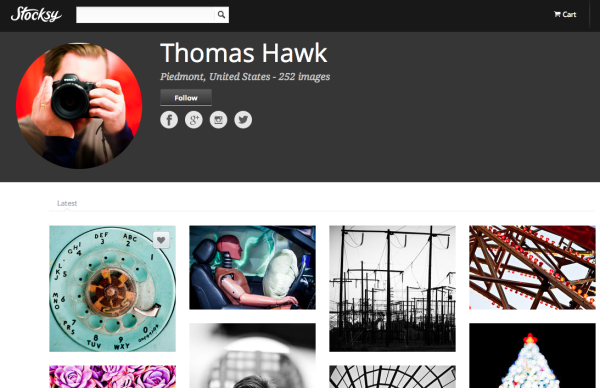
Thomas Hawk is a very well known photographer in the photo community. He’s one of the most followed photographers on Flickr, Google+ and Facebook. He’s also a very established stock photographer and has had his images licensed/represented by Getty for years now. Well, on Monday Thomas announced (very publicly) that he is quitting Getty and moving to Stocksy. You can read Thomas’ post at his website or over at PitaPixel.

In his article, Thomas goes over in detail much of what I talked about above. About how absurd it is that Getty is undercutting photographers so drastically. He then goes on to describe the culture behind Getty; how they excommunicate photographers who speak up and express their distaste for what it has become. One photographer who made much of his entire living from Getty recently got ‘fired’ and banned for voicing his opinion. Thomas points out that “At Stocksy; editors and management do Google+ hangouts with photographers. While at Getty all they seem to do is fight.”

So What Is Stocksy Already!?

Screen Shot 2013-03-25 at 4.20.47 PMStocksy could very well be the future of stock photography. Instead of a lousy and insulting 20% for all the hard work that goes in to making stock photographs, Stocksy is going to pay 50%. Right down the middle. You provide the work, they put it in front of buyers. This is fair. Would I like more than 50%? Um, yes. Who wouldn’t? But would I be happy with 50%? Yes.
Stocksy is also different in the way it’s run. The founder is none other than Bruce Livingstone, the founder of iStockPhoto who sold the company to Getty for $ 50 million (you can read more about that from this article on CNET). According to that article, Stocksy won’t be selling out to large companies like Getty. It doesn’t have a master plan of growing and selling. Livingstone says that Stocksy will be “more like a nonprofit. At the end of the year, we take all the profits and distribute them. We’re not lining our pockets with cash.” It will essentially be a stock agency run by photographers, for photographers.

Quality Control

Another way that Stocksy is different is the quality control aspect of it. Let’s face it, Getty pretty much opened the flood gates on Flickr and just about anyone with a camera and some decent images could begin touting that they’re “Represented By Getty.” Stocksy is, at least for now, taking a much different approach. Only letting in very high quality portfolios that meet the level of excellence that Stocksy wants to be known for. I think that’s awesome.

Conclusion

Like I said, Stocksy could very well be the future of stock photography. But it’s up to us, the photographers, to make sure that happens. Tell your friends, tell your parents, tell your web designer, your graphic designer, write a blog post, tell everyone. And for the record, I am not part of Stocksy. I submitted my portfolio to them yesterday and am crossing my fingers to make it through. I just think this is a great idea and would love nothing more than to see quality photographers flock from Getty and start getting what they deserve. I think this has been a long time coming.

Let me know what you think in the comments below or on Twitter. Follow me @jamesdbrandon.

Post originally from: Digital Photography Tips.

Check out our more Photography Tips at Photography Tips for Beginners, Portrait Photography Tips and Wedding Photography Tips.

Getty Is An Insult To Photographers. Introducing Stocksy [OPINION]


Digital Photography School

 
Comments Off on Getty Is An Insult To Photographers. Introducing Stocksy [OPINION]

Posted in Photography


3 Ways to get Better Control of Autofocus

27 Mar

In this post, Steve Berardi from PhotoNaturalist talks about three ways to get better control of autofocus.

auto-focus.jpgSometimes autofocus can be really annoying. For some shots it’ll focus on the right part of your subject, but then the very next shot it may choose to focus on something far and away into the background.

Sure, you could avoid this problem by always using manual focus, but autofocus is great when you need to focus quickly or when you’re photographing a landscape and you need to focus on a certain spot in the scene.

Well, autofocus doesn’t have to be annoying anymore, because here are three ways to get better control of it:

#1 – Press your shutter button half-way to activate autofocus and then recompose

Set your autofocus point to the center spot, then point this spot where you want to focus and press your shutter button half-way (don’t press it completely yet) to initiate autofocus. Then, while still holding down the button half-way, recompose your shot and press the button completely down to snap the photo.

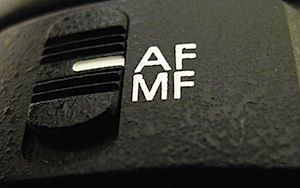
#2 – Switch to manual focus after autofocusing

Use autofocus as you normally do, but once it focuses on the right spot, just switch off autofocus on your lens to manual focus. Your lens will keep the current focus when you do this. This method works well when your camera is on a tripod and you’re taking multiple exposures from the same spot, like when photographing a landscape.

#3 – Use back-button autofocusing

Normally, your camera will autofocus when you press the shutter button, but with back-button autofocusing, you have to press a button on the back of the camera instead, giving you complete control of when autofocus is initiated.

With back-button autofocusing, you can just set the autofocus point to the center spot, then point that where you want to focus, and finally press the back button to automatically focus on that point. Now for all the shots you take from that position, that focus will be maintained (the camera won’t randomly focus into the background anymore).

You can do the same thing without this back-button autofocusing by switching to manual focus after the camera focuses properly, but using the back button saves time and this way you don’t have to constantly switch back and forth between manual and autofocus (which can inadvertently move the camera sometimes).

Back-button focusing is especially helpful for photographing moving subjects, like birds in flight or other wildlife: just switch on the continuous focusing mode, set the autofocus point to the center spot, and hold down that back button. Now you don’t have to worry about accidentally hitting the shutter button while you’re tracking the subject in your viewfinder.

How to enable back-button autofocusing: Unfortunately, this feature is called something different on each camera, so you’ll probably have to do some digging around in your camera’s manual and “custom functions” to find it. If it’s not labelled clearly on your camera, try changing the settings of the different buttons on the back of your camera (like the AE lock button).

steve.jpgAbout the Author: Steve Berardi is a naturalist, photographer, and computer scientist. You can usually find him hiking in the beautiful mountains and deserts of Southern California. Read more of his articles on nature photography at the PhotoNaturalist and follow him on Twitter.

Post originally from: Digital Photography Tips.

Check out our more Photography Tips at Photography Tips for Beginners, Portrait Photography Tips and Wedding Photography Tips.

3 Ways to get Better Control of Autofocus


Digital Photography School

 
Comments Off on 3 Ways to get Better Control of Autofocus

Posted in Photography