The post Canon to Release 16 New RF Lenses Before the End of 2021 appeared first on Digital Photography School. It was authored by Jaymes Dempsey.
Canon’s full-frame mirrorless lineup has seen the addition of two incredible camera bodies this year, but Canon is determined to keep shooting for the stars.
According to Canon Rumors, we’ll likely see the addition of a whopping 16 new lenses to the RF lineup before 2021 is out. These will round out Canon’s existing set of RF lenses and fill in key gaps, while doubling the native options for Canon’s full-frame mirrorless shooters.
While the 2021 lens roadmap isn’t confirmed, Canon Rumors claims that it “comes from a great source” and that “most, if not all [is] accurate.”
So what are these 16 lenses we’ll be getting over the next year?
First, we should see the Canon RF 70-200mm f/4L IS USM, which is supposedly “about the size of a coke can;” if this is accurate, then Canon shooters are in for a treat. A compact 70-200mm f/4 lens that you can carry everywhere is a dream come true for plenty of photographers, including landscape photographers after intimate nature shots, as well as some portrait photographers and potentially even street snappers.
We’ll also get the Canon RF 50mm f/1.8 STM. This is the RF version of the ultra-popular Canon EF 50mm f/1.8 STM, and Canon Rumors claims that it will be “better optically and in build quality than the EF version.” Expect that it’ll be relatively affordable, giving hobbyist shooters a clear-cut entry point into the Canon mirrorless world and giving more serious photographers a lightweight prime to keep on the camera when shooting casually.
Honestly, these two lenses are alone worth the hype, but add to it 14 additional lenses and you’ve got yourself a truly robust lens lineup.
Here are the other Canon RF lenses you can expect to see before 2021 is out:
Canon TS-R (tilt-shift) 14mm f/4L
Canon TS-R (tilt-shift) 24mm f/3.5L
Canon RF 10-24mm f/4L
Canon RF 14-35mm f/4L IS USM
Canon RF 24mm f/1.8 IS STM Macro
Canon RF 35mm f/1.2L USM
Canon RF 100mm f/2.8L Macro IS USM
Canon RF 135mm f/1.4L USM
Canon RF 100-400mm f/5.6-7.1 USM
Canon RF 400mm f/2.8L IS USM
Canon RF 500mm f/4L IS USM
Canon RF 600mm f/4L IS USM
Canon RF 800mm f/5.6L IS USM
Canon RF 1200mm f/8L IS USM
Key among these new lenses are a slew of super-telephoto primes, including a 400mm f/2.8, a 500mm f/4, and a 600mm f/4, all of which will serve wildlife and bird photographers well. And the ultra-wide zooms (the 10-24mm f/4 and the 14-35mm f/4) should certainly be compelling for landscape photographers of all stripes, especially if Canon can keep the price down to a reasonable level.
For Canon shooters, this has been a good year.
And next year is shaping up to be even more exciting. It’s clear that Canon is now all-in with regard to their full-frame mirrorless lens lineup.
So if you’ve been thinking about grabbing a Canon mirrorless body, now’s a great time!
Now over to you:
What do you think of these 16 new RF lenses? Which lenses interest you the most? Are you impressed by Canon’s dedication to its RF-mount? Share your thoughts in the comments!
The post Canon to Release 16 New RF Lenses Before the End of 2021 appeared first on Digital Photography School. It was authored by Jaymes Dempsey.
The post 10 Ideas for Photographing Nature in your Backyard appeared first on Digital Photography School. It was authored by Karen Quist.
Have you noticed how many photographers are fascinated with nature? Even if we specialize in another genre, few of us can resist a gorgeous flower or a branch of autumn leaves.
One of the best things about photographing nature is that it is so accessible. You don’t need to travel far to find it, because it’s all around you. You may take it for granted because you see it every day, but your own backyard is a treasure trove. Every hour of every day and every season brings something new.
Summer lavender | 1/200 sec | f/3.5 | ISO 100
The term “backyard” needn’t be taken literally here. If you don’t have a backyard, you’ll find plenty of nature to photograph just by wandering the streets or public parks and gardens.
Tech details: All of the photographs in this article were shot on my Canon 5D Mark III. Unless otherwise stated, I have used my Canon 100mm f/2.8 macro lens. I have included details of ISO, aperture, and shutter speed settings.
1. Flowers and leaves
Flowers and leaves are often the first things that come to mind when we look for subjects in our own backyards. They offer an endless variety of colors, shapes, and textures for you to photograph. You could create a collection based on a single color scheme, or try to find as many different leaf or flower shapes as possible.
Cymbidium orchid | Canon 5D Mark III | Canon 100mm f/2.8 Macro | 1/100 sec | f/4 | ISO 640
Violet leaves | Canon 5D Mark III | Canon 100mm f/2.8L IS Macro | 1/30 sec | f/8 | ISO 800
Geranium leaves | Canon 5D Mark III | Canon 100mm f/2.8L IS Macro | 1/40 sec | f/8 | ISO 320
You should also experiment with different lighting and conditions. I love backlighting for leaves and flowers, as it creates a luminous, almost three-dimensional effect, and you can see details such as veins. Some shapes look better with strong, directional light, and I love how colors are enhanced by water droplets.
Erlicheer daffodils | Canon 5D Mark III | Canon 100mm f/2.8L IS Macro | 1/640 sec | f/4 | ISO 100
The same flower shot with the sun at my back | Canon 5D Mark III | Canon 100mm f/2.8L IS Macro | 1/800 sec | f/4 | ISO 100
Backlighting a leaf reveals details you wouldn’t see if you lit it directly | Canon 5D Mark III | Canon 100mm f/2.8L IS Macro | 1/250 sec | f/4 | ISO 100
Flowers are seasonal, and in temperate zones, spring and summer offer the widest variety. There are still flowers to be found in winter, although you may need to look harder. Don’t forget that weeds, such as dandelions, are also beautiful! Autumn provides the greatest color spectrum in leaves.
Liquidambar leaves photographed en masse | Canon 5D Mark III | Canon 100mm f/2.8L IS Macro | 1/80 sec | f/4 | ISO 640
A single leaf isolated against a dark background | Canon 5D Mark III | Canon 100mm f/2.8L IS Macro | 1/30 sec | f/4 | ISO 640
2. Fruit, berries, and seed pods
When the summer flowers disappear, fruits and berries are nature’s way of providing for birds and animals throughout the colder months. Many berries and seed pods ripen towards the end of autumn, bringing color to the winter garden. Citrus trees bear fruit in winter, and persimmon trees lose their leaves to reveal branches of shiny orange fruits. Think also of acorns, pine cones, and nuts.
Kumquat | Canon 5D Mark III | Canon 100mm f/2.8L IS Macro | 1/50 sec | f/4.5 | ISO 2500
Canon 5D Mark III | Canon 100mm f/2.8L IS Macro | 1/500 sec | f/8 | ISO 800
Canon 5D Mark III | Canon 100mm f/2.8L IS Macro | 1/1250 sec | f/5 | ISO 500
Orange rosehip | Canon 5D Mark III | Canon 100mm f/2.8L IS Macro | 1/160 sec | f/5 | ISO 500
Bunches of red berries | Canon 5D Mark III | Canon 100mm f/2.8L IS Macro | 1/100 sec | f/5 | ISO 500
3. After the rain
Raindrops are fascinating through the lens. Try photographing them from various angles and in different lighting.
When photographing a single droplet, or a string of them, isolate them by keeping the background uncluttered. You can do this by creating distance between the droplets and the background, and by using a wide aperture to ensure the background is blurred. Notice also how water sits in nice round droplets on some types of leaves, but on others it disperses.
Arthropodium leaves after the rain | Canon 5D Mark III | Canon 100mm f/2.8L IS Macro | 1/80 sec | f/4.5 | ISO 800
Raindrops hang from the slats on the back of a garden chair | Canon 5D Mark III | Canon 100mm f/2.8L IS Macro | 1/125 sec | f/4 | ISO 1000
Canon 5D Mark III | Canon 100mm f/2.8L IS Macro | 1/125 sec | f/4 | ISO 640
Canon 5D Mark III | Canon 100mm f/2.8L IS Macro | 1/125 sec | f/4 | ISO 1000
4. Mushrooms, toadstools, and fungi
These are abundant in autumn and winter, but some species pop up throughout the year after rain. Look in damp, mossy places, on the sides of trees, and in log piles for them.
My personal favorites are the red toadstools with white speckles. They are evocative of fairy tales and magic, and their colors are a nature photographer’s dream!
Toadstool | Canon 5D Mark III | Canon 100mm f/2.8L IS Macro | 1/250 sec | f/6.3 | ISO 1000
Canon 5D Mark III | Canon 100mm f/2.8L IS Macro | 1/160 sec | f/6.3 | ISO 1000
But don’t ignore the tiny, dull-colored mushrooms and fungi. The mushrooms in the photo below were growing in a crevice on the side of my herb garden. You can see by the scale of the woodgrain how tiny they were. From above, they were nondescript, but when I laid on the ground beneath them and shot into the backlight, they became translucent and I could see their delicate structure.
These tiny mushrooms were no bigger than the fingernail on my pinky finger! | Canon 5D Mark III | Canon 100mm f/2.8L IS Macro | 1/160 sec | f/8 | ISO 800
5. Look up; look down
We have a gigantic tree in our backyard. It was probably planted when our house was first built in the 1920s, and its canopy is as big as the house itself. One of my favorite things to do in the warmer months is to put a picnic rug on the lawn and lie on my back gazing up into the tree’s branches. It is free therapy!
Watching the leaves change from bright spring green through to darker green in summer, the first blush of color in autumn, through to a rich claret just before they drop, never ceases to delight me. I have photographed it time and time again through the seasons. Even lying on the ground with my 35mm lens, I can only capture a small portion of the canopy.
If you are lucky enough to have trees in your garden, try standing or lying directly underneath them and shooting up into the branches. Notice how the light changes from early morning throughout the day into late afternoon and evening. Branches, whether they are naked or covered with leaves, contrast beautifully against a blue sky. They are also stunning at sunrise and sunset and on moonlit nights.
If you don’t have any trees, look for interesting cloud formations to photograph. You can create a collection of skies to use as Photoshop overlays, which can add interest to other outdoor photos such as portraits. Look for vertical cloud formations, fat white fluffy clouds, and those lovely soft colors around the edge of the clouds at dusk and dawn.
You can also turn your attention downward. On the ground are a million microcosms among the moss, the lawn, between the paving stones, and in the fallen bark and leaves. You won’t see them until you get down to ground level, so lie flat on your tummy and peer into another world.
The moss on a tree trunk | Canon 5D Mark III | Canon 100mm f/2.8L IS Macro | 1/40 sec | f/4 | ISO 640
6. Black and white beauty
We tend to think of color photography when we think of nature, but don’t dismiss the idea of black and white images. Nature provides sculptural shapes and contrasting textures that make great black and white subjects. If you have succulents or cacti in your garden, they are often more interesting in black and white than they are in color (except on those rare occasions when they flower). Ditto with white flowers against a dark background. Smooth pebbles, rough bark, snail shells, acorns, and pine cones all look fabulous in black and white. Try strong, directional lighting and a high contrast edit.
When I converted this file to black and white in Lightroom, I played with the sliders in the B&W panel. The photo on the left has the blue slider pulled all the way down to -100 to darken the sky. On the right, the blue slider is set to zero.
Canon 5D Mark III | Canon 100mm f/2.8L IS Macro | 1/100 sec | f/8 | ISO 100
7. Experiment with sun flare and haze
Your backyard is one of the best places to experiment with effects and new techniques. Firstly, you can become familiar with how things look at various times of the day and throughout the seasons. Secondly, you don’t need to travel far, so you can respond to anything on a whim. If you spot something amazing while you’re sipping your morning coffee, you needn’t even get out of your pajamas to capture it!
The subjects in the two photographs below are both visible from my desk. Every morning last summer, I noticed how this shaft of hazy sunlight would hit the planting of succulents on a pedestal, so I knew exactly what time to capture it at its best. Also sitting at my desk, I saw how the sun caught a spray of orchids just after the rain, and I rushed outside with my camera.
Canon 85mm lens | 1/800 sec | f/4 | ISO 100
Shot with sun flare and no lens hood | 1/1000 sec | f/4 | ISO 100
For comparison, this is the same scene shot with a lens hood to reduce flare | 1/320 sec | f/4 | ISO 100
8. Snails, bugs, and spiders
For nine months out of the year, there are a million creepy-crawlies in my backyard. This includes butterflies, cicadas, crickets, praying mantises, caterpillars, moths, bees, wasps, and spiders (I could happily do without the latter two). At the time of writing, it is winter in Melbourne, so most bugs are hiding or dormant.
9. Birds and other wildlife
I’m going to begin this section with honesty.
Confession number one: Photographing wildlife of any kind requires more patience and a longer telephoto lens than I possess.
Confession number two: I have the greatest admiration for those who do wildlife photography. I have a Pinterest board just for animal photos (I have a clear bias towards squirrels), and on 500px I follow a number of photographers, one of whom only photographs squirrels!
The kinds of animals and birds you’re likely to find in your backyard obviously depends on which part of the world you live in and how built-up your neighborhood is. You will know which kinds of critters visit your backyard and what their habits are. With that in mind, find a spot where you won’t be too conspicuous and be prepared to wait. If you’re using a long lens, you might consider working with a tripod or a monopod to avoid camera shake. Have your ISO and aperture all set to go, plus a fast shutter speed to freeze motion. If you have been watching an animal’s behavior over several days or weeks, it may be possible to focus roughly on the area you expect them to appear (for example, the birdbath).
Also read: Guide to Attracting Critters to Your Garden for Backyard Wildlife Photography
10. Portraits in nature
Nature provides us with the perfect canvas for portraiture. Look for a bank of flowers, a bed of autumn leaves, or just a green hedge. The colors in nature never seem to clash.
When photographing children and pets, in particular, I almost always prefer an outdoor location over a studio. My eldest daughter usually runs a mile when she sees the camera, but the chance to roll around with the dog in glorious leaves was clearly too much for her to resist (see the image below).
I love how the soft hues flatter my daughter’s skin tone. If you are shooting outdoors with lots of colors, such as flowers or autumn leaves, pay attention to your subject’s outfit. These portraits might have been too busy if my daughter had been wearing a patterned outfit.
Not even teenage daughters can resist these leaves! | 1/400 sec | f/4 | ISO 320
1/320 sec | f/4 | ISO 320
Conclusion
So there you have it: Plenty of inspiration to get outdoors and photograph nature in your own backyard. It’s time to stop reading and get out there with your camera.
Here are some additional articles that will help improve your outdoor and nature photography skills:
3 Habits Every Outdoor Photographer Should Develop to Avoid Missing Shots
5 Tips for Better Nature Photography
27 Serene Images of the Natural World
The post 10 Ideas for Photographing Nature in your Backyard appeared first on Digital Photography School. It was authored by Karen Quist.
The post 5 Must-Have Lenses for Wedding Photographers and Why appeared first on Digital Photography School. It was authored by Lily Sawyer.
Have you ever wondered which lenses for wedding photographers are best?
There is a plethora of choice when it comes to lenses, and lens companies come up with new products all the time. Many photographers are attracted to these bright and shiny things and end up with a huge collection of lenses, many of which hardly see the light of day.
But if you have to pare back to the absolute necessities and are allowed five lenses in your wedding photography bag, these are the ones that I would recommend. I have been a professional wedding photographer for seven years now, and deciding on these five lenses took some time and serious consideration over the course of my career.
They are:
The 70-200mm f/2.8
The 24-70mm f/2.8
The 85mm prime
The 35mm prime
A macro lens (105mm or 60mm for Nikon, 100mm or 60mm for Canon)
Let’s look at each lens individually to see why.
1. 70-200mm f/2.8
It’s big, bulky, and heavy, but I wouldn’t do a wedding without this lens. The 70-200 f/2.8 is my workhorse when it comes to weddings. It is a versatile lens that gives you amazing sharpness at all focal lengths. The bokeh is beautiful, especially at 200mm and even with a stopped-down aperture (thanks to the compression created by the long focal length).
A 70-200mm f/2.8 makes a wedding photographer invisible. You don’t have to be close to people’s faces; you can capture candid expressions and serendipitous moments from a fair distance away. This lens is especially useful during the wedding ceremony, when you would rather be far away and out of sight or hidden behind a wall or door. It allows you to capture the exchange of rings, the vows, and the kiss discreetly.
If you require an even longer zoom while staying at the same distance, you can choose to photograph using Crop mode (if you shoot full-frame and your camera offers this option). This will generally give you a 1.5x crop factor (it only uses a portion of the image and enlarges it approximately 1.5x). If you do this, make sure that you have enough pixels for the crop in case you feel the need to straighten or change your composition in post-processing.
For example, if you are shooting with a 12 MP camera in its full-frame mode, when you convert to your Crop mode the camera becomes a 5 MP camera. This is below the minimum amount of pixels you need (generally around 6 MP) to enlarge prints to a decent size.
And if you have to crop in post-processing, 5 MP will not offer enough pixels to do so without compromising print output sizes.
However, if you are photographing with a 36 MP camera in Crop mode, it drops to 15.3 MP. While this is a significant resolution reduction, it still leaves you enough wiggle room for minimal and sensible cropping if necessary.
If you use Crop mode, don’t forget that when photographing on a full-frame camera, or when using a lens designed for APS-C cameras, the camera only uses the center of the sensor. So if you forget to compose accordingly in-camera, you will get a nasty surprise after you have taken the image: cut off heads and limbs, and badly cropped compositions are two examples.
When using APS-C lenses on a full-frame body, the rest of the unused sensor area is blacked out. But when using full-frame lenses in Crop mode, this is not the default. You will still see the entire full-frame sensor if you don’t change your settings.
70-200mm is an excellent focal length for flattering portraits. When photographing at 200mm, I typically stop down to around f/4 or f/5.6 at a shutter speed of 1/200-1/400th, and the sharpness of the image is stunning against a creamy bokeh background. My 70-200mm f/2.8 lens also has a built-in lens collar you can use to steady your setup when hand-holding (and you also have the option to attach it to a tripod).
Without a tripod, you can steady yourself as much as possible by leaning against something strong like a wall or a stable surface such as a table. You can also keep your arms pinned against something sturdy to reduce camera shake, especially when using your lens for portrait work at the longer end of its focal length.
There are also 70-200mm f/4 lenses, which you can purchase at vastly cheaper prices compared to the f/2.8. I personally do not have the f/4 version, but if you’re on a budget and you don’t mind not having the option to photograph at a wider aperture, then I see no reason why you should avoid the 70-200mm f/4. It is lighter and smaller (it has fewer glass elements compared to its more expensive counterpart) which lessens the weight you have to carry around at a wedding.
2. 24-70mm f/2.8
The 24-70mm f/2.8 offers the focal length versatility needed when you are photographing on the go, which is what wedding photographers require for most of the day. You can use this lens to capture wider location scenes, candid photos of people, guests arriving, people milling and chatting while waiting for the ceremony to start or during the wedding breakfast, some decorations and details, the first dance, and the leaving photos, to cite just a few.
I use this lens for photos that do not require close portrait work, although it can definitely be used for that type of image. The 50-70mm range will yield pleasing results, like the image directly below. However, my preference is to use prime lenses for portraits.
The 24-70mm lens sees a whole lot of action on the wedding day, and is definitely my other workhorse for capturing people, wider shots, and behind-the-scenes images.
Many photographers use a much wider lens for location photographs, such as a 14-24mm f/2.8. But while I would love to add this lens to my arsenal, this is not an absolute necessity. With the 24-70mm, you can photograph location scenes wide enough. And should you need to capture a wider scene, you could photograph a few images and stitch them together in Photoshop as a panorama. This is easy enough to do by making sure the exposure setting for the series of shots is the same, standing on a fixed point, then capturing a set of images while adjusting your composition slightly.
You can do the same for a photograph of all the guests, too. In fact, the two times mentioned above are the only times I need an ultra-wide lens for a wedding, so I cannot yet justify adding it to my list of must-haves.
3. 85mm prime
This is my all-time favorite lens, and the one I use for portraits of the bride and groom, bridesmaids and groomsmen, individual guests and small groups (the list goes on!).
As a fixed lens, an 85mm prime requires more work on your part; you have to zoom in and out with your feet. But the extra effort is worth it. The portraits are cleaner, the backgrounds are creamier, and it is a fabulous lens in very low-light conditions.
The best thing about this lens is that it is tack sharp from the sweet spot on. Accurate, light-sensitive, with great results; this is my go-to lens, and it never leaves my bag. As a prime lens, the 85mm is fast, small, and extremely reliable.
I have photographed an entire wedding of a relative (as a guest) using only an 85mm lens. I was asked on the day if I could cover the wedding and I agreed, with only the D700 and my 85mm lens in hand (I generally carry that combination with me for personal snapshots and photos of my family).
The photos from that wedding are published on one of the UK’s top wedding blogs, which is proof that you can photograph a wedding with what you have, given that you know your gear well enough.
The 85mm for Nikon F-mount cameras comes in either as an f/1.8 version ($ 480 USD) or an f/1.4 version ($ 1597 USD), with a huge price difference between the two due to the glass elements and optics. You can also purchase the 85mm f/1.8 S for Nikon Z-mount cameras for just under $ 800 USD.
Canon has an 85mm f/1.2 available for $ 1999 USD, as well as an f/1.4 version ($ 1599 USD) and an f/1.8 version ($ 419 USD). For Canon mirrorless users, there’s the Canon RF 85mm f/1.2 (for an admittedly premium price). And Sony offers an 85mm f/1.8 for $ 598 USD and an 85mm f/1.4 for $ 1798 USD.
I have the Nikon 85mm f/1.8 and it has always performed marvelously for me. The f/1.4 has been on my lens list forever, and while I could buy it I have held off, given that I have never felt the need to upgrade.
4. 35mm
One of my early serious lens investments was the amazing 35mm f/1.4. If there is a lens I can always rely on, it’s this one.
It’s an ultra-versatile lens that you can use to photograph the bride getting ready, which is the time when wedding photographers are usually under pressure to capture everything. This includes the location, the many accessories, any small details, candid shots, the dress, the natural interactions between the bride and her loved ones, and group portraits. Plus, you must do this in a very short amount of time, often in small spaces like cramped hotel rooms.
A 35mm lens is also perfect for photographing wider scenes, because you can get images without the exaggerated distortions caused by a wider focal length.
This lens is super fast and sharp. It has yet to fail me. With this lens, you can get close, which is very handy when you are in a crowded space.
As if that weren’t enough, my 35mm lens opens up to f/1.4, which allows you to photograph in extremely low light, especially if you are too pressed for time and space to use off-camera flashes.
Even though the 35mm focal length is already covered by the 24-70mm f/2.8 (discussed above), the difference between f/1.4 and f/2.8 (two extra stops for four times the light) cannot be underestimated.
The 35mm is also offered as an f/1.8 version by Nikon, but it’s a DX lens that you can purchase for cheap (under $ 200).
You may wonder about the astronomical difference in price compared to the professional f/1.4 counterpart. First of all, you cannot use the DX lens on a full-frame camera without losing pixels, and the lens becomes 52.5mm which can be very limiting in tight spaces.
Secondly, the 35mm view is close enough to what the eye naturally sees, and I like that view. It allows you to capture images that give the viewer the impression that they could have been there seeing the scene themselves. This is an important element in any wedding photography, specifically wedding photography with a documentary style.
If you ever get to physically hold each lens in your hands at the same time, the enormous price difference between the f/1.4 version and the f/1.8 version won’t even be in question. The f/1.4 is considerably heavier and much bigger than the pocket-sized f/1.8. But don’t be fooled by appearances; the f/1.8 is also an outstanding lens with exceptional capabilities in its own right, and for crop-sensor cameras may be more than sufficient. It is definitely easy on the budget.
If you already have a 50mm lens and your budget is constrained, then a 50mm prime could replace the 35mm prime on this list. It is also an incredible lens.
Although a 50mm doesn’t give you as much room to maneuver in smaller spaces as a 35mm, the bokeh on the 50mm is stunning and it’s impressively sharp too, which is one of the top benefits of prime lenses. Like the 35mm lens, the 50mm is available as an f/1.8, f/1.4 or, for Canon cameras, an f/1.2 maximum aperture. The price difference is small between the f/1.8 and the f/1.4, but it jumps up to a huge number for the f/1.2.
5. 105mm (100mm) or 60mm macro lens
A macro lens is the last of my must-have lenses for wedding photographers. It’s absolutely key if you want to capture detailed images of rings. You can also use your macro lens for photographing jewelry and other accessories while the bride is getting ready.
If the bride’s dress is adorned with jewels, a macro lens would also be ideal for photographing the details.
In addition, macro lenses are also great for portraits if you do not require an aperture wider than f/2.8. This makes macro lenses versatile options to carry around, especially 60mm macro lenses, which look and feel minuscule compared to the 105mm options (100mm for Canon). These macro lenses can generally stop down to f/32, which is handy, especially when photographing location landscapes in extremely bright sunlight.
Some photographers even use the 105mm macro lens as a substitute for the 70-200mm lens if the latter is just too out of reach. You can use the 105mm in Crop mode, which gives you 157.5mm; this is long enough to still be very inconspicuous at a wedding. A 105mm lens is also smaller and lighter, and it opens up to f/2.8. Plus, it doubles as a macro lens.
The post 5 Must-Have Lenses for Wedding Photographers and Why appeared first on Digital Photography School. It was authored by Lily Sawyer.
The post Weekly Photography Challenge – Iconic appeared first on Digital Photography School. It was authored by Sime.
This week we want to see something iconic, that can be a landmark or place or just something that you think people will immediately recognise, like… A certain brand of toothpaste, for example, photographed in an interesting way (Bonus points if you try that!) or the London Eye! (This was a photo I made of the Eye in 2007… on a 6mp camera… those days were fun!) It just has to be instantly recognisable to the viewer. Do your best and have fun! #dPSIconic – Think outside the box!
London Eye by night | Canon 30D f/4.5 for 4 seconds at 17mm
If you don’t have an iconic building handy, think smaller like ‘Lego’ for example, most people know what Lego is! (Or have stepped on it in the dead of night while checking on the sleeping kids!) The goal is to photograph something instantly recognisable and try to do it in an interesting way!
Great! Where do I upload my photos?
Simply upload your shot into the comments field (look for the little camera icon in the Disqus comments section) and they’ll get embedded for us all to see. Or, if you’d prefer, upload them to your favourite photo-sharing site and leave the link to them.
Share in the dPS Facebook Group
You can also share your images in the dPS Facebook group as the challenge is posted there each week as well.
If you tag your photos on Flickr, Instagram, Twitter or other sites – tag them as #DPSIconic to help others find them. Linking back to this page might also help others know what you’re doing so that they can share in the fun.
Follow us on Instagram?
The post Weekly Photography Challenge – Iconic appeared first on Digital Photography School. It was authored by Sime.
The post Try the Full-Frame Nikon Z 5 for 30 Days With the Yellow Program appeared first on Digital Photography School. It was authored by Jaymes Dempsey.
If you’re thinking about purchasing the Nikon Z 5 but you’re just not sure whether it’s the right fit, then you’re in luck:
Nikon has reintroduced its Yellow Program, which allows US-based consumers to order the Z5 and, if not satisfied before a month is out, return the camera for their money back.
As Nikon explains:
“We’re so sure you’ll be thrilled with the performance you’ll get with your new full frame mirrorless Z 5 camera that we’ll let you try one at home for 30 days. If you aren’t totally impressed with the Z 5 (we’d be surprised), send it back to us for a full refund.”
The return offer even includes a prepaid shipping label, so there truly is no cost to you; if you’re not completely satisfied by your purchase, you’ll have lost nothing at all.
If you do decide to take advantage of the Nikon Yellow Program, note that your Z 5 will be inspected if returned (it must be sent back in “like-new condition”). Also note that all Nikon Yellow customers will need to pay in advance, rather than after the thirty-day trial period is over.
So what options does the Yellow Program offer?
You can choose from three kits:
The Nikon Z 5 body only (for $ 1399.95 USD)
The Nikon Z 5 with a 24-200mm f/4-6.3 VR lens (for $ 2,199.95 USD)
The Nikon Z 5 with a 24-50mm f/4-6.3 lens (for $ 1699.95 USD)
You can also grab the FTZ adapter for a few extra dollars; this will allow you to mount Nikon F-mount lenses onto the Z 5. The adapter is invaluable if you have a collection of lenses for your Nikon DSLR and, fortunately, Nikon includes a special provision in the Yellow Program to account for FTZ adapters: If you purchase an adapter along with a Yellow Program Z 5, you can return the adapter as well as the camera at the end of the trial period for a full refund.
Nice, right?
All in all, the Z 5 is a powerful, entry-level, full-frame option from Nikon, one that’s perfect for hobbyists and semi-professionals of all types, from landscape shooters to travel photographers to portrait snappers and more.
So why not give it a try?
You can read more about the Nikon Yellow Program here, but don’t dawdle; the offer ends on November 30th.
The post Try the Full-Frame Nikon Z 5 for 30 Days With the Yellow Program appeared first on Digital Photography School. It was authored by Jaymes Dempsey.
The post Ways Creativity Can Help in Times of Uncertainty appeared first on Digital Photography School. It was authored by Anthony Epes.
When times are challenging for us, either individually or collectively, I find that my photography plays an important role in helping me get through intense life experiences like those we are all experiencing right now. So today I want to share some valuable ideas on ways creativity can help in times of uncertainty.
Life feels so strange when you are tootling along, maybe a bit bored or lethargic, and then something deeply unsettling happens, seemingly out of the blue.
And you are confronted with the big life questions: how to survive when you are faced with pandemics, mortality, aging, illness, financial problems, etc.
Often, when things get tough, we stop doing the things that make us relax and make us happy. We contract with fear or worry; we start focusing on the uncertainty, the pain, and the problems.
But what I would love to share with you today is that, instead of contracting when things get rocky, instead of making our lives less joyful and fun, we can actually use photography, and our love of being creative, to help us cope in tough times.
Using our creativity can help us to explore the world. It can help to take our minds away from obsessive worrying, to look beyond our challenges, to find beauty in unexpected places, and to connect with others.
There are so many opportunities to weave in moments of immense joy from this incredible medium of photography that we all love so much.
So here are my ideas on how creativity can help you in times of uncertainty.
The simple joy of making
One of my favorite writers, Neil Gaiman, is extraordinary when discussing the benefits of being creative. But a very simple idea of his is perhaps the most powerful here:
“The world always seems brighter when you’ve just made something that wasn’t there before.” –Neil Gaiman
I never, ever regret spending time shooting.
Even if I don’t get any shots I love, making the effort to explore and take photos makes my day better.
Of course, this is especially true when I hit those amazing moments when I capture something perfectly.
If I find some incredible light, a beautiful vista, or an interesting face, I feel fantastic when looking at those photos afterward.
Even if I get zero good shots, I know that every single time I make the effort to shoot, I am feeding my ideas, my imagination, and my creativity.
Even if I get things wrong, make something boring, or miss a shot, the effort of shooting, as well as the experience of shooting, always feels worthwhile to me.
It is a pretty basic but powerful idea to think that we humans just love to make things.
It’s part of what makes us human: to have ideas, to experience the world not just as a way to get our needs met, but as a way to add something to what is already here.
And, of course, I always regret not shooting.
Creativity can expand our vision beyond the here and now
When we are so wrapped up in our lives or the challenges we are facing, it can feel like our struggles are the only things we can think about.
This is especially true when we are fearful and worried. We see everything through the filter of our worries.
And so it is good, in fact, essential, to take our minds away into realms of other possibilities and see the world beyond what is freaking us out.
It’s important to contemplate and see the worlds other people are living, to explore the wilderness, to look at the stars and imagine their eternal timelessness.
To bring the focus of our lives away from the minutiae and worries and toward the vast incredible planet that we live in.
To remember that this is just a moment in time.
We know that life goes on. Every day is new. Challenges are overcome, eventually. Things continue to change. We can rely on that.
The photographer Diane Arbus said that being a photographer gives you a license to talk to people you wouldn’t usually approach. And this is the amazing thing that applies to all of photography, I believe.
Having a camera in hand is an incredible license (permission, even) to try and look at the world in a new way.
So use it.
Use photography to go beyond whatever is concerning you right now. Use photography to see things afresh, to look at new places, or to try and look at the same things in new ways.
Use limitation to stretch your creativity and imagination
During lockdown, I took some of the best photos I had in years. Because I didn’t have the chance to just go out and explore, I was confined to my apartment and had to squeeze my inspiration and imagination to come up with something awesome in this confining situation.
I had to dig deep and think beyond what was ordinarily possible; I had to look at the limited opportunities that I had and make the very best of them.
And I did! My creativity, because I used it daily, because I valued it and fed it, gave me some amazing ideas for great shots.
(It’s important to remember what the wonderful writer Maya Angelou said: “You can’t use up creativity. The more you use, the more you have.”)
It’s amazing what the imagination can do when given very tight restrictions!
Creativity can help us share and connect with others in challenging times
We all face challenges. Life has times of darkness for us all.
It is not unique to hit a point in life that you believe will shatter your spirit or break you from worry.
And yet so often we hide these experiences and feelings from each other because they are strange and oddly embarrassing to share.
But we can use our craft and our creativity to bring light and to share our experiences with others. To show people that we are all human, facing many similar challenges.
This quote from the writer James Baldwin sums up the power that creative people have:
“The precise role of the artist, then, is to illuminate that darkness, blaze roads through that vast forest, so that we will not, in all our doing, lose sight of its purpose, which is, after all, to make the world a more human dwelling place.” –James Baldwin
Bringing calm to our minds and bodies
There are many studies that show being creative is good for our emotional health.
Being creative is often compared to meditation. This is because we get lost in creative tasks, and getting lost in something has a calming effect on our nervous systems.
It’s soothing to be focused on something that is concerned with something beyond the practical, which is about creating something beautiful or interesting or fun.
And, as I mentioned before, anything that moves us away from our worries, that brings us ideas and inspiration, is so valuable during times when it feels like life is sitting on quicksand.
Creativity is a way to work things out
I want to live for more than just getting by. I want to live in a way that is exciting and interesting and electrifying. And yet there is so much that brings us away from the joy.
It’s very easy as humans to get so embedded in our habits, both in how we live our lives and how we think, that it often feels like we are running on autopilot.
This can be especially true in times of uncertainty. We go over and over and over the things that are concerning us. We think of ways to help, what to change, and how to fix things. We talk about our concerns a lot and get lost in endless articles. We discuss, rationalize, and disagree.
But maybe there is no fix, and you can only live with whatever is on your path. The obsessive thinking and worrying is not going to help you at all.
I love this quote from Edward de Bono because, to me, it shows that we can use creativity to break out of old patterns and habits, and to go beyond how we see the world at the moment:
“Creativity involves breaking out of expected patterns in order to look at things in a different way.” –Edward de Bono
Creativity brings you into the present moment
This is ultimately all that we have: this present moment. We cannot escape back to the past nor rely on the future. This is what we have now. And to always be sucked into doing or planning or thinking is to miss the only real life that we have:
What is here, right now.
It is so easy to get lost in the moment. But somehow, when we are challenged with any of the things that are hard in life (grief, loss, or pain), the challenge can serve as an opportunity to wake us up.
It slams our attention into focus, and it can be a time when we break. But it can also be a time when we suddenly say: I am going to stop getting lost in the busyness of life. I am going to pay attention to what is actually here.
And by facing the feeling of uncertainty, by acknowledging that it can overtake our thoughts, can seep into our bodies, can overwhelm us, we can start to do something to transcend it.
We can use these times of uncertainty to allow all that is unnecessary and distracting to simply fall away.
And creativity can help us with the whole process. It can help us see what we aren’t seeing. It can open our eyes to all that is fascinating and meaningful and true for us.
Being creative isn’t something to save only for retirement or when you’ve got time. It isn’t to be saved for when your kids are older or for when you’ve completed all your tasks (tasks are never-ending, aren’t they?).
Creativity can help us move through dark times with more grace and understanding. It can comfort us at times when we struggle. It pays attention to that part of ourselves that is so uniquely human, that weirdly, magically, strangely, unnecessary, completely impractical side of who we are.
If we are to enjoy our lives, isn’t it because we are not just doing what is necessary, but reveling in the pleasures and beauty and joy of it all?
Otherwise, what is the point of all of our hard efforts, all of the work, all of the struggles and challenges we face?
What is the point if there isn’t a little bit of stardust to delight our spirits at least once every day?
I hope these ideas have been helpful to you and have ignited your imagination. I hope these ideas have shown you how creativity can help in these times of uncertainty. I would love to know if they have, so please share your thoughts in a comment below.
The post Ways Creativity Can Help in Times of Uncertainty appeared first on Digital Photography School. It was authored by Anthony Epes.
What color is your camera? Have you ever paid attention to the color of DSLR cameras? Peek in a wedding photographer’s bag, or check out the sea of photographers at a press conference or sporting event and you’ll notice that most (or all of) their cameras are one color — black. Keep looking and you’ll notice that most of their Continue Reading
The post Camera Color Guide – Why Cameras Are Black appeared first on Photodoto.
The post An Introduction to Working with Layers in Affinity Photo appeared first on Digital Photography School. It was authored by Kevin Landwer-Johan.
Working with layers in Affinity Photo is very similar to how you work with layers in Adobe Photoshop. So if you are used to Photoshop, the transition to using layers in Affinity Photo is relatively easy.
Are you new to post-processing your photos with software that allows you to use layers? You’re sure to learn some cool new editing tips and tricks as you read through this article.
Being able to stack images, text, shapes, etc., with layers in Affinity Photo provides unlimited scope for creativity. As with any serious image-processing program, the learning curve is steep. There is always more than one series of steps you can take to achieve the same results.
In this article, I’ll introduce you to using layers in Affinity Photo. I’ll show you some of the cool ways you can edit your photos and create graphics that would not be possible without using layers.
Layer basics
When you open an image in Affinity Photo, a new layer is created. This shows in the Layers Panel on the left of your monitor. When you have one layer, you can add new layers and also move them up and down in the Layers Panel.
Any image, shape, or text can be added in a layer. You can continue to stack layers one on top of the other. Layers in Affinity Photo can be resized and cropped so they are different dimensions than the original layer.
The top layer is visible and may hide the layers underneath it, depending on the settings you choose for it. The opacity of the layer can be reduced so that the layer below is revealed.
There are also options to change the blend modes of layers. This means that the layer will interact differently with the layers below it. So if you add a text layer, you can alter how the text looks by changing the blend mode.
This works very much the same way as it does in Photoshop. But if you are new to this, you’ll have fun as you experiment with the different blend modes and the effects you can create with them.
Adjustment layers in Affinity Photo
With the Layers Panel, there is also a panel labeled Adjustments. This contains 22 items that, when clicked, will add a new adjustment layer to the file you are working on.
Adding an adjustment layer affects the layers underneath. You can create a layer group and include the adjustment layer with the layers you want it to affect.
Here I have added a Channel Mixer adjustment at the top of the layer hierarchy:
The adjustment layer is affecting both the text and the photo.
Here I moved the adjustment layer to group it with the text layer:
To do this, click the adjustment layer and drag it onto the layer you want it to affect.
Adjustment layers are non-destructive. This means that you can turn them on and off and they will not alter your original image. This gives you a lot of room to experiment without permanently editing the photo or other artwork you are working on.
You can use adjustment layers in Affinity Photo to create an unlimited number of effects in your photos. Each layer you add interacts with the layers beneath it. You can also change the blend mode of each adjustment layer independently.
Layer masks
You can mask out a layer or parts of a layer using layer masks. To add a layer mask, click on the icon that looks like a rectangle with a circle in it at the bottom of the Layers Panel. This will add a layer mask to the layer you currently have selected.
Here, I have duplicated my layer with the photo and painted with a black brush to erase the bottom part of the photo. If you make a mistake when you’re painting, you can switch the brush color to white. Then you can simply paint over the area you want to restore and the image will re-appear.
Once you’ve added a mask, you can alter the blend mode and even add further adjustment masks to it.
Here I have changed the blend mode to Multiply and then further darkened the sky by adding a Curves adjustment:
Notice that these changes only affect the layer they are grouped with. So only the sky, which I did not mask out, is altered.
Text layers in Affinity Photo
Affinity Photo enables you to do some innovative and pretty cool things with text layers.
To add a text layer, click on the text icon in the toolbar. By clicking and dragging on your canvas, you can set the size of the text. Once you release the mouse button, you can type and the text will appear at the size you set it to.
By clicking and holding the text icon in the toolbar, you can choose another option. This brings up the Frame Text tool. With this, you can click and drag on your canvas to make a bounding box to add your text inside. You can right-click in the box and select Insert Filler Text to fill your new test box.
You can also do this with any of the shapes in the toolbar menu.
Conclusion
Working with layers opens up whole new realms of creative possibilities for what you can do with your photos. If you are new to post-processing your photos or have been using an app like Lightroom, which has no layers, you have a lot to explore.
Take your time experimenting and familiarize yourself with the many options you have for working with layers in Affinity Photo.
I hope this article has provided you with a little insight into the potential of what you can do with layers. Now it’s up to you to take it beyond the basics and start creating masterpieces.
As you practice and try new things, please let us know in the comments below if you discover an aspect of working with layers in Affinity Photo that you think other readers might like to learn about.
The post An Introduction to Working with Layers in Affinity Photo appeared first on Digital Photography School. It was authored by Kevin Landwer-Johan.
The post How To Find Your Lens’ Sweet Spot: A Beginner’s Guide to Sharper Images appeared first on Digital Photography School. It was authored by Dena Haines.
Are you tired of blurry images?
It’s time to learn how to capture sharper images by finding your lens’s sweet spot. This will give you more confidence, save time, and help you take better photos.
In this article, you’ll learn:
How to find your lens’s sweet spot (for sharper images)
Why you should shoot in Aperture Priority mode (and how to use it)
How to perform a test to get the sharpest image every time
How important your lens’s sweet spot really is
In the above images of the clock, the one on the right is sharper. Look closely at the words. The f/9 image is sharper throughout because it was shot using my lens’s sweet spot. The f/3.5 one was not.
First, take a look at your lens
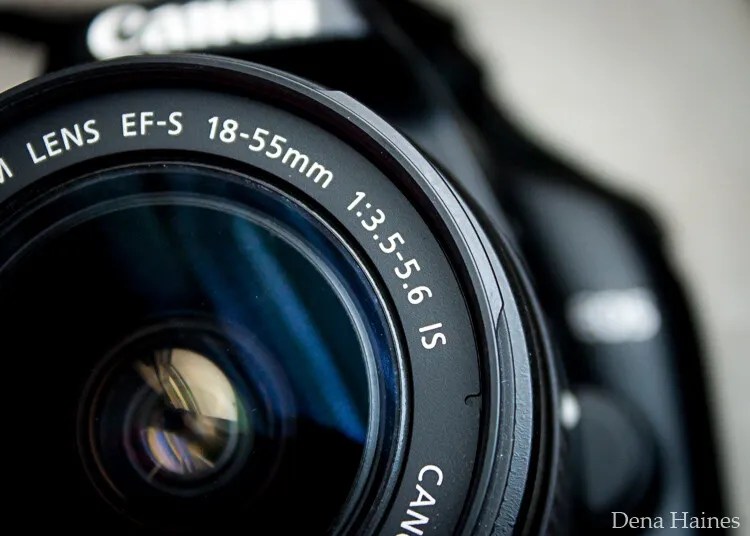
In this beginner’s guide, we’ll use an entry-level zoom lens as our example. Most kit lenses (the basic lens that comes with a DSLR) generally shoot their sharpest at a mid-range aperture setting. To determine the mid-range aperture of your lens, you’ll need to know its widest (or maximum) aperture setting. This is located on the side or end of the lens and will look something like 1:3.5-5.6.
For example, here it is on my Canon 18-55mm zoom lens:
This means that when my lens is zoomed all the way out to 18mm, its widest aperture is f/3.5. When zoomed all the way in to 55mm, its widest aperture is f/5.6.
The rule for finding that mid-range sweet spot is to count up two full f-stops (aperture settings are called f-stops) from the widest aperture. On my lens, the widest aperture is f/3.5. Two full stops from there would bring me to a sweet spot of around f/7.1.
Use this chart to count your f-stops:
By Robin Parmar
There is some wiggle room in what counts as mid-range, so anything from f/7.1 to f/10 will capture a sharp image. Once you know the mid-range aperture of your lens, you can do an easy test to get your sharpest image. To perform the test you’ll need to shoot in Aperture Priority mode.
Take control with Aperture Priority mode
Shooting in Aperture Priority allows you to choose the aperture setting you want, which gives you more creative control than Auto mode.
By controlling the aperture setting, it’s much easier to get a sharp image. And because your camera still chooses the ISO (if it’s set to Auto ISO) and the shutter speed automatically, it’s very easy to use.
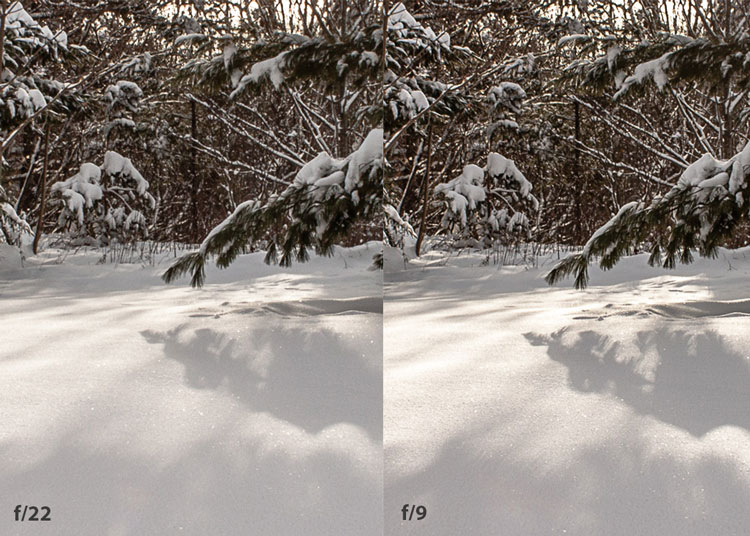
You’ve probably heard that apertures like f/16 and f/22 are best for keeping everything in focus. While that can be true, focus does not always equal overall sharpness. Choosing a mid-range aperture will give you sharper images throughout. You can improve your photos even further by reducing camera shake by way of a tripod and a remote shutter release (or your camera’s self-timer).
Here’s an example of how shooting in your lens’s sweet spot will give you sharper images:
In the above image, the f/9 shot is sharper than the f/22 one. The needles and shadows are not as soft or blurry as in the f/22 shot (look at the crispness and sparkles in the snow, too).
Switching from Auto to Aperture Priority mode
To take your camera off of Auto and put it in Aperture Priority, just turn the large mode dial to Aperture Priority. This is what that looks like on my Canon (on Nikon and other brands look for the “A”).
Auto mode is the green rectangle; Aperture Priority mode is the Av (or A on a Nikon). Once your camera is in Aperture Priority mode, turn the smaller main dial (shown here on the top of my Canon) to choose your f-stop.
As you turn that dial, you’ll see the f-number changing on your screen. In the next picture, it’s set to f/9.5:
Perform a lens sweet spot test
Once you have your camera set up on a tripod, performing a sweet spot test only takes a couple of minutes. To begin, put your camera in Aperture Priority mode, then compose your shot and take photos at varying apertures. Start with a shot at the widest aperture, then rotate that main dial a couple of times (to narrow the aperture) and take another shot. Keep doing that until you’ve taken seven or eight photos.
Upload your photos to your computer and zoom in. You’ll quickly see which aperture settings gave you the sharpest overall image.
This next photo of my daughter was shot using natural light. Shooting in my lens’s sweet spot gave me a pretty sharp image, even in this low light setting:
The close-up of the mug shows the advantage of shooting in the lens’s sweet spot. Whenever you want to make sure you get the sharpest capture possible, take a shot at each mid-range setting: f/7.1, f/8, f/9, and f/10.
Getting your sharpest images
Now that you know your lens’s sweet spot, it’s time to practice. I hope you’re as pleased with the results as I’ve been!
I love shooting in natural light, and learning how to capture sharper images in low light has made me so much happier with my photos.
Tips for capturing the sharpest images
Shoot in Aperture Priority mode
Choose a mid-range aperture (usually f/7.1 to f/10)
Use a tripod and a remote shutter release (or your camera’s self-timer) to reduce camera shake
Take a series of shots at f/7.1 through f/10 when a sharp capture is especially important
But don’t stop there. Keep playing with settings in Aperture Priority mode. It’s awesome to get images that are sharp throughout, but there’s a lot more to aperture than that.
Learn more about aperture and depth of field here.
The post How To Find Your Lens’ Sweet Spot: A Beginner’s Guide to Sharper Images appeared first on Digital Photography School. It was authored by Dena Haines.
The post Canon to Announce the EOS M50 Mark II With 32.5 MP, 14 FPS appeared first on Digital Photography School. It was authored by Jaymes Dempsey.
2020 is Canon’s year.
First we get the EOS R5 and R6, two powerhouse cameras that have revolutionized Canon’s mirrorless lineup (and, in some ways, the world of mirrorless more generally).
And now it looks like we’ll be seeing another impressive mirrorless model before the year is out, this time as an addition to Canon’s APS-C mirrorless arsenal:
The EOS M50 Mark II, the successor to the fantastic EOS M50.
While the EOS M50 Mark II’s release isn’t yet official, camera product listings have prompted Canon Rumors to declare that the new mirrorless body is “confirmed.”
And according to Canon Rumors, the EOS M50 Mark II will include a 32.5 MP sensor (up from 24 MP on the EOS M50), as well as improved autofocus, 14 frames-per-second continuous shooting (compared to 10 fps on the EOS M50), 4K/60p capabilities without a crop, one SD card slot, and a 3.69M-dot electronic viewfinder (up from the 2.36M-dot EVF on the EOS M50). You can also expect compatibility (via an adapter) with Canon’s EF and EF-S lenses, though Canon also offers a decent range of EF-M glass.
In other words, the EOS M50 Mark II will be impressive indeed. Photographers will be able to harness the detail of a 30+ megapixel sensor while maintaining the speed of an action camera. And while we don’t know if the 14 fps specification only applies when using AF-S autofocus, worst-case scenario puts the EOS M50 Mark II at around 10 fps when set to AF-C, which is not bad at all for serious action shooters.
Personally, I’m most looking forward to the electronic viewfinder. I find EVFs below 3.69M-dot tough to use, and it’s hard to overstate the value of a good electronic viewfinder. After all, it’s what defines your entire shooting experience, especially if you’re the type that shoots frequently through the viewfinder rather than working with Live View on the rear LCD.
Overall, the EOS M50 Mark II appears to be something of an all-around camera for beginners and intermediate photographers (while still perfectly capable of professional-quality shots). And the 4K/60p video is a nice addition for hybrid shooters and vloggers, especially given the limitations of the EOS M50’s 4K/24p video (it comes with a frustrating 1.7x crop).
So if you’re looking for a powerful camera that offers a lot of resolution, impressive speed, and a (likely) reasonable price tag, then keep an eye out for the official EOS M50 Mark II announcement over the next few months.
Now over to you:
What do you think about these EOS M50 Mark II features? Are you impressed? Disappointed? Do you plan to purchase the EOS M50 Mark II?
The post Canon to Announce the EOS M50 Mark II With 32.5 MP, 14 FPS appeared first on Digital Photography School. It was authored by Jaymes Dempsey.