RSS
 

Archive for the ‘Photography’ Category

26 Spooky Images for Halloween Week

02 Nov

It’s that time of year again when the ghosts and goblins take over and the timid and meek take shelter and hide. Yes, it’s Halloween this coming week.

Depending on where you live, this may be a holiday the kids enjoy, but we adults can have a little fun too. Spooky images of ghosts in the night, apparitions, scary pumpkins and more. Let’s see what these photographers found spooky and captured for Halloween.

Krystian Olszanski

By Krystian Olszanski

Anne Marthe Widvey

By Anne Marthe Widvey

Rachel.Adams

By Rachel.Adams

Chris JL

By Chris JL

Jader56

By jader56

Micadew

By micadew

MattysFlicks

By MattysFlicks

Stefano Corso

By Stefano Corso

Moyan Brenn

By Moyan Brenn

Thomas Hawk

By Thomas Hawk

WxMom

By WxMom

Jpellgen

By jpellgen

Darlene Hildebrandt

By Darlene Hildebrandt

Craig

By Craig

Kevin Dooley

By Kevin Dooley

JLS Photography - Alaska

By JLS Photography – Alaska

Kris Williams

By Kris Williams

Nesster

By Nesster

Thomas Hawk

By Thomas Hawk

Flood G.

By Flood G.

Neil Howard

By Neil Howard

Adrian Kingsley-Hughes

By Adrian Kingsley-Hughes

Andrew Kuznetsov

By Andrew Kuznetsov

Christopher Bligh

By Christopher Bligh

Dan Castleberry

By Dan Castleberry

Hjl

By hjl

googletag.cmd.push(function() {
tablet_slots.push( googletag.defineSlot( “/1005424/_dPSv4_tab-all-article-bottom_(300×250)”, [300, 250], “pb-ad-78623” ).addService( googletag.pubads() ) ); } );

googletag.cmd.push(function() {
mobile_slots.push( googletag.defineSlot( “/1005424/_dPSv4_mob-all-article-bottom_(300×250)”, [300, 250], “pb-ad-78158” ).addService( googletag.pubads() ) ); } );

The post 26 Spooky Images for Halloween Week by Darlene Hildebrandt appeared first on Digital Photography School.

Digital Photography School

 
Comments Off on 26 Spooky Images for Halloween Week

Posted in Photography


Weekly Photography Challenge – Spooky

02 Nov

This Halloween week we looked at some spooky images by other photographers already. Now it’s your turn in this weekly photography challenge.

Milomingo

By milomingo

Weekly Photography Challenge – Spooky

Halloween conjures up images of ghosts and goblins, witches and warlocks, ghouls and skeletons who come out of the closet. Now is the time to create your scariest, spooky image and post it here for our theme this week. Maybe it’s dramatic lighting that makes your image scary. Or perhaps someone in a costume, make sure to use spooky monster lighting.

Anant Nath Sharma

By Anant Nath Sharma

Milomingo

By milomingo

Dun.can

By Dun.can

Jonathan Hollander

By Jonathan Hollander

Share your images below:

Simply upload your shot into the comment field (look for the little camera icon in the Disqus comments section) and they’ll get embedded for us all to see or if you’d prefer, upload them to your favorite photo-sharing site and leave the link to them. Show me your best images in this week’s challenge. Sometimes it takes a while for an image to appear so be patient and try not to post the same image twice.

Share in the dPS Facebook Group

You can also share your images on the dPS Facebook group as the challenge is posted there each week as well.

googletag.cmd.push(function() {
tablet_slots.push( googletag.defineSlot( “/1005424/_dPSv4_tab-all-article-bottom_(300×250)”, [300, 250], “pb-ad-78623” ).addService( googletag.pubads() ) ); } );

googletag.cmd.push(function() {
mobile_slots.push( googletag.defineSlot( “/1005424/_dPSv4_mob-all-article-bottom_(300×250)”, [300, 250], “pb-ad-78158” ).addService( googletag.pubads() ) ); } );

The post Weekly Photography Challenge – Spooky by Darlene Hildebrandt appeared first on Digital Photography School.

Digital Photography School

 
Comments Off on Weekly Photography Challenge – Spooky

Posted in Photography


How to Experiment with Different Editing Styles to Find Your Own

02 Nov

Photography is an art form and like every art form, it goes through its fair share of evolution. Hence, it is only fair that as photographers (artists of this trade), we too go through an evolution process of defining and redefining our artistic flair. This redefinition can take place in many different ways. It can be technical (going from digital to film or vice-versa) or it can be business (changing genres of what you photograph). Another way you can evolve as a photographer is with your editing style. And it is perfectly okay and acceptable to make one or all of these changes in your personal photographic journey.

memorable-jaunts-experimenting-with-editing-styles-article-for-digital-photography-school-1

For a photographer, his or her images are the art form. Experimenting with the images is creatively satisfying.

There comes a point in one’s career when you really take a hard look at what your journey has been. What you have been through to get here and where you are headed. While you may call this a mid-life crisis of some sort, I call it reassessing your strengths, talents, and goals.

A few years ago, while I was searching for what style of photography appealed to me, I was instantly drawn to bright and airy images with lots of light and emotion. This kind of images really inspire me and make me happy. But of late, I have been drawn to more moody contrasty images that are still full of emotion. I don’t consider this a flaw or a failure of my part but instead, choose to look at it as a natural evolution in my journey as an artist.

memorable-jaunts-experimenting-with-editing-styles-article-for-digital-photography-school-1-4

The same subject shot two different ways. I love them both equally and feel like both represent the message/story I wanted to convey about summer’s favorite produce – blueberries!

If you are at such crossroads, I encourage you to fully explore each of these paths and find a way to integrate it with your existing work. I have found that, if done correctly, your clients (or fans) will also value this evolution process as a sign of internal growth of your talent.

There are a few ways to go about this discovery.

1 – Identify your personal editing style

What style of images are you most drawn to? In other words, when you seek inspiration what sort of images do you gravitate towards? For me, images that are full of emotion and personality really call out my name! That is my first requirement; what story is the photographer trying to communicate.

Then I look for processing – is it dark and moody, or full of light and crisp? I like airy, light images just slightly more than dark and moody ones but they both appeal to me. My personal opinion – I am not inspired by sepia or warmer toned black and white, it’s just my personal preference. If that is what moves and motivates you, you own it and rock that style!

memorable-jaunts-experimenting-with-editing-styles-article-for-digital-photography-school-1-5

A clean, crisp, bright edit brings out the freshness of the florals against the blue backdrop of the chairs.

2 – Research all other styles that inspire you

There are a few common editing styles that seems to surface over time. This is by no means a comprehensive list, just some that I noticed as I browsed through the internet and Pinterest for inspiration.

Matte Finish

Those images that appear as if a slight hazy filter has been placed consistently over the image.

Matt style typically has black which is not sure 100% as it it were printed on matt paper.

Matte style typically has blacks which are not sure 100% as if the image was printed on matte paper. (see original image below)

Original image

Original image

matte-style2

A slight haze like finish that is predominately seen over the florals (especially comparing to the earlier image).

Desaturated Look

Images where all the colors are very muted. This style seems to be quite popular lately, especially images where the greenery (i.e. trees and brushes) are toned down in the saturation of green tones.

memorable-jaunts-experimenting-with-editing-styles-article-for-digital-photography-school-6

A desaturated look where all the colors are muted from the original vibrancy seen in the first image of this series. The reds are toned down, the greens and blues are also muted (reduced in intensity).

HDR

As Per Wikipedia, HDR or High Dynamic Range is the effect to reproduce a greater dynamic range of luminosity than what is typical of standard digital imagery. I have seen this typically with urban night shots but in theory, this effect can be applied to any image.

memorable-jaunts-experimenting-with-editing-styles-article-for-digital-photography-school-7

HDR here almost has the opposite effect of desaturated colors…the greens, reds, and pinks seem to pop in this image.

Monochrome

This quite simply means single color and is most commonly used in black and white images.

memorable-jaunts-experimenting-with-editing-styles-article-for-digital-photography-school-8

3 – Identify artists that do these things well and follow them

There are many artists that excel at one or more of these types of editing styles. Once you have identified the ones you want to experiment with, find those artists and follow their work. You will begin to see a pattern in their shooting and editing style that may provide you with the right amount of motivation to try and achieve a certain look for your own portfolio and images.

4 – Shoot for a particular style and close to your vision

This ties in with the above two points. Once you have identified the type of look you want to achieve, take the time and effort to set up all the parameters needed to achieve it. For example, if I am aiming for a dark and moody look to my image I will look for lighting, textures, and tones that will support that type of imagery. I will not set up the shoot in the brightest part of my house where sunlight fills the room.

memorable-jaunts-experimenting-with-editing-styles-article-for-digital-photography-school-1-2

This food editorial shot was set up in my basement studio on a dark cloudy day to minimize the amount of light hitting the overall scene. Additionally the dark tones of the bread and the wood board compliment the look, feel, and tone of this image.

5 – Invest in LR presets or PS actions or experiment

There are numerous editing aids out there for almost every style of photography. Just google the kind of look you want to achieve and chances are someone has created a template/preset/action for that effect. Some editing aids are free while others cost money. Depending on your personal preference, you can choose to use these aids or not. My primary editing software is Lightroom and sometimes I will use a free preset just to see if I like that style of editing before I go down the path of additional research and experimentation with my own shooting style.

Conclusion

At the end of the day, there are many different ways to look at your creativity and your photography style. There will always be those of us who go through life with the mindset of – Don’t fix what isn’t broken – while others follow the logic of – Change it up, mix it up, rock that boat…fall in the water and you will learn to swim! No matter what camp you belong to, the message I want to leave with you is that do that what makes photography fun, interesting and creatively challenging for you!

googletag.cmd.push(function() {
tablet_slots.push( googletag.defineSlot( “/1005424/_dPSv4_tab-all-article-bottom_(300×250)”, [300, 250], “pb-ad-78623” ).addService( googletag.pubads() ) ); } );

googletag.cmd.push(function() {
mobile_slots.push( googletag.defineSlot( “/1005424/_dPSv4_mob-all-article-bottom_(300×250)”, [300, 250], “pb-ad-78158” ).addService( googletag.pubads() ) ); } );

The post How to Experiment with Different Editing Styles to Find Your Own by Karthika Gupta appeared first on Digital Photography School.

Digital Photography School

 
Comments Off on How to Experiment with Different Editing Styles to Find Your Own

Posted in Photography


Five Photography Rules You May Want to Ignore

02 Nov

A few years ago when I purchased my first Canon dSLR I took a free 2-hour class on digital photography from a local school. They offered free seminars as a way to market their series of intensive 6-week photography courses. I was new to digital photography at the time, having learned on 35mm film. During the class I scribbled away in the notebook the instructor handed out. I was given several photography rules to follow, but is that the best advice?

My camera-loving orange tabby Carter, shot in low light, requiring a relatively high ISO of 1600 to get a fast enough shutter speed to hand hold.  ISO 1600, 1/125th, F4 @ 105mm.

My camera-loving orange tabby Carter, shot in low light, requiring a relatively high ISO of 1600 to get a fast enough shutter speed to hand-hold. ISO 1600, 1/125th, f/4 @ 105mm.

The thing about photography is that it’s a series of decisions starting with the brand of gear you choose and it funnels down to your favorite subject, your preferred shooting mode, your shutter speed, aperture and ISO. By applying popular advice to all situations, you eliminate too many of the key creative decision about how your images look. Go ahead and disagree with or ignore rule-of-thumb photography advice. The choices you make allow you to create images that feel right to you – and that’s the real sweet spot.

So let’s look at five supposed photography rules and see if you agree or disagree with them.

1. Set the ISO at 400

One of my instructor’s key points was to set the ISO at 400 and forget it.”

Since I didn’t know anything about digital photography, it like pretty good advice, so I tried it. I also made a lot of blurry images. Set at ISO 400, and limited by a wide open aperture of f/3.5 on my kit lens, I often couldn’t gather enough light for a shutter speed fast enough to prevent motion blur. I flipped back to Auto Shooting Mode (Full Auto or Program) and suddenly my images were sharp again.

I dissected the settings on the Auto Mode shots and – you’ve probably guessed this already – the main difference while in Auto Mode was that the ISO was higher, enabling a faster shutter speed and reducing motion blur.

five-photography-tips-to-ignore-n

While this image wouldn’t have made the cut because of the awkward composition, the horse is also a bit blurry because my ISO was too low, allowing my shutter speed to lag. It wasn’t fast enough to freeze the motion of the moving horse. ISO 800, 1/160th, f/5.6, 176mm.

Increasing your digital ISO makes your camera’s sensor more sensitive to light, meaning you can shoot at smaller apertures and/or faster shutter speeds in low light conditions. Like film, increasing your ISO can create a grainier, noisier image. But unlike film, digital cameras have extraordinary ISO capacity. High-end cameras like the Canon 1Dx Mark II have an ISO capability of 51,200 expandable to 409,600! Sticking to ISO 400 is like pretending you’re still shooting film and disregarding all the recent digital technology advances.

Earlier this year I was in Mesa, AZ photographing the Salt River Wild horses at dawn. During blue hour, I started with my ISO too low, my shutter speed lagged, and I shot a whole series of blurry images (see image above). Purely by luck, at ISO 800, only this one didn’t have motion blur.

Five Photography Tips to Ignore A

ISO 800

The next day, I started at ISO 12,800 to keep my shutter high enough to prevent motion blur, gradually decreasing my ISO was the sun grew brighter.

Five Photography Tips to Ignore B

ISO 12,800

Five Photography Tips to Ignore C

ISO 1250

While these images might be noisier than those shot at ISO 400, noise is almost always preferred to motion blur. Digital noise can be managed, while an unintentionally blurry picture can rarely be saved.

Setting your ISO to an unrealistically low value and leaving it there is the sort of advice or rule I’d encourage you to ignore.

2. You never need to shoot faster than 1/500th of a second

There’s a famous teaching photographer (I mentioned him here too) who says that you never need to shoot faster than 1/500th of a second. I ignore his advice too. Here’s why.

Five Photography Tips to Ignore D

Shutter speed 1/500th

This image, shot at 1/500th of a second, shows motion blur in the horse’s legs. Sometimes you may want to intentionally include motion blur in your images because it shows speed in a dynamic way, and in this case, that’s what I wanted. If I wanted no motion blur, I would need to have chosen a faster shutter speed.

Five Photography Tips to Ignore E

Shutter speed 1/640th

This image, shot at 1/640th of a second, is sharper. It has very minimal motion blur in the legs but again, it still shows motion blur.

Five Photography Tips to Ignore F

Shutter speed 1/1000th

If you shoot at 1/1000th and above, you can get crisp, blur-free images of fast-moving objects or animals in motion. In this image, even the water droplets are frozen in time.

Depending on your creative goals, you may want to experiment and shoot from 1/100th, all the way up to 1/8000th of a second. That’s the reason to ignore this rule. Adhering to 1/500th of a second as your maximum shutter speed takes too many of your creative choices away from you.

3. Serious photographers always use tripods

Has your instructor or mentor told you that to be serious about making images, you must always use a tripod? That’s another piece of advice you might want to ignore, unless the type of work you make truly requires a tripod. Night photography, for example, typically requires a tripod because of the longer shutter speeds.

Five Photography Tips to Ignore G

Night photography – with a tripod

Long exposure photography, astrophotography and shooting landscapes at dusk or dawn are all good examples of when to use a tripod in order to make excellent images.

Macro photography often requires a tripod but sometimes doesn’t. This image was made hand-held.

Five Photography Tips to Ignore H

Macro photography – handheld

Street photography never requires a tripod. The most serious street photographers I know use small camera bodies with prime lenses. What makes them serious is that they carry their cameras all the time and are always ready to shoot. For a street photographer, lugging around a tripod actually seems a little ridiculous, doesn’t it?

Five Photography Tips to Ignore I

Street photography – handheld

I’m a very serious photographer and I almost never use a tripod. I have two: a Travel Flat Benro tripod and a Gitzo with a Really Right Stuff BH 40 Ball Head. I always have one in the car or in my suitcase, but I rarely use either one anymore.

Does that mean I’m no longer a serious photographer? No, of course not. I travel all over the world to photograph horses and wildlife. I’m very serious about the images I make. The thing is, my images don’t usually require a tripod. Using one is sometimes even counterproductive when photographing fast bursts of action.

When two wild stallions start to fight out in the desert, I begin to shoot while adjusting my body position to look for the best angles for the scene to improve my composition. Sometimes a wild stallion spat can last for mere seconds. If you had to pause to adjust your tripod, you’d likely miss the action.

Five Photography Tips to Ignore J

Wild stallions – hand-held. ISO 250, 1/800th, f/8 @ 98mm

Being a serious photographer isn’t about the gear you choose to use or not use. Being serious is about making images with intention. Your intention might be totally different than the photographer using the tripod. If it is, ignore his advice to use one.

4. Only shoot in Manual Mode

Most of the professional, money-making photographers I know actually shoot in Aperture Priority so I think this rule is more the advice of old-fashioned, learned-on-film photographers. These photographers grew up using Manual Mode since that’s the only option that was available. They didn’t have the choice of Auto, Aperture or Shutter Priority Modes.

So that’s the rub. You do have a choice. You also have stellar gear that is going to make the right exposure choice 90% of the time. Why not learn to use all the modes on your camera?

At a cocktail party for your bestie’s 40th? Use Auto Mode to make sure you get the shot. Shooting fast action? Use Shutter Priority. Shooting in quickly shifting light? Use Manual Mode and set your ISO to Auto. Shooting a portrait? Experiment with Aperture Priority and then give your camera’s Portrait Mode a try.

Five Photography Tips to Ignore K

Self-portrait shot in Portrait Program Mode. 100, 1/100th, f/3.5 @ 50mm

Cameras today have amazing functionality. Anyone telling you to exclusively use Manual Mode may have different photography goals than you do. If your goal is to make sure you make the best images possible, ignore their advice and learn all of your camera’s capabilities backwards and forwards.

5. Only shoot in your lens’s sweet spot

If you’re keeping track, by heeding all of this well-intentioned advice, your camera is in Manual Mode and attached to a tripod. Your ISO is set at 400 and you’re using a maximum shutter speed of 1/500th. There has to be a rule about aperture and focal length too, right? There is.

The sweet spot is a combination of the aperture and focal length where your lens functions at its absolute best. If you’ve read reviews about zoom lenses you may have read something along the lines of; “Wide open at f/5.6 at the maximum focal length of 400mm, the corners get soft and there’s a noticeable loss of sharpness throughout.” Photographers write reviews like that so that you can avoid shooting in the so-called soft end of your lens and gravitate towards its sweet spot.

You can evaluate the sweet spot of your lens by making a series of images of the same subject, in the same lighting conditions, using each aperture at every focal length and comparing the results. (Read: How To Find Your Lens’ Sweet Spot: A Beginner’s Guide to Sharper Images for a full description of how to do this.) That sort of evaluation sounds soul-crushing and unnecessary to me. If you buy a zoom lens, you’re buying it because you need that focal length in your bag. Why run a test on your lens that might make you hesitate to use it at its maximum focal length?

Five Photography Tips to Ignore L

The real sweet spot is making images that feel right to you. ISO 2500, 1/80th, f/4.5 @73mm

Instead how about learning the capabilities of your lens by truly using it? Over time, you may gradually learn that the sweet spot is 100mm at f/8, because every image you shoot at that aperture and focal length is amazing. Rather than avoiding the rest of your lens’ focal length range and aperture combinations, you can shoot a second image using the sweet spot. If there isn’t time to shoot a second image, that’s okay. Just be grateful you had a lens capable of capturing the image at all.

Bottom line

The bottom line is that as you progress in your photography journey, you get to make the decisions. What advice and rules will you follow, and which will you toss out?

Be disagreeable with me! What photography rules have you been taught that you ignore now? Please share your experience in the comments below.

googletag.cmd.push(function() {
tablet_slots.push( googletag.defineSlot( “/1005424/_dPSv4_tab-all-article-bottom_(300×250)”, [300, 250], “pb-ad-78623” ).addService( googletag.pubads() ) ); } );

googletag.cmd.push(function() {
mobile_slots.push( googletag.defineSlot( “/1005424/_dPSv4_mob-all-article-bottom_(300×250)”, [300, 250], “pb-ad-78158” ).addService( googletag.pubads() ) ); } );

The post Five Photography Rules You May Want to Ignore by Lara Joy Brynildssen appeared first on Digital Photography School.

Digital Photography School

 
Comments Off on Five Photography Rules You May Want to Ignore

Posted in Photography


How to Go Beyond the Hero Image and Get Real Storytelling Photos

02 Nov

Good photography is really about telling stories, and that’s where all the lessons of composition, juxtaposition, lines, and focus fall short. Compelling images tell compelling stories, but the hard part is recognizing that story. I’ll tell you a story of how I missed the opportunity to do that, and look at some ways you can add more storytelling into your photography.

A bear story with a moral

I was camped on a low tundra bench above a swift blue river in Alaska’s western Arctic. Our green canoes lay upside down next to the kitchen tent, and the willows along the river were flecked with the first autumn yellow. It was early when I crawled from my tent, stood and stretched. While still reaching skyward I saw another form rise from the tundra a stone’s throw away, a young grizzly giving me a curious look. I dropped my arms and turned just in time to see its sibling offering me a similar stare from a bit farther back. These bears were three-year-olds, spending their first summer away from their mother, ursine-teenagers, and just as troublesome. Unlike the many adult bears we’d encountered on our journey down the river, these two didn’t yet know to give humans a wide berth.

In Katmai National Park at the famous Brooks Falls tourists are inescapable. In this image, I embraced that part of the story of being there.

In Katmai National Park at the famous Brooks Falls tourists are inescapable. In this image, I embraced that part of the story.

Safety first

They backed off, after I shooed them with a wave of the arms, though not far enough. I woke my co-guide, and together we herded them away from camp and down onto the gravel bar below. One of the two young bears, rather than wandering off, decided to push my buttons and walked straight over. When off hiking or away from camp, you always give bears the right of way, but in camp, you can’t do that. Bears cannot learn that camps are places to explore.

Standing on the low bench, I knew that I could not let this mischievous youngster enter our camp. I stepped forward as he approached, right to the edge of the cut bank, and started speaking to the bear in a low steady voice. “I can’t let you up here, you have to back off. Back off. Now.” The bear paused in its approach, then stepped forward again. I raised a can of strong pepper spray, and held it up, ready to fire. The bear took another step forward, and then another until he was just eight feet away.

Hard lesson learned

And that’s when I felt a sudden moment of regret. Not for my behavior around this young, dumb bear, (in that, I knew I was doing the right thing) but for the fact that my camera lay in my tent. This beautiful (if troublesome) beast was so close I could count his whiskers. What a photo-op I was missing! But I pushed that aside, and spoke again, “One more step and you are getting it in the face. Don’t do it”, I said. “I’ll give you a count of three, then you are getting sprayed. One. Two…” before I could say three the young bear thought better of his situation, turned and ambled back to the river, swam across with his sibling, and disappeared.

Similar to the story I related above, this bear approached a group of photographers I was a part of on Admiralty Island, Alaska. He came very close, and I regret not taking a moment to show a wider shot with the group of us in the frame.

Similar to the story I related above, this bear approached a group of photographers I was a part of on Admiralty Island, Alaska. He came very close, and I regret not taking a moment to show a wider shot with the group of us in the frame.

Think outside the frame – the moral

In retrospect, as I thought about the images I missed, I realized that it wasn’t the frame-filling portraits of the bear that would have been so spectacular about that moment. It was the story that went with it. Facing the bear down with a can of pepper spray, the bear testing us, and his eventual retreat. That’s where the compelling images were, not in the missed photos of the bear, but in the missed story that went with it.

If I had a camera in that moment with the bear, even if I’d been on the sidelines, I know I would have blown it and gone for the wildlife portraits, missing the much more interesting interaction that was taking place.

Here a herd of caribou is seen migrating across the coastal plain of the Arctic National Wildlife Refuge in Alaska. This image tells a more important story of movement, landscape, and perspective than a more typical portrait of an animal would.

Here a herd of caribou is seen migrating across the coastal plain of the Arctic National Wildlife Refuge in Alaska. This image tells a more important story of movement, landscape, and perspective than a more typical portrait of just an animal would.

Learn from the best

Take a look at any issue of National Geographic. Many, even most, of images that are selected are storytelling images, not illustrations. The compositions are atypical, often showing the interaction of people or animals within the scene. Those photographers stepped back from a typical composition and explored their surroundings in a way that most of us, myself included, usually forget to do.

This image of an Adelie Penguin on an iceberg, I made in Antarctica. Getting close to wildlife is easy there, and the following image provides information to see just how easy.

This image of an Adelie Penguin on an iceberg, I made in Antarctica. Getting close to wildlife is easy there, and the following image provides information to see just how easy.

A zodiac pull right up to an iceberg with Adelie Penguins.

A zodiac pulled right up to an iceberg with Adelie Penguins.

Look around

This is an easy lesson to say, a much harder one to perform in the field because the real story is often easy to miss.

Another example: I was photographing the start of the Yukon Quest sled dog Race in Fairbanks, Alaska, where I live, a few years ago. I’d been concentrating on the passing dogs, the smiling mushers, and been studiously avoiding the crowds of people that surrounded me. At one point a spectator raised a point and shoot in front of my shot, I was irritated, but in that moment I was forced to pause. It clicked, and I realized that the real story was the crowd of mushing fans, out on a cold morning to watch the race. I changed my composition and made an image of the spectator’s camera. That shot is much more telling of the experience than any of my previous photos.

Here, the scene of the dog teams seen through a spectator's camera is more telling of the experience of the start of the Yukon Quest.

Here, the scene of the dog teams seen through a spectator’s camera is more telling of the experience of the start of the Yukon Quest.

This broad perspective is also an effective way to tell the story, showing the rows of spectators and the buildings of Fairbanks in the background.

This broad perspective is also an effective way to tell the story, showing the rows of spectators and the buildings of Fairbanks in the background.

Sometimes it’s a sudden realization like mine at the mushing race, but often, you have to put some effort into the real story. You need to break away from the scene you think you should be photographing, pause, and look around. Consider not just the scene, but the experience. What are you, or those around you, feeling, seeing, and doing?

Stay open to your surroundings

While being focused on your subject is vital to creating good images, it’s important not to close yourself off too much. Take the time to look around. Literally step away from your tripod, and turn 360 degrees while paying attention. What else is out there? Have you been missing anything as you’ve been staring through your viewfinder? What happens if you back up and show the surroundings?

While an image of single bird, in this case a Least Sandpiper is nice portrait, it is more of an illustration than a story.

While an image of a single bird, in this case, a Least Sandpiper is a nice portrait, it is more of an illustration than a story.

A large flock of shorebirds, when compared to the single-bird portrait, is more telling of the lives of the birds, and their epic migrations.

A large flock of shorebirds, when compared to the single-bird portrait, is more telling of the lives of the birds, and their epic migrations.

Think in terms of stories

That real story can be told within a single image, but there are also other strategies. Though an entire article is required to discuss the photo essay (5 Tips for Creating a Photo Essay with a Purpose), I do want to note that you can always think through your story using a series of images. This is also a good way to make the classic images you strive for while simultaneously capturing the storytelling ones as well.

Telling the real story is important not just for the quality of our images, but also for the quality of our experience. These storytelling images may not have the flash and glamor of a bear portrait or a sprinting sled dog, but it will help your viewers know the story, and that really is where the real excitement lies.

googletag.cmd.push(function() {
tablet_slots.push( googletag.defineSlot( “/1005424/_dPSv4_tab-all-article-bottom_(300×250)”, [300, 250], “pb-ad-78623” ).addService( googletag.pubads() ) ); } );

googletag.cmd.push(function() {
mobile_slots.push( googletag.defineSlot( “/1005424/_dPSv4_mob-all-article-bottom_(300×250)”, [300, 250], “pb-ad-78158” ).addService( googletag.pubads() ) ); } );

The post How to Go Beyond the Hero Image and Get Real Storytelling Photos by David Shaw appeared first on Digital Photography School.

Digital Photography School

 
Comments Off on How to Go Beyond the Hero Image and Get Real Storytelling Photos

Posted in Photography


A Simple Way to Conquer Your Fear of Street Photography

02 Nov

Frustrating, isn’t it? You are ready to go out, your camera is in your hands, it’s a nice day outside and once you actually go where people are….panic starts settling in. It’s that old fear of street photography.

It’s almost like, as soon as you start putting the camera to your eye, your heart starts beating faster and you start sweating. You can’t think about the picture anymore, it’s gone. You are pretty sure you can get a nice shot if only you could get close enough. But you chose to play it safe and settle for some wide angles where everyone is pretty far away.

fear-street-photography-2

That, my friends, is called the fear of street photography. And if you are reading this, I am pretty sure you want to get rid of it, right? The good news is, you not only can, it’s actually probably not the way you think. Oh, and take it from a guy that couldn’t even look his own older brother in the eye.

But before diving into the logistics of fear, let’s get two things straight and out of the way first.

1 – Getting closer means nothing

There’s an unspoken creed amongst street photographers, it’s the notion that that you always need to be close for it to be a good image. While it is probably better to be closer than not, that’s just one thing. A bad image is a bad image, whether it’s close or far away. Just getting close won’t magically make an image good. Look at the image below, I’m not particularly close to the guy in the middle and he’s not even facing me!

fear-street-photography-3It’s not just about getting close. There are far away images that are great and very close images that are the epitome of boring. If anything, you might NOT want to get too close to people, so that you can include them and their surroundings. All of this to say what? Street photography is an art form, it’s about images, and getting closer sometimes has no bearing on the final results!

2 – A smaller camera is better

Some cameras bring more attention to them than others. No one would really notice a pocket camera, but pull out a double battery DSLR with a large lens and you will be noticed. So, use a small camera, it’s de facto less attention on you, at least for the time being.

With that being said, let’s get to the nitty gritty of fear!

fear-photography-1

People don’t really care about what you do

Sorry to break it to you. You are not so important that all the people in the street want to do is to notice you. Except if you are Brad Pitt, or Beyonce. If you are, call me! If you are just a regular Joe like the rest of us, the bottom line is this; people just don’t care about you. They care about themselves, and it’s easy to prove. Just go out in the streets without a camera and ask yourself how many of these people actually notice you.

Hint: Very few, most likely none will notice you.

Psychology tells us we all have something called the spotlight effect, where we believe a spotlight on us, that everyone notices us, but that is not the case, it’s just how we feel. But it’s not the same when you have a camera with you and near, right? Yes and no. Again, most people won’t notice you with a camera, but even if they do, what’s the problem?

fear-street-photography-4

Why you fear street photography

What’s the problem if people notice you taking a picture of them? Well, let me ask you a question. Don’t worry, it relates to the matter at hand. Do you feel guilty when your boss pays you? The answer (except if you are doing something fishy) is probably NO. Because you exchanged value for it. Your time and skills in exchange for his/her money, nothing wrong there.

But it’s not the same on the streets. There you feel like you are TAKING something from the person you are photographing. Something that is theirs, and you took it. That’s called stealing, right? So doesn’t it logically follow that you feel fear because you fear being caught at thievery? It’s easily proven. As soon as you ask for permission the fear dissipates because there is no more tension.

street-photography-fear

You fear because you think you are doing something inherently wrong. Let’s look at it in another way, do you feel any fear when just walking down the street? No, because you don’t feel you are doing anything wrong. Fear in street photography comes from fearing the reaction of others to your perceived wrong-doing. And between me and you, if I was stealing, I would feel fearful!

The cure for fear

The answer then is understanding the value exchange that happens on the street. You are not taking anything, you are making a photograph. You are creating something. Of all the people and things to photograph, you have chosen one person to make an image of them. You have acknowledged that person’s existence and importance.

street-photography-fear-03

Sounds cheesy? The photograph is the ultimate ego tool. Check your Facebook, everyone is clamoring for attention through their selfies. Why can’t you be the one that bestows that attention on them with your lens?
Images are so powerful, that a Japanese photographer got carte blanche to photograph Yakuzas, Japanese mafia. Quite powerful, no?

By making a photograph of someone, you are acknowledging their existence, something that every one of us needs and desires at a deep level of our psyche.

fear-street-photography-5

The exchange between you and the subject

Go down the street, give a nod to someone. Smile, and say hello. You have just altered someone’s day with your acknowledgment. Images are like that, they are visual acknowledgment. Once you stop seeing what you’re doing (photographing them) as something that’s wrong and actually see it as something good by exchanging value (they get to participate in the making of an art piece in exchange for their photo) your outlook will start to change. And by doing so you change your way of approaching street photography and the fear will dissipate.

The street photographer’s posture

This is truly where the magic happens because here’s a truth – the street reacts to you. The way you are in the street will dictate how people react to you. That’s the whole secret. But wait. If that was the whole secret, why then did I write all of the stuff above? Couldn’t I just cut to the chase, get right to this part? The streets react to you, so it’s all about appearing confident, right?

fear-street-photography-6

Well, not really because I don’t believe you can fake it. I could tell you to go up and down the streets and act confident, to fake it till you make it so to speak. But I think people smell these things like a dog smells fear. If you think you are doing something wrong, it’s probably going to show in your posture and people will react accordingly.

Street Karma

Think about this with me – you look out your window and this guy is just strolling by your house, all happy go lucky. Then you look out your window once again and see this shady looking guy, looking right and left, as if he is doing something wrong. How are you going to react towards each one? Towards the first one you might even smile, but to the other, you may be ready to call the police.

The same rule applies on the street, it’s called street karma. You will get out of it the energy that you put into it. And it’s no woo-woo stuff either. It’s because of mirror neurons, those things in your brain that make you tend to mimic others. The street reacts to you. That’s what makes the difference between getting a dirty look and a smile of amusement.

street-photography-fear-04

Conclusion

As you have seen, people care less about you than you may think, and the streets react according to how you hold yourself. Act like a thief, be treated like one. But act like you are enriching the world, and people will react differently.

Such things can be faked. It all comes from knowing that what we are doing in the street isn’t anything wrong. Indeed we are not thieves because as photographers we seek to simply interpret the reality that is in front of us with our lens. Now go out there and shine forth. Be yourself, stay focused, and keep on shooting.

googletag.cmd.push(function() {
tablet_slots.push( googletag.defineSlot( “/1005424/_dPSv4_tab-all-article-bottom_(300×250)”, [300, 250], “pb-ad-78623” ).addService( googletag.pubads() ) ); } );

googletag.cmd.push(function() {
mobile_slots.push( googletag.defineSlot( “/1005424/_dPSv4_mob-all-article-bottom_(300×250)”, [300, 250], “pb-ad-78158” ).addService( googletag.pubads() ) ); } );

The post A Simple Way to Conquer Your Fear of Street Photography by Olivier Duong appeared first on Digital Photography School.

Digital Photography School

 
Comments Off on A Simple Way to Conquer Your Fear of Street Photography

Posted in Photography


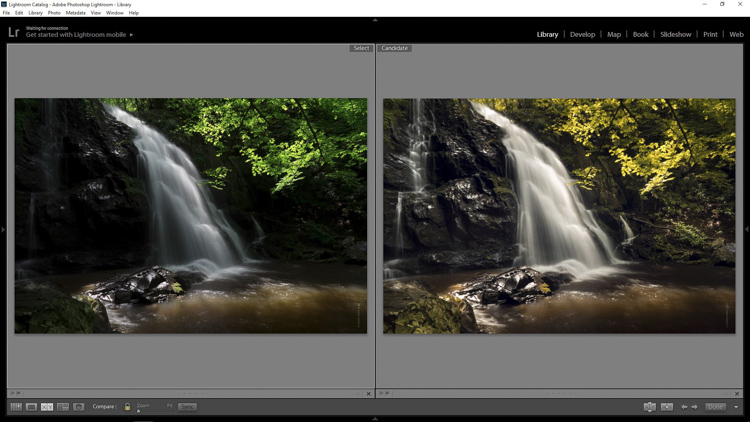
How to Sharpen Your Photos using Lightroom and Nik Efex

02 Nov

Do you want to take razor sharp photos? One of the best methods for creating tack sharp images is what I call The 20/20 Technique. It’s a process that combines the editing power of Adobe Lightroom and Nik Efex to sharpen your images.

sharpen, photos, tips, photography, Lightroom, Nik Efex

Lotus Temple, Delhi: Bringing out sharpness in architectural photos can really make them pop. © Pete DeMarco

Is sharpness overrated?

The godfather of street photography, Henri Cartier-Bresson, once quipped, “Sharpness is a bourgeois concept.” It’s true that sharpness does not turn a bad photo into a good one. In fact, some of the greatest photographs of our time aren’t that sharp. A picture that evokes emotion will always win over an image that is technically great but lacks feeling.

In the digital age, however, sharpness is another tool in the photographer’s kit that can transform an image from good to great. Have you ever seen a photo so clear that it makes you feel as if you could reach through the screen? It’s almost as if it’s not even a photograph at all but a window into another world.

sharpen, sharper photos, tips, photography, Lightroom, Nik Efex

Bundi, India: Be careful not to sharpen people too much. © Pete DeMarco

Popular advice about getting sharp images usually centers around buying expensive lenses or having the proper settings in camera, as is explained in this article; How to Take Sharp Images. Although those two factors have a major impact on the overall sharpness of the image, today’s top photographers take an additional step. They enhance the sharpness in post-processing.

Sharpen Using The 20/20 Technique

In the modern digital darkroom, there are a number of ways you can add a superior amount of sharpness to your images. I’m going to explain one of the most simple and effective methods you can use to get incredible results. Here is my 20/20 Technique workflow:

sharpen, photos, tips, photography, Lightroom, Nik Efex

Burj Khalifa Reflection, Dubai: Nik Efex is a powerful photo editing suite you can download for free. © Pete DeMarco

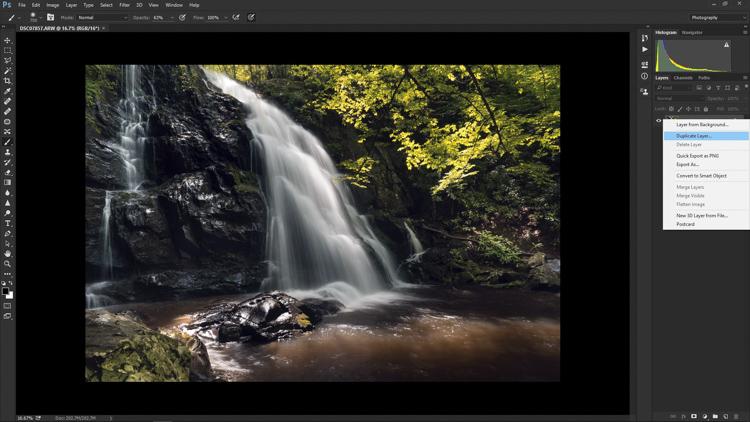
Step 1. Open your image in LR

Import your image into Adobe Lightroom (or the editing software of your choice). Open the Develop Module and go to the Detail Panel, then to Sharpening. Increase the sliders up to somewhere between 40 – 50. This is just a general number to start. You’ll have to decide what works best for your image (make sure to view it full size or 1:1). Then finish editing your photo (correcting the white balance, exposure, etc.).

Step 2. Open the image in Nik Efex

For the next step, you will need a piece of software called NIK Efex. You can download NIK Efex for free here. Look for the blue download button in the top-right corner.

NIK Software is a company that develops image editing tools for others like Adobe and Google. In fact, Google bought the company in 2012. Then they copied the best editing algorithms from NIK Efex and created the photo editing app Snapseed. Sadly, NIK Efex has not been updated since then. Most assume it will die a slow death, especially after Google announced the software is now free.

sharpen, photos, tips, photography, Lightroom, Nik Efex

Busan, South Korea: Adding a slight tilt-shift blur effect to the edges of your photo can accentuate the sharpened areas. © Pete DeMarco

Anyways, once you install Nik Efex, right click on your photo in the Lightroom Develop Module > Edit in Nik Output Sharpener, and choose; Edit a copy with Lightroom Adjustments. Your photo will then open in a new Nik Output Sharpener window.

Step 3. Adjust using the Nik filters

From the Nik Output Sharpener window, move the sliders until you get the look and sharpness you are after. For me, I usually leave the “Adaptive Sharpening” at 50%. Then I increase the “Local Contrast” and “Focus” sliders up to around 15-20%.

Google, Nik Efex, sharpen, photograph, output

The Nik Efex Output Sharpener interface.

Step 4. Save and head back to Lightroom

Click on “Save” and the final version of your image will import as a new file back in Lightroom. That’s it!

Here is a video from Nik showing how to use this filter:

Words of warning

Don’t sharpen too much. Know when to pump it up or turn it down. For instance, clouds are soft so you usually don’t want to apply a lot of sharpening to them. Nature scenes usually call for less sharpening. With architecture, some extra sharpening really makes it pop (try adding a little “Structure” sharpening to those). Sharpening people can be hit or miss. It all depends on what you’re trying to achieve.

sharp, photos, tips, photography, Lightroom, Nik Efex

Xingping, China: Selectively sharpening parts of your image, like the houses in the foreground of this photo, helps to lead the viewer’s eye. © Pete DeMarco

Watch out for noise. The more digital sharpening you apply, the greater the noise in your photo. Just zoom in on your photo to see it more clearly. You can apply some Noise Reduction in Lightroom if need be. I don’t like to use it much though because it softens the image. Some noise really doesn’t matter anyways, especially if you are sharing your photo as a smaller size online.

Make sure you’re using a good monitor. If you are viewing or editing your photos on an old monitor, it’s possible that you will not see much difference in sharpness. You can get the best results on a retina display or by printing your photos.

sharpen, photos, tips, photography, Lightroom, Nik Efex

Sipisopiso Waterfall, Indonesia: Transform your images by combining the 20/20 Technique with split toning. © Pete DeMarco

Share your work

Try the 20/20 Technique and share your photo in the comments below. I’d love to see what you do with it. And if you enjoyed this article, you might also like my previous article: How To Use Split Toning to Make Your Photos Stand Out.

googletag.cmd.push(function() {
tablet_slots.push( googletag.defineSlot( “/1005424/_dPSv4_tab-all-article-bottom_(300×250)”, [300, 250], “pb-ad-78623” ).addService( googletag.pubads() ) ); } );

googletag.cmd.push(function() {
mobile_slots.push( googletag.defineSlot( “/1005424/_dPSv4_mob-all-article-bottom_(300×250)”, [300, 250], “pb-ad-78158” ).addService( googletag.pubads() ) ); } );

The post How to Sharpen Your Photos using Lightroom and Nik Efex by Pete DeMarco appeared first on Digital Photography School.

Digital Photography School

 
Comments Off on How to Sharpen Your Photos using Lightroom and Nik Efex

Posted in Photography


Overview and Field Test of HoldFast Gear’s Money Maker Leather Camera Strap

02 Nov

The camera strap is one accessory that has definitely evolved along with the photography industry. While the default strap that comes with every camera might suit your basic shooting needs, there are plenty of options available with enhanced features (and style). Some help you shoot more ergonomically by better balancing heavy gear across your body, and some just give you the appearance of looking like a more polished professional. This product review is a camera strap that meets both ergonomic and stylistic needs of today’s photographers: the Money Maker leather camera strap by HoldFast Gear.

best leather camera strap Holdfast Moneymaker Review

About the MoneyMaker strap

The MoneyMaker is one of several camera strap products created by HoldFast Gear founder Matthew Swaggart. As a photographer himself, Swaggart created his line of camera straps to efficiently carry his own camera gear and pocket items, while also maintaining a nice aesthetic. Beginning with his very first product, the RuckStrap, Swaggart’s brand is perhaps best known for the MoneyMaker leather dual camera strap. Based in Tulsa, Oklahoma, every single HoldFast product is made in the USA, and Swaggart has been known to openly collaborate with customers to design custom straps.

best leather camera strap Holdfast Moneymaker Review

Benefits of Dual (or Double) Camera Straps

While dual (or double) camera straps are already very popular among photographers who carry multiple camera bodies, many of them such as the popular Black Rapid Double have designs that resemble tactical SWAT team gear. As a petite female photographer using these dual camera straps, I’m frequently met with raised eyebrows and asked if I’m getting ready for battle.

This is where the HoldFast MoneyMaker comes into play. Once I switched from Black Rapid to the MoneyMaker, I noticed even more raised eyebrows, but this time with the question, “Where did you get that beautiful camera strap?”

best leather camera strap Holdfast Moneymaker Review

MoneyMaker Basics

Crafted from high-grade leather and metal fasteners and buckles, the MoneyMaker is worn like suspenders, with a camera suspended from each end. The design balances the weight of the cameras so they both hang down by your hips, and you can even attach a third camera to the front by using an optional attachment leash. One of the best features, that is lacking from competitors such as BlackRapid, is the MoneyMaker’s inclusion of a Safety Catch clip that adds an extra layer of security to your camera.

best leather camera strap Holdfast Moneymaker Review

If you’ve ever used a Black Rapid camera strap, the mechanics of the MoneyMaker will be very similar.

  1. Start by first putting on the MoneyMaker Straps, then fasten the HoldFast screws to the tripod mount of your camera.
  2. Next, attach the circular split ring from the Safety Catch to your camera. This can be a bit tricky for Canon DSLRs.

best leather camera strap Holdfast Moneymaker Review

MoneyMaker Options and Variations

Textures

There are several standard variations you can choose from with the MoneyMaker to make it more comfortable and stylish. First, the MoneyMaker comes in several different materials including English Bridle, Water Buffalo, Great American Bison, and even Genuine Python. Prices and color options vary according to the material you choose, with Bridle Leather being the lowest priced, and Genuine Python costing the most.

best leather camera strap Holdfast Moneymaker Review

For those preferring camera straps not made of leather, HoldFast offers the Camera Swagg collection featuring the same MoneyMaker design crafted from high-grade nylon. Slightly lighter in weight and more affordable in price compared to leather options, this ultra-light option also comes in a wider array of colors including copper, navy, red, and black.

pratt_holdfast-gear-camera-strap_16

If you want a truly unique, one-of-a-kind camera strap, you can even opt for the hand tooled, hand painted leather MoneyMaker. Each is custom made to order and results in a beautiful, functional piece of art that embodies the art of leather craftsmanship.

Sizes

All of the leather straps can be ordered in the Original (1 1/2″ wide) or Skinny (1″ wide with 1 1/2 inch removable shoulder pads) version. They also come in Small, Medium, or Large, depending mainly on your height and build, with optional D-ring metal loops that can add extra attachment options. As a 5’2″ petite female, I opted for the Bridle Leather MoneyMaker in Chestnut color, size Small, and the Skinny version with no D-rings (they are’t recommended if you have long hair). It was a perfect fit!

best leather camera strap Holdfast Moneymaker Review

My Experience Shooting with the MoneyMaker

While the MoneyMaker is very popular among wedding photographers, I found it to be perfect for shooting concerts and corporate events as well. At concerts and music festivals, in particular, where leather camera straps aren’t yet prevalent, the MoneyMaker proved to be an excellent conversation starter among other photographers and concert-goers.

best leather camera strap Holdfast Moneymaker Review

When I shoot big concerts and events, I typically have the following camera setup:

  • (1) Canon 5D Mark III (B&H or Amazon pricing) with a 70-200mm f/2.8 attached  (B&H or Amazon pricing)
  • (1) Canon 6D (B&H or Amazon pricing) with a 24-70mm f/2.8 attached (B&H or Amazon pricing)
  • (1) 580 EXII Flash (B&H or Amazon pricing)
  • (1) Wallet with extra memory cards, batteries, and business cards

Using the MoneyMaker to carry my two camera bodies, I also used a lightweight ThinkTank belt pack to carry my flash and wallet. This combination helps balance the weight in my upper body and allows me to emerge with zero back and shoulder pain after shooting a multi-day music festival and two corporate conferences.

best leather camera strap Holdfast Moneymaker Review

best leather camera strap Holdfast Moneymaker Review

Things to Note

While my experience with the MoneyMaker was highly positive, there are a couple things about this camera strap system to note.

First, the use of all authentic leather makes the MoneyMaker heavy compared to the all-nylon systems of Black Rapid and other competitors. This isn’t a problem when you’re wearing and using the camera straps, but it can feel and appear somewhat intimidating right out of the box.

best leather camera strap Holdfast Moneymaker Review

Second, leather takes some time to break in, so the straps aren’t the softest and most supple at first. That doesn’t mean the straps aren’t comfortable, but you’ll need to use them frequently over time to get them to loosen up. Also, you’ll want to take extra care of the material if you go with a genuine leather camera strap option so it retains high quality.

Over to you

Do you have a certain camera strap that you prefer to use other than the default strap you automatically receive when you buy a camera? Is style as important as function when it comes to your ideal camera strap? What do you look for in a strap?

Please share in the comments below.

best leather camera strap Holdfast Moneymaker Review

googletag.cmd.push(function() {
tablet_slots.push( googletag.defineSlot( “/1005424/_dPSv4_tab-all-article-bottom_(300×250)”, [300, 250], “pb-ad-78623” ).addService( googletag.pubads() ) ); } );

googletag.cmd.push(function() {
mobile_slots.push( googletag.defineSlot( “/1005424/_dPSv4_mob-all-article-bottom_(300×250)”, [300, 250], “pb-ad-78158” ).addService( googletag.pubads() ) ); } );

The post Overview and Field Test of HoldFast Gear’s Money Maker Leather Camera Strap by Suzi Pratt appeared first on Digital Photography School.

Digital Photography School

 
Comments Off on Overview and Field Test of HoldFast Gear’s Money Maker Leather Camera Strap

Posted in Photography


How to Get Stunning Macro Photos with Your Mobile Phone

01 Nov

If you’ve ever scrolled through Instagram or Flickr and seen an incredible close-up photograph of a flower, insect, or even jewelry, you may have wondered how you can get similar photos, especially if you don’t have a camera. Thankfully, you don’t have to buy a DSLR or expensive macro lens to get these kinds of shots. All you need is a mobile phone, a simple accessory, and a bit of curiosity. In this article, I’ll go through some tips to help you get stunning macro photos using your mobile phone.

how-to-get-stunning-macro-photos-with-your-mobile-phone

Busy

Lenses

While some phones have a macro mode, the best way to get amazing macro photos with your phone is to invest in an inexpensive lens (or set of lenses) that work specifically with your device. I have an iPhone 5s and initially purchased the Olloclip 4-in-1 set that includes lenses for wide-angle, fisheye, macro 10x, and macro 15x.

I quickly discovered the 10x was my personal favorite since it best suited most of my subjects. So I also got the Olloclip Macro 3-in-1 that has lenses for 7x, 14x, and 21x, as well as a couple special hoods that diffuse the lighting and make getting a good shot a bit easier. Over time, I’ve discovered that the 7x lens is my go-to for nearly all of my macro photos since it can capture a large enough area while still getting lots of detail. You can experiment and use any of these magnifications to get the types of shots you are not able to take with your phone camera alone.

Prairie

Options

There are definitely other brands and magnifications available, but make sure that the lens you buy fits with your phone and won’t get in the way of taking photos. Note that most lenses slip over your phone so you cannot typically use them with a phone case. Olloclip has special cases with openings at the camera area for easy access, or you can go without a case.

You never know when you might come across something that will make for a good macro photo. Initially, I suggest taking your lenses with you (they fit in a pocket), especially when you go outside so that you can experiment with different subjects. A garden or another area with flowers or insects is a great place to try out your new lens. Or if it’s winter, use your lens as an excuse to buy a bouquet of flowers.

Garden

Lighting

As with all photography, lighting is critically important for taking good macro pictures. Daylight is probably the best and easiest to work with, but bright sunlight can make for tricky shadows. With macro photography, sometimes you can simply move your subject to decrease shadows by gently bending a flower stem or turning a leaf toward you.

Fullsun

You can also use your body to block bright sunlight or put a hand over your subject to reduce glare. You can play around with sunrise and sunset, and catch lighting in the background of your images. With macro lenses, the light will often turn into a lovely addition to your photos in the form of bokeh, or out-of-focus areas that make your pictures appear to glow.

Bokeh

Note: you can also add light. Read: How to Create Gorgeous Flower Images using a Flashlight and a Reflector

Focus and framing

With macro photos, there are endless ways to frame your subject, but you will be limited in the depth of field or the area of the photo that will remain in focus. You want the subject to remain (mostly) in focus, depending on your magnification. The larger the magnification, the smaller the area of exact focus in your pictures. This can lead to surprisingly beautiful photos which you might not expect to get from just your mobile phone.

Sunset

Sometimes your intended subject will be too large to fully capture, even with the smaller magnification (like the 7x lens), so you may have to focus on only a part of the subject like the center of the flower, or a few petals. This is the fun part of macro photography! You can shoot the subject from directly above, from the side, or even from below. Experiment with different angles for the same subject.

Center

Other notes

When taking macro photos, any movement is your enemy. Even slight movement while shooting will result in blurriness. You will need to remain very still, and do everything you can to keep your subject from moving. A tripod for your phone can help but isn’t necessary. Just find a position that’s comfortable, stay as still as possible, and steady your phone with two hands.

Sometimes, like on a breezy day, it’s impossible to keep your subject in one place. You can sometimes hold your subject still (as with a flower), but other times you can’t, as with shooting insect photos. One helpful tip for these situations is to use the burst mode on your phone’s camera which takes many shots in rapid succession. On an iPhone, you can hold down the camera button on the side of the phone or on-screen to shoot multiple photos very quickly. Android phones usually have a way to do this, too. If you don’t have built-in burst most, just take many photos while staying as still as possible. This is how I get most of my insect photos, patience and taking many shots. It’s easy to weed out the blurry photos later.

Beebalm

Editing – especially for Instagram users

Since many people who use their mobile phones for photography also use Instagram to share them, here are a couple extra tips for Instagram users.

1. You don’t need to use Instagram’s filters to make great photos.

Adjusting color or warmth slightly can make your photos look more like real life. In the image below, the only adjustment has been to crop the image.

Original

2. Turn up the Lux

This is the little light/dark option at the top of the screen when you are on the Filter or Edit pages in the Instagram app. Using this editing trick (try moving it to the right to 50 or even 100), you increase the intensity of your images. This makes the photo a little less washed out, which can help if you’re taking photos on a very bright day. In the image below, this is turned up slightly and adds more depth to the petals.

Lux

3. Sharpen your macro photos

Using Instagram’s own built-in sharpen edit, you can bring a bit more detail out of your macro photos. In the image below, this has been adjusted and brings out the detail in the center of the photo.

Sharpen

Conclusion – your turn

Do you have any tips for getting good macro shots with a mobile phone, or with other gear that doesn’t cost a lot of money? Leave your thoughts in the comments below, and feel free to share your own macro shots, too. I’d love to see your photos.

Ladybug

googletag.cmd.push(function() {
tablet_slots.push( googletag.defineSlot( “/1005424/_dPSv4_tab-all-article-bottom_(300×250)”, [300, 250], “pb-ad-78623” ).addService( googletag.pubads() ) ); } );

googletag.cmd.push(function() {
mobile_slots.push( googletag.defineSlot( “/1005424/_dPSv4_mob-all-article-bottom_(300×250)”, [300, 250], “pb-ad-78158” ).addService( googletag.pubads() ) ); } );

The post How to Get Stunning Macro Photos with Your Mobile Phone by Beth Ringsmuth Stolpman appeared first on Digital Photography School.

Digital Photography School

 
Comments Off on How to Get Stunning Macro Photos with Your Mobile Phone

Posted in Photography


REVIEW: Everyday Messenger Bag for Photographers… And Everyone Else!

01 Nov

Peak Design is familiar to any pro photographer and their latest Kickstarter project for their Everyday Bags that gathered over $ 6,000,000 of funding has made them famous far beyond the photography world. While their new backpack, tote, and sling from the Everyday series are conquering the world, I’ve got a chance to put my hands on Peak Design’s Every Messenger Continue Reading
The post REVIEW: Everyday Messenger Bag for Photographers… And Everyone Else! appeared first on Photodoto.


Photodoto

 
Comments Off on REVIEW: Everyday Messenger Bag for Photographers… And Everyone Else!

Posted in Photography