RSS
 

Archive for the ‘Photography’ Category

4 Beginner Tips for Doing Architecture Photography

20 Dec

The first thought you will want to steer clear of is that architecture means buildings, as it actually encompasses most man-made structures. Architectural photography involves capturing an image of a physical structure in an aesthetically pleasing way for your viewers. Here are a few tips to consider if you are just getting into this category of photography.

architecture photography tips

1. Gear Up

In any genre of photography, the right gear makes the difference and this also holds true for architectural photography.
If you want to get an entire structure or room into your frame or opt for a dramatic composition, pack a wide-angle lens in your bag.

architecture photography tips

Keep in mind that there will be times when even a wide angle lens may not be adequate to capture an enormous structure or a sense of place – here the knowledge of shooting panoramic images can come in handy.

architecture photography tips

On the flip side, you may not want to show everything and just focus on some interesting details. Pack a zoom lens to capture those details which help to convey the more ornate and interesting characteristics of architecture.

arnos-vale-entrance-architecture

architecture photography tips

Also, a telephoto lens allows shooting your subject from further away and can help a building’s walls and lines appear straighter (with less distortion).

2. Compose Yourself

Interesting architectural photography benefits from good composition. While distortion can add drama and lend to that artistic feel, buildings leaning backwards or looking too distorted can be less appealing. Always consider your angles and how you want to convey your subject.

architecture photography tips

Photographers who specialize in architectural photography find themselves correcting skews in the post-processing phase or invest in a tilt-shift lens to avoid distortion in the first place.

If you are starting out and want to play around with the dramatic feel, you can shoot from lower or higher angles to maximize the disfigurement. Remember while doing this can be interesting, it is recommended to reduce the effect so that it is not too distracting.

architecture photography tips
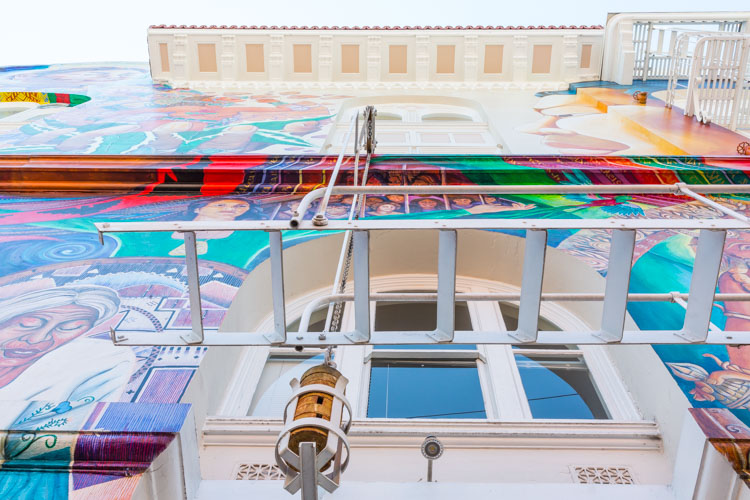
Move around and try different angles – shoot straight up, get closer or further away, go low to the ground or higher than the building if possible and see what enhances your architecture.

3. Lighting

A major challenge with architectural photography is that you have no control over the position and orientation of the subject (especially when it comes to buildings), so most times you have to make the most the available light.

architecture photography tips
One of the most interesting (and recommended) lighting options for buildings is when light falls on its side and front (side-front lighting). This angle of lighting provides a decent amount of illumination and can cast interesting shadows across the face of a building, which gives it a more three-dimensional look. So scout out your location at different times and see how the light and shadows change the look and feel of your image.

architecture photography tips
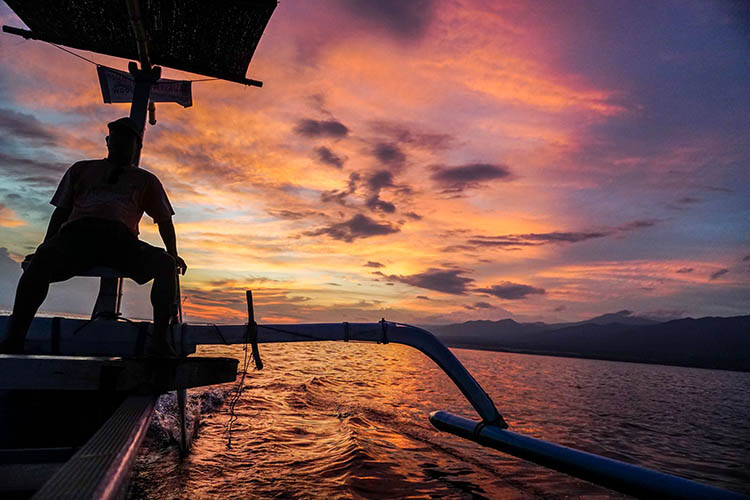
Be wary with strong back lighting when shooting buildings since it can create uniform dark surfaces, unless you are going for that silhouetted look. Again the time of day comes into play and if the structure itself has lights, it adds to the photo.

architecture photography tips
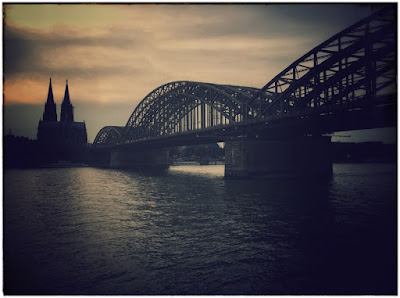
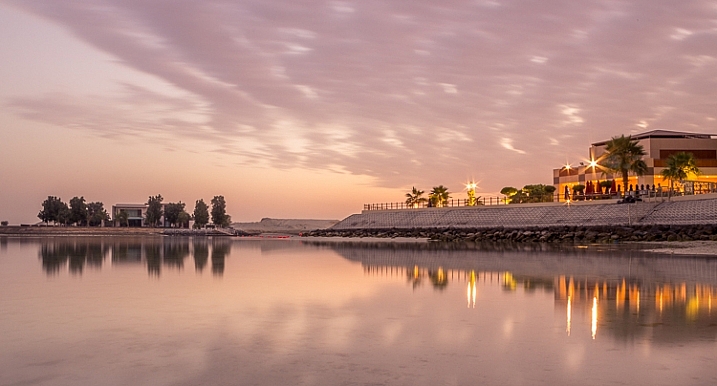
Alternatively, you can shoot at night. Many buildings and cities are designed with night time in mind. Even bridges, sculptures, and windmills can be interesting pieces to photograph after dark. Look for color and the way the buildings are lit and use a tripod!

4. Time Investments

As noted there is little control over large-scale lighting on existing grand architecture, so work with the light that is already there. You can do this effectively by investing time to determine what light is most flattering.

architecture photography tips nighttime

Does the building look better in the morning sun or at sunset? How about at night – is it lit or does it make a great silhouette? Are there interesting reflections in the daytime or a lot of texture to capture? Remember that different times of the day and varying weather conditions can change the mood of your architecture.

architecture photography tips light

Conclusion

Architectural photography is interesting and can be quite exciting. Give yourself time to see architecture from alternate angles, at different times of the day and study it long enough to know what you want your end result to be. Invest the time – it can be worth it.

What is your favorite type of architecture to shoot? Please share some of your shots and techniques with us in the comments below..

googletag.cmd.push(function() {
tablet_slots.push( googletag.defineSlot( “/1005424/_dPSv4_tab-all-article-bottom_(300×250)”, [300, 250], “pb-ad-78623” ).addService( googletag.pubads() ) ); } );

googletag.cmd.push(function() {
mobile_slots.push( googletag.defineSlot( “/1005424/_dPSv4_mob-all-article-bottom_(300×250)”, [300, 250], “pb-ad-78158” ).addService( googletag.pubads() ) ); } );

The post 4 Beginner Tips for Doing Architecture Photography by Nisha Ramroop appeared first on Digital Photography School.


Digital Photography School

 
Comments Off on 4 Beginner Tips for Doing Architecture Photography

Posted in Photography


Tips and Resources for Doing Android Phone Photography

20 Dec

Everywhere you go in the world today you will find someone, or many people, with their phones in the air capturing what they see. They all have a camera with them because they have their phones and can photograph everything they see. Phones have had cameras in them for quite a few years now, but slowly over the years they have improved and today many phones are amazing.

However, when you look around at phone photography there does seem to be an emphasis on iPhones and their cameras. While this article isn’t about which is better, it is important to remember that when it comes to phones Android has a much larger market share and therefore more people are using Android phones and their cameras.

Android phone photography tips

The camera user-interface for the Samsung Galaxy S7 Edge.

For this reason, this article is going to concentrate on Android photography, as there are many who seem to think that everything is made for the iPhone and if they don’t have one they are missing out. That really isn’t the case and since beginning research for this article so many things have come to light.

Phone

Not all phones are the same, nor are the cameras in them. If you are serious about using it for photography, then it would be good to do your research and get one that has a good camera.

While Samsung has had some bad press lately over the debacle with the release of the Note 7, it has to be remembered they are still good phones and the camera in the Galaxy S7 Edge is said to be the best still camera (inside a mobile phone) on the market. It is very clear and the photos have an amazing quality. This is the one I use.

Get one that matches your needs

The camera, as with most, has lots of different settings and modes so you can find one that will be suitable for the type of photography that you are shooting.

If your intention is to use your phone a lot for photography then be sure to select on that has what you need. Also, make sure that it is easy to get the photos from the phone to your computer. In today’s phone market, though, that is easier than ever.

Android phone photography tips

Some food photography with the Samsung Galaxy S7 camera.

Apps for photography

We live in a world of apps. There seem to be apps for everything. Whether they are good or not is another story.

If you go to the Google Play Store and search for cameras you will be given an overwhelming choice. You can get apps for image sharing, doing effects, making selfies, collages, and so on. The list seems endless. Just the popular results give you over 200 choices.

Android phone photography tips

Photos taken with the Instant Camera App.

Most of them are free, so if you are unsure which ones to use you can install them, try them out, and if you don’t like one then just uninstall it. The reviews and number of stars can be a good indicator, especially for ones that you have to pay for. If you have to spend money, then you want to make sure it is a good purchase. Having said, though, many of them don’t cost a lot.

I purchased Instant, which imitates the type of image you would get with a Polaroid camera. After playing around with it for a bit I discovered that there are lots of filters in the app to create many different effects. It is set up for you to shake or blow the image for it to be revealed, like the original Polaroids. Even though you know you don’t need to do it, it almost seems irresistible to not shake or blow on it.

Android phone photography tips Instant app Polaroid.

Taking photos with the Instant Camera App.

Retro camera app

Another one that you can try out is the Retro camera. It’s free and comes with several different cameras. If you press the camera icon in the app you can scroll through and find different ones. I quite like the Xoloroid one and the Fudgecan.  This app does not seem to have the filters, but you can choose to either take colour or black and white images with it.

Android phone photography tips retro camera

The Retro Camera app as it is taking an image.

They are great fun to play around with and I do suggest you try many apps. You might even fall in love with one.

Android phone photography tips retro app

Using the cameras within the Retro Camera app you can get a variety of results with each of the different options.

Lenses to attach to your phone

Lenses for mobile phones have been around for a while, but there does seem to be the impression that they are only for iPhones. I thought the same thing too. But, there are many lenses available for you to attach to your Android phone.

Lensbaby has lenses for the iPhone. When asked why didn’t they do them for Android the answer was simple. They did, but people didn’t seem interested and they didn’t sell. Perhaps the reason they didn’t sell well, was because people didn’t know about them. Well, now you do.

It is unknown how many lenses there are for Android, but apparently, a lot of the ones for iPhones can also be used on Androids. They use a magnetic ring that sticks over the top of the camera on the back of your phone. Some rings are better than others, and some don’t work very well.

Lensbaby

There are three phone lenses from Lensbaby and they all do different things. Along with them is an app for your phone that helps you take photos.

  • The Lensbaby LM-10 is a two-way lens, meaning you can turn it around and use the opposite end as well. The sweet spot is in the center for both ends, but one end will let you get closer than the other. It is a bit like reversing the lens on your camera.
  • LM-20 has a bigger sweet center spot and lets you take more normal images.
  • LM-30m this is very sharp in the middle and gives a crazy effect around it. Some say the photos are mind-bending, and can too strange. You do have to think about where you would use this lens. It isn’t suitable for everything.
Android phone photography tips Lensbaby LM-10

Lensbaby Lenses

The magnetic ring that sticks to the camera is great and doesn’t come off when you take the lenses off. However, it can be hard to focus using it and if you leave it on, the camera can move so it may need readjusting next time.

One thing that is quite good is that you can take it on and off a bit. I’ve done it up to four times and often leave it stuck to the back of the phone until I need it, and then move it over the camera when I’m ready to shoot.

Android phone photography tips lenses

Macro photo taken using the Lensbaby LM-10

Lensbaby app

As previously stated, Lensbaby also has a free app that you can download that lets you have a lot more control over the images. You can move the sweet spot around, or lock it to one position. Be aware that the LM-10 does reverse the image when you are taking it, so you need the app so you can reverse the view so it appears right way around.

Overall the lenses are great and are small enough to carry around in your pocket or bag when you’re out. I use them a lot for macro photography.

Android phone photography tips Lensbaby

Three images, the first taken with the Lensbaby LM-20, the second two taken using the LM-30 lens.

Photojojo

Another company that has produced lenses is Photojojo. You can buy all five or just a couple of them. They have standard lenses, but they also have some special effects ones as well. They are the only company that I saw with a polarizer, which could be very handy for some situations.

Here is a list of what they have:

  • Fisheye
  • Superfisheye
  • Polarizer
  • Wide/macro
  • Telephoto lens
Android phone photography tips Photojojo

Photojojo lenses

They are all good but the super fisheye is probably the one I’ve played with the most. It is very wide and distorted. You will get your hand holding the camera in the shots you take with this lens. The other lenses are much what you would expect.

The Photojojo lenses come with the magnetic rings to attach to your camera, but they don’t stick very well and when you remove the lens, the ring often comes off as well. If the lens is a bit heavy, like the super fisheye, when you angle the phone down it will just come off, along with the ring.

Android phone photography tips Photojojo lenses

Photos taken with the Photojojo lenses, the super fisheye.

I’ve been using the Lensbaby rings with the Photojojo lenses. Sometimes you have to move the lens or the ring around, but you can get them to work together if you are patient.

Photo editing apps

When you start taking photos with your phone the next progression is to start sharing them with the world on social media places like Facebook or Instagram. You could just post them straight up, use the filters that come with Instagram, or you can do some fine tuning of the images photo editor apps.

If you do a search for photo editors in the Play Store you will be given many choices. As it was for the cameras, you need to go through and see which ones you think will work for you and your purposes. We are going to look at two here.

Snapseed

Snapseed is a photo editor app that has been around for a while. It is free and fairly easy to use. While it does have some filters that you can just add to your image, it also has quite a few adjustments as well. Often, that is all you need to do, just do a few tweaks and the photo is ready to be saved.

As with any software that allows you to make changes to your images you always have to save it. On your phone, Snapseed will make a new gallery for your new saved edited images. You will end up with two of every image, the original and the edited version. When you are sharing, make sure to choose the one from the Snapseed gallery.

leannecole-androidphone-snapseed

The photo on the left was taken with my phone and then processed in Snapseed on the right.

Lightroom Mobile

To get Lightroom Mobile for your phone you have to be a subscriber to Adobe for Photoshop CC and Lightroom CC. It comes as part of the package. Once you are a subscriber you can download the app and sign in.

Get a 20% discount on Photography Plan using this link for dPS readers only! 

It doesn’t work like Lightroom CC on your computer, rather is very similar to other photo editing apps like Snapseed. It is easy to navigate around and figure out. Again, save everything you do and it will export it into a Lightroom gallery for you on your phone.

If you don’t subscribe, then don’t do it just to get this app. Snapseed is probably just as good, and if you don’t like it there are lots of other editing apps. Ask around and I am sure you will get a list for a lot of them. One thing that is great is the ability to install them, and if you don’t like, just uninstall.

Android photography round-up

Taking photos with your phone can very enjoyable and just because you have an Android that doesn’t mean you can’t take photos just as well as those with iPhones. Don’t let Apple users tell you your phone isn’t as good. Now you know that you can take good photos just as good, maybe even better.

In the end, it comes down to the person holding the camera (you) and how good you are. Have faith and share your photos. I would love to see them in the comments section below.

googletag.cmd.push(function() {
tablet_slots.push( googletag.defineSlot( “/1005424/_dPSv4_tab-all-article-bottom_(300×250)”, [300, 250], “pb-ad-78623” ).addService( googletag.pubads() ) ); } );

googletag.cmd.push(function() {
mobile_slots.push( googletag.defineSlot( “/1005424/_dPSv4_mob-all-article-bottom_(300×250)”, [300, 250], “pb-ad-78158” ).addService( googletag.pubads() ) ); } );

The post Tips and Resources for Doing Android Phone Photography by Leanne Cole appeared first on Digital Photography School.


Digital Photography School

 
Comments Off on Tips and Resources for Doing Android Phone Photography

Posted in Photography


DEAL: How to Create Captivating Photo Collages in Seconds

20 Dec

Welcome to Day 7 of the dPS 12 Days of Christmas Sale.

Today’s exclusive offer will help you make beautifully designed collages within Lightroom, in seconds.

Cole from Cole’s Classroom has an exclusive offering for dPS subscribers.

LR collage header

Normally $ 158, today it’s only $ 29. That’s 85% Off.

Creating photo collages has never been so simple, and without ever having to leave Lightroom, you save massive amount of time! These Drag & Drop Collage Templates are Perfect for…

Your Blog, Instagram, Facebook, Prints for Your House & More!

Cole has set up templates for all the popular formats, so you can create collages using:

  • 16 Instagram Unique Design Templates
  • 18 Blog or Website Collage Templates
  • 19 Facebook Cover Design Templates
  • 7 Facebook Ad Templates
  • 16 Print Design Layout Templates

That’s a total of 76 unique design layouts & collages!

Cole has also thrown in a bonus if you buy today so you can export your collages to your blog or Facebook in one click!

So don’t miss out, save $ 129 today.

Note: There’s a 100% no-questions asked money back guarantee on these templates so no risk to you. Buy it, try it and if isn’t what you expect Cole will be more than happy to provide you with a refund.

googletag.cmd.push(function() {
tablet_slots.push( googletag.defineSlot( “/1005424/_dPSv4_tab-all-article-bottom_(300×250)”, [300, 250], “pb-ad-78623” ).addService( googletag.pubads() ) ); } );

googletag.cmd.push(function() {
mobile_slots.push( googletag.defineSlot( “/1005424/_dPSv4_mob-all-article-bottom_(300×250)”, [300, 250], “pb-ad-78158” ).addService( googletag.pubads() ) ); } );

The post DEAL: How to Create Captivating Photo Collages in Seconds by Darren Rowse appeared first on Digital Photography School.


Digital Photography School
 
Comments Off on DEAL: How to Create Captivating Photo Collages in Seconds

Posted in Photography


4 Tips For Doing Eye-Catching Landscape Photography

20 Dec

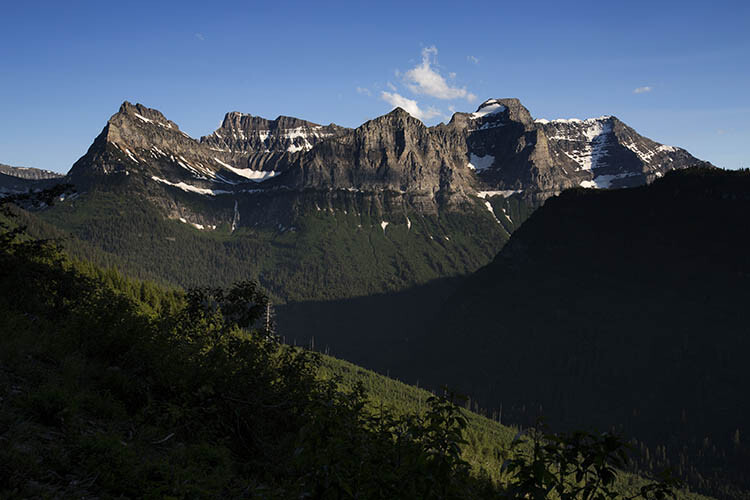
Landscape photography is everywhere today and for good reason – the world is beautiful! However, because landscape photography is so popular, it can be difficult for your photographs to grab the eyes of your desired viewers. While there’s no way to predict exactly what image will stand out in the crowd, you can use these four techniques to give your photography the edge when it comes time to grab some eyes.

Landscape Photography

#1. Define your vision

As a photographer you are not only taking a photograph, you are sharing a vision – your vision. It’s important to remember this concept every time you’re capturing an image. This is important because if you are aware of why you’re attracted to a scene, and why you want to share it with others, the easier it will be for your viewers to connect with what you saw.

This does not mean that you have to stick with the same definition of vision through every photograph you take. Instead, you should try to adapt and evolve your vision each time you go out to take photographs. Letting your experiences influence the choices you make in your photography will allow your photography to express your individuality as a person.

#2. Perspective

Landscape Photography

It’s easy to see a beautiful landscape and take a photograph of what you see, but that is often not enough to grab the eye of your viewer. After you’ve defined your vision for a specific photograph it’s time to answer some questions about the perspective you wish to convey.

Do you want to photograph from a low angle or from above the scene? Are you thinking of using a super wide-angle lens or would your scene be better suited for the compressed look of a telephoto? You can even begin to think about what type of post-production techniques you will use. Will it be HDR, black and white, vibrant and saturated, or muted?

Each photograph you take is going to be unique in its answers to these questions. There’s no one-answer-fits-all solution here, it’s just a matter of finding out what works and learning from experiences over time.

#3. Be purposeful in the choices you make

Landscape Photography

If you’re going to overexpose a photograph, have a reason why. If you’re going to post-process an image using the HDR technique be sure do it because it makes sense, not because you want it to be HDR. Making purposeful decisions in your photography will make every photograph you take better.

In regards to post-production in general, be sure to use it as a tool to elevate your great photographs to the next level, and not to save your misfires from the trashcan. Post-production is not what makes a photograph great, it can only enhance an already great photograph allowing it to stand out, above the crowd.

#4. Subject matter, light, and the basics

Landscape Photography

Finally, a boring landscape, shot in bad light, with the wrong techniques is not going to win any love from the peanut gallery so brush up on the basics first. Learning how to photograph in the right lighting conditions, how to properly use a tripod, and how to achieve the perfect exposure of your scene will allow you to create more eye-catching photographs.

What else?

Do you have some other tips for achieving eye-catching landscape photographs? Share them with us in the comments below!

googletag.cmd.push(function() {
tablet_slots.push( googletag.defineSlot( “/1005424/_dPSv4_tab-all-article-bottom_(300×250)”, [300, 250], “pb-ad-78623” ).addService( googletag.pubads() ) ); } );

googletag.cmd.push(function() {
mobile_slots.push( googletag.defineSlot( “/1005424/_dPSv4_mob-all-article-bottom_(300×250)”, [300, 250], “pb-ad-78158” ).addService( googletag.pubads() ) ); } );

The post 4 Tips For Doing Eye-Catching Landscape Photography by John Davenport appeared first on Digital Photography School.


Digital Photography School
 
Comments Off on 4 Tips For Doing Eye-Catching Landscape Photography

Posted in Photography


5 Tips for Shooting Glass to Enhance Your Street Photographs

20 Dec

As any studio photographer will tell you, photographing translucent and reflective objects like glass for product work can be an ordeal. It’s not impossible, but it sure isn’t easy, with plenty of variables and tricky reflections to minimize and avoid.

Naturally, you can imagine my foray into street photography was both a welcome change and a culture shock. Stepping out of the studio and into the realm of street photography, I went from an incredibly controlled environment to anything but! That’s when I began to view glass in a different light. Yes, the very bane of many a studio photographer’s existence can actually be a street photographer’s blessing.

Shooting through glass

Photographing through glass lends unique perspectives, like this photo of a gecko hanging upside down on a glass enclosure.

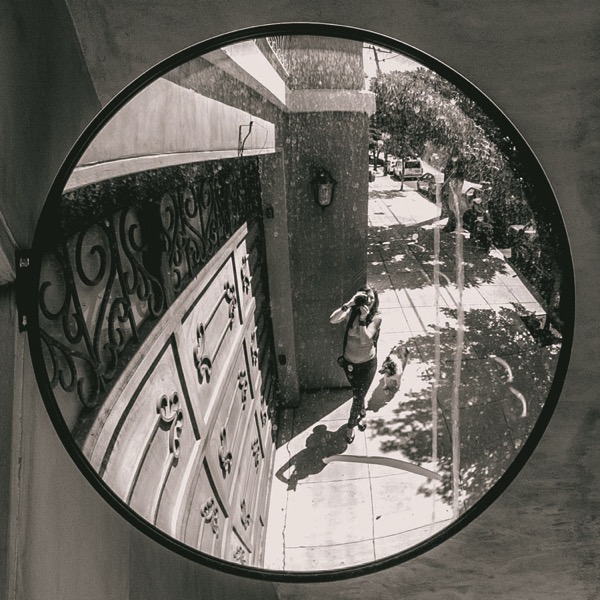
There aren’t many fixed objects that pose opportunities as readily to a street photographer as glass. As photographers, we all (mostly) use glass in our lenses as its inherent properties focus light and correct optical aberrations, allowing us to record sharp images. Glass surfaces in the street, however, present a variable and volatile abundance of opportunity. It can soften, reflect, highlight, disguise, frame, and transpose. Glass constantly changes with the environment yet it behaves as a physical barrier between the photographer and subject, allowing for a degree of ease between the two.

For the sake of this article, I’ve narrowed the benefits of glass to only the most obvious and dramatic – color, pattern and texture, reflections and depth, glass as a physical barrier, framing and finally, distortion and perspective. Okay, so I combined a few points, but you’ll soon see that glass isn’t just for selfies and reflections. Shooting through glass can actually change up your practice and give you a whole new perspective on street photography.

1 – Color

photography-through-glass05

The saturated red of the glass between the subject and I adds a sense of voyeurism.

Color greatly influences how a viewer reads an image. Shooting through colored glass is a great way of adding atmosphere to your photographs without post-production. Red glass, like that found on decals or nightclubs, suggests a sense of intimacy or passion, whereas blue could suggest an aquatic or daylight setting. Color eludes to the time of day a photograph was taken and a highly saturated image can also take on a surreal appearance, distancing the viewer from the photograph and creating a feeling of voyeurism. Try photographing subjects through tinted feature walls at late-night shopping malls or through the aged glass of old windows.

photography-through-glass06

2 – Pattern and texture

Using pattern and texture in a photograph explores how an image feels as well as how it looks. Textural images appeal to our sense of touch and it allows photographers to form greater connections with an audience. Photographing textured, semi-opaque and reinforced glass divides an image into smaller sections. This prompts a viewer to dissect an image in pieces to gain a greater understanding of the whole.

Different textures are great for images with organic and inorganic subject matter too. Creating juxtapositions that draw attention to subjects that are usually discounted creates engaging subject matter. Texture also affects the way light interacts with glass, softening the subject matter behind it and emphasizing form and shape over content.

photography-through-glass04

The rough, reinforced glass in the foreground of this image highlights the soft, organic form of the plant in the background.

photography-through-glass07

3 – Reflections and depth

Want to add context to a portrait but running low on legroom? Reflective glass windows are a great way to add depth to a photograph. Reflections in glass create a greater sense of atmosphere and give the viewer more information about an image. The characteristics of reflected light add tonal variety to a photograph, drawing a viewer in for a closer look. The closer you are to a glass surface, the less it will reflect, try stepping back or shifting the camera angle. Stepping back also has the added bonus of minimizing your chances of disturbing a potential subject.

photography-through-glass02

This photograph features a woman inspecting an eel in a shop window, but also includes a reflection of the street, adding depth and a greater sense of context.

4 – The invisible wall

In my time as a street photographer, I’ve noticed an interesting psychological phenomenon. When I’m photographing subjects through transparent panes of glass – people are much more at ease. Photographing people through a glass window or panel seems to add a degree of separation. My theory is that when there is a physical barrier between you and the subject, people subconsciously feel more comfortable. Glass reduces noise and light, creating a physical partition that lures people into a sense of security.

I find that when separated by a pane glass people are more likely to look directly into the lens too, allowing their curiosity to run a little freer behind a physical partition. Some of the most natural street portraits I have taken have been through glass partitions and windows. Train rides offer an excellent opportunity for unencumbered street photography.

photography-through-glass12

Taken from a train window, the subject and I had a bit of a stare-off before I took this shot.

Also taken from a train window, this child was watching my train leave the station. I was quick enough to place my camera against the glass to capture her looking back at me.

5 – Framing and perspective

Emphasizing the photographer’s point of view can lend a voyeuristic atmosphere to an image. Framing is the use of shapes in the environment to guide the viewer’s eye to a point in a photograph. Photographing through glass partitions or windows emphasizes that you have captured a moment without prompting a subject, like looking through a keyhole.

Viewing a subject photographed from above feels different to viewing a photograph taken from below. One great way to take advantage of glass’s transparent nature is to focus on various animals’ attraction to transparent surfaces. Inhabitants of urban landscapes such as lizards, frogs, spiders, snails and insects all negotiate glass surfaces with ease.

A photographer with a keen eye can exploit these opportunities to capture unique perspectives of our fellow city-dwellers. Like humans, animals seem more at ease with a wall of glass to separate them from potential predators, allowing you the chance to capture a more natural photograph.

photography-through-glass13
photography-through-glass11

photography-through-glass03

Distortion

Light traveling through glass often behaves in surprising and interesting ways. If light touches even the most minute curved surface it refracts, distorting anything viewed through it. Planning a shot in front of a pane of glass can yield fascinating and surrealistic photographs.

Try experimenting with different thicknesses of glass at varying degrees of curvature. Aquariums and aquatic displays are good for honing this technique because the water inside the glass containers amplifies the distortion. Holding variously shaped prisms over the front of your lens can yield some surprisingly effective and interesting results too.

photography-through-glass08

Conclusion

Transparent, opaque, tinted, laminated, textured, reinforced… there are endless varieties of glass and each presents a unique opportunity for you as a photographer. Although I’ve tried to list a few of the more dramatic ways to use glass in street photography, the potential is limitless and exciting.

photography-through-glass14

They key to taking great street photographs is to be open to opportunity and quick on the shutter button. With limited time to capitalize on the moments that are presented to you, focusing on surfaces like glass that can yield fascinating results quickly and is a fool-proof way of enhancing your craft.

googletag.cmd.push(function() {
tablet_slots.push( googletag.defineSlot( “/1005424/_dPSv4_tab-all-article-bottom_(300×250)”, [300, 250], “pb-ad-78623” ).addService( googletag.pubads() ) ); } );

googletag.cmd.push(function() {
mobile_slots.push( googletag.defineSlot( “/1005424/_dPSv4_mob-all-article-bottom_(300×250)”, [300, 250], “pb-ad-78158” ).addService( googletag.pubads() ) ); } );

The post 5 Tips for Shooting Glass to Enhance Your Street Photographs by Megan Kennedy appeared first on Digital Photography School.


Digital Photography School
 
Comments Off on 5 Tips for Shooting Glass to Enhance Your Street Photographs

Posted in Photography


How to do Tilt-Shift Portraits

14 Dec

Photography gives you an awesome opportunity to present to the world your vision of it rather than its absolute reality. At their best, photos can evoke the feel of a moment without being an exact representation of it. Think of the last time you fell in love. Most likely, your memories aren’t clear, linear progressions, but rather a series of moments, blurred together by a high-dose cocktail of dopamine and romance. Life can be a blur and feel so good. For me, that’s where tilt-shift portraits come in.

tilt-shift-photography-8-of-1-13

tilt-shift-photography-8-of-1-6

Tilt-shift lenses are most commonly used for architectural purposes, meant to fix converging verticals when shooting tall buildings in order to reduce distortion in the final photo. You’ve also probably seen the miniaturized versions of city streets shot from above where even a city as grand as New York can seem positively dainty. Tilt-shift portraiture however, involves carefully selecting focus and letting anything that isn’t the subject of your photo fade into obscurity. This allows the viewer to be swept into your alternative realty. In my view, it’s a portrait that can be a truer representation to how a moment actually felt.

Tilt-shift portraiture however, involves carefully selecting focus and letting anything that isn’t the subject of your photo fade into obscurity. This allows the viewer to be swept into your alternative realty. In my view, it’s a portrait that can be a truer representation to how a moment actually felt.

Tilt-shift portraits = high risk, high reward

tilt-shift-photography-4-of-1

Most of my tilt-shift portraits are taken wide-open (using the largest aperture setting) with the lenses shifted as far as possible. This means that my focus point is tiny and the chances of me missing it are huge. This means that if I want the eyes in focus, I have to slow down, concentrate, play with my focus ring and maybe take a few shots just in case.

When the focus is even just a little bit off, you lose the ability to the guide the viewer. That said, when you do nail the focus, the subject jumps out of the frame surrounded by bokeh.

Note: if you do not own a tilt-shift lens, look into renting one from a local camera store.

Wait, what’s a tilt-shift lens?

tilt-shift-photography-8-of-1-10

The tilt-shift is a specialty lens that allows the photographer to bend and distort light by tilting and/or shifting the lens itself.

Shifting implies that the lens actually shifts its position (and the view through it) either up or down, left or right. This can minimize distortion especially with wider focal lengths. Tilting is when the front lens elements literally tilt (again, up or down, left or right) to get selective focus in a given plane.

tilt-shift-photography-8-of-1-12

So how do you use this lens to take an interesting portrait? Here is a step by step guide:

Step #1 – Visualize it

tilt-shift-photography-8-of-1-11

Because of the precision and manual focus, you need to visualize your shot before you take it. You need to know exactly what story you want to tell. Do you want the viewer to zoom in to the subject’s eyes or perhaps your shot is about the flow of her dress or how he’s placed his hand. Most of the time, with tilt-shift, you gotta pick one thing to tell your story. What do you want that to be?

Step #2 – Shift it

tilt-shift-photography-8-of-1-8

Tilt-shift lenses can become rather mundane without a shift. Sure, you can use your tilt-shift to take shots straight on with neither tilt, nor shift, but where’s the fun in that? I recommend shifting your lenses before framing your shot as your sweet spot on your lens will help determine your framing. With that, I should mention…

Step #3 – Know your lens’s sweet spot

tilt-shift-photography-8-of-1

Every tilt-shift has parts of the lens that it captures better when tilted or shifted. Know where to place the subject in your frame to get it in focus.

Step #4 – Manual focus

tilt-shift-photography-8-of-1-5

If you’re used to relying on autofocus, switching to manual focus can feel like jumping into the driver’s seat of a stick shift car after years of only using automatic. You’ll be a rusty at first and are sure to stall out once or twice, but soon enough, you’ll get the hang of it.

On most dSLRs you have two options to view your focus. The first is right through the viewfinder, just make sure that the dial (the diopter) next to the viewfinder is set to match whatever your eye needs or you will have a hard time getting focus pinned down. The second is through Live View Mode on the back of your LCD.

At times, Live View is a better option as it provides a larger screen but also it allows you to zoom in to your precise focus point and make sure you’re right on.

Step #5 – Take a deep breath

tilt-shift-photography-8-of-1-9

Tilt-shifts are not quick and easy lenses to use. You need to spend time to set up your shot. Relish in its slowness. Just before taking the shot, take a deep breath. Not only will it help steady your shot, but you’ll feel darn good after clicking that shutter.

Step #6 – There’s more to life than just faces

tilt-shift-photography-8-of-1-2

Portrait artists can get overly fixated on eyes. Yes, eyes are incredibly satisfying and captivating things to focus on, but so are fabrics, texture, movement, etc. In life, all of these things at times can be the sole focus of our attention and that story needs to be told too.

tilt-shift-photography-3-of-1

Conclusion

Tilt-shift lenses make it so we can’t get anxious about precision but rather let the feel of photograph take center stage. They can open up a whole new way of viewing not only the world but your photographic style. Now go forth and play!

googletag.cmd.push(function() {
tablet_slots.push( googletag.defineSlot( “/1005424/_dPSv4_tab-all-article-bottom_(300×250)”, [300, 250], “pb-ad-78623” ).addService( googletag.pubads() ) ); } );

googletag.cmd.push(function() {
mobile_slots.push( googletag.defineSlot( “/1005424/_dPSv4_mob-all-article-bottom_(300×250)”, [300, 250], “pb-ad-78158” ).addService( googletag.pubads() ) ); } );

The post How to do Tilt-Shift Portraits by Laura Sullivan appeared first on Digital Photography School.


Digital Photography School
 
Comments Off on How to do Tilt-Shift Portraits

Posted in Photography


20 Airborne Images of Objects in Flight

14 Dec

There are many things that take to the air in flight. Humans need a device like a plane or glider, whereas other creatures take off on their own steam.

Flying things can be hard to photograph. Photographers have to make choices to freeze their motion or create a blur. Let’s see how these 20 photographers decided to photograph these flying objects.

Aleksander Markin. ????????? ??????

By Aleksander Markin. ????????? ??????

Jim McCulloch

By Jim McCulloch

Gianluca Micheletti

By Gianluca Micheletti

Steve Corey

By Steve Corey

Victoria Nevland

By Victoria Nevland

Howard Ignatius

By Howard Ignatius

RejeanJ Deschenes

By RejeanJ Deschenes

Steve Corey

By Steve Corey

Aleksander Markin. ????????? ??????

By Aleksander Markin. ????????? ??????

Darlene Hildebrandt

By Darlene Hildebrandt

Cat Burton

By Cat Burton

Stan Lupo

By Stan Lupo

Andy Morffew

By Andy Morffew

Jblaha

By jblaha

Michael Jefferies

By Michael Jefferies

Nicolas Raymond

By Nicolas Raymond

Farrukh

By Farrukh

Pat Gaines

By Pat Gaines

ERIC SALARD

By ERIC SALARD

Darkday

By darkday

googletag.cmd.push(function() {
tablet_slots.push( googletag.defineSlot( “/1005424/_dPSv4_tab-all-article-bottom_(300×250)”, [300, 250], “pb-ad-78623” ).addService( googletag.pubads() ) ); } );

googletag.cmd.push(function() {
mobile_slots.push( googletag.defineSlot( “/1005424/_dPSv4_mob-all-article-bottom_(300×250)”, [300, 250], “pb-ad-78158” ).addService( googletag.pubads() ) ); } );

The post 20 Airborne Images of Objects in Flight by Darlene Hildebrandt appeared first on Digital Photography School.


Digital Photography School
 
Comments Off on 20 Airborne Images of Objects in Flight

Posted in Photography


Weekly Photography Challenge – Flight

14 Dec

Things that fly or defy gravity have always fascinated humans. These 20 images of airborne objects capture flight perfectly.

Susanne Nilsson

By Susanne Nilsson

Weekly Photography Challenge – Flight

What sorts of subjects can you think of that take flight, or glide through the air? How about these:

  • Birds
  • Planes
  • Kites
  • Gliders
  • Flying squirrels
  • Paper airplanes
  • Bugs, butterflies, dragonflies, etc.
  • Balloons
  • Hot air balloons
  • Ski jumpers?
  • Skate boarders?

Can you think of any others?

Simon Plestenjak

By Simon Plestenjak

William Warby

By William Warby

Chris Harrelson

By Chris Harrelson

Heather

By Heather

Share your images below:

Simply upload your shot into the comment field (look for the little camera icon in the Disqus comments section) and they’ll get embedded for us all to see or if you’d prefer, upload them to your favorite photo-sharing site and leave the link to them. Show me your best images in this week’s challenge. Sometimes it takes a while for an image to appear so be patient and try not to post the same image twice.

Share in the dPS Facebook Group

You can also share your images on the dPS Facebook group as the challenge is posted there each week as well.

googletag.cmd.push(function() {
tablet_slots.push( googletag.defineSlot( “/1005424/_dPSv4_tab-all-article-bottom_(300×250)”, [300, 250], “pb-ad-78623” ).addService( googletag.pubads() ) ); } );

googletag.cmd.push(function() {
mobile_slots.push( googletag.defineSlot( “/1005424/_dPSv4_mob-all-article-bottom_(300×250)”, [300, 250], “pb-ad-78158” ).addService( googletag.pubads() ) ); } );

The post Weekly Photography Challenge – Flight by Darlene Hildebrandt appeared first on Digital Photography School.


Digital Photography School
 
Comments Off on Weekly Photography Challenge – Flight

Posted in Photography


The Five Most Essential Camera Settings and How to Use Them

14 Dec

Modern cameras, from phones to high-end DSLRs, are designed to make decisions for us. And for the most part, they do a pretty darn good job of it. Slap your SLR into AUTO mode and more often than not you’ll get images that are sharp with decent exposure. If you are just looking to document your world, then go for it, snap away. The drawback is that images taken in AUTO tend to look similar to one another, with a uniform depth of field and exposure. If you want to move beyond the automatic camera settings, you need to understand your camera, how to use it, and most importantly, what impact changing those settings will have on your final image. Here are five of the most essential camera settings, what they mean, and how they impact the photograph.

Five Most Essential Camera Settings

ISO

Five Most Essential Camera Settings

This night image required I use a fast shutter speed to retain detail in the flame, so I had to use a high ISO (3200). In the next detail shot, you can see the noise, in the original RAW file. (By the way, this image shows what happens when you free methane from a bubble in the ice of a frozen pond in the boreal forest, and then set it alight.)

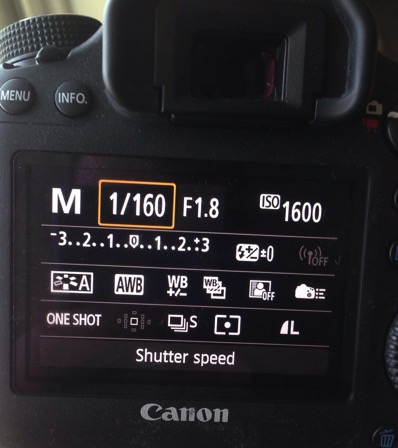
First, the acronym ISO is terrible, because it’s basically meaningless in terms of photography. It stands for “International Standards Organization” a European non-governmental organization that makes sure industries apply the same standards. In the case of photography, they want to make sure that an 800 ISO on a Canon is the same as on a Nikon, Sony or Fuji. If that standard didn’t exist, then settings wouldn’t be applicable across camera brands. So if I set my Canon to make an image at 1/100th sec at f/2.8 and ISO 400, and you set your Nikon to the same setting, we wouldn’t get the same exposure. Thankfully all the major manufacturers do subscribe to the ISO standards.

Yeah, yeah, but what is ISO? It is the measure of the sensitivity of your camera’s digital sensor to light. The lower the number the lower the sensitivity, the higher the number the more sensitive the sensor becomes. If you are shooting in a low light situation, say a poorly lit room or a dusky evening, an ISO setting of 100 will require that more light reaches the sensor than if you were to use a setting of 400, 800, or 1600.

Five Most Essential Camera Settings ISO

Note the noise in the detail of the person’s clothing and in other shadowed areas.

Drawbacks of high ISO

So why not shoot at high ISOs all the time? Two reasons: 1. High ISOs often create digital noise on the image, (though camera sensors are getting better and better) and 2. Sometimes you may want to force a slow shutter speed, in which case you want low sensitivity to light. This may be the case when you are trying to capture blurred motion such as water, wind or to create pleasing blurs in sports photography.

  1. High ISOs often create digital noise in the image, (though camera sensors are getting better and better)
  2. Sometimes you may want to force a slow shutter speed, in which case you want low sensitivity to light. This may be the case when you are trying to capture blurred motion such as water, wind, or to create pleasing blurs in sports photography.

In short, ISO is one of the three tools you have at your disposal to manipulate your exposure.

Shutter Speed

The length of time your camera’s sensor is exposed to light is the shutter speed. Many cameras have a mechanical shutter that snaps open and closed allowing light to reach the sensor, others use a digital shutter that simply turns on the sensor for the set period of time before switching it off again. Shutter speed has a huge impact on the final image. A long shutter speed will create blur in moving subjects. As a landscape photographer, I use long shutter speeds often to blur water, expose starlight, or capture wind motion.

Five Most Essential Camera Settings

For this image, I used a 0.5 sec shutter speed to blur the waves somewhat, but retain detail.

Five Most Essential Camera Settings shutter speed

A 30-second shutter speed blurred the Yukon River in this image, into a mirror-like surface.

Short or fast shutter speeds have the effect of stopping motion. Use a shutter speed of 1/2000th of a second and the motion of a runner or a cyclist will be stopped dead.

Five Most Essential Camera Settings shutter speed

This image of a bike passing used a shutter speed of 1/500th of a second. It was just enough to be sharp overall while retaining some sense of motion in the spinning tire.

Your use of the shutter has to be thoughtful to create a good image. Think about the final image you want to create. Does it have blurred components or is it all sharp? Do you want to stop, or convey the sense of motion? Consider, experiment, then decide on your shutter speed.

Aperture

Five Most Essential Camera Settings aperture

An f-stop of f/11 at 17mm was sufficient to make the entire image, from inches in front of the lens to the cliffs in the distance, sharp.

The aperture, or f-stop, may be the most confusing aspect of photography for many photographers because it affects images in unexpected ways. Essentially, the aperture is how big the hole in the lens is. The smaller the hole, the less light is allowed in, the larger it is, the more light gets through. What often confuses people is the numbering system: the smaller the number, the larger the hole. So f/2.8 is a larger opening than f/4, f/5.6, f/8, f/11 and so on. Lenses with a wide maximum aperture (a small number like f/2) are considered “fast” meaning they are capable of allowing in more light.

But it’s not just about light, and how wide a lens can open. The aperture also affects image sharpness. Most lenses (dare I say all?) are sharper, a few stops down (called the sweet spot). A lens with a maximum aperture of f/2.8 will create a sharper image at f/8, then at f/2.8. The higher quality the lens, the less this matters, but it is noticeable on most lenses.

Five Most Essential Camera Settings aperture

A very shallow depth of field in this image brings the grouse hiding in the brush into focus while the surrounding chaos of branches blurs into a haze.

Depth of Field and application

Next, the aperture also controls the Depth of Field. The DoF is the amount of the image from close to far that is in focus. A lens, when set wide open, say f/2.8, will have less DoF than when the same lens is set to f/11.

Like shutter speed, your use of aperture should be purposeful. Have a landscape image that you want in focus from front to back? You better select a high f-stop (like f/11). How about a portrait where you want a clean, soft background but a tack-sharp eye? Then use a small f-stop (like f/2.8 or f/4) and watch that focus point.

The aperture has a direct impact on shutter speed. A large f-stop will require you to use a longer shutter speed to attain proper exposure. Just as lower f-stop, will allow you to use a fast shutter speed. These two are completely interrelated, there is no escaping it, so you NEED a strong understanding of both.

White Balance

White balance, like ISO, relates to the sensor, but in this case, it has to do with the color of the light, rather than its brightness.

Different light sources have different color tones. Our eyes often don’t detect these differences, but you can bet your camera will. Have you ever seen a photo of a home interior lit by soft-white bulbs, but including a window? Usually, the interior of the room looks natural while the light outdoors looks artificially blue. That’s white balance. The camera (or photographer) decided to use the interior light (the warm-toned bulbs) as the natural color, but then the natural light

The camera (or photographer) decided to use the interior light (the warm-toned bulbs) as the neutral color, but then the natural light outdoors appears blue. When the white balance is set wrong, the colors are off. They look too yellow, blue, or orange. When it’s correct, everything looks natural, or as our eyes detect it.

Five Most Essential Camera Settings white balance

Here is the camera’s AUTO selection for the White Balance. The colors of the aurora borealis appear too purple and yellow.

Five Most Essential Camera Settings white balance

In this version, using the same post-processing for exposure, I adjusted the white balance further into the blue range, making the colors of the lights appear more natural and pleasing.

What about Auto White Balance?

I’ve got a confession to make here. I almost always use the AUTO white balance setting on my cameras. Cameras are pretty darn good at assessing color tones and deciding on the appropriate white balance. When it does get it wrong, I can check the image on the LCD and make the correction for the next shot. Second, I shoot exclusively in RAW format which means that I can make adjustments to the white balance in the computer. I trust the image on my computer screen more than I trust the tiny LCD on the back of my camera.

That said, there are times to adjust the camera’s white balance settings. The first is if you are shooting JPEGs. That image format will not allow you to effectively adjust white balance later, so it’s got to be right in the camera. The second is when stacking images either for high contrast scenes or for panoramas. When stacking images, slight changes in color tones will make combining them into HDR or panoramas much more difficult or impossible. You can also use White Balance if you purposefully want to make an image look cool or warm, or if you are using artificial lights. (Now THAT subject warrants an article of its own…)

Be mindful of your White Balance, know what it does and how it will impact your image, then decide how, or whether to use it.

Exposure Compensation

ak-homer-109266-sunset-139

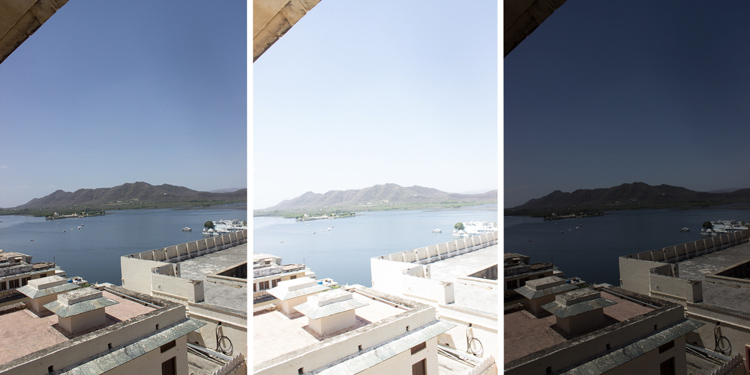
Here I used Exposure Compensation to make sure that the image was bright enough to show details in the foreground while assuring that the bright sunset in the background was not blown out.

These two images show how useful Exposure compensation can be. The image below was made in bright sunlight, but a purposeful underexposure of three stops reduced the mountains to black but retained detail in the sky, making a surreal image.

Know your camera well

Exposure Compensation is a tool you should know how to adjust without even lowering the camera from your eye. Exposure compensation allows you to very quickly, add or subtract light from an image. Too dark? Use Exposure Compensation to add a stop of light. Too bright? Exposure Compensation can quickly reduce the exposure. How it is set depends on your camera settings.

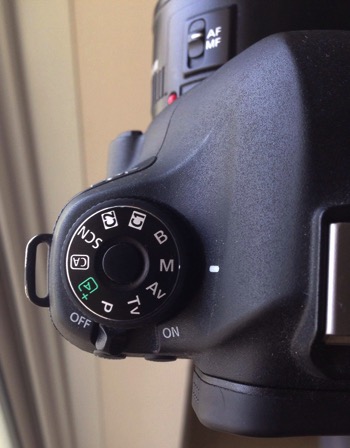
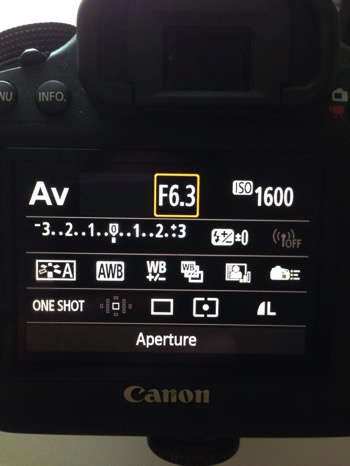
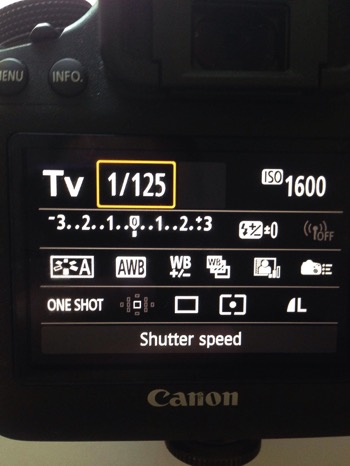
I use Aperture Priority mode most often on my camera. That means I select the aperture, and the camera decides the shutter speed. If I adjust my Exposure Compensation, the camera will retain my chosen aperture and simply adjust shutter speed up or down to get the desired exposure. If I were to use Shutter Priority, as I sometimes do, the camera will adjust the aperture. In AUTO the camera will make that decision for me.

I use Exposure compensation constantly. It is my go-to method for fine-tuning my exposure in the field. On my Canon DSLR, I can adjust it with a simple twitch of my thumb on the rear wheel of the camera. Other cameras have their Exposure Compensation controls on the front, a wheel near the shutter button, or some other system of buttons on the back. Know how your camera works, and learn to adjust this quickly and efficiently. Understanding this important tool will mean you don’t miss your chance to get the shot right when you are working in the field or studio.

Conclusion

These five camera settings are the most important things to understand on your camera. Experiment with them so you know how they affect your final image, and know how to change each quickly and without fuss. Once you do, you’ll have taken charge of your photography, and be on your way to creating purposeful images.

If you have comments or questions please share post them below.

googletag.cmd.push(function() {
tablet_slots.push( googletag.defineSlot( “/1005424/_dPSv4_tab-all-article-bottom_(300×250)”, [300, 250], “pb-ad-78623” ).addService( googletag.pubads() ) ); } );

googletag.cmd.push(function() {
mobile_slots.push( googletag.defineSlot( “/1005424/_dPSv4_mob-all-article-bottom_(300×250)”, [300, 250], “pb-ad-78158” ).addService( googletag.pubads() ) ); } );

The post The Five Most Essential Camera Settings and How to Use Them by David Shaw appeared first on Digital Photography School.


Digital Photography School
 
Comments Off on The Five Most Essential Camera Settings and How to Use Them

Posted in Photography


3 Photoshop Elements Tutorials to Help You Correct and Enhance Your Images

14 Dec

We’ve noticed on our current reader survey (if you haven’t filled it out already, please do so here) that many of you are using Photoshop Elements. So I rounded up some video tutorials to help you use Elements (15 or any older version) to help you make corrections and enhancements to your images.

#1 How to brighten and improve a dull photo

George Peirson from How To Gurus walks you through several steps you can apply to make a dull photo more exciting. He covers things like working with adjustment layers so you can work non-destructively, adding more color in certain areas, layer blending modes, and more.

#2 How to remove people using the clone stamp tool

Sometimes you can get unwanted people in your shots. In this video you can learn how to remove them using just the clone stamp tool in Photoshop Elements.

#3 How to create a motion blur effect using Elements

In this final video learn the steps to add motion to an image using different blur effects in Photoshop Elements. The example used is a race car that was frozen with a fast shutter speed.

If you use Photoshop Elements I hope these videos have helped you out, and you have learned a couple new things. Many things that you can do in Photoshop, can also be done in Elements. Some of the tools and menus are a bit different but many of the features are similar. Elements also offers a “guided” user experience to help you walk through doing some common things.

If you want to learn more try the Adobe website where they have more tutorials and articles on Elements.

For more Photoshop help try these dPS articles:

  • How to Add a Sun Flare to Your Images Using Photoshop
  • How to do Non-Destructive Editing in Photoshop
  • An Introduction to Photoshop Layers Possibilities and Properties
  • Tips for Using the Blur Filters in Photoshop
  • 2 Simple Methods for Adding Color to Your Images Using Photoshop
  • A Guide to Black and White Conversion in Photoshop

googletag.cmd.push(function() {
tablet_slots.push( googletag.defineSlot( “/1005424/_dPSv4_tab-all-article-bottom_(300×250)”, [300, 250], “pb-ad-78623” ).addService( googletag.pubads() ) ); } );

googletag.cmd.push(function() {
mobile_slots.push( googletag.defineSlot( “/1005424/_dPSv4_mob-all-article-bottom_(300×250)”, [300, 250], “pb-ad-78158” ).addService( googletag.pubads() ) ); } );

The post 3 Photoshop Elements Tutorials to Help You Correct and Enhance Your Images by Darlene Hildebrandt appeared first on Digital Photography School.


Digital Photography School

 
Comments Off on 3 Photoshop Elements Tutorials to Help You Correct and Enhance Your Images

Posted in Photography