RSS
 

Archive for the ‘Photography’ Category

50 Sweet Valentine Gifts for Photographers and Their Sweethearts

26 Jan

The season for love is here but finding a perfect gift for your lover isn’t easy. Whether you’re an amateur photographer or a real pro, you can give your sweetheart a photography Valentines gift that would be a winner for sure. I know you want to make this Valentine’s day unforgettable. Here I showcase 50 amazingly creative and romantic Valentine Continue Reading

The post 50 Sweet Valentine Gifts for Photographers and Their Sweethearts appeared first on Photodoto.


Photodoto

 
Comments Off on 50 Sweet Valentine Gifts for Photographers and Their Sweethearts

Posted in Photography


How to Make a Low Key Portrait Step by Step

22 Jan

What does low key mean?

In a world where the crisp, clean, high key shot dominates, it’s great to see a return to the low key portrait. In comparison to the high key image, where most of the tones are above (lighter than) 50% grey, the low key portrait has tones that are mostly under (darker than) 50%.

You’re replacing the light, airy feel with a more moody, dramatic look. Looking at your histogram, most of the information is bunched on the left-hand side. That’s not to say that you’re underexposing the subject to get this look. You still need correct exposure on the face. A lot of action movies or thrillers have posters with a low key feel. Think drama and you’re in the ballpark for how a low key portrait will look.

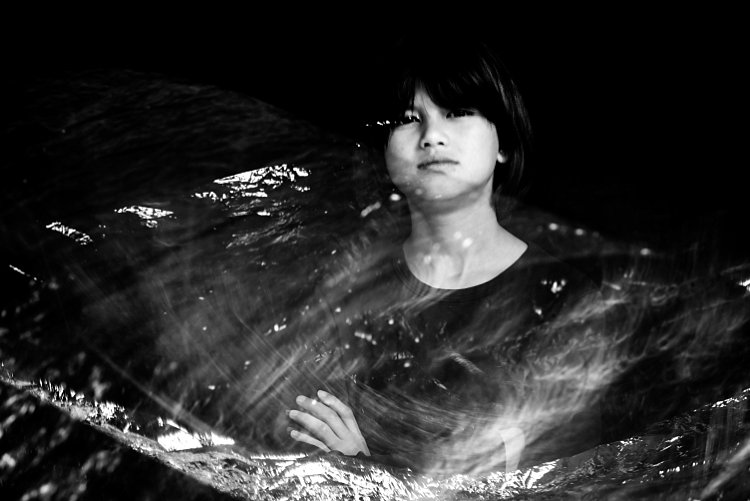
Low key portrait examples 01

The background and lighting

Your background needs to be dark, usually dark grey or black, and the tone of the clothing will be of a darker tone. They don’t need to be black strictly speaking.

You should set your lighting to create drama. Take your cues from film noir. The photos don’t need to be in black and white, though. However, you may find that the absence of color in low key images can lend itself to this look. As well as choosing dark clothes, avoid ones with patterns, as this will draw attention away from the face.

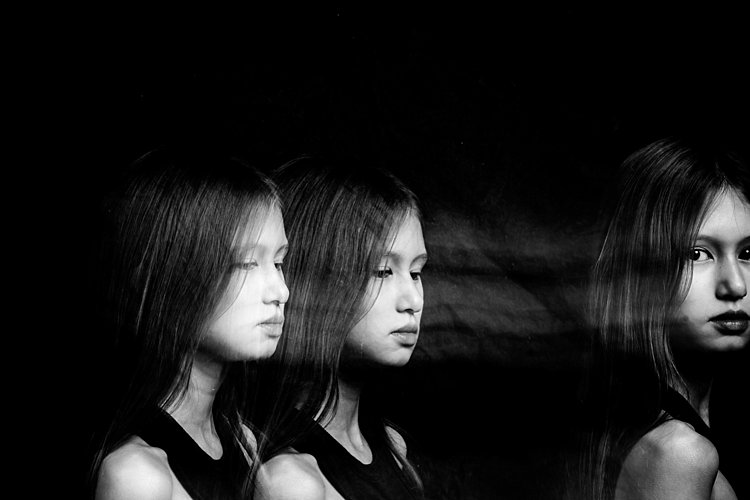
Low key portrait examples 02

Lighting a low key portrait

You don’t need to use artificial lighting to get a low key portrait. You could use natural light through a window. To get control, you need to close the curtains down to a tiny slit of light. Then, with the room lights off, place your subject in the light and expose for their face.

The rest of the room will go dark for a naturally lit low key portrait. If you’re in a corner room with a window on each side, you could even do this trick where the second window acts as a backlight. Just narrow the slit in the curtains to control the light for this effect (see below).

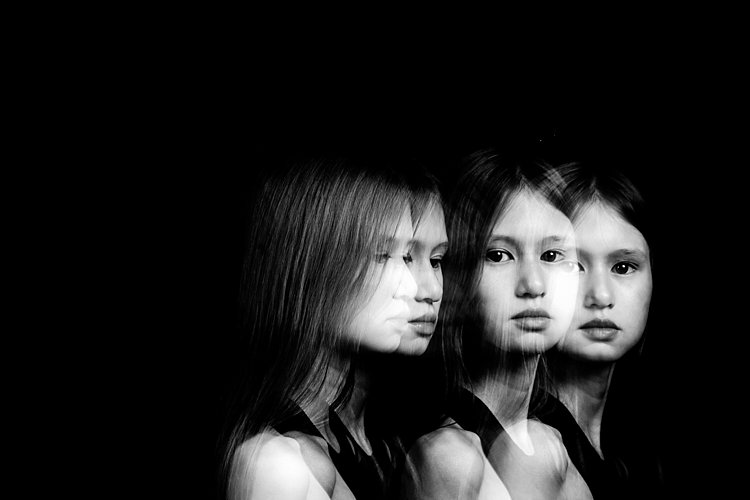
Low key portrait examples 03

You can also have this control in the studio, so let’s set up and refine a studio portrait.

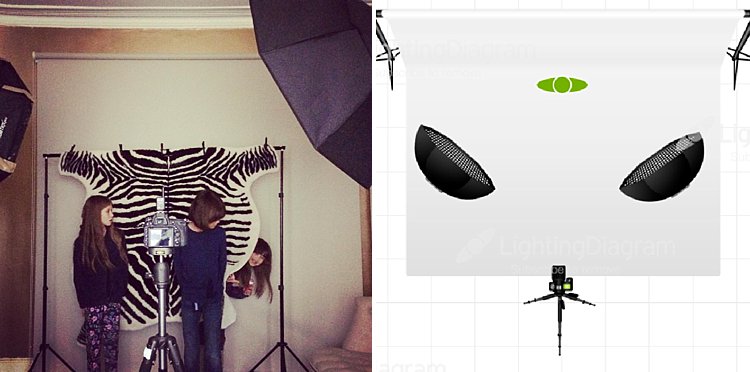
You’ll need a lighting setup that is flattering and controllable. A strip softbox lets you control the light more, as would a beauty dish. If you don’t have either, you can add some material over the softbox you do have to create a strip light. If you have a grid, even better. As long as you can control where the light goes, you’ll be able to get this down. You can even block your light from the background using a black card (things that block light are referred to as flags).

Creating a low key portrait from scratch

For the examples here, I used an Elinchrom BRX500 with a 44cm White Beauty Dish and a white deflector. Like I’ve mentioned, you don’t need to have exactly this gear to get these shots. Gear is only small part of the equation, it’s using the gear that counts.

Making the background darker

In this first shot, you’ll see the model against the wall, photographed with a butterfly lighting pattern. Even though the tones are dark, the image itself is too bright for a low key portrait.

Low key portrait example 02

Close to the grey wall.

The Setup

By moving the model and the light evenly away from the wall, you’ll notice the light on the subject stays the same, but the background gets darker.

Low key portrait example 03

Moving the model away from the wall means the light falls off and the background gets darker.

Move the light to the side

If you move the light around to the side, into a short lighting position, you’ll see the background darkens even more, and there is an increase in the drama of the shot. We still have light spilling on to our background, though.

Low key portrait example 05

Moving the light to the side means even less light falls on the background, darkening it even more.

Low key portrait example 04

Add a grid to the light

By adding a grid to the light, you can control the light even more. The grid restricts the light to whatever is in front of the light only, none bounces around or spills out the sides.

Low key portrait example 07

With a grid added to the light.

Low key portrait example 06

Light with grid added.

Add light onto the hair

You’ll see that the hair is starting to blend in with the background now. This can be a great effect sometimes, but if you want separation between the hair and the background, you need to add fill light in there somehow.

You could choose a reflector, but a second light offers more control. I’ve added a strip light on the other side of the subject opposite the main light. Make sure that light doesn’t hit your lens or you will get flare. Use a grid or a flag to block it if necessary.

Low key portrait example 09

Second light added for her hair.

Low key portrait example 08

Light position with main light (with a grid) and hair light (also with a grid) opposite and behind the subject.

Practice it!

These examples should get you going towards making your own low key portrait. The trick is to control the light so you darken the environment. Try the curtain trick if you don’t have any lights. You can even use that trick with an off-camera speed light by putting the flash outside the window to replace the natural light for more control.

Have you done any low key portraits? Have any questions? Please share in the comments below.

googletag.cmd.push(function() {
tablet_slots.push( googletag.defineSlot( “/1005424/_dPSv4_tab-all-article-bottom_(300×250)”, [300, 250], “pb-ad-78623” ).addService( googletag.pubads() ) ); } );

googletag.cmd.push(function() {
mobile_slots.push( googletag.defineSlot( “/1005424/_dPSv4_mob-all-article-bottom_(300×250)”, [300, 250], “pb-ad-78158” ).addService( googletag.pubads() ) ); } );

The post How to Make a Low Key Portrait Step by Step by Sean McCormack appeared first on Digital Photography School.


Digital Photography School

 
Comments Off on How to Make a Low Key Portrait Step by Step

Posted in Photography


How to Use Photoshop to Create Milestone Photos of Babies

22 Jan

Buried deep in my parents’ basement are boxes of slides with pictures of my siblings and I, when we were kids, all taken with my dad’s Minolta DSLR that has long since been lost to the ages. I have a few scans of those early photos but most of them won’t see the light of day anytime soon. Thus the images that marked the passage of time for me, my sister, and my three brothers are few and far between.

Baby milestones Photoshop background

This picture taken with a pocket camera and the fabric was purchased at a thrift store.

Thankfully modern technology and the prevalence of digital cameras means babies born today will likely have no shortage of images to mark their early years. One of the most common methods of documenting milestones is to take pictures at weekly or monthly intervals. Often these are augmented with some type of decoration or adornment to indicate the passage of time (e.g. a small chalkboard, a giant sticker on the kid’s tummy, or a number stamped in the corner of the picture).

There is an incredibly easy, fun, and highly effective way to do this in Photoshop. It only takes a few minutes and produces great results, even if you have never used this program before you should be able to figure it out.

Preparing for the photo shoot

My wife and I got this idea after reading a post on the popular do-it-yourself blog Young House Love but have tweaked it to fit our style. To get started you will need a few things, many of which you probably already own:

  • Fabric with big colorful prints; Finer-detailed prints are okay, but the bigger and more prominent the pattern, the better it will look when paired with your baby. Don’t spend much money on these since you’ll need a lot if you do a different fabric each week. Pro tip, let the grandparents know you’re in need of fabric. Ours were thrilled to go shopping at thrift stores and send us what they found.
  • White onesies; A t-shirt works better after the first year, but until that time onesies are best because they stretch nice and even across the baby’s body leaving you with fewer wrinkles to contend with in the post-processing phase.
  • Blue painter’s tape;  Used to hold the fabric down to the ground.
  • A big window; Or a glass door, or another similar surface to let in a lot of light.
  • A step stool; so you can get a higher angle.
  • Tape to hold the fabric in place; Blue painter’s tape will work but I like to use Gaffer’s tape (I recommend this brand which is stronger and leaves no residue on the carpet when you pull it off.)
  • A reflector;  We didn’t buy one of these until well into our second child and it’s amazing how much a reflector helps get nice even lighting.
How to Use Photoshop to Create Milestone Photos of Babies - setup

It doesn’t take much to prepare for this type of photo shoot.

The session

The process works best with two people; one to take pictures and someone else to do multiple jobs like hold the reflector, smooth the blanket, and soothe the baby. Position your child with his or her feet near the light source (i.e. giant window or glass door) and have your helper hold the reflector by the baby’s head to bounce light back. Then get up on the stepstool and start taking pictures! Babies wriggle and squirm around a lot so don’t worry about quantity. It’s better to have too many good ones than to have to redo everything because you only took three shots and the baby was frowning in all of them.

Photoshop time

After your pictures are done it’s time to head to Photoshop where the real fun begins. You will need two fonts: Fyra for the numbers and one that you want to use for the letters. I like Fertigo Pro, but almost anything will work, it’s largely a matter of personal taste here.

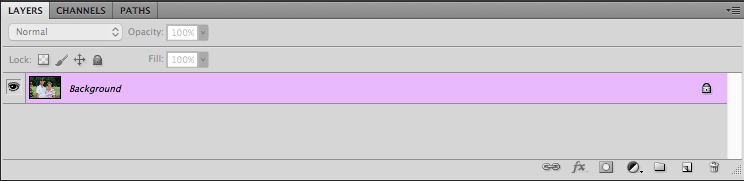
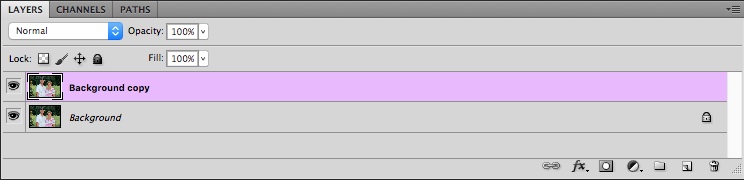
Open your photo in Photoshop and it will appear as the background layer. You can leave it as is unless you plan to do any editing such as color adjustments or retouching, though my advice is to keep it simple and avoid all that if possible. You’ve got a newborn and you can’t spend hours editing your photos every single week when there are diapers to change and clothes to wash!

Add the text

photoshop-baby-milestones-fyra

Click the “T” button in the tool palette to activate the Text Tool, then click anywhere in the picture to create a new text layer. Use the Fyra font and type a letter which will show up as a big circular number – perfect for marking the weeks or months of time that have passed.

Use the toolbar at the top of your screen to adjust the size of the number, and if you don’t get it perfect you can always change it later using the Transform Tool. Press [enter] to lock in the number, then repeat most of the process for “weeks” by clicking the Text tool, selecting a font, clicking on your baby, and typing the label (weeks, months, etc.) you want.

How to Use Photoshop to Create Milestone Photos of Babies adding the text

At this point your picture might look like something the neighbor kid made in Microsoft Paint, but you’re just getting started. The finished version will look much better thanks to the magic of Photoshop.

Resize and warp the text

The next step is to customize the size and position of each of the elements. Using the Layers palette select the layer with a single letter, which is actually the number in the picture, and choose “Edit > Transform”. You can now reposition the number where you want it, and resize it by clicking and dragging on one of the corners. Hold down the [shift] key while doing this to maintain the proportions (shape) of the number or else your finished product will look all stretched out. You can even rotate the number by hovering your cursor near one corner until it turns into a cornered arrow and then click and drag.

How to Use Photoshop to Create Milestone Photos of Babies transform the text

Repeat the same process for the word you’ve used then with that layer still selected, click the Text tool in your toolbar and manually select the word (in this case “weeks”) itself. Then choose; Layer > Type > Warp Text… and add an Arch style. (You can also click the “Warp Text” toolbar button to do the same thing, see red arrow below.)

How to Use Photoshop to Create Milestone Photos of Babies warp text

I like to use just a couple of degrees here, which helps the text simulate a more natural curve that you might see if it were printed across the white onesie directly. Usually, +5 gets the job done just fine.

How to Use Photoshop to Create Milestone Photos of Babies warp text tool

Text color

After that, the next step is to change the color of the text so it complements the fabric on which your baby is laying. Use the Text tool to select either the number or the word (weeks) then click the black box next to the Warp Text button to change the color of the text.

How to Use Photoshop to Create Milestone Photos of Babies text color

Use the eyedropper to select a color from the fabric and tweak as necessary. you will also see the color of your text or number, whichever is selected, change as you try out different options. When you find one you like you can click the “OK” button to lock it in place.

But, before you do that select the six letters and numbers in the # box at the bottom and press [ctrl+c] to copy it. This is the hex code that tells your computer what color is in use, and you will use it again in the next step.

How to Use Photoshop to Create Milestone Photos of Babies text color

Repeat the same process for the other layer of text. To get the same color you can either hover the eyedropper over the newly-colored text on the picture or paste the color code (6-digits you copied) into the box at the bottom. When you are finished you will have an image that is close to the final product, but you’re not quite done yet.

How to Use Photoshop to Create Milestone Photos of Babies

Blend mode

Two final editing steps remain before your image is done, the first involves blend modes. These have to do with the way in which layers work together and how one layer’s color can be altered based on how it is combined with the layer below.

Use the Layers palette to highlight a text layer and change its blend mode to “multiply” with an opacity of 75%. This will allow some of the texture of the white onesie to show through, and make the text seem like it naturally printed on the fabric instead of just pasted on afterward in a computer program.

How to Use Photoshop to Create Milestone Photos of Babies blend mode

Masking

At this point, you may be thinking about using the eraser tool to fix parts of your image where the baby’s hands obscure the number or text. But trust me, this is not what you want to do!

Photoshop has a fantastic feature called layer masks that let you hide (erase) parts of a layer and even recover (show) them again later if you erase too much. In the example above, you will note that the baby’s arm should be covering up the 20, so the solution is to use a layer mask to remove (hide) that portion of the 20. How to Use Photoshop to Create Milestone Photos of Babies masking

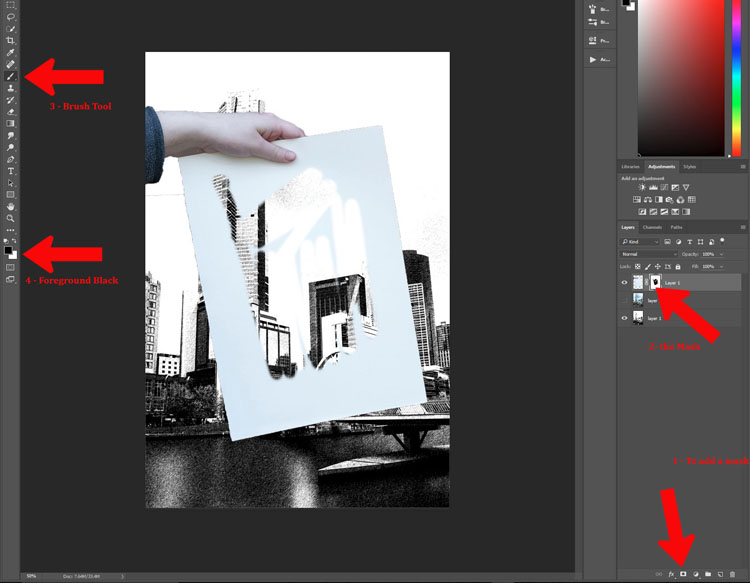
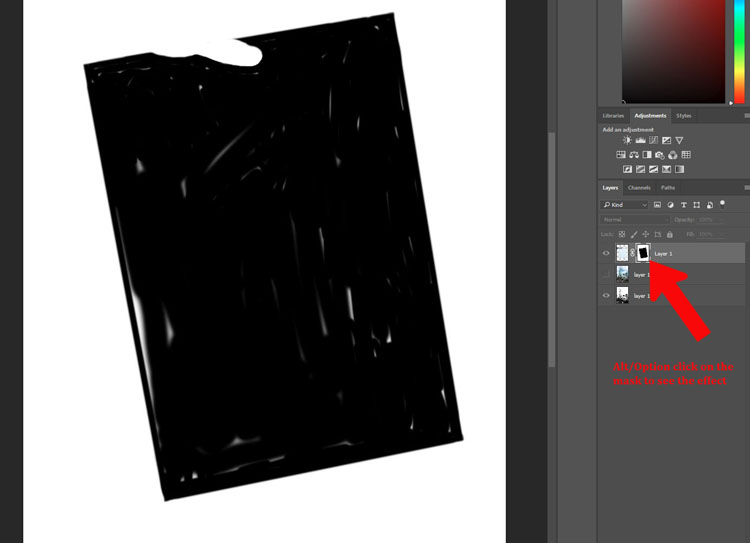
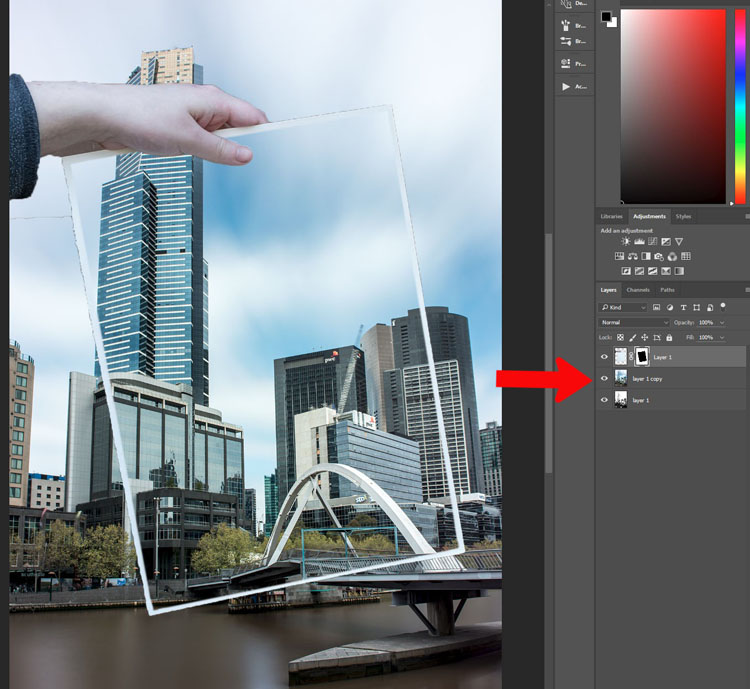
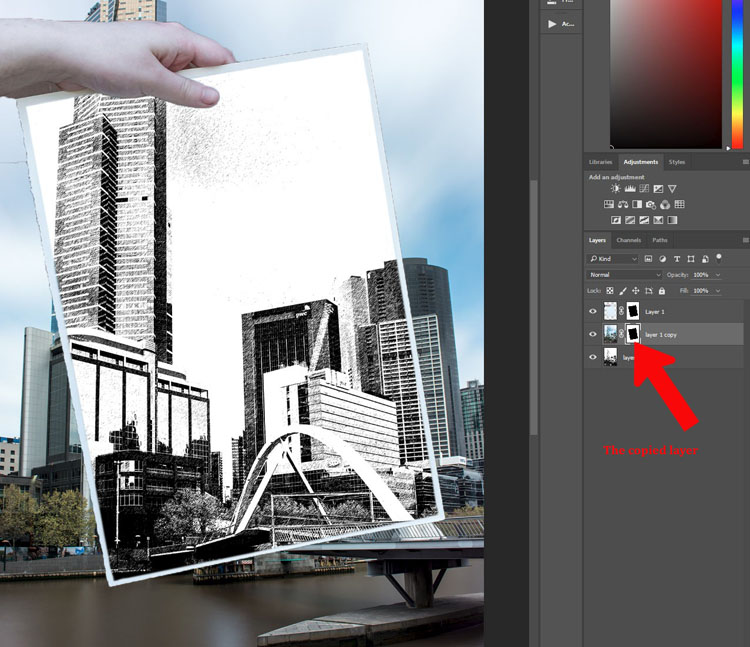
Click the text layer that you want to edit then choose “Layer > Layer Mask > Reveal All”. Now you will see a white box next to the layer that you can use to show and hide different parts of the layer itself. When you add anything dark to this layer mask it will erase (hide) that part of the layer, and when you add anything white to the mask it will show that part of the layer. This is an incredibly useful feature in Photoshop that you can use in all sorts of ways to edit your images, not just snapshots of your baby with milestone stickers.

Click the brush tool and start painting over the portion of the layer mask you want to erase, but keep one finger on the “x” key of your keyboard to switch between erasing mode and adding mode. If you accidentally brush over something that you want to keep, press “x” and add it back by painting it back in white! Then press “x” again to go back to deleting (painting with black).

Press the “z” key to zoom in on your image (and option-z to zoom out) and then “b” to go back to the brush tool. After a few strokes of your brush, your image is ready to share with family and friends!

How to Use Photoshop to Create Milestone Photos of Babies

When to stop

Right here is where I like to stop because the image is, as I like to say, good enough. There are some imperfections that could be cleaned up like using a displacement map to alter “weeks” so it follows all the contours and folds of the fabric, but I have found that these are just not worth my time. To be honest, most people won’t even notice.

You can easily spend hours using warp transforms, color tweaking, and spot removal to get each picture looking pixel-perfect and ready to print in Baby Cosmopolitan. But parents of newborns have to find a balance between time spent on the computer and time spent with their families.

How to Use Photoshop to Create Milestone Photos of Babies

After 52 weeks of doing pictures we used a slightly different setup and reduced our images to once a month with our child standing or sitting instead of lying down.

Conclusion

If you have an infant or are expecting one, pictures like this are a fantastic way to mark the passage of time. My wife and I did shots like these with our two boys every week for the first year of their lives, and then every month until they turned two.

At the time it seemed like a huge hassle to get out the fabric, put a white onesie on, and try to soothe a fussy infant long enough to snap a few pictures every single week. Looking back through them we are so glad we did. When shown in an album side by side these images provide a priceless way of seeing how our kids both grew so much during those early times of their lives.

If you have a small baby and give this a try, please share your images and/or questions in the comments area below.

googletag.cmd.push(function() {
tablet_slots.push( googletag.defineSlot( “/1005424/_dPSv4_tab-all-article-bottom_(300×250)”, [300, 250], “pb-ad-78623” ).addService( googletag.pubads() ) ); } );

googletag.cmd.push(function() {
mobile_slots.push( googletag.defineSlot( “/1005424/_dPSv4_mob-all-article-bottom_(300×250)”, [300, 250], “pb-ad-78158” ).addService( googletag.pubads() ) ); } );

The post How to Use Photoshop to Create Milestone Photos of Babies by Simon Ringsmuth appeared first on Digital Photography School.


Digital Photography School

 
Comments Off on How to Use Photoshop to Create Milestone Photos of Babies

Posted in Photography


10 Tips to Help Photographers Avoid Back Problems

21 Jan

Studies state that one time or another, about 80% of the world population experiences some kind of back problems or pain. This is either due to nerve and muscular problems, degenerative disc disease, arthritis or some kind of trauma. Age, poor physical fitness and being overweight may explain some causes of back pain, but the main reason responsible is for sure bad posture.

A lot of jobs require physical efforts like lifting, pushing, or pulling while twisting your spine, but sitting at a desk all day may be just as bad, as a static posture increases stress in the back.

Nick Haskins

By Nick Haskins

Photographers are for sure high-risk candidates to back pain, either for carrying heavy cameras or bags on their necks or shoulders or by spending a long time at their computers editing images. Every photographer I know always complains about how bad their back hurts after a long shooting session or many hours editing images.

For many years I was one of those photographers with constant back pain. I was always trying to relieve it with pain medication or visits to a chiropractor until the day I woke up with my left arm completely numb. The doctor told me I had two really bad herniated discs in my cervical and that I needed surgery to fix it.

It was not an easy surgery let me tell you; the recovery was long and painful and it all made me realize that I could have avoided reaching this point if I had paid more attention to my posture. So here are some tips I have learned along the way that can help you take better care of your back while doing your photography work, so you can avoid what I went through.

#1 – Trade your shoulder bag for a backpack

10 Tips to Help Photographers Avoid Back Problems

A shoulder bag is a signature style for most photojournalists, and it is indeed practical when you need to have easy access to your equipment while on the move. But it is also a big enemy of your posture, as it puts all the weight in one of your shoulders making your spine curved and unbalanced.

Backpacks distribute the weight equally on both shoulders, making it a much better solution for carrying your equipment. Rolling trolleys are an even better option, but they are not as practical if you need to move fast and don’t have smooth terrain.

#2 – Trade the neck strap on your camera for a sling strap

Having a heavy camera and lens hanging from your neck by a strap is obviously a really bad idea. It causes a lot of stress on your neck, leading to issues with either the spinal discs or in the joints of the cervical spine. Sling straps minimize the impact of the camera’s weight, hanging it from the shoulder and across the torso. This makes it easier for you to move around and reach the camera, reducing the impact on your neck.

10 Tips to Help Photographers Avoid Back Problems

#3 – Get a good office chair

If you spend a long time working on your computer, then a good office chair is something you must invest in. It is really important that your chair is adjustable, and can be regulated to your size, and the position you adopt in relation to the table and the computer you are working on.

The optimal angle position between your legs and back is around 125 degrees.

10 Tips to Help Photographers Avoid Back Problems

Also avoid chairs with wheels that cannot be blocked, as they tend to move back and forward leading you to bad posture while seated. Also, avoid arm rests as they might cause pressure on the elbow tendons leading to tendinitis and ulnar nerve compression.

#4 – Adapt the computer position to your body

Almost everyone uses their computer in the worst possible position as they are most of the time located very low, especially if it is a laptop.

Hunching over and looking down for a long time causes really bad stress on the cervical spine and neck muscles, This can lead to a stiff neck, headaches, and in a long run degenerative spinal problems. The correct thing to do is to place your computer monitor in a position that you can look straight ahead without having to curve your neck.

10 Tips to Help Photographers Avoid Back Problems

#5 – Use a pen and tablet instead of a mouse

A mouse is a fundamental piece of hardware for most people’s computer work, but at the same time, it is a bad ergonomic tool. It forces your hand to stay in an unnatural position, leading in the long run, to hand, wrist, shoulder and arm problems like tendinitis and arthritis.

The use of a pen and tablet, besides giving you much better control of design functions in image editing software, allows a much more natural hand position, avoiding health problems.

10 Tips to Help Photographers Avoid Back Problems

#6 – Take regular breaks and stretch your body

A common mistake we all make is to stand in the same position for long periods of time whether it is photographing, driving, standing at a desk, or simply just relaxing on the couch.

It is fundamental to take small breaks in your daily activities and simply just stretch, allowing the fibers in your muscles to move and avoid cramps and contracting.

10 Tips to Help Photographers Avoid Back Problems

#7 – Get your blood flowing

Poor circulation is the starting point to a lot of really serious health problems. Of course, we would all like to have a healthier life, eat better, and exercise more, but the truth is that it takes a lot of time and discipline.

A great way to overcome this is to turn your regular activities into small exercises.

Simple things like taking the stairs instead of the elevator, or turn a walk down the street to the coffee shop into a power walk, just by adding more movement to your arms while you walk, can make a big difference in your overall physical condition.

10 Tips to Help Photographers Avoid Back Problems

#8 – Always lift with your knees, not your back

Most severe back injuries come from trauma or heavy weight lifting. Trying to pick up something heavy from ground level, using just your back, is a true recipe for a disaster like a herniated disk.

The trick here is to always keep you back straight and use your knees as a lever to lift up the weight. Your legs muscles are much stronger than your back, trust me.

10 Tips to Help Photographers Avoid Back Problems

#9 – Adjust your sleeping position

We spend roughly one-third of our lives sleeping, so if we worry about our posture during the day, we should also worry about our posture while we sleep.

Most hard working people I know are so tired when they get to bed, that they just lay down, close their eyes and get to sleep right away. Most of the time that’s in really awkward positions and they spend most of the night wrestling with their pillow or sinking in really bad mattresses.

The best sleeping position is a really controversial discussion as it is a personal thing due to your body shape, weight, breathing difficulties, etc.

We move a lot in our sleep, but whether you sleep most of the time on your back, side or stomach, always try to have a mattress and pillow that keep your spine as straight as possible. You will rest a lot better and wake up a lot more fresh.

10 Tips to Help Photographers Avoid Back Problems

#10 – Hydrate yourself properly

Our body is 90% water, but yet we tend to forget how much we need to drink water just to be alive.

If you are a busy person, it’s not easy to reach the 2 liters per day of optimal water intake. But if you just make an effort and carry a water bottle around with you and drink regularly during the day you will see that your internal organs will function a lot better, your skin will look younger and your joints and bones will not get old so fast.

10 Tips to Help Photographers Avoid Back Problems

Conclusion – over to you

So there it is, a small list of simple tips that might make a significant change in your life.

They may seem obvious for most people, but the fact is that we are all so busy with our daily life and work routines, that we seem just to forget to take care of ourselves and only realize when it is just too late.

What about you, do you have some tips we could add to this list to help other photographers avoid back problems?

googletag.cmd.push(function() {
tablet_slots.push( googletag.defineSlot( “/1005424/_dPSv4_tab-all-article-bottom_(300×250)”, [300, 250], “pb-ad-78623” ).addService( googletag.pubads() ) ); } );

googletag.cmd.push(function() {
mobile_slots.push( googletag.defineSlot( “/1005424/_dPSv4_mob-all-article-bottom_(300×250)”, [300, 250], “pb-ad-78158” ).addService( googletag.pubads() ) ); } );

The post 10 Tips to Help Photographers Avoid Back Problems by Ivo Guimaraes appeared first on Digital Photography School.


Digital Photography School

 
Comments Off on 10 Tips to Help Photographers Avoid Back Problems

Posted in Photography


When is the Right Time to Upgrade Camera Gear?

21 Jan

Knowing when to upgrade camera gear can be a little tricky. Picking the right time to upgrade is about knowing who you are as a photographer, and who you want to become.

When is the Right Time to Upgrade Your Camera Gear?

What makes upgrading tricky is the pace at which technology advances. New form factors, features, and capabilities will continue to be innovated over the years to come. It’s certainly possible that new trends could make traditional photography obsolete. For example, 360 degree photography is one new trend that has garnered a lot of interest.

If that wasn’t enough, the amount of money that companies spend on marketing their innovations is continuing to increase. This means that there are more deals, more packages, and more attempts to convince you that it is the right time to upgrade your gear.

So how do you know when you are actually ready to upgrade your photography gear?

Five Signs you’re ready to upgrade your camera gear

Your needs and wants will be different from mine and from that of your neighbor’s so it’s difficult to offer a blanket “This is when you should upgrade” statement. But, there are at least five key things to consider when upgrading your gear.

When is the Right Time to Upgrade Your Camera Gear?

1. Your current gear is struggling to keep up with your creative needs

It’s a good sign that you are ready to upgrade your gear when your current gear fails to give you the results you are looking for.

When this might be the case is if you are trying to take portraits of people with sharp focus in the foreground and creamy bokeh in the background. If you’re still using the kit lens that came with your camera, odds are the results you’re getting aren’t meeting your needs. In a case like this, buying a new lens might be worth considering.

2. If you’ve decided to go to a more professional level of work

When you decide to make the move from hobbyist to being a professional photographer, upgrading could become a viable option. Higher quality gear tends to be more durable and offers more flexibility, both of which are important in a professional setting.

As an added bonus once you start working professionally you will be able to deduct the costs of your gear from your taxes making the cost of upgrading more bearable.

3. Your gear is showing its age

While tomorrow’s technology will always make today’s look old, and upgrading to stay current is not usually the right choice – there will come a time when you gear does get so dated, that upgrading is actually your best option.

You may even be able to save some money by upgrading to generation body or lens that is a year or two old. This will still allow you to make a leap in terms of the technology that you are using, at a fraction of the cost of jumping to the current generation technologies.

When is the Right Time to Upgrade Your Camera Gear?

4. The manufacturer has dropped support

Sometimes you’ll find out that the manufacturer has dropped support for the product you own. In cases like this, it might be time to consider upgrading. (Note: this means you ignored point #3 above and kept using your aging gear until it effectively died).

5. Your current gear is “hacked” together to meet a need

Finally, let’s say that your current gear does what it needs to do to achieve the photographs that you want, but it does so in a way that requires a cumbersome process or a jerry-rigged system. If there’s a solution available that would simplify your current process in a way that saves you time and frustration it’s certainly worth considering an upgrade.

Two good reasons you are not ready to upgrade

When is the Right Time to Upgrade Your Camera Gear?

1. Upgrading when a new model is released

New model releases are always going to tempt you into upgrading. Marketing teams do a fantastic job at showcasing the new improvements, and how they will enhance your photography. However, rarely will these improvements have a substantial impact on your overall photography. It’s not about whether the new features are better than the ones that you currently have, but will they actually impact the results that you can not achieve with your current camera.

More concisely – does the new model help justify one or more of the reasons listed above? If not, then it’s probably not worth upgrading at this point in time.

2. Keeping up with your friends

As if you need another reason to upgrade – your best photography buddy just did – so now you have to as well. If the reason you’re buying something is because you’re trying to outdo, or one-up someone you know – it’s the wrong reason to upgrade your gear.

What are other valid reasons to upgrade?

Read more here:

  • 3 Valid Reasons it Might be Time to Upgrade Your Camera Equipment
  • Ready to Upgrade Your Kit Lens? Tips for Which Lens to Invest in Next
  • Do You Need to Upgrade to the Latest Camera?

When have you felt the need to upgrade your camera gear? Let us know in the comments below.

googletag.cmd.push(function() {
tablet_slots.push( googletag.defineSlot( “/1005424/_dPSv4_tab-all-article-bottom_(300×250)”, [300, 250], “pb-ad-78623” ).addService( googletag.pubads() ) ); } );

googletag.cmd.push(function() {
mobile_slots.push( googletag.defineSlot( “/1005424/_dPSv4_mob-all-article-bottom_(300×250)”, [300, 250], “pb-ad-78158” ).addService( googletag.pubads() ) ); } );

The post When is the Right Time to Upgrade Camera Gear? by John Davenport appeared first on Digital Photography School.


Digital Photography School

 
Comments Off on When is the Right Time to Upgrade Camera Gear?

Posted in Photography


7 Vital Tips to Improve Your Candid Street Photography

21 Jan

If people watching is in your nature, you owe it to yourself to try some street photography. It can be addicting, and the fleeting moments you can capture will be one of a kind. It is a genre of photography similar to fishing. The more you enjoy the process, and the more you cast your reel out there (is this correct fishing terminology?), the more you will catch.

Time and experience trump everything due to the difficulty, and while perseverance is the only way to do street photography well, there are some important tips and strategies that can set you off in the right direction. Here are some of my favorites.

7 Vital Tips to Improve Your Candid Street Photography Polka Dots and Pink Shoes, Subway, 2012.

1. Travel light and with minimal gear

Many of you will have a DSLR and a mid-range zoom lens. While it is fine to shoot street photography with this equipment and many do (and even more start out this way), lightening your load will make a huge difference. You will have more energy, your coordination will be better, and you will be faster and more willing to explore. You will also be able to photograph in situations where you would not want to bring a large camera.

Not only are micro-4/3rds and mirrorless camera systems lighter, but they look less intimidating to the people you are photographing. If you have a DSLR, consider using a 35 or 50mm prime, or a pancake lens for these reasons. Fortunately, you do not need the fastest versions of these lenses, so it will not be quite as expensive. A 35mm f/2 is usually about half the size of a 35mm f/1.4, and Canon’s 50mm f/1.8 is both small and only $ 125.

7 Vital Tips to Improve Your Candid Street Photography Greene Street, New York Street Photography

Prime lenses

Prime lenses will restrict you to a specific focal length, but this limitation can actually be quite freeing. By sticking to a focal length such as 35mm or 50mm (the two favorite lenses for most street photographers), you will learn to see how the lens sees.

You may miss out on certain moments by not having a zoom, but at the same time, you will be able to capture more quality images within the ideal distance for the lens that you are using. You will be quicker and more spontaneous with your camera. You will even start to think more about your perspective and framing without having the luxury of the zoom, and as the old saying goes, you will begin to zoom with your feet.

2. Raise your ISO

7 Vital Tips to Improve Your Candid Street Photography SoHo, New York Street Photography

It used to be taught that you always needed to use as low an ISO as possible. This is because the early digital cameras were terrible at high ISOs, particularly over 400. Luckily, new digital cameras blow the old ones out of the water in terms of high ISO ability. You can now shoot at ISOs of 1600 and 3200 with beautiful looking grain/noise, but the stigma of using high ISOs still exists.

For street photography, I will typically shoot at ISO 400 in sunlight, 800 in light shade, 1600 in dark shade, 3200 at dusk, and 6400 at night. With an entry level or less advanced camera, I would go down one stop in ISO, i.e. ISO 200 in sunlight and up to 3200 at night.

Benefits of high ISO

This gives us a huge advantage. Being able to raise our ISOs this high not only allows us to shoot handheld in dark situations, but it also allows us to simultaneously shoot with a faster shutter speed to freeze motion and a small aperture to maximize the depth of field.

Some photographers prefer a shallow depth of field, but in the fast moving world of candid photography, I prefer a large depth of field for a few reasons. First, if you miss the focus on your subject, they can still turn out sharp. If you are photographing at f/2.8 on the other hand, your image will be ruined if you miss the focus. Next, since context is very important in street photography, if you have multiple subjects at different depths or important background elements, it will allow everything in the frame to be relatively sharp.

I prefer to shoot at 1/250th of a second to guarantee that there is no motion blur in my subjects, although I will go to 1/160th or 1/125th in the darkest of situations. In bright light, I will shoot at 1/320th or 1/400th of a second. A high ISO is what allows me to shoot with these speeds, no matter what the lighting is like.

3. Pick a spot and wait

7 Vital Tips to Improve Your Candid Street Photography Broadway, New York Street Photography

Street photography and going for a walk go hand in hand. Sometimes you just want to take your camera and explore on a nice day. However, by constantly walking, you might be doing yourself a disservice. Instead, try to find some promising locations on the way and linger there for a while as you wait for something to happen.

Picking one spot does a few things. First, it allows you to combine a good location with an interesting moment. If you find a quality location and just take a quick photo and move on, you’re killing so much of the potential. By waiting, you give yourself more time for that magical moment to happen. It’s when the right location merges with the interesting moment, that a great photograph appears.

It’s when the right location merges with the interesting moment, that a great photograph appears.

You will also be faster at noticing your surroundings and quicker with your camera because you will be focused on looking around instead of walking. In addition, people will be coming into your scene and entering your space instead of you entering their space, so it makes the whole practice of street photography easier and less confrontational.

Camera snap

A small but important tip that goes hand in hand with this idea has to do with the camera snap. The camera snap is the quick, instinctive removal of the camera from their eye that photographers do immediately after clicking the shutter. It is the motion that tips your subjects off to the fact that you just took a photo.

By picking a spot and waiting for a subject, you can be as candid as possible. Just put the camera to your eye, take the image, and keep it there as the subject leaves your scene. This will make it seems like you were just photographing the background and waiting for them to get out of the way.

4. Know what to say if someone stops you

7 Vital Tips to Improve Your Candid Street Photography

No matter how you approach it, there is an inherent creep factor to street photography. Some of your subjects will understand and be flattered, while others will think you are the weirdest person on the planet. If you like to photograph your surroundings and culture, people are a big part of that. Including them in what you capture can be a big part of telling the story of your surroundings, and there is nothing wrong with it.

While tough situations are rare, particularly if you handle yourself in the right way, knowing what to say ahead of time is very important. If someone asks if you took their photo, own up to it and tell them what you were doing. Talk to them and explain why you found them interesting. This will flatter some people, but others will still not understand. I always keep a business card with me and offer to send the photograph if someone emails me for one.

Keep your cool

Always keep a smile on your face. If someone seems angry for any reason, there is no need to get defensive or angry back. You don’t have to explain that it’s in your legal right (depending on where you are photographing of course) unless it comes to that. That’s not the best thing to bring up right away because it can make people even angrier.

Instead, figure out how to diffuse the situation and tell them that you did not mean to make them uncomfortable. I’ve offered to delete a couple of photos over the years when I felt it was necessary. The ability to diffuse a situation is very important, even though I have only had one or two uncomfortable situations over a 15 year period of frequent shooting.

5. It’s not just about people

7 Vital Tips to Improve Your Candid Street Photography

It is a common thought that street photography is only about capturing people walking down the street, on a beach, or in public. That’s just not the case. Street photography is about candid photography of life and culture. While that can and should include people sometimes, other times it can be about nearly anything else. Capture daily scenes and backgrounds that you find to be interesting.

They can be weird images. Capture something unique. You do not always have to take the prettiest or most epically beautiful photograph. Capture something that makes someone think or that throws them off balance. Capture images for yourself, and ones that you know some people will not understand or like right away. It is not your job to please everyone. It’s your job to take a good photograph.

Be spontaneous and go for it

Be spontaneous. With other forms of photography, you can be a perfectionist about every detail. While it is also important to think this way for street photography, so many of these decisions are made in a split second. Let yourself go and be spontaneous with what you capture. Whenever you feel there is potential for a strong image, even if you aren’t sure, go for it. Many will fail, but some of those moments will end up being the best photos you have ever taken.

Go somewhere that you think will make it tough to capture an interesting photograph. Sometimes you will find that you will be able to capture unique content in areas that others would think of as quiet or boring. There are good photographs everywhere and the best photographers have a way of finding them anywhere.

6. Group your photos while editing

7 Vital Tips to Improve Your Candid Street Photography - Three Men, Gucci, New York Street Photography

This is not a tip that all street photographers adhere to. Some like each of their photographs to live on their own. However, many prefer to group their work by feeling, ideas, or themes. For some, the book is the ultimate form of display for street photography.

Group your photos based on feel and sequence them into a loosely based narrative of some sort. Come back often and add to and take away from it. Over time, you will notice that ideas will grow organically. It will help inform you about what to capture when you are out there. These ideas will develop as you grow as a photographer.

Before you think about putting together a book, purchase a simple cork board for your office wall and fill it with 4×6 and 5×7 images. Constantly print and replace them to create a cohesive wall of images. It is a lot of fun and a great way to view your work and your progress.

7. Explore the work of other photographers

7 Vital Tips to Improve Your Candid Street Photography

This is such a simple tip but it is immensely important. In your free time, look up the work of all types of street photographers and study their portfolios. Explore the content, the technique, and the styles that you like. Watch videos of these photographers in action to see how they approach the street. Go to gallery shows and look at real life prints to train your eye. This will give you a range of ideas for what to capture the next time you are out shooting.

The fascinating thing about street photography is that while the content is the same for all of us, what we each come back with is completely different. Studying the styles of different photographers will help inform what is possible for you to create.

It is inspiring and fun to do. Start a photography book collection or even purchase a couple prints for your walls. The more you surround yourself with it, the better you will become, the more ideas you will have, and the more inspired you will be.

Some photographers to start out with are Henri Cartier-Bresson, Garry Winogrand, Robert Frank, Helen Levitt, Lee Friedlander, William Eggleston, Walker Evans, Daido Moriyama, Martin Parr, Elliot Erwitt, Joel Meyerowitz, Mary Ellen Mark, Bruce Davidson, Saul Leiter, Trent Parke, Alex Webb, Vivian Maier, and Bruce Gilden.

Conclusion

Now go out there and have some fun. The biggest tip is that the more time you spend shooting, the better images you will come back with. So shoot with some regularity and do it in the way that you find the most fun so you will continue to practice.


If you’d like to learn more about Street Photography, then please check out my ebook The Essentials of Street Photography.

googletag.cmd.push(function() {
tablet_slots.push( googletag.defineSlot( “/1005424/_dPSv4_tab-all-article-bottom_(300×250)”, [300, 250], “pb-ad-78623” ).addService( googletag.pubads() ) ); } );

googletag.cmd.push(function() {
mobile_slots.push( googletag.defineSlot( “/1005424/_dPSv4_mob-all-article-bottom_(300×250)”, [300, 250], “pb-ad-78158” ).addService( googletag.pubads() ) ); } );

The post 7 Vital Tips to Improve Your Candid Street Photography by James Maher appeared first on Digital Photography School.


Digital Photography School

 
Comments Off on 7 Vital Tips to Improve Your Candid Street Photography

Posted in Photography


5 Tips for Capturing Everyday Moments in Your Family’s Life

21 Jan

Lifestyle photography and the art of everyday photography is about documenting your daily life. This could include capturing your baby’s toothless smile, his/her first steps, the way they hold their hair or twirl their dress, first time they start to read or write, or anything that you would normally run to grab your cell phone to capture.

While smartphone cameras have gotten to be more powerful and expensive over the years; nothing beats the quality and the depth of field you can achieve with wide apertures using your DSLR. The ability to capture raw files and process them, lens interchangeability, and being able to obtain superior images under even low light conditions, are just a few of the benefits. To add, over the decade the price for an entry level DSLR has also come down significantly. So if you own a DSLR (or a mirrorless or high-end compact camera) already, why not use it to capture everyday moments in your daily life?

how to capture everyday moments

Here are some tips for you to capture your everyday moments with your camera.

#1 – Capture the details

how to capture everyday moments

how to capture everyday moments

Capturing the details is about focusing on what the subject is actually doing versus photographing the entire subject which can take away from the story the image is trying to tell or convey. It could be something as simple as a kid holding a flower, or the way she touches her hair or smiles, or anything for that matter.

how to capture everyday moments details

Another key to creating extraordinary images out of the ordinary is to think about composition while considering the detail you are trying to capture. You may be focused on documenting and creating that memory that you can reflect upon. So compose your image such that the subject, in this case, the boy writing, creates stronger and meaningful image while helping you remember the story that occurred.

Another example is the image below.

how to capture everyday moments

This was a very simple image where he wanted to show a tiny flower he got from the garden. Again, having my camera right next to me, I quickly adjusted the settings to get the shot. I also tweaked the image a bit during post-processing to accentuate the details.

how to capture everyday moments

Children grow up fast and the memories in images and videos of them doing little fun things, their innocence is sometimes all we have to remember and treasure of their childhood.

#2 – Think perspective

how to capture everyday moments perspective

This was an ordinary everyday moment for us. Having breakfast at the table, eating his favorite snack and just enjoying his moment. I happened to think about a different angle and took this image while he stared up at me. Straight on would have been a perfectly fine image as well, but him looking up gives the viewers something different from the usual.

Here is another image where perspective was a little different.

how to capture everyday moments

In this image, I found my little one sitting on the stairs and coloring away. He found that to be his comfortable spot. Using the stair rods as framing I placed my camera in between the pillars and clicked for a unique perspective. This was a very ordinary moment of a 4-year-old coloring. But having my camera on hand and using a different perspective makes this image more unique and extra special.

Perspective can be anything. Utilizing your stairs for shooting through, or having your kid looking up at you while you click to emphasize scale are some commonly used techniques that can give an added boost to your images.

how to capture everyday moments

3 – Open your windows and blinds and use natural light

When that fails, use alternate light sources.

The biggest challenge with indoor photography is the availability of light and being able to use your camera under different lighting conditions. The quantity and quality of light change dramatically with different sky conditions. Regardless of the sky, however, try to shoot in the available natural light while keeping your subject close to the window.

how to capture everyday moments

how to capture everyday moments

Also, consider the time of day while photographing your subjects. In the first image above, I had to increase my ISO to 400 while also trying to keep only certain parts of the image in focus. Something to remember is while a high ISO can help you with many scenarios, it can also produce a certain amount of grain in the images which may or may not be desirable, depending on the look you want.

The bigger challenge with natural light is what do you do at night when there is only artificial light available? One solution is to use a flash and bounce it off the ceiling or wall depending on how much you wish to have in your image. Another way is to actually decrease the available light in your image, use interesting available light sources as a backdrop and accentuate your subject under low lighting conditions for some extra creativity.

how to capture everyday moments

In the image above, all the artificial lights in the room were turned off. While he was browsing his iPad, it was the only light source illuminating his face.

In examples below, I used the lighting from the Christmas tree as my light source. I turned all the room lights off and adjusted the exposure a bit during post-processing. Another creative way to use the artificial light is to use backlighting which causes a silhouette.

how to capture everyday moments

how to capture everyday moments

In other words, use natural light as much as possible. However, when artificial lighting is all you have, use it in the best possible creative way.

#4 – Make your moments happen, don’t wait for them

how to capture everyday moments

how to capture everyday moments

how to capture everyday moments

Somedays, you just have to wait for a cute moment to happen. While other days, you have to create a scenario to make those adorable moments with your kids occur. In the images above, he just wanted to hang out in his room. I used that as an opportunity to let him jump on the bed, which he loved a lot, and I clicked away to capture the action and movement shots with a high shutter speed.
In the image below, I really wanted a laughing happy image of my kid without him knowing I was shooting. Hence acting natural, while he really didn’t care to do either while being engrossed with his iPad. I kept repeating certain jokes he likes until I got that laughter out of him.

how to capture everyday moments

In other words, it is nice to have your camera nearby when a certain moment happens for you to be able to capture it right away. However, you sometimes have to create that moment or place your subject in a place or a scene in order to achieve something you want.

#5 – Last, but not the least, carry your camera everywhere

how to capture everyday moments

how to capture everyday moments

Carrying your camera everywhere you go will ensure that you do not miss out on documenting key moments in your kids’ lives. Can you imagine carrying only your cell phone to your son’s soccer game and ending up with a blurry image?

Documenting and creating a memory book or printing out a family album with images you created that are clean, crisp and not blurry is a special feeling of its own. Having your DSLR with you while learning the basics will help you to document key events in your own life and ensure they remain for generations to come.

Conclusion

In conclusion, just a few simple techniques in understanding composition, lighting, while also applying the above tips will help you create stronger images. Lifestyle photography and the art of capturing the everyday moments using your DSLR instead of your cell phone gives you an extra layer of that creative edge while still documenting moments that you usually would either way.

googletag.cmd.push(function() {
tablet_slots.push( googletag.defineSlot( “/1005424/_dPSv4_tab-all-article-bottom_(300×250)”, [300, 250], “pb-ad-78623” ).addService( googletag.pubads() ) ); } );

googletag.cmd.push(function() {
mobile_slots.push( googletag.defineSlot( “/1005424/_dPSv4_mob-all-article-bottom_(300×250)”, [300, 250], “pb-ad-78158” ).addService( googletag.pubads() ) ); } );

The post 5 Tips for Capturing Everyday Moments in Your Family’s Life by Jyotsna Bhamidipati appeared first on Digital Photography School.


Digital Photography School

 
Comments Off on 5 Tips for Capturing Everyday Moments in Your Family’s Life

Posted in Photography


Review of the New Flagship DX Camera – The Nikon D500

20 Jan

Everyone thinks they need a full frame camera but are they really that much better? Most people feel the only reason they have cropped sensor cameras is because they can’t afford a full frame one. Then you have to wonder why Nikon have produced one that is not full frame and comes with an expensive price tag. So who would be interested in the new Nikon D500? There are a lot of people who would love this camera and what it has a lot to offer.

Earlier this year Nikon released the new flagship D500 camera as part of their DX range or cropped sensor line-up. It is fast and designed with a specific user in mind. It is also one of the first cameras Nikon has produced that is using Snapbridge, the new phone app that allows you to take photos and upload them to your phone for sharing on social media straight away.

Nikon D500 review

The Nikon D500 – image courtesy of Nikon.

Price out the Nikon D500 on Amazon or B&H Photo’s site.

First impressions

Unlike many of the other DX cameras, it is quite large. People tend to think that cameras with cropped sensors are smaller, but the D500 is in the Pro range and you can see that just by looking at it. It looks like a camera that a professional photographer would use, and many indeed do.

One of the first things I noticed was how similar many of the controls and the layout is to the D800. In many ways, it seems like a cropped sensor version of that camera. This also means that most of the buttons are around the camera body, so you don’t have to keep going back to the menu to change settings. There are everywhere, but it doesn’t make it confusing. You can make changes without really having to stop and look at what you are doing.

Nikon D500 review

Sunset image shot with the Nikon D500.

If want to do long exposure photography there is a small blind in the viewfinder that will close to stop light leaking into your image. It means you never have to worry about whether or not you have the cover for it. You just need to remember to use it when doing long exposures. Very handy.

ISO and noise

The D500 is Nikon’s replacement for the popular D300 range that they stopping making a few years ago. The D300 was fast and great for many types of photography, however, the ISO range was not good. As soon as you increased the ISO the images became very noisy.

It also didn’t go very high, with ISO 3200 being the maximum. The D500 ISO goes up to 512,000, so it will get you images no matter the shooting conditions. The level of noise in the images is also significantly better and not as noticeable.

Review of the New Flagship DX Camera - The Nikon D500

Image shot using a tripod with the Nikon D500 at ISO 200.

Review of the New Flagship DX Camera - The Nikon D500

Image shot with the Nikon D500 hand held at ISO 6400.

Megapixels and image size

The camera is 20 megapixels, which is enough for most people. A RAW image is around 25 MB. Not as large as some cameras, but still large enough that you have to consider how you will store them. Jpegs are a lot smaller, but you don’t get as much information to work with as shooting RAW.
Battery

The battery is very similar to the battery for the D800 but it is a new version, so should only be used in the D500. If you have similar batteries for other cameras it is a good idea to mark them in some ways so they don’t get mixed up. You don’t want to be putting the wrong battery in the camera. While the battery is different the charger is the same.

The battery lasts a long time and you can safely go out for a day of shooting and not use much. Like most Nikon cameras you can go out and shoot for a few days without having to recharge it. Though that is dependent on how many photos you take. Of course, if you do a lot of chimping (image review on the camera) or use LiveView frequently the battery will run out faster. Likewise, if you’re shooting in the cold.

The batteries do typically last a long time as well. You can use a battery for quite a few years before you start noticing that it doesn’t last as long.

Remote shutter release

Review Nikon D500 DX camera

Using some ND filters and the MC-36 remote shutter release on the Nikon D500 for some long exposures.

When you are looking at a new camera you need to be aware of all the accessories and whether or not you will have to buy a lot of new ones. The remote shutter release that I purchased for the D300s, the MC-36, was fine for the D800, and it is also good to use on the D500. That makes it a good match for the gear I already have. It is something you need to consider anytime you are buying a camera, it isn’t just the expense of the camera, but what other equipment you may need as well.

Review Nikon D500 DX camera

A long exposure of some recently painted silos using the D500.

Focusing area

The focusing area takes up larger space in the Nikon D500 than it does in other bodies. It has the same focusing center as the Nikon D5, their top pro model, but on the cropped sensor of the D500. In practice, that means you can focus on subjects almost up to the very edges of the viewfinder. You can focus on a much larger area than other DX cameras.

If you want to use spot focusing, but have found it hard in the past because you couldn’t focus on subjects at the side, it is now possible to do that. Any camera that makes focusing easier for you has to be good.

Memory card


The D500 has two slots for memory cards. You can put an SD card in one, and the other is for XQD cards, which are reasonably new but only needed for a few Nikon cameras. It is mainly used in the higher end bodies that are fast and shoot a lot of frames per second, which is why the card is used. Normal cards would find it hard keeping up with the speed and writing the images. If you are taking photos at 10 frames a second it is important.

Apparently, you can buy the cards at all good camera stores. Though, you would also need a memory card reader for it as well.

Touchscreen

The screen at the back is a touchscreen which makes it easy to scroll through your images. It works a lot like your smartphone. You can make the images bigger or smaller and flip through them with your fingers.

leannecole-nikon-d500-review-15

The back screen of the D500 can be moved for better viewing and is also a touchscreen.

Crop factor

The Nikon D500 has the 1.5x crop factor. Basically, that means that if you have a full frame lens, like the 70-200mm, when you use it on the D500 the lens becomes essentially like a 105-300mm. It is the advantage of using a DX camera body with high-quality lenses.

Nikon D500 review

It is all set up to take some sunset photos of the city of Melbourne.

Who is the Nikon D500 for?

The most likely person to buy this camera is someone who is interested in the 1.5x crop factor. Photographers who can’t afford those great big long lenses, but want to be able to get as close as they can to the action. Having the ability to make a 300mm lens go to 450mm is fantastic. The longer the telephoto lens, the more expensive it is, so the cropped sensor is great for that reason.

leannecole-nikon-d500-review-20

The sunset shot with the Nikon D500. The DX camera allowed me to get a lot closer with the 80-200mm, this was at 277mm.

Sports photographers would also be interested where speed and getting closer to the action is very important. Full frame is great, but to get a camera that is fast enough to shoot lots of frames per second you would need to spend around $ 6500 on a Nikon D5 or similar. If you don’t have that kind of money, $ 2000 USD will get you the Nikon D500 which will do many of the things that the others can, but you also get the cropped sensor.

There are many other kinds of photographers who would benefit from the D500 as well. Bird and wildlife photographers would love being able to get more length with their lenses. The 10 frames per second capability of this camera would also be an advantage for capturing birds and animals on the move.

Macro photographers will get a lot closer to their subjects with their lenses, and when you put on extension tubes, a whole new world will be seen.

leannecole-nikon-d500-review-23

Taken using the D500 and the Nikon 105mm macro lens, with the cropped sensor you can get in a lot closer than you can with a full frame.

Snapbridge app

This is a new app that Nikon has developed that makes it possible to connect your smartphone with the camera. It is unlike others that use Wi-Fi to do it, Snapbridge stays connected to your phone all the time. You can upload photos, use it to take your photos, and it also keeps your camera’s firmware up to date.

It is available for Apple iPhones and Android, though it is a little harder to use with an Android.

Using the camera

I found the camera easy to handle and work my way around. Then again, I’ve been using Nikon cameras for many years, and as previously stated I found a lot of similarities with the D800. I found the weight fine, but others who picked it up thought it was heavy. Then again, you would expect a camera of this quality to be that heavy. Good quality cameras of this caliber are always a bit hefty.

The fast frame rate blew me away and as someone who always likes to bracket photos to get more options, I really enjoyed it. With the D800 I would never do more than three shot hand holding, but with the D500 I felt there was enough speed to let me do five. I also really enjoyed just listening to how fast it was.

leannecole-nikon-d500-review-14

Using the D500 for night photography in Melbourne.

If I had one criticism, it would be that there is an overall blue cast and how, in some cases, it made the blues far bluer than they really were. I’m not a fan of blue in images, so I didn’t like it, but I know a lot of other photographers would.

Overall

The Nikon D500 is a great camera and anyone who purchases it will really enjoy using it. Full frame is great, but if you are a photographer who likes to zoom in, then the DX may suit you more. If you shoot sports, birds, wildlife or macro, look at this camera, it could be just what you need.

Price out the Nikon D500 on Amazon or B&H Photo’s site.

leannecole-nikon-d500-review-19

The sun as it sets and the camera taking photos.

googletag.cmd.push(function() {
tablet_slots.push( googletag.defineSlot( “/1005424/_dPSv4_tab-all-article-bottom_(300×250)”, [300, 250], “pb-ad-78623” ).addService( googletag.pubads() ) ); } );

googletag.cmd.push(function() {
mobile_slots.push( googletag.defineSlot( “/1005424/_dPSv4_mob-all-article-bottom_(300×250)”, [300, 250], “pb-ad-78158” ).addService( googletag.pubads() ) ); } );

The post Review of the New Flagship DX Camera – The Nikon D500 by Leanne Cole appeared first on Digital Photography School.


Digital Photography School

 
Comments Off on Review of the New Flagship DX Camera – The Nikon D500

Posted in Photography


How to Create a Rim Light Effect Using Photoshop

20 Jan

Lighting is a huge integral part of a movie’s success. The same applies to photography. It’s all about the light or lack of it to create the drama in an image. Rim lighting, as the term suggests, is also called edge or back lighting. In this article I will show you how to create this dramatic style of lighting.

how to create a rim light effect in Photoshop

A rim light effect created in-camera and an Inner Glow effect added in Photoshop.

Rim lighting adds drama

There’s a particular scene in the movie Alien (1979) in which the character played by Harry Dean Stanton goes to find Jones the cat. That scene had me glued to my chair with both hands up to my mouth and fingers lodged between my teeth. You just knew something bad was going to happen but it was drawn out with unbelievable tension.

How to Create a Rim Light Effect Using Photoshop Alien

Alien Courtesy of 20th Century Fox

The lighting throughout the movie was low key to give that moody atmospheric feel.

A good example of rim lighting is using two side lights or one light from behind the subject, as in the image below.

How to Create a Rim Light Effect Using Photoshop

In this photo the light is behind the subject creating an edge or rim light around the subject’s head. This is also called a hair light.

Before I demonstrate how to create a rim light effect in Photoshop. I want to show you just how easy it is to get a rim light effect in-camera, so you can try it out in the comfort of your own home.


Create a rim light effect in-camera at home

I used the following setup to create my rim light:

  • One bottle of water
  • One glossy black tile
  • Two lights
  • A camera mounted on a tripod

I picked up a sample black glossy tile from a local tile shop, where I was able to purchase just the one. As for the lighting, strip softboxes are ideal for this type of rim lighting. You place a strip softbox on each side, and slightly behind (closer to the background), the subject.

Unlike standard softboxes, strip softboxes are narrow and rectangular in shape. But, for the purpose of this article so that you can easily do a similar setup in your own home, use whatever light sources that you already have at your disposal.

Using my iPad placed vertically to one side of the bottle, I opened the Soft Box app which is free to download and set it to white. I placed an LED light on the other side of the bottle. My kitchen table was used for the setup.

As you can see in the photo below, I was able to angle the lights so that I could control the rim light hitting the bottle. My camera settings were: ISO 2000, 1/60th of a second, at an aperture of f/5.6.

How to Create a Rim Light Effect Using Photoshop

A simple setup that you can do at home to create a rim light effect in-camera using a black glossy tile, a prop, and two lights.

NOTE:

If you don’t want to use two lights and you have a regular softbox, try placing it directly behind the object and cover the center of the softbox with a strip of black card (that will become your background). You will need to experiment to get the rim lighting around the object.

how to create a rim light effect in Photoshop

This is the bottle of Water straight out of the camera.

Let’s dive into Photoshop.

Creating a rim light effect in Photoshop

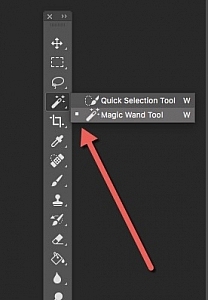
The key to adding the rim light effect in Photoshop is Layer Styles and having the subject isolated from the background. Before any layer style can be applied, it is necessary that the image that you are applying the style to has been carefully cut out. Use whatever selection tool you want but I would recommend using the pen tool.

Layer style

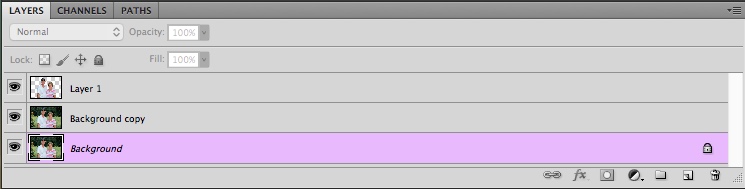
Let’s take a look at Layer Styles. With Photoshop open, go over to the Layers Panel. Scroll down to the bottom and you will see a group of icons. You will see this icon, fx second to the right. Click on that and a pop-up dialog box will appear with different preset style options.

How to Create a Rim Light Effect Using Photoshop layer styles

The Layer Styles presets are accessed by clicking on the fx icon located at the bottom of the Layers Panel.

How to Create a Rim Light Effect Using Photoshop - The Inner Glow preset

The Inner Glow preset

Alternatively, you can access the Layer Styles by going back to the top right corner of the Layers Panel and clicking on the downward arrow icon with horizontal lines beside it. Scroll down to where it says Blending Options. The same Layer Style option box appears and just click on Inner Glow.

How to Create a Rim Light Effect Using Photoshop

When you click on any of the Layer Style options, the settings are all preset options, but they can be easily edited. In this example, leave some of the settings as they are and only adjust the following three:

  1. Choke – similar to feathering
  2. Size
  3. Opacity

Experiment until you get the desired effect, then click the OK button.

How to Create a Rim Light Effect Using Photoshop

The Layer Style pop-up dialog box with the default settings.

adding a rim light effect in Photoshop

A rim light effect is added in Photoshop using Inner Glow from the presets in the Layer Styles.

Using Color Dodge Blend Mode instead of Screen

My preference when using this Layer Style technique is to change the Blend Mode from Screen to Color Dodge. I used this on the bottle of water in the title shot. To illustrate the subtle differences between the two Blend Modes, see the two photos below. The first image is the Inner Glow with Screen as the

The first image is the Inner Glow with Screen as the default setting. For the second image, I changed the Blend Mode to Color Dodge.

alt=

Changing the Blend Mode to Color Dodge

How to Create a Rim Light Effect Using Photoshop inner glow

Rim light effect created in Photoshop using Inner Glow from the presets in Layer Styles.

How to Create a Rim Light Effect Using Photoshop

This rim light effect is created using Inner Glow from the Layer Style presets but I changed the Blend Mode to Color Dodge.

Creating a rim light from scratch using Photoshop

However, this technique really does shine when you have to create the rim light effect totally in Photoshop. For example, take this Owl Butterfly image that I got from www.pixabay.com. It has no rim light effect on it at all.

How to Create a Rim Light Effect Using Photoshop owl

Owl Butterfly from Pixabay 1668956 – dowload the image if you want to follow along.

I isolated the Owl Butterfly from the background using the Pen Tool and placed it against a different background shot to which I added a Gaussian Blur.

How to Create a Rim Light Effect Using Photoshop owl

Wheat from Pixabay 8244_1920

As I had the Butterfly on its own separate layer, I added an Inner Glow from the Layer Styles and changed the Blend Mode to Color Dodge and chose a darkish yellow. I wanted a backlight to appear on the wings of the Butterfly caused by the setting sun in the background.

How to Create a Rim Light Effect Using Photoshop owl before

The Owl Butterfly was cut out using the Pen Tool in Photoshop and placed it against another background image. I blurred the background using Gaussian Blur.

I put this Layer Style effect on its own separate layer. Then I applied a layer mask and brushed in the yellow glow on the wings to give it a more realistic look. I did a bit more retouching by adding a gradient Overlay and then applied the Filter>Blur>Average to blend the colors from the two images.

How to Create a Rim Light Effect Using Photoshop layer style

By placing the Layer Style effect on its own separate layer. I was able to apply a layer mask and brush the Glow effect onto to the wings of the Butterfly.

How to Create a Rim Light Effect Using Photoshop owl after

An Inner Glow was added using the blend Mode set to Color Dodge. I then added a Gradient Overlay to darken the bottom part of the Butterfly and I applied an Average Blur to blend the color of the two images.

Your turn

I hope I have been able to show you how effective creating a rim light in Photoshop can enhance your images. Do you use this effect on your images? Feel free to give it a try and post your results below, I will try to answer any questions and would love to see your images.

googletag.cmd.push(function() {
tablet_slots.push( googletag.defineSlot( “/1005424/_dPSv4_tab-all-article-bottom_(300×250)”, [300, 250], “pb-ad-78623” ).addService( googletag.pubads() ) ); } );

googletag.cmd.push(function() {
mobile_slots.push( googletag.defineSlot( “/1005424/_dPSv4_mob-all-article-bottom_(300×250)”, [300, 250], “pb-ad-78158” ).addService( googletag.pubads() ) ); } );

The post How to Create a Rim Light Effect Using Photoshop by Sarah Hipwell appeared first on Digital Photography School.


Digital Photography School

 
Comments Off on How to Create a Rim Light Effect Using Photoshop

Posted in Photography


How to Stand Out as a Photographer in a Crowded Market

20 Jan

In today’s world of rapidly changing technology, there’s one big problem that you and every aspiring photographer must face; you are one among many. It no longer takes years of practice or even an expensive camera to make someone a talented, and in some cases professional, photographer. Whether you are an aspiring pro or just taking up photography as a hobby, here are five ways to challenge yourself and stand out as a photographer in today’s crowded market.

How to Stand Out as a Photographer in a Crowded Market

1. Keep evolving your craft

Let’s start with the good news; just because someone has a camera doesn’t mean they know how to take great photos. In fact, there are very few people who desire to shoot in anything other than the automatic program function of their cameras.

Dedicate yourself to mastering every aspect of photography. If you’re shooting in full auto, learn how to shoot in Aperture Priority, then Shutter Priority, and then finally Manual mode. If you’ve mastered natural lighting, move on to off-camera flash and other lighting techniques. Keep pushing forward and challenging yourself to master new aspects of photography, and you’ll always be a step ahead.

How to Stand Out as a Photographer in a Crowded Market

2. Focus on one area of expertise

Just as the photography market has become saturated, so has the industry for teaching photography skills. From websites like dPS to local workshops, there are many avenues to learn about every aspect of photography. In order to keep evolving your craft and not get overwhelmed by the plethora of information out there, focus your studies on one aspect of photography to start. Also, limit the resources you use for the sake of consistency.

This same strategy of limiting your areas of expertise is also true if you’re aiming to start a photography business. Narrowing your focus makes it much easier to grow your skills quickly, and also attract clients that you actually want to work with.

How to Stand Out as a Photographer in a Crowded Market

3. Only implement new technology if it’s working for you

No matter how many features are packed into a camera, your job is ultimately about producing a good photo. Sometimes, having the latest camera packed with tons of fancy new high-tech features can actually overcomplicate your work. I remember the first time I tried shooting tethered for a new corporate client. It was only my third time using that process, and I was so overwhelmed by other factors on set that my attempt at using technology just caused more frustration.

If you invest in new technology, be sure it is actually enhancing your workflow and not holding you back. Take the time to practice using it over and over until it feels like second nature. And always have a fallback plan, since technology notoriously fails at one point or another.

How to Stand Out as a Photographer in a Crowded Market

4. Work your people skills

Being a skilled photographer isn’t just about growing your technical abilities. You should also have excellent people skills. As a professional photographer, it’s not uncommon to be hired for a photo shoot or complemented on my work before my client even looks at my photos. I’ve come to realize it’s all about people skills and making people feel comfortable even before delivering a service.

Even if you don’t photograph people, you still interact with them to set up photo shoots and sell your services. Practice your people skills and get good at putting a smile on someone’s face even when they’re not in front of your camera.

How to Stand Out as a Photographer in a Crowded Market people skills

5. Continue to network and put your work out there

Another positive aspect to a growing interest in photography is the huge uptick in communities for photographers. From Instagram and Facebook Groups to local Meetups, there are tons of places to meet fellow photography enthusiasts. Take part in communities such as the Digital Photography School Group. Check out the questions and conversations others are having. Put your work out there to get feedback from others and make improvements accordingly. Also, don’t be afraid to chime in and offer your own constructive criticism.

In Conclusion

What are your thoughts on the role of evolving camera technology today? Do you have your own tips and strategies for standing out as a photographer in a saturated market? Let me know in the comments below!

googletag.cmd.push(function() {
tablet_slots.push( googletag.defineSlot( “/1005424/_dPSv4_tab-all-article-bottom_(300×250)”, [300, 250], “pb-ad-78623” ).addService( googletag.pubads() ) ); } );

googletag.cmd.push(function() {
mobile_slots.push( googletag.defineSlot( “/1005424/_dPSv4_mob-all-article-bottom_(300×250)”, [300, 250], “pb-ad-78158” ).addService( googletag.pubads() ) ); } );

The post How to Stand Out as a Photographer in a Crowded Market by Suzi Pratt appeared first on Digital Photography School.


Digital Photography School

 
Comments Off on How to Stand Out as a Photographer in a Crowded Market

Posted in Photography