RSS
 

Archive for the ‘Equipment’ Category

DIY: Turn a Lens into a Bouquet Holder

07 Mar

Extra photos for bloggers: 1, 2, 3

If you were to pick a themed wedding, it wouldn’t be lightsabers and Ewoks. It’d be photo-themed.

But this is no Vegas drive-through wedding. This is a glassy classy operation.

There are lots of ways to weave your favorite things into your wedding, but this DIY lens bouquet holder our pal Amber Phillips made stood out as a super original way to include your love of photography.

She’s sharing her how-to, and you don’t even have to be getting married to get in on it! You can turn your lens into a vase, planter, or a pencil-holder.

Make a Lens Bouquet Holder

p.s. Our buddies at Nations Photo Lab have 1/2 off all prints 8×10 and smaller right now. Hurry though, it ends at midnight EST!

Why It’s Cool:

ingred-smMaybe you have a broken, old lens you haven’t been able to use, or maybe your local camera shop has a bin of scratched lenses that you eye every time you visit.

Whether you’re having a wedding or not, you can repurpose that lens, and that saves one more from ending up in the dump while beautifying your home all at the same time.

This project shows you how to safely hollow out your lens, so you can fill it with flowers, pencils, plants, a pile of plastic dinosaurs, or whatever else you might have around.

Ingredients:

paint-sm

  • A broken lens
  • A hammer
  • Pliers
  • Any kind of knife
  • Floral foam (a 4″ x 4″ chunk does fine)
  • Gorilla glue or hot glue
  • Safety glasses
  • Work gloves

STEP 1: How a Broken Lens Got Its Groove Back

paint-smWhere does one pick up a broken lens? It’s as easy as searching “broken lens” on eBay.

Your local camera shop might have unusable lenses for sale, and you might also find some at garage sales or swap meets.

There are a ton of old lenses out there that are just too scratched to be used. Once you have your lens, you’re ready to start breaking it down …

Step 2: Remove the Glass

paint-smFirst, lay down cardboard or bubble wrap to protect your work surface. You’ll be removing the glass from the lens by hammering it.

Put on your safety glasses. We don’t recommend you touch the broken glass with your hands, but for extra precaution, put on work gloves. Or a robo-glove. Either works.

You might notice there are multiple layers of glass inside. Start breaking through the first layer of glass by hammering.

TIP: Breaking this glass is harder than you would think. The layers can be pretty thick. Be careful and watch for “bounce-back” with your hammer hand.

Use your pliers to pull out any glass that you wouldn’t want to touch with your hands.

Once you are through the first layer of glass, take a look at the lens depth and figure out if you want to go further. If so, keep on hammering.

Step 3: Cut the Foam

paint-smOnce you’ve reached the depth you need, bust out your floral foam.

Take a look inside the lens, and eyeball what size you would need to cut down the foam so it fits in snug at the bottom.

Use a knife to cut it down to size.

Step 4: Glue the Foam

paint-smWith a dab of glue, attach the foam into the bottom of your lens.

This’ll make sure the flowers don’t fall out while you’re holding the bouquet throughout the day.

Step 5: Arrange Your Bouquet

paint-smOnce the foam is glued inside, you can start arranging your bouquet!

If you’re feeling shy about arranging your own flowers, take it to your florist, and they’ll be able to make something stunning for you.

Step 6: Put It to Use

paint-smNow what? Get married!

After you set up some chairs and get an officiant and all that.

Enjoy your day with your photo-geek bouquet, and play a prank on your photographer. What do you mean? Your lens *isn’t* supposed to have flowers in it?

Take it further

  • Make yours a planter. Check out our DIY!
  • Skip the foam, and turn your lens into a desk companion/pencil holder!
  • If you’re not in a DIY mood, Lens Mugs are super realistic faux lenses you can use instead.

Amber Phillips is a photographer and crafter based in Talladega, Alabama. Besides photography, she absolutely loves Doctor Who.

Related posts:

  1. Printable, Foldable, DIY Lens Hoods, Fitted For Your Lens. Free! Paul Mutton doesn’t want you to spend twenty bucks on…
  2. Freelensing! Turn any Lens into a Tilt-Shift or Macro ~Reach 290,000 photo fans A great philosopher once told us,…
  3. How to Turn a Flatbed Scanner into a Handheld Camera for Spooky Photos! Extra photos for bloggers: 1, 2, 3 Pumpkins, witches and…


Photojojo

 
Comments Off on DIY: Turn a Lens into a Bouquet Holder

Posted in Equipment


Uebergrund gehen

07 Mar

Ein Beitrag von: Sebastian Linck

“uebergrund” gehen,
Asphalt unter den Füßen spüren.
Der urbane Raum verändert sich,
– klick – captured der Augenblick!
Streifzüge durch die Stadt bei Nacht.
Der dunkle Tunnel
und die Katakombe
strahlen kalte Wärme aus.
Irdische Orte
“ueber- und untergrund”.
Abriss
wird mit der Zeit zum “Grundriss”:
Schönheit der Vergänglichkeit.

Auf meiner Webseite habe ich im Menüpunkt „About“ oben wiedergegebenes Gedicht ? oder wie auch immer man es nennen mag ? eingefügt. Es handelt sich dabei um einen Versuch, meine Gefühle zum Ausdruck zu bringen, die ich empfinde, wenn ich in die urbane Welt abtauche und im besten Fall diese mit der Kamera festhalte.

3

Ich klettere an einem x-beliebigen Ort über eine Mauer, schlüpfe durch ein Loch im Zaun oder schleiche mich in den Untergrund. Der Lärm der Stadt wird leiser, bis er bald nicht mehr zu hören ist. Ich bin angekommen in einer Parallelwelt, in meiner Parallelwelt, weit weg vom Schreibtisch und dem Alltag!

Abriss, Zerstörung und Dunkelheit dominieren. Ich tauche ein und lasse sie auf mich wirken. Die Sinne sind wachsam, der Körper ist gespannt, plötzlich ein Geräusch – Adrenalin schießt durch meinen Körper, der Schweiß tritt aus den Poren. Was wartet in der Dunkelheit auf mich? Ich weiß es nicht.

5 8

Der Blick durch den Sucher fixiert, der Spiegel klappt hoch, festgebrannt der Augenblick. Einfangen und erhalten, bevor die Abrissbirne kommt.

Die Schönheit dieser Orte sieht man meist erst auf den zweiten Blick, doch sie ist da. Manchmal gelingt es mir, sie abzulichten, manchmal nicht. Dann wiederum habe ich kein Interesse an dieser Schönheit. Ich suche die „roughness“ und die hässliche Fratze der Stadt, die mich ebenso fasziniert wie anzieht.

6

7

Meine Art der Fotografie zeigt die rohe Authentizität. Ich mag das Unverfälschte und Echte. Spontane und schnell geschossene Fotos sind mir am liebsten, um diese Momente einzufangen. Ich möchte die Szenen so zeigen, wie ich sie vorgefunden habe und möglichst wenig retuschieren oder gar kaschieren.

Ich bewege mich allein, ich bestimme meine Geschwindigkeit, meinen „Workflow“. Von Set-Aufbauten lasse ich mich nicht fesseln. Ich nehme mir die für mich so wichtige Freiheit, lasse mich auf meinen Streifzügen treiben.

Niemand weiß, wo ich mich befinde, dieses Gefühl ist etwas Besonderes. Keiner weiß, welche Wege ich beschreite. Die Gefahr ist ein ständiger Begleiter – ich heiße sie respektvoll willkommen. Die Schritte wähle ich aufmerksam, Fehltritte kann man sich in einer maroden Umgebung nicht erlauben. Wachsamkeit!

11

Die Spannung dieser Parallelwelt möchte ich nicht nur einfangen, sondern auch in angemessenem Gewand präsentieren. Fotografien verdienen es nicht, nur ein virtuelles Dasein als nummerierte Datei auf einer Festplatte zu fristen.

Die einzige Aufstiegsmöglichkeit in einer Welt aus Einsen und Nullen ist die Position des Bildschirmschoners. Millionen von Pixeln haben mehr verdient: Sie gehören auf Papier gedruckt. In dieser Form können sie ihre Farbenvielfalt, die starken Kontraste oder die schwarzweißen Nuancen perfekt entfalten.

Das haptische Erlebnis macht den Unterschied. In analogen Zeiten wurde mit Spannung auf die Entwicklung der Fotos gewartet. Durchblättern, aussortieren und einkleben; Arbeit mit den Händen.

Im Jahr 2009 kam mir – nach einem einjährigen Auslandsaufenthalt – die Idee, meine Fotografien nicht „nur“ in einer Diashow zu präsentieren, sondern auch in Form eines Bildbandes. Einige schlaflose Nächte – und viel Herzblut – später war das „uebergrund Fotomagazin“ geboren.

16-1

Inzwischen sind vier Jahre vergangen und ich habe meine „Urban-Trilogie“ abgeschlossen und jährlich im Eigenverlag veröffentlicht. In den drei Ausgaben zeige ich Stadtansichten aus Australien, Neuseeland, Vietnam, Hongkong und verschiedenen europäischen Metropolen. Die Druckmaschine hat meine Interpretation von Abriss, Verfall, Schönheit, Dunkelheit, uebergrund, Untergrund, Urban art, Nachtilluminationen und Trash zu Papier gebracht.

Jetzt ist es Zeit für neue Wege – diese werde ich im Sommer 2013 beschreiten. Der Titel bleibt, der Inhalt wird ein anderer!


kwerfeldein – Fotografie Magazin

 
Comments Off on Uebergrund gehen

Posted in Equipment


6. März 2013

06 Mar

Ein Beitrag von: Marcus Horstbrink

© Marcus Horstbrink


kwerfeldein – Fotografie Magazin

 
Comments Off on 6. März 2013

Posted in Equipment


Mobile Photo Awards 2012

06 Mar

Als Annie Leibovitz 2011 auf NBC das iPhone als Schnappschusskamera anprieß, ging ein Raunen durch die Fotografengemeinde: Eine Weltklassefotografin riet zu einem Mobiltelefon anstatt einer „richtigen“ Kamera zum Fotografieren.

Dass mit Mobiltelefonen wirklich großartige Fotos entstehen können, beweist der Wettbewerb Mobile Photo Awards. Wie der Name bereits verrät, geht es hier ausschließlich um Bilder, die mit Mobiltelefonen aufgenommen und bearbeitet wurden. Dabei ist es völlig egal, um welches Telefon es sich handelt.

Salgado
Lobende Erwähnung in der Kategorie „Kinder“ von Millo Salgado

Das kurzfristige Ziel der Mobile Photo Awards ist es, das Medium der mobilen Fotografie, seine Künstler, die Entwickler der Apps und natürlich die Schönheit der Bilder zu feiern. Wir glauben, dass, um die Bilder weiter in die öffentliche Wahrnehmung zu rücken, das Medium sich über Online-Fotosharing hinausentwickeln muss.

Um dies zu erreichen, werden die Bilder nicht nur online präsentiert, sondern gedruckt, gerahmt und in Galerien ausgestellt. Für das Team der Mobile Photo Awards ist es wichtig, aufzuklären und zu zeigen, dass es vor allem auf die Bilder selbst ankommt und nicht auf das Werkzeug zur Erstellung.

mpa
Lobende Erwähnung in der Kategorie „Tiere“ von Theodore Kaye

Wir glauben, dass mobile Fotografie nichts anderes ist, als das, was einige als „echte“ Fotografie bezeichnen. Mobile Fotografie ist echte Fotografie. Es ist eine einzigartige Kunstform, die von Millionen praktiziert wird – ein wachsendes, globales Öko-System von Künstlern und App-Entwicklern, von denen viele außergewöhnliche Bilder und Anwendungen erstellt haben. Und sie verdienen mehr Aufmerksamkeit als Instagram-Herzen oder Flickr-Favoriten.

Dies unterschreiben wir und bestaunen die Gewinner des diesjährigen Wettbewerbs mit seinen insgesamt 19 Kategorien.

mpa-winner-street
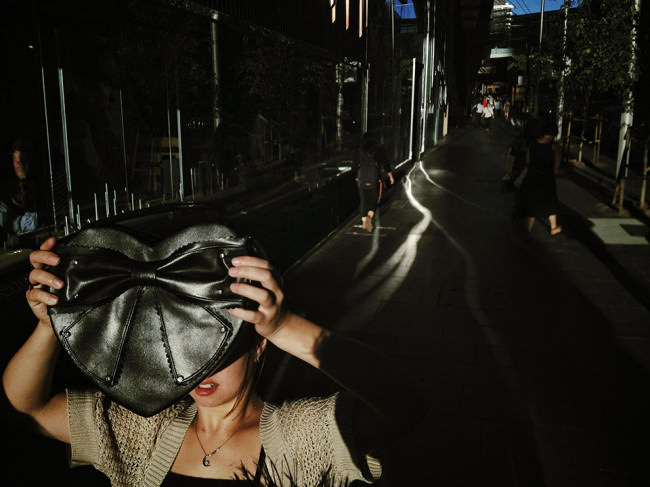
Gewinner in der Kategorie „Street“: „Hiding from the light“ von Oliver Lang

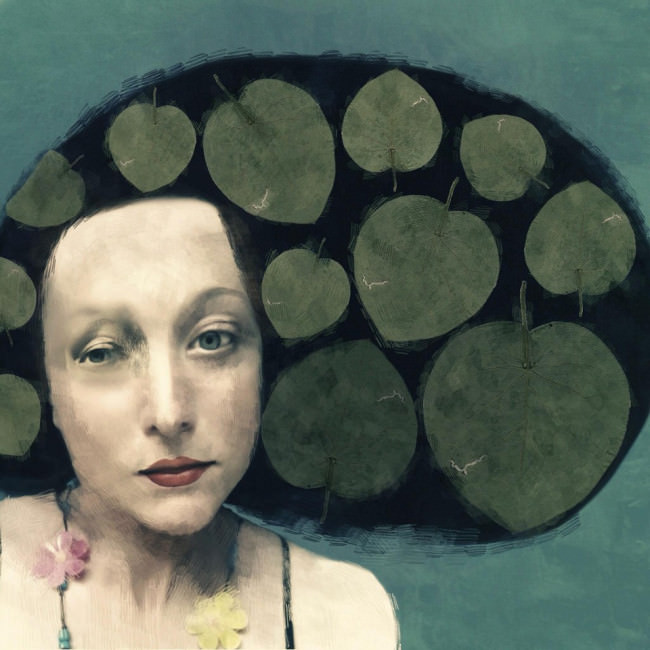
Die Gesamtgewinnerin der Mobile Phone Awards 2012 heißt Sarah Jarrett und wird bereits scherzhaft als App-Flüsterin bezeichnet, denn ihre Bilder erinnern durch die starke Bearbeitung am iPhone beinahe eher an Gemälde.

Die englische Fotografin setzte sich mit Abstand neben allen anderen Teilnehmern durch und stand bei allen sieben Jurymitgliedern als einzige auf der Top-Ten-Liste. Auch das Titelbild dieses Artikels stammt von ihr.

jarrett
Gesamtgewinnerin des MPA 2012: Sarah Jarrett

Alle Gewinner und lobende Erwähnungen könnt Ihr auf der Awardseite ansehen. Nehmt Euch einen Tee und etwas Zeit, denn es lohnt sich.

Ich sehe die mobile Fotografie nach diesen Fotos auf jeden Fall mit anderen Augen, beeindruckt von der Qualität und den Möglichkeiten, die mir bisher völlig unbekannt waren. Zu schade, dass mein Handy keine Fotos machen kann, denn sonst würde ich wohl jetzt direkt damit losziehen.


kwerfeldein – Fotografie Magazin

 
Comments Off on Mobile Photo Awards 2012

Posted in Equipment


5. März 2013

06 Mar

Ein Beitrag von: Valentine Winter

riverside


kwerfeldein – Fotografie Magazin

 
Comments Off on 5. März 2013

Posted in Equipment


Win the Ultimate Time-Lapse Photography Setup – Over $5000 in Prizes

06 Mar

JMG-Galleries.com Ultimate Time-Lapse Photography Giveaway - Over $  5000 in Prizes
Win an eMotimo TB3 Black & Dynamic Perception Stage 0 Dolly System
with a Quick Change 8 RPM & 21 RPM with MX2/AT2 Controller!

I am happy to announce that I’ve teamed up with eMotimo and Dynamic Perception to giveaway the ultimate time-lapse photography setup. Visit the JMG-Galleries Facebook page to enter. In addition bonus prizes, many worthy of grand prize status, are available from Adobe, Apple, GuraGear, BorrowLenses.com, and Lexar. Don’t miss your chance to enter to win amazing timelapse photography gear.


HERE’S HOW IT WORKS

STEP 1: Like JMG-Galleries.com on Facebook
Visit facebook.com/jmggalleries and click on the “Giveaway” page under our profile photo.
If you are not yet a fan you’ll need to “Like” BorrowLenses.com to access the contest

STEP 2: Enter the drawing
To enter fill out the contest entry form with your name, email address, city, and state. Gain additional entries in the drawing by subscribing to our newsletter, and following our generous sponsors eMotimo and Dynamic Perception.

STEP 3: Share for extra entries to better your odds
After you enter the drawing you will be able to share this giveaway with your friends via Facebook, Twitter and email with a custom link. You will automatically receive an extra entry in the giveaway for each friend that you refer.  You can return to our contest page at any time to check on how many referrals you’ve received.

STEP 4: Bonus prizes
Once you’ve referred 10 of your friends to enter the giveaway, return to our contest page and you will be able to “UNLOCK” our bond prize drawings for 1 of dozens of great bonus prizes.

STEP 5: Win
On May 1st we will select our winners by random drawing. After selecting our winners we will contact our grand prize winner of the eMotimo TB3 Black & Dynamic Perception Stage 0 Dolly System with a Quick Change 8 RPM & 21 RPM with MX2/AT2 Controller.  We will also announce the winners on our Facebook wall, so be sure to check our page and your email inbox to see if you’ve won.

Visit Facebook.com/jmggalleries To Enter

  • Contest Details

    Contest ends April 30, 2013 at 11:59PM PST. No purchase necessary. A purchase will not increase a contestant’s chance of winning. JMG-Galleries.com, a web site that is part of JMG Communications, LLC, is not responsible for entries that are lost, late, misdirected, incomplete, incomprehensible, illegible, damaged, undeliverable or delayed.
  • Eligibility

    To enter, you must be at least 18 years of age. Employees of JMG-Galleries, JMG Communications, LLC, their advertising agencies, affiliates, contest sponsors, employees and immediate families of each are not eligible to win any contest. Immediate family includes the spouse, great-grandparents, grandparents, parents, brothers, sisters, children, grandchildren, and great-grandchildren of the employee and his/her spouse. This also includes individuals for whom the employee is current legal guardian
  • Fraudulent Activity

    Fraudulent or abusive voting will be monitored and omitted through out the course of the giveaway. We reserve the right to disqualify users, without notice, and for any reason.
  • Prizes

    We reserve the right to substitute a prize of equal or greater value in the event that the original promised prize becomes unavailable. eMotimo TB3 Black is valued at $ 885.00, 6′ DynamicPerception Stage Zero System with a Quick Change 8 RPM & 21 RPM with MX2/AT2 controller is valued at $ 1280 and the bonus prize packages range from $ 85-$ 999. The odds of winning will depend on the number of entries. Unless otherwise noted, all contests and giveaway prizes are awarded via random drawing. Winners automatically grant the use of their name and likeness in the promotion of this and other JMG-Galleries.com contests. This promotion is in no way sponsored, endorsed or administered by, or associated with Facebook. Shipping is free for USA residents; winners outside of USA are responsible for shipping fees and your country taxes. All winners have 14 days to accept and coordinate shipping. If winner doesn’t respond within 14 days, prize is forfeited and replacement winner will be randomly selected from qualified contestants. BorrowLenses.com gift certificates are good for rentals only. Prizes are non-transferable and non-exchangeable.

Copyright Jim M. Goldstein, All Rights Reserved

Win the Ultimate Time-Lapse Photography Setup – Over $ 5000 in Prizes

The post Win the Ultimate Time-Lapse Photography Setup – Over $ 5000 in Prizes appeared first on JMG-Galleries – Landscape, Nature & Travel Photography.


JMG-Galleries – Landscape, Nature & Travel Photography

 
Comments Off on Win the Ultimate Time-Lapse Photography Setup – Over $5000 in Prizes

Posted in Equipment


Fotogenes Deutschland – Geroldsee

05 Mar

Nicht immer muss man als Landschaftsfotograf in die Ferne schweifen. Auch in Deutschland gibt es spektakuläre Landschaften zu entdecken. Ich möchte hiermit nun eine Artikelserie beginnen, die den Fokus auf eben jene Landschaften legt, die mehr oder weniger vor unserer Haustür liegen. Als Auftakt stelle ich euch einen meiner Lieblingsorte in den deutschen Alpen vor: Den Wagenbrüchsee, besser bekannt als Geroldsee.

Ich habe diesen Ort in den letzten zwei Jahren zu jeder Jahreszeit besucht und in den unterschiedlichsten Stimmungen erlebt. Mal regnete es ununterbrochen, mal war der See in Nebel gehüllt oder von Schnee bedeckt. Doch egal, wie das Wetter war, ich konnte immer mit einem besonderen Foto zurückkehren.

Was den Geroldsee zu einem so schönen Motiv macht, ist vor allem die Karwendelbergkette, die sich bei Windstille im See spiegelt. Zu Sonnenaufgang kann man auf einen glühenden Himmel hinter den Bergen hoffen, zu Sonnenuntergang glühen die Berge selbst. Der Geroldsee ist der perfekte Ort, um Alpenglühen zu erleben. Zudem ist er von zahlreichen kleinen Hütten umgeben, die sich sehr gut als Vordergrundmotive eignen.

Am liebsten fotografiere ich dort im Juni und Anfang Juli. Zu dieser Zeit besteht verstärkt die Chance auf Nebel, der morgens vom Barmsee herüberzieht.

Man sollte sich aber immer früh genug um eine Unterkunft bemühen. Die Gegend zwischen Garmisch Partenkirchen und Mittenwald ist im Sommer sehr beliebt bei Wanderern und im Winter bei Skifahrern. Deshalb sind viele Pensionen schon Wochen vorher ausgebucht – vielleicht hatte ich bislang aber auch nur immer ein schlechtes Timing.

Colorful Dreaming

Equilibrium

Glorious Morning

Winter Wonderland

Zum Abschluss bleibt noch zu sagen: „Leave only footprints, take only photos.“ Und auf den sumpfigen Wiesen um den See sollte man am besten gar keine Spuren hinterlassen. Bei der Fülle an Motiven ist das auch gar nicht nötig.


kwerfeldein – Fotografie Magazin

 
Comments Off on Fotogenes Deutschland – Geroldsee

Posted in Equipment


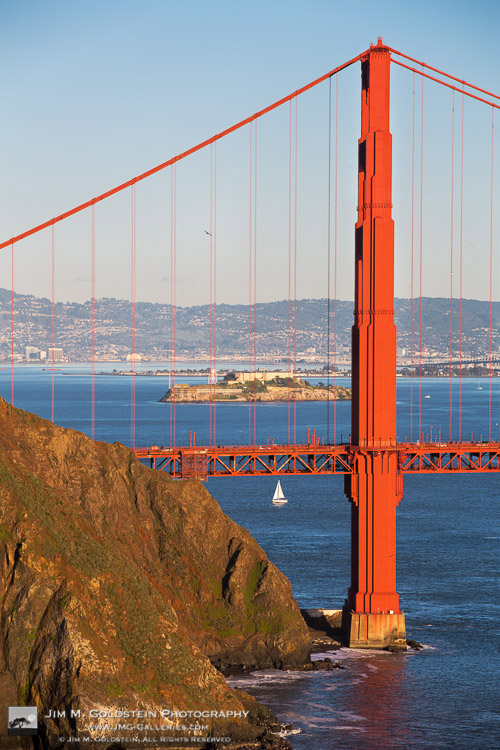
San Francisco Behind Bars: Alcatraz and Golden Gate Bridge at Sunset

05 Mar

Alcatraz Seen Through the Golden Gate Bridge – San Francisco, California

San Francisco is no stranger to photography icons. As you drive across the Golden Gate Bridge it’s quite easy to see Alcatraz sitting in the middle of the entry to the San Francisco Bay, but its not as easy to see both Alcatraz and the Golden Gate Bridge in clean alignment. One such low angle view does exist and its quite fun to see Alcatraz of all places behind bars… I mean the cables of the Golden Gate Bridge. Insert great sunset light, a sailboat and a pelican and it rounds the scene out to a rather fun photo.

Copyright Jim M. Goldstein, All Rights Reserved

San Francisco Behind Bars: Alcatraz and Golden Gate Bridge at Sunset

The post San Francisco Behind Bars: Alcatraz and Golden Gate Bridge at Sunset appeared first on JMG-Galleries – Landscape, Nature & Travel Photography.


JMG-Galleries – Landscape, Nature & Travel Photography

 
Comments Off on San Francisco Behind Bars: Alcatraz and Golden Gate Bridge at Sunset

Posted in Equipment


4. März 2013

04 Mar

Ein Beitrag von: Frau Mandarine

8527044351_a473c998e9_h


kwerfeldein – Fotografie Magazin

 
Comments Off on 4. März 2013

Posted in Equipment


DIY: Make a Stained Glass Window out of Instagrams

04 Mar

Extra photos for bloggers: 1, 2, 3

Ever wish your Instagram feed were more tangible? Like, hanging-from-your-window-tangible?

Well, you’ve come to the right place.

This DIY turns your windows into giant, photo-filled lightboxes that showcase your Instagram masterpieces.

Make colorful stained glass inspired windows to brighten up any space.

Gather up those digital files, or pull out that old box of 35mm slides from your grandparent’s attic.

Finally, a digital-analog way to drape your windows with Kodak moments!

Turn Your Windows into Giant Lightboxes

p.s. Attention Android party people – we’re ready for ya! You can *Enroll in Phoneography 101* – our guide to taking primo pics on your phone.

Why it’s cool:

ingred-smShiny colorful reflections that change throughout the day? Yes, please.

This funky slide curtain adds interest to any room.

Channel harsh sunlight through all the Kodachrome colors and Instagram filters, and even keep passers-by at bay.

Although, you may actually find a crowd hovering outside your door to look at your photographic treasures.

But hey, can you blame them? They are pretty awesome.

Oh, did we mention these are completely removable and damage-free? Sweet!

Ingredients:

paint-sm

  • For a digital option: Instagrams printed onto transparencies
  • For an analog option: 35mm slides, lots of them. See step one for amount.
  • Archival Slide Sleeves
  • Scissors
  • Super Glue
  • Scotch Tape
  • Small, removable plastic hooks. We used these 3M Hooks

STEP 1: Measure:

paint-smFirst, measure the space you want to cover with your curtain. For both the digital and analog version of this project, you’ll be working with 8.5″x11″ transparency pages or sleeves.

Each sheet, whether digital or analog, will hold 20 2″x2″ images.

To figure out how many slides/images we were going to need, we did a little math. You can also physically layout the sheets to visualize what this will look like.

The door we covered was 22″ wide, and 62″ high.

We measured that 2 sheets wide would cover the width. It needed 7 sheets down to cover the length. That made 14 sleeves we would need to fill with images. Since each sleeve holds 20 images, our final count was 280 images.

We’re starting with the digital version. If you are working with slides, skip to step 5.

Step 2: Digital Layout:

paint-smUse an editing software like Photoshop or Gimp to create a digital layout for your images.

Size your images to 2″ by 2″.

Copy and paste your photos into a new document that is 8.5 x 11″.

Space them out to create a grid that fits 4 images across by 5 images down.

Here’s a video that will help you figure out how to make a grid.

Repeat this step until you have the desired number of pages to cover your window.

Step 3: Digital Prints:

paint-smOnce your grids are finished, print them out on transparency pages.

You can pick these up at any office supply or art store. Just make sure they are compatible with your printer.

You could also take your files to a local copy shop and have them print on transparency for you.

Either way is fine, just print those bad boys out!

Step 4: Digital Trim:

paint-sm Sometimes the transparency will have a larger edge on the top and bottom.

If so, trim your pages to have even borders, around a half an inch wide.

Lay them out in the order you want them to be hung.

Now, skip down to step 8.

Step 5: Analog Layout:

paint-sm Now, layout your sheets on a table.

Make sure the opening where you’ll place your slides in each sheet are either at the top or side of the curtain. If they’re at the bottom, your slides could fall out.

Line them up so that they are all facing the same direction. This will help you keep track of how to glue them together in later steps.

Step 6: Analog Trim:

paint-sm In this step, you’re going to remove the white label and three hole punch from all of the sheets except the top row.

Take your scissors, and carefully trim as close to the white label as possible.

After you’ve cut one sheet, put it back in its place in the layout and move on to the next one.

TIP: You want to remove the label and holes from each sheet, but leave enough plastic to glue the sheets together.

Step 7: Analog Align:

paint-sm Again, double check that you are putting your sheets back together in a consistent manner.

You want all the openings to be facing the same direction.

Also make sure the openings are all on the same side of each sheet.

Step 8: Glue:

paint-smStart gluing the sheets of one column together.

Take the very top piece, the one with the holes and white label still attached, and place a thin line of glue along the bottom edge.

Carefully line up the sides of the next piece, and glue them together.

Press and hold for 30 seconds.

Repeat this step for the rest of the sheets.

Let the glue fully dry for 10 minutes.

TIP: We found it easiest to glue on column at a time. Start with the left side, and work top to bottom. Then do the same with the right side.

Step 9: Join:

paint-sm Once the glue has dried, it’s time to join the columns.

Line them up next to each other.

Place a line of glue on the edge of one column, and press the other column in place.

Let it dry for another 10 minutes.

TIP: It may help to temporarily tape them together to make sure they stay aligned while you’re gluing.

Step 10: Fill:

paint-smNow the fun part!

Fill up your curtain with all of your amazing slides.

You can make patterns of color, place images chronologically, or make any funky design you want.

You digital creators won’t need this step. Go ahead and skip this step.

Step 11: Place Hooks:

paint-sm Because we wanted to cover a metal door, we used these clear, removable 3M hooks on the glass.

But you can use any hanging system you wish.

Depending on your space, a curtain rod with rings might work well, or you might decide to tack it in place.

Either way, measure where to place your hooks, and affix them to your wall or window.

Step 12: Hang:

paint-smNow you see why we left the holes on the top row, eh?

Place the holes of the top row over your hooks.

Ta-da! Time to kick back and enjoy!

Take it further

  • Make a small cluster of framed slides for smaller spaces.
  • These vertical blinds add colored light and move with the breeze.
  • Make a slide light for a colorful display day or night.

Thanks to Design Sponge for the inspiration!

Related posts:

  1. How To Make Instagrams, Hand-made Exposures on Instant Film! Extra photos for bloggers: 1, 2, 3 Did you know…
  2. Turn Your Photos into Beautiful Glass Etchings! Extra photos for bloggers: 1, 2, 3 Before printers spewed…
  3. Glass Jar Frames Extra photos for bloggers: 1, 2 ~Have a cool photo…


Photojojo

 
Comments Off on DIY: Make a Stained Glass Window out of Instagrams

Posted in Equipment