RSS
 

Tips for Taking Better Pictures from a Moving Vehicle

08 Aug

Have you ever been stuck in a car or a bus and seen all this great photographic potential passing you by? Fantastic landscapes, funny signs, unusual animals, and stunning compositions seem to always appear when I’m stuck in the passenger seat of a car. It’s frustrating, especially if the car can’t stop to let you capture the view.

A landscape photographed from a car on a highway. - Tips for Taking Better Pictures from a Moving Vehicle

A fantastically colorful landscape by the highway in the Atlas mountains of Morocco.

The Challenge

For someone who actually doesn’t like the idea of just driving through an area and taking photos of it through the window (maybe because it feels so impersonal), I’ve done a surprising amount of it. Often because it’s a now-or-never situation; the view won’t be there later, or I won’t be returning in the near future.

Sometimes I’m on a highway and can’t stop, or there are so many photos I’d like to take that I feel bad asking the driver to stop over and over again. Also, taking photos from a car or bus can be great for people who have a hard time walking.

A landscape seen through a bus window in Iceland. Tips for Taking Better Pictures from a Moving Vehicle

I couldn’t resist this view seen through a bus window in Iceland.

In a car, bus, or train, there are many contexts in which it’s inappropriate, difficult or impossible to take a photo. Fortunately, there are also many situations in which you don’t have to leave completely empty-handed. It is possible to take photos from a moving vehicle, but it takes a bit of knowledge and planning.

It’s a suboptimal situation but sometimes you just have to find a way to make the best of it. Most likely it’s better than not trying at all! In this article, I hope to give some tips to help make your trips more enjoyable and creative. Let’s begin!

A house seen from a car in the Rif mountains of Morocco. Tips for Taking Better Pictures from a Moving Vehicle

The amazing houses and views in the mountains of northern Morocco were difficult to resist, even though it was a bit tricky to compose well.

When to try and when not to shoot

Safety is paramount

Even though trying is almost always better than not, there definitely are situations where you shouldn’t be taking photos from a moving vehicle. Remember that you’re sitting in a metal box moving through space at high speeds!

It goes without saying that you shouldn’t be doing any photography if you’re the driver. But as a passenger, you also need to be aware of how your photography may pose a danger to you or others. In short: think about safety.

Make sure you don’t block the driver’s line of sight or disturb them in some other way. Communicate with the driver and the other passengers. If you’re on a tour bus, don’t block other the passengers’ view through the window.

A woman on a donkey in rural Morocco. Tips for Taking Better Pictures from a Moving Vehicle

A very old photo I took through a car window. There are clearly some issues in terms of sharpness and composition, but it’s still a lovely memory.

If you’re in a car and planning to open a window, make sure nothing can fly out and be aware that there might be branches or objects by the side of the road that can hit you or your camera. Also be aware of oncoming traffic, and don’t lean out! Only slow down if it won’t disrupt the flow of traffic and if you convince the driver to stop the car for a photo break, make sure it’s in a safe place.

Is it worth it?

Even if everything’s okay in terms of safety, there are a few other things to consider before you start photographing.

Can the car stop for a little while instead of you attempting to take pictures through the window? If not, can the window be opened? Is there enough light for photography? Will doing so mean that you’ll miss out on seeing and enjoying the view?

There may also be places where I wouldn’t recommend photographing through a window. Driving through a city or village pointing a telephoto lens at people could be considered a bit creepy.

A mountain landscape seen from a highway in Morocco. Tips for Taking Better Pictures from a Moving Vehicle

This is how you do it

Enough of the don’ts and the warnings. It’s time to learn how to take great photos in this challenging situation.

Expose right

Not surprisingly, the most challenging part of this kind of photography is dealing with movement. In a moving car, your subject matter might swoop by at very high speeds.

In practical terms, this means using a shutter speed that can freeze that movement, finding an aperture that allows for enough depth of field, and choosing the ISO that makes all of that possible.

A view of rural Morocco. Tips for Taking Better Pictures from a Moving Vehicle

Here, the car was moving quite slowly so I got quite a sharp photo with a relatively wide angle. The dark and rainy weather made exposure a bit challenging, but it also made the sky much more dramatic.

The desired exposure depends a lot on what kind of a photograph you want. To get a sharp landscape photo from a moving vehicle, it’s important to have a fast enough shutter speed.

How fast depends on how fast you’re moving, but faster is generally better. I would suggest using at least 1/400th, but preferably faster. Be aware that the foreground is more likely to reveal signs of movement, whereas photographing something that’s further from the road is more likely to be successful.

Between the mountains and the desert in Morocco. Tips for Taking Better Pictures from a Moving Vehicle

A photo with a lot of depth, taken from a moving car.

If we continue with the example of a landscape photo, it’s also important to have a large enough depth of field to get a sharp capture of the whole view. This means you’ll need to use a small aperture, preferably around f/8.0, also depending on the sweet spot of your lens.

If you have the chance, try different settings, but if you can only take one or two photos, aim for a small aperture. Again, this depends a lot on what kind of photograph you’re aiming for and light levels.

Geological features photographed from a highway in the Atlas mountains of Morocco. Tips for Taking Better Pictures from a Moving Vehicle

I was aiming for a sharp photo of these beautiful geological features rushing past the car in the Moroccan Atlas mountains.

The last element of exposure, ISO, doesn’t make as much of a difference to this kind of photography as shutter speed and aperture do. ISO has the effect it always has, so the lower it is, the better.

Still, with modern DSLRs, using a higher ISO might be the key to allowing you to use the shutter speed and aperture you need while not adding a lot of noise.

An urban landscape near Casablanca, Morocco. Tips for Taking Better Pictures from a Moving Vehicle

It was cloudy and rainy, but by aiming for silhouettes and a dark atmosphere, this industrial view turned out sharp enough.

Plan well

It might seem difficult to plan in these situations, but there are usually some things that can help you create as good a photograph as possible. Even before you take your photo you can observe the light levels outside, which can help you with exposure.

You may also be able to get a good composition by observing the landscape outside and imagine what it might look like behind that curve or beyond that next hill. You can also see when there will be power lines appearing in your photo. I find that one of the most annoying parts of this kind of photography is power lines. They always get in the way!

Also, remember that this is one of those situations where taking a lot of photos is not a bad thing.

Signs and advertisements after a storm. Tips for Taking Better Pictures from a Moving Vehicle

Really annoying power lines! Still, I decided that I wanted to document the aftermath of a pretty bad storm outside Rabat, Morocco.

Optimise

To get as good a photo as possible, you should open the window to avoid unfortunate reflections or dirt in your photo. A closed window will also limit your movement and your options when it comes to composing.

There are many situations in which opening the window isn’t really a great idea, though. Remember that the most important thing is safety. If you can’t open the window, use the viewfinder and possibly a polarizing filter to try to avoid getting reflections and dirt in your photo.

A mountain landscape in Morocco. Tips for Taking Better Pictures from a Moving Vehicle

I didn’t have time to open the window so I photographed this view of houses seemingly pressed between mountains and clouds through the window.

Conclusion

Have you taken photos out of a car, bus, or train? I find the hardest part to be composing the photo.

What do you think? What benefits and challenges have you noticed? Do you have any tips for better photography on the road?

The post Tips for Taking Better Pictures from a Moving Vehicle appeared first on Digital Photography School.


Digital Photography School

 
Comments Off on Tips for Taking Better Pictures from a Moving Vehicle

Posted in Photography


How to use Colored Gels to Create Unique and Creative Portraits

08 Aug

We’ve all seen the usual studio set up –  beautifully crisp white light, maybe some strobes, diffusers, and other things of the sort. However, what can you do beyond that to make your portraits stand out? Add some color! In this article, learn how to use colored gels to add some spice to your images.

musician portrait with pink background - How to use Colored Gels to Create Unique and Creative Lighting

Colored gels are filters that go on your light in order to change the output color. They are usually sold at photography stores and clamped onto your lights. They range in size, thickness, color cast, and most importantly, price. Be very mindful of how hot your lights are because we’ve had gels melt on the set before during long sessions (such as music videos). 

However, you can also make your own colored gels using cellophane and tape. Just take some really saturated cellophane from a local party or art store and wrap them around your softbox or LED light (so long as the LED runs cold and won’t melt the plastic paper) and fasten with tape.

This may not look like the most professional setup, but I suppose that matters little so long as the final outcome is fantastic!

spooky photo with double exposures - How to use Colored Gels to Create Unique and Creative Lighting

There are limitless possibilities with gels. In regard to color combinations, I suggest making sure all of your gels are saturated the same in order to match with one another (and not become a headache in the editing room later).

Here are some of my favorite gel lighting arrangements to create some new and unique imagery. As a personal preference, I use continuous light, but the same can be achieved with studio strobes or speedlights.

One Color Gel Setup

The simplest and most traditional gel lighting look. There isn’t any fancy setup for this look, you can photograph your model in any fashion and just replace the white light with a color. Make sure your colored gel is really vibrant or the image may fall flat. 

portrait of a girl with amber gel - How to use Colored Gels to Create Unique and Creative Lighting

Play with distance, shutter speed, and some light post-processing to see how far you can get the light to spread. That can add a unique and unexpected twist to your one-light setup!

A good use of the one color set up is backlighting! Take your light and place it behind the subject.

backlighting with gels - How to use Colored Gels to Create Unique and Creative Lighting

Double Colored Gel Setup

My personal favorite is the double colored gel setup. All this requires is two lights, each gelled with different colors. Set them to the side of your model and watch the magic happen!

The division can be very eye-catching and intriguing.

model with red and green lights - How to use Colored Gels to Create Unique and Creative Lighting

lighting diagram - How to use Colored Gels to Create Unique and Creative Lighting

Be mindful of your model’s physical structure. You want to make sure that the color division hits the proper place. Aim for the lighting to (generally) divide right at the center of the nose (split lighting).

Tri-Color Gel Setup

How to use Colored Gels to Create Unique and Creative Lighting

You can go as intense with colors as you like, but when I do three color looks, I like one of those colors to be white. The white softens the whole look and doesn’t make it overly exaggerated.

However, if you prefer a color, I suggest placing a lighter color in the center of your arrangement and the darker colors on the sides.

portrait with 3 colors of light - How to use Colored Gels to Create Unique and Creative Lighting

For three color looks, my favorite arrangement is the traditional triangle light setup. This includes one light in front of the subject and two lights at the sides.

Depending on the look you want to achieve, you can set up the two side lights behind the model and just turn them towards the model. That keeps the light from being too harsh. For a more intense look, place the lights directly at the model’s sides.

lighting diagram - How to use Colored Gels to Create Unique and Creative Lighting

Rim Light Colored Gel Setup

girl with rim lighting - How to use Colored Gels to Create Unique and Creative Lighting

Always a very dramatic and edgy look, using gels for rim lights can bring a bit of flair to your portraits. It does depend on your model’s structure as to where you place the lights. What I do is set up a white light in front of the model and two colored gels on lights to the side pointed forward.

The best colors I’ve found for the rim light look are purples, blues, reds, and greens – oranges tend to get a bit lost with the white light.

How to use Colored Gels to Create Unique and Creative Lighting

Background Light Gel Setup

How to use Colored Gels to Create Unique and Creative Lighting

The quickest way to liven up any location is to aim some lights with colored gels attached toward the background wall.

You can photograph your subject in any traditional studio light manner, and just shoot two gelled lights to the back wall. This allows your subject to be really well separated from the background (something we always strive for in studio photography).

How to use Colored Gels to Create Unique and Creative Lighting

Now go out there and play with colors!

The post How to use Colored Gels to Create Unique and Creative Portraits appeared first on Digital Photography School.


Digital Photography School

 
Comments Off on How to use Colored Gels to Create Unique and Creative Portraits

Posted in Photography


A Quick Primer On Resolution and Photo Scanning

08 Aug

When you are setting out to digitize your collection of old photos and film, scanning resolution is an important attribute to consider. This number is crucial when you are thinking of printing your scanned images rather than just viewing them on a screen. Since most people, at some point or the other, will want to create memorable keepsakes – framed Continue Reading

The post A Quick Primer On Resolution and Photo Scanning appeared first on Photodoto.


Photodoto

 
Comments Off on A Quick Primer On Resolution and Photo Scanning

Posted in Photography


Cactus launches bare bulb wireless monolight on Kickstarter

08 Aug

Lighting manufacturer Cactus has officially launched its RQ250 bare bulb wireless TTL flash unit on the Kickstarter crowd funding website. Plans for the flash were originally announced at the beginning of the year, and now the company says it will be ready for delivery in October.

The head offers a maximum output of 250Ws and a recycle time of 1.1 seconds at full power

The RQ250 is ‘barely larger than a speedlight’ according to the manufacturer but offers the flexibility of a studio head. It can be controlled wirelessly via the Cactus V6 II radio transceiver system and allows TTL metering across the six main camera brands. Those who prefer manual control can adjust it in 0.1EV steps from full power down to 1/512th power, while the 4-cell lithium ion rechargeable battery provides 520 full-power bursts per charge. The head offers a maximum output of 250Ws and a recycle time of 1.1 seconds at full power. An integrated fan is designed to maintain a decent temperature in the head during intensive shoots, and the aluminum reflector helps by dissipating heat away from the body.

A range of modifiers will be available that connect to the head with via a twist lock bayonet system. The bayonet-mount reflector has a magnetic rim which allows further modifiers to be switched very quickly. The range that can be used will include softboxes, umbrellas and a reflector, as well as a set of magnetic gel holders, a snoot, a diffuser dome and barn doors. Initially it was said that the head would have a Bowens S-Mount bayonet, but it seems Cactus has changed this to its own mount but will offer an optional Bowens S-Mount adapter.

An LED in the head can be used as a 20W modeling bulb as well as an AF assist lamp that comes on only as the camera’s shutter release is depressed

The head can be used in two modes – Color or Speed. Color aims to produce consistent color balance as output varies, while Speed is designed for short flash duration to freeze motion in the image. High speed sync is also available.

An LED in the head can be used as a 20W modeling bulb as well as an AF assist lamp that comes on only as the camera’s shutter release is depressed. It can be kept on all the time at full brightness or linked to the selected level of output to give proportional lighting in multi-head set ups. Additional Speedlights can be used in one of four groups with the RQ250, and wireless control can be achieved with 2.4Ghz radio or optical slave settings.

The Cactus RQ250 is designed and assembled in Hong Kong, measures 194mm x 80mm x 80mm and weighs 1235g (2.7 lb) with the battery, reflector and tube loaded. It will cost $ 699 but can be snapped up for an early bird price of around $ 550 / £430 on Kickstarter.

See the Cactus website or the RQ250 Kickstarter page for more information

Press Release

Cactus RQ250 is now on Kickstarter

The Cactus RQ250, a palm-sized, 250Ws, Li-ion battery-powered TTL wireless monolight, is now on Kickstarter!

Cactus, the award-winning manufacturer of the world’s first cross-brand wireless trigger, is proud to present its first project on Kickstarter: The RQ250 Li-ion battery-powered TTL wireless monolight.

With the freedom of going wireless using portable flashes, location shooting is much easier than before. “Over the years, Cactus started to think about making a flash with all the essentials of a studio strobe, powerful yet portable enough like a speedlight, a light that can pair up with various kinds of modifiers to shape the light photographers want. A light photographers can use on location, fast and smart,” says Henry Chan, the head of R&D at Cactus.

The Cactus RQ250 is small, versatile, fits all kinds of light modifiers in just a click, and addresses all location shooting needs.

Small but Powerful

The RQ250 is so compact it can sit on the palm of your hand. Barely larger than a speedlight, it comes with 250Ws of power and a range of 10 stops, from 1/512 to full power.

Uni-body Design

What makes the RQ250 unique is its special flash head design. The 63-degree optical optimized reflector, which is equivalent to speedlight zoom setting of 35mm, not only makes it good to shoot with on its own, but it is also a perfect match with a lighting umbrella.

Inside the flash head sits Cactus TubeOneTM, the proprietary bare bulb that can be put instantly in a softbox. Coupled with the aluminium flash reflector and Cactus bayonet mount, changing instantly from a round head diffusion disc flash to bare-bulb requires only one click.

Magnetic Clip-on Modifier System Kit

With built-in magnets on the RQ250’s reflector head, clip-on light modifiers can be snapped into place and easily stacked to create the desired lighting effect. The optional kit to the RQ250 includes a barn door, a colour gel set, a diffuser dome, a honeycomb, and a snoot.

Instant Recharge and Fast Recycling Time

The RQ250 maximizes the power of its four-cell battery pack using our proprietary UltroEDTM transformer, which recycles in 1.1 seconds and fires a whopping 520 full power flashes on a single charge.

The RQ250 is also the only monolight of its size equipped with an integrated cooling fan and thermal sensors that allow optimal cooling in any environment photographers are working in. Together with the aluminium flash reflector that dissipates heat, the RQ250 can take a beating and still not overheat.

Colour Mode and Speed Mode

With colour mode on, the RQ250 is able to produce consistent colour temperatures across the entire 10-stop power range and over hundreds of shots, saving photographers a tremendous amount of time during post-editing.

In speed mode, lightning fast flash duration at low power outputs allows photographers to freeze the fastest of movements. With power adjustment steps as fine as 0.1EV, the 10-stop power range from 1/512 to 1/1 enables full manipulation of the RQ250 power band.

TTL on Eight (8) Camera Brands

The RQ250 is a wireless TTL monolight for Canon, Fujifilm, Nikon, Olympus, Panasonic, Pentax, Sigma, and Sony when triggered by a Cactus V6 II or V6 IIs. It supports TTL, high-speed sync (HSS/FP) as well as manual power control and works simultaneously with any portable flashes compatible with the Cactus V6 II or V6 IIs.

Modelling Light and AF-assist

A modelling light has always been an exclusive feature in professional studio lights, but we managed to put one in the small body of the RQ250. The RQ250 not only has one, but it has 20W, making it powerful enough to light any subject and allowing photographers to work freely in any environment. The modelling light can be used as an AF-assist to help photographers achieve accurate and efficient focus.

Kickstarter

The new RQ250 (MSRP: US$ 699.00) and its accessories will be available on Kickstarter for a pre-sale discount beginning August 6, 2018.

About Cactus

Headquartered in Hong Kong, Cactus is a brand under the R&D company Harvest One Limited. The RQ250 is designed, engineered and assembled in Hong Kong.

The manufacturer of the award-winning Cactus wireless flash triggers and flashes, the world’s first and only wireless triggering system that supports TTL/HSS across eight (8) brands of camera and flash systems, Cactus stands firmly behind its products and closely works with photographers to always cater to their needs.

Cactus has distributors and dealers worldwide. Learn more about the RQ250 and Cactus’s other products at www.cactus-image.com.

Articles: Digital Photography Review (dpreview.com)

 
Comments Off on Cactus launches bare bulb wireless monolight on Kickstarter

Posted in Uncategorized


Tips for Processing Night Photography with ON1 Photo RAW 2018.5

07 Aug

For many students, as they start learning photography they want to know how to take photos at night. It is a mystery to them and they often think it is so complicated that they will never be able to do it. That is until they try it and discover just how easy it is. The next step is editing those images and ON1 Photo RAW 2018.5 has a lot of tools and adjustments that are perfect for processing night photography.

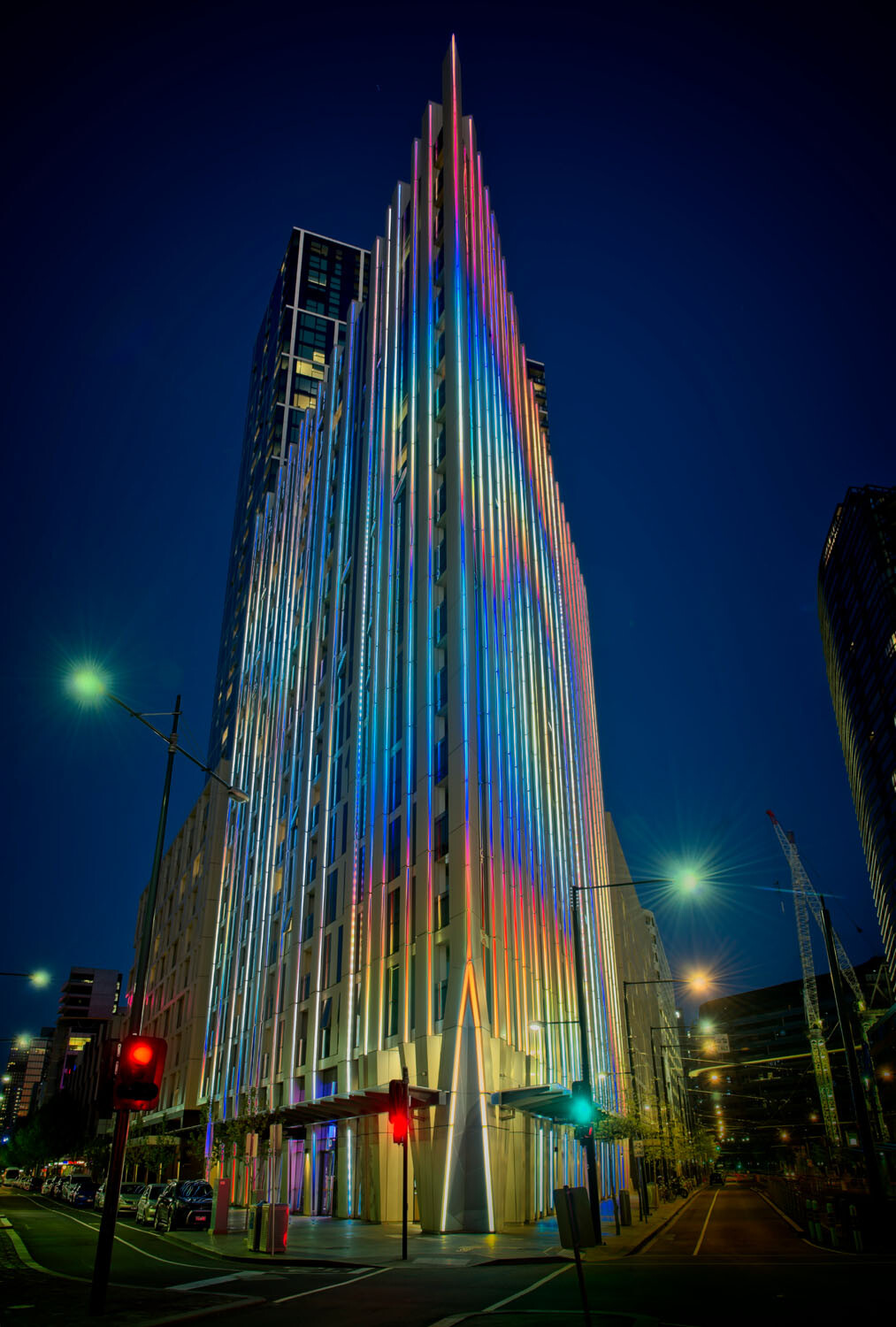
HDR architecture image - Tips for Processing Night Photography with ON1 Photo RAW 2018

An image created using the HDR option in On1 Photo RAW 2018.

Night photography options

First, we should take a look at the different types of night photography that you can do. There is the easiest option of setting your camera up on a tripod and photographing lights somewhere.

The city at night is very popular if you live in an urban area. Perhaps capturing town lights can also be good. You just need something that is making light. HDR has had a lot of bad press, but it really is good for some images, and night shots of cities are perfect for it. ON1 Photo RAW’s HDR processing is one of the best I’ve seen.

When the sun has gone down and there is a lot of traffic you can photograph light trails. Taking longer exposures with your camera on a tripod will make all those lights look like streaks. If you want to make it look like there were a lot, then you can stack the images together, so all the streaks will show in one final image.

One type of night shot that is hugely popular right now, especially in Australia, is astrophotography. Photographing the Milky Way. It is the season for it here and with the low population, you are spoilt for choice where to do them. If you have ever tried doing any astrophotography then you will also be aware that your images have to be processed or they can look at washed out. ON1 Photo RAW 2018.5 has you covered there as well.

Tips for Processing Night Photography with ON1 Photo RAW 2018 - astrophotography milky way image

An astrophotography image processed with ON1 Photo RAW 2018.5

Photographing the City

Night time in the city can be so magical and to be taking photos of it even more so. Processing your images taken at night is much the same as processing any of your images.

Open your image in ON1 Photo RAW and take it into the Develop module. Make the adjustments as you would for other images. Move the sliders around to see what you can get. Take them too far and then bring them back.

sliders in ON1 Photo RAW - Tips for Processing Night Photography with ON1 Photo RAW 2018

When learning it is good to take the sliders too far, see what happens.

If you want to make adjustments to particular areas, then look at local adjustments which is the best place to do that.

However, what if you want to do something to your image to really make it pop?

HDR photography, or High Dynamic Range, can be perfect for this. It is a process that has copped a lot of criticism over the years. People say it is too much, that the images can be ugly. But that really only happens when you don’t use it for the right images, or overdo it.

There are some scenes and images that are perfect for HDR and night photography is one of those times.

HDR Night Photography

When you are to decide which images would work best for HDR, look for ones that have a lot of dark areas, and a lot of bright parts as well. Usually, your camera will struggle with getting an even image of a high contrast scene. It will either make the image too bright or too dark. Night images have those problems. Once you get the lights exposed right, all the shadows become too dark or black.

The best way to do HDR is to take a series of images or bracketed shots. If your camera will allow you to bracket then it will sort out the exposures you need. The most common number of shots is 3 or 5. For this article, five images were taken.

Next, select all of your bracketed images inside the ON1 Photo RAW browse module. You can do that by clicking the first then pressing the shift key followed by clicking on the last image. If you have put the images into a subfolder you can then just use Ctrl/Cmd+A.

Tips for Processing Night Photography with ON1 Photo RAW 2018 - bracketed set of images

Work out which images you want to use.

Once they are selected you should be able to see the HDR button over on the right-hand side of your screen, underneath all the different modes.

select images and HDR button - Tips for Processing Night Photography with ON1 Photo RAW 2018

Select all your images.

ON1 Photo RAW will then merge all your images together. The first time you do it, a window will pop up asking you what look you would like. The options include Natural, Natural Auto, Surreal and Surreal Auto. You can make the changes once the image has been merged to HDR. There are lots of choices with ON1.

Let’s take a look around the HDR working window

Tips for Processing Night Photography with ON1 Photo RAW 2018 - HDR looks

Selecting your HDR look in ON1 Photo RAW.

There are several places where you can set the amount of de-ghosting (remove spots where something moved between brackets) you want the program to do. You can change the HDR look you wanted if you think you made a mistake. You can select which image you think should be the main one.

Go through and change the image to suit the look you are after. I know I say this a lot, but the best way to learn is to play around with the settings.

HDR options - Tips for Processing Night Photography with ON1 Photo RAW 2018

All the different things you can do to your image.

Like most images, you need to experiment to see what you like. Remember that ON1 is non-destructive so you won’t ruin anything. Try everything, it is the best way to learn. Take it all too far and then bring it back.

Lastly, choose where you want your image to go when you are done. You can have it open in Develop, Effects or go back to Browse. The last choice is Cancel. If you want to save it then click Save.

Tips for Processing Night Photography with ON1 Photo RAW 2018

Taking the image further.

Once the image is opened in the Develop module, you can then make more adjustments to as you would normally.

Develop module - Tips for Processing Night Photography with ON1 Photo RAW 2018

Where to go next.

ON1 Photo RAW is one of the best programs for doing HDR. You can make so many changes to it as it is happening and after it is done. Nothing is final.

final HDR - Tips for Processing Night Photography with ON1 Photo RAW 2018

The final HDR image.

Astrophotography

For anyone who has ever done astrophotography, you know that the images always need to be processed.

Here is an image that was taken a couple of years ago. This is the raw file and you can see that it needs a lot of work.

night image Milky Way and lighthouse - Tips for Processing Night Photography with ON1 Photo RAW 2018

Raw image from astrophotography shoot.

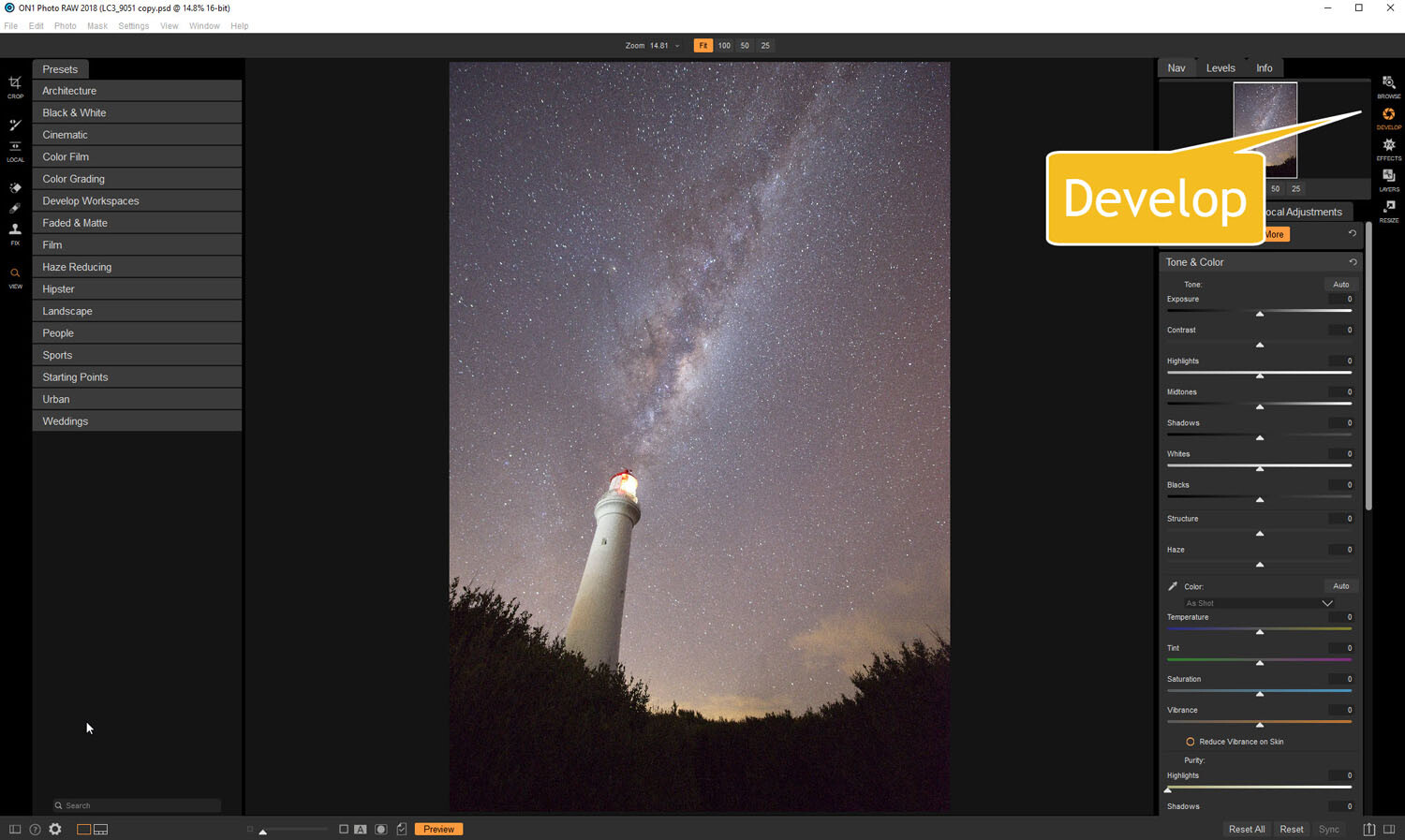
Open the image up in ON1 Photo RAW and go to the Develop module. Everything you need to make the best astrophotography images is all right there.

develop - Tips for Processing Night Photography with ON1 Photo RAW 2018

Open in the Develop module.

Noise reduction

The first thing you want to do is to work on the noise in the image. All astrophotography images have a great deal of noise. You have to increase your ISO quite high in order to get the Milky Way in your image. Usually, it is going to be somewhere between ISO 3200 up to 6400.

The image for this article was taken at f/2.8, for 30 seconds at ISO 6400. It was taken at 14mm using a 14-24mm lens.

In the Develop module go to Details. This is where you can help reduce the noise in your image. Click on the image to zoom in so you can see the noise better.

noise and details section of develop - Tips for Processing Night Photography with ON1 Photo RAW 2018

The first thing to do is to fix the noise in the image.

Under Noise Reduction, you will see a Luminance slider. Move that along until the noise almost disappears. Be careful not to go too far or you might lose all the stars (noise is just white specs so the stars can easily be misinterpreted as noise if you go too far).

This slider smooths out the image and you can lose a lot of detail if you go too far. Bring up the Detail slider to help maintain it. It is about experimenting and seeing what you like as well.

You can also bring up the Sharpening amount as well but be careful. Over sharpened images can look terrible. Go easy with this slider.

noise adjustments - Tips for Processing Night Photography with ON1 Photo RAW 2018

You can see how much was changed.

Tone & Color

It is time to go back to Tone & Color and make more adjustments.

tone and color - Tips for Processing Night Photography with ON1 Photo RAW 2018

Take the image back to Tone & Color to make basic changes.

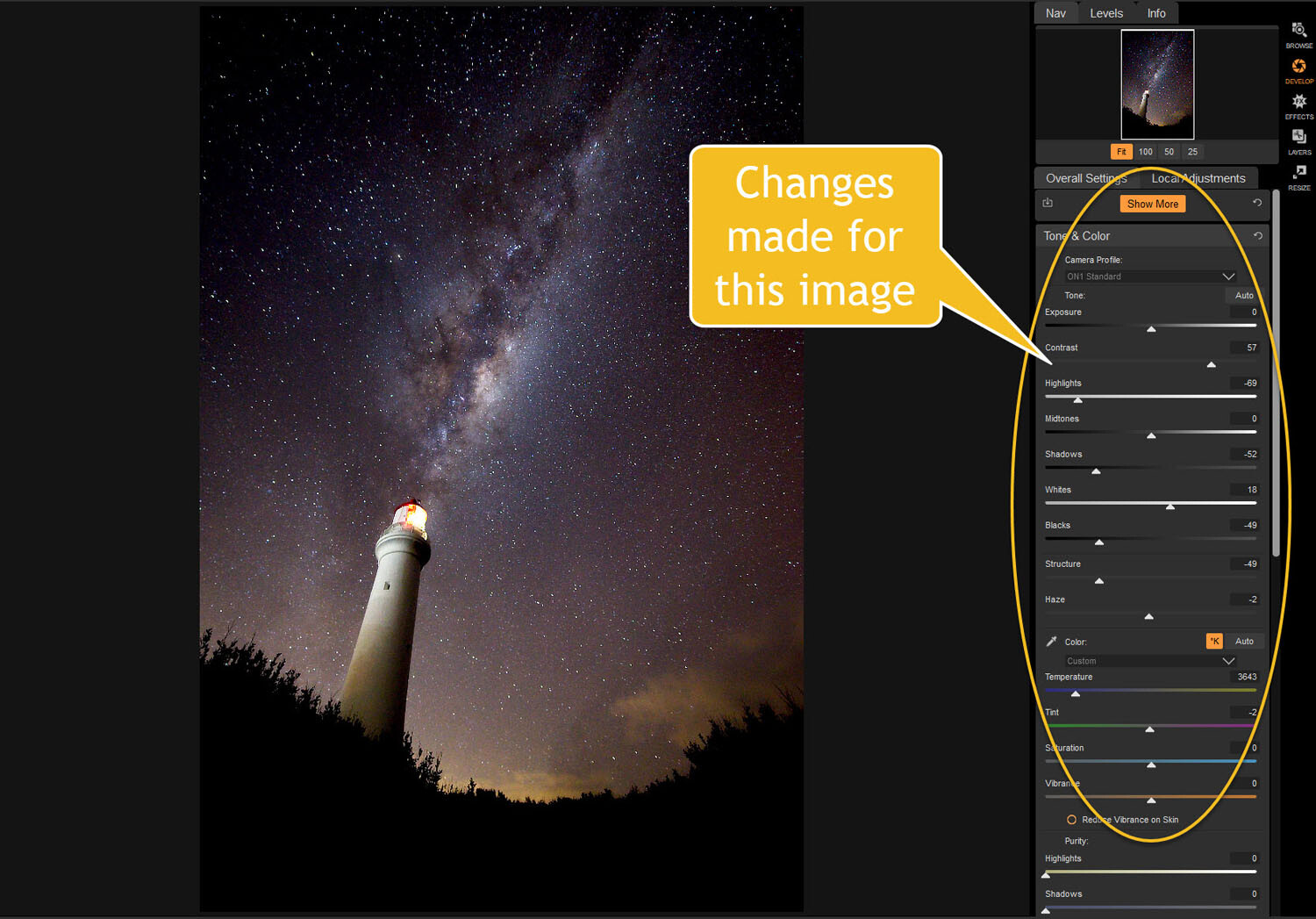
The main things you want to add back into your image are the blacks and lots of contrast. The added contrast will help the stars stand out more from the dark sky. The blacks will allow the darker parts of the sky to appear as you saw them when you shot the image.

The highlights can be brought down to stop the lighthouse from blowing out too much. If you take the shadows down it helps make the darker parts of the sky richer as well. However, be aware that it can also make other parts of the image go black, like the foliage at the bottom of this image.

The whites were brought up a fraction, as this helped to lighten up the Milky Way and make it jump out more.

slider adjustments - Tips for Processing Night Photography with ON1 Photo RAW 2018

Some of the changes that were made in Tone and Color.

Color Adjustments

Most of the changes are made to the image now, but if you look closely there is quite a bit of blue in it. It shouldn’t be there and to remove it you need to go to Show More and then Color Adjustments.

color cast - Tips for Processing Night Photography with ON1 Photo RAW 2018

Taking out the blue cast color in the stars.

A new window for this will open up down below the other adjustment windows.

As it is the blue you want to change, click on that color square. Once it is selected you can move the saturation slider until the blue in the image disappears or is to your liking.

reducing blue saturation - Tips for Processing Night Photography with ON1 Photo RAW 2018

Changing the saturation of the blue.

You can try adding presets to your image as well, though most people with astrophotography just do the basics and leave it there.

You will need to play around with your photos to see what you can do and what is to your tastes. These are just suggestions as to what other photographers do. Experiment, take the sliders too far and then bring them back.

This is the final image.

final image of lighthouse - Tips for Processing Night Photography with ON1 Photo RAW 2018

The final image of the Milky Way over the top of the lighthouse.

Light Trails

In cities, or anywhere there is a lot of traffic, you will see photographers trying to capture the trails of the lights as the cars go past. For most places, the best time to capture this is during peak hour when a lot of vehicles are moving. However, it also needs to be dark.

Unfortunately, there are times of the year where it is impossible to get both at the same time. For instance, in Australia during the summer daylight saving means it doesn’t get dark until after 8 pm. Getting good light trails is reduced because there isn’t enough traffic at that hour.

However, there is a way to make it look like there was more traffic, that is to stack your images. You can also do this for star trails too.

Stacking light trails

Work out which image will be the first one. Take it the Develop module in ON1 Photo RAW and do what you want to process it normally first.

But do not straighten it or do any lens correction on the image. If you do then the other images won’t align up properly, you can do all that after.

original image for light trails - Tips for Processing Night Photography with ON1 Photo RAW 2018

The first image used for the light trails.

Once you have your image ready, go to the Layers module.

layers - Tips for Processing Night Photography with ON1 Photo RAW 2018

Take the image to the Layers mode.

Next, add all the other photos that will make up the final image. The best way to do this is to put all the images into a subfolder. Select the images you want to use, then right-click and go to Add Subfolder.

add subfolder - Tips for Processing Night Photography with ON1 Photo RAW 2018

Putting your images into a subfolder.

A window will pop up once you click Add Subfolder. You can name it as you want, or ON1 will name the folder the same as the filename for the first image. Make sure the box is ticked for Move Selected Items into Subfolder.

add subfolder - Tips for Processing Night Photography with ON1 Photo RAW 2018

Creating the subfolder.

Now you are ready to add all those images as layers to the original photo.

Get your image to the Layers module which is where you will add the images for your light trails. Go up to File in the main menu at the top. Select Add Layer(s) from File.

add images from file - Tips for Processing Night Photography with ON1 Photo RAW 2018

Now it is time to add the layers.

A window will pop up where you can go to the subfolder that you put the images into. Select all the images, Ctrl/Cmd+A, then press Open.

select images - Tips for Processing Night Photography with ON1 Photo RAW 2018

Selecting all the images you want to use.

ON1 Photo RAW will ask you if you want to open them all, say yes. Depending on how many images you are trying to do it can take some time for this to happen. The images used for this demonstration are quite large and took a few minutes.

images added as layers - Tips for Processing Night Photography with ON1 Photo RAW 2018

All the images are added.

Next, you need to blend each layer. You want the lights to shine through from each but not everything else. For each layer, go up to the blending pull-down and select Lighten.

blending options - Tips for Processing Night Photography with ON1 Photo RAW 2018

Blending all the layers with Lighten.

You can now save the image and then you can do more processing if you wish. If the image needs straightening, lens corrections, etc., you can do it in the Develop module.

light trails image - Tips for Processing Night Photography with ON1 Photo RAW 2018

The final image.

Star Trails

If you enjoy doing star trails then you will be able to use this same method for processing and stacking those images using ON1 Photo RAW. Just add them all as layers and use the Blending option Lighten.

Conclusion

There are many things you can do with your night photos in ON1 Photo RAW 2018.5. With things developing constantly you will be able to do more and more with time. The HDR feature is one of the best I’ve seen and I’m sure most of you will enjoy that.

With all software, experimenting is the key. Take what you learn and see what else you can do with it.

Disclaimer: ON1 is a dPS paid partner.

The post Tips for Processing Night Photography with ON1 Photo RAW 2018.5 appeared first on Digital Photography School.


Digital Photography School

 
Comments Off on Tips for Processing Night Photography with ON1 Photo RAW 2018.5

Posted in Photography


Lensbaby Sol 45 impressions and sample gallery

07 Aug

$ (document).ready(function() { SampleGalleryV2({“containerId”:”embeddedSampleGallery_2833132410″,”galleryId”:”2833132410″,”isEmbeddedWidget”:true,”selectedImageIndex”:0,”isMobile”:false}) });

Lensbaby has announced the Sol 45, a lens aimed at photographers new to the Lensbaby lineup. The Sol 45 is a fixed F3.5 aperture 45mm manual focus creative lens that offers a relatively straight-forward way to try out the creative effects that Lensbaby is known for. You get the signature Lensbaby tilting focus, sharp center and blurred edges, but in a more restrained package that can help you get the look you are after.

The fixed F3.5 aperture on the Sol means that you only have one “level” of focus + blur to work with. If you are familiar with other Lensbaby lenses, you can typically use the aperture to control how strong of an effect you get: the wider open the aperture, the stronger the effect. This is useful if you want control over how bold or subtle the effect is, but it does add one more decision you need to make when setting up your shot. With the Sol 45, that decision is removed so you have a more consistent experience. This might feel limiting if you are accustomed to using aperture as one of your controls, but it also simplifies the process.

The Sol 45 can be tilted to move the focus to different parts of the frame, giving you plenty of options for composition. If you are coming from another Lensbaby tilting lens system like the Composer Pro II, you will notice that the Sol 45 does not tilt quite as much — the Sol tilts 8.5° whereas the Composer Pro II can tilt up to 15°. But the feature that I am excited about is the ability to lock the Sol 45 back to the center (or keep it locked so that the focus sweet spot is always in the center). The narrower tilting range combined with the ability to find and lock the focus back to center gives photographers a lot more predictability and control.

If the tilt and blurred edges aren’t enough for your creative tastes, the Sol 45 has one more trick up its sleeve: two bokeh blades that can be used to add texture to your bokeh. You can use the bokeh blades alone or together, and they can be rotated to create different effects. As someone who doesn’t use textures very often in my editing I prefer to keep the bokeh blades tucked safely away, but I can see the appeal for someone who is a fan of textured bokeh and who is using more appropriate backgrounds and composition (most of my sample images include very busy backgrounds because I wanted to see the maximum effect of the bokeh blades).

My only frustration with the Sol 45 is that the in-focus area seems a bit small compared to the frame, especially if I have the lens tilted at an angle. With a 45mm focal length, I found that my normal framing for portraits was too close if my subject wasn’t centered; any off-center subjects would have only one eye in focus. This could be corrected by taking a few steps back, of course.

Overall, I found the Sol 45 to be simple and fun to use. The more conservative controls made it less intimidating than creative lenses sometimes can be, and I was able to quickly get the hang of it and get results I liked. It’s a good way to be introduced to the world of in-camera creative effects if you are curious about the potential but you’re not quite ready to dive in.

Check out our Lensbaby Sol 45
real-world sample gallery

Lensbaby Inspires New Audiences With the Fun and Accessible Sol 45

A tool to inspire. A tool to be bold. A tool to build memories.

Portland, OR (August 7th)Lensbaby—makers of award-winning creative effects lenses, optics and accessories—announces the launch of their most playful and accessible lens yet, the Sol 45.

“Sol 45 opens up a new creative experience for those who want to dip their toes in the Lensbaby pool,” said Craig Strong Lensbaby Co-Founder and CCO. “Sol inspires visual artists to find new and fun ways to see their world by creating unique images in camera – no filters needed.”

The Sol 45 responds to those curious and insightful individuals who desire intention, imagination, and passion within each experience they live. This fixed aperture lens features an ease-of-use that injects the classic Lensbaby energy into images while creating a fun photography experience that benefits from the creation of unique photos that are representative of the users’ passions.

Users simply identify a subject in frame, bend the lens toward it, rotate the focus ring to bring subject into focus and shoot, ultimately creating a tack-sharp circular area of focus surrounded by bold blur and smooth bokeh. In addition, users can bring the lens’s bokeh blades – situated on hinged arms hiding at the edge of the lens – into the lens’s field of view. These bokeh blades add subtle lines of texture in-camera to the bokeh, creating stylized texture effects that many photographers only experience post-edit.

Since 2004, Lensbaby has challenged photographers to make their creative process one that distinctly captures the voice they find behind the camera. Today, the Sol 45 opens this door to all creatives, regardless of skill level. Enthusiast DSLR and mirrorless camera shooters, especially those who are newer to Lensbaby, now have the opportunity to experiment with the brand’s iconic look for an affordable price of $ 199.95.

The Sol 45 is made specifically for DSLR and mirrorless cameras, and is compatible with Canon EF, Nikon F, Sony A, Pentax K, Sony E, and Fuji X. The lens will also be available in a 22mm version specifically for Micro 4/3rd shooters. The Micro 4/3rd community is a passionate group who has embraced Lensbaby for years, all while longing for lenses tailored specifically for them. The Sol 22 was developed in a 22mm focal length (44mm equivalent) to serve these photographers.

For more information about the Sol Lenses please visit: https://sol.lensbaby.com/. The Sol 45 will be available for purchase on: https://lensbaby.com/product/sol45mm/ and select Lensbaby-authorized retailers for $ 199.95 on August 7th, 2018, and the Sol 22 will be available for purchase in September at: https://lensbaby.com/product/sol22mm/ . For more information please contact Keri Friedman at keri@lensbaby.com or Elizabeth Gerken with Groundswell PR at Elizabeth@groundswellpr.com.

About Lensbaby:

For over a decade Portland, Oregon-based Lensbaby has inspired and challenged photographers on their journey to finding their unique, visual voice. Lensbaby makes award-winning, one-of-a-kind lenses, optics and accessories for risk-taking photographers who believe that photography is an expression of their soul. Lensbaby provides instructional content through their educational hub, Lensbaby University and sells its products worldwide. For more information, visit www.lensbaby.com

Articles: Digital Photography Review (dpreview.com)

 
Comments Off on Lensbaby Sol 45 impressions and sample gallery

Posted in Uncategorized


Pigs don’t fly, but bears do with DJI’s latest Spark drone

07 Aug

In one of the more bizarre collaborations we’ve seen in a while, drone manufacturer DJI has teamed up with Line Friends to release an animal-themed DJI Spark drone.

For those unfamiliar, Line Friends is a collection of playful characters taken from the messaging app Line. Although pictures indicate other characters could make their way onto DJI Spark drones, the only confirmed character collaboration is with a bear named Brown.

As you may have suspected, the special-edition DJI Spark, named ‘LINE FRIENDS (BROWN) | Spark,’ features a brown paint scheme with the bear’s adorable features on top. In addition to the drone’s paint scheme, the remote control also features an image of Brown on the top faceplate, between the antennas. To wrap it all up, a custom box is included as well, which features an image of Brown holding a DJI remote control.

Aside from the custom paint scheme, the Spark drone remains identical to the standard version, including the 16 minute flight time, two mile range, 2-axis gimbal and 12-megapixel camera. Like its less decorative counterpart, the LINE FRIENDS (BROWN) | Spark costs $ 399 and can be purchased through DJI’s online store.

Articles: Digital Photography Review (dpreview.com)

 
Comments Off on Pigs don’t fly, but bears do with DJI’s latest Spark drone

Posted in Uncategorized


Don’t Show Me Your Tricks, Show Me Your Photography Skills

07 Aug

Did you know that the automated features and tricks built into cameras and computer software can actually stunt your photographic growth and photography skills? It’s true. Unless you are seeking to learn how to achieve specific results from the canned effects used by others, you might be shortchanging yourself.

Think back to what made you take up photography in the first place. Remember seeing the amazing shots in magazines, online, or taken by a friend and then dreaming that you too might produce amazing pictures?

Well, you can and you should. Learn the camera’s basic controls and how to shape your pictures with software tools, and don’t just rely on packaged effects.

Tricks Bode Orig - Don’t Show Me Your Tricks, Show Me Your Photography Skills

Photography skills override tricks

If you enjoy fishing but purchase fresh fish from the market on your way home, are you really fishing? You might bring home a tasty meal but can you really take credit for the catch? You dove into photography to capture great shots and produce gorgeous pictures. don’t shortchange yourself with tricks and shortcuts.

Tricks Bode Blue - Photography Skills

An occasional foray into visual effects can be interesting, but a steady diet gets boring and appears cliché.

Are you relying on auto settings, presets, and effects to make your shots look special? Do you run your photos through software that pushes your shots through prefab cookie-cutter interpretations?

Perhaps it’s time to put your time into understanding the basics of the photographic process. There’s an artist inside you yearning to learn. Put that artist to work in reality. Let your pride be in your work, not someone else’s.

Stop being predictable.

Those pre-digested interpretations offered by many post-processing software packages are way too easy to spot. The effects should be used sparingly and only when the scene really lends itself to the effect. Presets look good once in a while (I use them myself occasionally). But I want people to see my photography skills, not someone else’s tricks.

Be the individual, not the trend.

Stop doing what everybody else does and start expressing yourself. I grew up in the hippie era and to some degree, I bought into the trend. I wanted to be taken seriously as an individual; a non-conformist who didn’t just follow the masses and do what everybody else did.

But eventually, I realized that all my non-conformists friends dressed alike, talked alike, acted alike, and (frankly) smelled alike. All while proclaiming their individuality.

They conformed to the accepted non-conformity trends. That herd-mentality behavior didn’t make sense back then and it doesn’t make sense now. If you want to express yourself, do just that – express yourself. Just take the time to learn the basics of shaping images. It’s a whole lot easier than you think and it’s amazingly rewarding.

Tricks Bridge Orig - Photography Skills

Tricks Bridge Neon - Photography Skills

Nobody I know actually lives in a fantasyland with color as over-amped as this. Indiscriminately using a colorful effect on the wrong image can reduce the image to a clown show.

You are a logical person with a good head on your shoulders. You know you can do serious work if you take the time to learn the process. There is more to photography than learning the camera controls. You must understand the why issues of photography, not just the how of the camera buttons.

Your images deserve special attention… yours!

Use your imagination.

Determine today to see life through your own lens and interpret what you see with your eyes and your imagination. Shape your images with a clear understanding of how to command the medium of photography. Don’t see life through the lens of popular automation and trick treatments, learn to control the light and color that your camera captures.

Classy Nassau - Photography Skills

This is a pricey waterfront condo in Nassau. When you take the time to match the scene with an appropriate treatment, the results make sense to the viewer.

Capture images and shape them into what your mind sees. Don’t try to force your shots into someone else’s prefab, over-used interpretations. If this really is an age of personal expression, take control of your creative life by learning how to control the light in your photographs, both during the capture process and in post-production.

Eventually, you will come to a point where you want to test the waters of photo-creativity, learn the basics of image shaping, and let your images show your talent and photography skills instead of displaying someone else’s. It all starts with taking the time to learn the basics and believing in yourself.

Just the right amount.

One of the most beneficial parts of understanding how to shape your own pictures is knowing how much adjustment is enough and how much is too much. Like a four-year-old little girl playing with her mother’s makeup, your first attempts won’t be works of art, but that’s the way EVERY great photographer starts; over-producing their pictures.

The single most important ingredient in success is practice. Practice makes better, none of us ever get to perfect.

FoldedSail SBS - Photography Skills

Here’s the first rule of editing. When alterations start looking surrealistic, you’ve probably taken the processing too far. We enjoy special effects in the movies but we live in the real world. Small adjustments to colors and tones sometimes produce big differences. Make your initial moves and then back away from the picture for a few minutes and then take another look at the project again.

Imaging Basics

Nudging the mid-tones lighter and increasing the overall contrast can improve the appearance of almost every photo. It’s a good place to start.

Because of the linear manner in which digital cameras capture images, the simple process of capturing a scene with pixels produces images that are darker in the three-quarter tones than they need to be. These images usually benefit from shifting the mid-tones lighter simply by making some minor adjustments in the Basic panel in Camera Raw or Lightroom.

Learn to fine-tune your images to bring out the true colors and detail. The process is simple but the results can be profound. Target specific regions of light to reveal to the viewer what your mind saw when your camera captured the image. Our brains compensate for unbalanced lighting in a scene while the camera simply records existing light levels.

Basic Adjustments - Photography Skills

Small adjustments can make a major difference in the appearance of digital image captures.

Your camera doesn’t know where important detail is located in an image, although your brain located the detail and mentally enhanced the scene. You must learn how to deal with the scene’s lighting and reveal that detail manually. Most of those ho-hum images just need a little TLC to come to life.

San Juan House CR - Photography Skills

Two panels in Camera Raw provided all the controls and tools I needed to target and enhance specific areas of this image.

The white surfaces of the house above needed a boost to brighten them up without losing the surface detail. The detail in the deep shadow tones of the trees and stair steps needed to be lightened without losing the defining deep shadows.

The Basic panel provided the tools and the Tone Curve panel provided the narrow target for both the highlight and shadow adjustment without affecting the mid-tones.

Conclusion

Be the artist who understands their medium and is in command of their art. Let others see your style and maybe they’ll try to emulate you. Stop playing follow the leader and become the leader. There are only a handful of basic skills you need to develop to break the mold and really control your pictures.

Enough of the grunge, the excessive saturation, the surrealism, and the pre-packaged garbage. Start showing the world your skills and leave the tricks to the those who need them.

The post Don’t Show Me Your Tricks, Show Me Your Photography Skills appeared first on Digital Photography School.


Digital Photography School

 
Comments Off on Don’t Show Me Your Tricks, Show Me Your Photography Skills

Posted in Photography


Android ‘Pie’ adds multiple-camera access for developers, HEIF support

07 Aug

Android 9, taking the moniker ‘Pie,’ only adds a few photography features but they’re notable. With Pie, app developers will now be able to access streams from multiple physical cameras simultaneously. This means third party apps will be able to take advantage of information from dual-cameras for bokeh effects and zooming seamlessly between cameras. HEIF support is also introduced – a compressed image format that saves more space than JPEG and is now in regular use by Apple in its iOS devices.

App developers will now be able to access streams from multiple physical cameras simultaneously

Other additions in Pie include support for external USB/UVC cameras and adaptive display brightness to learn your preferred brightness settings in various lighting situations and automatically enable them. HDR VP9 Profile 2 is also added for HDR video viewing on YouTube and Google Play Movies.

Android Pie will start rolling out to Pixel phones today. Beta participants can expect the update by the end of this fall, and Google says it will work with other partners to roll out the update this year.

Articles: Digital Photography Review (dpreview.com)

 
Comments Off on Android ‘Pie’ adds multiple-camera access for developers, HEIF support

Posted in Uncategorized


Discover How to Master Off-Camera Flash like a Pro

06 Aug

Off-Camera Flash Advanced Course

If you want to figure out how to get amazing results like the pros, the secret is off-camera flash. Phil Steele has just released the sequel to one of the best off-camera flash courses we’ve ever promoted through Digital Photography School. And it has been worth the 4 year wait!

But don’t worry, if you haven’t done the original course, you can still learn these advanced lighting techniques to make your photos stand out. For one week only we can offer you a one-time only 50% discount off the $ 147 course fee. The course will never be available at this price again.

For just $ 74 the Advanced Off-Camera Flash Photography course by Phil Steele makes amazing photography accessible. What once required a complicated and expensive studio setup, can now be done with small portable speedlights.

Phil will save you even more money by showing the few essential and inexpensive pieces of gear you’ll need to get started, and some options for more advanced shooting. He’ll then teach you all the techniques you need to get the kind of photos that photographers with on-camera flash just can’t achieve. He’ll even show you his mistakes so you can learn from them.

Just some of the fun techniques you will learn include how to:

  • take beautiful night portraits using background lights for a glamourous bokeh effect
  • master the art of tabletop photography for selling on ebay or simply capturing beautiful objects
  • master the art of daylight portrait photography with blurry backgrounds, even in full sunlight
  • use simple colored gels that transport your photos to another world, or add excitement to any event
  • create drama in your event photography with flash backlighting
  • remove your own lights from your photos in post-production

Or maybe you have already dabbled in off-camera flash, but you know you’re not quite there, like Sue:

“Phil, I have had three flashes for couple of years, and they have just sat there doing nothing. I just needed someone to explain in my terms how to use these flashes, and your course certainly is doing that. I love that you show us that everyone makes mistakes. I never know if what I am doing is right, and this course is pointing me in the right direction. I also love the in-depth retouching explained so well. Thank you!”

—Sue Masterson, Ballarat, Australia

For the next week only, Phil is offering a 50% discount off his course fee of $ 147. dPS readers will pay just $ 74 for his Advanced Off-Camera Flash Photography course, and you’ll also get a great deal if you want to pick up his original course “How to Shoot Professional-Looking Headshots and Portraits on a Budget with Small Flashes”.

You’ll get instant access for life to 22 videos (over 5 hours of training) distilling almost a decade of Phil’s experience with off-camera flash, and of course, a 100% full money back guarantee.

If you’re not getting the results you want with your photography, off-camera flash may just be what you need to get professional-caliber results.

And remember, it doesn’t matter if you haven’t done the original course (all though a lot of you have!), and you get a great deal on it if you haven’t.

Learn more and buy the course

More testimonials from Phil’s students:

“Another informative, clear, and easy-to-understand course. I like the manageable “chunks”, which allow you to digest and understand each section, before moving onto the next. The easy, relaxed teaching style aids concentration, and you avoid getting bogged down in jargon. Showing your mistakes was a great idea, not only showing you as “human” but also a great learning tool. This course is up to, if not exceeding, the high standards of your previous courses.”

—John Steel, Rochdale, UK

“This is THE course I have been waiting for for soooooo long. Perfect! I watch videos from everyone out there, both on YouTube and some that I’ve paid for. You are the best by far hands down. You speak clearly. I am the lead photographer at my university (I loved your Event Photography course, too.) I will be recommending your course to the other photographers on my team. It was worth the wait.”

—Bob Weidner, Pocono Mountains, Pennsylvania

“Phil—another fantastic course—well worth the wait!  I learned something from every video, and feel (once again) a renewed sense of confidence to raise my own photography game!  Particular favorite videos were #15 (Colored Gels) and #21 (Overpowering The Sun). Your teaching style is terrific as always, and I thoroughly enjoyed every minute of the course. I can’t wait for the next one!”

—Steve Burn, Toronto Canada

“GREAT JOB! Kudos on making this course “up close and personal.” It has a wealth of technical expertise…explained, illustrated, and demonstrated in a very easy to understand way. I loved the removing-the-lights trick. Including some of your “mistakes” makes this much more helpful for the real-world photographers who are going to implement this vast amount of knowledge. Thank you so much!”

—John Quinn, S.J., Photography Instructor, Loyola High School, Los Angeles

“Finally a photography course to get EXCITED about. The techniques laid out in this course not only deliver immediate (and truly dramatic) results, but also will change how I’ll be shooting serious photos the rest of my life. Phil Steele can teach like few others. Whatever your experience, the material here will open up to you an entirely new realm of photographic possibilities.”

—Sebastian Michaels, Photoshop Instructor, North Carolina

“Your courses are well organized and deliver the proper content in the right amount of time. I love the fact that you teach it from the beginning of the shoot (planning and gear explanation) to the end product ready for the client. I find it helpful to know that even as a professional that you can make mistakes as well! I have learned so much from your training courses that could never be accomplished by reading books or attending seminars!”

—Duane T. Bruning

Like many dPS students before you, we’re confident you’ll get a lot out of Phil’s teaching. And remember, Phil offers a full money back guarantee, so you can benefit from this one-time only 50% discount completely risk-free. And if it’s not for you, you can get a full refund.

The post Discover How to Master Off-Camera Flash like a Pro appeared first on Digital Photography School.


Digital Photography School

 
Comments Off on Discover How to Master Off-Camera Flash like a Pro

Posted in Photography