RSS
 

Posts Tagged ‘wireless’

Metz mecablitz M400 compact wireless flash unit now available

06 Dec

German flash manufacturer Metz has launched a new compact sized flash unit that offers wireless TTL control and coverage to match 24-105mm lenses. First announced at Photokina, the Metz mecablitz M400 has a guide number of 40m/131ft at ISO 100 at the 105mm zoom setting, along with a tilt and swivel head for bouncing the light. The gun is compatible with Canon, Fujifilm, Nikon, Micro Four Thirds, Pentax and Sony multi-interface cameras and offers TTL metering with each. All but the Fujifilm model will support wireless TTL flash as well, with the M400 being used either as a slave or commander in a group. A USB socket is provided for future firmware updates.

High speed sync mode is available, as is the choice of first and second curtain triggering, and 25 steps of manual control. The unit also has a 100 Lux/1m video light built-in that provides six stages of illumination.

The Metz mecablitz M400 is available now and costs $ 280/£122. For more information visit the Metz website.

Press Release

M400 launched by Metz

Compact and powerful flashgun

Metz has launched the mecablitz M400, a compact system flash suited to mirrorless system cameras and is ideal for any photographer or film-maker looking for a convenient, compact flash unit. It is available in Canon, Nikon, Micro FourThirds, Pentax, Sony and Fuji fittings.

Powered by four AAA sized NiMH, alkaline-magnesium or lithium batteries, the Metz mecablitz M400 has a zoom-swivel head covering a FOV range matching that of a full-frame 24-105mm lens, with a guide number of 40 (in metres at ISO 100/21°) at the 105mm position. Depending on your camera, the mecablitz M400 with master and slave mode also offers wireless TTL flash functionality. The M400 comes with an adjustable LED video/modelling light, bounce card and integrated wide-angle diffuser. Other highlights include high-speed flash synchronisation, second-curtain sync and red-eye reduction plus it can always be kept up-to-date via the USB interface for receiving firmware updates.

Features / Tech Spec:
High max. guide number 40m (131feet) for ISO100 and 105mm
Vertical (+90°) and horizontal (360°) bounce/swivel head
Clear OLED display
Integrated high-performance LED video light (100 Lux @ 1m)
Motorised zoom for 24–105mm illumination
Integrated wide-angle diffuser (12mm) & flip-out reflector card
Flash readiness indicator, correct exposure display on unit and on camera (camera dependent)
Flash range shown in OLED display
Automatic unit shut-off
Dimensions: (W x H x D) 65 x 92 x 87mm
Fittings available: Canon / Nikon / Fuji / Sony / Pentax / Olympus – Panasonic

Prices & Availability
Metz M400 Flashgun – all fittings. £121.99 inc VAT
Available immediately

Articles: Digital Photography Review (dpreview.com)

 
Comments Off on Metz mecablitz M400 compact wireless flash unit now available

Posted in Uncategorized


Accessory review: Western Digital My Passport Wireless Pro

11 Nov

If you’re like me, chances are good that a normal part of your mobile kit for photo travel is a laptop computer. However, given the choice, it would also be one of the first things I would jettison from my travel kit thanks to the added weight and space it consumes in my pack. Unfortunately, I haven’t found a viable way to do it since I usually need to back up data, do some editing in the field, and share images to social media or to clients.

That’s exactly the challenge the Western Digital My Passport Wireless Pro is designed to address. It’s a hard drive with its own built-in Wi-Fi network, internal SD card slot, USB connection, and dedicated iOS and Android apps. In theory, it should appeal to those who want to back up photos and videos in the field, access their data from a mobile device such as an iPad, and even do some editing of their files without a computer.

What’s new

This is the second iteration of Western Digital’s My Passport Wireless line of products; we reviewed the original about a year and a half ago and, although it was great in concept, it felt a bit like a first attempt at a product with room to improve. In fact, a Western Digital representative told us that the company listened carefully to users of the first edition, and that most of the improvements in this updated model were in direct response to user feedback.

On the hardware side of things, the My Passport Wireless Pro has a much faster SD card slot than its predecessor, with a 75 MB/sec read speed compared to 10 MB/sec on the previous model. It also supports 802.11ac Wi-Fi using both 2.4GHz and 5GHz networks, and WD tells us the new model is capable of WiFi data transfers up to 20 MB/sec compared to 9 MB/sec on the first edition. Additionally, battery capacity has been improved significantly, from 3400 mAh to 6400 mAh, providing a claimed 11.5 hours of mobile power (6-8 hours under heavy use).

However, according to WD, one of the most common feature requests was directed at the MyCloud mobile app, which didn’t provide a way for users to export photos from the drive to the Camera Roll on their device. The new WD My Cloud app facilitates this, though how it works will depend whether you’re using JPEG or Raw files.

Key Features:

  • 2TB/3TB 5400rpm hard drive
  • 802.11ac Wi-Fi (2.4GHz and 5GHz)
  • Built-in Wi-Fi hotspot
  • SD 3.0 card reader
  • USB 2.0 port for external card readers
  • Connectivity to common cloud services, including Adobe Creative Cloud
  • Rechargeable battery with up to 11.5 hours of operation
  • IOS and Android apps
  • Plex media server 

The My Passport Wireless Pro is available in two capacities: a 2TB version which retails for $ 229 and a 3TB version which retails for $ 249.

Setup

Initial setup of the My Passport Wireless Pro is fairly straightforward, though I did find myself referring to the user manual on a couple occasions. If you’re working from a mobile device you’ll need to download the WD My Cloud app from the appropriate app store before starting. Then, using either a computer or mobile device you simply turn on the drive, connect to the Wi-Fi hotspot it creates using a web browser or the My Cloud app, and follow the setup instructions.

The web-based dashboard is intuitive and puts most functions within easy reach. However, since the Passport doesn’t recognize Raw image files by type they get categorized as ‘Other.’ (Which explains the 300GB of ‘other’ files in the graph.)

During setup you have the option of connecting to the internet. The My Passport Wireless Pro accomplishes this by acting as a bridge between your computer or mobile device and the Wi-Fi network of your choice. When configuring the Wi-Fi connection it’s important to pay attention to the option that asks whether you want to share the device on the network: if you’re on a private network this can be a useful feature, but if you’re on a public network, such as at a hotel or a coffee shop, everyone else on the network will be able to see your files as well.

Once the setup process is complete there are basically three ways to connect to the My Passport Wireless Pro. The first is via a direct Wi-Fi connection between the Passport and your computer or mobile device. This works whether the Passport is connected to the internet or not, and it allows you to access the contents of the drive using the My Cloud app or a computer. Second, assuming you’ve configured your My Passport to connect to a Wi-Fi network (and selected the option to share its contents), any computer on the network will be able to access the drive. In a sense, it acts like a mini-NAS. Finally, the My Passport can always be plugged directly into a computer using a USB 3.0 cable. In this scenario it just acts like a normal hard drive, but a direct connection provides the best performance.

The Passport’s built-in Wi-Fi hotspot can act as a bridge to connect to the internet and supports connections from multiple devices simultaneously.

Backing up data

My typical photography workflow when traveling revolves around a laptop computer and various attached hard drives or SSDs. The prospect of leaving all that at home, and traveling only with the My Passport Wireless Pro and an iPad was enticing, so I decided to put it through a real world test.

A couple months ago I traveled to the city of Yellowknife in Canada’s Northwest Territories to photograph the northern lights. This type of trip requires disciplined data management as it involves shooting multiple DSLRs at one time, with each camera capturing hundreds, or even thousands, of photos per night while capturing time-lapse sequences. I would have to recycle my cards and needed a foolproof, reliable way to back up all the images. (In the interest of full disclosure, I ran my normal workflow in parallel for security.)

I quickly came to appreciate the ease-of-use of the My Passport Wireless Pro. Upon returning to the hotel every morning, I simply turned it on and began inserting cards to back up while I focused on re-organizing my gear and charging batteries. The device can be set to back up cards automatically or require the user to initiate transfer. I settled for the automatic transfer option, so all I had to do was insert a card and go about my business. A row of LEDs, which double as a battery indicator, dutifully blinked away while data was copied, and once they stopped I could just insert the next card and move on.

The My Passport Wireless pro organizes card data into a very logical hierarchy.

This process works very well, in part thanks to the way the My Passport Wireless Pro organizes data. When a card is inserted, its entire contents are copied to a unique folder, and all folders are organized by date. The result is a well-organized hierarchy of every card you’ve backed up along the way. It also supports incremental backups, so inserting a card with a few extra files added doesn’t result in redundant backups or duplicated data; only new files are copied.

Working with images

The My Passport Wireless Pro did a great job of backing up my data, but that’s only part of the equation. Western Digital’s premise is that you can leave your laptop at home and work entirely from a mobile device. To access images on the drive you’ll need to download the WD My Cloud app, available for both iOS and Android. (I did my testing on an iPad. There may be minor differences when working from Android.)

The My Cloud app makes it easy to navigate and view all the contents of the drive, though there are some limitations. If you’re working with JPEG files it’s possible to preview them inside the app, save them to your Camera Roll, or share them with other apps on your device.

If you’re working with JPEG files it’s easy to preview your images in the My Cloud app. The share button in the upper right corner allows you to save images to the camera roll or send them to other apps.

The user interface isn’t quite as polished as I’d like. In particular, there’s no way to display a grid of thumbnail images across the screen, similar to what you would find in the Camera Roll or many other apps. Instead, you’re basically browsing the file system in a single column with tiny thumbnails, leaving much of the screen unused until you select an image. It works, but it seems like a missed opportunity to make the app much more user friendly.

Unfortunately, there’s no support for Raw images inside the My Cloud app. It’s possible to see the files, but clicking on one results in a giant question mark instead of an image preview. If you want to work with Raw images you really need to shoot Raw + JPEG. This essentially provides a thumbnail image for each Raw file so that you know which image you’re looking at in the app. Simply use the JPEG files to find the desired image, then select the Raw file with the same filename. From here you have a couple options to work with a Raw file.

If you’re shooting Raw files it’s not possible to view them directly inside the My Cloud app. However, it’s possible to save them to your Camera Roll (DNG) or send them to other apps for processing. Shooting Raw + JPEG serves to provide thumbnail images to help find the file you’re looking for.

The quickest way is to save your Raw image(s) to your Camera Roll or send them to another app for editing. This works fine if you’re working with DNG images, especially now that iOS recognizes this type of file. However, since very few cameras save DNG files natively, chances are pretty good that whatever you’re backing up in the field will be in a different format. In my case, I had thousands of Nikon NEF files, so this wasn’t an option.

Alternatively, the My Cloud app can be linked to several common cloud storage services. At the time of publication, this includes Dropbox, Google Drive, Microsoft OneDrive, WD’s own MyCloud and Adobe Creative Cloud. This means that you can easily copy any of your files to a cloud service where you may have additional ways to work with it. The inclusion of Adobe Creative Cloud is particularly useful since files there can be opened and edited by Adobe apps on your mobile device. (Assuming you have a Creative Cloud subscription, of course.)

Popular cloud storage services, including Adobe Creative Cloud, are integrated with the My Cloud app, making it easy to copy Raw files from the Passport to another location.

Performance

One of the knocks against the original My Passport Wireless was speed, and Western Digital has clearly focused on improving this aspect of the user experience. In particular, WD says the SD card slot can now read data at 75 MB/sec, compared to 10 MB/sec on the original model. In practice, I found that it took about 5 minutes to back up a card with 10GB of data using the built-in card reader. By comparison, connecting the drive to my laptop via USB 3.0 and using the MacBook’s built-in SD card reader to copy the same data set to the Passport took around 2 minutes and 30 seconds, or about half the time. This ratio stayed fairly constant across a number of informal tests. The card reader on the Passport isn’t a speed demon, but it’s fast enough for a portable backup solution that can run on its own while I focus other things.

There’s also a USB port on the device in case you need to back up files from a different type of media, such as a CFast 2.0 card. Unfortunately, it’s a USB 2.0 port, so it won’t support the faster transfer speeds most of us are accustomed to with USB 3.0. In practice, however, it wasn’t that much slower than using the built-in card reader on the device. The 10GB reference data set I mentioned above typically transferred in about 6 minutes and 30 seconds, compared to 5 minutes for the built-in card reader. However, it seems like another missed opportunity given that media like CFast 2.0 or XQD cards have the potential to transfer data much more quickly.

WD claims the battery on the My Passport Wireless Pro can last up to 11.5 hours, or 6-8 hours under heavy use. In practice, I typically got around 8 hours of use on a charge. The drive comes with an AC power adapter for charging or to keep the drive powered full time.

Build quality

One important feature of any device meant for travel or mobile use is durability. The My Passport Wireless Pro feels dense and solid, and I never ran into any trouble with my review unit. My only concern revolves around the plastic case, which seems more appropriate for a desktop hard drive than a mobile device. It’s picked up a few scuffs and scratches along the way, but it has otherwise held up pretty well. I suspect that it might look a lot rougher around the edges after a year of heavy use, but I’m reasonably confident that the damage would be cosmetic and not functional. 

Conclusion

Overall I really liked using the My Passport Wireless Pro, and under the right circumstances it can be a great solution. For example, if you’re the type of person who just saves all your images on memory cards until you get home, it’s a great way to provide an extra layer of security for your data while traveling: simply plug in your cards and they all get duplicated to a second location for safety.

It’s also a great solution if you work mostly with JPEG images, want to do some editing and sharing of images on the road, but prefer to leave your laptop at home. In fact, I think this is probably the sweet spot for the Passport. In this scenario it really can relieve you of the burden of carrying a laptop all the time, but still provides a way to access and perform basic editing of every photo from your trip in one place.

Power users will likely find some utility in the device, but not enough to meet all their needs, particularly when working mainly from Raw files. That said, it can still be a very useful tool. In particular, I appreciated the simplicity of using the device to back up my cards in a highly organized manner with minimal effort.

Western Digital has addressed many, though not all, of the shortcomings on the original My Passport Wireless, and overall I was impressed with the My Passport Wireless Pro. However, whether it’s the right tool for you will come down to your particular use case and whether the features meet your specific needs. 

What we like:

  • Automated, organized backups
  • Integrated mobile app
  • Integration with cloud services
  • Built-in Wi-Fi hotspot
  • Excellent battery life

What we don’t like:

  • No way to view Raw files in My Cloud app
  • Plastic case scratches easily
  • USB 2.0 connection for non-SD media types

Articles: Digital Photography Review (dpreview.com)

 
Comments Off on Accessory review: Western Digital My Passport Wireless Pro

Posted in Uncategorized


Overview and Test of the New Cactus V6II Wireless Flash Trigger for High-Speed Sync

28 Oct

Cactus Image recently launched a new version of their radio trigger for speedlights and strobes, the Cactus V6II. In this review, I’ll go over the features of this trigger, how to use it, and do some example photo shoots to test it.

Features of the Cactus V6II Wireless Flash Transceiver

This is a 16 channel system with 4 groups. That means 16 systems can run concurrently, and each photographer could have four sets of flashes of which they can control the power (and zoom for the RF-60/TTL Flashes). It runs off two AA batteries, mini-USB 2.0, or a 5v DC input. Like most modern flash triggers, it runs at 2.4Ghz, which helps it work reliably up to 100 meters. It supports High-Speed Sync up to 1/8000 sec (if your camera goes that high).

The mini-USB port also allows you to update the firmware on the device, giving it a certain amount of future proofing. The main difference between the V6 and the V6II is that the latter allows you to use High-Speed Sync across a range of cameras and flashes, including that of the Fuji X series (which lacks the ability normally). The V6II HSS is based on the use of camera and flash profiles. This allows both Cactus and the photographer to make profiles for flashes they may not already have in the system.

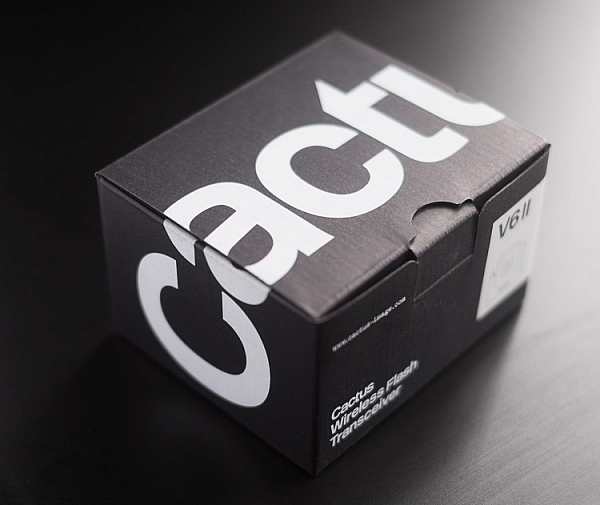
Cactus Wireless Flash Transceiver V6 II - box

The Cactus V6II transceiver box.

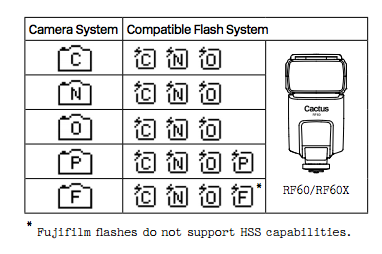
This means there’s practically universal support for any flash you may have. The exception is flashes that have a high sync voltage. The units are cross compatible between systems, so you can use Pentax cameras with Olympus flashes, etc.

Camera and flash compatibility list for the v6II

Camera and flash compatibility list for the v6II

There are two High-Speed Sync modes; Normal and Power. Normal High-Speed Sync works up to 1/8000th of a second and uses a pulsing flash fire. Power Sync uses the full power flash as a normal fire, but allows you to exceed the normal sync-speed of the camera.

Getting started with the Cactus V6II

The trigger comes in a nicely designed box, containing the user manual, the trigger, and a hotshoe foot. Unlike other hotshoe feet, this one doesn’t have a screw thread for a lighting stand. It’s not an issue as I wasn’t expecting one anyway. The unit can be configured as either a transmitter or a receiver by selecting Tx or Rx from the power switch.

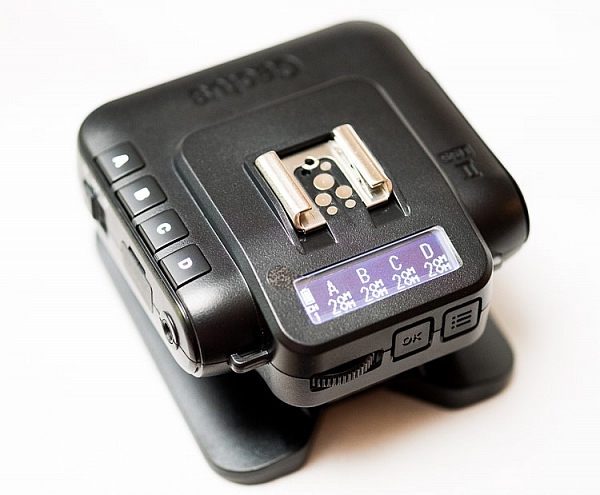
When it is on-camera as a transmitter, you have the four groups visible on the camera left-hand side. Marked A, B, C and D, pressing one toggles it on and off. This way you can select a specific group of flashes to change settings on. This works especially great with Cactus’ own flash, the RF60. Using the dial on the back you can change the power of the flashes on the group, or by pressing in the dial, swap to the lens zoom setting and change that instead.

The unboxed Cactus V6II

The unboxed Cactus V6II

On the right hand side at the front is the test button. You can press it to test that the signal is going to either the RF60, or to another V6II set to receiver mode. One other useful feature is that there’s a hotshoe on the trigger, where you can add your existing trigger system, or another flash. Using your current triggers will allow the High-Speed Sync signal to pass through the V6II and into your flash system.

Setting up

My main portable system is based around Godox v850 flashes (more precisely, the Neweer versions rebranded as the TT850 – it’s the same flash). I also have the more powerful AD360, which responds to the same trigger (the older FT-16), so I find it a really useful system. All of the flashes are High-Speed Sync capable and have profiles in the trigger. I don’t actually use the built-in profiles for High-Speed Sync with Fuji cameras.

The Gear Setup for HSS

Using the older triggers, I set up the flash as normal. Once it’s all working I take the trigger off the camera and put the Cactus V6II on instead (switched to Tx mode). Next I put the old (FT-16) transmitter on top of the hotshoe on the V6II. Finally I set the flash to HSS mode by pressing a two button combination on the back. Each system has its own way of turning on HSS. Yes, this does mean you only need one Cactus V6II trigger with this system to get HSS working.

To get started, press the Menu button on the back right of the V6II unit. Turn the dial to Camera and Flash Setup. Set Camera to Auto, then set Flash to the brand that you use. Next use the Auto Profile for your Flash. For Fuji, you have an additional step, where you make the trigger learn the HSS response of the flash. For the AD360, I set the Flash to Nikon and the Profile to Auto (Nikon).

The Beta Test

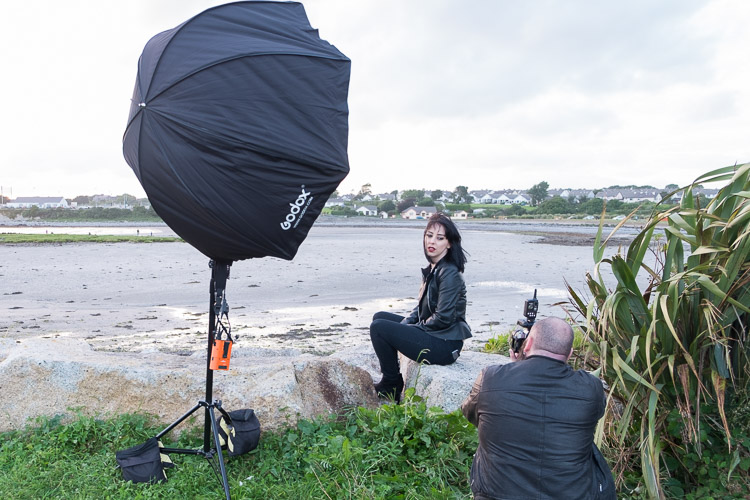
So I set it all up, and with my trusty Godox 120cm Octabox on the Ad360, I sweet-talked my son into posing on his bike. That’s roughly three minutes of attention span before boredom hits. I’ve included some behind the scenes shots as well. The exposure was 1/4000th, f/2.8, ISO 200 with a 35mm f/1.4 lens. Even the nearby trees are out of focus. I absolutely love the bokeh in my first shoot with the trigger.

Cactus image v6ii review matt

Test Shoot #1

Testing means dragging out a range of people to shoot with. It also means working around their schedule. So this next shoot happened a little later than I would’ve liked, but I still got some good shots.

Once the trigger is set up, your main issue is dealing with power. Normally with manual flash, only the aperture has an effect on the apparent power of the flash. Below sync-speed, you can change the shutter speed to your heart’s content, and it won’t affect the flash. Not so with High-Speed Sync. Any change of shutter speed changes the flash power. The faster the shutter speed, the more flash power you need. It’s a new experience if you’ve gotten used to normal manual flash. Each stop increase in shutter speed requires about a stop of increase in the flash power.

Here’s the first setup and the resulting image.

Cactus image v6ii review sunset 1

Behind the scenes shot showing the Godox AD360 flash with Godox 120cm Octabox. Taken by Ola.

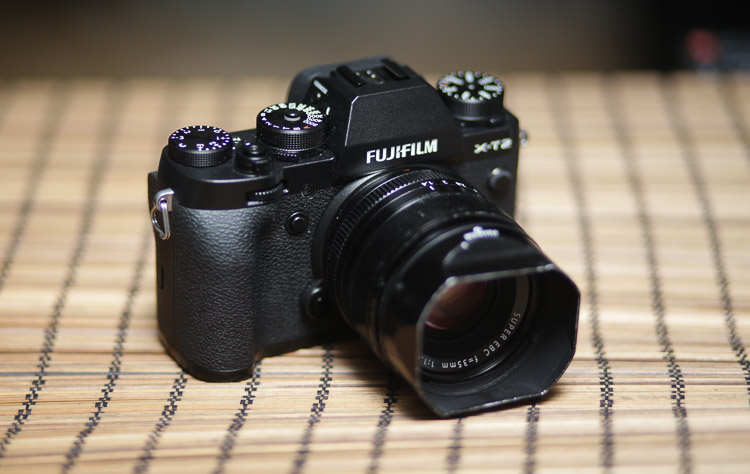
The shot with HSS. The background is beautifully out of focus. ISO200 f1.8 1/4000sec 35mm on Fuji X-T10

The shot with HSS. The background is beautifully out of focus. ISO 200, f/1.8, 1/4000th, 35mm on Fuji X-T10.

I still managed to blow out the sun slightly, but the flash was at full power, so I couldn’t change the aperture to compensate. The octabox was just out of frame too. Normally, I shoot vertical portraits but for articles, horizontal looks better, so I just recovered this highlights in Lightroom.

Test Shoot #2

For the second shoot, I had more time, better planning, and less wind! Due to the model’s availability, it was later than I’d have like, but still had enough light to get shots using HSS (out of want rather than need!).

Here I’ve used my typical short lit Godox Octa setup for this using the Fujifilm X-T10 with a 35mm f/1.4 lens. I wanted to create tension and go for a cinematic feel to the image. The grass at the bottom is well out of focus and gives a slightly ethereal feel to the shot. The black clothes and the model peering out of frame seem to reference things in the past as if a loved one has passed.

cactus-v6ii-review-emma-1

ISO 200, f/1.4, 1/1600

For the second shot, I wanted to bring in an additional element – a back light. I could’ve used one of the 850’s, but instead, I opted for the Cactus RF-60 flash. This has the receiver built-in and communicates directly with the Cactus V6II receiver. I set this to Group B and zoomed the flash to 105mm to allow it to throw the light further. Once in HSS mode, it triggered every time along with the AD360. I also went for the 50-140mm lens to get further back and compress the background more.

ISO200 f2.8 1/500sec. Shot with the 50-1400 f2.8 lens

ISO 200, f/2.8, 1/500th. Shot with the 50-140mm f/2.8 lens.

Here’s how the gear looked behind the scenes:

Cactus image v6ii review emma 3

Headshot variation

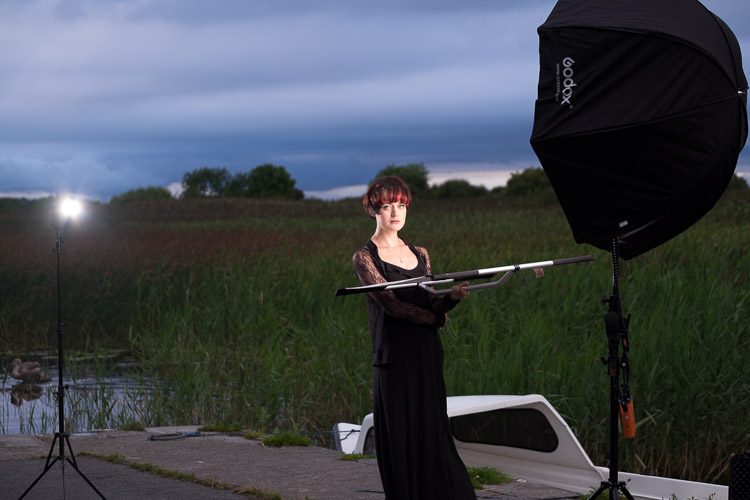
For the final look, I went for a headshot, so the Octa was moved to give her a soft loop light. I got the model to hold a reflector (in this case a California Sunbounce silver-white mini, using the silver side for contrast). It’s very similar to the last setup with the Cactus RF-60 acting as a kicker.

cactus-image-v6ii-review-emma-3

ISO 200, f/2.8, 1/500th.

Here’s the setup shot:

Cactus image v6ii review emma 5

By swapping the side the Octa is on, so the kicker and the key are on the same side, you get a very different look for only a few minutes work.

cactus-image-v6ii-review-emma-5

Cross Platform Test: Fuji Camera – Canon Flashes

Using a second Cactus V6II trigger, I added a Canon 580EXII Speedlite to the setup to use with the Fuji camera. In this case, I set the flash up as Canon with an Auto Canon Flash Profile. Again with the flash set to HSS, I went through the learning process for HSS, and the flash worked perfectly with the Fujifilm in HSS mode. The 580EXII was set to ETTL, and I could control both the flash power and the flash from the V6II transceiver on the camera.

I still have my Canon 5D MarkIII (not for much longer), so I did a quick test with that as a system check. Again I used the Canon 580EXII Speedlite on ETTL, set to HSS. Because both transceivers were set to Auto, switching the units off and back on began a new detection cycle, successfully recognizing both flash and camera as Canon. After one or two test fires, it all worked perfectly. No pretty models for this demo, but something close to my heart instead.

Shooting the X-T2 using a Canon 5DIII. The 580EXII flash was set up off camera, with the trigger set to auto detect camera, and the receiver set to auto detect flash. Set to ETTL mode, both power and zoom can be controlled from the trigger. The flash was bounced into the ceiling. ISO200 1/500sec f1.8.

Shooting the Fuji X-T2 using a Canon 5D MarkIII. The Canon 580EXII flash was set up off-camera, with the trigger set to auto-detect the camera, and the receiver set to auto-detect the flash. Set to ETTL mode, both the power and zoom of the flash can be controlled from the trigger. The flash was bounced into the ceiling. ISO 200, 1/500th, f/1.8.

Firmware Updates for the V6II

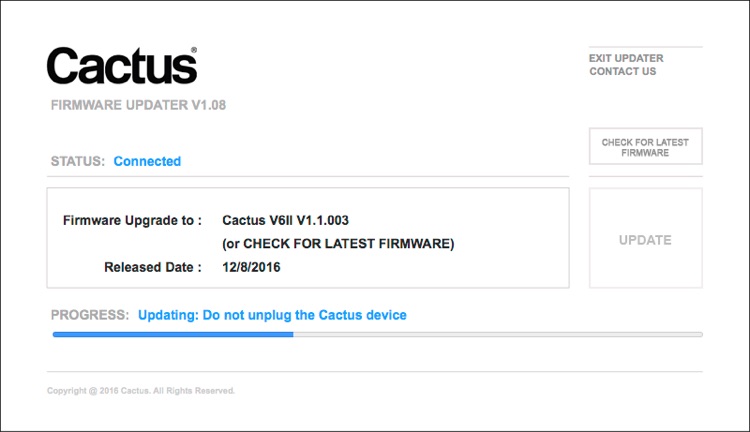
Another feature of this trigger is you can update the firmware as new features and profiles are added. During my testing period, two firmware updates became available. I also had the chance to test a beta version of the new Fuji X-T2, another testament to Cactus’ support for their product. For the public updates, I simply downloaded the updater app, ran it, and followed the instructions.

Cactus Firmware Updater

Cactus Firmware Updater

Pros of the Cactus V6II Triggers

  • Gives you High-Speed Sync ability across a range of camera systems and flashes.
  • Firmware upgradeable.
  • Works directly with the Cactus RF-60 flash.
  • Good range of channels and groups.
  • Power Sync allows additional sync speed options for non-HSS flashes.
  • Can work with only one transmitter and your existing triggers.

Cons of the Cactus V6II Triggers

  • Clunky – the shape isn’t as elegant as many others with a hotshoe passthrough.
  • One of the units I had suffered from a really tight battery clip. It’s more an annoyance than a real con as the batteries last a really long time. The clip on the other unit was perfect.
  • For Fuji users, there’s more work to get it going. For everyone else, no problem.

Verdict

I’m delighted with the Cactus V6II wireless flash trigger. It really works.

During the short time I’ve had the trigger, I’ve used it on a few magazine shoots, as well as the fun shoots I did to test it. It’s been great. Their support has been fabulous, and there’s a lot of information on their community page.

Would I recommend these triggers? Absolutely. They bring a new dimension to shooting portraits outdoors that can change your style completely.

googletag.cmd.push(function() {
tablet_slots.push( googletag.defineSlot( “/1005424/_dPSv4_tab-all-article-bottom_(300×250)”, [300, 250], “pb-ad-78623” ).addService( googletag.pubads() ) ); } );

googletag.cmd.push(function() {
mobile_slots.push( googletag.defineSlot( “/1005424/_dPSv4_mob-all-article-bottom_(300×250)”, [300, 250], “pb-ad-78158” ).addService( googletag.pubads() ) ); } );

The post Overview and Test of the New Cactus V6II Wireless Flash Trigger for High-Speed Sync by Sean McCormack appeared first on Digital Photography School.


Digital Photography School

 
Comments Off on Overview and Test of the New Cactus V6II Wireless Flash Trigger for High-Speed Sync

Posted in Photography


Overview of the Yongnuo RF-603 Wireless Flash Trigger

26 Oct

Off-camera flash is a key technique that can really differentiate your photography style and make you and your imagery appear more professional. The tools needed to achieve off-camera flash are relatively simple, consisting of just a flash unit and a cord or triggers to connect the flash to your camera. While a cord is by far the cheapest and most straightforward option, it’s also inconvenient since it physically binds you to your camera. Wireless triggers are a simpler solution, but they tend to be pricey, especially if you opt for Pocket Wizards. Enter a budget option: the Yongnuo RF-603 wireless flash trigger.

Yongnuo RF-603 wireless flash trigger

Features

Priced at under $ 35 for a set of two, the Yongnuo RF-603 works as both a wireless flash trigger and receiver. It can also function as a remote shutter release for your camera.

Yongnuo wireless flash triggers

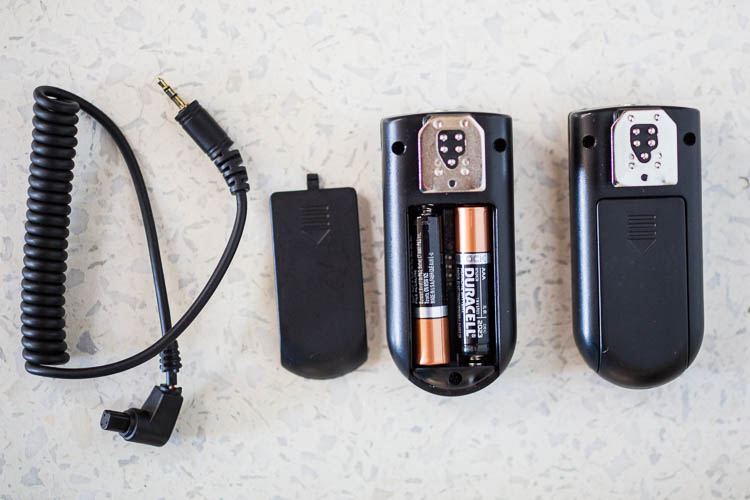
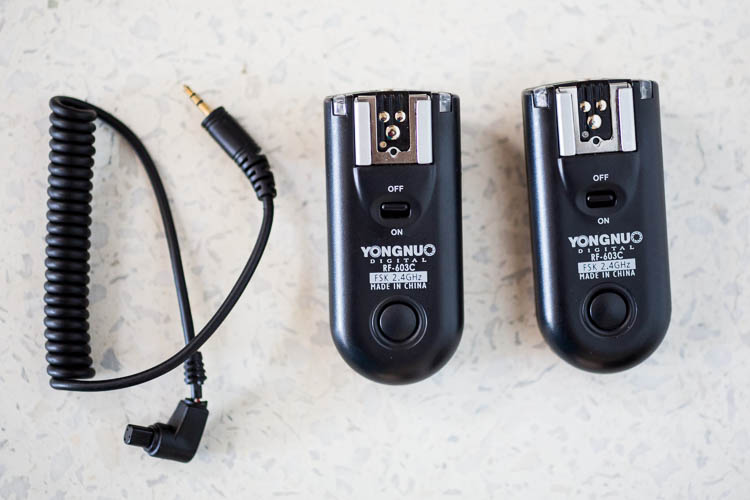
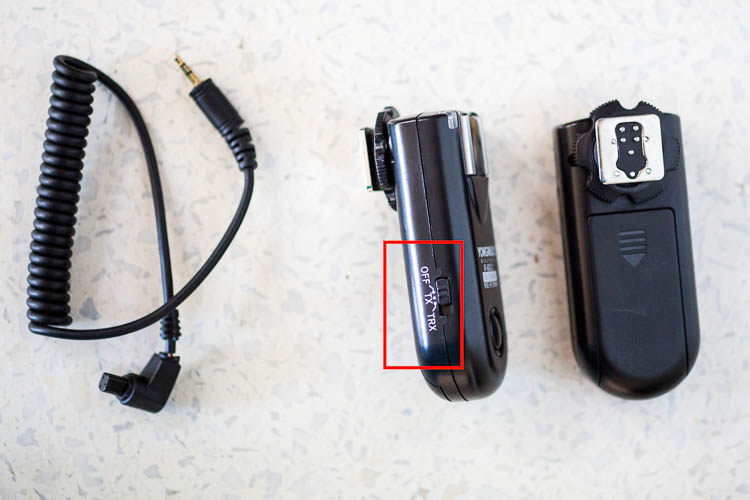
What’s in the box: two (2) flash triggers, one (1) N1 shutter release cable. AAA batteries not included.

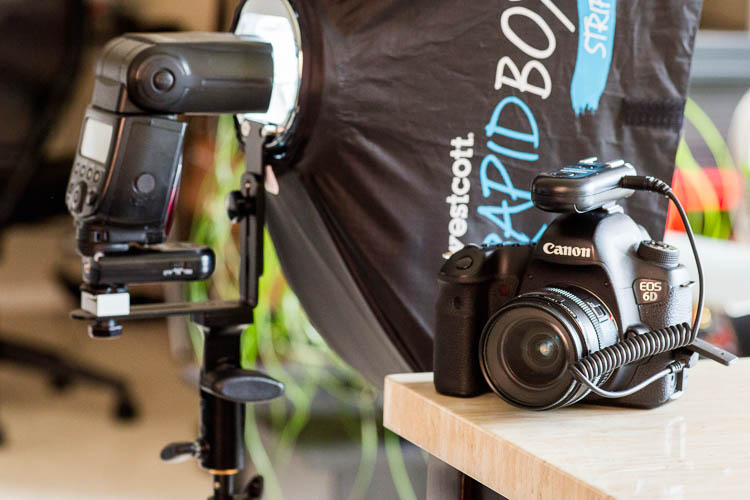
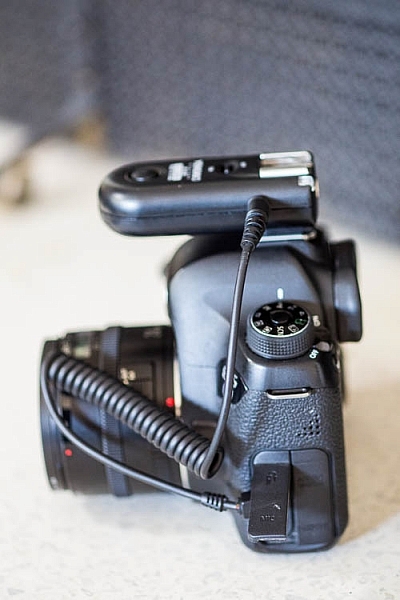
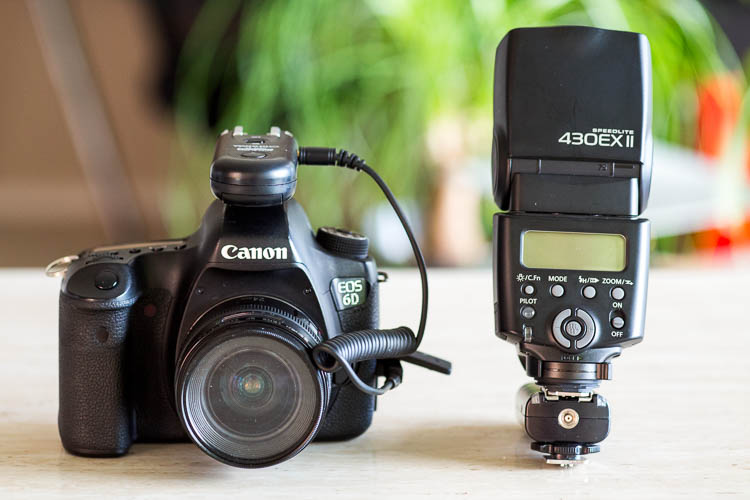
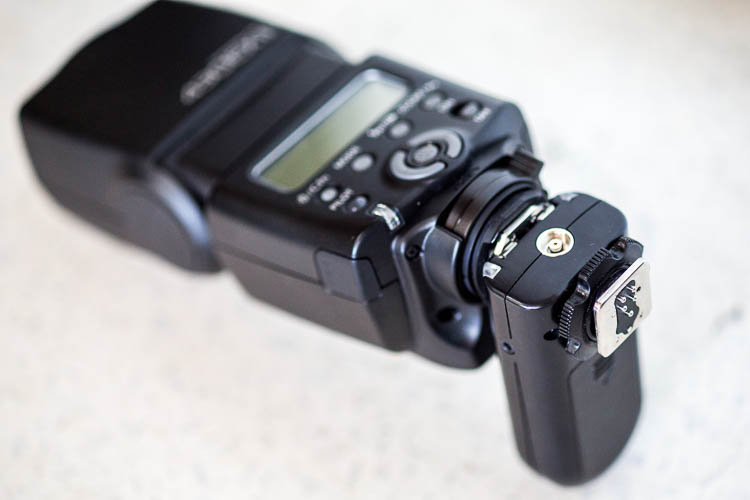
One of the triggers attaches to your off-camera flash unit via the hot shoe mount. Ihe other slides onto your camera’s hot shoe mount and also connects via the included N1 shutter release cable. Then you simply turn the triggers, camera, and flash on and you’re good to start firing away!

You can also purchase additional Yongnuo transceivers to trigger multiple flashes at once. To use the Yongnuo RF-603 as a shutter release, simply attach one unit to your camera’s hot shoe mount, turn both units on, and use the second unit to remotely fire your camera.

Yongnuo wireless flash triggers

How to Yongnuo RF-603 trigger attaches to your camera.

Yongnuo wireless flash triggers

Batteries

Besides being very reasonably priced, these Yongnuo triggers are powered by two normal AAA batteries. They use the battery power very efficiently, meaning you won’t have to constantly switch out drained ones. The triggers are also very slim and lightweight in size at just three inches long, making them easy to slip into a bag or pocket. These triggers are compatible with most DSLR cameras, but double check to make sure you order the correct model that is compatible with yours.

Yongnuo wireless flash triggers

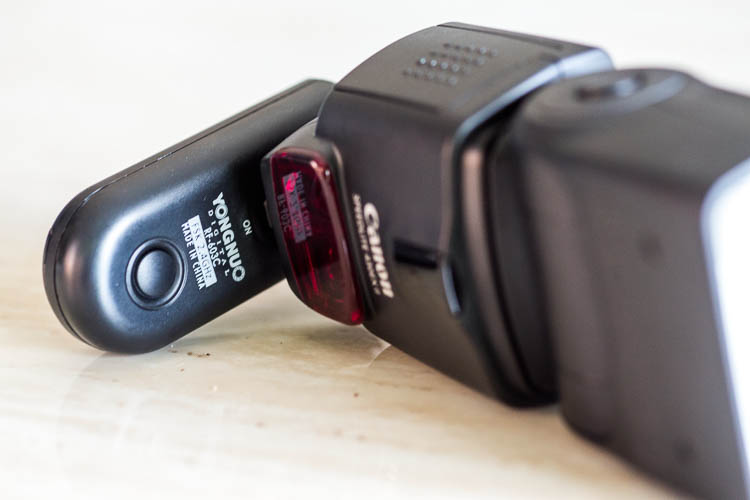
Slim and low-profile, the Yongnuo RF-603 doesn’t add a lot of bulk to your flash unit.

Shooting distance

Another point to note is that these Yongnuo triggers use a 2.4GHz wireless frequency, and the remote control distance is up to approximately 100 meters (328 feet). Synchronization speed can reach 1/320, but may only reach 1/250 depending on the exact scenario you’re shooting in.

Yongnuo wireless flash triggers

Yongnuo RF-603, the original version.

Yongnuo wireless flash triggers

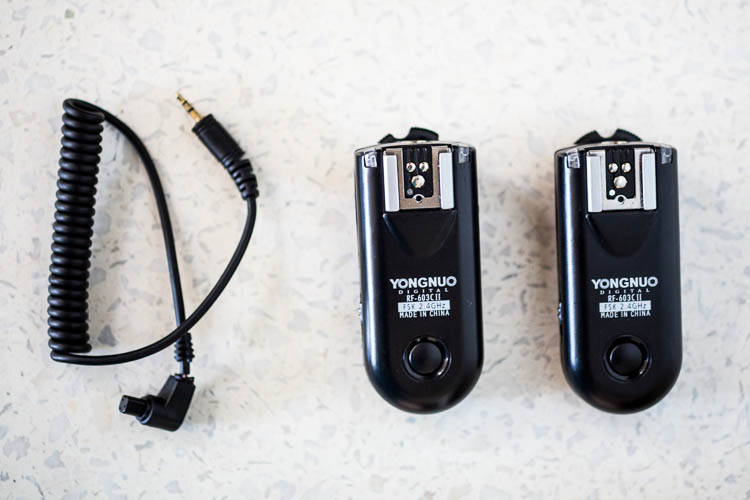
Yongnuo RF-603 II, the latest version.

Why the Newer Version is Better

When shopping around, you might notice that there are two Yongnuo RF-603 models: RF-603 and RF-603 II. The older, original version looks like it has recently been discontinued by the manufacturer, but it is still available for sale. Thus, it’s important to note several key differences between the two models, and why you’ll probably want to opt for the newer version. Also note that the original and newer transceivers are compatible with each other, so you can mix and match if you happen to have both versions.

Yongnuo wireless flash triggers

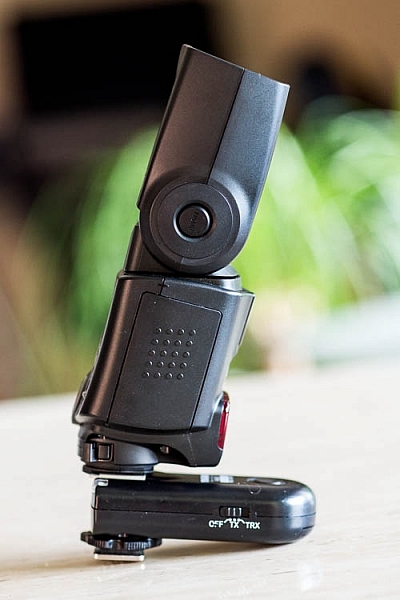
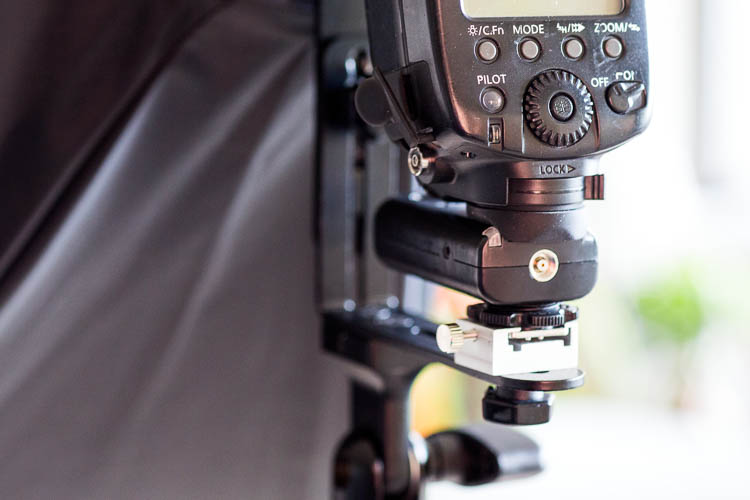
The round locking mechanism above the metal hot shoe of the Yongnuo RF-603 II (the original version does not have this feature).

Yongnuo wireless flash triggers

An example of the locking mechanism being used to attach the flash to a lighting stand.

Enhanced on/off switch is on the side for easier access

The original trigger has the on/off button on the top surface, which means it is completely covered up when attached to your flash. Thankfully, Yongnuo fixed this problem in the second version, and moved the on/off button to the side of the trigger. The newer version also includes the option of designating the trigger as off, in TR mode or TRX mode, rather than simply on or off.

Yongnuo wireless flash triggers

Even before the flash unit is fully attached, the on/off switch of the original Yongnuo RF-603 is already covered and hard to access.

Yongnuo wireless flash triggers

The newer Yongnuo RF-603 II added options to the on/off button and moved it to the side of the trigger.

Yongnuo wireless flash triggers

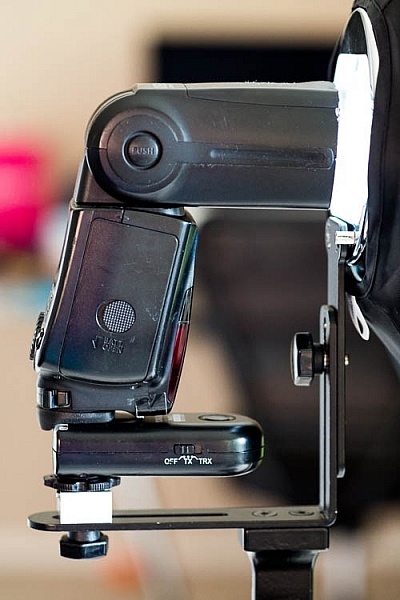
Having the on/off button on the side of the trigger makes it easier to access with the flash attached.

Who should use Yongnuo RF-603 Triggers

If you’re a photographer looking for a low-cost way to experiment with off-camera flash, Yongnuo triggers and even their own brand name flash units are highly recommended. Based on multiple user reviews and my own experience with Yongnuo products, they are dependable, efficient, and incredibly easy to use despite being considered budget options.

The only downside to these Yongnuo RF-603 triggers lies in their simplicity. Since this base model trigger only has a simple on/off button, you still have to manually adjust your flash settings if you want to tweak the flash power, flash zoom, etc. Upgrading to a more sophisticated trigger system such as the Yongnuo 622N TX ($ 85 for a pair approx.) gives you the full power of adjusting flash settings without having to even touch your flash. However, given the extra cost and complication of the Yongnuo 622N, only opt for this version if you truly need the extra features (in other words, stick with the RF-603 if you’re a beginner or on a budget).

googletag.cmd.push(function() {
tablet_slots.push( googletag.defineSlot( “/1005424/_dPSv4_tab-all-article-bottom_(300×250)”, [300, 250], “pb-ad-78623” ).addService( googletag.pubads() ) ); } );

googletag.cmd.push(function() {
mobile_slots.push( googletag.defineSlot( “/1005424/_dPSv4_mob-all-article-bottom_(300×250)”, [300, 250], “pb-ad-78158” ).addService( googletag.pubads() ) ); } );

The post Overview of the Yongnuo RF-603 Wireless Flash Trigger by Suzi Pratt appeared first on Digital Photography School.


Digital Photography School

 
Comments Off on Overview of the Yongnuo RF-603 Wireless Flash Trigger

Posted in Photography


iLUUN Air is a wireless USB 3.0 flashdrive for your smartphone

18 Oct

The iLUUN Air is designed to look and work just like any USB 3.0 flash drive. However, it also allows you to share files with your smartphone or tablet via a wireless connection. Seeking funding on Kickstarter, if the iLuun Air is brought to production it can be used to create a Wi-Fi network that you can connect to with your mobile device. You can then use it to store or share images and videos, transfer files and stream movies or music using the iLUUN app that is available for Android and iOS.

The storage device will be available in versions with 32, 64, 128 or 256GB of storage and can wirelessly share content with up to six users simultaneously. There is also a backup & restore function that lets you free up storage space on your phone by transferring files to iLUUN and built-in encryption makes sure your content is safe.

The iLUUN Air looks like an interesting option for those who frequently run out of local storage space or like sharing content with multiple users without making use of cloud services. Pledging $ 42 on the iLUUN Kickstarter page will get you a 32GB version, for the 256GB variant you’ll have to invest $ 149. Delivery is planned for March 2017.

Articles: Digital Photography Review (dpreview.com)

 
Comments Off on iLUUN Air is a wireless USB 3.0 flashdrive for your smartphone

Posted in Uncategorized


Elinchrom adds Sony compatibility to its high speed sync Skyport Plus HS wireless controller

11 Aug

Lighting manufacturer Elinchrom has introduced a version of its high speed sync Skyport remote flash trigger and controller that is compatible with Sony cameras. The new Skyport Plus HS transmitter allows Sony camera users to synchronize their shutter with Elinchrom flash heads using speeds of up to 1/8000sec. The system has been in use for some time for Canon and Nikon users, but now Elinchrom has added Sony to the list of camera brands with which the transmitter works.

Elinchrom’s high speed sync system is called Hi-Sync and varies from hotshoe style flash units in the way it produces light for short shutter speeds. While HSS modes in speedlights tend to use pulsing flash that gradually covers the camera sensor as the shutter slit passes by, Hi-Sync just uses a relatively long-duration burst. The company has introduced a system it calls OverDrive Sync that allows the user to calibrate the timing of the burst to the opening and closing of the individual camera’s shutter to ensure the two events coincide. This ODS system also allows a certain degree of exposure manipulation as photographers can tailor their shutter to different segments of the flash output curve.

The Skyport Plus HS 2.4GHz radio transmitter has a range of 200m/656ft when used without obstruction between the camera and the head, and 60m/196ft when used indoors. It system offers 20 channels for normal shooting and 20 more for high speed shooting, which can be arranged in 4 groups, and an AF illuminator to assist in low light conditions.

The Elinchrom Skyport Plus HS costs $ 249.95 USD / €249 EUR / £199 GBP.

For more information see the Elinchrom website.

Sony camera compatibility

 A7  A7 ll  A7r  A7r ll  A7s
 A7s ll A33 A37 A55 A57
A77 A77 ll A99 A100 A230
A290 A330 A350 A380 A390
A450 A500 A550 A560 A580
A700 A850 A6000 RX1 NEX-7K

Press release:

Elinchrom expands the family of EL-Skyport Plus HS transmitters to Sony users !

Since the launch of the Skyport Plus HS for Canon and Nikon, Sony users have been patiently awaiting their dedicated Transmitter. As promised, the most advanced Skyport ever is now available to Sony users. This will give them the ability to control and visualize power settings for all their compatible Elinchrom lights and the capability to shoot at speeds up to 1/8000s in Hi-Sync mode.

Visual Feedback Interface
The Large LCD display of the Skyport HS features two-way control via a visual feedback interface that lets you see the exact power up to 10 compatible Elinchrom lights in your setup right on the transmitter.

Users can control the modelling lamp and power of each flash unit directly from the Skyport transmitter, which instantly shows the updated settings.

This provides unsurpassed levels of “two-way communication and control” for every light in your setup, right from your camera.

Hi-Sync opens up the world of flash photography
Elinchrom Hi-Sync technology lets you go beyond the X-Sync of your camera. Photographers can simply switch to Hi-Sync mode and access sync speeds up to 1/8000s to freeze motion, overpower the sun, darken backgrounds or use a wider aperture. The ODS (Over Drive Sync) enables users to fine tune the Skyport Plus HS transmitter’s trigger signal to optimize exposure at high shutter speeds while gaining up to 2 more f-stops of light.

Even more
The Skyport HS has 20 frequency channels that can be used for either Normal or Speed mode. The transmitter attaches easily and securely to the hotshoe with its one-touch quick-lock mechanism, and is powered by 2x AA batteries. Users can also enjoy a range of up to 656ft (200m) outdoors, and up to 196ft (60m) indoors.

The Skyport HS continues the Elinchrom commitment to quality
Providing photographers with tools to enhance their shooting experience whilst also showing how Elinchrom is looking firmly ahead to the future. The Skyport HS represents a seamless extension of the EL-Skyport family since it is also compatible with the three previous generations of Elinchrom flash units (those using the EL-Skyport Transceiver RX module for Style RX, Digital RX, and Ranger RX systems, and those with integrated EL-Skyport modules for the BRX, D-Lite RX, ELC Pro HD, and ELB series.)

Other camera systems are currently being evaluated for future release.

EL-Skyport Plus HS Features
* Large LCD with unique, real-time display of remote flash power settings
* Easy access buttons and rotation ring for fast setup and control
* 20 Channels, 4 Groups for Normal and Speed Sync Modes
* Hi-Sync, up to 1/8000sec with Sony, Canon and Nikon cameras
* Extended working range up to 656ft (200m)
* AF Illuminator and sure-lock mounting foot
* USB port for future-proof upgrades

The EL-Skyport Transmitter Plus HS is now available for Sony, Canon and Nikon cameras.
EL19371 – EL-Skyport Transmitter Plus HS for Sony
EL19366 – EL-Skyport Transmitter Plus HS for Canon
EL19367 – EL-Skyport Transmitter Plus HS for Nikon
Street Price: $ 249.95 USD / €249 EUR / £199 GBP

Specifications
Frequency Band : 2.4 GHz
Channels : 40; (20 in Normal mode – green / 20 in Speed mode – red)
Groups : 4: 1, 2, 3, 4
Flash synchronization :
Normal: limited to the native X-sync of your camera
Hi-Sync mode: up to a 1/8000 sec.*
2nd curtain sync: only Canon
Range : Up to 200m (656’) for triggering
AF Assist Beam : Yes
Connection :
Foot for Sony hotshoe (19371) Canon hotshoe (19366) and Nikon hotshoe (19367)
Mini-USB for firmware updates
2.5 mm remote release
Power source : 2x AA batteries
Indicators and Controls :
LCD screen display:
Sync mode, group, channel, ODS activation, Hi-Sync activation, shutter mode, remaining battery power, flash unit name, flash unit ID, flash unit power level, flash unit modelling level.
Buttons:
Group selection, test, rotation ring to change values, confirmation, on/off and refresh.
There are also 4 buttons with variable functionality:
Power +/-, Modelling lamp off/prop/free, Individual unit selection and setup on the dashboard. Menu up, menu down and exit in the setup menu.
Dimensions : 84.1 x 68.3 x 58.5 mm (3.3 x 2.7 x 2.3”)
Weight : 120 g ( 0.27 lbs.) without batteries

Articles: Digital Photography Review (dpreview.com)

 
Comments Off on Elinchrom adds Sony compatibility to its high speed sync Skyport Plus HS wireless controller

Posted in Uncategorized


Wireless tethering on a budget: control your camera from your phone or tablet for $40

13 Jul

Wireless tethering is nothing new, but it’s not exactly a cheap proposition. Well, that’s changed, as Seattle-based photographer Alan Lawrence shows on his blog. For around $ 40, you can wirelessly control and transfer images from your camera to your phone or tablet.

In short, this DIY wireless tethering requires a TP-Link MR3040 Battery Powered 3G Wireless Router, some software, a USB cable, and some time. Lawrence says the router is similar-looking to the CamRanger, a device that offers tethering functionality out-of-the-box, but the router retails for under $ 30 compared to the CamRanger’s $ 299 MSRP.

Once you’ve got your hands on the router (and he does say you need a specific version, which is the one linked above), you’ll need a $ 9 app called DSLR Dashboard for Android, or QDSLR Dashboard for iOS. The last thing you’ll need is a compatible USB cable, and you’re almost in business.

The DSLR Dashboard website has a link to download new firmware for the router, and once you’ve updated that, all you have to do is connect to the wireless network you’ve set up and launch the app. You can control your camera from your device and download files instantly after you’ve taken them.

You can read all the nitty gritty details over on Alan Lawrence’s blog.

Articles: Digital Photography Review (dpreview.com)
 
Comments Off on Wireless tethering on a budget: control your camera from your phone or tablet for $40

Posted in Uncategorized


Hands-on with Sony’s wireless flash system, arriving in August

11 Jul

$ (document).ready(function() { SampleGalleryV2({“containerId”:”embeddedSampleGallery_7699465702″,”galleryId”:”7699465702″,”isEmbeddedWidget”:true,”standalone”:false,”selectedImageIndex”:0,”startInCommentsView”:false,”isMobile”:false}) });

Sony’s wireless radio flash trigger system, introduced back in March, is headed to retailers this August. The system is comprised of a ‘commander’ (FA-WRC1M) and a receiver (FA-WRR1). There can be up to 5 groups, each of which can contain 15 flashes. A standard sync port on the receiver allows for control of studio strobes with ease, though of course you’ll lose TTL capabilities. High Speed Sync (HSS) is also supported. The system has a maximum range of 30m/98ft, and the commander unit sports a large LCD with an intuitive user interface.

What we like

At a recent shooting event in San Diego, CA, I got some brief hands-on time with the new transmitters and receivers, and was pleased with how intuitive the user interface was (not something you can always take for granted with flash systems). For the shot below, I used E-TTL with three flashes (groups) – one (A) at camera right for some harsh side-lighting, one (B) front left of model Eliza as the key, and one (C) directly in front of her for a tiny bit of balance to the overall light. I dialed in my exposure manually to ensure ambient was drowned out, then varied the ratios of groups A, B, and C on the transmitter’s LCD with ease until I got the lighting just as I wanted it. Essentially, it all worked just as I’d expect it to. Adjust flash ratios, groups, Manual power, Flash Exposure Compensation are all very intuitive and direct. Furthermore, the option of triggering studio probes was very handy. Studio shooters: rejoice.

What we’re less pleased with

If you’re an event shooter, I was less pleased with the lack of an AF assist beam on the transmitter. This speaks to a larger problem with Sony mirrorless: no Sony E-mount camera will trigger any off-camera AF assist beam. Red/IR AF assist beams are a boon to any event photographer; for example, I rely on it for fast AF at dim wedding receptions, where all my flashes are off-camera for dramatic lighting. In such scenarios, AF assist beams on transmitters allow the camera’s AF system to focus in near-darkness, obviating the need for a heavy flash on-camera. Sony’s continued lack of any support of off-camera assist beams on transmitters or flashes is unfortunate, given Sony’s desire for acceptance by pros, and considering that in our own lab tests, Sony’s a7R II and a6300 focus incredibly well with red/IR assist beams triggered by Canon/Nikon systems (contrary to the belief of many that on-sensor phase-detect AF systems can’t ‘see’ these beams).

While one can fault both Canon and Nikon for similar oversights in their latest radio triggered flash systems, we find the omission increasingly unforgivable given that 3rd party options like Phottix and Yongnuo do offer AF assist beams on their radio triggers. Yet while these 3rd party options do at least work on Canon and Nikon DSLRs, they fail entirely to trigger AF beams on Sony FE cameras, due to Sony’s continued lack of support of AF assist beams (save for the largely useless one built into the camera).

We’re hopeful that this is something Sony will address in the future. It’s by no means a deal-breaker though for what appears to be a very capable radio trigger system that should find a way into your kit if you shoot with Sony flashes.

Both the commander and receiver will be available in August at $ 350 and $ 200, respectively.

Pricing and Availability – New FE 70-200mm f/2.8 GM OSS G Master lens. Teleconverters and Wireless Lighting Control System

Today, Sony has also released pricing and ship timing for the FE 70-200mm f/2.8 GM OSS G Master lens, 1.4x and 2.0x teleconverters plus their new wireless lighting control system. All products were introduced earlier this year.

One of the most eagerly anticipated lenses of the year, the Sony FE 70-200mm f/2.8 GM OSS G Master lens takes its place as the flagship telephoto zoom in the Sony lens lineup. Featuring built in Optical Stead Shot (OSS) and a fast f/2.8 maximum aperture across the zoom range, the lens will be an ideal fit for nature, sports, travel, fashion, beauty and wedding photographers. This lens will ship this July for a retail price of $ 2,500 US and $ 3,300 CA.

Designed exclusively to fit the 70-200mm F2.8 G Master lens, the new 1.4x and 2.0x teleconverters (models SEL14TC and SEL20TC) will both be sold for the same retail price of about $ 550 US and $ 700 CA, and will ship this July.

The versatile new wireless flash and control system – comprised of the FA-WRC1M wireless radio commander and the FA-WRR1 wireless radio receiver – was designed to meet the growing demands of professional Sony photographers. With a maximum range of 30m (approx. 98 feet) and the ability to control a maximum of 15 separate flash units in 5 different groups, it offers a flexible wireless flash shooting experience with exceptional performance.

The FA-WRC1M commander will be sold for about $ 350 US and $ 480 CA. The FA-WRR1 receiver will be sold for about $ 200 US and $ 280 CA. Both products will ship this August.

The new lenses, teleconverters and wireless lighting system will be sold at a variety of Sony authorized dealers throughout North America.

Articles: Digital Photography Review (dpreview.com)
 
Comments Off on Hands-on with Sony’s wireless flash system, arriving in August

Posted in Uncategorized


Western Digital announces My Passport Wireless Pro

21 Jun

Western Digital has announced its new My Passport Wireless Pro hard drive, a Wi-Fi enabled portable storage device designed for photographers and videographers who want to backup, access, and edit photos or video in the field without using a computer. In addition to Wi-Fi, the drive includes an integrated SD card slot and a USB port that can be used to connect external devices, such as a CFast or XQD card reader. It can also be plugged directly into a computer for standard operation.

This is the second generation of Western Digital’s My Passport Wireless series. The company told us that they received a lot of feedback from photographers following the product’s initial release in 2014, and that much of that feedback has been incorporated into the new Pro edition. The Pro version includes a faster SD card slot with transfer rates up to 75MB/s, up from 10MB/s, as well as upgraded 802.11ac Wi-Fi with speeds up to 20MB/s, improved from 9MB/s. It also features a larger 6400mAh battery, compared to 3400mAh on the original model, which WD says can last up to 11.5 hours in the field, including 6 to 8 hours of operation under ‘hard use.’ Unfortunately, the USB port for connecting external devices appears to be of the USB 2.0 variety.

WD has also made improvements to the product’s companion My Cloud app for iPad. The company told us that while photographers loved the ability to view images stored on the drive from an iPad, they didn’t want to be restricted to using a proprietary app. The updated app makes it possible to export photos to the camera roll for easy sharing or editing with other iOS apps. It also integrates with Adobe’s Creative Cloud, facilitating transfer of photos directly to a user’s Creative Cloud account.

Finally, WD told us that about 50% of customers using the original product used it primarily as a device to stream content. To better support these users the company has added a PLEX media server to the device.

We recently received a demo unit from Western Digital and look forward to taking it for a spin (pun intended). We look forward to letting you know how it works.

The My Passport Wireless Pro comes in two capacities: a 2TB model which lists for $ 229.99, and a 3TB model which lists for $ 249.99. The company also announced a new My Cloud Pro Series NAS device, which you can read about in the press release below.


Press Release:

My Passport Wireless Pro and My Cloud Pro Together

Provide Fast, Reliable Back-up and Transfer While on a Remote Shoot or in the Studio

IRVINE, Calif. – June 21, 2016 – Western Digital Corporation (“Western Digital”) (NASDAQ: WDC), a global storage technology and solutions leader, today introduced the WD Pro Series: My Passport® Wireless Pro Wi-Fi® mobile storage and My Cloud® Pro Series network attached storage (NAS). Designed specifically for the creative community, the WD Pro Series enables seamless transfer of content between devices, with classic WD reliability and speed, regardless of whether users are on a remote shoot, in the studio or editing at home. The products use the My Cloud mobile app – the new version of the app will be launched with the My Passport Wireless Pro and My Cloud Pro Series and be compatible with the Adobe® Creative Cloud®. In addition, both the My Passport Wireless Pro and My Cloud Pro Series devices are also compatible with the Plex™ Media Server and My Cloud OS 3 software for easy editing, streaming and sharing of content.

“Portability, reliability, capacity, speed and interoperability are crucial for creative professionals, whose very livelihoods rely on the strength of the technology they use to store their life’s work,” said Sven Rathjen, vice president of marketing for content solutions at WD. “We created the WD Pro Series as a comprehensive, feature-rich storage solution designed to fit seamlessly into their workflow, regardless of where the work actually happens, so storage, transfer, back-up, editing and even streaming options are readily available.”

My Passport Wireless Pro

My Passport Wireless Pro Wi-Fi mobile storage lets creative professionals and enthusiasts leave the laptop behind when on a shoot. Using the direct Wi-Fi connection, creators can automatically backup files from compatible cameras, as well as save, edit and transfer work seamlessly from up to eight other devices connected to the drive. Tethered connections are also available for faster transfers and include a built-in SD card reader as well as a USB 3.0 port.

Available in capacities up to 3TB, the My Passport Wireless Pro device also features up to 10 hours of battery life* and a built-in battery pack that can even be used to charge phones and other devices like digital or video cameras.

To ensure creative professionals can continue to work while in the field, My Passport Wireless Pro devices include compatibility with Adobe’s Creative Cloud for mobile photo and video editing, as well as compatibility with Plex Media Server, which is capable of playing up to four streams of content while on-the-go.

My Cloud Pro Series network attached storage

When the shoot is over and it’s time for editing or studio work, the My Cloud Pro Series NAS device takes the reins seamlessly. Offering up to 32TB of storage, the My Cloud Pro Series NAS are optimized to import from cameras/memory card readers and other USB storage with a simple one touch backup button. Simply connect your cameras and compatible USB storage devices, press a button, and your new files are easily backed up/imported.

In addition to giving creative professionals and enthusiasts a reliable place to store their files, this fast, high capacity drive features a hardware accelerated video processor. Its powerful transcoding capabilities mean the My Cloud Pro Series NAS can ingest, edit, store and stream content to and from popular formats, including 4K video. These capabilities compliment a robust, integrated application suite, which includes compatibility with Plex Media Server for storing and optimizing media libraries and compatibility with Adobe’s Creative Cloud for editing and finalizing them.
The My Cloud Pro Series NAS gives the creative community significantly more control while they are away from their workstation, using WD’s My Cloud app and MyCloud.com remote access, and despite its professional caliber, is still easy to set up and use.

Pricing and Availability

My Passport Wireless Pro Wi-Fi mobile storage is available today in the WD store at wdstore.com and at select retailers, including Amazon.com and distributors. My Passport Wireless Pro storage has a Manufacturer’s Suggest Retail Price (MSRP) ranging from $ 229.99 up to $ 249.99 depending on capacity. The My Passport Wireless Pro storage will offer a 2-year limited warranty. Terms and conditions of WD’s limited warranty may be found on the WD website.

My Cloud Pro Series NAS devices are also available at Amazon.com, B&H and the WD Store. Manufacturer’s Suggested Retail Price (MSRP) begins at $ 399.99 up to $ 1,649.99 depending on configuration and capacity. The My Cloud Pro Series will also offer a 2-year limited warranty for diskless models and 3-year limited warranty for populated models. Terms and conditions of WD’s limited warranty may be found on the WD website.

About Western Digital

Western Digital Corporation (NASDAQ: WDC) is an industry-leading provider of storage technologies and solutions that enable people to create, leverage, experience and preserve data. The company addresses ever-changing market needs by providing a full portfolio of compelling, high-quality storage solutions with customer-focused innovation, high efficiency, flexibility and speed. Our products are marketed under the HGST, SanDisk and WD brands to OEMs, distributors, resellers, cloud infrastructure providers and consumers.

*Based on streaming HD 720p, 3 Mbps video to one device over Wi-Fi 2.4 GHz single band only. Actual battery life depends on file size, type, format, bitrate, devices connected, Wi-Fi connectivity, settings and other factors.

Articles: Digital Photography Review (dpreview.com)
 
Comments Off on Western Digital announces My Passport Wireless Pro

Posted in Uncategorized


Elinchrom launches new EL-Skyport Plus system to include hotshoe flashes in wireless lighting networks

05 May

$ (document).ready(function() { SampleGalleryV2({“containerId”:”embeddedSampleGallery_9814466852″,”galleryId”:”9814466852″,”isEmbeddedWidget”:true,”standalone”:false,”selectedImageIndex”:0,”startInCommentsView”:false,”isMobile”:false}) });

Swiss studio flash manufacturer Elinchrom has launched the next generation of its Skyport wireless triggering system that allows photographers to include hotshoe flash units in their lighting set-ups. The EL-Skyport Plus system includes a newly designed transmitter that has a swivelling head that the company says helps to optimize reception, while the new receiver features a hotshoe mount for triggering ‘almost any’ brand of hotshoe flash.

The units work via 2.4Ghz radio communications, have a range of 656ft/200m and offer 16 channels with four groups.

The EL-Skyport Transmitter Plus costs $ 89.99 and the kit that includes the transmitter and the hotshoe receiver costs $ 139.99.

For more information visit the Elinchrom website.


Press release:

The Latest Evolution of the Skyport

Introducing the New EL-Skyport Plus System

The next generation Skyport is here and allows you to take full control of your flashes from the palm of your hands.

The EL-Skyport Plus follows the successful launch of the EL-Skyport Transmitter Plus HS for Canon® and Nikon®, for those shooters requiring Hi-Sync. The new EL-Skyport Plus system is compact and robust, using readily available AA batteries. The Skyport Plus offers an extended range of up to 656 feet (200 m) and controls the power of all Skyport enabled Elinchrom flash units. With eight individual frequencies and the choice of standard and speed protocols, there are 16 frequency options, each with four groups. The EL-Skyport Transmitter Plus is compatible with almost every camera. The transmitter head folds down for reduced profile and easier subject viewing while shooting.

Compatible with Most Flash Systems
The EL-Skyport Receiver Plus will trigger almost every flash system and features a built-in hot shoe to trigger speedlights, while enabling them to also be conveniently mounted onto a lighting stand.
When used in conjunction with a Skyport HS Plus Transmitter, most speedlights set at full power can also be incorporated into Hi-Sync applications (using high shutter sync speeds to freeze motion and control ambient light).

“Elinchrom has long prided itself on providing as much control as possible to its photographers. The new Skyport Plus continues that tradition by allowing shooters to take and maintain complete control no matter what they are shooting. When it comes to Living Light, no company does it better than Elinchrom.” said Jan Lederman, MAC Group President.

The Elinchrom Skyport Plus system is retro compatible with the existing Skyport Speed system, and forward compatible to the additional frequencies offered by the latest Elinchrom ELB and ELC units.

EL-Skyport Plus To Go Contents
* EL-Skyport Transmitter Plus contains:
* EL-Skyport Transmitter Plus
* 2.5 mm to PC sync cord
* Wrist strap
* 2-year warranty

EL-Skyport Universal Plus set contains:
* EL-Skyport Transmitter Plus
* EL-Skyport Receiver Plus
* 2.5 mm to PC sync cord
* 3.5 mm to 3.5 mm sync cord
* 3.5 mm to 6.35 mm adapter
* Wrist strap
* 2-year warranty

Articles: Digital Photography Review (dpreview.com)

 
Comments Off on Elinchrom launches new EL-Skyport Plus system to include hotshoe flashes in wireless lighting networks

Posted in Uncategorized