RSS
 

Posts Tagged ‘Winter’

4 Tips for Low Light Photography During the Winter

26 Oct

With fall here and winter fast approaching as well, the sun sets earlier in the day and most of us will be confined to shooting indoors. Whether you are shooting during the day or in the evening after the sunset, adapting and embracing shooting in low light will be beneficial to help you continue working on your photography skills and other personal photo projects.

If you are like me and work all day and come home in the evening to pick up your camera, you may be further limited to shooting right around sunset or utilizing artificial light sources only.

Low light indoors winter 10

There was a time not long ago when I used to hate photographing my kids in low light. I was nervous about increasing the ISO and adding noise in my images or worried about reducing the shutter speed and causing camera shake. But slowly over time, I started to get used to working with various light sources around me creatively and utilizing them in my images.

If you are new to shooting in low light, here are some simple tips that could be helpful without the fear of shooting indoors in low light or using artificial light.

1. Shoot wide open and/or use a slow shutter speed

Although this may not be the best solution all the time with multiple people in the image indoors; but shooting wide open (as much as your camera allows) helps you get more light in the image. Making sure your focal points are aligned on the subject where they need to be, this could help you with that low light shooting you are struggling with.

Low light indoors winter 1

Low light indoors winter 2

Another option would be to consider using a slow shutter speed. A shutter speed of 1/200th or slower to 1/100th doesn’t always produce camera shake when handheld and lets more light in as well. There’s always the option of using a tripod, however, keep in mind that this may not be feasible when photographing kids in action.

Low light indoors winter 3

2. Crank up that ISO and embrace noise

Having a camera with low light capabilities sounds great. However, if you are on a budget and need to work with what you have, consider cranking up your ISO as high as you can after adjusting your shutter speed and aperture.

Consider embracing the noise or grain produced and using it in your images creatively. Converting an image to black and white during post-processing also helps hide any yellow light indoors you may have from artificial sources after hours.

Low light indoors winter 4

Low light indoors winter 5

Low light indoors winter 6

Low light indoors winter 7

Consider using alternate artificial light sources such as an iPad light, refrigerator light, desk lamp, etc., for extra creativity.

Low light indoors winter 8

Low light indoors winter 9

3. Find pockets of light

Open up windows, blinds, and curtains. Pockets of light and shadows add to the drama and create depth.

Once you get home from work in the evening, look around to find any little pockets of light that you can use. This may be right around the golden hour (one hour prior to sunset) and you will find some amazing light peeking through the windows if you time it just right. Utilizing this light will produce some amazing shadows and you can create some moody images as well.

Low light indoors winter 11

Low light indoors winter 12

Low light indoors winter 13

4. Dust off your flash and practice using it

When all else fails and I need to turn my lights on after hours, I rely on my Yongnuo flash unit and simply bounce it off the nearby walls. A lot of times I hear from other photographers (who limit themselves from shooting indoors during evening hours) that using flash is really complicated. I set my flash unit on ETTL and power it accordingly to get more or less light in the image based on how many artificial light sources I have turned on in the room.

Low light indoors winter 14

Low light indoors winter 15

Conclusion

In conclusion, all of the tips above are not always an either/or situation. Most of them can be used together such as combining a slow shutter speed along with increasing the ISO while shooting in a pocket of light with the blinds open when you really have those corner rooms with less light!

While doing the above and balancing your exposure creatively, you can create moody images with some drama. In summary, shooting in low light or the use of artificial light doesn’t have to be that intimidating. Give it a trying show us what you come up with in the comments below.

The post 4 Tips for Low Light Photography During the Winter by Jyotsna Bhamidipati appeared first on Digital Photography School.


Digital Photography School

 
Comments Off on 4 Tips for Low Light Photography During the Winter

Posted in Photography


Siberia Space: Russian Town Tints Its White Winter World

26 Jun

[ By Steve in Architecture & Cities & Urbanism. ]

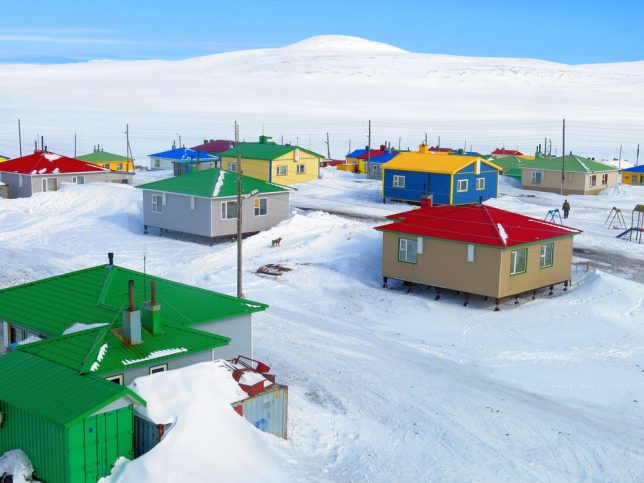
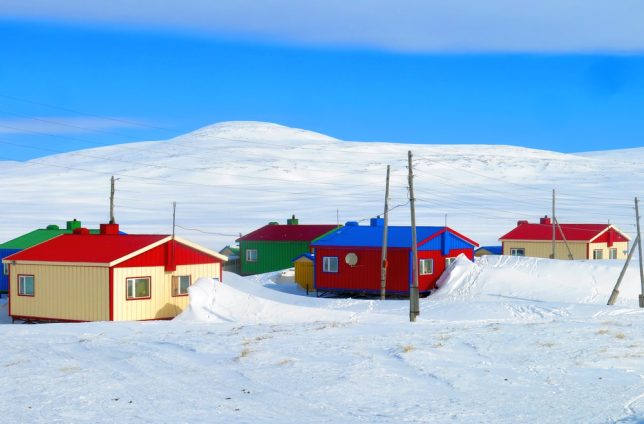
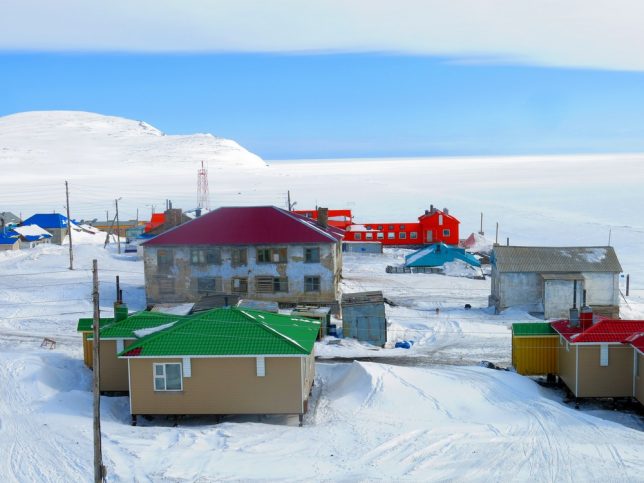
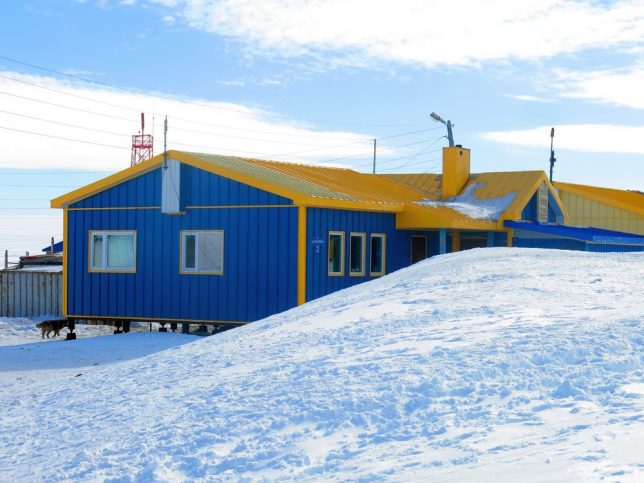
The tiny Siberian town of Ust-Yansk counters the pervasive whiteness of long & snowy winters by cladding its buildings in a rainbow of contrasting colors.

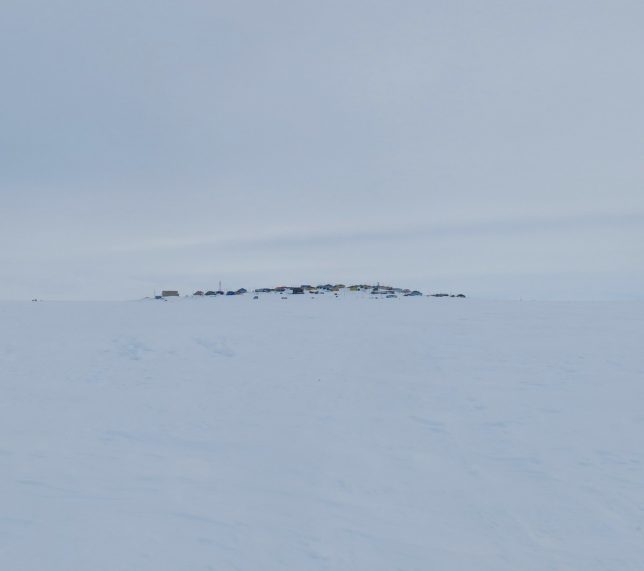
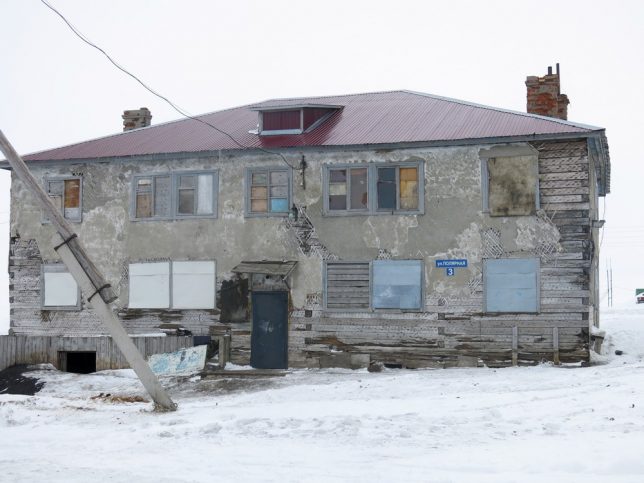
To say Ust-Yansk is isolated is an understatement: the nearest sizable town (Deputatsky, pop. 2,983) lies 302 miles (486 kilometers) to the southeast. Ust-Yansk itself boasts a population of just 317 (as of 2010, down from 341 in 2002). Both towns are located in Russia’s Sakha Republic, a sprawling Siberian territory slightly smaller than India but with just a thousandth of the latter’s population. The photo above shows Ust-Yansk from the distance of about 1 kilometer or about 6/10th of a mile.

Never a wealthy locality, Ust-Yansk fell on hard(er) times in the 1990s when the fall of communism left Russia’s backwater districts pretty much to their own devices. In Ust-Yansk’s case, those devices consisted mainly of mining, reindeer herding and fishing – activities requiring decent weather to function to their potential. Being that Ust-Yansk lies deep in northern Siberia, the weather is usually anything BUT decent. To quote the Wikipedia entry on Deputatsky, “Winters are prolonged and bitterly cold, with up to seven months of sub-zero high temperatures.” Nice. The unrestored buildings above, photographed by blogger BASOV-CHUKOTKA, look about as miserable as their inhabitants must have felt.

The East Is Red, Blue, Yellow, Green…

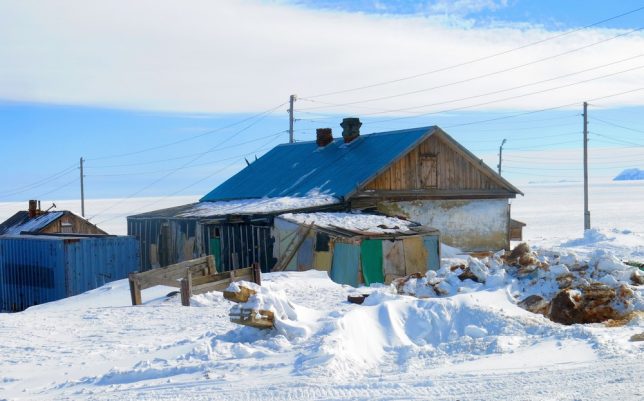
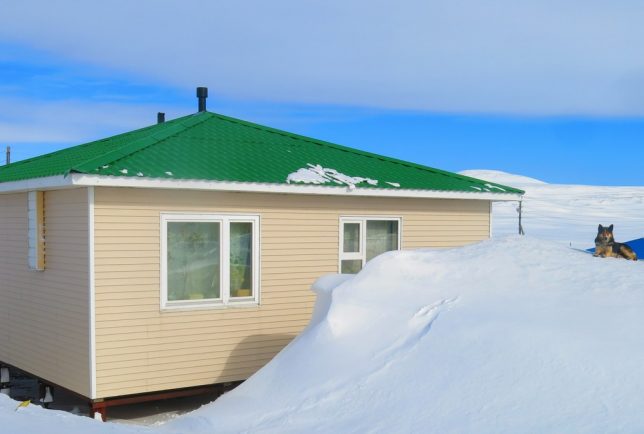
Snow falls early and often in Ust-Yansk, and when it falls it stays – like most tundra towns built on the permafrost, Ust-Yansk’s buildings rest on stilts to prevent heat from melting the frozen ground beneath. This type of construction can be expensive, however, but after the turn of the century rising oil prices flooded Russia’s coffers with bright, shiny rubles and towns like Ust-Yansk began to reap the benefits.

New construction and renovation transformed Ust-Yansk into a more livable town but what really stands out in these photographs taken in May of 2017 are the wealth of colors! From rich primary hues to more delicate pastel tints, Ust-Yansk brilliantly refutes the popular image of Siberia as a dreary place fit only for marginalized indigenous tribes and prisoners of the soviet Gulag. Well, it’s a start at least.

Next Page – Click Below to Read More:
Siberia Space Russian Town Tints Its White Winter World

Share on Facebook


[ By Steve in Architecture & Cities & Urbanism. ]

[ WebUrbanist | Archives | Galleries | Privacy | TOS ]


WebUrbanist

 
Comments Off on Siberia Space: Russian Town Tints Its White Winter World

Posted in Creativity


Winter Carousels: Circular Spinning Ice Islands Carved with Chainsaws

08 Feb

[ By WebUrbanist in Culture & History & Travel. ]

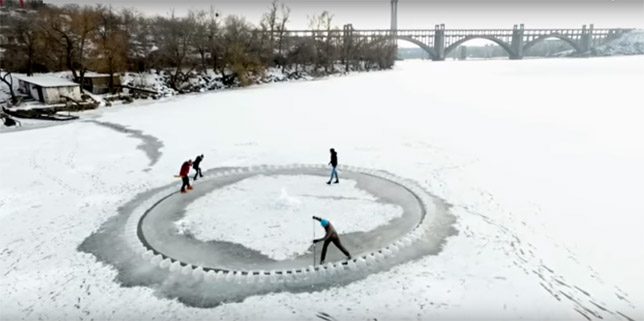
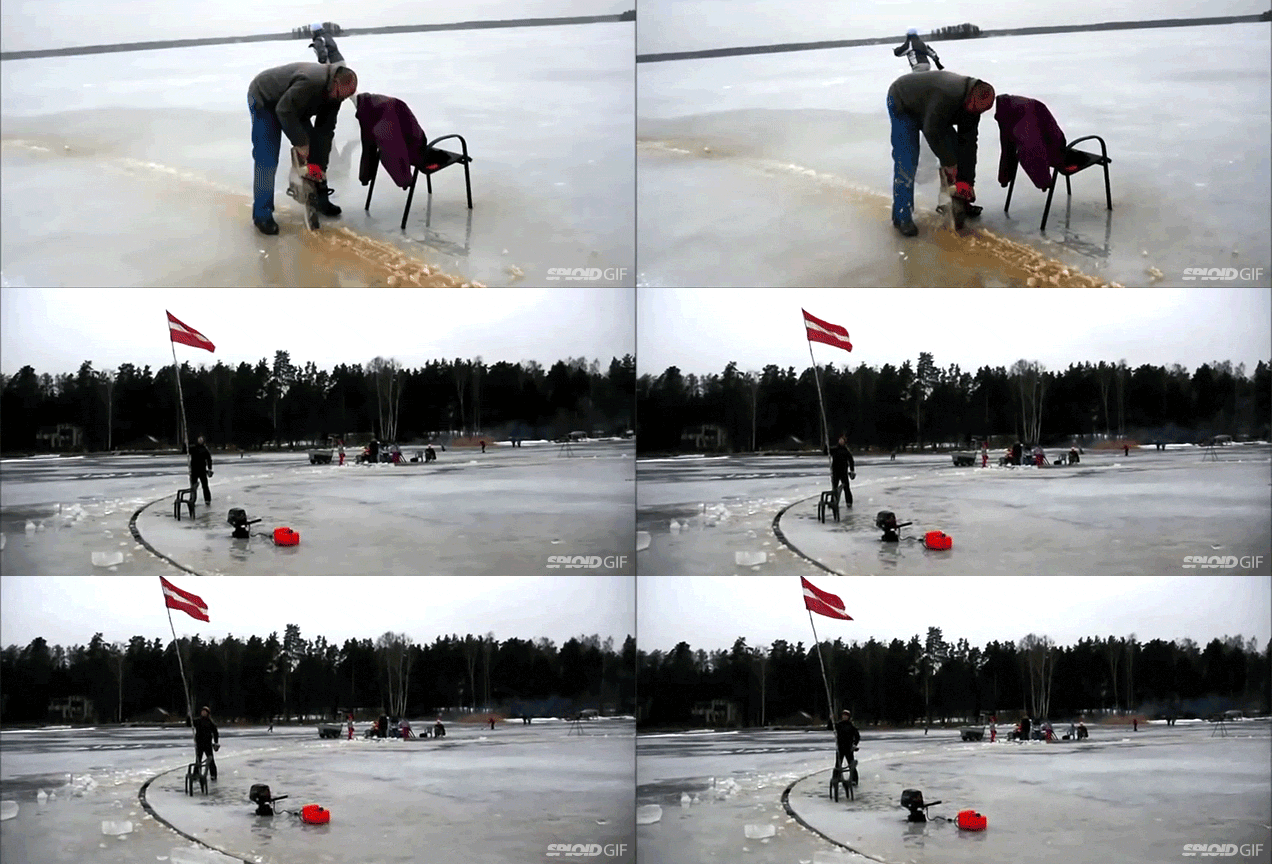
ice carousels

Ice fishing huts and art shanties allow people to enjoy peaceful winters and creative expression on frozen lakes, but for those with something more dynamic in mind: rotating DIY islands of ice are also an option.

ice

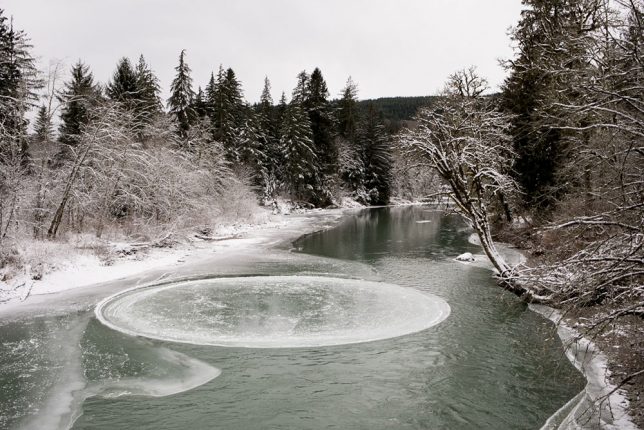
Ice circles have been known to form naturally, particularly in streams where a current can round the edges of a free-floating chunk and keep it spinning. The ice circle below captured by Kaylyn Messer is one such example, found this winter in the Snoqualmie River near Seattle, Washington.

ice circle

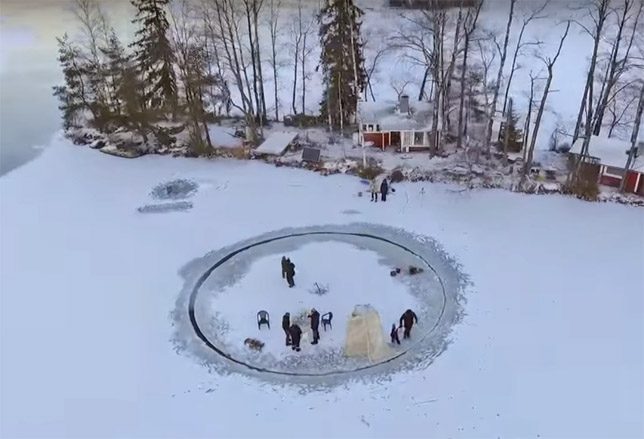
These kinds of formations happen on their own at times in Scandinavian and American rivers, water currents slowly shaping the ice. Lakes with fully-frozen surfaces are another matter — creating ice islands on their surface requires a bit more ingenuity (or at least: labor and machinery).

winter spinning ice

Once created, these may or may not move on their own, depending on currents below the surface — in some cases they have to be helped along by an outboard motor. Seating and shelters can be brought out to make them more homey (small fires can even be lit if the intended use is temporary).

Fair warning, though: if you plan to light your ice circle on fire at the end of a festival or gathering, be sure to stay far back from the flames and warming ice.

The best part is that there is no waste in the making of these things nor assembly required. And if your first attempt fails (assuming you don’t go down with the island), you can always carve out more.

Share on Facebook


[ By WebUrbanist in Culture & History & Travel. ]

[ WebUrbanist | Archives | Galleries | Privacy | TOS ]


WebUrbanist

 
Comments Off on Winter Carousels: Circular Spinning Ice Islands Carved with Chainsaws

Posted in Creativity


24 Frozen Images of Some Cold Winter Weather

29 Jan

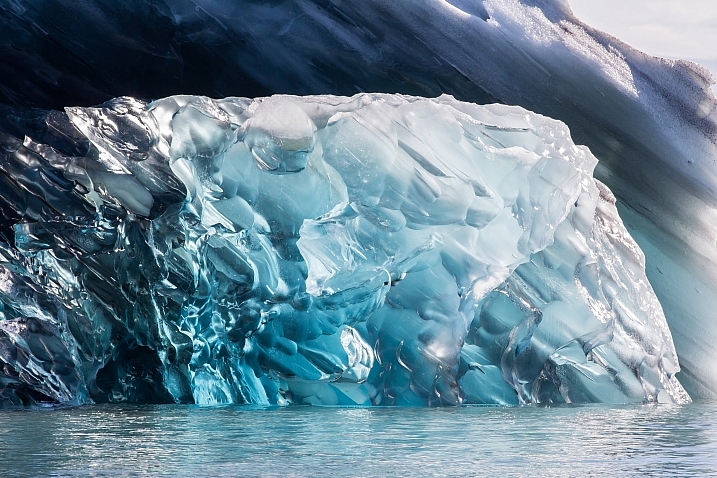
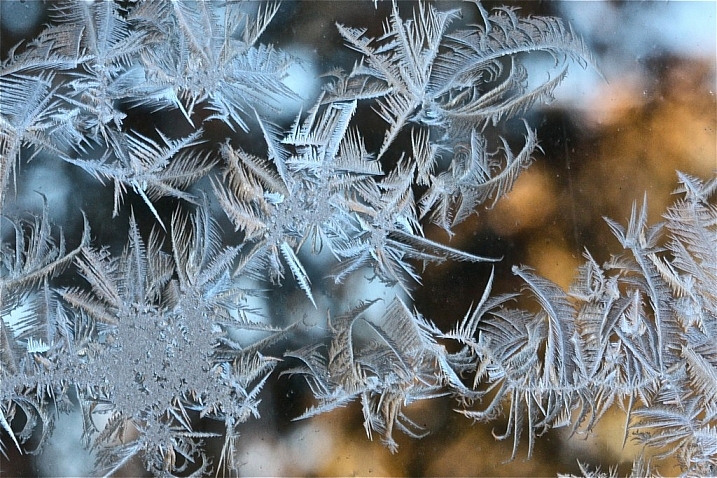
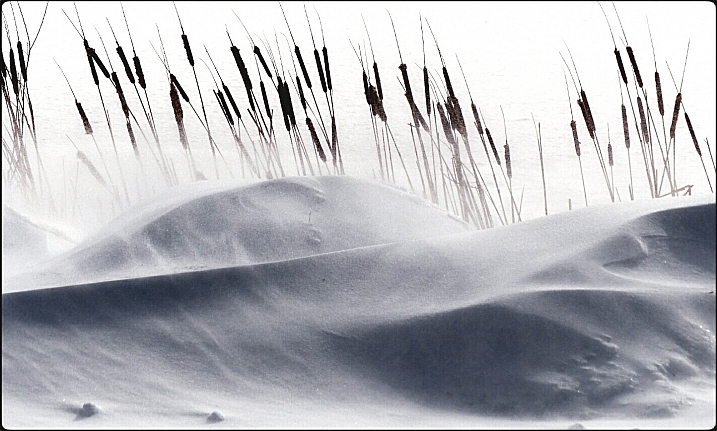
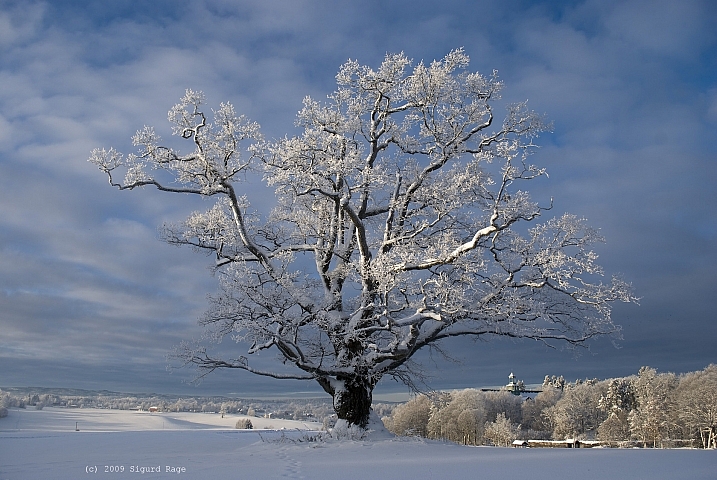
Here in the northern hemisphere part of the world, it is winter. That means two things – cold and snow. But that doesn’t stop some people (nor should it stop you) from doing photography.

Let’s have a look at some frozen images of some cold winter scenes.

By Howard Ignatius

By Neil Howard

By Dan (catching up)

By smilla4

By Ken Mattison

By Sigurd Rage

By Roger S. Hart

By Barbara Friedman

By Julie Falk

By chuddlesworth

By USFWS Mountain-Prairie

By Jack Skipworth

By ShinyPhotoScotland

By B Gilmour.

By Tupulak

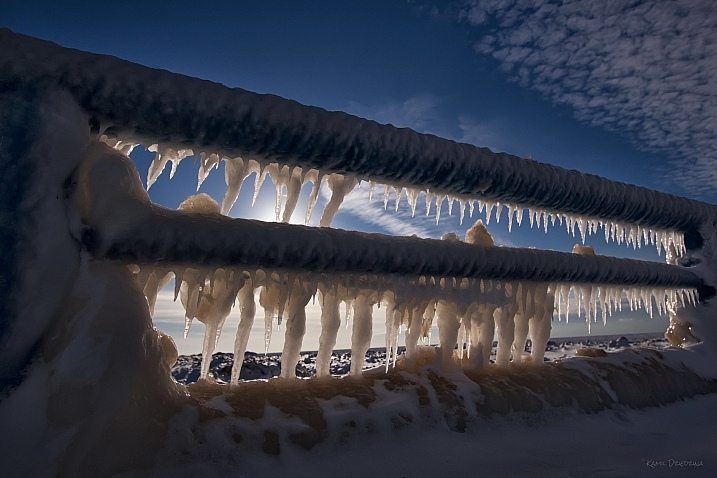
By Kamil Dziedzina

By MJI Photos (Mary J. I.)

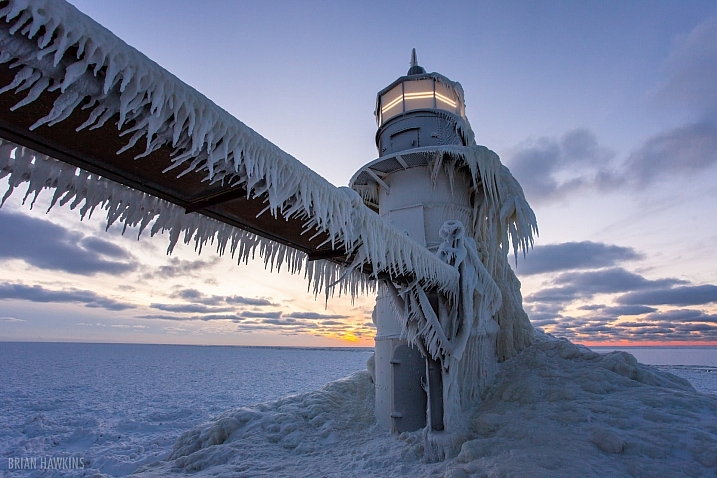
By Brian Hawkins

By Melinda Shelton

By Simon Doggett

By Nicolas Raymond

By ellenm1

By Gonzalo Baeza

By ravas51

googletag.cmd.push(function() {
tablet_slots.push( googletag.defineSlot( “/1005424/_dPSv4_tab-all-article-bottom_(300×250)”, [300, 250], “pb-ad-78623” ).addService( googletag.pubads() ) ); } );

googletag.cmd.push(function() {
mobile_slots.push( googletag.defineSlot( “/1005424/_dPSv4_mob-all-article-bottom_(300×250)”, [300, 250], “pb-ad-78158” ).addService( googletag.pubads() ) ); } );

The post 24 Frozen Images of Some Cold Winter Weather by Darlene Hildebrandt appeared first on Digital Photography School.


Digital Photography School

 
Comments Off on 24 Frozen Images of Some Cold Winter Weather

Posted in Photography


Rugged Fujifilm XP120 arrives just in time for winter

09 Jan

$ (document).ready(function() { SampleGalleryV2({“containerId”:”embeddedSampleGallery_9616569688″,”galleryId”:”9616569688″,”isEmbeddedWidget”:true,”standalone”:false,”selectedImageIndex”:0,”startInCommentsView”:false,”isMobile”:false}) });

It’s snowy season here in the Northern Hemisphere, so Fujifilm’s release of its XP120 is well-timed. The XP120 has a 16.4MP BSI-CMOS sensor and a 28-140mm lens, and is waterproof to 20m/65ft, shockproof to 1.8m/5.7ft and freezeproof to -10C/+14F. 

Other features include a 3″ LCD, unique ‘Cinemagraph’ feature, which ‘produces still photos with moving elements’, 1080/60p video (with a wind filter) and Wi-Fi.

The XP120 will come in four colors – blue, sky blue, green and yellow – and will be available in February for $ 229.

FUJIFILM INTRODUCES NEW RUGGED FINEPIX XP120 FOR OUTDOOR ADVENTURES; FLAGSHIP X SERIES CAMERAS ARRIVE IN NEW PREMIUM COLORS

Valhalla, N.Y., January 5, 2017 – FUJIFILM North America Corporation today announced the new FinePix XP120, with a 16.4MP back-illuminated CMOS sensor and a large 3.0 inch LCD monitor in a compact body. The new FinePix XP120 is waterproof to 65 feet \ 20 meters, shockproof to 5.7 feet \ 1.75 meters, freeze proof to 14°F \ -10°C and dust proof. The XP120 is equipped with a FUJINON lens that provides unique color reproduction technology and advanced sharpness to deliver outstanding image quality, making it an ideal choice for a wide variety of shooting situations in rugged environments.

Also announced are the new FUJIFILM X-Pro2 Body with XF23mmF2 R WR Lens and Lens Hood Kit, Graphite Edition, and the new FUJIFILM X-T2 Body, Graphite Silver Edition.

FinePix XP120 Delivers Four-Way Rugged Protection
The XP120 is waterproof to 65 feet \ 20 meters, shockproof to 5.7 feet \ 1.75 meters, freeze proof to 14°F \ -10°C and dust proof and is designed for ease of use in outdoor activities. The XP120 features an improved grip design for firm one-handed holding and a double-locking mechanism for the battery compartment. There is no need to worry about water, sand or short drops, making it the perfect first camera for children when on a fun adventure.

High Performance Sensor and Lens for Sharp Images

The XP120 is equipped with a 16.4MP back-illuminated CMOS sensor and FUJINON 5x optical zoom lens that includes a 28mm wide-angle setting for sweeping landscape and scenic shots. The optical zoom range can be doubled to 10x with Intelligent Digital Zoom technology, while the camera’s optical image stabilization function ensures that any effects from camera shake are minimized.

Compact and lightweight design with a large 3.0-inch 920K-dot LCD monitor

The new compact XP120 has a large 3.0 inch 920K-dot high definition LCD monitor with anti-reflective coating in its lightweight body making it perfect for outdoor activities. The monitor inhibits light reflection so you are able to comfortably check composition and pictures taken under bright daylight or underwater. The operation buttons on the new XP120 were created in pursuit of optimal size and position, enabling smooth operation even while wearing gloves or holding with one hand. And, the battery compartment is designed with a double-locking mechanism that requires two-stage operation to lock and unlock the lid.

Extensive Shooting Functions with an All New Cinemagraph for Artistic Expression

The XP120 offers an all-new Cinemagraph mode that produces still images with moving elements. Cinemagraph is a novel photographic approach that creates an image somewhere between a still and video, which makes a stark contrast against the rest of the still image so that it appears as if time has been frozen. Additional features that aid versatile artistic expressions include Burst Mode of up to 10 fps, smooth full HD video recording of 60 fps, and time-lapse recording which is useful for fixed-point observation of scenes such as sunsets and flowers opening.

FinePix XP120 Key Features:

  • 16.4MP back-illuminated CMOS sensor and FUJINON 5x optical zoom lens with 28mm wide-angle setting
  • Four-way protection
    • Waterproof up to 65 feet/20 meters, shockproof to 5.7 feet/1.75 meters, freeze proof to 14°F/ -10°C and dust proof
  • Compact lightweight design with 3.0 inch 920K dot high definition LCD monitor with anti-reflective coating
  • Scene Recognition Mode quickly determines the scene before optimizing focus, exposure and shutter speed for best possible results
    • Underwater and underwater macro functions available
  • Remote Shooting function: Allows for wireless connection from the XP120 to a smartphone or tablet for remote camera operations such as releasing the shutter or zooming in and out
  • Interval Timer Shooting: Automatically shoot any number of images in set intervals
    • Interval can be set to either 5 or 10 minutes, or 15, 30 or 60 seconds
  • Burst Mode up to 10 fps, and Advanced Burst Mode capable of shooting at up to 60 fps
  • Time Lapse Video: Automatically converts images taken with interval timer to video
    • Frame rates of 10fps, 30fps or 60 fps can be selected along with three different types of movie size, including full HD. Allows for capturing transitions in nature from a stationary point, such as sunsets or opening flowers
  • Wireless LAN connectivity, Smartphone Transfer and the FUJIFILM Camera Remote app
    • Transfer photos and videos from the XP120 to your smartphone or tablet, or directly to the Instax Share SP-2 Printer for quick, high-quality prints
  • Cinemagraph mode: produces still images with moving elements
  • Motion Panorama 360° function for superb panoramic shots, and the Advanced Filter function to create advanced artistic effects with ease
    • Select from 11 filters when taking pictures or 7 filters during video recording
  • Records smooth Full HD video at 1080/60p with a dedicated movie button
  • Wind Filter Setting: reduces wind noise which is often a problem with outdoor movie recording 

Availability and Pricing

The FinePix XP120 will be released in late February 2017 in the U.S. and Canada for USD $ 229.95 and CAD $ 239.99.

Articles: Digital Photography Review (dpreview.com)

 
Comments Off on Rugged Fujifilm XP120 arrives just in time for winter

Posted in Uncategorized


Angling for Warmth in Winter: 21 Ice Fishing Hut Designs

25 Dec

[ By SA Rogers in Culture & History & Travel. ]

Maine fishing hut

Not just cold comfort, these portable shacks designed to be towed out onto frozen lakes come in a variety of forms, from the practical and resourceful to the funny and artistic.  These ice fishing hut designs demonstrate how surprisingly warm and cozy the simplest of shelters can be – and prove that people who live in the world’s coldest climates (happily spending their spare time engaging in recreational outdoor activities in subzero temps) are way hardier than the rest of us.

Fishing Hut & Hot Tub Combo

fishing-huts-hot-tub

A group of local anglers in Calgary came up with a pretty brilliant way to stay warm while out on the ice: a towable hot tub, which they pull out onto frozen lakes alongside their fishing hut. It takes a couple hours to heat up, but the waiting time has got to be worthwhile once you get in. “We weren’t catching any fish, so we thought we’d do something else,” says the tub’s creator, Scott Chesterman.

Ice Fishing Hut with Frozen Walls

fishing-hut-ice-walls-1

fishing-hut-ice-walls-2

Rather than hauling a pre-made hut out onto the water, you could work with what’s already there. This mobile fisherman’s hut design by Norwegian architecture studio Gartnerfuglen is made of a wooden frame and wire mesh, used as a form for ice. Once the walls freeze into place, the inside is insulated. In the summertime, it can be used as a garden shed, with the wire supporting climbing plants.

The Art Shanty Project: 8 Creative Hut Designs
fishing-huts-art-shanty-project-1

fishing-huts-art-shanty-2

fishing-huts-art-shanty-project-2

fishing-huts-art-shanty-3

fishing-huts-art-shanty-4

fishing-huts-art-shanty-5

fishing-huts-art-shanty-6

fishing-huts-art-shanty-7

fishing-huts-art-shanty-8

Is this the polar opposite of Burning Man? Over 1,000 artists have designed and built creative ice shanties for the annual ‘Art Shanty Project’ over the last decade, covering the frozen surface of a Minnesota lake like an iced-over version of the popular desert festival. The creations include wooden stick-framed shacks, geodesic domes, tipis, sculptural structures and mobile shanties of all kinds, put on display for thousands of tourists to see for an event that’s uniquely Minnesotan.

Next Page – Click Below to Read More:
Angling For Warmth In Winter 21 Ice Fishing Hut Designs

Share on Facebook


[ By SA Rogers in Culture & History & Travel. ]

[ WebUrbanist | Archives | Galleries | Privacy | TOS ]


WebUrbanist

 
Comments Off on Angling for Warmth in Winter: 21 Ice Fishing Hut Designs

Posted in Creativity


Shooting in the Cold – Tips for Winter Photography

06 Dec

Just because it’s cold doesn’t mean you should stop doing any photography. Winter photography can be magical, here are some tips for shooting in the cold to help you.

The weather

It’s easy to go out and shoot when the weather is nice and the weather God’s smile down with big fair sky grins. Summer, Spring, and especially Autumn are popular times for photography because there’s no shortage of photo opportunities – comfortable photo opportunities at that.

Winter Photography 2

Seasons change, though, but that doesn’t mean that you have to be discouraged, or worse, stop shooting just because winter comes around and the weather outside turns cold.

Winter Photography 5

That’s not to say that making photographs in winter doesn’t come with its own set of problems – well, not really problems. Let’s just say that making photos in the colder months is more challenging than it is when at warmer times of the year.

Winter Photography 4

There are still quite a few reasons to venture out into the cold with your camera. Here are a few tips that will help you stay productive (and safe) during those frosty months between Fall and Spring.

Winter Photography 7

Protect yourself

All the know-how and skill in the world won’t do you much good if you’re too cold and miserable to actually make photographs. Always be aware that you and your well-being, above all else, is the most important thing to protect while shooting in frigid temperatures, doing winter photography.

Winter Photography 6

Keep a well updated on current and future weather conditions and dress accordingly. Wearing layers of clothing will help you adjust your body temperature based on your level of activity while shooting, to prevent sweating which can lead to hypothermia. Protect your face, hands, and feet.

Winter Cold Weather Protection

This includes wearing warm gloves that allow good finger movement so you don’t have to constantly remove them before using your camera. Also, a face wrap or scarf goes a long way to shield your face from the wind but also to protect your camera from freezing condensation of your breath. More on that oh so wonderful phenomena a little later.

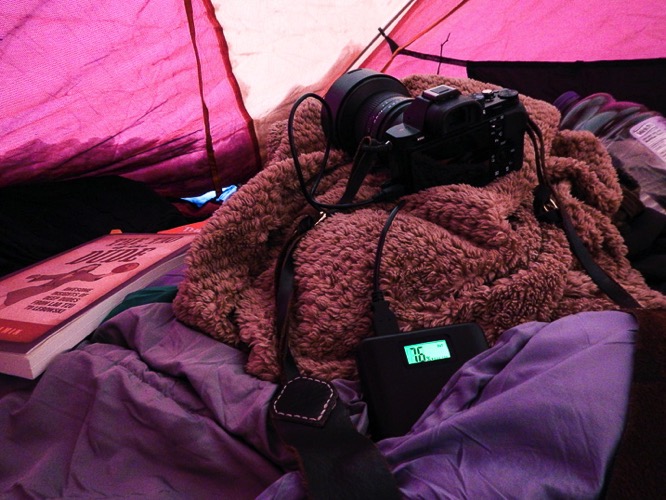
Protect your batteries

Yes, we all know most of our cameras are electric and that means batteries. Batteries are essentially little chemical reactors that produce electricity. High or low temperatures affect batteries to varying degrees (temperature humor). Cold batteries discharge themselves faster than do warm ones. So basically, the cold temperatures faced when shooting winter photography can drain your batteries.

Winter Batteries

Take this into account and bring an extra battery or two when you venture out for some chilly winter shooting. If you can, carry your extra batteries in your pocket or closer to your body to keep them warmer and working more efficiently. There have been times when I was working in single digit temperatures when I put my battery in the camera only immediately before composing in order to maximize my shooting time.

Don’t breathe

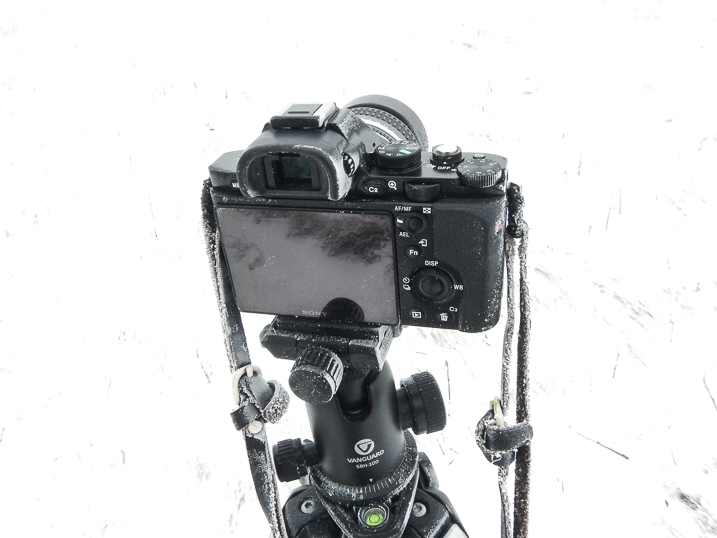
Well, breathe of course, just not on your camera, or lens for that matter. Your breath contains a relatively high amount of moisture and heat. When the temperature outside drops, the very air you exhale can spell disaster for your winter photography. If you breathe directly onto your camera or lens condensation forms. Just like blowing your breath on a mirror. When it gets cold (below freezing), that condensation WILL FREEZE. This means that lens elements can glaze over with your own brand of self-made ice and viewfinders become unusable.

Winter Frozen Camera 2

To combat this frosting effect, remember to never carry your lenses close to your body and never blow your breath on them. For that matter don’t hold them in your hand for extended amounts of time because this too will warm them up which can lead to condensation. When composing your images, it’s a good idea to hold your breath.

Winter Frozen Camera 1

It only takes a few moments and will prevent a buildup of frost and ice on your camera.

Understand your tripod

I remember one late afternoon of shooting, a few winters back on a secluded stretch of a mountain stream. I was standing in the water with my tripod, making exposures until the light was gone and then packed everything up to drive back to the hotel. The temperatures were hovering somewhere in the lower twenties F (-4 to -6c). I carried my gear inside but left the folded tripod in the car.

The next morning found me beating on my now frozen tripod with a boot in order to break it free of the ice caused by leaving a wet tripod in a car overnight.

Winter Photography 1

I learned my lesson that day and there are a few things you can do to prevent my mistake from happening to you.

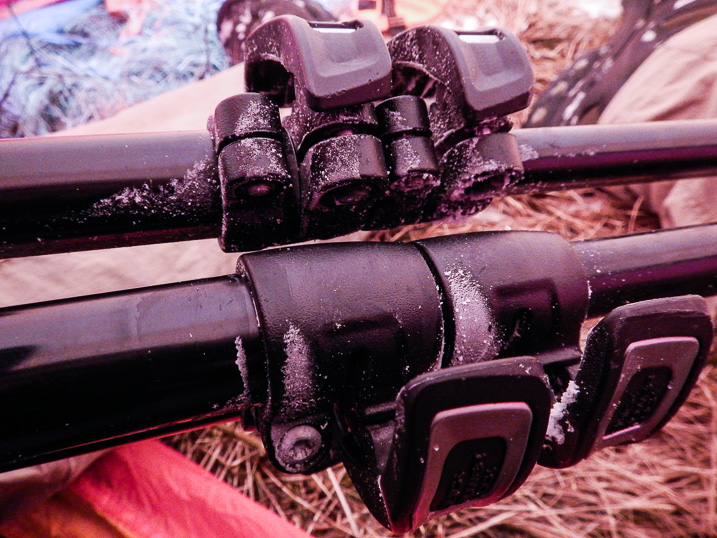
Winter Frozen Tripod

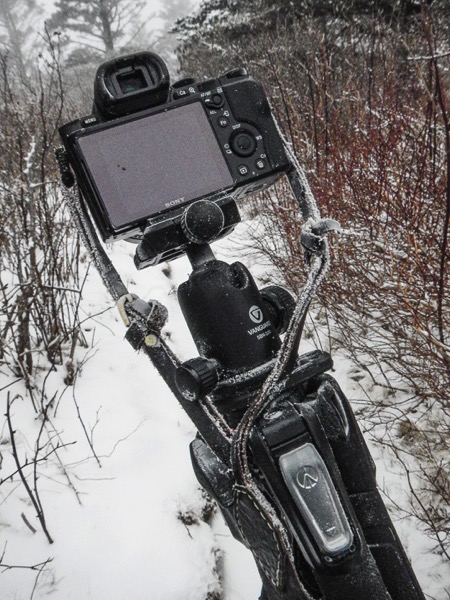
If your tripod gets wet, do what you can to remove as much water as possible. This will reduce the ice buildup. If you find yourself unable to store your tripod in a warmer place after shooting, leave the legs fully extended and be sure not to lock the legs. By leaving the legs unlocked you will have a much easier time making the tripod usable if it does freeze.

Leaving the legs fully extended may be cumbersome but it will keep water from being introduced further into legs. The key factor to remember when using your tripod in winter is that water and moisture are your enemies. Anything you can do to reduce the moisture will help ensure your tripod functions more easily when things get really cold.

Summary

Cold weather shooting and winter photography can be an extremely rewarding experience. Winter time transforms landscapes and locations into dream-like scenes different from any other time of year.

Winter Photography 3

Be sure you understand how to cope with the winter temperatures so you can protect yourself and your gear. Here’s a quick recap of the things you can do to make your sure your winter shooting is a great experience.

  1. Dress yourself according to the conditions. If you feel you’re not adequately prepared don’t risk it.
  2. Bring extra batteries and keep them warm. Carry your batteries close to you in order to extend their life.
  3. Don’t breathe on your gear. The condensation from your warm breath will freeze on your camera and lens. Hold your breath when composing.
  4. Be mindful of your tripod. If it gets wet the water may freeze making it difficult to use. Keep it as dry as possible.

Please share any other winter photography preparedness tips in the comments below. Of course, share your winter images as well!

googletag.cmd.push(function() {
tablet_slots.push( googletag.defineSlot( “/1005424/_dPSv4_tab-all-article-bottom_(300×250)”, [300, 250], “pb-ad-78623” ).addService( googletag.pubads() ) ); } );

googletag.cmd.push(function() {
mobile_slots.push( googletag.defineSlot( “/1005424/_dPSv4_mob-all-article-bottom_(300×250)”, [300, 250], “pb-ad-78158” ).addService( googletag.pubads() ) ); } );

The post Shooting in the Cold – Tips for Winter Photography by Adam Welch appeared first on Digital Photography School.


Digital Photography School

 
Comments Off on Shooting in the Cold – Tips for Winter Photography

Posted in Photography


Winter is Coming: Here are some tips on what and where to shoot when it gets cold

10 Oct

Winter is Coming

Winter is only a month or two away and many photographers will find it challenging to press on through the dreary winter months; especially those of us that live in Seattle or other areas where wind, rain, sleet and snow pound the region for months on end.

In this article I’ve outlined some tips to keep your landscape photography fresh when the weather starts to head south.

Photograph Transitions

The transition between fall and winter offers up a unique opportunity to photograph fall color under a fresh dusting of snow. If the forecast is calling for snow toward the end of fall, head out and see what you can find!

The warmer colors of the fall leaves and foliage will be presented in stark contrast against the cold tones of the snow and can make for very interesting and dynamic images. The above image was taken in the central Cascade mountains of Washington state at the end of Fall.

Head to the Desert

This may sound like a weird tip, but if you have any sort of opportunity to visit the desert or the canyon lands of any kind during the winter, do it! Places like Bryce Canyon in Utah (pictured above) and the Grand Canyon in Arizona offer very unique conditions and compositions that the average tourist won’t get to see during the summer months.

Snow can add a nice color contrast to the desert landscape and can also add soft textures to the arid environment. As an added bonus you won’t have to deal with the crazy crowds and 100 degree temperatures.

Icy Waterfalls

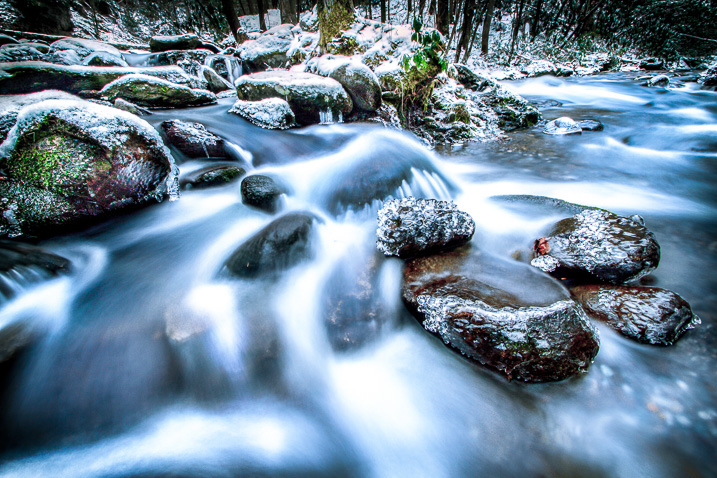
Shooting waterfalls during the winter months can often times make even popular and well shot locations look refreshing and new. Multnomah falls is one of the most recognizable waterfalls in Oregon and even it can take on a different appearance during the winter.

The frozen spray from the falls can add some really nice textures and visual elements to your images. The snow can also contrast well with the icy blue water flowing over the falls.

  • If you plan to shoot waterfalls or any sort of moving water during the winter definitely invest in a good set of micro-spikes (for traction) to give you an extra edge for hiking and climbing.
  • Trekking poles (your tripod can work in a pinch) are also a great idea to help with stability and balance while transversing icy terrain. 
  • If your tripod comes with metal spikes or feet it’s always good idea to bring them along as they may work better (or worse) depending upon conditions.
  • Hip-waders and Gortex can definitely help keep you dry and comfortable.

Let’s face it, slipping and falling into a river or on a rocky slope isn’t something you really want to do in cold weather.

The Mountains are Calling

Snow and the winter weather that comes with it can really add depth and layers to your images. Heading to the mountains with a longer focal length lens can really help to emphasize winter weather conditions such as fresh snow, low clouds and fog. 

When the weather looks to be heading south I love to head up to the mountains to check out how the conditions are shaping up for sunset and sunrise.

  • Bring waterproof and breathable layers, snow shoes and any other supplies that you may need when you find yourself hiking in cold conditions.
  • Packing a Jet Boil (or another source of heat) and some instant meals can be a lifesaver if you’re in a pinch.
  • A GPS can be your best friend if your tracks get covered by fresh snow.
  • Check the weather forecasts often and do some research to ensure that you don’t find yourself in the wrong place at the wrong time.

Chase the Storms

The sunsets that often follow winter storms can offer some of the most intense and gorgeous light that you can capture. To really take advantage of this try heading to the coast just as a low pressure system has begun to move on shore. It takes a bit of planning but the sunset/sunrise conditions on the back edge of the storm can be absolutely spectacular! The above image was taken in late winter at Cape Kiwanda on the Oregon Coast.

  • Check the weather forecasts hourly when planning a trip like this.
  • The National Weather Service here in the US is a great place to track weather and believe it or not the Weather Channel website offers some of the most accurate forecasts you can find on the internet. 
  • The NOAA Hi-Def radar smartphone App can give you a great deal of insight into minute by minute precipitation and cloud cover forecasts.

As an added bonus you won’t have to deal with that pesky marine layer that often plagues the west coast of the US during the summer months. 

Stay Close to Home

If the conditions are just too dangerous or you just don’t have time to plan a trip, look to areas near you for unique vantage points and compositions that can offer up very different photographic results during the winter months. This was taken near my home in Snoqualmie, WA. 

Get creative in your surroundings! This shot was taken with my Canon 70-300mm F4-5.6L IS lens. Using longer focal lengths in your area can really open up new and exciting compositional opportunities. 

Articles: Digital Photography Review (dpreview.com)

 
Comments Off on Winter is Coming: Here are some tips on what and where to shoot when it gets cold

Posted in Uncategorized


Winter Morning at Swinging Bridge, Yosemite National Park

26 Aug
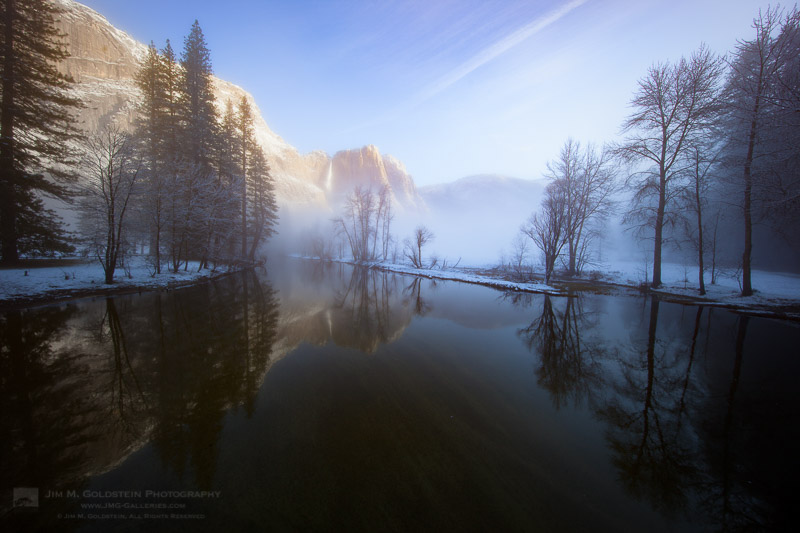
Morning light on Yosemite Falls amidst rising winter fog - Yosemite National Park

Morning light on Yosemite Falls amidst rising winter fog – Yosemite National Park

To celebrate today’s 100th birthday of the U.S. National Park system I thought it would be fitting to share a favorite image of mine taken in Yosemite National Park “Winter Morning at Swinging Bridge”. The NPS is often considered America’s Best Idea and I think most would agree. I have made so many amazing memories in our National Parks and witnessed jaw dropping beauty that has warmed my soul. We are all so fortunate to have this great resource.  Now get out there and explore it.

The post Winter Morning at Swinging Bridge, Yosemite National Park appeared first on JMG-Galleries – Landscape, Nature & Travel Photography.


JMG-Galleries – Landscape, Nature & Travel Photography

 
Comments Off on Winter Morning at Swinging Bridge, Yosemite National Park

Posted in Equipment


Tips for Processing Winter Landscapes in Lightroom

20 Apr

I see a lot of winter. The interior of Alaska, where I live, gets a solid six months, often seven, of the white stuff. Essentially anytime from October to mid-April, we are likely to have snow on the ground. Unless I put the camera down for most of the year (which I don’t), I end up with a lot of photos on my computer of snowy mountains, forest, and tundra. Come the early-spring, brown season, I have a lot of computer work to take care of.
Kelly DONE-1

Though the method of processing winter images is largely the same as many other types of outdoor images, you’ve got to approach snowy images with cold focus (insert laughter here). I jest, but actually the cold, and bright blue tones of winter, are elements that should not be forgotten (or overdone).

My Approach

When I come at an image in Lightroom, I don’t tackle it with a standard formula. Rather, I consider the time and place I made it, what the landscape looked like, and just as importantly, how it felt. Those memories play an important role in my vision for the final image.

With that in mind let’s dive into the first of the three winter images I want to walk you through my processing steps.

Brooks Range, Alaska – Early winter
Kelly 1

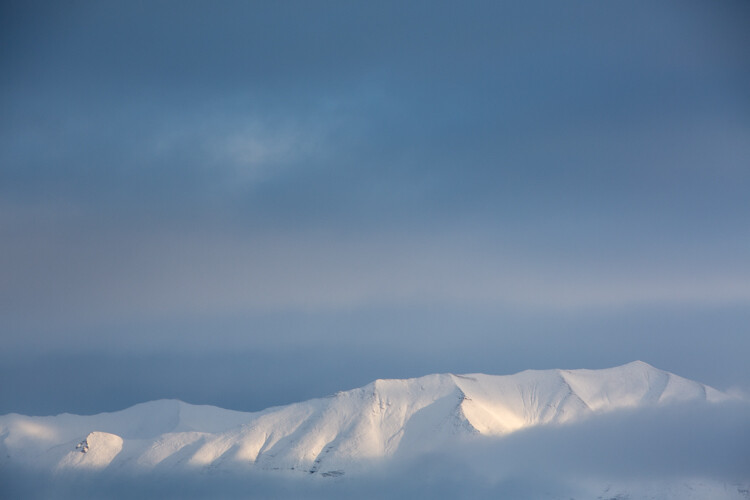
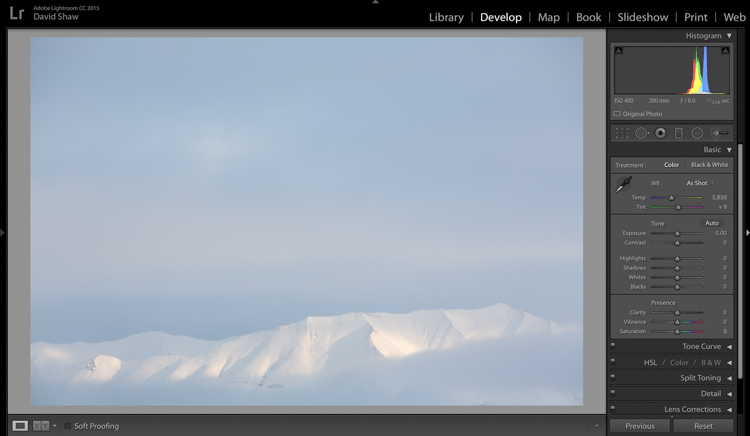
On a river trip in early September, down the remote Kelly River of the western Brooks Range, my clients and I were hit by the first snowfall of winter. It started the evening before I made this image, with a few big, wet flakes falling from the overcast sky. By the following morning, my tent, the gravel bar on which we were camped, and the entire landscape, was covered in six inches of fresh snow. The snow was tapering off, and I could see breaks in the clouds where patches of blue sky shone through. It didn’t take long before those patches were turned into beams of sunlight on the mountains. I walked down to the river with my camera, and started making images of the shifting light on the land. This shot came out of that session.

The light and color is typical of many winter images, bright, with lots of blue. Take a look at the histogram in the upper right, and you can see how it’s pushed to the right, meaning the image is on the bright side (but no blown-out highlights), exactly what I want with an out-of-camera winter shot.

Step One – White Balance

The first thing to consider is the white balance. Cloudy days tend to cause warmer tones, and snow, particularly under-exposed snow, can take on a yellowish hue. This can be off-putting, so pushing your white balance toward the blues can help provide a more pleasing, and accurate tonality. In this case, my camera selected an appropriate White Balance in the field, and didn’t need any adjustment in Lightroom. But keep this in mind when processing your own images.

Step Two – Exposure
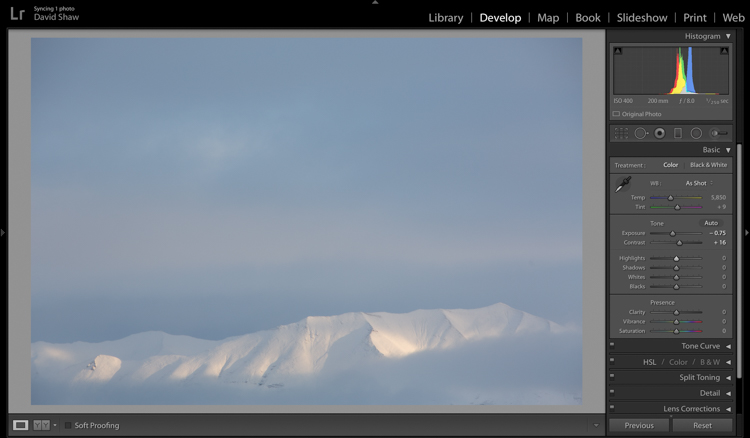
Kelly 2

The next step was to bring down the exposure by 0.75 stops, making the image a bit moodier, and less bright. I then bumped the contrast a hair to +16 just to make those highlights more clear before I dove into the more important contrast adjustments.

As a quick note, I bet I do 85% of my Lightroom edits in the Basic panel. This very effective section of the program is one you should know intimately, before you go exploring too much of the huge variety of other tools provided by the software.
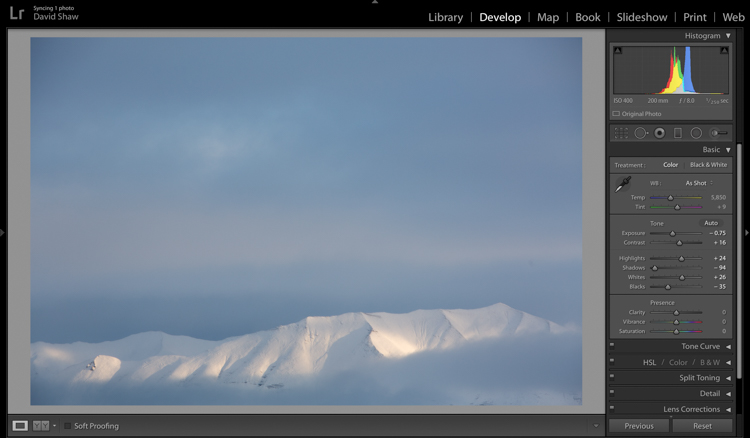
Kelly 3

The next four sliders provide a more specific modification of lighting in the image. In this case, I wanted to recollect some of the feeling of the dissipating storm by emphasizing the dark clouds. To do so, I pulled the Shadows slider down nearly all the way, making the dark blues and grays of the clouds appear more menacing. The Highlights, I bumped just a notch, adding some pop to the bright patch on the mountains. Whites and Blacks each got a nudge up (Whites) and down (Blacks) respectively, finishing the job I started with the first two sliders.

Step Three – Clarity
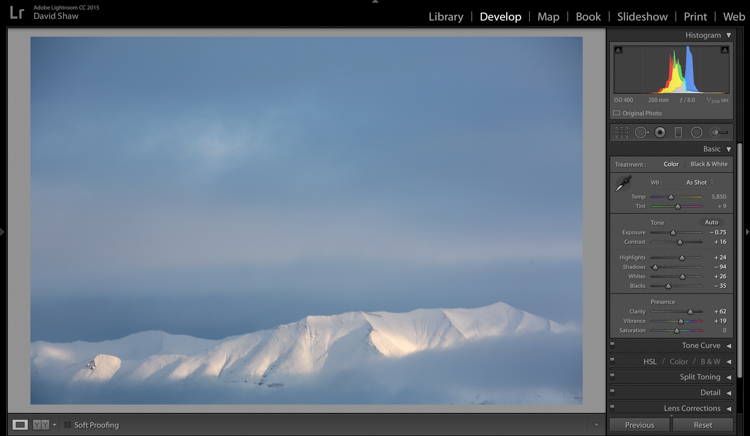
Kelly 4

The first of the next three sliders is Clarity. This nifty tool, increases the contrast where dark and bright edges meet, and adds apparent sharpness to the image. On the morning I made the image, the clear morning light made the mountains very sharp to the eye. Wanting to emulate that effect in the image, I gave the Clarity a substantial boost to +62. That’s about as high as you can go on most images without appearing artificial.

Step Four – Vibrance and Saturation

The Vibrance and Saturation sliders are dangerous. Photographers tend to believe that bright colors mean a good image. I want to say this very clearly: Do NOT over-saturate your images. It doesn’t look as good as you think it does, so, you know, just don’t.

Vibrance increases the intensity of the less saturated tones. When used in moderation it adds pop. In this image, I left the saturation slider completely alone.
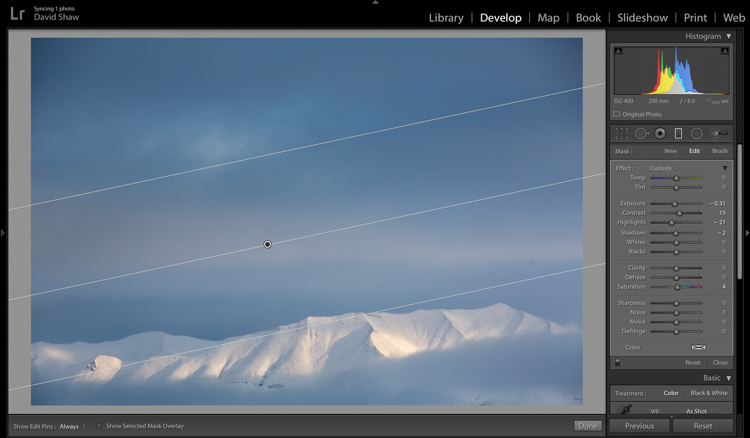
Kelly 5

The rectangular icon in the row below the histogram is the Graduated Filter. This useful tool allows you to adjust a portion of the frame, without affecting the other areas. Just as importantly, you can adjust the edge softness (transition area) as hard or soft as you like. In this case, I wanted my changes to taper naturally into the frame so made the filter edge fairly wide (set feather to a high number). Using this tool, I chose to darken the sky, and draw attention to the mountains at the bottom of the frame. After adjusting the placement, I lowered the exposure in the sky. This allowed me to subtly darken the sky, without affecting the brighter tones of the mountains.
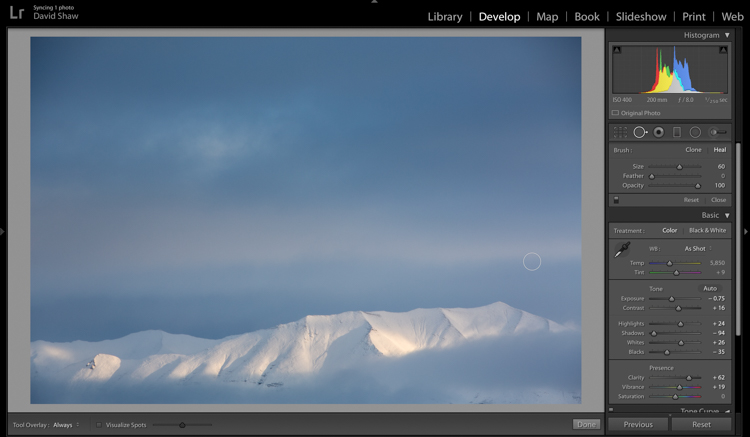
Kelly 6

Adjusting contrast can cause previously invisible imperfections to appear. In this case, it was a dust spot on my sensor, which I cloned out using the “Heal” tool.

The final image, as you can see, is a substantial improvement over the original, and holds true to the scene as I remember it.
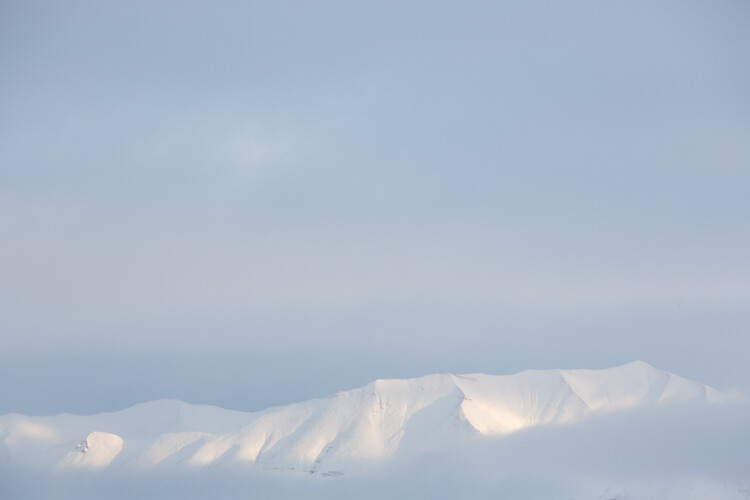
Before

Before processing

Kelly DONE-1

After processing

Color in the Cold

Not all images of the winter rely on cool tones for their success. At times, it is the juxtaposition of those cool tones and bright warm colors that make an image.
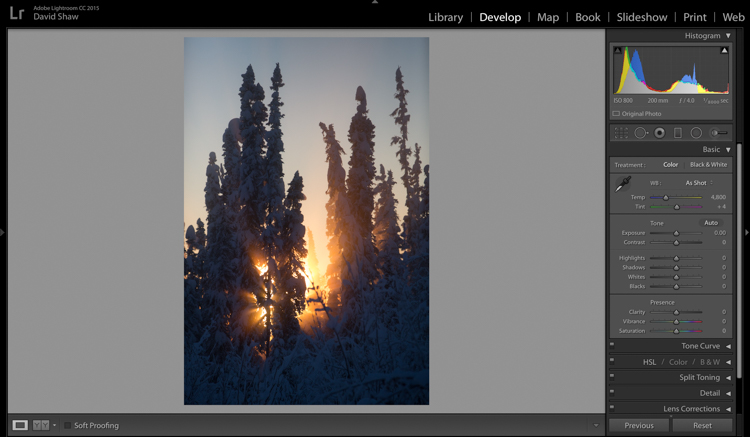
Beams 1

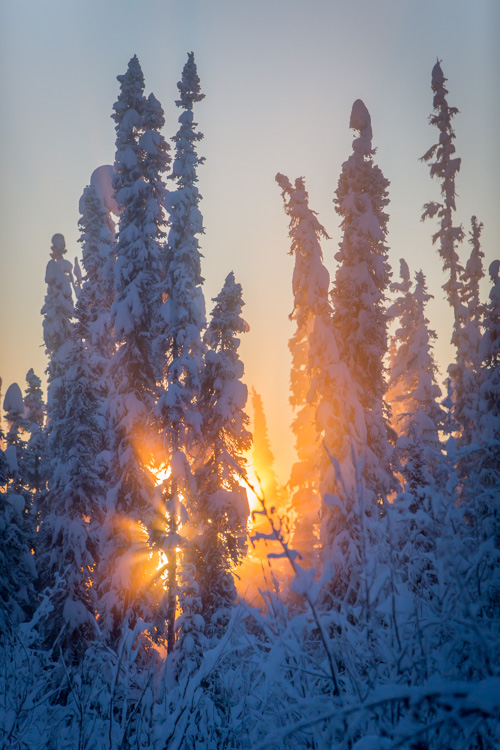
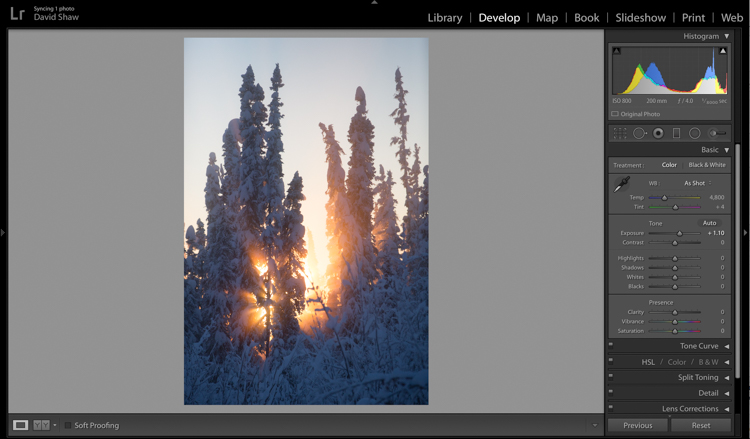
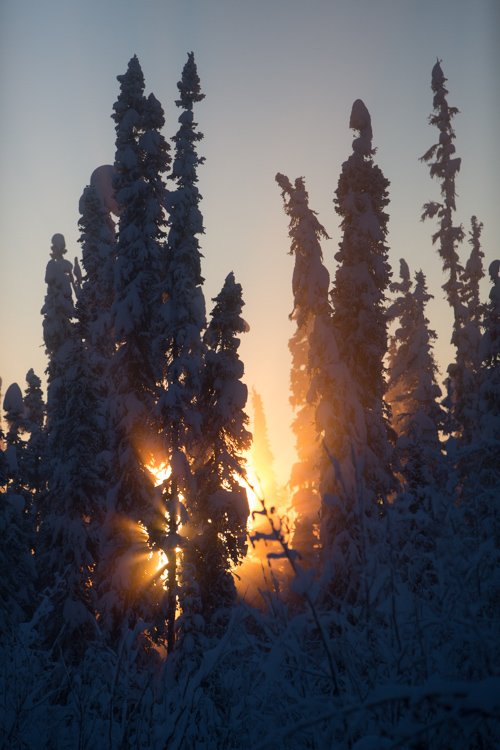
This is one such image. I made it on an extremely cold mid-winter day, on the ice of the small creek that flows on the lower part of my property north of Fairbanks, Alaska. It was about -35f (-37c), and water, pushed up from the bottom of the creek by the pressure of the ice, was trickling out onto the surface where it steamed into the frigid air, before freezing. It was midday, and the sun, just a few ticks above the horizon to the south, was throwing orange beams through the branches of the snow-colored spruces. Fortunately, I had my camera, and managed this photo before the sun slipped away.
Beams 2

On that cold day, I was forced to underexpose the image to keep the beams of sunlight and the sky from blowing out. My first step was to return some of that brightness to the image by raising the Exposure +1.10 stops.
Beams 3

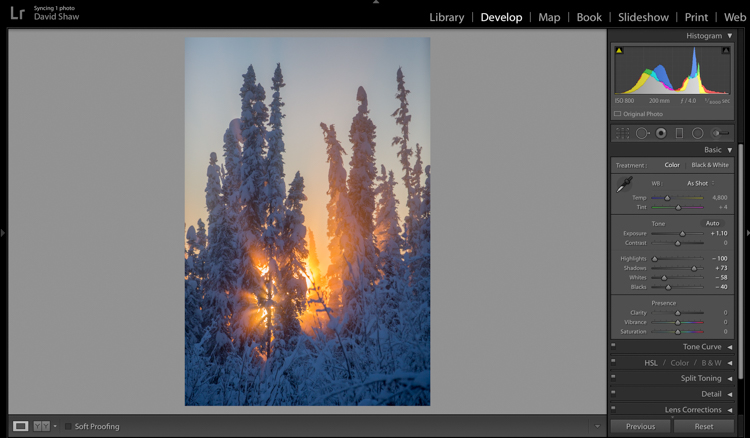
In general, I dislike High Dynamic Range (HDR) images, particularly the over-processed ones that appear regularly on Facebook and Instagram feeds. That said, HDR, or my Lightroom version of it, can be helpful in highly contrasted images like this one. Here, I pulled the highlights all the way down, bringing the beams and the sky back to more appealing levels. The Shadows I brought up, which revealed details in the trees and shrubs which were previously too dark to see. The effect, when used appropriately, does not look artificial.
Beams 4

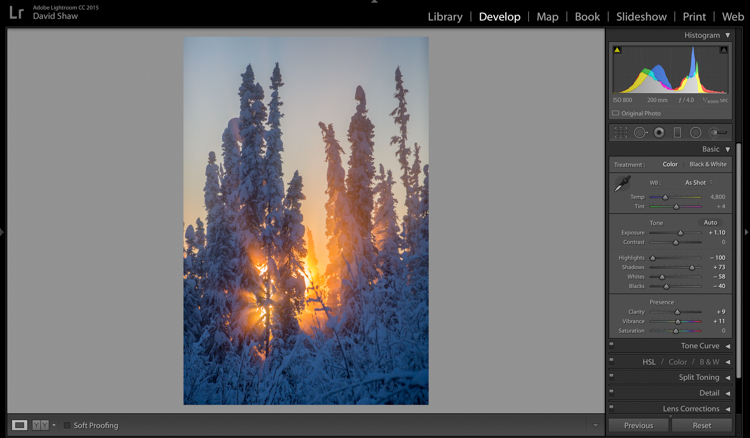
The image was already colorful and sharp so required very little in the way of Clarity, Vibrance or Saturation. A small boost (+9) to Clarity, +11 to Vibrance, and no change in Saturation was all the image needed.
Beams 6

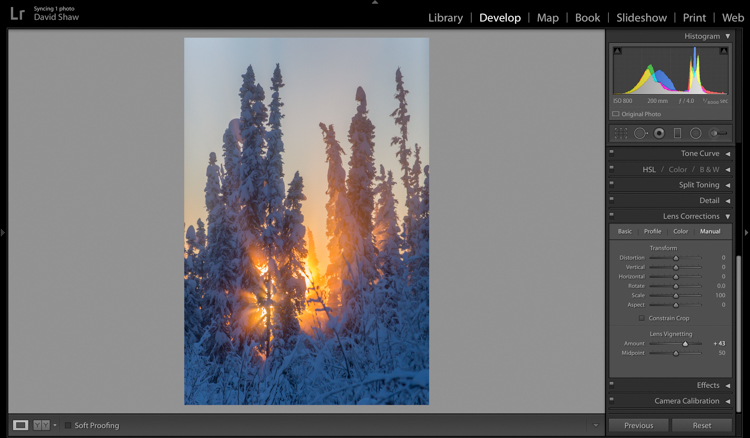
The lens I used to make the image has a hood, which I realized after the fact, was slightly mis-aligned and threw a vignette over the corners of the photo. If I want a vignette (see next), it needs to be purposeful, not the accident of a poorly fitted hood. So, using the Lens Corrections module, I made a single adjustment, sliding the Lens Vignetting slider to the right, brightening the corners, and almost entirely eliminating the ugly dark area in the top right.
Beams 7

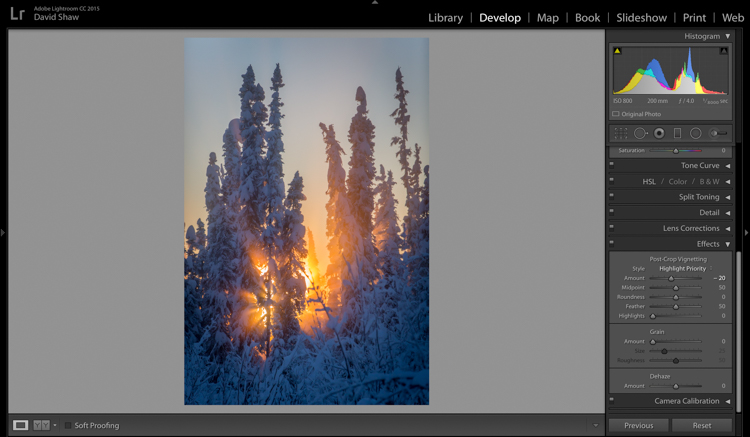
The last thing I wanted to do was darken the sky a touch more, and bring further attention to the starburst of sunbeams coming through the trees. So, using the Effects Module, I added a -20 Post-crop Vignette, which effectively darkened the sky and lower corners.

With that final change, the image was complete, a starburst of color on a brutal winter day.
Before processing

Before processing

Beams Done-1

After processing

The Storm

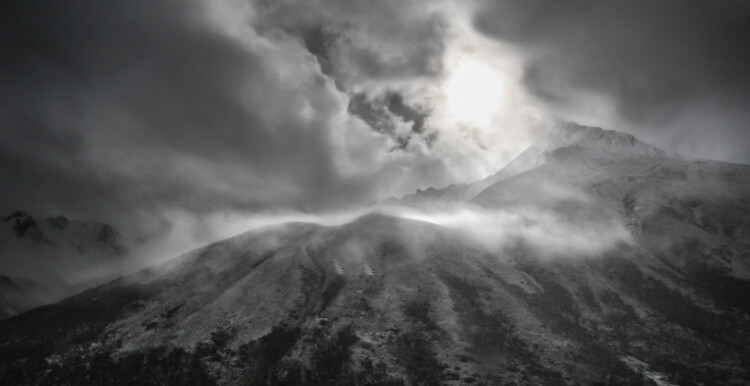
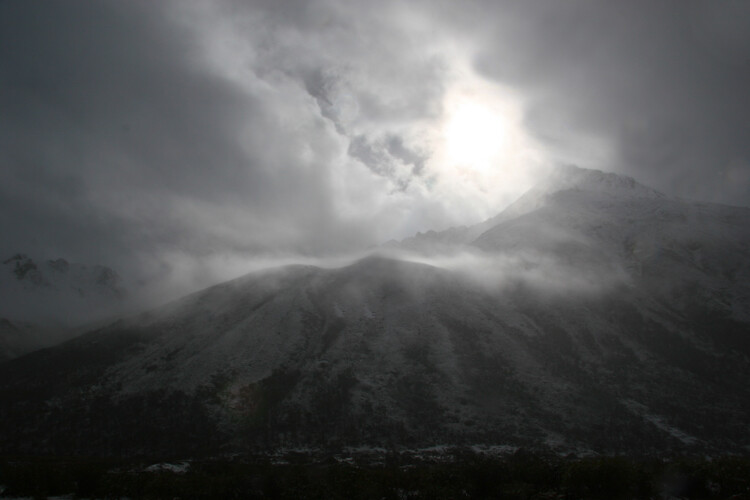
A number of years ago, I spent 10 days trekking through the Himalayas of Bhutan. It was October, the tail end of the trekking season for the little mountain kingdom. My group and I hiked up from the lowlands, to a high camp at over 13,000 feet, where we planned to cross over two 15,000 foot passes before making a long descent back to the city of Thimpu. It didn’t work out as planned. We’d scheduled two nights at the high camp to acclimatize before crossing the passes. Just before bed on the second night, a storm rolled in, and by the time we woke up the following morning, there were eight inches of snow on the ground. Any hopes of penetrating higher into the mountains were dashed. Making the best of it, I rose and made photos of the dark mountains and falling snow.
Bhutan 1

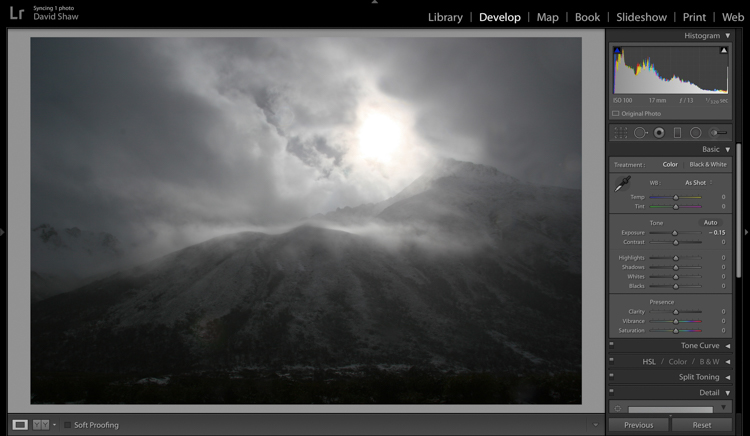
In the field, I purposely underexposed to keep the small patch of bright sky surrounding the sun from blowing out entirely. The mountains ended up nearly black, and the sky dark gray. Though consistent with my desire to make a moody, foreboding image, I wanted to emphasize that feeling even more.
Bhutan 2

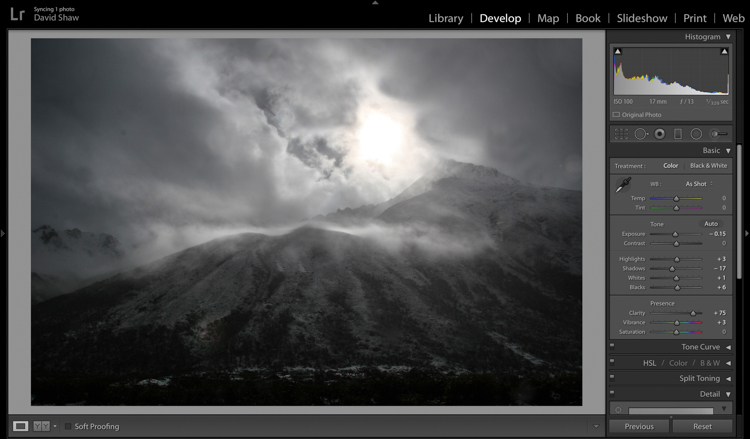
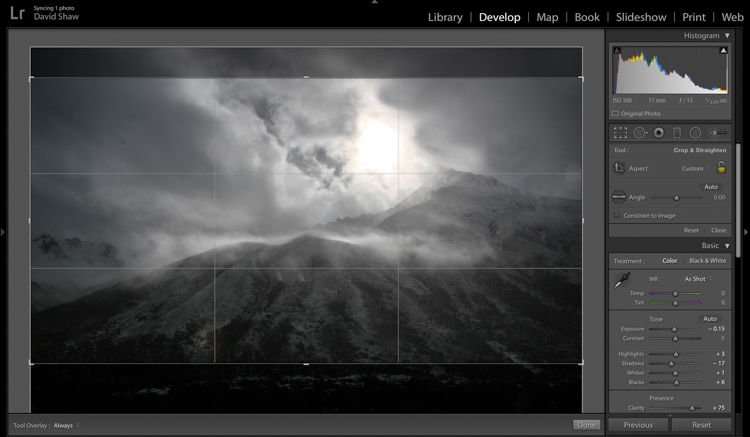
In the Basic Module, you can see that I darkened the image a bit more, left the highlights more or less alone, darkened the shadows a hair, and bumped the blacks just a bit to bring some texture into the dark lower corners. The Clarity slider I pushed notably to the right, which made the textures in the sky and mountain pop against the otherwise soft grays. I left the color adjustments mostly alone.
Bhutan 3

The more I looked a the photo, the more I realized the top and bottom edges added nothing to the image. Using the crop tool, I nipped them off, bringing all the attention to the action in the central part of the frame.
Bhutan 4

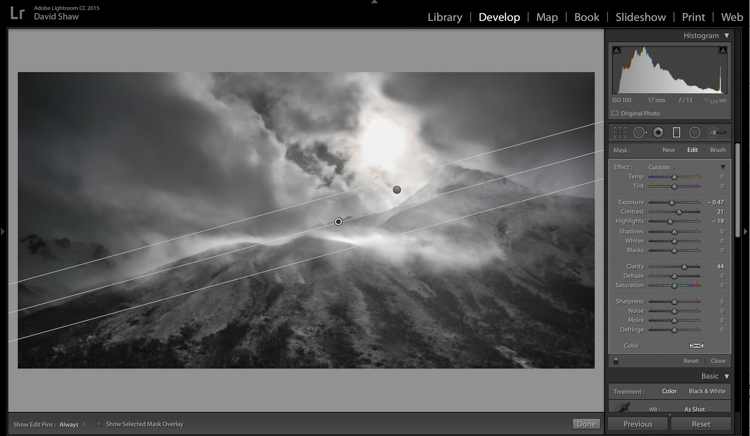
At this point, the processing got a bit complicated. I wanted to deal with the sky and mountains separately. One I wanted to brighten, the other darken. There were two ways to deal with this:

  1. Use the Adjustment Brush tool to select and develop the two areas
  2. Use Graduated filters to accomplish the same thing. Because the Graduated filter allows more flexibility to change the softness of the adjustment edge, I decided to use that.

The filter that adjusted the sky I darkened, and increased the clarity. The one for the mountains, I brightened, boosted the highlights, to make the scudding clouds pop, and added some clarity.
Bhutan 5

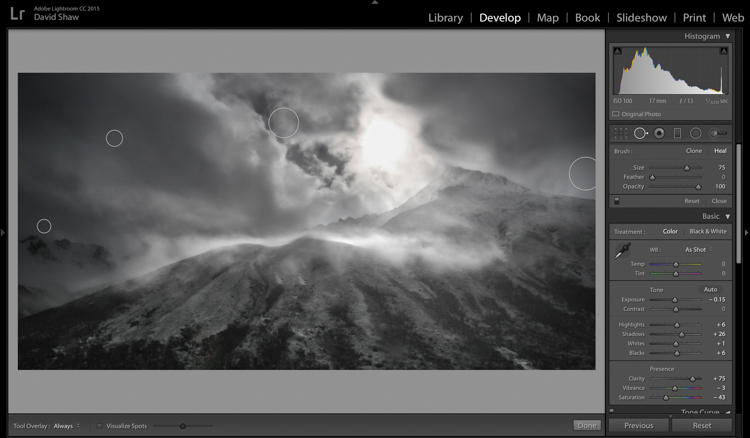
As noted earlier, the changes in contrast can emphasize imperfections, and I took a moment to remove lens flares and dust spots.

Last, I did a second pass of the Vibrance and Saturation. The yellowish patch around the sun was annoying me, so I dropped both the color sliders down reducing the image to a near black-and-white.
Bhutan-Jangothang-snowstorm-04

Before processing

Bhutan Done-1

Finished image after processing

I really like the final image. It provides a sense of the storm and the foreboding nature of mountain weather. Looking back, I can easily remember my nervousness that snowy morning, the uncertainty, and eventually, our retreat back the way we’d come.

Conclusion

Great images can come from snow. Many photographers put their cameras away during a winter storm, but I strongly recommend you don’t because there is great stuff out there if you’ve got the perseverance to suffer through some cold days. The images you gather, like these, can be optimized in your computer. Remember to take a moment before you begin, to recall how the scene looked and felt when you made the image, then use those memories as your guide.

Do you have any winter images on your computer that are begging to be processed? Now’s the time to do it, please share your images and comments below.

googletag.cmd.push(function() {
tablet_slots.push( googletag.defineSlot( “/1005424/_dPSv4_tab-all-article-bottom_(300×250)”, [300, 250], “pb-ad-78623” ).addService( googletag.pubads() ) ); } );

googletag.cmd.push(function() {
mobile_slots.push( googletag.defineSlot( “/1005424/_dPSv4_mob-all-article-bottom_(300×250)”, [300, 250], “pb-ad-78158” ).addService( googletag.pubads() ) ); } );

The post Tips for Processing Winter Landscapes in Lightroom by David Shaw appeared first on Digital Photography School.


Digital Photography School

 
Comments Off on Tips for Processing Winter Landscapes in Lightroom

Posted in Photography