RSS
 

Posts Tagged ‘Ways’

6 Ways to Improve your Cityscape Photography

29 Jun

Cityscape photography is becoming increasingly popular and can be a welcome change to capturing rolling hills and scenic vistas. Urban landscape environments can offer you, the photographer, attractive buildings, patterns and lines to capture stunning scenes and an alternative to the familiar nature shots found in the countryside.

6 Ways to Improve your Cityscape Photography

Here are 6 elements you will want to consider to improve your photographs of cities:

1. Shoot at different times of the day

Think about blue hour, golden hour, and daytime for your city images.

As the sun goes down and darkness falls, cities come to life when buildings and architectural details become illuminated and can make for some spectacular image opportunities. However, a common mistake people make when doing cityscape photography is to capture images too late at night when the natural light has disappeared and the sky is completely black.

6 Ways to Improve your Cityscape Photography

Shanghai skyline at night.

Total darkness is generally not the best time to photograph buildings as they will appear less attractive with little detail.

If you intend to photograph in the evenings, I would recommend that you arrive at your location for sunset and wait for dusk to fall. You could shoot during blue hour, a period of twilight when the sun is at a significant depth below the horizon and when the sky takes on a predominantly blue shade.

Although it is called the blue hour, it usually occurs for a window of around 20-30 minutes, depending on your location and the season.

Golden hour is another good time for cityscape photography. During the early morning or late afternoon, you’ll have beautiful long shadows to work with, as well as soft golden light.

6 Ways to Improve your Cityscape Photography

Daytime shot of the same city.

Alternatively, photographing during the day allows for a more interesting composition as scenes can be more crowded. Just add people in your frame that can make intriguing subjects combined with buildings.

2. Use ambient light effectively

If you capture the final elements of ambient light in the sky before darkness falls and combine it with the artificial light of the buildings, this will usually result in good photographs.

Once the city lights come on there is usually a window of about an hour to capture pleasing cityscapes. Shooting scenes at this time will allow you to balance the sky with the artificial lights of the city.

6 Ways to Improve your Cityscape Photography - blue hour bridge

3. Consider color

Look for patterns and blocks of color that may offset one another. Buildings may be painted in different colors that work well together, for example.

The cool blue sky of the blue hour complements the warm, golden, amber hues of street and building lights perfectly. The harmony of an image is apparent when colorful tones come together, such as this image of Oxford at night.

6 Ways to Improve your Cityscape Photography - Oxford at blur hour

Also, the sun can create different colors as it strikes buildings and reflects off them.

4. Consider composition

It is best to try and exclude any distracting and unwanted objects from the frame such as trash bins, signs, and any unsightly buildings that will make your image less attractive. Re-compose your image until it’s free of clutter and you are happy with the way the image looks.

6 Ways to Improve your Cityscape Photography - building at night

Work with the light if you’re capturing cityscapes during the day. Usually, you will want to shoot with the sun lighting the buildings for the best results and to ensure everything in your view is illuminated.

5. Experiment with exposure

Cityscapes often provide a great opportunity to experiment with your exposure. You will discover that after sunset, as the light fades, you will be less able to hand hold your camera to capture your cityscape scene. Recording long exposures in cityscape photography will create motion and that feeling of movement is only possible by using a tripod.

6 Ways to Improve your Cityscape Photography - London Tower Bridge

As twilight unveils, you can capture the low ambient light by using slow shutter speeds to create mobility within your image. The stillness of buildings contrasting the movement of clouds or light trails from traffic, for example, make for an interesting image and can add drama to your composition.

Using fast shutter speeds can help to freeze the motion of different objects in the scene. I recommend that you experiment with different shutter speeds to see what different moods this creates and see which style of image you like.

6. Get creative

Add some beauty to your shot by capturing close up objects such as bridges or signs with the cityscape in the background. You could even try photographing people and the cityscape to show the full setting you are photographing within.

6 Ways to Improve your Cityscape Photography

Don’t be afraid to get closer to your subject and focus on the action. I suggest that you play around with various angles to capture something truly unique and inspirational, one that you are proud of.

Cityscape photography requires a great deal of practice and you most likely won’t walk away with award-winning cityscapes overnight. Keep shooting and with these tips, you will become more adept at capturing urban imagery you can be proud of.

Now it’s your turn, please share your cityscape photography images and tips in the comments area below.

The post 6 Ways to Improve your Cityscape Photography appeared first on Digital Photography School.


Digital Photography School

 
Comments Off on 6 Ways to Improve your Cityscape Photography

Posted in Photography


Two Ways to Replace the Sky Using Photoshop

23 Jun

There are many things that you can control when shooting a photograph, but the weather is not one of them! If you have a great landscape or architecture photo but the sky is too dull it will bring down the entire image, so just keep reading to learn how to replace the sky with Photoshop.

Paste sky Photoshop tutorial before after - Two Ways to Replace the Sky with Photoshop

“Give the clouds an assignment.” said photographer Werner Mantz.

He was right, sometimes you can have the best weather and end up with a flat blue sky. Even worse if you have a horribly cold day that gives you a dull grey sky. Either way it can be the win or lose element of the image. No need to panic though, you can composite two photos into one perfect shot and replace the sky with a better one.

Method #1 – Sky Replacement in Photoshop

Most importantly you need an image from a cloudy sky that matches the mood of the image onto which you’re going to paste it. I’m going to work with a vertical shot so it’s better if the one from the sky has the same format. The subject is a ship aground in iced waters so my sky should be ideally from a stormy day.

Paste sky Photoshop tutorial subject clouds - Two Ways to Replace the Sky with Photoshop

With the image of the subject open, make a selection of the sky that needs to be covered by the new one. For this you can use any tool with which you feel comfortable. I usually start with a broad selection using the Magic Wand and then get closer with the different types of Lasso tools. You’ll see a dotted line (marching ants) around the area that is being selected.

Paste sky Photoshop tutorial selection tools - https://digital-photography-school.com/3-ways-make-sky-selection-photoshop/

Refine the selection

I find it’s also useful to go into Menu > Selection > Edit in Quick Mask. This will show the parts that are not selected in a red mask, so you can paint with the Brush tool what you want out and use the Erase tool to include in the selection.

Paste sky Photoshop tutorial quick mask selection- https://digital-photography-school.com/3-ways-make-sky-selection-photoshop/

Now open the sky image and select it all (Cmd/Ctrl + A), then go to Menu > Edit > Copy. Turn back into the first image and go to Menu > Edit > Paste Into. Notice that it becomes a new Layer and it has a Layer Mask with the shape of the selection you made, therefore you can now scale it and move it around and your subject won’t be affected, you’ll see the new sky directly as it would be fit in the image.

Paste sky Photoshop tutorial transform - Two Ways to Replace the Sky with Photoshop

Once you’re happy with the montage, you can add some adjustment layers so that the two parts have the matching brightness, tone, etc., and the result seems as natural as possible.

Paste sky Photoshop tutorial before after - Two Ways to Replace the Sky with Photoshop

Method #2 – Sky Replacement in Photoshop

When your landscape has a diffused horizon line like one with trees, for example, especially if you just need the sky to have a few more clouds instead of completely replacing the original sky then this technique is much more efficient because you don’t have to do the precise selection needed in the previous method. So go ahead and open both images on Photoshop.

Paste sky Photoshop tutorial before sunny day - Two Ways to Replace the Sky with Photoshop

In the image of the sky go to Menu > Selection > Edit in Quick Mask Mode and then choosing the Gradient tool draw a line from bottom to top, this will make the image appear with a red mask, faded gradually from one edge to the other.

Paste sky Photoshop tutorial quick mask selection gradient - Two Ways to Replace the Sky with Photoshop

Now go back to Menu > Selection > Edit in Quick Mask Mode and click again, this will turn the Quick Mask off, and you’ll see a rectangular selection on your image without noticing the gradient. But don’t worry, it’s still there.

Now pull the tab of the image to the side so that you can access the two images simultaneously, then drag the sky selection and drop it on top of the first image.

Paste sky Photoshop tutorial drag subject clouds

Now pick the Eraser tool and with a soft brush start erasing the part of the new layer that is covering the subject. You can also decrease the opacity of the layer so that it blends in a bit more smoothly.

Paste sky Photoshop tutorial erase opacity

There you go, you can do the final touches with adjustment layers so that levels and colors match.

Paste sky Photoshop tutorial after sunny day

Conclusion

So there you have two methods to replace the sky using Photoshop.

Have you tried this technique before? Please share your questions and comments about it below.

The post Two Ways to Replace the Sky Using Photoshop appeared first on Digital Photography School.


Digital Photography School

 
Comments Off on Two Ways to Replace the Sky Using Photoshop

Posted in Photography


Three Ways to Apply Tonal Effects in Photoshop

13 Jun

We are used to thinking about photography in terms of color or black and white, but before we arrived here, though, there were a series of processes that resulted in images being monochrome. In this tutorial, I’ll show you how to get those looks so you can think outside the box and achieve different tonal effects that will make your photos unique.

Intro Tonal Effects Photoshop Tutorial

Adding a tonal effect can give your photos from different collections a unified look. It can also help to set the atmosphere of a scene, or simply give a nostalgic and antique look. Before photography became as we know it to be today, there were many experiments and formulas chemists used that became popular throughout history.

Many of them had a particular color. The most popular are sepia and cyan and now it’s possible to achieve these and any other tonal effect with just a few clicks. I’ll show you three different ways to achieve it so you can choose which method suits you best.

#1 – SOLID COLORS

First of all, you need to work with a black and white image. There are many different ways to achieve this in Photoshop. The one I’m choosing is Menu > Image > Adjustments > Black and White because it gives you a lot of control.

Three Ways to Apply Tonal Effects in Photoshop

Once you have your starting image as black and white, you need to add a solid color adjustment layer. To do this go to the Layers palette and click the adjustment layers button on the bottom and choose the Solid Color option from there.

A pop-up window will open where you can choose the color you want for that layer. There’s no right or wrong here, it’s a matter of taste but for a sepia tone go somewhere in between the yellow and the red and when you’re happy just click OK.

Solid Color Tonal Effects Photoshop Tutorial

Now the color should have covered the entire image, which is normal as you added a solid color. But you still need to merge it with the image, so open the blending options menu from the top of the Layers palette and choose Soft Light.

Solid Color Soft Light Tonal Effects Photoshop Tutorial

You can also check out the other blending possibilities to see if there’s something that suits you better, but Soft Light usually works best for me. You can make a final adjustment on the layer opacity if you think it needs tweaking and that’s it!

Sepia Tonal Effects Photoshop Tutorial

#2 – ADJUSTMENT LAYERS

To achieve a cyan tone on your photo you need to start with a black and white image the same as the previous process, so I’ll use the opportunity to show you another way of converting your color photo into black and white.

Go to the Layers palette, add an adjustment layer. and from the drop-down menu choose Black and White. On the Properties window, you’ll have the same adjustments as the previous method as I used above.

The difference is that now you’ll have the black and white adjustment on a different layer so you can come back and tweak it or change the opacity at any time.

Adjustments Layer BlackandWhite Tonal Effects Photoshop Tutorial

Next add another adjustment layer, this time choosing Levels from the menu. In the Properties window, you can see a histogram of your image that shows you the blacks, whites, and mid-tones in your image and a corresponding slider to each of them for you to adjust.

Start moving the sliders to increase the contrast of your image as this will give a better result when you apply the cyan color to it.

Adjustments Layer Levels Histogram Tonal Effects Photoshop Tutorial

The final step you need to do is to add a third adjustment layer, this time using the Hue/Saturation option. On the Properties window move the Hue slider towards the blue end until you find a tone that you like, around the 215 is usually pretty good. If you feel the blue is too intense just decrease the saturation value a little until you are satisfied with the result.

Adjustments Layer Hue Saturation Tonal Effects Photoshop Tutorial

Now you have a snowy photo with a nice cold tone to boost the mood!

Cyan Tonal Effects Photoshop Tutorial

#3 – DUOTONE

If you are thinking that sepia or cyan are very nice effects but it would be even better if you apply both or even more, you don’t have to worry. Photoshop has thought about that too.

First, you have to open your black and white image (or convert your image to black and white as we did above). Then go to Menu > Image > Mode and choose the Duotone option. This is correct even if you want three or four tones, you will modify that later.

Duotone Tonal Effects Photoshop Tutorial

A pop-up window will open where you can choose the number of inks (tones) that you want in your image just by clicking on the drop-down menu. For this example, I’m choosing Tritone so three fields will be available to choose the inks.

Triotone Tonal Effects Photoshop Tutorial

You can set the color of each ink by clicking in the second square which will open a pop-up window with a color picker. So just click on the tone you like and hit OK. Then name it in the field to the right of the ink. Repeat this process for each ink color.

Duotone Color Picker Tonal Effects Photoshop Tutorial

Now the colors you selected are all covering the image in the same way. But you can modify that by choosing which ink will affect more which tones. For example, I choose the magenta for the darkest tones and the yellow for the lighter tones, but you can choose any tone and any adjustment you want.

Just click on the first square which will open the Curves window. By default, it will have a diagonal straight line that goes from 0 (black) to 255 (whites) you can experiment moving it all you like until you get the look of your image right.

Duotone Curves Tonal Effects Photoshop Tutorial

Because of all the possibilities, this is the hardest technique but also the more personalized one that will give you a very unique result. Try it out and let me know in the comments how it goes!

Duotone Tonal Effects Photoshop Tutorial jpg

Your turn

So there you have three methods for applying tonal effects using Photoshop. Do you use any of these for your images? Which method do you prefer? Do you have another technique you like? Please share your tonal effects images and ideas in the comment area below.

The post Three Ways to Apply Tonal Effects in Photoshop appeared first on Digital Photography School.


Digital Photography School

 
Comments Off on Three Ways to Apply Tonal Effects in Photoshop

Posted in Photography


8 Ways to Create More Dramatic Flower Photos

27 May

Do you think flower photography is boring? Or even too easy and obvious? I mean, of course, when you point your camera at a pretty flower you’re going to get a pretty photograph. Right?

But a subject that you feel is boring and easy is actually the perfect one to challenge yourself with. Can you make a flower image that is creative and dramatic somehow?

Here are a few ideas to get you started making more dramatic flower photos.

1. Dramatic light

Often flower photos are made under soft lighting conditions, either in the shade or on an overcast day. This is because of the soft and delicate nature of a flower which lends itself to that type of light.

But it doesn’t have to be that way. For a more dramatic image, try to find a flower that has direct light on it and shade behind it. High contrast scenes feel more dramatic and your flower will stand out against a darker background.

Flowers in the Light - 8 Ways to Create More Dramatic Flower Photos

2. Change your perspective

Most flower photos are made from a perspective looking right into the open flower. Try other perspectives for more interesting compositions. You can look at the flower from above, from the side, or from underneath.

To make the image below, my camera was on the ground looking directly up at the flower. Because the sky was so much brighter than the flower, it created a more high-key type of image with light shining through the petals making them appear to glow.

Looking Up flower - 8 Ways to Create More Dramatic Flower Photos

When I made the next image, I was interested in the lines created by the petals of a dahlia the size of a dinner plate. Most photos would include the whole flower, but I only included a small portion of the huge flower taken from a side angle.

Giant Dahlia - 8 Ways to Create More Dramatic Flower Photos

3. Focus through

In one of my favorite techniques for flower photography, I use a telephoto lens and focus on a flower that is around five feet away. Then I position the lens so that another flower is right in front of it. Because the close flower is extremely out of focus, it creates a soft area of color in front of the main subject.

This is especially effective if you can find two flowers that are complementary colors (opposite) on the color wheel.

Focus Through Poppy - 8 Ways to Create More Dramatic Flower Photos

4. Let the wind blow

One of the most frustrating things you encounter when photographing flowers is wind. A little bit of wind you can handle with a faster shutter speed, but sometimes the wind is just too much and your flower is blowing all over the place.

When this happens, just go with the flow! Instead of trying to get a sharp image, go with a slow shutter speed and capture the motion of the flower moving in front of your lens.

Flowers in the Wind- 8 Ways to Create More Dramatic Flower Photos

5. Environmental portrait

Most flower photos contain only the flower with no context. But you can also make an environmental portrait that shows the flower and its surrounding environment, like the one below.

Storm Flowers - 8 Ways to Create More Dramatic Flower Photos

6. Echo

Another of my favorite techniques I refer to as an echo. For your main subject, find a flower that has another virtually identical flower behind it. Use a shallow depth of field and focus on your main subject letting the flower behind fall out of focus. This creates a sort of echo of the main subject.

Yellow flowers - 8 Ways to Create More Dramatic Flower Photos

7. Less than perfect flowers

When photographing flowers, most photographers search for perfect specimens to be the main subject. But perhaps more interesting subjects are the less than perfect flowers. They can be dead flowers, ones with flaws, or even flowers that have fallen over.

In the image below, I was attracted to the raindrops that were on the side of this fallen tulip. Flowers with raindrops are not uncommon, but the tulip on its side is a bit more unusual.

Fallen Tulip - 8 Ways to Create More Dramatic Flower Photos

8. Emphasize edges in post-processing

You can also introduce effects in post-processing to make unique and dramatic flower photos. Try experimenting with textures or edge effects.

For the image below, I added an edge effect in post-processing to draw the viewer’s attention to the shape of the petals.

pink Dahlia - 8 Ways to Create More Dramatic Flower Photos

What else can you think of? Flower photography doesn’t have to be boring or predictable. In fact, any subject that you find boring and predictable is a challenge waiting for you to unleash your own unique perspective. How do you make more dramatic flower photos?

The post 8 Ways to Create More Dramatic Flower Photos appeared first on Digital Photography School.


Digital Photography School

 
Comments Off on 8 Ways to Create More Dramatic Flower Photos

Posted in Photography


Ways to Get Amazing Smiles from Your Subjects

24 May

Photographing people is a deceptively simple process these days. It seems with the wide availability of high-quality photo equipment and digital editing software that every Tom, Dick, and Harry is now a professional photographer. The reality is that true pros know technical knowledge is not the only thing that sets them apart from the amateurs. Connecting with your subject when Continue Reading

The post Ways to Get Amazing Smiles from Your Subjects appeared first on Photodoto.


Photodoto

 
Comments Off on Ways to Get Amazing Smiles from Your Subjects

Posted in Photography


6 Ways to Improve Your Images and Take Better Vacation Photos

17 May

Have you ever been on a vacation only to return home disappointed with your images? Many people take pictures while on holiday but find they are unsatisfied with their results. You can improve your chances of capturing better vacation photos by learning the basics and applying a few simple techniques.

better vacation photos - trees in Namibia

1. Choose the right equipment

Firstly, you don’t need expensive equipment to achieve photos from your travels that are satisfying. If you’re looking to buy a camera, choose one that suits your needs and budget. Digital cameras now range from professional DSLRs to great compacts that can produce quality images. Even mobile phones can give you stunning results.

Generally, a camera with more megapixels will provide a better picture resolution and higher quality images when printed. Whichever camera you decide to use, choose a compact with a good quality lens and broad optical zoom or a digital SLR with a zoom or telephoto lens depending on the subjects and angle of view you want to capture.

For example, a wide zoom would help to photograph a wide sweeping landscape and a telephoto can be used to capture wildlife. Also consider the size and weight of your equipment and make sure you can carry your camera kit comfortably.

Lion's roar Ngorongoro Crater Tanzania - better vacation photos

2. Make mistakes

A common mistake people tend to make is to pick up a camera and shoot a scene without giving any thought to what they are actually photographing.

You can dramatically improve your images by learning from your mistakes and analyzing why an image may not look as good as the view that you saw when you took the image.

Appraise your work and think about how you could improve your images next time. It’s good to recognize your mistakes, such as poor camera technique and poor composition and improve on those things next time around.

Zhangjiajie China scene - better vacation photos

3. Improve your camera technique

A great photograph is rarely achieved without some initial technical knowledge and photographic skills. Learn the basics about your camera and how it works. Study your camera manual and read up on other technical areas such as depth of field.

Know the limits of your equipment and how to use it effectively to create the style of images you want to capture.

Handling your camera in advance of your trip can help familiarize yourself with the buttons and you will be more comfortable with how it works when you’re away. Time spent understanding your camera will help take your photography to the next level and make for a more enjoyable experience when on vacation.

town with mountains and a lake - Take Better Vacation Photos

4. Improve your composition

A thoughtless composition can let your image down. Too many different subjects can complicate a scene. Look for features, shapes and patterns that may work in harmony to strengthen your images. Take time to manufacture your shot, trust your instinct and aim for a composition that you like.

The image of trees and the towering sand dunes shows an example where the different subjects of the composition can work well together and strengthen an image.

Camel thorn trees Deadvlei Namibia - Take Better Vacation Photos

5. Focus on details

You can choose to photograph specific and interesting subjects to improve your holiday pictures. Focusing on details allows you to reduce the number of variables in the frame and concentrate on the different shapes and forms that can be found within your subject.

By shooting only a portion of a famous building or scene of nature, you can isolate an image to concentrate on the aspects that appeal to you. Try zooming in or moving closer to your subject to narrow your point of interest and make it stand out.

scenice view of a town with church steeple - Take Better Vacation Photos

6. Consider the time of day

The quality of light varies throughout the day and can have a huge impact on your final image. Most holiday snappers go on vacation for a break, rest in the mornings and go out and shoot during the middle of the day. However, bright sunlight at noon provides harsh shadows and flat lighting.

Try and shoot outside this time for better vacation photos and more dramatic light. Instead of sleeping in, set the alarm clock and get out early at least once when on vacation, or stay out late to capture the beautiful tones from the sun.

The light at this time of day can make a pleasing difference to your images. Be aware of the effects light can create and use it to capture better images. For example, look for shadows and highlights that may improve your images by providing contrasting shapes.

The Grand Canyon USA - better vacation photos

Conclusion

Taking photographs during a vacation is a wonderful way to improve your photography. By applying the tips above you can achieve better images while capturing lasting memories of the places you have visited that can give you immense pleasure for years to come.

Do you have any other vacation photography tips and photos? Please share them in the comments area below.

The post 6 Ways to Improve Your Images and Take Better Vacation Photos appeared first on Digital Photography School.


Digital Photography School

 
Comments Off on 6 Ways to Improve Your Images and Take Better Vacation Photos

Posted in Photography


Ways to Get Amazing Smiles from Your Subjects

17 May

Photographing people is a deceptively simple process these days. It seems with the wide availability of high-quality photo equipment and digital editing software that every Tom, Dick, and Harry is now a professional photographer. The reality is that true pros know technical knowledge is not the only thing that sets them apart from the amateurs. Connecting with your subject when Continue Reading

The post Ways to Get Amazing Smiles from Your Subjects appeared first on Photodoto.


Photodoto

 
Comments Off on Ways to Get Amazing Smiles from Your Subjects

Posted in Photography


5 Ways to Find Great Locations for Travel Photography

12 May

In this article, you’ll get five tips to help you find great locations for travel photography.

The issue

The use of cell phones has truly changed the face of photography. All realms have been affected. Travel photography like all other genres has changed. Nowadays the world is so easily accessible through the internet, so many famous sites have been shot over and over again. Google the Eiffel Tower and millions of images will pop up.

person on a quiet beach - 5 Ways to Find Great Locations for Travel Photography

We stopped to visit the small town in Wales that my parents lived in when they were young, and discovered a beautiful moody beach.

So when traveling how do you find things to shoot? Yes of course still shoot the famous landmarks and sites. You have to shoot them! How could anyone go to London without checking out Big Ben or London Bridge? (Unless of course the clock was covered in scaffolding for maintenance like it was when I visited.)

As always, I’m going to suggest you push yourself past these common sites and look deeper into a location. The question is how do you find great locations for travel photography and how can you plan your trip, so you make the most of these sites?

It’s time to look into a few methods for finding fantastic photographic opportunities when traveling at home or abroad.

1) Travel Books

Portugal travel book - 5 Ways to Find Great Locations for Travel Photography

A shot from my Instagram feed. I’m always researching my next location, even when sitting in a car waiting for my kids.

Tried and trusted travel books can help you begin your search for interesting places to photograph. While not focused solely on photography, they provide you with the background information and history of different sites.

All of this is, of course, relevant for travel photography. You need to know the ins and outs of visiting a country and all its sites. There’s nothing worse than showing up expecting to be able to shoot a variety of historic buildings only to discover they’re closed on Sundays.

Having a solid knowledge of a country is so important when going to photograph a location. What are the rules for photography? How will people react when you take their photo? Travel guide books can help you in the primary stages of your research.

5 Ways to Find Great Locations for Travel Photography - Snowdonia valley

Snowdonia is the main tourist location but when we stopped to check out the view we stumbled upon the training grounds for the airforce planes zipped through this valley. It was impressive.

One of my favorite series of digging into a place is the 500 Hidden Secrets Books. I love them for the info and the pointers. They usually contain some small less popular sites and the books are nicely organized. Another favorite that has never steered me wrong is the Lonely Planet Guides. Whatever you prefer, there are tons of books out there that can assist you in your primary travel research.

2) Travel Blogs and Articles

I often find inspiration for travel by reading articles on the internet. Of course, check out the famous websites like the travel lists from Forbes and National Geographic but I also like to dig into some rather interesting blogs. There are lots of people visiting the world, discovering places, and providing inspiration. I like to take a look at what the folks at Drink Tea and Travel have discovered as well as Dan Flying Solo.

5 Ways to Find Great Locations for Travel Photography - secluded beach

A small out of the way beach we found through a hiking website.

3) Travel sharing websites

A site like Trover can be very inspiring and informative when trying to research a destination. I’m heading to New York and Portugal shortly so this site will feature fairly heavily in my research. It’s very much a social sharing site that allows you to get some first-hand information about specific locations.

But it’s important to plan when going traveling with photography as your focus and being able to get first-hand information is important. Let’s face it; if the author is not a photographer, they have no idea how important it is to visit a site at the right time of day. So, by all means, check out a ton of photo sharing sites before you head to any location.

Harlech Castle - 5 Ways to Find Great Locations for Travel Photography

A shot of the impressive Unesco Heritage Site, Harlech Castle. You will find this site on the main tourist trail in Wales. It’s still worth a visit, though.

4) Ask Locals

One of the best places I found to shoot was based on information I got from a local. You have to be careful when you ask. Always take the proper safety precautions but they know their home well, and they know the hidden away amazing places.

Case in point, people come to Canada and they often skip Toronto and head straight to Niagara Falls. Their response is often the same. The falls are nice but the rest of the town, it’s kitschy. As a local, I know all about the tourist trap areas around the falls. I often direct people to see the falls but to also visit Toronto too. They are often surprised at what they find in this frequently overlooked city.

So go for it chat up the locals to find out what they know about their home. Just be aware and always use safety precautions when meeting people in person or giving our your personal information or travel plans.

restaurant - 5 Ways to Find Great Locations for Travel Photography

A shot taken on my phone. We found this amazing restaurant by chatting with a bouncer in Cardiff.

5) When you get there take a calculated risk and follow a whim

Some of the best photographs I’ve ever captured have occurred because I let fate guide my steps. I chose to leave the beaten path and explore. I revelled in the mystery of getting lost.

You will find that these detours almost always pay off. You find out of the way places that provide you with some insight into the wonder of a location. Plus there’s always the excitement of adventure and the road less traveled.

Most of my favourite memories come from these moments when I have no idea where I’m going or what might occur.

Harlech castle black and white - 5 Ways to Find Great Locations for Travel Photography

A more artistic shot of Harlech Castle.

Summary

There are endless places to discover. Travel photography is both exciting and challenging. Don’t hesitate to discover some amazing things.

Share your favorite methods of finding great photography locations. The more ways we share, the more we discover about this incredible world in which we live. So go ahead post your favorite travel articles, share your stories with locals and let’s make a huge list of resources we can all use for finding those amazing locations we love to capture so much.

waterfall - 5 Ways to Find Great Locations for Travel Photography

Best day ever! On a side trip, we found this waterfall and had a blast wandering around behind it.

The post 5 Ways to Find Great Locations for Travel Photography appeared first on Digital Photography School.


Digital Photography School

 
Comments Off on 5 Ways to Find Great Locations for Travel Photography

Posted in Photography


Top 10 Ways to Improve Flickr for 2018

28 Apr

Having spent thousands of hours on Flickr over the past 15 years or so, on a personal level I’ve become fairly invested in the site. To date I’ve published over 140,000 of my photographs there. I publish 40 or so new photos there every single day. It’s my primary archive of my photography work on the internet. I’ve also been actively involved in groups over the years which have led to many personal friendships for me. I’ve favorited over 720,000 photos that I’ve browsed over the years. I blog about it. I search it for photos to map as I’m going about my project of documenting America. It’s my favorite site on the internet.

That said there are some significant ways that Flickr can improve and given the new recent ownership change I thought now would be a good time to write about some of the ways Flickr can improve from here. Jef Poskanzer another early Flickr user also made his own excellent to do list for Flickr here.

The power of Flickr in my opinion has always been the community. I think there are ways that Flickr can recapture some of the community spirit that it did have in years past and grow to become the primary community for photographers on the web going forward. This will take work but will be worth it in the end for the community, it’s users and now SmugMug.

Flicker Meetup, 7-7-2005, #3
Flickr Meet Up, Crossroads Cafe, 2005.

1. Community. In the earliest days of Flickr when a new user would join co-founder Caterina Fake would greet them personally on the site and welcome them — not a bot or a script, but Caterina herself. While this would not scale today, I think the original founders of Flickr realized how important community development was in the early success of the site. I remember shortly after I joined Flickr going to some of my first photo meetups in San Francisco at a local coffeehouse. Flickr’s other co-founder Stewart Butterfield would show up and so would Cal Henderson and many of the other early Flickr staff and engineers. They eventually brought Heather Champ on as Community Manager and her sole focus was in managing this new community that was growing at Flickr.
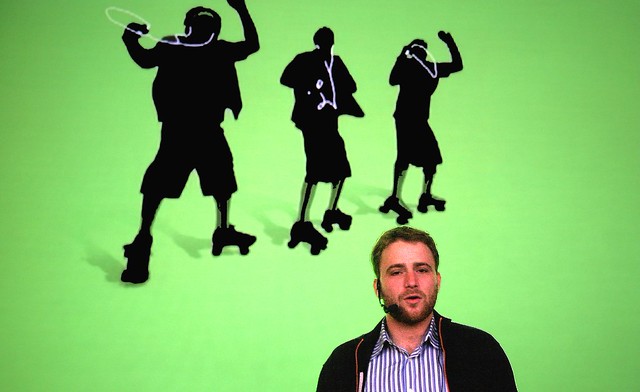
Stewart and the Skatepods
Flickr Co-Founder Stewart Butterfield introducing Flickr Photographers at a group show at the Apple Store, 2005.

Back in those early days Heather organized an event at the San Francisco Apple Store where some Flickr photographers shared their photos on the giant large screen upstairs in the old Apple Store off Market Street. There was a show where Flickr photographers from all over the world sent in a photo and Flickr printed them all for a group gallery show at 111 Minna. There were active meetups and drinkups and photowalks and even a giant party hosted by Flickr once a year. Flickr Fiesta, Flickr Turns 2, Flickr Turns 3…

I think what Flickr realized early on was that getting users to connect personally offline after first meeting online could be a powerful thing. Friendships were created. A group I was in started doing phototrips together. We did a trip to Miami, a trip to Detroit, a trip to Las Vegas a trip to Toronto. These trips would originate and be planned out in groups on Flickr. When out of town Flickr friends came to town you’d meet up and go shooting together. Meeting Mr. Chalk for the first time in person was fantastic! Because Flickr was the online community bringing all of these people together, it became a very beloved site for so many early Flickr users.

The challenge now is to try and restore much of that sense of community that over the years has been lost in my opinion. I think SmugMug should invest in this aspect of Flickr more than any other. They should hire perhaps a few community managers. They should host events. They should engage directly with the most active users on the site and promote Flickr evangelists from their user base who work to build and maintain that photography community at Flickr. I think Don MacAskill (SmugMug’s CEO) is the type of guy who will be good at this. It was good to see him engaging publicly about the acquisition on Hacker News shortly after the purchase. Management most of all has a role in actively engaging with the users of the site following the early example of Caterina Fake.

2. Groups. Much of Flickr’s early success was built around groups. More than just places to post a photo about a certain topic the group threads were vibrant conversations. Conversations about photography and Flickr itself sure, but also conversations about politics, about popular movies and television, about really anything and everything. Through some redesign over the years group discussions lost ground to the photos themselves. Discussions became harder and harder to track and follow. Facebook showed up and many people moved conversations over there, etc.

There are some significant ways that Flickr could rebuild group conversations.

The single most significant thing Flickr could do to improve group discussions would be to allow users to subscribe to individual discussion threads and then give them a central page where those conversations are bumped as activity/conversations happens in those threads. These are the conversations that I care the most about.

Many Flickr users belong to many different groups. Having to go to each individual group discussion page one by one just does not work for monitoring all of the conversations you are a part of. I may really care about a conversation about William Eggleston’s photography, but if there is only one new update to that conversation a week, as much as I care about it, I may not be checking it as regularly as I should. What’s more, the best time to see a conversation is as quickly after it happens as possible because that’s when others in that conversation still might be online. If I reply to a conversation 10 minutes after it happens that generates much more activity than if I reply 1 day after it happens. Giving users the ability to track all of the conversations they are interested in across the site would be a powerful tool.

Conversation begets more conversation. Activity begets activity. Give users the tool to track all of the group conversations across Flickr that they care about. This thread subscription page should be easily accessed in the mobile app as well.

After building conversation subscriptions, Flickr should also allow users to hide conversations in groups. Groups can get very noisy at times. The most recent group discussion is bumped to the top of the discussion page. If I don’t care about Game of Thrones, but that is the conversation that is repeatedly being bumped to the top of the threads I should allowed to hide it and make it disappear for me.

Flickr should identify 50 or so of the most active groups and have their community managers personally be involved in those groups and conversations. People should know that they can interact with management there. Flickr’s help forum is a bit like this, but the help forum is really only about Flickr help which can be boring at times. Flickr should promote these groups across the site and do everything that they can to make them as active as possible. If the discussions are not active in a group people stop coming. If the discussions are active it becomes a wonderful watering hole where people will spend hours online engaging with each other.

In the early days of Flickr Stewart Butterfield was active in Flickr Central threads. He’d frequently chime in and interact with the community there. This was a great thing.

I should also be able to mute certain users in a group. Inevitably trolls can/will invade groups and while some trolls can be charming and funny, others can be destructive. Allowing me to mute certain people gives me a bit of control over these conversations.

Groups should have photo pools, but these should really be secondary to the discussion threads and the groups pages should be designed to reflect this.
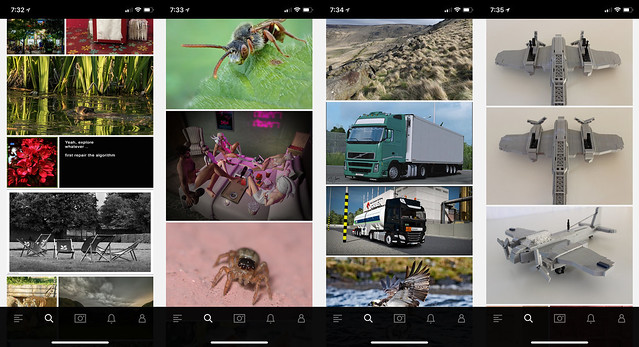
Flickr Explore
Some sample photos from yesterday’s Flickr Explore page.

3. Explore is so broken. There are so many bad photos regularly in Explore. The algorithm screens out more active users (like myself and many others). I looked at Explore for the first time in months yesterday and what do I see? Exactly the type of photos I don’t want to see on Flickr. Macro photos of insects. Lots of photos with signatures and watermarks. Three photos in a row of a LEGO airplane. Some screengrab of some user mocking Explore. Photos of big trucks and other transport. I don’t mind great train shots actually, but shots of boring city busses and big trucks that some Flickr transport fans collect are less interesting to me.

As much as I dislike Instagram and their world of ads, of all things, Instagram is doing a great job with their version of Explore. When I click on the search bar on Instagram it populates their version. What do I see there? Lots of photos of neon signs. Interesting analog photography. Great architecture.

The problem is that everyone sees the exact same version of Explore. In today’s world of AI Flickr should be smart enough to look at the photos I’m favoriting and serve me up my own customized version of Explore. Photos that I might be interested in based on what it knows about me.

Do I never favorite the classic bee on a flower shot? Then don’t show more to me. Someone who favorites 10,000 Second Life screengrabs might like to see more of them that they don’t know about on the site. I don’t. I love neon signs. Show me the most kickass photos of neon signs that I haven’t seen yet on the site from the past 24 hours. If I hate watermarked photos and never favorite them, don’t show them to me. If someone else watermarks their own photos and only favorites watermarked photos, show lots of them to them.

4. Maps. Although Stig’s excellent Flickr Fixr already fixes this, put a link to the Google Maps location under the map of a geotagged photo on Flickr. Google’s maps are the best in the world — and while it may be too expensive to actually license the maps to embed themselves, put a link there so users can go actually find the place. As it is now the Flickr maps are worthless. They won’t show you where something is. They will provide you the general vicinity of where something is, but they won’t show you exactly where it is.

If I am going on a trip and want to research a new city on Flickr, I want to know EXACTLY where things are so I can build a Google Map to go see and photograph those things myself.

5. Fix the Yahoo Log In. This is probably easy to do and from what I’ve read Don MacAskill is already on this one as a first priority. The Yahoo Login system (and especially for those using old legacy AT&T, PacBell, etc, versions of the login) is much too difficult to use. Pre-yahoo Flickr had a very simple user name / password log in that you set yourself. Users should be given an easy option to have that again and to get back into their Yahoo accounts that so many seem to be locked out of.

6. Fix the jumpy problem in photos from your contacts. Jef Poskanzer mentioned this one in his post as well. For years now whenever you browse photos by your contacts, right before you are about to favorite a photo on that page Flickr will inexplicably jolt and jump to some other random area on the page making you lose your place. Worse, right when you press the favorite button, because the page has suddenly jolted somewhere else you will accidently click on a photo which will take you away from that page and you have to press the browser back bar to get back and reload your contact’s photos page from the beginning. It’s a frustrating user experience and something that has been broken for YEARS now. It is time to fix it. Photos from your contacts is a very popular page and it is a problem that your most active users are having.

Flickr No Connection Issue

7. Flickr app connection issues. The Flickr photo app has a connection problem that other apps don’t. Just about every single day at some point you get a red “no internet connection” message at the bottom of the app. Even if you are connected to the internet and even if all your other apps work just fine. Flickr will not work. The only way to make the Flickr app work again is to quit the app and relaunch it. I think what may be happening is that at some point the Flickr app loses internet connection and isn’t smart enough to try and re-establish connection. So the app is dead and the only way to re-establish the connection is to quit it and relaunch it.
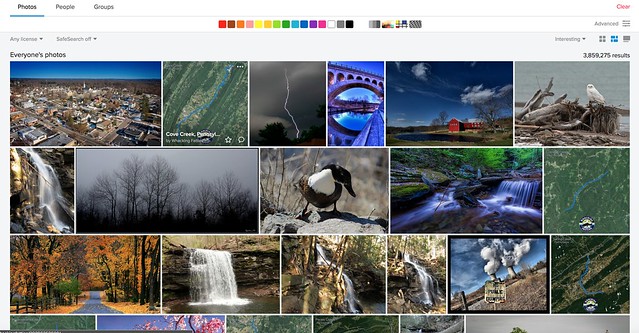
Searching Pennsylvania by Interestingness

8. Fix search. I’ve got a trip to Pennsylvania planned in a few months. Why when I search “Pennsylvania” (over 3.5 million photos on Flickr by the way) and sort by interestingness is the 2nd most interesting photo on all of Flickr a dumb aerial map screengrab with a squiggly blue line with a “whacking fatties” watermark? The photo has zero faves, zero comments and only 11 views. In fact there are four “whacking fatties” screengrabs in the top 20 most interesting of the millions of photos of Pennsylvania. This is dumb. If Flickr’s interestingness algorithm is so broken that it puts this photo as the 2nd most interesting photo in all of Pennsylvania at least give me the option to sort the photos by favorites. If I sort the photos by favorites chances are that some of the most favorited photos might be better and more interesting photos. While favorites alone might not be the best indicator of what photos are most interesting, at least give me that option. Alternatively, stop showing photos with low faves, comments, views on the first page of search results by interestingness.

9. Fix recent activity. The recent activity page is the most important page on Flickr. I load it more than any other page. For me (and many others) recently it stopped loading. It times out the majority of the time and returns a server error. I can get around this error by changing my recent activity settings from “since the beginning” to “in the last month” but I shouldn’t have to. I should be able to get it to load reliably 100% of the time since the beginning. Your most active users are users are your most valuable users. This should be fixed.

10. Let users favorite multi photo batches from the Flickr homepage. At present if I go to the main flickr homepage at flickr.com and I hover over a single photo there I’m given an option to favorite that photo by pressing a little star. This is great. But if I hover over a batch of photos that a user has uploaded I am not given this option. The only way there I can favorite a photo is to click through on the photo and leave a favorite. Flickr should treat all photos whether individual or batch on that page the same giving me a hover over star to favorite the photos.

Bonus: The “taken on” date on a photo’s photo page, really should be a hyperlink that you can click that will take you to that date in your camera roll.

That’s all for now. Much more later. See you on Flickr.

You can find me on Flickr here. ?


Thomas Hawk Digital Connection

 
Comments Off on Top 10 Ways to Improve Flickr for 2018

Posted in Photography


4 Ways To Make Better Street Portraits While Traveling

19 Apr

One of my favorite things about travel photography is the opportunities it provides to meet interesting people in the street and make portraits of them. Here are some of the things that I have learned that you can put into practice when you are traveling and make street portraits.

Street portraits and travel photography

1. Ask people for permission

It’s surprising how you often get the best results when you ask people for permission to make their portrait. This doesn’t apply all the time – you might see somebody interesting who doesn’t notice that you are there and you get the opportunity to make a great candid portrait.

But more often than not you can get a better result by approaching people and asking permission. The good thing about this approach is that it gives you a great excuse to go up to somebody and ask if you can make their portrait. A good way to phrase it is to explain that you are undertaking a project asking interesting people to pose for you.

Problems can arise with this approach if you don’t speak the local language. But that doesn’t stop you communicating with good body language and a smile. You can point to your camera to indicate you are asking for permission to make a portrait.

It’s worth overcoming the challenges

An alternative approach is to work with a local person who can translate for you. This may be a local photographer who you have made contact with and who is interested in helping you out. Or it may be a fixer who you pay to help you communicate with local people and find photo opportunities that you are unlikely to come across by yourself.

Once you have somebody’s permission you have an immediate advantage that you can spend some time with them to work on creating a good street portrait. For example, let’s say you see an interesting person who is standing in the sun and as a result, the light is too harsh to make a good portrait. If you approach them to ask for permission you can then ask them to stand in the shade so you get the best light.

Street portraits and travel photography

That’s the approach I took with the portrait above, created in a mosque in Delhi. The man approached us in the mosque and explained a few things to us about what we were seeing. When we met him he was standing in the sun. After a few minutes of conversation, we asked if we could make a portrait of him and he said yes. It was easy to find a shady place for him to stand.

2. Photograph character, not beauty

It may be tempting to look for beautiful or handsome people to photograph. And who could blame you? But you’ll create more interesting street portraits full of character if you find interesting people. This means people of both genders and all ages (except children, see next point).

For example, I made the portrait below in the town of San Antonio de Areco in Argentina. This town is famous for its atmospheric bars and gauchos. While taking photos in one of the bars somebody told me there was an elderly couple down the road who loved talking to people and having their photo taken. We went to check out the situation and found the couple sitting out on the street. We had an interesting conversation and I made this portrait.

Street portraits and travel photography

This also shows how you should be open to opportunity. If people are friendly and make suggestions like this, go with the flow and see where it takes you. Interesting things often happen this way.

3. Don’t take too many photos of children

A few years ago I traveled to the town of Tupiza in southern Bolivia. We were walking through the town’s main square and noticed there was a lot of children. It turned out that it was a national sports day and as part of that event, local school children were in the square to participate in sporting activities.

Eventually one of the children noticed that I had a camera and started jumping up and down in front of me, asking me to take his photo. Of course, then other children joined in and soon I had a mob of kids in front of me who all wanted their photos taken. Which I did, and I have a nice memory because of it.

Street portraits and travel photography

Luckily a teacher came along and shooed the kids away. The point of this story is that kids are often easy to photograph, especially in places where they get excited whenever they see a foreigner. But they are not likely to feature in your most interesting or memorable photos.

As a subject, they are too easy. Plus, you have to consider that in some countries local people may view strangers photographing children as suspicious. You’ll get better results by avoiding kids and finding interesting adults.

4. Look for interesting backgrounds

My final tip is to look for interesting backgrounds or places and wait with your camera to see what happens. Have you noticed how some photographers walk rapidly from one place to another, taking photos of anything that catches their eye? The aim of this exercise is to get you to slow down and become attuned to the rhythm of the place you’re in.

If the background is interesting enough, you can wait for somebody to pass by and add an element of human interest. People will usually think that you’re photographing whatever’s in the background and probably won’t even realize they are in the photo.

Here’s an example of that. I found this beautiful scene in Guatemala and waited to see what would happen. Eventually, a man cycled by and I was able to make this photo.

Street portraits and travel photography

Conclusion

When you are traveling with the intention of creating street portraits it takes some work to get the best results. Following the tips in this article, and getting used to approaching people to ask if you can make their portrait will help you a lot with the process.


The Candid Portrait

If you’d like to learn more about street and travel photography then please check out my popular ebook popular ebook The Creative Portrait. Use the code DPS20 for a 20% discount on your first order.

The post 4 Ways To Make Better Street Portraits While Traveling appeared first on Digital Photography School.


Digital Photography School

 
Comments Off on 4 Ways To Make Better Street Portraits While Traveling

Posted in Photography