RSS
 

Posts Tagged ‘Ways’

Six Ways to Capture Character in Portraits

31 Mar

Broadly speaking there are two types of portraits. The first is where you try to make the model look as beautiful as possible. You may need a make-up artist or stylist to do it properly. Most commercial photographers are paid to make their models look beautiful, and there are many links with the world of fashion photography.

Six Ways to Create Character Portraits

The other is where you try and capture somebody’s essence, create character portraits. One interesting thing about this style of portraiture is that it opens up your range of models beyond people that are considered conventionally beautiful. It’s less complex because you don’t necessarily need make-up artists, stylists, or complex lighting.

Capturing character is a more simplistic, honest approach to making portraits. The techniques and principles behind it are simple but may take a lifetime to master.

1. Focus on the eyes

This applies to all types of portraiture but even more so when trying to capture their character. This idea goes beyond focusing your lens on your model’s eyes and making sure they are well lit and have a catchlight.

Six Ways to Capture Character Portraits

I made this character portrait of an elderly lady in Bolivia. Her eyes and the wrinkles around them convey so much about her life.

Eyes should be a focus conceptually as well as literally. They tell you a lot about a person. Eyes convey emotion, vitality, and life. The saying, “The eyes are the windows of the soul” has a lot of truth to it. Older people have wrinkles around their eyes that speak of experiences lived and wisdom gained.

2. Ask the model to wear their own clothes

Choice of clothing can say a lot about an individual, particularly if they have a quirky fashion sense. This is the opposite approach to fashion, where the model often wears clothes that don’t belong to them. When capturing character ask the model to bring along clothes that are meaningful to them.

Character portraits

The model in these portraits is a circus performer, she wore the costume she uses while performing. The close-up portrait draws more attention to her dreadlocks and tattoo, the other to her costume.

3. Shoot the model in their environment

A common component of the type of portrait photography where you try to make somebody look beautiful is to place the model in an unusual or striking environment.

When capturing character you should try and do the opposite. Look for links between your model and the environment. If your model is the outdoorsy type, look for a place to take the portrait that reflects that. Or maybe their home or garden are decorated in a way that reflects their character. Or perhaps they have an interesting hobby or profession.

Think about how you can use these elements to create a portrait that tells a story about the model’s character.

Character portraits

The man in these portraits makes wooden flutes, so I photographed him in his workshop. Hands often reveal character so I took a close-up photo of his hands at work.

4. Use prime lenses

Prime lenses are the secret weapon of the portrait photographer. Part of that is because of the practical advantages. We all know you can select a wide aperture to blur the background and create compositions with bokeh. But you can also set the aperture to f/2.8 or f/4 knowing the results will be sharp (compared to the softer performance expected from zoom lenses at those apertures).

Being restricted to a single focal length means you have to get creative with your compositions. You can create variety by changing the distance between you and your model, and by utilizing different points of view.

But most of all, the minimal approach to gear enforced by prime lenses lends itself to a more honest approach to portraiture. I often take just one camera, one short telephoto lens, and no lights to a portrait shoot. I prefer to rely on natural light (and reflectors). Eliminating distractions helps me concentrate on the next step – making a genuine and meaningful connection with the model.

Character portraits

I used an 85mm prime lens set to f/2.5 to create this portrait. The wide aperture blurred the background, making the model the center of attention.

5. Build rapport

The success of the shoot depends on the relationship you create with your model. You might only have a short time to do this. I’ve turned up for shoots with people who I’ve never met before, having communicated only by email or text message. It helps that I’m a naturally curious person and enjoy learning about other people and their lives.

Part of building rapport is getting the model genuinely interested in the photo shoot. If it is part of an ongoing project (and it should be, because projects are the best way to help you develop creatively as a photographer) let the model know about it so they can take pride in being part of your project.

Use conversation during the shoot to provoke animated expressions. Read the story about Yousuf Karsh photographing Winston Churchill for an extreme example of this!

Character portraits

I made this portrait as part of a project photographing musicians. The violinist enjoyed being part of the project.

6. Post-process appropriately

Think about your style of post-processing. For example, a portrait that expresses character probably needs far less retouching than a portrait that is trying to make the model look as physically beautiful as possible. A light touch is often best, when working in color.

You should also consider converting your best portraits to black and white. There is something timeless and special about a good black and white portrait. It’s ideal for expressing character and emotion.

Character portraits

The strong eye contact and black and white conversion turn this portrait into one that expresses the character of the model.

Conclusion

Capturing character, rather than (but not necessarily instead of) beauty poses a challenge to the creative photographer, but the results are often more satisfying.

I find that an interest in capturing character rather than beauty marks an evolution in a photographer’s thinking, a shift from photographing the superficial to looking for deeper themes and human connections. But what do you think? What techniques do you use to capture character? Let us know in the comments below.


If you enjoyed this article and would like to learn more about portrait photography then please check out my ebook The Candid Portrait.

The post Six Ways to Capture Character in Portraits by Andrew S. Gibson appeared first on Digital Photography School.


Digital Photography School

 
Comments Off on Six Ways to Capture Character in Portraits

Posted in Photography


Eight Ways to Get Rid of GAS – Gear Acquisition Syndrome

30 Mar

All photographers find themselves suffering from Gear Acquisition Syndrome (or GAS, if you don’t mind) at one time or another. Whether you are eager to try something new or just stuck in a creative rut, falling into the trap of thinking that buying a new lens will instantly revamp your photography skills is something we have all been guilty of doing.

You can spend hours daydreaming of the amazing shots you would be taking if only you could afford that lovely lens you have your eye on. But what if you just can’t justify the purchase? If, like most of us, you don’t have inexhaustible funds, here are eight easy tips to keep your GAS (Gear Acquisition Syndrome) at bay.

Eight Ways to Get Rid of GAS - Gear Acquisition Syndrome

#1 – Keep your kit lens

One of the first things many photographers do after they’ve learned how to use their DSLR is to upgrade their kit lens. Kit lenses are lightweight, versatile, and can achieve most of the results you desire, despite their limitations. They are incredibly handy to keep around. As you start expanding your lens collection, you may suddenly find that there is a type of photography you want to explore that your current lenses aren’t very good for. Your kit lens can almost certainly help you.

Typically ranging from 17-55mm, kit lenses offer a good wide-angle combined with a short telephoto capability (especially when used on an APS-C sensor camera). This means that they can shoot the gamut from landscape to portraiture easily. When you suddenly find yourself dreaming of that incredibly pricey wide-angle and wishing it was yours, having your kit lens on hand is a way of finding out if you actually want or need a wide-angle lens before you hand over your hard-earned money.

Gear Acquisition Syndrome

Shot using a kit lens.

#2 – Change your environment, not your gear

The easiest way to shake up the way you shoot with the equipment you already have is to change what you are shooting. Hop in your car and go on a road trip. Visit the sea. Climb a hill and take in the view. Go to a new neighborhood and explore.

Of course, it doesn’t all have to be about travel. If you always shoot landscapes or take some time out to see how your skills translate to portraiture. If you love still life photos, go to your local hardware store and buy a few wooden planks and marble tiles to use as backdrops in your images.

It’s easy to get bored, but shaking up your surroundings and seeking out new subjects is an instant form of inspiration.

Gear Acquisition Syndrome

A new place opens your eyes.

#3 – Set your alarm clock

It’s a piece of advice given to photographers so often that it is almost a cliché, but there’s no denying that it’s true. Setting your alarm clock to wake up early and take advantage of the golden hour light is the easiest way to improve your photography without spending a penny.

The quality of light found at sunrise – that crisp, misty, lemony light – and sunset – that rich red and gold glow – completely transforms any scene. Buying a different lens isn’t going to change your world unless you have very specific needs for it, but having a limitless spectrum of shifting light to play with certainly will.

Gear Acquisition Syndrome

Light can make even the most mundane subject seem magical.

#4 – Join an on-going photography challenge

Whether it’s a 365 photo-a-day challenge or a 30-day photo sprint, whether it’s a once-a-week challenge or just something you dip into now and again like a photography tutorial book, starting a challenge can refresh your eye for photography. On-going challenges can also help you to avoid blank spots in your creativity and build up a body of work over time. As well as helping you get rid of any creative blocks, these challenges can introduce you to new techniques and ideas.

Sometimes changing the way you shoot is far easier than changing what you are shooting with. Why not try HDR? How about trying a new post-production technique? Or maybe try creating a photo series where you can only use a symmetrical perspective. These challenges help you try lots of new things without needing to buy any new gear.

Gear Acquisition Syndrome

New perspectives can shake up your photography.

#5 – Limit yourself

They say that the best camera is the one you have with you. Sometimes we get so fixated on gear we think we need, that we forget that the photographer is the main component in making a great picture. Digital Rev’s Cheap Camera Challenge has proven time and again that great photography starts with the creative eye behind the camera and not the actual camera they are using.

Instead of investing in a new piece of gear, put your gear on the shelf and limit yourself for a while to the camera on your phone. It might sound like madness, but limitation can be the mother of creativity. Working with a more basic tool forces you to focus on the fundamentals of the form – composition, color, texture, symmetry, subject, style, and more. This minimalist approach will hone your eye, and when you finally go back to using your gear, it will be like dipping into a treasure trove of possibilities.

Gear Acquisition Syndrome

Shot with an iPhone.

#6 – Macro without a macro lens

There are some types of photography you may think are impossible without first investing in specialist equipment. Macro photography is one of those genres. Without a dedicated macro lens, how can you possibly achieve close enough focus? But there are a few ways to try shooting macro before you buy.

Firstly, free lensing is the technique of shooting with your lens unattached to your camera’s lens mount. By holding the lens freely and moving it backward and forward in front of the sensor, you can achieve a dreamy, light-leaked aesthetic. But this freedom of movement also changes the lens’s ability to focus at far closer distances. This is an easy and completely free way to test out shooting macro. The downside, however, is that it’s hard to control the light leaks and almost impossible to shoot steadily.

Gear Acquisition Syndrome

Shot using a Canon extension tube.

To resolve this you can try extension tubes. These cheap tubes mimic the effect of free lensing, but minimize light leaks and shake. If you have a little more to spend, you can buy AF-equipped versions. These cheap solutions can let you try shooting macro without putting quite the dent in your bank balance that a dedicated macro lens would.

#7 – Collaborate with models

If you find yourself stuck in a creative rut and you’re fixated on a new piece of gear in the hopes of shaking yourself out of it, why not try working with new subjects instead?

Platforms like Model Mayhem or Purple Port can help you to connect and collaborate with models. By finding subjects who also bring their own ideas to the table, you can test out new techniques and styles. Don’t forget that working with models can mean more than just portraiture. Food photographers sometimes need models to be the hands in their images and lifestyle photographers may need someone building the campfire in a landscape scene. Let your imagination run wild.

Eight Ways to Get Rid of GAS - Gear Acquisition Syndrome A model interacting with a scene tells a story.

#8 – Shop for bargains

If all else fails and you succumb to GAS, try and find some cheap alternatives before you splash the cash. By shopping around on platforms like eBay and Etsy, you can stumble across some great vintage lenses for reasonable prices. As long as you have an adapter for your lens mount, these manual lenses offer fantastic optics at less than a quarter of the price of a modern alternative.

You can also find secondhand cameras, lenses, tripods, and lighting gear from reputable sellers like Wex Photographic and the London Camera Exchange (in the UK) or B&H Photo Video and Adorama (in the USA). These sellers test the equipment they sell to ensure it is in working order and sometimes offer warranties, giving you peace of mind and shaving potentially hundreds off your purchase.

Eight Ways to Get Rid of GAS - Gear Acquisition Syndrome

Get out and shoot. (Shot with an iPhone.)

Conclusion

There will always be a time when you need a new tripod, lens, flashgun – or whatever it may be – in order to bring your creative vision to life. But I’d argue that nine times out of ten you don’t actually need more gear – you need more ingenuity.

So when you feel like you are succumbing to GAS and are hasty to spend money, just remember that a great photograph starts and ends with a great photographer. You don’t give credit for the exquisite work of a master carpenter to the chisel he chose to use, so you certainly shouldn’t give so much credit to your gear! Instead, focus on your ingenuity in using what you already own.

The post Eight Ways to Get Rid of GAS – Gear Acquisition Syndrome by Laura Hexton appeared first on Digital Photography School.


Digital Photography School

 
Comments Off on Eight Ways to Get Rid of GAS – Gear Acquisition Syndrome

Posted in Photography


3 Ways to Get Honest Feedback on Your Work

21 Mar

Learning to evaluate your own work and getting good honest feedback is critical to improving as a photographer. Others will see things you don’t see. It will give you tips to help you improve. And it is peculiar to your work (not just general tips for everyone).

3 Ways to Get Honest Feedback on Your Work

The problem is that getting honest feedback on your work has always been difficult. Your choices boil down to:

  • Bothering friends and family in the hopes that they would risk hurting your feelings to give you honest feedback.
  • Hoping someone will chime in with actual constructive criticism on a picture you post online.
  • Paying a lot of money to attend a photography conference and have your work reviewed by an expert.

None of these is ideal. The first two don’t work, and the third is a rather large, expensive (not to mention scary) undertaking.

So what do you do? Fortunately, the world is changing in this area. There are additional tools to help you get feedback and also to help you objectively judge your own work as well. In this article, you’ll be introduced to a few of my favorites.

googletag.cmd.push(function() {var gpt_slot = googletag.defineSlot( “/1005424/_dPSv5in-post-mobile(300×250)”, [300, 250], “pb-ruleset-mobile-ad-0” ).addService( googletag.pubads() );ruleset_mobile_slots.push( gpt_slot );});

googletag.cmd.push(function() {var gpt_slot = googletag.defineSlot( “/1005424/_dPSv5in-post-mobile(300×250)”, [300, 250], “pb-ruleset-desktop-ad-4” ).addService( googletag.pubads() );ruleset_desktop_slots.push( gpt_slot );});

#1 – 500 px

You may already be familiar with 500px. You upload your pictures to the site and it provides you with a score for your photograph based on the number of likes and comments it receives from others. An obvious way to get feedback is through the score. Higher scores generally mean better pictures and you can judge your picture by the score it receives.

3 Ways to Get Honest Feedback on Your Work

500px.com

That said, the scoring of 500px can be somewhat unreliable. Sometimes you will upload pictures that you know are better than the score they get (but be careful about that, as sometimes we delude ourselves into thinking our photos are better than they are). Other times you will see pictures with really high scores that aren’t as good as their scores warrant. There are a lot of factors that might determine the number of people that are liking your photo at any particular time.

The score isn’t the only way that 500px helps you evaluate your own work, though. When you upload your picture to the site, you will see it in pools of pictures that 500px creates. All new pictures go into the Fresh pool of pictures, then if your photo reaches a score of 70 it goes into an Upcoming pool, and pictures that score over 80 are deemed Popular. When you look at your photo within these pools, you will see it surrounded by its peers.  You are essentially forced to compare your photo to the surrounding ones. Sometimes you will like what you see, sometimes you won’t.

3 Ways to Get Honest Feedback on Your Work

The Popular pool of photos on 500px.

Then, when you are ready for a little dose of humility, you can compare your photo to the most popular photos on the front page. These photos are almost always incredible shots. Be warned, this will bruise your ego. Once you get past that, you can look at what these photographers are doing to get those great shots. That will help show you things you could be doing.

#2 – Photographers via phone or Skype

Having your photos reviewed by an expert has always been an option, but it has historically been expensive. Usually, it involves going to a photography conference, where you are given the opportunity to sit face-to-face with someone reviewing your work. These opportunities are invaluable but are also expensive and time-consuming. The conferences usually aren’t cheap and there may be significant travel expenses involved as well.

googletag.cmd.push(function() {var gpt_slot = googletag.defineSlot( “/1005424/_dPSv5in-post-mobile(300×250)”, [300, 250], “pb-ruleset-mobile-ad-1” ).addService( googletag.pubads() );ruleset_mobile_slots.push( gpt_slot );});

googletag.cmd.push(function() {var gpt_slot = googletag.defineSlot( “/1005424/_dPSv5in-post-mobile(300×250)”, [300, 250], “pb-ruleset-desktop-ad-5” ).addService( googletag.pubads() );ruleset_desktop_slots.push( gpt_slot );});

Technology is starting to help change this situation, though. Now, if you poke around online, you can find photographers that will review your work virtually for a fraction of the cost. The occasions I have done this have cost me $ 50 or less.

What you do is upload some pictures to the photographer or service, and they review them. I’ve done it where I had a call with the reviewer, and where the reviewer sent me an audio/video file of them reviewing my work. Obviously, you only have interaction with them the first way, but the reality is that you are mostly doing this for their honest feedback your pictures, and not to ask questions or have them explain things. In any case, you get feedback on your work from an industry expert.

3 Ways to Get Honest Feedback on Your Work

An example of a photo review service.

Some photographers offer this as a service on their websites. Many others don’t, but I suspect they would welcome the opportunity to make a little extra cash if approached. If you have a favorite photographer, you might see if they are interested in reviewing your work for a fee. It will get you great feedback without the cost of traveling to a conference.

#3 – Pixoto

Another way I have seen to get good feedback on your work is a website called Pixoto.

3 Ways to Get Honest Feedback on Your Work

When you post a photo to Pixoto, it goes through a series of Image Duels, which are head-to-head competitions between your photo and another image. You will be asked to vote on Image Duels of photos submitted by others, and they will vote on yours. It is nameless and faceless. As a result of the wins and losses (and even the best photos have plenty of losses), Pixoto generates a score for your photo. It also tells you what percentage of photos yours placed above.

3 Ways to Get Honest Feedback on Your Work

Example of an Image Duel on Pixoto.

googletag.cmd.push(function() {var gpt_slot = googletag.defineSlot( “/1005424/_dPSv5in-post-mobile(300×250)”, [300, 250], “pb-ruleset-mobile-ad-2” ).addService( googletag.pubads() );ruleset_mobile_slots.push( gpt_slot );});

googletag.cmd.push(function() {var gpt_slot = googletag.defineSlot( “/1005424/_dPSv5in-post-mobile(300×250)”, [300, 250], “pb-ruleset-desktop-ad-6” ).addService( googletag.pubads() );ruleset_desktop_slots.push( gpt_slot );});

You won’t always agree with the results Pixoto gives you. Sometimes that will be because the Pixoto score is wrong, but more often it will be because you failed to properly evaluate your own work (which is very hard). In any case, this is another tool in your arsenal, and it is free.

Evaluating your own work

None of these tools is perfect, what’s more, they will sometimes conflict. You might have a photo that gets a really high score on 500px but does dismally on Pixoto. Or you might have a photo that gets lots of social media attention and is loved by a reviewer but goes nowhere on 500px or Pixoto. None of this replaces judgment and there is no accounting for taste. But they can give you good markers to help you critically evaluate your own work.

These tools will occasionally change your mind, and it can work in both directions. There will be photos you absolutely love, but you later realize aren’t as good as you thought after you’ve used these tools. At the same time, there will be photos that you didn’t think much of but that you realize might be a little better than you gave them credit for after seeing the reaction of others to them.

In any event, perhaps the greatest tool these can offer you is helping you learn to better evaluate your own work by yourself. After you have seen others do it, you’ll learn things. You’ll stop repeating mistakes. You’ll learn what is important to others. And you’ll learn to view your photos with a more critical eye.

googletag.cmd.push(function() {var gpt_slot = googletag.defineSlot( “/1005424/_dPSv5in-post-mobile(300×250)”, [300, 250], “pb-ruleset-mobile-ad-3” ).addService( googletag.pubads() );ruleset_mobile_slots.push( gpt_slot );});

googletag.cmd.push(function() {var gpt_slot = googletag.defineSlot( “/1005424/_dPSv5in-post-mobile(300×250)”, [300, 250], “pb-ruleset-desktop-ad-7” ).addService( googletag.pubads() );ruleset_desktop_slots.push( gpt_slot );});

The post 3 Ways to Get Honest Feedback on Your Work by Jim Hamel appeared first on Digital Photography School.


Digital Photography School

 
Comments Off on 3 Ways to Get Honest Feedback on Your Work

Posted in Photography


5 Ways Patience Makes You a Better Photographer

09 Mar

It’s interesting that on websites like Digital Photography School you will find lots of articles on gear and photographic techniques, but far fewer on the mindset of the successful photographer. I’ve always believed that the key to understanding why people are successful lies in the way they think. For example, if you want to build a business that turns over a million dollars a year, then you would learn a great deal from talking with people who have already achieved that.

It’s the same with photography. One of the mindset skills that is important to cultivate is patience. It’s surprisingly difficult to do. Much has been written about our western culture of instant gratification and shortening attention spans. Many people are naturally impatient – it is natural to want results now rather than wait.

5 Ways Patience Makes You a Better Photographer

With all this in mind, let’s look at some of the ways that patience can make you a better photographer.

1. Patience gives you time to explore the scene

It’s so often tempting to find an interesting scene, take a few photos, then move on to look for something else.

But what if you waited? Maybe the right person needs to enter the frame to complete the composition. Perhaps you have to wait until somebody finishes what they are doing and moves out of the way. Maybe you just need to work the scene more, trying different angles and focal lengths and taking the time to look beyond the obvious.

Patience will help you do that.

For example, I had to sit and observe the scene below and wait for the right person to enter the frame. He finally did – and I got this photo.

5 Ways Patience Makes You a Better Photographer

2. Patience helps you build rapport with a model

Patience is a great characteristic to have in all dealings with people, but it’s especially helpful when photographing people. It takes time to gain somebody’s trust, to get to know them, and for them to open up and give you expressions that reveal character and emotion. It requires an emotional investment on your part, and it greatly helps if you are genuinely curious and interested in your model. An interesting conversation, a discovery of common experience or interest often leads to better, more revealing portraits.

You’ll get even better results if you work repeatedly with the same model. That requires the patience to build a friendship and working relationship, and the understanding that you might only start making your best portraits on the third or fourth shoot, not right away.

This is one of my favorite photos of this model, and it came on our third shoot. I would never have made it without the patience to build our working relationship.

5 Ways Patience Makes You a Better Photographer

3. Patience helps immensely with long exposure photography

Long exposure photography is different from other types of landscape photography in that the shutter may be open for as much as five or six minutes. This is a long time to wait, and it can be difficult to know what to do.

I like to use that time purposefully, when I can, by exploring different compositions and angles of view with my iPhone (whose camera has nearly the same angle of view as my Fuji 18mm lens). This way I am working on my next photo while the camera is exposing the frame.

If I am not thinking about other photos then I like to relax, breathe in the air, and contemplate the scene. It’s a chance to chill out and enjoy the view, rather than rush from one viewpoint to another.

5 Ways Patience Makes You a Better Photographer

4. Patience helps you find the best light

You’ll find the best light for most types of landscape, travel, and architectural photography at the beginning and end of the day, when the sun is low in the sky and golden light rakes across the scene. This is called the golden hour and it’s when most scenes look the most beautiful.

When you find an interesting place it takes patience to wait until the sun is lower in the sky, or discipline to wait and return when the light is better. The reward when you do so is beautiful light and more powerful images.

The light changes with the seasons as well as the time of day, and it takes patience to return to a scene at different times of year to explore it in different lighting conditions. I used to live near the beach where I took the photos below. Patience helped me build a series of images shot in different seasons and different types of light.

5 Ways Patience Makes You a Better Photographer

5 Ways Patience Makes You a Better Photographer

5 Ways Patience Makes You a Better Photographer

5. Patience helps you build a body of work over time

One of the easiest ways to improve your photography is to assign yourself projects that you can tackle over time. Projects are interesting because they focus your attention on a theme that you can explore in depth. This takes time, patience and sometimes determination. There may be times when things don’t go your way, when creativity doesn’t flow, or when people let you down. Patience helps you push through these negative events and go on to complete your project.

This photo was taken as part of a long-term project photographing circus performers.

5 Ways Patience Makes You a Better Photographer

Learn how I created this shot here: How to Create Beautiful Light Painting Images With an Illuminated Hoop

The long-term view

One thing that all these ideas have in common is taking the long-term view. It’s all about considering what you’d like to achieve in photography over the next few years and how you are going to do so.

If, for example, you decide that you would like to spend more time taking photos of people, then there is some hard work in front of you in terms of finding interesting models and arranging shoots. Patience is required, but so is the ability to look into the future and think about your photography related goals, and the body of work you are building. Thinking ahead like this helps you act purposefully and constructively. Good luck!


If you enjoyed this article and would like to learn more about the creative side of photography then please check out my ebook Mastering Photography.

The post 5 Ways Patience Makes You a Better Photographer by Andrew S. Gibson appeared first on Digital Photography School.


Digital Photography School

 
Comments Off on 5 Ways Patience Makes You a Better Photographer

Posted in Photography


9 Ways to Ensure You Get Sharp Images When Photographing People

09 Mar

If you are struggling with soft or blurry images, you are not alone. Many photographers have difficulty with getting crisp, clear, in-focus images. This is especially true when taking pictures of people. It can be done, though, if you take the right steps. Try out these nine tips to make sure you get sharp images when you are photographing people. With a little practice, you should start seeing results right away.

9 Ways to Ensure You Get Sharp Images When Photographing People

1. Shutter Speed

If you set your shutter speed too slow, chances are that your images are not going to be as sharp as you want them to be. Make sure to set your shutter speed at least the same speed as the focal length of your lens. To be extra sure, you could even double it.

For example, if you are shooting with a 35mm lens, make sure your shutter speed is set to 1/35th (doubled – 1/70th) or faster. If you are shooting with an 85mm lens, set the shutter speed to 1/90th (double to 1/170th) or faster.

9 Ways to Ensure You Get Sharp Images When Photographing People

Shutter speed 1/1640th of a second.

2. Steady Hands

To hold your camera steady, firmly plant your hands on your camera and make sure that you are not shaking, even slightly. Ideally, a tripod could eliminate the possibility of this, but if you are shooting handheld, make sure to keep things as steady as you can. Even the slightest movement could cause your photo to become out of focus.

9 Ways to Ensure You Get Sharp Images When Photographing People - Shot hand held

Shot handheld.

3. Set Your Focal Point

There are a few ways to set your focus, but one great way is to set your focal point to the center focal point on your camera and focus in on the person you want to photograph. You can change the points around, but generally, the center one will give you the clearest focus.

9 Ways to Ensure You Get Sharp Images When Photographing People - Shot with center focal point

Shot with the camera set to the center focal point.

4. Look at the Eyes

If you are taking a photo of just one person, set your focus on their eyes. The eyes are generally what will stand out in a great portrait, so making sure that they are in focus is key. Remember those focal points? Make sure that center one is lined up right on their eye.

9 Ways to Ensure You Get Sharp Images When Photographing People - Focus on the eyes

Note: if the person is posed slightly sideways, always focus on the eye closest to the camera.

5. Pose Them

If you are taking a photo with more than one person or a family, the way you pose them can affect the sharpness and focus. An easy pose which helps to make sure the focus will stay sharp is lining them up. Keep everyone on the same plane (equidistant from the lens). This will be helpful especially if you are still learning manual shooting mode, and working with your aperture. When you pose a group of people for a picture and they are in multiple lines, or if you have some closer to the camera, while others are farther away, this could make it more difficult to get everyone in sharp focus.

9 Ways to Ensure You Get Sharp Images When Photographing People - Posed in a line

6. Setting Your Aperture

The wider you set your aperture, the greater the chance there may be some parts of the image that are out of focus. Remember how you’re going to pose them? When you pose the people in a line on the same plane, you can keep your aperture wider and lower the risk for a blurry photo. It is also easier to shoot with a wider aperture if you are just photographing one individual.

9 Ways to Ensure You Get Sharp Images When Photographing People - Aperture 2.2

Shot at aperture f/2.2

7. Focus on the Person Closest to You

If there are many people in your photo, set the focal point on the person closest to you. Ideally, this person will also be in the center of the group. This will help to make sure that they are in focus as well as any people in the photo that are behind them. Then, adjust your aperture to make sure all group members will be in focus.

8. Choose Your Lens

Not all lenses are created the same and some are better at capturing sharp images than others. It’s not necessarily always the most expensive lenses either. A good starter lens that has great focus and won’t break your bank account is the 50mm f/1.8. A few other great lenses that generally produce sharp photos and aren’t as pricey are the 85mm f/1.8 or the 50mm f/1.4.

9 Ways to Ensure You Get Sharp Images When Photographing People - Shot with 50mm f/1.4

Shot with a 50mm f/1.4 lens.

9. Clean Your Gear

If you’ve tried all these steps and you are still experiencing soft, blurry pictures, it may be time to clean your equipment. If it’s been awhile (or if you’ve never had it cleaned), take your camera and lenses into a local camera shop you trust and have them clean your gear for you. Hopefully, that will make a big different in the sharpness of your images.

Now you try it. Next time you go out to photo shoot, think about these steps and carefully plan to get sharp images. Don’t just assume it’s automatically going to happen. With practice you will get it, so keep trying.

The post 9 Ways to Ensure You Get Sharp Images When Photographing People by Emily Supiot appeared first on Digital Photography School.


Digital Photography School

 
Comments Off on 9 Ways to Ensure You Get Sharp Images When Photographing People

Posted in Photography


4 Simple Ways to Get Sharper Photos

23 Feb

If I were to ask you what the best way to make sharper photographs is, your mind might instantly jump to something like, “Get a better lens.” While the quality of your lens glass certainly does play a huge role in overall image sharpness, it is not an absolute guarantee.

googletag.cmd.push(function() {
mobile_slots.push( googletag.defineSlot( “/1005424/_dPSv5topic-rhs(300×250)”, [300, 250], “pb-ad-124309” ).addService( googletag.pubads() ) ); } );

There are many other factors that come into play when discussing image sharpness or lack thereof. I’ve even said things myself like, “If I only had this lens or that lens, I could make better photos.” But have you considered the other reasons why your images seem to lack that wonderful sharpness we all chase?

4 Simple Ways to Get Sharper Photos

Let’s face it, not all of us can afford the top of the line lenses that we believe will deliver the utmost clarity in our photographs. But there are so many other things that can be done to make sure you don’t stand in the way of even your kit lenses of delivering the best images possible. Here a few easy tips you can use right now to make sure you get the most out of whatever glass you might have on hand…or rather, on camera – and get help you get sharper photos.

#1 – Ye’ Olde Tripod

Here it comes. That same old practice that I’ve always implored you to do – use a tripod. There’s simply no escaping the fact that the more steady your camera is the sharper your images will be. Read: 5 Tips to Get Sharp Photos While Using a Tripod for more on this.

4 Simple Ways to Get Sharper Photos

The truth is, excuses for not using a tripod are becoming slimmer and slimmer. Lightweight travel-style tripods (like the Vanguard tripod I wrote about here) are becoming more readily available. These are small and light options that fit in your camera bag without dragging you down. While not always practical, of course, a tripod (even a monopod) is the single best option you have for steadying your camera while making a photo. But when a tripod isn’t possible there are still ways to physically steady your camera for the capture. Like these…

#2 – How to Hold Your Camera Steady

There isn’t a set way to place your hands for each and every camera you may encounter. But there are some basic principles to follow that can help you to keep your camera physically stable when shooting handheld.

The most important thing to remember is that the further your camera moves away from your center of gravity, the more inherent possible camera shake will become. This means that whenever possible you should hold your arms close to your body and avoid putting distance between yourself and the camera.

4 Simple Ways to Get Sharper Photos

Arms out making the camera unsteady.

4 Simple Ways to Get Sharper Photos

Arms and elbows tucked in, this is much more stable.

Furthermore, the manner with which you hold the camera in your hands becomes important. Keep a comfortable yet firm grip with your shutter hand while your left hand remains beneath the lens close to the camera body, all the while still being capable of adjusting the lens focus or zoom ring. Your left hand should be pressing slightly backward in opposition to your shutter hand.

4 Simple Ways to Get Sharper Photos

Hold the camera and lens firmly but stay flexible. Notice the left hand is under the lens.

This will allow more steady control of the entire setup to reduce shake. Again, experiment with different configurations of the same grip so that you become the most comfortable. Just remember to keep those elbows tucked in close to your body, with your left hand cradling the lens firmly underneath close to the camera. Your right hand should be gripping the camera equally as firmly with opposing forward pressure to your left hand.

If you want to test yourself, take in a deep breath before each shot and exhale half way before you click the shutter. These little nuances may seem somewhat neurotic but can help you to get sharper photos when the odds are against you.

#3 – The Importance of Shutter Speed

Much like the idea of preventing camera shake, the faster the shutter speed you can use the better it is in terms of making your images sharper. Motion is always your enemy. Unless you purposefully want to impart motion to your photograph the more helpful arresting it in your frame will be. One of the most helpful methods you will find to reduce both camera shake and subject blur when shooting handheld is something called the Reciprocal Rule. Which really, is more of a guideline than a rule.

The Reciprocal Rule is simply a calculation based on whatever focal length lens you happen to be using. Just take the focal length in millimeters and make it a fraction. If you’re shooting a 50mm lens your maximum shutter speed should not be slower than 1/50th of a second. If you’re shooting a 24mm lens then the shutter speed should be at least 1/24th second; a 300mm lens would need 1/300th, and so forth. If the exact shutter speed isn’t available just round up to the nearest speed (or faster).

Here are a couple of examples of the improved sharpness based on an increase in shutter speed according to the Reciprocal Rule:

4 Simple Ways to Get Sharper Photos

Shot at 1/40th of a second with 85mm lens – notice how it’s not quite sharp. Usually when you see a sort of  double image like this – it’s due to the shutter speed being too slow. 

Now notice the reduction in motion blur once the shutter is increased to 1/100th second.

4 Simple Ways to Get Sharper Photos

Shot at 1/100th of a second with an 85mm lens

This is an easy and quick way to prevent your images from suffering sharpness robbing blur due to camera shake. While not perfect, the Reciprocal Rule will become your best friend in the field.

#4 – What’s a Sweet Spot Anyway?

Regardless of the lens you happen to be using, it has what is often referred to as a sweet spot. This is the aperture range of your lens that will produce the sharpest images. This range varies even between lenses of the same make and model, so personal experimentation is a must in order to determine where the sweet spot of your particular lens may be. Read: How to Identify Your Lens’s Sweet Spot

4 Simple Ways to Get Sharper Photos

Begin at the largest aperture (smallest f-number like f/4) and make photos at each aperture up to the minimum aperture (largest f-number like f/22 or f/32) of your lens. Adjust shutter speed and ISO as you go to normalize the exposure. Then examine each image throughout the frame, especially at the corners, to see which apertures give you the best sharpness. This is a somewhat tedious process, but I assure you it will pay off in more ways than you might imagine.

When in doubt, always place the subject of your photo towards the middle of the frame. The center of the lens glass will virtually always be the sharpest area. So, regardless of the aperture you happen to employ the more important aspect of your photo will benefit from the most physical sharpness possible.

Summing Up

  • When you can, use a tripod. A tripod really is your best friend.
  • Practice good camera holding techniques. Keep those elbows tucked in with your left hand firmly (yet still maneuverable) cradling the lens from underneath. Use your right hand to tightly grip the camera body in opposition to your left hand.
  • Use the fastest shutter speed allowable for your image effect. If you need to figure a maximum shutter speed quickly use the Reciprocal Rule (one over the focal length of your lens).
  • Learn the sweet spot of your lenses. Figure out the optimum sharpness aperture for each. If conditions don’t allow you to use that particular setting, then place your subject as close to the center of the frame as possible.

Have more tips that help you achieve sharper images? Please let us know in the comments please.

googletag.cmd.push(function() {
tablet_slots.push( googletag.defineSlot( “/1005424/_dPSv4_tab-all-article-bottom_(300×250)”, [300, 250], “pb-ad-78623” ).addService( googletag.pubads() ) ); } );

googletag.cmd.push(function() {
mobile_slots.push( googletag.defineSlot( “/1005424/_dPSv4_mob-all-article-bottom_(300×250)”, [300, 250], “pb-ad-78158” ).addService( googletag.pubads() ) ); } );

The post 4 Simple Ways to Get Sharper Photos by Adam Welch appeared first on Digital Photography School.


Digital Photography School

 
Comments Off on 4 Simple Ways to Get Sharper Photos

Posted in Photography


8 Ways to Use Your Smartphone for Photography

14 Feb

What’s the most useful camera gear you carry with you? This is the most common question asked of photographers. Many will say a tripod or perhaps a lens, but how many people would have answered a Smartphone? Well, I’m sure there were more than a few.

The moment I saw the potential of smart devices was years ago when traveling with a friend in Japan. He had just bought an iPod touch, and everywhere we went he could show people his photos. It formed a lasting impression, and it wasn’t long before I had an iPod touch of my own. Now, of course, there are a plethora of smart devices available, and you can use your Smartphone for photography in many ways.

8 Ways to Use Your Smartphone for Photography

The Smartphone is great for many photography-related tasks.

1 – Use your phone for light painting

This is a really great and creative way for you to use your phone for photography. Using a Smartphone for light painting is the subject of this article: How to do Light Painting with a Piece of Fruit and a Cell Phone, so there is no need to elaborate on it too much here. The flashlight that comes with all phones these days can be used to both light the subject, and to light paint in the background.

You will, of course, need a tripod, a darkened room, and a camera capable of long exposures to make this work. In addition to the flashlight, you can also use the screen for light painting as well. The simplest way of doing this is to download a flashlight app. Now you can customize your light painting almost as much as you can with the pixelstick! Once you have chosen your background color, use this to light paint a pattern in a darkened room.

8 Ways to Use Your Smartphone for Photography

This photo was taken with a dSLR, but all the light painting was done with an iPhone 4.

2 – Download apps for your photography

There are many apps available for download that will help your photography, some are obvious and some you might not have considered. Tablet devices have many of the same apps as a Smartphone, though a phone can be handier to carry around. Here is a selective list of apps you might consider downloading to help with your photography.

  1. Suncalc (iOS version) – This app shows you the direction of the sun, and how that changes through the year. This is vital information when planning a photograph (for Android users here).
  2. Easy release (iOS version) – Store your model releases on the go, this app is accepted by major stock photography sites such as Getty images (Android here).
  3. Weather underground (iOS version) – This or any of the other weather apps provides information about weather conditions by the hour. This is great to know when planning the day you wish to photograph (for Android here).
  4. Pocket light meter – Always useful to have this, especially if you’re using off-camera flash (for Android here).
  5. Simple DoF calculator – Having this information to hand on your phone is always useful (Apple only but there are other Android options available).
  6. My Tide Times (iOS version) – Anyone photographing a coastal area needs to know the times for high and low tide. This can literally be a life saver and will help you plan your time effectively (Android version here).

3 – Never forget a location

8 Ways to Use Your Smartphone for Photography

This photo was taken with an iPhone. The geotagging was used to return to the location later.

Location scouting is one of the most important things you can do as a photographer. This is a good practice to get into whether you’re a portrait or a landscape photographer. Having go-to locations is a must. It’s not always easy to remember locations, though, especially if the area is unfamiliar to you because you’re traveling. Fortunately, the map apps that come with or you download onto your Smartphone will help here. There are a couple of options for saving your locations.

  • Bookmark it – When standing at the place you want to return to simply bookmark it by dropping a pin at your current location, then leave a note for yourself about what to find there.
  • Photograph it – Your photographs taken on your Smartphone can be geotagged, so you can use this to help you both remember the place and what’s there to photograph. If you do this, remember to check that location services are turned on for your camera app.
8 Ways to Use Your Smartphone for Photography

The location for this music band shoot was scouted out before (see photo above). The photo was of course inspired by a famous music band from the UK.

4 – Share your photos in person, and on social media

Taking your best photos with you to share with people is always smart, you never know who could be a future client. This is a great way to use your phone for photography as it often allows you build up a good rapport with other people. You should be prepared to look at their photos as well, remember most people have Smartphones these days.

Of course, social media is a big player, and branching out of your geographical area is easier as a result. That means putting your very best photos on sites like Instagram, Facebook, and 500px. These sites are a vital part of getting yourself known as a photographer, and your Smartphone is at the center of that.

8 Ways to Use Your Smartphone for Photography

The use of social media sites like Facebook and Instagram to share your work is increasingly important.

5 – No external flash, no problem!

Photography is all about controlling the light, and a strobe or flash is a great tool for doing so. An alternative to a flash is your Smartphone in low light. This is because the flashlight on your phone can be used as a makeshift continuous studio light.

In order do this you will probably need to bump up your iso, and shoot with a large aperture. The use of multiple Smartphones will give you even more options. How about using one of them as a rim light?

8 Ways to Use Your Smartphone for Photography

The flashlight on Smartphones is great for lighting your subject.

6 – Use your phone for photography! It’s your second camera!

Having a second camera with you is never a bad idea, and if you’re doing commercial work it’s mandatory. A second DSLR camera body is heavy to carry, though, and if you’re out taking photos for your own pleasure not really necessary. Having a camera phone with you is often all the second camera you’ll need, you can do a lot with it. Why would you use your phone for photography when you already have a DSLR with you?
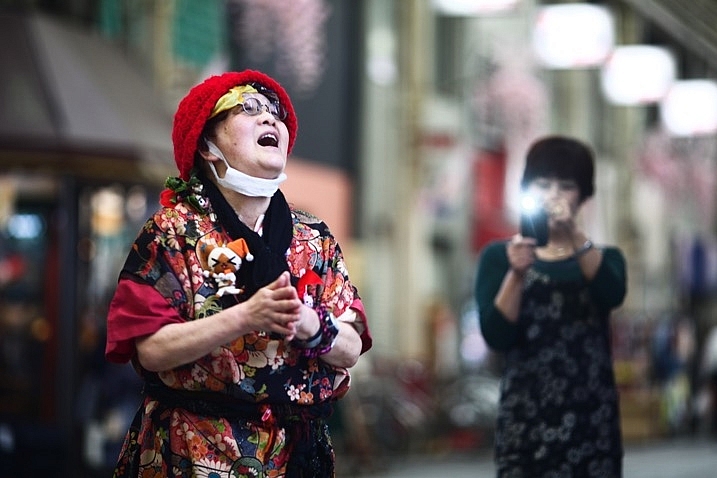
  • Fun shots: The biggest reason is for those informal behind the scenes photos with your friends.
  • Behind the scenes shots: You can use it to show the setup for your main photograph taken with your DSLR.
  • Second shots: When taking a photo with your main camera on a tripod, another photo opportunity presents itself. You don’t want to move your main camera, but a Smartphone photo will work.
  • Less intimidating: In street photography, a Smartphone is smaller and less intimidating.
8 Ways to Use Your Smartphone for Photography

This photo was taken with a Smartphone. It records a behind the scenes moment, while the main camera is on a tripod.

7 – Make lists, and store them

It’s said good photography happens when planning and spontaneity come together. There is a lot of preparation that goes into planning, and one of the best things you can do is make a list. The notes app on your Smartphone is another great way to use it for photography.

Making your pre-shoot list gives you a clear focus for your work. The really great thing about having that list with you is you can add to it on location. There will always be potential photos you could take in the future, which you will only see when you arrive. Note the new photo ideas down, and Geotag the location if needed as well. Evernote is another great app that works on any device, syncs with your home computer and you can access from anywhere with a web browser.

8 Ways to Use Your Smartphone for Photography

Make use of the notes function in your phone. You can note down ideas so you don’t forget them in the future.

8 – Use your phone . . . as a phone!

It’s easy to forget the primary function of your techno slab is to be a phone! That’s a mighty useful thing in photography for any business related activities. It goes without saying that your website, e-mail footer, and business cards, should all have your phone contact details included. Those opportunities to shoot commercially will improve you as a photographer as well, it will push you to deliver results. Even if you don’t have a photography business a phone is still great for contacting your photography friends! Your friends are always good to meet up with,

Even if you don’t have a photography business a phone is still great for contacting your photography friends! Your friends are always good to meet up with, collaborate, and bounce ideas off each other.

8 Ways to Use Your Smartphone for Photography

As stunning an idea as this may sound. You can use your phone to make phone calls!

The Smartphone, how will you use yours for photography?

The diversity of today’s Smartphones means they are so much more than just phones. As you can see, there are many ways you can use your phone to enhance your photography, we’d love to know how you use yours.

Are there any other ways in which you have used your phone, that aren’t mentioned here? The phone is a great device to have with you that takes up little space and doesn’t weigh you down. The chances are you have it with you anyway, so try out some of the ideas above.

googletag.cmd.push(function() {
tablet_slots.push( googletag.defineSlot( “/1005424/_dPSv4_tab-all-article-bottom_(300×250)”, [300, 250], “pb-ad-78623” ).addService( googletag.pubads() ) ); } );

googletag.cmd.push(function() {
mobile_slots.push( googletag.defineSlot( “/1005424/_dPSv4_mob-all-article-bottom_(300×250)”, [300, 250], “pb-ad-78158” ).addService( googletag.pubads() ) ); } );

The post 8 Ways to Use Your Smartphone for Photography by Simon Bond appeared first on Digital Photography School.


Digital Photography School

 
Comments Off on 8 Ways to Use Your Smartphone for Photography

Posted in Photography


5 Easy Ways to Drastically Improve Your Photographs for Beginners

11 Feb

It’s the easiest thing in the world to take a photo. You aim and press, and you’ve captured a moment, which in time will turn into a treasured memory. But did you know that with just a little bit more effort and barely any time, you can turn those captures into something more? Something that offers the subject the respect it deserves. Something that is a pleasure to look at even before the shimmer of nostalgia is sprinkled onto it by time, and something you’ll be proud to share.
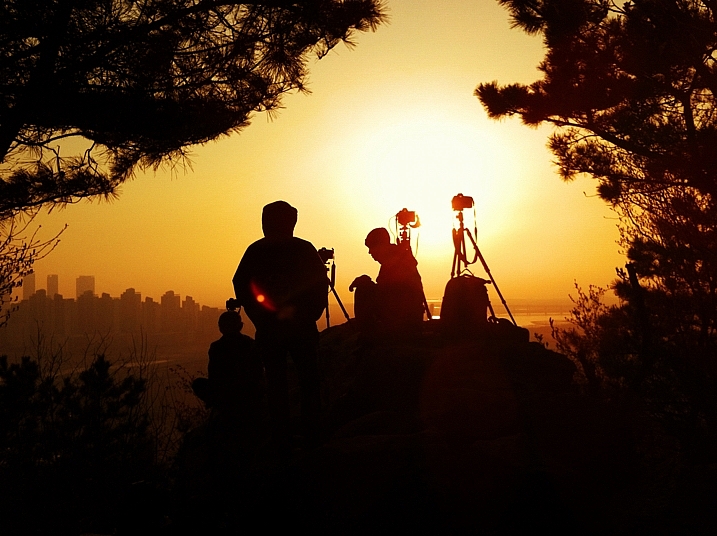
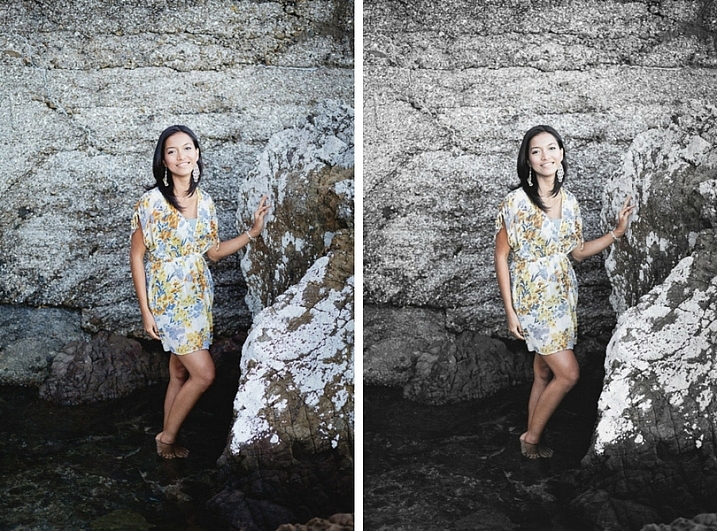
With these five basic steps, you will notice an immediate improvement in your photos. Once you’ve started giving it just a little bit more thought, it’ll become a natural part of your photography.

Let’s begin!

1. Get low, get high — it’s all about perspective
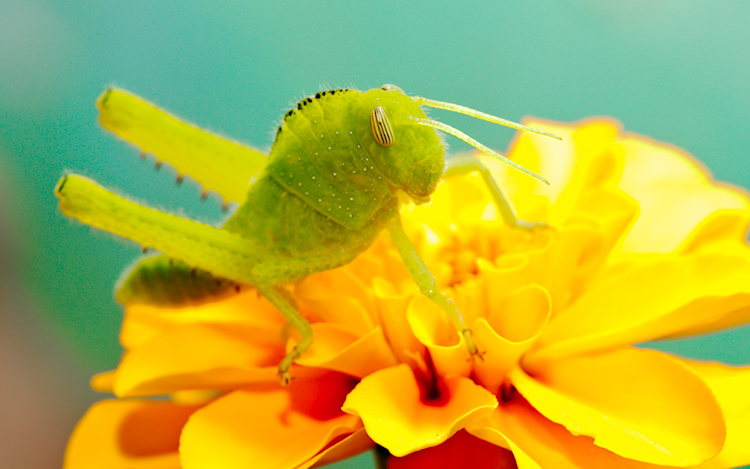
The easiest and most natural way is to photograph from the level of your own eyes. There is nothing wrong with that, but it’s just one of many viewpoints — and perspective is essential to the way we relate to a photograph.

5 Easy Ways to Drastically Improve Your Photographs for Beginners - perspective

Shot at human eye level.

Want to expand your perspective? Don’t be afraid to move, crouch, or if you’re up to it, lie down before taking your photo. Climb up on a chair even. If you’re photographing a child, get down to their eye-level and see what a difference it makes to your photo.

5 Easy Ways to Drastically Improve Your Photographs for Beginners - perspective

Shot at bug level.

2. Less space, more content

Do you tend to point and shoot, without composing the photo? This leads to two very common outcomes. One of them being a lot of unnecessary space around the subject, the other we’ll discuss in step three below.

Does the person you’re photographing take up only a small portion of the image? Most of the time, that’s unintentional, and it just makes it harder to enjoy the look of the subject, whether it’s a person, flower, or a sculpture.

Try filling the frame with a face. Don’t be afraid to get closer (unless you’re photographing a venomous snake).

5 Easy Ways to Drastically Improve Your Photographs for Beginners - get close 5 Easy Ways to Drastically Improve Your Photographs for Beginners - get close

3. A view askew (off-centered)

The other common result of pointing and shooting is that the subject almost always ends up being in the center of the frame. Sometimes, that works beautifully, but most of the time it’s just boring.

If you’re photographing a person, try to place them (particularly their eyes) off-center in the image. Be aware of their movement or line of sight, and leave room for that. Meaning, place the subject to the side they’re not moving into or looking at, and put more space in front of them in the direction they’re facing.

5 Easy Ways to Drastically Improve Your Photographs for Beginners - off-center

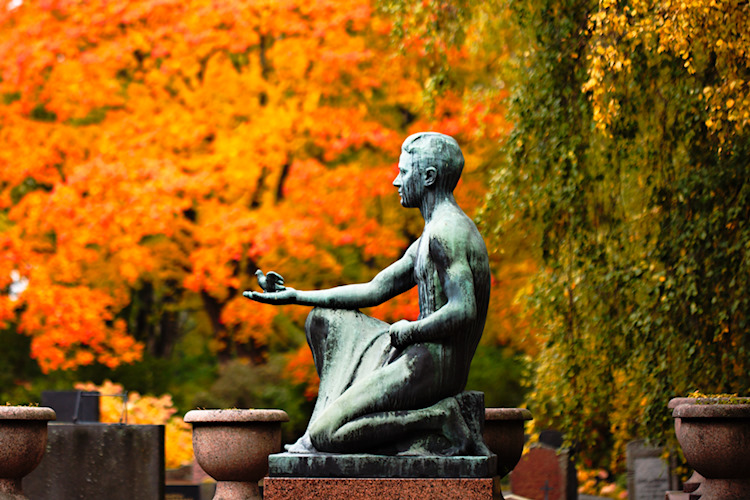
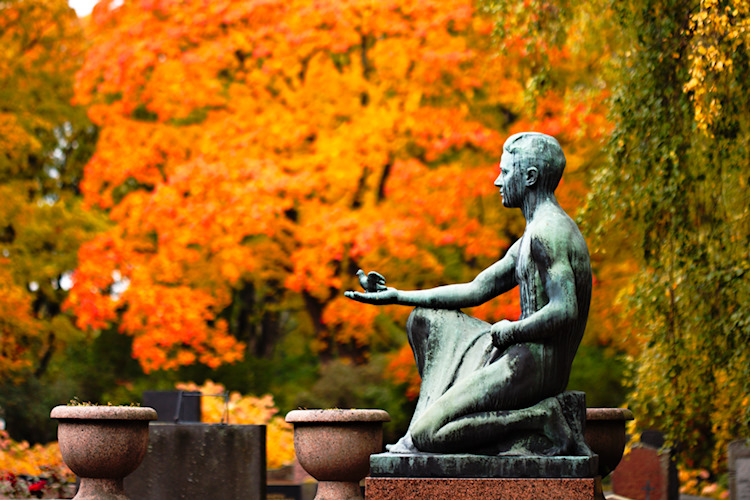
The statue is entered in the frame here and the image is very static (boring).

5 Easy Ways to Drastically Improve Your Photographs for Beginners - off-center

In this image there is more room in front of the statue in the direction the hand is pointing, leaving room for the little bird to “fly”.

To learn more about composition, check out these composition tips.

4. When too much is just right

If you’ve been doing photography for a while, you’ve probably heard how important it is to control the exposure of your images correctly (in other words avoiding both too little and too much light. It’s a basic rule of photography, but let me suggest that you try breaking it.

In my experience, too little light is more of a problem than too much, and sometimes, too much is just perfect — especially if your subject is backlit.

Try it and see what you think!

5 Easy Ways to Drastically Improve Your Photographs for Beginners

5. Space is cheap

Don’t worry about taking too many photos. Really! One of the great things about digital photography is that you can snap loads of shots and choose among them later for the best ones to keep. Don’t miss a moment because you hoped to capture it perfectly in one go.

5 Easy Ways to Drastically Improve Your Photographs for Beginners

5 Easy Ways to Drastically Improve Your Photographs for Beginners

5 Easy Ways to Drastically Improve Your Photographs for Beginners

Try taking photos the way you would normally, then experiment with the steps presented above. When you look through your photos, choose the ones you like and delete the rest. Think a bit about why you like the ones you kept and why you chose to delete some. It’s a fun, easy, and cheap way to learn and to find your own style.

Lastly

As always, rules are meant to be broken! But remember that the more familiar you are with the rules, the more creative your breaking of them can be. If you try out any of these steps, I’d love to see your creations in the comments below!

googletag.cmd.push(function() {
tablet_slots.push( googletag.defineSlot( “/1005424/_dPSv4_tab-all-article-bottom_(300×250)”, [300, 250], “pb-ad-78623” ).addService( googletag.pubads() ) ); } );

googletag.cmd.push(function() {
mobile_slots.push( googletag.defineSlot( “/1005424/_dPSv4_mob-all-article-bottom_(300×250)”, [300, 250], “pb-ad-78158” ).addService( googletag.pubads() ) ); } );

The post 5 Easy Ways to Drastically Improve Your Photographs for Beginners by Hannele Luhtasela-el Showk appeared first on Digital Photography School.


Digital Photography School

 
Comments Off on 5 Easy Ways to Drastically Improve Your Photographs for Beginners

Posted in Photography


3 Ways to Make Selective Color Portraits Using Lightroom and Silver Efex Pro 2

26 Jan

3 Ways Make Selective Color Portraits Using Lightroom and Silver Efex Pro 2Selective coloring is a post-processing technique where you convert an image to black and white, but leave part of it in color. It has a bad reputation because it can be used to create some truly horrendous images where the only thing on display is the photographer’s lack of ability.
But the good news is that you can use selective coloring in a far more sophisticated way to create some interesting images. The key is to keep it subtle and to use it only on suitable photos. I like to make selective color portraits, but of course you are free to experiment with other subjects as well (but please, no flowers).

I prefer to keep my workflow within Lightroom whenever possible as it saves hard drive space and makes the entire photography workflow much simpler. The first two techniques below are for Lightroom, the third uses Silver Efex Pro 2, a free plug-in you can download from Google.

1. Selective color in Lightroom using the Adjustment Brush

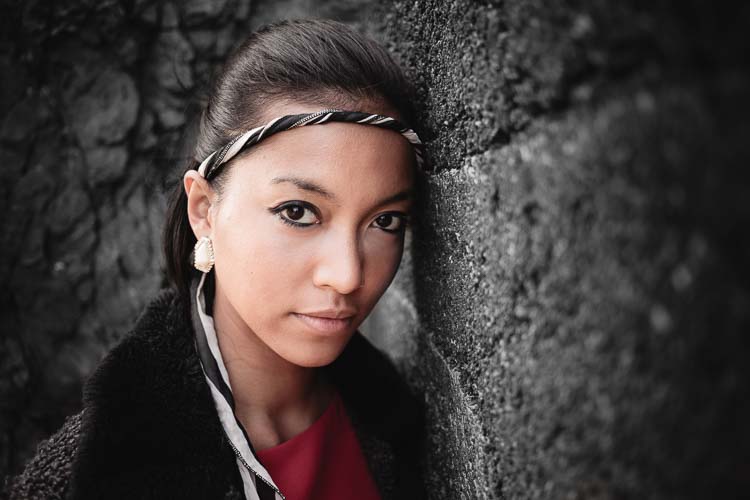
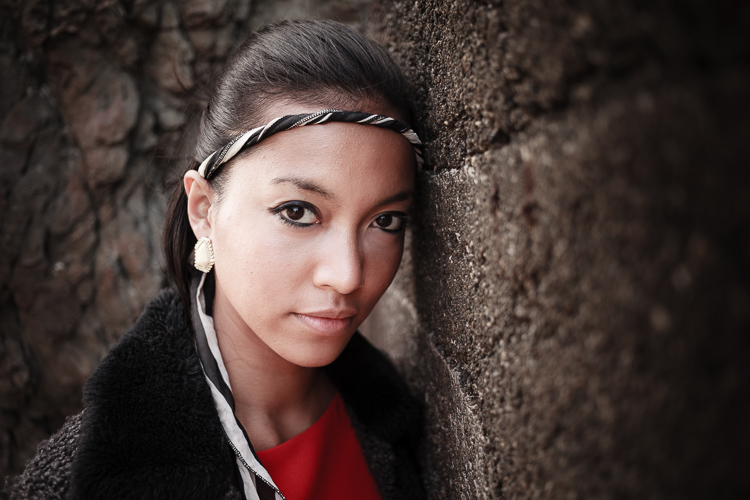
The first example, below, shows what you can do in Lightroom. This is the portrait that I am going to work with for this technique.

3 Ways Make Selective Color Portraits Using Lightroom and Silver Efex Pro 2

The simple background means it’s ideal to use for a selective color portrait.

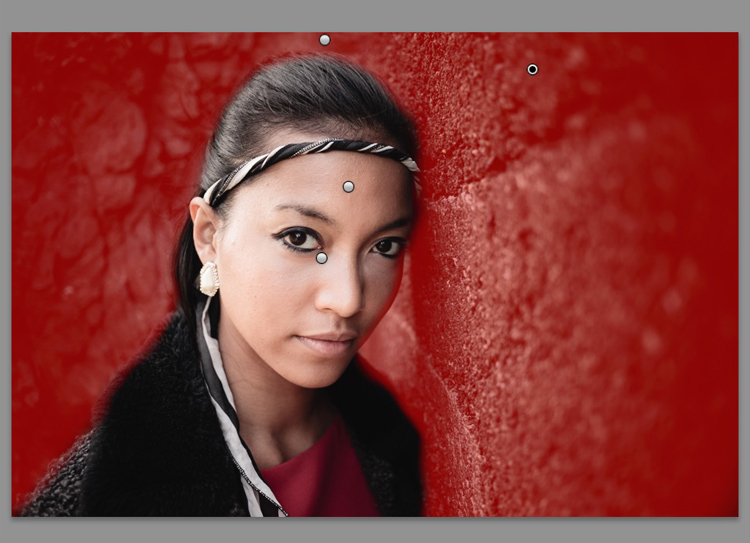
Start by going to the Develop module and activating the Adjustment Brush tool. Paint in the background to create a mask (as shown below).

3 Ways Make Selective Color Portraits Using Lightroom and Silver Efex Pro 2

The mask is shown here in red.

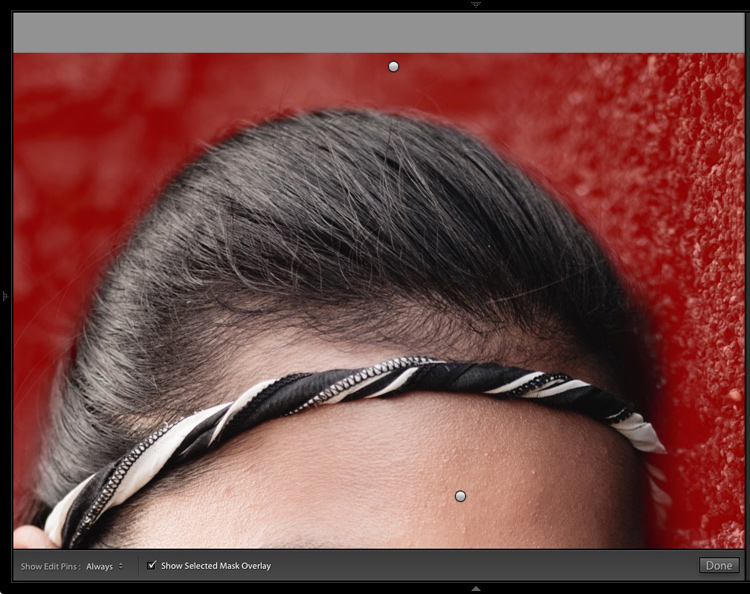
It may help to zoom in and use a smaller brush around the model for a more accurate mask.

3 Ways Make Selective Color Portraits Using Lightroom and Silver Efex Pro 2

View zoomed in so you can mask more accurately around the model.

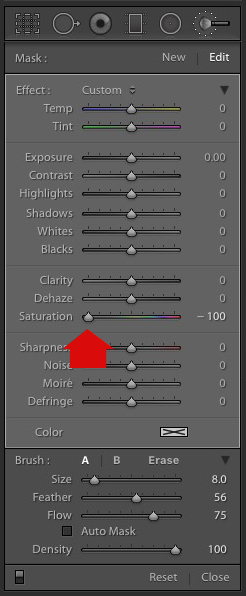
Go to the Adjustment Brush sliders and set the saturation to zero.

3 Ways Make Selective Color Portraits Using Lightroom and Silver Efex Pro 2 - set saturation to zero

That removes all color from the background, giving this effect. Don’t forget you don’t have to move Saturation all the way to zero – you can simply lower it to reduce the color intensity of the background. Play around and see what works best for your image.

Selective coloring in Lightroom

It’s important that you chose the correct image for this technique to get the best effect. There are several reasons it works well with this portrait.

  • The background is monochromatic. It wouldn’t work as well with a colorful background.
  • The rocks in the background have plenty of texture, which looks good in black and white.
  • Some of the model’s clothes are black or charcoal gray, so introducing this color into the background fits with the overall aesthetic of the image.

2. Selective coloring in Lightroom using the HSL

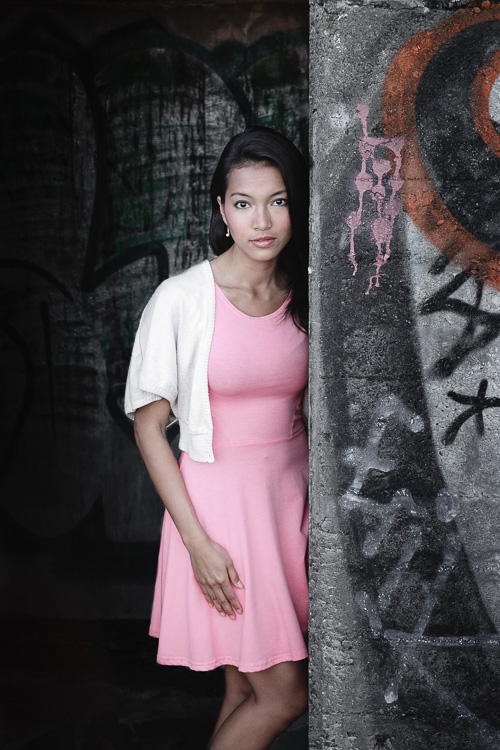
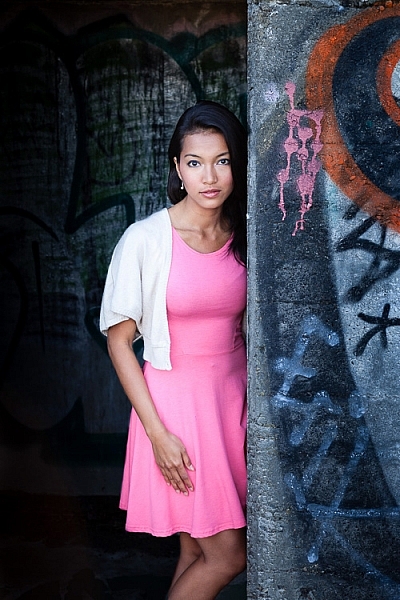
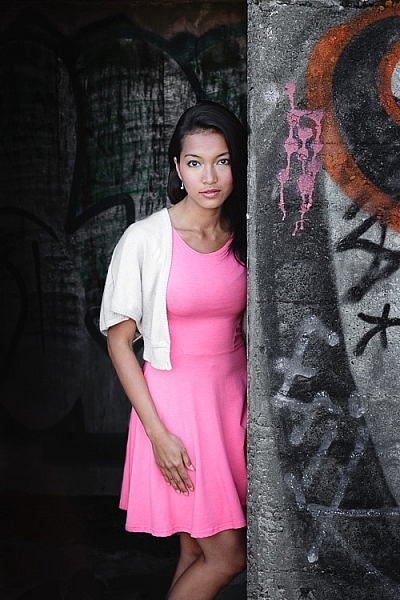
The next portrait (below) has a more colorful foreground. I’m not going to remove the color completely, but I would like to make it more monochromatic. That will help the subtle colors in the model’s dress and skin to stand out.

3 Ways Make Selective Color Portraits Using Lightroom and Silver Efex Pro 2

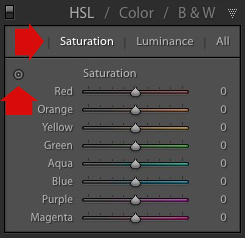
Go to the HSL / Color / B&W panel in the Develop module. Click the Saturation tab, then the Targeted Adjustment tool (marked below) to activate it.

Selective coloring in Lightroom

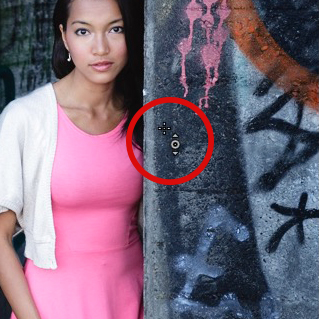
Move the cursor over part of the image that you want to desaturate. In this case, the foreground has a blue cast that I want to remove, so I chose this spot (marked by the small cross circled in red below).

Selective coloring in Lightroom

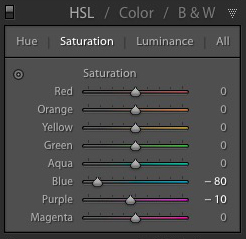
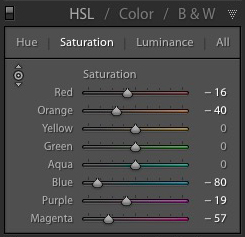
Click and hold the button as you move the mouse downward. Lightroom reads the pixels under the cross representing the Targeted Adjustment tool and reduces the saturation of those colors across the entire image. The matching color sliders in the HSL panel move to the left. When I did this, Lightroom set Blue to -80 and Purple to -10.

Selective coloring in Lightroom

This is the result.

3 Ways Make Selective Color Portraits Using Lightroom and Silver Efex Pro 2

I took it further by repeating the technique. This time using the Targeted Adjustment tool on the pink and orange paintwork on the wall, resulted in the following saturation settings.

Selective coloring in Lightroom

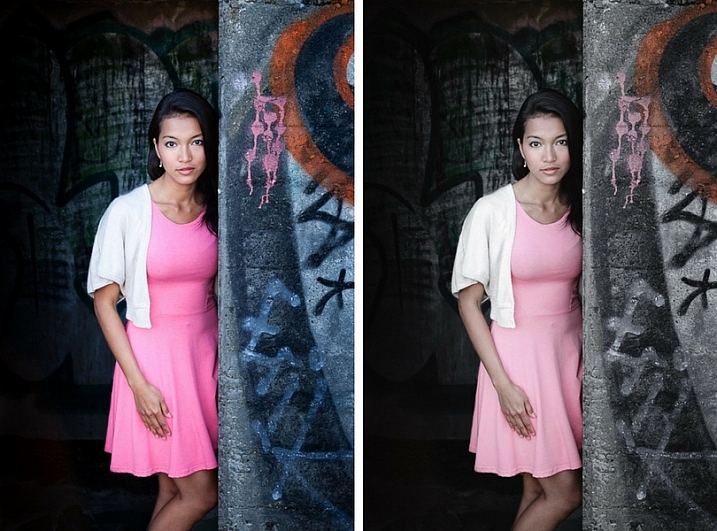
This is a before and after of the final portrait showing these extra adjustments.

selective-colored-portrait-01

Notes:

One key thing to be aware of is how the colors in your photo are related. In the photo above reducing the saturation of the pink paint affected the model’s dress, which is also pink.

Reducing the saturation of the orange paint also affected the model’s skin. In this case, it worked out okay, but you should always zoom in and double check, especially when changing the color settings of Red, Orange or Yellow hues, as this can have some strange effects on skin tones.

3. Selective coloring using Silver Efex Pro 2

Silver Efex Pro 2 is one of my favorite black and white plug-ins. I’d like to show you how to use it for making a selective color portrait with a subtle effect that almost looks like an old style hand-tinted black and white print.

This is the portrait I’m going to use. It’s a good photo to use as the colors are subtle.

3 Ways Make Selective Color Portraits Using Lightroom and Silver Efex Pro 2

If you don’t have Silver Efex Pro 2 already, you can download it for free from the official Nik Collection website.

Once it’s installed go to Lightroom’s Library module and select the photo you want to edit. Go to File > Edit In > Silver Efex Pro 2 (you can also find this option by right-clicking the photo).

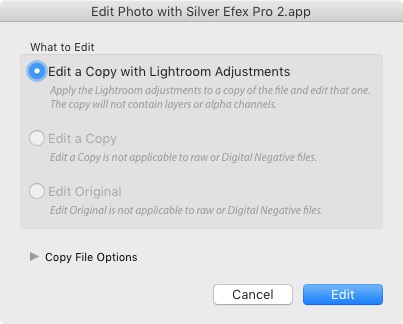
Select the option that says “Edit a Copy with Lightroom Adjustments” in the next window (it will probably be the only one you can select) and click Edit. Lightroom converts the Raw file to a TIFF file and opens it in Silver Efex Pro 2.

Selective coloring in Silver Efex Pro 2

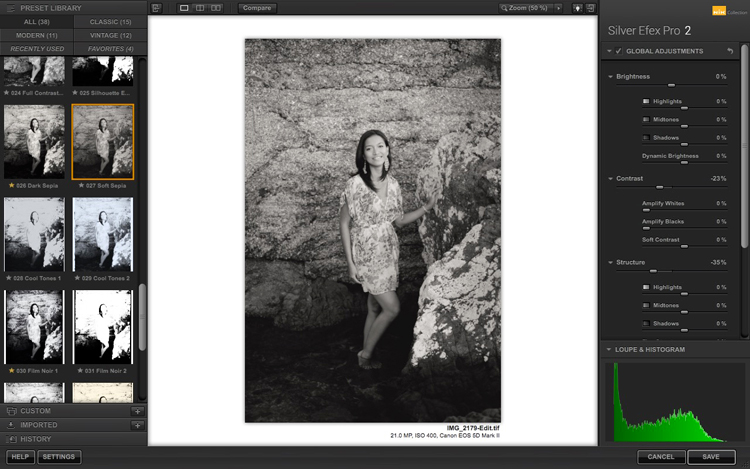
Your first task in Silver Efex Pro 2 is to decide whether you want to stay with the default neutral black and white conversion or use one of the built-in presets. I selected the Soft Sepia preset (below), then made some adjustments to the tonal values until I was ready to apply selective coloring.

3 Ways Make Selective Color Portraits Using Lightroom and Silver Efex Pro 2

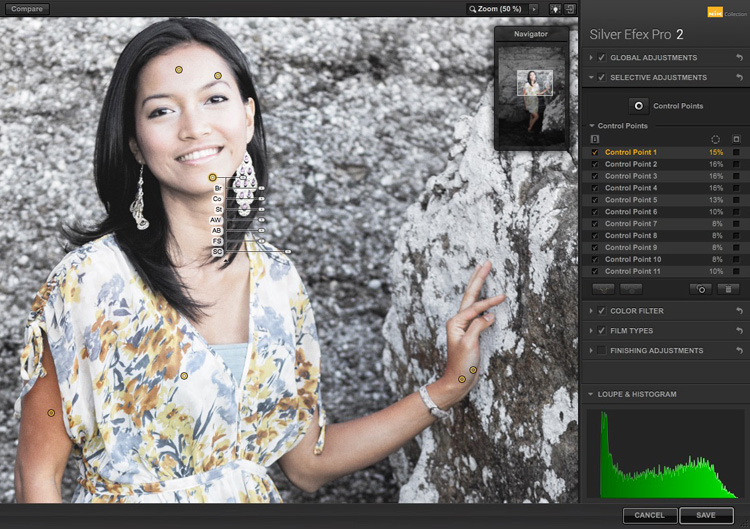
In Silver Efex Pro 2 you make local adjustments by going to the Selective Adjustments panel and adding Control Points. This screenshot shows seven of the Control Points that I added to this photo. Each one is depicted by a yellow dot.

Selective coloring in Silver Efex Pro 2

Using Control Points

Control Points work by analyzing the color and brightness of the pixels underneath them, then applying the selected effect to the pixels within the circle. In this photo, I moved the Selective Coloring slider (SC) to the right to bring the colors back to the model, but not the background.

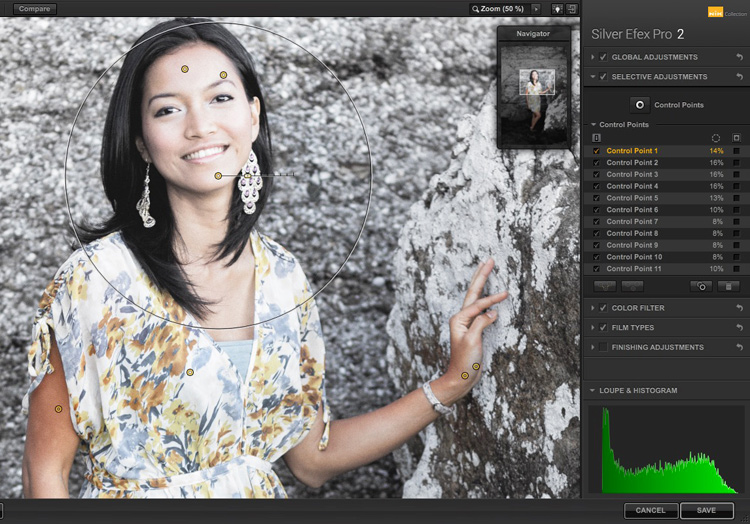
You control the size of the circle by moving the top slider. Silver Efex Pro 2 displays a circle to show you the area affected by the Control Point.

3 Ways Make Selective Color Portraits Using Lightroom and Silver Efex Pro 2

Add multiple Control Points with circles that cover the model but as little of the background as possible. When you are finished, click the Save button. Silver Efex Pro 2 closes, saving the new TIFF file in the same folder as the original file and adding it to the same Collection in Lightroom.

Here’s the before and after with portrait after selective coloring in Silver Efex Pro 2. Notice it’s very subtle.

selective-colored-portrait-02

Conclusion

Hopefully, this article has shown you how to use selective color in a subtle and sophisticated way that moves on from the garish examples you have probably seen online. Do you have any questions about these techniques? Let me know in the comments below.


If you’d like to learn more about Lightroom, then please check out my popular Mastering Lightroom ebooks.

googletag.cmd.push(function() {
tablet_slots.push( googletag.defineSlot( “/1005424/_dPSv4_tab-all-article-bottom_(300×250)”, [300, 250], “pb-ad-78623” ).addService( googletag.pubads() ) ); } );

googletag.cmd.push(function() {
mobile_slots.push( googletag.defineSlot( “/1005424/_dPSv4_mob-all-article-bottom_(300×250)”, [300, 250], “pb-ad-78158” ).addService( googletag.pubads() ) ); } );

The post 3 Ways to Make Selective Color Portraits Using Lightroom and Silver Efex Pro 2 by Andrew S. Gibson appeared first on Digital Photography School.


Digital Photography School

 
Comments Off on 3 Ways to Make Selective Color Portraits Using Lightroom and Silver Efex Pro 2

Posted in Photography


Urban Adventuring Apps: 13 Interactive Ways to Explore Your City

08 Dec

[ By SA Rogers in Travel & Urban Exploration. ]

urbex-app-history-pin-3

Whether you want to get to know your own city on a deeper level or explore secret spots in unfamiliar places, this collection of smartphone apps will take you on adventures you’d otherwise miss. Check out these scavenger hunts, walking tours, history lessons, interactive tasks that take you on random routes, user-submitted local favorites and other ways to interact with urban environments in fun and unexpected ways.

Derivé: Random Tasks Send You on an Adventure

urbex-app-derive

Explore your city – or an unfamiliar city – in a totally new way with the Derivé app, which randomly assigns you a task to do, like “find your favorite building”, “follow a hat,” “sit for two minutes” or “find a tree.” Refreshed every three minutes, the task cards lead you on a single-person scavenger hunt that will encourage you to take routes you’d never take otherwise and experience your environment in a new way.

History Pin: See History in Real Time

urbex-apps-history-pin-1

urbex-app-history-pin-2

urbex-app-history-pin-3

This user-generated history map lets you see what cities used to look like thanks to submitted historical photographs, which are pinned onto their real-life locations. The app uses Google Maps and Street View technology to overlay the historic photos onto the live camera view. Just hold up your phone in the street, and it’ll give you a glimpse of the past.

Spotted by Locals: Get the Inside Scoop

urbex-apps-spotted-by-locals

urbex-apps-spotted-by-locals-2

When you’re traveling, it’s easy enough to wander randomly without the use of a smartphone or simply go by tourist guide recommendations, but finding out what locals love can be more challenging. The Spotted by Locals app tells you what’s popular in any given spot, and it’s constantly updated to keep track of business openings and closings.

Geocaching: Treasure Hunting Challenge

urbex-apps-geocaching

urbex-apps-geocaching-2

The classic treasure-hunting app that has explorers digging for cleverly hidden containers called ‘geocaches’ remains the most popular way to participate in the adventure. The Geocaching app shows you geocaches near your location, allows you to message other players for hints and log the treasures you’ve found.

Geo Street Art Apps for New York City & London

urbex-apps-street-art-2

urbex-apps-street-art

Available for major cities like New York City and London, the Geo Street Art apps feature hundreds of local and international street artists, pointing you to their work so you can see it in person. ‘Street Art London’ and ‘Street Art New York City’ provide a “comprehensive reference point” of the street art scene, including artist biographies. The London version boasts over 600 images from over 90 artists in 270 locations.

Next Page – Click Below to Read More:
Urban Adventuring Apps 13 Interactive Ways To Explore Your City

Share on Facebook


[ By SA Rogers in Travel & Urban Exploration. ]

[ WebUrbanist | Archives | Galleries | Privacy | TOS ]


WebUrbanist

 
Comments Off on Urban Adventuring Apps: 13 Interactive Ways to Explore Your City

Posted in Creativity