RSS
 

Posts Tagged ‘Video’

A Twist on the 365 Project: One Second a Day Video Project

02 May

Extra photos for bloggers: 1, 2, 3

Doesn’t it feel like 2012 was just a couple weeks ago?

Maybe your New Year’s resolution was to start a 365 Project where you snap a photo every day.

Well, what if we told you that you can make a time-lapse of your life by taking a one second clip every day? That’s what Photojojo pal, James Bernal did for the all 366 days of 2012.

Think about how awesome yours would look — it’d be a 6-and-a-half minute mosaic of your year!

James put together an awesome guide detailing how to shoot, what to shoot, and how to keep going when you’re ready to set the camera down.

A Guide to Shooting One Second a Day

p.s. Win a traveling photo booth! We’re giving away an Instax camera & more with Brit+Co. Enter to win right here.

p.p.s. Even moar giveaways! Our pals at SnapKnot (the wedding photographer directory) are giving away a Nikon D800 or Canon 5D Mark III. Here’s how to enter.

Why it’s cool:

First, watch this. The one second a day video James made of his 2012.

2012 in 366 Seconds from James Bernal on Vimeo.

Sometimes, we take our days for granted. A project like this will help you reflect on your life as it happens.

Imagine being able to look back on any day and instantly remember what you did, who you met, what you learned, or how you felt.

While you’ll be able to have a really nifty video time capsule of your life and a fun way to share your year with others, it can also be an ingenious and powerful way for you to be able to remember what you’ve accomplished over the year and how you want to make it even better.

Undertaking this project will also improve your camera skills. For real! Keeping your eyes peeled for your one second each day, you’ll be sizing up the world for good moments and you’ll naturally want to attempt new shots to keep it fresh.

When to Start:

paint-sm While you might think you missed the boat with starting off your project on January 1st, 2013, the truth is, this is about your life and you can start your project anytime!

You can start it on your 27th birthday, the first day of your round-the-world trip, a random Tuesday, on your first day of college, or Chinese New Year!

There’s also no rule for how long it should be, so you can keep this up for 3 months or a whole year or even keep doing it for the rest of your life!

Tools For Putting it all Together:

paint-smA Camera.
Or even better, all the cameras. You can use any camera that’s able to take video, and preferably at least 720p so you can share it with the rest of the world.

You don’t have to stick to one camera either, so don’t be afraid to use different ones as long as their quality is as good as your main camera. Nowadays, most smartphones, point and shoots, and GoPros can shoot in glorious HD!

An Editing Program.
You’re going to need to put this puzzle together somehow! Some editing programs have more bells and whistles than others but you won’t need to get too over your head.

All you really need is to put your clips in order and find a sweet song to make it all flow together nicely. Our suggestion – iMovie and Windows Movie Maker are free and work just fine.

If you’re planning on using an iPhone exclusively as your one and only camera, then there’s now a recently launched app that helps keep you organized and edit all your footage together! It’s called One Second Everyday.

STEP 1: GET TO SHOOTING

paint-sm Get out there and shoot your one second clip everyday! Take your camera everywhere. Yeah guys, everywhere.

You never know what you’re going to encounter once you walk out your door. Take it to work, parties, the beach, school, the DMV, wherever.

Document the first time you tried a churro, your walk in the park, that bike ride over the Brooklyn Bridge, or maybe the impromptu dance party that erupted while you were waiting for the bus.

Take a Step Backward!
It’s easy to get so wrapped up in being a cinematographer that you forget to take a look around you and give us a little more context about where you are.

paint-sm

If you’re pointing your camera at a delicious pizza you’re about to eat, it could be even more interesting if you take a couple steps backwards (but watch your step!) and show us you’re eating a pizza … at the Grand Canyon.

Get Creative.
We’re not gonna lie, taking a memorable video of each and every day is going to be a tough workout for your eyes and brain, but hang in there. We know you can do this!

Try out new angles and different techniques, or maybe throw in a one second time-lapse in there if you’re pretty handy with that stuff. Don’t forget to hand your camera to others from time to time so you can also make a cameo in your video!

Sticking with this project, you’ll naturally become more creative with your shots when you’re forced to come up with something new every single day.

Get a reminder.
There might be days you’re so busy you forget all about your project. Don’t let up! Put an alarm or a reminder on your phone to make sure you remember to snap a video of something each day!

STEP 2: GET UP AND GO OUTSIDE

paint-sm Seriously, you guys, keep shooting.

There are 86,400 seconds in a day. More than a few of those are gonna be totally worth getting on tape!

Everything is fair game.
From your awesome roadtrip, to the C- you got on your biology test, to that flat tire you had to change (in the snow!), everything is worth documenting.

It’s natural to want to remember all the good times but don’t be afraid to point your camera at some of the less-than-stellar moments. It’s all part of the story of your life and every moment is equally important.

Don’t Stop.
This is the most important tip.

You’re gonna get tired of shooting a second a day, and you might want to skip a day. Don’t give up.

Even if you think there’s nothing interesting happening, go outside and make something happen. There’s always something worth documenting, even if it’s just you walking your dog (especially if it’s a particularly awesome dog).

I also found it helpful to tell my friends about my project and they were crucial in keeping me motivated. They’d even ask “Hey, can I be your one second clip today?”

STEP 3: DOWNLOAD YOUR FOOTAGE

paint-sm As the days fly by and you fill up your memory cards with footage, you’re gonna have to start downloading your footage to your computer.

It’s going to be a little different from computer to computer, but it’s pretty simple. Make a main folder, and organize your clips in a way you can easily keep track of what’s where.

More importantly, stay organized. Seriously, guys, 365 different video clips are as unruly as a bag full of puppies (although not as cuddly and definitely not as cute).

You’re gonna have a much easier time if you regularly organize your clips into folders for months over the course of your project. It would also be a really good idea to make a backup of all your footage so you don’t lose all your work in case an elephant stomps on your computer.

Step 4: START EDITING

paint-sm Import your clips into iMovie (free) or Final Cut Pro if you’re a Mac fan. If you’re running windows, try Windows Movie Maker (free) or Adobe Premiere.

Most movie editors are laid out with a little area for all your clips and another area called a timeline. The timeline is where you’re gonna be placing your clips and organizing them.

Editing is a lot like solving a puzzle – you’re moving all your clips around into the right order by date. While you rearrange the clips where they belong, you can start ‘trimming’ them down to 1 second each.

Those fun kids over at Vimeo have a couple good lessons to help get you started on whatever editing program you’ve got!

  • Editing with Windows Live
  • Editing with iMovie
  • Trimming & Cutting with iMovie

STEP 5: THROW A PHAT BEAT ON IT

paint-smJust like photography, music is a universal language. Go through your music library and find a bumpin’ song that you can add to your video!

Was there a song that was your jam while you were shooting this project? If Polka is your thing, that’s cool too! Try out a couple different songs and see which one sets the mood you’re going for and really goes with the flow of your movie.

STEP 6: THE HOME STRETCH

Add some titles, effects, and finishing touches to your video.

Hit the export or share button and upload it to Youtube or Vimeo, so you can showcase your masterpiece to the world!

Wanna see more examples? Here are two more of our favorites!

Brittany Bravo’s 2012.

Cesar Kuriyama’s Year 30.

1 Second Everyday – Age 30 from Cesar Kuriyama on Vimeo.

Take it further

  • Watch Cesar Kuriyama’s TED talk all about the making of video (above). It’ll inspire you!
  • Get more advanced with your video editing, try a time-lapse.
  • Learn how to make a stop-motion video!
  • Check out our guide to Project 365, the inspiration behind the one second a day video

Related posts:

  1. The Flip Video — The $ 100 Digital Video Camera that’s Tiny, Cheap, and Fun! Remember those shoulder-mounted VHS camcorders dad used to haul out…
  2. An Inspiring Stop-Motion Video (Modest Mouse Fan Video) Stop-motion photography ain’t easy. It requires patience, patience, planning, patience,…
  3. Vacation Photos with a Twist — or What to Do with All Those Pictures of Your Feet June’s Photojojo made possible by… ~Have a cool photo product…


Photojojo

 
Comments Off on A Twist on the 365 Project: One Second a Day Video Project

Posted in Equipment


Canon firmware for 5D Mark III allows uncompressed video and AF at F8

30 Apr

canon_eos5dmkiii.png

Canon has released a firmware update for the EOS 5D Mark III with significant benefits for both stills and video shooters. Firmware version 1.2.1 allows uncompressed video output over the HDMI port as well as cross-type autofocus when working with a maximum aperture of F8. Click through for more details and the download link.

News: Digital Photography Review (dpreview.com)

 
Comments Off on Canon firmware for 5D Mark III allows uncompressed video and AF at F8

Posted in Uncategorized


Aptina creates faster 14MP 1″ sensor capable of 80 fps and 4K video

18 Apr

Logo.png

Sensor maker Aptina has announced a 14MP 1″-type sensor for use in mirrorless and video cameras. The AR1411HS enters the range alongside the existing 10MP model and offers even faster shooting capabilities. The 14MP chip can shoot full-resolution images at up to 80 fps and can shoot either 4K or Quad HD (allowing high quality 4:2:2 color) at up to 60 fps. The company suggests the 1″ format (actually 13.2 x 8.8mm) offers an effective balance of image quality, price and capabilities to make a sensible middle ground between the tiny 1/2.3″ sensors in most compacts and the APS-C sensors used in many mirrorless models and DSLRs. 

News: Digital Photography Review (dpreview.com)

 
Comments Off on Aptina creates faster 14MP 1″ sensor capable of 80 fps and 4K video

Posted in Uncategorized


Surfrigger 2 Video – Paddling Outrigger Canoe in Colorado

12 Apr

10 years ago: paddling outrigger canoe, Surfrigger, on Horsetooth and Boyd Lakes in northern Colorado, winter and summer.

Surfrigger (24′x13.5″, ~28lb) built by John Diller from Savage River Works arrived to Fort Collins in the very end of January 2003. This solo outrigger canoe designed by Kris Kjeldsen, a New Zealand designer and has won many races in that area and in the west coast. A very light and stiff carbon/kevlar lay-up, rudder, the small volume cockpit with sprayskirt, two small hatches allow me to do some light overnight paddling.

I’ve been paddling Surfrigger on local waters in Colorado including Horsetooth Reservoir, Boyd Lake, Gross Reservoir and Lake Pueblo. I also paddled her during 2003 WaterTribe Everglades Challenge in Florida and 2009 Missouri River 340 Race.

Surfrigger is an interesting platform for photography and videomaking providing a variety of shooting angles.

Related posts:
Bent Shaft Paddle and Racing Outrigger Canoe
Surfrigger Canoe on the Boyd Lake
Crocks or Everything Turns Green in Springtime
Photo Impressions on Surfrigger, My Outrigger Canoe


paddling with a camera

 
Comments Off on Surfrigger 2 Video – Paddling Outrigger Canoe in Colorado

Posted in Photography


Vision Research posts high-speed 4k video with Phantom Flex4K at 1000fps

10 Apr

Firefighter.png

High speed camera maker Vision Research has put together its first footage with the yet to be announced Phantom Flex4K video camera. Capable of capturing up to 1000 fps at 4K resolution, the Flex4K features a 10MP Super-35 sensor, records either RAW or compressed footage and will come in PL, PV Canon EF, Nikon F,G mounts. For this video, NYC-based cinematographer Greg Wilson and director Brendan Bellomo captured the Hebron and Glastonbury Fire Departments in action, highlighting the camera’s slow motion capabilities. Click through to watch the video.

News: Digital Photography Review (dpreview.com)

 
Comments Off on Vision Research posts high-speed 4k video with Phantom Flex4K at 1000fps

Posted in Uncategorized


Game, Cassette, Match: 10 Abandoned Video Stores

07 Apr

[ By Steve in Abandoned Places & Architecture. ]

abandoned video stores
Once as common as the VHS and Betamax tapes they rented out, video stores these days are fading away faster than the images on a well-worn cassette someone forgot to rewind. These 10 abandoned video stores are caught between the night they closed and the day a more relevant tenant takes over the lease.

Terminal Virus

abandoned video store viral video(images via: Tattoed Steve’s Storage Unit Of Terror)

The store sign’s font absolutely screams “EIGHTIES!” but the name – Viral Video – presciently anticipates the advent of YouTube and the corresponding end of the rental video era. As the poster child for classic Mom & Pop video stores, Keansburg, New Jersey’s Viral Video exudes a folksy vibe even in its abandoned afterlife. Repurposed wooden bookshelves ironically hold video tapes organized by genre and the assortment of admonishing signs are only missing “No Shoes, No Shirt, No Service.”

Twice Unlucky

abandoned video store Seattle theater(image via: Curtis Cronn)

Kudos to Flickr user Curtis Cronn for composing this cool color-infused capture of a now-nameless abandoned video store on Queen Anne Avenue in Seattle, Washington. The store was obviously a movie theater back in the days when video tape technology was the coming thing. Just goes to show you what comes around, goes around.

Movie Scene No Longer Seen

abandoned video store Movie Scene Savannah(images via: RetailByRyan95)

How many movies could a Movie Scene move if a Movie Scene could move movies? Quite a few, considering the Hayes, VA store was in business for almost 7 years before giving up the ghost in March of 2009. Full credit Flickr user RetailByRyan95 for immortalizing the former car garage, Jeff’s Cycle Center and Video Update (an SNL reference?) before it re-opened as an AutoZone.

Hurray For Hollywood (Video)

abandoned video store Hollywood Video(images via: j4349 and C-Bunny)

Chewbacca’s star on Hollywood Video’s walk of fame serves to date the era of video cassette rentals with pinpoint accuracy but while the empire might strike back, Hollywood Video is down for the count. Occupying the medium-sized niche between small strip-mall stores and large anchor stores like Blockbuster, Hollywood Video – at least, this location in Savannah, GA – just couldn’t survive the big squeeze.

Next Page:
Game Cassette Match 10 Abandoned Video Stores

Share on Facebook


[ By Steve in Abandoned Places & Architecture. ]

[ WebUrbanist | Archives | Galleries | Privacy | TOS ]


WebUrbanist

 
Comments Off on Game, Cassette, Match: 10 Abandoned Video Stores

Posted in Creativity


Teton Gravity Research posts video shot with 4K Gyro-stabilized system

01 Apr

69914b43-ccc1-406f-8a46-b2c5e0d7d7a3.jpg

Action sports video production company Teton Gravity Research (TGR) has posted the first video shot with the GSS C520, a five-axis gyro-stabilized 4K cinema system by GSS (Gyro-Stabilized Systems). The C520 is compatible with the RED Epic, Arri Alexa M and Sony F55/HDC-2500 video cameras. For this video, the system was fitted with a RED Epic video camera and mounted on a helicopter to capture 4K stabilized footage of San Francisco, California. (via FStoppers)

News: Digital Photography Review (dpreview.com)

 
Comments Off on Teton Gravity Research posts video shot with 4K Gyro-stabilized system

Posted in Uncategorized


Nikon posts sample images and video from Coolpix A

06 Mar

img_03_l.jpg

Nikon has posted a gallery of ten images and a video of the new Coolpix A DX-format compact camera. The camera features a 16MP APS-C sensor with no optical low-pass filter and a 28mm equivalent F2.8 prime lens. The images that Nikon has posted are taken by documentary photographer Doug Menuez in JPEG Fine (8-bit) mode. Click through for some images and a link to the full gallery. 

News: Digital Photography Review (dpreview.com)

 
Comments Off on Nikon posts sample images and video from Coolpix A

Posted in Uncategorized


Canon develops high sensitivity full-frame CMOS sensor for video

05 Mar

canon_videosensor.png

Canon has developed a 35mm full-frame CMOS image sensor designed for low-light video capture. The 16:9 sensor features a 1920×1080 pixel array, meaning each pixel measures a huge 19 microns along each edge – 7.5 times larger than the ones in the EOS-1D X. The large pixels and low readout-noise circuitry allow the sensor to capture light around 10 times less bright than current CCDs used for astronomy. The sensor will first be shown in public at a security show in Japan.

News: Digital Photography Review (dpreview.com)

 
Comments Off on Canon develops high sensitivity full-frame CMOS sensor for video

Posted in Uncategorized


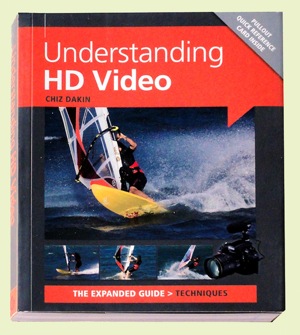
Understanding HD Video [Book Review]

04 Mar

Understanding HD VideoAfter a careful read of Chiz Dakin’s book, I came to the conclusion that — for the right reader — her volume is the ant’s pants, the bees’ knees of ‘how to’ books in the video field.

The right reader? Well that comes down to those who are competent in stills photography, own a DSLR or a CSC camera and know how to work with different lenses, be savvy with ISO, histograms etc.

CSC? Compact System Camera or what could also be called a MILC (Mirrorless Interchangeable Lens Camera).

I also figure it would probably not be right for the hardened videographer, accustomed to video camcorders, as most of the info within its pages is aimed at the stills brigade … and how jump ship into the world of movies.

High end cameras such as Canon’s EOS MkII and MkIII and Nikon’s D800 are becoming increasingly popular with feature film and documentary makers due to their reasonable price (compared to high end video cameras) and ability to use lenses with focal lengths that image to a full frame 35mm area. Lenses of these focal lengths enable photographers to work with a reduced depth of field and produce that ‘film look’. The odd thing is that the true 35mm movie frame is roughly half the size of the 35mm still frame! Oh well!

The early chapters take the reader through the differences between camcorders and movie-enabled still cameras: their radically different ergonomics; limited recording time; tricky sound capture arrangements; challenging focus ergonomics etc.

Then we get into the language of video shooting: how to capture movement; framing the scene; managing or supplementing light; creating an acceptable storyline; selecting camera angles.

Quite a few pages are devoted to creating the story line, which may at first seem an odd subject in what could be seen as a techy book. But, different to stills photography, video making is a linear process: scene one comes before scene two etc.

It may seem overkill when there follows a chapter listing the personnel on a typical video crew but, as many festival entrants know, even on a simple, home made video you can often need a Director (of course!), a Producer, camera operator, lighting gaffer, grip, art director etc to produce something with more going for it than a simple home movie.

More about the basics: how to select locations; pick the right time of the day or even the right time of the year; choose camera angles; ‘crossing the line’ rules.

Then we get to discuss differing types of cameras, with an admission that even smartphones can have their place in the scheme of things, especially when ‘you need to record somewhere that you couldn’t (or wouldn’t) want to put a bigger camera.’

Lenses come into view with explanations of how effective focal length is affected by sensor size and the roles of prime lenses vs zooms, extreme wide angle lenses, macros, teles and shift lenses.

There is much essential and useful info on memory cards, transfer bit rates, the different file formats, NTSC vs PAL, bit rates, frame rates etc.

There is one piece of advice that is, to my mind, worth the book’s cover price alone: if you set the camera to auto exposure, when panning the camera from a dark area to a light one it will cause distracting exposure shifts. Better to switch to manual exposure so the lens aperture, shutter speed and ISO setting will all be locked.

Result: exposure stays the same wherever the camera is pointed.

Overall, an enormously useful book, full of all the stuff you need to make movies!

Author: C Dakin.
Publisher: Ammonite Press.
Distributor: Capricorn Link.
Size: 14.5x18x1.5cm. 192 pages.
ISBN: 978 1 90770 862 6.
Price: Get a price on Understanding HD Video (Expanded Guide Techniques) by Chiz Dakin at Amazon (22% off at present).

Post originally from: Digital Photography Tips.

Check out our more Photography Tips at Photography Tips for Beginners, Portrait Photography Tips and Wedding Photography Tips.

Understanding HD Video [Book Review]


Digital Photography School

 
Comments Off on Understanding HD Video [Book Review]

Posted in Photography