Tag: Video

  • Processing an Image in Lightroom 5 – a Video Tutorial

    Lightroom5-processing

    Of course, I always like to get the photo as perfect as possible, right in the camera.  But, sometimes the situation just doesn’t allow for a lot of adjustments to be made before the opportunity is lost. Today’s image of a Canadian Lynx kitten was one of those situations.

    The kitten was in a forest on a bright sunny day with mottled light, pretty much nightmare’ish light.  Fill flash would have helped, but I’m hesitant to use fill flash with most mammalian critters because the flash will often show off hairs that our eyes don’t normally see, thereby rendering an artificial appearance to the critter.  So, instead, I attempted to expose for the highlights, trusting and hoping that my RAW files (later converted to Adobe’s DNG format) would help save the day when I got around to processing the image.  Today, is that day.

    Processing an Image in Lightroom 5

    So here is a video tutorial on using the features in Lightroom 5 to change a photo that started off looking like this . . .

    © Paul Burwell

    Before Lightroom Processing

    . . . into a photo that looks like this!

    © Paul Burwell

    After processing in Lightroom 5 – Horizontal Crop

    OR even this . . .

    © Paul Burwell

    After Lightroom Processing – Vertical Crop

    To accomplish this we’ll make use of the Crop tool, the Basic Adjustment Panel, the Adjustment Brush, the Radial Filter, the Detail (Sharpening) Panel and the Virtual Copy feature.

    We’ll take the photo of the Canadian Lynx kitten that started off pretty bland and forgettable, and end up with a nice looking, intimate portrait of a beautiful cat.  The video will cost you about 30 minutes of your life to watch through from beginning to end, but when you’re done, you’ll have an excellent idea on how to use these tools that come embedded in Lightroom to transform (or save) some of your own, less than stellar images.

    Enjoy this video on processing an image in Lightroom 5

    For more Lightroom tips try these articles:

    • 3 Uses for the Radial Filter Tool in Lightroom 5
    • Lightroom 5 Tips – Hidden Gems
    • Lightroom Tips for the Develop Module – the Magic Alt Key
    • Comparing Images with Lightroom 5’s Survey View

    The post Processing an Image in Lightroom 5 – a Video Tutorial by Paul Burwell appeared first on Digital Photography School.


    Digital Photography School

  • Sony Xperia Z2 brings 4K video to its flagship smartphone

    z2_2.jpg

    Sony has launched the latest iteration of its Xperia Z-line of flagship Android smartphones. With a 20.7 MP 1/2.3-inch CMOS sensor the camera specifications look identical to the Z1 but the new model is now capable of recording 4K video. Learn more on connect.dpreview.com

    News: Digital Photography Review (dpreview.com)

  • Samsung Galaxy S5 adds 16MP camera with 4K video

    samsunga53.png

    Samsung’s latest flagship smartphone, the Galaxy S5, has been announced at Mobile World Congress in Barcelona. It features a 16MP camera that shoots 4K video, a 5.1-inch screen and new water resistant shell. Also new is a fingerprint scanner for biometric screen locking and mobile payment. Learn more on connect.dpreview.com

    News: Digital Photography Review (dpreview.com)

  • LedGo 4 x 150 LED Photo and Video Lighting Kit Review

    It’s been a long while since I used LED lighting for photography! In fact, it was the 6th of April, 2010. Reading back over that review, I can confirm that LED technology has come a long way! I have a great little kit on loan from ProTog here in Melbourne that consists of four LED panels, 150 LEDs each, lithium batteries, charger, AA battery adaptors, four gel packs to colour up your lights and mounting hardware, too.
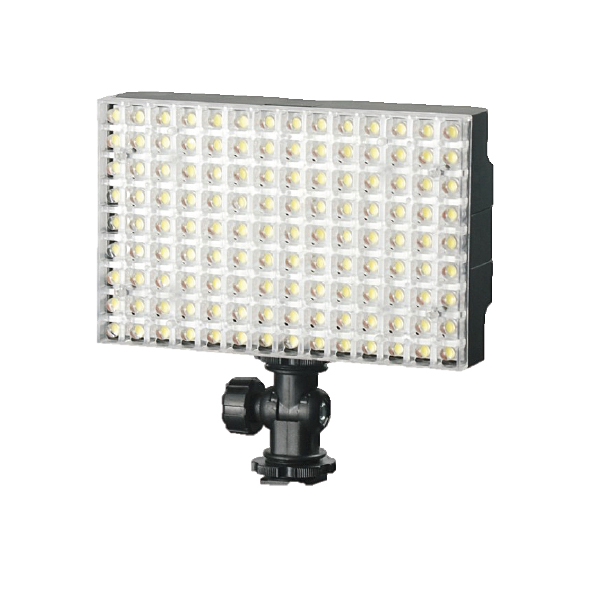
    LGB1504KB

    LedGo 4 x 150 LED Photo / Video Lighting kit

    I first saw this little kit (which comes in different forms with various sized panels) when working with Jeff and the team from ProTog at the recent Digital Show here in Melbourne, I had a few chances to play with it as I was working the booth at the show. I noticed a massive difference by comparison to the LED panels I’d tried before (and I sound like a laundry detergent commercial, but…) whiter whites and brighter brights! I could see right away that these little panels had the ability to put out a decent amount of the good stuff! And, at the same time it can be so nicely controlled. A photograph below of something I’m playing with right now, the Sony QX100, but more on that later…
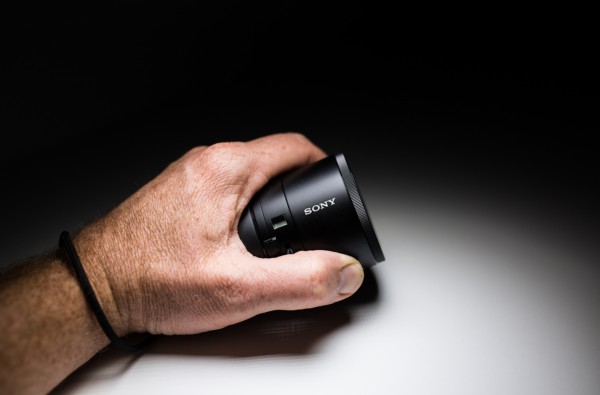
    gtvone_sony_qx100_ledgo

    So, I’ve been using the kit for three weeks now, I’ve used it for macro, portraits, fill lighting (in a boardroom on a boom) mixed with daylight and to say I’m very impressed is a tiny little massive understatement! It’s not that I can’t achieve the lighting I’m getting from the LedGo kit with a conventional flash, it’s that I can really quickly light a scene or even hand a light to a seven year old and say “here, point it at the side of your head” without them burning themselves or having to use two hands to hold the lights up.

    The individual panels with battery attached weigh in at 334 grams (0.75 lbs) as per my kitchen scales, so easily within the realm of what a model can hold if you need to take a portrait. You can very quickly and easily gang two of the 150 panels together to give you plenty of light for a standard portrait, but remember that you have four panels in the kit, so you can use two as your key light and two as a hair light or… well, the possibilities are many.
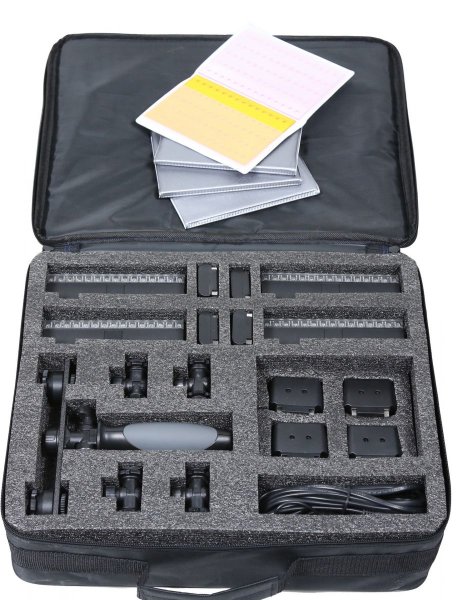
    LedGo_LED_LIGHT_LG1504-KIT-bag_REVIEW

    If you’re not confident with your ‘mastering light’ something you may find appealing is the “forgiveness factor”. It’s very easy to grab a LedGo panel, pop it on a stand, or as I did so many times, a NastyClamp, and turn it on and flick my camera into “live View” mode – What You See is What You Get – this means it’s very easy to see exactly what effect you will have on your scene and subject if you have the light in the wrong spot. Shifting your hand, stand, or clamp an inch to the left will make your subject more backlit, moving it forward gives less shadow etc. All of this is right there in front of you and you can set up your scene as you like it and shoot it. Of course you can do this with flash too, but constant light may be easier for you to deal with if you’re just starting out.

    I’ve only had the gear for three to four weeks, but it’s been used a lot! By me AND (don’t worry ProTog!) by my 4 year old. It’s very sturdy and very easy to use! My little man likes to copy what I do and so, I found him lighting his dinosaurs one morning and taking photographs with my 5D MK3! I was somewhere between super impressed, and a little amused by the fact that he’d used the light as “the Dino door” — My point is that the LED panels can be handled by a 4 year old with no issues (for the light or the child).
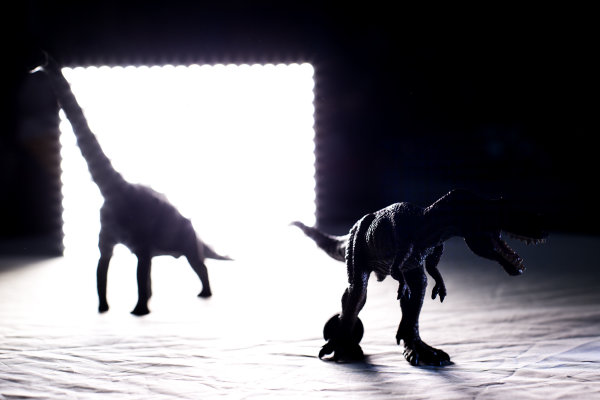
    LedGo_LED_Light_ProTog_Review

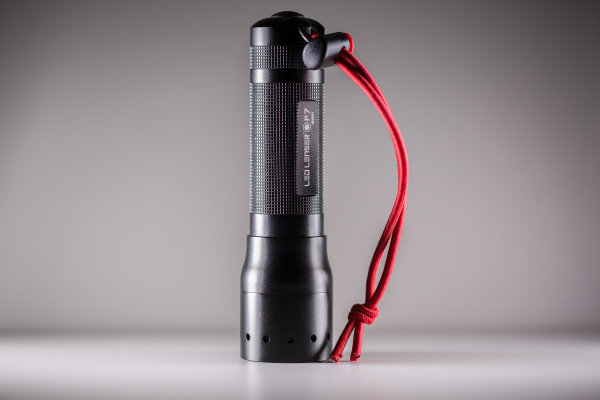
    The first images I took with the kit were a small handful of product type shots – I’m not a product photographer but I liked the results…
    Led_Lenser_photograph_gtvone_ledgo_review

    Above, the Led Lenser P7 is lit with two lights, one on each side. Same with the espresso below…

    espressor_simon_pollock_ledgo_led_kit_protog_review

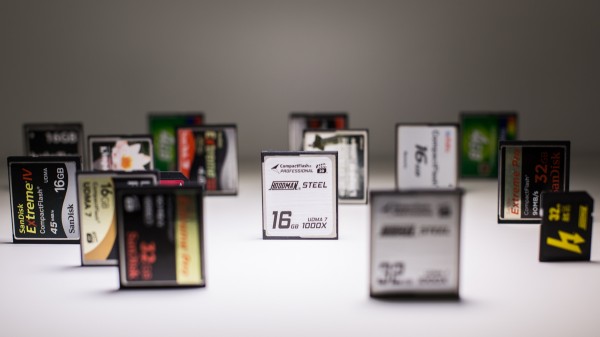
    The photograph below of the memory cards is one single LedGo panel over the top, in nice and close to give me a bit of dramatic fall off.
    memory_cards_ledgo_led_lighting_kit_review

    I can’t fault the LedGo LED kit – the 150 led panels are rated at 90+ CRI (colour rendering index) which means that they’re very color accurate – the clip together and clip apart feature, the gels clip on and off very easily as do the feet that allow you to use a single light in the hotshoe of your camera or you can flip the bracket around and mount it to anything with a 1/4 20″ threaded mount. (like a tripod plate, so you can stick a panel(s) on a tripod very easily)

    PROS:

    • ease of use
    • durability
    • not silly expensive
    • flexible

    CONS:

    • The gels need to go on and the lights need to go together a certain way – the guys at ProTog told me how, so I knew, but it’s not in the instructions so you could damage a mounting tab if you’re a bit gung-ho about putting them together. (It’s pretty obvious, you’d have to be a bit of a muppet)

    I have since picked up my own LedGo panel for myself from ProTog and do not hesitate in suggesting you pop out and try one – they’re not for everything, but for video, product, and spontaneous selfies (no, really) they’re utterly fantastic!

    I rate the LedGo 4 x 150 LED Panel kit a Nine of a possible Eleven stars. Clearer instructions and iIll hand those stars back to you…

    –Sime

    The post LedGo 4 x 150 LED Photo and Video Lighting Kit Review by Sime appeared first on Digital Photography School.


    Digital Photography School

  • LG launches LG G Pro 2 phablet with 4k video

    image.jpg

    LG has launched the LG G Pro 2 in Korea and the new device’s global launch is expected at the Mobile World Congress in Barcelona next week. With its 5.9-inch 1080p IPS screen the new model falls firmly into the phablet category and follows last year’s Optimus G Pro in the LG lineup. Click for more on connect.dpreview.com

    News: Digital Photography Review (dpreview.com)

  • 25 January, 2014 – Phase One IQ250 – First Report and Video Interview

    Phase One announced today their new IQ250, 50 Megapixel medium format back, which uses a CMOS sensor for the first time in a medium format. This sensor is made by Sony, the first time that a Sony sensor appears in an MF product.

    Part One of our on-going analysis of the IQ250 features online a video interview with Phase One executives, a video on how the back’s Live View works, and sample ISO 6400 images, as well as our initial impressions of the back. The article contains price and delivery information, which incidentally begins this coming week.

    Kevin and Michael are leaving today (Jan 24) for two weeks in Chile and Antarctica, and will be testing the IQ250 on this expedition. Part 2, full report and video coverage will follow.


    And speaking of Antarctica –
    we have a few spaces left on our January 31 through February 9, 2015 Antarctic workshop.


    The Luminous Landscape – What’s New

  • Rumored Sony Xperia ‘Sirius’ reported to shoot 4K video

    TS520x0~cms_posts-9705313773-im01.jpg

    Information has leaked about the Android 4.4.2. KitKat OS to be included in Sony’s next flagship Xperia handset that points to 4K video capability. Codenamed ‘Sirius,’ the high-end device will reportedly carry many of the same camera features that the current flagship Sony Z1 offers like manual exposure control, and along with 4K video is expected to add some new features like ‘timeshift video,’ a high frame rate movie mode with the option to apply slow motion effects. Read more on our sister site connect.dpreview.com.

    News: Digital Photography Review (dpreview.com)

  • 16 January, 2014 – The Rangefinder ? A New Video


    The Rangefinder
    ‘Truths’, ‘Mystique’ & Practice with the Leica M240

    We have just published our newest video titled "The Rangefinder: Truth, Mystique & Practice – Leica M240"

    In our Our Store, do a search for ‘Rangefinder‘. For those wishing to purchase it individually, the price is $ 12.50. It is without extra charge for our annual subscribers, and should appear in customers’ subscriptions within 24 hours (01/17/2014)

    The video is made up of a three segment discussion on Rangefinders between Michael Reichmann, Sean Reid of reidreviews.com, and Mark Dubovoy. It was shot on location in Ithaca, N.Y. in the Spring of 2013.

    At an hour and twenty minutes, this wide-ranging discussion looks in detail at the Leica M240, the Fuji X-Pro1, focussing techniques, Window Viewfinders and Electronic Viewfinders, a comparison to DSLRs, the use of R lenses on an M Leica, the suitability of Rangefinders for new photographers, the cost of Leica and others, a recent history of Rangefinders since the advent of SLRs, Rangefinders use for ‘quiet’ or ‘stealth’ photography, a look at what’s new in the M240 over the M9, the shortcomings of the M240 – in the varied opinions of the three participants, Leica lenses, their ‘mystique’ and finally, the use of Leica M mount lenses on other cameras.


    Sean Reid of reidreviews.com, a widely recognized writer about rangefinder and window finder cameras, was a participant in our new video. You should know that Sean has just published a review of the Sony A7R and will be publishing follow-up articles that look carefully at side by tests of the A7R and M-240 with various rangefinder lenses. Reidreviews is a subscription site.


    The Luminous Landscape – What’s New

  • Rugged Fujifilm FinePix XP70 offers Wi-Fi, Full HD video

    XP70_Yellow_Front_Left.png

    CES 2014: The Fujifilm FinePix XP70 is the company’s latest rugged compact, building on its predecessor’s specification with Wi-Fi connectivity. It’s also waterproof to 33 ft / 10m (compared to the XP60’s 20 ft rating), shockproof up to a 5 ft / 1.5m drop and freezeproof to +14F/-10C. It offers a 28-140mm equivalent F3.9-4.9 zoom lens, 16 megapixel sensor, and 1080 HD video at 60i/30p. 

    News: Digital Photography Review (dpreview.com)

  • Strobist Video Vault

    Over the last eight years many cool videos have graced the pages of Strobist.com. Here, in the order in which they originally appeared, are the Top 100.

    Windows open in tabs for easier multi-video browsing:

    Read more »
    Strobist