RSS
 

Posts Tagged ‘Version’

Apple releases cheaper 8GB version of iPhone 5c

20 Mar

iphone5c.jpg

When Apple launched their latest flagship smartphone, the iPhone 5s, they took the hardware of the predecessor, the iPhone 5, added iOS7 and a new colorful plastic body, and called the new creation the iPhone 5c. The 5c was meant to be a more affordable alternative to the 5s but it appears sales have thus far not met the expectations of Apple executives. Today the tech giant from Cupertino has made a move to fix this and released an 8GB version of the iPhone 5c. Learn more

News: Digital Photography Review (dpreview.com)

 
Comments Off on Apple releases cheaper 8GB version of iPhone 5c

Posted in Uncategorized


Nikon releases beta version of next-generation Capture NX software

25 Feb

shared:NikonLogo.png

Nikon has released a beta version of an update to its Capture NX software, a product which has been relatively stagnant in recent years. Capture NX-D is the first version of Nikon’s Raw converter to be made since previous developer Nik Software was bought by Google in 2012. The software features a new user interface, batch conversion and a non-destructive workflow that saves adjustments in sidecar files alongside the original image. Find out how to try Capture NX-D for yourself.

News: Digital Photography Review (dpreview.com)

 
Comments Off on Nikon releases beta version of next-generation Capture NX software

Posted in Uncategorized


Olympus releases OM-D E-M5 firmware version 2.0

30 Jan

shared:download-button.png

Olympus has issued a firmware update for the OM-D E-M5, adding two new features that owners should welcome: an extended ‘Low’ ISO setting and smaller AF points. The ISO 100-equivalent setting promises lower noise, and enables shooting of fast primes at closer to maximum aperture in daylight, but comes at the cost of earlier highlight clipping. Also being added to the E-M5 is the ability to select smaller AF target points for more accurate focusing. Get the update

News: Digital Photography Review (dpreview.com)

 
Comments Off on Olympus releases OM-D E-M5 firmware version 2.0

Posted in Uncategorized


Ricoh GR firmware version 3.00 now available

25 Jan

shared:download-button.png

Ricoh has released firmware version 3.00 for its GR compact camera. The list of updated features includes two options for folder name settings, ability to develop RAW images in different aspect ratios, and customization to assign various AFL Focus Settings to the AF button when the AF function switching lever is set to AEL/AFL (previously only Spot AF was available). Get the update

News: Digital Photography Review (dpreview.com)

 
Comments Off on Ricoh GR firmware version 3.00 now available

Posted in Uncategorized


Prismatic Launches iOS Version 2.0

20 Dec

Prismatic for iOS
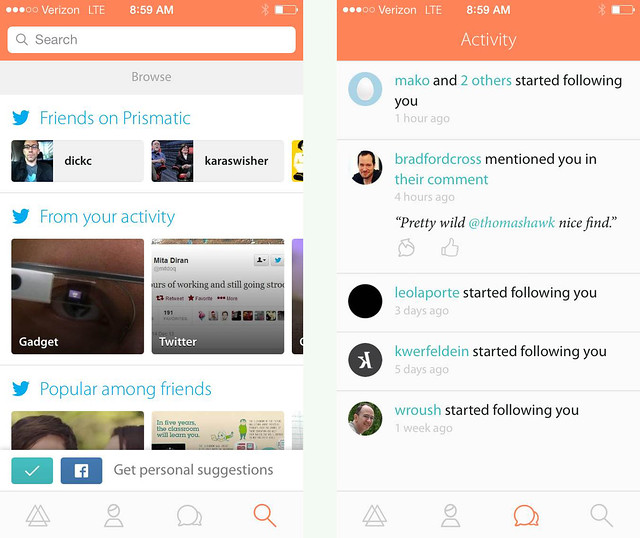
Prismatic 2.0 for iOS released this morning.

I’ve been a big fan of the news aggregator Prismatic ever since it originally launched on the web. As far as I’m concerned, there is no better site on the internet today for aggregating all of the news stories that *I* care about than Prismatic. It’s the ultimate personalized news feed.

On Prismatic, I enter my interests (subjects, topics, companies, people, TV shows, etc.) and Prismatic offers me up a daily feed of pretty accurate stories that I will be interested in. Prismatic has completely replaced my old RSS reader for me and is my go to place each day to view my favorite stories, personally tailored to my interests. The design is fast and elegant and easy to use. Prismatic currently indexes 5 million new stories every day and contains over 10,000 interests you can follow.

Prismatic for iOS

On Prismatic I can like or dislike stories and Prismatic uses a machine learning algorithm to tailor my future posts even more to my interests.

With the new iOS version Prismatic gets even more social than it’s been in the past. I can follow people and things that my friends like are included in the algorithm for what I’m presented.

While I spend a lot of time working on my photos or spending time on social networks when I’m on my computer, Prismatic is the perfect companion to my iPhone, where I want to quickly find great articles that interest me while I’m on my commute or walking around mobile. You can easily share stories you find and like directly from Prismatic to Twitter or Facebook.

Congrats to Bradford Cross and his team at Prismatic on today’s launch. Go get the new Prismatic for iOS in the APP store and check it out. I think you’ll be impressed by how many great stories are personalized to you — especially great photography stories. :)

More from Matthew Ingram at GigaOm here.


Thomas Hawk Digital Connection

 
Comments Off on Prismatic Launches iOS Version 2.0

Posted in Photography


Tokina announces Sony Alpha-mount version of 11-16mm f/2.8 II

27 Nov

11-16-sony.png

Tokina has announced that its highly-regarded AT-X PRO 11-16mm f/2.8 DX II fast wideangle zoom for APS-C SLRs will be available in Sony Alpha mount from the start of next year. The ‘type II’ version adds improved coatings compared to the previous model of the lens. The design is otherwise unchanged, with the same optics and useful ‘one touch’ focus clutch mechanism. Click through for full details.

News: Digital Photography Review (dpreview.com)

 
Comments Off on Tokina announces Sony Alpha-mount version of 11-16mm f/2.8 II

Posted in Uncategorized


Ricoh GR firmware version 2.03 now available

04 Oct

ricohgr.png

Ricoh has released firmware v2.03 for its GR enthusiast compact. The list of updated features includes support for Raw file transfer via Eye-Fi card, the ability to use 1/2500 sec shutter speed with maximum aperture and a 47mm-equivalent crop mode. Also new is a ‘Maximum Aperture Priority’ setting available in Program and Manual exposure modes. Click through for a link to download the latest firmware version.

News: Digital Photography Review (dpreview.com)

 
Comments Off on Ricoh GR firmware version 2.03 now available

Posted in Uncategorized


3 Reasons To Keep Your Old Photoshop Version

09 Sep

By Helen Bradley

3 reasons not to delete old versions of photoshop opener

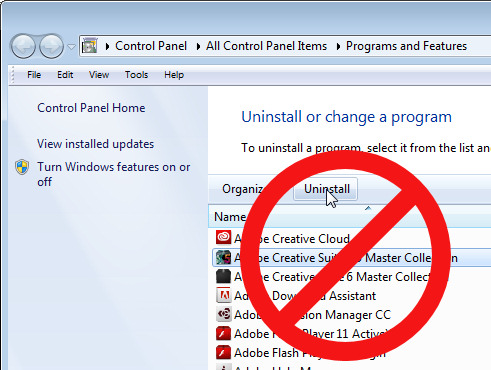
If you’re moving from Photoshop CS5 or CS6 to Photoshop CC you may be tempted to clean up your computer and remove the older Photoshop version from it. After all there’s no point leaving it there if you’re not using it is there? Well I, for one, won’t be removing Photoshop CS5 anytime soon and I suggest you think twice about removing your older version too. Here are my reasons:

1. Adobe Axed Picture Package

Adobe axed Picture Package quite a long time ago but it could be easily made to work with Photoshop CS5. For a time there I also had it running with Photoshop CS6 until an update to CS6 permanently knocked it out. So, because I like to use Picture Package for assembling images and because it works just fine with Photoshop CS5, I’ll be keeping that version. Anytime I need to assemble multiple images into a layout I only need choose File > Automate > Picture Package and I’m off and running.

If you want to know how to add Picture Package back into Photoshop CS4 there’s a DPS blog post that I wrote explaining all about it here in Multiple Image Printing in Photoshop CS4.

For Photoshop CS4 and CS5 I also created some training for Mediabistro.com which you will find here.

And for Photoshop CS6, I wrote a post on my blog about how to add it to Photoshop CS6. While many readers are finding it still works, sadly while I can tell you how to do it the actual solution no longer works for me.

3 reasons not to delete old versions of photoshop 1

2. Adobe Axed Pixel Bender

Yep, in Photoshop CS6 Adobe took the Oil Paint Filter from Pixel Bender, built it into Photoshop and promptly dumped everything else. I found that disappointing – I kind of like Pixel Bender – in particular some of the fractal effects that you can create with it. I also have a Droste filter for it that is awesome and that I use from time to time.

Since I plan to keep Photoshop CS5 I’ll still have access to Pixel Bender – thank you very much Adobe!

Just in case you’re interested – the Pixel Bender extension won’t work with versions of Photoshop later than Photoshop CS5. Again, I wrote a DPS blog post on Pixel Bender, how to install it and what you’ll find when you get it here.

And a post on Tom Beddard’s awesome Droste Filter here.

And I have a YouTube video that shows you how to use the Droste Effect filter here:

3 reasons not to delete old versions of photoshop 2

3. I Don’t Trust the Licensing Model

If you’re reliant on Photoshop for your day to day work – if you’re a Photoshop teacher, for example, then problems with the new licensing model might cause you unexpected grief. In this scenario you will start your computer one day and Photoshop will lock you out citing some issue with your license. Of course you have a paid up license, but the software won’t recognize this and it will go into lock down mode.

Until you can call Adobe Support and get them to fix the issue you won’t be able to get into your software – one more reason why I suggest you keep an earlier version of Photoshop on your computer just in case.

Now I haven’t had problems with Photoshop CC but I have had issues with a subscription license for Adobe Captive – on two separate occasions both within the last 12 months and both without warning. If I had been teaching a class, it would have meant that I simply couldn’t do what I was being paid to do. The problem with the subscription licensing is that it’s not full proof and if it fails you may be locked out of your software until you can get support to fix the issue and that’s going to take time.

In Summary

While I wholeheartedly encourage you to enjoy the new features of Photoshop CC I do recommend that you keep an earlier version of Photoshop on your computer. Then, you’ll have access to Picture Package and the Pixel Bender feature (once you install them) and a fallback position if you get locked out of your software unexpectedly.

So now it’s over to you – if you’ve installed Photoshop CC do you still have an older version of Photoshop installed? If so, what is your reason for not removing the earlier version?

Post originally from: Digital Photography Tips.

Check out our more Photography Tips at Photography Tips for Beginners, Portrait Photography Tips and Wedding Photography Tips.

3 Reasons To Keep Your Old Photoshop Version


Digital Photography School

 
Comments Off on 3 Reasons To Keep Your Old Photoshop Version

Posted in Photography


Next Version of Adobe Photoshop to Be Branded Photoshop CC, Includes Awesome New Motion Blur Sharpening Tool

07 May

Today Adobe announced a new branding of their flagship Photoshop product to be released later this year, Photoshop CC. The new version will only be available via a monthly subscription to Adobe’s Creative Cloud and will not be sold as a traditional boxed application that consumers can purchase.

Probably the most anticipated new feature in the next iteration of Photoshop is a revolutionary new image sharpening tool that focuses on fixing camera shake issues.

The new tool analyzes images that are out of focus due to the slight movement or motion that takes place while a shutter is open. There are lots of reasons why photographers may find camera shake in their images. Many images shot slower than about 125th of a second are susceptible to camera shake unless you’re on a tripod or have a very steady hand. Telephoto shots, especially can be problematic.

With the new version of Photoshop CC, Adobe uses an algorithm to try and detect which direction the camera was moving that produced the shake. They then try to account for the movement back into the direction of a steady image without camera shake. This new sharpening tool won’t help you with other types of focal blur issues, like lens position, but it does address a fairly common issue dealt with by photographers.

Adobe had previously offered a sneak peak of this new technology in a video that they posted to Youtube. Watch the video and you’ll be impressed.

What makes this interesting to me is that there are a lot of old images that I’ve taken in the past that now will suddenly become salvageable.

This new technology advancement should be yet another reminder to photographers why they should save ALL of their images, even the bad ones that they don’t think they can use. With technology advancements in image processing, I’m finding more and more images that I’d previously dismissed due to problems. Whether previous Adobe noise reduction tech or newer tech like this new sharpening tool, it pays to save all of your images no matter what. Storage is cheap and you never know when you may need that image that you never knew you needed at the time. Even years after you are dead, those images may be important to someone, somewhere for some reason.

While the camera shake feature is the sizzle of the new Photoshop upgrade, there are several other enhancements they have made to the program as well including, smart Sharpen (new technology promising more realistic sharpening without halos or noise) and new upsampling tech (this helps make your photos look better when you make them larger than you processed them).

The biggest news though is Adobe’s moving Photoshop 100% into the Cloud and 100% by subscription. You’ll still be able to purchase Photoshop CS for the time being, but it won’t have the new features available in CC.

Pricing varies by type of customer but starts at $ 49.99 a month per person for individuals. Existing Creative Suite customers, students, and teachers will get a discount to $ 29.99 a month. Creative Cloud has a lot more applications than just Photoshop and also includes Lightroom and a whole suite of other Adobe Creative applications. It also includes integration with Behance, a portfolio site for creatives that Adobe recently purchased.


Thomas Hawk Digital Connection

 
Comments Off on Next Version of Adobe Photoshop to Be Branded Photoshop CC, Includes Awesome New Motion Blur Sharpening Tool

Posted in Photography


Lightroom for your tablet? A mobile version could be in works

02 May

TS80x80~cms_posts_6365066828_Lightroom.png

Adobe product manager Tom Hogarty yesterday offered a tantalizing sneak peek into future Lightroom functionality. On Scott Kelby’s web show, The Grid, Hogarty demoed an iOS app that allows a wide range of raw file edits on the iPad that can sync back to your Lightroom catalog. You can watch it in action on connect.dpreview.com.

News: Digital Photography Review (dpreview.com)

 
Comments Off on Lightroom for your tablet? A mobile version could be in works

Posted in Uncategorized