RSS
 

Posts Tagged ‘Version’

MindShift Gear releases 18L version of its popular BackLight daypack

17 Apr

$ (document).ready(function() { SampleGalleryV2({“containerId”:”embeddedSampleGallery_3616816138″,”galleryId”:”3616816138″,”isEmbeddedWidget”:true,”selectedImageIndex”:0,”isMobile”:false}) });

After releasing a set of weather-resistant Exposure messenger bags earlier this month, MindShift Gear is back with a new product: the BackLight 18L backpack for photographers. This new model expands MindShift’s existing BackLight rear panel access backpack lineup, offering the same convenient access in a smaller overall size.

The 18L offers the same features as the larger 26L and 36L backpacks. The bag’s exterior is made with 420D velocity nylon and high-density nylon, 320G UltraStretch mesh, 350G air mesh, YKK RC-Fuse zippers, 3-ply bonded nylon thread, and a water-repellant coating. The interior includes a 210D nylon lining, high-density closed-cell foam, hexa-mesh pockets, PE board reinforcement, and the same 3-ply thread.

One of the BackLight lineup’s biggest features is the ability to remove/replace items without taking the daypack off. Instead, the wearer, after securing the waist belt, rotates the bag to the front and uses the rear panel to access the gear inside. The bag accommodates various gear configurations, such as a pair of gripped DSLRs with attached lenses and an additional 1 – 3 zoom lenses, or a pair of gripped mirrorless cameras with attached lenses and and 3 – 5 additional lenses.

Additionally, the BackLight 18L supports up to 13-inch laptops and a 10-inch tablet, plus there are front compartments with a total 5L capacity for personal items.

Additional features include a front/side mounting system for a tripod/monopod, a pair of large water bottle pockets, lash points, daisy chain, ice axe loops, interior mesh pockets, lumbar support and an air channel. Plus, the bag is compatible with MindShift’s existing Tripod Suspension Kit, Switch Case, Filter Nest, and Filter Hive.

The BackLight 18L is available from MindShift now in Woodland Green and Charcoal colors for $ 200 USD. To learn more, head over to the MindShift Gear website.

Press Release

MindShift Gear’s BackLight 18L Outdoor Photography Daypack Offers Added Comfort and Quick Rear-Panel Access

SANTA ROSA, CALIF – MindShift Gear announces the release of an 18-liter version of its popular BackLight series, the BackLight® 18L rear-panel backpack. This smaller version offers a lightweight daypack that enables photographers to access gear without taking off the backpack. They can change lenses or just snap a quick photo simply by rotating the bag to the front while the waist belt is still secured. Rear-panel access also adds security when traveling since camera gear is protected from behind.

This back-panel access allows photographers to work out of the bag without getting the harness dirty, wet, muddy, or icy. It features dedicated compartments that fit up to a 13” laptop and a full-size tablet. As a daypack, its front pockets total 5 liters in personal gear carry for a day’s outing, such as extra layers, a light jacket, food, and more. It is available in two colors, Charcoal and Woodland Green, and meets most international and U.S. airline carry-on requirements.

This new backpack holds a variety of camera kits:

  • Two gripped DSLRs with lenses attached and one to three standard zoom lenses
  • Two gripped Mirrorless bodies with lenses attached and three to five lenses
  • Fits up to a 13” laptop and a 10” tablet
  • Fits personal gear in the 5L front compartments
  • Maximum lens size: 300mm f/2.8 or 150–600mm f/5–6.3 attached to a body

“The BackLight 18L was designed with comfort in mind,” said Doug Murdoch, MindShift’s CEO and Lead Designer. “The air channel on the rear panel was designed for maximum comfort. It features a large padded waistbelt to support heavy gear and a contoured backpanel for extra lumbar support.”

Additional Features and Benefits

  • Daisy chain, ice axe loops and additional lash points for expanding carry capacity
  • Includes tripod/monopod mounting system on front or side
  • Comfortable padded waist belt for all day comfort on the trail with webbing rail for additional MindShift accessories
  • Flap-keeper neck strap allows unencumbered access to gear
  • Two large water bottle pockets with cinch cord fit a 32oz Nalgene
  • Side compression straps with locking SR buckles for additional lash points
  • Air channel and lumbar support on rear-panel for all-day comfort
  • Ergonomic zipper pulls are easily gripped with gloves or frozen fingers
  • Highest quality YKK zippers, 420D Velocity and 420D high-density nylon for long lasting durability and strength
  • Front stuff pockets for trail essentials, e.g., headlamp, gloves, chargers
  • Adjustable dividers for large telephoto lenses, traditional photo gear, or personal items
  • Top zippered pocket for quick access essentials
  • Interior mesh pockets for storing filters, batteries, cables, etc.
  • Seam-sealed rain cover included, folds flat for use as a ground cover
  • Compatible with MindShift’s Tripod Suspension Kit, Filter Nest, Filter Hive and Switch Case

Materials

Exterior: For superior water resistance, all exterior fabric has a durable water-repellant coating, plus the underside of the fabric has a polyurethane coating. Features the highest-quality abrasion-resistant YKK® RC-Fuse zippers, 420D velocity nylon, 420D high-density nylon, 320G UltraStretch mesh, 350G airmesh, nylon webbing, 3-ply bonded nylon thread

Interior: 210D silver-toned nylon lining, hexa-mesh pockets, high-density closed-cell foam, PE board reinforcement, 3-ply bonded nylon thread

Specifications

  • Exterior Dimensions: 10.6” W x 18.5” H x 7.1” D (27 x 47 x 18 cm)
  • Interior Camera Compartment: 9.4” W x 16.7” H x 5.5” D (24 x 42.5 x 14 cm)
  • Laptop Pocket: 8.9” W x 13.8” H x 0.8”D (22.5 x 35 x 2.1 cm)
  • Tablet Pocket: 8.7” W x 10.2” H x 0.6” D (22 x 26 x 1.5 cm)
  • Total Volume: 18L
  • Weight: 3.5 lbs. (1.6 kg)

Articles: Digital Photography Review (dpreview.com)

 
Comments Off on MindShift Gear releases 18L version of its popular BackLight daypack

Posted in Uncategorized


MRMC unveil a smaller, lighter and cheaper version of its Bolt camera robot

02 Mar

Nikon-owned Mark Roberts Motion Control has announced that it will release a new smaller version of its Bolt camera robot in April this year. The original Bolt is claimed to be ‘most advanced high-speed camera robot in the world’, and the so-called Bolt Junior aims to continue that legacy in a package that weighs less than half as much, is more capable of working in confined spaces, and costs less as well.

Offering 6-axis movements, the Bolt JR will have an arm’s reach of 1.2m/3.94ft and will be able to travel at up to 3m/9.8ft per second when running on tracks… all while carrying 12kg of camera equipment. Using the company’s Flair software to control the robot, users will be able to program a series of movements that can be repeated exactly, again and again.

The robot arm can control lens settings as well as camera position, and can be used to create sophisticated timelapse sequences or follow camera movements created in animation software Maya. Finally, the company says the Bolt Jr takes only an hour to set up, and because it weighs only 110kg/242.5lbs, it is easy to transport as well.

The robot will go on show for the first time at the NAB exhibition in Las Vegas. For more information, visit the Bolt JR landing page.

Press Release

MRMC Launch Bolt Junior

Mark Roberts Motion Control Develops High-Speed Smaller Compact Version of Famous Bolt Cinebot

With a 50-year legacy developing highly effective camera robotics, Mark Roberts Motion Control (MRMC) have developed Bolt Junior (Bolt JR)

The MRMC Bolt JR has been developed in response to customer need for a smaller, compact, more cost-effective version of the highly regarded high-speed MRMC Bolt Cinebot – the fastest and most advanced motion control rig in the world.

This high-speed, compact 6-axes camera robot arm has been specially developed for film studios, photographic studios and for table-top work where studio space and budget are a key criterion. Being small and lightweight, Bolt JR is also easily maneuverable and transportable.

But make no mistake… Bolt JR may be short on size and stature but packs a mighty punch enabling impressive camera robotic capability. Available in pedestal and on-track versions, the Bolt JR cinebot has an arm reach of 1.2 metres and can move high-speed on-track at over 3m per second with a camera payload up to 12kg.

Camera robots can empower the cameraman, motion control operator and photography director to get the camera exactly where it needs to be for unique tight camera angles, special effects and to capture all the action and drama.

Controlling and programming Bolt JR is quick and straight- forward using the MRMC Flair system. Bolt JR with Flair offers a wide variety of automated functions and precision repeat functions. For complete flexibility, Bolt JR can also automate lighting, trigger synchronised SFX timecodes, rig movement or model movement.

Bolt JR is set to make its appearance this April at the NAB exhibition in Las Vegas where it will be demonstrated to over 100,000 show visitors alongside its big brother Bolt Cinebot. With the launch of Bolt JR, MRMC has launched a new dedicated Bolt JR website providing information, specification, video and product sheet for download. The Bolt JR website can be found at www.mrmoco.com/boltjr

Articles: Digital Photography Review (dpreview.com)

 
Comments Off on MRMC unveil a smaller, lighter and cheaper version of its Bolt camera robot

Posted in Uncategorized


Sony releases silver version of the popular a6300

05 Jan

$ (document).ready(function() { SampleGalleryV2({“containerId”:”embeddedSampleGallery_3445098688″,”galleryId”:”3445098688″,”isEmbeddedWidget”:true,”selectedImageIndex”:0,”isMobile”:false}) });

Tacked onto the end of the Sony E-mount 18-135mm F3.5-5.6 OSS lens announcement late last night was a short line that is very easy to miss:

Also announced today, Sony will be releasing a new silver color option for the popular ?6300 camera. The sleek new silver camera body will be available in February 2018 at select retailers.

It’s a minor update to be sure: entirely cosmetic, no difference that we know of in terms of specs or even price. But for those of you considering a Sony a6300—which falls into our Best Cameras Under $ 1,000 buying guide—maybe a new color is the nudge you didn’t know you needed to take the leap.

Read our Sony a6300 Review

Articles: Digital Photography Review (dpreview.com)

 
Comments Off on Sony releases silver version of the popular a6300

Posted in Uncategorized


Adobe has released the final standalone version of Lightroom

20 Dec

If the release of Lightroom Classic CC and Lightroom CC on October 18th was the beginning of the end for standalone Lightroom, today marks the end of the end. Adobe has released the final standalone Lightroom, version 6.14, adding some bug fixes and camera and lens compatibility, but otherwise using the opportunity to encourage users to jump on the subscription bandwagon.

To their credit, Adobe isn’t hiding this fact. They announced that this final update was coming all the way back in October, and today’s update announcement notes state the facts plainly:

Lightroom 6.14 is the last perpetual, standalone version of Lightroom.

While you may continue to purchase and use Lightroom 6 with a perpetual license, Adobe will no longer provide updates to the software. Consider upgrading to the Creative Cloud Photography plan to get the latest updates in Lightroom Classic CC and the all-new Lightroom CC, and ensure that the software works with raw files from the newest cameras.

As of today, Lightroom 6 becomes an ‘unsupported product.’

Of course, that’s okay if you plan to use it with a camera you currently own and don’t intend to upgrade any time soon. Problems—or, rather, inconveniences—arise with your next camera purchase. That camera won’t be supported by Lightroom 6, and you’ll be forced to use Adobe’s DNG converter before importing your images.

Not to mention the OS compatibility issues that will inevitably arise as Microsoft and Apple continue releasing new operating systems.

If that all sounds like too much of a hassle, and a Creative Cloud subscription is simply out of the question, it might be time to check out some of the popular alternatives that we’ve been testing and writing about recently.

Click here to download the latest (and last) version of Lightroom 6.

Articles: Digital Photography Review (dpreview.com)

 
Comments Off on Adobe has released the final standalone version of Lightroom

Posted in Uncategorized


Lifeprint unveils larger, WiFi-enabled version of its AR-equipped mobile printer

06 Dec

Lifeprint, the company behind the mobile photo printers with embedded augmented reality technology, today announced its second model, which produces larger prints than the original version and offers Wi-Fi connectivity as well.

The new printer can print images that are 3 by 4.5 inches in size—compared to the original model’s minuscule 2 by 3 inch prints—and thanks to the new Wi-Fi feature you can remotely send an image for printing to a Lifeprint printer from anywhere, or send photos to printers owned by friends and family. For local printing, a Bluetooth connection is available as well.

As with the original Lifeprint, you can print video stills or a frame of an iPhone Live Photo and then view the full version via the Lifeprint app, merging physical print with digital display technology and offering a novel way of sharing videos with friends and family.

Like most mobile printers on the market, the Lifeprint prints on Polaroid’s ZINK paper, which does away with the need for ink cartridges and comes with an adhesive backside. Inside the app you can add stickers, captions and filters before printing. At more than $ 1 per photo, the luxury is not cheap, so select your images and videos wisely.

Lifeprint’s new larger printer is available exclusively through Apple Stores and on Apple.com for $ 150. A film pack of 20 is $ 30; $ 50 will get you a pack of 40.

Articles: Digital Photography Review (dpreview.com)

 
Comments Off on Lifeprint unveils larger, WiFi-enabled version of its AR-equipped mobile printer

Posted in Uncategorized


Leica unveils retro version of the APO-Summicron-M 50mm F2.0 ASPH to honor the LHSA

01 Dec

$ (document).ready(function() { SampleGalleryV2({“containerId”:”embeddedSampleGallery_5189466503″,”galleryId”:”5189466503″,”isEmbeddedWidget”:true,”standalone”:false,”selectedImageIndex”:0,”startInCommentsView”:false,”isMobile”:false}) });

Hot on the heels of yesterday’s Noctilux-M 75mm F1.25 ASPH announcement, Leica has debuted yet another lens this week. This time, it’s a special edition: the Leica APO-Summicron-M 50mm F2 ASPH ‘LHSA’ released in honor of the 50th anniversary of The International Leica Society (LHSA).

What makes this lens special is, basically, that it meshes the styling of the original Summicon 50mm F2 from 1954 with the optics of the current APO-Summicron 50mm F2 ASPH released in May of 2012. Optically, it’s identical to the 2012 lens, but on the outside it features either a black paint or silver chrome finish, a 1950s style lens hood, and red engravings of the distance scale. Other special markings include:

The special serial number is engraved on the aperture ring and is picked out in black on the silver chrome version and is not coloured on the black paint lens. Further engravings are found on the bayonet ring: ‘MADE IN GERMANY’ and the LHSA Logo – both of which are not picked out in colour.

This special edition Leica APO-Summicron-M 50mm F2 ASPH ‘LHSA’ will be limited to just 500 copies—300 in the black finish and 200 in silver—and each of them will come in ‘high quality packaging’ with a certificate of authenticity.

Both colors will be available starting the 4th of December, and according to our contacts at Leica it will retail for $ 9,595. That’s $ 1,800 more than the non-special edition lens retails for.

To learn more about this lens, visit the Leica website.

Press Release

Leica APO-Summicron-M 50mm f/2 ASPH. ‘LHSA’: Special Edition to Celebrate the 50th Anniversary of ‘The International Leica Society’ (LHSA)

Wetzlar, 30 November 2017 – For the past 50 years, ‘The International Leica Society’ (LHSA) has dedicated itself to researching the history of Leica and the use of the company’s products. The beginning of the celebration of the 50th anniversary in 2018 will be marked by the launch of a special edition of the Leica APO-Summicron-M 50 mm f/2 ASPH. produced especially for the occasion. The appearance of the lens is reminiscent of the Summicron 50 mm f/2 from 1954. The special edition thus unites the outstanding imaging performance of the current lens—which was the first to be able to fully exploit the contrast and resolution offered by modern digital cameras—with the look of the nineteen-fifties.

Depending on the choice of colour of the ‘LHSA’ special edition, the outer brass elements of the lens are finished either in black paint or in silver chrome. This also applies to the separate lens hood in the style of the nineteen-fifties that is also made of brass. While the engravings of the distance scale in feet are picked out in red on both versions, the other engravings vary in colour depending on the version of the lens selected: these are in white on the black paint version and black in the case of the silver chrome option. The special serial number is engraved on the aperture ring and is picked out in black on the silver chrome version and is not coloured on the black paint lens. Further engravings are found on the bayonet ring: ‘MADE IN GERMANY’ and the LHSA Logo—both of which are not picked out in colour.

The cordial collaboration between Leica and the LHSA has a long tradition and has already been the source of a number of special editions in the past. These include, for example, a set comprising a silver chrome Leica M6 and three Summicron-M lenses of different focal lengths produced in 1993 and a Leica MP from 2003 finished in a special hammertone lacquer.

The LHSA special edition of the APO-Summicron-M 50 mm f/2 ASPH. is strictly limited to 500 examples, 300 in black paint finish and 200 in silver chrome. Both versions will be supplied together with a certificate of authenticity in particularly high-quality packaging and will be available from 4 December 2017.

Articles: Digital Photography Review (dpreview.com)

 
Comments Off on Leica unveils retro version of the APO-Summicron-M 50mm F2.0 ASPH to honor the LHSA

Posted in Uncategorized


New Lightroom CC or Lightroom Classic: Which Version is Right for You?

10 Nov

You may have heard that Adobe recently unveiled some pretty significant changes to Lightroom. When you consider using Lightroom, you will now have two different versions to choose from; both are aimed at different audiences. In this article we will take a look at both the new Lightroom CC and Lightroom Classic, so you can choose the one that best meets your needs.

New Lightroom CC or Lightroom Classic: Which is Right for You?

How we got here

There are a lot of letters and numbers associated with Lightroom, so it might be helpful to walk through a quick timeline of how we got here.

In the beginning, way back in 2007, there was Lightroom. At first, Adobe was content to come out with periodic new releases and number them. So we had Lightroom 1.0, 2.0, 3.0, 4.0, 5.0, and 6.0, with each version they added some new features. If nothing else, the system was easy to understand.

After that, however, Adobe moved to a subscription model. They simply called it Lightroom CC, which stood for Creative Cloud. With the change to the subscription model, there wouldn’t be big periodic launches. Instead, new features would be rolled out periodically. That’s the world we lived in until recently.

Now, however, Adobe has essentially split Lightroom into two different applications. They are Lightroom CC and Lightroom Classic. Let’s take a closer look at each of them.

Lightroom Classic

Let’s start with the simple one, Lightroom Classic. If you are already familiar with Lightroom, then this is the easy one to understand. Lightroom Classic is basically the same Lightroom you have been using but it’s just updated a little bit. There are really only two changes.

The first is that it is faster. It uploads (imports) image faster, it moves through pictures faster, it edits faster – it seems to do everything faster. There have been a lot of complaints about speed in recent versions of Lightroom. As Adobe added more and more features, it gummed up the works so it was moving slower and slower. Adobe clearly made fixing this a priority.

So Lightroom Classic is faster – a lot faster – than previous versions of Lightroom. How much faster? I haven’t seen any numbers, but the increase in speed will be noticeable to you immediately. It is much faster.

Beyond the speed, is there anything actually different between Lightroom Classic and the prior version? Yes, but not that much. In fact, when it comes to making global changes to your pictures, there is nothing different. The features and controls are all exactly the same. There is one change that is small but is really handy if you make local adjustments to your pictures (i.e. changes to discrete portions of your pictures rather than the whole thing).

New Lightroom CC or Lightroom Classic: Which is Right for You?

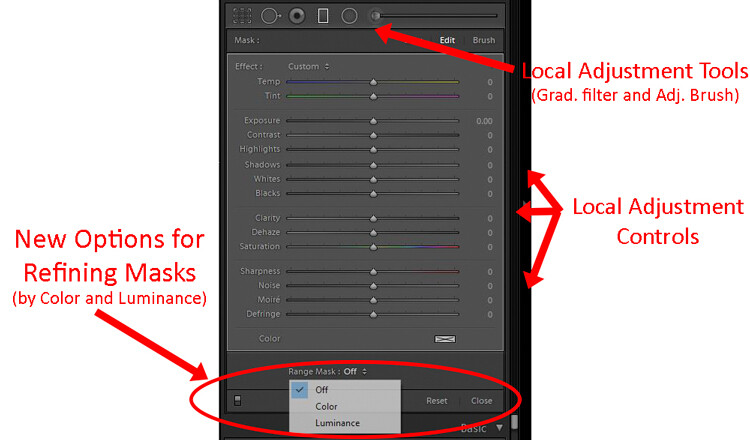
Adobe added new masking controls to the local adjustment tools – those being the Adjustment Brush, Graduated Filter, and Radial Filter. It is called the Range Mask feature, and it allows you to limit the selection you make by either the Luminance or the Color. In other words, if you make a selection with the Adjustment Brush or one of the filters, but there are things you don’t want to be included in your selection, you can remove them using these tools. This promises to make local adjustments much more doable in Lightroom.

Lightroom CC

Now comes the new part, and the one everyone is talking about (for good or for bad), Lightroom CC. This is a whole new Lightroom. It really comes down to three principles.

  1. Lightroom CC is simpler to use
  2. It is designed for mobile devices
  3. It relies largely on cloud storage

Let’s take a look at each of these.

#1 Lightroom CC is simpler

Lightroom CC has a simpler interface. It is streamlined and more intuitive. Those new to Lightroom will find it easier to navigate and use.

New Lightroom CC or Lightroom Classic: Which is Right for You?

Simplified Lightroom CC editing controls.

This comes at a cost though. Experienced Lightroom users will find the experience a little like switching from Photoshop to Photoshop Elements. There are entire modules of Lightroom that are missing from Lightroom CC.

There are no Print, Maps, or Books modules. There are some editing functions that are missing as well (the Tone Curve and Camera Calibration). There is no Photo Merge or HDR. In fairness, however, over 90% of the editing functions in traditional Lightroom are present in Lightroom CC.

New Lightroom CC or Lightroom Classic: Which is Right for You?

Expanded Lightroom CC editing controls.

#2 Lightroom CC is for mobile

Lightroom CC is designed for mobile platforms. It will look and work exactly the same whether you use it on your phone, your tablet, or your desktop. You’ll be editing full resolution versions of your photos, and they will be synced to all your devices. What’s more, Lightroom CC makes it easy to share your photos to various social media channels. Because of this, however, you can only export to JPEG (no PSDs or TIFFs) and only in sRGB, which is the color space that is used for all online photos.

#3 Cloud storage

All your edits in Lightroom CC are backed up to cloud storage. Of course, this will cost you extra. More about the plans below, but the first TB of data will cost you $ 10 a month, and it goes up from there. There is also an additional element of organization added in; Lightroom CC uses Adobe’s Sensei to automatically add keywords to your photos.

The Plans

Here’s the deal, though, you don’t necessarily have to choose between the different versions of Lightroom. If you subscribe to the Photography Plan (in my opinion, most readers of this website should be doing that) you already get Lightroom CC. It has just been added to your subscription, along with a token 20 GB of cloud storage. If you aren’t already familiar with the Photography Plan, it is where you get Photoshop and Lightroom for $ 10 a month.

If you want additional cloud storage, it will cost you more. 1 TB of cloud storage costs another $ 10 a month, taking the Photography Plan plus the 1 TB of cloud storage up to $ 20 a month.

Finally, if you only want the new Lightroom CC, you can get it along with 1 TB of cloud storage for $ 10 a month. That might be a good option for those that are very mobile, store everything to the cloud, and/or are just getting started with Lightroom.

Here is a chart from Adobe showing the options:

Purchased outright version is going away

There is one more thing you need to know. If you want to purchase Lightroom outright and avoid the monthly charge, you can still do so, but Lightroom 6 is your last chance. Adobe will also stop updating that fairly soon (meaning if you buy a new camera and LR 6 can’t open the raw files there will be no update for that – you’d have to convert them all to DNG before importing). The days of being able to purchase Lightroom (as opposed to renting it) appear to be just about over.

Which version of Lightroom is right for you?

So, which one is right for you? If you are just starting out with Lightroom and your photography is based on mobile platforms, then Lightroom CC might be for you. But if you are already using Lightroom, I think Classic is the way to go.

If you are used to Lightroom, then switching to CC will probably seem like a step backward. Further, if you tend to use desktops and laptops for your editing, then Classic is clearly the way to go. For those instances when you need to do something on your phone, there is always Lightroom Mobile (not ideal, but it works in a pinch).

Of course, all this assumes that Adobe keeps updating Lightroom Classic (the use of the term “Classic” has a lot of people scared since that is often the kiss of death in the tech world).  For the moment at least, Adobe is promising continued updates to it.

Poll

Fill in this quick poll and tell us what you’ll be choosing in regards to Lightroom.
Note: There is a poll embedded within this post, please visit the site to participate in this post’s poll.

The post New Lightroom CC or Lightroom Classic: Which Version is Right for You? by Jim Hamel appeared first on Digital Photography School.


Digital Photography School

 
Comments Off on New Lightroom CC or Lightroom Classic: Which Version is Right for You?

Posted in Photography


Godox to introduce Elinchrom mount version of AD600 TTL studio flash

08 Nov

Chinese flash manufacturer Godox has posted an instruction manual on its website that suggests it is about to introduce a version of its Witstro AD600 TTL battery-powered studio flash head with an Elinchrom mount. According to the manual, the AD600E head is exactly the same as its existing AD600/A600B other than the Godox or Bowen’s mount has been switched so the head will accept Elinchrom mount accessories.

There is nothing to suggest that the company plans to introduce a manual version of the Elinchrom-mount head, so all control will be TTL via the Godox wireless radio system.
No release date is given on the manufacturer’s website, but we should expect the head to cost around $ 750 like the existing models.

Articles: Digital Photography Review (dpreview.com)

 
Comments Off on Godox to introduce Elinchrom mount version of AD600 TTL studio flash

Posted in Uncategorized


Review of the Latest Version of PaintShop Pro 2018

02 Oct

In this article, I will review the latest version of PaintShop Pro 2018. I have a unique perspective, having used it over 17 years ago for the first time. Let’s see how it fairs now.

Please note: this is a Windows-only program.

Start of PaintShop Pro (PSP)

Approximately 17 years ago I was working in retail selling computer hardware and software. A lot of people came in asking for Photoshop and were understandably shocked when they were informed the price was $ 1500. So being able to offer them an alternative for around $ 200 meant I made a lot of sales of what was then PaintShop Pro Version 7.

Review of the Latest Version of PaintShop Pro 2018

Since then, Corel bought the program and invested in further development. PSP (as it was known in the day) could do quite a bit of what Photoshop did, it had layers and masking, support for graphics tablets, and for the majority of people who just wanted to be creative, was a very cost-effective option. It was laid out in a similar way to Photoshop, functioned very similarly and to a certain extent was just as difficult to learn for a newbie.

Things have changed a lot since then. Now, I have spent the last three years learning to use Photoshop to creatively edit my images beyond straight photography. With a new set of skills under my belt, it’s time to see what PaintShop Pro 2018 can offer once again.

Price and Options of PaintShop Pro 2018

PaintShop Pro 2018 is available in both Standard ($ 64.99 USD) and Ultimate ($ 79.99 USD) options, where Ultimate includes some other potentially useful Corel programs. For our purposes here, this review will only cover the Standard version.

Purchase Full version for a new installation, or upgrade if you are a current user.

Please note that PaintShop Pro 2018 is only compatible with Windows operating systems, however, it must also be noted that this is a perpetual license, not a subscription. You only need to pay once and it’s yours forever, which may appeal to some customers.

Ease of Use

On starting up PaintShop Pro you are greeted with a Welcome screen and the choice of Essentials or Complete.  Each screen is a different color to minimize confusion. At the bottom of each screen is a choice of links encompassing tutorials, free stuff and access to technical support.

Review of the Latest Version of PaintShop Pro 2018

There is also access directly within the program to purchase extra textures, software (including an upgrade to the Ultimate version) and lots of different plugins and special effect options.

Creating a new file offers choices from a custom design and several different image or document presets.

Review of the Latest Version of PaintShop Pro 2018

The Essentials Workspace

The Essentials workspace layout is very simple and clean with the usual central space dedicated to the image, a menu bar at the top, tool bar options to the left and right, and an image browsing interface (similar to Adobe Bridge) at the bottom.

The left tool bar can be moved, docked, floated or stretched out to a single column of buttons. Adding or removing functions is easily done by clicking on the plus (+) at the bottom and selecting from the choices available. It is a pretty extensive list and would likely cover the requirements for most average users.

The right tool bar by default handles the colour palette options and can also be docked by right-clicking and selecting that option.

Review of the Latest Version of PaintShop Pro 2018

The Complete Workspace

The Complete workspace layout is a bit more involved with an additional Learning Center docked on the right-hand side. Good news is that if you switch between Essentials and Complete, the program remembers your preferences for laying out the menus so it stays consistent. Layers also dock much tidier in Complete workspace than they do in Essentials – so if you want to use Layers, I suggest using the Complete workspace. There is a fair amount of customization of the visual layout, sizing, and color options as well under User Interface.

Keyboard shortcuts appear to be pretty similar to those used in Photoshop. I tested Ctl+Z (undo), B, and X with expected results.

Review of the Latest Version of PaintShop Pro 2018

Performance

The system used for testing was an HP Z230 Workstation with an i7-4770 3.4Ghz processor, 12GB memory, and an SSD drive. The performance was quick and responsive. However noticeable lag was experienced when bringing in a large PSD file with around 50 layers. It took about a minute for the program to process and open the file.

Linking to a Network Drive to view RAW files also showed some hesitation while the program did some background processing.

Image Management and Editing

Enhance Photo options are available within both the Essential and Complete workspaces. My preference is for the Smart Photo fix, as you get a large preview window to view the effect of adjustments, plus you have more options and control over the settings. One Step Photo Fix is a “click the button and what you get is what you get”. Smart Photo Fix gives you basic options but with a bit more control.

Review of the Latest Version of PaintShop Pro 2018

Smart Photo Fix option offers some basic editing options as well as a Before and After preview which is really useful.

There are also some Lens Correction options under the Adjust Menu to help counter various distortion problems.

The usual Adjustment layers are available; Brightness/Contrast, Curves, Hue/Saturation, and Levels being the most likely candidates, plus a few unique to PaintShop Pro. One feature I did particularly like was that it offers a preview of the effect from within the editing palette.

Review of the Latest Version of PaintShop Pro 2018

A preview window is offered on all the Adjustment Layers that I tested.

Working with RAW images

RAW images can be edited via a Camera Raw option. It appears to work similar to Lightroom, where you point the navigation at the desired folder and it pulls up the images in a grid view. I have everything saved on an NAS (Network Attached Storage), and the Computer navigation option couldn’t view it, but I was able to add a link to the NAS under the Collections>Browse more Folders option. It took a while for the program to make the network linkage, and bring up the images.

Once you find the RAW file you want to edit, select it and click the EDIT Tab and it will open up a fairly basic panel with similar options to Adobe Camera Raw. It would be on a par with Lightroom version 3 or 4, so quite limited compared to current Adobe options. However, if you do not need the more advanced features, it is quite functional.

Review of the Latest Version of PaintShop Pro 2018

Raw file editing is fairly basic compared to today’s standards (Adobe ACR) but it covers the bases for most home users without being too complicated.

Creative Options

Masks are still a bit clunky. When you want to add one, you are asked to choose from three options – if you want it to behave the same way you expect in Photoshop, choose Source Opacity. The default is Source Luminance.

Review of the Latest Version of PaintShop Pro 2018

No wonder I found masks so difficult to learn back when first using PaintShop Pro.

The Scratch Remover worked alright but when I tested it on a textured background, there was an obvious blur visible where it had applied. Object Remover was a bit clunky to use, in that you had to select the object you wanted to remove with one tool, and the background you wanted to replace it with via a separate tool. Once applied it did a pretty good job. Some feathering of the edges, and it would blend in nicely.

Here you can see a line of blur where I have used the Scratch Remover (red circle). I have also used the Content-Aware option but that is less obvious (purple circle).

Text can be applied, and there are lots of options for texture, paint, brushes (though there is a very limited default range of brushes, you do have the option to purchase more or create your own).

Review of the Latest Version of PaintShop Pro 2018

Brushes and text and using layers.

Conclusion

PaintShop Pro 2018 is a program that is clearly aimed at the consumer market. With two levels of control, it caters to the most basic requirements, and still allows enough scope for people who want to stretch their editing capabilities.

For those needing professional or advanced level editing Lightroom and Photoshop, both offer much more advanced functionality, but PaintShop Pro will cater to the vast majority of user requirements. The price is attractive, as is the lack of any ongoing subscription costs. A lot of work has gone into improving and modernizing the interface and there is a lot of flexibility offered as to how you can interact with the program.

It offers a good range of tools and options at a reasonable price and should not be overlooked. It would compare favorably against Adobe Elements.

Rating

There are a few historical quirks (like management of layers) that should be improved to make it easier to use. But PaintShop Pro is ideal for a home user who wants a range of features that are not too complicated.

The post Review of the Latest Version of PaintShop Pro 2018 by Stacey Hill appeared first on Digital Photography School.


Digital Photography School

 
Comments Off on Review of the Latest Version of PaintShop Pro 2018

Posted in Photography


Meyer Optik launches modern version of historic Lydith 30mm F3.5

09 Jun

German optical manufacturer Meyer-Optik-Gorlitz has launched a Kickstarter campaign to help it reintroduce its Lydith 30mm F3.5 lens. The original lens was launched in 1964 and the forthcoming version will remain true to the basic design of five elements in five groups, but the new company will be updating a number of its features.

Meyer will use Schott glass, modern coatings and a 12-bladed iris instead of the 10 of the original lens. The modern Meyer Optik trades on the interesting ‘bubble’ bokeh of its Trioplan lenses and has gone to some lengths to ensure bokeh is equally exciting to the eye in its modern relaunched lenses.

The original Lydith from 1964

The Lydith will offer a closest focusing distance of just 16cm/8in, which is approximately half that of the 1964 lens, and although the company hasn’t said specifically it is likely that it will have a click-less aperture ring as well.

The standard price of this manual focus lens on the Kickstarter page is $ 749, though some early bird offers were left at the time of writing. The earliest shipping date is December 2017, with the main batch going out in February 2018.

For more information about the company see the Meyer-Optik-Gorlitz website or the Lydith 30mm F3.5 Kickstarter page.

Manufacturer’s newsletter

Meet our new lens – create magic

Dear Meyer-Optik-Görlitz friend,

We are very excited and proud to introduce you to the next in our oustanding line of art lenses – the Lydith 30mm f3.5

One of the widest lenses in the Meyer-Optik lineup, the Lydith will impress you with its versatility at all distances. Exceptional sharpness, contrast and colour fidelity and it’s wonderful ability to create images with that indefinable magic is how this lens can best be described. It is a lens that will allow you to creatively capture those “magic moments”.

Designed in the late 1950s and introduced in 1964, the modern version of the Lydith will be updated with high-perfomance lens coatings and a short minimum focusing distance of 8 inches (16 cm). Like all of Meyer-Optik’s lenses, the Lydith will be fully manual, 100 percent handmade in Germany.

We think you are going to fall in love with the way it renders colors, its exceptional sharpness and, of course, it’s signature creamy bokeh not only in the background but also in the front.

Don’t miss out – visit our Kickstarter now and be one of the first in the world to own the modern version of this classic lens.

Best regards,

Dr. Stefan Immes and the Meyer-Optik Team

Articles: Digital Photography Review (dpreview.com)

 
Comments Off on Meyer Optik launches modern version of historic Lydith 30mm F3.5

Posted in Uncategorized