RSS
 

Posts Tagged ‘Updates’

Instagram is testing a ‘Regram’ button and other major feature updates

30 Nov
Photo by Erik Lucatero

Instagram is testing a bunch of new features, including one very intriguing and long-awaited button that will put several 3rd party apps out of business: the Regram. The new features were published by The Next Web, which was able to obtain screenshots of several feature updates that are still only being tested with small groups of users.

First things first though: Regram. Like Tumblr’s Reblog or Facebook’s Share, regramming would allow Instagram users to share another user’s photo or video with their own followers. Third party apps already allow for a cumbersome version of this, but a built-in button has never existed… until now.

Regram Button Screenshot. Credit: The Next Web

In addition to the Regram, TNW found that Instagram may soon:

  • Allow you to search for and add GIFs to your profile or Instagram Story.
  • Allow iOS users to join a Beta program that will give you early access to upcoming versions of the app.
  • Add an Archive feature for Stories (you can already archive regular posts)
  • Create a “Closest Friends List” that lets you share posts or stories with a smaller more intimate group.
  • Share to WhatsApp
  • Search by Top Hashtag and Top Emoji
  • Follow hashtags, not just other profiles

There is also an “Add Coffee” button that mysteriously popped up in the share page (the same page where you write your caption, select the social media accounts you’d like to share to, and click post). Nobody seems to have any idea what that’s about.

To see screenshots of all these features, head over to The Next Web’s report by clicking here. And let us know what you think of these new features in the comments down below.

Articles: Digital Photography Review (dpreview.com)

 
Comments Off on Instagram is testing a ‘Regram’ button and other major feature updates

Posted in Uncategorized


Adobe updates Photoshop CC with new tools, 360° image editing, HEIF support and more

19 Oct

$ (document).ready(function() { SampleGalleryV2({“containerId”:”embeddedSampleGallery_2078864935″,”galleryId”:”2078864935″,”isEmbeddedWidget”:true,”standalone”:false,”selectedImageIndex”:0,”startInCommentsView”:false,”isMobile”:false}) });

The all-new Lightroom CC (and newly-renamed Lightroom Classic CC) might be hogging the spotlight at Adobe MAX 2017, but Adobe didn’t forget to throw some love Photoshop’s way. In addition to the standard performance enhancements you expect with every update, Photoshop CC has been gifted with a slew of new features, including: the new curvature pen tool, 360° spherical image editing, HEIF format support, Select and Mask improvements and more.

All of the improvements are summarized in the list below, and while none of them will blow your mind, there’s plenty there for regular Photoshop users to be happy about:

According to Adobe, the most requested improvement that ships with the new version of Photoshop CC is actually the enhanced Brush Presets and Brush Preset Management, which you can see demonstrated in the video below:

And with the explosion of 360° images into the mainstream and the release of iOS 11, the ability to open & edit spherical 360° panoramic images in Photoshop, as well as HEIF format images, is a big deal as well.

Other notable improvements include the new color and luminance range masking tools that were also added to Lightroom CC, the Curvature Pen Tool that Adobe teased us with just last month, and improved Select & Mask functionality overall. You can see these new features in action in the YouTube videos embedded below:

As with all previous updates to Photoshop CC, you won’t have to pay anything extra if you’re already a subscriber. The $ 10/month Creative Cloud Photography Plan now includes 20GB of cloud storage, Photoshop CC, Lightroom CC, and Lightroom Classic CC; or you can upgrade to 1TB of storage for $ 15/month until next year, when that price will go up to $ 20/month.

To learn more about these updates from Adobe itself, head over to the Adobe Photoshop blog by clicking here.

Articles: Digital Photography Review (dpreview.com)

 
Comments Off on Adobe updates Photoshop CC with new tools, 360° image editing, HEIF support and more

Posted in Uncategorized


Fujifilm releases firmware updates for X-T2, X-Pro2 and two lenses

06 Oct

Fujifilm has released firmware updates for its X-T2 and X-Pro2 camera bodies. The update to version 2.12 on the X-T2 and version 3.12 on the X-Pro2 fixes an issue that could occasionally cause the cameras to lock up when shooting in continuous high speed mode.

The X-T2 and X-Pro2 firmware updates are available to download at the links below:

  • X-T2 Firmware ver. 2.12
  • X-Pro2 Firmware ver. 3.12

Additionally, the company released updates for its XF 18-55 and XF 10-24 lenses. The new versions of the lens firmware fix an issue that could cause the focal length to be displayed incorrectly, and/or cause shaking in peripheral parts of images, even with focal length focus fixed.

You can download those updates by clicking on the links below.

  • XF18-55 Firmware ver. 3.22
  • XF10-24 Firmware ver. 1.12

Articles: Digital Photography Review (dpreview.com)

 
Comments Off on Fujifilm releases firmware updates for X-T2, X-Pro2 and two lenses

Posted in Uncategorized


Synology launches its first 6-bay NAS tower, updates more affordable options

22 Sep

Storage solution company Synology has introduced its first six-bay NAS device: the DS3018xs. The new model holds six drives of its own, but if that’s still not enough storage for your epic photo library, it can combine with the company’s DX1215 expansion units to control up to thirty.

The company has used the Pentium D1208 dual-core 2.2GHz processor that can boost to 2.6GHz, and provides a PCle slot for users to install an optional dual M.2 SATA SSD adapter to shift processing onto solid state drives for speed and efficiency. The DS3018xs comes with 8GB of RAM installed, but has two memory slots for expansion up to 32GB, and an optional 10GbE network card can provide 2230MB/s sequential read speeds.

At the same time, Synology has launched four other DS and DS+ models that replace existing NAS enclosures. The new DS918+ and DS718+ are upgrades of the DS..16+ models, and bring more memory capacity and options for adding extra slots via DX517 expansion unit. These models and the DS218+ and DS418 get new processors as well, while all are said to be capable of transcoding 4K video on the go.

Synology has started a series of workshops around the world that demonstrate some of these models and show off the company’s technology. They are free to attend to anyone registered via the Synology 2018 events page. For more information about the new NAS enclosures visit the Synology website.

Pricing

DS3018xs – £1298.18 (including VAT), €1190 (excluding taxes)
DS918+ – £518.18 (including VAT), €475 (excluding taxes)
DS718+ – £414.55 (including VAT), €380 (excluding taxes)
DS218+ – £310.90 (including VAT), €285 (excluding taxes)
DS418 – £387.91 (including VAT), €351 (excluding taxes)

Press Release

From Home to Business: Synology® Unveils New XS/Plus/Value-Series Product Lineup

Storage solutions designed to meet a multitude of needs

Synology® Inc. announced the official launch of new product lineup featuring:

DS3018xs: Synology’s first 6-bay tower NAS with optional 10GbE and NVMe SATA SSD supports

Plus-series DS918+, DS718+, and DS218+: Designed to meet your intensive daily workloads

Value-series DS418: Featuring optimized 4K online transcoding capability

To allow for ultra-high performance using SSD cache without occupying internal drive bays, DS3018xs features a PCIe slot, which can be installed with a dual M.2 SATA SSD adapter card (M2D17). DS918+ comes with dedicated dual M.2 NVMe slots at the bottom where you can directly install M.2 NVMe SSDs. DS418 features 10-bit H.265 4K video transcoding, and while supporting the next-generation Btrfs file system in DSM 6.2 official, expected to release in early Q1 next year. Btrfs provides reliable data protection through its cutting-edge self-healing and point-in-time snapshot features.

DS3018xs, Synology’s first 6-bay tower NAS, is compact yet powerful as it features the Intel’s advanced Pentium D1508 dual-core 2.2GHz processor (Turbo Boost up to 2.6GHz) with AES-NI encryption engine; offering scalability of RAM up to 32 GB and storage capacity up to 30 drives with two Synology DX1215. In addition to four Gigabit LAN ports, DS3018xs takes advantage of boosting maximum throughput with an optional 10GbE network interface card, delivering stunning performance at over 2,230 MB/s sequential reading and 265,000 sequential read IOPS.

DS918+ and DS718+ are powered by Intel‘s Celeron® J3455 quad-core processor. DS218+ is powered by Intel’s Celeron® J3355 dual core processor. Both models are equipped with AES-NI hardware encryption engine and support up to two channels of H.265/H.264 4K video transcoding.DS918+’s RAM is scalable up to 8GB, while DS718+ and DS218+ are scalable up to 6 GB, allowing you to operate more intensive tasks at once. DS918+ and DS718+ are equipped with two LAN ports, and their storage capacity can be scaled up to 9 and 7 drives, respectively, with Synology’s DX517 expansion unit.

“Responding to the demands from our customers, DS3018xs is built as a comprehensive business-ready desktop NAS. Running mission-critical applications or planning virtualization deployment with DS3018xs has never been easier.” said Katarina Shao, Product Manager at Synology Inc. “The new DS918+, DS718+, and DS218+ are optimized to be your digital video libraries, and will bring you an excellent viewing experience with high definition live video transcoding, regardless of device limitations.”

DS418 is equipped with a 1.4GHz quad-core processor with hardware encryption engine, 2 GB RAM, and two LAN ports. Powered by the hardware transcoding engine, DS418 supports H.265 4K transcoding allowing it to serve as your media library. Combined with Btrfs and Snapshot supports, DS418 is delivers more efficient data storage and more reliable data protection.

For more information on DS3018xs, please visit https://www.synology.com/products/DS3018xs

For more information on DS918+, please visit https://www.synology.com/products/DS918+

For more information on DS718+, please visit https://www.synology.com/products/DS718+

For more information on DS218+, please visit https://www.synology.com/products/DS218+

For more information on DS418, please visit https://www.synology.com/products/DS418

Articles: Digital Photography Review (dpreview.com)

 
Comments Off on Synology launches its first 6-bay NAS tower, updates more affordable options

Posted in Uncategorized


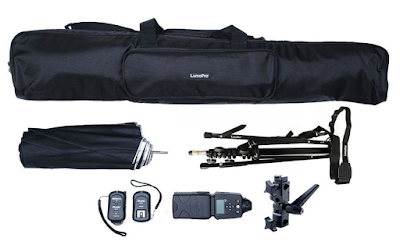
Major Updates to Strobist Lighting Kits

23 Aug

Strobist lighting kits are the modern day version of the basic speedlight-based setup I carried on my daily newspaper assigments for the better part of 20 years.

Over the past ten years, the recommended kit has gone through several evolutions. But recently there have been significant updates to several of the components (and a cool addition) making the kit better now than at any other time. I thought the updates merited a shoutout.

The kits are built around the idea of strong value with thoughtfully chosen components, many with unique features. All components carry best-in-class warranties, and can be expected to give you good service for years. If I was talking to myself as a 20-year-old, I’d advise me to get this before even buying a second lens.

The lighting kits come in several variations: Single with flash, single without flash, two-light version (two of everthing; but one remote) and add-a flash (one of everything, no remote).

Current components are as follows, with updates/additions noted:

Flash: LP180

The LumoPro LP180 is basically a bullet-proof (not literally, but relatively) manual flash that comes with the stuff you need, without the bells and whistles that you don’t.

Notable features include four-way sync, 1/1 – 1/128 manual power, variable slave, selectable ready tone, smart thermal protection, power equal to or greater than OEM flagship flashes, 1/4″x20 side mount and built-in gel clips. (It also includes a gel kit that covers the most commonly used CC and theatrical colors.)

Build quality of the LP180 borders on ridiculous. (One was famously destroyed in the field by a leopard. It was replaced.)

Warranty: twice as long as OEM flagships.

Price: one-third of OEM flagships.

Remote: Phottix Ares Original Model
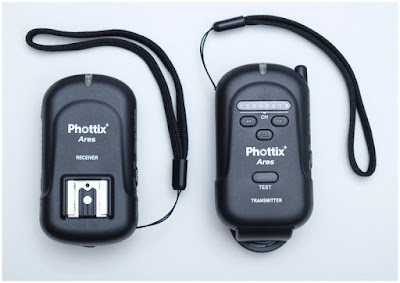
A legit remote trigger for not much more than the cost of a sync cord. Features include: AA-powered (no weird batteries to find) 8 channels, hot-shoe based mount and excellent reliability. Backed by a two-year warranty.

I have been teaching with (and using) these remotes for several years now. They are solid.

Stand: LP605S
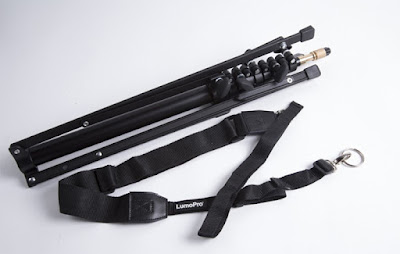
Recently updated; best in class. The LP605S is the classic, 5-section compact stand — except beefier build, and with a couple of unique added features.

One, it comes with folding ground spikes that will add to stability when used outside. Un-sandbagged umbrellas are always a risk in wind. But you can at least spike this stand and use bare flashes outdoors in a stiff breeze.

Two, the LP605S come predrilled for a strap, and includes the strap. This is somethng I DIY’d for many years, and the idea has now found its way to what was already the best compact stand on the market.

Umbrella: LumoPro 3-in-1 Double Fold

Recently swapped; best in class. Functionally similar to my older Westcotts, but with better build quality, more durability and added features.

The LP version gives you the choice of the best umbrella surface for any given job. It converts from white shoot-thru, to white reflective (black-backed) and silver reflective.

Unlike most double-folds, LP 3-in-1 umbrellas do not feel like fragile little flowers right out of the box. They are more substantial, and have lasted far longer than other models in daily use.

They also come with a slip case the does not make it feel like your umbrella is trying to squeeze into skinny jeans every time you try to case it.

Swivel: LP679-v2
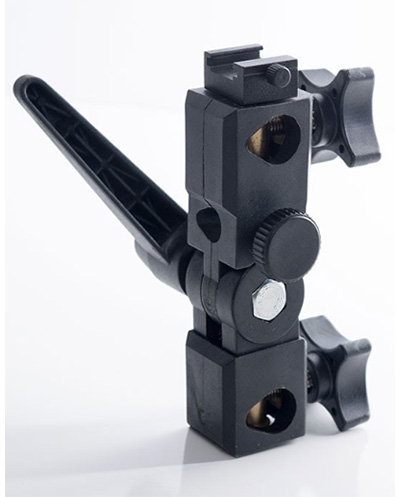
Recently updated; best in class.

Finally, someone has nailed the swivel. The 679-v2 has all of the things common sense dictates in a swivel: removable cold shoe, big arm/smooth hinge, and a cold shoe post lockdown that does not bump up against your flash.

The recent improvement that sets it apart is in the umbrella lockdown screw. It is big and knurled. God only knows why, but most every other swivel I have seen puts a tiny thumb-mangler lockdown nub there. Why?

The LP679-v2 is LumoPro listening to photographers’ upstream suggestions. As a result it is much better in practical use, comparatively speaking, than other swivels.

Bonus: Lighting in Layers

Lighting in Layers was a 6-DVD, 8-hour video tutorial series that sold for $ 159.99 from 2011 to 2016. (Full info here.) After six printings, the idea of physical DVDs had run its course. And since those DVDs had been very good to our family, I wanted to pay it forward to the next generation of lighting photographers.

So, all versions of the Jumpstarter kits purchased directly from Midwest Photo now include SD or thumbdrive versions of the Lighting in Layers video series. This is especially cool because one of the Jumpstarter kit versions (single/no flash) actually sells for less than the original cost of the DVDs.

VERY IMPORTANT, PLEASE NOTE:

Jumpstarter kits are available both on Amazon (finally!) and directly from Midwest Photo. Only the kits purchased directly from Midwest Photo include the video series. So if the video is important to you, choose Midwest. If not, you can go the easy two-click route through Amazon.

And A Case

All Jumpstarter kits (except Add a Light kit, which presumes you already have a case) include a padded shoulder case that big enough to hold a two-light kit and various odds and ends.
__________

A Caveat for Sony Users

If you are a Sony user, your camera may have a non-standard hot shoe. Sigh. Thanks Sony. Which means that this flash and remote (and, sadly, many other lighting components) may not fit your camera.

Fortunately, there are workarounds. Sony shooters are advised to email Midwest Photo and they will step you through any adapters you may need.

Different Versions / Where to Buy

The Jumpstarter kits are now also available via Amazon, which makes for a super-easy (two clicks) way to order. If you go that route, understand that the Amazon versions do not come with the lighting videos. That is a Midwest Photo in-store exclusive. Other that that, they are identical to the Midwest versions.

• If you already own a flash, single version without flash:

Midwest Photo (includes Lighting in Layers video): $ 147.99

Amazon, DOES NOT INCLUDE VIDEO: $ 147.99

• Single version, includes LP180 flash:

Midwest Photo (includes Lighting in Layers video): $ 276.99

Amazon, DOES NOT INCLUDE VIDEO: $ 276.99

• Two-light kit (portable, wireless 2-light studio, professional quality, for less than the cost of a single Nikon or Canon flagship flash):

Midwest Photo (includes Lighting in Layers video): $ 479.99

• Single add-a-light kit (includes flash but no remote or case):

Midwest Photo (includes Lighting in Layers video): $ 203.00
Strobist

 
Comments Off on Major Updates to Strobist Lighting Kits

Posted in Photography


Sigma updates firmware for popular 24-70mm F2.8 Art lens and MC-11 converters

19 Aug

Sigma has released firmware updates for both its 24-70mm F2.8 DG OS HSM | Art lens and its Mount Converter MC-11 SA-E and EF-E. Both updates address an issue in which the optical stabilization mechanism malfunctions when the lens is used with either of the aforementioned MC-11 mount converters.

The products can be updated using Sigma Optimization Pro 1.4.1 or greater for Windows or version 1.4.0 or greater for Mac, as well as with the Sigma USB Dock.

Articles: Digital Photography Review (dpreview.com)

 
Comments Off on Sigma updates firmware for popular 24-70mm F2.8 Art lens and MC-11 converters

Posted in Uncategorized


Nikon updates firmware for D600, D610, D750 and KeyMission 80

27 Jul

Nikon has updated multiple camera models with new firmware, bringing many bug fixes, as well as some new lens support and improvements to the D600 (version 1.03), D610 (version 1.02), D750 (version 1.12), and KeyMission 80 (version 1.2). All four updates are available to download now from the Nikon website. The full update changelogs are listed below:

Nikon D600 v1.03

  • Added support for the following features of AF-P lenses:
    • If the standby timer expires after the camera has focused, the focus position will not change when the timer is reactivated.
    • In manual focus mode, the focus indicator in the viewfinder (or in live view, the focus point selected in the monitor) will flash to show that infinity or the minimum focus distance has been reached by rotating the focus ring.
  • Added support for AF-P DX lenses.
  • Fixed the following issues:
    • Optimal exposure would sometimes not be achieved in photos taken in live view using a lens with electromagnetically controlled aperture (type E lenses).
    • When used to take pictures after an option was selected for Custom Setting d10 (Exposure delay mode) in the CUSTOM SETTING MENU, Camera Control Pro 2 would sometimes display the error “The camera was not able to take a picture.” despite having actually taken the picture.

Nikon D610 v1.02

  • Added support for the following features of AF-P lenses:
    • If the standby timer expires after the camera has focused, the focus position will not change when the timer is reactivated.
    • In manual focus mode, the focus indicator in the viewfinder (or in live view, the focus point selected in the monitor) will flash to show that infinity or the minimum focus distance has been reached by rotating the focus ring.
  • Added support for AF-P DX lenses.
  • Fixed the following issues:
    • Optimal exposure would sometimes not be achieved in photos taken in live view using a lens with electromagnetically controlled aperture (type E lenses).
    • When used to take pictures after an option was selected for Custom Setting d10 (Exposure delay mode) in the CUSTOM SETTING MENU, Camera Control Pro 2 would sometimes display the error “The camera was not able to take a picture.” despite having actually taken the picture.

Nikon D750

  • Added support for the following features of AF-P lenses:
    • ?If the standby timer expires after the camera has focused, the focus position will not change when the timer is reactivated.
    • ?In manual focus mode, the focus indicator in the viewfinder (or in live view, the focus point selected in the monitor) will flash to show that infinity or the minimum focus distance has been reached by rotating the focus ring.
  • Fixed the following issues:
    • ?When pictures were viewed after shooting with Overflow selected for Role played by card in Slot 2 in the PHOTO SHOOTING MENU, the camera would sometimes display the second-last picture taken.
    • Microphone sensitivity would sometimes not be correctly adjusted when movies were recorded with Auto sensitivity > Microphone sensitivity.

Nikon KeyMission 80

  • Improved an issue that interfered with pairing or resulted in unreliable connections when the camera was used with the Android edition of the SnapBridge app.

Articles: Digital Photography Review (dpreview.com)

 
Comments Off on Nikon updates firmware for D600, D610, D750 and KeyMission 80

Posted in Uncategorized


Adobe updates Lightroom Mobile with new features and interface on iOS and Android

19 Jul
Today’s Lightroom Mobile updates include the addition of the selective brush on iOS, and a new interface for Android users.

Adobe released a major update to Lightroom Mobile for both iOS and Android users today. Each update is unique, offering different features depending on which operating system you use. Scroll down for a summary of both.

Lightroom Mobile for iOS

For iOS users, today’s update includes a new selective brush, improved details tab, and an improved interface for iPad users.

The new selective brush is a much-requested update, allowing you to paint enhancements onto specific parts of your image. What’s more, 3D-touch enabled devices (iPhone 6S or later) will vary the strength of the brush based on finger pressure.

Other improvements include the addition of global sharpening and noise reduction to the Details tab, and a new iPad interface that has been optimized to take full advantage of the powerful processors found in the iPad Pro and iPad Pro 2.

$ (document).ready(function() { SampleGalleryV2({“containerId”:”embeddedSampleGallery_5384339921″,”galleryId”:”5384339921″,”isEmbeddedWidget”:true,”standalone”:false,”selectedImageIndex”:0,”startInCommentsView”:false,”isMobile”:false}) });

Lightroom Mobile for Android

On the Android side, today’s update focuses on making Lightroom mobile faster and, in Adobe’s own words, “more Android-y.”

“We wanted to provide the best Android experience possible ,so we redesigned Lightroom for Android from the ground up to be faster, more efficient, and, well, more Android-y,” explains Adobe’s Josh Haftel. “Every screen has been redesigned with the goal of ensuring a natural, native Android experience while providing the highest quality, professional-grade mobile photo editing app ever.”

$ (document).ready(function() { SampleGalleryV2({“containerId”:”embeddedSampleGallery_1712960971″,”galleryId”:”1712960971″,”isEmbeddedWidget”:true,”standalone”:false,”selectedImageIndex”:0,”startInCommentsView”:false,”isMobile”:false}) });

To take advantage of these updates on both iOS and Android, either update your Lightroom Mobile or download a new copy off the iTunes App Store or Google Play.

Articles: Digital Photography Review (dpreview.com)

 
Comments Off on Adobe updates Lightroom Mobile with new features and interface on iOS and Android

Posted in Uncategorized


Nikon releases several firmware and software updates, adds new features to the D5

13 Jul

Nikon has pushed out several updates today, increasing its D5 firmware from version 1.10 to 1.20, its D500 firmware from version 1.00 to 1.12, and its Coolpix B700 firmware from version 1.2 to 1.3. In addition to updating camera firmware, the company also updated its ViewNX-1 software from version 1.2.7 to 1.2.8, and its Camera Control Pro 2 software from version 2.25.0 to 2.25.1.

All of the updates are minor with the exception of the D5 firmware update, which brings a substantial number of changes including new features and a handful of bug fixes. The full change-logs for each update are listed below.

The updates are available via the following links:

  • Nikon D5
  • Nikon D500
  • Nikon Coolpix B700
  • Camera Control Pro 2
  • ViewNX-i

D5 Firmware Version 1.10 to 1.20:

  • Added two new AF-area modes: group-area AF (HL) and group-area AF (VL). The user selects a row (HL) or column (VL) of focus points; when AF-C is selected for focus mode, the camera will give priority to the point in the selected row or column containing the subject closest to the camera.
  • Updated the photo info display to show the color temperature for photos taken with Auto selected for white balance.
  • Added an Exif tag listing the difference between the local time zone and UTC, part of the Exif 2.31 specification.
  • Added the support for the following features of AF-P lenses:
    • If the standby timer expires after the camera has focused, the focus position will not change when the timer is reactivated.
    • In manual focus mode, the focus indicator in the viewfinder (or in live view, the focus point selected in the monitor) will flash to show that infinity or the minimum focus distance has been reached by rotating the focus ring.
  • Changed the checks performed when Clean image sensor > Clean now is selected in the SETUP MENU. We recommend that you perform image sensor cleaning after updating the firmware.

Fixed the following issues:

  • The higher the amount of Active D Lighting selected when optional flash units were used with auto aperture (AA), non-TTL auto (A), or distance-priority manual (GN) flash mode, the more the resulting images would be underexposed.
  • Changes to exposure (including exposure compensation) would not be reflected in the photo live view exposure preview while the display was zoomed in.
  • Photo live view display WB could not be selected in the i-button menu while the exposure preview was displayed in photo live view.
  • Taking long bursts of photos with On selected for Network > Options > Auto send would sometimes drastically slow the recording of data to the memory card.
  • Reduced the amount of time needed to connect to hidden SSIDs when WPA-PSK or WPA2-PSK is selected for Authentication.
  • Updated some help text.

Notice

Users of the software listed below will need to update to the following versions to support the changes in this firmware update:

    • Camera Control Pro 2 version 2.25.1 or later
    • ViewNX-i version 1.2.8 or later

Coolpix B700 Firmware 1.2 to 1.3

  • Fixed an issue that prevented the camera charging when connected to an AC charging adapter with Off selected for Charge by computer.

Nikon D500 Firmware 1.12 to 1.13

  • Fixed an issue that interfered with pairing or resulted in unreliable connections when the camera was used with the Android edition of the SnapBridge app.

Camera Control Pro 2.25.0 to 2.25.1

  • Added support for D5 “C” firmware version 1.20.
  • Added Group-area AF (HL) and Group-area AF (VL) options to AF-area mode (D5 “C” firmware version 1.20).

ViewNX-i 1.2.7 to 1.2.8

  • Added support for D5 “C” firmware version 1.20. Users can now:
    • View focus points for images taken using group-area AF (HL) and group-area AF (VL)
    • Use File and Camera Information to view the color temperature for photos taken using auto white balance

Articles: Digital Photography Review (dpreview.com)

 
Comments Off on Nikon releases several firmware and software updates, adds new features to the D5

Posted in Uncategorized


Sigma updates MC-11 Sony adapter, adds support for 24-70mm Art lens and more

10 Jul

Sigma continues to add compatibility to its MC-11 adapter, allowing more Sigma SA and EOS mount Sigma lenses to be used on Sony E-mount cameras. And the latest round of updates adds compatibility with one of Sigma’s most anticipated and exciting Art lenses.

The MC-11 comes in two variations—the MC-11 SA-E for Sigma-mount lenses, and the MC-11 EF-E for Canon mount lenses. The new firmware makes the converters compatible with Sigma’s new 14mm f/1.8 HD HSM | Art and the long-awaited 24-70mm f/2.8 DG OS HSM | Art lenses. The MC-11 EF-E also becomes compatible with Sigma’s Cine Lens 14mm T2 FF and 135mm T2 FF in the Canon EF mount.

The company has also released new firmware for its 100-400mm f/5-6.3 FG OS HSM | Contemporary telephoto zoom lens. The update improves AF speed in all cases, but it also improves functionality when mounted via MC-11 SA-E adapter. According to Sigma, focusing features are enhanced in the adapter-mounted lens, and the optical stabilization system becomes operational more quickly.

All firmware can be downloaded for free from Sigma’s download page, or through the Sigma USB dock. To update the MC-11 mount converter, simply plug it in to your PC and run the SIGMA Optimization Pro app.

Articles: Digital Photography Review (dpreview.com)

 
Comments Off on Sigma updates MC-11 Sony adapter, adds support for 24-70mm Art lens and more

Posted in Uncategorized