RSS
 

Posts Tagged ‘Tricks’

Landscape Photography Tips & Tricks: Getting the Big Picture

04 Feb

Of all the different types of photography, capturing images of landscapes is one of the most popular.   The compulsion to capture breathtaking images of sweeping vistas, crystal shorelines and towering mountains comes on especially strong whenever people travel to new places. You’ve probably noticed this whenever some of your friends go on vacations. Their Facebook walls become flooded with Continue Reading

The post Landscape Photography Tips & Tricks: Getting the Big Picture appeared first on Photodoto.


Photodoto

 
Comments Off on Landscape Photography Tips & Tricks: Getting the Big Picture

Posted in Photography


Tips, Tricks and Treats for Your Halloween Photos

15 Oct

This week, when my fearless leader, Photodoto Head Honcho Nancy Young, asked me to write a story on shooting Halloween, I must admit that I kind of had a freak out attack. I’m just not a Halloween person. I mean, bobbing for apples? Totally unsanitary. Haunted houses? They’re SCARY. But of course I take pictures of my children in their Continue Reading

The post Tips, Tricks and Treats for Your Halloween Photos appeared first on Photodoto.


Photodoto

 
Comments Off on Tips, Tricks and Treats for Your Halloween Photos

Posted in Photography


Trained Eye: Rail Art Plays Visual Tricks with Tracks & Ties

04 Aug

[ By WebUrbanist in Art & Street Art & Graffiti. ]

train art rail music

This artist colors outside the lines (or off the rails, if you will) with his clever train-centric creations, dashing onto the tracks to complete pieces that play with the site-specific transit infrastructure in public places.

train painting hand shake

train graffiti scary jump

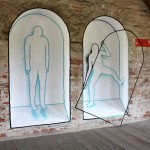
Portuguese artist Artur Bordalo (AKA Bordalo II) works in and around the train lines, using what is there as props and backdrops for his colorful compositions, turning them into musical lines, extended arms or text underlines.

train on off art

bordalo train tick tac toe

train outside the lines

Many of these are necessarily quickly-executed pieces, placed as they are around active train tracks, while others use abandoned railways and include three-dimensional objects in the mix.

bardalo wall apple mixed

bardalo installation art

bardalo mixed media art

We would be remiss not to mention his other works of urban installation art, often vibrant and including mixed-media elements drawn together, collaged and montaged from their environments (often including garbage and even its receptacles).

Share on Facebook


[ By WebUrbanist in Art & Street Art & Graffiti. ]

[ WebUrbanist | Archives | Galleries | Privacy | TOS ]


WebUrbanist

 
Comments Off on Trained Eye: Rail Art Plays Visual Tricks with Tracks & Ties

Posted in Creativity


Sam Horine:Travel Photography Tips and Tricks

17 Jul

How do you capture the magical feeling of traveling to a new city for the first time?

Heck if we know! So … We found someone who does.

Sam Horine shoots cityscapes so stunning a scroll through his Instagram feed feels like a trip around a whole new world.

We wanted to know just how he captures the cities he visits so very well, so we asked him … and he told us!

Learn to Shoot Cityscapes Like a Pro (Sam Horine Specifically)

(…)
Read the rest of Sam Horine:
Travel Photography Tips and Tricks (859 words)


© laurel for Photojojo, 2014. |
Permalink |
No comment |
Add to
Travel Photography Tips and Tricks”>del.icio.us

Post tags:


Photojojo

 
Comments Off on Sam Horine:Travel Photography Tips and Tricks

Posted in Equipment


Loop Portraits:Romain Laurent Reveals His Tricks

05 Jun

When we see a photo that just makes us say, “How in the world?!” we just have to stop talking out loud to our computer screen, hunt down the genius behind said stunner and ask them…

“How in the world?!”

Turns out it’s Romain Laurent who crafts the mind bending, perfectly looped portraits that had us agog.

So, we tracked him down and bombarded him with “hows,” “whys” and “you’re so cools.”

Check out his answers and see more of his loop portraits over on our blog.

Romain Laurent Reveals The Tricks to His Trade

(…)
Read the rest of Loop Portraits:
Romain Laurent Reveals His Tricks (753 words)


© laurel for Photojojo, 2014. |
Permalink |
No comment |
Add to
Romain Laurent Reveals His Tricks”>del.icio.us

Post tags:


Photojojo

 
Comments Off on Loop Portraits:Romain Laurent Reveals His Tricks

Posted in Equipment


Small Space Hacks: 24 Tricks for Living in Tiny Apartments

29 Apr

[ By Steph in Design & Furniture & Decor. ]

Small Apartment Hacks Main

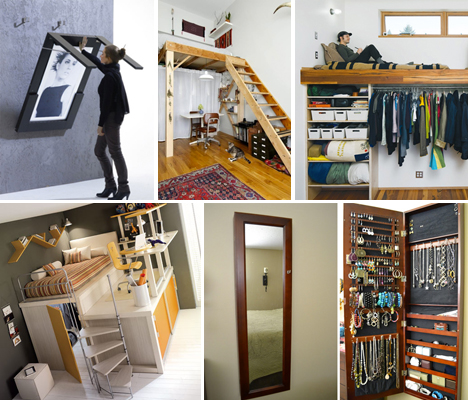
Making the most of a tiny apartment is all about smart use of space, organization and multi-purpose furniture. Here are 24 examples of clever small-space hacks that pack in a ton of function while avoiding clutter, like lofted platforms, hidden jewelry storage, fold-down tables and DIY slide-out pantries.

Space-Saving Bedroom Sets

Small Apartment Hacks Bed 1

Small Apartment Hacks Bed 2

Small Apartment Hacks Bed 3

Compact bedroom sets can fit everything you need and more into a tiny room without even taking up the full space. The Matroshka All-in-One furniture set measures just 13 square feet when it’s all packed up, but pulls out into a double bed, bookshelves, a corner couch, a desk, a wardrobe, a dining table, four stools and additional storage. Another option is a couch that cleverly flips up into a bunk bed in one swift motion. Lofted bedroom sets (most often made for kids and teens) are available in a wide variety of colors and styles and often include desks and even extra beds for guests.

Elevated Platforms for Sleeping and Working

Space Saving Hacks Platform 1

Space Saving Hacks Platform 3

Small Apartment Hacks Wooden Platform bed

When faced with minimal square footage, we tend to focus on floor space and ignore all of the usable real estate on the walls. If you’ve got ceiling height, take advantage of it with lofted designs that lift beds, storage or work spaces, freeing up room on the floor. These designs can be built-in or portable like furniture. A Portland couple with a 704-square-foot home used vertical space to pack in a closet and other storage areas under a lounge and workspace. A bed tucked under the stairs could be a creative way to use what’s often wasted space, and a simple handmade free-standing wooden platform elevates a bed over a dining area.

Magnetic & Mason Jar Storage for the Bathroom

Space Saving Hacks bathroom

Keeping bathrooms clutter-free is a challenge when you’re dealing with tons of small items like cosmetics, toiletries, tweezers and bobby pins. Use an IKEA magnetic knife strip to corral metal items, or create a mason jar organizer for cotton balls, makeup brushes and more. An easy way to alter your medicine cabinet to fit more stuff involves simply placing a sheet of precut galvanized steel along its back wall and adding magnetic hooks and containers.

Maximizing Cabinet and Wall Space in the Kitchen

Small Apartment Hacks Kitchen Storage

Small Apartment Hacks Canned Food Organizer

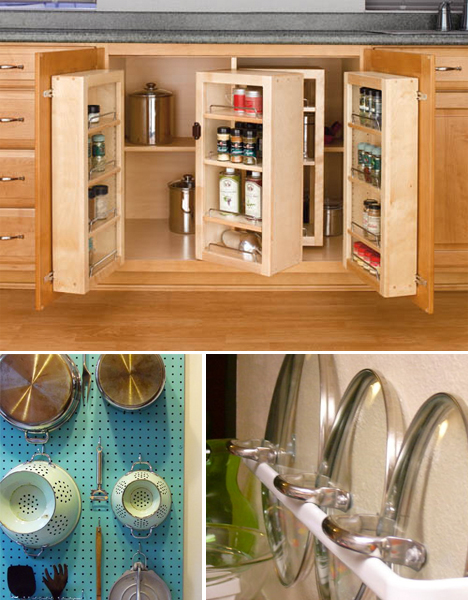
A simple towel bar keeps pot lids out of the way, whether you mount it on the wall or inside a cabinet. Update Julia Child’s classic kitchen pegboard by painting it a custom color and use it for pots, pans, lids, tools and spices. That empty space next to your refrigerator is practically begging to be put to use; a simple DIY pantry on casters hides away a surprising amount of food. And if you’re not up to breaking out the hammer and nails, check out custom cabinet organizers like the Rev-a-Shelf swing-out pantry system.

Next Page – Click Below to Read More:
Small Space Hacks 24 Tricks For Living In Tiny Apartments

Share on Facebook


[ By Steph in Design & Furniture & Decor. ]

[ WebUrbanist | Archives | Galleries | Privacy | TOS ]


WebUrbanist

 
Comments Off on Small Space Hacks: 24 Tricks for Living in Tiny Apartments

Posted in Creativity


4 Not-so-Secret Tricks to Speed up Your Lightroom Workflow

22 Jan

Lightroom_iconDo you want to speed up your Lightroom workflow? You’re not alone – I get countless requests from people to help them optimize their photo processing workflow. However, because it is so commonly asked, it is also frequently answered and this makes it difficult to add a fresh spin on a topic that hasn’t changed much over the years.

One of the great things about dPS is the diverse nature of its writers and how we each have our own point of view, own skill set, and own way of explaining a topic. This post won’t be a groundbreaking reveal of some hidden secrets that I just uncovered in Lightroom yesterday, but rather an explanation of some commonly overlooked and ignored features of Lightroom that you’ll want to learn in order to speed up your workflow.

Speed up your Lightroom workflow

#1 – Auto Advance rating option

This is something that I would have preferred Adobe set to “ON” as default and then give you the option to turn it off if you choose. How many of you rate your photos by selecting a rating, and then pressing the arrow right key to advance to the next photo?

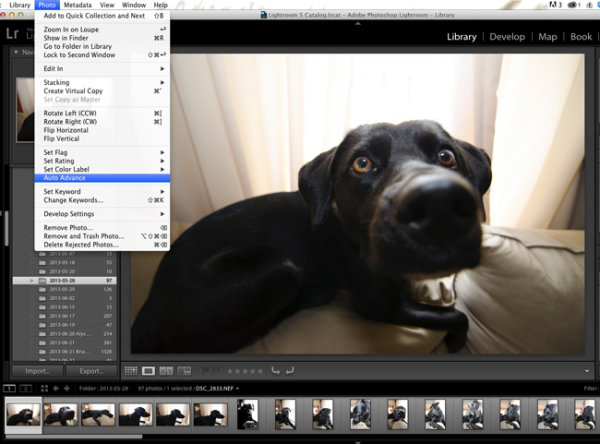
Do that no longer! Simply turn on Auto Advance either by selecting it from the drop down menu under ‘Photo’ or simple turn on CAPS LOCK. Once activated Lightroom will advance you to the next photo in the queue after every successful rating. It’s amazing how fast you can get through a fresh import with this option turned on.
Lightroom workflow use auto advance

#2 – Start with a YES or NO rating system

I like to think of this as keeping it simple. There are so many different rating options (from flags, to stars, to colors) and while each one serves a purpose, I think it’s best to keep it simple the first time you import a new set of photos. Remember tip #1 above and active Auto Advance, and then use the keys ‘P’ or ‘X’ to rate your photos. ‘P’ tells Lightroom that you want to keep that photo and it is flagged as a “Pick”. ‘X’ tells Lightroom that you want to reject that photo, and it is marked as such. Once you’ve made it all the way through your import, press Command + Delete (control on PC). This will remove all of your rejected photos, never to be seen again. (choose “delete from disk” to not only remove from your LR catalog but delete from your hard drive)

I find that this will help to keep your Library cleaner, and easier to manage. It will also allow you to remove a lot of the ‘maybe-I’ll-use-this-photo-sometime’ photos which in most cases just end up wasting your time.

Lightroom-workflow-keep-it-simple

#3 – Learn and use the magic keyboard shortcuts

I’ve already mentioned a couple of the keyboard shortcuts above, but the master list is only a shortcut away. Press Command / (Control / on PC)  in any panel of Lightroom and the index of everything possible within that window is displayed. It’s one thing to learn the keys, and it’s another to work them into your workflow (I’m still slowly learning to do this myself), but once you get it down you will be flying through the panels without even thinking about it.

Lightroom-workflow-learn-keyboard-shortcuts

Press: Cmd / (Control / on PC) to get this to pop up

#4 – Use Solo Mode on the side panels

Another Lightroom setting that I personally feel should have been set as a default option is the Solo Mode option for the various tool panels of Lightroom. This option allows you to automatically minimize a panel when you open another one. For example, if you’re working in the Basic Tab of the Develop Module and want to switch to work on sharpening your photo, clicking on the Detail Tab, Lightroom will automatically close the Basic Tab for you. I find that this keeps the interface a lot cleaner and easier to navigate, especially for someone who’s just starting to get their feet wet with the program (or using a small screen or laptop)

To turn it on simply right click on any of the sidebar panel names (not the triangle) and select ‘Solo Mode’ from the menu that appears. Once activated you’ll probably never go back.

Speed-up-lightroom-workflow-solo-mode

How do you speed up your Lightroom workflow?

These four tips will certainly help you become faster at working through your photos, but there are countless other ways to speed up the way you work. If you are well experienced with Lightroom, what else can you think of to add to this list?

For more Lightroom reading check out these articles:

  • How to Upload Photos to Flickr and 500px using Lightroom 5
  • Lightroom Tips for the Develop Module – the Magic Alt Key
  • Creative Ways to use Keywords in Lightroom 5
  • Use Lightroom Collections to Improve your Workflow

The post 4 Not-so-Secret Tricks to Speed up Your Lightroom Workflow by John Davenport appeared first on Digital Photography School.


Digital Photography School

 
Comments Off on 4 Not-so-Secret Tricks to Speed up Your Lightroom Workflow

Posted in Photography


Tonal Tricks and Treats: Sweets Neatly Arranged By Color

22 Dec

[ By Delana in Art & Photography & Video. ]

purple

If you’re one of those people who has to have everything arranged in a very specific way, the art of Emily Blincoe is exactly what you’ll want to spend part of today staring at.

red

yellow

pink

Blincoe is a photographer who created the Sugar Series, a set of photos that depict all different types of sweets arranged neatly by their predominant color.

blue

orange

white

There are familiar candies that you might remember depending on which part of the world you are from, and there are others (Teaberry Gum or tighty whiteys on a stick, anyone?) that might not be quite as recognizable.

green

gold

black

Blincoe’s other series (collectively named Colors Organized Neatly) include similarly color-coded objects, all arranged by their respective hues and neatly laid out on vivid backgrounds.

Share on Facebook


[ By Delana in Art & Photography & Video. ]

[ WebUrbanist | Archives | Galleries | Privacy | TOS ]


WebUrbanist

 
Comments Off on Tonal Tricks and Treats: Sweets Neatly Arranged By Color

Posted in Creativity


Splendid Fall Photography Tips and Tricks to Make The Most Of This Gorgeous Season

06 Sep

Fall is indeed a magical time for everyone. With the air becoming clean and crisp, you get to dust off your overcoats and walking boots. You’ll hear the chopping of the wood that will see everyone though the winter months. But there is nothing more recognizable with the season of autumn than the colors associated with the falling of the Continue Reading

The post Splendid Fall Photography Tips and Tricks to Make The Most Of This Gorgeous Season appeared first on Photodoto.


Photodoto

 
Comments Off on Splendid Fall Photography Tips and Tricks to Make The Most Of This Gorgeous Season

Posted in Photography


KaleidoCamera teaches your DSLR new light field tricks

23 Jul

kaleidocam.png

A prototype for a new DSLR add-on is poised to bring plenoptic capabilities to consumer cameras. The KaleidoCamera is designed to sit between a standard DSLR’s sensor and lens. A diffuser splits light passing through the lens into nine different beams, each passing through a filter before it reaches the camera’s sensor. Click through to read on about this prototype’s capabilities and potential applications.

News: Digital Photography Review (dpreview.com)

 
Comments Off on KaleidoCamera teaches your DSLR new light field tricks

Posted in Uncategorized