RSS
 

Posts Tagged ‘travel’

Travel People Photography – Tips and Pitfalls

21 Apr

“Oh the people you will meet!” goes one of Dr. Seuss’ famous lines, speaking to a particular joy of travel. We don’t just travel to see new places, we travel to experience new cultures full of new people – and as photographers, we’re intrigued to take their photo.
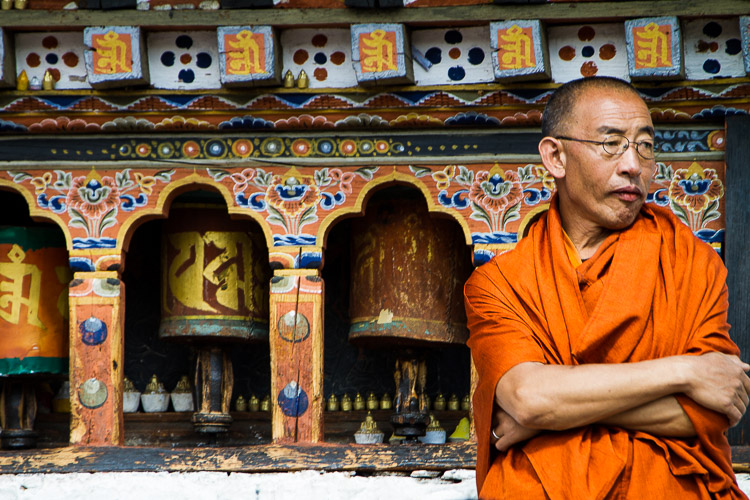
Monk, Paro, Bhutan

Yet it’s not as easy as taking photos of foreign mountains or cityscapes. because, gasp!, those people are full of life and feelings and opinions. They might be speaking a language we don’t understand. We are left wondering what they are thinking as we start to bring our camera up to our eye.

I’ve been photographing for 26 years, and traveling regularly for the last eight. I don’t know it all, but I have learned, through trial and error and research, what helps and what hinders travel portrait photography.

The Tips

Watch the light

Photography is about light. You’ve likely heard it a hundred times before. Sometimes we forget that when out of our comfort zone, but it’s important to remember that great photos need great subjects, and great use of light.
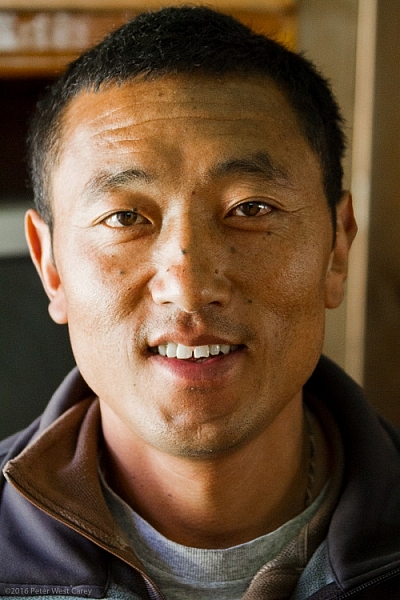
PWC-Nepal100509-093652-4565-b

Before raising your camera, know your light. Know what light will be available, and how best to use it. This article: Understanding Natural Light Part 3: Direction of Light – has a wealth of knowledge to get you thinking about the natural light at your location. Of course, you can use a flash as well, but most of us rely on natural light for our travel portraits.

Connect

Hot Button Topic: To connect before or after you take a photo? This decades-old discussion will not be settled here, but I will give my opinion as fuel to the fire.

I believe in give and take. If I’m always taking photos when I travel, I feel more the part of an interloper than a welcome guest. There are irresistible times when someone is doing something soooooo perfect, we have to have a photo, we think. Introducing ourselves will ruin the moment and break the magic we are witnessing.
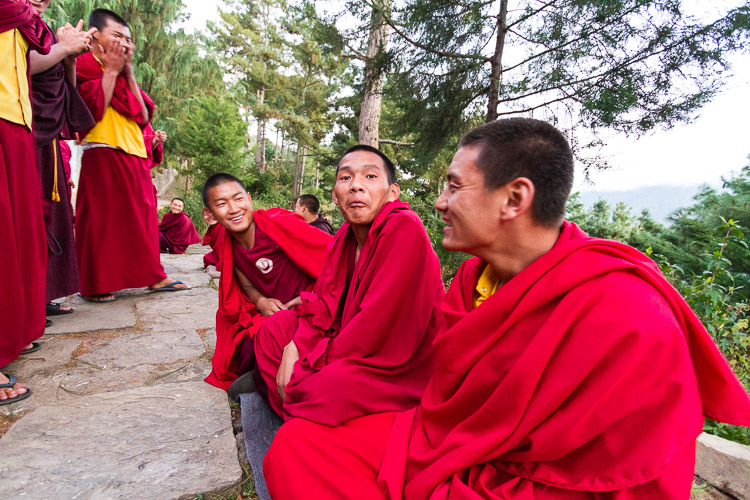
Monk Debates, Jakar, Bhutan

My advice is to take those photos, but give something back. Approach your subject after the fact and introduce yourself. Smile, make eye contact, promote goodwill, and be nice.

If they are a vendor, buy something they are selling, or at least take a look. Canon, Sony and others now have portable printers you can bring with you, and what better way for give and take than to hand over a printed copy of the portrait you now treasure. It’s more work than just taking photos and continuing on your way, but it is also more rewarding.
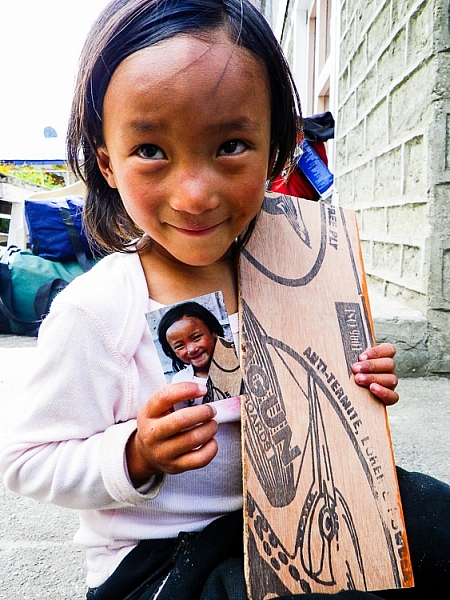
PWC-Nepal2011-1001-0530

Get their feedback

Building on the point above, show your subject their portrait. It’s part of giving back. Get their feedback on how they think they look.

You might hear good things or bad, because everyone tends to be their own worst critic. Ask their friends as well, if they are around, to know if you have captured an accurate representation of your new friend.
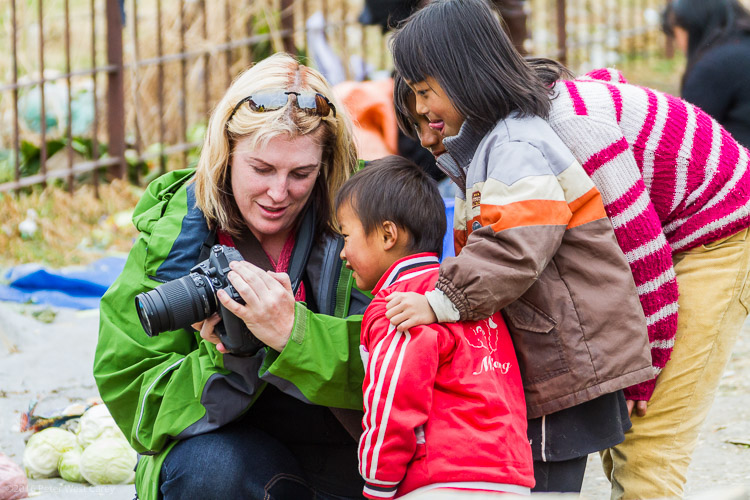
PWC-Bhutan2013-0317-4766

They may have an idealized portrait they want you to take. What’s the harm in taking the photo they would like and the one you like? The more interaction, the better the portrait.

To smile or not to smile

This argument goes both ways. Some photographers want all smiles, especially if they believe there are in a happy place. Others abhor a grin. What a different story Steve McCurry’s Afghan Girl photo would tell if he was playing the ham and got her to smile!

As artists, we always instill our own bias into our art, that is okay. Sometimes your subject will also instill their bias. For instance, in Bhutan I encountered mostly stern faces when I took portraits, even if the subjects were lively, happy and smiling while I talked to them for a few minutes beforehand. I didn’t feel the stoic portraits the subjects wanted to portray accurately, reflected the warmth I felt while walking the countryside. So, what to do?

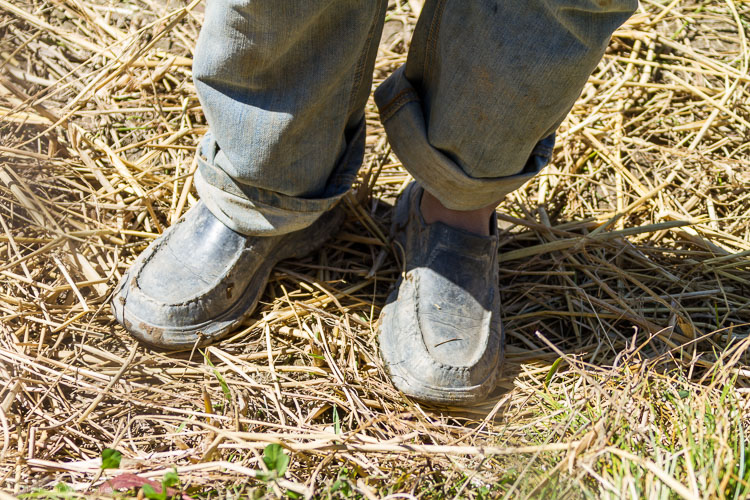
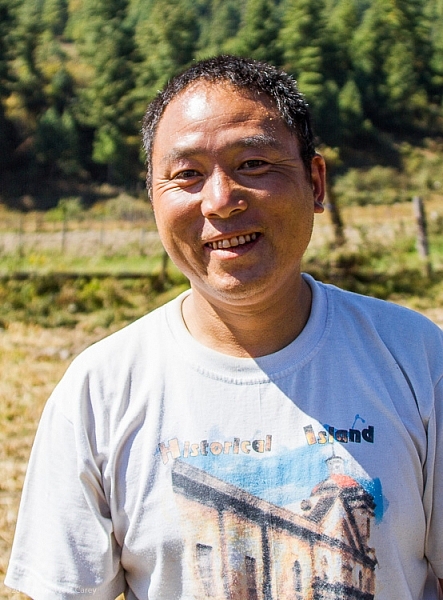
I developed a technique on that trip of taking pictures of people’s shoes. This served two purposes; I got images that tell their own story (footwear can tell you a lot about the wearer) and, in that moment when the subject was wondering why the heck is this guy taking pictures of my shoes, they let their guard down and returned to the smile I had encountered until the portrait was taken.
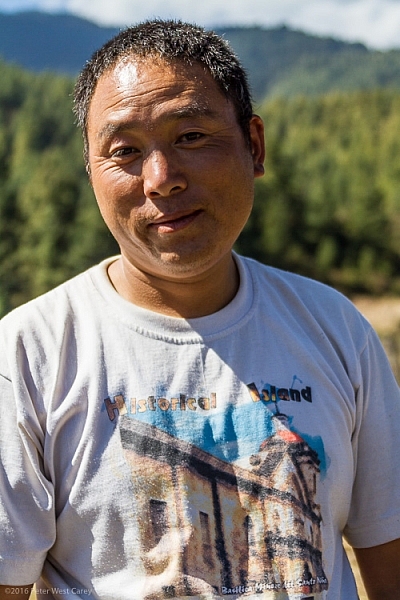
PWC-Bhutan2011-1024-9664

Before shoe photo

PWC-Bhutan2011-1024-9666

PWC-Bhutan2011-1024-9667

After shoe photo

My suggestion is to get to know your subject before taking their portrait. Then find a way to help that personality shine in their portrait.

Let them do their thing

To tell a better story of an individual is to put them in their environment. It helps travel portraits if there is context of the individual, in relation to the space around them.

Interact with your subject, take their posed portrait to your liking, then let them return to what they were doing. This is probably what drew you to them in the first place. Sit, observe, and be patient with your next photos.
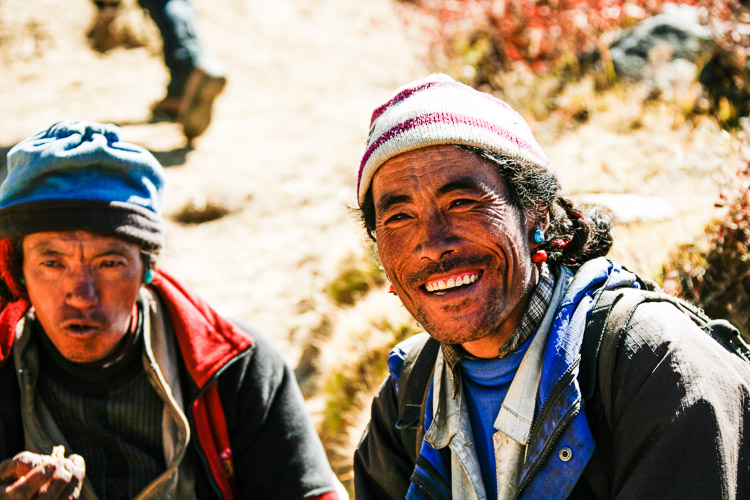
Tibetan Shepherds

They might not be classic portraits, subject’s eyes on the lens. To tell the story of the individual in the digital age is to have the ability to show more than one side, more than one image of your subject. You’re not a National Geographic photographer who will only get one image of the person in the magazine. You’re someone with a Facebook or other online account, and you can share both the portrait and the person in their element.

The Pitfalls

The Death Stare

You can probably feel the chill down your spine right now when I mention the Death Stare. Every street photographer has felt it at one point, and most every travel photographer as well.
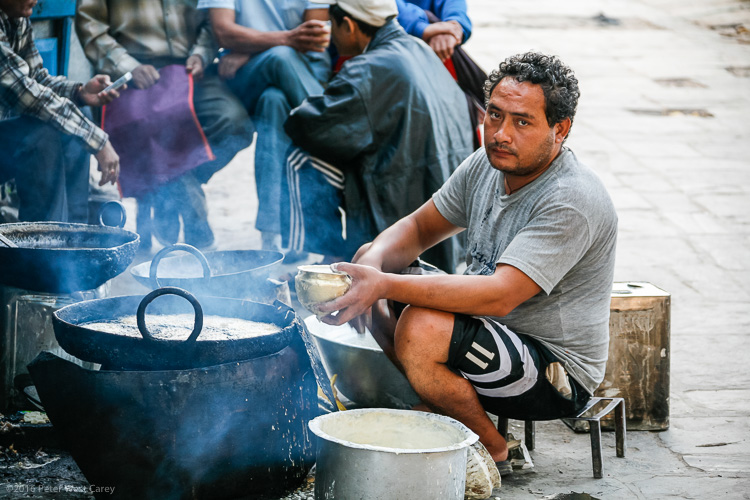
PWC-Nepal2008-1010-3229

The Death Stare comes when someone sees your camera pointed their way, and fully disapproves of being the object of your desire. It’s important to realize the Death Stare is usually not so much about you, it’s about the situation, and empathy goes a long way to avoiding it. So does the tip above about connecting.

Recovery from the Death Stare can be hard. It chips at your confidence while you are in a foreign environment, already feeling out of place. Now you are unwelcome?
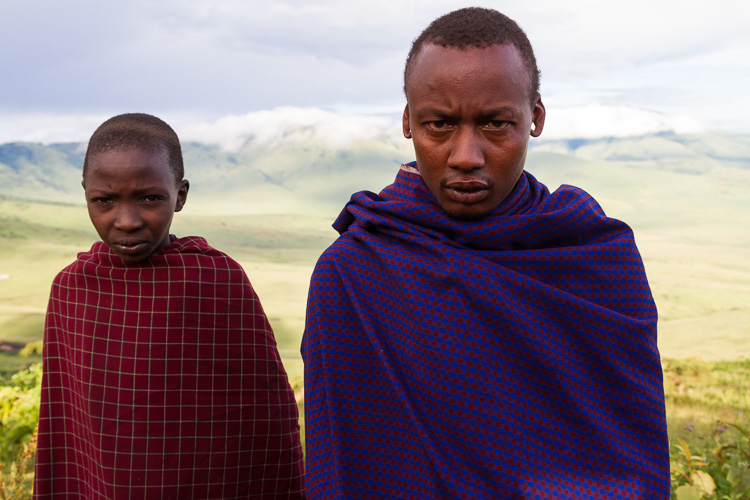
Maasi On The Rim

When I receive the Death Stare, I take a few mental steps backward, and put my camera away for just a bit – maybe 10 minutes, maybe an hour. I spend that time soaking in my surroundings and trying to connect with locals instead of capturing them.

Super posers

Kids are famous posers, but the disease travels across every age range. Some societies are more prone than others to super posing. By super posing I mean the tendency to totally ham it up for the camera. We all like to put on our best face, but the super poser makes almost a 180 degree change from what you first saw in them and wanted to photograph.
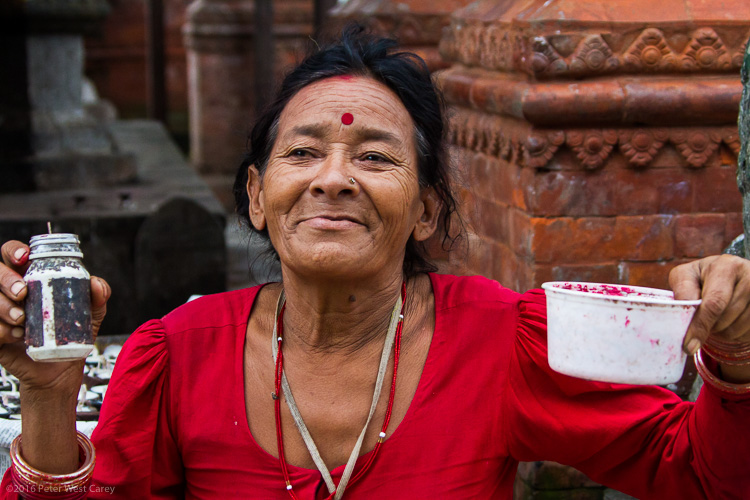
Pay Me For Paint, Kathmandu, Nepal

I have watched enough parents try to get their kids to, “smile normally, please?” and spend tens of minutes in frustration at their children being children. My suggestion with travel photos is to not fight the super poser. Accept that the moment you saw in them has passed, and move on.

Only telephoto

Afraid of the Death Stare, or an imaginary worse reaction, the telephoto-only portrait becomes the easy out. If I can shoot from 100 feet away, in obscurity, why get closer?

Because your images will lack intimacy, that’s why. I’m not saying don’t shoot with a telephoto from a distance – but don’t only shoot from a distance. If I peruse your gallery of images from Egypt and only see telephoto attempts at portraits, I’m going to feel as distant as you physically were from your subject.
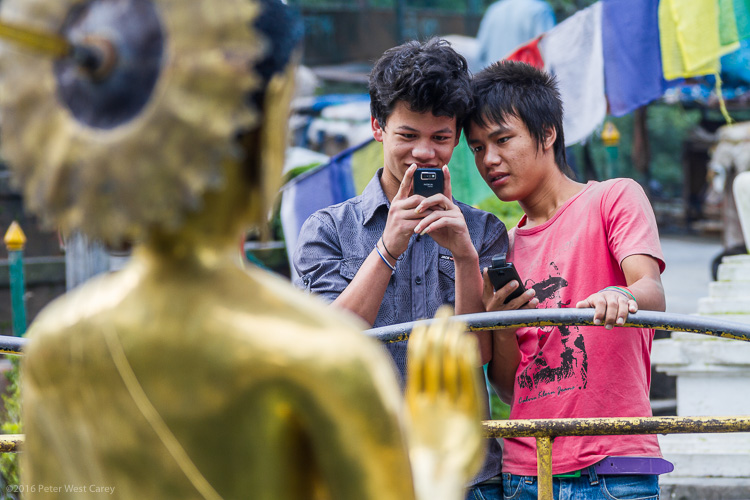
Boys photographing statue of buddha - Nepal

In my mind, connecting with strangers and only obtaining a few mostly-posed portraits is better than 100 shots from across the street. To me it says, “I traveled to this land, but didn’t really get into it.”

“Please don’t use that”

Following the advice above, you show some shots to your subject. They reply, “Oh, please don’t use any of those. I look horrible!” Now what?

If there is a chance, reshoot the images. If you must move on with your travels, I suggest you take the high road and respect the individual’s wishes. You may think they look perfect. Yet being respectful is more important than impressing your Facebook friends or Instagram followers.

This makes my original advice a bit of a double edged sword. Maybe you shouldn’t show them if there is a chance they will say no? The problem is face recognition software is getting more and more powerful, and Facebook’s (and other companies’) database is getting larger and more accurate. I live of the virtue it is better karma to error on the side of not potentially ticking people off.

Use of the photos after the fact
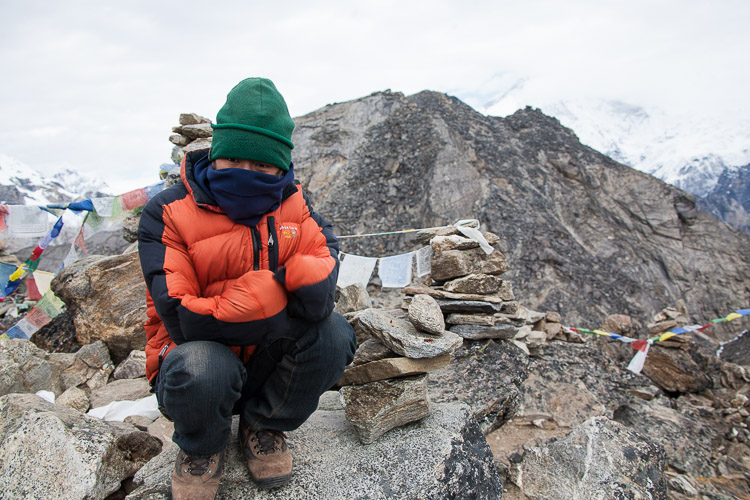
Ghombu

This brings up a good point about use. What are you going to do with those images?

Again, street photographers know this argument well. “You can’t take my photo!” they have had shouted at them if they have been in the game long enough. While this may be true in certain countries or situations, in most public spaces, especially in the US, you are free to photograph individuals.

What you do with the images after is the key point. Your own personal, artistic use is okay – included in a gallery on Facebook or a post on Twitter, a slideshow presentation at the local social club, or a gallery showing. Commercial use, where a model release is needed (think: ad campaigns, brochures, catalogs, stock), is not. Editorial use in a magazine or newspaper generally is okay.

DPS has some excellent resources, including our article Model Releases: What You Need To Know (with samples).

Conclusion
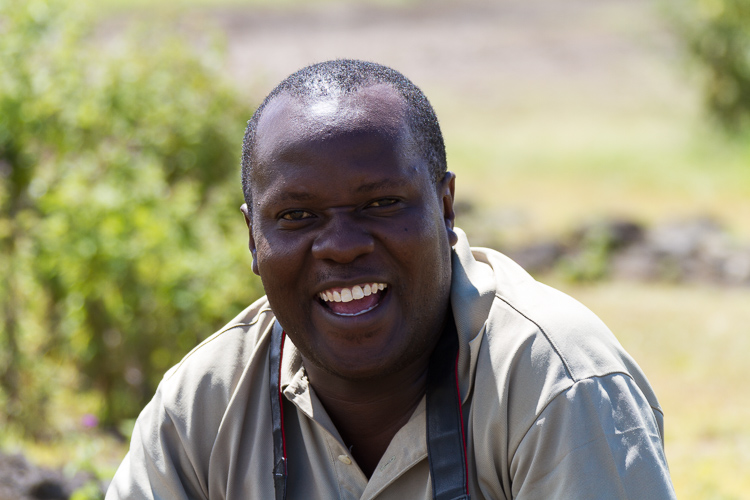
PWC-Tanzania100321-105740-2967

PWC-Nepal2011-0929-8494

Travel portrait photography can be a tricky world to navigate. You’re out of your comfort zone, you may not speak the language or know the customs, but you want to bring home photos of not just the pretty sites, but the interesting people, too.

Be kind. Treat people as people, not objects. Share your images and take time to connect.

Speaking of sharing, what other advice would you give those wishing to bring back travel portraits?

People photography week

This week on dPS we’re featuring articles all about different kinds of people photography including portrait, event and travel photography. See all the previous ones below, and watch for more people photography articles over the next few days.

  • How to Take Low Key Head-shots
  • How to Do a One Light Portrait Setup and Use it as Your Back-up Plan

googletag.cmd.push(function() {
tablet_slots.push( googletag.defineSlot( “/1005424/_dPSv4_tab-all-article-bottom_(300×250)”, [300, 250], “pb-ad-78623” ).addService( googletag.pubads() ) ); } );

googletag.cmd.push(function() {
mobile_slots.push( googletag.defineSlot( “/1005424/_dPSv4_mob-all-article-bottom_(300×250)”, [300, 250], “pb-ad-78158” ).addService( googletag.pubads() ) ); } );

The post Travel People Photography – Tips and Pitfalls by Peter West Carey appeared first on Digital Photography School.
Digital Photography School

 
Comments Off on Travel People Photography – Tips and Pitfalls

Posted in Photography


My Favourite Travel Lens – The Tamron 28-300mm

20 Apr

Last year I was given an incredible opportunity to travel to the US for three and half weeks just to take photos. My trip was sponsored by an amazing woman, which spurred me to try and get other sponsors for my photography. When you are travelling you can’t take everything with you, so being able to get a lens that could handle a lot of the scenes that I wanted to shoot was very handy. To be able to go from a wide angle view, then zoom right in, was going to be a great lens for travelling, I hoped.

LeanneCole-tamronlens-28-300mm

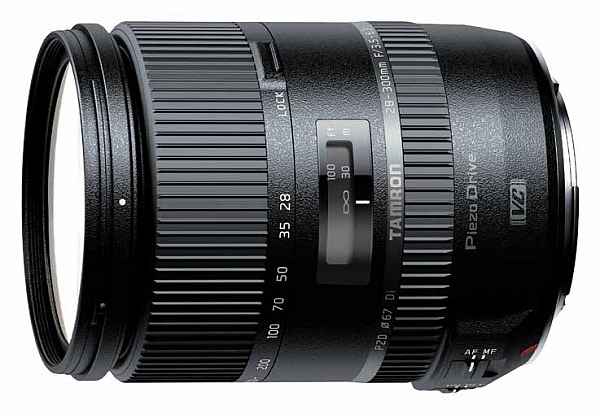
Tamron 28-300mm Lens – image courtesy of Tamron for both Canon and Nikon mounts.

I had read about the Tamron 28-300mm lens, and how it was a good for travelling. I decided to contact Tamron Australia to see if they would loan me the 28-300mm for my trip, and they did. It is a full frame lens and if you have a cropped sensor then you need to remember that you won’t be able to get 28mm (more like 42mm), and that it will be far longer than 300mm (similar to 450mm).

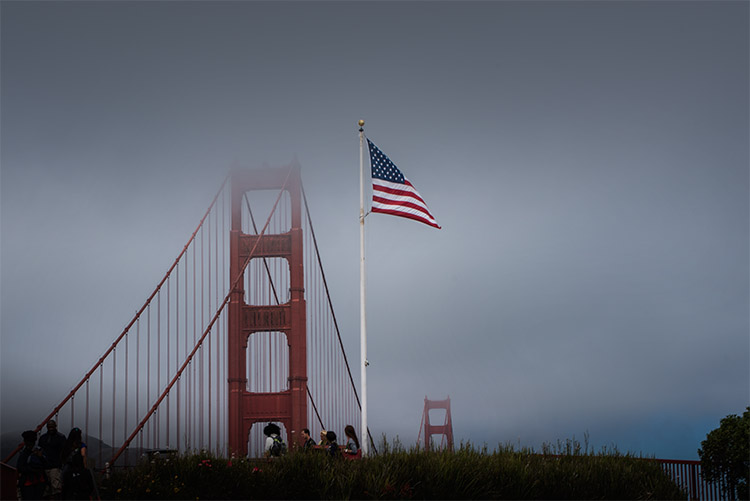
LeanneCole-tamronlens-goldengatebridge-65mm

Golden Gate Bridge with US Flag, taken through a car window. Focal length 65mm

Physical Size

The first thing I noticed when I opened the box was the size. For a lens with such a big zoom length, it’s quite small. It isn’t a heavy lens either. Straight away it seemed like the perfect lens to carry, that wouldn’t contribute to breaking my back.

It fits nicely into any camera bag, due to its compact size. The bag I used on my trip was quite small, and it was easy to pack. The light weight meant I didn’t have to worry about making my bag heavier. Imagine how your back would feel if you had to carry a bunch of other lenses to cover that range!

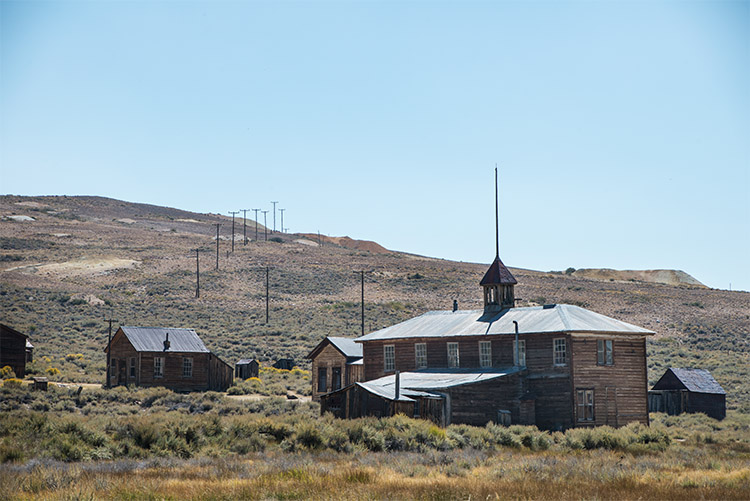
LeanneCole-tamronlens-bodieghosttown-122mm

Some of the old building at the ghost town in Bodie, CA, focal length 122mm.

Versatility

When travelling you can’t always get close to places to get the best angles, and having a lens that allows you to take photos when you are close, or far away, is an advantage. You can take an image of a building and get most of it in, then zoom in to get some details of it as well.

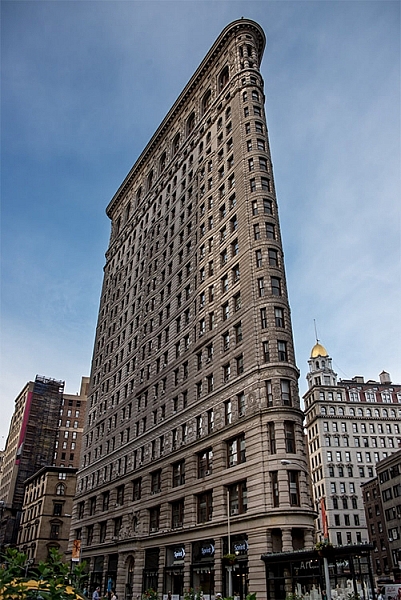
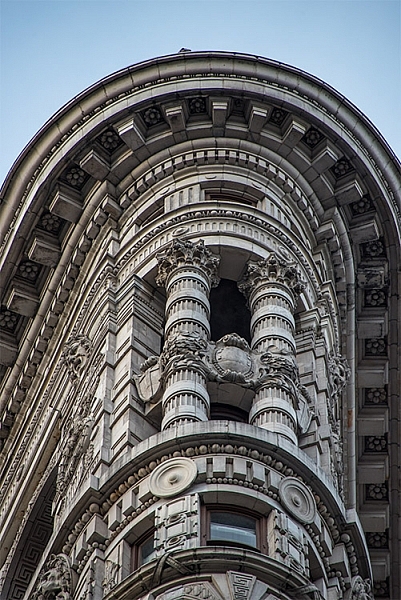
The following images of the Flatiron Building in NYC, show how you can take a photo of the whole building, and then a close up of some detail using the 28-300mm lens.

LeanneCole-tamronlens-flatiron-28mm

The Flatiron Building in New York, focal length 28mm.

LeanneCole-tamronlens-flatiron-300mm

Detail of the Flatiron Building, focal length 300mm.

There is also the advantage of not having to constantly change your lens. If it is busy, or crowded, you won’t have to stop, get out another lens and change it. This compact lens is great for most situations.

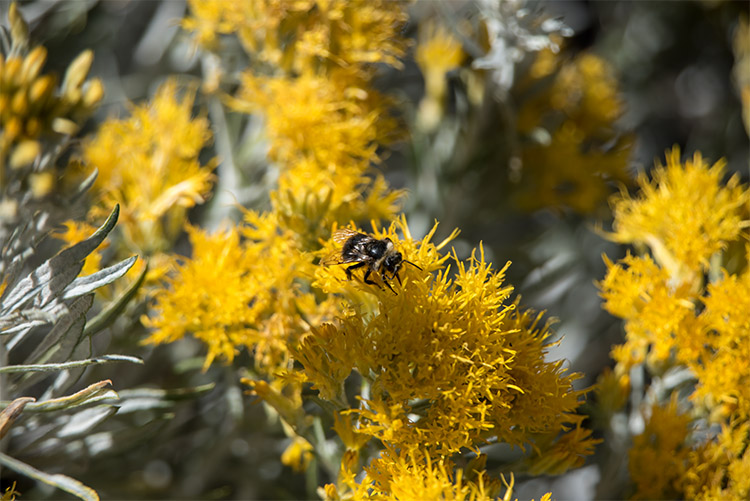
LeanneCole-tamronlens-beemountain-300mm

A bee on a flower, taken at 300mm.

Compromises

With any lens that has this kind of focal length range, you are going to have to compromise somewhere.

Sharpness

When you take photos at 300mm, the images are not as sharp as they are at 150mm. This is a common problem with most lenses, and more so with ones that have longer lengths such as the Tamron 28-300mm.

Slower Lens

A lens is judged by the size of the largest aperture. A fast lens has a large aperture of f/2.8 or, as is the case with some of the prime lenses, maybe f/1.4. The largest aperture means that when there is lower light you can get a faster shutter speed, which makes it a faster lens.

This Tamron 28-300mm lens has an aperture range of f/3.5 – 6.3, which translates to being able to have the faster aperture of f3.5 at 28mm, but when you zoom out to 300mm the fastest (widest) one you can get is only f/6.3. Most of the time it isn’t a problem, and only becomes one when the light is low, or when shooting indoors. The compromise is, when those conditions arise you have to put up your ISO, which introduces noise into your images, or, in old terms, grain.

Vignetting when zoomed out

One of the things I found, was that there was some vignetting when the lens was zoomed all the way out to 300mm. I was a bit annoyed initially, but when I was given an opportunity to try out the Nikon 28-300mm I noticed it did the same. It is just one of the disadvantages working with lenses such as these.

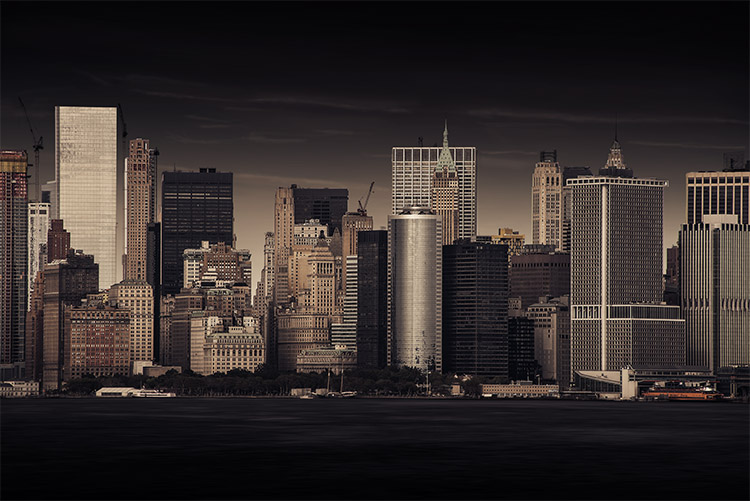
LeanneCole-tamronlens-NewYork-300mm

A view of New York Skyline from Staten Island ferry. Focal length 300mm,

The Other Factors

Weight

The lens weighs just over half a kilogram or 19oz. Compare it with the Nikon lens which is 800 grams or 28.2oz. As stated previously, it is quite a light lens, and an easy one to carry around and store.

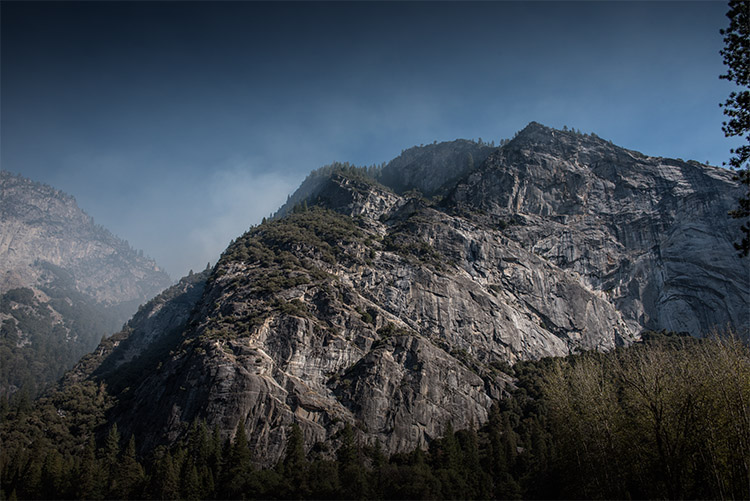
LeanneCole-tamronlens-yosemite-28mm

One of the many mountains at Yosemite, focal length 28mm.

Price

The lens is around US$ 850, which makes it a good price for the versatility that you get. It makes it an affordable lens, and a very good option for a beginner who wants to find one lens that will suit almost any situation or occasion.

In conclusion

This was a perfect lens for travelling. I found it so versatile, and to tell the truth, while I took a couple of other lenses, this one was on my camera 80% of the time. I didn’t want to take it off. It was very sad when the lens had to be returned to Tamron, I know when I can get the money together, it will be the next lens in my kit.

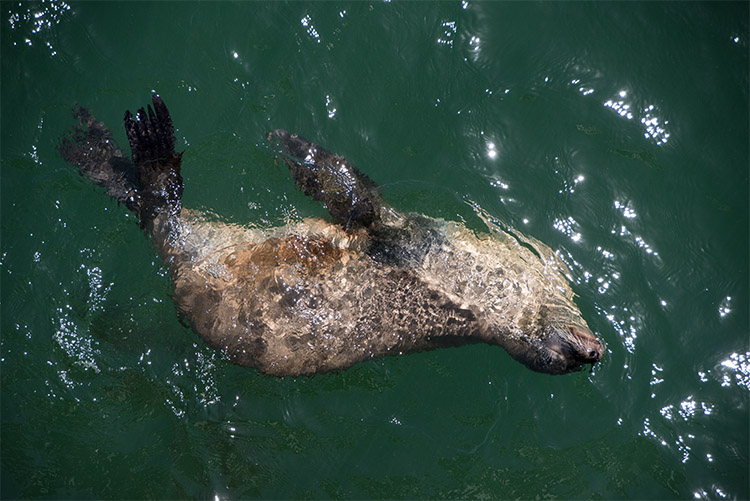
LeanneCole-tamronlens-santacruz-135mm

Seal at Santa Cruz Boardwalk. Focal length 135mm.

googletag.cmd.push(function() {
tablet_slots.push( googletag.defineSlot( “/1005424/_dPSv4_tab-all-article-bottom_(300×250)”, [300, 250], “pb-ad-78623” ).addService( googletag.pubads() ) ); } );

googletag.cmd.push(function() {
mobile_slots.push( googletag.defineSlot( “/1005424/_dPSv4_mob-all-article-bottom_(300×250)”, [300, 250], “pb-ad-78158” ).addService( googletag.pubads() ) ); } );

The post My Favourite Travel Lens – The Tamron 28-300mm by Leanne Cole appeared first on Digital Photography School.

Digital Photography School

 
Comments Off on My Favourite Travel Lens – The Tamron 28-300mm

Posted in Photography


Time Travel in China: Photos Reveal A Century of Dramatic Growth

15 Apr

[ By Steph in Culture & History & Travel. ]

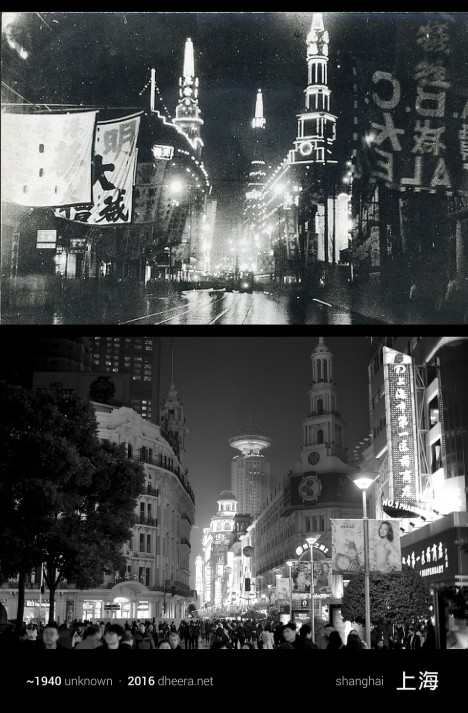
time travel china 1

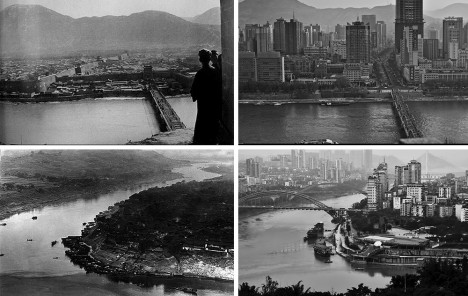
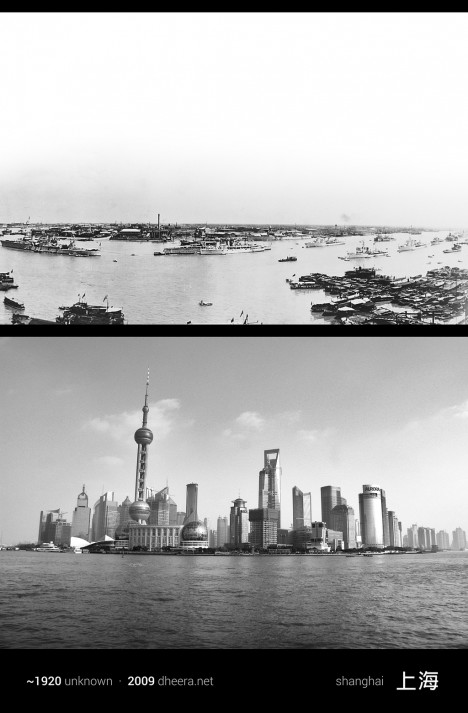
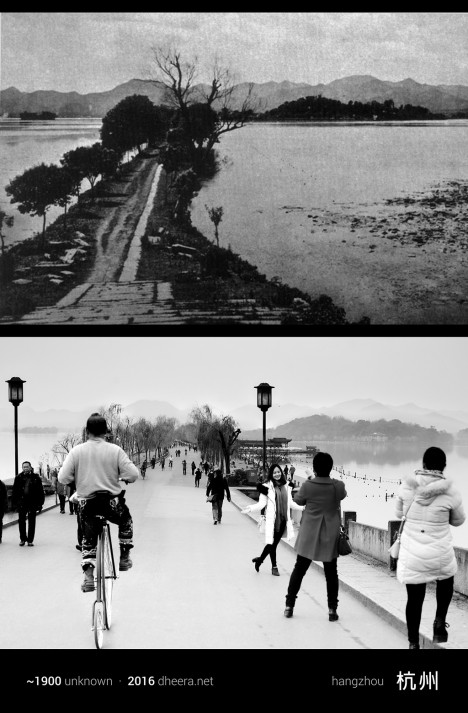
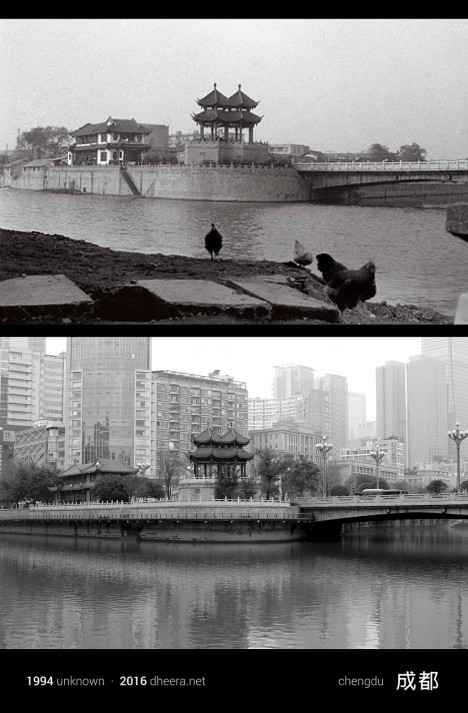
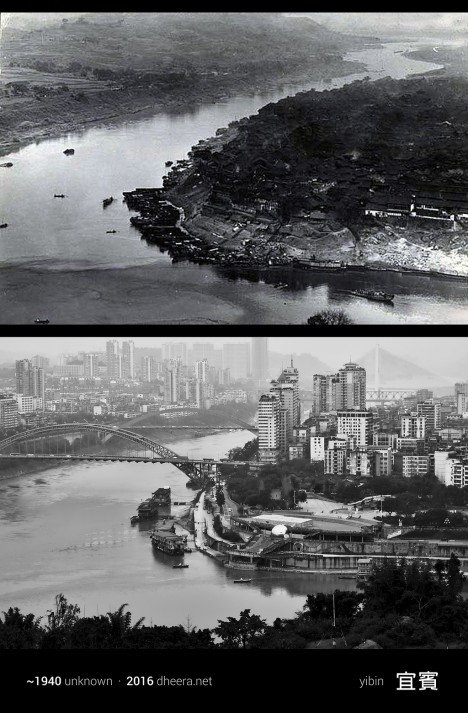
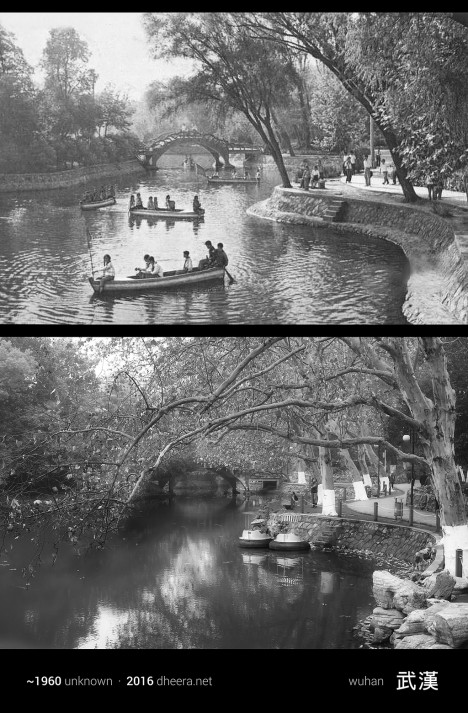
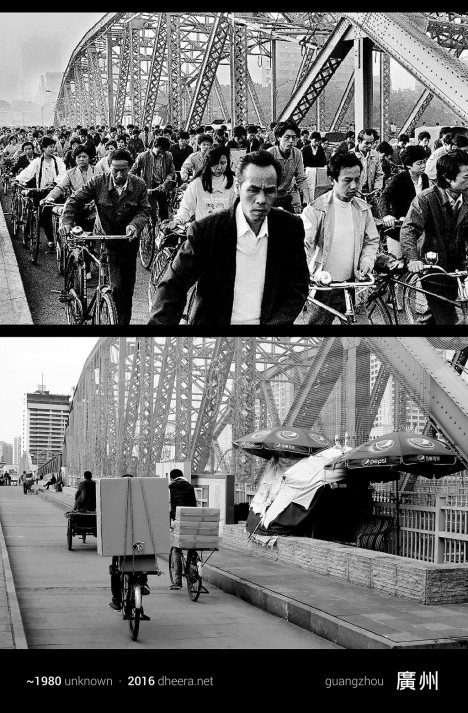
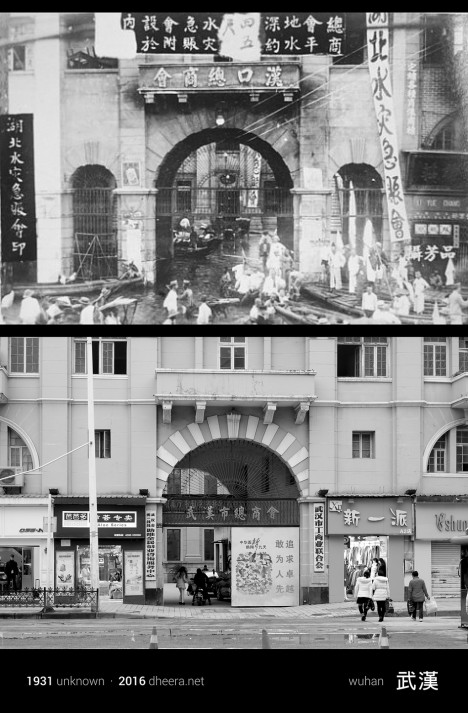
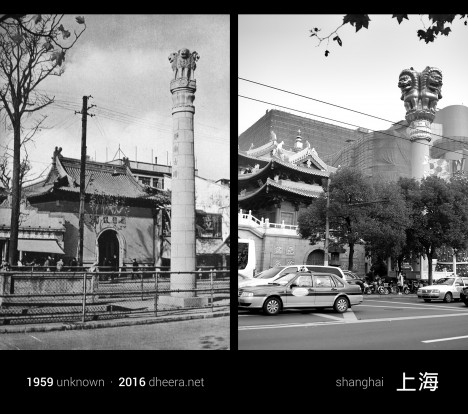
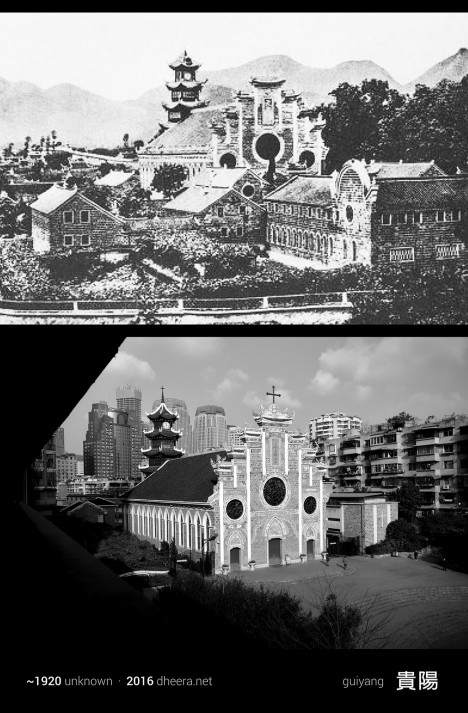
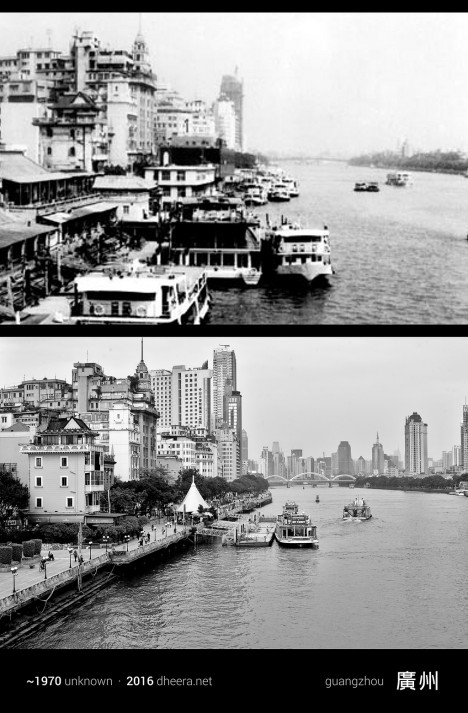
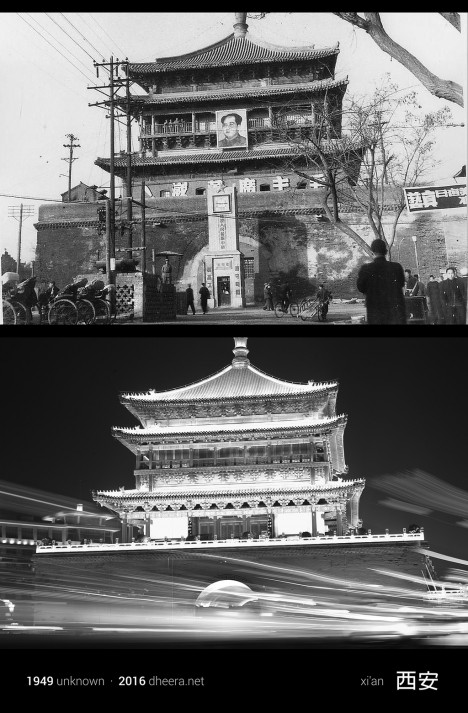
Few nations have experienced quite the explosive rate of growth over the last century as China, and a new photo series shows us just how dramatic those changes actually look on the ground. Photographer, computer scientist and MIT alum Dheera Venkatraman pored through books and archives to find images taken in the 20th century and then went out and re-took them, shot by shot, attempting to frame them exactly as they were originally photographed. All of the new imagery has been converted to black and white to highlight what’s different and what has managed to survive after decades of frantic industrialization.

time travel china 11

time travel china 5

The result is a series called Time Travel in China, creating pairs of images that Venkatraman likens to a ‘spot-the-difference’ game. Agricultural fields become towns, skyscrapers shoot up into the air, bridges stretch across waterways, dirt roads are paved, infrastructure becomes more complex.

time travel china 6

time travel china 7

time travel china 2

Yet not only do the contours of the land and the silhouettes of the mountains remain the same, a surprising number of buildings do, too, especially temples and historical structures. In some cases, the only notable shifts in a forty- or even eighty-year period are the vehicles, some lights and a handful of modern towers.

time travel china 12

time travel china 14

time travel china 3

time travel china 10

“When most people travel, they think of traveling in space,” she says. “Whether it’s hiking through a national park or learning about a distant culture, it’s usually about the destination. This time, I decided to travel in time.”

time travel china 8

time travel china 9

time travel china 4

“It wasn’t always easy to get that perfect angle match,” she continues in a post on PetaPixel. “In some places, the vantage point ended up being in a private location, and in some cases there was a large obstruction or building preventing me from getting the same view. But nonetheless, I managed to capture several shocking contrasts over the past century of Chinese history.”

Share on Facebook


[ By Steph in Culture & History & Travel. ]

[ WebUrbanist | Archives | Galleries | Privacy | TOS ]


WebUrbanist

 
Comments Off on Time Travel in China: Photos Reveal A Century of Dramatic Growth

Posted in Creativity


6 Tips for How to be a Culturally Sensitive Travel Photographer

14 Apr

There is a little wanderlust in all of us. Everyone, at some point in their lives, wants to travel the world and experience all its beauty for themselves. Travel opens the mind to many different possibilities, and makes us more tolerant and conscious as humans. What might be simple, normal, and mundane to some, might be unique, challenging and exciting to another. In the words of Gustave Flaubert, “Travel makes one modest. You see what a tiny space you occupy in the world.”

Memorable Jaunts Ethical Travel Photography Article for Digital Photography School-5

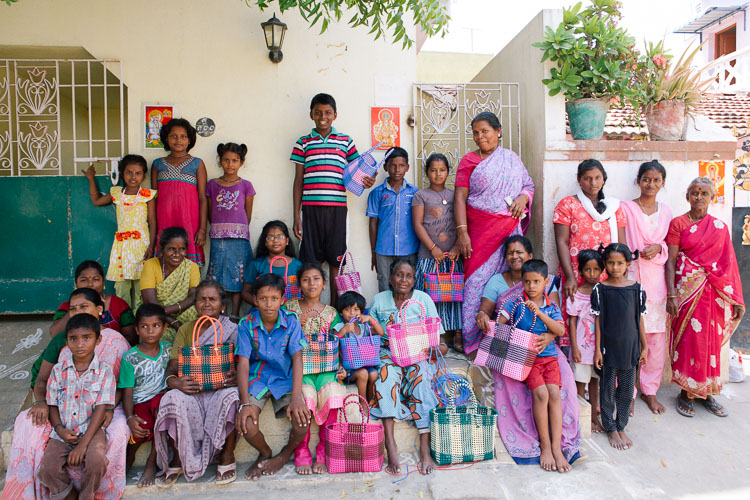
On a particular assignment in Chennai, India last year, the whole community came out to see what I was doing and soon I found 20+ willing subjects to photograph!

As photographers, travel and photography are very much intwined. Photography is a way to capture and communicate the sense of place and people. Our images help immortalize our experiences in travel. This is particularly important when we travel to places outside of our cultural comfort zones. Every moment and every experience is new, and the need to document and preserve them sometimes takes over simple basic common sense. I admit that there have been times when all I’ve done is experienced a place or an event through the back of my viewfinder. My camera has been strapped to my person like my life depended on it, and I have always come back feeling less than happy. The fact that I missed all the little nuances outside the line of vision of my viewfinder, weighs quite heavily on my mind.

Even beyond the obvious need to really experience a place, is the question on when is it okay to take photos of people and places, especially when traveling to other countries? Many times there are major cultural, social and economic differences between the photographer and the subject being photographed. Perhaps the best way to answer that question is that responsible photography is very much like responsible travel. Armed with a thorough knowledge of the place, an interest in cultural enrichment, an open mind, a pleasant attitude, some common sense and a smile, photography abroad—just like travel itself—can be a very fulfilling experience.

Here are some basic guidelines on how to be a culturally sensitive photographer when traveling

1) Knowledge is key

Invest time before traveling to research the customs, and photography norms of the place you will visit. Customs vary not only by country, but by region and religion as well. Understand and appreciate the diverse cultural context, and be respectful of these differences. A little research prior to your journey, goes a long way in avoiding disappointment and despair when you find out that certain photography restrictions exist in the places where you are traveling.

Memorable Jaunts Ethical Travel Photography Article for Digital Photography School-10

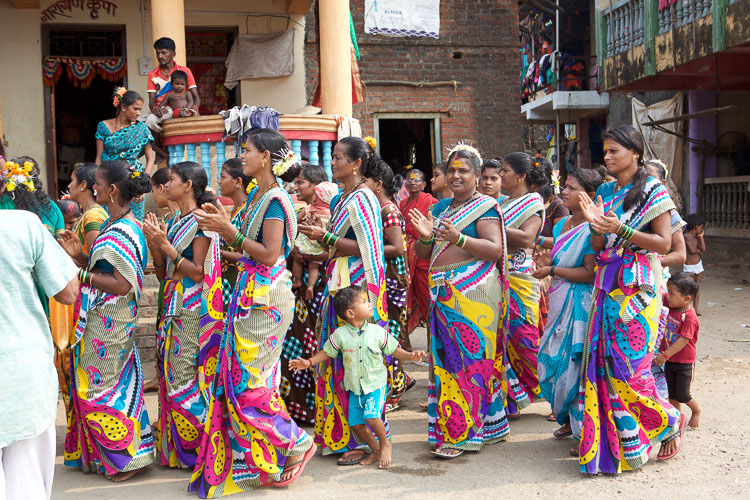
I stumbled upon a religious ceremony on a recent trip and soon found myself to be the official photographer of the ceremony – the cultural enrichment was unlike anything found in any guidebook!

2) Be personable and communicate your needs

Self confidence, an open attitude, and a genuine smile, are important wherever you travel. People will generally respond to you with the same attitude that you show them. Be open and honest about your need to photograph something or someone, and more often than not, people will respond positively to you. I have found that most people love to have their picture taken. If you are uncomfortable or nervous about something or someone, it’s best to just leave the camera in your bag.

Memorable Jaunts Ethical Travel Photography Article for Digital Photography School-9

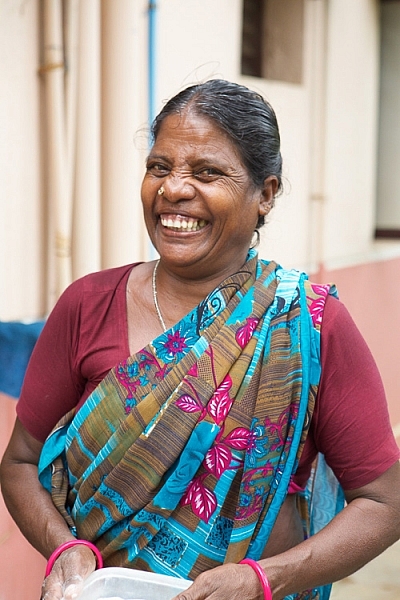
I let my camera do the talking and was rewarded with one of the most genuine portraits I have ever taken.

Memorable Jaunts Ethical Travel Photography Article for Digital Photography School-14

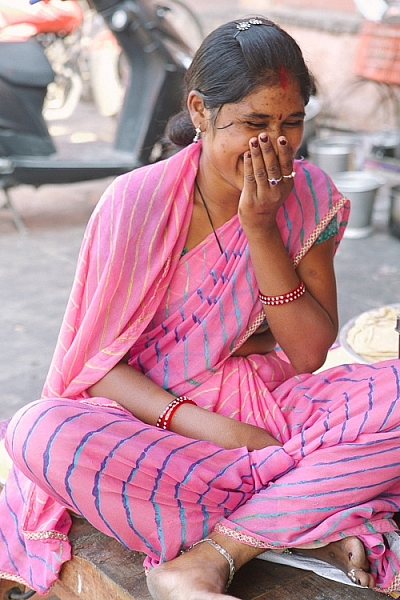
I was grabbing a quick meal before going to the airport in Jaipur, India and this lady was very curious about me and my gear. I promised her a photograph in exchange for a smile and I absolutely adore this image!

3) Get permission

Almost everyone around the world knows what a camera is, and what it can do. Even if you don’t know the language, simple hand gestures and pointing to the camera, can take you far in terms of communicating what is it that you are seeking.

Not understanding the language should never be an excuse to photograph an unwilling person. As a photographer, the responsibility of asking for permission before you click the shutter rests solely on you. If you have time, learn some simple phrases, related to photography, in the language of the country in which you are traveling. This will not only allow you to communicate more directly with your subject, explaining why you want to take a photograph, it shows your interest in learning at least some of the local language.

Sometimes use your camera as an ice-breaker. Take a picture and show people the photos you’ve taken of them, and you will find that photography instantly becomes more fun and less intimidating. More than anything, respect the fact that “No” really does mean NO. Yes, I understand that there is another school of thought of whether asking for permission will ruin the composition of an image. And while a lot of photographers will argue one way or the other, I am of the opinion that if you are taking a picture of a person, you should make every effort to ask permission – either before or after.

Memorable Jaunts Ethical Travel Photography Article for Digital Photography School-13

I made the mistake of not asking this lady before photographing her and as she walked by me, she yelled at me for being rude and taking her picture – lesson learnt!

4) Travel without taking pictures

Take the time to really travel without obsessing over capturing every minute of every day with your camera. Spend time exploring your surroundings, and your body and mind will thank you for it. Even if you are on assignment, build in some down time to your schedule. Not only does it help you relax, but also recharges those creative juices so you are more productive when you do get back to work!

5) Know your gear

This one is one of the basics of photography, no matter what your genre. You should know the workings of your camera inside and out. When you are traveling and have strangers pose for you, that is not the time to start trying out different settings and fidgeting with your gear. People begin to loose patience and often get leery of you and your abilities. They are more likely to simply walk away, rather than waste their time with a stranger who does not know how to operate his/her camera.

Memorable Jaunts Ethical Travel Photography Article for Digital Photography School-8

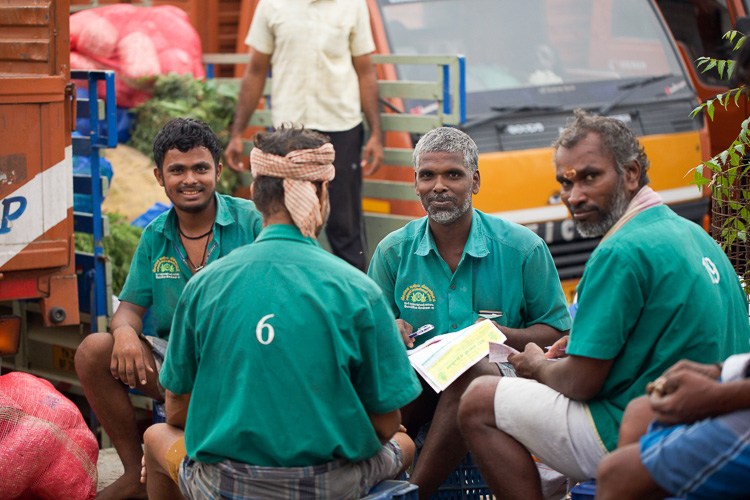
These men were intently discussing the price of wholesale fruits and vegetables at the Chennai Flower market and I had exactly two seconds to take this image – this image is literally SOOC (Straight out of the camera).

6) To pay or not to pay

Perhaps, one of the most controversial situations while traveling abroad, is the question of giving money to people you photograph. There is always that one uneducated, desperate tourist who gives money to get what they think is an award-winning prized photograph, and soon it becomes a lucrative business in the local community. This can get quite uncomfortable and unsafe for other photographers traveling through the same places.

I prefer engaging people openly, and sharing my story and my need for a picture. I find that in most cases people are more than happy to share their story, and to be heard. I too, walk away more culturally and emotionally enriched with the experience. However, if someone expects money for a photograph, then the decision becomes less of whether to pay and more of whether to take the photo. That is a judgement call that each of us needs to make on a case-by-case basis, while being mindful of the example we are setting for future travellers and photographers.

Memorable Jaunts Ethical Travel Photography Article for Digital Photography School-4 Memorable Jaunts Ethical Travel Photography Article for Digital Photography School-12

I remember one instance last year when I was traveling in India with my kids. We were visiting a temple in Southern India, and for some reason a lot of teenagers starting taking pictures of my five year old son. They would come and ask me if they could take a selfie with my son. Initially it seemed innocent enough, and my son posed with them. Soon it was getting to the point of being creepy, and I had to refuse. As a parent, I was extremely uncomfortable with having strangers take pictures of my kids. This experience taught me a very valuable lesson – value and respect people’s personal space and personal preferences.

What are your thoughts on this topic? Do you ask for permission before taking photographs of strangers when you travel? Or do you just take the picture and move on? What other things to you take into consideration to be a culturally sensitive travel photographer?

googletag.cmd.push(function() {
tablet_slots.push( googletag.defineSlot( “/1005424/_dPSv4_tab-all-article-bottom_(300×250)”, [300, 250], “pb-ad-78623” ).addService( googletag.pubads() ) ); } );

googletag.cmd.push(function() {
mobile_slots.push( googletag.defineSlot( “/1005424/_dPSv4_mob-all-article-bottom_(300×250)”, [300, 250], “pb-ad-78158” ).addService( googletag.pubads() ) ); } );

The post 6 Tips for How to be a Culturally Sensitive Travel Photographer by Karthika Gupta appeared first on Digital Photography School.

Digital Photography School

 
Comments Off on 6 Tips for How to be a Culturally Sensitive Travel Photographer

Posted in Photography


Sony introduces Cyber-shot DSC-HX80 30x travel zoom

08 Mar

$ (document).ready(function() { SampleGalleryV2({“containerId”:”embeddedSampleGallery_2186906594″,”galleryId”:”2186906594″,”isEmbeddedWidget”:true,”standalone”:false,”selectedImageIndex”:0,”startInCommentsView”:false,”isMobile”:false}) });

Sony is unveiling its third in a series of 30x zoom compacts, the Cyber-shot DSC-HX80. It offers a built-in pop-up EVF like the HX90, and uses an 18.2MP Exmor R CMOS sensor with Bionz X processor capable of 1080p HD video. Its zoom lens covers an equivalent 24-720mm range and is equipped with Optical SteadyShot stabilization. Size-wise, it’s just a tad bit smaller than the RX100 series, making it shirt pocketable. Wi-Fi and NFC are included, and the 921k-dot 3″ LCD flips upward for easier self portraits.

The Sony Cyber-shot DSC-HX80 will ship in April for $ 350.


Press release:

Sony Announces New HX80 Compact Camera with 30x Zoom and Electronic Viewfinder 

New Model is World’s Smallest Camera with 30x Optical Zoom Lens1

SAN DIEGO, Mar. 7, 2016 – Sony Electronics, a worldwide leader in digital imaging and the world’s largest image sensor manufacturer, has today introduced the newest addition to their compact zoom camera lineup, the DSC-HX80 model.

The new camera features a variety of advanced imaging capabilities including 30x optical zoom, a high-resolution 18.2 MP2 Exmor R CMOS Sensor and a retractable OLED Tru-Finder in a class-leading compact body.  Along with the DSC-HX90V model, the HX80 camera becomes the only compact high-zoom camera with a retractable electronic viewfinder, making it an extremely appealing and flexible solution for travel and family photography and video shooting. 

The HX80 also features a high-resolution, 921k dot LCD screen that tilts a full 180 degrees for comfortable arms-length portraits or “selfies” and is Wi-Fi / NFC compatible.  

Key features for the new model are included below: 

Compact Hi-Zoom HX80 Camera w/ Built-in Retractable EVF
Available in April for about $ 350 

  • Premium 30x ZEISS Vario-Sonnar T* optical zoom lens with 60x “Clear Image” digital zoom capability
  • Built-in pop-up OLED Tru-Finder EVF w/ high contrast and vivid colors
  • 18.2 MP Exmor R CMOS sensor and BIONZ X processor ensure the finest capture details for still images and Full HD videos in all lighting conditions
  • Optical SteadyShot with 5-axis image stabilization minimizes effects of camera shake
  • 921k dot, 3.0 type LCD screen that tilts a full 180 degrees 
  • Full HD movie shooting capabilities including high-speed XAVC S format at 50 Mbps 
  • Built-in ‘pop up’ flash for low-light shooting support
  • Compatible with Wi-Fi / NFC for seamless wireless transfer of content and with select Sony PlayMemories™ Camera apps 

1 Among compact digital cameras with a built-in viewfinder and 30x or greater optical zoom lens, as of April 13, 2015

2 Effective Megapixels

Sony Cyber-shot DSC-HX80 specifications

Price
MSRP $ 350
Body type
Body type Ultracompact
Sensor
Max resolution 4896 x 3672
Image ratio w:h 1:1, 4:3, 3:2, 16:9
Effective pixels 18 megapixels
Sensor photo detectors 21 megapixels
Sensor size 1/2.3" (6.17 x 4.55 mm)
Sensor type BSI-CMOS
Processor Bionz X
Color space sRGB
Color filter array Primary c0lor filter
Image
ISO Auto, 80-3200, expands to 12800 in Multi-Frame NR mode
Boosted ISO (maximum) 12800
White balance presets 9
Custom white balance Yes
Image stabilization Optical
Image stabilization notes 5-axis (hybrid)
Uncompressed format No
JPEG quality levels Fine, standard
File format
  • JPEG (Exif v2.3, DCF v2.0)
Optics & Focus
Focal length (equiv.) 24–720 mm
Optical zoom 30×
Maximum aperture F3.5 – F6.4
Autofocus
  • Contrast Detect (sensor)
  • Multi-area
  • Center
  • Selective single-point
  • Tracking
  • Single
  • Continuous
  • Face Detection
  • Live View
Autofocus assist lamp Yes
Digital zoom Yes (2x)
Manual focus Yes
Normal focus range 5 cm (1.97)
Macro focus range 5 cm (1.97)
Screen / viewfinder
Articulated LCD Tilting
Screen size 3
Screen dots 921,600
Touch screen No
Screen type TFT LCD
Live view Yes
Viewfinder type Electronic
Viewfinder coverage 100%
Photography features
Minimum shutter speed 30 sec
Maximum shutter speed 1/2000 sec
Exposure modes
  • iAuto
  • Program
  • Shutter priority
  • Aperture priority
  • Manual
Scene modes
  • Portrait
  • Advanced Sports Shooting
  • Landscape
  • Sunset
  • Night Scene
  • Handheld Twilight
  • Night Portrait
  • Anti Motion Blur
  • Pet Mode
  • Gourmet
  • Beach
  • Snow
  • Fireworks
  • Soft Skin
  • High Sensitivity
Built-in flash Yes
Flash range 5.40 m (with Auto ISO)
External flash No
Flash modes Auto, on, slow sync, off, rear sync
Drive modes
  • Single shot
  • Continuous
  • Single bracketing
  • Continuous bracketing
  • DRO bracketing
  • Self-timer
Continuous drive 10.0 fps
Self-timer Yes
Metering modes
  • Multi
  • Center-weighted
  • Spot
Exposure compensation ±3 (at 1/3 EV steps)
AE Bracketing (3 frames at 1/3 EV steps)
Videography features
Resolutions 1920 x 1080 (60p, 60i, 30p, 24p), 1280 x 720 (30p)
Format MPEG-4, AVCHD, XAVC S
Microphone Stereo
Speaker Mono
Storage
Storage types Memory Stick PRO Duo/Pro-HG Duo; SD/SDHC/SDXC
Connectivity
USB USB 2.0 (480 Mbit/sec)
HDMI Yes (micro-HDMI)
Microphone port No
Headphone port No
Wireless Built-In
Wireless notes 802.11b/g/n with NFC
Remote control Yes (via smartphone)
Physical
Environmentally sealed No
Battery Battery Pack
Battery description NP-BX1 lithium-ion battery & USB charger
Battery Life (CIPA) 390
Weight (inc. batteries) 245 g (0.54 lb / 8.64 oz)
Dimensions 102 x 58 x 36 mm (4.02 x 2.28 x 1.42)
Other features
Orientation sensor Yes
GPS None

Articles: Digital Photography Review (dpreview.com)

 
Comments Off on Sony introduces Cyber-shot DSC-HX80 30x travel zoom

Posted in Uncategorized


How to Choose the Best Lens for Travel and Street Photography

23 Feb

If you were to ask me what the best lens for street and travel photography is, the first thing I would advise you to do, is to think about what you need from the lens. In my case, the following criteria are important to me –  your list, of course, may differ.

  • The lens should be small, lightweight, and unobtrusive.
  • The optical quality must be excellent.
  • Autofocus performance needs to be very good.
  • As I sometimes shoot in low light, a wide aperture is a must.

Best lens for street and travel photography

These criteria should point to several lenses that may be suitable for you. Perhaps you own these lenses already – in which case the next step is to take them out into the street, and take some photos with them. This is important, because you may find that in practice, the lens you prefer to use is different from the one you thought might be best.

For example, you may think that a zoom lens will come in useful because of the convenience of being able to quickly adjust focal length. But in reality, find that you prefer a prime lens with a wider aperture for shooting in low light, or using selective focus.

On the other hand, you may be approaching this exercise with the intent of choosing a lens to buy. It’s difficult to test a lens if you don’t already own it, although you may be able to borrow or rent it. If you can’t do that, the next best thing to do is to go online and do some research. Read some reviews of the lens. Look for articles written by photographers whose photos you like, who also use the lens you’re considering. Go onto Flickr and see if there is a group dedicated to the lens. Explore some good quality forums, ask the members if anybody owns the lens, and what they think of it.

My favorite lens

By now you are probably wondering what is my favorite lens for street and photography. The answer is – the Fujinon 35mm f/1.4 lens. To be honest, this has come as a surprise to me. When I first bought into the Fujifilm camera system, I thought that I would either prefer a short telephoto lens (such as the 56mm f/1.2) or a moderate wide-angle (like the 18mm f/2 pancake lens) for street and travel photography.

But in practice, I’ve found that I prefer the 35mm. It has received a lot of praise since it was released with the X-Pro-1 several years ago, and is a standard prime lens (for APS-C cameras). The angle-of-view is very similar to that of a 50mm lens on a full-frame camera, or a 25mm lens on a Micro four-thirds camera.

So, why has this lens worked so well for me? The short answer is that it is extremely versatile. I prefer to take the simple approach to street photography, and that means reducing the number of choices that I have to make. Using a prime means I don’t have to think about focal length, yet the versatility of this lens means I can use it a number of different ways.

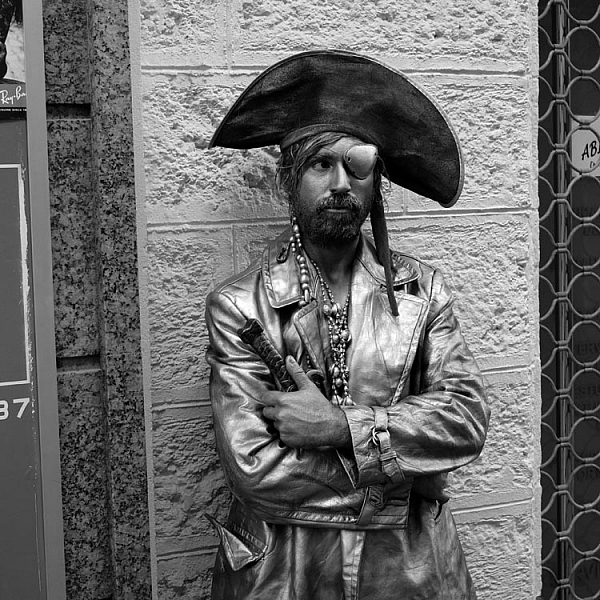
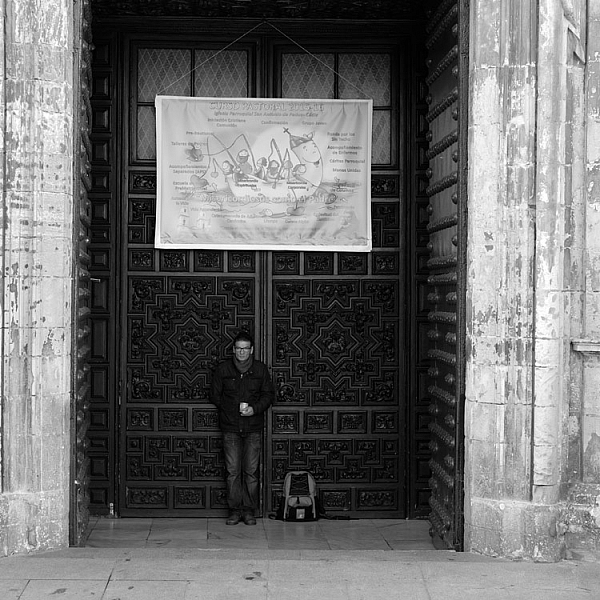
For example, when photographing people I can keep my distance and frame the person in the context of their environment.

Best lens for street and travel photography

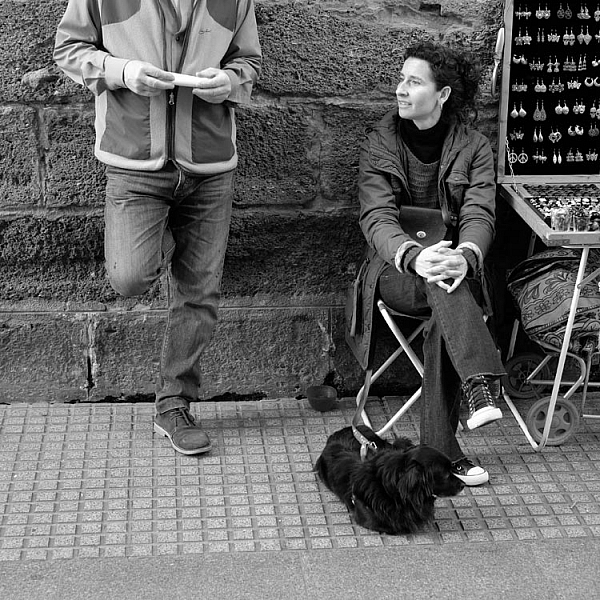
Or I can get closer and concentrate more on the person.

Best lens for street and travel photography

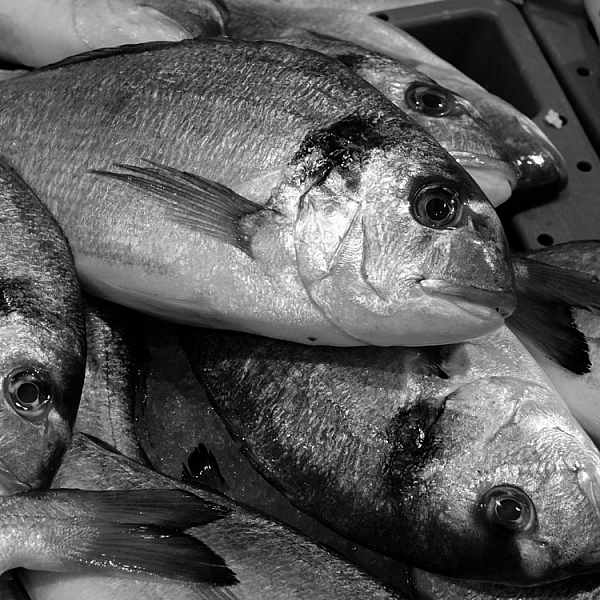
I can also get close to the subject for a tight detail shot, like this one.

Best lens for street and travel photography

Standard lenses for street photography

Working distance is a term used in macro and close-up photography to describe how far the lens is from the subject. You can apply this concept to street, and travel photography too. If you are using a telephoto lens, you will be farther away from the subject. That’s great for not being noticed, but it can also lead to a kind of detached feeling in the image. The viewer can tell you weren’t close to the action, and there may be a sense of lack of involvement in the scene.

A wide-angle lens forces you to get in closer to fill the frame. The closer you get to somebody on the street, the more likely they are to notice you, and react to the camera in some way. This is not necessarily a bad thing (Bruce Gilden has taken this confrontational style to an extreme) and using a wide-angle lens definitely shows involvement in the life of the street. It’s also an approach you can take if you like to go up to people, and ask permission to take their photo first.

The standard lens falls in-between these two extremes. It lets you get close enough to be involved in the scene, but not so close that people are overly bothered by what you are doing. It helps you blend in to what is a very common thing these days – people taking photos on the street (although most often with camera phones, not actual cameras).

Best lens for street and travel photography

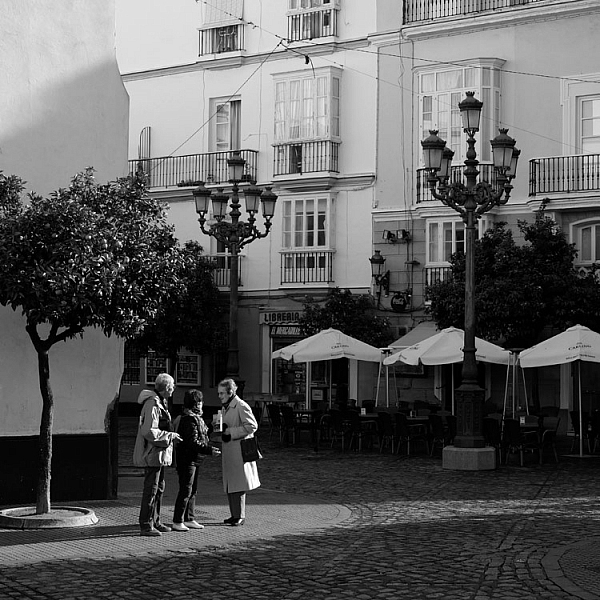
By the way, all the photos in this article were taken in the Spanish city of Cadiz, and I wanted to show the people in context, with the historical buildings in the background, in at least some of the photos. The 35mm lens worked very well for this.

So, for me, the 35mm lens is a clear favorite for travel and street photography. But, what about you? What lenses do you prefer to use? Please let me know in the comments, I’d like to hear your thoughts.


Mastering Lenses photography ebookMastering Lenses

My new ebook Mastering Lenses: A Photographer’s Guide to Creating Beautiful Photos With Any Lens shows you how to get the best from the lenses you own already. A comprehensive guide to exploring the creative potential potential of wide-angle, normal and telephoto lenses, it’s also the ultimate buying guide for readers thinking about purchasing a new lens for their camera. Please click the link to learn more or buy.

googletag.cmd.push(function() {
tablet_slots.push( googletag.defineSlot( “/1005424/_dPSv4_tab-all-article-bottom_(300×250)”, [300, 250], “pb-ad-78623” ).addService( googletag.pubads() ) ); } );

googletag.cmd.push(function() {
mobile_slots.push( googletag.defineSlot( “/1005424/_dPSv4_mob-all-article-bottom_(300×250)”, [300, 250], “pb-ad-78158” ).addService( googletag.pubads() ) ); } );

The post How to Choose the Best Lens for Travel and Street Photography by Andrew S. Gibson appeared first on Digital Photography School.

Digital Photography School

 
Comments Off on How to Choose the Best Lens for Travel and Street Photography

Posted in Photography


Travel Photography Simplified: 4 Changes that Made me a Better Photographer

19 Feb

Get Viktor’s Lightroom Rapid Editing System for Travel Photography Course 50% off now at SnapnDeals for a limited time only – February 9th-23rd, 2016.

When I look back and analyze how my photography has changed over time, I see that the last couple of years were the most eventful in regards to the evolution of my photography. I see that rapid advances in technology, in combination with my attempts to simplify various aspects of my photography, gradually changed my entire workflow.

Images Travel Photography Simplified 01

If I had to identify the key moments that triggered the rest of the changes, my switch from DSLR to a mirrorless system would be at the very top of the list.

1. Mirrorless Setup

Depending on the type of photography, the switch to a mirrorless system affects photographers differently. As a travel photographer, the effect of the change was huge for me, and even though the learning curve was steep, it was liberating from the very beginning.

The compactness of mirrorless systems was the most obvious factor for the switch. Here is the breakdown of my camera, plus lenses setup:

  • Sony A6000 (344g, 12oz)
  • Sony 10-18mm (220g, 8oz)
  • Sony 16-70mm (308g, 11oz)
  • Total: 874g (31oz)

It’s hard to believe that a high-quality, wide angle zoom lens (10-18mm) can weigh only 220g (8oz). The full set, including the camera and two lenses that cover 90-95% of my needs, weighs less than 900g (32oz). I call it freedom.

Images Travel Photography Simplified 02

From a practical standpoint, it actually means that I can pack the entire setup into a carry-on when traveling by plane. It also means that I do not have to think about what equipment to bring when packing for a demanding hike. Instead, I bring everything with me.

The other two factors of my switch that impacted my photography were the amazing dynamic range of the Sony sensor and its EVF (Electronic Viewfinder). The extended dynamic range of the sensor allows me to reduce the number of brackets I have to take, to cover the entire dynamic range of the scene. Also, it saves me time editing, since I do not have to use HDR, and Image Blending techniques, as often as before.

The Electronic Viewfinder also allows me to more accurately assess the scene before taking the shot and, as a result, reduces the number of unsuccessful shots.

Images Travel Photography Simplified 03

2. Changing Travel Routine

I did not expect that one small change to my travel routine would impact my photography so much. So what was the change? I simply stopped editing photos while traveling. Instead, I began concentrating all my efforts on finding interesting locations and capturing them – nothing else. This new focus makes my trips more enjoyable, reduces stress, and improves my photography in general.

Before, I always loaded all of the new photos at the end of the day to Lightroom using my laptop. While checking the day’s results, I would often start culling and editing.

Now, when I want to check if a shot is successful, I can do it while shooting, simply by wirelessly connecting my camera with my tablet. And, if it is absolutely necessary to post a couple of new photos to social media, I can edit them in seconds using Snapseed on my tablet, then easily post them online.

Images Travel Photography Simplified 04

3. Simplified Backup System

Keeping photos safe while traveling is a big issue for any photographer. Up until recently, there was no reliable enough solution for a photographer, like myself, to go on an extended photography trip without bringing a laptop. For years, a laptop was the center of my backup strategy while traveling, which only added unnecessary bulk to my setup.

Finally, I think this is starting to change. For the last few months I’ve been testing a laptop-less travel approach, and I am confident that a new setup this year will completely replace my outdated backup system.

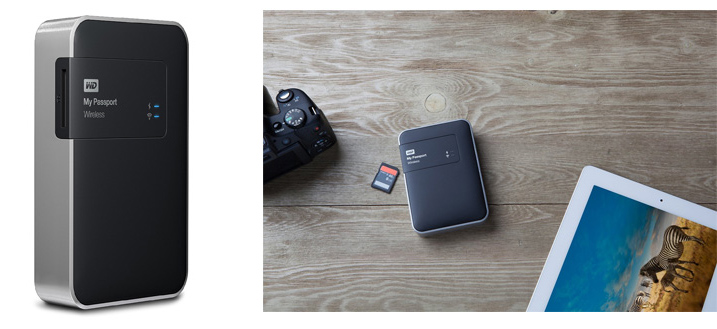
This new workflow is possible because of a device that was recently released: WD My Passport Wireless. The device has a variety of interesting features, but the most important one, from a photography standpoint, is the SD Memory Card Reader. When you insert a memory card into the reader, it automatically backs up all the contents of the card to the drive. Plus, it supports incremental backups, which means that it backs up only new files rather than those previously transferred.

Images Travel Photography Simplified 05

Photo courtesy Western Digital

This device makes it possible to travel without a computer. Also, it minimizes the risk of losing images due to memory card failure. Now, I incrementally backup my new images multiple times throughout the day, and by the end of the day back at the hotel, I already have all of my new images on two devices.

Another feature of the WD My Drive Wireless that excites me as a photographer, is its ability to connect to the drive with a mobile app and grab any photos (JPEGs only) for editing.

Images Travel Photography Simplified 06

4. Rapid Editing

Lightroom is my primary photography editing tool. At some point, I realized that 80% of my editing steps were identical for every photo. This meant that only 20% of my efforts were spent on what really mattered: making every photo unique. I also recognized that if I could automate the 80%, then I could drastically reduce the time I spend in front of the computer.

The obvious choice for editing automation was Lightroom’s preset functionality. The presets allow users to record their editing steps in Lightroom for later use.

The main obstacle in developing and implementing a new system was Lightroom’s presets limitations. You have probably already noticed that it is rare when you apply one of the presets to a photo that are happy with the final results. You still have to dive deeper into the Lightroom editing tools to compensate for the level of exposure, lighting conditions, shadows, and the dynamic range of the scene.

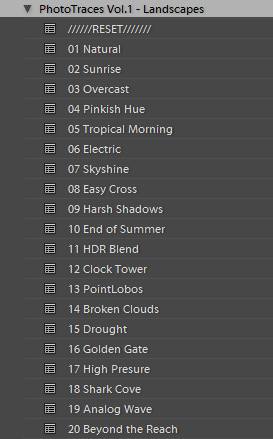
I solved this problem by introducing a two-level editing system which I call Lightroom Rapid Editing. I separated my Lightroom presets into two categories:

Style Presets: The presets that establish the artistic style and reflect our creative vision. For example, a dreamy, warm look or an aggressive and contrasted style, soft black & white or a vibrant cross processed treatment.

Images Travel Photography Simplified 07

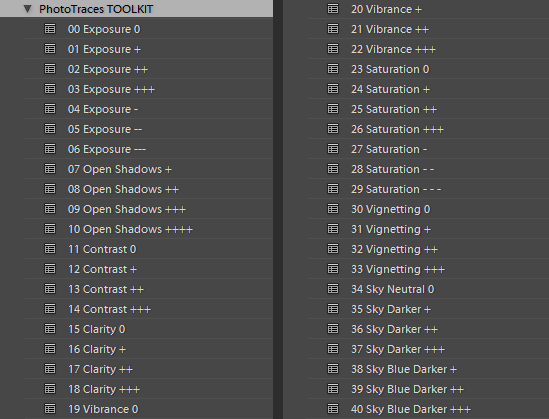
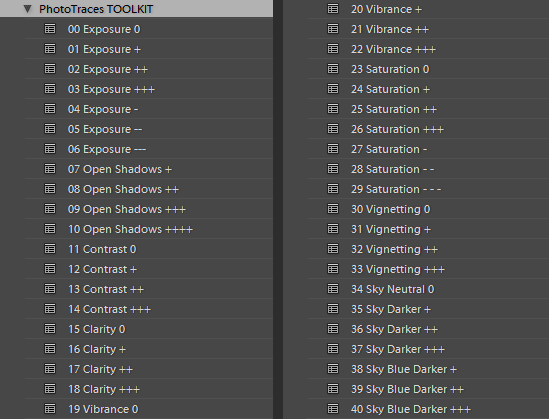
Adjustment Presets: The presets that do affect the style of the photograph but help us to fine-tune the following parameters: exposure, shadow recovery, contrast, clarity, vignetting. I called the collection of the adjustment presets the TOOLKIT.

Images Travel Photography Simplified 08

This is how my workflow looked after I implemented the two level preset system:

First, I applied one of the Style Presets. Then, I used the Adjustment Presets from the TOOLKIT to fine tune the image. Simple, effective, and automated. The Lightroom Rapid Editing System reduced my editing time by more than half and made my photography more consistent.

Here is a quick demonstration:

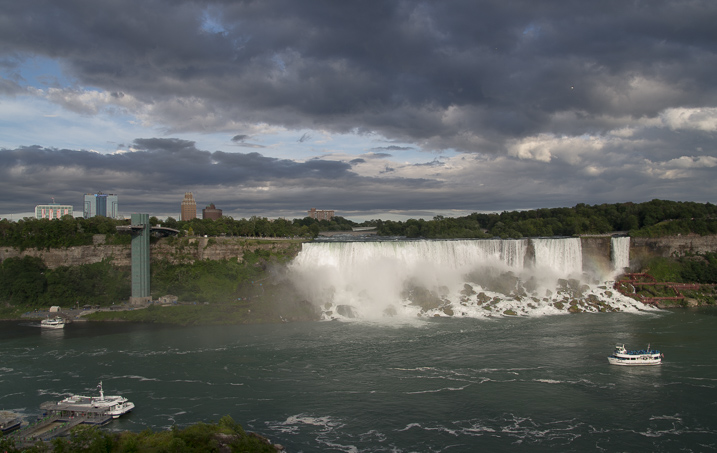
For the demonstration, I selected a photo of Niagara Falls (American and Bridal Veil Falls). The scene was somewhat challenging as the water of the falls, was much brighter than the rest of the scene. I intentionally set exposure for the brightest areas, making sure I preserved enough details in the water. It resulted in an underexposed capture, making it more challenging to edit.

Images Travel Photography Simplified 09

First, I applied one of my favorite presets from the Landscape Collection – Natural. Second, I used the following TOOLKIT adjustments (Adjustment Presets):

  • 01 Exposure +
  • 08 Open Shadows ++
  • 17 Clarity ++
  • 31 Vignetting +

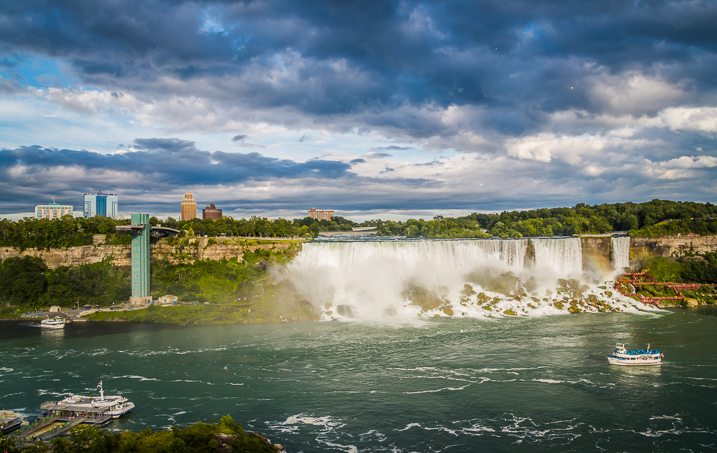
Here is the result. It took me five clicks, and no more than two minutes to complete the editing. To record my editing steps for future reference and easy sharing, I used Lightroom Rapid Editing Formula: Natural (02, 08, 17, 31).

Images Travel Photography Simplified 10

Read a more detailed explanation of my travel photography workflow here: Photo Editing Workflow for Travel Photography

Conclusion

I believe that simplification is the key factor in mastering any complex process. If you reject unnecessary complexity by drastically simplifying it, you can invest more time and effort into what really matters. The changes I listed above did not happen overnight but they were always driven by the desire to simplify my photography.

How have you simplified your photography? Share with us in the comments below.


If you found this helpful, get Viktor’s Lightroom Rapid Editing System for Travel Photography Course 50% off now at SnapnDeals for a limited time only – February 9th-23rd, 2016.

googletag.cmd.push(function() {
tablet_slots.push( googletag.defineSlot( “/1005424/_dPSv4_tab-all-article-bottom_(300×250)”, [300, 250], “pb-ad-78623” ).addService( googletag.pubads() ) ); } );

googletag.cmd.push(function() {
mobile_slots.push( googletag.defineSlot( “/1005424/_dPSv4_mob-all-article-bottom_(300×250)”, [300, 250], “pb-ad-78158” ).addService( googletag.pubads() ) ); } );

The post Travel Photography Simplified: 4 Changes that Made me a Better Photographer by Viktor Elizarov appeared first on Digital Photography School.

Digital Photography School

 
Comments Off on Travel Photography Simplified: 4 Changes that Made me a Better Photographer

Posted in Photography


Photo Editing Workflow for Travel Photography

09 Feb

Get Viktor’s Lightroom Rapid Editing System for Travel Photography Course 50% off now at SnapnDeals for a limited time only – February 9th-23rd, 2016.

A few years ago, just as I returned with 5,000 brand new photos from a driving trip to California, Utah and Nevada, I realized that I needed a completely new editing workflow. Two months later, I was not even close to being done with editing.

Photo Editing Workflow for Travel Photography Image 01

I spent the following year or so testing different approaches and systems, with the main goal to streamline, simplify, and speed up the entire process – from the moment the picture is taken, until it is published and safely backed up to the cloud.

After implementing my new workflow, using it for over a year and tweaking it along the way, I can now process and edit thousands of photos in a matter of hours. I would love to share my new workflow with you.

On the Road

The biggest change in my editing workflow happened when I practically stopped editing photos while traveling. Instead, I concentrated only on shooting, rather than wasting time on anything else.

Photo Editing Workflow for Travel Photography Image 02

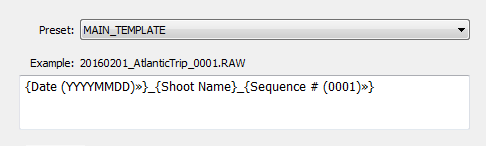
By the end of each day on the road, I import all new photos to a temporary Lightroom catalog, and during the import, I select the option to generate Smart Previews. This allows me to have access to all my photos through Lightroom Mobile on my tablet. I also rename all the images using my renaming template.

Photo Editing Workflow for Travel Photography Image 03

After renaming, my photos then have the following naming structure:

  • 20160201_AtlanticTrip_0001.RAW
  • 20160201_AtlanticTrip_0002.RAW
  • 20160201_AtlanticTrip_0003.RAW

During initial import, I also apply top level tagging based on the location, or type of photos. For example, I might apply very generic tags like “Canada” and “New Brunswick.”

But, even before I import the photos to Lightroom and generate the Smart Previews, I always have another option to access my images. Since switching to mirrorless, I can now connect to my camera using my tablet or smartphone at any time, grab a few images for a quick edit in Snapseed, and post them to social media. As I mentioned before, my editing workflow is minimal on the road.

At Home

The real processing work starts as soon I am home. Sometimes, however, it can start even sooner. If it is a long flight home, I might cull some photos on the plane using Lightroom Mobile, with the main purpose simply to refresh my memories of the trip and make notes.

Import

At home, I connect my master travel external hard drive to my desktop computer, and use the Lightroom option “Import from Another Catalog.” I then bring all the new photos to my main catalog and generate full-size previews for all of them. Because it typically takes a while to import thousands of RAW files and generate full-size previews, I often start the process before going to bed, so that when I wake up in the morning everything is ready.

Culling

Culling is the process of selecting the best photos for editing, and rejecting the bad ones. For a long time, I struggled with this step, as it was always time consuming, and quite often I would get distracted with an interesting image and start editing before finishing my selection.

Lightroom has multiple organizational features for culling that can, to be honest, be overwhelming at times. Features include: Flagging, Starring, Color Tagging, Collections, Smart Collections, Quick Collection. In the past, I tried to use all of them to design an elaborate system that was impossible to sustain for very long. Each time I failed with one system, I would come up with an even more complex scheme. Eventually, I recognized that it was time to simplify the process.

The inspiration for my new culling strategy was from the book, The ONE Thing, by Gary Keller. It states that in order to be 100% efficient you should concentrate on only one thing at a time. In other words, multitasking is evil. Inspired by the book, my process soon changed. My first goal, after importing new photos to Lightroom, is now to remove all the bad shots, the ones that can never be used (out of focus photos, for example). I quickly go through all my photos and use the keyboard shortcut “X” to flag all rejected shots. The process goes very fast even if I have thousands of photos because I concentrate on only one task.

After I finish marking the photos, I immediately delete the rejected files so they do not go to my backup system.
The next step is my favorite. I go through the photos again, and with the help of the keyboard shortcut “P” (P is for PICKED), I flag all the photos that have the potential to be processed and published (keepers). Once again, I only concentrate on a single task as I am not trying to grade picked photos or set star value. This approach allows me to identify the keepers at an incredible and efficient speed.

The next step is to make the keepers pretty.

Rapid Editing

The development of a new Lightroom editing approach was triggered by the realization that 80-90% of the edits I perform in Lightroom are identical for every edited image, and only 10-20% contributes to the uniqueness of any given photograph. The rationale was to automate the 80-90% of the editing process to save time on repetitive tasks.

In order to automate the editing, I created a two-level preset based system, one that I call Lightroom Rapid Editing. Lightroom Rapid Editing allows me to overcome the limitation of the presets, such as when any given preset produces a very different result depending on the level of exposure, lighting conditions, shadows and the dynamic range of the scene. With this two-level approach, I am able to compensate for various lighting conditions without touching the main Lightroom editing tool.

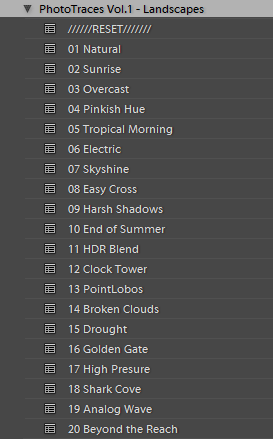
Level 1 – Style Presets. The presets that define the “LOOK” and style of the photograph. For example: cool or warm, cross processed or natural, contrasted or soft.

Photo Editing Workflow for Travel Photography Image 04

Level 2 – Adjustment Presets. The presets that allow fine-tuning of a photo without altering the style, and without the use of Lightroom editing tools. I named them the TOOLKIT.

Photo Editing Workflow for Travel Photography Image 05

Here is a real life scenario

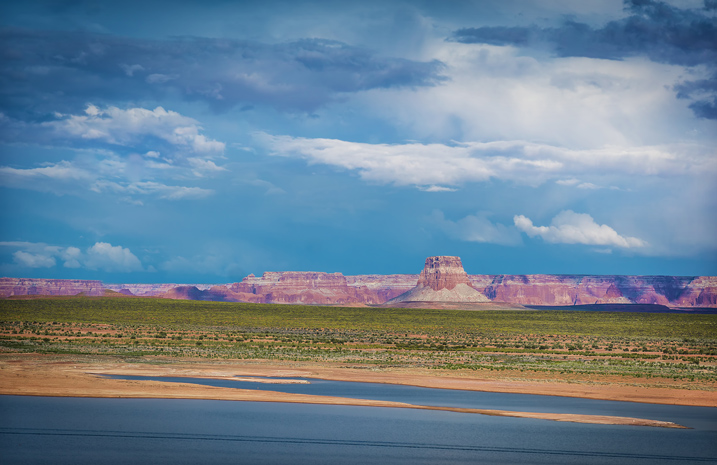
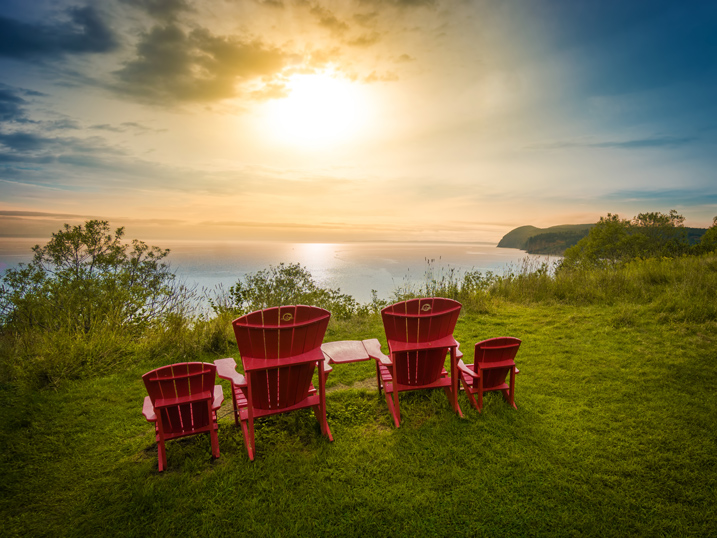
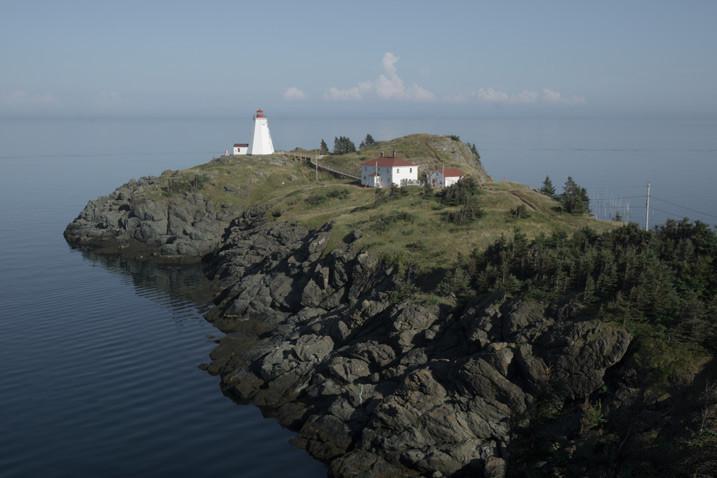
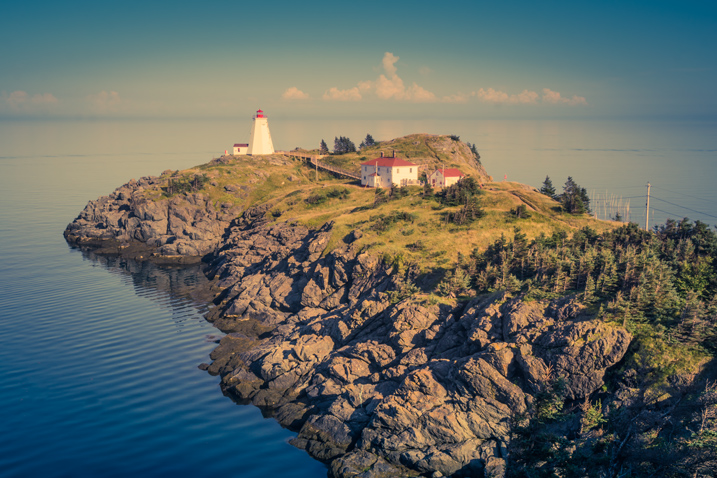
When I returned from a driving trip to Atlantic Canada, I brought back over a thousand new photos. After selecting around 10 keepers, I wanted to edit them using a similar style, and then publish them as the Atlantic Series on my travel photography blog. I started with my favorite photo from the selection.

Photo Editing Workflow for Travel Photography Image 06

I began with Level 1 of Rapid Editing by applying the NATURAL style preset to the selected image (above).

Photo Editing Workflow for Travel Photography Image 07
Natural style preset applied.

Even though I liked the style, the image did not look good at all, because it was too dark, with deep shadows in the background. This is when the second level of editing came into play.

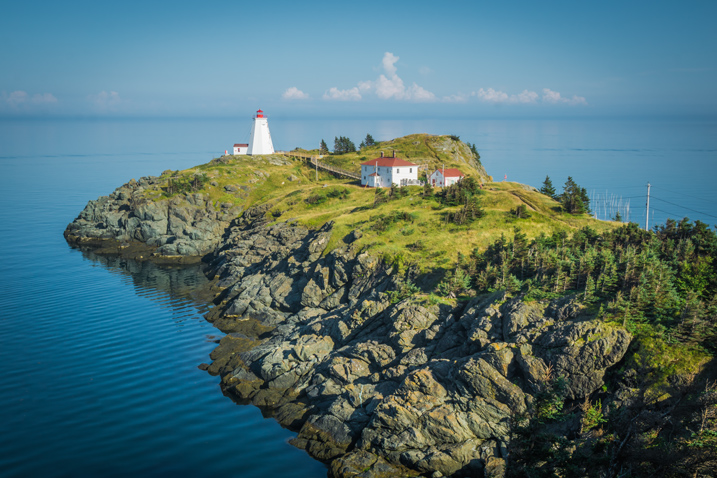
From the TOOLKIT adjustment presets collection, I applied the following presets:

  • 01.Exposure +
  • 09.Open Shadow +++
  • 16.Clarity +
  • 20. Vibrance ++

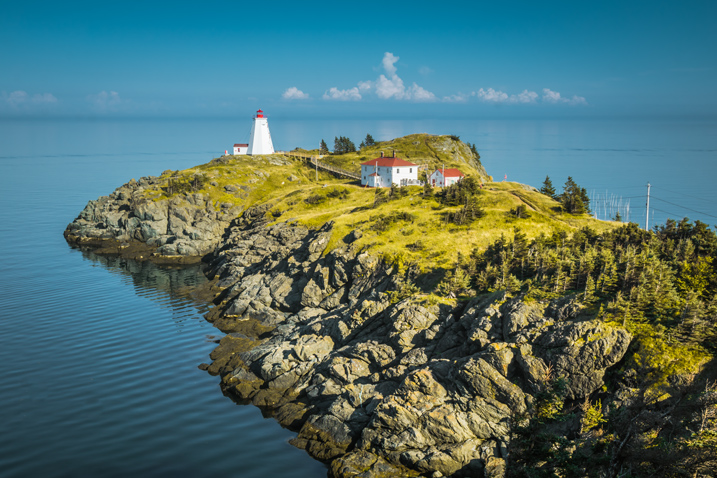
Below is the final result. It took me five clicks to go from the original unprocessed RAW image to the final edit.

Photo Editing Workflow for Travel Photography Image 08

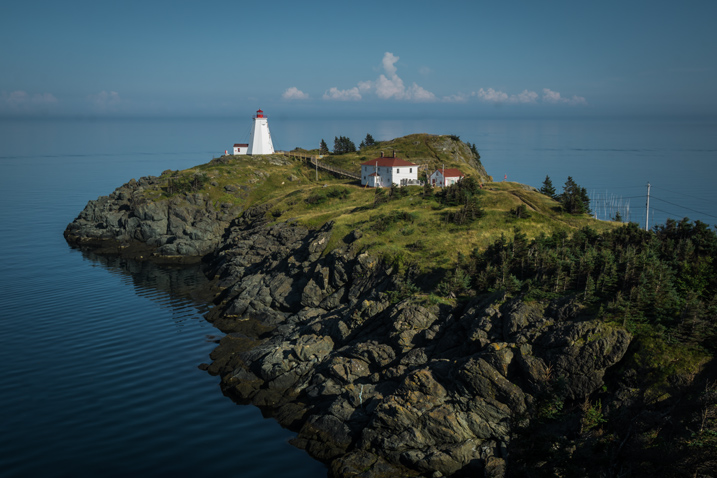
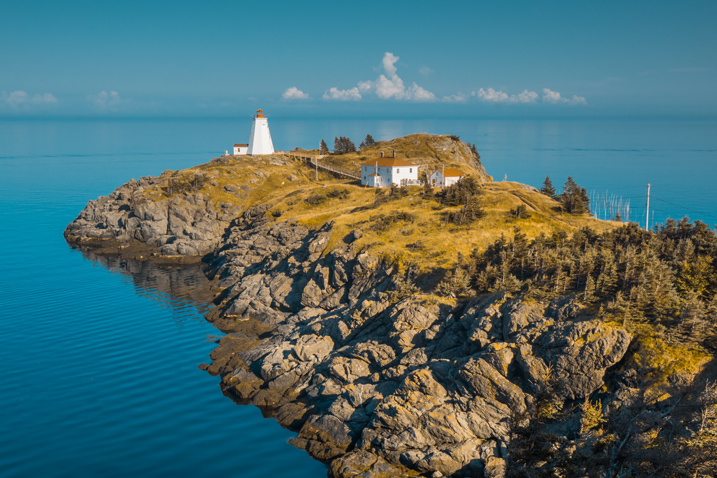
The next step was to come up with a more creative style for this particular photograph. I used the two-level Lightroom Rapid Editing process to produce three more creative versions.

Photo Editing Workflow for Travel Photography Image 09
Preset: Broken Clouds

Photo Editing Workflow for Travel Photography Image 10
Preset: Drought

Photo Editing Workflow for Travel Photography Image 11
Preset: Point Lobos

During the next step, I selected the edited version I liked the best. In this particular case, I chose the image with the Point Lobos preset effect. I then used the SYNC SETTINGS functionality of Lightroom, to synchronize the editing settings with the rest of the flagged photos (the other nine keepers).

In the last step, I went through the photos one more time, using only the TOOLKIT, and focused on each photo individually. At this stage, I mostly adjusted the Exposure and Open Shadow to compensate for different lighting conditions and exposure imperfections (underexposure and overexposure). This process typically does not take long – an average of 10-15 seconds per photo.

Photo Editing Workflow for Travel Photography Image 12

Photo Editing Workflow for Travel Photography Image 13

Photo Editing Workflow for Travel Photography Image 14

Photo Editing Workflow for Travel Photography Image 15

Photo Editing Workflow for Travel Photography Image 16

Photo Editing Workflow for Travel Photography Image 17

Photo Editing Workflow for Travel Photography Image 18

Photo Editing Workflow for Travel Photography Image 19

Photo Editing Workflow for Travel Photography Image 20

At this point, I was finished with Rapid Editing. I managed to complete 80-90% of the editing process without touching any of the Lightroom editing tools. As you can see, Lightroom Rapid Editing allows me to process a high volume of photos in a relatively short amount of time, while also giving the photos a similar look and feel, that makes the set distinguished and unique.

After this two-level editing process, it was then time to perform the last 10-20% of editing that cannot be automated.
Depending on the image, I might open it in Photoshop for selective editing. In most cases, I clean the images by removing distracting elements from the composition (electric wires, debris). Another option I often use is Lightroom Adjustment Brushes for selective editing.

Publishing

The very last step of my workflow is publishing. I use the plugin functionality of Lightroom to synchronize my newly created photos with my cloud portfolio on SmugMug. With SmugMug cloud service, I have access to all my photos at full resolution, and 100% quality anytime and anywhere.

One of my favorite features of SmugMug is the ability to create custom sized images on the fly by manually changing an image URL, without using any editing tools.

Conclusion

What I learned after designing my photo editing workflow is that there is no perfect solution for travel photography that fits every photographer. Any system we put in place is in a constant state of fluctuation, and all we can do is keep adjusting it based on the type of photography and our individual habits and routines.

Do you have a workflow you’d like to share with us? Please do so in the comments section below.


If you found this helpful, get Viktor’s Lightroom Rapid Editing System for Travel Photography Course 50% off now at SnapnDeals for a limited time only – February 9th-23rd, 2016.

googletag.cmd.push(function() {
tablet_slots.push( googletag.defineSlot( “/1005424/_dPSv4_tab-all-article-bottom_(300×250)”, [300, 250], “pb-ad-78623” ).addService( googletag.pubads() ) ); } );

googletag.cmd.push(function() {
mobile_slots.push( googletag.defineSlot( “/1005424/_dPSv4_mob-all-article-bottom_(300×250)”, [300, 250], “pb-ad-78158” ).addService( googletag.pubads() ) ); } );

The post Photo Editing Workflow for Travel Photography by Viktor Elizarov appeared first on Digital Photography School.

Digital Photography School

 
Comments Off on Photo Editing Workflow for Travel Photography

Posted in Photography


Manfrotto introduces carbon fiber version of its 190Go travel tripod

30 Jan
The new carbon fiber version of the Manfrotto 190Go, with the existing aluminium version behind it

Manfrotto has launched a new lighter version of its 190Go travel tripod that is made with carbon fiber. The new model joins the aluminum version of the existing 190Go, and is essentially the same other than the amount it weighs – and costs. While the aluminum version weighs 1670g / 58.9oz, the new carbon fiber model is notably lighter at 1350g / 47.61oz. Both can manage 7kg / 15.43lbs of equipment and have a maximum shooting height of 147cm / 57.87in.

The 190Go Carbon fiber will be available legs-only or in a kit with the 496RC2 ball and socket head or the new 804 Mark ll 3-way pan-and-tilt head. UK prices are as follows (US pricing is yet to be announced): 

  • 190Go! Carbon fiber 4-section – £309.95
  • 190Go! Aluminium 4-section (for reference) – £159.95/$ 199.99
  • 190Go! Aluminium kits with 3 way head or ball head – £214.95
  • 190Go! Carbon fiber kits with 3 way head or ball head – £359.95

For more information visit the Manfrotto website. 

Articles: Digital Photography Review (dpreview.com)

 
Comments Off on Manfrotto introduces carbon fiber version of its 190Go travel tripod

Posted in Uncategorized


The Tip Top Travel Topics of 2015

01 Jan

Travel and photography often go hand in hand. We get bored shooting in our own neighborhood, city or even country, and we’re more likely to shoot more photos when we head out to a new place. The grass is always greener on the other side of the fence right?

Caroline

By Caroline

Here are some of the top travel topics we had on dPS in the last 12 months:

  1. Video Share – Travel Photography Hacks and Gear Tips
  2. 10 Ways to Improve Your Travel Photography
  3. 7 Travel Photography Tips Your Tour Guide Won’t Tell You
  4. Travel Photography Tips – Photographing the Coast
  5. How to Tell Better Visual Stories with Travel Photography
  6. Safety Tips for Travel Photographers (Particularly Women)
  7. 8 Tips to Help You Come Home with Great Travel Photos
  8. 5 Reasons to Use Flash to Improve Your Travel Photography
  9. Simple Tips for Photographing Waterfalls
  10. 15 Tips for Protecting Your Images While Traveling
  11. The Camera Bag of a Professional Traveler
  12. Simple Tips to Improve Your Travel PortraitsHow to Become a Professional Travel Photographer – Two Paths
  13. Travel Photographers Workflow – At Home and on the Road

Of course, remember that if travel isn’t in your plans or isn’t feasible for you right now – you can still apply many of the tips in the articles to photography you can do near home too! Check out these articles too:

  • How to Find Inspiration Photographing Locations Near Home
  • Put the Fun Back into Your Photography with a Cow Safari

Fun-photography-safari-01


googletag.cmd.push(function() {
tablet_slots.push( googletag.defineSlot( “/1005424/_dPSv4_tab-all-article-bottom_(300×250)”, [300, 250], “pb-ad-78623” ).addService( googletag.pubads() ) ); } );

googletag.cmd.push(function() {
mobile_slots.push( googletag.defineSlot( “/1005424/_dPSv4_mob-all-article-bottom_(300×250)”, [300, 250], “pb-ad-78158” ).addService( googletag.pubads() ) ); } );

The post The Tip Top Travel Topics of 2015 by Darlene Hildebrandt appeared first on Digital Photography School.

Digital Photography School

 
Comments Off on The Tip Top Travel Topics of 2015

Posted in Photography