RSS
 

Posts Tagged ‘Tips’

Top Portrait Photography Tips of the Year on dPS in 2017

27 Dec

This week on dPS we’re featuring some of the top articles in different categories that were published on the site over the last year, 2017. Yesterday was the Best Landscape Articles on dPS in 2017, and this one is all about the best portrait tips of the year.

Here are the top 18 portrait tip articles:

  1. How to Create Portraits with a Black Background
  2. How to Make a Low Key Portrait Step by Step
  3. How to Make Beautiful Portraits Using Flash and High-Speed Sync
  4. How to Create a Dark and Moody Rembrandt-Style Portrait In Lightroom
  5. 4 Beginner Tips for Creating Dramatic Portraits with One Flash
  6. How to Pose People for Group Portraits
  7. Tips for Making Natural Light Portraits
  8. How to Create Good Black and White Portraits
  9. 5 Tips for Creating Romantic Portraits of Couples
  10. 8 Tips for Mastering Your Portrait Photography
  11. Six Ways to Capture the True Character of a Subject in Portraits
  12. A Quick Exercise to Help You Take Better Self-Portraits
  13. How to Create and Shoot Night Portraits
  14. 6 Tips for Posing Hands in Wedding and Portrait Photography
  15. 5 Reasons to Use Lightroom for Portrait Retouching
  16. Basic Portrait Post-Processing Workflow Tips to Help You Save Time and Stay Organized
  17. 5 More Tips for Making Better Black and White Portraits
  18. 3 Tips for Taking Portraits with a Kit Lens

Tomorrow, look for the most popular articles on post-processing in 2017.

The post Top Portrait Photography Tips of the Year on dPS in 2017 by Darlene Hildebrandt appeared first on Digital Photography School.


Digital Photography School

 
Comments Off on Top Portrait Photography Tips of the Year on dPS in 2017

Posted in Photography


4 Tips for Creative HDR Styling with Aurora HDR 2018

27 Dec

Arguably the best software for making high dynamic range photos is Macphun’s (soon to be Skylum) Aurora HDR 2018. This image editor can be used as by itself or in conjunction with their popular Luminar photo editor (as well as a plugin for Photoshop, Lightroom, Aperture, and Elements). Within Aurora HDR are tons of photo editing tools including their popular presets (filters). But you don’t have to use Presets to creatively style your HDR photos.

Here are four tips beyond using presets for achieving creative images.

1. Make your images pop with subtle HDR enhancements

4 Tips for Creative HDR Styling with Aurora HDR

Before – the middle image of a 3-shot bracket.

Instead of going right for the Presets at the bottom of Aurora HDR, dive right into the HDR Basic panel on the right-hand side of the software. Start with the Contrast and HDR Enhance sliders to enhance textures and details in your photo. Then play with the Smart Tone to tame down the shadows that can be created by increasing the contrast.

Next, head to the Color panel right below HDR Basic and adjust the Vibrance and Saturation. Keep these color adjustments minimal if you’re going for a more subtle, realistic look. Based on the color edits that you make, you may also need to balance out the color temperature if your image appears too cool or too warm.

4 Tips for Creative HDR Styling with Aurora HDR

Add the HDR Basic and Color Filters.

4 Tips for Creative HDR Styling with Aurora HDR

2. Add a Polarizing and Graduated ND Filter Effect

Landscape photographers are well aware of the effects of the polarizing and graduated neutral density (ND) lens filters. If you aren’t familiar with them, here’s a quick rundown. A polarizing filter helps darken skies and minimize reflections and glares of light bouncing off of surfaces such as water or glass. Similarly, the graduated ND filter helps balance out exposures by darkening backgrounds that are much brighter than foregrounds. In essence, both of these filters are often needed to obtain the best landscape photos.

If you don’t have these filters or happen to forget them, Aurora HDR’s post-processing effects can produce very similar results. Simply click scroll to the Polarizing Filter panel and apply as much of the effect as you wish. In the example below, increasing the polarizer makes the blues really pop, especially in the sky.

Further down, you’ll find the graduated ND filter effect, known simply as Top & Bottom Tuning. This allows you to adjust the exposure, contrast, vibrance, and saturation of the top and bottom areas of your image separately. If you happen to have an untraditional horizon, click the Set Orientation button to fine tune the horizon’s rotation and make your graduated ND filter effect blend more realistically.

4 Tips for Creative HDR Styling with Aurora HDR

Polarizing Filter and Top & Bottom Tuning (ND filter)

Skylum Aurora HDR Creative Styling Tips

3. Replace the sky

4 Tips for Creative HDR Styling with Aurora HDR

Before – the middle image of a 5-shot bracketed set.

If you’ve ever photographed a sunset and wished the sky had been more colorful, you can actually make this edit rather quickly with Aurora HDR. All you need is a clear photo of the ideal sunset that you want to swap into your bracketed image. You can pull that ideal sunset image from your own archives, or use a stock photo like the one that I’m using from Pexels in the example below.

Start by running your brackets through Aurora HDR and making any desired adjustments to the resulting photo. Below, I’ve applied a Warm Skylight filter. Next, go the Layers section in the right-hand panel and click on the plus sign. Select “Add Image Layer…” This is where you can select your ideal sunset photo and import it as an image layer.

Once your new image has loaded, you can apply any filters or adjustments as desired. Next, click on the paintbrush icon next to the image layer. A small drop-down menu will appear with four options: Brush, Radial Mask, Gradient Mask, and Lumosity.

4 Tips for Creative HDR Styling with Aurora HDR

If your image has a straight horizon with no big obstructions, the Gradient Mask will easily mask your ideal sunset into your bracketed shot. But in my case, I have a big building in the way, so the Brush is my best bet. After clicking on Brush, a thin bar of options will appear on the top panel. This is where you can control whether you’re painting over the image, or Erasing (backtracking on any mistakes). You can also control the size, softness, and opacity of the paintbrush.

When I’m done painting in my new sunset sky, I’ll press the blue Done button. Check out the before and after images below!

4 Tips for Creative HDR Styling with Aurora HDR

4 Tips for Creative HDR Styling with Aurora HDR

4. Add a texture overlay

4 Tips for Creative HDR Styling with Aurora HDR

Before – the middle image of a 3-shot bracketed set.

Using a similar technique to sky replacement, you can add textured overlay layers to your photos for a more creative effect. All you need is a textured photo, such as the weathered paper image below. Simply import that image as a new layer. You can then selectively mask it by using the Brush, Radial Mask or Gradient Mask tools (explained above). Or you can apply the texture equally to the whole image by adjusting the opacity. The resulting image had a moody, vintage look to it.

Skylum Aurora HDR Creative Styling Tips

Over to You

Have you used Aurora HDR 2018 to enhance your images? What tools have you found to be the most useful for achieving more creative photos? Let us know in the comments below!

Disclaimer: Macphun, soon to be Skylum, is a dPS advertising partner.

The post 4 Tips for Creative HDR Styling with Aurora HDR 2018 by Suzi Pratt appeared first on Digital Photography School.


Digital Photography School

 
Comments Off on 4 Tips for Creative HDR Styling with Aurora HDR 2018

Posted in Photography


6 Tips for Working with Unruly Animals in Pet Photography

23 Dec

Whenever I do an event that promotes my pet photography, there are always one or two potential clients that have reservations about booking due to their beloved furry family member’s “unruly” behavior. Whether it be a hyperactive puppy that does not yet know how to sit still or a feline that runs the roost, some owners believe their pets to be impossible to photograph!

Working with Unruly Animals in Pet Photography

But you see, this perspective comes from someone who lives with their critters. Those who specialize in pet photography know just how to work with all sorts of four-legged personalities that find themselves in front of the camera. Here are some tricks for working with the hyper, the untrained, the unruly, or the camera-shy to help you bring out their best sides.

Please note that the tips provided below are not intended as a pet training mechanism or a deep insight into animal behavior – they are only to be used for individual photography sessions.

Working with Unruly Animals in Pet Photography

#1 – A Tired Dog is a Good Dog

Each old saying has a grain of truth to it, and in this case, significantly more than just a grain. An animal that is tired is less likely to have the energy to misbehave! A key tip in working with untrained pets is getting them too tired to exert their boisterous behavior or protest having to stay still. Playing, running, and stimulating the dog, cat, or even parrot before a session will keep them mellower when it comes time to take the photographs.

Depending on how you run your photo sessions, you will either suggest this for your client or proceed to take on the responsibility of doing it yourself. If your client is the one to do this, ensure that they time the play effectively so that their furry family member isn’t so stimulated that the presence of a photographer causes stress or anxiety. The key is to get the animal to the level of tired that they no longer care about what is happening around them. Combined with other techniques as I am about to discuss, this is a sure way to get a great photo session.

Do keep in mind that it certainly depends on the age of the animal you are working with in regards to how long they remain tired or how long one should play. Puppies and kittens tend to tire out very easily, while an adult dog and cat take a longer amount of time. Baby or young animals may also remain tired for less time than an adult counterpart, as their energy comes in bursts.

Working with Unruly Animals in Pet Photography

#2 – Become Boring John or Jane Doe

Unruly animal behavior can often be linked to excitement, overstimulation, or anxiety about something new in the pet’s home or immediate location. Animals communicate with body language and conduct. Because pets cannot speak words to us, their method of expressing emotions is very physical.

Knowing this means that we, as photographers, must find a way to dull the reaction our own presence causes. Allowing pets to become familiar with us is a good way to do so, such as letting a dog sniff us and our equipment or having a cat circle around and check us out. Letting owners interact with the photographer as they would any familiar person can also help the animal become more familiar.

Working with Unruly Animals in Pet Photography

For fearful pets, getting down to their level (sitting on the ground, for example) and letting them come to you is key. Try not to look at them or pay much mind until they become insistent on receiving attention from you. Depending on the personality and temperament of the pet, giving the animal their favorite treat can also aid. Try not to act overly excited or exceptionally grabby or touchy with the pet, as many animals take that as “play”.

#3 – Tap Into Your Inner Mind Reader

Working with Unruly Animals in Pet Photography

The following tip can be applied to all animal photography, whether it be wild animals or domestic. Ensuring that you are always ready to capture the perfect moment whenever it may occur is key. A good way of knowing when to raise the camera and click the shutter is to predict the animal’s behavior.

Much of this does come from experience and exposure to various kinds of pets, but you can often use common sense to figure out what your subject is going to do next. If a dog is about to run, practice your panning technique! If a cat is about to jump from the back of a couch, prepare yourself to capture that action.

Working with Unruly Animals in Pet Photography

#4 – Become an Observer

Sometimes, the best pet photography shots are those in which you play no involvement and sit back as an observant photographer rather than one who dictates the session. It is often to your benefit to sit farther back with a telephoto or zoom lens and not interfere with what proceeds to occur.

This does depend on what your client wants from the photo shoot, what you expect, or what the animal you are working with is like – but certainly, give it a thought!

Working with Unruly Animals in Pet Photography

#5 – Toys and Treats Capture Hearts

Depending on the pet you’re photographing, toys and treats can become your best friend. Though you do not want to overstimulate the pet, keeping their attention can be equally important. Treats, toys, and noises can often do this for you.

You may even be able to teach a dog to sit during your photo session or keep a cat looking at you as you take pictures, depending on how you are with animals. The key with treats is to use high-value treats, a common term used among dog trainers. High-value treats are goodies that the pet finds irresistible, and that becomes a big motivator for them to do what you want.

Working with Unruly Animals in Pet Photography

Certain types of toys can be the same. Toys and noises are also a great way to get alert ears and a happier facial expression.

#6 – Be Creative

This is the most important piece of advice anyone can give you – just be creative. A successful photographer is one who knows how to adapt to any situation thrown their way, and an animal that isn’t behaving is just another circumstance to overcome.

Take your creativity for a spin as you adapt to what you’ve been given, and find new and unique ways to capture the creature’s personality on camera. Whether it’s using a different lens or changing your perspective and composition, doing something new based on what’s happening is a great way to work with animals.

Of course, all animals are different. Your reaction should be based on the individual animal’s personality, reaction, and needs. Pet photographers must display a sensitivity and empathy towards their subject, and act accordingly!

Conclusion

Hopefully, these tips have given you some ideas or inspiration to work with all kinds of animals, mellow and not-so-mellow!

Working with Unruly Animals in Pet Photography

The post 6 Tips for Working with Unruly Animals in Pet Photography by Anabel DFlux appeared first on Digital Photography School.


Digital Photography School

 
Comments Off on 6 Tips for Working with Unruly Animals in Pet Photography

Posted in Photography


5 Must-Know Photoshop Retouching Tips and Tricks for Photographers

23 Dec

Here are five quick tips for doing retouching in Photoshop that are essential to know. Learn them to do better retouching on your photos.

#1 – Load Luminosity as a Selection

In Photoshop you can use the luminosity of an image (the bright pixels) as selections. The easiest way to make a selection out of the bright pixels of a photo is by pressing Command+Option+2, (Windows: Ctrl+Alt+2).

If you cannot remember the keyboard shortcut, you can also load luminosity as a selection by holding Cmd/Ctrl and clicking on the RGB thumbnail in the Channels panel.

01 selection - 5 Must-Know Photoshop Retouching Tips and Tricks for Photographers

With a selection active, you can create an Adjustment Layer to apply the selection to the Layer Mask.

02 adjustment mask - 5 Must-Know Photoshop Retouching Tips and Tricks for Photographers

This Adjustment Layer will only target the brighter pixels of your image. If you make an adjustment, you’ll notice that you will only affect the bright pixels and not the dark ones.

03 adjustment lights - 5 Must-Know Photoshop Retouching Tips and Tricks for Photographers

You can target dark pixels by inverting the selection. To do so, Select the Layer Mask, and clicking on Invert in the Properties panel.

04 invert mask - 5 Must-Know Photoshop Retouching Tips and Tricks for Photographers

Now if you make an adjustment, the dark pixels will be affected and not the bright.

05 adjustment darks - 5 Must-Know Photoshop Retouching Tips and Tricks for Photographers

#2 – Spot Healing Brush Tool Modes – Lighten and Darken

One way to remove wrinkles, blemishes, and other distractions from the face quickly and efficiently is to use the Modes in the Spot Healing Brush Tool and Content-Aware.

First, think of the blemish, wrinkle, or distraction that you are trying to remove. Is it darker than the skin tone or is it brighter than the skin tone?

06 portrait - 5 Must-Know Photoshop Retouching Tips and Tricks for Photographers

In this case, the wrinkles are darker than the skin tone. That means that you want to “lighten” those wrinkles.

With the Spot Healing Brush Tool selected, in the Options bar, click on Content-Aware, and under the Mode drop-down menu, select Lighten.

07 lighten - 5 Must-Know Photoshop Retouching Tips and Tricks for Photographers

Then start painting with a small brush and small strokes over the wrinkles to remove them. But you will not lose essential details in the highlights. The Spot Healing Brush tool is only targeting dark pixels which are the wrinkles.

08 before after - 5 Must-Know Photoshop Retouching Tips and Tricks for Photographers

If your blemish or distraction is brighter than the skin tone, such as the bright wrinkles above the lip, then select Darken from the Mode drop-down menu, and paint them away.

10 final heal - 5 Must-Know Photoshop Retouching Tips and Tricks for Photographers

To learn more about how this technique works, check out this video on the Spot Healing Brush Tool:

#3 – Open the Same Image in Two Windows

In Photoshop, you can open the same image in two windows and set them side-by-side to work on both details and the overall image at the same time.

This technique is great when you are working with two monitors. But even with one monitor, this technique can be very useful.

To open the same document in two windows, go to Window > Arrange, “New Window for [Name of Document].” Then go to Window > Arrange > Two up Vertical to put the two tabs side-by-side. You can then Zoom into one window, and zoom out on the other.

same doc two windosw - 5 Must-Know Photoshop Retouching Tips and Tricks for Photographers

These are not two separate files. They are the same document, and any adjustments that you make to one will reflect on the other instantly.

#4 – Targeted Selections with Color Range

The Color Range command can be an excellent tool for selecting difficult areas of an image. However, if you simply use the Color Range on a problematic image, it may not give you the results you want. Sometimes there is too much information on a single image, and you need to focus on just one area.

To focus the Color Range in only one area, create a selection around the object that you want to select. A simple rectangular selection will be fine.

12 selection - 5 Must-Know Photoshop Retouching Tips and Tricks for Photographers

Then go into Select > Color Range, and you will see that Color range is now focusing solely on the selected area.

13 color range - 5 Must-Know Photoshop Retouching Tips and Tricks for Photographers

Select a red color on the shirt using the eyedropper, then use the fuzziness slider to adjust the selection.

Keep in mind that it is going to be next to impossible not to select the hands or the railing that she’s leaning on because the skin tones and the paint on the railing are very similar in color to the red that you are trying to select.

But you can use the Lasso tool to quickly deselect those areas, leaving only the red in the shirt selected.

14 selection only red - 5 Must-Know Photoshop Retouching Tips and Tricks for Photographers

With a selection active, you can create a Hue and Saturation Adjustment Layer that will just target the red in the shirt.
Then use the Hue slider to change the color of the shirt.

15 change color - 5 Must-Know Photoshop Retouching Tips and Tricks for Photographers

#5 – Use the Lab Color Mode

Most of the time, you will work with RGB or CMYK while in Photoshop. But there is another Color Mode that you can use that can be very useful in certain situations. If you go to Image > Mode > Lab Color, you will change your photo’s color mode to Lab.

16 color mode - 5 Must-Know Photoshop Retouching Tips and Tricks for Photographers

The Lab color mode has three channels: Lightness, A, and B.

  • The Lightness channel contains the detail of the image – the Luminance values.
  • “A” is the relationship between green and magenta. These are the same colors as the Tint slider in Lightroom and Camera Raw.
  • “B” is the relationship between blue and yellow. These are the same colors as the Temperature slider in Lightroom and Camera Raw.

17 lab graphic

One of the most significant advantages of working with the Lab color mode is that Lab separates detail (luminosity) from color. This separation allows you to work with color without affecting detail and vice versa.

17 red dress - 5 Must-Know Photoshop Retouching Tips and Tricks for Photographers

For example, you could turn a red dress green by duplicating the layer, and then selecting “A” from the Channel’s panel, and pressing Cmd/Ctrl+I to invert the channel.

18 a channel

Notice that the color of the image changed, but the detail was left intact.

19 green layer - 5 Must-Know Photoshop Retouching Tips and Tricks for Photographers

You could then use a Layer Mask to contain the adjustment to only the dress.

20 mask dress

Another advantage of using the Lab color mode is that you can sharpen without affecting the color of a photo. If you apply any sharpening filter to the Lightness channel, you will only target the detail and will leave the color intact.

The example below has the same Sharpening filter applied to both the regular image and the Lightness channel in Lab Color. I’ve made sharpening effect an extreme one for demonstration purposes, to make the results more noticeable.

Notice that when you apply sharpening to the Lightness channel (right), the colors on the edges are not saturated or changed. They only become brighter or darker. While the sharpening on the regular layer increases the saturation of the edge pixels.

21 sharpening

As a side note, Photoshop doesn’t really add detail to an image when you apply sharpening. It creates the illusion of detail by adding contrast to the edges in the photo. You can see that edge contrast in these extreme adjustments.

You can learn more about sharpening in this video on sharpening photos in Photoshop:

One important thing to note is that the Lab color mode does not have access to all the Adjustment Layers, and some Adjustment Layers will work a bit different than their RGB counterparts.

If you are working with Adjustment Layers and you would like to go back to the RGB color mode, you will have to put the image, and the Adjustment Layers in a Smart Object then make the conversion. Otherwise, Photoshop will ask you to delete the Adjustment Layers or flatten the image.

Conclusion

I hope you found these tips helpful for retouching or editing your images in Photoshop. Do you have any other tips or tricks that you use? Please share in the comments below.

The post 5 Must-Know Photoshop Retouching Tips and Tricks for Photographers by Jesus Ramirez appeared first on Digital Photography School.


Digital Photography School

 
Comments Off on 5 Must-Know Photoshop Retouching Tips and Tricks for Photographers

Posted in Photography


5 Tips for Killer Macro Backgrounds

20 Dec

You’ve got a perfect macro subject, the perfect angle, and the perfect composition. You’ve checked your focus, and it’s spot on. Your finger hovers over the shutter button. One quick press, and you’ll have the shot. It’s all there before you…right?

Maybe not. There’s one more thing that I’d urge you to check before you shoot – and that is the background.

Macro backgrounds coneflower 1

See, while subject, lighting, and setup matter a great deal in macro photography, the background matters too, far more than people often realize. This is quite understandable; it’s the background. As long as you’ve got the perfect subject, why worry?

But when it comes to macro photography, the background can make or break a shot. You’re often working with a limited compositional palette, of sorts. Lines, colors, shapes; macro photography simplifies things, which is not to say that it makes photography easier. Instead, it magnifies each element, making attention to detail all the more important.

Fortunately, getting good backgrounds is not that difficult. As you start to become conscious of backgrounds and of their importance, your eye will develop. But to jump-start your technique, here are five tips that will dramatically improve your macro images right away.

1. Simplicity is key

I said I’d give you five tips, but this one right here is the big one. This is the starting point that should drive all other background considerations.

When I say simplicity, I’m not necessarily advocating a static, uniform, black or white background (although that can work well). What I mean is that you don’t want clutter. You don’t want a background full of distracting shapes and lines that draw the eye away from the main subject.

For instance, one of my favorite types of backgrounds is just a single color. Nothing fancy, but nothing distracting, either. If you’re shooting in a natural area, maybe you can position yourself so that your subject has some trees behind it. Then you can capture a nice, green wash for your background.

Macro backgrounds pink cosmos 2

The background here is a simple green, which allows the colorful subject to pop.

And if it’s autumn, even better. The golds of the changing leaves make for some beautiful hues.

Macro backgrounds daisy 3

Once I found this flower, I shifted my position to include distant trees, which were exhibiting some lovely fall colors.

The key consideration here is that the background isn’t distracting. Aim for the background to complement the subject without overpowering it. In general, you’ll be safe with a uniform wash (but it’s also possible to go with something a little more complex, as you will see in tips four and five below).

2. Achieve good subject-background separation

When it comes to macro photography, sufficient separation between the subject and the background is crucial. That is, you’re going to want to find a subject that is a significant distance away from whatever sits behind it. When you focus on your subject in the foreground, distant background elements will generally become a pleasing blur, creating the solid wash that I discussed above.

So what exactly is a significant distance? In general, this is going to depend on a couple of things.

Macro backgrounds blackeyedsusan 9

First, camera to subject distance. The closer your camera is to the subject, the closer the background can be to the subject. If your camera is just five inches from a flower, then you’ll probably be okay with a background that’s only 10 inches behind that flower. However, if your camera is five feet from the flower, then you’re going to need perhaps ten feet of distance between the flower and background.

Second, depth of field is a factor. Briefly, depth of field refers to the amount of the subject that is sharp and in focus, which is altered by widening and narrowing the lens’s aperture.

The shallower your depth of field (achieved by using a wide aperture, generally in the f/1.8-5.6 range), the closer your subject can be to the background, while still allowing for a nice uniform wash. But when you’re using a narrow aperture (e.g., f/8-32), you’ll need to be a lot more careful. Without a large distance between your background and subject, you’ll find that whatever exists in your background (leaves, stems, trees, etc.) will remain well defined, and will, therefore, distract from the subject.

Macro backgrounds cosmos 4

This flower was a few feet in front of the background. The large distance, plus the shallow depth of field at f/2.8, allowed for the background leaves, drenched in evening sunlight, to blur in a pleasing manner.

3. Shoot toward a cloudy sky

This one is easy to pull off, and can result in some really pleasing images. All it takes is a willingness to get low to the ground so that you can place the sky behind your subject. If you take the picture as you normally would, exposing for the main subject, then you’ll find that the background will be rendered as a pleasing, uniform white.

Macro backgrounds highkey 5

I got down to a level with this subject so that it was positioned just above the horizon, and I could capture clouds as the background.

4. Shoot into the sun

Often, macro photographers like to position the sun behind them, so that the light is coming over their shoulders and falling on the front of the subject. While this can be a great strategy, sometimes switching things up can result in creative effects.

One of the most interesting techniques is to wait until the sun is low on the horizon. Then position the subject between yourself and the sun, get down low, and expose for the main subject. Don’t aim to get the sun in your shot. Instead, try to capture some of that golden light that sits just beside the sun.

Macro backgrounds sunflower 6

I took this image while lying on my front lawn, as the sun sank below the horizon. These colors are essentially straight-out-of-camera.

It’s critical that you do this in the late evening. Any earlier and the sun will be too bright. You won’t get those rich, golden colors, and it will be tough to expose for the main subject.

I’d also urge you to be careful; do not look at the sun through your camera viewfinder. This will be damaging to your eyes. Instead, capture the image while using your camera’s Live View function.

5. Use the surrounding color

While a uniform wash often works quite well as a background, you may want to give your shots something extra. A little bit of pop. That’s where vibrant colors can come in handy.

For now, I’m not necessarily suggesting that you match colors like clothes, nor am I suggesting you use color theory. There’s no need to be that particular, not when you’re starting out. Instead, just try to look for colorful spots in the background, and compose the shot so that the main subject has a bit of color behind it.

Macro backgrounds fairytale 7

For this image, I angled my camera so that a few yellow flowers in the background contrasted with the reds of the subject.

When you’re out in the field, you may not see an abundance of options, but pause and glance around. Try looking through the viewfinder while shifting your camera angle. It may turn out that certain areas become startlingly beautiful once they’re out of focus.

One of my favorite techniques when shooting flowers is to adjust my composition so that a second bloom is a bit behind the first, while shooting with a shallow depth of field. Rendered as an out-of-focus patch of color, this background bloom complements the main subject.

Macro backgrounds yellow 8

Here I positioned myself so that a second flower, a little behind the first, was rendered nicely out of focus.

In conclusion

Macro photography requires careful attention to your background, but don’t let that hold you back. By achieving good separation between the subject and the background, by shooting toward the sky, the setting sun, or including vibrant colors, and by—above all—concentrating on simplicity, you’ll be well on your way to getting fantastic macro images.

If you have any tips that I didn’t mention here, I’d love to hear them in the comments!


The post 5 Tips for Killer Macro Backgrounds by Jaymes Dempsey appeared first on Digital Photography School.


Digital Photography School

 
Comments Off on 5 Tips for Killer Macro Backgrounds

Posted in Photography


5 Tips for Doing Portrait Photography in Busy Locations

18 Dec

I live in London and it’s a pretty big city with an array of location choices when it comes to portrait photography. There are beautiful parks, many are vast and rolling, dotted around the city; you almost feel like the country is never more than an hour away. There are canals and rivers with boats and ships within easy reach. There are hilltops offering astounding views of the rising skyline and various parts of the city. And of course, there’s architecture that’s so impressive weaving itself across the city, the fabric of London life with a culturally diverse population traversing the criss-cross of alleys and roads. It’s a fast and busy place.

Some of my couples prefer such busy locations that remind them of the hustle and bustle of the place or of icons and landmarks that they love. Here are 5 tips for you on how to photograph a portrait while walking through a busy city. Embrace the buzz of activity, the age-old structures and new glass skyscrapers that loom over you as you go about your daily business of life, work, and play.

#1 Scout out the location and look for pockets of photo spots

5 Tips for Doing Portrait Photography in Busy Locations

Communicate with your portrait clients and give them some location ideas and options from which they can choose. Get them involved in the process as this helps them get excited, look forward to the photoshoot and own it too!

This is also a good opportunity to discuss outfits, as clothing is really important to the overall look and feel of the images. For this photoshoot, we had an area in mind, but with two very different locations in terms of ambiance and style.

Originally the couple wanted an old ruined church which has stunning walls and old architecture and some greenery. This also gave a really cozy country feel, soft light, and almost enchanting ambiance. However, they had already decided on their outfits and had bought them specifically. I felt that these outfits would work better in a fun city walk photoshoot rather than the old church ruins.

5 Tips for Doing Portrait Photography in Busy Locations

Match the location to the subjects

Just a stone’s throw away was the Leadenhall Market. It is built-up, old, colorful, busy and with a very city-feel, yet smart too. I suggested to them this would be the perfect location and after thinking about it they agreed. The forecast was also rainy and the market is a covered area so that was a good option for shelter.

The main idea was to walk the streets in this part of town and find pockets of photo spots that appealed to them. I know the area well as I shoot quite a few weddings in the city, so I was able to lead them to areas where I thought there were interesting spots to make portraits.

It’s a nice experience walking the streets, being part of the everyday goings-on, the mundane and the special alike.

5 Tips for Doing Portrait Photography in Busy Locations

We were also specifically on the lookout for British icons and landmarks as the couple was visiting from America. So we asked Waterstones, a British book retailer if we could take some pictures inside. They agreed. This leads me on nicely to my next tip…

#2 Incorporate icons and landmarks

We chose boutique shops and food stops that were traditional and well-known in the area and used their shop windows as backdrops. Incidentally, the guy’s name is Tom and we passed this quaint Bar called Old Tom’s Bar – just a perfect location for him.

It’s important that you know a little about what your couple likes so you keep your eyes peeled for anything that appeals to them. In this case, Tom is English and he likes his beer so we stopped by the Tavern for a drink!

5 Tips for Doing Portrait Photography in Busy Locations

5 Tips for Doing Portrait Photography in Busy Locations5 Tips for Doing Portrait Photography in Busy Locations

Get permission

There are places where it would be wise for you to ask permission first before going in for some photos. Usually, the shopkeepers are helpful and allow you to do so if you are quiet, non-disruptive and quick. However, others refuse and that is perfectly fine – don’t take it personally.

In the market, there was a lady shining shoes. She had a traditional shoe-shine set-up which would have been perfect for some photos, but she refused consent so we didn’t push. Other places are public and open and you can take snaps, just like any tourist would, to your heart’s content. The spot on the left is one such place. The photo on the right was taken from across the road, a fair distance to the building as permission is needed if you go too close!

5 Tips for Doing Portrait Photography in Busy Locations

#3 Leverage the busy-ness

There is just no getting away from people on crowded, busy streets. Often, it’s a waiting and asking game. You either wait for people to walk past and clear your space, or you ask them to move away. Again, politely and with great gratitude, if they happily oblige.

You can leverage this busy-ness by incorporating motion into your images such as this one below. It could take several attempts to get it right as this can be a very difficult setup with no planning ahead or anticipation of what is to come.

Of course, if things don’t go to plan in shots such as this, there is always Photoshop!

5 Tips for Doing Portrait Photography in Busy Locations

Adding motion with a long exposure and blurred moving objects can add a sense of the hustle and bustle of the city to your images.

#4 Do something fun and quirky

Keep the photoshoot lighthearted and fun by finding some unusual spots and asking your couple to do some quirky things if they are open to that. Like this image below standing in between the huge exhaust installations with the BEL-AIR sign in the background pretending to get blown away! Don’t forget to capture some safe, normal shots too like the one below it, just in case.

5 Tips for Doing Portrait Photography in Busy Locations

5 Tips for Doing Portrait Photography in Busy Locations

We found this old chapel with sculptures (below) and thought it would be funny if they copied the poses of the sculptures as another quirky shot. This turned out to be one of their favorite spots from the day too.

The photoshoot is more than just taking pictures, it is an experience as well, so aim to make it easy and fun.

5 Tips for Doing Portrait Photography in Busy Locations

#5 End on a high note

As you are shooting, don’t forget to include “indicators” in your conversations as to how far you are into your photoshoot, what other plans you may have in terms of location or shots such as individuals, action, walking away, etc. Tell them how far along you are into your plan, if you are are already nearing the end of the shoot, whether this is this your last location and your last shots, and when it’s a wrap.

Couples appreciate knowing where the markers are in the photoshoot. Some people just cannot handle more than half an hour so markers and indicators help them through it. Others like long photoshoots that could well run beyond the agreed duration and you need to keep tabs on your time so these markers work well for you too. As much as possible though, do not look at your watch!!!

Lastly, end on a high note with lots of laughter if possible. If you achieve this, it greatly helps in reinforcing good photoshoot memories so that there will be a “next time” for another photoshoot with you! Your couple will look back at this day and remember good vibes, not so much the other trying parts like the weather, how cold it was, the hassle of waiting for people to get out of the way, and so forth. When you show your couples their image gallery, end with happy photos too! And that’s a wrap!!

5 Tips for Doing Portrait Photography in Busy Locations

5 Tips for Doing Portrait Photography in Busy Locations

I hope you enjoyed this little article and do share any tips you may have which have not been covered above!

The post 5 Tips for Doing Portrait Photography in Busy Locations by Lily Sawyer appeared first on Digital Photography School.


Digital Photography School

 
Comments Off on 5 Tips for Doing Portrait Photography in Busy Locations

Posted in Photography


Video: Travel Photography Tips – Shoot with a Purpose

15 Dec

The challenge with travel photography is that you may not get back to a location again anytime soon. So many photographers try and squeeze out as many photos as possible. The issue is lack of attention to detail and having any intentions or purpose before shooting.

What do you want your image to show?

Waiting for the right gesture, or even right subject to enter your scene is critical.

In this image shot in Trinidad, Cuba I found some amazing light skimming across the cobblestone streets. But it lacked something.

By waiting for a subject, the couple, to enter the scene it is more of a complete story.

In this video, photographer Mitchell gives you some great examples of how to shoot lots of images but end up with better results than just rapid-fire shooting.

The key points mentioned in the video are:

  • It’s not about shooting as many images as possible, but to shoot as many as possible with a purpose and intent.
  • Don’t settle for one or two shots from each scene. Get out of the mindset of needing to get the perfect shot in as few frames as possible. It’s not a contest.
  • Don’t spray and pray. Have an idea of what you want to capture.
  • Explore different framings and camera settings.
  • See how the light changes from different angles.
  • Experiment with different perspectives.

Another example

Here you can see some shots I took of two men deep in conversation in Cienfuegos, Cuba. But it still wasn’t quite what I wanted. The first (upper left) was too busy. The second (right) was more focused on the med but lacked context of the busy street scene. The third (lower left) shot from across is getting closer. 

Finally with the addition of the cyclist I had the shot I had envisioned. It shows context, has layers of activity, and interest. To me, it really speaks about daily life in a Cuban city. 

Do you photograph with purpose? Slow down and think about each frame you shoot. Be intentional.

And come home with great photos!

The post Video: Travel Photography Tips – Shoot with a Purpose by Darlene Hildebrandt appeared first on Digital Photography School.


Digital Photography School

 
Comments Off on Video: Travel Photography Tips – Shoot with a Purpose

Posted in Photography


5 Tips for Better Winter Landscape Photography

15 Dec

Born and raised in Norway, my opinion might be slightly biased but winter is my favorite season for photography.  Sure, it’s a cold and harsh season but there are so many opportunities to capture beautiful winter landscape images both during the day and night.

I haven’t always been a fan of winter photography, though. In fact, it took me several years after purchasing my first camera before I brought it with me on skiing and hiking trips. Needless to say, it didn’t take many trips before I was hooked and began looking forward to next winter. I quickly realized that photographing during winter is in many ways different than any other season.

There are several new challenges you need to handle and, quite often, everything is white. How do you handle that? Here are five tips to capture better winter landscape images.

5 Tips for Better Winter Landscape Photography

1 – Look for Color Contrast

After a few days of heavy snowfall, the landscape here in Norway is completely white. White trees, white lakes, white mountains and normally a white sky. When everything is white, it’s quite challenging to find a focal element as nothing really stands out.

During days like this, you should be searching for elements of color that stand out in the otherwise white landscape. Here’s an example of a house captured the morning after a heavy snowfall.

5 Tips for Better Winter Landscape Photography

The red cabin is what makes this picture interesting. Without it, the scene lacks a focal element and the viewer’s eyes have no place to rest.

I find red to be a particularly pleasing color in situations like this but search for any dominant color. Perhaps there’s an autumn leaf laying on top of a thin layer of snow, or maybe it’s a few skiers wearing red jackets. Just find a dominant color in the otherwise white landscape and use that as your focal element.

2 – Bright is Better than Dark

When you’re not able to find a colorful focal element that stands out in the frame, overexpose your image. If it’s snowing and there’s no contrast in the sky, winter images can often benefit from being a stop or two brighter. Just avoid clipping the highlights.

5 Tips for Better Winter Landscape Photography

This isn’t something I always do but whenever it’s a whiteout I tend to lean that direction. The slightly overexposed image enhances the whiteout and helps convey just how cold you were when taking the picture, yet it still shows a sense of calmness.

3 – Choose a Cold White Balance

You can either choose White Balance in camera or in post-processing if you’re photographing Raw, a cool color balance is often the most suitable for winter scenes.

Unless it’s a colorful sunset, there’s no reason to use a warm White Balance. Snow is white and the shadows are cool. Using a cold White Balance will help enhance the winter mood while keeping the image more realistic.

5 Tips for Better Winter Landscape Photography

4 – Photograph During Bluehour

Winter is a season with lots of opportunities throughout the entire day; even a sunny winter day is worth taking your camera out for. However, during the last years, I’ve begun to appreciate the blue hour more and more.

The moments before the sun rises or after it sets creates a magical, soft light in the winter landscape, especially near the mountains. This is a time where you should be out with your camera. Even if it’s freezing cold and you’d rather stay at home underneath a blanket, you’re doing yourself a favor by going out with the camera at this time of day.

5 Tips for Better Winter Landscape Photography

If I was only able to choose one time of the day to go photographing during winter it would be the blue hour (well, night-time and aurora chasing might be preferred…)

5 – Bring Extra Batteries and Keep Them Warm!

The last tip is perhaps the most important when it comes to photographing cold climates in general – bring extra batteries. Batteries drain much quicker in winter and if you’re like me and use Live View for most shots, you need to bring at least a few extra batteries – just in case.

I tend to keep at least one spare battery in an inner pocket of my jacket to keep it from draining or failing in the cold temperature. I’ve also found that doing so will result in the battery lasting longer when you do start using it.

5 Tips for Better Winter Landscape Photography

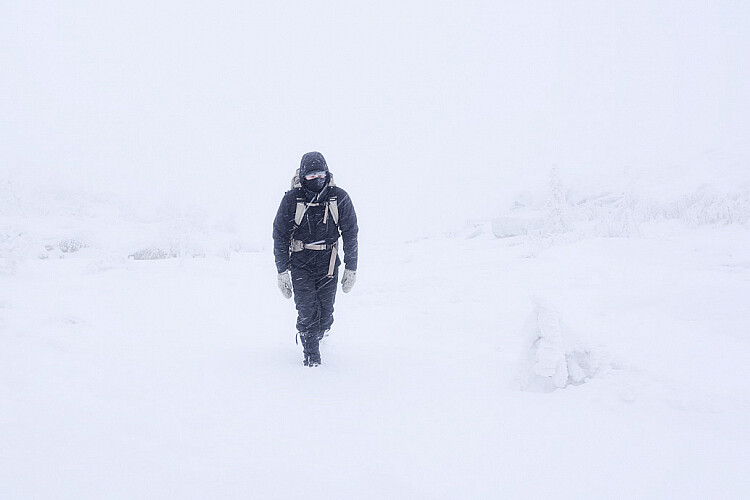
A self-portrait I took on a hike in rough conditions last winter

Lastly, related to keeping the batteries warm, you need to stay warm as well. Always be prepared and rather bring a layer too many than too few. You always want to have the opportunity to dress down, especially if you’re going on a hike.

Over to you

Do you get winter weather where you live? Get out and take some winter landscape shots and share them in the comments below. We’d love to see them.

The post 5 Tips for Better Winter Landscape Photography by Christian Hoiberg appeared first on Digital Photography School.


Digital Photography School

 
Comments Off on 5 Tips for Better Winter Landscape Photography

Posted in Photography


Tips for Planning and Capturing a Creative Portrait

11 Dec

There is saying, in the photography world, that an image can be taken in a hundred different ways. This is especially true, as you have probably already noticed when capturing portraits.

Portrait photography is probably the most popular genre, within the realm of the diverse world that is the art of photography. People take portraits so frequently, snapping selfies or photos of their loved ones, with mobile phones or cameras. In any case, this is pretty much what portrait photography is all about, capturing people’s faces.

However, as photographers, you will always be striving for higher excellence, whatever the style of your photography. It’s a natural cause, this is one of the reasons why photography is artistry. The drive for capturing better images, in the field of portrait photography, will eventually lead you to a higher dimension where you won’t be satisfied with just capturing a face, but rather the soul of your subject.

creative portrait of a woman

Lonely young and beautiful woman seating in a bar, next to a piano and a bottle of champagne, of 1920s time period. The woman is dressed in 1920s black evening dress and Gatsby-style diadem on her hair, there is a large old rusted window in the background where blue evening light invades the scene.

This dimension in photography is where creativity lay hidden. It waits to be unleashed by forces such as knowledge and the inspiration gathered along the way, as you were growing as a photographer. So let’s embark on a quest which will help you harvest the power of creativity in photographing portraits and escape the ordinary.

In the list below, you’ll learn the main ingredients that will help you harvest this creative force and take you to another level with your portrait photography.

Equipment

Know the equipment you work with well. This is the baseline from where you need to start. Technical knowledge may not seem connected to art at first, but let’s examine the image below.

creative self portrait

Self-portrait with creative lighting involving a continuous light and a studio strobe.

This image was captured with a single exposure and there weren’t any alterations applied to it in Photoshop. A second curtain flash technique with slow shutter speed created the effect here. Camera White Balance was set to tungsten and the key light colored with CTO – to balance the colors with gels.

Self portrait lighting diagram

Surely you have noticed how technical knowledge and art correlate. Be it your camera settings, lens, or strobe lights, the more you know about your equipment the more options you’ll end up having to explore in bringing your artwork to realization.

Selecting the right faces, exploring your model’s hidden potential

Most photographers create their best work by working on personal projects. When working on a personal project, you’ll have the full control to choose the model sitting in front of your camera – you are the Art Director.

There are faces full of potential, although they are not faces of professional models (it could be people you see in the public transport or the streets), revealing great characters and features. You need to be able to see this potential and invite such people for a portrait photo session.

Keep in mind that although a person looks great, he or she may not feel comfortable sitting and posing for you at first. This will obviously affect the overall quality and purpose of the photo session.

Remember, as a photographer, it’s your job to bring a good vibe and mood to the set, in order to help your model relax and being able to explore his/her best features.

creative portrait of a man

Low key portrait of a black man wearing glasses and a black leather jacket, having his hands and fingers very close to his face.

In the first image above, is a man who booked a personal creative portrait session. It took four hours of working with him in order to reach a point where he was finally in the right part of his own creative universe, feeling free and exploring himself. He had never had such an experience before and was feeling quite nervous and shy at first.

The second image below is a good representation of working with a great character.

creative portrait of a man

Portrait capturing a model dressed in WWII pilot outfit holding Cuban cigar in his mouth. The creative look of this portrait has been achieved by the use of multiple strobe lights.

Lighting

Light is the very reason why photography exists. Think about light, study light – how it spreads, how it bounces, how it is reflected, its specularity, etc. There is so much to light. Light is what will be rendering the reality in front of you, by reflecting and bouncing back into your camera lens.

Light has a quality which is defined by the source, intensity, size, and color temperature of the light. The best part is that you have full access to controlling any of this. Main sources of light for photographers are:

  • Ambient light
  • Strobe light
  • Continuous light

But as you move on to the next topic, you’ll see that there is much more to light than just being available in some form.

creative portrait setup

Photographic studio setup for a portrait session, the image features Bowens strobes, a white backdrop and light modifiers.

In the image, above, can be seeing a studio strobe lighting setup for a portrait session. Some characters may require really complex lighting in order to capture their personalities. Others just require one or two light sources – it will be up to you as an artist to determine this.

creative portrait of a man

Low key portrait of a man with a ginger beard and leather jacket, the scene features dramatic and creative strobe lighting.

The portrait above was photographed with only two strobe lights – portraying very well how the most appropriate lighting was selected to illuminate and capture the mood and personality of the person. While for the image below involved the use of six strobe lights.

creative portrait of a woman

Portrait of young woman on blue background wearing a purple dress – with a creative, multiple lighting setup and approach.

Shaping the light, light modifiers

All artists use different sort of tools that help them shape the fabric of their own inspirations and bring creative ideas to life. It is the same for us photographers too.

First, there’s the light, ambient or strobe, which is the raw material you work with. But this material needs to be softened or shaped, helping you in the process of reaching deeper dimensions of your subject’s features and character.

Light shaping tools will help you define your own creative realm – the realms of Game of Shadows, Game of Highlights and Game of Midtones, where you are the master controlling and balancing what sort of reality your light will render.

creative portrait of a woman and man

Tattooed rockabilly, demon, barber holding razor blade in his dark and demonic barber shop with pinup model as his evil assistant on the background next to a bottle of Jack Daniels.

For the creation of the image above, several light shaping tools were used and some of them were even further modified in order to produce the quality of light needed in this particular situation (the image was shot at 10 am in the morning but the idea was for dark – Sweeney Todd concept)

Studio, location, and features

Another very important ingredient to the process of building unique and creative portrait images is exploring what is around you. What is available or what you can build, light and create on location or in the studio?

Although portrait images are characterized by very tightly cropped frames, around the subject’s face – attention needs to be given even to the smallest details. Such details will greatly contribute to the overall contrast within the scene you are capturing.

An example of this is when you are shooting in a studio you can use a snoot, or another light modifier, and create a spot of light or perhaps colorize your background, by placing color gels. Do not limit yourself to only thinking of the face you intend to capture, but rather on the grand scene of everything that will be captured in your composition/frame.

Following the same flow of thoughts and principles – you can turn even a simple room into a professional studio like has been done on the image below – photographed in a bedroom.

creative portrait of a man

An image featuring the founder of Vialucci media, Theo X photographed on a white background.

Things even get more challenging and interesting when shooting environmental, wide-angle portraits. A location can reveal so much about the personality of your subject and also contribute greatly to the level of creative quality in your images. All you need to do when you’re at a great location is help stylize the scene, frame well (appealing creative composition), bring the strobes in and work out the best of your models.

Props, makeup, and hair

This is a very challenging step that eventually one day you’ll take, but it is also very rewarding. By reaching the point of employing props, makeup, and a hair stylist – it will be solid evidence that a line was crossed with no option of turning back. This is the stage where you’ll be seeing beyond the ordinary qualities of your subject and looking to reach a deeper dimension – a state of creative vision.

creative portrait of a woman

A conceptual scene of a four-handed Queen seating on a throne receiving scripts from her Demon servant, and pointing at a Victorian style globe. The scene is lit by several light sources with different colors, rendering the whole scene in a very creative and original light.

creative portrait of a man

Creative portrait composite representing WWII pilot in the cockpit of his aircraft engaged in an aerial battle, with the enemy aircraft in the background.

The images above illustrate very well, the level of creativity obtained by employing props, makeup and hair into the photoshoot.

Editing and retouching

Processing or editing images has always been an integral part of the whole creative process. Although having all the advantages and power of digital technology, you shouldn’t abandon the universal rules and laws of aesthetics.

Think of retouching and editing as a process that helps you enhance the high-quality photographs you already capture and bring your creative vision to final realization. This is achieved without overdoing and diminishing the quality of your photographs.

The two images below are good examples of a photograph captured with simple lighting setup and processed just enough to clear and strengthen the subject’s appearance.

Creative portrait photography before

Before processing.

Creative portrait photography after

After processing.

Conclusion

Capturing creative images involves innovative and creative thinking – seeing things differently, thinking differently. That is why you always need to be on your own small quest for creativity, not bound only by what was covered here or elsewhere.

Come up with your own new solutions – in the process of which you only will add and improve your portrait photography.

The post Tips for Planning and Capturing a Creative Portrait by Nikolay Mirchev appeared first on Digital Photography School.


Digital Photography School

 
Comments Off on Tips for Planning and Capturing a Creative Portrait

Posted in Photography


Tips for Photographing Reflections to Create Stunning Images

10 Dec

It can’t be denied. There’s something special about reflections that makes them a unique aspect of photography. Maybe it’s because a reflection just like a photograph is a gateway to another world, parallel but restricted. Also just like photography, reflections are a simplification of our world; they turn a 3D reality into a 2D representation.

In a way, photography can make ”reality” and reflections more equal, by cramming the former into 2D while retaining the natural, 2D state of the latter.

01 reflections photography tips

Before we get into the exciting art of photographing reflections, let’s think a bit more about why they’re so attractive, and how we can find new ways to photograph them. Since you’re definitely going to have your own ideas about this mystery, I’d love it if you shared them in the comments below at the end of the article.

02 reflections photography tips

Why photograph reflections?

Reflections have always had an immediate attraction to me, and I don’t think I’m the only one. They’re like visual illusions dropped into everyday life. They turn the world upside down, add a hint of confusion to a scene, and show us things we can’t immediately see the source of.


For you as a photographer, reflections offer a way to create a certain atmosphere. It can be mystery and confusion, but also vastness, such as sky reflected in a lake, or calmness, as a reflection requires a relatively still surface.

Tips for How to Photograph Reflections

Thanks to their mirroring effect and the interaction with the (unreflected) surroundings, reflections are useful tools if you’re trying to tell a story with your photograph — as you always should!

Tips for How to Photograph Reflections

Where to find reflections

What is your first thought when you think about reflections? Is it a mirror, perhaps, or a beautiful lake on a wind still evening?

One great aspect about photographing reflections is that they can be found in so many places and created by a variety of surfaces. Whether you’re into photographing landscapes, portraits, products, flowers, or street scenes, you can utilize reflections to add something special to your photos.

Tips for How to Photograph Reflections

The most obvious place to find photogenic reflections in nature is in connection with water. And wherever there is life, there is water, so the opportunities are basically endless. It can be anything from large bodies of water and wet sand on a beach to a raindrop on a frog’s head.

Tips for How to Photograph Reflections

For more urban photographers, water is of course still an option (puddles are sometimes great for other things than jumping into), but buildings provide another world of options. Start with shop windows and glass buildings, and go on from there. Reflections are fun and beautiful, and we don’t hesitate to incorporate them into our cityscapes.

Tips for How to Photograph Reflections

If you don’t feel like leaving the house or find yourself at a party, do not despair, you can still exercise your photography skills. Mirrors are the obvious surface to use to add another dimension or an interesting twist to your photograph. But windows and polished tables or counters are also great. And don’t forget the opportunities of a well-placed wine glass!

Tips for How to Photograph Reflections

How to capture reflections

Photographing reflections is pretty easy, but there are a few things to think about before and while you’re doing it. These are just a few tips:

  • Unless intended, make sure you don’t show up in the reflection. Change your angle and move around to find the best place from which to take your photograph so you don’t appear in the image.
  • Framing is essential! Use the elements of the space you’re in to create an interesting composition and experiment to discover what creates the greatest effect.
  • Lighting might be a bit tricky. For instance, in a picture of a natural scene reflected in a lake, the reflection is often quite a lot darker than the reflected scene. Use that to create an effect in your image or use filters to even out the lighting difference. It’s up to you!

Tips for How to Photograph Reflections

Conclusion

Those are some of the basics of one of my favorite types of photography. Do you like photographing reflections, and if so, why? What is it about them you find attractive?

If you have photographs to show or tips to share, I’d love to see them in the comments below!

The post Tips for Photographing Reflections to Create Stunning Images by Hannele Luhtasela-el Showk appeared first on Digital Photography School.


Digital Photography School

 
Comments Off on Tips for Photographing Reflections to Create Stunning Images

Posted in Photography