RSS
 

Posts Tagged ‘Tips’

Capture Epic Photos Outside the Golden Hour with these Easy Photography Tips

20 Nov

The post Capture Epic Photos Outside the Golden Hour with these Easy Photography Tips appeared first on Digital Photography School. It was authored by Jeremy Flint.

capture-epic-photos-outside-the-golden-hour

The golden hour is one of the most magical times of the day for photography with wonderful light at sunrise and sunset. Yet, have you ever challenged yourself to photograph around these times? You can still capture amazing photos outside the golden hour and here are some ways you can achieve this:

Shoot during the Blue Hour

capture-epic-photos-outside-the-golden-hour

The blue hour is a fantastic window of opportunity where you can create some stunning images. It refers to the period of twilight when the sun is well below the horizon, and residual, indirect sunlight takes on a predominantly blue shade. The blue hour generally lasts for 20-30 minutes and occurs just after sunset and just before sunrise.

It is important to use a tripod when capturing images in low light. Sharper images will also result from using a tripod by minimizing camera shake when using a slower shutter speed. In terms of the best subjects to photograph during the blue hour, start with cityscapes, roads with street lights, roads with traffic, bridges, fairs, wharves, and marinas.

Include electric lights for dramatic effect and use the extra light to add interest to epic scenes. Most of all, be creative and capture the artificial and natural light together. The warmer tones of illuminated buildings can blend beautifully with the cool blue hues of the sky.

Shoot at night

capture-epic-photos-outside-the-golden-hour

Don’t be in a hurry to put the camera away after the blue hour. There are still more opportunities to take great photos outside the golden hour and blue hour with night photography.

Although the natural light will have faded away, other photographic moments awaken.

Regarding city scenes, the sky will appear darker, and as a result, it can help make other city landmarks and street lights stand out.

Using moonlight can be a brilliant way to capture epic scenes as it paints the landscape or photographing it within a wider frame. Then there is the night sky, which can present wonderfully scenic photos. You can shoot stars, star trails, and even the northern lights.

Combine any of these with the landscape, and they are a recipe for epic images.

Shoot in the midday sun

Outside golden hour 3

Most people tend to avoid photography during the middle of the day, preferring to shoot during the golden hour. Well, challenge yourself to capture photos outside the Golden Hour by shooting at this time of day, and you can be greatly rewarded.

Although the light can indeed be harsh with the midday sun directly overhead, think outside the box. Subjects are well-illuminated, so look for colors that may stand out.

Blue skies can look great with cityscapes. Colorful buildings or flowers can look amazing with a backdrop of a clear blue sky or fluffy white clouds. Also, some cloud cover that reveals patterns of light over a nice landscape scene can look great.

Another option is to shoot the light reflecting indoors. You can head to your local market or capture the interior of a building. Both locations can be great for capturing images at midday.

Shoot when the sun is lower in the sky

Outside golden hour 4

During the winter, daylight is reduced, and we all like to stay in and enjoy the comforts of our home. However, this is a great time to get out and be creative with your camera to capture some awe-inspiring, majestic winter images. At this time, the sun arcs lower in the sky, which is perfect for getting some memorable photos. As this happens throughout the day, you can get some good images at any time.

Watch how the sun stays low and casts long and dramatic shadows and capture this in your images. Use shadows to support your main subject and to give a sense of scale.

Shoot in the morning light

Outside golden hour 5

One of the best times to take photos outside the golden hour is in the morning.

If you shoot after the hour following sunrise when the light is still good, you can get some great images. Whether you find yourself on a trip or in your local area, there is always a morning photography opportunity.

You can photograph landscapes or cityscapes by aiming your camera towards the sun whilst it is still rising. Alternatively, turn around and photograph the gorgeous light painting the land or city behind you.

If you are in a warmer climate, the temperature can be good at this time of day before it can get too hot to be carrying around all your camera equipment. If you like to photograph street scenes and people, head to some of the busier streets as more and more people will be around as the day warms up.

Look for any interesting activity and capture epic scenes of these subjects – they can really be worth the early morning start.

Conclusion

Remember, you can achieve awesome images when shooting at a variety of times outside the golden hour. Choose a time to take your camera out and go and do it!

Do you have a preferred time for taking amazing images besides the golden hour? Share the images you capture with us below.


The post Capture Epic Photos Outside the Golden Hour with these Easy Photography Tips appeared first on Digital Photography School. It was authored by Jeremy Flint.


Digital Photography School

 
Comments Off on Capture Epic Photos Outside the Golden Hour with these Easy Photography Tips

Posted in Photography


6 Tips for a Faster Lightroom Workflow So You Can Get Back to Taking Photos!

20 Nov

The post 6 Tips for a Faster Lightroom Workflow So You Can Get Back to Taking Photos! appeared first on Digital Photography School. It was authored by Simon Ringsmuth.

faster-lightroom-workflow-tips

Many photographers rely on Lightroom to organize, edit and share their photos. While this software has a vast array of tools to help people in several key areas, it has not always been known for speed. Recent updates and GPU acceleration have helped, but if you really want to have a faster Lightroom workflow, there are some simple things you can do to supercharge your post-processing. These aren’t hacks or plugins, but simple tweaks to Lightroom that can make your life a lot easier.

6 Tips for a Faster Lightroom Workflow So You Can Get Back to Taking Photos!

1. Apply a preset when importing images

The first thing you can do for a faster Lightroom workflow is to apply a preset when importing images.

Lightroom has a mind-boggling number of options and sliders to adjust when editing images. If you find yourself using the same types of edits on most of your pictures, you can use Presets to shave hours off your editing. Most people already know this, but you might not be aware that you can apply Presets when initially importing your files.

On the right side of the Import screen, there is an option for “Apply During Import.” Use this to select one of the many presets built into Lightroom (or select one of your own that you may have saved) and have it automatically applied to your pictures as you import them.

faster Lightroom workflow

In the screenshot above, you can also see an option called Nikon RAW import. That’s a custom preset I made that contains specific adjustments I like to apply to my Nikon RAW files, which gets me to a good starting point when editing. That alone has helped me with a faster Lightroom workflow, but applying it to a batch of photos on import is even more of a speed boost.

Don’t worry about messing anything up if you apply presets on import. Like everything else in Lightroom, they are non-destructive, meaning you can always go back and change things later.

2. Sync settings across multiple images

If you have spent any time editing multiple similar images in Lightroom, particularly from an event or photo session with clients, you have no doubt found the Copy/Paste Settings to be useful. Right-click on any image in the Develop module and choose “Develop Settings->Copy Settings…” Then check the boxes next to any (or all!) the settings you want to copy.

Finally, go to another photo, right-click, and choose “Develop Settings->Paste Settings.” Or better yet, use Ctrl+C (cmd+C on mac) and Ctrl+V (cmd+V on mac) like you would on any word processor.

faster Lightroom workflow

I shot dozens of pictures of this wasp. The Sync Settings option let me instantly edit a single image and then apply those edits to all my other images in an instant.

This process works great, but what if you want to paste your settings on to five, ten, or a hundred images? Even the fast method of using Ctrl+V starts to feel like a chore.

Fortunately, there’s a better way.

faster Lightroom workflow

Image 21 is selected, and Images 17-20 are also highlighted. After clicking the Sync… button, all the edits from 21 will be applied to 17-20.

In the Develop module, select a single picture in the filmstrip at the bottom of the screen. Then hold down the [shift] key and select more images. Finally, click the “Sync…” button to synchronize any (or all) of your edits on the original image to the rest that are selected.

When I discovered this trick, I almost fell out of my chair! I didn’t just speed up my Lightroom editing. It supercharged my editing.

3. Straighten your pictures with the Auto button

I’m always a little leery of anything that says Auto when I’m editing pictures. I don’t need my computer to do what it thinks is best – I want my computer to do what I think is best! At best, I use some Auto options, like when setting white balance on RAW files, as a rough draft that I go and refine.

However, there is one Auto setting that I have learned to use over and over again. Learning to embrace Auto for straightening my photos has saved me a lot of time and really led to an overall faster Lightroom workflow.

Image: The Auto button in the Crop & Straighten panel can really help make things go faster when...

The Auto button in the Crop & Straighten panel can really help make things go faster when you need to straighten your photos.

The reason Auto works so well for straightening images is that it doesn’t try to make a guess which affects the artistic goals of the photographer. It simply looks for straight lines such as light poles, buildings, or horizons, and then adjusts images accordingly. It works far more than I initially thought. Plus, it can really speed things up when editing in Lightroom.

faster Lightroom workflow

My tripod was askew when I shot this, but Lightroom fixed it with a simple click of the Auto button.

4. Automatically organize with smart collections

Collections in Lightroom are an easy way to organize your images. You can create as many collections as you want, and one photo can exist in multiple collections. What you may not realize is that Lightroom lets you create Smart Collections, which are populated dynamically according to rules you specify.

To create a Smart Collection, choose the + button at the top-left of the Collections panel. Then select “Create Smart Collection…” and specify your parameters for the Smart Collection.

faster Lightroom workflow

As an example of how this can lead to a faster Lightroom workflow, I create Smart Collections to sort my photos by month for an entire year. I do this each January, and for the rest of the year my photos are automatically sorted month-by-month without me having to do anything.

Image: I create Smart Collections for my personal images at the beginning of each year. My images ar...

I create Smart Collections for my personal images at the beginning of each year. My images are then sorted automatically.

These Smart Collections also do not include any photos with the keyword “PhotoSession” which I apply to all images that I take for clients. Photos with that keyword go in another set of Smart Collections that I use to keep client images separate from personal photos.

Smart Collections can contain dozens of parameters including Rating, Pick Flag, Color Label, Keyword, even metadata such as camera model or focal length. They are an incredibly powerful but very simple way to make your day-to-day Lightroom editing significantly faster.

5. Multi-Batch Export

Lightroom has long offered customizable export presets. These allow you to export photos with certain parameters specified such as file type, image size, quality setting, and even specifying custom names.

faster Lightroom workflow

New in the November 2019 update to Lightroom Classic is the option to perform a single export operation that utilizes multiple Presets. This means you no longer have to do an export operation for full-size JPGs at 100% quality, another export for low-resolution proofs at 80% quality, and so on.

Just check any boxes in the Export dialog box for the presets you want, and Lightroom will take care of the rest!

Image: The November 2019 update to Lightroom Classic lets you select multiple presets for a single e...

The November 2019 update to Lightroom Classic lets you select multiple presets for a single export operation.

This is a great way to save time when you are ready to export your images. It’s not the kind of workflow addition that will change your life, but it’s another simple but highly effective process you can utilize to shave precious minutes from your editing. And as someone who exports a lot of photos regularly, those minutes add up.

6. Cull on Lightroom Mobile

One of my favorite aspects of the Adobe Creative Cloud Photography plan is the synchronization between Lightroom Classic and Lightroom Mobile. While the mobile version of Lightroom isn’t as full-featured as its desktop-based big brother, it does one thing incredibly well that has made a huge difference for me when editing photos for clients.

Click the checkbox next to any Collection to sync those photos with Lightroom CC. This means you can access low-resolution previews of all those images on the web, your phone, or tablet. (Note that this does not work with Smart Collections, only regular Collections.)

6 Tips for a Faster Lightroom Workflow So You Can Get Back to Taking Photos!

I don’t find Lightroom Mobile particularly useful for detailed editing, but it absolutely runs circles around the desktop version when it comes to culling operations. If you have an iPad, this could honestly change your entire approach to culling your images. It also works pretty well on other mobile devices too.

Load a picture in any collection that you have synced to Lightroom CC and then click the Star icon in the lower-right corner. This switches to a mode where you can quickly assign star ratings or flags to any picture. Tap one of the Flag or Star icons at the bottom of the screen to change the status of the image. A quick swipe of your finger will load the next image.

faster Lightroom workflow

Tap the star icon in the lower-right corner of Lightroom Mobile to quickly assign Flags and Star Ratings with a swipe of your finger.

This is all well and good, but there’s one trick here that will send your culling into overdrive.

Slide a finger up or down on the right side of the photo to change the Flag status. Slide a finger up or down on the left side to assign a Star rating. Then swipe to the next image and repeat.

All your edits on Lightroom Mobile, including Star ratings and Flag statuses, are instantly synced back to Lightroom Classic on your computer.

I’m not kidding about the speed of this operation, either.

I used to dread the culling process, but now it takes a fraction of the time it used to. A few weeks ago, I returned from a photo session with over 1,100 images. In about an hour, I was able to cull them to a fraction of that amount, thanks to Lightroom Mobile.

Image: There were hundreds of images from this session that I had to sort through. Lightroom Desktop...

There were hundreds of images from this session that I had to sort through. Lightroom Desktop makes this a burden, but Lightroom Mobile makes it a breeze.

All six of these tips have saved me a huge amount of time over the years. I hope they are useful to you as well.

If you have any other tricks or suggestions for a faster Lightroom workflow, leave them in the comments below!

The post 6 Tips for a Faster Lightroom Workflow So You Can Get Back to Taking Photos! appeared first on Digital Photography School. It was authored by Simon Ringsmuth.


Digital Photography School

 
Comments Off on 6 Tips for a Faster Lightroom Workflow So You Can Get Back to Taking Photos!

Posted in Photography


17 Tips for Shooting Better Urban Portraits

11 Nov

The post 17 Tips for Shooting Better Urban Portraits appeared first on Digital Photography School. It was authored by Matt Murray.

tips-for-shooting-better-urban-portraits

Are you interested in doing an urban portrait shoot, but you’re not sure where to start? An outdoor shoot in your local town or city is a great way to be more creative, think on your feet, and come away with some unique images that you can’t get from a shoot in a studio or your local park. However, If you’ve never done one before, you may be a little daunted. In this guide, I run you through my top tips for shooting better urban portraits.

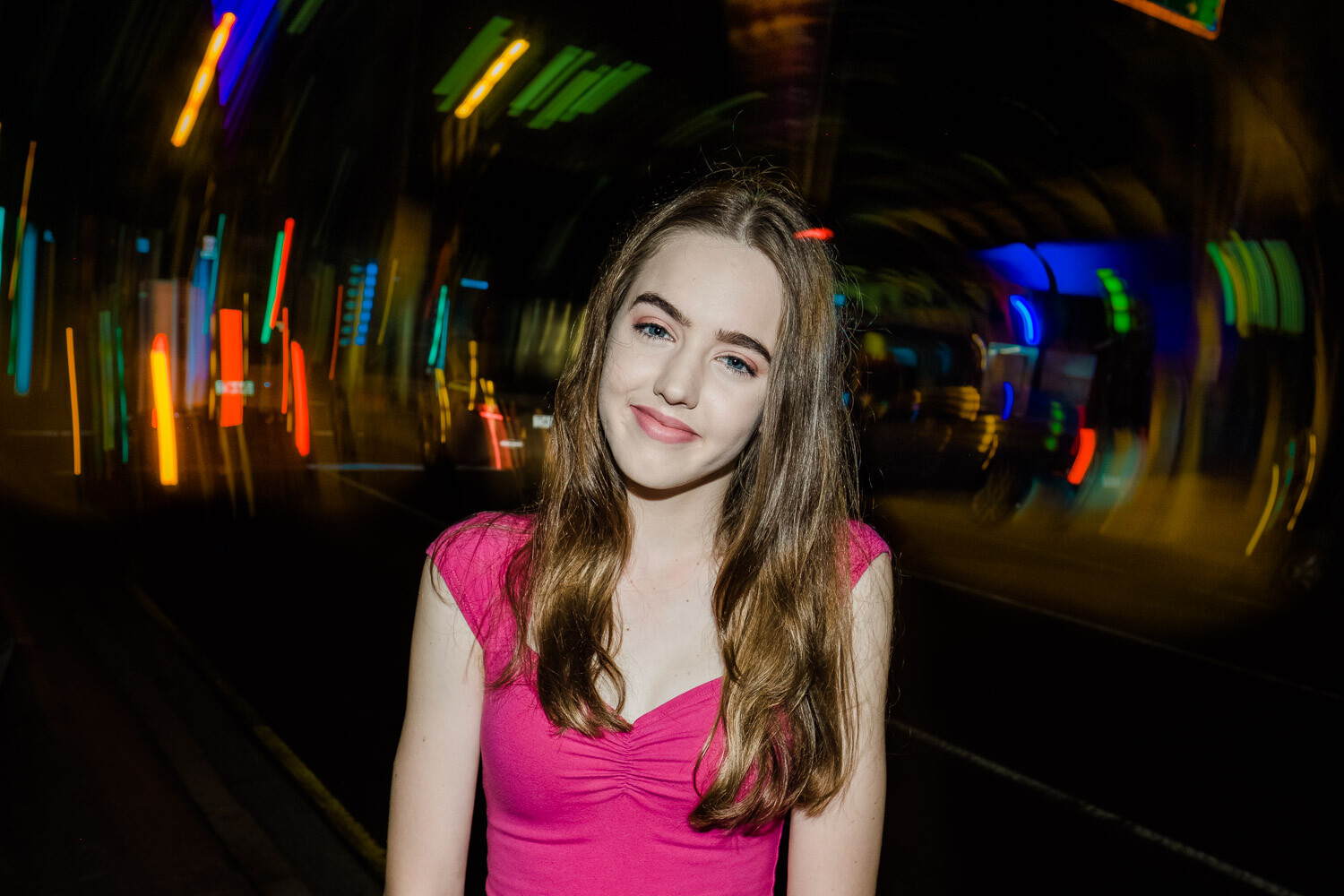
One way to make sure your talent is relaxed at the start of the shoot is by asking them to smile and getting some fun shots to kick things off.

1. Have a vision for the images you want to shoot

Begin with the end in mind. Create a mood board of urban portraits using a free tool such as Pinterest. These could either be your images or inspirational images from other photographers. Keep these in mind as you plan your shoot, as this is the standard you’ll be aiming for.

2. Location scouting

Before you plan your shoot, get an idea of the type of urban landscapes in your area. What kind of images could you take here? How could the buildings and street scenes feature in your photographs as a point of interest or as a background texture?

Every town and city has its unique charms – from heritage buildings to seaside piers to abandoned shopping centers. Find what’s interesting about your area and use it.

You can find out more about what I look for when scouting locations in my previous dPS article, How to Choose Urban Landscapes for Portrait Photography.

tips-for-shooting-better-urban-portraits

There’s always something of interest to shoot. Open up to the creative possibilities in your town.

3. Find talent for your shoot

The easiest way to find someone for a shoot is by asking family or friends. This way, the pressure is off, as you have someone familiar to work with that you can test your ideas on. Make sure you ask someone that is not too shy or self-conscious, though; after all, it will involve posing for photographs in a public location.

If you’re ready to test your urban portrait skills with a model, organize a TFP (time for print) shoot. These have been around since the pre-digital days, when photographers, models, and make-up artists would collaborate and give their time for free in exchange for physical prints of images taken during the shoot. These days, images from TFP shoots are usually digital files shared over the internet.

Finding people to work with should be relatively easy. Most cities have photographer and model groups on Facebook. Type the name of your area with the words model or photographer and see what comes up. If you have no luck, you can also ask in general photography groups if anyone knows of a TFP-style group you could join.

Image: In this image, I have lit Alyssa with a video light. Fujifilm X-T3 with a 35mm f1.4 lens.

In this image, I have lit Alyssa with a video light. Fujifilm X-T3 with a 35mm f1.4 lens.

4. Ask for expressions of interest

Once you’ve joined a local Facebook group, have a scan of the posts and see if it’s the kind of community you wish to work with. If you feel comfortable, it’s time to post your expression of interest.

Create a post introducing yourself and calling for expressions of interest in a TFP urban portrait shoot. Link to examples of your work and your Instagram.

Let people know specific details about the shoot. This includes the approximate location, proposed days and times, and the types of shots you’re looking to get. You can also link to or share images from your mood board on the post to set an expectation of the kind of shots you’ll take. If you use images on the mood board that are not yours, make sure you credit the photographer and explicitly state whose work it is.

Finally, ask people to comment on the post or send you a private message, expressing their interest. Also, ask them to link to their Instagram or portfolio.

tips-for-shooting-better-urban-portraits

Safety is important on any shoot – never put yourself or your talent in danger to get a shot. I took this image with the model on the footpath.

5. Arrange details for the shoot

After you’ve chosen whom you’d like to work with, organize the shoot. Agree on the day, time, and location. Prepare to negotiate regarding which day you can shoot, but not on the time. Always choose the time of day that you know will work best for photography. For me, that’s about an hour before dusk as this provides opportunities for natural light and after-dark images.

If the model is under 18, check that their parent or guardian is coming along and that they will be able to sign a model release form.

Ask your model what they’re planning to wear for the shoot. Quite often, they will ask for your advice or provide you with options. Explain that it would be ideal to have two or three different looks. Some people will prefer to have completely different outfits for the first and second half of the shoot (if there is somewhere to change). For others, it means bringing along some fun accessories like glasses, sunglasses, a hat or jacket.

If you’re arranging a shoot a week or two in advance, don’t forget to stay in touch with your model. Remind them a day or two before the shoot.

tips-for-shooting-better-urban-portraits

Sunglasses can be very handy on a shoot – especially when there are neon signs! Anneke, Brisbane. Fujifilm X-T3 with a 56mm f1.2 lens.

6. Have a plan

Think back to your location scouting. Have a list of 8-10 places where you’d like to shoot that are within walking distance of each other. Draw a map in your notebook and plan your route and the types of shots at each place. Typically, I only shoot in 6-8 locations, but I like having a couple of options up my sleeve in case some don’t work out.

Finally, don’t be afraid to throw your plan out the window if a better opportunity presents itself.

17 Tips for Shooting Better Urban Portraits

7. Plan your kit

It’s tempting to take as much kit as you can carry on an urban portrait shoot. However, strike a happy medium between taking enough kit to give you options without having to hire a Sherpa to carry your gear.

I typically take two camera bodies (Fujifilm X-T3 and X-T2) with prime lenses, with a third lens in my bag. My lenses of choice are usually the Fujinon 16mm f1.4 for wide-angle and environmental portraits, and either the 35mm f1.4 or the 56mm f1.2 lenses for portrait work. With the APS-C crop factor, these work out to 24mm, 52.5mm, and 84mm equivalent lenses in full-frame terms.

Although I love zoom lenses for family portrait shoots, I only take fast prime lenses on urban portrait shoots.

Double-check all your camera settings when you pack your gear. Things I check are:

  1. I’ve selected the same JPG film simulation on both cameras,
  2. I have the same auto ISO settings,
  3. JPG + RAW is selected in the image quality settings.
  4. There are spare formatted SD cards and spare batteries in my bag
  5. I have model release forms and a pen.

8. Get to know whom you’re photographing

Make sure you turn up early – you won’t make a good impression if your talent is waiting for you and wondering if you are going to turn up or not. Get to know your model and their chaperone. Everyone can be a bit nervous at the start of a shoot, so have a good chat with them before you even think about pulling out a camera.

9. On the shoot

Remember, on these kinds of shoots, you don’t need quantity, you need quality. I aim to get a dozen images I’m really happy with. This means potentially shooting in a different way than you usually would. Take your time with directing the model and getting the composition right before taking the shot.

Make sure you get a variety of shots – close-ups, full length, looking to the camera, looking away. Also, remember to get some different looks by using any accessories the model has brought with them.

tips-for-shooting-better-urban-portraits

Make sure you get a variety of shots – not just close-ups.

10. Be prepared to direct the model

Directing talent is a skill you will need to learn – especially with younger up-and-coming models with limited experience. There’s no need to be worried if you have no experience doing this yourself. Get yourself the 67 PORTRAIT POSES (PRINTABLE) Guide from DPS to have on your phone (or print them), or have a stash of urban portrait images, ready to flick through to give your talent some ideas on how to pose.

17 Tips for Shooting Better Urban Portraits

11. Check your ISO and shutter speed

As the day moves into night, keep a check on your ISO and make sure you have usable shutter speeds above 1/80th of a second. The most annoying mistake I’ve made on these shoots is looking at the back of the LCD screen, thinking that I’ve captured a sharp image, only to see that the image wasn’t as sharp as I thought on my computer screen later on.

12. Limit any negative self-talk

Negative self-talk can affect us all. If you had an idea for an image, but it doesn’t work out on the shoot, move on and forget about it. Many images are still there for the taking.

13. Carry your own lighting options

For the first half of an urban portrait shoot, I rely on natural or ambient light. As darkness envelopes the urban landscape, I look to my own lighting options.

The first option I usually take is a speedlight flash that I can use on-camera, or trigger remotely. Typically, the light from these types of flashes can be harsh, so you may like to use a light modifier such as a mini softbox.

The second type of lighting that I use on my urban portrait shoots are small LED video lights. These are fantastic, and I love using them. Again, you can use one through a light modifier for a softer effect.

Image: Using an on-camera flash can lead to some creative effects.

Using an on-camera flash can lead to some creative effects.

14. Safety

Safety should be your number one priority on a shoot like this. Identify any hazards before the shoot and brief your model. The last thing you want is someone getting hurt. Be aware of your surroundings at all times. If you get a bad vibe from an area, it’s best to move on.

Never leave any of your bags on the ground unattended. A few moments of inattention is all an opportunistic thief needs.

15. Legal

Always operate your shoots legally. Research if you need any permits to shoot in your city, look into public liability insurance, and have model releases signed before the shoot.

16. Limit the shoot time

Keep the shoot between 60 and 90 minutes; you’ll be amazed at how fast this will go. It’s better to have it run shorter and end on a high than run it longer with everyone exhausted. For younger models, keep it to under 60 minutes.

tips-for-shooting-better-urban-portraits

Keep the shoot length to under an hour for younger people – modeling is very tiring!

17. Editing your images

I always try and get it right in-camera, with only minor edits made to images afterward. One decision you may have to make is how much you want to clean up the image in post. In the example below, there were a lot of cigarette butts on the ground. I decided to remove these in Photoshop to make a cleaner image.

17 Tips for Shooting Better Urban Portraits

tips-for-shooting-better-urban-portraits

In this image, I removed all the cigarette butts and other debris from the road as I felt it detracted from the image. Sasha, Brisbane, Fujifilm X100F lit by a Godox flash.

Conclusion

Urban portrait shoots are a lot of fun and can stretch your creativity as a photographer. They help you to think on your feet and overcome challenges. If you’ve never done one before, there’s no need to feel daunted. Do your research and planning, and it will all fall into place.

If you have any questions or comments about planning an urban shoot, let us know below.

The post 17 Tips for Shooting Better Urban Portraits appeared first on Digital Photography School. It was authored by Matt Murray.


Digital Photography School

 
Comments Off on 17 Tips for Shooting Better Urban Portraits

Posted in Photography


11 Tips for Photographing Bears in Alaska

06 Nov

The post 11 Tips for Photographing Bears in Alaska appeared first on Digital Photography School. It was authored by André Costantini.

tips-for-photographing-bears-in-alaska

Alaska is the only state in the country that’s home to three types of bears: the polar bear, the black bear, and the brown bear. It’s why photographers converge annually on the Last Frontier, hoping to document ursine activity in the bears’ natural habitats, in such locations as the Anan Wildlife Observatory, Katmai National Park, and Admiralty Island, home to one of the world’s highest density of brown bears. Read on for tips on photographing bears in Alaska while these magnificent creatures eat, play, and interact.

photographing-bears-in-alaska

1. Pack light

To gain entry into sections of certain viewing areas that offer access to bear viewing, you’ll often have to take a seaplane. That means there may be weight restrictions, so limit your gear to one or two DSLRs or Mirrorless bodies with a couple of compact lenses. Add extra batteries, memory cards, any filters you like to use, and rain covers in case of inclement weather.

2. Make sure at least one of those lenses is a versatile zoom

You obviously want to stay a safe distance from the animals you’re photographing. The Tamron SP 150-600mm VC G2 lens is one such lens that offers such flexibility, with an extra-long reach. If you use that lens on a crop sensor camera, you’ll achieve even more effective magnification. Bird photographers often use a similar combination for that very reason.

11 Tips for Photographing Bears in Alaska

3. Plan your trip for optimal bear-watching opportunities

The best times of the year for bear watching in Alaska are June through September. If you want the chance to photograph them catching salmon in the rivers, July and August are your best bets. That’s the peak of the salmon runs (when the salmon is sparse, bears will eat things like clams and grass instead).

4. Head out early, stay out a little later

Although you’ll likely be able to spot bears at any time of day, they tend to be out foraging for food early in the day and later in the evening. Those times of day also happen to coincide with the best natural lighting.

That said, Alaska, during the summer months, enjoys nearly 24-hour daylight. Between May and July, for example, some areas never get completely dark, even between sunset and sunrise. So, don’t expect traditional lighting conditions.

11 Tips for Photographing Bears in Alaska

5. Respect the venue’s safety rules

Every park or preserve that features bears has basic guidelines to protect both the bears and the visitors. You’ll likely be required to stay a certain number of feet away from the bears. This means if the bears approach you and block your path, you’ll be subject to what’s known as a “bear jam.” You’ll effectively be stuck there until the bears decide to move. That’s okay – that gives you plenty of time to take more pictures.

11 Tips for Photographing Bears in Alaska

6. Don’t feel you have to shoot in silence

In fact, the opposite is the case. While you don’t want to make super-loud noises that startle the bears, you do want to make enough of it, so the bears know you’re there at all times. It can be more alarming for the bears if you’re trying to be stealthy and then suddenly emerge. Some people will wear a bell attached to their knapsack, or just talk very loudly.

7. Get on the bears’ eye level

There’s something more intimate about a portrait in which you feel like you’re looking eye-to-eye with your subject. Crouch or kneel on the ground or viewing platform to get as close to that angle of view as you can.

If you’re out in a small boat, you’re practically at water level already, so if bears are frolicking nearby, you’re set.

photographing-bears-in-alaska

8. Get a handle on your focusing

If the bears are on the move, shoot in AI Servo mode or AF-F (Nikon), Continuous Focus (Canon), Continuous AF (Sony), so that your focus continually adjusts as you’re tracking moving subjects.

9. Capture the bears interacting with each other

Part of what you want to accomplish when photographing wildlife is to tell their story. Highlighting a sow cuddling with her cubs or siblings tussling in the grass is a way to showcase their relationships and create emotive photos.

11 Tips for Photographing Bears in Alaska

10. Be patient

Wildlife is unpredictable, and there’s no real way to tell when a real money shot, like a bear catching a salmon in the river, will emerge. But when bears are engaged in an activity, they’ll actually stay in the same place for a significant amount of time.

So, if you stick around, hunker down, and just keep taking pictures. You’ll be more likely to produce a bunch of keepers.

photographing-bears-in-alaska

11. Prepare for the unexpected

Even if you time your visit for when the bears are expected to be active and the salmon flowing, it’s Mother Nature – things don’t always work out as planned.

The activity level is somewhat consistent, but it does vary from year to year. If you get there and the bears are a bust, it’s disappointing, but go to Plan B.

Photograph the amazing Alaska Peninsula landscapes, or keep an eye out for the region’s diverse bird population. Look to the dozens of other mammals in the area, including red foxes, porcupines, beavers, and otters instead.


I hope you find these 11 tips for photographing bears in Alaska tips helpful. If you have any other tips or bear photos you’d like to share, please do so in the comments section!

Disclaimer: Tamron is a paid dPS partner.


The post 11 Tips for Photographing Bears in Alaska appeared first on Digital Photography School. It was authored by André Costantini.


Digital Photography School

 
Comments Off on 11 Tips for Photographing Bears in Alaska

Posted in Photography


Tips for Doing Fine Art Underwater Bubble Photography

04 Nov

The post Tips for Doing Fine Art Underwater Bubble Photography appeared first on Digital Photography School. It was authored by Joanne Taylor.

tips-for-doing-underwater-bubble-photography

Doing underwater bubble photography is both fun and challenging! Read on for easy-to-follow techniques, tips, and tricks for you to try no matter which underwater environment you’re in!

underwater-bubble-photography

Safety

For your safety, have someone on land, in a boat or in the water with you to act as a spotter. Have them keep a floatation device with them at all times too. Underwater photography can be tiring, and you might feel the need for assistance from time to time.

Have drinking water accessible regardless of the weather. Be sure to have sunscreen on and beware of the sun reflections off the water: sunburns hurt!

underwater-bubble-photography

Equipment

There are many devices you can use, including a GoPro, underwater phones, and the disposable ones they sell at the drug store. However, the best way to achieve shots like these is to have an SLR camera within a professionally-made underwater housing. You can still try these types of shots with whichever device you do have, but it is easier to take them with a lot of control going in.

I achieved these shots with a Nikon D7100 and a custom Ikelite housing.

You can shop for professional underwater equipment from a variety of places, but Ikelite – www.ikelite.com has a strong reputation internationally, and for good reasons. You can also check out Mozaik Underwater Camera – www.housingcamera.com

Both websites sell camera and housing packages for underwater photography and also individual housing cases. You definitely want reliable, trustworthy equipment to achieve consistent, sharp images.

Equipment check

Please note that human error causes most floods (where water breaches the housing compartment, and you risk losing your camera and every photo you’ve taken). Common causes of floods are sand, hair, or dust in the O-ring (which you should lightly lubricate every so often) and improperly secured latches.

With a professional underwater housing, you have the same capabilities underwater as you do on land. This saves much time if you’re in deep water – no need to climb in and out of the boat or in and out from the beach. Same for scuba diving – sometimes coming up from a deeper depth is simply not an option. For those using other devices, be sure to know the depth limit of the device, or you risk losing everything!

Tips for Doing Fine Art Underwater Bubble Photography

Camera settings and taking the first few shots

Make sure the lens on both the camera and the housing is clean. There is nothing worse than getting underwater, taking some fantastic bubble photos, and then seeing a sunscreen finger smear in the corner of each shot.

In underwater photography, your body will be moving, so too is the water and the bubbles. So if in doubt, use your camera in Auto Mode the first few times. Alternatively, try setting your camera to F22 and F20 at 1/2000th, 1/4000th, and rely on natural light.

Next, you are ready to get into the water and don’t forget to defog your goggles before putting them on (spit or a defogging spray work great).

Bring your equipment in and determine if it’s working underwater with a few test shots (aim at your feet) and then check the image on your viewfinder. Make any adjustments necessary.

Tips for Doing Fine Art Underwater Bubble Photography

Water and weather

Take into consideration the appearance of the water. You are looking for water clarity. Sometimes, the bottom can be churned up by a recent storm, and there can be a lot of debris. Debris can cause low visibility and definitely with underwater photography, the clearer the water, the better.

If you are in a controlled setting such as a pool, the clarity of the water will depend on the chemicals added. If the water is cloudy due to improper chemical balance, there will be a hazy quality in all of the photographs.

The weather affects the light in your photographs. A cloudy day will allow you to use a flash if you have one. Only add a small amount of flash, or you run the risk of blowing out the bubbles entirely.

If you don’t have a flash, keep shallow and try taking photos in the top two feet or so as the light will only decrease the further down you go. If it’s raining, you can still take photographs. It is fun to get the water droplets falling on the surface of the water while bubbles are rising towards them.

When it’s a sunny day, light streams through the water surface and lights up the bubbles from behind. Try to take a few pictures with the sun in the shot as well.

underwater-bubble-photography

How to create bubbles with containers

Use a variety of containers for different sized bubbles. Try sand buckets, Tupperware, or other plastic bowls. Children’s stacking cups are great too, as long as they don’t have a hole or holes in the bottom. Anything can work (re-usable drinking bottles are great too) but avoid all breakables like glass.

Bring them one by one into the water, so they don’t float away. You would benefit from a helper to pass them to you, so it’s easier to juggle your camera and the buckets.

Start with the smallest, easiest to manage container, and work up to the largest as they are the hardest to maneuver underwater.

Take the container underwater by holding the opening directly over the surface and pushing it down underwater to catch the air inside. Practice tilting the cup slowly underwater to let the air trickle out in a trail of bubbles and practice tilting the cup quickly to let all the air out at one time.

Now take a few test shots of the air escaping the container. You might have to practice a few times not to catch your hand or the container in the shot.

Try taking the container deeper. Be patient until you get the right balance of speed of the bubbles versus shutter speed. Check your viewfinder and make any necessary adjustments regarding shutter speed, focal length, or the strength of your flash if you’re using one.

Tips for Doing Fine Art Underwater Bubble Photography

Try taking a series of images of bubbles using multi-shot (continuous shooting) for a better choice of images later.

Move into another section of the water for a variety of images. If you’re using the sun as a backlight, you may also have to angle your camera up towards the surface of the water to get a better shot.

How to create bubbles without containers

Take the containers out of the water and try kicking your feet and making lots of tiny bubbles.

Tips for Doing Fine Art Underwater Bubble Photography

Editing

Once you have downloaded your images, you are ready to edit.

Adobe Lightroom will make editing easy – though, you can use any editing software of your choice. Cropping will be your most used tool as you eliminate any hands, containers, or debris. Cropping is also necessary to zoom in on a section as you attempt to create the most aesthetically pleasing bubble photograph.

Tips for Doing Fine Art Underwater Bubble Photography

Occasionally, you may want to adjust the color of the photograph by making it bluer or taking all color away to see the bubble shapes in black and white.

Tips for Doing Fine Art Underwater Bubble Photography

Conclusion

Fine art underwater bubble photography takes a lot of patience, so relax and have fun. Bubbles are fragile, finite, and often hard to predict. Your best shots may be a string of bubbles, a cloud of little ones, or a single, large one.

Let’s see what you can do! Please share your underwater bubble photography with us in the comments!

The post Tips for Doing Fine Art Underwater Bubble Photography appeared first on Digital Photography School. It was authored by Joanne Taylor.


Digital Photography School

 
Comments Off on Tips for Doing Fine Art Underwater Bubble Photography

Posted in Photography


Tips to Achieve Memorable Getting Ready Photos at Any Wedding

27 Oct

The post Tips to Achieve Memorable Getting Ready Photos at Any Wedding appeared first on Digital Photography School. It was authored by Jackie Lamas.

memorable-getting-ready-photos-at-any-wedding

Even though every wedding is unique, each wedding photographer knows that the timeline of photos is pretty much the same, beginning with the getting ready photos.

Learn how to successfully photograph the bride and groom getting ready, what you’ll need to prep for beforehand, and why it’s important to capture this part of the day during a wedding.

wedding-day-getting-ready-photos

What are the getting ready photos exactly?

The getting ready portion of a wedding day is when the bride and groom begin to get dressed for their wedding celebration.

wedding-day-getting-ready-photos

Getting ready photos are to include both the actual getting ready portion and the details of the day like shoes, florals, dress, rings, etc.

It’s usually when the bride is getting her makeup done, getting into her dress, putting on her jewelry, and all of the other final details that go into her complete look. The same goes for the groom; photos of him getting into his tux or suit, putting on his watch, tie, and shoes.

Image: The getting ready portion of the wedding day lets you get photos of the important details of...

The getting ready portion of the wedding day lets you get photos of the important details of the day.

Sometimes, getting ready photos will include more people during the shoot. For example, the bride might want to get ready with all of her bridesmaids and have her maid of honor help with putting on her veil.

Tips to Achieve Memorable Getting Ready Photos at Any Wedding

Other times, you might get the bride and groom getting ready together in the same space. Either way, it’s a crucial moment during the day that leads up to all the festivities. It tells more of the story of how the wedding day unfolded.

Prep for the getting ready

wedding-day-getting-ready-photos

Inform your clients during a pre-consultation

A pre-consultation is where you meet with your clients and go over the details of the wedding day. It is important to find out if the couple will be getting ready in the same location or different locations.

Tips to Achieve Memorable Getting Ready Photos at Any Wedding

If at all possible, advise your clients to get ready in the same location but in separate rooms. That way, you can bounce between both of your clients and capture the getting ready shots.

However, sometimes it isn’t possible. But don’t worry, sometimes you can re-create some of the getting ready moments before the ceremony and still get those beautiful getting ready photos to go with the narrative of the day.

Tips to Achieve Memorable Getting Ready Photos at Any Wedding

Advise your clients to tell their key people (those helping with the brides or grooms outfit) to be ready, too, since they will also be photographed during the getting ready stage. This goes for the mother of the bride, father of the bride, bridesmaids, and groomsmen.

wedding-day-getting-ready-photos

Make sure the key people are dressed and made up for the getting ready photos so everyone looks great in the final images.

Tell your clients to make sure florals are ready during this time so that you can photograph them before the wedding day begins.

Prep your gear bag

There are a few items you should have handy for the getting ready portion of your day. They aren’t required but do make the getting ready photos more streamlined and easier to photograph.

Tips to Achieve Memorable Getting Ready Photos at Any Wedding

One handy tool is a Command Hook. This will help you stick the hook where you want, hang the dress or suit, and photograph it virtually anywhere at the location of the getting ready photos. It also helps hang other details that are important to the wedding day.

Bring a small poster board or some fabric to style a flat lay of the details. This could include things like the rings, shoes, garter, bouquet, or special details like vow books. It can give you a cohesive look to the detail photos. That way, you’re also not limited to the surfaces in the getting ready room, if there are any available spots.

Tips to Achieve Memorable Getting Ready Photos at Any Wedding

PlayDoh or similar putty can help keep rings styled or from falling over. Roll a tiny ball and place it under the rings, ring boxes, jewelry, and other items to keep them in place. Then simply remove it after you’ve achieved your shot.

wedding-day-getting-ready-photos

Use a video light or flashlight from your phone to light the details if you need a little boost in light. Some getting ready rooms, like bridal rooms, are tiny and don’t offer much light, so having a video light or using your flashlight from your cell phone, can help give you the light you need. It can also help you to get interesting photos of the details like rings or shoes.

Tips to Achieve Memorable Getting Ready Photos at Any Wedding

While these items aren’t a must, they do help with styling the details of the getting ready portion.

What to photograph during the getting ready portion of a wedding day

The getting ready part of a wedding day isn’t just about photographing your clients getting into their dresses or suits – it’s much more than that. It’s about capturing a part of the day that begins all of the events that everyone is excited about!

wedding-day-getting-ready-photos

When photographing the getting ready, mix different style shots like full length and close-up shots of the same scene.

When you photograph a getting ready, make sure to get photos either styled or depending on your photography style, the following:

  • Rings, ring boxes, ring pillows or carrying cases
  • Florals: bouquets, boutonnieres, hairpieces, and corsages for others
  • Shoes
  • Accessories like jewelry, watches, gifts of the bride and groom
  • The something blue, something old, something borrowed if they are part of the wardrobe/attire.
  • Getting ready: Makeup and hairstyling, adjusting their dress/suit, putting on the dress/suit
  • Putting on shoes
  • Detail photos of the dress/suit alone and on the bride/groom
  • Invitation set
  • Portrait of your client alone
  • Portrait of the client with their bridal party or others who are in the room with them
  • Anything else that is considered special or important
  • Key people in the background or with your client

Tips to Achieve Memorable Getting Ready Photos at Any Wedding

How to get the most out of getting ready photos

The getting ready photos are somewhat of a photojournalistic approach to the day. Besides the detail shots that you style, most everything else is photographed as it unfolds during this time.

wedding-day-getting-ready-photos

To get the most out of the getting ready photos, try and get different focal length shots of the events like the makeup and hair. Get a wide shot of the room but also get close-up photos of the makeup as it’s applied. Capture real emotions from the people in the room with your client.

Tips to Achieve Memorable Getting Ready Photos at Any Wedding

When your client is ready to get dressed, ask them to clear out the portion of the room that you’d like to use. For height, consider getting on the bed if your client is using a hotel room.

Tips to Achieve Memorable Getting Ready Photos at Any Wedding

If you can, choose a location with nice lighting and a calm vibe. It will help set the tone of the getting ready portion of the photos.

Remember, during this time, clients are usually feeling a mixture of emotions. They also have to attend to tasks, questions, and anything that might come up that is related to the planning of the wedding.

wedding-day-getting-ready-photos

So a calm setting can really set the tone for the rest of the day while you photograph your client as they get dressed.

Also, don’t worry about moving furniture if you need to, or other items to get the best photo possible. Try different areas of the getting ready room to choose the best photos of the details, dress, and your client.

Tips to Achieve Memorable Getting Ready Photos at Any Wedding

Photograph a portrait of your client after they are dressed alone

As mentioned above, setting the tone for the rest of the day can make all the difference for your client. This is why, after your client has gotten dressed, that you take them to a calm location and photograph a portrait of them alone.

wedding-day-getting-ready-photos

During this time, don’t ask anything of them. Don’t mention the wedding, planning, or anything that is related. Just help them to feel calm by using a soft tone, directing them to get the best angle, and show them a photo or two so that they get excited by how great they look!

Tips to Achieve Memorable Getting Ready Photos at Any Wedding

This will also build a nice rapport with how you handle the stress of the day. It will also help your client to feel less saturated or anxious about their wedding day.

How to photograph getting ready photos after the fact

Sometimes you don’t have time to take getting ready photos of both of your clients due to logistics, being the only photographer, or otherwise. Other times, time slips away and cuts time for getting ready photos altogether. Or, your client might have opted to set the hours of coverage to cover more of the reception than the getting ready portion.

wedding-day-getting-ready-photos

You can take portraits like this later in the day to re-create the getting ready photos.

If this is the case, don’t worry, you can recreate the getting ready photos after the fact! For example, before the ceremony, while your client waits to come out and down the aisle, you can get a few getting ready photos of them in the suite or empty hallway/walkway. Simply ask them to fluff their dress, have their key person adjust their veil, or pretend to tie their dress or suit.

Tips to Achieve Memorable Getting Ready Photos at Any Wedding

You can get action shots like having your clients look into the mirror and pretend to put on their jewelry or suit jacket or shoes. While you might not have been there during the actual getting ready, you can always pretend like you were by styling and directing your clients in between other wedding day events.

wedding-day-getting-ready-photos

Why are getting ready photos important?

Getting ready photos are important to a wedding day because, as the photographer, you’ll have time to get the important details of the day photographed. The rings, vow books, bouquets, and most importantly, the dress or suit that your clients wear.

wedding-day-getting-ready-photos

Each of these items was thought about, and chosen with the utmost care and attention to the details. Anything that your clients poured their hearts into is worthy of photographing. It also makes for a nice retelling of the wedding day in an album or publication after the wedding day has ended.

Tips to Achieve Memorable Getting Ready Photos at Any Wedding

Most importantly, photographing getting ready photos allows you to set the tone for the day and reassure your client that you are there for all of it. That you are there for the best moments of the day and to help them feel confident, beautiful, and excited about the rest of the wedding events. It’s like you’re there as their personal cheerleader on what is usually a stressful day.

Tips to Achieve Memorable Getting Ready Photos at Any Wedding

Having this time with your client also helps you to get to know them a bit more. You can try different angles during the individual portraits, and also get to know who the key people are that need photographing during family formals and bridal party photos.

In conclusion

Tips to Achieve Memorable Getting Ready Photos at Any Wedding

Telling the story of a couple during their wedding day is truly an honor for any photographer. The getting ready portion of the day sets the tone and begins the story of how the day unfolded. These tips will help you successfully capture your clients during the start of their most important day as a couple.

Do you have any additional tips for capturing the getting ready photos of any wedding day? We’d love you to share them with us in the comments!

The post Tips to Achieve Memorable Getting Ready Photos at Any Wedding appeared first on Digital Photography School. It was authored by Jackie Lamas.


Digital Photography School

 
Comments Off on Tips to Achieve Memorable Getting Ready Photos at Any Wedding

Posted in Photography


Tips for Creating Compelling Nature Photography

23 Oct

The post Tips for Creating Compelling Nature Photography appeared first on Digital Photography School. It was authored by Karthika Gupta.

tips-for-creating-compelling-nature-photography

Nature photography is one of the most common forms of photography out there today and in this article, I’m going to give you tips for creating more compelling nature photography.

Instagram alone has more than 80 million posts under the hashtag #naturephotography. Not to mention that variations like #naturephotos and #naturephotoshoot have their own massive following. No matter what genre of photography you practice, getting out in nature and capturing images of the natural world is always fascinating.

Perhaps some of the charm and pull of nature photography has to do with the fact that it is free, easily accessible (depending on where you are), and there is never a shortage of subject matter, light or even creative framing – all elements that contribute to a stellar photo.

Tips for Creating Compelling Nature Photography

Nature photography doesn’t have to be boring or mundane. Nor is nature photography only images of dramatic landscapes in exotic faraway locations. Even your house plant or tree in your backyard can become compelling nature photography if done correctly. There are a few things you can do to take your nature photography from boring to amazing.

Focus on the subject

Look at any photography course, cheat sheet, or guide. It will talk about the importance of your subject as it relates to the overall image. The subject is everything. A subject can make or break an image, and I don’t say that to just sound dramatic.

Some photos have so much going on that we are confused about the message. On the flip side, some images use a shallow depth of field to focus on one element, yet nothing else gives context to what is going on in the image. We are often left wondering what the intention of the image is.

Don’t let that happen to you. Focus on the subject based on what story you are looking to tell. Ask yourself if the subject helps or distracts from that story.

tips-for-creating-compelling-nature-photography

We were photographing wild horses in Utah when the sun set. My subject was still the horses but, for me, the element of the setting sun just added more drama to the scene.

If you want to photograph a tree in your backyard in the Fall, wait until all the leaves turn a bright red color to complement the story of fall colors. If you want to photograph a landscape at golden hour, figure out the direction of the sunset and watch the weather to see if conditions are right for a dramatic golden hour and sunset.

Understand what you are photographing and the story you want to tell. This will help you conduct the right kind of research needed for executing your shoot and the results you want.

Understand the light you are working with

If there is one thing I would shout from the rooftops as it relates to photography, it is about the importance of light in photography.

There is no such thing as bad lighting. Lighting is just different at different times of the day.

Not all lighting is the same in terms of quality of light. Light is just different at different times of the day. Sometimes the light is perfect – that warm, soft glow that translates beautifully in pictures. Other times, the lighting is harsh and strong. I wouldn’t say that type of lighting is always bad – it is just not the same every time.

tips-for-creating-compelling-nature-photography

Morning Light In The Tetons

tips-for-creating-compelling-nature-photography

Harsh mid-day sun in the Himalayas

Image: Setting sun along the Oregon coast

Setting sun along the Oregon coast

The sooner you train your eye to read the different types of light, and what it can do to your images, the sooner you will be able to analyze your imagery better. You’ll also get photos closer to the style you like without wasting too much time in post-processing. No amount of editing can really fix an image taken in poor lighting conditions.

As it is with nature photography, you cannot always control your light source, that is, the sun. There might be many instances that you are out in nature during the harsh midday sun. This light is strong and very warm. Learn to use that to compliment your photos.

If you can get outside during golden hour, use that light to add some drama to your nature photos. But make sure that you don’t photograph directly into the setting sun as it leads to a lot of sun flare entering your frame (unless that is the effect you are after). It can also make the shot appear muddy and blown out to the point of not being able to see the subjects clearly.

Focus on the details

Most of us focus on the bigger picture when we photo nature and landscapes: big skies, large mountains, or even vast open waters. But there is something to be said about slowing down and noticing the details around you. The feel and texture of sand, the colors of pebbles at the beach, the curling leaves under flowers or the colors of a butterfly’s wings. There are so many ways to include details in your images to create compelling nature photography.

Just because something is larger than life, doesn’t mean it is the only thing that matters. Details create depth, texture, and complement the narrative.

tips-for-creating-compelling-nature-photography

Explore colors in nature

I recently came across a YouTuber who prepares natural paints from colors found in nature and uses that for her art. I found it fascinating to watch her grid stones and use their powder for colors, harness indigo from blueberries and red from wild roses. There are countless colors that are found in nature if only we know where to look.

Use colors to convey emotions and meaning. We all know that some colors are associated with certain types of feelings in the eyes of the viewer. Yellow evokes happiness and enthusiasm. Red means strength and energy. Orange shows creativity and warmth. Green signifies harmony and growth.

Use colors in your photography to give that element of wow to your images. Nature has an abundance of color all around – just look for it.

Tips for Creating Compelling Nature Photography

Simple always triumphs complex

I alluded to this earlier in the article, where I talked about the chaos in an image. Clutter can be messy and sometimes put off a person in real life. Some busy photos where there is a lot happening can be complex and chaotic. Life is crazy enough. We don’t always need to take that into our art.

Nature Photography has the power to transform us to a magical and fantastical place, someplace calm and peaceful. By simplifying our photos, we can transport the user to a place of calm so that they can emotionally connect with our images.

Image: I used a simple black foam board to highlight the white and the fellow of these flowers.

I used a simple black foam board to highlight the white and the fellow of these flowers.

I hope these simple tips help you create more compelling nature photography. Nature has the power to heal in so many ways, and by using that effectively in our imagery, we can convey that narrative to our audience.

Do you have any other tips for creating compelling nature photography? Share with us in the comments!

The post Tips for Creating Compelling Nature Photography appeared first on Digital Photography School. It was authored by Karthika Gupta.


Digital Photography School

 
Comments Off on Tips for Creating Compelling Nature Photography

Posted in Photography


Simple Tips to Improve Your Portrait Photography Immediately

15 Oct

The post Simple Tips to Improve Your Portrait Photography Immediately appeared first on Digital Photography School. It was authored by John McIntire.

tips-to-improve-your-portrait-photography-immediately

Getting started with portrait photography can seem like a daunting task. Once you start researching all the techniques, equipment and (so-called) rules, and everything else you have to memorize and acquire, it can all feel a bit overwhelming. Even so, the journey is worth it, and portraiture is a rewarding pursuit. Throughout your time taking portraits, you will meet, talk to and get to know a lot of people, and hopefully take some great photos of them as well. Instead of focusing on what you need to take great portraits (that’s a camera by the way, nothing more), this article outlines eight tips that you can take and start using immediately to help you improve your portrait photography immediately, without spending another penny.

1. Use softer light

tips-to-improve-your-portrait-photography-immediately

Soft light is an incredible tool to get the very most out of your portraits. Using it is not the only way to do things, but it’s a great place to start.

If you’ve read anything about portrait lighting before, this is a tip you’ve already heard, but it needs to be repeated over and over again. Hard light, such as that from the midday sun, is usually the quickest way to attain contrasty and harsh portraits with unflattering shadows and highlights. Taking the time to seek out pockets of softer light (or creating it in the studio) is by far the quickest and most effective way to improve your portrait photography without doing anything else.

Outdoors, look for areas of open shade or take advantage of overcast days where the light is diffused by the cloud cover. Of course, golden hour will provide you with amazing light most of the time, but that doesn’t mean you can’t go out and search for pockets of diffused, flattering light at any other time of the day.

Image: For soft light in the studio, big modifiers in close will do the job just great.

For soft light in the studio, big modifiers in close will do the job just great.

In the studio, make sure that you are using as big of a modifier as you have. If the light is still too hard, you can diffuse your light with a diffuser (yes, I know that might require another purchase, and I apologize for that), or you can move the light closer to your subject.

Just remember that the bigger the apparent light source is to your subject, the softer the light is.

Is all this to say that you shouldn’t use hard light for portraits? Absolutely not. Hard light can make for wonderful portraits, but in a lot of cases, and especially as you are starting out, you will find it beneficial to learn how to use and understand soft light first.

2. Light for the eyes

tips-to-improve-your-portrait-photography-immediately

Making your subject’s eyes a priority when you are lighting your images will ensure that the eyes are bright and remain the focal point of your images.

Eyes may be the most important part of a portrait. When your viewers look at photos of people, most of the time they engaging with the person’s eyes first. This is because that is how we humans engage with people in face-to-face scenarios. To make sure you get the very best from your subject’s eyes, start making sure that you light for the eyes at the beginning of every portrait session before you even take your first frame.

To do this, watch your subject’s eyes carefully as you arrange the light, whether that be outdoors or in the studio. Direct your subject (or move your light source if you can) so that the catchlight in their eye is near the top of their eye. It also helps if the light is going directly into their eyes. This will help you to get the most detail in your subject’s eyes.

You will also find that making the eyes a priority at the capture stage means that you will rarely have to do anything to them in post-processing.

In short, light from above whenever possible and direct your subject’s pose so that the light is going into their eyes.

Image: If you use a really big light source (i.e. to get softer light), the less bright the eyes wil...

If you use a really big light source (i.e. to get softer light), the less bright the eyes will be. This is a good thing to keep in mind as you start looking towards big octaboxes and parabolic umbrellas.

As an aside, the softer the light source, the less detail will record in your subject’s eyes and the darker they will appear in your images. The harder the light source, the more detail.

This will only become an issue if you are using really, really big modifiers in the studio, or if there’s particularly heavy cloud cover. You should be fine if you’re using medium (normal) sized modifiers.

If your goal is simply to get the most detail possible out of your subject’s eyes, you might need to go for a harder light source. You could also mix light sources so that your subject’s eyes are lit by a hard light source, but there is still a softer light source evening-out the contrast in your images.

3. Rapport

tips-to-improve-your-portrait-photography-immediately

Having a good rapport and good communication with your subjects is the best way to get the best expressions out of them.

It should probably go without saying that if you are serious about undertaking portrait photography, then your people skills are going to be paramount to your success. In order to get the best reactions and poses, and to keep your subjects comfortable and engaged, you should build a rapport with each and every subject. Every person is different and no two techniques or methods will work the same with everyone, so you will need to build a catalog of techniques to help you encourage the best from people.

You can start by always, always being polite. Stay positive and complimentary even if things are going completely wrong. Instead of saying: “this isn’t right,” try something along the lines of “This is cool, let’s move on to something else.”

Also remember that as the focus of your portrait is the person you are photographing, so should your attention be. Talk about your subject, and let them talk about themselves.

Try to avoid talking about your photography and definitely avoid technical jargon. Unless you are photographing a photographer, nobody cares. I know that’s tough to hear as you as a photographer care deeply about that stuff, but nobody else does. The confusion and disinterest that those topics inspire in other people will clearly show in the final photos.

If you remember that it’s not about you or your photography, but the person in the photo, you mostly can’t go wrong.

4. Background

Image: On location, making sure your backgrounds are clean and distraction-free is a vital skill to...

On location, making sure your backgrounds are clean and distraction-free is a vital skill to develop.

This is one of those skills that once you learn, you will start to do it automatically and never have to think about it again. In the beginning, however, it is vital to pay close attention to the backgrounds in your images. Ensure there are no extraneous elements creeping into the frame. Make sure there’s nothing like poles, trees, or cars intersecting your subject. If your background is blurred with a shallow depth of field, make sure there are no blobs of contrasting color or value that take away attention from your subject.

In short, pay as much attention to your backgrounds as you do your subjects and ensure that they are clean and distraction-free.

tips-to-improve-your-portrait-photography-immediately

Background clutter is just as much of a pain in the studio. Lights, cables, reflectors, edges of the background all seem to find a way to creep into the frame.

This is easier to do in the studio environment, but there are still things that you can look out for. Avoid using wrinkled backdrops (they never, ever look good). With plain walls, look out for marks and cracks from subsidence or similar. Just taking a moment to pay attention to these small details can help to improve your photos immensely. It’s also a lot easier to spot these things and deal with them in the moment than it is to retouch them out of your photos later.

5. Get close

tips-to-improve-your-portrait-photography-immediately

Filling the frame with your subject will help to emphasize the focal point of your image.

It was Robert Capa who said, “If your pictures aren’t good enough, you aren’t close enough.”

Out of all the photography quotes ever quoted, this is the one I find the most useful by far. It applies to all genres of photography in general, but in portraiture, it’s a particularly important concept. Whatever the focus of your photos (people in this case), ensuring that that your subject is the focal point, and the only focal point in the image, is important. Get close and fill the frame. In most cases, you don’t need much background, and in a lot of cases, you don’t need any background at all.

Doing this helps you to make sure there are no distracting elements in your images. It also helps to emphasize that your portrait is a portrait of a person and nothing else. Sure, there are plenty of instances when you want more background in your images.

Environmental portraiture is a fantastic genre that I love to look at, but if you look at some of the best examples of these, you will probably find that the subject still dominates the frame. The background is just ancillary information that is used to complement the focus on the subject rather than detract from it.

tips-to-improve-your-portrait-photography-immediately

All that said, the use of dead space is a valuable and wonderful compositional element.

Another instance you might opt not to get too close is when you want to use dead space as a design element or perhaps for editorial photography. That’s also fine. The key in these situations is to know when to be close and get a tight-framed portrait, and when to step back and let more into the frame. Most of the time with portraits, however, you will be well-served by getting in close and filling the frame.

The beginning

There you have it, that’s a few tips that will help you to improve your portrait photography without spending another penny. Perhaps not all of these tips will suit you and your photography, but I encourage you to try to implement them for the sake of seeing what you can learn from them anyway.

This list is by no means exhaustive, and if you have any tips you feel should be shared with beginners to help improve their portrait photography, please do leave them in the comments.

The post Simple Tips to Improve Your Portrait Photography Immediately appeared first on Digital Photography School. It was authored by John McIntire.


Digital Photography School

 
Comments Off on Simple Tips to Improve Your Portrait Photography Immediately

Posted in Photography


Create Amazing Sunrise Photos with these Easy Lightroom Editing Tips

09 Oct

The post Create Amazing Sunrise Photos with these Easy Lightroom Editing Tips appeared first on Digital Photography School. It was authored by Simon Ringsmuth.

Sunrise pictures can be tricky. Even the most dedicated photographer can get frustrated with sub-par results, often with foregrounds that are too dark or a nice round sun that appears white and washed-out. While things like timing and technique are critical for taking good sunrise pictures, another element is the editing. With a few Lightroom sunrise photo editing tips, you can take a boring, bland sunrise and turn it into a work of art.

Create Amazing Sunrise Photos with these Easy Lightroom Editing Tips

To get a good finished photo you need a solid starting point. That means your initial sunrise photo needs to meet a few basic parameters:

  • It must be shot in RAW.
  • The sky should be properly exposed, which means the foreground will be dark.
  • It’s helpful to shoot with low ISO values to give you as much headroom as possible when editing.

If you start with a sunrise photo that meets these parameters, you can use a few sliders and options in Lightroom to bring out the colors and brilliance that you saw with your eyes when you shot it.

To illustrate this process, I’m going to walk through an example of sunrise photo editing. The picture below is a RAW file straight out of my camera.

sunrise-photo-editing-tips

Original RAW file straight from my camera. Nikon D750, 50mm, f/4, 1/180 second, ISO 320.

This picture might not look very impressive, but that’s the point. If I had exposed for the foreground, the dark areas would be bright and natural. The trade-off is that parts of the sky would be so bright they would be unrecoverable in Lightroom.

Everything needed for a beautiful sunrise photo is fully intact in this dark, underexposed image. I just need to coax out the colors with a little sunrise photo editing.

Step 1: Shadows

The first thing to do is brighten the foreground by adjusting the shadows. Locate the Basic Panel in the Lightroom Develop module and push the Shadows slider all the way to the right.

Image: Boosting the shadows will make the dark foreground a lot more usable.

Boosting the shadows will make the dark foreground a lot more usable.

This makes the foreground much brighter. It is very close to how the scene looked when I shot the picture. I was on my bike, and there’s no way I would have ridden to work that morning in the complete pitch black!

sunrise-photo-editing-tips

With the shadows lifted, the foreground is brighter. You can also see that there is plenty of image data captured in the RAW file to work with.

Step 2: White balance and graduated filters

After bringing up the shadows, the next step is to tweak the colors of the sky and foreground. The graduated filter is perfect for this since your edits are applied gradually, as the name implies.

Image: Graduated Filters are ideal for sunrise photos.

Graduated Filters are ideal for sunrise photos.

The values you use for this will depend greatly on the look you want in your picture. For a good starting point, I recommend lowering the Temperature, raising the Whites, and increasing the Saturation. Feel free to tweak the other settings to your liking, but I recommend being a little conservative at this point. You can always go back and change things later. If you have objects protruding into your sky like trees, buildings, or mountains, you can use the Range Mask option. Then your edits are only applied to the sky and nothing else.

Image: When using a Graduated Filter on the sky, I like to lower the color temperature and increase...

When using a Graduated Filter on the sky, I like to lower the color temperature and increase saturation. You might find other tweaks to be helpful as well.

After adjusting the sky, use a second Graduated Filter to perform a similar operation on the foreground. Click the New button at the top of the Graduated Filter panel, and click-and-drag on the picture to apply your filter.

Move the Temperature slider to the right so the foreground is a little warmer. Then adjust other options like Exposure, Texture, and Sharpness as needed.

Image: A second Graduated Filter in the opposite direction can be useful for giving the foreground a...

A second Graduated Filter in the opposite direction can be useful for giving the foreground a warmer white balance.

There’s no correct way to do this next step because everyone has unique taste and preferences. I used the following values on the image above, but your results will vary depending on your picture.

Image: When applying a second Graduated Filter to the foreground, it can be useful to edit some othe...

When applying a second Graduated Filter to the foreground, it can be useful to edit some other parameters as well, especially Exposure and Shadows.

Step 3: Crop the picture

Some will debate the exact stage in the process where you need to crop your picture. Others will say that a good photographer should use what comes out of the camera and never crop anything! I say it’s your picture and if you want to crop, go right ahead. I recommend cropping after your basic adjustments are in place. Those operations can bring out things formerly hidden and give you a better sense of how you really want to crop the image.

In the image I’m working with for this example, I don’t like the “Speed Limit 35” sign on the right side. If I crop that out, then I need also to re-frame the picture, so the sun is in the middle.

sunrise-photo-editing-tips

You can use cropping to get the dimensions and proportions of your picture just right.

Step 4: General Color Adjustments

After making your initial set of adjustments, and cropping the picture to your liking, it’s time to head to the HSL/Color panel to tweak the individual colors of the sunrise. Bring up the Saturation level of orange, blue, and red while also adjusting the Hue and Luminance to get just the right look. As before, be careful not to go overboard since too much tweaking makes your picture look unnatural.

For the picture below, I adjusted the Hue and Saturation of Blue by +20 each, and the Saturation of Orange by 14.

Image: Adjusting the blues and oranges can really bring out some of the vivid colors of a sunrise pi...

Adjusting the blues and oranges can really bring out some of the vivid colors of a sunrise picture.

Image: Don’t overdo your adjustments or your image will look fake and over-saturated.

Don’t overdo your adjustments or your image will look fake and over-saturated.

Step 5: Detailed enhancements

As with cropping, some photographers have varying opinions on when to do this step while others skip it entirely. I like to do it near the end of the editing process after I have made my other adjustments. However, you might find it better utilized at an earlier phase. Head back to the Basic panel where everything began and fine-tune a couple of other sliders like Highlights, Whites, Texture, and even Exposure if you need to.

sunrise-photo-editing-tips

Final tweaks help put the finishing touches on your sunrise.

At this point, you’re really just putting the finishing touches on, almost like adding a pinch of salt or garlic powder to a pot of soup that’s ready to eat. I sometimes get lost down an image-editing rabbit hole at this step. I find myself endlessly tweaking the sliders in a vain attempt to chase perfection. If that happens to you, walk away from your computer for an hour. When you return, you may be pleasantly surprised at how good your picture looks, with no additional tweaking required.

Create Amazing Sunrise Photos with these Easy Lightroom Editing Tips

You can also use the Spot Removal tool to clean up dust or dirt on the lens as well as fix other imperfections. There are also several Sharpening options to make your sunrise a little more clear and crisp.

From good to great

As with most photo editing situations, your results will vary greatly depending on a variety of factors. I have found that this same process, with different degrees of adjustments to the sliders, works quite well for me. It would probably work as a good starting point for you too. Still, I encourage you to experiment and develop your own editing style over time.

For one more example of how this process can yield good results, I started with the following RAW file. I shot this picture just as the sun was coming up in rural Nebraska.

sunrise-photo-editing-tips

RAW file straight out of my camera. 50mm, f/8, 1/180 second, ISO 100. As with the other image at the top of this article, the original is severely underexposed but contains all the data needed when editing in Lightroom.

I used the exact same process described in this article to vastly improve the picture in less than two minutes.

sunrise-photo-editing-tips

Two minutes later and it’s been transformed into a frame-worthy midwestern sunrise.

I hope these sunrise photo editing tips help you achieve some epic photos!

I’d love to see some of your sunrise shots and hear about the editing process you use as well. Leave your thoughts, as well as any pictures you’d like to share, in the comments below.


sunrise-photo-editing-tips

The post Create Amazing Sunrise Photos with these Easy Lightroom Editing Tips appeared first on Digital Photography School. It was authored by Simon Ringsmuth.


Digital Photography School

 
Comments Off on Create Amazing Sunrise Photos with these Easy Lightroom Editing Tips

Posted in Photography


Tips & Tricks: A Survey of Iconic Family Lifestyle Photography

06 Oct

Family lifestyle photography is a unique and incredibly exciting subsection of the photographic field. This is a method that is widely practiced, though to be done right, one needs to properly understand its history, its limitations, its necessities, and how it can be executed to get the most incredible and poignant photos possible. First, defining lifestyle photography is imperative: here, Continue Reading

The post Tips & Tricks: A Survey of Iconic Family Lifestyle Photography appeared first on Photodoto.


Photodoto

 
Comments Off on Tips & Tricks: A Survey of Iconic Family Lifestyle Photography

Posted in Photography