RSS
 

Posts Tagged ‘Timelapse’

10K Timelapse: 80-Megapixel Camera Captures Urban Rio in Motion

27 Feb

[ By WebUrbanist in Art & Photography & Video. ]

time lapse favela project

No monitor in the world can fully do justice to the amazing level of detail in this sequence, but be sure to go full screen when watching in this video, regardless, to get a taste of the possibilities. Aside from other urban subjects, the selection of a favela for one of these shots gave the photographer an opportunity to show off how a place so rich in variegated colors and textures could be displayed at various scales.

favela

Each 80-megapixel image (frames at 10328×7760 pixels) was shot by John Capra to illustrate the capabilities of the PhaseOne IQ180 camera. These series were shot while on an assignment in Brazil to do a series of 4K and 8K timelapses, but blow even those out of the water. In the video, Capra keeps zooming in to highlight just how much one can capture and see.

screenshot at fifty percent

“I wanted to show a couple things with this demo video,” says Capra.“First, the extreme resolution of this camera (and medium format in general). Second, the amazing amount of flexibility this resolution allows for in post production. You can literally get about 8-10 solid 1920×1080 shots out of a single shot. You can also get about 5-6 solid 4K shots out of a single shot.”

screenshot brazil favela zoom

screenshot at 100 percent

favela zoom final

“Each shot was very minimally processed and included curves, input sharpening, saturation adjustments. The h264 compression really kills alot of the fine detail. No noise reduction was done on any of the shots. I tried to keep the shots as close to raw as possible so you may see some dust spots, noise, and manual exposure changes I made while shooting. For a final video edit these adjustments would be smoothed out and fixed. Normally I run shots where I manually change exposure during the shot through LRTimelapse, but unfortunately the program can’t seem to handle such huge raw files. I also had to loop some shots in order to have enough runtime to do some zooms, so you may see a jump in the footage here and there.”

Share on Facebook


[ By WebUrbanist in Art & Photography & Video. ]

[ WebUrbanist | Archives | Galleries | Privacy | TOS ]


WebUrbanist

 
Comments Off on 10K Timelapse: 80-Megapixel Camera Captures Urban Rio in Motion

Posted in Creativity


Compressed Motion: 14 Hypnotizing Time-Lapse Videos & Images

19 Feb

[ By Steph in Art & Photography & Video. ]

time lapse snowflakes 2

Movements that may happen to quickly for us to perceive in real time, like the imperceptible swaying of a portrait subject trying to stay still or the multiplication of microscopic crystals as they turn into snowflakes, are stunningly captured in these 14 (more!) time-lapse videos, images and sculptures.

Time Lapse Captures Triple Lightning Strike

time lapse triple lightning

Videographer Craig Shimala was filming a time lapse of a storm from his home in Chicago when he just happened to capture an incredibly rare triple lightning strike, with the Willis Tower, the Trump Tower and the John Hancock Buiding being hit at the same time.

Seagull Skytrails

time lapse seagulls

The curves and patterns of seagull flight are revealed in this time-lapse video by Paul Parker, created using the ‘echo’ effect in video editing software After Effects.

Psychedelic Spinning Paint Time Lapse

rower time lapse

Just try to look away from this video of the hypnotizing swirls of color created as artist Holton Rower pours paint onto a spinning block.

Paper Portraits by Ryuta Iida

time lapse paper portraits

time lapse paper portraits 2

Three minutes of imperceptible movement are compressed into a single layered portrait in this series by Ryuta Iida, in which many layers of photographs of a single subject are stacked and glued together. Each layer is a separate photograph taken over the tree-minute period in which the subject tried to stay still, but once they’re put together, it’s clear that even millimeters of shifting in place make a difference.

Yoga Movements Captured in Sand

time lapse yoga sand

time lapse yoga sand 2

Artist Katie Grinnan used sand, plastic and enamel to capture her own body’s movements during her morning yoga routine. “Mirage focuses on the concept of peripersonal space, the space that your body encompasses at its most extended point in every direction, which describes the body’s potential boundary.”

Next Page – Click Below to Read More:
Compressed Motion 14 Hypnotizing Time Lapse Videos Images

Share on Facebook


[ By Steph in Art & Photography & Video. ]

[ WebUrbanist | Archives | Galleries | Privacy | TOS ]


WebUrbanist

 
Comments Off on Compressed Motion: 14 Hypnotizing Time-Lapse Videos & Images

Posted in Creativity


9 January, 2015 – Practical Considerations For Time-Lapse Photography

09 Jan


Time-Lapse Photography is becoming a new interest of many photographers.  With almost every new consumer and pro camera introduced these days there is a time-lapse feature built in.  Even the newer smartphones have time-lapse as a setting.  I remember as a kid in school watching the time-lapse images of a flower growing from a seed or clouds moving across the sky in weather time-lapse movies. 

We are seeing time-lapse videos appear more and more often on You-Tube.  Some of these are quite spectacular and offer a new ways of seeing familiar scenes.  One of the pioneers and experts in this type of photography is German photographer Anna Possberg.  We are happy to publish her very detailed and extensive look into Practical Considerations For Time-Lapse Photography.  Take some time and enjoy this article and view some of the videos in the links.  Then grab your camera and go out and give it a try.


The Luminous Landscape – What’s New

 
Comments Off on 9 January, 2015 – Practical Considerations For Time-Lapse Photography

Posted in News


Instagram Hyperlapse app creates smooth time-lapse video

27 Aug

Last week Microsoft announced development of a technology that turns shaky first-person video into smooth, stabilized hyperlapse videos. Now it appears that Instagram has beaten them to market with a similar product. They’ve announced Hyperlapse, an app that converts videos of up to 45 minutes into smooth and stable time-lapses with a speed of up to 12x faster than the original. Read more

Articles: Digital Photography Review (dpreview.com)

 
Comments Off on Instagram Hyperlapse app creates smooth time-lapse video

Posted in Uncategorized


Time-Lapse Photography – a Quick Guide to Building Your Movie

11 Aug

Time-lapse photography shows you events that occur over an extended period that are captured on camera and shown in a relatively short time.

Time-lapse imagery is the capture of individual images of a subject at preset intervals over a preset duration. These individual images are then combined using software, thereby compressing the event into a much shorter time span.  If you were to witness an ice cube melting it would take an hour or more. With time-lapse the process from solid to liquid could be seen in seconds.

What do you need to do time-lapse photography?

Cameras

Though point-and-shoot cameras will do the job, digital single lens reflex cameras (DSLR’s) and mirror-less cameras allow for the most flexibility. They not only capture images that are of a higher quality but have features most suitable for time-lapse. In particular, they are capable of manual exposure and focus control. They also have an array of lenses to choose from and all the accessories required for capturing time-lapse sequences.

Lenses

All focal lengths are suitable based on the subject you select. A lens that has a manual aperture ring is best as the aperture blades do not open and close for each shot captured.

Intervalometer

The key to achieving a great lime-lapse sequence is a good intervalometer. This is a device capable of triggering your camera with accurate intervals and precise shutter actuations. It can be an external or internal device.

Tripod

Image Stabilization and Vibration Reduction are good but they are no substitutes for a good tripod for time-lapse photography. Use a solid tripod.

Batteries and/or AC Couplers

Because of the long duration of time-lapse sequences, the batteries in your camera may drain out before the sequence is completed. Here are a few tips to help you increase your battery life:

  • The single battery in your camera powers a number of functions. Many of these can be switched off for time-lapse capture or you can decrease their “on-time”.
  • A major drain on the battery is the LCD display and Live View. Use these screens only if it is imperative and then make certain that you lower the brightness using one of the custom functions. Also, limit the preview duration, keeping it to a minimum.
  • Don’t use your camera’s LCD screen for viewing and deleting images. Leave that activity to be performed on your computer after you have downloaded your images.
  • If you are shooting a sequence indoors you can use an AC coupler to power your camera.  An AC coupler is used in lieu of the camera battery.

Formula for Time-Lapse Capture

The typical frame rate for movies is between 24 and 30 frames per second. As a guideline, the greater the frames per second the smoother the playback.

When using a DSLR, you have all the control to create good time-lapse sequences. Selection of shutter speed, depth of field and the interval between shots can be set as desired. Just remember, the faster the movement of the subject or subjects within your project, the shorter the interval between images captured. However, you may be limited in low light situations.

Here is a guide for intervals:

1 Second

1 – 5 Seconds

15 to 30 Seconds

3 – 15 minutes

Air and Road Travel

Sunrise Sunset

Moon going across the sky

Growing Plants

City Scenes with Traffic

Crowd Scenes

Stars and Milky Way

Home Building Projects

Bicycle Rides

Slow Moving Clouds

A good starting point for any subject matter is to create your time-lapse with a shorter interval than you may think is appropriate. You can always discard alternate or irrelevant images from your final sequence if you want to speed up the action.  For example, if you decide to use a 30 second interval for a moon sequence, but want to be sure that the final sequence will be smooth, shoot at 15 second intervals. You can get back to your original plan by removing every alternate image for the final sequence.

Prepare your images

Using any software editing program, crop or size your captured images to a width of 1920 pixels and a height of 1080 pixels for a 1080p HD video (use 1280 pixels by 720 pixels for 720p video). Make sure your crop registration is identical for all the images.  If you are not comfortable doing this, use the automatic resizing provided by most time-lapse assembly software.

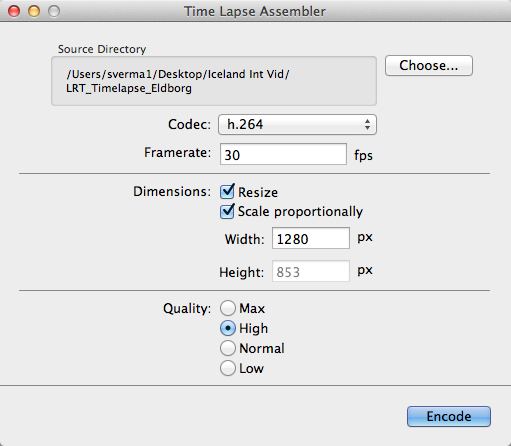
Now that the images of the sequence are ready, you can use one of the many free applications for Windows and Mac operating systems to create your video. Some of these are VideoVelocity from CandyLabs, Photolapse from Stephan van der Palen and Time-Lapse Assembler created by Dan Bridges. For under $ 30 Apple Quicktime Pro 7 can be used to create some excellent time-lapse video.

How to use Time Lapse Assembler for Mac

tla-1

  1. Open Time Lapse Assembler
  2. Select the directory that contains the image sequence
  3. Select the codec. Use h.264 or mp4v for making .mov files or mp4v for making .mp4 movies
  4. Leave the frame rate at 30fps
  5. Set the dimension to resize
  6. Scale proportionately
  7. For HD video you can adjust the width to 1920 or 1280 (1920 for 1080P video and 1280 for 720p video)
  8. Select Quality High (you can always use Max but the rendering will take longer
  9. Click on Encode
  10. You will be presented with a Save window. Name your sequence and click Save.

tla-2

The software will produce a Quicktime compatible movie file that can be viewed as is, or used for further editing in iMovie or any other video editing software.

See below an example of the video in very low resolution:

Here are the steps for Quicktime Pro 7

  1. Open Quicktime
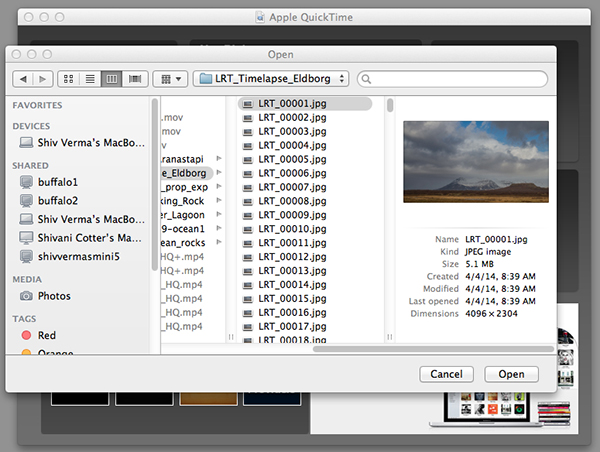
  2. Go to the menu and under File – click on Open Image Sequence. Go to the directory where you downloaded your images (make sure you have only the images that belong in the sequence in this folder)
  3. Click on the first image of the sequence and click Open

    Select the Sequence

    Select the Sequence

  4. You will be presented with a choice for picking your frame rate – use 30 frames per second for a smooth sequence. Now click OK
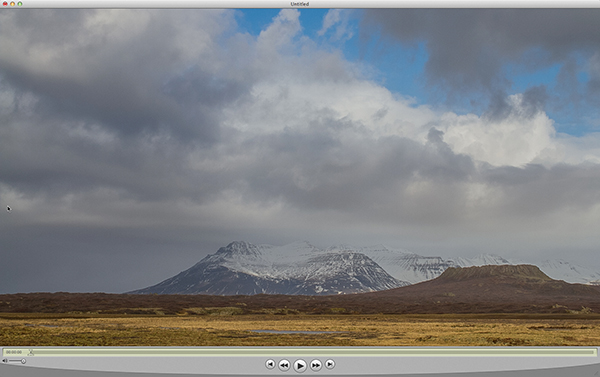
  5. Quicktime will import all the images in that folder and assemble them in their original sequence and at their original resolution. You probably will not be able to see the entire image as it is larger than the resolution of your screen but you can go to the Menu>View>Fit to Screen. You now have the first frame visible in its entirety.
    Assembled Sequence

    Assembled Sequence

    If you attempt to play this sequence you will not see the movie as you might like it to be. It will not be smooth and may pause for long periods. This is because the individual frames are very large and the video has not been rendered for playback.

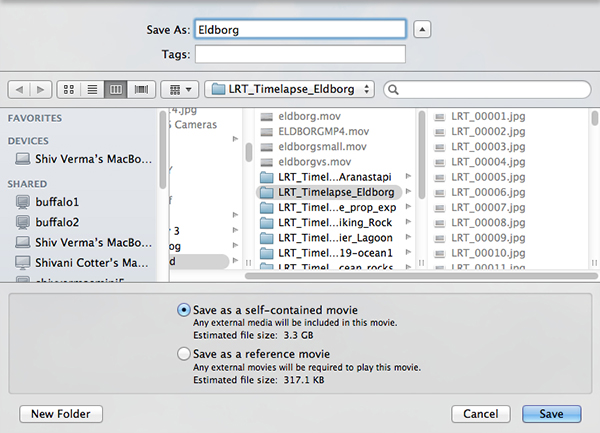
  6. Save this sequence File>Save
  7. You will be presented with options as to where you would like to save the Quicktime file.
  8. Save the file in the same directory as the original images and name the file

The next steps will render a viewable video

  1. You will export this sequence File>Export
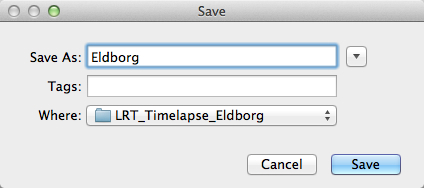
  2. You will get the typical “Save As” option and the “Where” option. Save the export in the same folder as the original files giving it a pertinent name.
    QT-3
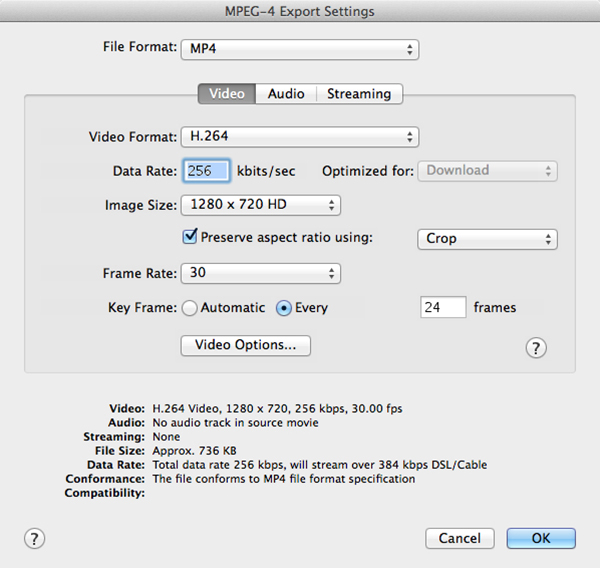
  3. There are two other sets of export criteria and an options button. For now, export the sequence as a QuickTime Movie and in the Options Section use H264.
    QT-4
  4. The export will take some time so be patient. Once the rendering and export is complete you will be able to watch the video. 

Have fun making your time-lapse – enjoy!

The post Time-Lapse Photography – a Quick Guide to Building Your Movie by Shiv Verma appeared first on Digital Photography School.


Digital Photography School

 
Comments Off on Time-Lapse Photography – a Quick Guide to Building Your Movie

Posted in Photography


eMotimo TB3 Review – Robotic Tripod Head and Time-lapse Movie

02 Jul

I’d forgotten all about my childhood dreams of achieving world domination using my very own robot army until I switched on the TB3 from eMotimo. As soon as I synched up the wireless remote and started panning and tilting this robotic tripod head, I was transformed into a grinning 8 year old boy who believed he could do anything.

I expect that the eMotimo exhibit at trade shows is usually ringed by a troupe of grinning time-lapse photography nerds like myself, who just realized they stumbled upon a truly legendary tool for photographic creativity.

My example footage

The short time-lapse movie above was made entirely using the TB3 with my Sony A7R Camera mounted on the Rhino Slider Pro 4ft. What started out as a couple of quick test shots turned into a fully fledged trailer when I realized what I could achieve with the TB3. Once I stuck it on a slider, things got awesome real quick.

What does the TB3 do?
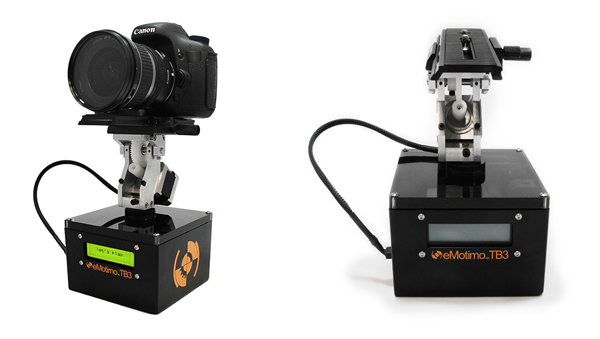
Emotimo TB3 Review

Pictured on the left with a Canon DSLR

For those of you who have no idea what’s so great about a device like this, let me throw the term ‘Motion Control’ at you. If you want to shoot videos or time-lapse movies that offer the viewer a more captivating perspective than just a plain old dolly/slider shot, you’ll be wanting one of these TB3′s.

The TB3 from eMotimo allows you to add high production values to your footage by moving your camera along two axes while shooting. It can pan AND tilt all at the same time. Combine this device with a slider and you’ve got yourself a powerful three axis rig for making fascinating cinematography and time-lapse photography. Your footage will appear to have been shot with a camera that magically floats through the air.
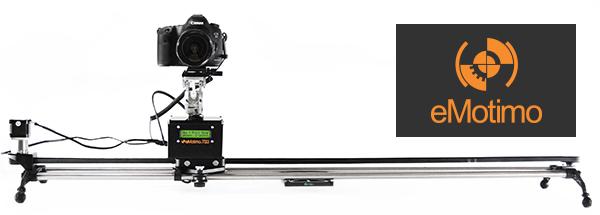
Motion Control Timelapse- TB3 Review

The TB3 shown here with a Canon DSLR and a Rhino Slider Pro 4FT.

Create multi-gigapixel panoramic photos

It’s not just about time-lapse and video. The TB3 also allows you to take multi-gigapixel images such as panoramas. For landscape shooters who want wall-filling image resolution, this feature is a major bonus. When you add in the awesome time-lapse and video shooting capabilities, you’re getting a lot of functionality for just under a $ 1000 USD.

Programming interface

Programming the movement of the TB3 requires a small learning curve. The interface is a very basic LCD screen with abbreviated titles and you navigate through this by using the included remote control joystick. It takes a while to get used to but if you’ve ever used a video game joystick you’re already half way there.
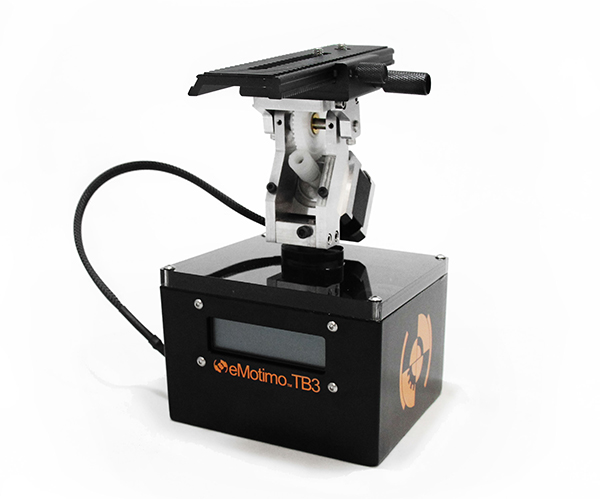
Emotimo TB3

Two-point or three-point movement and reverse moves

You can decide how many points of location your film sequence will have. If you want a simple A to B movement you select a two-point move. You tell the TB3 where you’d like to start and where you’d like to end, and the TB3 fills in the blanks.

With a three-point move you can get more creative by adding a less obvious direction to your movement. You could even program the TB3 to go into reverse after you’ve reached point two, or point the camera in the opposite direction, whatever you like. This is great for taking your audience on an unpredictable ride through your scene.

‘Reverse’ moves come in really useful when you’re using a slider and need to save valuable battery life by cutting out the ‘return to start’ move that the TB3 has to do once you’ve programmed in your move. You basically work backwards and tell the TB3 to start shooting from your last position. This is essential when doing vertical ‘jib’ shots on a slider which sucks a LOT of battery power.
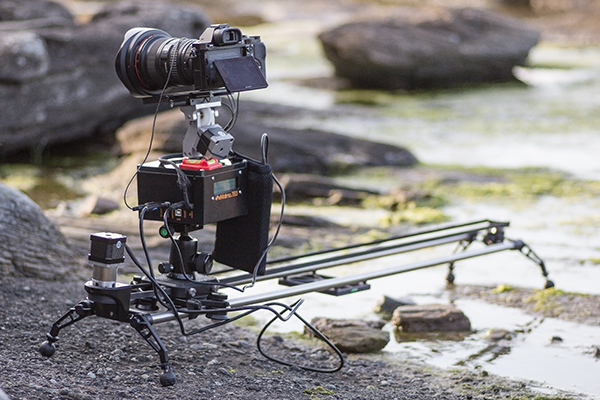
The TB3 by eMotimo

At the beach shooting a Timelapse sunset with the TB3 from eMotimo on a Rhino Slider.

Ramp

When I first saw the word ‘Ramp’ in the interface I thought it referred to Bulb ramping or ‘Bramping’ for time-lapse, but it actually refers to the degree of acceleration used when the TB3 moves to its start and end points. This is a really cool feature as it gives your camera motion a very smooth, but dynamic movement, as the TB3 gradually speeds up and then slows down to its end point. Most of the scenes in my video feature a ramp setting of 70.

Lead in-out

Another great feature of the TB3 is that you can specify a static ‘no movement’ period to either end of your shooting sequence. This is great if your sequence ends and you then fade up some titles in your video but want to keep the movie playing in the background.
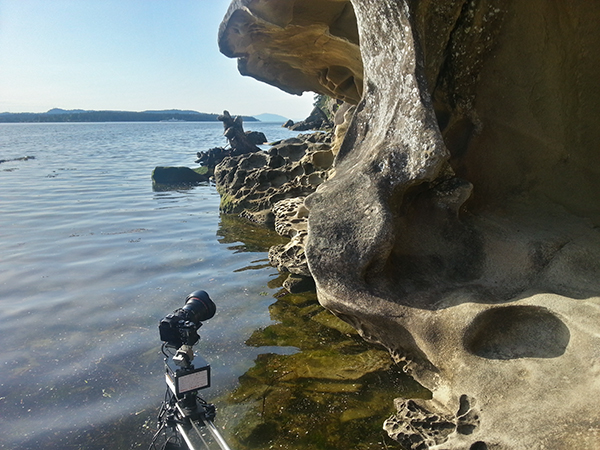
Emotimo TB3 shooting a timelapse

Smartphone shot. The TB3 almost going for a swim while shooting a time-lapse at Jack Point, Nanaimo (Canada).

Build quality

This is a sturdy unit. It kind of looks like something you’d expect to find under the skin of a young Arnold Schwarzzeneger during his debut as the world’s favourite cybernetic assassin. It’s built for functionality, not looks, and I expect it will appeal to the gadget geek in all of us due to its no nonsense appearance.

As well built as the TB3 is, I wouldn’t want to drop it. There are lots of exposed moving parts so it’s best to handle it with the care and attention it deserves. Encasing it in rubber would perhaps give it more protection but would add more weight. The interface cable that connects the moving parts to the brain of the unit could be more rugged as it’s already started to fray after light use.
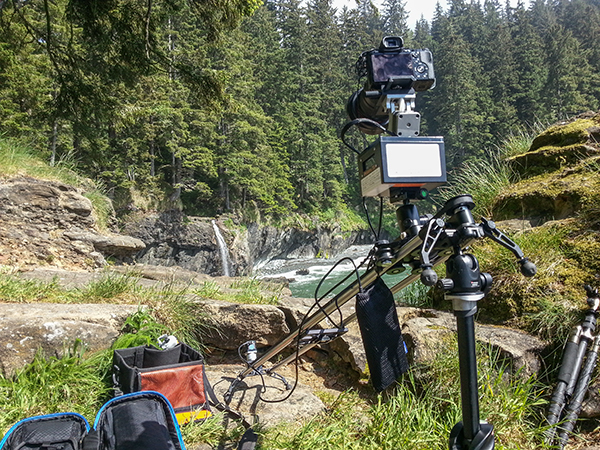
Rugged Build Quality on the TB3

Smartphone shot. Semi-vertical jib style shots like this require more battery power so the TB3′s reverse 2-point move helped save me a little battery life.

Weight and size

Lets face it, if you’re doing serious time-lapse movies or cinematography, you long ago accepted that you’d be lugging heavy gear around. The TB3 isn’t that heavy in itself but it’s yet another bag to carry along with your camera bag, tripod(s) and slider. For what this gadget does, I think they’ve packed a lot of tech into a relatively small device but I can’t wait to see a ‘Sonyfied’ future version that won’t add to my chiropractor bills. Till then, just deal with it.

Battery pack required

Yet another essential accessory for the time-lapse and video shooters – the external battery pack. eMotimo were kind enough to lend me the ‘Anker Astro Pro’ battery pack which powers the TB3 and many other devices such as your phone and camera. Although this adds yet more weight to carry, it’s great to know that when my Sony A7R battery inevitably lets me down (which it does daily), the battery pack will allow me to recharge in the field.
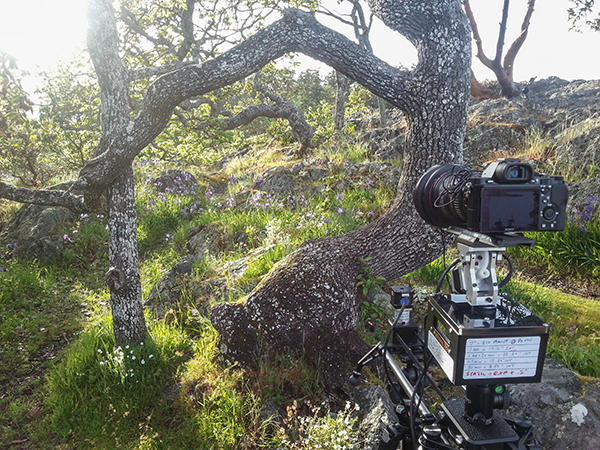
Shooting a timelapse with the Emotimo TB3

Smartphone shot. You can see I’ve written down all my interval settings for the 7 second sequences featured in my film.

Compatibility

The TB3 is compatible with most major camera systems but as you’d expect, the best compatibility is reserved for the two major giants Canon and Nikon. I’m a Sony shooter so this posed somewhat of a problem for my plans to shoot the time-lapse movie shown above. eMotimo managed to get around this problem by providing a simple IR (infrared) transmitter cable that I taped to the IR receiver port on my Sony A7R. Not as slick as the Canon/Nikon cabled version but it did the job. I’d like to see a wired solution from eMotimo pretty soon though as it looks like Sony is starting to gain traction with their new range of cameras.

For time-lapse shooters that use advanced bulb ramping devices like the ‘Promote Control’, you’ll be glad to know that this can be integrated with the TB3. eMotimo also provides motor accessories for various popular sliders so you have some different options for the 3-axis motion control shown in my example video.
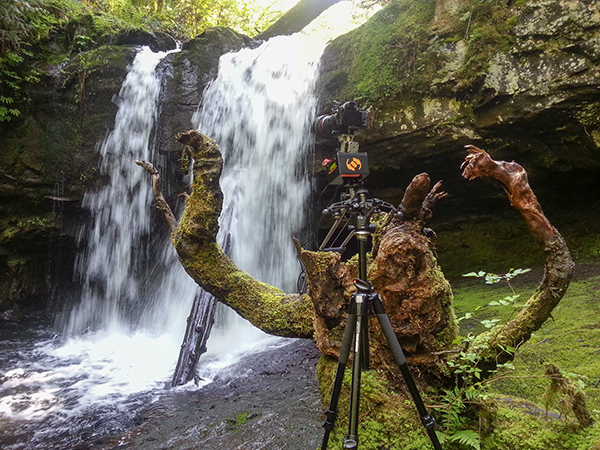
Waterfall timelapse with the TB3

Smartphone shot. My favourite angry tree stump gets the time-lapse treatment with the TB3 carefully balanced on the stump.

Things I love about the TB3

  • Super smooth motion – this really is the most important part of any motion control device. It may not look like it in my video, but before the dreadful internet compression butchered my film, I can assure that the footage is buttery smooth. Not all motion control devices are made equal and eMotimo have totally nailed this most essential aspect.
  • Rugged, no-nonsense construction. I filmed time-lapse sequences in all kinds of weather, even heavy rain. The TB3 handled it all with indifference.
  • The cool little sound effects that it makes while you pan/tilt the head using the joystick.
  • Tech support – eMotimo is a small company in San Francisco with a very hands-on approach. All of my foolish newbie questions were answered with patience and resolved quickly.
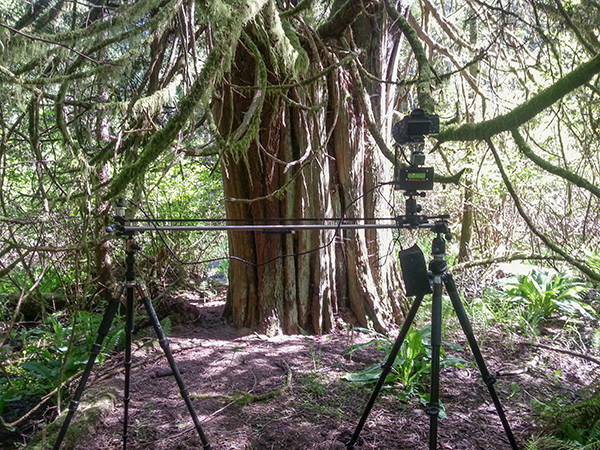
Forest timelapse movie

Smartphone shot. I found that hanging the battery pack off the slider caddy gave the best results.

Things I don’t love about the TB3

  • The carry case seemed like an afterthought. It doesn’t fit very well and I was forever worried about accessories falling out. I’d rather buy a larger all-purpose camera bag and put the TB3 in that.
  • The programming procedure could be more accommodating. The TB3 has a cool ‘repeat/reverse’ function that you can set off immediately after your time-lapse sequence is finished. Sadly, I couldn’t figure out a way to edit the settings, which is essential after the sun has gone down and the light has changed. Maybe a firmware update could fix this?
  • The ‘Fotomate’ mounting plate onto which you attach your camera was a little fiddly.
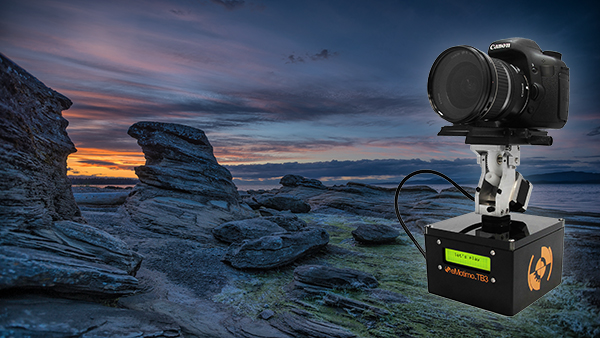
Emotimo TB3 Review

Would I buy the TB3?

Absolutely. The TB3 has enjoyed something of a cult following among the rockstar time-lapse and DLSR video shooters. It’s not just because eMotimo were there during the early years of the time lapse video phenomenon, it’s because they make a very versatile and rock solid product. When you factor in the sub $ 1,000 price point and the awesome tech support, I really don’t see any other contenders.

My star rating

Our rating system doesn’t allow for a 4.9 so I’m forced to give the TB3 5 stars. I could have given it 4.5 stars but that just wouldn’t be enough. If eMotimo can fix my two main gripes of having a better carry case and some form of improvement on the Fotomate mounting plate, the TB3 would be perfect and fully deserving of 5 glorious shining gold stars.

Want some time-lapse tips? Try these:

  • Timelapse Photography Tutorial: An Overview of Shooting, Processing and Rendering Timelapse Movies
  • Capturing the Northern Lights in Timelapse Video
  • Discover the Wonder of Time-Lapse Photography

The post eMotimo TB3 Review – Robotic Tripod Head and Time-lapse Movie by Gavin Hardcastle appeared first on Digital Photography School.


Digital Photography School

 
Comments Off on eMotimo TB3 Review – Robotic Tripod Head and Time-lapse Movie

Posted in Photography


5 Steps to Shoot a Simple-ish Time-Lapse Video With Your DSLR

30 Jun

If you have a new-ish DSLR, then you can probably “train” your camera to make a little movie for you. I’m talking about a time-lapse video, and while it might not be the next Hollywood blockbuster…it could spread like a virus on the Youtubez. 🙂 Read on to get started, and if I’ve done my job well (and you have the Continue Reading

The post 5 Steps to Shoot a Simple-ish Time-Lapse Video With Your DSLR appeared first on Photodoto.


Photodoto

 
Comments Off on 5 Steps to Shoot a Simple-ish Time-Lapse Video With Your DSLR

Posted in Photography


Flickering fireflies in time-lapse

17 May

Ozarks_Planet.jpg

You don’t have to be be a kid to enjoy the beautiful light show from fireflies. There’s something magical about their bioluminescence and the dancing display of lights they create. Photographer Vincent Brady loves fireflies too and his new time-lapse video, shot at Lake of the Ozarks, Missouri and around his hometown of Grand Ledge, Michigan, is an artistic look at one of nature’s most alluring insects. See video

News: Digital Photography Review (dpreview.com)

 
Comments Off on Flickering fireflies in time-lapse

Posted in Uncategorized


Time-Lapse Photography Equipment Guide to Getting Started

04 May

Currently for a limited time only get the Stage R Versatile Motion Control for Timelapse and Film and get FREE eBook – on now at SnapnDeals!

“Never forget that all the great photographs in history were made with more primitive camera equipment than you currently own.” – Brooks Jensen

No doubt that first time you said “Hey, wouldn’t it be fun to dabble in DSLR photography? You know, just as a hobby.” Your financial counsellors, or your spouse for that matter, broke out in budget busting hives.

There probably isn’t a more gear focused group of enthusiasts out there, but don’t worry, taking that step into time-lapse photography doesn’t require much gear to begin – and the extra gear that can really take your time-lapse to the next level is more affordable and easier to use than ever before.

Whether you are a brand new time-lapse photographer or an experienced shooter looking to unleash full creativity with time-lapse motion control, this article will provide a launch pad for your next steps into one of the most emotionally connecting, and at the same time freeing, creative photographic endeavours.

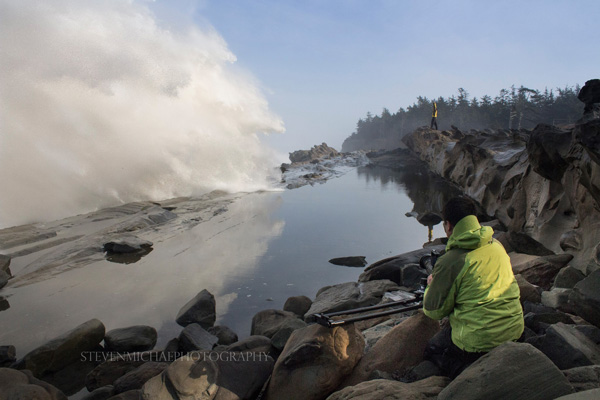
Steven Michael Photography 600

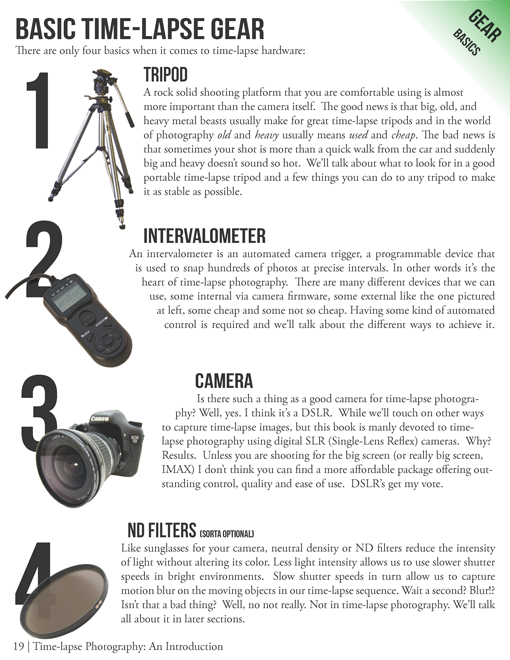
Your minimum gear checklist for time-lapse photography

Chances are good if you’re already a DSLR shooter you almost have everything you need to get started. These four things are essential.

  1. A tripod
  2. An intervalometer
  3. A Camera
  4. An ND filter

timelapse-gear.png

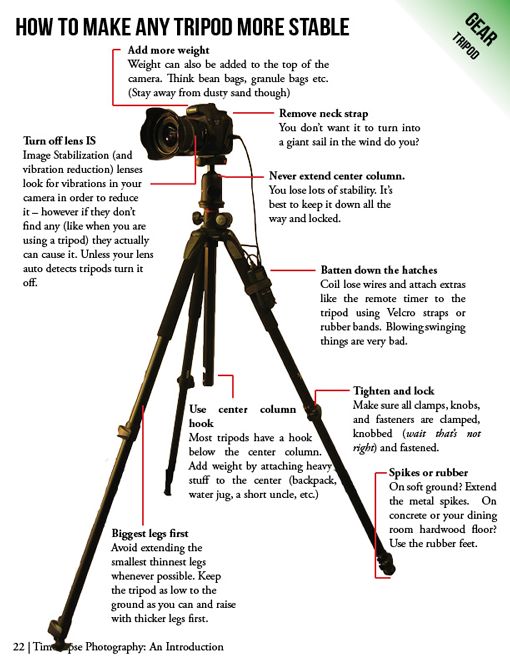
A closer look at a good time-lapse support system

Rock solid stability (or precise controlled movement) is just about the most important and most essential component for good time-lapse photography. Keep in mind a good tripod that meets your needs will outlast several cameras so consider budgeting a little more time and possibly cash to this category.

  • Consider the materials used – weight and strength
  • Check the load weight – avoid sagging and flexing
  • Height – eye level without using the centre column
  • The right tripod head for your work – ball heads versus pan and tilt

timelapse-tripods.png

Unleashing your creativity with advanced time-lapse equipment

Time-lapse photography is benefiting from a dramatic flow of new ideas. The level of innovation, especially over the last few years, is incredible. Not only are we quickly fixing problems that have plagued photographers for years, but advanced camera controls and processing tools that used to be cost prohibitive, are now becoming affordable for the most basic hobbyist.

Advanced camera exposure control

The Timelapse+ can operate as a universal intervalometer for nearly any camera that supports a remote shutter release, and IR remote, or USB tethering. Bulb-ramping is its claim to fame. The Timelapse+ can perform keyframe-based, guided, or fully automatic bulb ramping – and for cameras supported by USB control, the Timelapse+ can also seamlessly integrate ISO control to smoothly ramp across a wide exposure range, making the “holy-grail” transition from day-to-night or night-to-day easier to achieve. Extended and long-exposure HDR sequences are also made easy with the Timelapse+.

Simple and powerful advanced time-lapse sequence rendering with LRTimelapse:

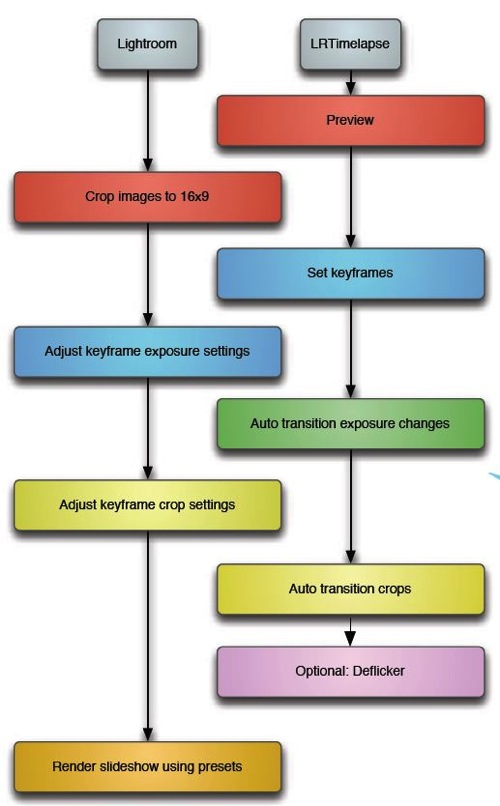
In a nutshell LRTimelapse takes changes and corrections you make in Lightroom and then smoothly applies them throughout the entire time-lapse sequence. By altering either the first and last image, or several images throughout the sequence, LRTimelapse can quickly fade the changes we need to only the parts we want. Deflickering can also easily be accomplished in the exact same way by flattening out big exposure jumps.

Here’s a simple workflow for editing timelapse images and rendering a movie using Adobe Lightroom and LRTimelapse.

Lrtimelapseworkflow

Advanced motion control

The last few years have shown incredible advances in the field of manual and controlled camera movement, so much so that the
average photographer can now afford motion control devices that were once only available to big budget productions. We’re talking precise, rugged and lightweight panning (left and right), tilting (up and down), and dolly movements with simple controls, such as a smartphone app, that make setup easy and intuitive. Control over motion and time combined with an interesting subject can produce what I believe to be an awesome trifecta of emotion eliciting imagery – some of the most engaging and lasting photography you’ve seen.

Yosemite HD II, an incredible example of time-lapse and motion:

Dolly motion shots can add multiple points of interest by highlighting components of a scene’s unchanging foreground and the larger time-altered background. The movement shots in the wave video move the camera along the jagged rocks, while the waves are slowed in the background. Some of the most popular time-lapse clips feature this kind of extreme moving contrast in many shots too. By moving the camera slowly from left to right on a horizontal track, or flipping the track system almost vertically to instead change the elevation of the camera, we can highlight stationary foreground objects in incredible ways.

The next two axes of movement can be accomplished by camera rotation – aptly named a motorized panning and tilting head. Then combining panning and tilting on a camera slider to achieve 2, or 3 axis of movement simultaneously can dramatically elevate the interest level in a shot.

zion 3axis motion control

2 axis motion control

Do you think advanced time-lapse work should be left to the pros?

Eric Warren of Matadornetwork.com posed a related question:

“Pros are the guys you call when you want to put a time-lapse in your car commercial. And while we tend to put pros up on a pedestal, they are often bogged down by their clients’ needs. Most commercial advertising doesn’t push the envelope of an art form.

That job often falls to the independent artists, building their own equipment, and often not [caring] about whether their work is going to sell. Not that I want to be too demanding here, but I want to see something mind-blowing. Either something I’ve never seen before or something familiar, shown in a new way (one thing time-lapse excels at.) ….

Consider this a call to all you independent filmmakers out there ready to push the limits of one of the most striking visual art forms.”

Time-lapse has a way of slowing the world for the photographer while at the same time accelerating it for everyone else. Shooting time-lapse alters the way you think, it challenges your view of the world and teaches you things about our world you can bring back and share with everybody else.

Get out and start shooting. Render some footage and break some rules. Most importantly know that you are not alone. The time-lapse community is more connected today than ever before. You have friends all over the world ready to help you get the shots you imagine.

Currently for a limited time only get the Stage R Versatile Motion Control for Timelapse and Film and get FREE eBook – on now at SnapnDeals!

The post Time-Lapse Photography Equipment Guide to Getting Started by Ryan Chylinski appeared first on Digital Photography School.


Digital Photography School

 
Comments Off on Time-Lapse Photography Equipment Guide to Getting Started

Posted in Photography


1 May, 2014 – Timelapse Animation with the GH4

01 May

The new Panasonic GH4 has a built-in timelapse capability which can be converted in-camera or in post to 4K video. Then, with such a high-res image some interesting special effects are possible. Michael explores this in this new article.


The Luminous Landscape – What’s New

 
Comments Off on 1 May, 2014 – Timelapse Animation with the GH4

Posted in News