Mike Olbinski recently spent 18 days and drove some 20,000 miles to capture one of nature’s most powerful forces on camera, and in doing so has created one of the most compelling time-lapse videos we’ve seen in a long time. He shot some 60,000 time-lapse frames between April 15th and June 15th, 2016 and compiled them into a six minute long epic that concludes with the holy grail of storm chasing: capturing a tornado on camera. Definitely view this one in full screen mode and enjoy!
Tag: Timelapse
-
Time-lapse captures fast-changing Singapore skyline over three years
Time-lapse and tilt-shift specialist Keith Loutit’s latest project has been years in the making. The Lion City II – Majulah is a follow-up to another impressive feature, documenting the rise and fall (but mostly rise) of skyscrapers on Singapore’s skyline over the course of three years.
Channel NewsAsia reports that the four-minute video is the culmination of 500 hours of shooting from June 2013 to June 2016. The soundtrack was composed for the project by Michael Adler Miltersen in collaboration with Loutit.
The Lion City II tells a compelling story about daily life in the shadow of urban growth. And as someone who played way too much Sim City as a kid, I’m pretty sure I could watch this on repeat all morning. Are you inspired to start a time-lapse project of your own? Let us know in the comments.
-
Shanghai Tower Timelapse Film Captures 4 Years of Construction
[ By Steph in Art & Photography & Video. ]

The second-tallest building in the world seems to appear out of nowhere, shooting into the sky as if of its own accord, in this stunning time-lapse video of the skyline in Lujiazui, China taken over a four-year period by filmmaker Joe Nafis. The 2,073-foot Shanghai Tower is surpassed only by the Burj Khalifa in Dubai and features a double-decker elevator offering the longest single elevator journey in the world at an amazing 1900 feet in under a minute. Its construction has made the skyline even more iconic, dwarfing all of the other buildings in the city.


Every single shot taken by Nafis is a work of art – razor sharp, beautifully composed, dynamic – and seeing them all put together in the final video is breathtaking. The filmmaker spent 1,000 work hours taking and editing 350,000 photos to capture the process as each of the 128 floors is built.


“Construction had already begun when I arrived in the city in 2009,” says Nafis. “The site was a large hole in the ground with construction crews milling around pouring concrete for the base. I began exploring the city looking for views and locations that would serve as groundwork for this video. In 2011, I secured a location with unobstructed views of Lujiazui where I could just glimpse the tower peeking behind the 185m (607 feet) Aurora Plaza.”


“I maintained a camera there for the next 4 years until the tower was completed. In the meantime I took hundreds of thousands of photos from various viewpoints around the city filling up around 8TB in the process. In all, over 1000 hours were dedicated to this project in exploring, shooting and post-processing.”
Want More? Click for Great Related Content on WebUrbanist:

10K Timelapse: 80-Megapixel Camera Captures Urban Rio in Motion
No monitor in the world can fully do justice to the amazing level of detail in this sequence, but be sure to go full screen when watching in this video, …
Click Here to Read More »»

3D NYC Timelapse: 500 Years of History in 1 WTC Elevator Ride
Riding to the top observation deck of 1 World Trade Center opening next month, visitors will be treated to a dizzying view of the city below, but not the one …
Click Here to Read More »»
Triangle Tower Approved: First New Paris Skyscraper in 42 Years
At nearly 600 feet (180 meters) tall, this structure was narrowly granted permission to be the first skyscraper to grace the Parisian skyline in nearly half a …
Click Here to Read More »»


[ By Steph in Art & Photography & Video. ]
[ WebUrbanist | Archives | Galleries | Privacy | TOS ]
-
How to Shoot a Pine Cone Time-lapse: A Mini Tutorial
This week over at our sister site, SnapnDeals, we have a great deal running where you can get 20% off Time-Lapse Photography: A technical and practical time-lapse tutorial guidebook for all skill levels designed to get you out the door and shooting now!
 In this lighthearted mini-tutorial we’ll take an 80/20 approach to creating a simple time-lapse of a common pinecone (in this case a Black Pine).
For a more general introduction to time-lapse photography view: Time-lapse Photography Tutorial: An Overview of Shooting, Processing and Rendering Time-lapse Movies.
You already know that pine cones are nature’s mysterious seed pyramids, but did you know they have a gender? Yes, there are both female and male pine cones. Did you also know that pine cones are an interesting time-lapse subject? Go get a female pine cone, and give it a shot. Let this whole male/female Nature Notes youtube revelation be your last straw, or should I say pine needle that breaks your procrastination. Here was my result:
Here’s how to make your own pine cone time-lapse:
Step 1. Find pine cones
Collect some good looking pine cones (preferably female: watch the Nature Notes video above). Look for good cones in fresh condition, without rot or discoloration, uniform shape, and bottoms that provide support for upright standing. I’d grab two or three for variety, and a dog chew backup. Here’s an example of an open found pine cone.

Step 2. Make them close
Pine cone motion is all about moisture, it’s a hydromorphic response. In high moisture environments pine cones close. In low moisture, over time, they open. This video showing both opened, and closed cones, with visible moisture is a perfect learning example.
To close a cone, simply put it in a cup of water and leave it for an hour or two. That’s it.
Step 3. Prepare for the opening shot
Key thoughts: Steady (consistent) lighting, simple background, camera position, power. Let’s take these one by one.
Steady light: Light fluctuations in a sequence of time-lapse images are bad, as they create unappealing bright and dark frames in the rendered movie, better known as time-lapse flicker (learn much more about that here). Chose a room that you can cordon off for a day or so to prevent disturbances, and block all light from any windows. Move any light sources near the photo white box, to provide a constant uniform brightness, then adjust their positions to eliminate shadows.
Background: Completely up to you creatively. I chose a minimal white background, using a simple inexpensive white box. By slightly overexposing each shot, you can effectively eliminate almost all appearances of a background.
Camera position: Choose one or more angles from which to shoot. I chose first, a front downward angle, and a second fully vertical angle from above.
Power: A pine cone bloom from closed to opened may last anywhere from 8-24 hours, so you’ll need an AC adapter for your camera to make sure it keeps going.
Step 4: Craft the time-lapse and begin
We talked a little bit about avoiding stray light sources in the room where you are shooting, as these changes introduce time-lapse flicker into the image sequence. Having your camera in any automatic mode may also introduce flicker. To get the best possible consistent exposure over many frames, shoot in manual mode, set a manual white balance, manual ISO, and manual focus. In the example video above I used a Sony A7s and FE 90mm f/2.8-22 Macro G OSS lens.
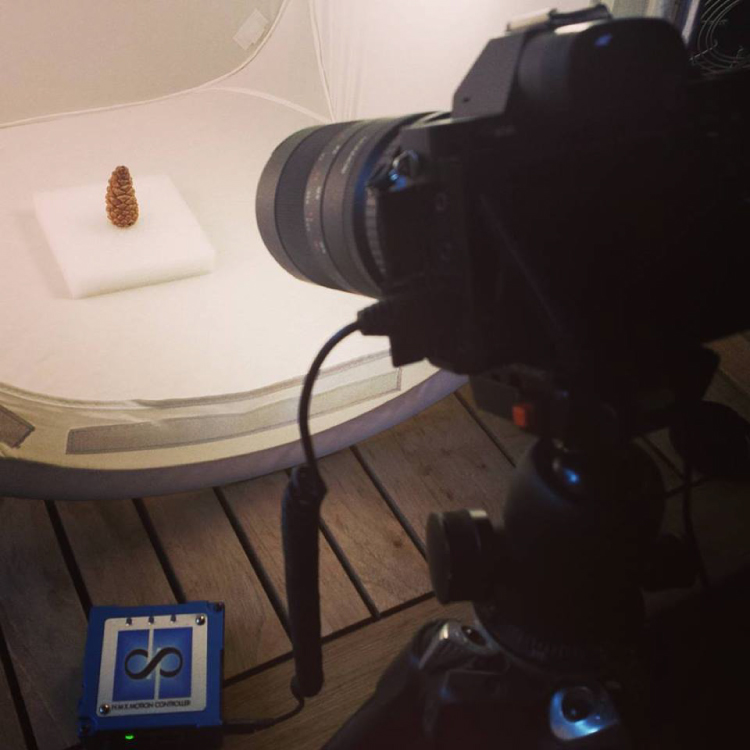
Exposure: Six seconds at ISO 200, f/22, produced a great image, and just started to wash out the brighter white background. You can push the whites a little further in post-production, and really create a clean image background.
Time-lapse interval: To be honest I didn’t know how long I would be shooting, or when the action would begin. Times will vary, as no two cones and no two climates, or indoor humidity levels are exactly alike. The side angle pine cone shot took from about 9:00 a.m., to 3:00 a.m. the following morning, approximately 18 hours. I chose a 30 second interval, and set the shot count to infinity, so it would continually shoot until it was manually turned off. When unsure of how quickly to shoot, or how many frames to capture, it’s always good to capture more, rather than less. You can always speed up a time-lapse with too many frames, but if you don’t get enough shots and miss important movement, you are usually stuck.

These 30 second exposures, over 18 hours, resulted in about 3,246 images. That’s a lot of frames. Pine cones are slow. Much slower than I anticipated, and my interval was pretty fast capturing more frames than necessary for smooth movement. For your experiment I’d recommend increasing your interval time to about 50 seconds, or one minute. Having a longer interval time will result in less photos, and with the slow moving nature of the bloom it will not result in a jumpy or less smooth cone opening video.
Step 5: Adjust the exposures and render the time-lapse
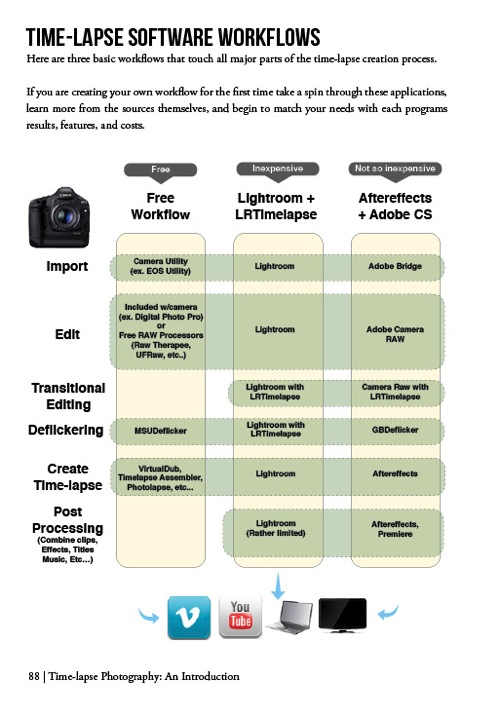
The beauty of Lightroom, or Adobe Bridge and other applications, is that you can adjust the exposure on a single reference photo, then apply those changes across all your photos. Simple – and so is rendering the basic time-lapse. There are several different applications to choose from, to turn your collection of images into a video – varying from free and inexpensive, to not so inexpensive. Fear not, you can learn much more about time-lapse rendering in previously mentioned article, but the diagram below provides an overview of time-lapse software and applications.
Patience is your most valuable commodity for this project. From pine cones to The Milky Way, I hope this mini peak into the world of creative time-lapse photography has ignited your curiosity to learn more. Time-lapse has a way of slowing the world for the photographer, while at the same time accelerating it for everyone else. I shoot time-lapse because it alters the way I think, it challenges my view of the world, and teaches me things I can bring back and share with everybody else. It’s a real honor and privilege to partner with you on this training journey. I hope is helpful and I would love to hear from you in the comments below.
This week over at our sister site, SnapnDeals, we have a great deal running where you can get 20% off Time-Lapse Photography: A technical and practical time-lapse tutorial guidebook for all skill levels designed to get you out the door and shooting now!
googletag.cmd.push(function() {
tablet_slots.push( googletag.defineSlot( “/1005424/_dPSv4_tab-all-article-bottom_(300×250)”, [300, 250], “pb-ad-78623” ).addService( googletag.pubads() ) ); } );googletag.cmd.push(function() {
mobile_slots.push( googletag.defineSlot( “/1005424/_dPSv4_mob-all-article-bottom_(300×250)”, [300, 250], “pb-ad-78158” ).addService( googletag.pubads() ) ); } );The post How to Shoot a Pine Cone Time-lapse: A Mini Tutorial by Ryan Chylinski appeared first on Digital Photography School.
-
Marble Earth: 7-Mile Scale Model Timelapse of Our Solar System
[ By WebUrbanist in Art & Installation & Sound. ]

Starting with a model planet Earth the size of a marble, a team of filmmakers set out to simulate our entire solar system in motion and capture the results in a compelling short movie.

In normal images and models of the planets in our solar neighborhood, nothing is too scale – at scale on a piece of paper, planets becoming vanishingly small and effectively impossible to see on the page. Textbooks and other graphics misrepresent sizes almost by necessity simply because it would be impossible to depict things otherwise in a small visual field.

The resulting visuals distort our sense of the distance between celestial bodies. In the scale model featured above, set in the Black Rock Desert of Nevada, Alex Gorosh and Wylie Overstreet give the viewer a much greater intuitive understanding of the separation and size of these spatial objects.

“As we got farther and farther away it diminished in size. Finally it shrank to the size of a marble, the most beautiful marble you can imagine. That beautiful, warm, living object looked so fragile, so delicate, that if you touched it with a finger it would crumble and fall apart.” said James Irwin, Apollo 15 astronaut. He is one of only 24 people in human history have seen the full circle of the Earth with their own eyes.

Using LED lights, GPS calculations, a dirt disrupter and ultimately cars driving in circles to simulate the orbits at night, the team created a 1:847,638,000 scale model in which blips of light represent the various bodies in space.

One of the participants climbed a nearby mountain to film it all from above, while post-production overlays create a key for the video. Process documentation was made in part with a drone flying overhead. According to its creators, this is the first scale model of the solar system ever constructed.
Want More? Click for Great Related Content on WebUrbanist:
City of Sounds: Scale Model Plays Urban Soundtrack
Every city has its own unique sound, but until now those sounds have been less than musical. This unique project turns the city itself into an instrument.
Click Here to Read More »»
Incredibly Intricate 2.5 Ton Carved Marble Manhattan
The island of Manhattan is a fascinating place on its own, but one artist has given it new life. This marble recreation of Manhattan is full of amazing details.
Click Here to Read More »»
See-Through Solar: Crystal Clear Panels Are 100% Transparent
Applied to anything from the surface of your smartphone to the the sides of a skyscraper, the possible uses of this innovation for everyday surfaces are …
Click Here to Read More »»
[ By WebUrbanist in Art & Installation & Sound. ]
[ WebUrbanist | Archives | Galleries | Privacy | TOS ]
-
What Time is it? It’s Time-lapse Time!

You’ve been drooling over time-lapses lately, and with good reason.
They’re perfect for capturing the buzz of a cityscape, the fun of your pool party and the awesomeness of storm-clouds moving over your hometown.
We’ve rounded up the best time-lapse tools for everyone from DSLR wielding pros to time-lapse newbz. You can finally snag perfect time-lapses … time after time.
Click Here Fast, We’ll Time You!
(…)
Read the rest of What Time is it? It’s Time-lapse Time! (310 words)
© Erin for Photojojo, 2015. |
Permalink |
No comment |
Add to
It’s Time-lapse Time!”>del.icio.us
Post tags:
-
What Time is it? It’s Time-lapse Time!
You’ve been drooling over time-lapses lately, and with good reason.
They’re perfect for capturing the buzz of a cityscape, the fun of your pool party and the awesomeness of storm-clouds moving over your hometown.
We’ve rounded up the best time-lapse tools for everyone from DSLR wielding pros to time-lapse newbz. You can finally snag perfect time-lapses … time after time.
Click Here Fast, We’ll Time You!
(…)
Read the rest of What Time is it? It’s Time-lapse Time! (310 words)
© Erin for Photojojo, 2015. |
Permalink |
No comment |
Add to
It’s Time-lapse Time!”>del.icio.us
Post tags:
-
3D NYC Timelapse: 500 Years of History in 1 WTC Elevator Ride
[ By WebUrbanist in Art & Installation & Sound. ]

Riding to the top observation deck of 1 World Trade Center opening next month, visitors will be treated to a dizzying view of the city below, but not the one they might expect – instead of looking out windows, they will see their surroundings on lifelike screens, enveloping them in a time-lapse view of New York City’s historic evolution. All of this is packed into a trip that lasts less than sixty seconds (video below).
Inevitably included in this fast-paced vertical ride through history is a view of one of the former Twin Towers, which appears then vanishes off to the right, reflecting its real-world existence and absence. This inclusion was contentious but hopefully will be seen by the public as a tribute to the fallen towers.

A circular display on one panel scrolls up through the years rather than heights, highlighting the fast passage of time. The show was designed and produced by the Hettema Group and Blur Studio in conjunction with architects of Montroy Andersen DeMarco.

The New York Times sets the scene: “Nine 75-inch, high-definition monitors are arrayed in each cab behind windowlike mullions to convey the impression that one is in a glass-walled elevator. At first, one feels enclosed in bedrock. The year is 1500 and the elevator is 55 feet below ground. As it rises, time advances. The cab seems to head skyward from an offshore marsh, a reminder that the trade center site was originally underwater.”

The experience is as historically complete as it is educational and immersive: “A peaceful riverfront settlement is then seen, just before the Europeans arrive. Soon enough, the still verdant island is dotted with the steep, crow-stepped gables of New Amsterdam, as windmill vanes poke up over the treetops.”

“Height records are made and broken by a succession of tallest towers: the Park Row Building, the Singer Building, the Woolworth Building and the original trade center. Then, the steel framework of the new 1 World Trade Center seems to assemble itself around the cab before visitors once again find themselves within an enclosed space — this time, an elevator shaft.”
Want More? Click for Great Related Content on WebUrbanist:

Error of Omission: 50-Floor Skyscraper Lacking an Elevator
Twin towers raising up the existing skyline and joined at the top – these were supposed to be a sign of recovery in a city and country ravaged by the …
Click Here to Read More »»

Deserted Elevator Shaft Hides Single-Room Street Museum
Like so many secret spaces of New York City, this one-room exhibit space (hidden inside an abandoned elevator) is not exactly on the beaten path. This pop-up …
Click Here to Read More »»
Top of the World: Photos & Videos from Atop Tallest Towers
First he presented a photo-edited version (carefully stitched together) to show what the view would look like without the building he on top of which he took …
Click Here to Read More »»
[ By WebUrbanist in Art & Installation & Sound. ]
[ WebUrbanist | Archives | Galleries | Privacy | TOS ]
-
Scientifantastic – The Time-lapse and Landscape Work of Joe Capra
Photographer Joe Capra got started shooting landscapes but in recent years he’s been making a name for himself with high-resolution timelapse videos, shot on dedicated stills cameras and painstakingly put together using specialist software. Click through to view some of his stunning imagery and to learn more about his process in our detailed Q&A
-
Triggertrap introduces pauses and delays for timelapse sequences with Timelapse Pro app
Triggertrap has released a new app that allows photographers to take more control of timelapse sessions by introducing the ability to add delays into a sequence. Timelapse Pro is available for iOS devices running iOS 8 and, with the appropriate dedicated cable, can control over 300 models of camera. Read more