RSS
 

Posts Tagged ‘Think’

8 October, 2014 – The Think Tank Navigator and More

09 Oct

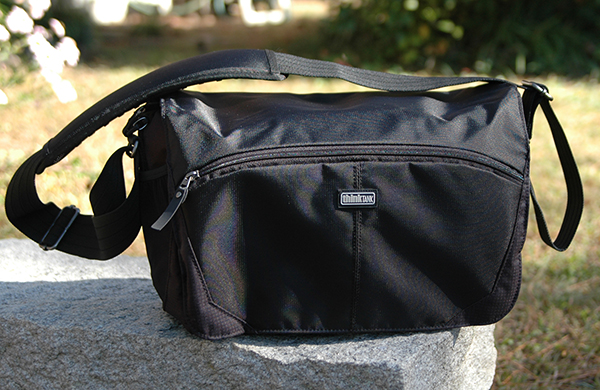
Many of us do a lot of traveling to capture the special images that we enjoy so much.  Getting to these special locations is a challenge these days. We face weight and size limitations of the airlines not to mention our own as we do everything we can do to reduce size and weight of our kits.  Over the years I have collected way too many bags trying to accomplish the ultimate carry solution for my gear.  Today I share one of the newest and best bags I have owned as well as some other tips on how I travel with my gear.  Check out The Think Tank Navigator article as well as a short video and hopefully you’ll find some good information that will help you in your travels. 

I thought I’d share a website I have just bookmarked that you may find handy too. Glossary Of Photographic Terms .


The Luminous Landscape – What’s New

 
Comments Off on 8 October, 2014 – The Think Tank Navigator and More

Posted in News


Post-Photokina polls – Tell us what you think

04 Oct

We’re planning some post-Photokina content and wanted to understand what you’re thinking. We’ve created two polls, both looking for your take on the products and trends of Photokina. Let your voice be heard. Cast your vote

Articles: Digital Photography Review (dpreview.com)

 
Comments Off on Post-Photokina polls – Tell us what you think

Posted in Uncategorized


Photokina 2014: Hands on with Leica’s S & M (it’s not what you think)

21 Sep

Leica announced two new M-series rangefinders at this year’s Photokina, in addition to the Digital M-P released last month. The German company also unveiled a new medium-format S, which as well as high-resolution stills can capture 4K video. Naturally, we headed over to the Leica booth to get our grubby hands all over the new cameras. Click through to see more. 

Articles: Digital Photography Review (dpreview.com)

 
Comments Off on Photokina 2014: Hands on with Leica’s S & M (it’s not what you think)

Posted in Uncategorized


Think Tank Modular Components and Pro Speed Belt Review

18 Jan

I’ve said it before and I’ll say it again. There are two kinds of reviews. There are first impressions, “fresh-out-of-the-box” reviews, and there are those (usually more useful) that come later, after the reviewer has had a chance to really put the product through its paces. Considering that I’ve been using the Think Tank Pro Speed Belt and Modular Components for almost ten years, I’d say that this review falls squarely within the second category.

think-tank-modular-components-review-001

The Think Tank Pro Speed Belt, combined with elements of the Modular Component System makes carrying and accessing your gear while on location easier and more convenient.

If you’ve been doing this long enough, you know that the right bag for getting you TO the gig is not always the right bag for getting you THROUGH the gig. You event photographers know what I mean. Whether it’s sports, concerts, weddings, or general location shooting, chances are good that at some point your bag has frustrated the hell out of you. Big and bulky may be great for safe transit, but you need lean and convenient once you’re inside the stadium, arena, or church.

My favorite solution to the problem is the Think Tank Pro Speed Belt with the Modular Component System. If you’ve ever wanted to feel like Batman and have a utility belt of your very own, now’s your chance. Think Tank offers a wide selection of components for the belt, ranging from lens pouches and accessory bags, to a holder for your water bottle. The modular components have more padding and removable inserts than the skin set, but both have their pros and cons (e.g., heavier and more protection vs. lighter and less protection).

Note: I should note that in the almost ten years since I started using this system, Think Tank has introduced Version 2, slightly updating each of the components. The pieces you see in the photos are from Version 1, but all are available in the newer models.

This review covers only the six modular components I actually own. I’ve never used all six at once. Just like I have different camera bags for different types of assignments, I can tailor the belt and its components in the same way. All have the high-quality construction I’ve come to expect from Think Tank, from the water-resistant materials and stitching, to the durable zippers and padded inserts. All components have their own removable rain covers, and are designed to either rotate freely around the bag (perfect for redistributing the weight when necessary), or be “locked” in place via the loops on the belt.

The Belt

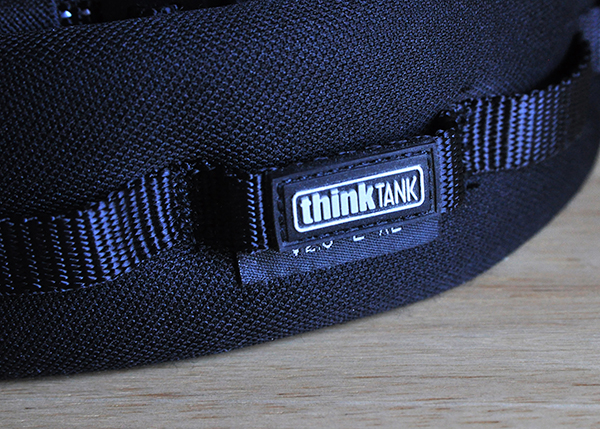
Made of nylon webbing, three-ply bonded nylon thread, and high-density closed cell foam, the belt is comfortable, durable, and comes in four sizes.

think-tank-modular-components-review-002

Modular components can either rotate freely around the belt, or be “locked” in place using the loops around the padded section.

Speed Changer

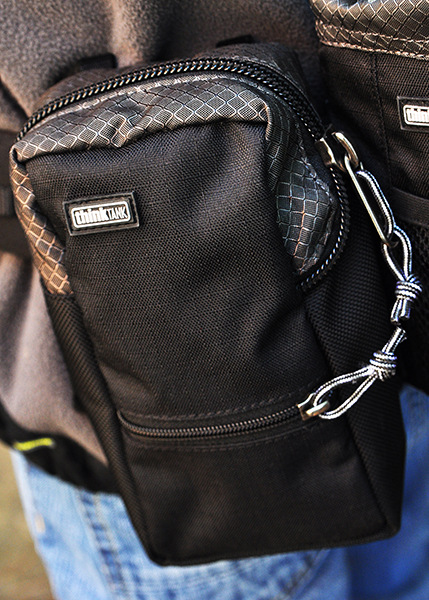
The Speed Changer is an incredibly versatile bag, and is my favorite belt component. It’s a bit deceptive-looking, actually capable of holding quite a bit more than it would seem from a quick glance at the outside. This is where I usually pack extra memory cards and batteries, as well as my cell phone, business cards, notebook, pens, lens cloth, energy bar, and more. Removing the padded insert allows enough space for a pro-sized DSLR body without a lens attached and a few small accessories. This is also a great belt pouch for assistants, who are often in charge of keeping spare batteries and accessories close at hand.

think-tank-modular-components-review-005

The Speed Changer is a multi-use pouch that can hold a wide array of necessary accessories.

Lightning Fast (Strobe Stuff in V2)

The Lightning Fast is a pouch designed to hold a standard speedlight (Nikon SB900, Canon 600EX) with the included diffuser attached.

think-tank-modular-components-review-004

The Lightning Fast (Strobe Stuff) holds a professional speedlight with diffuser attached, and has a pocket for extra batteries.

Lens Changer 50

The Lens Changer 50 is designed around wide-angle lenses like the 16-35mm f/2.8 or 17-40mm f/2.8. It’s a great pouch for carrying the lens with either caps and hood in their closed and reversed positions, or with the lens hood in its shoot-ready position.  As shown in the photo, I also occasionally use the LC50 for my 70-200mm f/2.8. It doesn’t fit completely–especially not with the hood in a shoot-ready position–but it still works well when I’m trying to travel light.

think-tank-modular-components-review-010

The LC50 is designed for wide-angle lenses, but can securely hold a 70-200mm as well.

Lens Changer 35

The LC35 is almost identical to the LC50, and holds my 24-70mm f/2.8 with the lens hood in its shoot-ready position.

Lens Changer 75 Pop Down

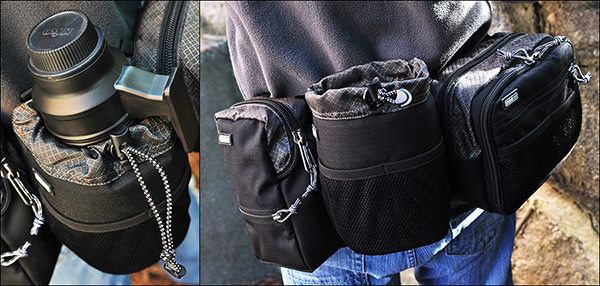
The LC75 is the one lens pouch in the line that is expandable. In its shorter size, it holds the 70-200mm f/2.8 with the hood reversed. By unzipping the bottom, the pouch expands to accommodate the lens with the hood in its shoot-ready position.

think-tank-modular-components-review-007

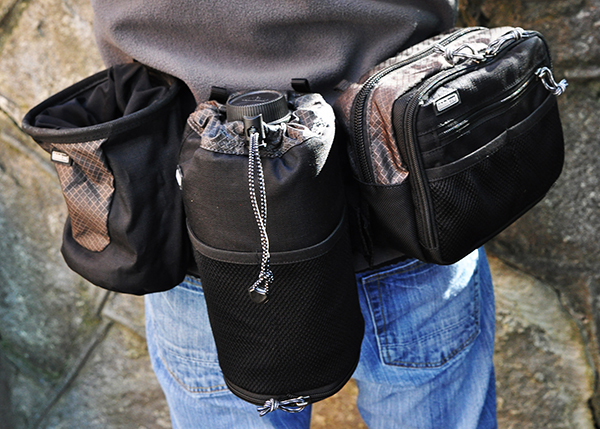
The LC75 Pop Down (worn in the middle in this photo), is expandable, able to hold the 70-200mm lens with the hood in the shoot-ready position. The Lens Drop (to the left of the LC75) is a versatile pouch with many uses.

Lens Drop

Don’t let the name worry you. The Lens Drop is a very secure and versatile pouch. Designed primarily for standard zooms and small primes, I’ve used it for every thing from lenses to small water bottles. Most of the time, though, I keep it empty. It gives me a place to put the lens that just came off the camera until I get the new lens on the camera. Without an empty pouch on the belt, I’d have to stop and find someplace to put the lens down until I had a free pouch for it. Keeping an empty pouch available lets me change lenses while I’m on the move. The Lens Drop is pictured above, directly to the left of the LC75 Pop Down.

Also Available But Not Pictured

  • Lens Changer 15 – Great for small primes, teleconverters, and most kit lenses with hood in shooting position.
  • Lens Changer 25 – Holds a regular zoom like the 24-70mm with hood reversed.
  • R U Hot? – Holds a large water bottle (Not included).
  • Stuff It & Little Stuff It – Perfect for small accessories and personal items.
  • Digital Holsters – Available in five sizes, the holsters carry bodies with lenses attached.

My favorite configuration of the bag is the Speed Changer for accessories and the Lightning Fast (Strobe Stuff in V2.0) for my speedlight. I’ll also add on the appropriate lens pouch for whatever back-up I’m carrying. If a traditional shoulder bag or backpack is giving you fits once you get to the shoot, consider the Think Tank Modular Components and Pro Speed Belt for a more convenient and even distribution of the weight around your waist, and for keeping everything at your fingertips.

Just like Batman.

The post Think Tank Modular Components and Pro Speed Belt Review by Jeff Guyer appeared first on Digital Photography School.


Digital Photography School

 
Comments Off on Think Tank Modular Components and Pro Speed Belt Review

Posted in Photography


I’d Plus One That! Why I Think Google’s Shared Endorsements Are a Good Thing for Social Media, Influencers and Consumers

12 Oct

Are You On Google+ Yet?  If You're Not You Should Be

There’s been a lot of talk today online about the upcoming change in Google’s TOS that will allow them to begin selling ads with your endorsement of various products and services on the web. I’ve seen different reactions from some people who dislike this idea and others who are largely apathetic about it.

Because Google gives everyone an opportunity to opt out of shared endorsements, it’s easy to dismiss a lot of the criticism by simply pointing folks to how easy opting out is. Some people are very anti-advertising though and certainly this new advertising channel will naturally be met by some with healthy skepticism. It’s also worth noting that these ads are not going to appear on Google+. Google+ will remain ad free. The new ads simply will use Google+ data to advertise in places where Google is already advertising, like search.

Personally speaking, for myself, I embrace change. In general I’d rather see more change, than less. I think change represents innovation (usually) and I probably tend to look for the positive in change rather than the negative. I’m a glass half full sort of guy when it comes to change.

I think most of us see how today’s announced change in the TOS is good for businesses who advertise. Personal endorsements by our friends are incredibly powerful motivators. Ads which feature personal endorsements by people we know, trust and respect, will be far more effective than other ads that an advertiser might come up with.

I think we can also see where this new product would be good for Google. Google gets paid by the click. If they can run ads that produce way more clicks and are more effective, it would seem to stand that they can make more money selling ads. The more clickable an ad the more revenue per page view it represents.

The last part of this equation though is the user, and I think a lot of people are trying to figure out if this is a good, bad, or indifferent thing for the user.

My opinion is that this is a good thing for the user and here’s why.

1. I believe that this change will push brands, products, services, businesses, etc. to allocate more of their marketing budgets towards social media and social media influencers than in the past. It’s ridiculous to me how much money companies like Canon and Nikon and other old brands, that just don’t get it, spend on things like tired old photography magazines and traditional print media vs. social media.

Social media is the future. By increasing the value of our possible endorsements through advertising buys, companies will spend more time, effort and money to court social influencers.

My favorite lens is the Canon 135 f/2. I love that lens so much. By allowing Canon the opportunity to buy that love in the form of a Google ad and promote it, that gives Canon a more powerful incentive to work with me to be more public about my love for this lens. I love lots of other things too. I’m not shy about telling folks when I like something. I had dinner last night at A 16 in Oakland, and it rocked. I like to spread the good word.

I predict that individuals with large followings on G+ will increasingly be seen as potential partners for brands whose products they use. If you consider yourself a social media type, this will be one more important reason why you’ll want to devote time to building out your presence on G+.

There will be a risk of course that some influencers will be bought off by brands for positive endorsements, but I think most of the time this stuff is pretty easy to sniff out. It’s the true, authentic, natural posts (available for purchase after the fact as ads) that will be most valuable. I bet brands spend more time showing us their cool new tech and products as the value of these ads become apparent and more of their budgets are spent on promoting products to G+ users.

2. When a company buys an ad with your endorsement, this is one more place that your social media footprint is shared on the web. I’m not sure if the endorsements will actually link back to your profile or the actual product review itself, but as I’ve seen it, it will at least include your name and your avatar.

One of the reasons why I never change my avatar is that I believe having a strong avatar that is consistent over the years with your brand helps you build recognition. When I see Robert Scoble’s avatar, I immediately know that it is him — I’m biased of course because I took the photo Robert uses for his avatar. :)

Even faster than I can read Robert’s name, I know it’s him.

When Facebook first started showing brands that your friends liked, Robert jumped right on that bandwagon. For about 2 months every time I logged into Facebook, I was seeing another brand that Robert liked. Were the brands paying Facebook for that? Probably. But it also constantly reminded me of a good friend and also linked back to him in the like. I have to admit that I ended up liking a lot of the same brands Robert did, when it was something I really liked.

3. Knowing that one of my friend’s has endorsed a product helps *me* make buying decisions. Let’s say I’m in the market to buy a new filter for my camera. Wouldn’t it be a positive for me to know that another photographer I respect (like Joe Azure) seems to like his Lee Big Stop Filter? Isn’t that a lot better than just a generic ad? Especially if I see a lot of my friends endorsing one product, this may be a good signal to me that this product is worth checking out more than others.

I saw a report earlier today that said that by 2014 10-15% of online reviews will be fakes. With all the fake reviews and astroturfing out there, I’m more inclined to trust the word of a friend on a product or service, than a stranger.

This is why I don’t really use yelp anymore. Every time I go to yelp I wonder if the review I’m reading is legit or whether or not someone from India or China has been paid to write it up and give it a five star rating. When I was recently in New York City, rather than rely on a service like Yelp to figure out where to eat, I instead relied on my good friend Daniel Krieger, whose opinion I respect and know I can trust. Would a five star dinner recommendation for a new restaurant in the form of a Daniel Krieger advert get my attention? You bet it would. As a consumer, this is a win for me.

Certainly there may be things that go wrong with the implementation of all of this. What if I’m not really endorsing something but my endorsement is slapped on it? Some of this will likely have to be worked though. As far as the general idea of shared endorsement goes though, I think I like it.

Oh, and by the way, if you were wondering whether or not those sea salt and vinegar chips in the dark blue bag by Kettle Chips were the BEST CHIPS IN THE ENTIRE WORLD? Yep, they pretty much are — and if Kettle Chips wants to send a few bags of those over to our place, my daughters and I would totally be down with that. ;)


Thomas Hawk Digital Connection
 
Comments Off on I’d Plus One That! Why I Think Google’s Shared Endorsements Are a Good Thing for Social Media, Influencers and Consumers

Posted in Photography


A Review of Think Tank Photo’s “My 2nd Brain”

30 Sep

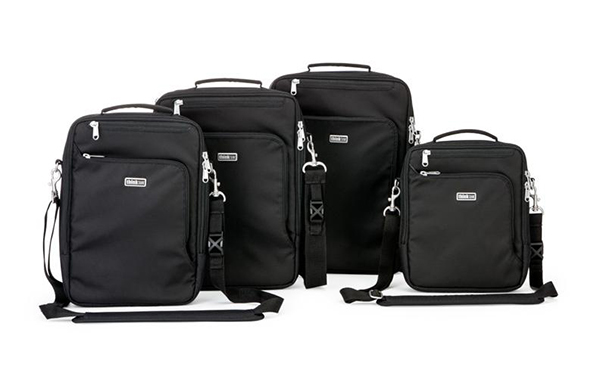
Think Tank has just launched a new line of bags, setting their sights this time not only on the photographic community, but on the Mac-obsessed public at large. My 2nd Brain is a laptop/iPad case that comes in four sizes and three colors (Black, Harbor Blue, and Green Mist), and is designed specifically around the dimensions of Apple products like the 15″ and 13″ MacBook Pros, the 11″ MacBook Air, iPad, iPhone, and all of the cords, cables, chargers, converters, and other accessories that have to travel along with them. Unless you drop in a small point-and-shoot, this is one Think Tank bag that’s not for cameras.

M2B-003-dPS

First Impressions

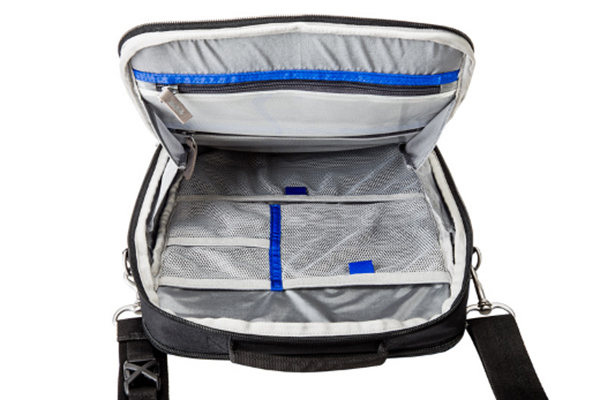
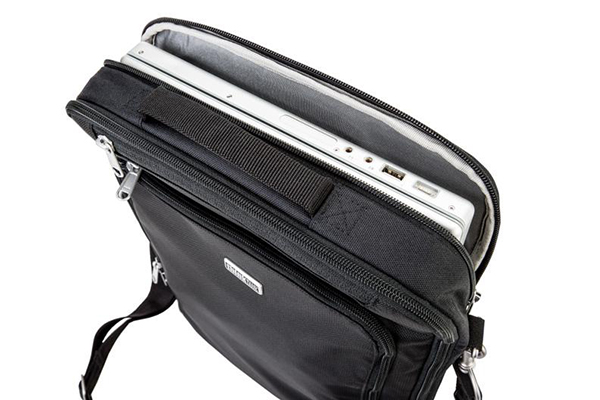
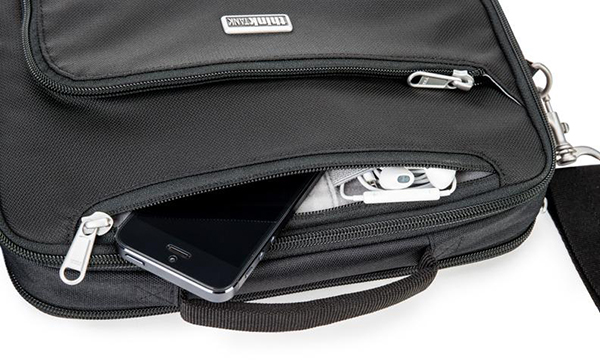
If you have ever owned a Think Tank camera bag this is going to sound very familiar. Fresh out of the box, you know you are holding a quality product in your hands that has been thoughtfully designed and built to last. High-quality, reinforced stitching, a comfortable shoulder strap, and the best zippers around help make up a durable, water-resistant exterior that’s sure to protect what’s inside without adding any unnecessary added bulk.  At first glance, you’re going to think that this bag can’t possibly hold very much. Then you are going to open it and be proven pleasantly wrong. The same attention to detail extends to the inside of the bag, where you’ll find dedicated pockets specifically for your iPad, iPhone, and laptop.

M2B-001-dPS

The accessory section of the bag takes up the most room, and has both see-through zippered and open-mesh pockets– plenty of room for power adapters and cords, as well as chargers, ear buds, keys, wallet, and just about any other reasonably sized item you might need to pack. An exterior zippered pocket on the front of the bag keeps pens, business cards, and small paperwork organized, while a pocket on the back is perfect for file folders, note pads, or magazines. This bag makes an awesome first impression.

M2B-005-dPS

Second Impressions

There are a few minor areas where I see room for a little bit of improvement in Version 2. I always have my phone in either a pants or jacket pocket, so I can at least feel it vibrate, even if I am someplace where I won’t be able to hear it. Unless I’m in a fairly quiet location, there is no way for me to hear my phone ring while in the M2B15, even at a pretty high volume. Additionally, the bag hangs in a vertical orientation. Another D-ring at the other end of the bag would be welcome, giving the user the added option of changing the connecting points for the strap, thus allowing it to be carried in a horizontal position as well.

My only other criticism stems from the very fact that this line of bags was designed around specific products with very specific dimensions. For instance, while a 15″ MacBook Pro fits perfectly in the laptop section of the bag, virtually any other 15″ laptop is going to be too thick for the zipper to close without a fight.  Think Tank’s Artificial Intelligence line of laptop cases is a viable option for non-Apple users, but that leaves out the “hybrid consumer” who uses an iPad and a non-Apple laptop. I think that leaving just a little bit of extra room could have accomplished the goal just as effectively without sacrificing anything in the way of padding and protection.

M2B-004-dPS

Overall

This bag is yet another great addition to the Think Tank family. Quality construction and convenience have always been Think Tank trademarks and the M2B is no exception. It is designed to keep you organized and mobile, without skimping on security or peace of mind. It does exactly what it says it does and it does it well.  In the final analysis, how much more can you ask of it?

Check out the video for more information on My 2nd Brain.

Post originally from: Digital Photography Tips.

Check out our more Photography Tips at Photography Tips for Beginners, Portrait Photography Tips and Wedding Photography Tips.

A Review of Think Tank Photo’s “My 2nd Brain”


Digital Photography School

 
Comments Off on A Review of Think Tank Photo’s “My 2nd Brain”

Posted in Photography


A Review of the Think Tank City Walker 30

06 Sep

All in all, this was a pretty good summer– except, of course, for the trip that didn’t happen.  I was supposed to hit the road with some friends last month, but events beyond our control pulled the rug out from under us at the last minute.  My bags were packed.  I was ready to go.  The taxi was waiting outside my door.  OK– not really, but my Think Tank City Walker 30 really was packed and I am all out of cheesy musical metaphors.  I took a few shots of this pretty amazing bag before I unpacked it and thought I’d share a few impressions.  I see so many articles about packing gear for travel and it’s always some big rolling case that fits an entire studio’s worth of equipment and a sherpa to roll it.  But what about a simple bag full of basics?

This is my eighth Think Tank bag (Hey– don’t judge me…I can quit any time I want!) and I’m pretty sure it’s quickly becoming my favorite.  I generally don’t write “fresh-out-of-the-box” reviews.  I prefer to put a product through its paces for a while before formulating an opinion or recommendation.  But since the 30 is a larger version of the City Walker 20 that I’ve been using for about ten months, I think we’re in the clear.  Certain things jump out at you when you pick up any Think Tank bag, and the City Walker messenger-style bags are no exception.  Superior construction is at the top of the list.  Even a light-weight bag like the City Walker is obviously built to last.  Everything from the zippers to the straps are designed with efficiency, durability, and comfort in mind.

CityWalker30-001

The Think Tank City Walker 30

So, what’s the big deal about yet another shoulder bag?  Besides its soft-sided, light-weight design, the entire City Walker line boasts the one thing I love most about Think Tank bags– it doesn’t scream, “Hey, I’m a camera bag!  Come steal me and my $ 8,463.75 worth of gear!”  Conceived with the needs of the urban street photographer or photojournalist in mind, the CW is also perfect for any photographer looking for a way to travel light– regardless of whether it’s on assignment, vacation, or a day out with the family.  As with all things Think Tank, there is an abundant supply of pockets, compartments, and dividers, and the dedicated interior laptop/iPad pocket is a huge welcome addition.  But perhaps the coolest feature of this camera bag is that it doesn’t have to be a camera bag at all.  The entire padded gear section can be removed, converting from camera bag to messenger bag or overnight bag (and back again) quickly and easily.

CityWalker30-006

The padded gear section is held in with Velcro and is easily removable.

Fresh out of the box, the City Walker doesn’t look like it’s going to hold all that much, but it really does.  Here’s a quick look at the gear I had packed for the trip, with plenty of room to spare.

CityWalker30-003

Packed and ready to go.

1.    Laptop

2.    Memory cards (Think Tank Custom Pixel Pocket Rocket)

3.    SB800 Speedlight in an internal side pocket

4.    16-35mm lens

5.    Nikon D90 with 24-70m lens attached

6.    70-200mm lens

7.    Two Think Tank DSLR battery holders

8.    CapturePRO Camera Clip from Peak Design

9.    Included Think Tank rain cover in an internal side pocket

10.    NOT pictured, but stashed in the pockets:  Business cards, notebook,, pens, lens cloth, AA’s, miscellaneous cords, chargers, and Peanut m&m’s.

The fact that you can completely remove the gear section adds some great diversity.  It actually wasn’t until my trip got cancelled that I realized I can completely pack for a long weekend with nothing more than my two City Walkers– some basic gear in the 20 and clothes in the 30 (or the other way around).  This photo shows almost a week’s worth of clothes and other essentials in the 30 with plenty of room to spare.

CityWalker30-007

Whereas I use different bag and configurations for different jobs and assignments, the City Walker 30 could easily be that one go-to bag for some professionals, as well as serious hobbyists and amateurs looking for a reliable, durable, comfortable bag with quick access to all of the gear.

As a travel bag it would be tough to be beat.  I’ll let you know next summer.

Post originally from: Digital Photography Tips.

Check out our more Photography Tips at Photography Tips for Beginners, Portrait Photography Tips and Wedding Photography Tips.

A Review of the Think Tank City Walker 30


Digital Photography School

 
Comments Off on A Review of the Think Tank City Walker 30

Posted in Photography


Travel Photography ~ Think Outside The Postcard When Photographing Famous Landmarks

21 Apr

How many of you have found yourselves in front of an iconic landmark and felt discouraged because every possible shot had already been made by thousands of tourists before you? You are on the trip of a lifetime. Your goal is certainly not to bring back pictures that look like the postcards at the souvenir shop.

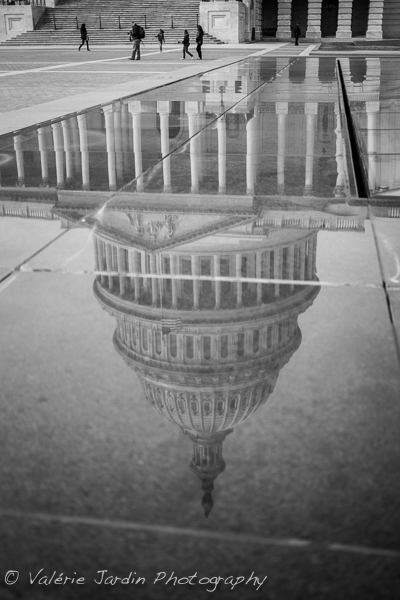
Photographing a reflection of a famous landmark such as the US Capitol in DC was a good way to avoid the cliché shot that every other tourist snaps daily. Adding the human element adds a sense of scale.

Photographing a reflection of a famous landmark such as the US Capitol in DC was a good way to avoid the cliché shot that every other tourist snaps daily. Adding the human element adds a sense of scale.

Here are a few tips to ‘think outside the postcard’ when you photograph a famous landmark:

Get the cliché shot out of the way. You won’t feel right unless you do. So go ahead and photograph the Eiffel Tower the way you see it in your head when you close your eyes. Got the shot? Okay, now think of different ways you could photograph it and create your OWN iconic images of the same subject. Frame it with trees, look for its reflection in a window or a puddle, include it with the local architecture, shoot it as a silhouette, etc. The sky is the limit, you just have to train yourself to look for those unconventional frames.

Afraid that you are going to miss other opportunities while you are looking for different ways to see? Practice at home! Every town has its own iconic landmark, even yours. It may not be a grandiose building, but it doesn’t matter. Whether it is the local historic grain elevator, or the statue of a famous local politician, go out with your camera and see it for the first time again. Work your scene and find a creative way to frame it.

Don’t forget to include people in your frame. They add interest, life and movement to your images. They also add a sense of scale which works well when photographing massive buildings.

This simple exercise will change the way you see photographically. The more you practice, the quicker you will spot those interesting shots when you visit a new place. Your pictures will never be boring again!

Practice at home!  This historic grain elevator may not be grand but it is one of the landmarks in a small river town near my home.

Practice at home! This historic grain elevator may not be grand but it is one of the landmarks in a small river town near my home.

Think of a different way to photograph a famous landmark by including local architecture in the foreground for example.

Think of a different way to photograph a famous landmark by including local architecture in the foreground for example.

Post originally from: Digital Photography Tips.

Check out our more Photography Tips at Photography Tips for Beginners, Portrait Photography Tips and Wedding Photography Tips.

Travel Photography ~ Think Outside The Postcard When Photographing Famous Landmarks


Digital Photography School

 
Comments Off on Travel Photography ~ Think Outside The Postcard When Photographing Famous Landmarks

Posted in Photography


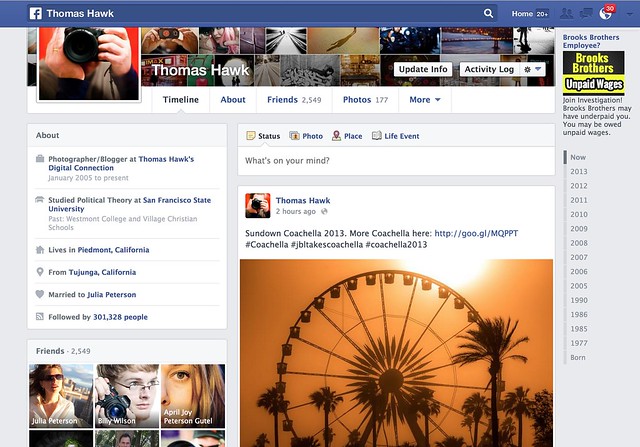
What Do You Think of Photos on the New Facebook Timeline?

19 Apr

The New Facebook Timeline

I had the new Facebook Timeline turned on for me yesterday. My wife got it about a week ago. Does anyone else have it? Do you like it? Anyone ever seen that movie Memento?

Photos feel larger — I like that — but I don’t really like the way that photos are cropped.

The old timeline forced everything into a square box by default so landscape/portrait crops were still problematic. You could reposition the photo after the fact (sometimes, when the reposition tool worked, which was probably less than 10% of the time for me) but your photo got stuck in a square crop. You could also “feature” the photo which would give it an extreme horizontal crop manually.

By the way, I seem to be able to use the reposition tool again now with the switch over to the new timeline.

Part of me liked the old Facebook timeline format. I love the square photo. It’s my favorite crop of all. When I uploaded a square to Facebook it would then show perfectly on my timeline page. If the other crops suffered, oh well.

The new timeline page goes back to a traditional landscape crop. So now when you upload your landscape oriented photos to Facebook they fit and look great. Unfortunately though, now both the portrait and the square crop are squashed into a landscape box.

Why on earth doesn’t Facebook just display BOTH landscape and square crops in their original crop? This is what they do on mobile btw, so it would seem more consistent. This would mean that square photos would be even bigger on the web version of Facebook, but everybody wants bigger photos anyways, so why make our square crop photos suffer in that landscape oriented box? This is what Flickr does by the way. On Flickr the square crop is king. I love that.

Of course portrait oriented photos get butchered even worse now with the new Facebook timeline — now they are squeezing a portrait photo into a landscape orientation instead of a square. Some of these just look awful.

It does feel like Facebook is trying to somehow more intelligently decide which portion of square and portrait photos get shown in the landscape box. Maybe their algorithm is looking for the eyes and focusing on that. I’m not sure, but it feels like the auto cropping is a little smarter and more intelligent.

Google+ takes a different approach. They retain the photographer’s original crop… but then you are stuck with those damn grey bars on the sides of your square and portrait photos on G+. For the life of Kevin, I’m not sure why G+ doesn’t just let the square photo have the entire envelope. It would look much better than those tiny little gray bars on the side and it’s just giving square photos an ensy weensy more real estate.

Which is what Facebook should do too, by the way. Square crops sort of fit into the landscape envelope, but why make the square suffer that way? Just liberate it. Make the square the king. I thought Facebook was doing this on the newsfeed a couple of weeks ago, but I think they switched back to cramming a square photo in a landscape box with both the new newsfeed and timeline now too.

Is there an answer to this perplexing problem about how best to display our images on the web? Why can’t we have just one big gigantic mosaic wall on both Facebook and Google+, that’s actually my favorite format of all I think.

Other changes on the new Facebook timeline, include moving your follower count over to a smaller less prominent place on the left. They also give the actual number now, instead of something that just said 300K before. You can add or remove certain modules out of the smaller left side column if you want.

Despite the photo crop issues, overall I like the new timeline a lot. I like it better than the old version. It feels more fluid and slick. I do like that overall photos do appear bigger. Landscape oriented photos especially look great there now.

The new comment system drives me a little batty though. I can never figure out who is talking to who and I feel like I’m trapped in some sort of web version of the movie Memento — but that’s a whole other topic entirely. I can never understand who said what in what order to who. I feel like I’m trapped in some sort of online version of that old movie Memento.

Unfortunately, as usual, with the new Facebook timeline we’re still stuck with the damn ads. I wish Facebook’s ads weren’t so especially vulgar. Why is Facebook trying to get me to join some lawsuit about unpaid wages at Brooks Brothers? I hate lawsuits — plus I’ve never worked at Brooks Brothers. Shouldn’t Facebook be smarter than that in terms of what ads it shows me? Why does Facebook think I worked at Brooks Brothers? Next thing you know some other ambulance chaser is going to start advertising at me just in case I’ve ever had Mesothelioma. Facebook should let us pay for a Pro account and exempt us from bad advertising.

By the way, anyone ever seen that movie Memento?


Thomas Hawk Digital Connection
 
Comments Off on What Do You Think of Photos on the New Facebook Timeline?

Posted in Photography


Think Tank releases three accessories for camera bags

02 Mar

THINKTANK-LOGO-1.png

Think Tank has announced three new accessories for their camera bag line-up. The Low Rider Strap with a split-pad design attaches a second bag to one’s main rolling luggage and is available for $ 29.75. The Pro DSLR Battery Holder, priced at $ 17.50 accommodates two full-sized DSLR battery packs. A limited edition Pixel Pocket Rocket holds CF and QXD memory cards. Priced at $ 18.75, this memory card holder was manufactured in just one production run and will be unavailable once the stocks runs out. European prices and availability information to be confirmed.

News: Digital Photography Review (dpreview.com)

 
Comments Off on Think Tank releases three accessories for camera bags

Posted in Uncategorized