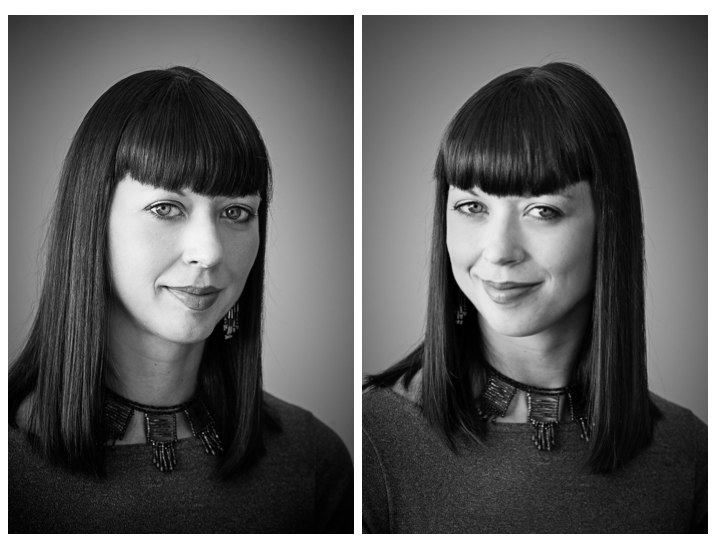
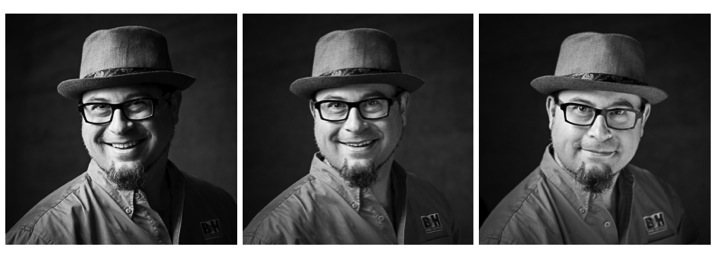
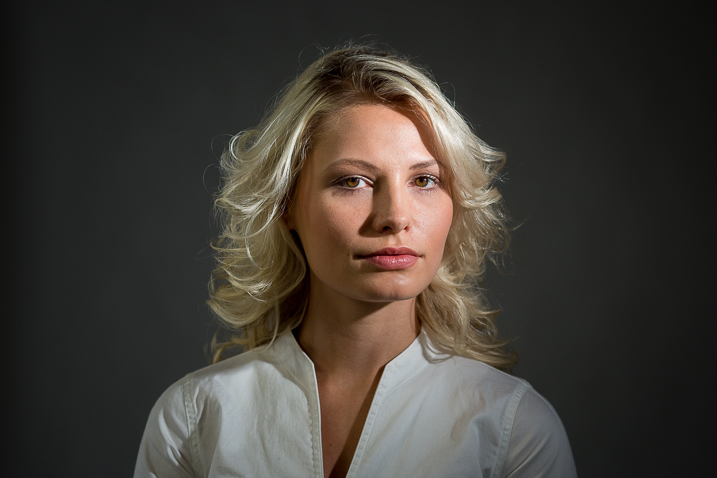
RSS
 

Posts Tagged ‘Think’

Why Off-Camera Flash Isn’t as Scary as you Think

23 Jul

Flash

The word alone has the potential to cause dread, even among experienced photographers, bringing to mind images of overexposed faces and red eyes. Because of this, many photographers avoid flash altogether, keeping a safe distance at all times. I think that’s too bad.

It’s a missed opportunity. Sure, flash may not always be applicable to your situation – but it’s very helpful to have another tool in your bag of tricks if and when it is needed.
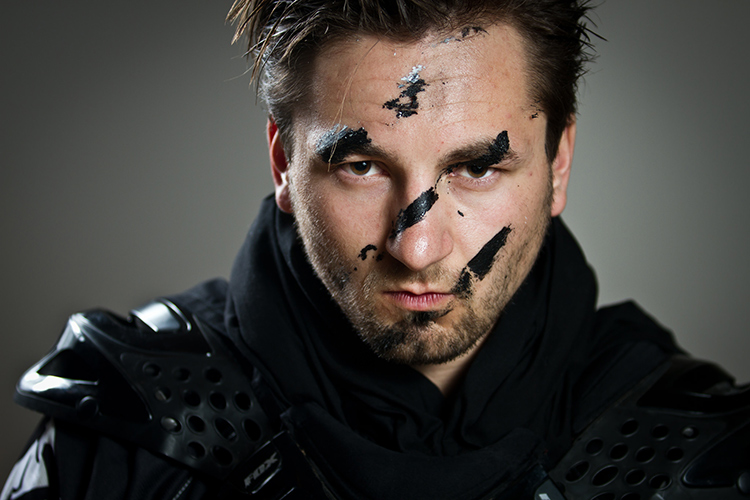
Portrait

Off-camera flash gives you an incredible amount of control. Yes, understanding natural light is an important part of being a photographer – but working with off-camera flash lets you create your own lighting conditions. You can even mimic the elusive golden hour.

This guide will explain off-camera flash in its simplest components, giving you the knowledge to begin to experiment, and to explore how it could help your photography.

What you need to start

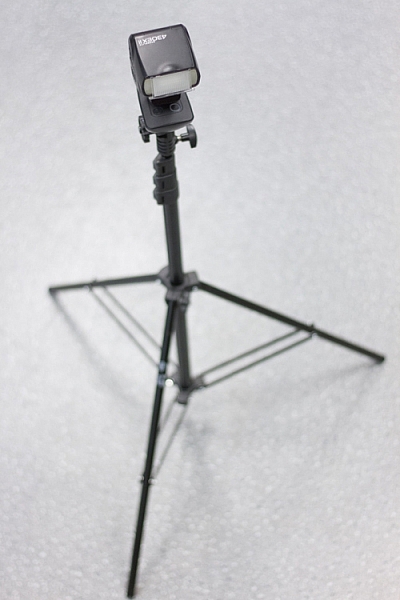
When I talk about off-camera flash, you might be picturing something like this:
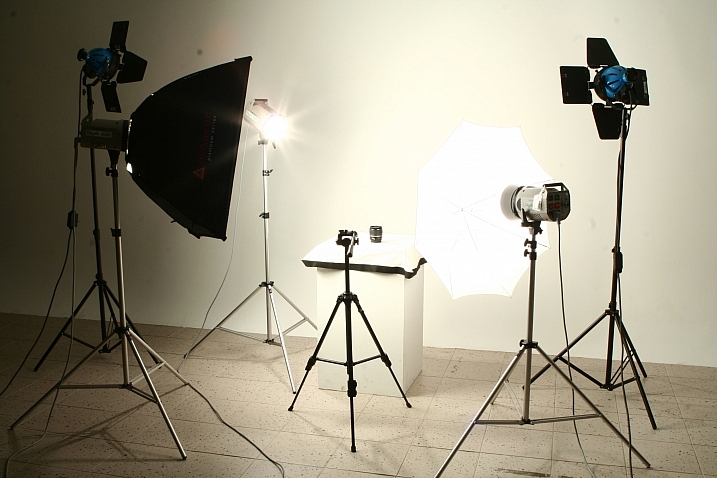
? ?? / Chris Lim

By ? ?? / Chris Lim

If that’s the case, I don’t blame you for being a bit nervous. In reality, all you need to get started with off-camera flash photography is:

  • A camera
  • An independent flash unit
  • A way to make them fire simultaneously
  • Something to hold your flash, like a light stand or a friend
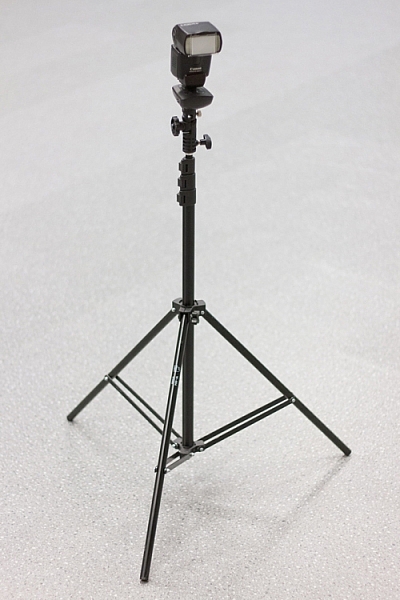
light-stand-1 light-stand-2

Once you take your flash unit off of the camera, it won’t know that it is supposed to fire when you hit the shutter button. Fortunately, there are several ways that you can sync your flash.

Built-In Flash Control: Some cameras have a built-in setting that uses the pop-up flash to tell your off-camera flash to fire. Most flash units have a sensor on the front that recognizes the sudden burst of light (optical sensor), and fires accordingly.
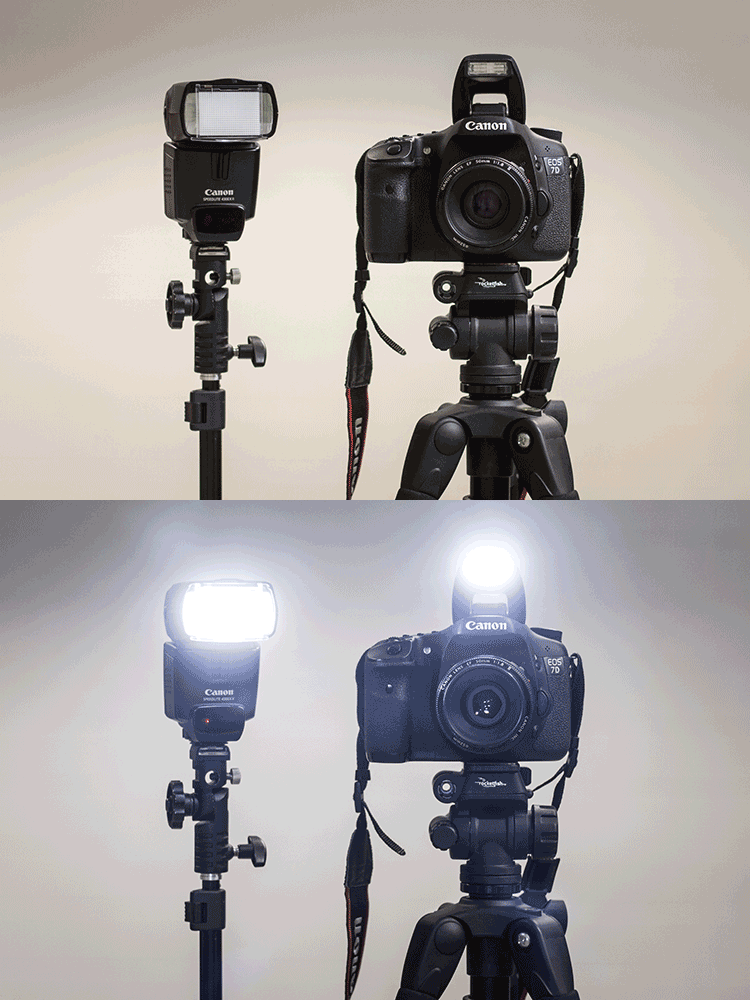
pop-up-flash

Flash Sync Cord: This is a cord that runs from your camera to the flash. Think of it like an extension cord. These are useful and reliable, but it also limits how far away the flash can be from your camera.

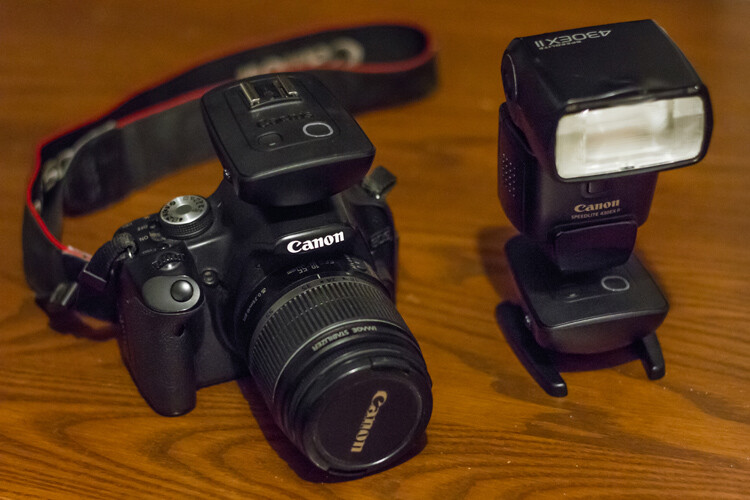
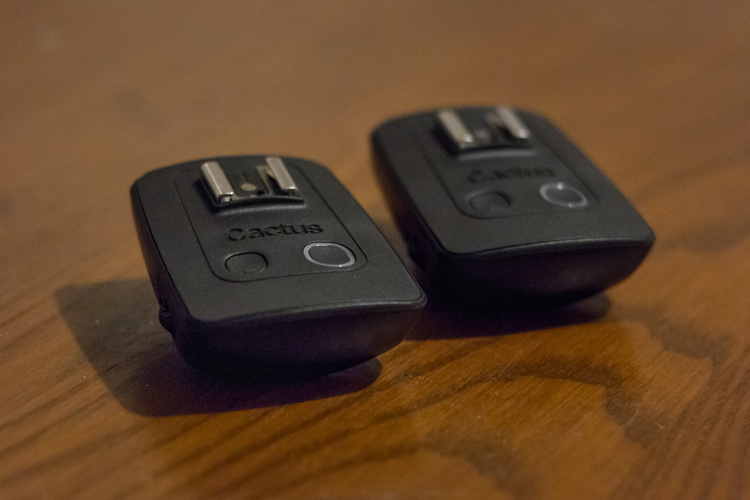
Wireless Radio Transmitters: The preferred option, radio transmitters can sync your flash to your shutter even if they are at a significant distance away.
bts-6855-edit

Cactus brand remote triggers

bts-6859-edit

One remote goes on the camera, the other attaches to the flash. When the camera fires the one on the camera sends a signal to the other remote to fire the flash.

Editor’s note: for more great tips read, A Beginner’s Guide to Working With Flash Off-Camera

The basics – controlling your off-camera flash

When you use a flash on-camera, it can determine the correct power settings and fire accordingly (TTL). Once you take the flash off the camera, however, you’re going to need to tell both the camera and the flash what to do manually.
bts-6851-edit

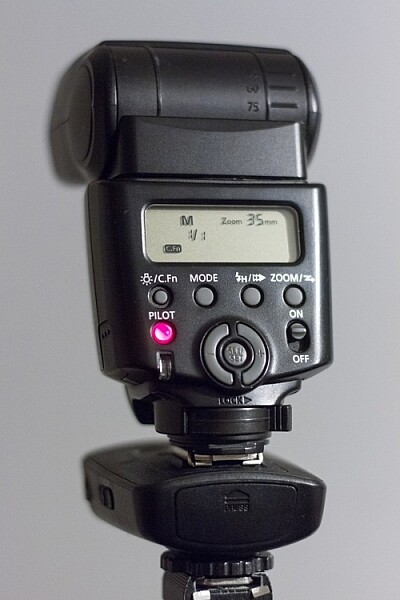
M is Manual mode, and 1/1 is full power. Zoom level shows 35mm. Read the user manual for your flash to see how to adjust these items.

If that sounds scary, just take a deep breath – we’ll get through this together.

Fortunately, controlling flashes is quite simple. In manual mode (on the flash), you choose the amount of power at which the flash fires. This is expressed as a fraction: 1/1 means the flash is firing at full power, ¼ means the flash is firing at a quarter of its total power, and so on. Easy, right?

Alright, so now we know how to control the flash. What about the settings on your camera?

This is the cool part. You can control the effects of the flash using your ISO and aperture. Adjusting these two settings controls how sensitive your camera sensor is, and how much light it can collect.

So here are the four ways to make the flash in your image stronger (more flash):

  • Turn up the flash power
  • Move the flash closer to your subject
  • Turn up the ISO
  • Make the aperture wider (smaller f-stop number)

Piece of cake! Is your flash in your picture too strong? Well, simply do the opposite of one of the criteria mentioned above (turn the flash down, move it away from the subject, turn the ISO down, use a smaller aperture).

You’ll notice that I haven’t mentioned shutter speed yet. That’s because your shutter speed doesn’t affect flash at all.

Well, almost not at all. Every camera has a flash sync-speed. This is because if the shutter speed goes too fast, it won’t sync perfectly with the flash (the shutter will open and close before the flash goes off). As a result, part of your picture won’t see the effects of the flash – resulting in a black bar across part of the shot. For most consumer cameras, your maximum flash sync speed will be around 1/200 or 1/250. Keep your shutter speed under that (slower like 1/125th or 1/60th) and you’ll be fine.
flash-sync-1

Correct sync speed used the flash lights the entire image
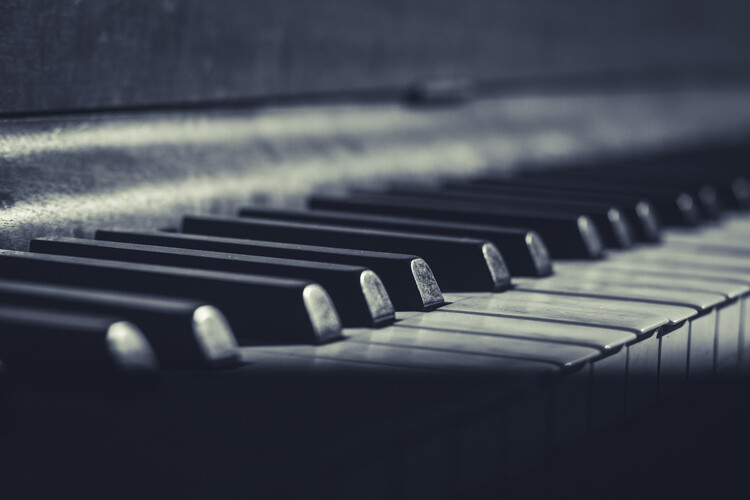
flash-sync-2

If your shutter speed is too fast (higher than the sync speed) you will get something like this, where part of the image is not lit by the flash and is dark, or even black.

Two exposures: Ambient and flash

This is the key to understanding off-camera flash photography.

Think of every picture taken with flash as being two exposures, overlapped on top of each other. The way you decide to balance the ambient lighting and the flash, sets the tone for the image. Let’s take it one layer at a time, and you’ll see how easy it can be to build an image using off-camera flash.

THE FIRST LAYER: AMBIENT LIGHTING

Ambient light is that which is already available in the area from the sun, window light, street lights, etc. At certain times of the day, your ambient light is going to be quite nice, like at Golden Hour. Other times, you may not be so lucky.

Sunsets, for example, are especially tricky. This is because in order to bring out the colour and texture of a sunset, you need to keep the exposure dark – and as a result, your subject will be completely silhouetted.

Here’s the first step for taking your off-camera flash picture – ignore your flash altogether. Turn it off.

Find the normal, correct exposure for the existing (ambient or available) light, and then adjust your settings to intentionally make your image too dark. The darker your ambient exposure, the more dramatic the light from your flash will be.
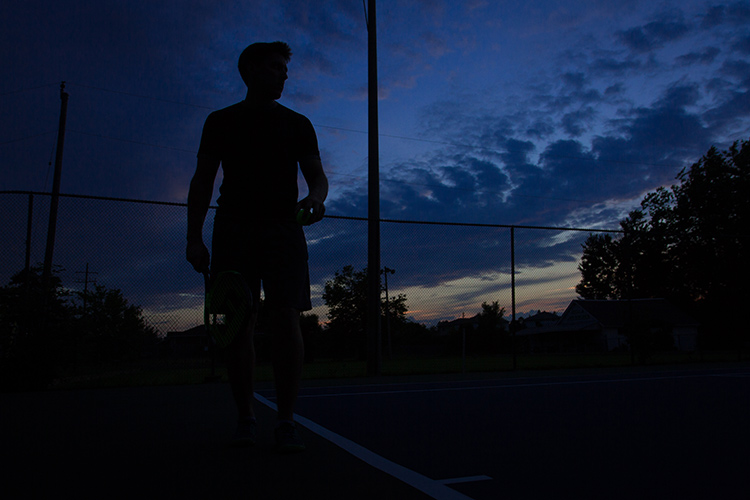
1 ambient

Here is my exposure for the ambient light (above). We’re off to a good start! For this shot, I want to keep the dark, dramatic sky in the background, and I will rely on my flash to light up the tennis player.

THE SECOND LAYER: FLASH

Alright, now turn on your flash. By using flash to light my subject, I can get the best of both worlds – my sky remains dark and dramatic while my subject is well-lit.

It will probably take a few shots to get your lighting right. That’s perfectly normal! Use the tips mentioned in the previous section to add more or less power to your flash.
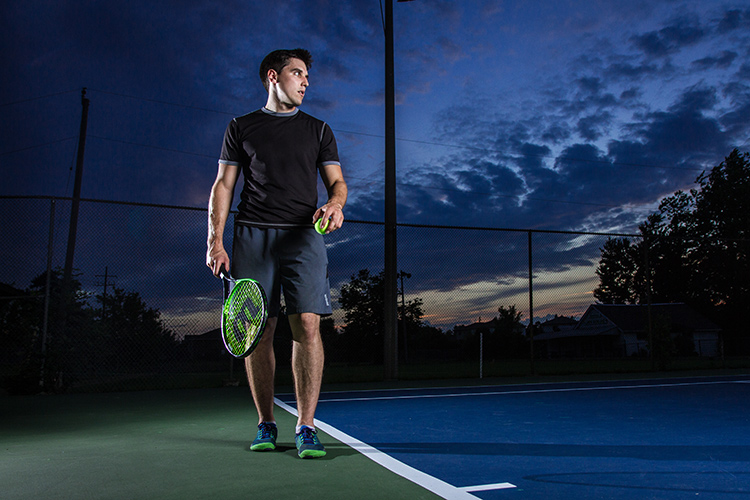
1 flash

When we add the flashes, we get to keep the dramatic background, with the benefit of crisp lighting on our subject. This shot simply isn’t possible without flash.

You can use what you know about ambient and flash lighting to set the tone of the image.

If you keep your ambient light levels high, the flash will add just a kiss of light. If you start with a very dark ambient image (like the one above), your flash will sculpt and define the image much more strongly.
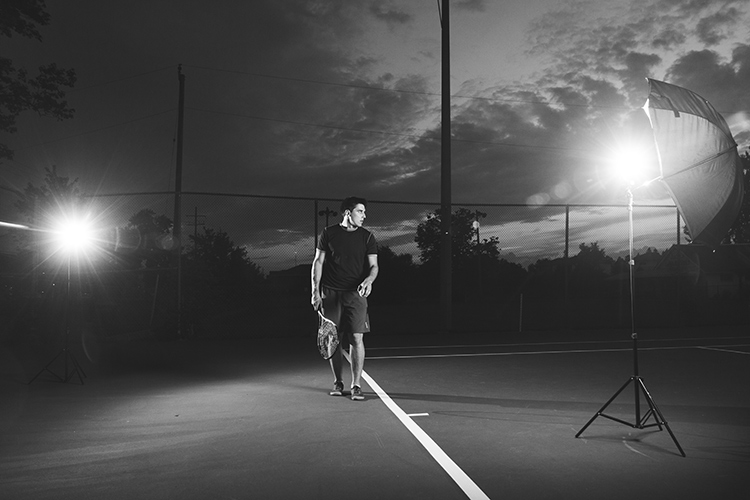
1 behind the scenes

Here’s the behind-the-scenes of our setup. Since the light is hitting the subject from an angle, it is dramatic and shows shape much more effectively than if the flash had been on the camera. One flash is to camera right, bouncing into an umbrella to soften it, the other is to camera left (and behind the subject) to add an accent light.

Putting it into Practice

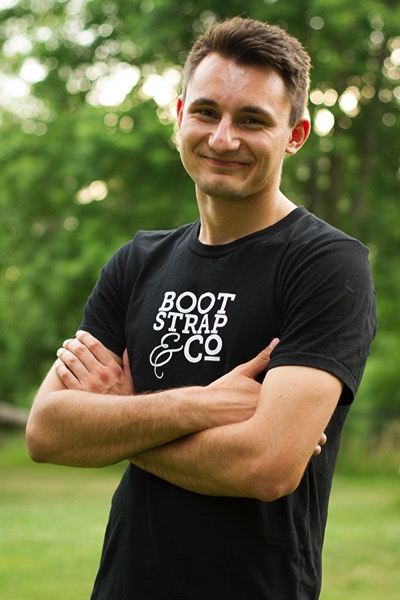
Here’s another example, this time using flash to give a simple kick, to a liven up a portrait.
2 natural

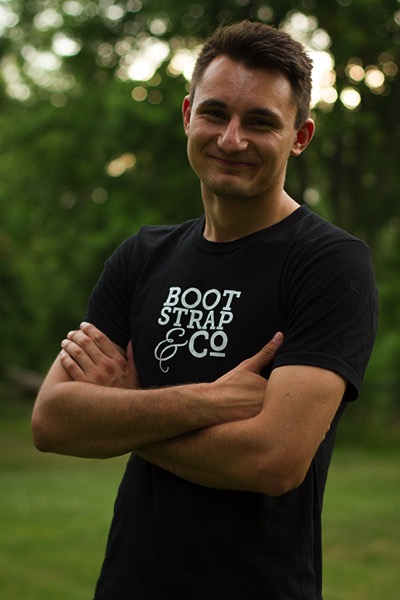
This was shot with no flash, exposed for the skin tones.

2 ambient

Ambient light only, darkened for the background.

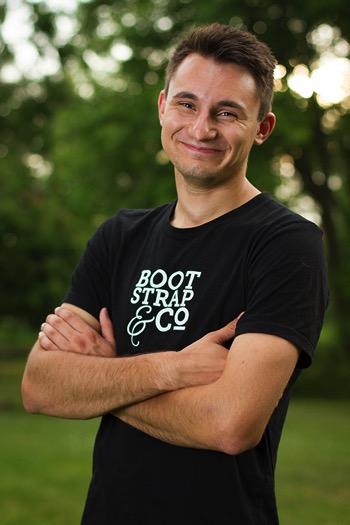
The first step was to push the “correct” exposure down, making the overall image darker, so that we could use flash to highlight the subject.
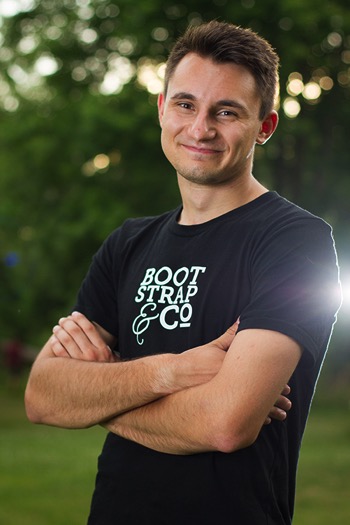
2 flash 2 double flash

In the image above (left), the flash is coming from just left of the camera. It brightens the subject up (compared to the background), and makes the image seem more three dimensional. The background also pops more than it did with the “correct” exposure.

If we want to, we can play around with the effects of a second flash (above right), maybe letting it aim directly toward the camera to create some lens flare?
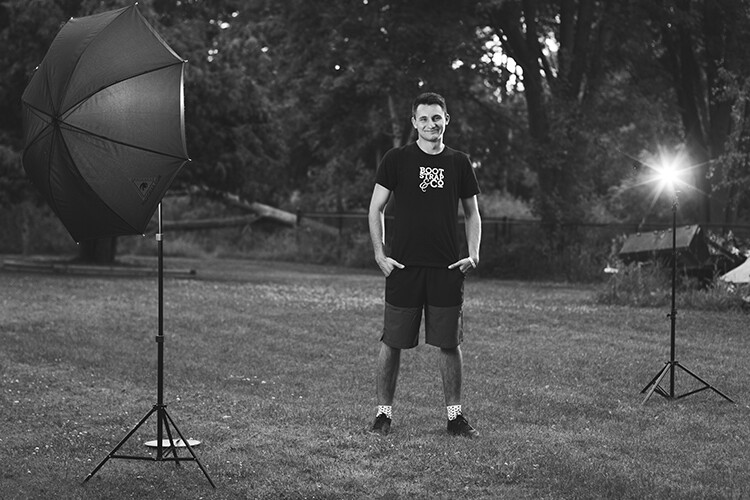
2 behind the scenes

Here’s the simple setup.

Shaping and modifying your light

Well done! You’ve made it through the basics of off-camera flash photography. Next, you can push your newfound skill to a whole new level by learning how to modify the light.

If you’re familiar with how the light on a cloudy day is softer than the light on a sunny day, then you already know nearly everything you need to know about flash modifiers.

The basic rule is this: the larger the light source, the softer the light.

A flash unit is a small light source that creates harsh shadows. That isn’t always so flattering.

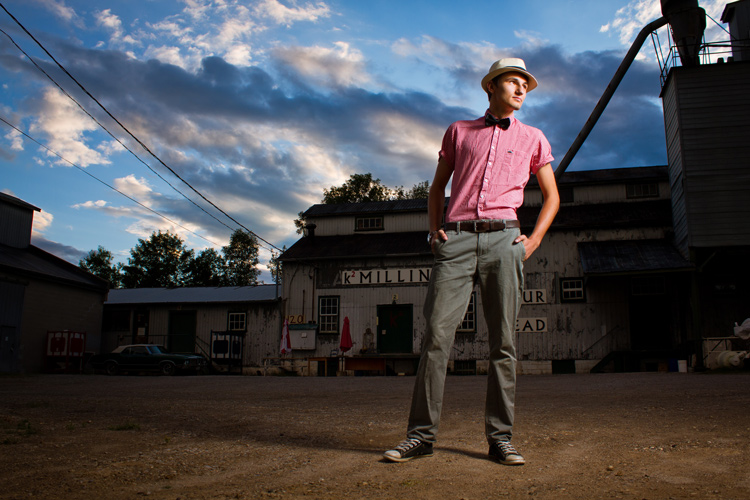
The purpose of umbrellas, soft boxes, and other light modifiers, is to make the source of light larger. This softens the light, which is especially useful for portraits.
flash-3

Learning how to modify light lets you build a style that matches your image.

Looking for a gritty photo? Shoot with a bare flash (no modifiers) and get sharp shadows. Looking for softer, more flattering light? Use a softbox.

Practice, practice, practice

Once you’ve got a feel for how to use your flash off-camera, you’ll have a whole new world of photography to explore. Try it. The worst thing that can possibly happen is that you’ll learn something.

Using digital equipment gives you the ability to try things without any financial repercussions. Learning flash photography through trial and error was probably pretty expensive back in the days of film; today you can fire as many shots as you need in order to learn, without breaking the bank.

Nobody ever got off-camera flash right on their first try – experiment and stick with it, and you’ll add a valuable new tool to your bag of tricks.
flash-2

More articles for you to read on dPS about off-camera flash:

  • How to Create Compelling Wide-Angle Portraits Using One Off-Camera Flash
  • 9 Steps to Get Over Your Fear of Off-Camera Flash
  • Supporting Your Off-Camera Flash – Tripods, Monopods or Light Stands?
  • Beginners Guide to Using TTL Off-Camera Flash
  • How to Get Started with Off-Camera Flash Photography – Start With One!
  • Getting Started with Off-Camera Flash
  • How to Balance Off-Camera Flash and Ambient Light on Location
  • A Beginner’s Guide to Working With Flash Off-Camera
  • The Ultimate Flash Photography Guide FAST FLASH FOR PORTRAIT PERFECTION a dPS ebook

googletag.cmd.push(function() {
tablet_slots.push( googletag.defineSlot( “/1005424/_dPSv4_tab-all-article-bottom_(300×250)”, [300, 250], “pb-ad-78623” ).addService( googletag.pubads() ) ); } );

googletag.cmd.push(function() {
mobile_slots.push( googletag.defineSlot( “/1005424/_dPSv4_mob-all-article-bottom_(300×250)”, [300, 250], “pb-ad-78158” ).addService( googletag.pubads() ) ); } );

The post Why Off-Camera Flash Isn’t as Scary as you Think by Frank Myrland appeared first on Digital Photography School.
Digital Photography School

 
Comments Off on Why Off-Camera Flash Isn’t as Scary as you Think

Posted in Photography


Think Tank Photo launches Helipak backpack for DJI Inspire drone

11 Jun

$ (document).ready(function() { SampleGalleryV2({“containerId”:”embeddedSampleGallery_7764010080″,”galleryId”:”7764010080″,”isEmbeddedWidget”:true,”standalone”:false,”selectedImageIndex”:0,”startInCommentsView”:false,”isMobile”:false}) });

Bag manufacturer Think Tank Photo has announced a new backpack designed for users of the DJI Inspire drone and other quadcopters of a similar size. The Helipak is capable of holding a single DJI Inspire craft as well as its gimbal, three lenses, spare propellers and six batteries, according to Think Tank Photo. There are also compartments for a 17in laptop and a pair of 8in tablets.

The idea of the Helipak is that it makes transporting the drone to ‘scenic’ locations much easier than via a hard flight case as it features shoulder straps that allow the whole thing to be carried on the user’s back. The backpack straps can also be stowed away to make the Helipak into a normal case with top and side handles.

While the case is made with soft materials it uses ‘twinwall’ reinforcement via a pair of ABS plastic shields within the outer construction that add extra rigid protection for the drone. The exterior is made with nylons and polyester that the company says provides a hardwearing and water repellent barrier, while zips are YKK RC Fuse and feature metal ‘hardwear’. In a promotional video Think Tank Photo claims that DJI’s own $ 200 case for the Inspire has poorly made zips that are prone to failing.

The bag is available now and costs $ 339.75. For more information see the Think Tank Photo website.

Press release

Think Tank Photo’s Helipak™ for DJI Inspire Backpack

Offers Superior Organization, Comfort, and Travel Portability

SANTA ROSA, CALIFORNIA –Think Tank Photo has released the most well thought-out, comfortable, and protective backpack for users of DJI Inspire or other similarly sized quadcopters. The Helipak for DJI Inspire easily holds a DJI Inspire (parked with gimbal and rotors detached), Zenmuse gimbal with 3 lenses, 6x batteries, 2x controllers, 2 x 8” tablets, lots of extra propellers, and a 17” laptop and charger.

Movable dividers allow users to customize the fit of their gear in this fully featured backpack. The contoured tuck-away harness with lumbar support, cut-away air-channel, the adjustable sternum strap, and the removable padded waistbelt allow for extreme comfort while trekking into remote areas or simply pulling it from the car.

“The backpack’s ABS twinwall reinforcement provides a rigid shell that protects sensitive gear from impacts, bumps and scrapes,” said Think Tank Photo’s president and
lead designer, Doug Murdoch. “It also features YKK™ RC Fuse zippers, 1680D Ballistic nylon bottom panel, metal hardware, and nylon webbing that are the most durable, longest
lasting materials on the market. The last thing drone users want to worry about is if their backpack will hold up in rigorous outdoor conditions.”

ADDITIONAL KEY FEATURES

  • Large front pocket fits auxiliary items for the day’s outing: light jacket, 17” laptop pocket or a large tablet
  • Lockable zippers
  • Internal see-through mesh pockets for small accessories: propellers, screwdriver, cables, etc.
  • Deluxe organizer for smart phone, wallet, pens, keys, business cards, etc.
  • Water bottle pocket on side
  • Height adjustable sternum strap
  • Elastic pockets on shoulder straps for phone, energy bar, etc.
  • Robust handles on three sides ensure rapid and easy retrieval from airline overhead bins, car trunks, etc.
  • Seam-sealed rain cover helps to protect gear and stows away inside backpack when not in use

MATERIALS
Exterior: For superior water-resistance, all exterior fabric has a durable water-repellant (DWR) coating, plus the underside of the fabric has a polyurethane coating. It also has YKK® RC Fuse (abrasion-resistant) zippers, 1680D ballistic nylon bottom panel, 600D polyester, 420D velocity nylon, 3D air mesh, ultra-stretch pockets, Y-buckles, antique finish metal hardware, nylon webbing, and 3-ply bonded nylon thread.

Interior: 6mm ABS twinwall, removable closed cell foam dividers with PE board reinforcement, 200D polyester, polyurethane-backed 3-layer velex liner, 2x polyurethane coated nylon 210T seam-sealed rain cover, Belly-O mesh pockets, and 3-ply bonded nylon thread.

TECHNICAL SPECIFICATIONS
Exterior Dimensions: 19.3” W x 24” H x 9.4” D (49 × 61 × 24cm)
Interior Dimensions: 17.3” W x 21.7” H x 7.9” D (44 × 55 × 20cm)
Laptop Compartment: 12.6” W x 16.9” H x 1.2” D (32 × 43 × 3cm)
Weight (with all accessories): 8.5 lbs. (3.9 kg)

Articles: Digital Photography Review (dpreview.com)

 
Comments Off on Think Tank Photo launches Helipak backpack for DJI Inspire drone

Posted in Uncategorized


Review: The Think Tank Lily Deanne Mezzo Shoulder Bag

27 Apr

It’s finally happening; camera bag manufacturers are making bags for women that attempt to be fashionable. There have been lame versions in the past that included ill-fitted straps, unfashionable fabrics, and impractical designs. But how about a new bag from Think Tank?

I have zero to no fashion sense, and even less when it comes to women’s accessories. The good news is I have friends who actually care about good looking bags and one in particular, Genevieve Hathaway, agreed to take a look at the Think Tank Lily Deanne Mezzo Shoulder Bag for me.

LilyDeanne_3

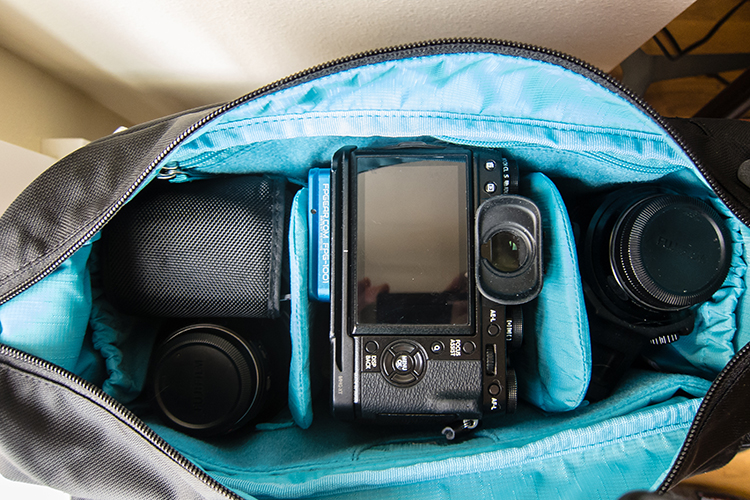
I recently had the opportunity to put the new Think Tank Lily Deanne Mezzo shoulder bag through its paces on a few different kinds of photo shoots – from photographing a full day conference to a portrait shoots, to a day on the move chasing an athlete up and down the stairways in Seattle. The Lily Deanne Mezzo not only kept up with me, but it made my shoots even easier because of how well it performed.

The Think Tank Lily Deanne women’s shoulder bag line is designed by two of the photography industry’s most respected members, Pulitzer Prize-winning photographer Deanne Fitzmaurice and Lily Fisher, Think Tank’s senior camera bag designer. They designed the Lily Deanne series to be the ideal camera shoulder bag for women photographers, and that’s exactly how I would describe this bag.

Design

My first reaction to this bag was how it looked. It looks professional, classy, and functional, yet is understated. When I’m on assignment carrying a lot of gear, whether on a shoot in Seattle or in Egypt, I want to look professional but not have a bag that screams, “look at me, I’m a photographer.” Deanne’s background as a photojournalist shines through in this bag’s design, both in its discretion, but also in its functionality.

LilyDeanne_5

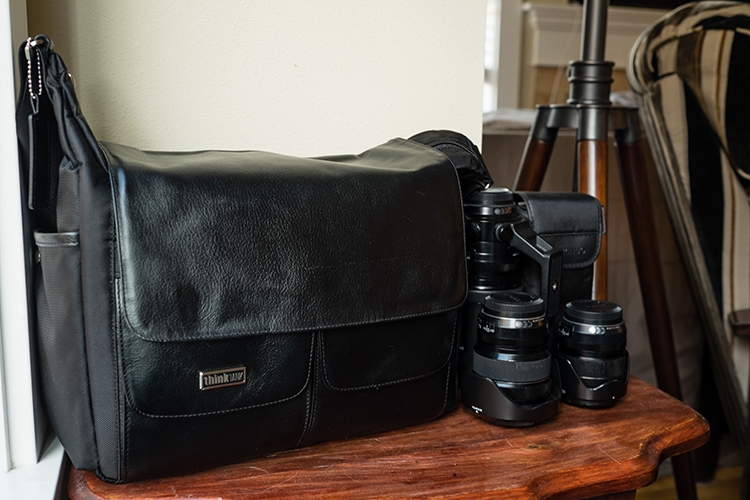
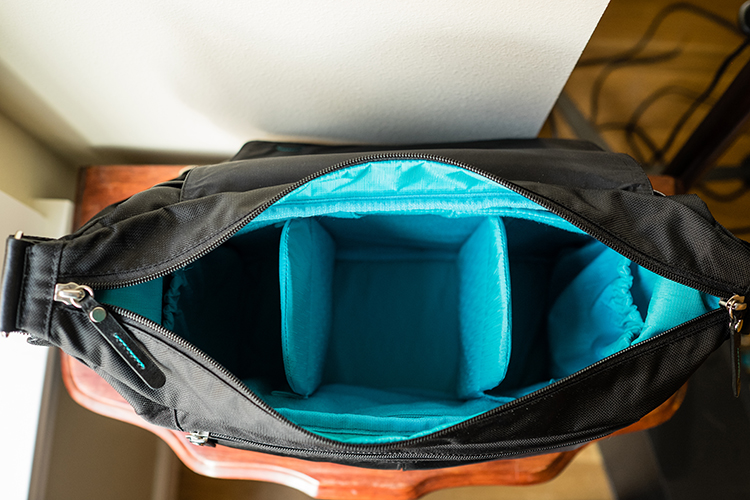
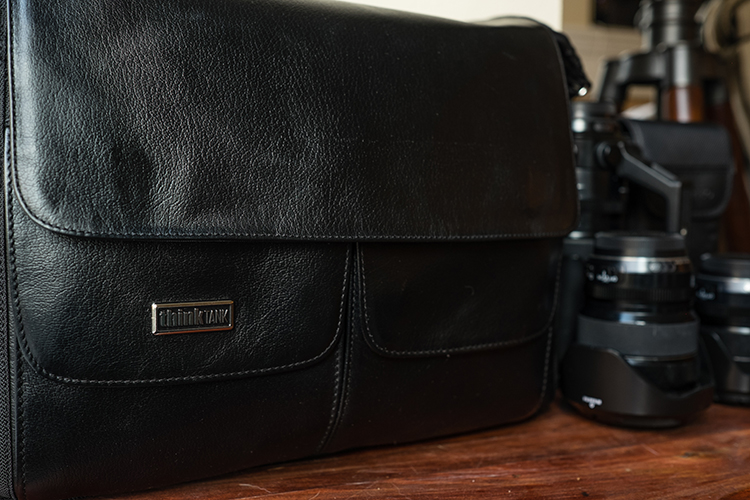
Using the Lily Deanne Mezzo bag, I immediately felt that this was a bag designed by a working photographer. From the wide zipper opening, to the flap which can be thrown over the top and latched with magnetic fasteners, to all the pockets and organizational units, to the slit in the back which lets you slide it over the bars of a roller bag – this bag met all my functional needs without any unnecessary bells and whistles. The level of attention to small details, and high quality craftsmanship makes this a beautiful bag to look at. The bag is a mix of strong nylon and supple full-grain Dakota leather flaps, pockets, and accents. The interior of the bag and exterior accents are a beautiful Robin’s egg blue, making this a stylish bag.

The Lily Deanne shoulder bag comes in two colors, Chestnut Brown and Black Licorice, and three sizes, Lucido (small-size), Mezzo (medium-size) and Tutto (largest-size). This bag was designed with plenty of room for pro-size lenses, no matter whether you shoot Canon, Nikon, Fuji, Sony, Olympus or any other line of camera.

LilyDeanne_2

The large zipper opening allows for quick and easy access of your gear. The top flap folds back completely to give full access to the interior of the bag. Or, it can be flipped forward to cover the main opening, it attaches to the front with rare earth magnets. The shoulder strap is well padded, with non-slip gripping. The success of any great shoulder bag hinges on the shoulder strap. Carrying a lot of gear around all day, I need a shoulder strap that is strong, does not slip, and is well padded. The Lily Deanne bags deliver with one of the most comfortable shoulder straps I’ve used. The bag has a lot of pockets (some zippered, some covered by magnet flaps), which really helps keep your accessories organized. The sides of the bag have expandable pouches to hold odds and ends, water bottles, or sunglasses.

LilyDeanne_1

Sizes and Specs

Lucido (small): Holds one standard DSLR with one to three lenses, or a complete mirrorless camera system (and three to four lenses). There is also room for an 8-inch tablet.

Mezzo (medium): Holds one standard DSLR with a mid-range zoom attached and two to three additional lenses, or a complete Mirrorless camera system (and three to four lenses). There is room for a 10 inch tablet or 11 inch laptop.

Tutto (large): Holds one standard DSLR and additional grip with a mid-range zoom lens attached, and two to five additional lenses, as well as 2 flashes, or one standard DSLR with a 70-200mm f/2.8 and two to five lenses in its main compartment and two flashes. It can fit a complete mirrorless camera system and 4 to 5 lenses. It also holds a 15-inch laptop.

In the Field

The Lily Deanne Mezzo is a great bag for lady photographers no matter what kind of job you’re on – event, editorial, commercial, photojournalist, wedding, or portrait shoot. Short of needing a backpack camera bag to carry a lot of gear over a long distance; this shoulder bag will handle pretty much any other type of scenario.

LilyDeanne_4

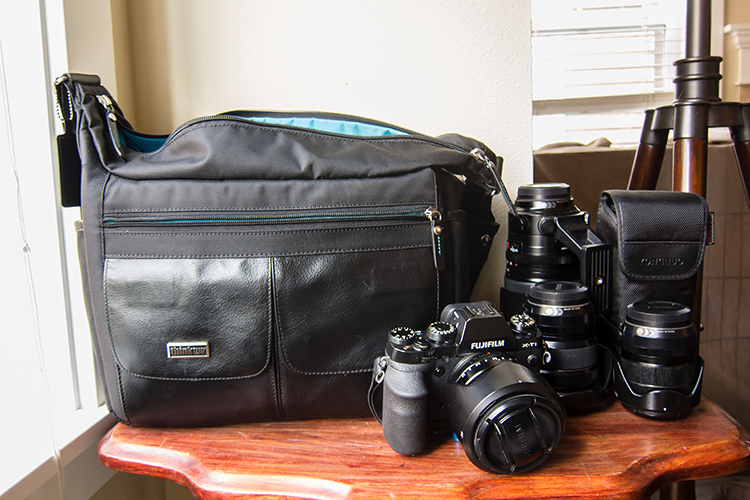
I shoot with the Fuji professional line and was able to easily fit in the bag: the Fujifilm XT-1, 18-55mm lens, 23mm f/1.4 lens, 10-22mm f/4 lens, and 50-140mm f/2.8 lens, along with a flash, and all my accessories. I still had room to fit an additional small prime lens.

Using this bag, it was very easy to access all my gear. I loved all the organizational pockets, which eliminated the need to hunt around for batteries, lens clothes, my phone, business cards and extra memory. The top flap is a great feature which allows you to keep the large zipper open, but cover your gear with the flap. The magnets keep the flap secure, while also allowing for very quick access to gear in time sensitive situations.

The shoulder strap is incredibly well designed, well-padded, and doesn’t slip around. While testing this bag on a 10 hour photoshoot of a conference, carrying all my lenses (which includes one mid-range zoom) and a flash setup, the bag did start to make my shoulder and neck sore toward the end of the shoot. But any shoulder bag, full of heavy camera gear, would have given the same result.

Conclusion

The Think Tank Lily Deanne shoulder bags are one of the best women’s bags I’ve used, arguably the best shoulder bag I’ve found. It balances understated elegance with functionality and comfort. I highly recommend this bag for women photographers looking for a great shoulder bag.

googletag.cmd.push(function() {
tablet_slots.push( googletag.defineSlot( “/1005424/_dPSv4_tab-all-article-bottom_(300×250)”, [300, 250], “pb-ad-78623” ).addService( googletag.pubads() ) ); } );

googletag.cmd.push(function() {
mobile_slots.push( googletag.defineSlot( “/1005424/_dPSv4_mob-all-article-bottom_(300×250)”, [300, 250], “pb-ad-78158” ).addService( googletag.pubads() ) ); } );

The post Review: The Think Tank Lily Deanne Mezzo Shoulder Bag by Peter West Carey appeared first on Digital Photography School.

Digital Photography School

 
Comments Off on Review: The Think Tank Lily Deanne Mezzo Shoulder Bag

Posted in Photography


Think Tank Photo launches largest rolling case for lighting

05 Apr

$ (document).ready(function() { SampleGalleryV2({“containerId”:”embeddedSampleGallery_0536172367″,”galleryId”:”0536172367″,”isEmbeddedWidget”:true,”standalone”:false,”selectedImageIndex”:0,”startInCommentsView”:false,”isMobile”:false}) });

Bag manufacturer Think Tank Photo has introduced a rolling case for lighting kit that it claims is the largest on the market. The Production Manager 50 is designed to hold a pair of studio-style heads with power packs, battery packs, dishes, umbrellas and even lighting stands. The case has internal dimensions of 38 x 125 x 25.4cm / 15.5 x 49.2 x 10in and comes with a collection of adjustable dividers so users can customize the layout of the interior. Zip-up pockets on the inside of the lid are designed to keep cables tidy, and straps on the exterior can be used to attach tripods and larger lighting stands.

The bag is made with ballistic nylon coated with a water-repellent agent that covers a rigid shell, and the shock-absorbing wheels are user replaceable should they get damaged. Think Tank Photo says that the idea of this big case is to make it easier for photographers to transport large amounts of kit in one load, and claims the Production Manager 50 can carry what it would normally require two assistants to manage.

The Think Tank Photo Production Manager 50 costs $ 599.75/£515. For more information see the Think Tank Photo website.


Press release:

Photographers Can Fit Lighting Equipment and Large Light Modifiers in One Rolling Bag with Think Tank Photo’s New Production Manager 50

Santa Rosa, Calif. – Think Tank Photo has released the largest rolling photography equipment case on the market, the Production Manager 50.  Designed to hold an immense amount of gear, including lighting equipment and large light modifiers, one photographer will now be able to transport what it used to take up to at least two assistants.  It is easy to move, carry, work out of, and stack among other gear.

This large rolling bag features stabilizing, wide-set, shock-absorbing wheels that roll smoothly and hold up under the toughest conditions, the ability to lock the main compartment and secure the bag with the included lock and cable, and a fully customizable interior with dividers to protect small and large lighting equipment including c-stands and large modifiers.

“Pro photographers usually travel by car or van to where they are going to shoot,” said Doug Murdoch, Think Tank’s CEO and Lead Designer. “Once a shoot is completed the set needs to be torn down and moved to the next location. Often times, there can be a time crunch where all the gear has to be loaded quickly. Carrying these bags up and down stairs and over rough terrain can be very cumbersome and often takes two people.  The Production Manager 50 makes this time-sensitive, cumbersome process easier and quicker.”

KEY ADDITIONAL FEATURES
* Large front zippered pocket for reflectors, umbrellas, extension cords, cables, etc.
* Attachments for lightstands or tripods on both sides (straps included)
* Rigid shell and stiffened dividers ensures gear protection
* Robust handles on four sides for easy loading and unloading by two people
* Heavy-duty aluminum side-frame protects axle from impact
* ID plate can be registered on the Think Tank site that may allow lost or stolen bag to be returned
* YKK RC Fuse zippers, 1680D ballistic nylon, and super-stick velex (interior) contribute to one of the most robust products on the market.
* Large interior mesh pockets for organizing pocket wizards, gels, cords, tape, batteries, and other accessories
* Ergonomic top handle for rolling or carrying by two people.
* Velex wrapped dividers for extra durability and longevity.
* Adjustable lid straps keep bag open and accessible
* Rear skid rails and custom wheel housings allow for loading and unloading from a vehicle with ease
* Business card holder for easy identification on top panel
* User replaceable wheels & hardware
* Seam-sealed rain cover included

MATERIALS
External: All fabric exterior treated with DWR while fabric underside is coated with PU for superior water resistance, 1680D ballistic nylon, YKK® RC Fuse (abrasion resistant) zippers, custom designed extra tall skid plates, replaceable custom-designed wheels, antique nickel plated metal hardware, nylon webbing, 3-ply bonded nylon thread

Internal: 210D silver-toned nylon, PU backed velex liner & dividers, 2x PU coated nylon 210T seam-sealed taffeta rain cover, closed cell foam & PE board stiffened dividers, belly-o mesh pockets, 3-ply bonded nylon thread

PRODUCT DIMENSIONS & WEIGHT 

Exterior Dimensions: 17.3” W x 53.1” H x 12.6” D (44 x 135 x 32 cm)
Interior Dimensions: 15.6” W x 49.2” H x 10” D (39.5 x 125 x 25 cm)
Weight:  20.7 – 29.8 lbs (9.4 – 13.5 kg)

Articles: Digital Photography Review (dpreview.com)

 
Comments Off on Think Tank Photo launches largest rolling case for lighting

Posted in Uncategorized


Why Asking What Camera Settings Were Used is Not as Helpful as You Think

10 Mar

When you view an image that you love, do you find yourself asking, “What camera settings did the photographer use?” This is a common question, that overlooks other important aspects which would have helped to create that image, such as the lighting conditions, and any post-processing techniques involved. As you become more experienced, and progress in your journey as a photographer, you may begin to realize that the things you originally obsessed over, may not be as important as you once thought.

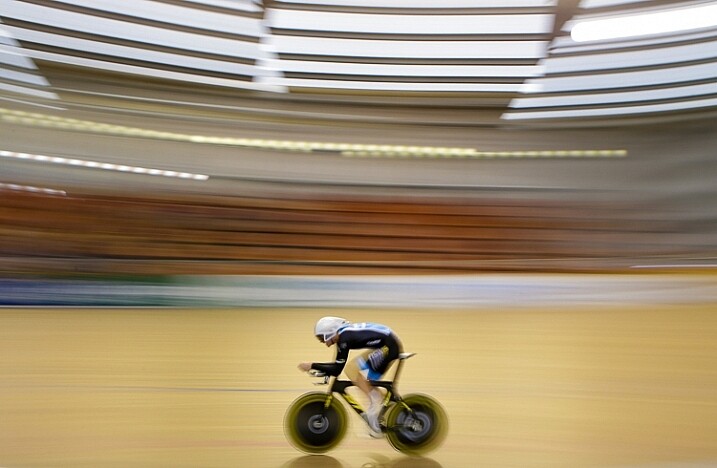
Fig 4

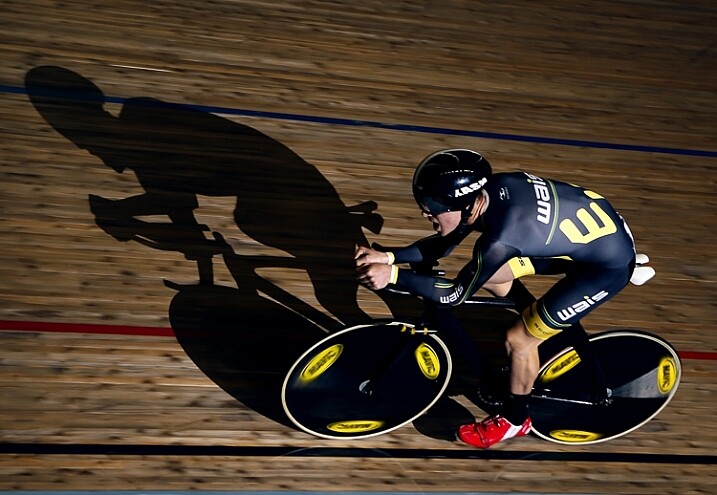
For this image I used a shutter speed of 1/5th, as this would blur out the background quite nicely, as I panned with the rider to make him pop out more. This meant I had to increase my aperture to f/10, and could also decrease my ISO to ISO 320, too. © Daniel Smith / Getty Images.

A topic that many photographers are caught up in, is knowing which camera settings were used; more specifically, aperture, shutter speed and ISO. Any photographer will tell you that these three elements of exposure are very important in creating the desired image. If you use the wrong combination of these in any given environment, you could very well end up with undesired results. Keeping that in mind, it is completely understandable why new photographers obsess over knowing exactly which camera settings were used.

In theory, this should help you to recreate that particular image, right? Unfortunately this may not be the case. Images are created from much more than just the correct combination of aperture, shutter speed and ISO. These three fundamentals do more than just control the exposure; they also give us a creative language to use in our images.

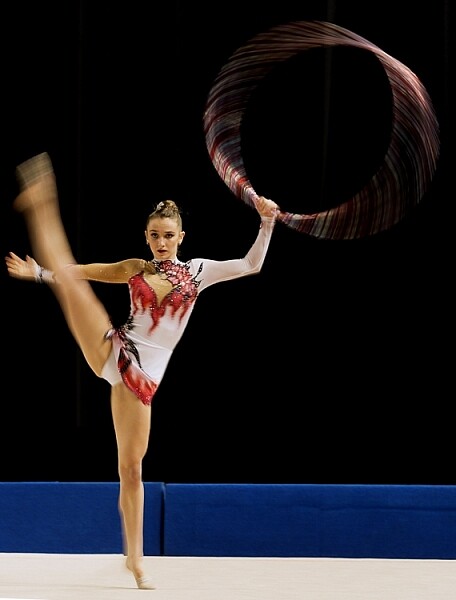
Fig 2

In this image, I wanted to show some motion in the gymnast’s movements, rather than taking another frozen frame. To do this I lowered my shutter speed from 1/1000th to 1/15th. This reduction meant I could also lower my ISO from ISO 3200 to ISO 500 and increase my aperture to f/7.1.

But before diving into this further, let’s explore the two different perspectives of this question; firstly from the point of view of a beginner, who would hope to replicate this imagine. They may assume that by knowing the exact camera settings, and dialling them into the camera, that they will somehow magically achieve the same result. Looking at this from an experienced photographer’s perspective, they may ask this question but with a different scope in mind. It may be when they are perplexed as to the techniques behind a particular image, or in relation to a very specific genre in photography, such as astrophotography, where knowing the settings may help provide a breakthrough.

So why is the question unhelpful?

This question will not always equip you with the knowledge you need, to recreate that image, or with your endeavours of becoming a more successful photographer. There is a lot more to creating an image than just the camera settings. By focussing on camera settings alone, you are missing out on a lot more information as to why those settings were used.

Settings are only a small part of what makes up that image. Lighting conditions, post-processing and the outcome the photographer wants to achieve, are just some of the factors that will dictate what settings the photographer uses. It’s akin to having the correct ingredients for a cake, but not knowing the method behind making it, or the reasons behind that method. Relying on camera settings alone does not tell you anything about the environment the image was taken in, nor does it give you an indication of what the lighting conditions were like.

To freeze the action here I used a shutter speed of 1/1000sec. To keep my ISO as low as possible, but still have a little more depth of field than what /2.8 would offer, I used an aperture of f/3.5. I then set my ISO to ISO 3200 to give me the correct exposure. Being indoors, the ISO is a little higher. © Daniel Smith / Getty Images.

To freeze the action here I used a shutter speed of 1/1000th. To keep my ISO as low as possible, but still have a little more depth of field than what f/2.8 would offer, I used an aperture of f/3.5. I then set my ISO to 3200 to give me the correct exposure. Being indoors, with low light conditions, the ISO is a little higher. © Daniel Smith / Getty Images.

Deciding what camera settings to use is a result of knowing how you want the image to look. For the above image, if I told you that I used a shutter speed of 1/1000, aperture f/3.5 and ISO 3200, and you were to go out and dial in the same settings, it would be highly unlikely that you will get the same result. Why? Because the chances of the lighting in your environment, compared to where this image was taken, being the same is highly unlikely.

The reason I chose these particular settings was simple; I needed a fast shutter speed to freeze the action, so I used 1/1000th of a second. I also wanted to use a wider aperture that would allow me to isolate the subject more. A bi-product of this, is that it allows me to maintain a fast shutter speed, but also helps me use a lower ISO. I then use whatever ISO needed to create the correct exposure – in this case it was ISO 3200. The settings you that you require could be 1/2000th, f/4 and ISO 800. The exposure may come out the same, but the settings used are different, and tailored to the specific lighting conditions.

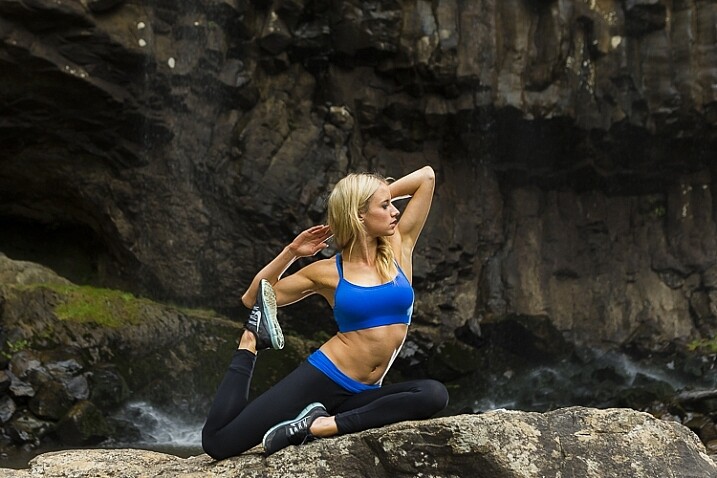
1/160, f/2.8 ISO 100 © Daniel Smith / Getty Images.

1/160th, f/2.8 ISO 100 © Daniel Smith / Getty Images.

Consider the image above. If you ask me what the camera settings for this image were, I will gladly tell you that this was shot at 1/160th, f/2.8 and ISO 100. But what this doesn’t tell you is that I had a speedlight on the ground, off to camera right, at full power. The majority of the light in this image is coming from the flash, with very little ambient (available light) influencing this image at all. Knowing just the settings will not help you to understand how this image was made. There is more to the image than just the camera settings.

The camera settings here are geared more toward the speedlight, as it is quite a distance from the rider. The slower shutter speed is just below sync-speed, which allows for more power of the flash to affect the image (high-speed sync decreases the flash output range) and it also adds a slight blur to the wheels, which gives a nice sense of speed to the image. I used f/2.8 again to aid in the power of the flash, because my ISO was low to reduce the amount of ambient light. The flash is also freezing the majority of the action here.

Knowing why those settings were used, is far more important than just knowing the settings by themselves. It’s knowing the why, that will help you in your journey as a photographer. As the saying goes, “Give a man a fish and you feed him for a day; teach a man to fish and you feed him for a lifetime.” The same principle is at work in photography. Even if I was with you, and told you the settings to use, what will you do when you are alone? You need to understand why those settings have been used.

Reading an image

When looking at an image, understanding what and why you like it, will be of great benefit to you. This is something that you will develop more and more, as you mature as a photographer. Just a hint, it’s not the camera settings that made an image great. It could be the location, the lighting (time of day is very important), composition, perspective, focal length, any editing techniques used, etc., that all worked together to make the final piece. Each one of these is no more or less important than the next, and they all need to be considered.

For me, moving from obsessing over camera settings, to these other factors that influence a photo, was somewhat of an epiphany for me, and made me realize that photography may not be as simple as I once thought it was!

With this image, I used 1/160sec, f/4 and ISO 400. I also have two flashes fired remotely; one camera-right just behind the model giving the rim light on her front side and arms etc. I also have my key light placed at camera left and at ~ 45-degree angle facing the model. Both lights are un-modified (bare-head, or bare-bulb).

With this image, I used 1/160th, f/4 and ISO 400. I also have two flashes fired remotely; one camera-right just behind the model, creatng the rim light on her front side and arms. I also have my key light placed at camera left and at approximately a 45-degree angle, facing the model. Both lights are un-modified (bare-head, or bare-bulb).

As you advance in photography, you will slowly develop a skill that is often referred to as reading an image. This is were you look at an image, and begin to work out how it was created.

For instance you will be able to have a rough idea of the position of the camera, any lighting setups that were used, etc. This is something that you will build upon as you become more experienced. Unfortunately, this is where the magic of photography seems to end. At first, you are in awe of what you captured, when you didn’t quite know how you got it; it all seemed to work like magic. But as you begin to read images, and dissect how they were crafted, that magic can seemingly disappear.

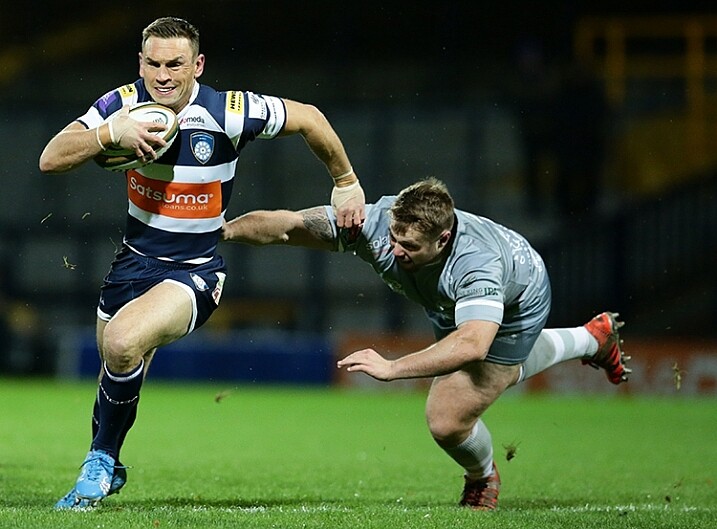
Here I used 1/1000sec to freeze the action, f/3.5 to give less depth of field and ISO 6400 to fill in the exposure gap. The ISO is quite high as this is at a night game. © Daniel Smith / Getty Images.

Here I used 1/1000th to freeze the action, f/3.5 to give less depth of field, and ISO 6400 to fill in the exposure gap. The ISO is quite high as this was a night game. © Daniel Smith / Getty Images.

But before you being to to read photos, you must first be very comfortable with not only the three exposure elements (aperture, shutter speed and ISO), but also how they visually affect images. Once you fully understand each element, you will be able to look at an image and say, “They’ve used a fast shutter speed for this” or, “The aperture used was very wide”.

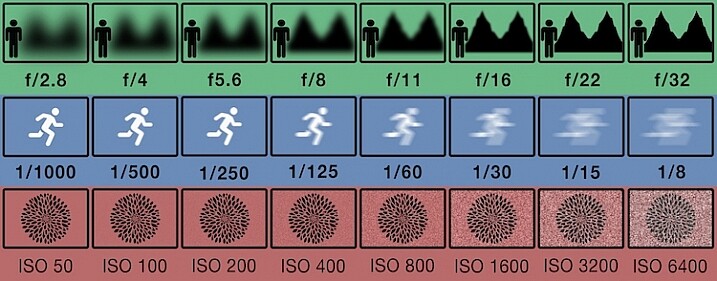
You may not be able to determine the exact camera settings, but you will be able to put yourself in a much better starting point than when you first begun, when you had no idea where to begin! This illustration gives a very quick visual representation of how shutter speed, aperture and ISO affect the look of an image.

This illustration gives a visual guide to how aperture, shutter speed, and ISO affect an image. *this is just an illustration and does not necessarily give exact representation for each.

This illustration gives a visual guide to how aperture, shutter speed, and ISO affect an image. *Note: this is just an illustration and does not necessarily give exact representation for each.

Conclusion

So you now know why asking, “What camera setting did you use?” is not the most helpful. But rather than leave you there, let’s look at some alternative questions you can ask, while you develop your image reading skills, and get some education under your belt:

  • How did you create this image?
  • What post-processing methods did you use?
  • How did you achieve (whatever part you are most intrigued about)?
  • What camera/lens combination did you use?
  • Why did you use that specific camera/lens combination?
  • Why did you use those particular settings?
  • What was the lighting like?

Now you are armed with some alternative questions to ask that will give you a better insight to how it was made, when you see an image you like.

With this in mind, what questions would you ask about this image? Would you still ask for the camera settings, or how this image was created?

Fig 9

googletag.cmd.push(function() {
tablet_slots.push( googletag.defineSlot( “/1005424/_dPSv4_tab-all-article-bottom_(300×250)”, [300, 250], “pb-ad-78623” ).addService( googletag.pubads() ) ); } );

googletag.cmd.push(function() {
mobile_slots.push( googletag.defineSlot( “/1005424/_dPSv4_mob-all-article-bottom_(300×250)”, [300, 250], “pb-ad-78158” ).addService( googletag.pubads() ) ); } );

The post Why Asking What Camera Settings Were Used is Not as Helpful as You Think by Daniel appeared first on Digital Photography School.

Digital Photography School

 
Comments Off on Why Asking What Camera Settings Were Used is Not as Helpful as You Think

Posted in Photography


Review: Think Tank Modular Component Set V2.0

09 Mar

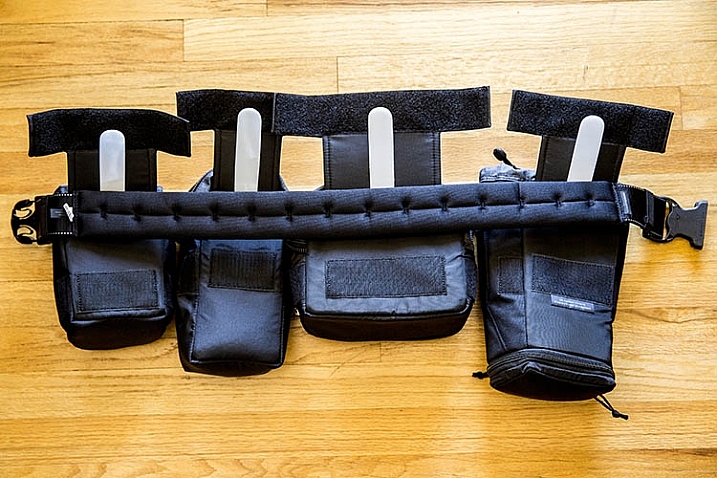
If you’re a photographer who frequently carries lots of gear, and needs it easily accessible to you during a shoot, it’s time to start thinking like Batman! That doesn’t mean donning a cape and mask, but rather making use of a utility belt that allows you to attach various accessories to it, for easy access. Luckily, you need not look any further than the Think Tank Modular Component Set, a customizable waist belt that holds you gear close to you, while taking the weight off your neck and shoulders.

In this review, I’ll take a closer look at the Modular Component System V2.0, and why it’s essential for on-location photographers.

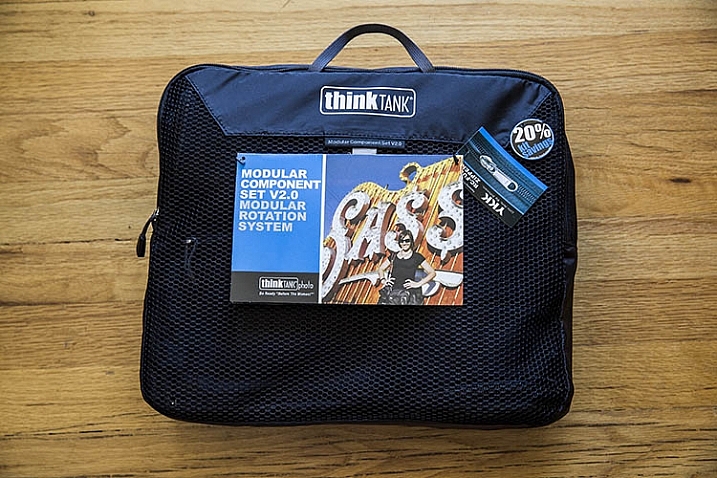
Think Tank Modular Components 1

What’s in the Box

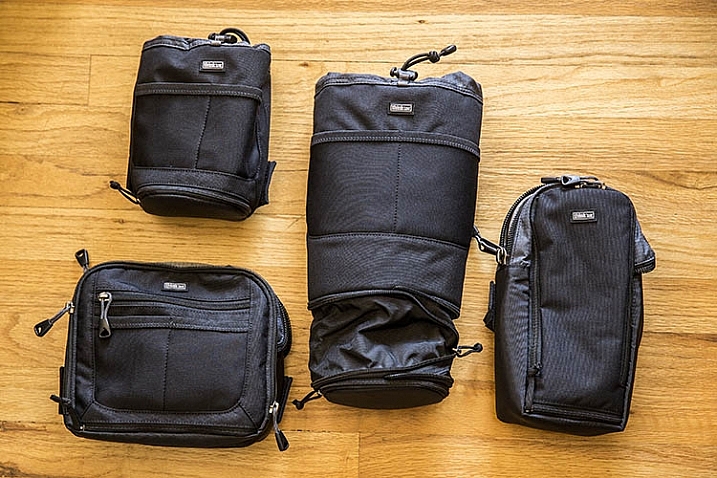
One of the best parts of this product, is that it includes the following modular components that can be used separately, or in conjunction with each other:

  • Lens Changer 50 V2.0
  • Lens Changer 75 Pop Down V2.0
  • Strobe Stuff
  • Speed Changer V2.0

Everything arrives neatly packaged in a zippered travel pouch.

Think Tank Modular Components 2

What Fits

As you can probably tell by the product photo above, two of these modular components are pouches with drawstrings, while the other two are zippered mini bags. Let’s look first at the pouches.

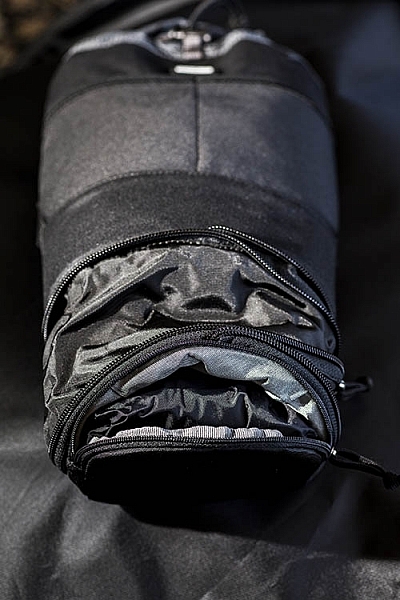
Think Tank Modular Components 1Pretty much any wide-angle or standard zoom lens will fit in the Lens Changer 50 pouch. The larger Lens Changer 75 pouch can unzip to extend its length, to be able to carry a lens as large as a 70–200mm f/2.8, or Canon EF 100-400mm f/4.5-5.6, with the lens hood reversed. Both of these pouches have wide, flexible openings, and drawstring cords that can be easily loosened or tightened with one hand. These two qualities make it very easy to quickly access the contents of the pouches. Each pouch also has a low-profile zippered bottom, that holds a rain cover.

In addition to the drawstring pouches, there are two mini bag components, one that can hold a large speedlight flash, and the other is quite a bit larger for holding extra small to mid-size lenses, or even a professional DSLR camera body without a lens attached.

Together, these modular components can hold quite a bit of gear if you use all of them, or you can slim down your pack by being more selective about the components you add to your belt. Speaking of that belt…

What isn’t included

If you purchase the Think Tank Modular Component System V2.0, you will also need to purchase one piece of gear that holds them all together: the actual utility belt itself. Think Tank offers three different versions of their Speed Belt. The main differences between them is the thickness of the material, with the thinnest being the Think Tank Thin Skin belt, and the thickest the Steroid Speed Belt. The middle option is the one that was used during this review: the Think Tank Pro Speed Belt, which has just the right amount of padding without too much added bulk.

Think Tank Modular Components 1

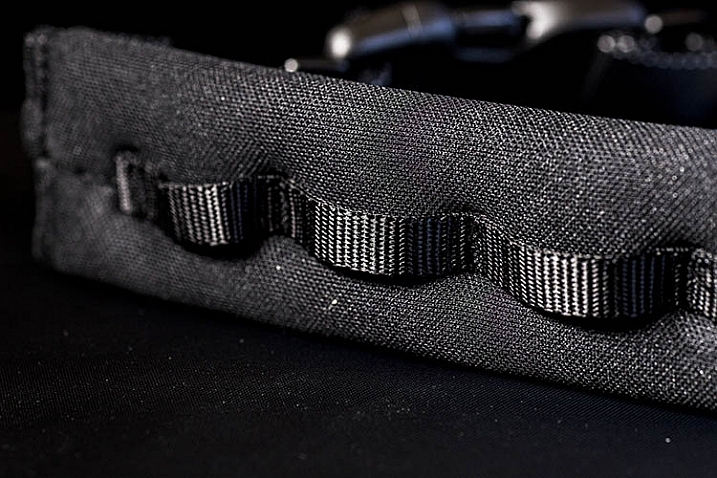
The Speed Belt can be used in conjunction with the Modular Component System, by attaching the pouches and mini bags to the belt via thick, secure velcro. Alternatively, you can also purchase larger holster bags, that can also be attached to the Speed Belt.

Think Tank Modular Components 1

Pros

This Modular Component System is very valuable for event or wedding photographers, who need quick and easy access to a wide repertoire of gear, while constantly shooting on the go. Wearing your gear as a utility belt, gives you a slimmer profile to weasel through crowds, while capturing photos of an event without accidentally hitting people with a bulky shoulder bag. Also, shooting with the Modular Component System gives you the polished look of a professional photographer, with the bulk of your gear on display. With that said, there are some cons to using this product.

Think Tank Modular Components 1

Cons

As mentioned above, wearing your gear on full display makes it more accessible to you during a shoot, but it also exposes the fact that you have lots of valuable camera gear. If you’re a street or documentary photographer, you probably won’t want to use this product, as you don’t want to attract unwanted attention. Additionally, while it can be tempting to load up the components with a ton of gear, this can quickly become overly bulky and heavy, so it’s important to be selective about how much you actually want to carry.

Over to you

Have you used the Think Tank Modular Component Set, or a similar belt system before? What was your impression of it? Let us know in the comments below!

googletag.cmd.push(function() {
tablet_slots.push( googletag.defineSlot( “/1005424/_dPSv4_tab-all-article-bottom_(300×250)”, [300, 250], “pb-ad-78623” ).addService( googletag.pubads() ) ); } );

googletag.cmd.push(function() {
mobile_slots.push( googletag.defineSlot( “/1005424/_dPSv4_mob-all-article-bottom_(300×250)”, [300, 250], “pb-ad-78158” ).addService( googletag.pubads() ) ); } );

The post Review: Think Tank Modular Component Set V2.0 by Suzi Pratt appeared first on Digital Photography School.

Digital Photography School

 
Comments Off on Review: Think Tank Modular Component Set V2.0

Posted in Photography


Review: Think Tank Turnstyle Sling Bag

09 Feb

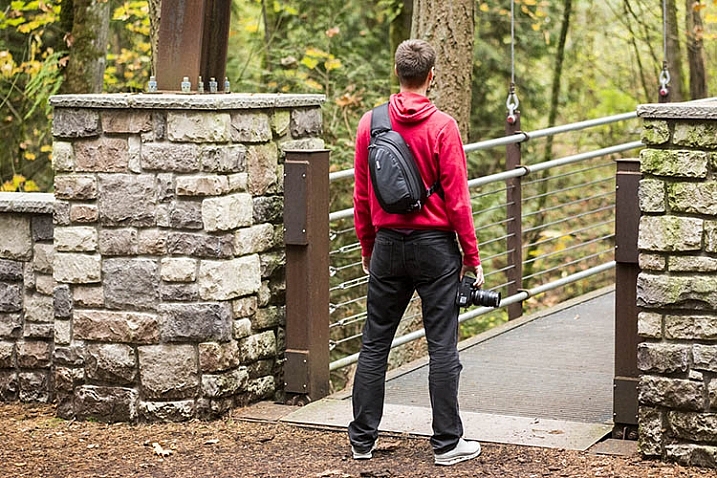
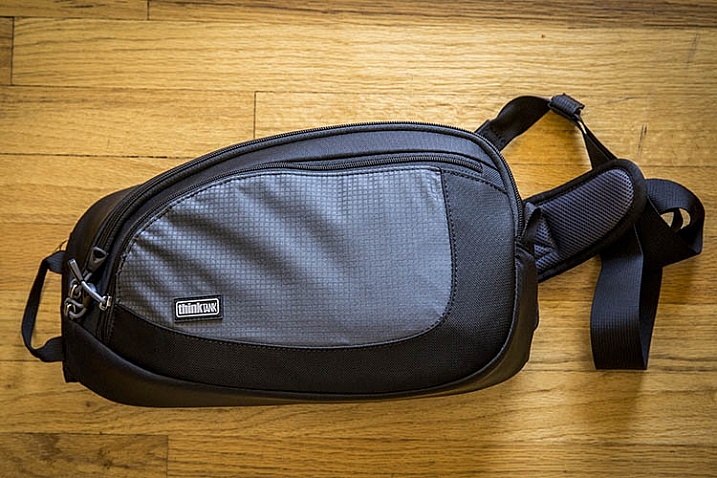
From messenger bags to suitcases, camera bags today come in just about every shape and form. After spending years tinkering mainly with backpacks and belt packs, I decided to try out a relatively new type of camera bag: the Think Tank TurnStyle sling bag. With its unique body-conforming design, and the rugged durability that comes with all Think Tank products, the TurnStyle has quickly become my new favorite camera bag. Here’s why:

ThinkTank TurnStyle Sling Bag Review

Think Tank TurnStyle Sling Bag

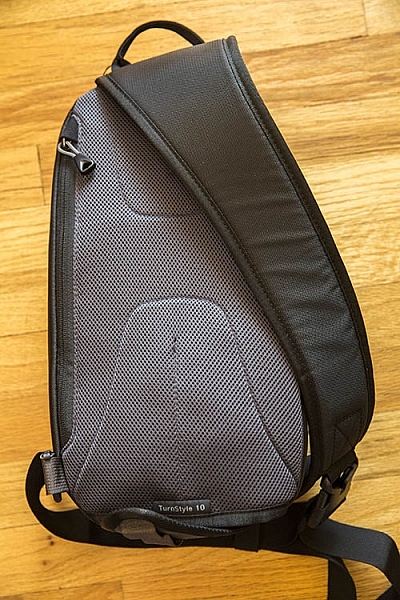
First off, it’s important to know that the TurnStyle bag comes in two colors (charcoal or slate blue) and three sizes. TurnStyle 5 is the smallest, meant to haul compact mirrorless camera systems, while TurnStyle 20 is the largest, capable of carrying a standard DSLR with a 70-200mm f/2.8 attached, plus another lens. Right in the middle of these two bags is the one I opted for: the TurnStyle 10, which could purportedly hold a standard DSLR with a 24-70mm f/2.8 attached. This is where I had a bit of a gripe with the bag off the bat.

ThinkTank TurnStyle Sling Bag Review

What Fits in the TurnStyle 10

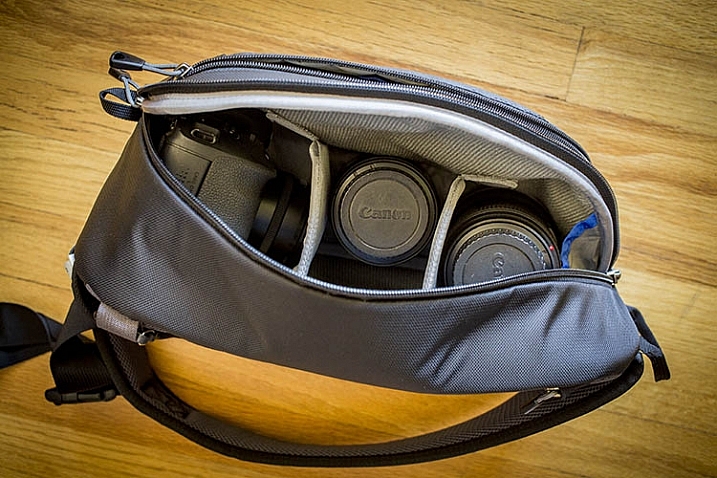
While the TurnStyle 10 is definitely a roomy bag, it couldn’t exactly hold my Canon 5D Mark III with a 24-70mm f/2.8 attached. The camera with lens does fit into the bag, but it won’t even come close to zipping up. (Note: I figured out I can make it fit if I take out all the dividers).

What does fit, albeit on the snug side, is my Canon 6D with the 24-70mm f/2.8 lens attached; in this setup, there are two more lens compartments open that can hold small or medium-sized lenses or a Canon Speedlite. In the above photo, the configuration shows a Canon 6D with 40mm f/2.8 pancake lens attached, a Canon 100mm f/2.8 macro lens, and a 24-70mm f/2.8 lens.

What definitely will not fit in this bag is a 70-200mm f/2.8 lens, unless it’s the only thing the bag is carrying. This makes the TurnStyle 10 a perfect travel photography camera bag, assuming you’re carrying a smaller DSLR body, and relatively few accessories. If you intend to carry a heavy-duty DSLR kit, the TurnStyle 20 will be a more accommodating size.

ThinkTank TurnStyle Sling Bag Review

Best Features

Body-Conforming Design

By far the best part of the TurnStyle bag series is its body-conforming design. Initially, the idea of the bag only having one strap may make it seem like you’ll end up carrying too much weight on one side of your body, but that is far from the case. The thickly padded single shoulder strap does indeed contour your body nicely, making even the heaviest gear bag feel relatively lightweight. This overall design makes the TurnStyle bag by far the most ergonomic camera bag I’ve ever used.

Suzi Pratt_Turnstyle 04

Converts into a Belt Pack

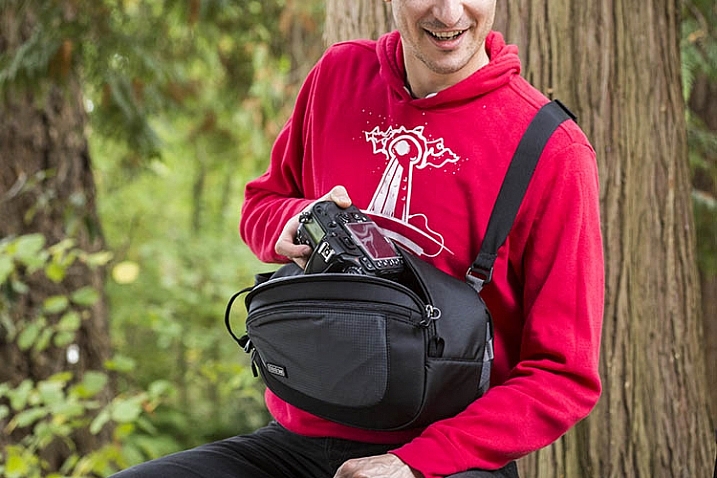
Another positive design feature is the ability to easily rotate the bag from your back to your chest, for quick access to your gear without having to take the bag off. You could even adjust the strap’s length, and turn the bag into a belt pack for better accessibility.

Made of Quality Materials

Similar to all other Think Tank products, the exterior components of the TurnStyle are highly durable and visually appealing. The bag’s exterior is made of rip-stop polyester with a water-repellant coating, and all zippers are abrasion-resistant. That is the say, this bag holds up even when you expose it to the elements, making it perfect for taking on your next photo safari vacation.

ThinkTank TurnStyle Sling Bag Review

Many Dedicated Pockets

The TurnStyle’s main compartment for holding your camera gear, comes with removable foam dividers so that you can customize the interior padding, based on what you’re carrying. There is also has a padded back pocket for holding a tablet or paperwork, and a larger zippered pocket on the front of the bag for holding essentials such as your wallet, cell phone, memory cards, etc. Finally, there is the signature component that accompanies all Think Tank bags: a dedicated rain cover that shields your bag from the elements.

Over to You

So is the Think Tank TurnStyle bag right for you? Honestly, it comes down to how much gear you want to carry with you. While you could combine this bag with a waist pack or shoulder bag to hold more gear, you experience the full benefits of the TurnStyle bag when carrying minimal gear. In this sense, it’s best suited for travel or street photographers, shooting with mirrorless or smaller DSLR cameras. If you plan to carry a longer telephoto lens, you’re probably better off with either the larger TurnStyle bag, or a different style altogether.

Have you tried out a sling-style camera bag? What were your thoughts on it? Do you have another favorite bag? Please share in the comments below.

googletag.cmd.push(function() {
tablet_slots.push( googletag.defineSlot( “/1005424/_dPSv4_tab-all-article-bottom_(300×250)”, [300, 250], “pb-ad-78623” ).addService( googletag.pubads() ) ); } );

googletag.cmd.push(function() {
mobile_slots.push( googletag.defineSlot( “/1005424/_dPSv4_mob-all-article-bottom_(300×250)”, [300, 250], “pb-ad-78158” ).addService( googletag.pubads() ) ); } );

The post Review: Think Tank Turnstyle Sling Bag by Suzi Pratt appeared first on Digital Photography School.

Digital Photography School

 
Comments Off on Review: Think Tank Turnstyle Sling Bag

Posted in Photography


Remodeling a Room? Think Like a Photographer

22 Dec

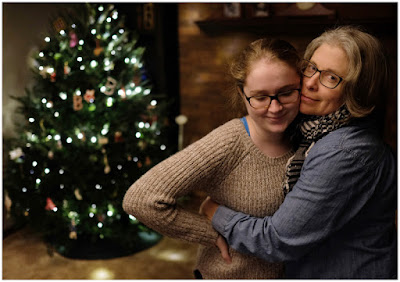
Long-time readers of this site are already familiar with my family, having watched my kids grow up in photos. Seen above, on the left, is my daughter Emily. You guys met her when she was eight.

She’s seventeen now, and headed off to college next year. Which meant this is the last time we’ll put up a Christmas tree while we are all living here together.

I have always tried take lots of photos around the holiday season. And even more so, now that the kids will be graduating soon. And as we have successively remodeled many of the rooms in our house, I have made it a point to pay special attention to the lighting.

Why? Because you can get a lot of bang for your buck when it comes how a room looks just by thinking like a photographer during the remodel. And another bonus is that your quick available light grab shots will look much better, too. Even if you are just using your iPhone to shoot it.

Take the living room, for instance. Before remodel, it was lit mainly by a small, four-bulb fixture attached to a ceiling fan. You can probably imagine just how flattering this wasn’t. And it was something that bugged me enough to lobby to get rid of the fan just so we could have more of a choice about our lighting.

In the end, I got the okay. And I have long been happy that we did it. Here’s a quick run-through on the decision process for this room, in the hopes that it’ll inspire you to think about how you can use your lighting skills to improve the quality of any room you might choose to remodel in the future.
__________

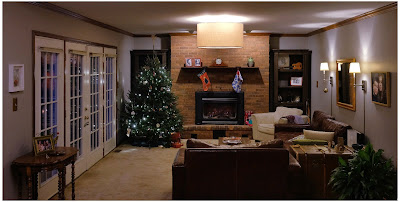
Here’s a photo of the living room as it exists now. Mind you, this is purposely shot available light, as that is kinda the point. The lighting in the room is not designed to exist in an overall interior shot. (In fact, that’s kind of impossible if the lights are part of the subject matter.)

But here it is, exposed for the room rather than for the light sources, to give you a sense of how the lights are distributed.

First and most important is the drum lamp hanging from the center of the ceiling. Remember the four-banger bare-lamp light I mentioned earlier? That’s long gone, and replaced by what is essentially a soft box pointing straight down. It’s three feet across; a legit beauty light.

And the arrangement of the room around the light means that anyone sitting in the room is sitting under a quality light source, and at a good angle. The only harsh place to be around this light would be directly under it. And you can’t go there. Because guess where we put the coffee table.

So if you are sitting on the sofa or the love seat or the chair, you look good. When you’re in the room the effect is not unlike sitting in a lounge in a nice hotel, where they have taken the time to design the light for the effect that they want.

And standing or sitting, pretty much anywhere in the room, a snapshot of you is gonna be reasonably flattering at the very least. And that’s true whether it was shot on a purpose-built camera or a smartphone. To wit, the example at top of the page.

Over at camera right are two wall lamps, which serve to fill the shadows of the overhead “key” light—or to become pretty nice rim lights for someone sitting on the couch. No major surgery here, as the lamps came with conduit assemblies to run the cords right down the wall. They’re just plugged in behind the couch.

At back are two “can” lights in the ceiling, washing down on the fireplace. They just keep it from going super dark back there. (And of all of the lights, they are the only ones that are built-in, and pre-dated the remodel.)

Two other items of note. One, the lights are all on dimmers. This gives us tons of control of both the absolute level of light and the lighting ratios between the different planes. You really can accomplish a lot of looks with a few different planned-out light sources and some dimmers.

And two, all of the lights are LEDs. Which means that this entire room—seven bulbs—totals only about 36 watts of energy consumption. And that is if they are on full-blast, which they almost never are. I just nuked them up to buy myself some exposure here. We normally keep them pretty subtle and balanced. But that also would look bad in a photo because a light cannot easily serve as both subject matter and light source.

But dialed down, I would guess we are typically lighting the room with around ten watts of power, total. It’s just well-distributed.
__________

Remodel Like a Photographer

When choosing lights for a room remodel, here are some things to think about.

• If you can spring for a big, soft main source, splurge. You won’t regret it. This could mean a drum lamp (we had ours made here) or a light that bounces off the ceiling. In our case, the main light does both. Unseen (from almost exactly my camera position) is a smaller version that hangs down over our dining table. The two light their assigned spaces beautifully and tie the double room together visually.

• Think of task lights as doing double-duty. First, they accent a room. Second, they fill the main light. Oh, wait, make that three—they can also create mood by dimming them down and using them without the main.

• LED bulbs are getting better and better—they have passed CFL lights—and will save you tons of money over their lifespan. Good quality ones are as low as $ 5 at Home Depot (these are Philips, FYI.) The room shot above is a poor representation of the light color/quality. That’s because the lights are serving as both light source and subject. If I chose one or the other (as in the top photo) they would look good. And to the eye they look great.

• Dimmers on each circuit and dimmable LED bulbs will give you lots of options to shape the room. Just make sure to use modern “triac” style dimmers (most all sold today are this type). Those work best with LED lights and also don’t just waste energy through resistors when you dim down.

• In the overall cost scheme of remodeling a room, decent lighting design (and the forethought of a photographer’s approach to lighting) is about the best value you can get for your dollar. I’ve done this with every single room we have remodeled, and have been really pleased with the results.
__________

While we’re here, from our family to yours, Merry Christmas.

Oh, and check back in next week if you get a chance. We are going to unwrap a project we’ve been hard at work on for three years.


Strobist

 
Comments Off on Remodeling a Room? Think Like a Photographer

Posted in Photography


Think Tank launches Lily Deanne series of shoulder bags for female photographers

24 Oct

Think Tank has launched the Lily Deanne, its first series of photo bags designed specifically with women in mind. The shoulder bag is available in three sizes, each designed to accommodate pro-sized camera bodies and lenses. Read more

Articles: Digital Photography Review (dpreview.com)

 
Comments Off on Think Tank launches Lily Deanne series of shoulder bags for female photographers

Posted in Uncategorized


10 Crucial Things You Need to Think About for Portrait Photography

20 Oct

Darlene’s Portrait Fundamentals course is on sale for $ 75 (50% off) now until November 3rd only. Find out more or grab the deal over at Snapndeals.com.


There are many pieces to doing a portrait – it’s not easy. You have to think about the technical stuff like exposure and focus, as well as the non-technical stuff like composition and working with a live subject. It can be daunting if you’re just starting out doing portrait photography so let’s break it down into all the pieces so you can work on one at a time, then put it all together.

Portrait tips dps717px 04

Here are the 10 crucial elements you need to think about when doing portrait photography:

  1. Lighting Pattern
  2. Lighting Ratio
  3. Quality of light
  4. Lens selection
  5. Background
  6. Exposure/metering
  7. Sharpness – getting it in focus
  8. How to position the subject (posing)
  9. Facial view and camera position
  10. Expression

THE TECHNICAL STUFF

#1 Lighting pattern

This is how the light falls on the subject’s face. How you set up the light will determine the mood of the final portrait and whether or not the subject is flattered. Lighting partner is a critical piece to get right. There are four main type of patterns and two styles, they are:

  • Split lighting
  • Loop lighting
  • Rembrandt lighting
  • Butterfly lighting
  • Short lighting
  • Broad lighting
Portrait tips 02

Left – Split lighting. Right – Loop lighting.

Portrait tips 01

Left: Broad lighting. Right: Short lighting. Notice how different she looks in each image, particularly her nose!

Knowing what each looks like and when to use them is very important. Read more here: 6 Portrait Lighting Patterns Every Photographer Should Know.

#2 Lighting ratio

A ratio is a comparison of one thing to another and in terms of lighting it is comparing the dark and light sides of the face. How much difference is there is from the shadow, to the highlight side? The greater the ratio, the more contrast the image will have, and the more moody the portrait will become. The lower the ratio, the less contrast, and the portrait will have a lighter, fresher feeling.

Look at the following examples:

Portrait tips 03

In the images above the ratio on the left is very strong, about 16:1 or four stops. The missing is about 4:1 or two stops, and the right is almost 1:1 or even. The only difference from one to the next is use of a reflector. Notice how the mood and feel of the portrait changes, as the contrast is adjusted.

For more detail on ratios read: Lighting Ratios to Make or Break your Portrait

#3 Quality of light

Another aspect of lighting you need to decide is whether you will use hard or soft light.

Hard light is produced by a small light source and is characterized by high contrast, enhanced texture of the subject, added drama, and harsh well edge-defined shadows. Examples of hard light sources are:

  • The sun (even though it is large, it is far away so its relative size is small)
  • A bare light bulb
  • The small built-in flash on your camera (including your speedlight without modifiers)

Here are two portraits done using hard light. Which is more appropriate use of this type of lighting for the subject?

Portrait tips dps717px 08

Portrait tips dps717px 05

Soft light is produced by a very large light source. It is low contrast (or can even be quite flat), less textureenhancing, and is more forgiving and flattering for people photography. Examples of soft light sources are:

  • The sky on an overcast day
  • Large studio softboxes
  • A large reflector like 42” or 52”
  • An on-camera flash that has been bounced off a ceiling or wall

Here are two portraits done using soft light. Which is more appropriate use of this type of lighting for the subject?

Portrait tips dps717px 09

Portrait tips dps717px 07

So along with the ratio, the quality of light will have a great affect on the mood and feeling of your portrait. Choose soft light for portraits that flatter the subject, and choose hard light for an edgier look with more grit and drama.

#4 Lens selection

The lens you select will change the appearance not only of the subject, but the background as well.

Using a wide angle lens will introduce distortion and cause the subject’s face to look abnormal, sort of stretched. It will also allow you to see a large sweeping view of the background behind them.

Portrait tips dps717px 13

Notice how the shape of her face and her features are distorted? This is not something most people will desire.

However, there may be instances where you want this look such as a humorous portrait, kids, or an editorial style portrait of a street vendor at a market where you want to see his environment.

Portrait tips dps717px 12

The wide angle view adds to the comical nature of this portrait.

Telephoto lenses compress perspective – this does two things. First it is usually more flattering to the subject, their facial features look less distorted. Second, it simplifies the background by seeing less of it, and often it’s less in focus as well (dependant on distance to the background) putting more emphasis on the subject, which is what you want. Read more at: How to Achieve Blurred Backgrounds in Portraits.

Portrait tips dps717px 14
Same girl as the portrait above. Compare her face in the two images, and take note of the background as well. See how much less of the room, and how it is more out of focus than the wide image above?

Portrait tips dps717px 11
The long lens used for this image has compressed the background and because it is so far away (across the river on the other side) it is really out of focus and provides a soft background to enhance the portrait, not take away from the girl.

#5 Background

One thing many of my students forget to control and think about is the background. It’s so easy to be focused on all the other stuff and working with your subject that you forget to even look at the background.

Two things you want to make sure about for the background are: it makes sense with the portrait, and doesn’t distract the viewer from the subject. There are four things that can do that, watch for them in your background and adjust your camera position or composition accordingly if they show up:

  • Contrast
  • Bright colours (warm tones are the worse for distraction like red and yellow)
  • Sharpness
  • Bright areas
Portrait tips dps717px 15

See how the bright areas, which are also high contrast, in the background draw your attention away from the wedding couple?

Any or all of those can draw the eye away from the subject if they are in your background. The eye is attracted to the brightest area of an image, as well as the sharpest. So get your portrait subject away from the background far enough to get it out of focus, and watch for hot spots that grab the eye. Sometimes simply moving your camera a foot or two to the left or right can eliminate trouble areas and give you a cleaner background – allowing the subject to be the star.

Portrait tips dps717px 16
Use of multiple techniques here have drastically improved this portrait over the one above. The background is now solid, out of focus, and it does not take your eye away from the couple but rather compliments the overall portrait.

#6 Exposure and metering

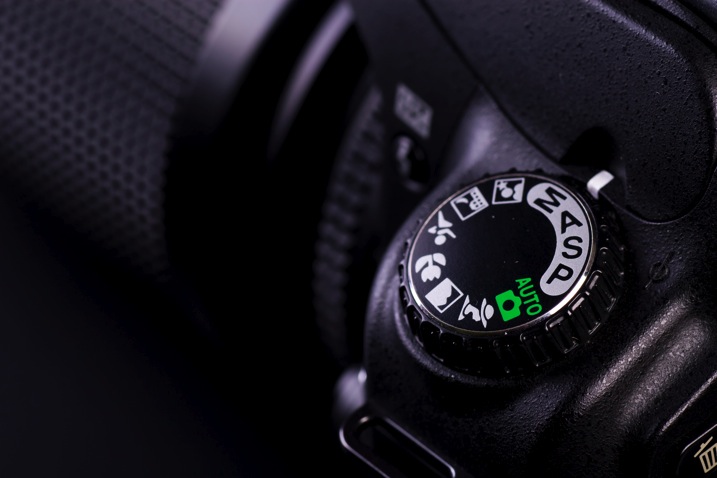
For a portrait where the subject is not moving, I almost always use the following camera settings:

  • Manual shooting mode
  • Single shot drive mode (when I press the button it takes one image only)
  • Single point focus (not multi or zone)
  • One-shot or AF-S focus mode to focus and lock (not continuous)
  • Shade White Balance preset (as I am usually working in the shade, if you’re in the bright sun choose that – but pick one that matches your lighting condition and leave it, anything but AWB!)
  • Shoot in RAW

That gives me the most control over doing one very important thing – having a consistent exposure from one frame to the next. That may not seem like a bit deal but if you ever decide to do portraits for a friend or have real paying clients – you want to be able to show them the images on the back of the camera and not worry about the one in the middle that was black cause you forgot to adjust the exposure.

Photodune 1733468 camera controls m

The other thing it does is makes editing in the post-production stage much faster.

So basically set your exposure, do a test shot (review it for exposure using the histogram), then don’t touch it unless you either move to a new location, or the light changes.

#7 Sharpness – getting it in focus

I already mentioned the settings I use for focus above. Back button focus is something I highly recommend as well. It allows me to lock focus on the subject, precisely on their eye if I’m in close enough, and then recompose my portrait and shoot away. Unless the subject or I move, changing the distance between us, there is no need to refocus.

Here are a few more focus tips from a past article I did: 5 Tips for Getting Sharper Images. Obviously if you’re shooting a moving target, like kids in action, you’ll want to choose different focus settings. Try Continuous focus (Servo or AF-C) and burst mode (continuous shooting mode or drive).

THE AESTHETIC STUFF

#8 Posing the subject

Getting your subject or model into a comfortable, yet flattering pose can be tricky. People are generally nervous when being photographed and will look to you for guidance on how to stand, hold their body, turn their head, and adjust their hands. So you need to have a few ideas ready for them, making sure they can hold it comfortably and they look good at the same time.

Here are a few tips:

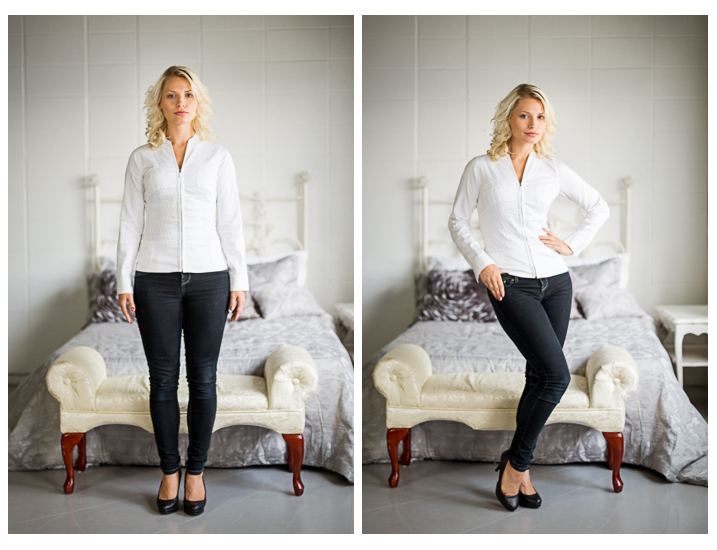
  • You’ve likely heard this before, but if it bends – bend it. Meaning get them out of a stiff body position bending one leg slightly, and bending elbows and wrists.
  • Get them to shift their weight away from the camera (hip away) it will be more flattering that way.
  • Add a slight head tilt for ladies to add a touch of femininity.
  • To get people to turn their body when standing – tell them to turn and point their feet, the body will follow naturally.
  • Turn shoulders slightly to narrow the body width, which is more flattering for most people.
  • Let them pose naturally and just make slight tweaks or adjustments. Watch how they move on their own so it still looks like them.
Portrait tips dps717px 17

Left – stiff and boring. Right – bend the parts that bend and make a more dynamic pose, it’s also more flattering, and in this case feminine.

For more tips on posing read these dPS articles:

  • Portrait Posing Tips- How to Help People to Relax and Take Better Photos
  • Tips for Posing Men
  • Posing Guide for Photographing Women: 7 Poses to Get You 21 Different Photos
  • Or grab the dPS ebook Portraits: Strike the Pose

#9 Facial view and camera position

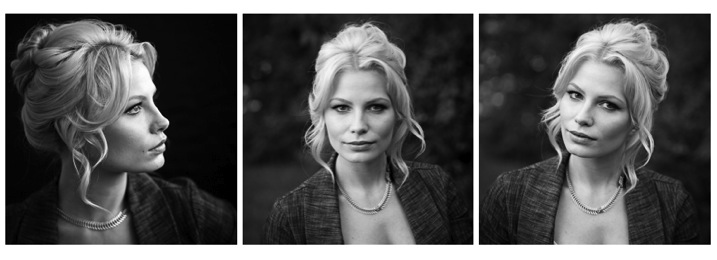
How you position the subject’s face is another factor that determines how flattering the portrait will be, and the mood. Some people look really great in full face view (facing the camera directly) while most benefit from turning slightly to one side, thus narrowing the face a little.

Profile view is something people cannot see in the mirror, so many have never seen theirs, and have no idea what they look like from the side. Only by trying it out will you see and know if it’s flattering for them.

The key to choosing the right angle for their face is to observe them. Do they tend to turn slightly when talking to you? Take note – that is probably the side the subconsciously prefer.

Portrait tips dps717px 18
Three different views of the same girl’s face (above). She has a really gorgeous profile and a square jaw. I think the profile and last image (¾ face view) are the most flattering for her but she looks great in any image. Not all your portrait subjects will have that, so you have to help them look their best by making choices like this. If in doubt, shoot all three and choose later, or let them pick. You’ll learn from the subject what they like and what they think looks flattering.

Tip: for people who have a bump on their nose that do not want it to show – try photographing them facing both ways. One way will show the bump, the other it will be hidden. How you do that is shoot one way with the light say off to camera right. Then trade places with them so the light is coming from the other way and do a second shot. See which shows, and which hides the bump – then you’re ready to go.

What camera position you choose will decide what you’re emphasizing on the subject. A low camera angle can show height (especially if shooting full body) and make someone look taller, but it also emphasizes the body more. Not a good choice if someone wants to appear slimmer. Getting low down near kids level puts you closer to the action and makes them appear less small.

A slightly above eye level camera angle will emphasize the face and minimize the body, a good choice for most people. It also makes kids look smaller and can be effective if that’s the look you want. A really high angle will make the forehead prominentant (perhaps not the best choice for a receding hairline).

Just be conscious that where you place your camera will affect the final look of the portrait.

#10 Expression

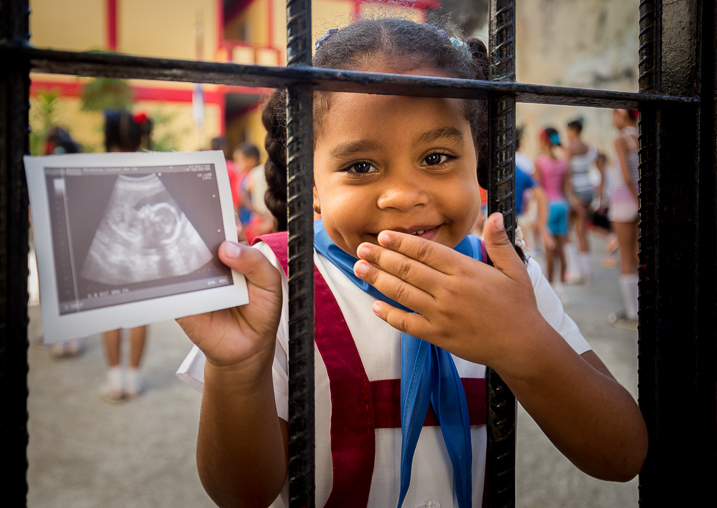
Portrait tips dps717px 20

Even though my Spanish is limited I was able to talk to this little girl and got this reaction and expression. She is holding a photo of her auntie’s ultrasound and her new baby cousin to be that she was really excited about. I just asked her to show me her baby primo (cousin) and she did this.

Okay, this is the ultimate thing you need to get right for great portraits. You can nail all nine points above, but if the subject has a bad expression, they will not like the image. There is one big tip I have for getting the best expressions in your portraits – talk to the subject and interact with them. There is one huge barrier to doing that which I see happen all the time.

There is a big black thing in between you and the real person sitting in front of you!

Yes, I mean the camera. Try this exercise if you dare:

Get a friend, or one of your kids or grandkids, to pose for you. Now put the camera up to your eye and take a few shots. How did it feel to you? Did you feel connected to your subject? Ask them how they felt?

Now put the camera on a tripod – yes the dreaded beast we all hate but it a necessary evil – and take a few shots using a remote trigger to fire the camera. How did you feel then? What about your subject? Were you able to make them laugh or smile? I’m going to go out on a limb and guess that you both had a better experience the second time and you got better expressions in the photos.

The key to expression is eye contact and you cannot do that with a camera between you.

Portrait tips dps717px 21
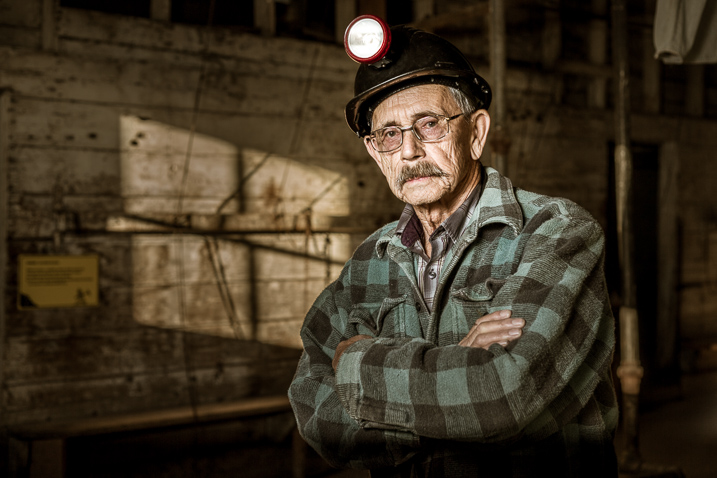
I’ve photographed Bob many times. He is a volunteer at an old coal mine where I do a workshop twice a year. He was a miner way back in the day and is as spry in his 70s as many people who are 40! He loves telling stories about the mine and ghosts so I just get him talking and let him go. We have fun, he loves being a “model” for a day, and it shows in the images.

Try it and see if it doesn’t make a difference. The tripod will also make you slow down and think about your camera, settings, and everything. Your tripod is not evil, it is your friend. Make friends with your tripod and use it.

Putting it all together

Whew! See I told you doing portraits is a lot to think about. But you can do this, you got this. Just take it one step at a time. If you aren’t at the stage of getting all 10 of these things yet, just pick one at a time and work on that. Choose patient models that will help you and practice. The only way to get better is by doing.

My students often ask me, “How do you make it look so easy?” – then answer – I’ve been doing this a really long time and it becomes instinct and subconscious after so many hours. Put in your 10,000 hours and we’ll talk!

If you have any questions or want to share your images – please do so in the comments below.


snapdeal-330-x-220Darlene’s Portrait Fundamentals course is on sale for $ 75 (50% off) now until November 3rd only. Find out more or grab the deal over at Snapndeals.com. Take more professional looking portraits in 30 days! The Portrait Fundamentals course covers everything you need to know, from camera basics to using a multi-flash set-ups. Over 6.5 hours of video lessons with two experiences instructors.

googletag.cmd.push(function() {
tablet_slots.push( googletag.defineSlot( “/1005424/_dPSv4_tab-all-article-bottom_(300×250)”, [300, 250], “pb-ad-78623” ).addService( googletag.pubads() ) ); } );

googletag.cmd.push(function() {
mobile_slots.push( googletag.defineSlot( “/1005424/_dPSv4_mob-all-article-bottom_(300×250)”, [300, 250], “pb-ad-78158” ).addService( googletag.pubads() ) ); } );

The post 10 Crucial Things You Need to Think About for Portrait Photography by Darlene Hildebrandt appeared first on Digital Photography School.

Digital Photography School

 
Comments Off on 10 Crucial Things You Need to Think About for Portrait Photography

Posted in Photography