RSS
 

Posts Tagged ‘Think’

I made a book of pictures of my cat, and I think it’s going to make me a better photographer

29 Jul

Hear me out.

Many years ago I made a Blurb photo book that was beautiful, but required hours and hours of my time to get it all just right. It was an enjoyable process really, but I just don’t find I have that kind of time or patience anymore. But I love a nice photo book – what better way to get photos off your phone or hard drive and make them into something tangible?

Whatever your level of interest and
time commitment, there’s a photo book
service for you

In the years since I made my first book, options for would-be photo book makers have exploded. They range from time-intensive to almost totally automated. Whatever your level of interest and time commitment, there’s a photo book service for you.

The other part of this story is that I’ve been struggling with finding inspiration for my personal photography lately. It’s hard to find a reason to bring a dedicated camera when I know I can get usable snapshots with my phone. Above all, I don’t end up doing anything with the photos I do take. I post the stray photo to Instagram or Facebook, but that’s as far as they go.

But recently, I downloaded Mosaic, an app from Mixbook that creates incredibly simple photo books out of 20 of your photos – no more, no less. You pick the photos from your camera roll, Facebook or Instagram account, put them in an order you like – and that’s about it.

The photos are arranged into a mosaic (see what they did there) for your front cover, which you can ‘shuffle’ to re-organize, but you can’t manually select how the images are arranged. Text can be added to the first page, but none on the following pages.

In trying it out I dove into my camera roll and looked for a story I could tell in 20 photos and by pure coincidence, I happened to have a large number of photos of my cat. I saw a theme emerge and began filling the pages of my book with pictures of him sleeping.

I know, I know. But you wouldn’t believe this cat. He sleeps in the strangest positions, and the photos fell into a neat symmetry as I placed them on opposing pages: two photos of him curled into a donut shape in his bed, two photos of him sprawled on the floor next to his bed, for some God damn reason. The book materialized in front of my eyes, and the temptation of the ‘order now’ button became too great.

See what I mean? He’s ridiculous.

Cats are bona-fide jerks but I’m in the part of the population that finds them irresistible against better judgement. And I know this sounds ridiculous, but my cat really does have a funny personality. One day he’ll be gone, not roaming around my apartment screaming for treats and attention, and I’ll have this silly little book to remember him by.

Mosaic is definitely not designed for professional photographers. For one, it only exists in app form, so it lends itself best to photos taken with your phone. You can source them from your Dropbox or a social media account, but the app certainly lacks the customization features a pro would want.

Creating a book is dead simple, and without the option to add text or captions, all emphasis is on the images and the story they tell

So Mosaic isn’t really intended for ‘serious photography,’ but to me there’s beauty in its limitations. Creating a book is dead simple, and without the option to add text or captions, all emphasis is on the images and the story they tell.

By making this book I may have unlocked a new cat lady achievement, but it also made me think about other stories I could tell in 20 photos. Open-ended photo projects feel too overwhelming to me, but the thought of assembling just 20 photos on a theme and having an easy, yet polished output mechanism for them is very appealing. Suddenly, I’m reconsidering the projects that seemed too onerous to take on. Documenting a trip or a social outing seems doable with a purpose, vision and boundaries for the final product.

Maybe this experience will help nudge me forward on a path I’m currently stalled on

Realistically, I’m not going to be making huge number of $ 25 photo books (plus an extra $ 5 for shipping). But maybe this experience will help nudge me forward on a path I’m currently stalled on. And isn’t that what it’s all about? At the very least, I’ve got one very fancy book of cat photos.

Also read: Ten ways to shake ‘photographer’s block’ for good

Articles: Digital Photography Review (dpreview.com)

 
Comments Off on I made a book of pictures of my cat, and I think it’s going to make me a better photographer

Posted in Uncategorized


Think Tank teams up with SKB for hard cases, launches MindShift ‘PhotoCross’ sling bags

03 Jul

MindShift Gear has announced ‘PhotoCross,’ a new lineup of sling bags designed for adventure photographers. Coming alongside this announcement is one from sister company Think Tank Photo, which has teamed up with SKB to offer the latter company’s hard cases fitted with soft inner dividers and organizers from Think Tank. The SKB/Think Tank hard case lineup currently includes 10 models.

The new hard case lineup comprises ‘SKB designed by Think Tank’ models featuring SKB’s own waterproof and durable iSeries hardshell exteriors. Think Tank has fitted its own internal modular organizers and protective padding into the cases, including movable dividers and lid organizers. The hard case lineup ranges in price from $ 109.99 to $ 329.99.

Joining those hard cases is MindShift Gear’s PhotoCross 10 and PhotoCross 13 bags for photographers in the field. Both bags feature space for photographic gear and either a 10-inch tablet (the PhotoCross 10) or up to a 13-inch laptop (the PhotoCross 13). The bags’ designs include T-pulls, carrying handles on both the side and top, a 320G breathable air-mesh back panel, a pocket that can accommodate most 1-liter water bottles and a 3-point harness.

The PhotoCross 10 bag can accommodate either a mirrorless camera body and up to five lenses or an ungripped DSLR and up to two lenses plus a tablet. The larger PhotoCross 13 can accommodate up to an ungripped DSLR alongside up to four lenses – including a 70–200mm F2.8 lens, MindShift explains – plus ‘some’ 13-inch laptops. The PhotoCross 13 will cost $ 129.99; PhotoCross 10 will cost $ 114.99.

Via: Think Tank Photo

Articles: Digital Photography Review (dpreview.com)

 
Comments Off on Think Tank teams up with SKB for hard cases, launches MindShift ‘PhotoCross’ sling bags

Posted in Uncategorized


Think Tank Signature 13 Camera Shoulder Bag Review

07 Jun

There are certain features most people would expect to find in any camera bag, such as spacious areas for holding gear, a shoulder strap, and pockets in and around the bag for carrying smaller items like memory cards, a flash, or even car keys. Judged by those standards, the Think Tank Signature 13 Shoulder Bag excels admirably. But handing out that kind of compliment for a camera bag is like giving kudos to a car company for including seats and a steering wheel on one of their latest sedans.

Pick nearly any camera bag on the market and you’ll find options and features similar to what you might see in Think Tank’s latest creation. But evaluating a bag like this by talking about a bulleted list of features kind of misses the point. This is one case in which the whole truly is much more than the sum of its parts, and the result is a capable and refined camera bag that will suit the needs of most photographers quite well.

Think Tank Signature 13 Camera Shoulder Bag Review

The Think Tank Signature 13 Camera Shoulder Bag

I have owned and used many camera bags over the years, from freebies that were included with a camera to expensive models uniquely suited to specific purposes. In my closet right now I’ve got backpack-style bags, messenger-style bags, over-the-shoulder bags, sling-style bags, and even one small little oddity whose purpose I can’t even articulate clearly. The Think Tank Signature 13 easily rests at or near the top of this relatively crowded consortium. Not necessarily because it has one single standout feature, but because it does many things so well and with a level of craftsmanship and refinement that I don’t often see especially on less expensive bags.

Design and appearance of the Think Tank Signature 13

The first thing I noticed when I got this bag, which held true for everyone to whom I showed it, is that the Signature 13 looks fantastic. Not that a nice-looking bag will help you take better photos or protect your gear, but if you value style then the Signature series is definitely worth a look. I have the Slate Gray version. It also comes in a greenish color called Dusty Olive, which I didn’t see in person although online it seemed a little too dull for my taste.

Bold leather accents and thick metal clasps made some heads turn when I brought the bag to my office. But these flourishes could also send a message to would-be camera pilferers that inside the bag is a lot of gear worth stealing. It’s not a drawback of the Signature 13 per se but is a reality of using a nice-looking camera bag. It’s also one of the reasons my father continues to keep his camera gear in what’s basically an old padded lunch sack. I do think even he would be tempted by the Signature 13 though, and it’s certainly a cut above some of the black and gray monochromatic nylon bags in my closet.

Details

Small, but significant, design touches abound, and you’re not likely to find a zipper, clasp, or velcro that isn’t a cut above what you’re used to seeing. The material from which the bag is made feels quite soft and yet surprisingly durable. My wife remarked that it felt a little bit like wool even though it’s actually a blend of nylon and polyester. In terms of overall appearance I like the way the fabric is accented with thick leather trim, hefty and durable clasps, and a generously-padded shoulder strap that distributes weight quite nicely. One of my coworkers stated that this bag would easily be suited to a professional environment such as business travel or public presentations, even though its primary function is to hold camera gear.

Think Tank Signature 13 Camera Shoulder Bag Review

Detail of the Think Tank Signature 13

Size

The Signature series comes in two sizes. A smaller Signature 10 is designed for mirrorless systems or those without a lot of camera gear, and the larger Signature 13 which can accommodate more equipment and even a 13″ laptop. I have the latter version which I found more than adequate for my camera kit on any given day of shooting. Although if I wanted to put all my gear inside it probably wouldn’t fit.

A bag like this is not really comparable to something like my Everyday Backpack 30L whose cavernous compartments can swallow up cameras, lenses, laptops, batteries, and a myriad of other accessories all at the same time. The Signature series takes a more measured and thoughtful approach to gear transportation. Instead of lugging everything you own, it’s ideally suited for the times when you want a bag that is small enough to hold the essentials, yet large enough that you can take what you need without having to worry about trade-offs.

Think Tank Signature 13 Camera Shoulder Bag Review

Practicalities of the Signature 13

In terms of regular daily usage there are lots of little details that make the Signature 13 bag pleasant to carry, with a couple of small nagging items that cast a shadow on an otherwise outstanding product.

Shoulder strap is a cut above

The main shoulder strap is, and I hope I don’t come across as overly effusive, exceedingly comfortable and ideally suited to carry a bag of this size with whatever gear you choose to put in it. Plenty of the bags in my collection seem to treat the shoulder strap as an afterthought, with basic nylon construction and perhaps a small sliding pad to keep your shoulder from hurting too much. The shoulder strap on the Signature 13 bag is almost worth the price alone, with thick luxurious (I’m serious, it’s really nice) padding running a full 20 inches throughout the length of the strap and a classy leather accent to boot. It’s a huge improvement over most other shoulder straps and makes carrying the bag an easy and pleasant experience.

There’s also a traditional handle for times when you want to grab the bag with one hand. While that isn’t generally how I use my camera bags I did find it to be sturdy and comfortable.

Think Tank Signature 13 Camera Shoulder Bag Review

These clasps fasten securely but I did sometimes have trouble opening them quickly.

Bag flaps

Inside the bag are other equally thoughtful considerations that are quite well suited to the needs of photographers. The main protective flap closes securely with two metal clasps on the front of the bag. They work just fine but did leave me frustrated a few times when I needed to open the bag quickly or close it without looking down.

The flap opens to reveal a front pouch with a dual-position strap to hold it shut, and an additional zipper pouch behind it for thin items like a cell phone, memory cards, shot list, etc. I did find myself fishing around in both of these front pouches a bit more than I thought I would, but it’s not really a design flaw so much as it’s a result of the pockets being so deep. There’s also a zippered top for the main storage compartment that acts as a second layer of protection if you’re a bit nervous at the thought of only using the main flap to keep your gear from tumbling out. But fortunately, this flap can be either buttoned to the top flap or tucked away altogether so it stays out of your way unless you really need it.

Signature 13 interior

The main cavity of the Signature 13 bag is, in many respects, standard fare for this type of storage device. Look inside and you will see a deep and well-padded chamber with plenty of velcro-style dividers that you can customize and reposition to your heart’s content. Some people like this style of bag and others don’t, so I can’t say whether this will specifically work for every photographer. But if you are the kind of person who likes to use velcro dividers to separate your gear then the Signature 13 will certainly work very well for you.

It’s not so much the functionality of this bag that differentiates it from others on the market, but the thoughtful construction and design choices made when creating it. One example is the quilted nature of the inner pocket and dividers which help them feel strong, sturdy, and quite durable. I found the dividers just as easy to use and reposition as any bag of this type, but they did have a more solid, confident feel than most others.

Detail inside the Signature 13

Detail inside the Signature 13

Bottom of the Signature 13

Rounding out the design of the Signature 13 is a massive leather base that extends the length of the bag and wraps about an inch up on either side as well. I don’t know if it’s because of this leather base or the sidewall construction, but I never had issues with the bag tipping over when I set it down regardless of whether it was empty or stuffed with cameras and lenses. Combine this with the nicely padded exterior and I would feel quite comfortable taking this bag on an extended trip, knowing my gear would be safe whether tossed in an overhead luggage bin or sitting among suitcases in the trunk of my car.

The Verdict

It probably sounds like I’m heaping compliments on this bag and to some extent that’s true. But I feel like praise is best given when it is well earned and that is certainly the case here. Still, I do have a few issues with the Signature 13 and would be remiss in not pointing them out for other buyers.

Con – the bag is not waterproof

For one, the bag is not entirely waterproof which could be a major drawback for some photographers who carry their gear in all kinds of weather. I do believe it would keep things dry well enough (though I must admit I am loathed to take it out in a rainstorm to test this out) but even so, the copious amounts of leather accents would likely get damaged or at least discolored in heavy amounts of rainfall. According to Think Tank the polyester/nylon shell is water resistant, so in theory, it should keep your gear safe and dry. It also comes with a collapsible nylon shell if you do find yourself caught in a downpour.

Think Tank Signature 13 Camera Shoulder Bag Review

The Signature 13 easily accommodates a DSLR body, 70-200 f/2.8 lens, external speedlight, and an iPad with some room to spare.

Con – clasps can be a bit clunky to use

I also think the dual front clasps are a bit impractical, and at times I found myself getting a little frustrated when trying to release or secure them in a hurry. They work just fine for what they are, but I tend to prefer magnetic or snap-based closure mechanisms that are easier to use with one hand or without looking.

Con  – large price tag

One other potential drawback is the price which, at $ 249 for the Signature 10 and $ 279 for the Signature 13, is not exactly cheap. For that price, you are certainly getting a high level of quality, but you are also paying for some of the appearance and design elements that just might not matter to some photographers. If the price is your primary consideration you might want to look elsewhere as there are certainly less expensive bags which perform most of the same functions as the Signature series. But you are also not likely to get a bag with such pleasantly pervasive flourishes and design touches.

Think Tank Signature 13 Camera Shoulder Bag Review

A sturdy leather base helps the bag sit upright whether empty or stuffed with gear.

Overall I have found the Think Tank Signature 13 Shoulder Bag to be outstanding and a fine addition to my carrying collection. It’s not revolutionary in any one single way, but it takes the concept of a shoulder-style bag with velcro dividers and enhances it to a level of refinement and craftsmanship that I don’t see in a lot of other bags. If you’re the kind of photographer who likes this type of bag, I heartily recommend the Think Tank Signature 13.

Rating (out of five stars)

  • Design: 5
  • Ease of Use: 4.5
  • Comfort: 5
  • Durability: 4.5
  • Functionality: 5
  • Overall: 4.5/5

The post Think Tank Signature 13 Camera Shoulder Bag Review by Simon Ringsmuth appeared first on Digital Photography School.


Digital Photography School

 
Comments Off on Think Tank Signature 13 Camera Shoulder Bag Review

Posted in Photography


Think Tank Photo updates TurnStyle sling bags and adds wheels to StreetWalker series

26 May

Bag and accessories manufacturer Think Tank Photo has updated two of its ranges, adding more internal space and a rolling option to the StreetWalker series and a new waist strap to the TurnStyle sling-type bags.

All three of the existing StreetWalker backpacks have been enlarged to create more depth in the interior compartments so they can carry more kit, and particularly large bodies with wide-ranging zoom lenses still attached. The series also now features a version with wheels and a retractable handle in the StreetWalker Rolling Backpack V2.0, which can operate as a backpack or a rolling case.

The company has also revamped its Turnstyle series of sling bags, adding a new waist strap to hold the bag securely when the user is taking pictures. There are three sizes of bag, and each is now available in grey or blue.

The StreetWalker Rolling Backpack V2.0 costs $ 299.75 while the Turnstyle bags are priced $ 74.75 , $ 84.75 and $ 99.75 for the 5, 10 and 20 versions. For more information see the Think Tank Photo website.


Press release

Think Tank Photo Releases New StreetWalker® Rolling Photo Backpack
and Upgrades Classic StreetWalker® Series Backpacks

Santa Rosa, Calif. – Legendary durability and award winning comfort have made Think Tank Photo’s StreetWalker® series one of the most sought-after products in the photographic world. Now Think Tank announces the new StreetWalker Rolling Backpack V2.0, featuring the ability to switch from a backpack to a roller. Also released are upgraded versions of all three classic StreetWalker backpacks. Photographers get the same comfort and quality as the original series but with new features such as increased depth for modern DSLR systems, and dedicated pockets for both tablets and smartphones.

The new StreetWalker Rolling Backpack V2.0 is so spacious, it will fit two DSLR
bodies with lenses attached (including a 200-400mm f/4), and a 15” laptop. The StreetWalker HardDrive V2.0 backpack fits two bodies with lenses attached or a gripped body with a 200–400mm f/4 attached, a 15” laptop and a 13” tablet. The StreetWalker Pro V2.0 backpack fits two bodies with lens attached or a 400mm f/2.8 unattached, and a 10” table. And, the StreetWalker V2.0 backpack fits one gripped DSLR with 70–200mm f/2.8 attached, one standard DSLR with 24–70mm f/2.8 attached, a 16–35mm f/2.8, and a 10” tablet.

“With the release of the new StreetWalker Rolling Backpack and the new versions of the three classic StreetWalker backpacks, we made three of the best pro-level backpacks in the photo industry even better,” said Doug Murdoch, Think Tank Photo’s CEO and lead designer. “The one thing we’ve heard over and over since they first launched is how comfortable and durable they are.

Now, with the hybrid rolling backpack and the upgraded core backpacks, we’ve integrated even more photographer feedback to expand their functionality.”

KEY FEATURES

StreetWalker Rolling Backpack V2.0

  • Comfortable harness system allows you to roll the bag or carry it on your back
  • Dedicated laptop compartment that holds up to a 15” laptop
  • Fits two bodies with lenses attached including a 200–400mm f/4
  • Specially designed interior to maximize gear for carry-on, meets most U.S. and International airline carry-on requirements
  • Reinforced telescoping handle with rubberized touch points
  • Tripod mount on front panel
  • Dedicated smartphone pocket fits today’s large phones with a 5.5” (14cm) screen size
  • Lockable YKK® RC Fuse zipper sliders (lock not included)
  • Two side water bottle pockets and two side zippered pockets
  • YKK® RC Fuse zippers, ballistic nylon, high-density velex and closed cell PU foam are the highest quality materials in the industry
  • Custom-designed, high-performance, 80mm wheels with sealed ABEC grade 5 bearings for quiet rolling
  • Seam-sealed rain cover included
  • User-replaceable retractable handle, wheels, wheel housings, feet and kick plate extends product life
  • Adjustable dividers allow a customized fit for your DSLR or Mirrorless gear
  • Hypalon reinforced rear panel for increased durability
  • Shoulder harness pockets, D-rings, daisy chain and adjustable sternum strap

Think Tank Photo’s Upgraded TurnStyle V2.0 Camera Bags Offer Greater Stability

Santa Rosa, Calif. – Ideal for a casual day of shooting with a DSLR or Mirrorless system, Think Tank Photo’s slim, body-conforming TurnStyle V2.0 sling bag allow photographers to move and shoot freely. The updated version of this popular series offers a new stabilizer strap that holds the bag steady while actively shooting or tucks away when not in use. Think Tank’s sling bags’ design promotes easy rotation for rapid access to gear and accessories.

The TurnStyle 5 fits a mirrorless body plus two to four lenses, and an eight-inch tablet. The TurnStyle 10 fits a standard size DSLR plus one to two lenses, and an eight-inch tablet. The TurnStyle 20 fits a standard size DSLR plus one to three lenses, and a 10” tablet. These new version releases come in the traditional Charcoal and in a new color, Indigo Blue.

“This new version of our popular TurnStyle sling bags reinforces their reputation as the ideal ‘grab and go’ camera bag,” said Doug Murdoch, Think Tank Photo’s CEO and lead designer. “One thing we’ve learned from serving professional photographers for so long is that they always need one, pre-conformed gear kit that gives them access to their core gear. The TurnStyle is that bag.”

KEY ADDITIONAL FEATURES

  • Slim, contoured, body-conforming design with a wide shoulder strap provides a very comfortable fit
  • Lightweight materials and construction
  • Breathable 320G air-mesh back panel keeps your back cool during long days
  • Easily accessible front organizer pocket for batteries, memory cards or other small accessories
  • Rear internal pocket holds documents
  • Fully customizable interior dividers
  • Seam-sealed rain cover included in dedicated pocket

MATERIALS

Exterior: All fabric exterior is treated with a durable water resistant coating while fabric underside is coated with polyurethane for superior water resistance, YKK® RC Fuse zippers, 420D velocity nylon, 550D polyspun, 320g air mesh, nylon webbing, 3-ply bonded nylon thread.

Interior: Removable closed-cell foam dividers, P210D, polyurethane backed velex liner, 2x polyurethane coated 210T seam-sealed taffeta rain cover, nylon binding tape, 3-ply bonded nylon thread.

Articles: Digital Photography Review (dpreview.com)

 
Comments Off on Think Tank Photo updates TurnStyle sling bags and adds wheels to StreetWalker series

Posted in Uncategorized


So you think you need to buy a RED camera

12 May

Have you thought about getting a RED Cinema Camera? Sure, they’re pretty amazing tools, but do you really need one? Cooper over at Cooper films gives you some questions to ask and some good advice to consider before taking the plunge.

Articles: Digital Photography Review (dpreview.com)

 
Comments Off on So you think you need to buy a RED camera

Posted in Uncategorized


I think most “creatives” can relate:

25 Apr

A great quote from Sebastian Marshall:

I don’t differentiate between work and play. I think my time is spent in either excellent, good, okay, or bad fashion. If too much of my time is just “okay” or “bad” – I’m doing something wrong

I think most freelance photographers, painters, writer, and pretty much anyone in a non-“standard” 9-5 job can relate.  Kinda reframes the whole “wasting time” thing – instead of trying to stop wasting time, just aim to increase the amount of time spent in excellent fashion!

Tweet This Post Stumble This Post


F/1.0

 
Comments Off on I think most “creatives” can relate:

Posted in Photography


Think Tank launches Signature series of soft shoulder bags

11 Feb

Camera bag manufacturer Think Tank has announced a new range of shoulder bags designed to look good as well as protect your equipment. The company says its new Signature range is made from a polyester/nylon blend that feels as soft as fine wool even though it has a water repellent coating.

The bags come in two sizes and are aimed at those with smaller interchangeable lens system bodies rather than full-blown DSLR kits. Think Tank says the bags are suitable for one body and three to four lenses, while the larger of the bags, the 13, can also accommodate a 13″ laptop.

The straps of the bags are made from leather while metal clasps keep it fastened shut. A waterproofing layer coats the base of the bags to protect them when they are placed on wet surfaces.

The Think Tank Signature 10 and 13 bags cost $ 249 and $ 279 and will be available in Slate Gray or Dusty Olive. For more information see the Think Tank website.

Manufacturer information

Signature Series

The Signature Series from Think Tank is a modernized version of the classic shoulder bag. Whether you are a young urban professional or corporate photographer, the Signature shoulder bag is as fashionable as it is functional. Hand sewn advanced fabrics blend weather protection and durability with the classic feel of fine wool.
Genuine leather detailing and metal hardware adds character and stands up to the rigors of a photographer’s daily use.

KEY FEATURES

  • Modern wool-like fabric that is soft to the touch and stands-up to everyday use
  • Full-grain leather bottom and detailing, plus antique finished metal hardware
  • Zippered flap provides full closure and security to the main compartment, or tucks away when not in use
  • Dedicated laptop/tablet compartment: Signature 13 fits a 13” laptop

Additional Features

  • Secure clasps on front flap with one handed operation
  • Soft look and feel with clothing-safe materials and design
  • Dedicated phone pocket fits up to an iPhone 6s+ or S7 Edge
  • Wide handle pass-through for attaching to rolling luggage
  • Large front pocket for an extra strobe, rain cover or small book
  • Long, cushioned neoprene shoulder pad positions easily when worn cross-body
  • Zippered front pocket provides security for small items and includes a built-in organizer for pens and business cards
  • Quilted velex dividers can be customized to fit your gear
  • Shorter dividers can be made into shelves to stack shorter lenses and primes
  • Dividers and bottom foam can be removed for a completely collapsible bag
  • Although the bag’s outer fabric is treated with water resistant coating, a seam-sealed rain cover is included for downpour conditions

What Fits
1 standard-size DSLR with mid-range zoom attached plus 2–3 additional lenses
13” laptop fits inside a dedicated compartment

Specifications
Internal Dimensions:
13.3” W x 9.1” H x 5.1” D (34 x 23 x 13 cm)
Exterior Dimensions:
14.6” W x 10.4” H x 6.3” D (37 x 26.5 x 16 cm)
Laptop/Tablet Pocket:
13” W x 9.1” H x 1.2” D (33 x 23 x 3 cm)
Weight:
3.1 lbs. (1.4 kg)

Materials
Exterior:
Durable water-repellant (DWR) coating
Polyurethane coating
240D wool-like 195G nylon/poly blend
Full-grain leather
YKK® RC Fuse (abrasion-resistant) zippers
Antique-plated metal hardware
550D polyspun
Nylon seatbelt webbing
Neoprene
3-ply bonded nylon thread

Interior:
High-density closed cell foam dividers
210D silver-toned nylon lining
Polyurethane backed velex liner & dividers
2x polyurethane coated nylon 210T seam-sealed rain cover
Nylon binding
3-ply bonded nylon thread

Articles: Digital Photography Review (dpreview.com)

 
Comments Off on Think Tank launches Signature series of soft shoulder bags

Posted in Uncategorized


Tips for How to Think and Use Lightroom More Artistically

04 Jan

Each time I process one of my images I do it in a totally different way. This might sound strange to you. I feel that often articles about image processing are riddled with ideas about formulas and essential steps. But for me, this totally goes against everything I believe about photography.
dps-how-to-be-artistic-lightrrom-9

If you want to make creative images there is no one formula that you can apply to all photographs, or all genres. There are no essential steps that you must follow for every single image.

Why there is no magic formula

To say there is one formula is like saying there is one for making great art, and if we followed it then we’d all be great artists. But that is looking at it from the wrong angle. That’s asking for something outside of you to make you perform well. In fact, the only chance (literally the only) any of us have of taking great photographs, is to allow the most unique parts of ourselves to flow out.

Now, that’s not to say I don’t have some great advice for you. I do! It is, though, based on my philosophy that every image is unique. This is not a paint by numbers experience – so processing must be approached in a fresh, new way every single time.
dps-artistic-lightroom-8-6

Before processing

Like a lot of photos there are a few different ways I could have gone about this. Processing, like the act of taking photos, is a totally subjective experience. That’s most of the fun!

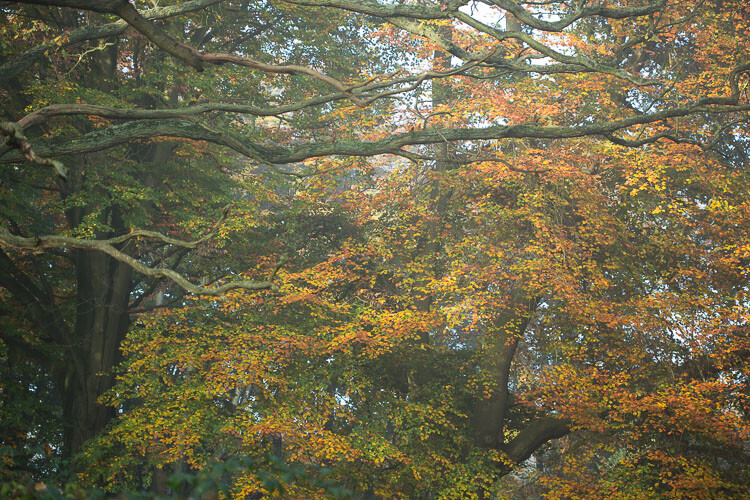
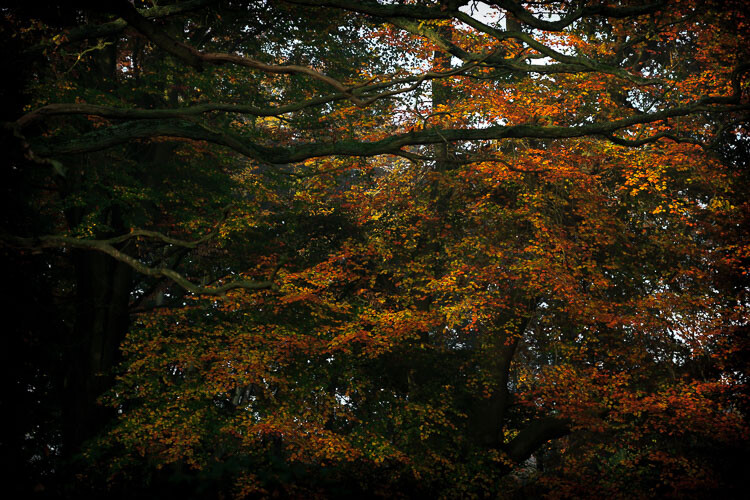
Unlike the other photos I’ve featured in this article, which were all taken on the same beautiful morning in Hampstead Heath in London, in this photo I didn’t want to have that misty fog in the photo. It didn’t work for me with the vibrant colours of the leaves. So instead I enhanced that deep colour and gave the leaves a strong contrast with the dark branches.

To me this is more of a natural look, what you would see when you are out in the woods. I used the HSL module to saturate the colour channels individually with a little Clarity in the basic module. It didn’t really take a big push to make a big change.
dps-artistic-lightroom-8-5

After processing.

“The reason that art (writing, engaging, and all of it) is valuable is precisely why I can’t tell you how to do it. If there were a map, there’d be no art, because art is the act of navigating without a map.” – Seth Godin

Take a unique approach for each image

You wouldn’t shoot all of your images at the same shutter speed would you? When you are out taking photos, even if you shoot on full auto, you respond to both the subject and the lighting conditions around you. You adjust and work with what is there. That’s the same approach you need to take when processing your images.

I like to think of processing an image like creating a painting. It’s an organic, subjective, unstructured process that finds me going back and forth between the tools, using a little of this, a little of that, until I am able see something that I want.
dps-artistic-lightroom-8-2

Before processing.

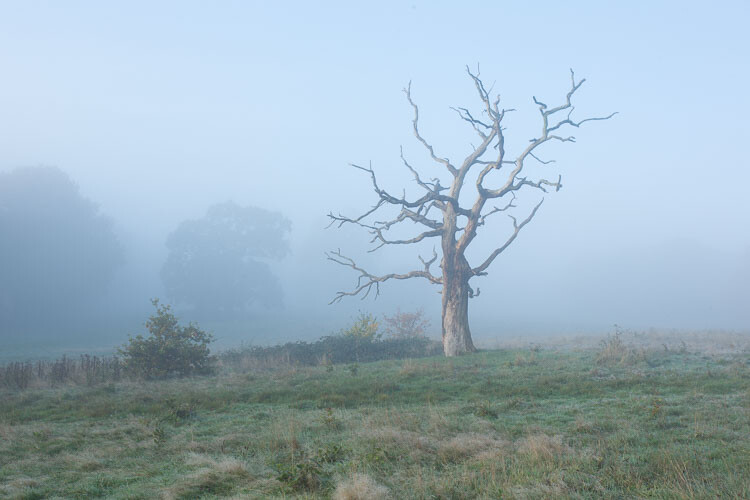
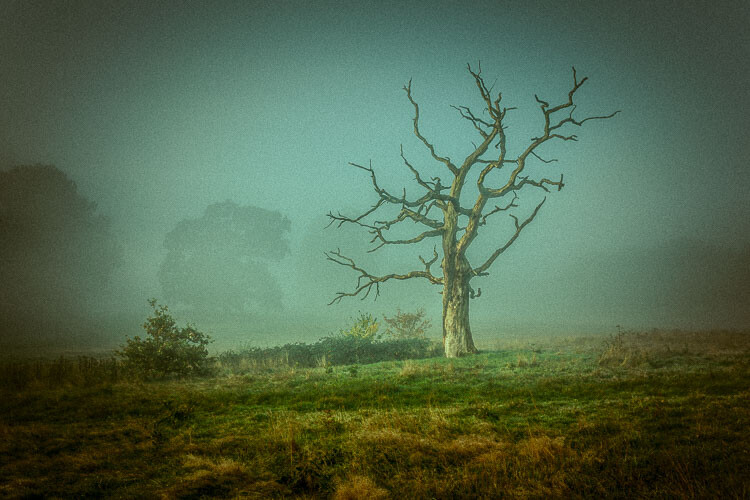
This image already has all of the elements for a good photo. There is atmospheric light that you can truly feel, and the composition of the bare wild tree on its own is strong. So what I focussed on in the processing was to bring out the colours and enhance the atmosphere ad feeling of cold, bleak and misty. Plus I thought a blue/orange split tone would look cool and topping it off with some grain would make it a have a feel of nostalgia…I’m very nostalgic about trees (childhood thing).
dps-artistic-lightroom-8

After processing in Lightroom.

“You must forget all your theories, all your ideas before the subject. What part of these is really your own will be expressed in your expression of the emotion awakened in you by the subject.” –  Henri Matisse

How can you apply this to your photography?

My approach might sound a tad unhelpful – I mean if I can’t tell you the formula, the five steps to success, the three keys everyone needs, how can you learn? Well, my approach may take longer to learn, but you will end up with much stronger images. You’ll create images that are powerful, impactful, and unique to you.

Even though Lightroom is about learning a software program, I recommend you do not use it with a technical mindset. Use it with a creative, artistic mindset. Use it as you would a paintbrush, a pen or your camera. Remember we are creating – not solving an algebra problem here!
dps-artistic-lightroom-8-3

Before

dps-artistic-lightroom-8-4

After

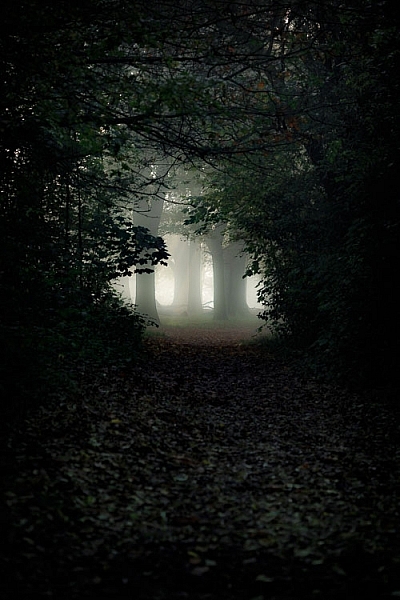
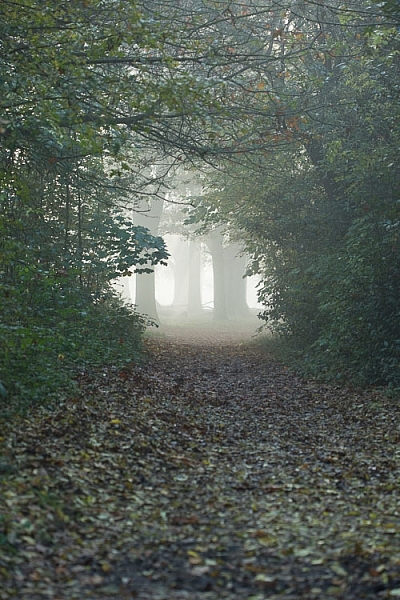
What appealed to me here was the slightly mystical feel. It made me think that the path was leading to a circle of fairies. So my Lightroom work reflected that vision, and this is what I created (above right).I wanted a very surreal look. I used split toning in greens and blues, as well as a vignette, and brought out the blacks very intensely using the basic panel. What I ignored was the histogram, which was all squashed up to the right, but that doesn’t matter.

I wanted a very surreal look. I used split toning in greens and blues, as well as a dark edge vignette, and brought out the blacks very intensely using the basic panel. What I ignored was the histogram, which was all squashed up to the right, but that doesn’t matter. Art is always a bit chaotic, right?

Before and after step by step

This is a creative, organic, fun process. Once you’ve gone through all the Lightroom modules (if needed), don’t be afraid to go back and adjust and have a play.

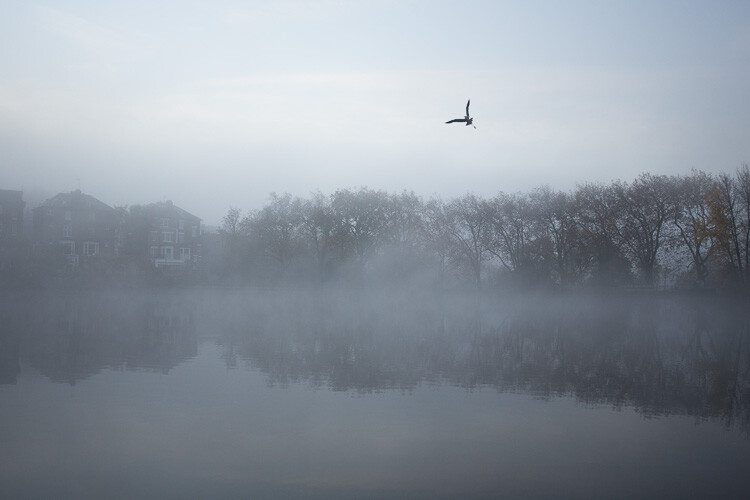
So, I want to take you through the steps of how I processed an image in detail. I hope it sparks a lot of ideas for ways to help you process yours. I am going to take the photo from this, straight out of the camera:
dps-artistic-lightroom-1

Before image, straight out of the camera.

To this:

dps-artistic-lightroom-1-7

Finished image processed in Lightroom.

Connect to the image

Look at the image. What does it make you think of, feel or imagine? What qualities can you sense in the image that you can work with and draw out? The Lightroom tutorials you watch and read will tell you how to use sliders, etc., but they usually don’t tell you when to use them. This process of knowing when to use certain tools comes down to getting really involved in your image, and learning to use the inherent qualities of the photo to guide you.

This may sound obvious, but I think this is an essential step that most people miss. We are often so focused on getting it done, or getting the buttons ready to press, that we leave the artistic part of our mind and jump too quickly into the technical. So respond to the subject, the colors, and the mood of the photo. No blanket presets here, please!

Basic panel first

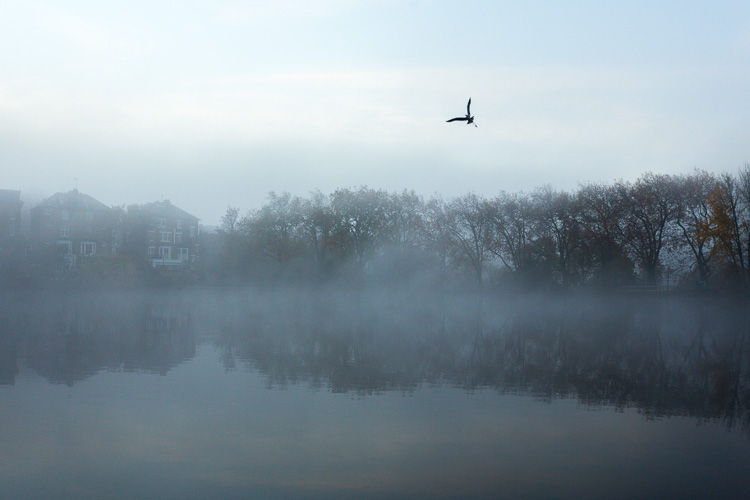
My next step with this image was with the Basic panel. Most images will start here because you may want to control the tones before starting on the color work. This image was really flat tonally so I wanted to boost the contrast by bringing down the shadows and raising the whites. You get much more specific control when you use the Highlights, Shadows, Whites and Blacks slider then you do with the Contrast slider above them. So here are the settings I applied:

  • Highlights -94
  • Shadows -50
  • Whites +50
  • Blacks -31
  • Saturation +50
  • Exposure -0.20
  • Contrast +19

Those changes produced the following result:
dps-artistic-lightroom-1-2

Now I have some good dark tones in the trees and some bright whites in the sky (all contained in the Histogram). Some Saturation gives me a good idea of what color the image would like to be (what direction it leans naturally). In this case, it’s blue.

Apply a Tone Curve

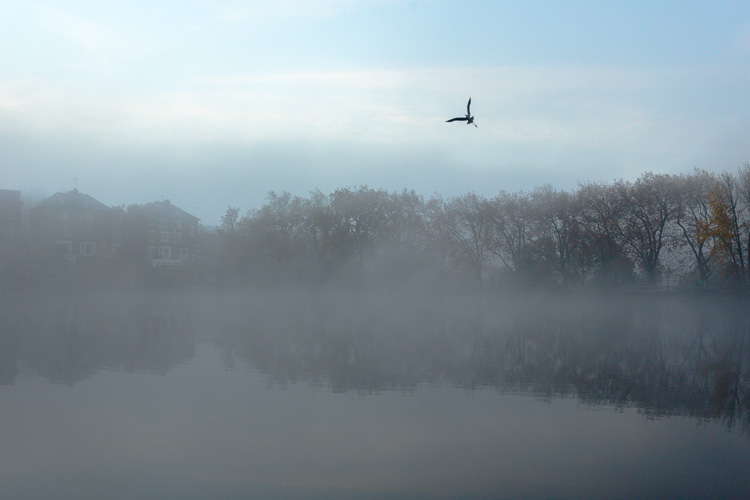
Next I decided to use the Curve panel for a bit more tonal change; bringing up the shadows and bringing down the highlights. Now the sky is richer and the dark areas are less muddy looking.
dps-artistic-lightroom-1-3

Dehaze

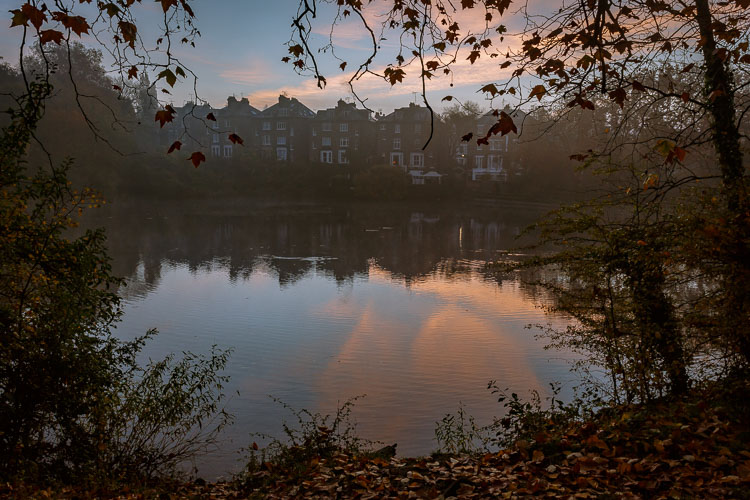
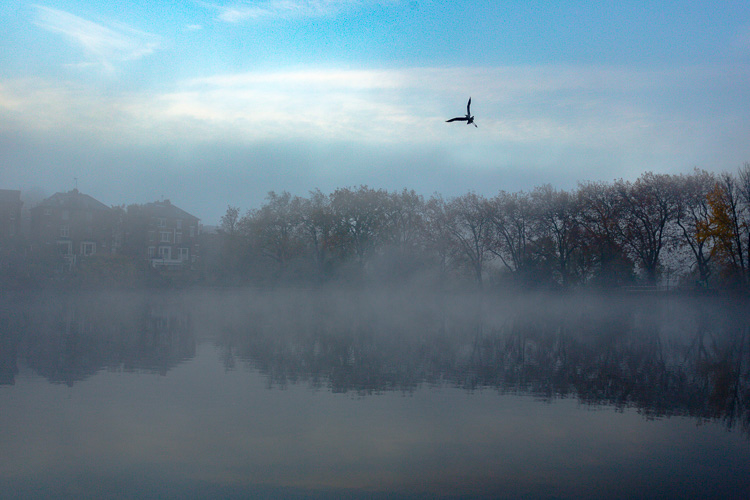
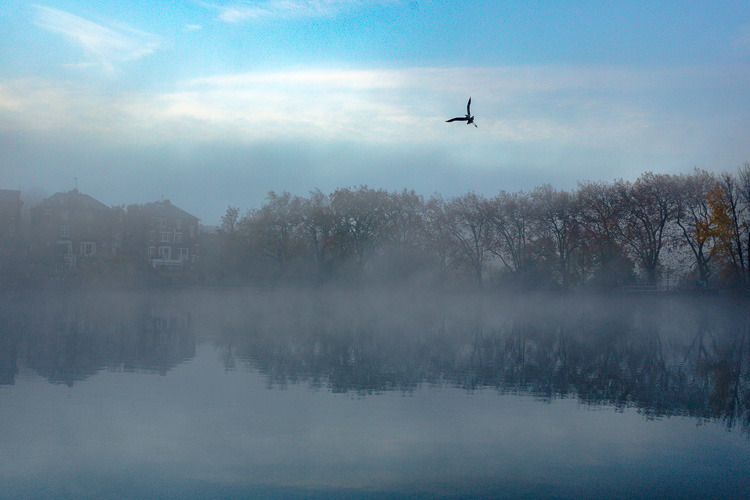
It was a really beautiful morning with the fog and trees, not to mention the fantastic bird (got lucky there!). That said, I was looking at this image and feeling that I wanted to bring out a lot more detail in the water and houses. The fog was great but I was pretty sure I could get more detail without a loss of atmosphere. My answer was Dehaze in the Effects module.

Dehaze is useful for images like this, but can be really super harsh if you are not careful. This image seemed to take a +44 without negative effects, like colour blocking and artefact creation so I left it there (see below).
dps-artistic-lightroom-1-4

Dehaze does tend to mess around with Saturation, which you can see here. But, eh, I liked it! What I was going for was removing some of the fog on the water and houses and that worked well. It also had the added effect of making the reflection of the trees in the water stand out.

Local adjustments

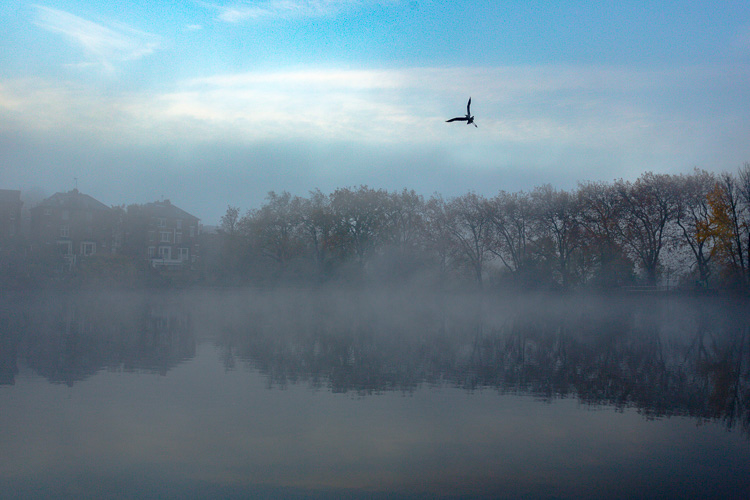
At this point I usually start to toggle modules on and off to see what happens. I thought the shadows of the trees on the right hand side could use a bit of detail so I made a mask with the brush tool to lighten them a bit. This also brightened up the sky behind the trees and made it all look less muddy. Then, I did the same for the reflection.
dps-artistic-lightroom-1-5

I really liked the fog on the water but I wanted the water to look crisp. So I used a graduated filter over it and put Clarity up to +74 and Exposure at +.60. I also changed the colour to match the blue sky. Now there is a lot more separation between the water and the reflection.

If I like my work up to a point I’ll make a snapshot so I can continue working on the image, but go back to that stage later if necessary. I’m pretty happy with it so far. Now is the time I would start toggling modules on and off again to see what needs adjusting.
dps-artistic-lightroom-1-6

Next, see below, I chose to use HSL (Hue/Saturation/Luminance) panel last just to boost specific colours, in this case the blues. (Not sure why now that I look at it…probably would do it all over again without the blue boost).

I did try lightening the tones in the trees, which look yellow but LR wasn’t having it and said that it was actually blue. Understandable, since there is such a blue cast over everything. The only yellow that could be targeted was that last tree on the far right. I end up with this:

dps-artistic-lightroom-1-7

Conclusion

Now – on the last note, Lightroom is never going to destroy your image or make permanent changes. Therefore you have endless opportunities to play and learn what is possible with this amazing world of processing. Processing is the second half of photography, taking the photo is just the first half. Now I encourage you to:

“Go and make interesting mistakes, make amazing mistakes, make glorious and fantastic mistakes. Break rules. Leave the world more interesting for your being here. Make. Good. Art.” – Neil Gaiman

I’d love to know what you think. Maybe you would have gone about processing this image totally differently? Maybe you like what I did, and maybe you don’t? Let me know, I would love to hear your thoughts.

googletag.cmd.push(function() {
tablet_slots.push( googletag.defineSlot( “/1005424/_dPSv4_tab-all-article-bottom_(300×250)”, [300, 250], “pb-ad-78623” ).addService( googletag.pubads() ) ); } );

googletag.cmd.push(function() {
mobile_slots.push( googletag.defineSlot( “/1005424/_dPSv4_mob-all-article-bottom_(300×250)”, [300, 250], “pb-ad-78158” ).addService( googletag.pubads() ) ); } );

The post Tips for How to Think and Use Lightroom More Artistically by Anthony Epes appeared first on Digital Photography School.


Digital Photography School

 
Comments Off on Tips for How to Think and Use Lightroom More Artistically

Posted in Photography


Think Tank Photo Outlet Center launches with discounted goods

03 Dec

Think Tank Photo has launched a new online Outlet Center offering discounted camera bags. These items, as is sometimes the case with outlet stores, are new products that may for one reason or another lack their original packing material and/or their sales tags. The Outlet Center currently lists 16 bags, though no doubt the number will fluctuate based on inventory. Price reductions are steep, and include the Shape Shifter bag, originally priced at $ 264.75, for $ 149.75.

Via: Imaging Resource

Articles: Digital Photography Review (dpreview.com)

 
Comments Off on Think Tank Photo Outlet Center launches with discounted goods

Posted in Uncategorized


Think Tank Airport Helipak for 3DR Solo drone and Airport Advantage bags now available

17 Sep

Think Tank has a new rolling camera bag and a drone backpack for traveling, the Airport Advantage and Airport Helipak for 3DR Solo. The Airport Advantage bag is designed for safely transporting cameras and lenses, while the Helipak model is designed to transport the 3DR Solo drone, a 15-inch laptop, and related drone accessories including the controller.

The Airport Advantage bag meets both international and US airline carry-on requirements, according to Think Tank, weighing in at 5.8lbs / 2.7kg with 2.7 W x 19.5 H x 7.3in D / 32.3 x 49.5 x 18.5cm external dimensions. This rolling bag can accommodate various camera and lens arrangements, such as two gripped DSLRs with lenses and three or four additional lenses, a pair of mirrorless camera bodies with ‘lots of lenses,’ or a standard DSLR with attached lens alongside three or four other lenses, a 15-inch laptop, and a gripped DSLR with an attached lens.

The Airport Helipak, meanwhile, is a soft-bodied backpack with a dedicated pocket for a 15-inch laptop, plus a custom divider that enables the wearer to reconfigure the bag’s space to accommodate other gear. According to Think Tank, the bag can hold the laptop, 3DR Solo drone and its controller, a charger and spare rotors, extra batteries, tools, GoPro cameras, a jacket and other items. The backpack weighs 4.6lbs / 2.1kg and has 14 W x 20.5 H x 9in D / 35.6 × 52.1 × 22.9cm external dimensions.

Both the Airport Advantage and the Airport Helipak for 3DR Solo are available now for $ 249.75 and $ 199.75.

Via: Think Tank (1), (2)

Articles: Digital Photography Review (dpreview.com)

 
Comments Off on Think Tank Airport Helipak for 3DR Solo drone and Airport Advantage bags now available

Posted in Uncategorized