RSS
 

Posts Tagged ‘Things’

10 Things I Learnt from Daily Shooting

02 Aug

A Guest Post by David Powell from Shoot Tokyo 

Dave.jpegHere are a few lessons I have learnt from daily shooting… I hope you enjoy.

1. “Do or Do Not…. There is no Try”

A lot of people shoot daily as they are lucky enough to have a career in photography. Others embark on a 365 project while others just take photos all the time. I decided after I started ShootTokyo that I wanted to shoot daily as a way to try and rapidly improve my photography.  

Shooting daily isn’t hard. It does require dedication, creatively and planning. It actually gets significantly easier with time as well. When I first started I would rack my brain for something interesting to photography but now you can put me just about anywhere for 10 minutes and I can find lots of ways to photograph it.

2. Bring your Camera Everywhere

To capture great images you need to have your camera with you.  People always ask me where I find the time to shoot. Honestly I shoot whatever is in front of me where ever I am going. Most of the great shots you will take aren’t planned or set up. Events or situations unfold and you capture them.

Having my camera with me allowed me to capture the events of the March 11th Earthquake in Japan as I was experiencing it and share it with my family, friends and ultimately strangers worried about their loved ones in Tokyo. 

1.jpeg
 
Having a camera allowed me to capture this woman checking the news about the earthquakes while on a break.
 
2.jpeg
 

3. Take Pictures of People

One of the most interesting pictures you can take is of people. I’ll let you in on a secret. Most people love having their photograph taken. Many photographers are very shy about asking people if they can take their photo so they end up trying to sneak a shot. This is just something you have to get over.  While most people like having their photo taken, they also like to know it is happening. I have found that 9 out of 10 people will say sure and give you a big smile or pose of whatever you are looking for when asked. The approach I have taken that seems to work is being genuine and I simple ask ‘Do you mind if I take your photo?’. Often I will ask them to continue doing whatever they are doing and I take my shot. I also carry these business cards that I call ‘photography cards’ that I give people and let them know they can email me and I will happily send them a high resolution photo for their troubles. Probably 10% actually email me but giving them a card makes the interaction more ‘legitimate’ and puts people at ease.

3.png

I have learnt to not be shy about asking if I can take someone’s photo and I am so pleased with the results I can get now… Check out this hip chick at Shibuya’s Hachiko…

4.jpeg

This beautiful girl passing through Shibuya Station…

5.jpeg

and dogs…

6.jpeg

4. The Less Gear you Carry the More Photos you take

This is a lesson I learnt the hard way after dragging excessive amounts of camera gear across Tokyo and when I was traveling. Typically I would leave the house with my Canon 5DMKII. I wanted to ensure I would catch any shot so I will make sure to bring a good assortment of lenses; 16-35mm, 24-70mm, 50mm, 135mm and maybe my 70-200mm. I would also have an assortment of filters, a flash or two and other odds and ends. At the end of the day, I spend all of my energy lugging gear around that I didn’t spend nearly as much time shooting. The reality is you can make great photographs with whatever gear you have granted you know how to use it.

Now more often than not, I leave the house with a single prime (fixed focal length) lens. This allows me to focus on taking pictures and bringing out my creativity to capture the shot I need with the only focal length I have. I carry the most minimal of accessories; extra card, extra battery, an ND filter and a cloth to wipe the lens. That’s it.

Do I miss some shots due to my limited gear? Sure, but what I missed is easily made up by all of the other shots I get.  

7.jpeg

5. Force Yourself to Shoot one Lens for a Week

A big part of making #4 work is knowing how to use your gear. I realized I would often carry multiple lenses as I didn’t know how to get a shot or the shot I wanted with the tools I had. I would feel like I was limited with a 50mm so I would want to make sure I had a 70-200mm if it was far away, and a 24-70mm in case I needed to zoom to capture what I needed, or maybe a 16-35mm in case I needed to capture it wide. I now shoot almost exclusively prime lenses. With my Leica M9 I shoot a 21mm f/1.4 Summilux, a 35mm f/1.4 Summilux and a 50mm f/0.95 Noctilux.

8.jpeg

The reality is you can capture a great shot with probably any lens you have with you provided you understand how to use the gear you have.  What I mean by this is what shots work for a given lens. What angle or distance do you need to be at for this particular focal length to give you the perspective you want.  I was great at shooting my 50mm lens but I really struggle with my 35mm and had just purchased a 21mm and did not really understand how to get the most out of it. I forced myself into a lens rotation where I shot a single lens for a week. I’ll be honest, it was incredibly frustrating for me. At times I wanted to just switch to a different lens as it was impossible to get the shot I wanted or needed but after a few days it became much easier to get the shots I was looking for and soon I was able to pre-visualize the shots before I even lifted the camera to my eye.  Now I can walk the streets at ease with any of my prime lens and come home with a card full of shots that I am happy with.

9.jpeg

10.jpeg

11.jpeg

6. Develop a Personal Style

There is no right or wrong with photography. Some people love flashes.  Others just shooting with their iPhones. Some love to photoshop their pictures for hours. Do what you love doing.  One thing shooting daily has helped me to do is develop a personal style of shooting. When I first started I was always watching people and trying to see if I could shoot like ‘them’. This was helpful to get me to learn to use my gear but once you know how to use your camera, you need to develop a style that is yours.  I don’t have a name for my style but I like a lot of selective focus and clean, natural pictures.  I do next to no post processing on the photos. The most I will do is clean up any dust spots, crop a little, or adjust exposure but for me photoshop on my Mac is to correct little imperfections but not for making pictures.
I like to use very narrow depth of fields to tell my stories. There are no hard and fast rules to what you can and can’t do, should or shouldn’t do. Learn the basics and then decide how you choose to apply them.

12.jpeg

I love to use a narrow depth of field and throw primary colors out of focus.

13.jpeg

I’ve learnt to love photographing people once I got over the initial fear of asking people if I can take their photo.

14.jpeg

I love combining shallow depth of field with lots of contrast like in this picture of ‘Dark Shibuya’…

15.jpeg

7. Shoot out of Airplane Windows

I have never been one of those people who shoot out of airplane windows. I have flown probably close to 1,000,000 miles in my career and can’t believe all of the subjects I have missed; Alaska, Mt Fuji, the slums of Mumbai, Chicago skyline, arrivals in Boston. This is something that I started doing this year and I have been so pleased with the results.

16.jpeg

8. Try new Things

Try different types of photography as you are trying to learn what it is you like. I was surprised to find out how much I enjoyed photographing the moon, how easy it is and that I already had all of the things I needed.  If you want to learn how to photograph the moon, read THIS. (link to: http://shoottokyo.com/photograph-moon/ )

17.jpeg

I also developed a love for HDR. This is the only time I am using software to modify my images. HDR can easily be overdone so I need to be careful but I found I really enjoyed it. My inaugural post on Shoot Tokyo was on HDR. You can read it HERE.

18.jpeg

Panning is a great way to bring motion and movement to your photos to make them come alive.  If you don’t know how, read THIS.

19.jpeg

9. Shoot at Night

I do the majority of my shooting at night. I am surprised how many people stop shooting when the sun goes down. What you need is a tripod, a low ISO and some practice. There is so much to photograph when the sun goes down.

Like light trails…

20.jpeg

Evening construction sites…

21.jpeg

Cities

22.jpeg

10. Backup Everything

I can’t stress this point enough.  I had a serious run of bad luck with Macs last winter and this spring.  I actually had 5 complete hard drives failures on my Mac(s).  Each time I was able to get Apple to do a complete replacement of my machine but it kept happening.  They were never able to root cause the problem but I am running safe and sound on a Mac outfitted with Solid State Flash Drives. I am very paranoid by nature so I was fortunate enough not to lose a single photograph throughout these issues. This experience just reinforced what I already know; backup everything, often and to multiple locations. I have friends and know fellow photographers that have lost their hard drives without backup.  I can’t imagine the feeling of losing all of my photos but I am do my best to ensure this never happens to me.

23.jpeg

Currently I backup using Apple’s Time Machine to Western Digital drives connected with FireWire. I do this as I travel often and the backup drive comes with me. A lot of people stop backups while traveling is when you can run into an issue such as losing a drive, downloading a virus, or having a laptop stolen. When I pull the data off cards and onto my Mac it is backed up before I delete the data off of the cards. I also have several additional drives that I rotate copying my entire ‘pictures’ folder to once a month as an additional backup.

I hope you found this useful!

Dave Powell is a blogger and photographer based in Tokyo, Japan. He writes Shoot Tokyo photography blog. You can see more of his work at www.shoottokyo.com or follow him on Twitter and Google +.

Post originally from: Digital Photography Tips.

Check out our more Photography Tips at Photography Tips for Beginners, Portrait Photography Tips and Wedding Photography Tips.

10 Things I Learnt from Daily Shooting

Digital Photography School

 
Comments Off on 10 Things I Learnt from Daily Shooting
Posted in Photography


TetherTools – Shooting Tethered and other Fun Things..

07 Jul

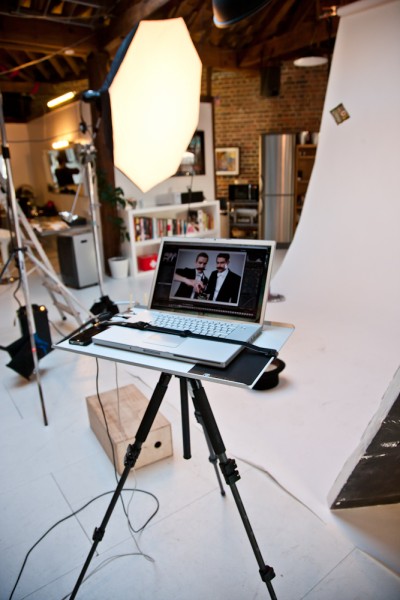
We had a look at the AERO from Tether Tools a while back (Read that review here) well, I’ve been in touch with the photographer who did that review for us, London based commercial photographer, Nathan Pask. He was on his way out to a shoot and did indeed have his Aero with him – Nathan snapped a couple of shots for me of the Aero in action and had this to say when asked “are you still using that Tether Table?” (I love a review that actually has a few months of use and a recap! Two weeks to get a proper feel for a product is a bit silly, really)

“Sure do mate. All the time! I get a lot of admirers ask about it. I like that its light. It does have a little bit of flex, but I have the big one because of the 17″ lappy so I guess that’s to be expected. I never feel like its going to topple though. So I mostly attach it to my carbon sticks and it becomes a really nice lightweight option when I’m on location particularly as myself or my Digi-op can easily pick it up and move to the next spot without too much fuss and the strap over the laptop keeps it pretty secure. Can’t recall ever having a scary moment that the table has been responsible for. It is quite expensive for what it is, but there isn’t a product I’ve seen that can compare, so they kinda have the market sewn up currently.”

Tether-Tools-Nathan-Pask-Photographer-London

Nathan Pask on a shoot using the Tether Tools Aero Master

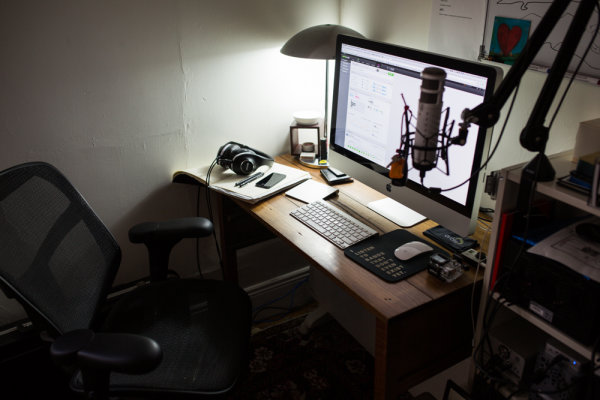
Since getting hold of my own Aero, I’ve been using her for a lot more than simply shooting tethered on a set or in the studio – the Tether Tools Aero has become a second desk space when I need a little more space – as you can see below, the option for pretty much anything else besides my frequent cups of coffee isn’t really an option. It takes me about 45 seconds to set up a tripod and my tether table to use as an extra desk.

simon_pollock_melbourne_based_photographer

Since our last look at Tether Tools, their quiver of gear has expanded to include a desk full of extra handy stuff that is set to make your life easier, from iPad holding gizmos to cup holders (I’m not even joking) – I wanted to bring some of it to your attention, perchance you’re struggling and these will bring a smile to your face and a bit of extra speed and security to your workflow. I went across to visit the terribly attractive team at Kayell in Melbourne and picked up the “essentials kit” it has Jerk Stopper and the super handy USB light in a little case, as well as a couple of the TetherPro cables – I got them in orange as, on a darker set, they’re “less easy” to trip over… (I’m a clutz ok..!)

For those of you still unfamiliar with exactly what tethering is, here… check this out!

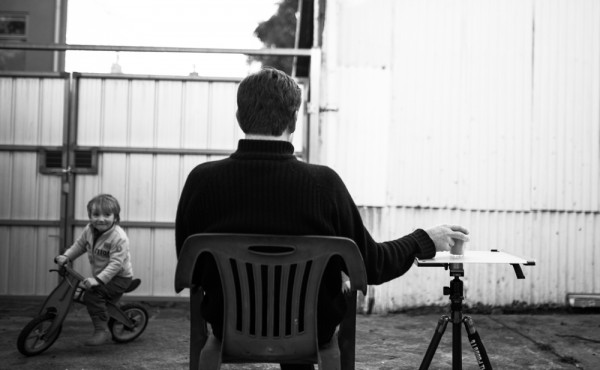
I’m using the Aero Master and an Aero XDC to run my external “on location” disc underneath the Aero.. This way, as Mark mentioned in the video, I can shoot straight to my laptop and have a copy load into my external disk via folder actions. I also have the CF in the camera with a copy on should something go horribly wrong. Some other examples of where I’ve used my Aero – most of which you may find a little amusing – include a coffee table (yes, with a tablecloth over it) as a work desk to use my Macbook Air on when I’m sitting outside working while watching my 3 year old ride his bike around and around… I’ve used it on a 3LeggedThing “Keith” as a tabletop recipe book holder AND I’ve also used it as a flag to block light on a shoot. (I usually use a NastyFlag or similar if I’m simply shaping light to shoot a product, but hey – I needed something bigger!)

simon_pollock_tether_tools_3leggedthing_photographer

The bottom line I guess is that the Aero has sooo many other uses than simply being a great, portable tethering accessory and workbench.

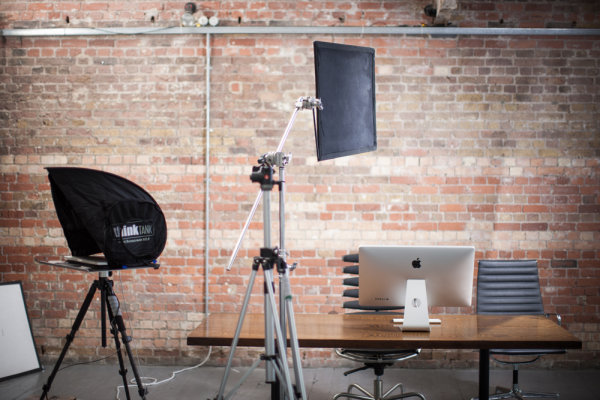
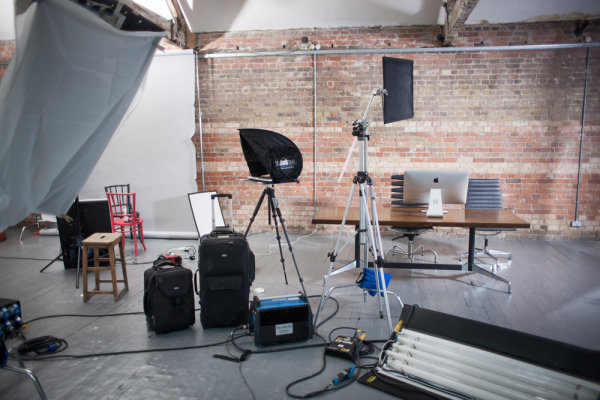
I’d like to close todays proceedings with a couple of actual photographs from the set Nathan was working on, you can see his Aero with a thinkTank Pixel Sunscreen on top, combining these two means you have a stable work surface and a non-glare option to make sure you’re shooting and getting exactly what you need. I agree that the Aero may not be for everyone, but if you’re a semi-pro or pro that is continually moving that annoying coffee table around to rest your laptop on, well, it may just be for you….

NN_IFX 0671

NN_IFX 0673

The Tether Tools Aero is a great bit of kit, though as Nathan mentioned, it is towards the pricier end of the scale, but I’d say for a working pro that does a lot of tethered work on location, the Aero is invaluable. (And my mum always said “buy well, buy once)

~Sime


Post originally from: Digital Photography Tips.

Check out our more Photography Tips at Photography Tips for Beginners, Portrait Photography Tips and Wedding Photography Tips.

TetherTools – Shooting Tethered and other Fun Things..


Digital Photography School

 
Comments Off on TetherTools – Shooting Tethered and other Fun Things..

Posted in Photography


A photographer’s wishlist: 5 things we want to see from Apple’s WWDC

06 Jun

Screen_Shot_2013-05-28_at_8.19.55_AM.png

In advance of Apple’s World Wide Developer’s Conference next week, we’re sharing our photographer’s wishlist of the announcements we’re hoping to see from the annual event. Compare our thoughts with yours on an expected new iOS 7 mobile operating system, whether or not we’ll see a new iPhone and more at connect.dpreview.com.

News: Digital Photography Review (dpreview.com)

 
Comments Off on A photographer’s wishlist: 5 things we want to see from Apple’s WWDC

Posted in Uncategorized


Why does your camera see things differently than you?

23 Feb

Do you ever see a beautiful scene, take out your camera, take the shot and then wonder what went wrong? Why doesn’t the display on the LCD screen look at all like the scene in front of you?

Do you ever stand next to another photographer and wonder how they made an image that is better than the scene you see with your own eyes?

Understanding how the camera “sees” is the key to figuring out why this happens and what you need to do to take charge of your camera and make the images you envision.

If you’re already dreading the mathematical calculations, don’t worry! I’m not going to start measuring my eyeballs and pupils and trying to figure out what kind of lens my eyes are equivalent to in focal length, f/stops, and ISO, or how many megapixels my eyes see. That’s not what this is about.

It’s just about understanding how a camera works differently than our eyes.

When the camera’s “eye” is better than our own

Sometimes the best images show the very thing that we cannot see with our own eyes.

Low Light Levels

At low light levels our eyes are less sensitive to colour than normal. Camera sensors, on the other hand, always have the same sensitivity. That’s why photographs taken in low light appear to have more colour than what we remember.

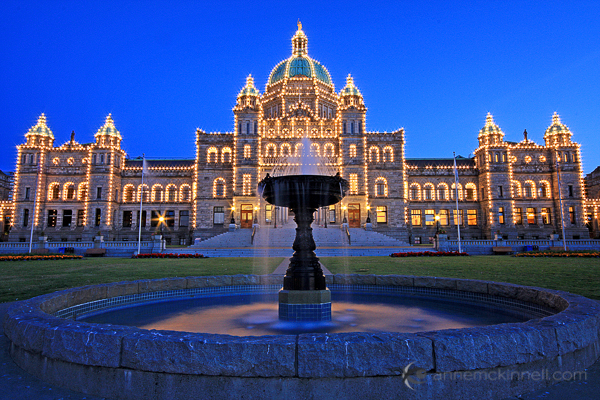
The Legislature in Victoria, British Columbia

When I made this image of the Legislature in Victoria, British Columbia, the sky was much darker and less blue to my eye.

Long Exposures

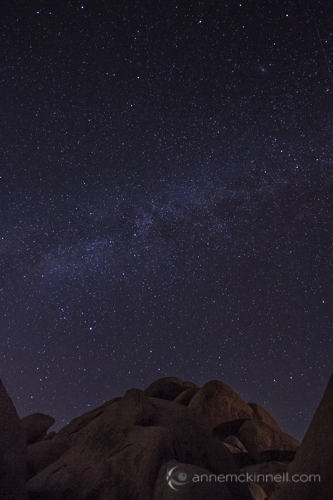
The longer the shutter remains open the more light can enter the camera and hit the sensor. Therefore long exposures can bring out objects that are faint in the sky whereas our eyes will perceive no extra detail by looking at something longer.

Starry Night at Joshua Tree National Park, California

The 30 second exposure in this image, made at Joshua Tree National Park in California, picked up more stars than I could see with the naked eye.

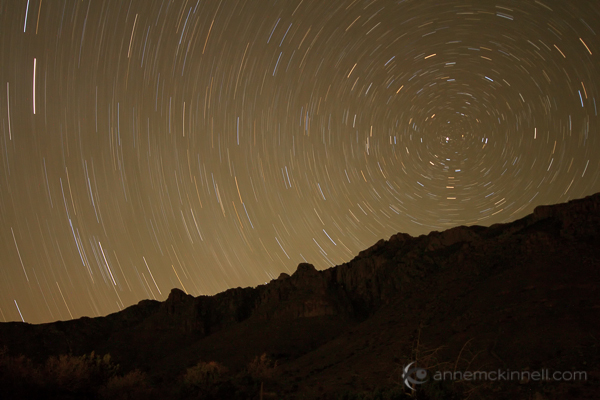
Long exposures also allow us to see the passing of time in a way we cannot with our eyes.

Star Trails in Guadalupe National Park, Texas

In Guadalupe National Park, Texas, I was able to capture the movement of the stars around Polaris, the north star, by leaving the shutter open for 30 minutes.

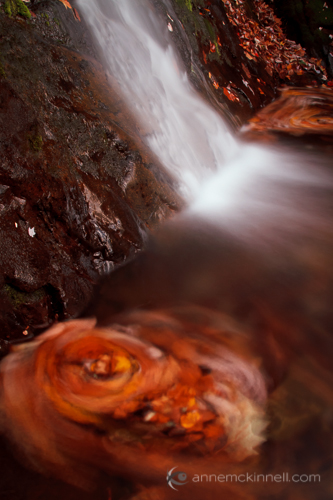
Fallingwater Cascades along the Blue Ridge Parkway, Virginia.

At Fallingwater Cascades along the Blue Ridge Parkway in Virginia, the movement of the water caused the maple leaves to swirl around in a circle. By using a 15 second exposure I was able to capture the movement of the leaves.

Short Exposures

On the other end of the scale, high speed photography can freeze motion and allow us to see something that would otherwise pass by too fast for our eyes to retain any detail.

Egret at Ding Darling Wildlife Refuge, Florida.

By using a shutter speed of 1/5000 second, I was able to freeze the water droplets as they swirled around the egret’s beak as he caught a fish.

Depth of Field

One thing that is somewhat similar between a camera and a human eye is aperture, but only if you hold it steady. For example, if you stare at one word in the middle of the this sentence and do not move your eyes, you can perceive that the other words are there but they are not clear. The part that is in focus is only the centre portion of your field of view.

That is the same as a camera with a small aperture. The difference is that you can’t actually look at the out-of-focus part. As soon as your eye moves to the out-of-focus words they instantly become in-focus.

Whereas if you are looking at a print or an image on your screen you can look at the out-of-focus part which is something we cannot do with our eyes. That’s why shallow depth of field images are so interesting to us.

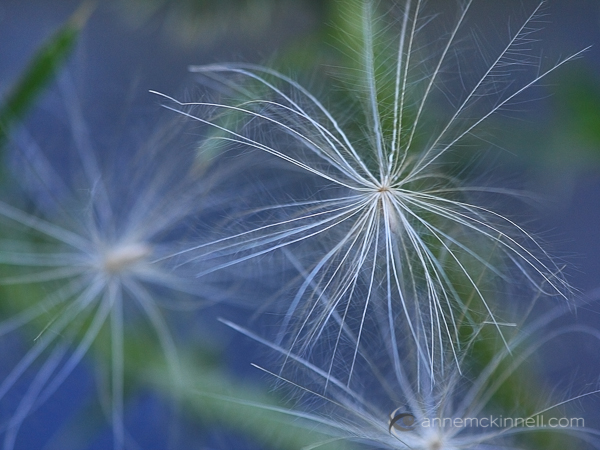
Dandelion Seed

Colour

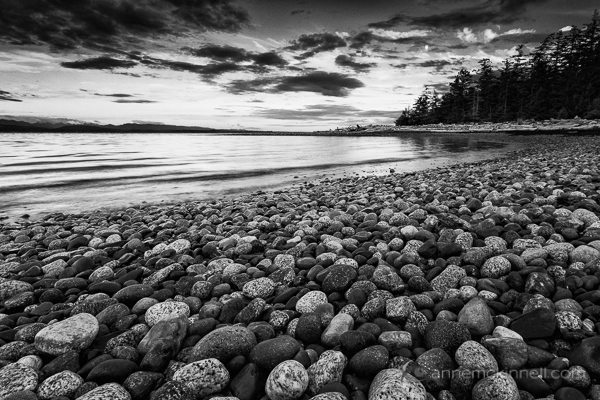
Most of us see in colour. Others see limited colours. But either way we are stuck with what we have. Maybe that’s why some people like or dislike black and white photography. For a long time colour was considered a limitation in photography and the human eye was obviously better. But now photographs give us the option of viewing things in a different way.

Rocks on the beach at Rebecca Spit, Quadra Island, British Columbia.

Rocks on the beach at Rebecca Spit, Quadra Island, British Columbia.

When the human eye (or brain) is better

Dynamic Range

One thing to keep in mind is that when we see something with our eyes, our brain is involved too. Think of optical illusions where you perceive something that isn’t actually there.

As we look around a scene our eyes quickly adjust to changing light. Take a scene with dark shadows and bright highlights for example. As your eye moves from one area to another it quickly adjusts so our eyes take in the right amount of light and we see detail in all parts of the scene. When we look at a scene it is like our brain takes numerous snapshots and what we perceive is the combination of those snapshots.

Your camera cannot do that. It simply records the light that hits the sensor at one aperture setting. It can only have one exposure for the whole scene.

That is where exposure blending, or high-dynamic-range (HDR) photography, can sometimes make a scene look more like what we perceived at the time.

On the other hand, depending on how you blend your images, HDR photographs can show us a lot more detail than what our eyes saw and then they don’t look realistic. Not that there’s anything wrong with that! It depends on whether you want your images to be realistic or not.

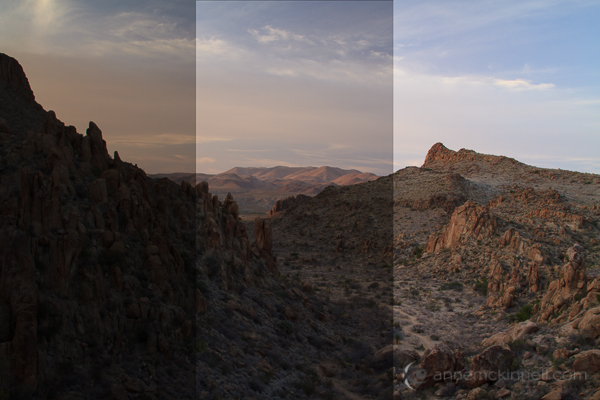
Grapevine Hills HDR Brackets

The image above represents the same scene taken at three different exposures. One exposure is for the shadows, another for the mid-tones and the other for the highlights.

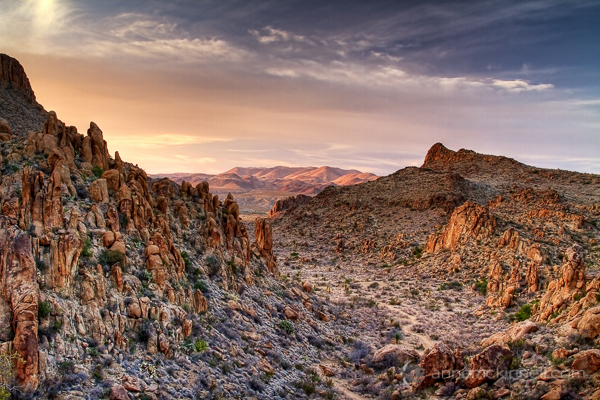
Grapevine Hills, Big Bend National Park, Texas.

Grapevine Hills, Big Bend National Park, Texas.

I can blend those images together in photoshop and end up with an image like this. Our brain does that all by itself!! This more closely represents the image I remember in my mind.

Conclusion

The kinds of images that are considered good differ from person to person. It’s subjective.

Some people like images that are just like what their eyes saw or are capable of seeing — the realistic images.

Other people prefer images that show them what they cannot see such as black and white, long exposures, or HDR with tons of detail.

Either way, understanding why the camera “sees” things differently than you will put you well on your way to creating the kind of images you want to make.

Post originally from: Digital Photography Tips.

Check out our more Photography Tips at Photography Tips for Beginners, Portrait Photography Tips and Wedding Photography Tips.

Why does your camera see things differently than you?


Digital Photography School

 
Comments Off on Why does your camera see things differently than you?

Posted in Photography


30 Things you Should Know to Help you Start a Photography Business

21 Feb

14“Follow your bliss and the universe will open doors for you where there were only walls.” – Joseph Campbell

1. Find the best photography course or workshops that work for you

If you are going to invest in a photography course/workshop do some serious research first.

It’s a huge investment so find out who the teachers are. Are they industry professionals that are going to be teaching you relevant styles and techniques?

Is the style of teaching suited to your personality and photography?

Who are the ex students that have gone on to create successful careers?

Consider weekend workshops and online courses held by experts in their fields.

2. Find a great mentor

A mentor should be someone who has had a successful career, whose work you admire and is passionate about what they do. They should be available for at least one hour a month.

3. Get as much industry experience as you can

Intern with as many different photography businesses as you can, both large and small. My first interning gig was with a food photographer. I’ve also worked with high-end commercial product photographers, car photographers, and fashion and wedding photographers. I came away with valuable skills that I still use today.

4. Be Flexible when looking for an internships

When you are looking for an internship it’s often easier to offer your services on a casual daily basis or weekends or even nights rather than trying to find someone who will commit to a long-term internship.

5. Sweep the floor and scrub the toilet

I landed a full time assisting job with a fashion and celebrity photographer because he noticed I scrubbed his toilet and cleaned his studio when I had nothing to do

6. Hang around with people who inspire and support you

Some of your friends and family are going to try and talk you out of pursuing your dreams.
They have good intentions but it’s your dream not theirs.

7. It takes 10,000 hours of work to become a master of your craft

If you spend 3 hours a day photographing and editing photos you will become a master at it in 10 years. There are no short cuts or magic formulas, just hard work.

8. Photography is not a job it’s a passion

When you love what you do it never feels like work.

9. Learn to embrace failure

Some of the world’s greatest entrepreneurs had spectacular failures before they found success.

Henry Ford had 5 businesses fail before he founded the successful Ford Motor Company.

Thomas Edison failed 10,000 times trying to invent the light bulb and after the 10,000th time; he succeed

Don’t be afraid to make mistakes

10. Your uniqueness is the most important asset you have

The photography industry does not need another Ansel Adams, Annie Leibowitz, or Alfred Stieglitz. Develop a unique style that sets you apart from everyone else

11. The most common cause of failure is quitting

Most people give too early. Building a business takes years, there will be set backs. Commit to the long haul.

Fact: the average entrepreneurial millionaire has been broke or nearly broke 3.2 times

12. There is no such thing as overnight success

It took me 5 years to actually make a profit. It took me ten years before that profit was enough to afford me a decent lifestyle

13. Having a full time or part time job while you build your business is a great idea

I worked full time in an Italian restaurant for the first 5 years

Having another job while I built my business had the following positive effects

  • It gives you something positive do everyday while you are waiting for your first breaks
  • It removes that “desperate” energy around you. Trying to find new clients in this headspace is really difficult. Nobody wants to hire someone that appears desperate it makes them wonder what is wrong with you.
  • Your part time job may be the source of photography leads or your first big break. It was for me.

14. You will constantly be surprised by where your big breaks come from

I landed my first paid advertising shoot from waitresses I worked with. She introduced me to her husband who ran an advertising agency. One day he asked me to do a shoot for his agency. It was a simple product shot that should have taken an hour. I worked on it for 2 days, made a loss but earned a very happy and lucrative client.

15. Every time you are rejected means you are one step closer to success

Collecting new clients is a numbers game. In my early years I discovered that when I was showing my folio to Art Directors and Editors I was getting 30-50 “no’s” to every “yes”.

It took me many, many years to work out that this rejection is never personal. It often just comes down to potluck if you meet with someone on the same day they happen to have an assignment that suits you.

There are some very famous examples of people who experienced countless rejections before they achieved success

  • Author, J.K Rowling’s manuscript Harry Potter was rejected 12 times before she found a publisher
  • Walt Disney was knocked back 302 times before he got financing for creating Disney World
  • Several record labels rejected The Beatles
  • Colonel Sanders, the founder of KFC had his famous secret recipe knocked back a staggering 1009 times

16. Seek constructive criticism and learn from it

One of my greatest learning periods was during a 3-month stint working in a photo lab printing Black and white prints. Yes, last century when we marveled at the new mobile phone that was the size of a small refrigerator and twice as heavy.

I was shooting models tests all weekend and bringing them into the lab to print and process during the week. Two of my co-workers were 30+ year veterans who would critique my work and give me suggestions on improving technique and style.

Show your photos to as many industry professionals as you can. Ask for constructive criticism and learn from it. This is a great time of growth and learning.

Be grateful for all the praise your family and friends will always give your work but remember they will always love everything you do and may find it difficult to point out any faults.

17. Dress to impress

If you want people to take you seriously then you should take your appearance seriously.

18. Always read the fine print

Never sign a contract before reading the fine print. If you don’t understand it then find someone who does.

19. Work your strengths, hire your weaknesses

Aim towards outsourcing all the things that take you away from earning money for your business like book keeping and web design. Your time would be better-spent blogging or marketing.

20. Social Networking

Blog, tweet, flickr, facebook, instagram, google+, linkedin do it all and do it often.

Share your work, support other artists whose work you love and be generous with your information.

21. Shoot personal projects that inspire you

Unless you are lucky enough to be working for cutting edge magazines or alternative clients who love to push the envelope shooting only paid work will give you a very generic looking folio.

Shooting personal projects give you a chance to test new lighting styles, lenses, locations and it’s a brilliant way to showcase your personality.

22. Have a consistent workflow

Name and number and file every shoot in a consistent way. If you’ve ever spent hours looking for an image or even worse lost files you will understand the importance of this point.

23. Back up twice

Keep one hard drive on location and another off site. Hard drives fail. Protect your files.

24. If you pay peanuts you get monkeys

Use professional assistants. Having a great assistant means you never have to sweat the small stuff. Everything is taken care of. This means you can focus on getting the shot

25. An inexperienced make up artist or stylist can ruin and entire shoot

Work with a variety of different Hair and Make Up artists and Stylists till you find the ones that compliment your shooting style.

26. Always shoot in RAW

A RAW image file contains all the original data that the camera censor captured.

A JPEG is a compressed file that only retains about half the data of a RAW file.

Give image the best possible chance from the start. No excuses. Just shoot RAW.

27. Never store your memory cards in your back pocket and don’t shoot an entire job on one card

Pockets get holes in them and cards fail. I found out the hard way.

28. Be quiet

If you depend on your creativity for your living, then your most valuable piece of equipment is your mind. Taking time out everyday is a great way to do this and

29. Make friends with other photographers

The best advice on equipment and technique has come from spending time with other photographers. Social networking makes it really easy to connect with different photographers from all around the world.

30. Just start. Today

“Whatever you can do, or dream you can, begin it.” -Johann Wolfgang von Goethe

The first thing I did when I decided to become a photographer was to get business cards printed that said Gina Milicia PHOTOGRAPHER. Even if I wasn’t 100% convinced I was ready or good enough the simple act of printing cards made it real to me.

I started out with a basic SLR camera and a cheap zoom I borrowed from my brother. I photographed only in daylight for the first 2 years because I could not afford flash gear and worked hand held because I also could not afford a tripod.

There will never be a time when you are 100% ready. There will always be something missing. Just start. Today.

A few great books that inspired me.

  • Think and Grow Rich: – Napoleon Hill
  • Power Stories: The 8 Stories you MUST tell to build an epic business: Valerie Khoo
  • Outliers: The Story of Success: Malcolm Gladwell
  • The Alchemist: Paolo Coelho

Enjoy this post? Check out more of Gina’s advice in her new eBook – Portraits: Making the Shot (and get a bonus one free for the next 24 hours only).

Portraits_468x190px.jpeg

Post originally from: Digital Photography Tips.

Check out our more Photography Tips at Photography Tips for Beginners, Portrait Photography Tips and Wedding Photography Tips.

30 Things you Should Know to Help you Start a Photography Business


Digital Photography School

 
Comments Off on 30 Things you Should Know to Help you Start a Photography Business

Posted in Photography


All Things Yosemite: One Day in Yosemite

25 Jan

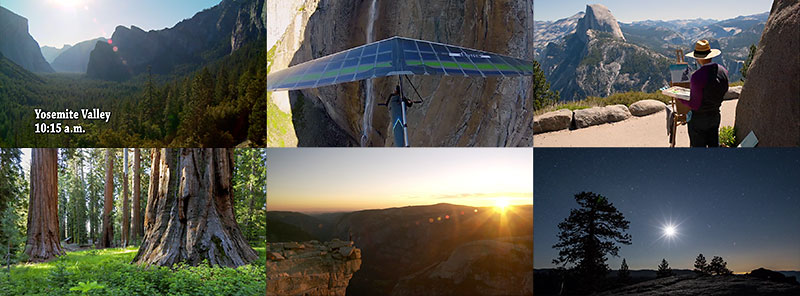
One Day in Yosemite Video Frames

Friend and filmmaker Steven M. Bumgardner (@yosemitesteve) has released  ”One Day in Yosemite“, a short film created by 30 filmmakers who spread out across Yosemite National Park to document a wide spectrum of activities that occur in one 24 hour period. This short film was an incredible logistical challenge that after months of editing sheds light on the concentrated diversity of activities one can enjoy while visiting one of the worlds most iconic national parks. It was an honor to be 1 of the 30 photographers and filmmakers that contributed to this project. Given Steve’s high standards I’m especially honored that two of my night time-lapse sequences were included at the end of the film.  If you’ve yet to view the Yosemite Nature Notes series, which this film is a part of,  I highly recommend it. It’s an amazingly inspirational series.

Copyright Jim M. Goldstein, All Rights Reserved

All Things Yosemite: One Day in Yosemite

The post All Things Yosemite: One Day in Yosemite appeared first on JMG-Galleries – Landscape, Nature & Travel Photography.


JMG-Galleries – Landscape, Nature & Travel Photography

 
Comments Off on All Things Yosemite: One Day in Yosemite

Posted in Equipment


Mundane Music: The Sonification of Everyday Things

11 Dec

[ By Steph in Gadgets & Geekery & Technology. ]

Exploring the world through sound is not limited to simply listening to the audio that’s automatically produced by the people, nature and objects that surround us each day. For designer Dennis P. Paul, anything can produce its own strange music – including Legos, crumpled paper and clown heads. Paul created a device that scans the surfaces of 3D objects and translates them into audible frequencies.

In a sort of reverse of Realität’s ‘Microsonic Landscapes’, which used a 3D printer to turn albums into physical objects, ‘An Instrument for the Sonification of Everyday Things’ translates the size and shape of various items into sound waves.

A laser scans the surface of the object and sends that information through a sound processor. The more convoluted the object is, the more complex and chaotic the music. It took Paul approximately three weeks to build the instrument, which consists of aluminum tubes, black acrylic, a stepper motor, a high-precision distance-measuring laser and “a few bits and bobs.”

“I was a Lego kid, printed my own t-shirts, bought a computer at the age of 10 and started to program it to make music and graphics. If you sum this all up, it is pretty much what I do today: I’m a designer/artist with a geek streak!”


Want More? Click for Great Related Content on WebUrbanist:

Creative Musician Makes Crazy Instruments From Everyday Items

Since childhood, Diego Stocco has played with sound. These days, he sets pianos on fire, plays with staplers, and runs his fingers through sand to make music.
2 Comments – Click Here to Read More »»


The Shape of Sound: New Orleans Village Made of Music

Is this shantytown in New Orleans the most musical neighborhood in the world? Every tiny shack here is a functional musical instrument.
Click Here to Read More »»


Share on Facebook


[ By Steph in Gadgets & Geekery & Technology. ]

[ WebUrbanist | Archives | Galleries | Privacy | TOS ]


WebUrbanist

 
Comments Off on Mundane Music: The Sonification of Everyday Things

Posted in Creativity


5 Things to Know About Photoshop Brushes

13 Nov

5 things to know about photoshop brushes opener

Brushes are used a lot in photo editing from removing blemishes and smoothing skin to dodging and burning and painting on masks. Here are five important features of the brush tool in Photoshop.

1. Adjust Size, Opacity and Hardness from the Keyboard

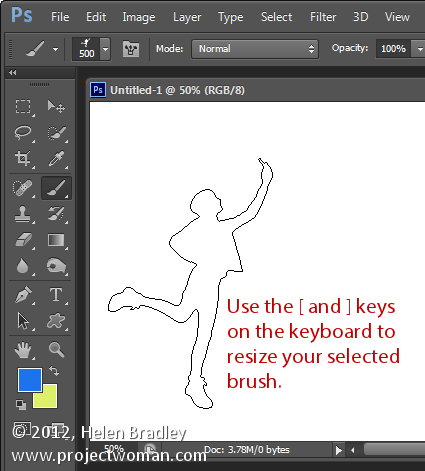
When a brush is selected you can adjust its size without having to open the Brushes palette by clicking the [ and ] keys on your keyboard.

Provided a brush is selected you can change its Opacity by typing a number. For example, type 5 to set Opacity to 50%, type 1 for 10% and 0 for 100%.

To adjust the hardness of the brush hold the Shift key as you tap either the [ or ] keys on the keyboard. Each tap increases or decreases the hardness by 25% in the range 0%-100%. The results of doing this are harder to see as there is no hardness indicator on the tool options bar. However, if you have the Painting Cursor set to Normal Brush Tip in preferences you will see a difference in the brush size as you do so

5 things to know about photoshop brushes 1

2. Save the Brush

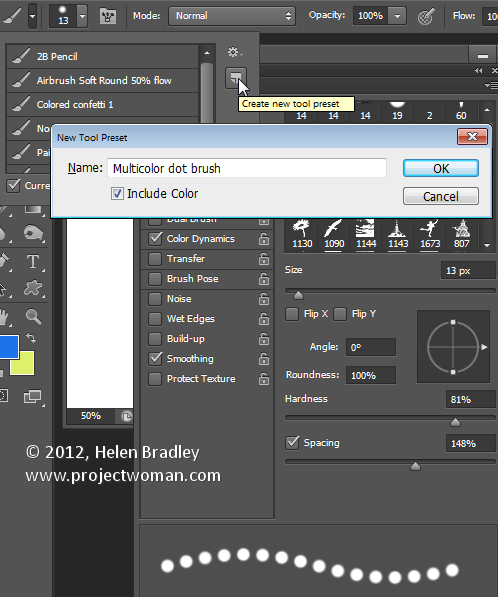
When you have a brush configured with your preferred settings, save it as a Tool preset. To do this from the Brush Preset list in the top left of the screen click the Create New Tool Preset button and type a name for the preset. Click Ok.

In future you can select this saved preset from the list and just start painting with it.

5 things to know about photoshop brushes 2

3. Disappearing Brushes

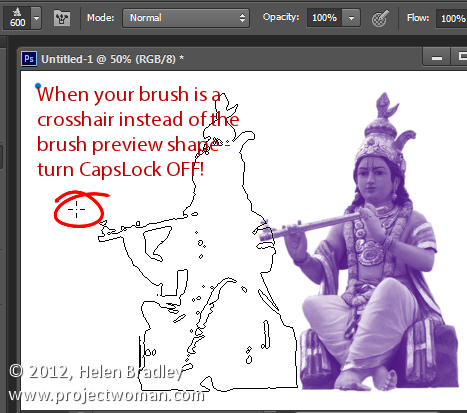
One of the very annoying things that will happen to most of us at one time or another is to have the brush appear to disappear. Instead of the regular brush cursor which shows the size and style of the brush you will see a crosshair cursor.

The issue is not with the brushes themselves but is with the Caps Lock key. If you disable Caps Lock on your keyboard the more visual brush cursor will reappear.

5 things to know about photoshop brushes 3

4. Paint a Straight Line

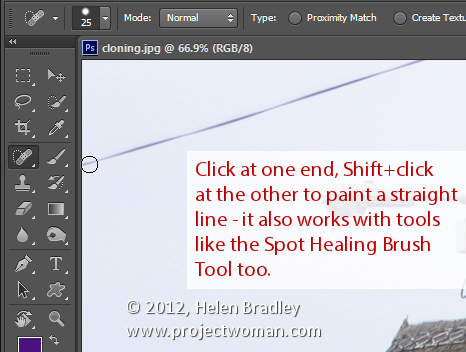
To paint in a straight line, click at one end of the line, hold the Shift key and click at the other end of the line. This draws a continuous brushstroke between both points.

If you adjust the spacing of your brush by using the Brush panel Spacing option to make it more than 100% you can create a line of dots this way.

This can also be used to remove power lines with the Spot Healing Brush Tool. Click at one end of the power line, Shift + Click at the other end to paint a straight line over the power line and it will be removed automatically.

5 things to know about photoshop brushes 4

5. Quickly Show the Brush Panel

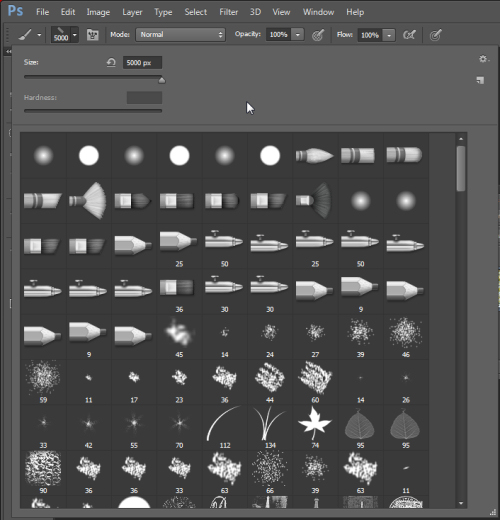
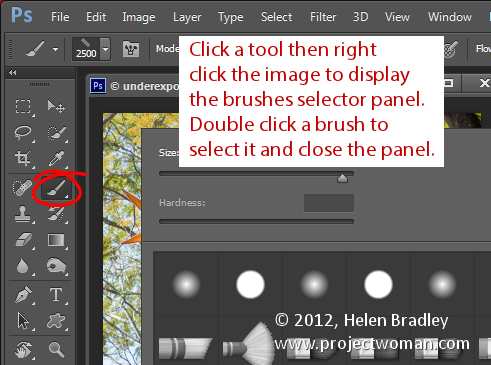
You can quickly show the Brush panel so you can choose a brush to use by first selecting a tool that uses a brush such as the Brush Tool, Dodge, Burn, Eraser tool and so on.

Then right click on the image and the brush panel appears automatically. To select a brush and exit the panel in one step, double click the brush to use.

5 things to know about photoshop brushes 5

And now it is over to you. What other features of Brushes do you think are valuable for photographers to know?

Post originally from: Digital Photography Tips.

Check out our more Photography Tips at Photography Tips for Beginners, Portrait Photography Tips and Wedding Photography Tips.

5 Things to Know About Photoshop Brushes


Digital Photography School

 
Comments Off on 5 Things to Know About Photoshop Brushes

Posted in Photography


A-ha – The Swing of Things – London Royal Albert Hall – 08/10/10

01 Aug

A-ha – The Swing of Things – London Royal Albert Hall – 08/10/10
Video Rating: 5 / 5


iGoogle – Things to Ponder

18 Aug

Get thinking with the “Things to Ponder” gadget.

When it comes to soft drinks, what happened to the first 6 “ups”? If a fool and his money are soon parted, then how did a fool and his money get together in the first place?

These and other important questions might get you thinking – or may cause a quick snicker. And you can display different ones every time you open your iGoogle page with the “Things to Ponder” gadget. Maximize the gadget and you can add your own comments to a particular question….

Read more at MalekTips.
New Computer and Technology Help and Tips – MalekTips.Com

 
Comments Off on iGoogle – Things to Ponder

Posted in Technology