RSS
 

Posts Tagged ‘They’

Retrofuturistic Urbanism: 6 Cities as they Could Have Become

08 May

[ By Delana in Architecture & Cities & Urbanism. ]

future retro city

To people of 100 or even 50 years ago, the metropolises of today would look utterly foreign. Our elevated highways, massive airports, high population density and huge skyscrapers would be breathtaking to someone from a far earlier era. But futurists of the past did their best to imagine the world of tomorrow – otherwise known as our today – and came up with some wild imagery.

San Francisco

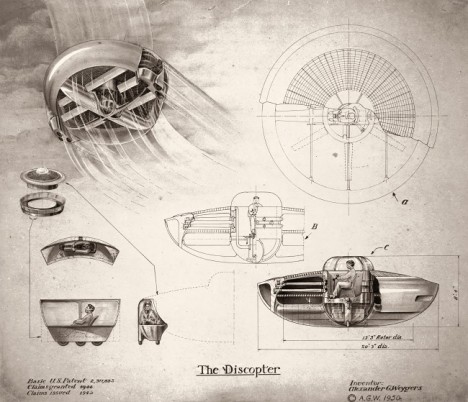
discopter diagrams

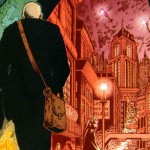
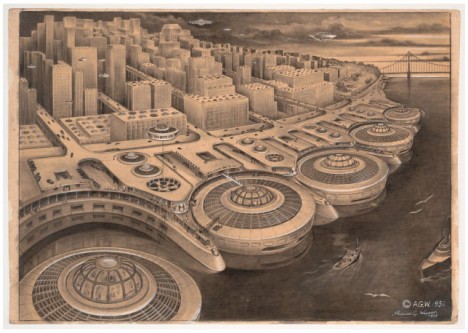
Above (and at top) is ship engineer and inventor Alexander Weygers‘ vision of San Francisco  as he saw it from 1950. The disc-shaped objects near the water are Weygers’ patented flying machine which he dubbed the Discopter. In his visions of future American cities, Weygers imagined large Discopter ports in every city, allowing for safe and convenient travel for the city’s residents.

Los Angeles

harlan georgescu sky lots

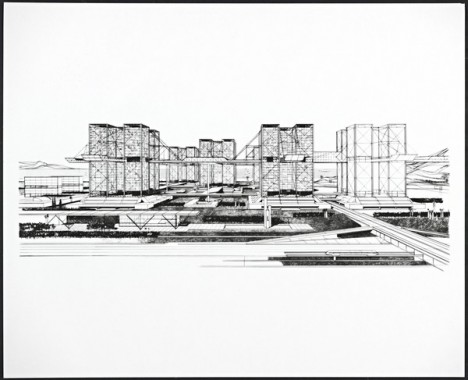
Architect Harlan Georgescu envisioned these sky-high mixed-use buildings becoming an integral part of future downtown Los Angeles. The buildings were meant to be 500 feet tall; Georgescu’s design put living, working, dining, shopping and recreational spaces in each building. Every structure would provide homes for 200 families in the space that would normally only support 12 conventional, ground-level homes. His Sky Lots plan included a suspended freeway running between the buildings – then out to the suburbs – to alleviate some of the city’s terrible traffic problems.

Houston

houston skyline

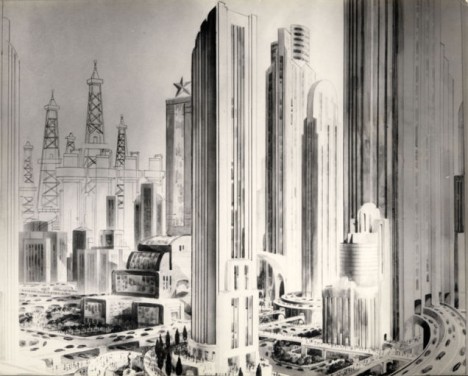
In the 1920s, Houston Post writers took a stab at predicting the city’s skyline in 1980. Note the same type of elevated freeways envisioned for LA, these also leading straight into and through tall buildings. Elevated walkways were also featured in the design, essentially doubling the pedestrian space for Houston residents. Houston did eventually develop a skyline containing plenty of tall, distinctive buildings and elevated roads – it looks like the Houston Post had (mostly) realistic expectations for the future of their city.

Next Page – Click Below to Read More:
Retrofuturistic Urbanism 6 Cities As They Could Have Become

Share on Facebook


[ By Delana in Architecture & Cities & Urbanism. ]

[ WebUrbanist | Archives | Galleries | Privacy | TOS ]


WebUrbanist

 
Comments Off on Retrofuturistic Urbanism: 6 Cities as they Could Have Become

Posted in Creativity


Stealth Structures: 10 Buildings That Aren’t What They Seem

23 Apr

[ By Steph in Travel & Urban Exploration. ]

superhero supply

How many houses that you pass each day aren’t really houses at all, but just realistic-looking facades hiding a secret function? Speakeasies and secret clubs masquerade as run-down stores in New York, faux suburban residences hide unexpected operations and weird-looking towers all over Los Angeles contain something you’d never expect.

Top Secret Bar You’d Never Find On Your Own
secret toy shop bar 1

secret toy shop bar 2

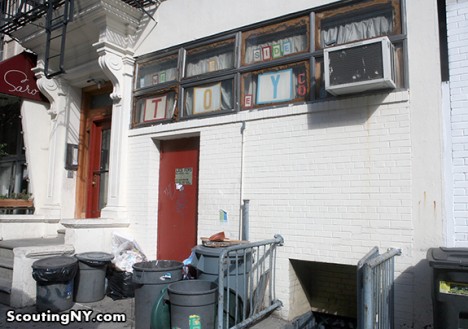
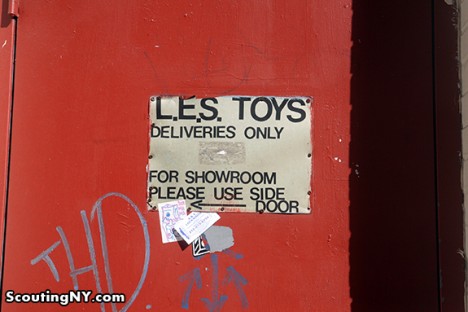
New York City hides all sorts of secrets, among them a number of fake storefronts hiding secret bars, clubs and meeting spaces. Scouting New York listed out eight of the best, including ‘Lower East Side Toys’ on Norfolk Street in Manhattan. It definitely doesn’t look like much from the street, and the door marked with a peeling sign that says ‘Deliveries Only’ seems innocuous enough. But those in the know step right through into The Back Room, a speakeasy-style bar. The takeaway here is that if you think a New York City business is a front for something else, you’re probably right.

Fake Brooklyn Brownstone Hides an Underground Portal

secret brooklyn brownstone 1

secret brooklyn brownstone 2

secret brooklyn brownstone 3

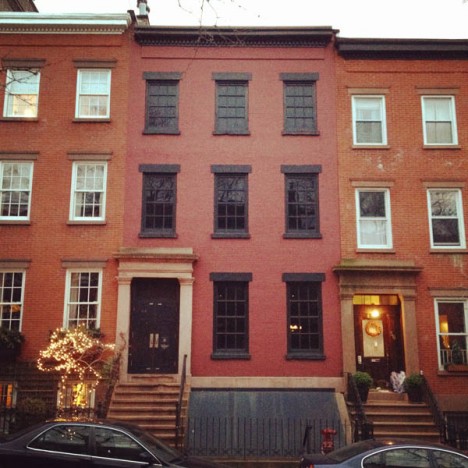
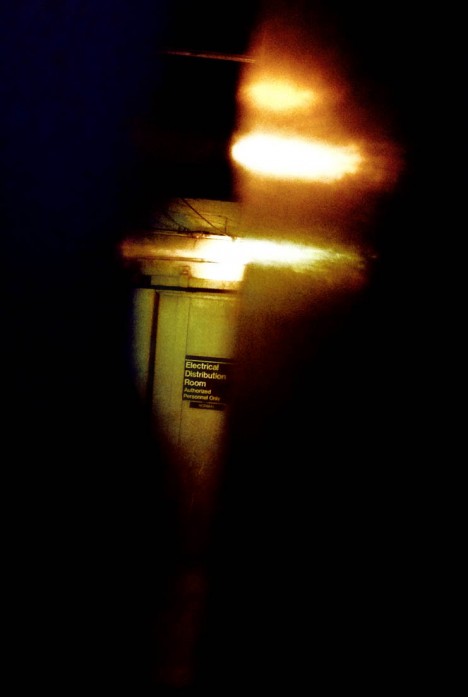
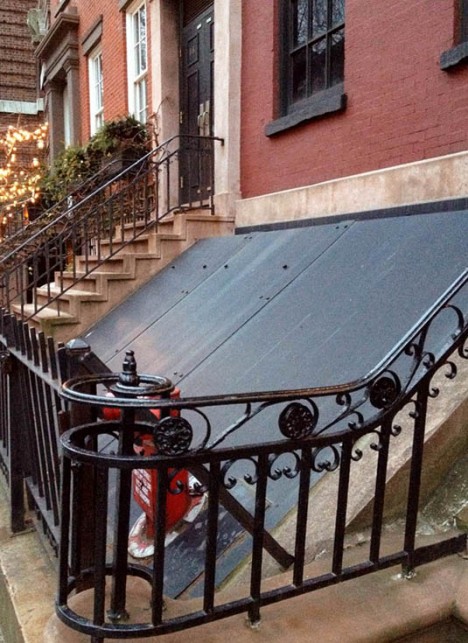
If you’re very observant, you might have noticed when passing by that the windows in this otherwise normal-looking Brooklyn brownstone are curiously blacked out. But that’s just about the only clue that anything is amiss – unless you walk right up to the door and peer through the crack, which reveals not a home but rather a concrete-lined, windowless industrial space. 58 Joralemon Street stands directly above the tracks for New York City’s subway lines 4 and 5, and functions as a ventilation shaft. The MTA disguised it as a courtesy to the residential neighbors.

Chicago Mansion Is Really a Power Substation
Screen Shot 2015-04-21 at 7.41.13 PM

Screen Shot 2015-04-21 at 7.40.54 PM

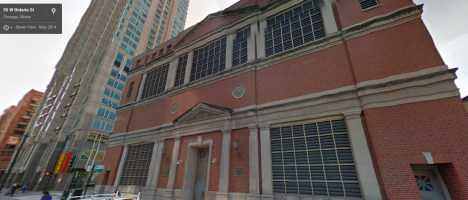
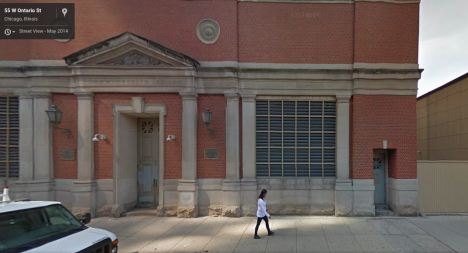
A faux Georgian mansion stands at a Chicago intersection with front doors that don’t open and windows that are never illuminated, no matter the time of day. It’s actually a substation for electrical company Commonwealth Edison, which goes to some trouble to camouflage many of these typically unsightly structures when they’re located in conspicuous spots. This one was designed by Stanley Tigerman, former director of the School of Architecture at the University of Illinois in Chicago. Triggerman made it as authentically Georgian as he could, down to the sturdy brickwork pattern that will help it stand the test of time with minimal maintenance. The blacked-out windows are actually vents.

Superhero Supply Store Doesn’t Really Sell Superhero Supplies
secret superhero supply 1

secret superhero supply 2

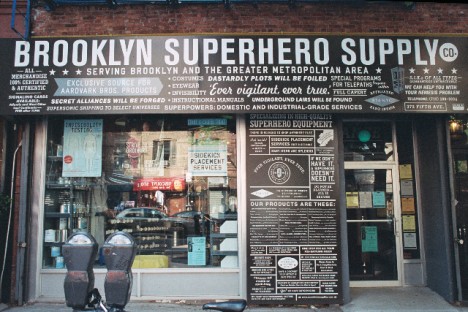
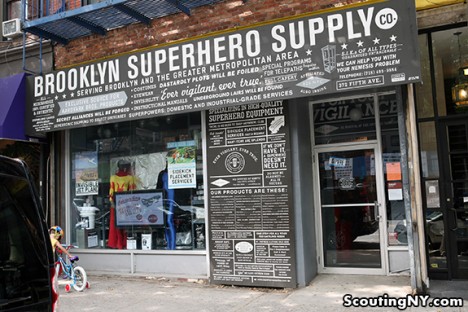
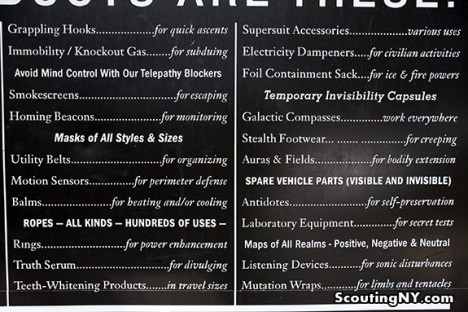
You might suspect that something’s amiss with the Brooklyn Superhero Supply Co, given that the products on display in the window and listed on a card outside include antimatter, a collapsible portal, galactic compasses and manuals for all sorts of fantastical weapons that don’t really exist. If you know the secret of the place once inside, you’ll head directly for a secret door hidden in a bookcase, which leads not to the headquarters of the Justice League but rather a student learning and activity center focusing on literacy. A viewing portal in the wall gives visitors a glimpse into this space. Disappointed? You can actually buy a number of products from the shop and the website, including superhero disguise kits, costumes, and even one-gallon cans of immortality. There’s even a musical inspired by it.

Swiss Fortress in Disguise
secret fortress villa rose

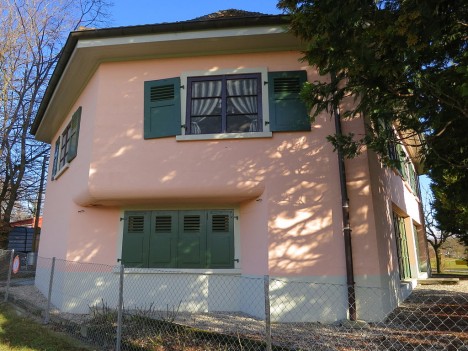
Would you ever guess that this little pink house in Switzerland is really a fortress? Villa Rose is located on the Toblerone defensive line, built to defend the country from invasion during World War II. If you opened the garage door you’d come face-to-face with a pair of gigantic cannons, a third hidden deeper inside. The fake windows painted onto the second story would only fool onlookers from afar, but when the fortress was active, nobody would have made it close enough to notice. The Villa Rose is now open to the public as a museum.

Next Page – Click Below to Read More:
Stealth Structures 10 Buildings That Arent What They Seem

Share on Facebook


[ By Steph in Travel & Urban Exploration. ]

[ WebUrbanist | Archives | Galleries | Privacy | TOS ]


WebUrbanist

 
Comments Off on Stealth Structures: 10 Buildings That Aren’t What They Seem

Posted in Creativity


6 Eye-Catching Photos and How They Can Help You Improve Your Photography

17 Feb

Each photographer has their own way of approaching a scene, choosing which settings on their camera will best reflect their vision, and then crafting the final image. You get to make this series of decisions each time you take a photo, and it’s a highly personal experience.

But you can still learn a lot by going behind the scenes of a photo, and hearing how the photographer made their own decisions. Whether you pick up a new tip for creating an interesting effect, a new way of looking at a scene, or simply the inspiration to go and shoot, it’s both informative, and a lot of fun too.

So here are six of my favourite photos, and details about how they were taken. Get out your notebook, have your camera handy, and let’s go.

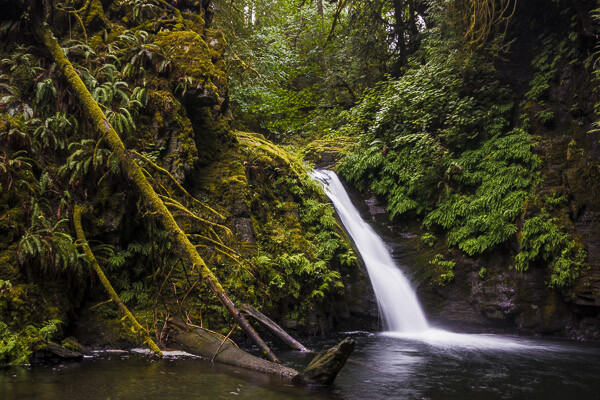
1. Waterfall in the Woods
Extremely essential camera skills 1

Vancouver Island, Canada – Settings: 14mm, f/10, 1.6 seconds, ISO 80

This shot is a great example of what happens when you pick a slow shutter speed. Moving water takes on this flowing look and adds a softer feel to the image.

If you want to get this effect, first set your shutter speed to a long value. Here the setting was 1.6 seconds – a value around there is a good place to start. Then you’ll need to adjust the rest of your settings to get a good exposure. This can be tricky sometimes, especially if it’s a really bright scene. A high (small) aperture, and low ISO can really help. But if that’s not enough, you may need to use a neutral density filter.

Then make sure you can keep your camera steady for the entire shot. The ideal would be to use a tripod, but it doesn’t even need to be a big, heavy one. This shot was taken with a point and shoot camera (the Sony RX100III) and the tripod was just a tiny tabletop tripod set up on the rocks.

Finally take the photo, and enjoy a beautiful waterfall image that really grabs your viewers’ attention.

2. The Bee and the Flower

Extremely essential camera skills 2

Edmonton, Canada – Settings: 85mm, f/4.0, 1/3000th, ISO 200

This photo has two elements to pay attention to, the first being the composition. The bee is very small, but you can still easily make it out. That’s thanks to negative space. All of the blue, empty sky is negative space that draws your eye towards the subject. One of the keys to finding negative space in a scene is to move your feet. Walk around, looking to see if you can find an angle that helps simplify your frame by incorporating negative space. Don’t stop there, though. Change your position even further by climbing up high, or, as in this case, lying on the ground. Yep, this photo was taken lying flat on the grass. Don’t be afraid to get messy in the pursuit of a great shot.

The second thing to note about this shot is the shutter speed. There’s a very fast setting chosen here (1/3000th of a second) and that allowed the bee to be in sharp focus, even when it was moving very fast. A slower shutter speed could have led to motion blur of the subject, losing that crisp, sharp detail. When shooting fast moving objects, make sure your shutter speed is set appropriately.

3. The Internet Man
Extremely essential camera skills 3

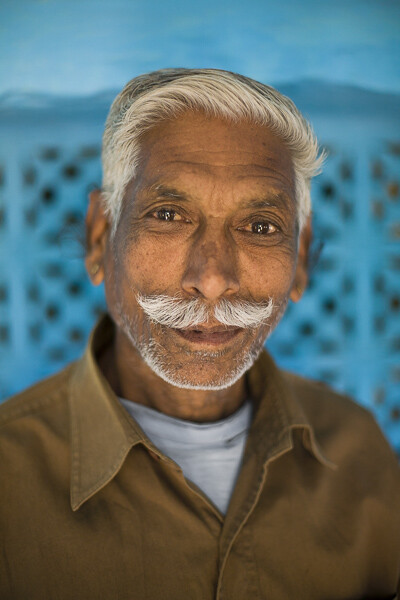
Jodhpur, India – Settings: 50mm, f/1.6, 1/320th, ISO 400

There’s a great story behind this image. On a trip through India we found ourselves in Jodhpur, known as the Blue City. The walls of many of the houses are painted a vibrant blue, and it made for some incredible images. But this portrait was not taken on a photo walk, but rather after we made our daily visit to the internet shop.

After we finished up on the computer, we got to chatting with the man who owned the shop. He was a wonderful guy, with a great face, so we asked for a portrait. He was happy to oblige, and by standing in the doorway of his shop we got both a beautiful blue background, and catchlights in his eyes from the light coming in the door (catchlights, those white specks in the eyes, are a great way to add life and sparkle to your subjects’ eyes).

One final note on the settings: using a low aperture value can help your subject stand out from the background, especially if you can’t bring them very far forward from the background. In this image f/1.6 was used, which is definitely very low, but it really helped create some background separation.

The best part of the story? After we took his photo (and gave him a copy of the file) he thanked us, and told us that he’d pray that we’d have a son before returning to India. Well, we did have a son. Now we just have to go back, don’t we?

4. Cows in the Field
Extremely essential camera skills 4

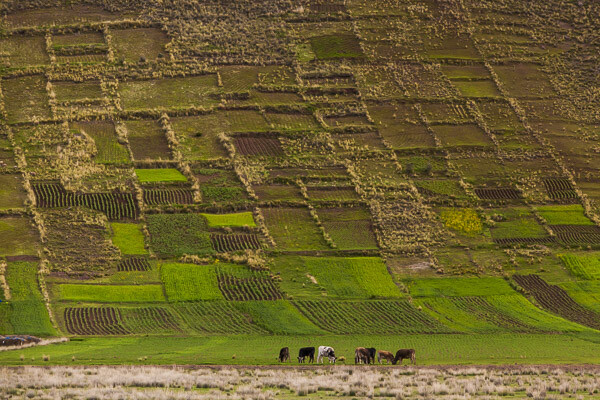
The Sacred Valley, Peru – Settings: 200mm, f/7.1, 1/1600th, ISO 800

Learning how to use lens compression to your advantage can make for some really impressive shots. This image is a great example of this technique.

Very simply, when you use a longer focal length (like the 200mm used in this photo) it makes the distance between objects in the frame appear to be less. It makes the background appear closer to the foreground, and in this example it makes the hills appear very close to cows. Essentially, it compresses the space in the image.

Here you can see how it makes the hills really fill the frame and create a strong, patterned background that contrasts nicely with the organic shapes of the cows.

In your own photography you can use a long lens to make clouds appear much larger and closer to your subject, or make your friends look like they’re stepping on top of a building, Godzilla-style. There’s no limit to the creative effects you can achieve when you use compression.

5. Down the Stairs
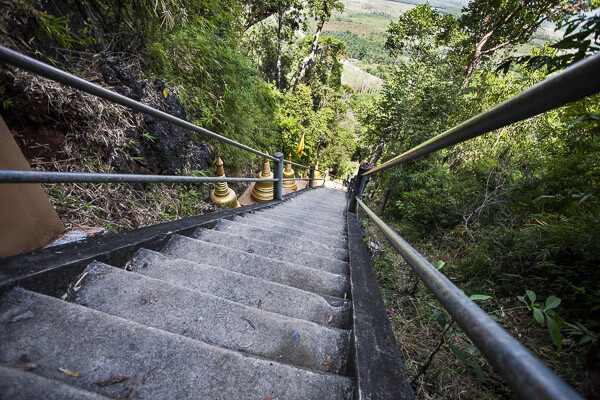
Extremely essential camera skills 5

Krabi, Thailand – Settings: 17mm, f/5.0, 1/400th, ISO 400

If long lenses make objects appear closer to each other in your frame, what about wide angle lenses?

Here’s a great example. This shot, taken while looking down a few of the 1,272 treacherously steep steps of the Tiger Cave Temple, makes you feel like you may just fall down them, along with the photographer.

The wide angle lens (17mm) helps to create that feeling. The wide angle exaggerates the distance between objects, especially at the edges. Take a look at those hand rails at the edge of the frame. They look very far apart, especially compared to the distance between the hand rails further down the stairs. But this exaggeration at the edges helps to turn the rails into leading lines, drawing your eye down the stairs, and creating that falling feeling.

So if you want to add some drama to an image, or exaggerate perspective, grab a wide angle lens. Place objects near the edges and make use of the stretching it causes.

6. Camel at Sunset
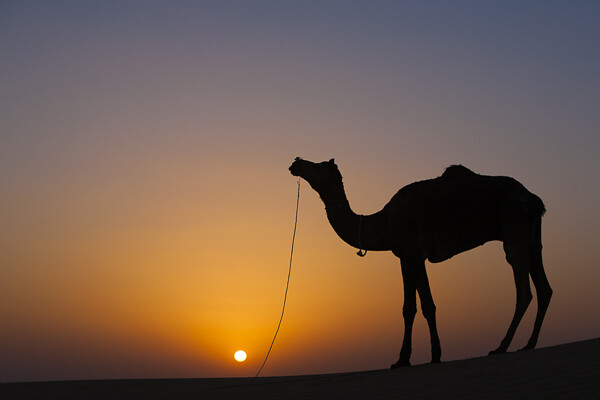
Extremely essential camera skills 6

Jaisalmer, India – Settings: 70mm, f/7.1, 1/400th, ISO 125

Doesn’t a great silhouette image just grab your attention? It’s so different from how we normally see the world that it can add a big impact to your work.

But a silhouette is a prime example of how your camera can easily be fooled by light, and how you, the photographer, need to know how to control it.

In this example your camera might very well try to expose for the camel, or somewhere in between the camel and the sunset, and you’ll wind up with something really bright, or sort of dark, but it probably won’t look like a nice, crisp silhouette.

So what to do? Take control. When aiming for a silhouette you’ll want to expose for the sky, not the subject. Then you can either use exposure compensation to dial in the exposure you’re looking for, or better yet, jump into full manual control and choose your settings to get exactly the exposure and depth of field you want.

Hopefully this peek behind the decisions and settings of these photos gives you a few tips to take some great shots of your own. The more you learn about how all the settings on your camera affect the look and feel of your images, the better decisions you’ll be able to make. Best of all, this stuff doesn’t have to be hard to learn, and you’ll get to use the knowledge to create better images for the rest of your life.

googletag.cmd.push(function() {
tablet_slots.push( googletag.defineSlot( “/1005424/_dPSv4_tab-all-article-bottom_(300×250)”, [300, 250], “pb-ad-78623” ).addService( googletag.pubads() ) ); } );

googletag.cmd.push(function() {
mobile_slots.push( googletag.defineSlot( “/1005424/_dPSv4_mob-all-article-bottom_(300×250)”, [300, 250], “pb-ad-78158” ).addService( googletag.pubads() ) ); } );

The post 6 Eye-Catching Photos and How They Can Help You Improve Your Photography by Lauren Lim appeared first on Digital Photography School.


Digital Photography School
 
Comments Off on 6 Eye-Catching Photos and How They Can Help You Improve Your Photography

Posted in Photography


Give Your Photographs The Stage They Deserve – Make Sure Your Website is Mobile Ready

12 Oct

If you post amazing professional-quality photographs to your website and nobody can access them, are they really that amazing? Nobody will know. All that hard work, focus, determination, and artistic ability -POOF – all for nothing. This is exactly what is happening to many very talented photographers. They pour their heart and soul into their art form and then entrust it to outdated technology that doesn’t adequately display their work on mobile devices.

ResponsivePortfolioSite

How important is being mobile friendly?

With the proliferation of mobile devices, it’s no surprise that many people do most of their web browsing on the go. Consider the following eye-opening statistics found on visual.ly:

  • Mobile search queries have grown five times in the past two years.
  • Nine out of 10 mobile phone searches result in a purchase or visit.
  • Three out of every five searches are conducted on a mobile device.
  • 99% of Smartphone owners use their mobile browsers at least once a day.
  • 52% of all local searches are conducted on a mobile device.
Mobile Search Statistics

Those are startling numbers, especially if you’re not keeping up with the changing face of the web. Unfortunately, it seems that there has been a lag in photographers adopting the appropriate web technology to showcase their work in a way that accommodates mobile users. To ensure that your site and your photography work are presented in an impactful way, it must be optimized specifically for mobile viewing.

Desktops and mobile devices don’t always play nice

Just building a site for the desktop doesn’t guarantee that the results will transfer to phones and tablets, or even the new smart watches. You do not want interested viewers to open your site on a mobile device and find a helter-skelter layout with distorted or inaccessible images. If this happens, it puts you in a difficult spot – you’re left hoping that they remember and desire to seek out your site for a second time when they’re back at a desktop computer. That’s wishful thinking considering the deluge of distractions we all encounter every day and the somewhat shrinking attention spans of the high-definition, high-speed digital generation. Here today, gone tomorrow, or maybe sooner in the case of your hard work and aspirations.

One of the worst-case scenarios you could be in is with a portfolio site that is completely based on Adobe Flash, leaving you to lose a whole group of mobile users who will rapidly look elsewhere when your site doesn’t load on their device. No one likes seeing a blank screen or a message saying, “This content cannot be displayed on your device.”

FlashOnlySite

Mobile devices often will not play Flash websites

Making your work accessible

It’s vital to give your audience exactly what they want – fast, fluid access to your dazzling work anytime anywhere. If they can’t clearly navigate your web site, it raises questions in their minds about your professionalism and your commitment to viewers and to your art form. This is not a good place to be for a proud, ambitious photographer. The good news, however, is that there are readily available solutions that you could leverage whether you already have an existing site or are starting one from scratch.

The key to optimizing the mobile user’s experience is to have a site that uses responsive web design or adaptive web design. These are two types of site programming that ensure a seamless transition of your content from the desktop to all mobile devices, regardless of screen size. Anything less than that, and you’re severely limiting exposure for your work and jeopardizing your chance of making a significant first impression. Negative experiences can turn into negative reviews. These travel fast in the digital age, and it’s difficult to change those perceptions once they’re public.

Using an adaptive design, you get a site that is specifically designed for particular browser sizes found on most mobile devices. In a lot of cases, the mobile site almost looks like a native app. Problogger.net (also run by dPS owner Darren Rowse) is an example of such a site. With this type of design, the experience on a mobile device is a bit different than that of a desktop, but you could still access the content in a readable format. This results in a fast and easy to read site that is user-friendlier on small web browsers.

ProBlogger Adaptive

Example of an adaptive design

A Responsive site is even better in that it is flexible in displaying the same content across a large array of devices while keeping much of the same styles. It maintains a fluid layout by using elements that are automatically resizable and could be placed where they fit best on the screen. This even works great on desktops when you want to shrink the browser window.

A perfect example of a website with a responsive design is Digital Photography School’s own site. If you’re accessing the site from a desktop browser, notice how the site responds fluidly as you resize the window. If you’re reading this from a mobile device, you’re still able to read the content just fine without having to manipulate the browser by zooming in and out or doing a lot of horizontal scrolling.

ResponsivePhotoSite

dPS is a responsive site

Simple changes make a HUGE difference

Updating your site from a clunky old format is quite simple, and the tools are readily available. Most people who have a blog use a Content Management System (CMS) such as WordPress, Joomla, or Drupal. These systems allow you to change the overall look and feel of your site by offering different designs or themes. There are plenty of available themes that are already responsive or adaptive right out of the box. These range in cost from free up to $ 100. A simple web search will reveal many sites that specialize in offering a variety of this type of themes. I’ve had great success using Theme Forest.

In addition to themes that are optimized for mobile browsing, these CMSs also allow you to install plugins that display the same content in a mobile-only theme. In some cases, especially if you already have an existing site, this might be the easier route to take.

Rock the mobile web

At some point, we’ve all experienced the disconnect between the artistic or creative world and the technology world. But in the modern age, you really can’t draw a distinction without suffering the consequences. It’s much wiser to embrace the role of technology in displaying art – in this case photography – and use it to your advantage.

With just a bit of effort, you can make sure that you nail that vital first impression with your fans and give your work the digital stage that it deserves!

The post Give Your Photographs The Stage They Deserve – Make Sure Your Website is Mobile Ready by Jorge Hassan appeared first on Digital Photography School.


Digital Photography School
 
Comments Off on Give Your Photographs The Stage They Deserve – Make Sure Your Website is Mobile Ready

Posted in Photography


Three Types of Light: Diffused, Backlight and Reflected – What are They and When to use Them

26 Aug

Light: it is the main component for every image that you will take. It does however come in many different forms, producing very different results. Some of these types of light are diffused, backlit and reflected. There will be times when each of these types of light is more readily available than another, or even in some cases multiple types of light at once. Some people create their full photographic style by using a certain type more, or less, exclusively in their work. But, knowing how to first spot the different light forms will allow you to take full of advantage of every scenario and add depth, variety and a sense of individuality to your images.

Figure 3

Diffused Light

Diffused light that which is not harsh and direct, it has been softened in some way. A great example is when you are outside and the sun is shining, with no clouds in the sky. The light is harsh and you will notice that there will be a lot shadows falling on or around your subject. But, if clouds are in the sky and they block out some of that harsh sunlight, the light then becomes diffused.

You can use diffused lighting to your advantage in a great way. If you are shooting portraits on an overcast (diffused) day, you are pretty much shooting with nature’s own softbox. You will be able to work with your subject easier, and have different angles to shoot from, because you won’t be limited by the harsh lines and shadows that undiffused light can create. Overcast (diffused) lighting is preferred by many photographers, as it is a flat and even light. If it were a particularly sunny and bright day, shooting in the shade would also offer you some diffused lighting.

Figure 1

This particular image shows the use of diffused lighting, using the shade of the building to soften the light, while also reflecting light shades back to the subject.
Figure 2

Backlight

Backlighting is where you are illuminating your subject from the back, as opposed to from the front, or the side. Working with backlight you can silhouette your subject, or give them a glow. To Silhouette your subject, you would meter for the sky and to create a glow around your subject, you would meter for the subject itself. You need to place your subject in front of your preferred light source and allow that light to illuminate your subject. If you are using the sun as your light source, different times of the day will give you different types of backlighting. The lower the sun falls, the softer the light will feel. You may find that sometimes you will have to move yourself into a position where your camera can autofocus or switch to full manual, as the light can be so strong that your focusing point struggles to find what it is you want to focus on.

Figure 4

Reflected Light

Reflected light can be found everywhere, on most surfaces. Reflected light is literally the light that is reflected from a particular surface or material. If you were to shoot a portrait next to a white building, the light hitting the building would be reflected on to your subject, creating a soft light. If you were in the middle of the red Moroccan Atlas Mountains and you were to shoot a portrait, there would be a softer red reflection coming onto your subject from the ground. Or, if you were doing a portrait session outside and you wanted to bounce some additional light into your subject’s face, you could use an actual reflector. They normally come in two colours; one side gold, and one side white.

Reflected light tends to be quite soft and takes on the colour of the surface/material that it is being bounced off.

Figure 5

The reflector was being used with the gold side to reflect a warm glow onto the subject’s face.

Figure 6

  • How To: Silhouette Photography / Self Portraits
  • Tips for Photographing in Different Weather Conditions
  • Let’s Talk About Light – 3 Types of Lighting Conditions and how to Use Them
  • Choosing the Right Color Reflector for Your Photography

The post Three Types of Light: Diffused, Backlight and Reflected – What are They and When to use Them by Natasha Cadman appeared first on Digital Photography School.


Digital Photography School
 
Comments Off on Three Types of Light: Diffused, Backlight and Reflected – What are They and When to use Them

Posted in Photography


Things they carried: Thom Atkinson’s ‘Soldiers’ Inventories’

23 Aug

‘What’s in your bag?’ is a question we ask a lot of photographers, because, well, we’re nosy that way. Asking the very same question, photographer Thom Atkinson posed it (figuratively) to centuries of British soldiers. He’s assembled what would have been the belongings and clothing of a dozen combatants, ranging from medieval to modern-day soldiers. Take a look and learn how it all came together in our Q&A. See gallery

Articles: Digital Photography Review (dpreview.com)

 
Comments Off on Things they carried: Thom Atkinson’s ‘Soldiers’ Inventories’

Posted in Uncategorized


National Park Photography Workshop Permits: Are They Really Necessary?

10 Jun
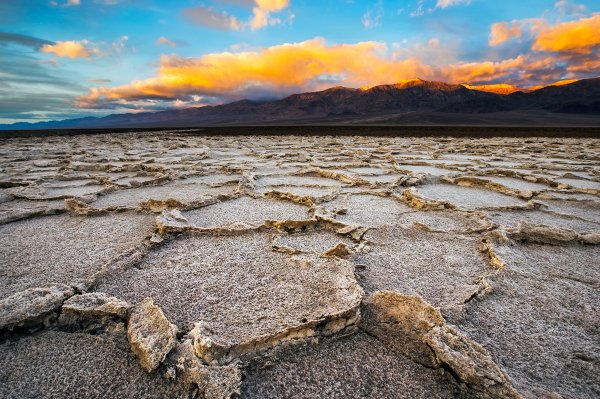
badwater-sunrise

Sunrise on the West Side Road at Badwater Basin, Death Valley

Back in February of 2014, I led two back-to-back photography workshops in Death Valley National Park with my friend and fellow photographer Mike Mezeul. Planning workshops is a lot of work and takes a lot of love and dedication to do right. Before the process of getting everything set up (making sure the students had all booked their flights, hotels, rental cars, etc.) we needed to apply for a workshop permit. This is sort of a tough thing to do timeline wise. You can apply for it ahead of time before you even announce the workshop; but then you run the risk of paying the $ 210 (average cost) and the workshop falling through or something like that. Or you can wait until you book spots for the workshop and then apply for the permit; but then you run the risk of not getting the permit in time for the workshop. We opted for the latter because we had plenty of time to get the application in and get the permit back. We got our workshop permit in time and had nothing to worry about. We weren’t going to risk getting in trouble with the park in an effort to save a few hundred bucks.

Now fast forward to the second workshop. We had just wrapped up a beautiful sunrise shoot at Badwater Basin on the West Side Road (Death Valley. The patterns at the main part of Badwater (by the parking lot) were in pretty terrible shape but we decided to take the group there after the sunrise shoot so they could see all the educational signs, walk around for a bit and get a picture of the “280 Feet Below Sea Level” sign. While we were there, a man came up to me and asked if we had found any good patterns. I’ve never been one to withhold secrets so I told him about the spot we found over on West Side Road. I noticed he had a van full of people and shortly after, they were on their way.

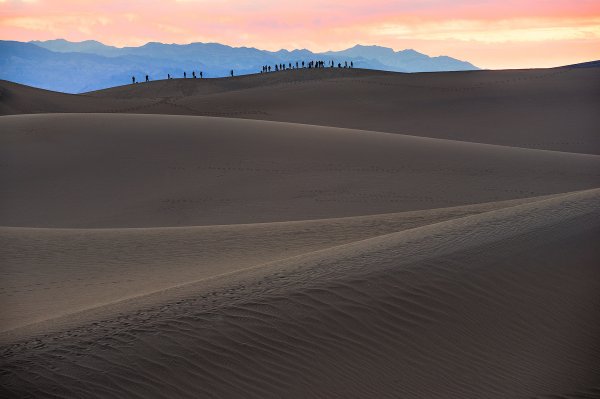
Workshop students set up for sunrise at the Mesquite Flat Sand Dunes

Workshop students set up for sunrise at the Mesquite Flat Sand Dunes

Our group stayed at the Badwater parking lot for another 30 minutes or so before heading back into Furnace Creek for breakfast. When we got to the Forty Niner Cafe we saw a large table of around 20 people (all with their photography gear) sitting in silence. It was really strange. Nobody was really talking and everyone looked stressed out and upset. I went to use the restroom and that’s when I saw the same guy who I’d spoken to at the Badwater Basin parking lot.

He told me that he was a workshop instructor and they were on day two (the first full day) of their photography workshop. He had taken my advice and driven his group down to the West Side Road but when he got there, a Park Ranger was waiting for him. As it turns out, the instructor and his partner had decided to forgo the workshop permit because they had applied for one the year before and never got asked about it at during that workshop. He figured, “Why not save the $ 210?” It’s not like Death Valley has much staff left after all the government cutbacks, right? Wrong.

The Ranger asked for his permit and when the instructor said he didn’t have one, he was told to leave the park immediately. He was instantly given a $ 2,000 fine for conducting a workshop inside a National Park without a permit. He had to leave his group of around 20 students inside the park–students who had paid the tuition for the workshop, bought plane tickets into Vegas, rental cars to drive into the park and $ 200/night hotels within the park. On top of that, he had to appear before a judge in federal court in California three months later. That meant another flight to book, a couple nights in a hotel, a rental car and living expenses for the trip. Based on the outcome of the court appearance, he was facing upwards of $ 10,000 in fines and a lifetime ban from the park. I’m not sure what the outcome was with his group of students but I’m assuming they got their money back for the workshop.

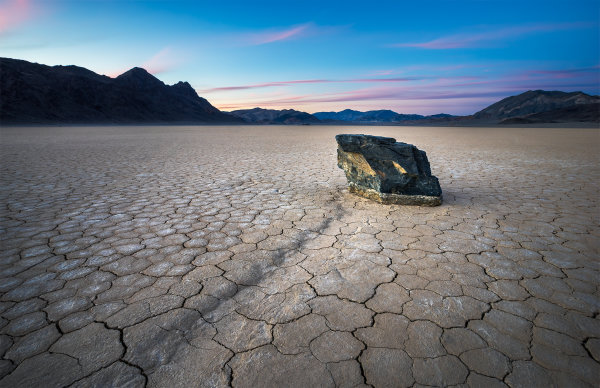
A mysterious sailing rock during sunset at the Racetrack Playa

A mysterious sailing rock during sunset at the Racetrack Playa

The Lesson to be Learned

The takeaway here is not to cut corners. If you are conducting a workshop inside of a national park, a national monument or even some state parks; get a permit. It’s not worth taking the risk and there are Park Rangers out there doing research. I talked to another photographer who was holding a workshop out in Zion National Park a while back. He had applied for a permit (and got one) to take his group into the Subway. When he got to the parking lot to start the hike, a Ranger was waiting there for him to check his permit. I’ve heard other stories of the Rangers looking up workshops on Google and then keeping track of the instructors on social media. They then try and pinpoint where the group will be and see if they can track them down to make sure they have the permit. All it takes is a tweet saying, “Beautiful sunrise at the Mesquite Dunes this morning.” To be honest, $ 210 is a very small fee to pay for holding a workshop inside of a national park. On top of that, you are supporting the park by paying the fee much in the same way you support it by purchasing park passes and entry fees.

If you are a student and will be attending a workshop inside a park, make sure that your instructor has the right permits. In my opinion, an instructor that cuts corners to save their bottom line isn’t an instructor worth paying tuition for a workshop.

For more information on choosing a photography workshop or tour, read these:

  • Taking a Photography Workshop; Why it is Different from a Photo Tour
  • Choosing a Photography Workshop Or Tour
  • Is that a Workshop, Tour or Seminar [Part I]

The post National Park Photography Workshop Permits: Are They Really Necessary? by James Brandon appeared first on Digital Photography School.


Digital Photography School
 
Comments Off on National Park Photography Workshop Permits: Are They Really Necessary?

Posted in Photography


Photographing the World’s Most Secluded Tribes: Before they Pass Away

17 Nov

Got 12 minutes? Check out this TED talk by photographer Jimmy Nelson who tells the story behind his amazing project ‘Before they Pass Away‘. A project where Jimmy sets out to photograph 35 of the world’s most secluded tribes.

In this video Jimmy shares 3 lessons (through story) that he’s learned through meeting and photographing these tribes.

Learn more about Jimmy’s project and meet the tribes he photographed at his website and grab a copy of his book of the same name to see the amazing images he’s created.

Post originally from: Digital Photography Tips.

Check out our more Photography Tips at Photography Tips for Beginners, Portrait Photography Tips and Wedding Photography Tips.

Photographing the World’s Most Secluded Tribes: Before they Pass Away

The post Photographing the World’s Most Secluded Tribes: Before they Pass Away by Darren Rowse appeared first on Digital Photography School.


Digital Photography School
 
Comments Off on Photographing the World’s Most Secluded Tribes: Before they Pass Away

Posted in Photography


Alternative Landmarks: 12 Monuments As They Almost Were

20 May

[ By Steph in Architecture & Public & Institutional. ]


Alternative Monuments Main

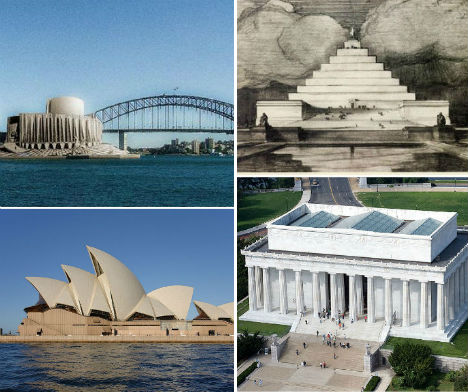
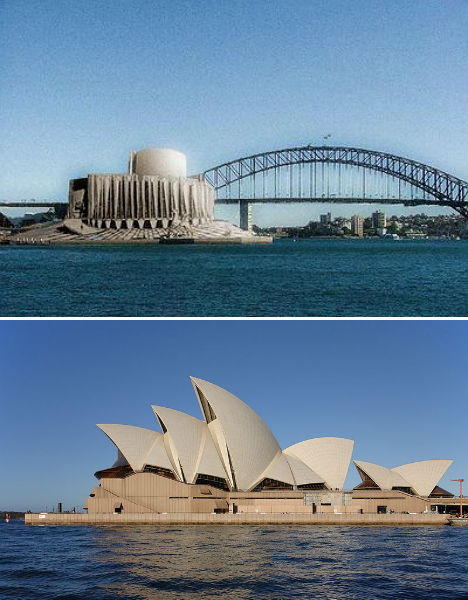
The Sydney Opera House might have been little more than a squat concrete building resembling a factory, and a visit to the statue of Abraham Lincoln at the Lincoln Memorial could have required scaling a massive stepped pyramid. Ranging from close second-place finishes in design competitions to proposals that were little more than pipe dreams, these alternative designs for 12 major iconic landmarks around the world represent radical departures from the monuments we’re accustomed to.

Sydney Opera House

Alternative Monuments Sydney Opera House

(images via: new world wonders, wikimedia commons)

The Sydney Opera House is one of the most recognizable buildings in the world, with a dramatic series of vaults rising from the ground along Sydney Harbour. But Danish architect Jørn Utzon’s now-iconic design was controversial when it was first proposed in 1957, and the design that came in second place may have been more palatable to the public. American architect Joseph Marzella’s design was rather industrial in its appearance, but didn’t seem quite so out there.  It’s hard to imagine the magnificent performing arts venue looking so squat and dull.

Triumphal Elephant in Place of Paris’ Arc de Triomphe

Alternative Monuments elephant 2

Alternative Monuments Arc de Triomphe Real

Alternative Monuments Elephant 1

(images via: wikimedia commons)

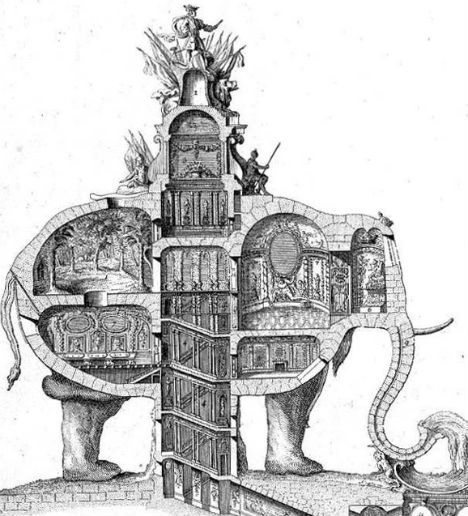
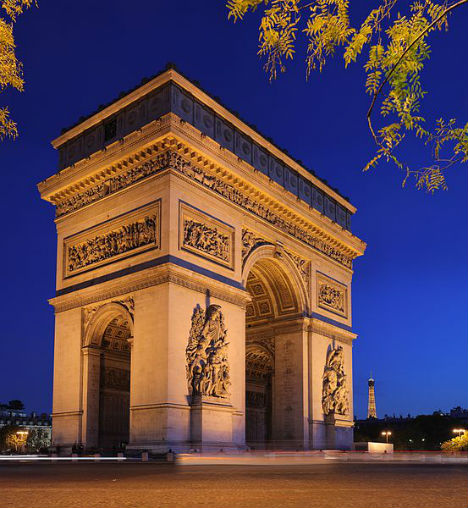
In place of one of Paris’ most famous monuments, the Arc de Triomphe, could have been a three-story elephant monument with a spiral staircase in the underbelly leading to the pinnacle. 18th century architect Charles Ribart offered this monument for the Champs Élysées, complete with a cross-sectional drawing showing the intricate rooms within, but was turned down by the French government.

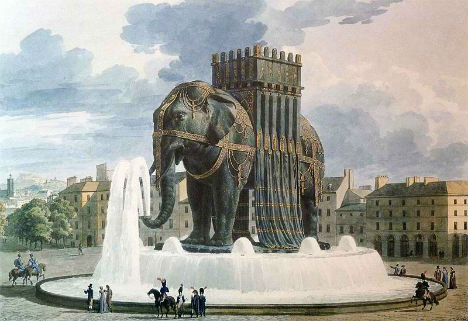
This isn’t even the only massive, ridiculous elephant statue envisioned for Paris. Originally conceived by Napoleon, the imposing Elephant of the Bastille (third photo) was meant to be cast of bronze and placed in Paris’ Place de la Bastille on the site of the old Bastille prison, which was the birthplace of the French Revolution. A stairway set into the legs would give access to the top, and the base would be surrounded by a fountain. However, only a plaster model was built, as memorialized by Victor Hugo in the novel Les Miserables, and eventually the July Column took its place.

Unbuilt Design for the Golden Gate Bridge

Alternative Monuments Golden Gate Bridge

(images via: pbs newshour, wikimedia commons)

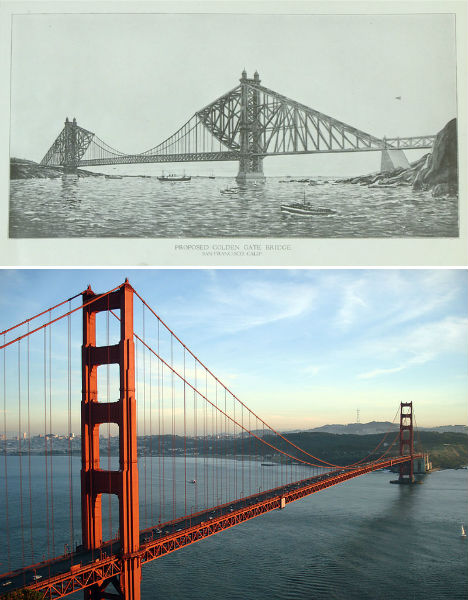
Now 76 years old, the Golden Gate Bridge is an iconic symbol of San Francisco, coated in literally millions of gallons of orange paint. The Art Deco-style bridge is one of the longest suspension bridges in the world, beating many experts’ predictions that it wouldn’t last against gale-force winds in the straight where the San Francisco Bay opens to the Pacific Ocean. But this wasn’t engineer Joseph Strauss’ first design. The original proposal is markedly different, with a heavier look combining cantilevered and suspension designs. It was rejected by the planning committee.

Lincoln Memorial Pyramid

Alternative Monuments Lincoln Memorial

(images via: i own the world, wikimedia commons)

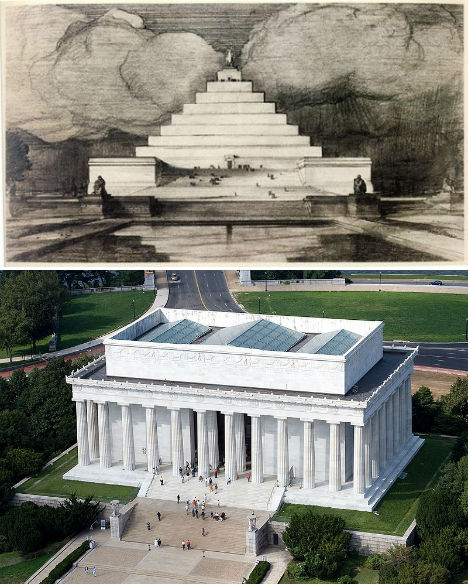
Highlighted at Unbuilt Washington, an exhibition at the National Building Museum in Washington D.C., John Russell Pope’s Lincoln Memorial Proposal replaces the columned rectangular building honoring the 16th president with a pyramid. Anyone who wanted to get up close to Abraham Lincoln’s statue would have had to climb that entire thing to reach it. Some historians believe that this proposal was ridiculous on purpose; Pope wasn’t a fan of the swampy location chosen for the memorial, and may have created this and other absurd designs in an effort to encourage the committee to seek a new setting. Pope went on to successfully design the Jefferson Memorial.

Pyramid Necropolis for London’s Primrose Hill

Alternative Monuments Primrose Hill Necropolis

Alternative Monuments Primrose Hill Real

(images via: andrew gough, wikimedia commons)

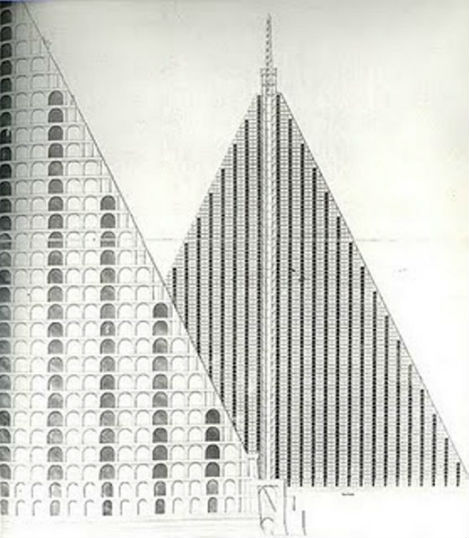
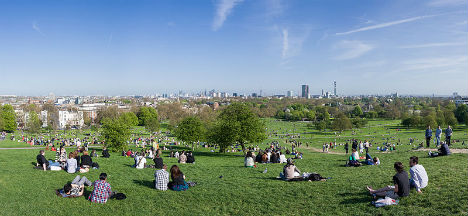
Infused in the Victorian preoccupation with melancholy and inspired by the Egyptian spoils of traveler and tomb-raider Giovanni Battista Belzoni, London architect Thomas Wilson proposed a massive, 15-acre pyramid-shaped necropolis for the city’s Primrose Hill. The granite pyramid would have towered into the air with 94 tiers of tombs in honeycomb shapes and a base measuring 18 acres, casting a gargantuan shadow over the hill many Londoners use for picnics and looking out over the city. Churchyards were so crowded at the time, that graves were bursting out of the ground – but concerns about what to do with London’s dead weren’t enough to convince the public that a necropolis was a good idea.

White House Alterations for President Harrison

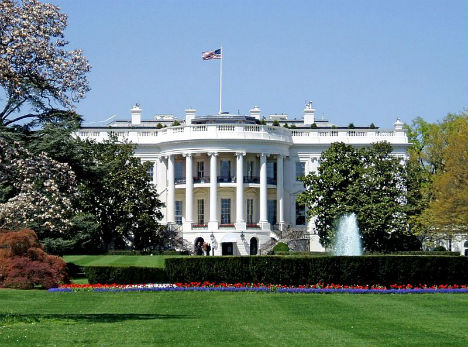
Alternative Monuments White House

Alternative Monuments White House Real

(images via: loc.gov, wikimedia commons)

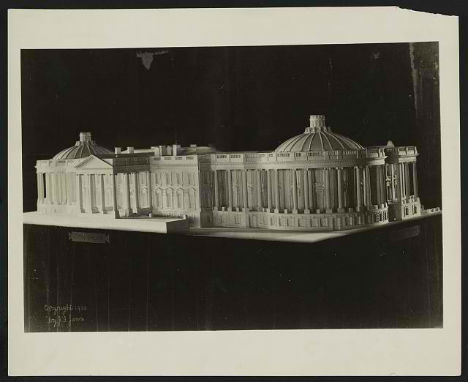
While he’s not nearly as forgettable as his grandfather, ninth United States President William Henry Harrison – who died after just 32 days in office – many Americans will struggle to recall any of twenty-third President Benjamin Harrison’s achievements during his tenure in the White House. However, Harrison could have made quite a mark. The first President to reside in the White House after it was wired for electricity, Harrison and his First Lady, Caroline Harrison, proposed significant changes to the complex that were never carried out. However, ten years later, Theodore Roosevelt made plenty of changes of his own, including the addition of the West Wing.

Next Page:
Alternative Landmarks 12 Monuments As They Almost Were

Share on Facebook


[ By Steph in Architecture & Public & Institutional. ]

[ WebUrbanist | Archives | Galleries | Privacy | TOS ]


WebUrbanist

 
Comments Off on Alternative Landmarks: 12 Monuments As They Almost Were

Posted in Creativity


Legal Photography Nightmares — and What They Mean for You

13 Mar

It’s not just photographers and social media fans who like Instagram; lawyers love the photo-sharing site too. After Instagram announced a badly-written change to its terms of service that would apparently have allowed the Facebook property to sell contributors’ images without compensation, the lawyers brought out their briefcases. Even though Instagram quickly took down the new terms and reverted to the old ones, the lawyers filed a class action suit alleging breach of contract. Last month, Instagram applied to have the case thrown out.

That case may not lead anywhere, and if it did, it would benefit photographers at the expense of a big company. That doesn’t always happen. Photographers, amateur as well as professional, need to be wary of being sued just as much as they need keep an eye out for big firms trampling over their legal rights.

Wedding Photographer Sued for Missed Kiss

That happened earlier this year to Australian wedding photographer George Ferris of Studio Edge & Multimedia who found himself in court defending a lawsuit brought by two unhappy clients. Ferris, said the couple, Jarrad and Sheree Mitchell, had missed all of the most important moments of the wedding, including the ribbon cutting, the certificate signing and the pair’s first kiss as husband and wife. They withheld $ 400 of the $ 2,700 fee — and sued for $ 6,700.

Ferris countersued for $ 6,000, claiming the remainder of the fee, court costs and $ 63 for a meal that he bought at his own expense. The Victorian Civil and Administrative Tribunal showed a surprising amount of sympathy for the difficult work of wedding photography; it agreed with Ferris that capturing the kiss is a challenge. But ordered him to pay the Mitchells $ 750 for failing to supply the full value of the package he’d sold, and told the couple to compensate the photographer for the cost of his meal.

That’s the sort of case that haunts every wedding photographer. The photographer appears to have screwed up. If you’re blaming shadows and blur on flowers and flash bounce, and missing key moments of the event, you can expect clients to be unhappy — and you can be afraid that they’re going to overreact and demand a giant chunk of compensation.

User Uploads Images, Photographer Sues the Site’s Owner

But it’s not just clients who can reach too fast for their lawyers. Photographer Charlyn Zlotnik recently threatened to bring a suit against Les Irvin, owner of jonimitchell.com. According to a page that went up on the site, Zlotnick demanded between $ 25,000 and $ 600,000 in compensation after an anonymous user uploaded four of her images without her permission.

Irvin’s site includes a legal page that explains how copyright owners can claim infringement, and he removed the images from the site as soon as he was informed of a claim. That quick deletion and the fact that the images were uploaded by a user and not by himself should have been enough to clear him of any accusation of copyright infringement.

Despite some apparent initial obstinacy, Irvin’s plea for the site’s users to write to the lawyers and to the photographer pleading with them to drop the suit might have been successful. The site no longer mentions the suit and the plea has been removed. BoingBoing has noted that the photographer was recently caught up in a drugs bust, while the legal firm that sent the letter demanding compensation has been mentioned on watchdog sites Ripoff Report and Extortion Letters Info. There may have been a lot less law to this case than meets the eye.

Prepare the Evidence Before the Suit

Zlotnick’s attempt to catch some cash might have had little credit but a recent case about one iconic image has a lot more justice on its side and offers a number of lessons for photographers.

The photograph at the center of the case dates to 1991 and shows University of Michigan’s Desmond Howard striking the Heisman Pose after returning a 93 yard punt for a touchdown. The shot was taken by freelance photographer Brian Masck who initially licensed it to Sports Illustrated.

Last month Masck sued a long list of targets, including Sports Illustrated, Nissan, Getty Images, Champions Press, Photo File, Inc., Fathead, Wal-Mart, Amazon.com, and even Desmond Howard himself for violating his copyright, either by reproducing the image without his permission or for selling unauthorized copies.

Law professor Eric Goldman has written about the suit and noted that it raises a couple of interesting issues.

The first is that because there were three photographers at the game, and all captured the image in slightly different ways, in 2011 Masck altered the image so that he would be able to track its use:

He added two tells to the photograph. First, he removed the branding from the glove on Desmond Howard’s right hand. Second, he extended the lettering on the football. These small alterations do not appear to the untrained eye, but assist Brian Masck in tracking infringing uses of his photograph.

That’s an interesting little trick that other photographers would do well to emulate especially when they’re shooting the same scenes alongside other photographers. Watermarks can be removed but these small “tells” are much harder to hide.

The second point concerns the importance of registering images with the Copyright  Office. Blaming bad legal advice, Masck didn’t register the image until 2011. That’s an error which would cost him the higher rate statutory damages.

Even without those damages though, Goldman believes that the actual damages and infringer’s profits should be both high enough and hard enough to prove for the parties to settle out of court.

That might suggest that turning to a lawyer when you think your copyright is being infringed is a good idea. Sometimes it will be. But street photographer Brandon Stanton come up with much more elegant response to an example of copyright infringement.

According to PetaPixel, Stanton was approached a few months ago by clothing firm DKNY who wanted to license 300 photos from his Humans of New York site to decorate its stores worldwide. The company offered a flat fee of $ 15,000. Believing that $ 50 per photograph was too low, Stanton rejected the offer.

That should have been the end of it. And it was until one of his fans sent Stanton a photograph of his images used to decorate a DKNY store in Bangkok.

Instead of demanding payment or calling his lawyers, Stanton told his Facebook page and asked his followers to share his demand that DKNY give a $ 100,000 donation to the YMCA in Bedford-Stuyvesant, Brooklyn. The company responded within 24 hours. The images, it said, had been used in an internal mock-up which that store had used by mistake. It apologized and donated $ 25,000 to the YMCA in Stanton’s name.

That’s not a decision that the lawyers will like but it should make photographers and social media fans happy.


Photopreneur – Make Money Selling Your Photos

 
Comments Off on Legal Photography Nightmares — and What They Mean for You

Posted in Equipment