RSS
 

Posts Tagged ‘TECHNIQUES’

5 Impressionist Photo Techniques

12 Dec
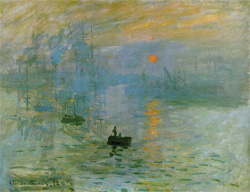
Impression, Sunrise

Impressionism is an art movement that began in the 19th century with the works of Monet whose painting "Impression, Sunrise" gave rise to the name of the art movement.

I often think of photography as two different art forms.

There is the traditional style that depicts a literal representation of a scene by showing how it actually appears to the person who is present – the style used in photojournalism and travel images.

Then there is another style when the photographer tries to convey the feeling of a scene, a general impression, or suggestion of a scene.

Lacking in detail these impressionist images emphasize colour over line and are often soft, dreamy, and have a painterly feel.

Think of the impression a scene leaves in your mind when you glance at it quickly and then look away before giving your eyes a chance to focus. Usually it is an impression of colour and shapes and maybe an idea of some things that were in the scene with little detail – just the essence of a subject.
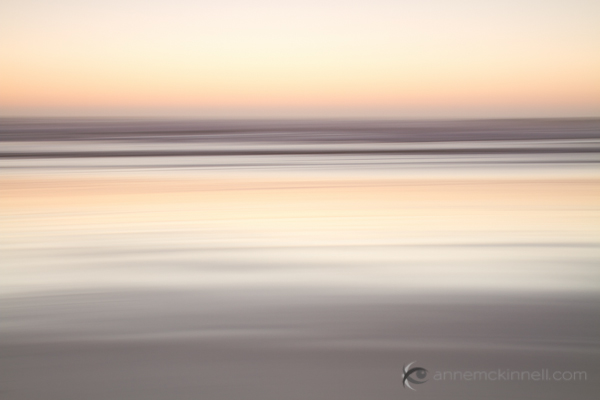
Beach blur using the intentional camera motion technique.

Beach blur using the intentional camera motion technique.

When it comes to creating these dreamy sorts of images where things are out of focus it should be obvious to the viewer that the photographer intended it to be out of focus. If it’s only out of focus a little bit it looks like a mistake.

Try to capture the feeling or mood of the scene rather than a literal representation.

Now, on to the techniques.

1. Intentional Camera Movement
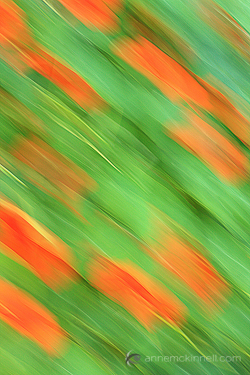
Flower blur using the intentional camera movement technique.

For this image I moved the camera in a diagonal direction. I also sharpened the image in post-processing which is what gives it the appearance of brush strokes.

This technique works great on landscapes with strong lines such as the horizontal lines in a beach scene (shown above) or the vertical lines in a forest scene but you can do it anywhere.

You will need to experiment quite a bit before you get a result you like but that is all part of the fun. Every frame will turn out differently.

  • * Start on shutter priority and pick a long shutter speed such as 1/20 to 1/2 a second.
  • * Point your camera at the middle of the scene and hold the shutter half way down to lock in the exposure.
  • * Pan in the same direction as any strong lines that exist in the scene.
  • * Start the panning before you completely press the shutter and continue after the shutter closes. That will make the movement smoother.
  • * Experiment with shutter speeds.


2. Zooming

Similar to the above technique, this one is intentional camera movement too, but instead of panning you zoom your lens in or out during the exposure. I like how this technique looks on city lights.

The Legislature in Victoria, British Columbia using the zoom blur technique.

The Legislature in Victoria, British Columbia using the zoom blur technique.

  • Set your camera to shutter priority and pick a shutter speed of at least a couple of seconds.
  • I find it easier to do this technique at night to allow for a really long exposure. If you do it during the day you might need to use a neutral density filter to block out some of the light to allow for the long exposure time.
  • While the shutter is open slowly zoom the lens. Try to make the zoom as smooth as possible.
  • You will probably have to try a number of different exposure times and try zooming quickly and slowly for different results.

3. Selective Focus

With this technique only a very very small portion of the frame will be in focus. The rest will be extremely soft and painterly. You will need to use a lens that has a very wide aperture opening (f/1.8 or 2.8 for example). It will work best if you move away from your subject and use a telephoto lens to zoom in.
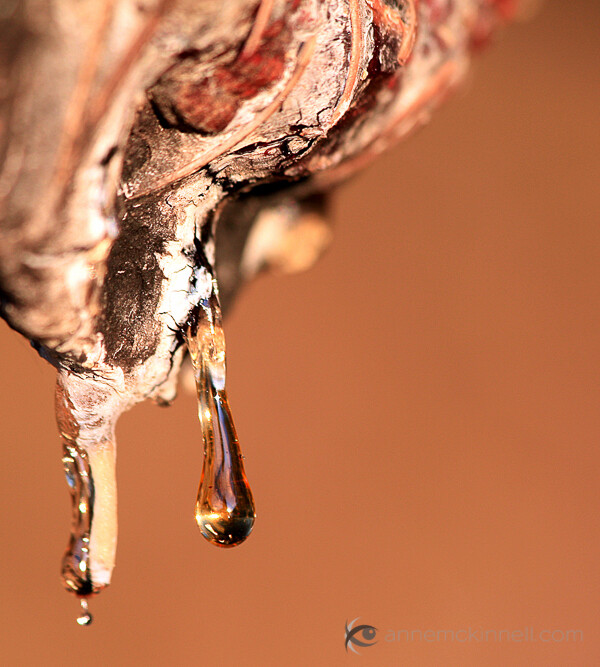
Sap abstract using the selective focus technique.

Or you can use a specialty lens like a Lensbaby.
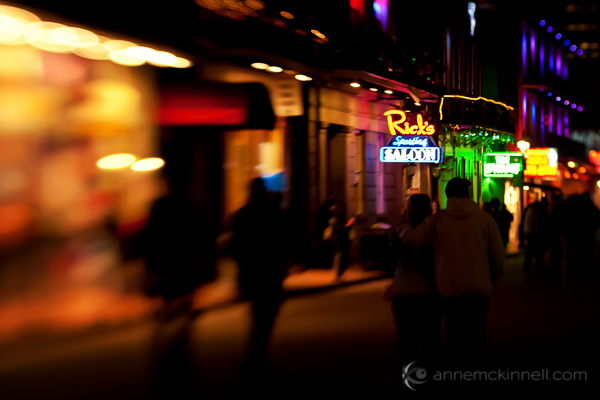
Bourbon Street, New Orleans during Mardi Gras captured with a Lensbaby.

Bourbon Street, New Orleans during Mardi Gras captured with a Lensbaby.

  • Use the aperture priority setting on your camera and set it for the widest aperture (lowest F stop number).
  • You might have to focus manually to get the right part of the frame in focus.
  • This technique tends to works best when you have good colour in the frame.

4. Long Exposures

I always remember the day I made this image because what I really wanted to do that day was the selective focus technique. But when I got to the location it was super windy and there was no way I was going to get anything in focus.

At first I was disappointed until I decided to go with the flow. The flowers blew all over the place while the shutter was open for half a second and I was delighted with the result.
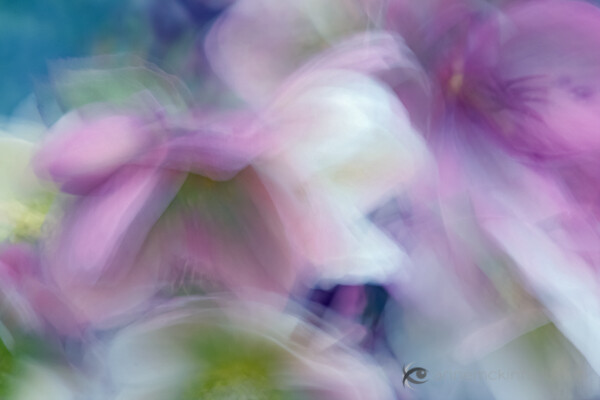
Flowers using the long exposure blur technique.

  • Set your camera to shutter priority and pick a long shutter speed like half a second or longer.
  • Find a subject that is in motion.
  • You will probably have to try lots of different shutter speeds before you get one that is just right depending on how quickly your subject is moving. I like it when the result is very abstract yet there is still enough detail to identify the subject.

5. Focus Through

This technique works great with flowers because the petals are semi-transparent and light shines through them. What you want to do is focus on a flower that is a couple of feet away and allow another flower to be extremely close to the end of your lens, so close that it could never be in focus.
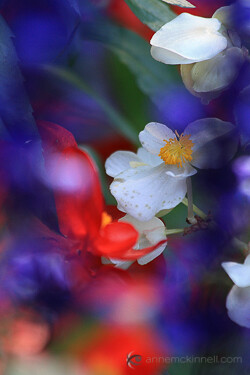
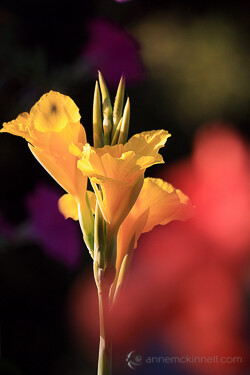
Flowers using the shoot through technique.Flowers using the shoot through technique.

  • Use a telephoto lens.
  • Find an object that is semi-transparent that you can place in front of the subject which is in focus.
  • Use manual focus so your camera isn’t confused by the object in the foreground.

The reason I like these techniques is because it gives me a real sense of freedom when there are no rules and I can play around as much as I like.

Even if these sorts of images aren’t your thing, I really encourage you to try it out for a day just for fun, just to release yourself from the obligation of making everything super sharp all the time.

Remember – you are the artist and you can do whatever you want.

I would love to hear about your experience with these techniques! Let me know how it worked out for you in the comments.

Post originally from: Digital Photography Tips.

Check out our more Photography Tips at Photography Tips for Beginners, Portrait Photography Tips and Wedding Photography Tips.

5 Impressionist Photo Techniques


Digital Photography School

 
Comments Off on 5 Impressionist Photo Techniques

Posted in Photography


Newborn Photo Techniques & Strategies, Part 1, Julie Klaasmeyer, Photovisionvideo

12 Nov

Use code YOUTUBE? to save 75% at www.photovisionvideo.com. In part 1 of this 3 part series, Julie shares with Janine Killian, PhotoVision’s Correspondent, all her tricks of the trade for successful newborn photography, including heating pads, space heaters, heartbeat sound machines and more. Watch as Julie conducts a newborn session with the aid of her assistant making sure they capture a series of well posed, solid images before trying to push the envelope to get that perfect image.

 
Comments Off on Newborn Photo Techniques & Strategies, Part 1, Julie Klaasmeyer, Photovisionvideo

Posted in Photography Videos


Photoshop tutorial-Baby photography techniques

30 Oct

www.nobsphotosuccess.com
Video Rating: 4 / 5

 
Comments Off on Photoshop tutorial-Baby photography techniques

Posted in Retouching in Photoshop


Photoshop Elements: More Eye Retouching Techniques

25 Oct

A couple of techniques for enhancing eyes are demonstrated, as well as an eye resizing method that does not require using the Liquify filter’s Bloat tool. This is the one-year anniversary video from my series of 70+ tutorials for beginning PSE users on the kkeithphotographer channel of Vimeo. Check it out!
Video Rating: 0 / 5

 
Comments Off on Photoshop Elements: More Eye Retouching Techniques

Posted in Retouching in Photoshop


Two Must Have Camera Techniques

24 Oct

These 2 sections were taken from our Advanced Broadcast Camera Techniques video www.elitevideo.com. Even though these videos were done a few years back, the tecniques still work well and can be applied in both videography and photography. The purchase the complete 2-disc set of Advanced Broadcast Camera Tecnhiques, visit http
Video Rating: 4 / 5

 
Comments Off on Two Must Have Camera Techniques

Posted in Nikon Videos


Get Digital; Photoshop Techniques for Tattoo Artists

20 Oct

Get Digital with Mike DeVries and Jamie Parker: Adobe* Photoshop* Techniques For Tattoo Artists of All Levels. Get Digital with Mike DeVries and Jamie Parker is a two-disc instructional DVD full of tips, tricks, and techniques to help tattoo artists to utilize Adobe* Photoshop* and learn how its tools can enhance creativity and imagination. Beginning with familiarization of most of the tools used in Adobe* Photoshop* CS3*, the DVD explains what most tools are ideal for, covering shortcuts, saving options, and file organization. Subjects such as: the importance of the dodge and burn tools, loading new brushes and fonts, colorization of black and grey photos, adding light sources to photos for striking enhancements , and changing backgrounds are explained. The instuction also delves into more advanced techniques,such as adding color to a pencil sketch and “zombifying” images; as well as guidance on how to make business cards, fliers, and banners. This excellent DVD set will help tattooists in an abundance of ways, making preparation for their creative projects more innovative and original than ever before. *Though newer versions are available, Mike and Jamie prefer Photoshop* CS3 and have chosen to utilize it for instructional purposes. Disc 1: Beginner & Intermediate….2 Hours…….Includes HD Digital Copy in Quicktime Format Disc 2: Advanced…2 Hours……..Includes HD Digital Copy in Quicktime Format We don’t cover every tool in Photoshop*, we just go over what we
Video Rating: 5 / 5

Dear YouTube Friends and Subscribers: This is an improved higher quality video of my previous version of this video. When all the fantastic photos came out during the filming of Bel Ami of Rob in costume as Georges DuRoy, Robsessed women across the globe panted with glee! (Including me…) I collected the best of the best photos, and enhanced them in PhotoShop; and decided to create this video for us Rob as Georges fans. I chose the background song “Lying in the Hands of God” by the Dave Matthews Band (DMB) because it is just so beautiful and sexy (like Rob)… and we all know that Rob is a Sex God, aka Mr. Sex On Legs. (And I’m sure he will really prove that in Bel Ami, seducing all these older women — I think I’ll DIE and go to heaven when I see THAT on the big screen!) I discovered the song “Lying in the Hands of God” via reading the fabulous fanfic, “The University of Edward Mason” by Sebastien Robichaud — one of my very favorite stories. (In the story, “Lying in the Hands of God” is the song that Professor Mason plays in the background when he makes love to Bella for the first time. *le sigh*) I have discovered so much wonderful music via playlists in my favorite fanfic stories. I do hope you enjoy this video as much as I enjoyed enhancing the photos and creating it. Best Regards and Hugs from MelbieToast (melbietoast@yahoo.com) CREDITS SONG: Lying in the Hands of God ARTISTS: Dave Matthews Band (DMB) ALBUM: Big Whiskey & the GrooGrux King Release Date June 2, 2009

 
Comments Off on Get Digital; Photoshop Techniques for Tattoo Artists

Posted in Retouching in Photoshop


SNYP’s MW2 Trick Shot Guide! Part 2 – Preparation, Techniques and Tactics

17 Oct

PART 2 IS FINALLY HERE! Thankyou all so much for the overwhelming response on Trickshot Guide part 1. We hope this fully interactive beast of a guide was worth the long wait! Please leave a like and favourite if you enjoyed it, we spent absolutely ages on this guide! 🙂 Lots of love, ~ SNYP

 
Comments Off on SNYP’s MW2 Trick Shot Guide! Part 2 – Preparation, Techniques and Tactics

Posted in 3D Videos


Unique Photography Techniques – Rock Band Photographer Michael Zagaris

03 Aug

Welcome to a new episode of the Marc Silber Show www.silberstudios.tv – Advancing Your Photography! We’re in San Francisco with our guest Michael Zagaris, also known as “the Z-man”. Michael has shot some of the most amazing rock & roll photos in his career behind the music. He became the band photographer for the Rolling Stones, The Who, Led Zeppelin, and the list of rock legends he captured on film goes on and on. As a rock & roll insider in those days, he took photos of what was, not what one expected to see, and as an insider today he does the same thing for 21st century bands and artists. As team photographer for the San Francisco 49ers and the Oakland A’s, Zagaris is sports’ “inside-out shooter”. Zagaris explains his approach to photography, how to “become what you shoot”, and focus on your subject. His unique tips on composition will help any photographer capture more raw emotion and energy in their photos.
Video Rating: 4 / 5

Adorama Photography TV presents “How’d They Do That” featuring Carl Heilman II. In this episode, Carl Heilman II explains how to get natural-looking HDR images,and panoramic and standard format nature photography shots with techniques he has learned. For related products and articles on the Adorama Learning Center, go here: www.adorama.com Visit www.adorama.com for more videos!
Video Rating: 4 / 5


ADOBE LIGHTROOM TIPS: FACIAL RETOUCHING TECHNIQUES

02 Aug

ONLINE ADOBE LIGHTROOM CLASSES @ www.bestlightroomtraining.com! Facial retouching techniques in Adobe Lightroom… Kris Gay Best Lightroom Training 260-440-3889 studio/office 260-438-7246 cell WEBSITE: bestlightroomtraining.com EMAIL: bestlightroomtraining@gmail.com This video may not be embedded or shown on any web site, page, or other venue without the express written permission of the copyright owner.
Video Rating: 5 / 5

 
Comments Off on ADOBE LIGHTROOM TIPS: FACIAL RETOUCHING TECHNIQUES

Posted in Retouching in Photoshop


VTC Photoshop Tutorial – Masking Techniques pt. 1

06 Mar

For the full sized video visit www.vtc.com. Adobe Photoshop Advanced Artistry II, is a course designed for professional designers and photographers who use Adobe Photoshop CS2. The course is designed to showcase cutting-edge creative techniques in many artistic disciplines such as digital imaging, color correction and manipulation, photo retouching, advanced production techniques and other popular graphic effects. This practical step-by-step tutorial by certified Photoshop Trainer Rita Amladi, is guaranteed to raise your knowledge level, and it will inspire you to apply these successful techniques in your own projects right away. In addition, several “Mini-Tutorials” shed light on key concepts and tools covered in each section. An entire section is devoted to teaching you about color management, which will ensure that you get the best possible results on screen and when printed. Work files are provided.