RSS
 

Posts Tagged ‘Subject’

SLC-1L-03: Need Light With More Edge? Aim It Away From Your Subject.

04 May

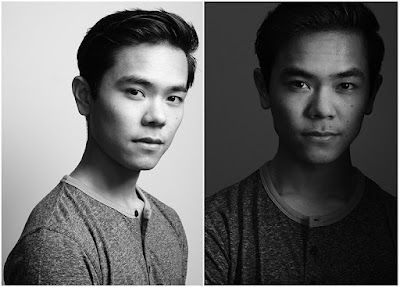
The two photos above have the same light source, same light location and same white background. The only difference in the second photo is that the light has been aimed differently. Pointing your light away from your subject—and using the edge of the beam—is a quick way to sculpt much more interesting light on a head shot or portrait.

But how far away do you need to aim it? Further than you'd think. And finding the nice edge to your light is definitely a game of inches.

Here's how to do it.Read more »
Strobist

 
Comments Off on SLC-1L-03: Need Light With More Edge? Aim It Away From Your Subject.

Posted in Photography


Fujifilm X-T20 firmware update improves subject tracking, enhances touchscreen functionality

13 Apr

In addition to the six other firmware updates released today, Fujifilm also released the previously announced upgrade to the X-T20. The most interesting features include:

  • Improved AF tracking: the company says that the camera can track moving subjects at twice the speed of the previous firmware. The X-T20 can now track subjects 50% smaller than before.
  • New touchscreen controls: Users can now move the AF area by touch when in ‘focus zoom’ mode. The Quick Menu can now be operated by touch, as well.
  • Exposure improved with face detection
  • RGB and highlight warnings now available

Version 2.00 of the X-T20 firmware can be downloaded here.

Here’s the full list of improvements:

The firmware update Ver.2.00 from Ver.1.11 incorporates the following issues:

1. New AF tracking algorithm for moving subjects
Thanks to the newly developed image recognition algorithm, the update enhances AF-C to track moving subjects twice as fast as previous firmware. In addition, the update also enhances tracking to be able to capture up to 50% smaller moving subjects than before.

2. Enhanced touch screen operation
The firmware update will add some of the touch screen operation features which are currently available on the FUJIFILM X-E3. These touch screen features include:
1) The Auto Focus area can be moved when in focus zoom with flick operation.
2) Pinch-in/out operation in playback mode will be updated to go from full-frame playback to multi-frame playback (Nine-frame view and Hundred-frame view)
3) Select the frame in multi-frame playback with tap or drag operation or return to full-frame playback by double-tapping
4) Q (Quick) menu selection
5) Input character with touch key-board (*1)
*1?Except for some functions. (ex. SSID input)

3. Support “FUJIFILM X RAW STUDIO”
After connecting a camera to a computer via USB cable, the “FUJIFILM X RAW STUDIO” enables users to convert RAW files with X Processor Pro. Fast batch processing will also be available. The “FUJIFILM X RAW STUDIO” can be downloaded from the FUJIFILM website for free.

4. Support for backup/restore of camera settings via FUJIFILM X Acquire
Once connecting a camera to a computer via USB cable, the “FUJIFILM X Acquire” allows users to backup/restore camera settings to/from a file. Copying all camera settings from one camera to another is available.
*Settings other than date and custom white balance can be backup and restored.

5. Compatible with the newly developed FUJINON XC15-45mmF3.5-5.6 OIS PZ lens
The upgrade will add compatibility for the newly developed FUJINON XC15-45mmF3.5-5.6 OIS PZ lens.
1) When changing the focus mode (AF/MF), the focus ring function (fine zoom adjustment, manual focus) automatically switches.
* Focus ring function when focus mode is “S” or “C”?Fine Zoom adjustment.
* Focus ring function when focus mode is “M”?Manual focus.
2) Memorize the lens zoom position when power off and return to the position when power on
3) Maintain the lens zoom position in playback mode to shorten the startup time for the next shooting

6. Improve radio flash controller usability
The upgrade allows users to shoot with compatible third party studio flash in high speed sync. or TTL mode via their radio controllers.

7. RGB histogram display and highlight warning
If you press the function button in the histogram, RGB histogram and highlight warning (high brightness portion will blink) will be displayed.

8. Enlarged and customizable indicators or information
The upgrade allows users to enlarge indicators and information in the viewfinder and/or LCD monitor. This upgrade will also enable users to customize the location of where the information is shown on the display. When enlarged display, some icons are not displayed like distance indicator, focus frame, focus mode, focus warning, microphone/remote release, AF+MF, button lock and sound and flash indicator.

9. AE optimization when face detection

Articles: Digital Photography Review (dpreview.com)

 
Comments Off on Fujifilm X-T20 firmware update improves subject tracking, enhances touchscreen functionality

Posted in Uncategorized


5 Quick Portrait Posing Tips to Flatter Your Subject

15 Mar

Being in front of the camera is daunting, to say the least, not to mention staring at a big black lens in front of you. I understand how my subjects feel because I totally hate being photographed. In this article, I’ll give you five portrait posing tips to help flatter your subjects.

1. Relaxed posture

5 Quick Portrait Posing Tips to Flatter Your Subject

Getting your subject into a relaxed posture is easier said than done! But relaxing for portraits is definitely not synonymous to slouching. I tell my subject to close their eyes and take some deep breaths, give their arms and hands a good shake, breathe out, and then open their eyes.

It’s easier for men. I tell them to relax into their normal stance and give them instructions from there. For men, it is generally a slouching issue. I tell them to straighten their spine and not to slouch. This makes them look taller and leaner and gives them square shoulders rather than droopy. However, this posture can look a bit stiff too so I ask them to gently breathe out as this releases the tension on the shoulders.

Relaxing for women is a little bit trickier but the above is a good start. Sometimes it helps them to imagine that a string is attached to their spine and I am pulling it gently upwards. The key word here is gently!

2. Weigh distribution

5 Quick Portrait Posing Tips to Flatter Your Subject

I get women to stand with one leg slightly behind the other and to put their weight on the back leg. With the weight distributed more on the back hip and leg, I get them to lean their upper body forward toward me to balance the weight distribution and slightly twist their body to either the left or right.

It’s a very subtle chest-forward-booty-back pose and you really want it to be subtle. It is important to make sure that you are not looking up at your subjects but that your camera is ever so slightly looking down at them. This pose and your camera angle combined gives your subject a more flattering and leaner look. Don’t overdo the looking down angle, a slight camera tilt will do. This is not the bird’s eye view pose.

Men don’t need to redistribute their weight backward and forwards like women. I find that an even central distribution of weight works better for them. Getting them to put their thumbs in their pockets helps achieve this. If I feel they need to slightly loosen up, I just tell them to gently breathe out.

3. Leaning

5 Quick Portrait Posing Tips to Flatter Your Subject

With their spines straight, find a wall or structure your subjects can lean on. I usually start with having them lean with their backs flat against the structure and I instruct them to pull away from one side until I feel the right angle is achieved.

Sometimes, this pose ends up as just one shoulder leaning. The important thing is that the resulting image does not look like your subject is missing a limb or shoulder as can happen sometimes if you are not careful with the angles.

4. Chin forward

5 Quick Portrait Posing Tips to Flatter Your Subject

Women are extremely conscious about double chins and their faces not looking as lean as they’d like in their images. A bad habit that many women do instinctively when they are photographed is to tilt their chins upwards thinking this removes any double chins.

This looks very unnatural and awkward and gives them a longer neck and a shorter face. When you speak to people, you don’t stick your chin up at them, do you? Instead of chinning up, I get them to push their chins forward and down a touch. This gives them a slight stretchy pain on the back of the neck and feels unnatural, but looks really flattering.

The forward action eliminates the double chin and tipping the chin slightly downwards makes the face look leaner.

You can modify this pose slightly by asking them to point their chins towards one shoulder and if the shoulder is droopy, they can lift the shoulder bone up a touch. This not only gives them a taller and leaner posture but adds angles as well to improve the composition of the image.

5 Quick Portrait Posing Tips to Flatter Your Subject - chin out

5. Connection

On any of the above and at any point during the session, breathing out helps your subject be more at ease so just remind them to do so. You also want them to always have a connection, just like the direction of the chin connecting to the direction of the shoulder for some angles.

Their gaze also needs to connect to either their body or their environment. You don’t want your images to look like the subject is in a vacuum. Looking straight at the camera connect them to the viewer. If you are shooting outdoors, you could instruct your subject to look at the horizon in the far distance or a tree nearby.

If they are holding something like flowers or a coffee mug, you could ask them to look down at what they have in their hands. Check that they don’t look asleep though so adjust your position and take a few images.

5 Quick Portrait Posing Tips to Flatter Your Subject

Conclusion

I hope these 5 quick portrait posing tips are helpful for you when you do your next photo session. If you have any other posing tips please share them in the comments below.

The post 5 Quick Portrait Posing Tips to Flatter Your Subject by Lily Sawyer appeared first on Digital Photography School.


Digital Photography School

 
Comments Off on 5 Quick Portrait Posing Tips to Flatter Your Subject

Posted in Photography


Photoshop CC update adds AI-powered subject selection tool and more

24 Jan

The AI-powered Select Subject feature that Adobe demoed back in November has finally arrived in Photoshop CC! The feature was officially released just minutes ago in Photoshop CC version 19.1, which also includes the addition of a Decontamination slider to the Select and Mask workspace and some significant compatibility updates for Windows users.

The major update is, obviously, the arrival of Select Subject to Photoshop CC. When it was first demoed in November, the Photoshop team touted the tool—which is powered by Adobe Sensei AI technology—as a way to “select prominent subjects in an image with one click.” That’s what they hope to deliver today.

A single click of the Select Subject button in the Quick Select tool should easily isolate your subject in images like the one below:

Of course, more difficult scenarios where the subject isn’t so obviously delineated against the background will give Select Subject more trouble—the original demo video, embedded below, showed that—but it promises to “let you get started with your selections faster than ever before.”

In addition to Select Subject, Adobe also added a Decontamination slider to the Select and Mask workspace that allows you to select the amount of color decontamination applied to an image:

For Windows users, version 19.1 brings much-requested support for Windows High Density Monitors—allowing you to switch between displays of varying resolutions and sizes seamlessly. Jerry Harris, principal scientist on the Photoshop team and himself a Windows user, explains what this means in the Adobe blog post:

With this release, Photoshop on Windows 10 Creator’s Edition now offers a full range of choices for UI scale factors from 100% through 400%, in 25% increments. This means that the Photoshop user interface will look crisp, beautiful, and the right size no matter the density of your monitor. Photoshop will now automatically adjust itself based on your Windows settings, making it simple to set up.

[…]

In addition, we worked very closely with Microsoft to provide per-monitor scaling across monitors with different scale factors. This means that a high resolution (HiDPI) laptop now works seamlessly alongside a lower resolution desktop monitor (or vice versa). One monitor can have a scale factor of 175% and another a scale factor of 400%.

And finally, Windows users also get advanced support for the Windows dial, which can now adjust brush settings while you paint. Before this, you could only adjust settings between brush strokes, but you can now adjust brush size, opacity, and other settings as you draw:

As of publication, this update should be live and ready to download if you’re already a Creative Cloud subscriber. If you want to learn more about any of the features above, or dive into bug fixes and other minutia, head over to the Adobe blog. Otherwise, just update your copy through the Creative Cloud app and you’re ready to go.

Articles: Digital Photography Review (dpreview.com)

 
Comments Off on Photoshop CC update adds AI-powered subject selection tool and more

Posted in Uncategorized


Taro uses infrared technology and AI for improved subject tracking

10 Nov

Conventional tracking systems tend to struggle when the tracked subject briefly exits the frame or disappears behind another object. The new Taro auto-tracker and stabilizer tackles this problem with infrared technology.

Users connect their smartphones, DSLR cameras or existing Bluetooth stabilizers to Taro and select the target they want to track. Taro will then follow the target using an AI-based infrared tracking algorithm that performs 30 calculations per second. According to the Taro team, this allows for tracking of objects that are moving as fast as 50 MPH.

“In developing Taro, we’ve essentially designed a robot that operates your camera just like a real cameraman could,” said Taro founder, Hao Qian. “Taro can instantaneously establish the intended object’s approximate location,” he said. “Taro also has a powerful learning algorithm that immediately eliminates sub-optimal positioning, precisely pinpointing the object’s exact location – which results in the perfect balance between efficiency and accuracy.”

The Taro robot looks like an interesting solution for anyone wanting to film themselves during sports and action activities or for filming while moving. The Taro is available on Kickstarter now in three versions, a kit for smartphones, a kit for DSLRs or just a tracking module that can be used with existing Bluetooth stabilizers.

The smartphone kit will set you back $ 200 while the DSLR kit is $ 600. The tracking module on its own is available at $ 100. Early-bird offers are available as well. For more information watch the video below and have a look at the project’s Kickstarter page.

Articles: Digital Photography Review (dpreview.com)

 
Comments Off on Taro uses infrared technology and AI for improved subject tracking

Posted in Uncategorized


Simple Tips for Positioning Your Portrait Subject to Leverage Natural Light

06 Nov

When I’m on a photo shoot, I always carry two flash guns with me. However, when it’s a family outing or holiday, the flash guns are left behind in favor of kiddie stuff I need to lug around and I shoot using purely natural light, without even a reflector to help. It does help that I carry a prime lens that opens up to f/1.4 should I need or want to shoot indoors.

Here are my tips for making portraits using purely natural light.

On a sunny day, there is so much light that it makes it quite hard to take portraits, contrary to what many would think. I generally don’t like taking portraits with the sun directly hitting the face of my subject, so that makes the job even harder on such a bright day.

Simple Tips for Positioning Your Portrait Subject to Leverage Natural Light

The first thing to be mindful of is the direction of light – is it coming from overhead, at an angle of 45 degrees or higher or lower? As you cannot physically move the sun, you are going to have to move your subject instead. Think of positioning your subject as leveraging natural light to make a pleasing portrait.

Outdoors

Here are some outdoor scenarios where you can position your subject and avoid direct bright sunlight.

In the shade

My go-to (and easiest) spot is a shaded or sheltered area. Ideally, find a large enough shaded area so that your entire subject is covered in shade. You don’t want dappled light or parts of the body overexposed by being in the sun while the rest of the person is in the shade.

Areas of shade could be under a tree or in the shadow of a tall structure such as the wall of a building as in the photo on the left below. This gives you even lighting over a large area and even exposure too with no hard shadows.

Compare the left photo to the right one where the subject is wearing a hat. I metered on her face and because she was furthered shadowed by the hat, the exposure increased a tad and the rest of the image then got brighter. This can be evened out quite easily in post-production by adding a soft vignette.

Simple Tips for Positioning Your Portrait Subject to Leverage Natural Light

With a very bright backlight

Sometimes you find yourself at a location that doesn’t offer enough shade or there is a lack of large structures to provide shelter. You would end up shooting in a bright wide-open space and your only option is to shoot backlit or at least provide shade to your subject’s face.

The difficulty with shooting backlit is that you would need to have ample fill light to compensate for the very strong backlight. You can either use your camera’s built-in flash or use some kind of reflector. That could be a light-colored piece of cardboard or a natural reflector in the vicinity, such as a bright path or wall that reflects strong sunlight back onto your subject’s face.

Shooting in an open or semi-open space, like the black and white photo above, where the backlight is a lot stronger than the light illuminating the subject it gets complicated. Unless you are using a flash to counteract the backlight, the background will be blown out. Even if you shoot with a small aperture, the difference in the amount of light between the subject and the background will be too great to get an even exposure without using a fill flash.

Natural reflectors

In the photo below, this was not taken in a fully open space but the shade there was weaker. The hat provided more shade to her face and you can see the left side is a little darker than the right. That makes for a nice gradation of light and shadow as opposed to a flatly-lit portrait.

I leveraged a natural reflector here which was just to camera right – a light colored parasol which reflected the sun onto the girl’s face. You can also see that the background was a lot brighter and more washed out compared to the first photo above left. But it is showing some foliage compared to the photo above right, hence there is more detail rather than just a white blown out sky.

When I find myself in situations like these, I make sure my main focus is the subject’s face and I don’t mind the background being blown or washed out. After all, I am after a portrait of the subject.

Simple Tips for Positioning Your Portrait Subject to Leverage Natural Light

Light from above

Compare the two photos below. The left photo is shot with fairly flat lighting on the face. I made sure the subject was in full shade and the light coming from both the right and left sides was even.

The photo on the right is different in that I asked her to look up a little, thus using the light coming from above and creating a slight gradation of shadow on the right side of her face. Simple positioning of the face in relation to the light source makes a big difference in how your photos look.

Simple Tips for Positioning Your Portrait Subject to Leverage Natural Light

Indoor lighting

In comparison to outdoors, there is usually only a fraction of the amount of light indoors, even with a window present. However, this works to your advantage. The light source is usually one-directional unless you have many windows, and therefore you can use this it to sculpt your subject’s face as it were, choosing where the shadows will fall and creating a moody portrait.

The light in the photo below left was coming from a big window, high up at about 30 – 45 degrees to the subject. You can see the shadow falling on the opposite side of her nose and cheeks creating a darker, moodier feel to the image compared to the photo on the right shot outdoors. Even with just a single light source indoors, you have enough light to play with and create the ambiance you want to portray.

Simple Tips for Positioning Your Portrait Subject to Leverage Natural Light

Over to you

Whether indoors or outdoors, it is always important to be mindful of where the light is coming from, how much light there is, and if there is any contrast of light and shade in the space. Knowing how to leverage the natural light allows you to create the type of mood you are after in your portrait.

Understanding this and practicing how to use available light will make you a better photographer.

The post Simple Tips for Positioning Your Portrait Subject to Leverage Natural Light by Lily Sawyer appeared first on Digital Photography School.


Digital Photography School

 
Comments Off on Simple Tips for Positioning Your Portrait Subject to Leverage Natural Light

Posted in Photography


Not quite as good? Nikon D850 versus Nikon D5 subject tracking

01 Oct

Video: D850 versus D5 subject tracking

Photographer Matt Granger’s YouTube channel is chock-full of videos that run the gamut from fairly technical testing to fun challenges and prize giveaways. But we took particular notice when, last weekend, he pitted his new Nikon D850 against his Nikon D5 in terms of autofocus tracking. (What can we say; we’re nerds.)

But why even bother? After all, the D850 and D5 purportedly have the exact same autofocus hardware—performance should be virtually identical. In fact, in our conversations with Nikon, we were told that the D850 includes an additional processor to handle autofocus calculations, just like the D5; they also claimed this processor was omitted from the D500.

More importantly, we were told flat out to expect ‘D5 levels of performance’ from the D850.

So why is it that, during an early shoot with the D850, Granger said, “I felt like I was getting more [images] well-tracked with the D5 than I did with the D850.” Cue the tests in the video below:

Granger performed both low-light and daylight tests. In the former, his subject moved primarily in the X axis (read: across the frame); in the latter, his subject moved in all three dimensions. Both cameras were set to shoot at 7fps (the D850’s max), and shared all other settings as well.

In both instances, Granger concludes that the D850 is simply not as good at tracking moving subjects as the D5.

In the first low-light test, he notes some hesitation: the AF point occasionally lagged behind the subject before catching up (though at 3:00, where he says the D5 does not exhibit this behavior, it looks like the D5 also hesitates a bit, but perhaps not as severely).

We’ve been told to expect ‘D5 levels of performance’ from the D850’s autofocus system.

In the second test, the D850 really struggled to track the subject as she moved between shade and direct sun, seemingly performing better if the subject was initially acquired in bright light.

Of course, Granger concludes that this disparity isn’t really a reason to ignore the D850 or cancel that pre-order. In fact, there have been similar claims across the interwebz of autofocus performance disparities between previous Nikon cameras that are supposed to share the same AF system (the D810 and D4S for example—although we haven’t dug into those). But it’s definitely something worth testing further.

So, given our recent coverage and in-progress full-review, what does the DPReview staff make of all this?

Our experience so far

For white water kayaking, we found the D850’s 3D Tracking to perform very well indeed.

We’ve been shooting a lot with the Nikon D850 over the past couple of weeks, and as with just about any recent high-end Nikon camera, we find subject tracking to work very well. Even though the D850 comes with that excellent AF selection joystick, sometimes we find it preferable to let the camera do some of the work for us.

In particular, when shooting white water kayaking in Oregon, 3D Tracking performed admirably. That shouldn’t be too much of a surprise, though, considering these are fairly distinct subjects, particularly in terms of color, when compared with their surroundings.

As with Matt Granger, though, we’ve been surprised by some of our own experiences while shooting with the D850. With both the D5 and even the D500, we’ve become accustomed to being able to initiate 3D Tracking on a subject’s eye for a tight headshot, and have the camera track it remarkably well as either the camera or subject moves.

This sort of candid kid shot is a situation in which accurate 3D Tracking or Sony’s Eye AF both come in very handy.

With the D850 though, we’ve noticed it is more apt to be ‘jumpy,’ in that it will jump from our subject’s eye to another portion of their face. Further complicating our assessment of this sort of behavior is that it seems to be inconsistent—sometimes the D850 will track perfectly, other times it gets distracted by something else in the scene.

We also noticed some inconsistency in a situation where we’ve historically been able to rely solely on 3D Tracking, namely: motocross. With the D850, we were able to get a ton of keepers using 3D Tracking, but sometimes, when we looked through our bursts and found that one perfect moment, it would be slightly out of focus because the AF point had jumped from one part of the rider or motorcycle to another.

When we switched to a type of zone focusing called D25, we came away with a better hit rate, so long as we kept the zone over our subject (Note: you would expect this result from just about any camera with advanced autofocus).

3D Tracking on the left nailed focus in this instance, but D25 on the right nailed focus more reliably, more often.

So what’s next?

More photos. Lots more photos.

We’ll be doing our standard autofocus treatment on the D850, including our bicycle tests and our close-range, low-light autofocus evaluation. We’ll also be seeking out sporting events in the Seattle area to see if we can draw some parallels between our usual evaluations and real-world shooting situation performance.

We should also note that, in both Granger’s testing and our own experience, we haven’t yet been able to use Nikon’s new battery grip for the D850. For it to be as even a comparison as possible, we’ll be looking to add the grip and the much more powerful EN-EL18a battery if at all possible.

Only more time and more testing will tell if the D850 can truly stand up to the D5’s autofocus performance, though we should reinforce that D5-level subject tracking is an awfully lofty benchmark to reach for. In our experience, it’s a benchmark that has remained out of reach of any camera to date, and whether or not the D850 measures up will be revealed in our full review.

Articles: Digital Photography Review (dpreview.com)

 
Comments Off on Not quite as good? Nikon D850 versus Nikon D5 subject tracking

Posted in Uncategorized


How to Select a Subject for Long Exposure Photography

03 Jul

Get 53% OFF Kevin’s Long Exposure Photography eBook on sale now at SnapnDeals until July 11th.

First of all, I want to clarify for you what type of long exposure photography this article discusses.

You won’t be learning any techniques regarding the creation of photographs at night, or in the low light levels that you might experience with architectural interiors, (even though those examples do require longer exposures).

No, the type long exposure photography that this article refers to most often occurs in bright daylight.

How to Select a Subject for Long Exposure Photography

Perhaps, you’ve already studied up a bit on this genre of photography? Maybe you’re familiar with the streaking clouds and creamy waves of water, which are often depicted in long exposure photographs.

The reason that the long exposure technique is so awesome, is that it creates an illusion of motion in a still image. That look of motion creates a visual presence that is virtually impossible to mimic using post-processing software.

You may have even purchased gear for long exposure photography such as; neutral density filters, graduated neutral density filters, a camera release, and a good sturdy tripod. Once you know how to assemble all of that gear, it seems like the photo creation process should be pretty straightforward. Right?

Well, it’s not. And, you likely realize this if you’ve been disappointed in some of your results.

A photographic fail that often occurs in long exposure photography is because of the subject selection, and that’s what you will be learning about in this article. You’re going to get some important tips on how to evaluate and choose, a subject for the best long exposure photography.

How to Select a Subject for Long Exposure Photography

Selecting a subject for long exposure photography

Subject selection is extremely important to successful long exposure photography. In fact, the subject selection process is so important that it can radically alter the technical steps in your creation of the image.

First, and foremost, in the subject selection process is that something needs to be moving. It’s the motion that creates the tension in the composition. You probably already realize that there needs to be motion.

The second, and perhaps less obvious component is that some element of the photograph should be rock steady. This isn’t an absolute, and sometimes if everything is moving it can lead to some pretty cool results. However, in general, you will want some aspect of your photograph to be rock steady and sharp.

How to Select a Subject for Long Exposure Photography

The image above is an example of a long exposure photograph where everything is moving. It’s a pretty cool result. However, if you’re not interested in an abstract look something needs to be still and sharp in your image. Otherwise, your photograph will simply look out of focus.

How to Select a Subject for Long Exposure Photography

Look for contrast

The next important factor is to search for contrast.

With long exposure photography, you will often be pointing your lens at clouds, water, or moving crowds of people. The movement of these subjects, as they blend through the image (as a result of their motion), tends to fall into the highlight end of the histogram scale (very light tones to absolute white).

Look at the image above. You’ll notice that most of the movement is captured in the bright highlight to the upper mid-tone scale of the histogram.

If you don’t want your photograph to look flat you need some tones on the far shadow end of the histogram. Some good solid shadows, or dark objects, are needed to balance off the highlights. If you don’t include something on the dark end of the scale, your image may look lackluster.

How do you accomplish that? Primarily, through your choice of the angle between the camera point-of-view, the subject, and the light source. A proper angle creates shadowing.

How to Select a Subject for Long Exposure Photography

In lieu of that, you can also manipulate tones in post-production to create a full range of tonality.

The main point

If you’re looking at your scene, and you hold your arms out straight to the left and right, the light source should be coming from somewhere in front of your arms. If the light source is behind your arms, it will likely not provide you with the contrast that you’re looking for through shadowing.

There is one exception.

If the scene contains objects that are dark or very black, then the angle of the light becomes less important- as those photographic elements will provide the necessary contrast.

How to Select a Subject for Long Exposure Photography

In this image, there was almost no directional light for this long exposure shot. This resulted in very low contrast.

Although the image above could have been made using much shorter exposure time, it was important to give the water enough time to create the long sleek ribbons of highlights. This image was exposed for 30 seconds.

The original camera raw file was completely flat in contrast. There were plenty of highlights to work with (as a result of the long exposure technique), however, there were no contrasting shadows, and they had to be created in post-production.

Angle of view

Your next concern in subject selection is the angle of view from the camera to the source of the movement.

If you look at the left image below, the red arrows point toward the photographic elements that were intended to highlight the long exposure effect. Yet, you can barely see the effect.

How to Select a Subject for Long Exposure Photography

There are two factors that will control how well you will see the effect in your long exposure efforts.

The first issue is the length of time for the exposure. You may think to yourself, “If a 4-second exposure looks good then a 30-second exposure will look amazing!” This isn’t necessarily the case. An extended long exposure can actually wipe out the effect if it’s too long. Much depends on the overall scene.

The second issue is the one that’s depicted above, and that is the angle of view; from the camera point of view to the elements creating the motion. If the motion is lying in a plane that is too parallel to the camera point of view, then the motion becomes minimized.

Look at the image on the right above. In that example, the camera is looking down onto the movement. The angle between the plane of movement and the camera point of view has been increased resulting in a more dramatic capture of the motion.

When choosing your subject, keep in mind the angle of view between the camera and the motion.

Could the left image above been better? It could have worked out more successfully if the camera had been moved closer to the cliff.

Could a change in the lens focal length, say to a longer telephoto, have helped? That wouldn’t have helped much as the angle of view would still be too low.

How to Select a Subject for Long Exposure Photography

This leads to your final decision in the subject selection process for long exposure photography.

Lens selection

What focal length are you going to need for your shot?

Long exposure photography works best when using a focal length that falls somewhere between an ultra wide-angle to a very moderate telephoto lens.

Longer telephoto lenses don’t lend themselves well to long exposure photography because they accentuate camera movement. This is true, even if you’re using a sturdy tripod and a camera release. It doesn’t take much movement to soften an exposure of 20-seconds or longer. You may not even perceive the movement.

Vibration from the wind, or even the vibration of the ground beneath you, can ruin your images. For example, if you’re set up on a bridge deck, you may not even feel the very slight motion of the bridge in a wind or when cars pass. However, enough consistent movement of the camera will ruin a long exposure.

Working with lenses in the 14-85mm focal length range will help you get sharp pictures. Keep this in mind as well, it’s helpful to look for a windbreak if there are any near your intended camera angle.

Once, you’ve chosen a subject, using even slight variations on the focal length of your lens, or camera position can lead to some exciting and varied results.

How to Select a Subject for Long Exposure Photography

In the image above, an 18mm lens was used to capture an expansive looking landscape. The long exposure technique highlighted the waterfall, which becomes a major element of the composition, even though it is fairly small in the frame.

How to Select a Subject for Long Exposure Photography

After experimenting with several longer focal length lenses, and not being happy with the results, a simple camera move of about 100 meters resulted in a much different photograph while still using the same 18mm lens.

To summarize the key considerations for subject selection in long exposure photography:

  1. Something in the scene needs to be moving (most often clouds, water, or crowds).
  2. Unless attempting an abstract, something in the scene needs to be steady and completely in focus.
  3. Look for subjects that have natural contrast, or visualize how you will create the contrast in post-production.
  4. Select a subject, or subject angle, where the light source is not behind the camera to achieve good shadowing for contrast.
  5. Choose a subject, or camera to subject angle, that isn’t parallel to the camera point of view. You want the camera pointing downward or upward toward the subject.
  6. Choose a subject, or a camera to subject position, that allows you to use a focal length lens that falls between 14mm and 85mm. Be mindful that if you use a lens that is too wide, the effect might be pushed back and not very visible. On the other hand, if you use a lens that is too long, you may have issues with camera motion. Be experimental. Check your results right there on the camera LCD screen for sharpness and the motion effect.
  7. The Wind is always a concern in long exposure photography. When choosing your subject, look for a windbreak that you can use at the camera position.

Get 53% OFF Kevin’s Long Exposure Photography eBook on sale now at SnapnDeals until July 11th.


The post How to Select a Subject for Long Exposure Photography by Kent DuFault appeared first on Digital Photography School.


Digital Photography School
 
Comments Off on How to Select a Subject for Long Exposure Photography

Posted in Photography


Subject tracking: Why it matters to us and why it should matter to you

19 Mar
On many cameras, subject tracking (choosing your subject and letting the camera track as you hold your composition) has gotten very, very good.
Nikon AF-S 24mm F1.8 @ F2.8 | 1/8000 | ISO 320.
Photo by Rishi Sanyal

Digital cameras, and for that matter, film cameras, have offered autofocus for a number of decades now. It’s evolved from just one point to many hundreds of points over the years, allowing for varying degrees of control. You can leave the whole focusing process up to the camera and let it choose what it thinks is your subject; you can just use a single point of your choosing; or you can dance in the middle-ground using a zone or group of points that you select and keep over your subject, while the camera attempts to compensate if your subject veers toward the outside of that zone.

Outright subject tracking, though, is something else. You select the subject you want, usually with a single point or a single zone, initiate focus, and the camera does the rest. It will attempt to identify the size, color and distance of your chosen subject and do its best to track that subject around the frame, whether your framing changes or your subject moves.

This isn’t a particularly challenging use case, but it’s a good demo of how subject tracking works on Nikon’s D5 in 3D Tracking mode. Note focus is initiated at the beginning of the run, and the camera automatically keeps an AF point over Richard while constantly refocusing; even when shooting at 12fps.

Many people don’t have trust their cameras to do this, and until the last few generations of digital cameras, we wouldn’t have recommended it; but manufacturers continue to invest in pushing this technology forward. Established professionals in particular are highly unlikely to shoot this way, because once you’ve worked one way and can reliably get results you’re happy with, why would you change?

But believe us; good subject tracking is really something special, and it’s worth your time to give it a go. Frankly, it has the potential to forever change the way you shoot, for the better.

Why does it even matter anyway?

There are cases both for and against using subject tracking. In high speed, peak action sports, an experienced photographer would likely do a fine job (or better job) by using a cluster, group or zone of autofocus points and follow the action his or herself. But for those who are less experienced, or when shooting at longer focal lengths where following the subject can be more difficult, or when just shooting really erratic and unpredictable motion, subject tracking can be a tremendous help. It got me a number of keepers at a rugby match on a Panasonic camera even though it was the first time I’d ever photographed rugby, and the Nikon D5 was great for low-light soccer.

1 2 3 4 5 6 7 8 9 10 11 12

In the above example from a Nikon D5, our tech editor Rishi Sanyal initiated focus on the kayaker, fired a short burst, kept tracking him with the shutter half-pressed, and then fired another burst that kept accurate focus despite the kayaker basically disappearing underwater for a moment. This gave Rishi an abundance of options for editing, allowing him to get just the moment he was after with that may not have been possible without the use of 3D Tracking. Click here to see the final edited photograph.

It’s true that most manufacturers, despite constantly improving their tracking algorithms with newer models, somehow still don’t recommend subject tracking for these sorts of situations; but in our experience, it still seems to work most of the time anyway.

What other sorts of situations could benefit from using subject tracking? Turns out, a lot.

Weddings are one situation in which I find subject tracking invaluable. For this shot, you could frame up your composition, initiate autofocus on the bride at the beginning of her walk down the aisle, and fire away as she moves through the scene with the camera constantly focusing. Ironically, I didn’t use tracking here because on this camera it’s a menu-dive to access that setting, and single AF is super fast; but the catch is I ended up with fewer options this way. 
Leica Q | ISO 2500 | 1/125 sec | F2
Photo by Carey Rose

Events and weddings are great use-cases for subject tracking. You can initiate focus on the bride (or groom) in a scene, and simply keep continuously focusing on them as they move around, dance, interact with guests, and so on. You don’t have to take the time to move your focus point around, which could results in missed shots, and you don’t have to focus and recompose, which can result in missed focus when shooting at really wide apertures. You can end up with a greater variety of images and more options to choose from when it comes time to edit.

Another use case is candid portraiture. When you can reliably lock focus on a subject’s face or eye and are able to move the camera around while it continues to track focus, that allows you to sample multiple compositions really quickly. It also allows you that much more creative freedom to focus on those compositions in the first place instead of constantly having to move your focus point to catch up to what you’re seeing in your head. Autofocus point placement becomes just one less thing you have to think about.

The elephant in the article – just give it a try

Now, you may have noticed that most of the examples and references in this article are from high-end Nikon cameras, and the reason is not a personal bias; we’ve consistently called out this feature for a while now on mid-to-high end Nikons because we find it to be industry-leading.

But if you’re not a Nikonian, don’t fret! Almost every major consumer camera manufacturer has subject tracking in some form. Panasonic’s tracking system works reliably well, in both rugby and in social situations. Sony’s Eye AF feature is truly amazing. Olympus’ C-AF + Tracking is fairly robust, and Canon’s Dual Pixel AF is probably the best face detection and recognition system out there.

In short, experiment a little, give it a try and happy shooting!

Articles: Digital Photography Review (dpreview.com)

 
Comments Off on Subject tracking: Why it matters to us and why it should matter to you

Posted in Uncategorized


How to Create Stronger Photos by Working the Subject

07 Nov

One way to create better compositions, and thus stronger images, is to do something called working the subject. Generally speaking, there are two ways to approach taking photos. Let’s take a look at both, and how you can learn to work the subject to improve your photography.

The first is to take as many photos as you can, in the hope that some of them turn out well. This is called machine-gunning, or spray and pray. It’s easier to do with digital cameras than it ever was with film cameras, as you are no longer limited by the number of frames on a roll of film.

Working the subject

Incidentally, this is one of the reasons often cited as a benefit of using film cameras. Knowing that every time you press the shutter button it adds to the cost of the shoot (processing plus film) is a good incentive to be more intentional and think carefully before you take a photo.

The second way is to take plenty of photos, but in a way that is more purposeful. The idea is to think about what you are doing and spend your time exploring the possibilities and potential of the subject. This is called working the subject.

Try new photography techniques

The dividing line between the two methods is sometimes a thin one. An example of this may be when you are trying a new technique, such as panning. Panning is a bit of a hit and miss technique. If you’ve chosen a good subject you should create some interesting photos, but you’re also going to get a lot of misses along the way.

The difference in this situation is that the photographer who is working the subject looks at the photos they have taken already, evaluates what works and what doesn’t, and adjusts their techniques and camera settings accordingly.

Another way of looking at it is that they are using the earlier photos as stepping stones to get to the more interesting images. A photographer who is machine-gunning, on the other hand, doesn’t think a lot about what they are doing and relies on serendipity rather than their own skill.

This is where the instant feedback of digital cameras is a useful tool for learning and improving.

Panning in Spain

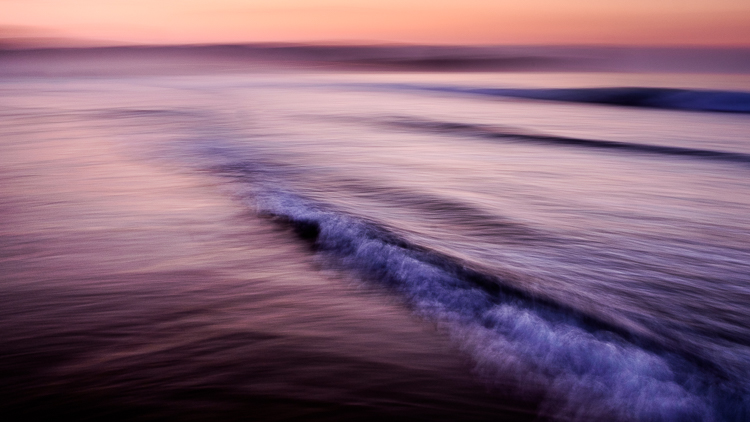
Let me illustrate the point with some photos I made in Spain. I stood in the sea at sunset and panned with my camera as the waves came by. I took a lot of photos, and these are some of my favorites.

working-subject-1

Working the subject

Working the subject

These images were created by working the subject. Doing so helped me figure out where to stand, what angle to use, how slowly to pan the camera, and the best shutter speed to use.

Photographing an old car

Working the subject doesn’t necessarily mean that you take lots of photos. Let me give you an example.

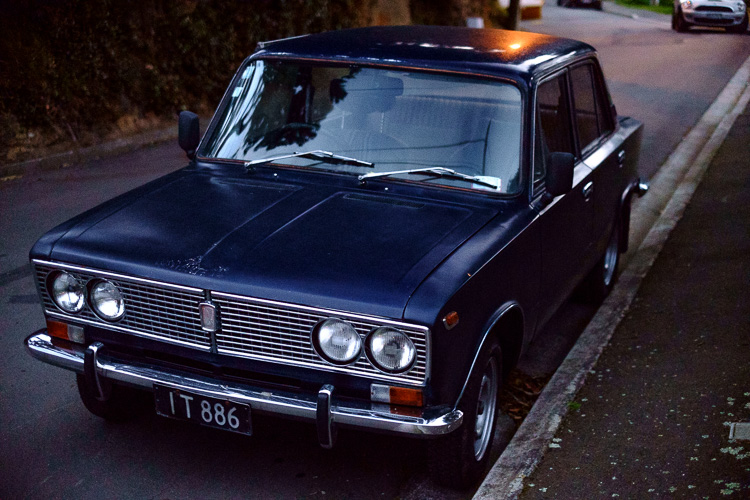
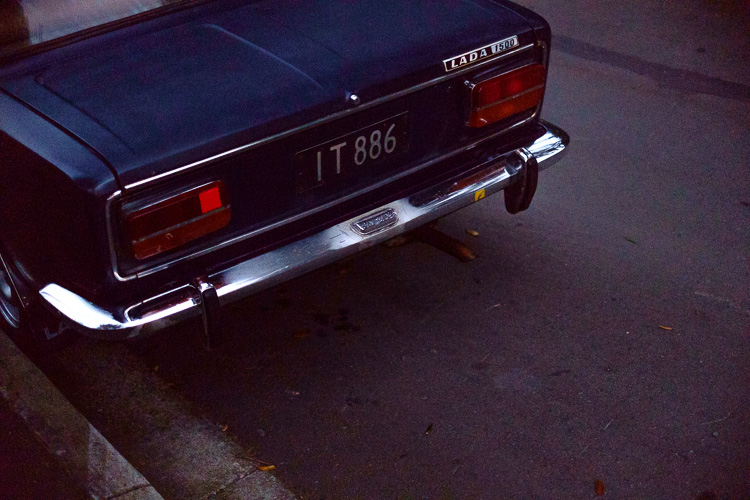
I bought a Fuji X-Pro 1 camera a couple of years ago and took it out one evening at dusk with the intention of shooting at high ISO in low light to see how it performed (the answer – very well). As I was walking around my local neighborhood I noticed an interesting car parked on the street. Intrigued (and wondering how a Lada ended up in New Zealand) I took this photo.

Working the subject

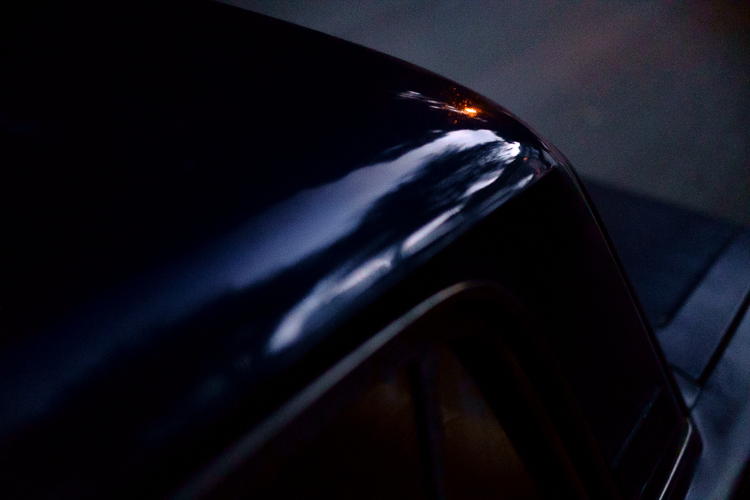
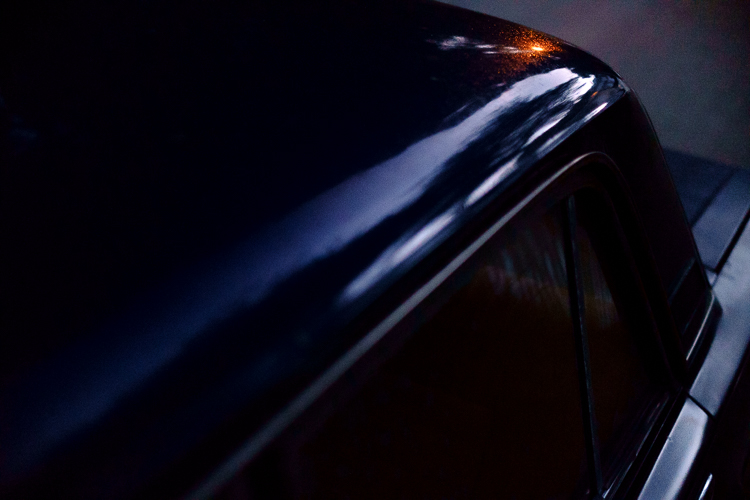
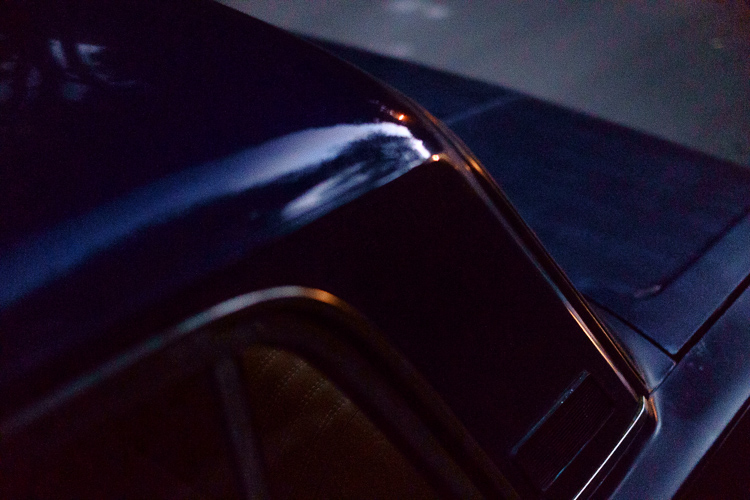
It’s nothing special, but I knew there was a better picture there. I kept looking and realized that what had really caught my eye was the way the light from the street lamp reflected off the roof of the car. So, I moved in closer and created the following images. They all contain the reflection of the street lamp and just part of the car rather than all of it.

Working the subject

Working the subject

Working the subject

Then I took another photo of the rear of the car.

Working the subject

Analysis of the shoot

I only made five photos, but I was still working the subject. When I break it down and think about what happened the process went something like this.

  1. I saw something interesting and took a photo. That was just my first impression. My gut feeling told me that there was a better photo to be had.
  2. I looked closely until I realized that the real subject, the thing that really interested me, was the way the street light was reflected in the car’s paintwork. So, I moved in close and made several photos that showed that.
  3. Lastly, I moved away from the car and took another photo, which was okay but not as good as the others. I understood that I had gotten what I wanted and decided to move on to look for another subject.

The last point is crucial because one of the differences between working the subject and machine-gunning is that the photographer who is working the subject knows when to stop.

Working the subject in China

Here’s another set of images taken in Beijing. We were visiting a historic site called Prince Gong’s Mansion, made up of a series of interconnected buildings, courtyards, and gardens.

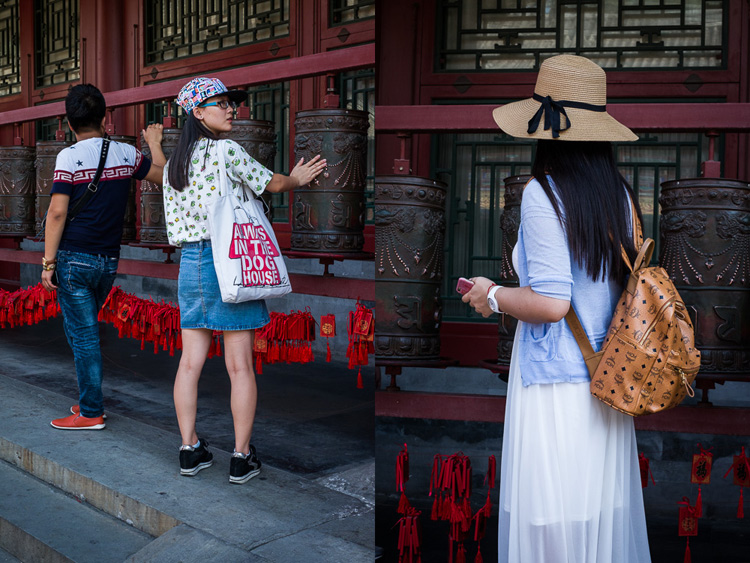
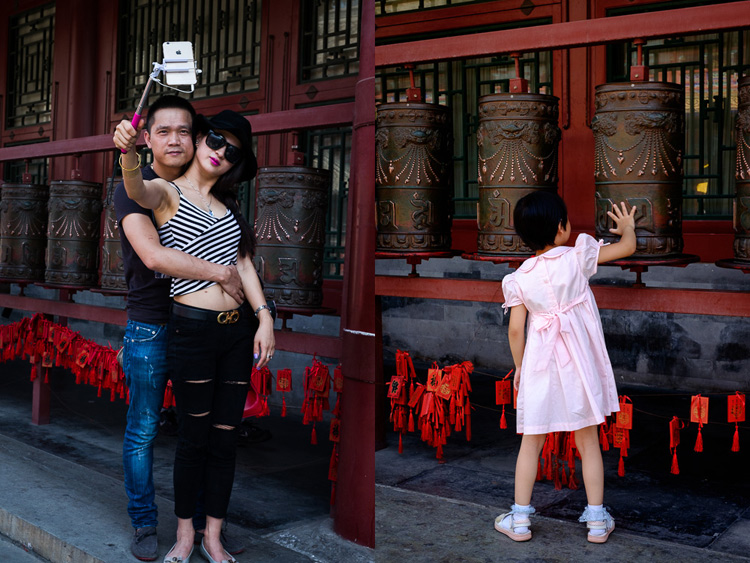
One of the courtyards contained some Tibetan style prayer wheels. I noticed that as people walked into the courtyard most of them passed by the prayer wheels, turning them as they went. I stood nearby and took some candid portraits of people doing so.

Working the subject

Of course, some of the photos are better than others, and I’m going to show you some of my favorites below. But there were also many times that I looked at the scene through the viewfinder and it wasn’t quite right, so I didn’t press the shutter.

One benefit of this method is that you don’t have as many photos to sort through and edit afterward. But it also shows discipline and an awareness of the subject. A machine-gunning photographer would take photos of everyone, without thinking about it much.

The photographer who is working the subject, and being more purposeful, is thinking about how to make each photo better than the one before. They may also be thinking about how the images are going to work together, or whether they should use a different technique, a different lens, or find a different point of view to add variety to the sequence of photos.

Working the subject

Conclusion

One of the key steps involved in learning to be a better and more creative photographer is knowing when to work the subject rather than machine-gun, and become more purposeful and intentional in your approach to making photos.

Can you think of any other examples of when working the subject can help you to create better images? Please let us know in the comments below.


Mastering Composition

If you’d like to learn more about composition then please check out my ebook Mastering Composition: A Photographer’s Guide to Seeing.

googletag.cmd.push(function() {
tablet_slots.push( googletag.defineSlot( “/1005424/_dPSv4_tab-all-article-bottom_(300×250)”, [300, 250], “pb-ad-78623” ).addService( googletag.pubads() ) ); } );

googletag.cmd.push(function() {
mobile_slots.push( googletag.defineSlot( “/1005424/_dPSv4_mob-all-article-bottom_(300×250)”, [300, 250], “pb-ad-78158” ).addService( googletag.pubads() ) ); } );

The post How to Create Stronger Photos by Working the Subject by Andrew S. Gibson appeared first on Digital Photography School.


Digital Photography School

 
Comments Off on How to Create Stronger Photos by Working the Subject

Posted in Photography