RSS
 

Posts Tagged ‘Studio’

Fujifilm GFX 100 added to studio test scene

04 Jun

$ (document).ready(function() { ImageComparisonWidget({“containerId”:”reviewImageComparisonWidget-56783544″,”widgetId”:687,”initialStateId”:null}) })

Fujifilm’s GFX 100 is equipped with an all-new, 100MP backside-illuminated CMOS sensor with dual-gain architecture. Not only does this sensor offer outstanding resolution, it also promises to exceed the capabilities of today’s best full-frame cameras when it comes to high ISO image quality and Raw dynamic range.

We’ve been shooting with a pre-production GFX 100 with near-final firmware for a while now, and as part of our ongoing review we’ve updated our studio scene database so you can see how it compares. Please note that these images may be replaced when we have access to final firmware and / or a final shipping sample of the GFX 100 in the coming weeks.


Images shot using a pre-production Fujifilm GFX 100 and published with permission. Image quality may not exactly represent exactly the output from final shipping cameras but is likely to be extremely close.

Articles: Digital Photography Review (dpreview.com)

 
Comments Off on Fujifilm GFX 100 added to studio test scene

Posted in Uncategorized


Nvidia Studio will boost the performance of your creative apps

28 May

Nvidia has launched a new software and hardware initiative at the Computex Taipei trade show. Nvidia Studio is targeted at video editors, photographers and other content creators and consists of a collection of APIs, SDKs and drivers for Nvidia RTX GPUs that have all been designed to increase performance in use with creative software from providers like Adobe, Epic, Autodesk, Unity and Blackmagic Design.

App developers can make use of an AI-powered software that provides automation of some tasks, including image upscaling or video color matching.

Acer, Asus, Dell, Gigabyte, HP, MSI and Razer will all be announcing 17 RTX Studio-branded laptops between each other at the trade show this week. Graphics options in the new models include Nividia’s RTX 2080, 2070, and 2060 GPUs as well as the Quadro 5000, 4000, and 3000 workstation models.

Nvidia says that in testing with apps like Maya and RedCine-X Pro, an RTX Studio laptop with Intel Core i7 CPU and RTX 2080 Max-Q GPU was seven times faster than a top-end MacBook Pro with a Core i9 and AMD Radeon Pro Vega 20 GPU.

The first RTX Studio laptops will be available in June, with pricing starting at $ 1,599.

Articles: Digital Photography Review (dpreview.com)

 
Comments Off on Nvidia Studio will boost the performance of your creative apps

Posted in Uncategorized


Canon EOS Rebel SL3 sample gallery and studio comparison

18 May

$ (document).ready(function() { SampleGalleryV2({“containerId”:”embeddedSampleGallery_9655091059″,”galleryId”:”9655091059″,”isEmbeddedWidget”:true,”selectedImageIndex”:0,”isMobile”:false}) });

Canon’s EOS Rebel SL3 is a compact, easy-to-use DSLR that takes great photos and comes packed with some of the company’s latest technologies – and also some frustrating limitations. While we work our way through our final review, take a peek at how the Rebel SL3 (also known as the EOS 250D and EOS Kiss X10) handled the New Orleans heat, the gray Seattle skies, and of course, our studio test scene.

$ (document).ready(function() { ImageComparisonWidget({“containerId”:”reviewImageComparisonWidget-64586409″,”widgetId”:686,”initialStateId”:null}) })
Articles: Digital Photography Review (dpreview.com)

 
Comments Off on Canon EOS Rebel SL3 sample gallery and studio comparison

Posted in Uncategorized


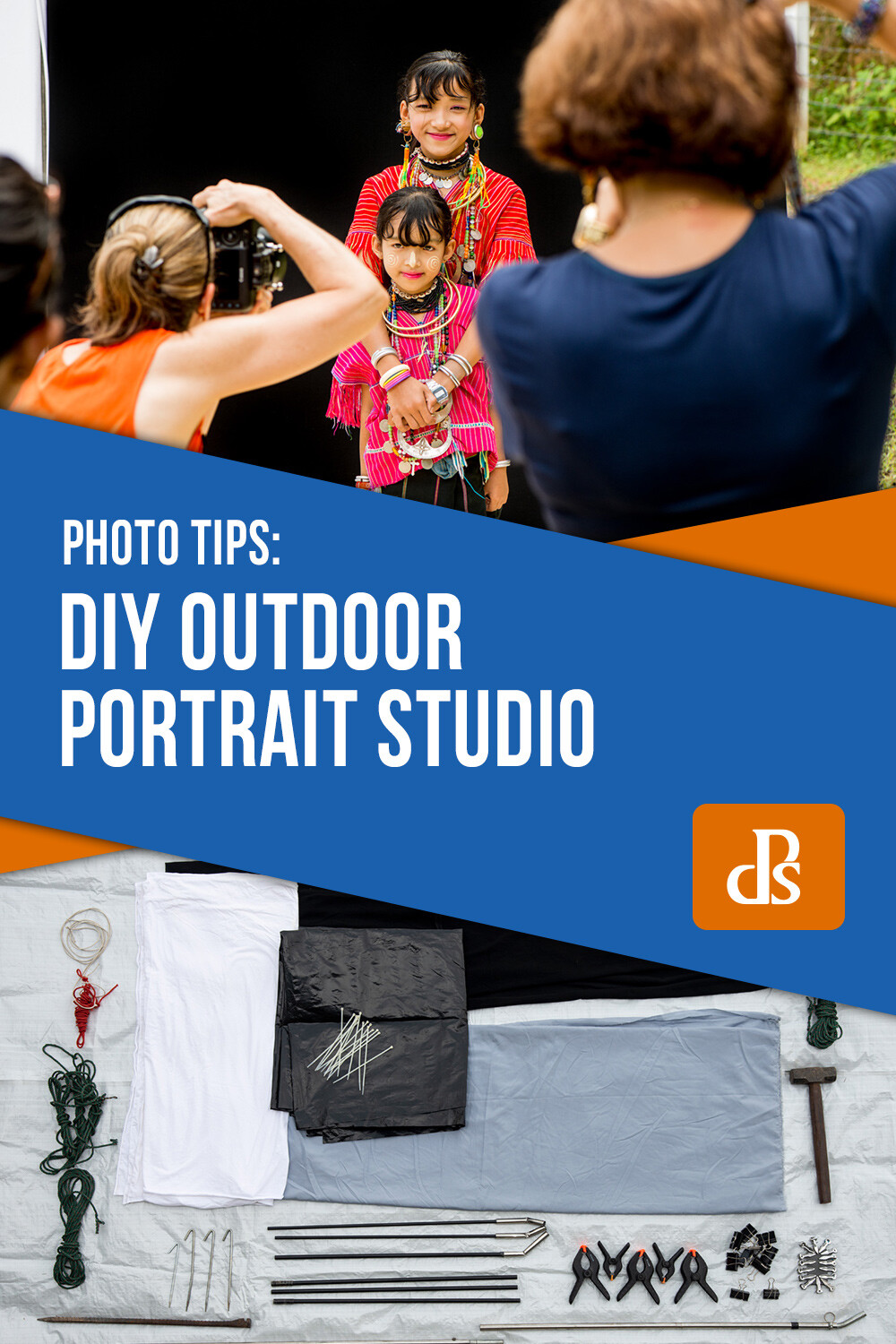
How To Use an Outdoor Studio for Natural Portraits

09 May

The post How To Use an Outdoor Studio for Natural Portraits appeared first on Digital Photography School. It was authored by Kevin Landwer-Johan.

I’ve grown to really love making portraits of people. My preferred way of working is on location with my natural light outdoor studio.

How To Use an Outdoor Studio for Natural Portraits Two Karen Men

© Kevin Landwer-Johan

For many years I had a dedicated studio set up in my home. During this time I hosted many travelers who passed through Chiang Mai. I made photographs of them all and we had a lot of fun making them. However, I was never so comfortable using studio strobes inside as I am working with my outdoor studio.

How To Use an Outdoor Studio for Natural Portraits Indoor Studio Portraits

Indoor studio portraits. © Kevin Landwer-Johan

Inspired by Vogue photographer, Irving Penn

Early on in my photography experience, I became aware of American photographer Irving Penn (1917-2009). He’s celebrated as one of Vogue magazine’s top photographers. Penn produced more covers for them than any other photographer over the 60 years he worked with the magazine.

Fashion photography has never been much of an interest for me. What attracted me to Penn’s mastery was the portraits he made outside his magazine work. Often he would stay on in these exotic locations where his assignments took him, and he’d make portraits of the locals.

He outlines some of these experiences in his book ‘Worlds in a Small Room.’ In the book, he tells how he developed a portable daylight studio he could set up on location. This allowed him control of the background and lighting.

Living in northern Thailand, I have opportunities to visit mountain villages and photograph indigenous hill tribe peoples. So I decided to design and build my own portable daylight portrait studio.

Setting my studio up in villages allows me to make studio portraits of people as they remain in their own environments.

How To Use an Outdoor Studio for Natural Portraits Three Karen Men

© Kevin Landwer-Johan

How I designed and built my outdoor studio

This was a completely DIY project, so you could easily copy the idea and make your own.

My studio has metamorphosed over the years. It now comprises of:

  • Three stainless steel tube uprights
  • One black and one white background
  • A shade cloth above the backgrounds
  • Reflectors
  • A bunch of clips, ropes, steel rods, and tent pegs
How To Use an Outdoor Studio for Natural Portraits Outdoor Studio Materials

Everything for my outdoor studio.

Because I often work alone my studio needed to be easily portable, unlike Penn’s which was large, bulky and required several assistants to set it up. I had to sacrifice size to make it practical. You could design a larger, less-portable studio for use in your backyard.

Originally I made upright supports using fiberglass tent poles. These proved too flimsy, so I replaced them with more sturdy stainless steel. I have also enlarged the background area and included a white background. My initial design only had a short black background. Now I also use reflectors to enhance and balance the light.

How To Use an Outdoor Studio for Natural Portraits

© Kevin Landwer-Johan

Control natural light using an outdoor studio

I prefer to set the studio up in the morning or later in the afternoon. If the sun is too high overhead, the light is more difficult to work with.

Choosing a location where the sun will be behind the backdrop is important. This helps to provide a hair light. The piece of thin grey nylon fabric I set up above the backdrops softens this hair light.

If the ground where I’m setting up is bare earth, that is perfect. Light reflects off the light colored soil up into the faces of my subjects. This is good for Asian skin tones, but not so good for Caucasians as it has a slight yellow/orange tone.

How To Use an Outdoor Studio for Natural Portraits Lahu Man Smoking

© Kevin Landwer-Johan

When I have to set up on a lawn, I lay down some white or light tan plastic sheeting to provide some uplighting. Without this, the grass would reflect an unpleasant green cast onto the people’s faces.

In the early days of using my studio, this was all I did to manipulate the light. Now I also use a large foldable reflector to bounce more light onto my subjects. This gives a little more control of the shadows.

The background fabric is a very stretchy polyester. It does not wrinkle and can be pulled tight between the uprights, so it’s flat. Behind the black background, I add a sheet of thick black polythene sheeting. This completely blocks out the sun which would otherwise partially shine through the fabric.

How To Use an Outdoor Studio for Natural Portraits Using the Outdoor Studio

© Kevin Landwer-Johan

Balancing the light

Your exposure settings are critical. A lot of light shines through the white background, while none shines through the black. Including too much of either background in your exposure calculations will result in an underexposed or overexposed subject.

You need to take your exposure reading from your subject’s face only. Using manual mode, once you have it set correctly, you won’t need to change it unless the light changes. This will happen if the sun goes behind a cloud or you bounce more light onto your subject with the reflector.

You can use the same exposure settings for both backgrounds because the light on your subject’s face does not change.

How To Use an Outdoor Studio for Natural Portraits Kayan Long Neck Woman on a White Background

© Kevin Landwer-Johan

If you take a light reading from the white background, you will see it is far brighter than your subject. Taking a reading from the black background will show there’s much less light reflecting off it than your subject. These contrasts help you achieve a pure white and pure black background.

The thin fabric above the background reduces the light and prohibits full sunshine from affecting your subject. You need to make sure your subject is not too far from the background; otherwise, the sunlight might hit their head directly.

How To Use an Outdoor Studio for Natural Portraits Two Kayan Long Neck Girls

© Kevin Landwer-Johan

Make your own outdoor studio

Putting together your own outdoor studio is relatively easy and cheap. You can use it anywhere there’s sufficient space. You don’t need to buy expensive lighting equipment or have a large studio space. The materials are inexpensive, and it’s portable so that you can use it anywhere.

Working outside you are reliant on good weather. It’s best when the sun is shining, but you can still use it under an overcast sky.

Photographing with available light is so much fun, especially when you have a little control over how it affects your subjects.

We’s love to see photos of your outdoor studio in the comments below.


The post How To Use an Outdoor Studio for Natural Portraits appeared first on Digital Photography School. It was authored by Kevin Landwer-Johan.


Digital Photography School

 
Comments Off on How To Use an Outdoor Studio for Natural Portraits

Posted in Photography


Timelapse+ Studio makes it easier than ever to create timelapses directly in Lightroom

02 May

Timelapse+ has introduced a new plug-in for Adobe Lightroom that promises to make editing and constructing timelapse videos significantly easier. Timelapse+ Studio can identify timelapse sequences in your library and form them into collections. It will then automatically mark what it thinks are key frames in the sequence and allow users to edit those key frames in Lightroom as normal. Users can add more key frames and then have the software blend transitions to balance for adjustments across all the images in the sequence.

The software also allows users to zoom in to areas of the scene and to pan across the frame to create a sense of camera movement even in situations in which the camera and lens were stationary during recording.

Exposure differences between frames, or different parts of the sequence, can be ironed out to avoid abrupt changes, and the result can be previewed in a window within Lightroom once the sequence is complete. The company says all the automated tasks the software performs can be undone and redone by those that need manual control of the way the timelapse is created.

The astro timelapse below was created by Adrien Mauduit using Timelapse+ Studio.

Timelapse+ Studio is available now and costs $ 49. For more information see the Timelapse+ website.

Articles: Digital Photography Review (dpreview.com)

 
Comments Off on Timelapse+ Studio makes it easier than ever to create timelapses directly in Lightroom

Posted in Uncategorized


Panasonic Lumix S1/S1R studio scenes with high-res mode published

24 Apr

We’ve been working through our full review of Panasonic’s high-megapixel, full-frame flagship, the Lumix S1R and its lower-resolution S1 sibling, and have published our studio test scene images from them – including the 187MP high-res mode. It’s, well, quite something. Take a look for yourself and prepare to get well acquainted with every detail of our studio test scene.

$ (document).ready(function() { ImageComparisonWidget({“containerId”:”reviewImageComparisonWidget-47369057″,”widgetId”:674,”initialStateId”:null}) })
Articles: Digital Photography Review (dpreview.com)

 
Comments Off on Panasonic Lumix S1/S1R studio scenes with high-res mode published

Posted in Uncategorized


Panasonic Lumix S1R studio scene with high-res mode published

23 Apr

We’ve been working through our full review of Panasonic’s high-megapixel, full-frame flagship, the Lumix S1R, and have published our studio test scene images from it – including the 187MP high-res mode. It’s, well, quite something. Take a look for yourself and prepare to get well acquainted with every detail of our studio test scene.

$ (document).ready(function() { ImageComparisonWidget({“containerId”:”reviewImageComparisonWidget-44664544″,”widgetId”:674,”initialStateId”:null}) })
Articles: Digital Photography Review (dpreview.com)

 
Comments Off on Panasonic Lumix S1R studio scene with high-res mode published

Posted in Uncategorized


7 Steps to Perfect White Portrait Backgrounds in the Studio

22 Apr

The post 7 Steps to Perfect White Portrait Backgrounds in the Studio appeared first on Digital Photography School. It was authored by John McIntire.

Photographing subjects on a white background is one of those things that looks easy from the outside. However, once you start digging into the details, it turns out it’s not quite as simple as it seemed at first glance.

Unfortunately, being able to shoot on a white background is one of the most useful skills for you to have in all sorts of photography including portraits and still life. Even if you hate it stylistically, you will eventually have plenty of people ask you for a pure white background.

When you get the technique right, there are a whole host of things you can easily do with your photos, such as cutting your subjects out for composites. Even when your technique isn’t perfect, there are a host of post-processing options to get you, and your images, there in the end.

However, this article outlines a process to help you get perfect results straight out of the camera every time. If you’re handling a high volume of images – whether that be portraits or products – this may save you countless hours in post-production.

What you need

You will need a few lights for this technique. In this example, there are three lights and a reflector.

To get started with shooting on a white backdrop in a studio, you will need a few things.

  • At least two studio strobes with modifiers or flashguns (three or four would be preferable and will make your life easier). Softboxes are the easiest option for your background lights.
  • A light-colored backdrop. White is preferable, but this technique will work easily with anything up to mid-grey. It is more than possible to do it with darker backdrops but to avoid complications, stay light when you can.
  • Space. You will need space to get the best results. As described below, you will need to keep enough room between your subject and the background to help prevent spill from the background lights falling on your subject. For portraits, this could easily take ten to fifteen feet of space in addition to the distance you are from the subject. For smaller subjects, space is much less of an issue.
  • (Optional) A light meter. Because we’re dealing with moderately precise ratios, a light meter will help you here. You can get by without one, but it does make it easier.

Step One – Choose your aperture

Before you do anything with your lights or your subject, the first step in this process is to choose the aperture you want to shoot at. This choice is going to be the basis for everything else you do in this process. Anything from f/8 to f/4 is a good bet for studio portraits, but you can choose anything you like. Your only real limitation here is the power output of your lights.

If you choose f/11, then your backgrounds lights will need to be set at least two stops brighter, which would be f/22. You may struggle to achieve that with low-powered strobes. If that’s the case, then you will have to choose a larger aperture for your final image.

For the remainder of this article, the chosen aperture will be f/5.6.

Step Two – Light your background

When lighting your background, take the time to ensure that it is evenly lit. This will ensure that all of your background is white with no darker tones creeping into the sides and corners.

Once you know your aperture, the next step is to set up your background light(s). If you can, use large, directional modifiers like softboxes. This will help prevent excess light spilling where you don’t want it. It will also help to ensure that the background is evenly lit from top to bottom, preventing any inconsistencies in exposure in your final images.

Place your lights on either side of your backdrop and pointed towards it at a forty-five-degree angle. Try to position them so that you get even coverage.

Step three – Set the exposure for your background lights

The easiest way to find the exposure for you background is to use a light meter. Don’t worry if you don’t have one, you can still chimp the histogram to make sure it’s overexposed.

With your lights positioned, all you have to do is set the power so that the camera will record your background as pure white. Your background needs to be at least two or three stops brighter than your subject. Because the hypothetical aperture we’re using is f/5.6, that means the backgrounds lights should be at f/16 for three stops of exposure difference.

If you’re using a meter, be sure to check the exposure at the top and bottom of the background and not just the middle.

Step four – Place your subject for a test

On the left, the subject is too close to the background and the light is wrapping around her and lighting her front. Placed a few feet further away, the subject is rendered as a silhouette. (The detail in the darker image is from the overhead fluorescent that I hadn’t turned off yet.)

To figure out where your subject needs to stand, or be placed, put them in front of the background and take a test shot with only the background lights on. If they are far enough away from the background, your subject should be in perfect silhouette, and there should be no light falling on them or wrapping around them in any way.

Where there is light falling on your subject, just move them further away from the backdrop until you achieve that perfect silhouette.

If your exposure is right, you should have no details in your background and no details in your subject.

Because you are lighting a white (therefore reflective) surface, your background is effectively a light source and acts like one. The light from your backgrounds will fall off at a rate governed by the inverse square law. What you are trying to do is to place your subject in a place where the light level drops enough that it has no effect on your subject at your desired aperture.

Step four (part 2) – Flag your background lights

To ensure light isn’t going where you don’t want it, flag your background lights. Here, I’ve used black fabric and covered all but the section of background that will be in the photos.

It may be that you can’t achieve a perfect silhouette of your subject for some reason. This issue can arise from not having enough space to work in, or it could be that your modifiers are producing too much spill. One way to combat this is to flag your lights.

Flagging simply means to block light from where you don’t want it. You can do this in any way that you want. V-flats and black curtains (as in the example images) are both cheap and effective ways to flag your light.

Simply place your preferred flags in a manner that blocks excess light from coming back towards the camera, but doesn’t interfere with the part of the background that will wind up in your composition.

Step 5 – Place your key light

Once the background lights are done, you can light your subject in any way you want.

Now that your background is lit and you know where your subject needs to be, you just need to light your subject. All you have to do is place your light any way that you desire (any lighting pattern will work), and set the power to your desired aperture (f/5.6 in the examples).

Unlike the background lights, you don’t have to worry about what any excess light from your key light is doing. Because you are so far away from the background with a light set to a much lower power, it will have little to no effect on the final exposure of the background. However, do pay attention to what the light is doing off to the sides. If it’s firing into a nearby white wall or another light-colored surface, then that surface will act as a reflector in your images.

Step 6 – Add fill (optional)

Use fill lighting to reduce the impact of heavy shadows in your images. You can use another light if you wish, or a reflector as shown here.

If you want to add a fill light to your set-up, you can now do that as normal. You can fill with another strobe, or you can use a reflector as shown in the example images. The main thing to remember about fill light is that it should be at least one stop lower in power than your key light.

Step 7 – Check your final exposure

With everything set-up, you should have a perfect white background straight out of the camera.

With everything in place, take a test shot at your desired aperture. If your key and fill lights are in your desired position, everything should be spot on and you should now have an image with a perfectly white background straight out of the camera.

That’s it

This isn’t a hard technique, but it does require a fair few steps and a lot of attention to detail. Don’t be put off by any of that. Once you’ve set it up a few times, it will become second nature very quickly. You will also be able to learn how to set it up in a few minutes, potentially saving you a ridiculous amount of time post-processing backgrounds that aren’t perfectly white.

The post 7 Steps to Perfect White Portrait Backgrounds in the Studio appeared first on Digital Photography School. It was authored by John McIntire.


Digital Photography School

 
Comments Off on 7 Steps to Perfect White Portrait Backgrounds in the Studio

Posted in Photography


Ricoh GR III studio scene published

14 Apr

We’ve been eager to test the Ricoh GR III since it arrived, so in addition to a sample gallery and a thorough analysis from the guys at DPReview TV, it’s also been added to our studio test scene comparison tool. Take a look at how it compares to its peers.

$ (document).ready(function() { ImageComparisonWidget({“containerId”:”reviewImageComparisonWidget-57418233″,”widgetId”:673,”initialStateId”:null}) })
Articles: Digital Photography Review (dpreview.com)

 
Comments Off on Ricoh GR III studio scene published

Posted in Uncategorized


How to Turn Your Living Room into a Photo Studio

08 Apr

The post How to Turn Your Living Room into a Photo Studio appeared first on Digital Photography School. It was authored by Jackie Lamas.

Have you ever wished to have a studio space where you could bring clients in and photograph all types of portraits and ideas? You can! Your living room, or any room in your home for that matter, can be quickly converted so that you can photograph your studio ideas in your home!

Setting up backgrounds on a plain wall can help you take great portraits in your own living room.

Finding the right space

Your living room might be the room with the biggest space for you to get the best angles and set up your lights. As long as you have about 10 feet of blank wall space, you can use it for your at-home studio.

Choose a wall where you can mount backgrounds. Put up studio paper, or any background paper. Alternatively, use a painted wall for your photos. It doesn’t have to be anything special, and you could use the existing wall as the main background as well.

A bedroom with big windows can be used as a studio for portraits.

Why 10 feet? The wider your wall space, the more room you’ll have to the sides of your photos. This will enable you to photograph both horizontally and vertically. You will also have room for more than one person.

If you’re photographing headshots or only individuals, a smaller wall space would work. A wall with 5 feet would be sufficient enough for headshots and individuals.

Other spaces in your home that could work

The living room doesn’t have to be the only space that you can use. For example, if you don’t have studio lights, but want to create beautiful portraits with creative direction on backgrounds and don’t want to go on location, your home can still work!

You can photograph in a covered patio with lots of wall space, in your garage, in the bedroom, or on a balcony. All of these spaces work if you have the wall space to place your subject and space to photograph them from a distance.

This makes it much simpler to choose the right location for your at-home studio in the event that you don’t have studio lighting equipment or a special look to your photographs.

Creating the best set up for studio/flash  set up

You don’t necessarily need to use studio lights for your at-home studio, however, if that is what you’re going to use then let’s go through what you’ll need in the space for the best outcome.

Use flash bouncing off the ceiling to light portraits in your living room or in the space you want for your at home studio.

You’ll need to choose a wall space that is in a darker or not-so-brightly-lit room. You can also use shades or curtains to block out light so that your off-camera lighting can correctly light your scene.

Using a flash to light these portraits to simulate the sun. Plain wall background in the bedroom.

Living rooms offer the most space but make sure you can get it dark enough to set up the lights exactly where you want them.  You could also use external flashes to set up your at-home studio.

You can light portraits creatively when you have control of the space and lighting.

Have a lamp nearby so that you can use it as a modeling light. You can also use a light dimmer so that the light doesn’t affect the outcome or interfere with the white balance, exposure, or look and feel that you’re trying to achieve.

Best set up for natural light at-home studio

If your living room or any other room in your home has great natural light, you can definitely set up your studio there. The same tips apply as far as wall space so that you can pose your subject and have enough space in the frame in case cropping is necessary. It also gives you the option to photograph vertical or horizontal.

This was shot with all natural light using a silver reflector with a 3×3 grey background taped to the wall. Edited to bump up the contrast and desaturate the colors.

Choose a room that has great window light or light coming into the space. For example, a garage space with the garage door open is a good option. Another good option is a living room with big sliding doors where light floods the room. Make sure that the sunlight isn’t coming directly into the room or through the window where it casts weird shadows on your subject.

To diffuse the light, you can hang translucent curtains. This will help with harsh lighting, shadows, and the temperature of the room. Of course, you don’t necessarily need the window open unless it adds more light to your scene – if that is the look you’re going for.

If your home has textured walls, you can use them as backgrounds for the portraits as well!

Use a reflector and bounce cards to help bounce light in the direction you want. Black flags  (black boards that help darken the light) and are great for creating shadows and can help to give you more dramatic lighting.

Be aware of the floor

In your home, your floor is already installed and this can present a problem if you’re photographing full-length portraits. Take a look to see if the floor is what you’ll want for your photos. If it isn’t, you can use paper and place it from the wall all the way to the floor. This will create a seamless look to your photos like a real studio.

In the before photo, we covered the floor with a black sheet so we could photoshop the black background in and create a seamless look.

You can also get cheap wood floor-looking laminate flooring and create your portable floor. If the trim base to the floor isn’t distracting, you could even possibly photoshop that out to create a more seamless look with the wall and the floor.

Just be aware of your floor so you know what to do before you start photographing in your new home studio.

Backgrounds for in-home studios

There are a lot of great backgrounds that you can use for a home studio. Given that it’s completely your space and you can get really creative. The simplest one is the one you already have available! Use the existing wall color and texture to create interesting portraits.

You can use existing decor to create beautiful portraits or tape a paper background to the wall for a seamless background.

Other backgrounds you can use can be:

  • A sheet that covers the wall and onto the floor for a seamless fabric background.
  • Paper either rolled onto the floor for seamless or a piece of paper taped to the wall for up-close portraits
  • Any fabric or paper with a print on it
  • Different colored paper for headshots

Pretty much anything you can think of you can create as a background! You can get really creative with balloons, tissue paper, hanging strings, lights, paper flowers, artificial flowers, string or hanging garlands either made by you or already made newspaper or even plants.

The options and ideas are limitless and will give your photos a unique look no matter what your style is.

In conclusion

Your living room can be the perfect space for you to create beautiful studio work. You don’t need fancy equipment just nice wall space and the light you love to photograph with. Add in some music and you’ve got the perfect comfortable studio right in your home!

Do you have other suggestions to make a great living room studio? Share with us and our readers in the comments below.

The post How to Turn Your Living Room into a Photo Studio appeared first on Digital Photography School. It was authored by Jackie Lamas.


Digital Photography School
 
Comments Off on How to Turn Your Living Room into a Photo Studio

Posted in Photography