RSS
 

Posts Tagged ‘Street’

How to Choose the Best Lens for Travel and Street Photography

23 Feb

If you were to ask me what the best lens for street and travel photography is, the first thing I would advise you to do, is to think about what you need from the lens. In my case, the following criteria are important to me –  your list, of course, may differ.

  • The lens should be small, lightweight, and unobtrusive.
  • The optical quality must be excellent.
  • Autofocus performance needs to be very good.
  • As I sometimes shoot in low light, a wide aperture is a must.

Best lens for street and travel photography

These criteria should point to several lenses that may be suitable for you. Perhaps you own these lenses already – in which case the next step is to take them out into the street, and take some photos with them. This is important, because you may find that in practice, the lens you prefer to use is different from the one you thought might be best.

For example, you may think that a zoom lens will come in useful because of the convenience of being able to quickly adjust focal length. But in reality, find that you prefer a prime lens with a wider aperture for shooting in low light, or using selective focus.

On the other hand, you may be approaching this exercise with the intent of choosing a lens to buy. It’s difficult to test a lens if you don’t already own it, although you may be able to borrow or rent it. If you can’t do that, the next best thing to do is to go online and do some research. Read some reviews of the lens. Look for articles written by photographers whose photos you like, who also use the lens you’re considering. Go onto Flickr and see if there is a group dedicated to the lens. Explore some good quality forums, ask the members if anybody owns the lens, and what they think of it.

My favorite lens

By now you are probably wondering what is my favorite lens for street and photography. The answer is – the Fujinon 35mm f/1.4 lens. To be honest, this has come as a surprise to me. When I first bought into the Fujifilm camera system, I thought that I would either prefer a short telephoto lens (such as the 56mm f/1.2) or a moderate wide-angle (like the 18mm f/2 pancake lens) for street and travel photography.

But in practice, I’ve found that I prefer the 35mm. It has received a lot of praise since it was released with the X-Pro-1 several years ago, and is a standard prime lens (for APS-C cameras). The angle-of-view is very similar to that of a 50mm lens on a full-frame camera, or a 25mm lens on a Micro four-thirds camera.

So, why has this lens worked so well for me? The short answer is that it is extremely versatile. I prefer to take the simple approach to street photography, and that means reducing the number of choices that I have to make. Using a prime means I don’t have to think about focal length, yet the versatility of this lens means I can use it a number of different ways.

For example, when photographing people I can keep my distance and frame the person in the context of their environment.

Best lens for street and travel photography

Or I can get closer and concentrate more on the person.

Best lens for street and travel photography

I can also get close to the subject for a tight detail shot, like this one.

Best lens for street and travel photography

Standard lenses for street photography

Working distance is a term used in macro and close-up photography to describe how far the lens is from the subject. You can apply this concept to street, and travel photography too. If you are using a telephoto lens, you will be farther away from the subject. That’s great for not being noticed, but it can also lead to a kind of detached feeling in the image. The viewer can tell you weren’t close to the action, and there may be a sense of lack of involvement in the scene.

A wide-angle lens forces you to get in closer to fill the frame. The closer you get to somebody on the street, the more likely they are to notice you, and react to the camera in some way. This is not necessarily a bad thing (Bruce Gilden has taken this confrontational style to an extreme) and using a wide-angle lens definitely shows involvement in the life of the street. It’s also an approach you can take if you like to go up to people, and ask permission to take their photo first.

The standard lens falls in-between these two extremes. It lets you get close enough to be involved in the scene, but not so close that people are overly bothered by what you are doing. It helps you blend in to what is a very common thing these days – people taking photos on the street (although most often with camera phones, not actual cameras).

Best lens for street and travel photography

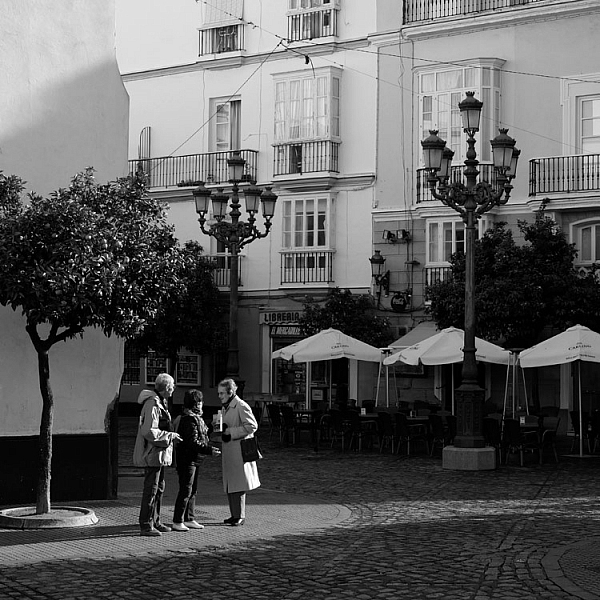
By the way, all the photos in this article were taken in the Spanish city of Cadiz, and I wanted to show the people in context, with the historical buildings in the background, in at least some of the photos. The 35mm lens worked very well for this.

So, for me, the 35mm lens is a clear favorite for travel and street photography. But, what about you? What lenses do you prefer to use? Please let me know in the comments, I’d like to hear your thoughts.


Mastering Lenses photography ebookMastering Lenses

My new ebook Mastering Lenses: A Photographer’s Guide to Creating Beautiful Photos With Any Lens shows you how to get the best from the lenses you own already. A comprehensive guide to exploring the creative potential potential of wide-angle, normal and telephoto lenses, it’s also the ultimate buying guide for readers thinking about purchasing a new lens for their camera. Please click the link to learn more or buy.

googletag.cmd.push(function() {
tablet_slots.push( googletag.defineSlot( “/1005424/_dPSv4_tab-all-article-bottom_(300×250)”, [300, 250], “pb-ad-78623” ).addService( googletag.pubads() ) ); } );

googletag.cmd.push(function() {
mobile_slots.push( googletag.defineSlot( “/1005424/_dPSv4_mob-all-article-bottom_(300×250)”, [300, 250], “pb-ad-78158” ).addService( googletag.pubads() ) ); } );

The post How to Choose the Best Lens for Travel and Street Photography by Andrew S. Gibson appeared first on Digital Photography School.


Digital Photography School

 
Comments Off on How to Choose the Best Lens for Travel and Street Photography

Posted in Photography


An Introduction to Street Photography for New Photographers

21 Jan

You may have seen a lot of candid photography all over the Internet and wondered, what is it all about? If you’ve never tried it before, or only have a bit of experience, I am going to lay out a roadmap to help you get started and improve your street photography.
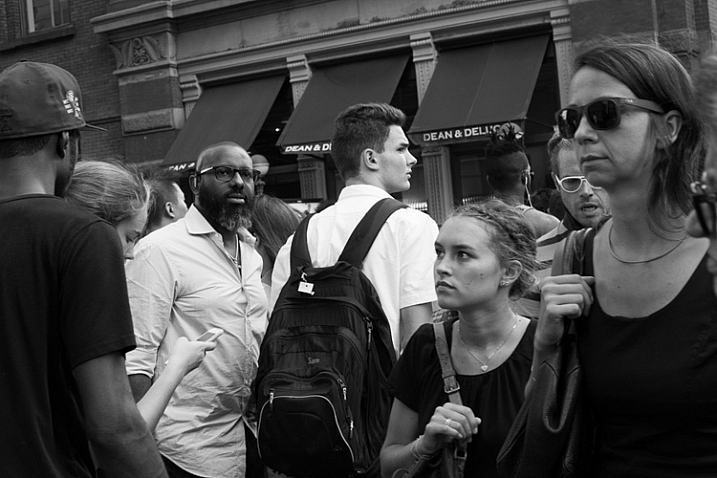
Street Corner, SoHo, NYC.

Street Corner, SoHo, NYC.

Street photography is the art of capturing life, culture, and humanity, in a candid manner. It is fascinating because a small percentage of photographers seem to be naturally drawn to it. Even before hearing about the phrase street photography, which can be a clunky term anyway, there are many photographers who prefer to point their cameras in the direction of culture and people that they’ve never met before, over mountains, sunsets, and landscapes.

However, if you haven’t done it before, street photography can be very intimidating to actually pull off. It’s one thing to admire it from afar, but it’s another to get in there and get your hands dirty. I promise though, that it’s a ton of fun and is a very rewarding art form to practice.

Here is list of my favorite tips to get you off and running.

1. Just do it
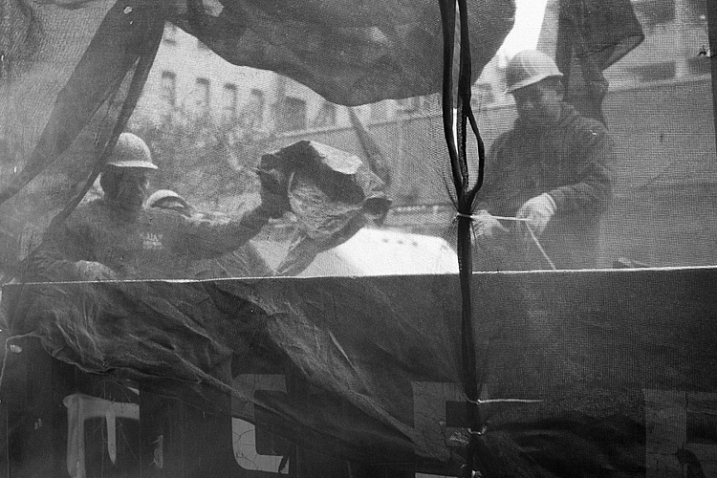
Construction Workers, Lower East Side, NYC.

Construction Workers, Lower East Side, NYC.

You can have all the tips in the world to get started. I can explain all of the techniques that I have learned from others and found so helpful over the years, and I will cover them here, but nothing beats pure, unbridled enjoyment and enthusiasm. No matter how much you learn, nothing beats the experience gained by being out there.

Street photography is one of the most difficult forms of photography, because it is so unplanned. A world of content is out there for you, and it is your job to go find it. You must develop your own visual language, to be able to see interesting moments, then to figure out how to capture them all in a quick, spontaneous instant. This takes regular practice. I’ve been doing street photography for nearly 15 years, and any time I take a month off (usually in the depressing February winter in New York), I feel very rusty when I grab the camera again.

Put in the hours, experience trumps everything. Enjoy the feeling of being out there, because it’s necessary to love it, to be able to put in the time to be successful.

2. Technical skills

Here are a few of the technical skills that are most important for street photography. I try to have my camera set up in a way so that I almost forget it’s there. So, it’s just me, and what I am seeing, and the camera doesn’t get in the way.
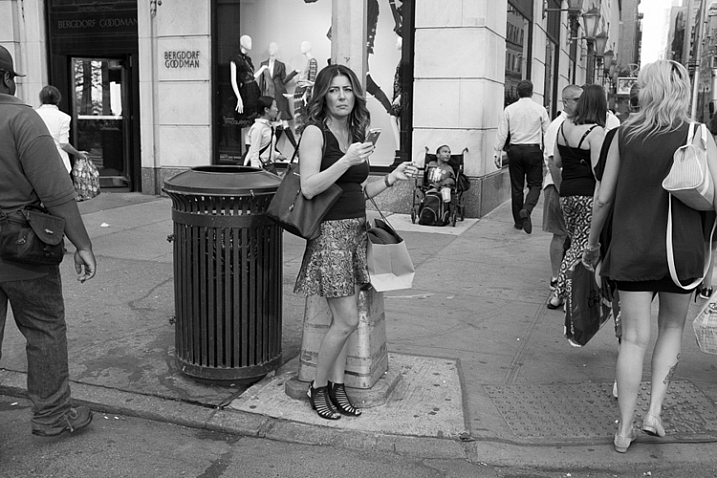
Bergdorf Goodman, 5th Avenue, NYC.

Bergdorf Goodman, 5th Avenue, NYC.

There are many different ways to set up your camera, but I prefer to shoot in Shutter Priority mode with a shutter speed around 1/250th of a second. That is a good minimum, to make sure you can freeze the motion of your subjects. In dimmer light, you can go to 1/160th and even 1/125th and still be okay. In strong sunlight you can go all the way up to 1/400th or 1/500th, but 1/250th is the number to keep in mind (as a good starting point).

Raise your ISO. There is no reason to go below ISO 400 for street photography, and I suggest staying between ISO 800 and 3200 when you’re not in bright sunlight. The reason is because, if you want to shoot at 1/250th, and you also want to use as small an aperture as possible, then something has to give, and that is the ISO.

You might be asking why it’s good to use a small aperture for street photography. That’s a creative choice of course, and sometimes the light is so low that you must shoot with as wide an aperture as possible. There are street photographers that prefer the look of a shallow depth of field for all their work. However, there are a few reasons why I believe a small aperture, and a lot of DOF is preferable. Because of the spontaneity, you never know where your subject is going to be, or if you are going to have multiple subjects at different depths. In addition, if you happen to miss the focus a bit, your subject will still be sharp if you are using a larger DOF. Finally, context is important. You are capturing culture, and surroundings are a part of the story. Do you really want to blur the surroundings away? The environment is a major part of street photography.
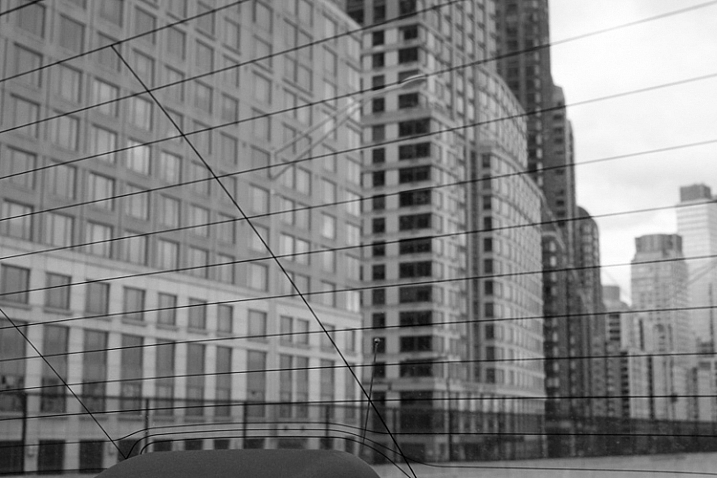
Greene Street, SoHo, NYC.

Greene Street, SoHo, NYC.

While a prime lens is not necessary, it can be very important for street photography, for a few reasons. First of all, zoom lenses are heavy and large. A small, light prime makes your camera a pleasure to carry around, and it looks much less imposing to your subjects. In addition, it can be a big advantage to get used to using a single focal length. You will start to learn how your camera sees, in a faster, and more intuitive way. I can’t overstate the previous sentence. When I wrote about forgetting that the camera is there, a prime lens is very important for this.

I prefer to use wide-angle primes, with 35mm and 50mm being my favorite. I like the wide-angle view because it will make you get closer to your subjects. In addition, the viewpoint will allow your foreground subjects to be more prominent and larger in the frame, while still being able to fit in more of the background, since it will be proportionally smaller. It’s a great look. If you are using a cropped camera, remember that a 35mm lens might not actually be a true 35mm view because of the crop factor, so try one that is the equivalent of a 35mm view.

3. Take photos for yourself

It is certainly important to see other people’s viewpoints and to pay attention to the images that they like, but I want you to focus on photographing for yourself. Capture an image that you love, first and foremost, and don’t worry if other people don’t get it. Street photography is still a niche genre, compared to other photography forms such as landscape, and because of that there are a lot of people that aren’t used to it.

Take weird images, take personal images, take ugly images, and take risks with what you capture. Be creative and have a good time. The more your images become a reflection of your voice and what you like, the better your work will be.
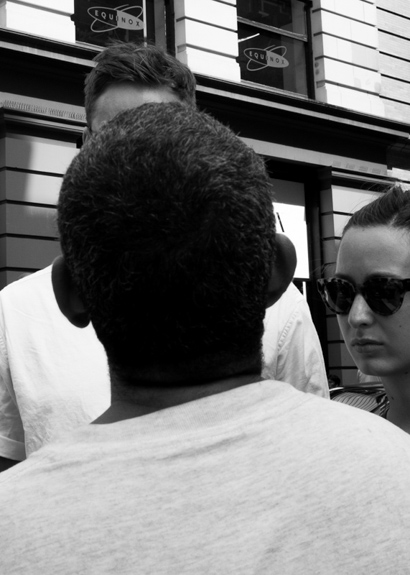
Panhandler, Broadway, NYC.

Panhandler, Broadway, NYC.


4. Shoot in a variety of locations and show us your area

A busy street corner in New York is usually the first place that comes to mind when people think about street photography, as it should be. New York has such a diversity of content, and that’s the reason why it’s one of the great meccas for street photography, but it is also only a very small part of the entire street photography world.

Street photography can, and should, be done anywhere. It can be done indoors, in coffee shops, at events, along country roads, or in small towns – you name it. Street photography is about culture and life. It is an idea, and a feeling. It doesn’t even need to have people in the images, just the hint of people.

The more you are able to capture images in the course of your daily life, the better you will become at it. Your images will be more personal and unique. For this reason, I suggest considering eventually trying a smaller camera, such as a Fuji X100T, a micro 4/3rds or mirrorless camera, or even a mobile phone camera, for the times where you don’t feel like bringing your large SLR. These cameras make it fun to capture images on a daily basis. You might bring one of these smaller cameras on a trip to the corner store, whereas a larger SLR would be more cumbersome for that situations.

5. Pick a location and wait there
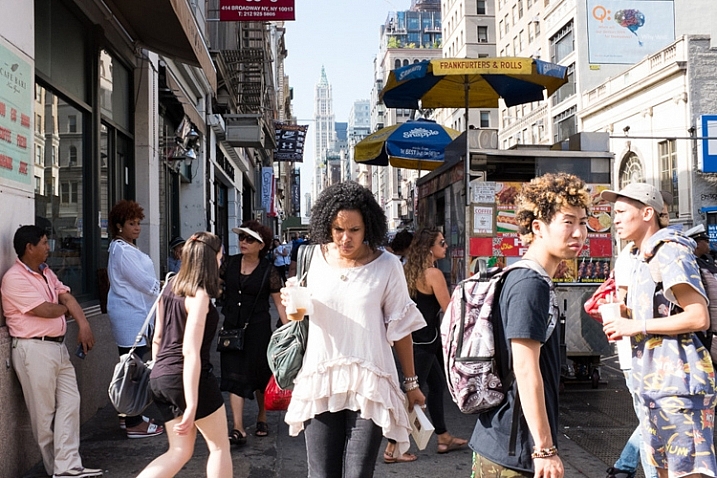
Canal Street, NYC.

Canal Street, NYC.

It can be intimidating to photograph people candidly. I still feel pretty intimidated, depending on the situation. To offset this, one of my favorite techniques is to pick a location, and just hang out there for awhile. Find a spot where you think an interesting moment could happen, and then wait for it to unfold.

By waiting and not walking, you will spend more time looking around and watching, as opposed to moving. Then, when that moment happens, you will already be in position, and ready with your camera to capture it. Also, your subjects will be entering your space, instead of you encroaching on their space. If you are walking down a street and see someone that you want to photograph, it’s much tougher to get in their space, and still take a good candid photograph. By stopping and letting them come to you, not only will you be ready with your camera, but you can make it look like you are just photographing the surrounding area and they happened to enter your scene.

Go back to the same locations, over and over again at different times, and in different light. The more you get used to a location, the more you can anticipate what will happen there, and the more comfortable you will become photographing in the area. Also, people will start to get used to you being there.

Of course you should still walk around, but I prefer to break up long walks, with periods of waiting in good locations.

6. My favorite trick
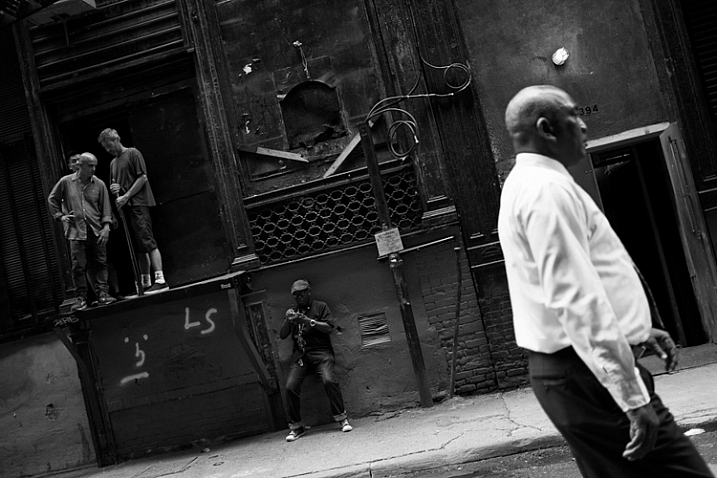
Cortlandt Alley, NYC.

Cortlandt Alley, NYC.

A natural reaction after you take a photo is to immediately take your camera away from your eye briefly. Take a picture and see. This is the number one thing that will tip someone off that you’ve taken their photograph. We don’t want to be too sneaky and creepy, but we also don’t want every person we’ve photographed to know, and stop us to figure out what we’re doing. That’s just tedious.

Whenever I capture an image of someone, I try not to remove the camera from my eye. I leave it there as they walk through the scene, as if I was trying to photograph the background and they got in the way. If you watch other photographers do this, you will see that sometimes the subjects will first think, “Hey did that person take my photo”, they will look back, and when they see the photographer with the camera still at their eye they will likely keep going, thinking that they were just in the way.

The flip side to this is when you are in an empty area, instead of a busy one. It is tougher to do this trick when there are only a couple people around, so what I will do in these situations is to aim up above, or to the side of the person, like I am photographing a building or a nice background. I will pretend to take an image or two, and then at the last second I will move the camera so that they are in the scene, in the right composition. I will quickly take the picture and remove the camera from my eye. When done right, it looks like you photographed the area above or next to them.

7. Don’t be too creepy
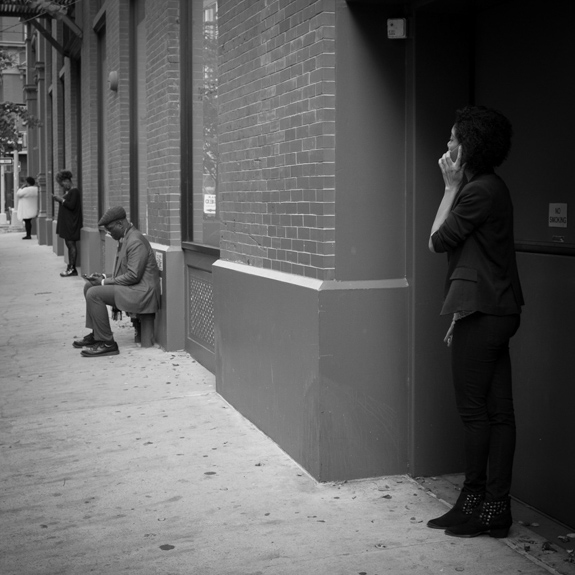
Cellphones, Nolita, NYC.

Cellphones, Nolita, NYC.

When I teach people street photography for the first time, there are inevitably those who will take five or six, or even twelve photos of one person. If you see a scene improving while you are photographing it, of course you should continue to capture the scene, but taking five or six candid photos of a person can get down right uncomfortable.

What we are doing, in my opinion, is a good thing. We are capturing and immortalizing culture and people. We do this because we like people, and unfortunately even when done as respectfully as possible, it is still a little bit creepy. We just have to accept that this is a worthy endeavor that offsets the slight creep factor. However, when you go to full on creep, it just gets uncomfortable for everyone. You don’t need to capture seven photos of a person. You don’t need to point your camera at a person for 30 seconds straight, while still pretending that you are not photographing them. If you want to do that, go up to them and ask for a portrait instead.

Take an image or two, then stop and reassess. If you see the scene developing further, put your camera down for a second. Act like you’re looking around for a way to capture the background, or pretend to play with your camera, and let the scene develop. Then, take another picture or two as it does. Just try not to point your camera at one person for too long.

8. Smile and carry a business card
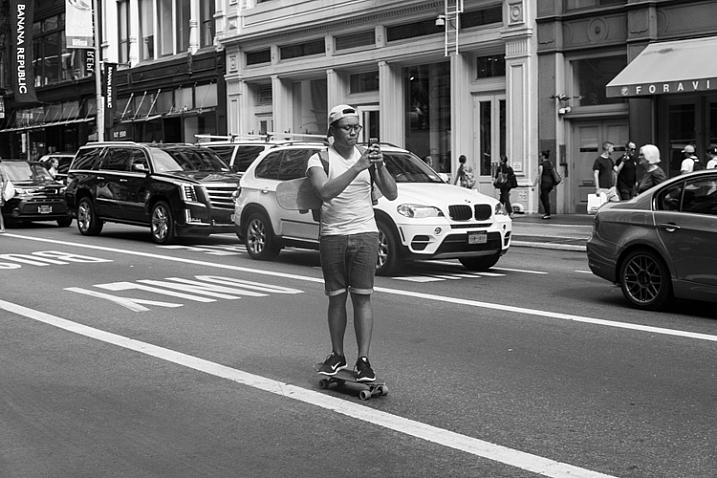
Skateboarder, Broadway, NYC.

Skateboarder, Broadway, NYC.

The more confident you act, the less people will notice you and care. If you look at master street photographers who have done this for a long time, many of them look almost invisible out there. This is not because they are necessarily sneakier, it’s because they carry themselves like they belong. They seem comfortable. When people see someone comfortably photographing in an area, they instinctively think that person belongs there. When they see someone who looks uncomfortable, like they are sneaking around, they will instinctively think they are are up to no good.

Whenever someone stops me and asks if I took their photo, I smile, say yes, and tell them that I’m a photographer doing a cultural project capturing daily life, and I thought they looked fabulous and had to capture them as part of the project (flattery goes a long way). I tell them I didn’t mean to make them uncomfortable, but it was just how I had to go about capturing the images. I carry cards to show them that I am a legitimate photographer and tell them to email me and I will send them the photo. After this, if they still seem very uncomfortable, I will offer to delete it. I’ve only ever had to delete two photos after a couple people asked me nicely. I’ve never had a bad interaction.

Of course, that doesn’t mean that others haven’t. Some photographers have certainly had bad interactions. You should make sure to pick the people that you photograph wisely, perhaps staying away from capturing someone that looks like they had a terrible day, or someone that looks angry or disturbed. Those are the situations where you are more apt to get yourself in trouble. Street smarts are important.

9. Capture images without people
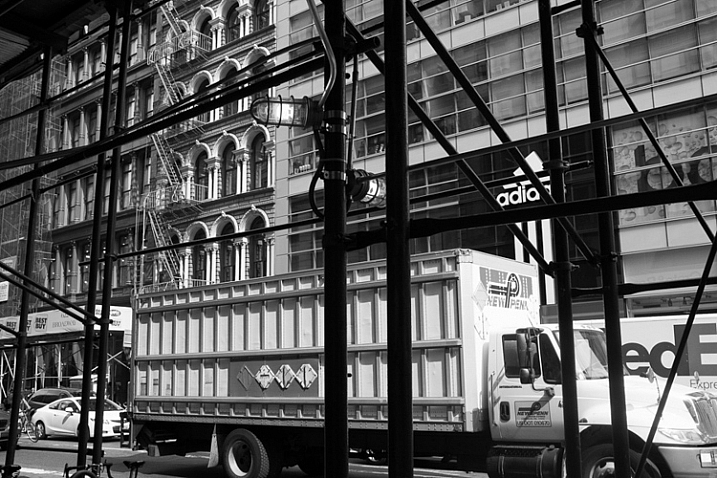
Scaffolding, Broadway, NYC.

Scaffolding, Broadway, NYC.

Usually the first thing that comes to mind when street photography is mentioned, is an image of an interesting looking person, walking down the street. That is a part of street photography, but there is so much more to it.

Capture environmental images in ways that still have the feeling of a traditional street photograph. Show culture and people in ways other than just capturing them directly. Figure out how to show stories, capture ideas, and foster feeling and mood in an image. Photograph in locations where others may not think to take pictures.

10. Capture expressions

One of the skills that all the great photographers have is their ability to capture expressions. This applies as much to street photographers, as it does to portrait ones. Look to capture people’s emotions. Do they look happy, sad, pensive, or angry? I always try to look at my subject’s eyes, and wait for them to give a look that exposes something going on in their head. Usually that look doesn’t come, but when it does, I’m ready for it. This is one of the most difficult things to both notice and capture, and it comes with experience. Try hard to notice it.
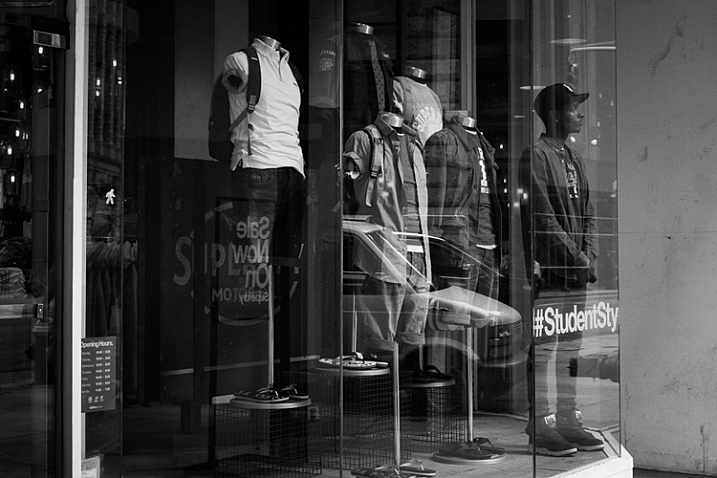
Student, Broadway, NYC.

Student, Broadway, NYC.

11. Edit and sequence your photos

Editing is just as important for your success as a photographer, as going out and shooting. Download and learn Lightroom, and learn to organize your photos well. I mark my best photos with three and five stars, to choose the decent and best photos from the day. Spend a lot of time reviewing, and narrowing down your photos, to the best of the best.

Start grouping your photos together. Learn which images work together, and figure out the reasons why. What are you trying to say and show? Can a sequence of your images create an interesting narrative? Use collections in Lightroom to group images together, without actually moving their location on the computer. Over time, you will start to identify themes, and ideas in your work, and it will help you figure out which images are your best. It will also help you know where you need to improve.

You will find that doing this will quickly help you improve when you are out shooting. The more time you spend organizing and thinking about your work, the more in-tune you will be to notice images that fit in, when you are out shooting. This is a way to help develop your voice in your photography.

12. Look at the work of other photographers

Spend a lot of time exploring the work of other photographers. This will both train your eye, and give you inspiration. It will quickly become a humbling experience. As a photographer, you don’t need to reinvent the wheel. So much has been done before, by photographers who spent decades doing it. What you need to figure out, is how to give your images a personal and modern take.

Look at both modern photographers, and go through lists of the old masters. Look at work done on busy street corners, and in quiet towns. Take it all in, then figure out what you relate to most, and build on that in your work.

13. Perfection is overrated
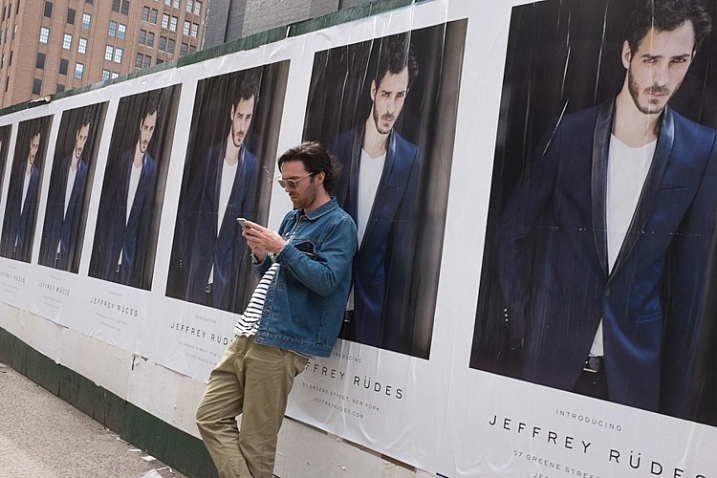
Greene Street, SoHo, NYC.

Greene Street, SoHo, NYC.

As a photographer, you need to become technically proficient with the camera. You need to learn to take sharp photos, that are well composed. You need to learn to see the light well. It is absolutely necessary for your growth. This is similar to a painter learning the fundamentals, before eventually gaining their voice, and going off in their own direction.

Once you have done this, is when you start to see that perfection in an image can sometimes be overrated. Your images don’t all have to be perfectly sharp, or perfectly composed. Sometimes a technical mistake will ruin a photo, but other times it may make it. Each image is completely different, and will work for completely different reasons. It is obvious when an image is ruined technically because a photographer didn’t know what they were doing, whereas it is different when it is just due to the situation presented to the photographer. If you take a look at the work of Garry Winogrand, so many of his images were slightly off-kilter. These days photographers might have decided to straightened them up a bit in Lightroom, but when you look at Winogrand’s work all together, that slight off-kilter look adds a sense of realness and spontaneity, and actually improves many of the images. The lack of perfection seems to make them better.

Have fun. Think of street photography like jazz and go a little off-kilter. Improvise and experiment. Just figure out how to find and capture, interesting and intimate moments.

googletag.cmd.push(function() {
tablet_slots.push( googletag.defineSlot( “/1005424/_dPSv4_tab-all-article-bottom_(300×250)”, [300, 250], “pb-ad-78623” ).addService( googletag.pubads() ) ); } );

googletag.cmd.push(function() {
mobile_slots.push( googletag.defineSlot( “/1005424/_dPSv4_mob-all-article-bottom_(300×250)”, [300, 250], “pb-ad-78158” ).addService( googletag.pubads() ) ); } );

The post An Introduction to Street Photography for New Photographers by James Maher appeared first on Digital Photography School.


Digital Photography School
 
Comments Off on An Introduction to Street Photography for New Photographers

Posted in Photography


13 Steps for Editing Street Photography in Lightroom from Start to Finish

20 Jan

Favorite editing tools for street photography

I admit it, I take too many photos. I know it, and I have too many images to deal with, and unless I am getting paid to finish them and send them out to a client, they may never get processed. Are you in the same boat? Do you too have some images that have just been sitting there in your digital desk drawer?

With digital photography, and especially because of how cheap memory is (don’t forget to include web hosting sights and the cloud), more and more photos are just there and never used.  The best solution is to be more decisive, and just take fewer photos. But we all get out of hand, and sometimes just come home with more images than we know what to do with.

image

Final product after the simple steps followed below—a workflow that you can adjust to your own tastes too!

So the best thing to do is get to the grind and produce something. But it doesn’t need to be so much of a grindstone as you might think. I love taking photos more than processing and unless I am flying solo, I think I’ve got lots of people onboard with me. As you know, photography is not about broad strokes, and details are important. This set of instructions is specifically designed for street photography. But, are most of your photos from your travels? Well, streets (along with the convenient airplane) is maybe how you got there. Much of what we do as photographers crosses over into different genres of style and art. So have a go at the following tutorial, and you may find that with your own adjustments this is a recipe for more than just the street.

image

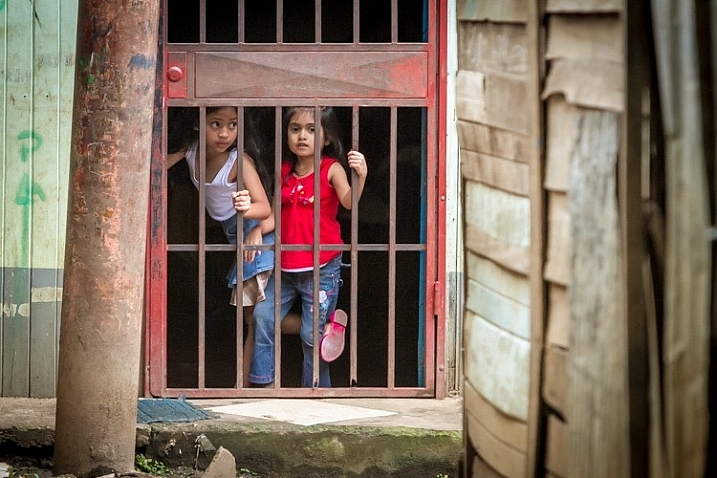
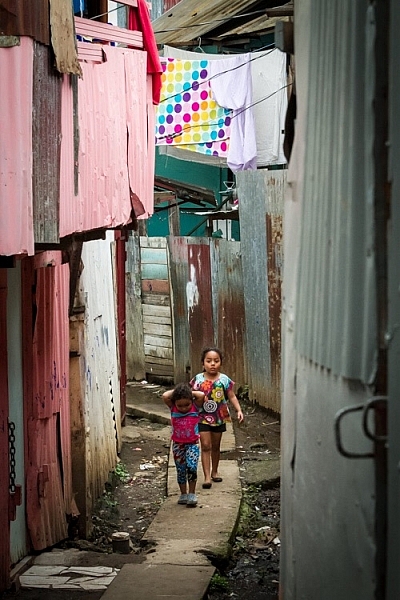
Final image of two young girls walking in the slums of San Jose Costa Rica, all editing was done following the steps below.

These instructions begin in the Library module of Lightroom, and then progress into the Develop module. There are countless modifications that can be made upon importing, categorizing them, giving them tags, etc. As the point of this tutorial is to streamline your workflow, the tips for editing will also be streamlined. So let’s get at it!

Library Module

Step 1 – Select images

Select a batch of images that are preferably in similar lighting conditions, and which have a similar theme. For example, choose a set of photos that were all shot outside over the course of a few hours, but not all night. Or a group of photos that were all shot in the rain. Lighting and theme conditions can vary, but greater variations will have potential greater variations in results.

Step 2 – White Balance

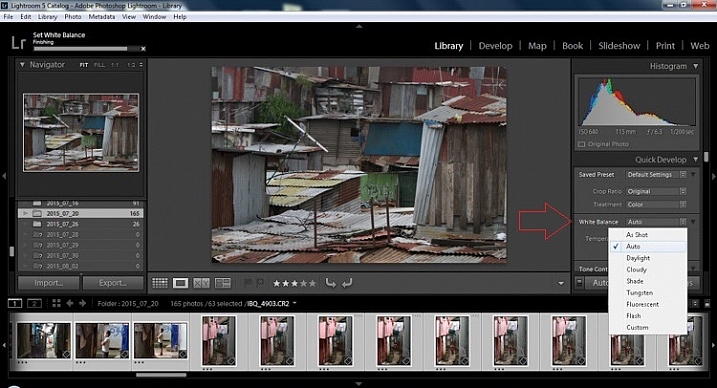
In the Quick Develop Panel (at the top of the right panel in the Library Module) Select White Balance and choose Auto. Before you turn away, let me assure you that there have been more Ph.D.s awarded, and dissertations given, in creating the algorithms behind this button. If you compound the interest in dollars that has been invested in this Auto algorithm it would sustain many third and fourth quarter GDP figures for entire nations.

image

Step 3 – Warm images

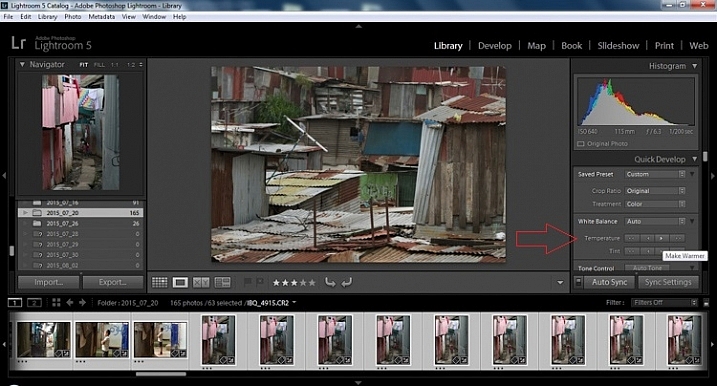
Next, push the single arrow pointing right under the temperature heading indicated by the Make Warmer hint that appears if you hover over it. The single arrow will increase your warmth tone by +5. If you want plus +10 push it twice, using the double arrow will increase it in increments of +15.

2015.09.25 Street Editing Tips Lightroom 002

Step 4 – Auto Tone

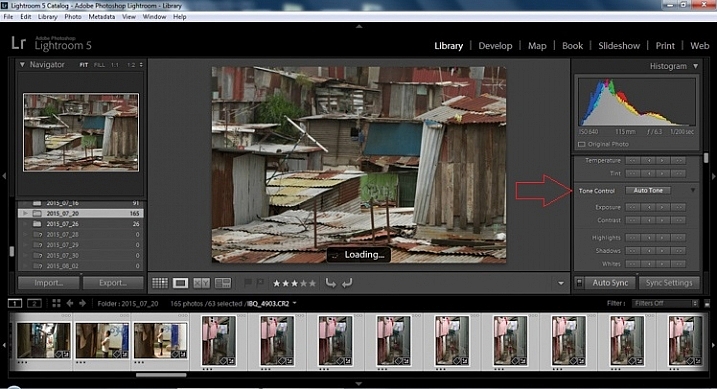
I know it is scary, and it does make me cringe sometimes too, but anything can be shifted, tweaked, and tuned later (and should be) to your liking. This will Auto Tone your exposure, highlights, shadows, whites, and blacks to each photo individually, so it is not the same as batch editing which will be covered later.

2015.09.25 Street Editing Tips Lightroom 003

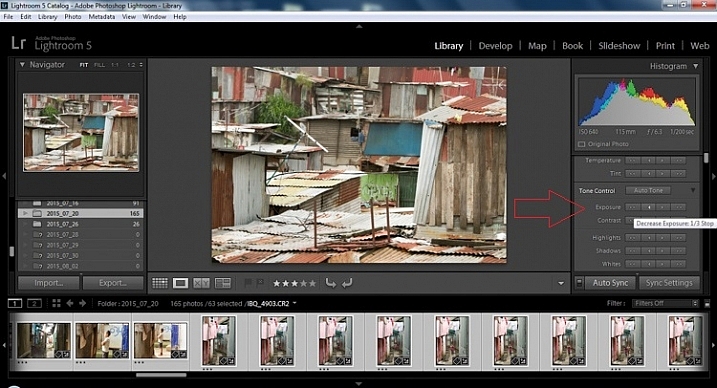
Step 5 – Decrease exposure

Select the single arrow to the left, decreasing the exposure by a 1/3 of a stop. It is minor, but keeps your darker tones (especially things like black asphalt) a little darker. Note: this is assuming you have a correct exposure to begin with – if it’s a bit out you can adjust later on a per image basis as needed.

2015.09.25 Street Editing Tips Lightroom 004

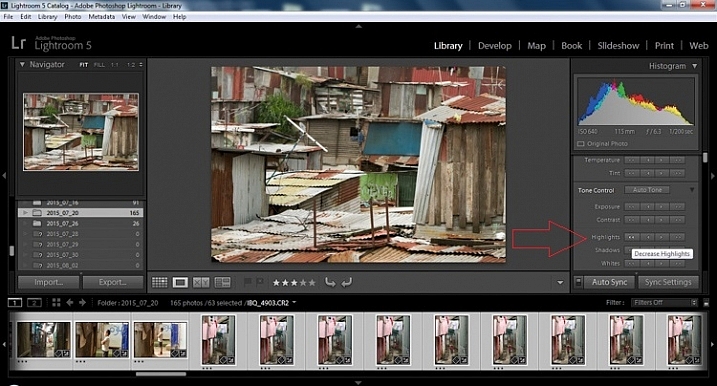
Step 6 – Decrease Highlights

For the Highlights, use the double arrow to the left, decreasing the highlights, and select it once. Be patient, as depending on how many pictures you select and your computer speed, it may take more than a few seconds. This can be monitored by looking in the top left of the screen above the Navigator window (progress bar).

2015.09.25 Street Editing Tips Lightroom 005

Step 7 – Shadows

For the shadows, use the double arrow on the right, decreasing the shadows, and click it once.

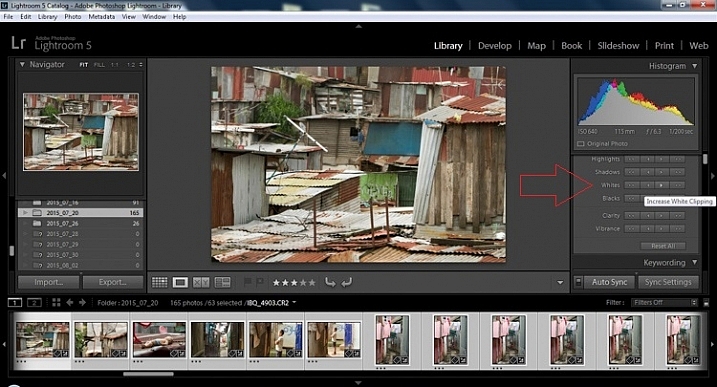
Step 8 – Whites and Blacks

Increase the white clipping by +5, by clicking the single right arrow once. Decrease the black clipping by -5 by clicking the single left arrow once.

2015.09.25 Street Editing Tips Lightroom 007

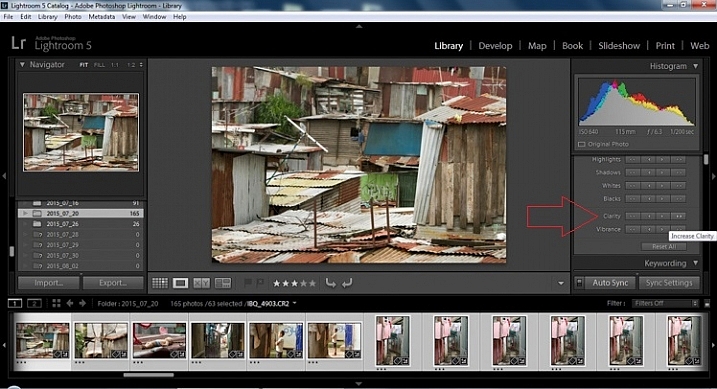
Step 9 – Clarity

Increase the clarity by +20, by pressing the double arrow to the right once (for more information about clarity please look near the end of the article which describes it in more detail).

2015.09.25 Street Editing Tips Lightroom 009

Step 10 – Vibrance

The final step in the Library module is to increase the vibrance by pressing the double arrow to the right (for more detailed information about vibrance please see below).

Develop Module

Now we will be moving into the Develop module. To this point, all the changes that you’ve made, have been applied to all the photos in the group, which you originally selected. Looking at the image below, you can see that despite the simple clicks made in the Library module, many delicate changes have been made. Again, all of these changes can be fine-tuned to your liking later. There are hundreds of modifications that can be made, but let’s keep those for later.

2015.09.25 Street Editing Tips Lightroom 011

Notice the sliders have moved based on the changes you made in the Library Module Quick Develop panel.

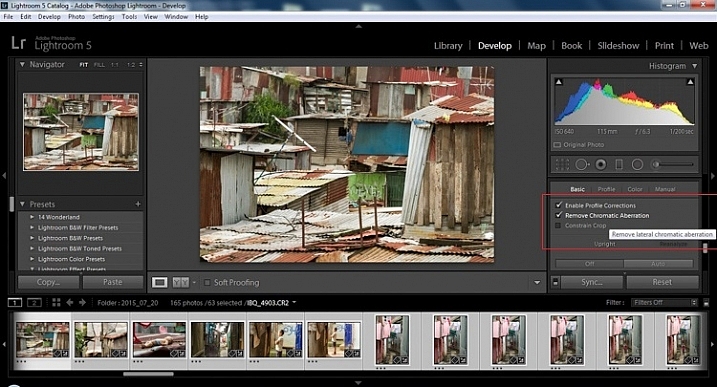
Step 11 – Lens Corrections

This step requires you to scroll down to the Lens Corrections Panel, and select two checkboxes. The first is Enable Profile Corrections, and the second is Remove Chromatic Aberrations. Both of these will allow Lightroom to make changes to the photo based on the lens used, and the inherent flaws that exist in that lens. A variety of corrections may or may not be included like, barrel distortion, vignetting, and as the second suggests, green and purple colors that result from diffraction in the lens.

2015.09.25 Street Editing Tips Lightroom 012

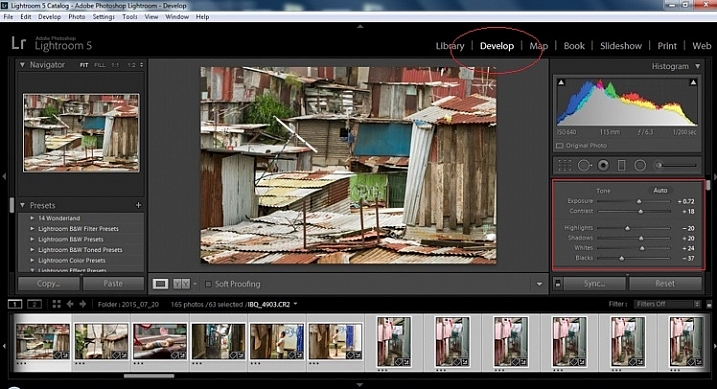
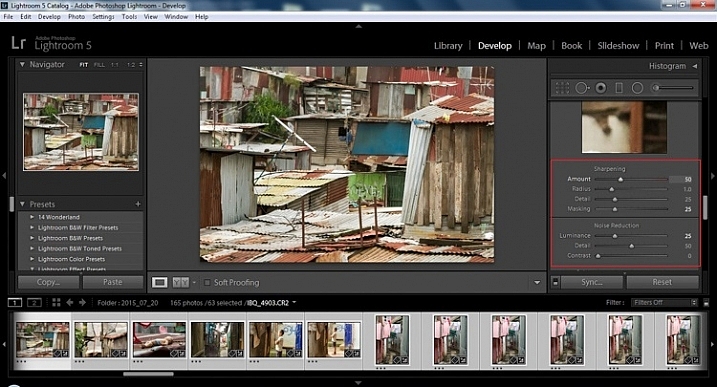
Step 12 – Detail Panel

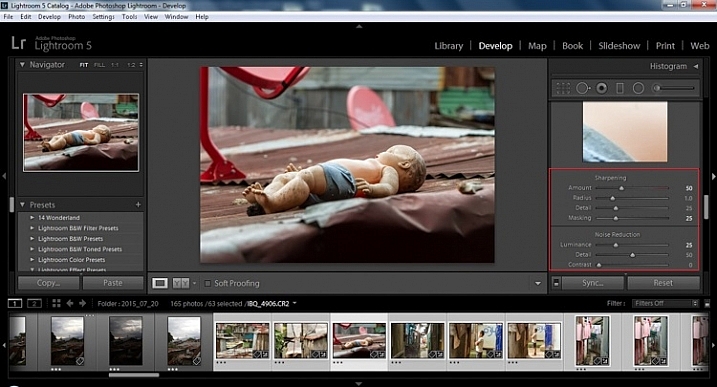
Next is to scroll up and go to sharpening, increase it to +50,  then increase your masking to +25. Finally you may or may not need to reduce noise. For this example, because the ISO was 640 the noise reduction was increased to +25. To understand, sharpening and masking in more detail and their relationship to noise reduction please read below.

2015.09.25 Street Editing Tips Lightroom 013

Are you still with me? Here is where you will thank some of those computer science majors for creating the AUTO button. This is why they get the big bucks, and it saves us large amounts of time. We don’t need to apply these changes individually.

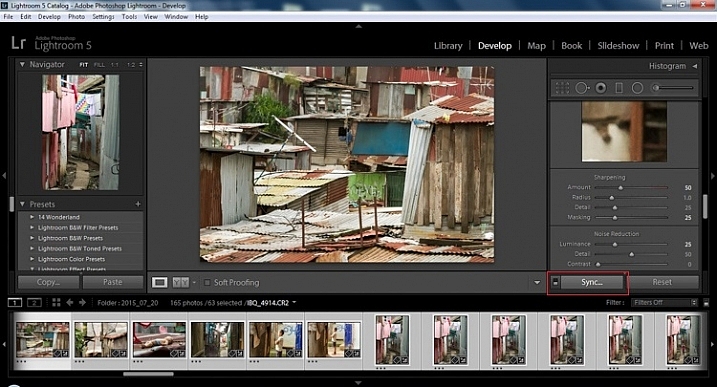
Step 13 – Sync settings

At the bottom of the Develop module there is a rectangular button that says Sync. PUSH IT! Make sure all your images are still selected before you sync (highlighted in the thumbnail strip at the bottom).

2015.09.25 Street Editing Tips Lightroom 014 sync

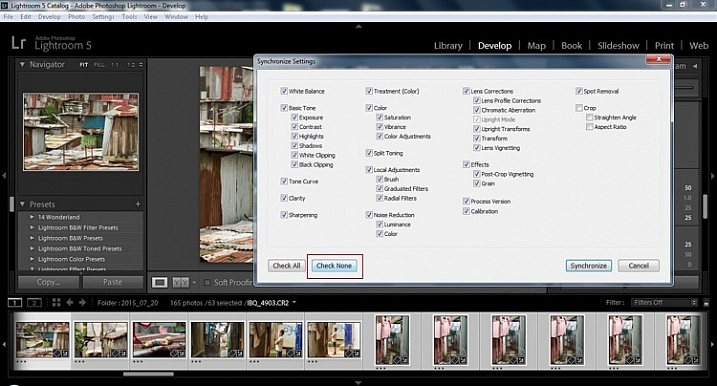
When the Synchronize Setting window pops up, select Check None. This will ensure that no unwanted changes will be made to your previous adjustments.

2015.09.25 Street Editing Tips Lightroom 015 sync check none

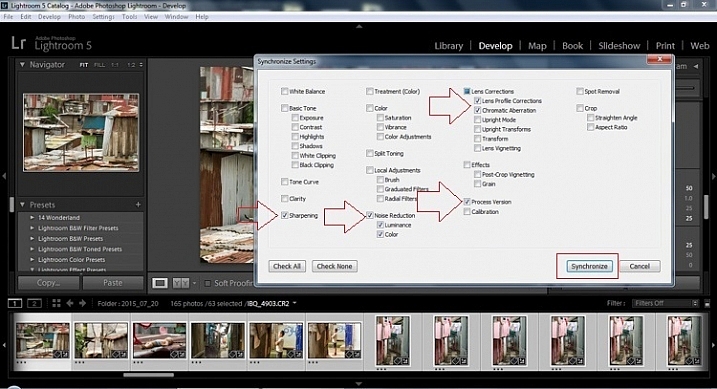
Now check the boxes labeled Sharpening, Noise reduction (which will subsequently select both boxes below it), Lens Profile Corrections, Chromatic Aberration, and finally Process Version. Notice these are the same adjustments that you had made in steps 12 and 13.

2015.09.25 Street Editing Tips Lightroom 016 sync check which apply

Finally, press the “Synchronize” button.

2015.09.25 Street Editing Tips Lightroom 017 verify sync

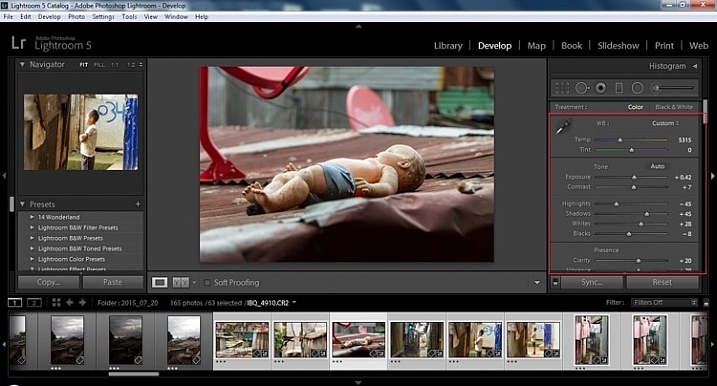
Looking at the screenshot above, you can see that the all of the selected photos have had the changes made to them.  If I were to go back and make all the individual changes to the potentially tens, hundreds, or even in bizarre cases thousands of photos, it would have taken me time that I don’t have, and neither do you. Looking at the image below you can see that the exposure, shadows, lights, whites and blacks have remained unique to the individual photo.

2015.09.25 Street Editing Tips Lightroom 018 verify sync basic settings

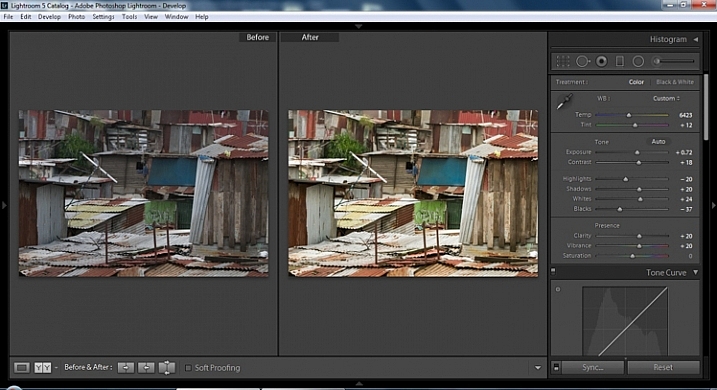
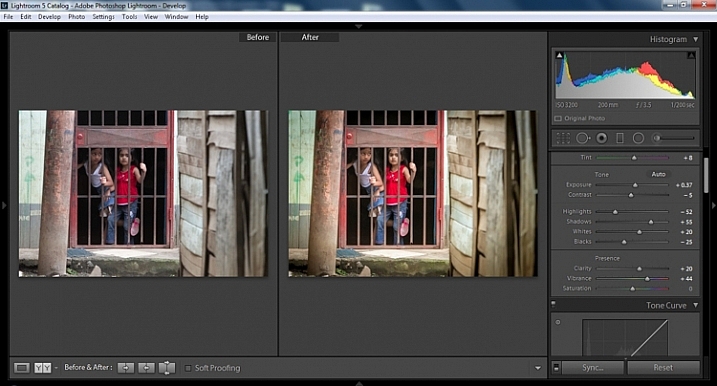
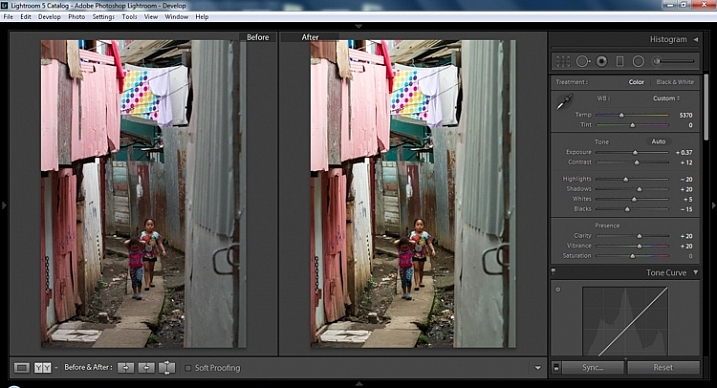
Below are simple side by side comparisons. In the last one I actually made a few additional small adjustments, and added a -10 vignette. Other than that, it is ready for export, along with almost all of the other photos that were just individually and batch adjusted. It is a bit of mix and match magic that keeps your photos natural, and true to the street.

2015.09.25 Street Editing Tips Lightroom 019 compare

2015.09.25 Street Editing Tips Lightroom 021 compare

2015.09.25 Street Editing Tips Lightroom 020 compare

Clarity

Clarity increases the contrast where two different tonal values meet. It is like contrast but on a micro scale, makes the image seem to be sharper. The lights will get lighter and the darks darker, but only where the different tone values meet, not broadly across the whole tonal range of the image.

Vibrance

Vibrance increases the tone of colors that are not already saturated. It is like a balancing scale for color. Saturation on the other hand, increases the intensity of all spectrums of light. Thus, vibrancy helps to bring out subtleties in the colors. For street photography, it brings out richness, without creating an over-saturated look. Sometimes I pull the vibrance up, and push the saturation down, to maintain an urban feel but doing so without making it look over-worked.

Sharpness

Just as I said, clarity is like contrast on the micro scale, sharpness is like clarity on a micro scale. Thus, it is like micro-micro scale. So we are still dealing with tonal values, but in even more detail. So be careful how much you increase your sharpness. Never try to rescue camera shake or blur in the photo using sharpness. “The devil is in the detail,” and this is no truer than in the sharpness slider. Because what you gain in sharpness you also increase the amount of noise (not desirable). If you have a high ISO, sharpness is more of an enemy than a friend.

EXTRA

Final image all adjustments applied

Masking

Textures will become more enhanced, but smooth surfaces will not be affected, resulting in less excess noise being introduced. This will help the street photography mood, without giving it an overly grainy feeling, or your shadows having too much noise. So how much of this movement left and right on the Masking slider is helping or hurting all your hard work? Thanks to those “AUTO guys” the Alt key on windows (Opt on Mac) will give you a grayscale impression of exactly where, and how the sharpening is impacting your photo. White indicates the area on the photo where sharpening is being applied, and black shows where it is not. You will notice that the contrasts and textures deserve most of the sharpening, alleviating your smooth tones and surfaces from the ill effects of sharpness.

Summary

So hopefully that will give you some things to try out with your images to process your street photography faster and consistently. Do you have any other tricks and tips you use? Please share in the comments below.

googletag.cmd.push(function() {
tablet_slots.push( googletag.defineSlot( “/1005424/_dPSv4_tab-all-article-bottom_(300×250)”, [300, 250], “pb-ad-78623” ).addService( googletag.pubads() ) ); } );

googletag.cmd.push(function() {
mobile_slots.push( googletag.defineSlot( “/1005424/_dPSv4_mob-all-article-bottom_(300×250)”, [300, 250], “pb-ad-78158” ).addService( googletag.pubads() ) ); } );

The post 13 Steps for Editing Street Photography in Lightroom from Start to Finish by Branson Quenzer appeared first on Digital Photography School.


Digital Photography School
 
Comments Off on 13 Steps for Editing Street Photography in Lightroom from Start to Finish

Posted in Photography


Pavement Bowie: 20 Street Art Tributes to David Bowie

18 Jan

[ By Steve in Art & Street Art & Graffiti. ]

bowie-street-art-1a
Ashes to ashes, Stardust to dust: having left life’s stage, cultural icon David Bowie also leaves behind a global imprint through street art and graffiti.

bowie-street-art-2a

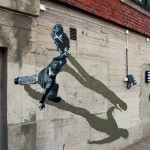
David Bowie was a multidimensional performer – “Sound and Vision” succinctly sums up his ability to impress in a range of senses. Though primarily a musician, the late Londoner’s enormous impact is discernible even when presented silently as street art and/or graffiti in locations as culturally diverse as Iceland and Brazil.

Aladdin Seen

bowie-street-art-3a

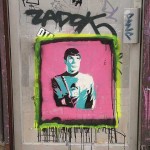
That’s gonna leave a mark. This small stenciled image on Ghent, Belgium’s Werregarenstraat (Graffiti Street) stands out amongst the more complex and colorful works all around. Flickr user Oriol Salvador zoomed right in on March 23rd of 2014.

Face The Change

bowie-street-art-20

Adding some non-local color to a Tel Aviv, Israel side street, these stenciled faces of Bowie aka Ziggy Stardust were snapped on November 24th, 2011 by Flickr user Fatemeh. One would hope the homeowner (a) approves of the art and (b) resists the urge to remove it.

Sticker Shock

bowie-street-art-16

Captured by Flickr user Openhammer on June 11th of 2008, this sticker references the cover photo from RCA Records’ 1972 worldwide release of Bowie’s 1970 album, “The Man Who Sold the World”. Due to their inherent fragility, it’s unknown whether the sticker has survived to date – one would have to scour Winn Street in Brisbane, Australia to know for certain.

They’re Jammin’

bowie-street-art-4aa

bowie-street-art-4b

bowie-street-art-4c

David Bowie and Bob Marley share space in a Toronto, Canada alleyway in this image from Flickr user Aviva West (letsgoeverywhere) taken on April 29th, 2011. Could this be love?

Londrina Calling

Londrina, Brazil was named for London, England so the above street art image of London-born David Bowie is right at home. Flickr user Marco Gomes snapped this sharp-edged stencil from the southern Brazilian city on March 3rd, 2008.

Next Page – Click Below to Read More:
Pavement Bowie 20 Street Art Tributes To David Bowie

Share on Facebook


[ By Steve in Art & Street Art & Graffiti. ]

[ WebUrbanist | Archives | Galleries | Privacy | TOS ]


WebUrbanist

 
Comments Off on Pavement Bowie: 20 Street Art Tributes to David Bowie

Posted in Creativity


Story Dispensers: Street Printers Vend Free Short Stories

09 Nov

[ By WebUrbanist in Art & Installation & Sound. ]

short story dispenser

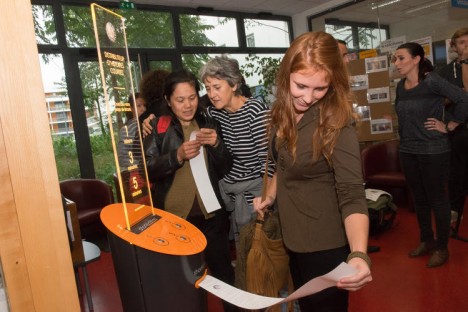
If your mobile device runs out of batteries on the streets of Grenoble, simply find one of these machines, specify a desired duration, and receive a free printed short story to read in a park or on a train.

short edition machine

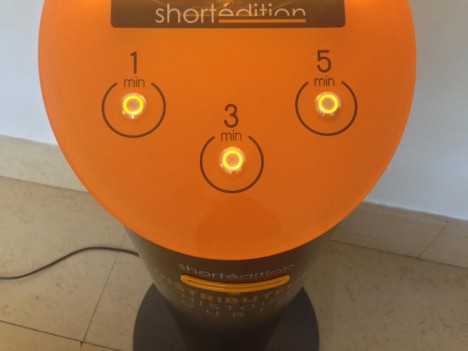
Deployed by the publishers of Short Édition, these automated kiosks are online 24 hours a day with a selection of 600 short stories, works selected by a community of over 140,000 subscribers. Would-be readers are directed to select the length of story they wish to read, then wait a few moments while the tale is printed.

pick length

No one is suggesting we stop traveling with our cell phones on hand, but for people who need a break from the screen or desire some alternative entertainment, this provides another option. The project creates not just printed stories but focal points for urban interaction, changing the way we think about and connect with cities and one another.

short story machine

That said, the ‘stories’ component is still a critical component of this civic intervention: “Stories are an important part of our life. We need them to construct who we are as individuals. More and more people don’t take the time anymore to sit and read a book. This is a way to have a little ‘bite’ of a story, just for a couple of minutes.”

Share on Facebook


[ By WebUrbanist in Art & Installation & Sound. ]

[ WebUrbanist | Archives | Galleries | Privacy | TOS ]


WebUrbanist

 
Comments Off on Story Dispensers: Street Printers Vend Free Short Stories

Posted in Creativity


Blooming Street Lights: Giant Flowers Interact with the City

03 Nov

[ By Steph in Art & Street Art & Graffiti. ]

flower lights 1

Step beneath these massive red flowers in Jerusalem’s Vallero Square and they’ll bloom before your eyes, offering light after dark and shelter from the rain. The interactive installation by HQ Architects reacts to pedestrians and traffic, their crimson textile petals filling with air when motion is sensed nearby.

flower lights 2

flower lights 3

Standing 30 feet tall in two pairs on opposite ends of the square, the flowers can be seen from afar, providing an eye-catching visual for visitors to a busy nearby market. In addition to functioning as public art and street lights, the flowers provide cover to commuters getting on and off the tram.

flower lights 4

flower lights 5

flower lights 6

flower lights 7

When the square is full of action, the flowers billow, creating a sense of movement. They go still when all is quiet late at night, their petals closing. An air compressor is built into the top of each one. Named the ‘Warde Project,’ the installation is part of an effort to revitalize a square that felt a little shabby. [Photos by Dor Kedmi]

Share on Facebook


[ By Steph in Art & Street Art & Graffiti. ]

[ WebUrbanist | Archives | Galleries | Privacy | TOS ]


WebUrbanist

 
Comments Off on Blooming Street Lights: Giant Flowers Interact with the City

Posted in Creativity


Ricoh Theta S boosts resolution, introduces Google Street View integration

03 Sep

Ricoh has unveiled the latest version of its 360-degree camera, the Theta S. Thanks to two 12MP 1/2.3″ sensors, the S is capable of 14MP 360-degree still image capture, up from the previous model’s 6MP images. Brighter lenses, 1080/30p video and integration with Google’s new Street View app are all onboard. Read more

Articles: Digital Photography Review (dpreview.com)

 
Comments Off on Ricoh Theta S boosts resolution, introduces Google Street View integration

Posted in Uncategorized


How to Create an Incredible Street Photography Project from A to Z

20 Aug

With a camera in hand anyone can proclaim himself or herself a street photographer. However, urban imagery requires vision. Most street photographers operate in a spontaneous way, but if you take a closer look at their projects they all have a key-element at the heart of their work, an idea that drives them. Street photography translates into emotional reactions to Continue Reading

The post How to Create an Incredible Street Photography Project from A to Z appeared first on Photodoto.


Photodoto

 
Comments Off on How to Create an Incredible Street Photography Project from A to Z

Posted in Photography


Color or Black and White for Street Photography?

19 Aug

First, let’s assume that you are shooting with a digital camera and the choice of color or monochrome treatment can be made at the post-processing level. The decision of choosing color or black and white if you are shooting film is a different story, and requires a different frame of mind, as it is usually made before you leave the house.

So, the questions is this: Is street photography better in color or black and white? There is no right or wrong answer to this question, it is definitely a personal preference. Some photographers only shoot in color, others prefer black and white for all their work. For my part, I let the subject dictate the choice and that decision is usually made before I press the shutter.

Here is some of the reasoning behind that decision…

Why black and white may be a better choice:

B&W will work best if your subject already has a timeless look.

B&W will work best if your subject already has a timeless look.

You may like to use black and white for its timeless quality. If your subject also has a timeless look, a black and white processing will make your image stand the test of time, and often give it a more artistic look. This is even more true when no element in your frame dates your photograph (such as mobile phones, cars, etc.). Other times, the black and white processing will even help hide those elements.

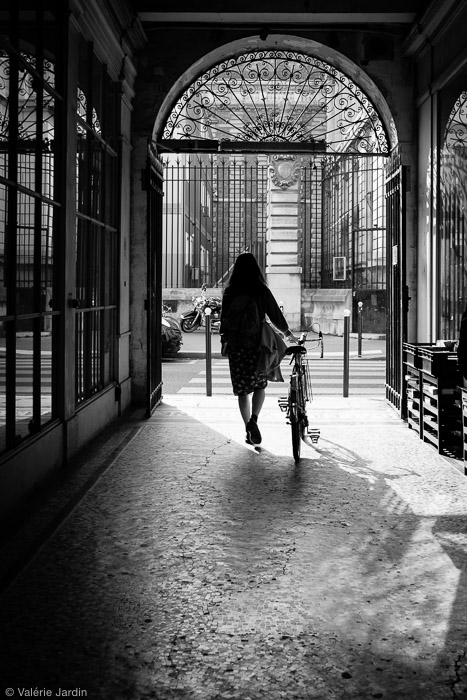
Silhouette photographs are often stronger in black and white than in color. The human element featured should be well-defined, and there needs to be some separation to identify the shape of the body. Removing the color will help make your subject stand out more, especially if it is small in the frame. The eye will automatically be drawn to the human shape.

B&W often works best when photographing silhouettes.

B&W often works best when photographing silhouettes.

There are also some strategic reasons to favor black and white over color. As street photographers we usually do not remove elements from the frame in post-processing. Our job is to record an authentic moment in time, that never happened before, and will never happen again. A skillful street photographer makes quick decisions, and is able to remove distracting elements from the frame by moving in closer and positioning him/herself correctly, before pressing the shutter. Most of us would not resort to using post-processing tools to remove objects. There are times when bright colorful elements such as stop signs, trash cans, or cars are inevitable, and will draw the attention away from the subject. By removing the color, you are able to bring the attention back to the human element.

Compare these two images:

In this frame the subject is interesting but your eye is immediately drawn to the red and blue street signs.

In this frame the subject is interesting but your eye is drawn to the colors of the street signs.

By removing the color distraction you have a much stronger image by bringing the attention right to your subject.

By removing the color distraction it’s a much stronger image, bringing attention right to the subject.

By shooting in RAW you retain all the color information in your file, which allows you to play with the color sliders in Lightroom and turn a distracting color into a light or dark grey tone to fine-tune your final image.

There are other times when the color is amazing but also overpowering, and risks becoming the subject because the human element is lost in the chaos.

Why color may work better:

When is color preferred? The color can be an integral part of the story, which also means that a black and white conversation would take away the most important component of the image, and it would not make any sense.

Here a B&W conversion would not make any sense and the subject would lose interest.

Here a B&W conversion would not make any sense and the subject would lose interest.

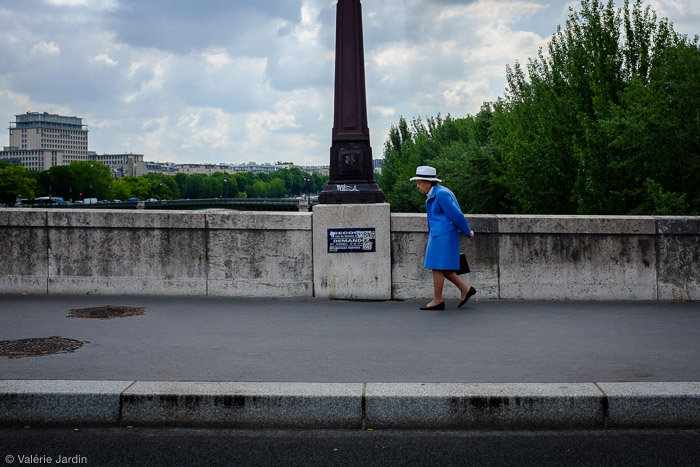
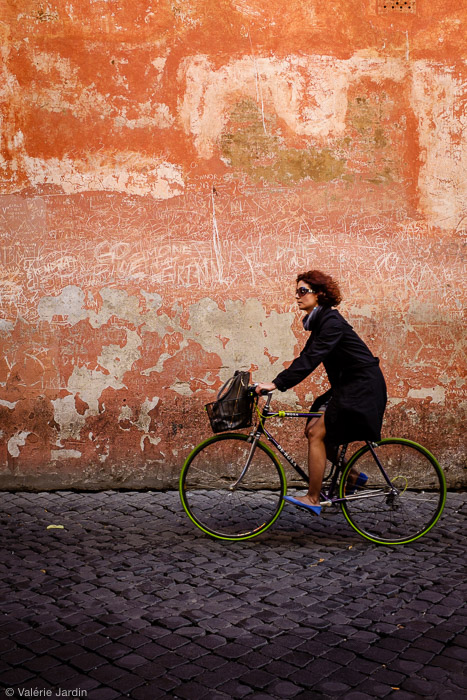
Finding a great background, such as a textured wall or a colorful storefront, is a great way to anticipate a shot, by waiting for the right subject to enter your frame. It may be even more important to get the right subject in a color shot than in a black and white picture. Color harmony plays an important role in making, or breaking the image. Most importantly, color should not overpower your subject. It should be part of the story, not a distraction from it.

Finding a textured colorful background and waiting for the right subject to enter your frame makes for a strong color street photograph. The green tires and blue shoes  completed the shot.

Finding a textured colorful background and waiting for the right subject to enter your frame makes for a strong color street photograph. The green tires and blue shoes completed the shot.

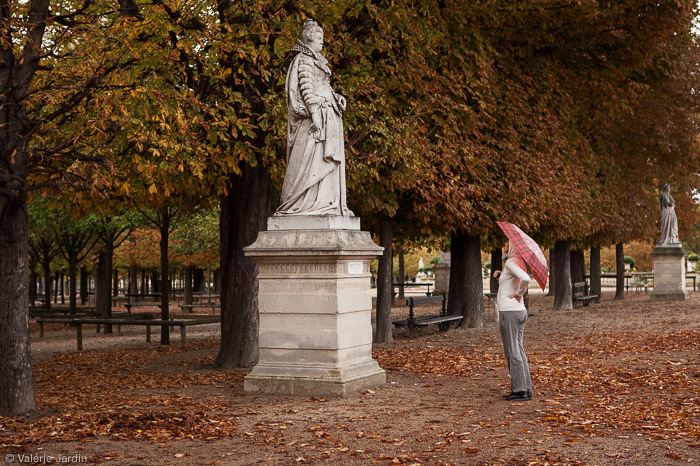
Color will also often give a sense of place or time in street photography. It will evoke the feeling of a season, for example, or the time of the day – from the warm glow of the golden hour, to the cool tones of the blue hour.

Autumn in Paris would not be as well conveyed in a B&W photograph.

Autumn in Paris would not be as well conveyed in a B&W photograph.

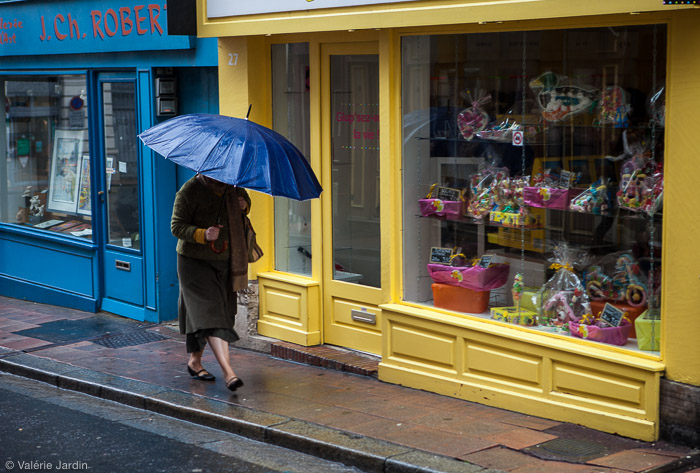
Going out on a photo walk with a specific color in mind is also a fun way to approach street photography. You will be surprised at the creative ways you will see the world around you by focusing your vision on one color. Try it!

Choosing a color theme then you are out on a photo walk can be a fun project. Here my color theme was blue!

Choosing a color theme then you are out on a photo walk can be a fun project. Here my color theme was blue!

Conclusion:

Don’t forget that it’s your vision, and you are shooting street photography for yourself first. Don’t get stuck, try new things! If you always shoot in color, go out and train yourself to see in grayscale for a few days. If you favor black and white, take another look at the world around you and learn to appreciate and use the colors it has to offer. You may discover a whole new way to see, and you will undoubtedly grow in the process. Have fun!

This short video about Color versus B&W is part of my Street Tips series called Hit the Streets with Valerie Jardin

Editor’s Note: This is last of a series of articles this week featuring black and white photography tips. Look for earlier ones below.

  • 5 Simple Ways to Create Expressive Photos in Black and White
  • Tips for Black and White Wildlife Photography
  • 7 Tips for Black and White Portrait Photography
  • 28 Images with Strong Black and White Compositions
  • Weekly Photography Challenge – Black and White Techniques
  • Tips for Black and White Wildlife Photography
  • How to Convert Images to Black and White and Add a Color Tint in Photoshop
  • Shooting all Black and White for a Day to Improve Your Photographic Eye
  • Split Toning Black and White Images in Lightroom
  • Processing Black and White Photos with OnOne Perfect B&W

googletag.cmd.push(function() {
tablet_slots.push( googletag.defineSlot( “/1005424/_dPSv4_tab-all-article-bottom_(300×250)”, [300, 250], “pb-ad-78623” ).addService( googletag.pubads() ) ); } );

googletag.cmd.push(function() {
mobile_slots.push( googletag.defineSlot( “/1005424/_dPSv4_mob-all-article-bottom_(300×250)”, [300, 250], “pb-ad-78158” ).addService( googletag.pubads() ) ); } );

The post Color or Black and White for Street Photography? by Valerie Jardin appeared first on Digital Photography School.


Digital Photography School
 
Comments Off on Color or Black and White for Street Photography?

Posted in Photography


Photo Lessons From the Street

18 Aug

Street photography can be intimidating. Snagging candids of strangers is uncomfortable, at first.

While it’s best to simply to get out and learn as you go, it is nice to arm yourself with a few tips. Marius Vieth, a seasoned street-photog, doles out 10 lessons learned in this article. He includes advice on how to blend in, predict patterns and be ready for that crucial moment.

Our favorite tips from the article are:

  • Minimal gear – Take only your camera and forget the added gear. You don’t want to be swapping lenses when the perfect photo-op pops up.
  • Find natural contrasts – Your foreground should be different enough from the background to make them both visually interesting.
  • Simplify your choices – Try focusing on one element (like a color or pattern) for a couple hours.

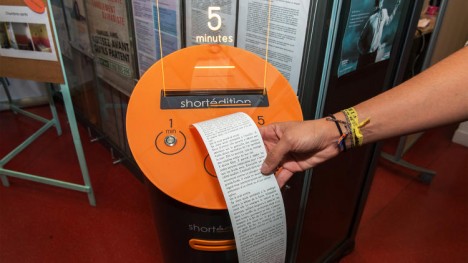
Photo by Marius Vieth

© Erin for Photojojo, 2015. |
Permalink |
No comment |
Add to
del.icio.us

Post tags:


Photojojo

 
Comments Off on Photo Lessons From the Street

Posted in Equipment