RSS
 

Posts Tagged ‘Steps’

How to Make a Portrait of a Stranger in 8 Easy Steps

10 Dec

While you may be at ease shooting candid street photography, you may not feel quite as comfortable doing street portraits… Making a portrait of a stranger, is a very different approach which requires an interaction with your subject.

If you are a very social person who talks to strangers anywhere you go, like I do, taking the next step should not be too much of an issue. If, on the other hand, the thought of approaching a stranger terrifies you, keep reading.

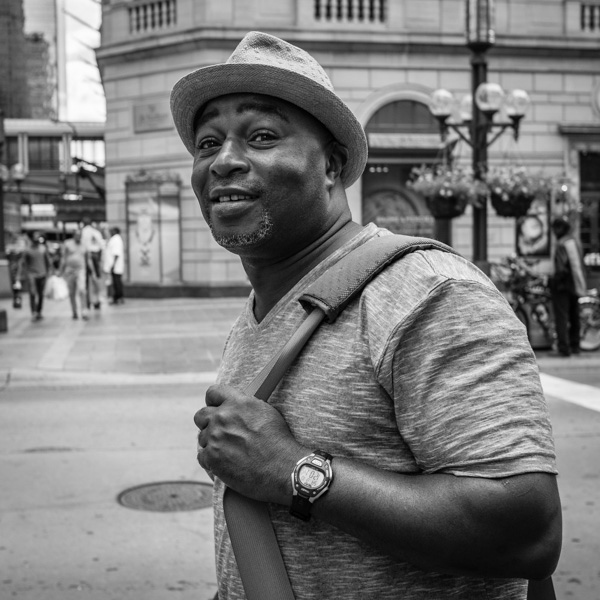
Meet Steve ~ While waiting for the light to cross the street, I made a comment on his cool hat. We talked for 10 minutes! ©Valérie Jardin

Meet Steve ~ While waiting for the light to cross the street, I made a comment on his cool hat. We talked for 10 minutes! ©Valérie Jardin

Step 1 – practice without a camera

Make it a goal to talk with strangers everyday for a few days. They can be waiting in line at the coffee shop with you or on the subway. Make small talk about the weather, comment on the new coffee flavor, just about anything that comes to mind as long as it’s not weird. You may find it terrifying at first but I can assure you that it will become easier everyday and you will soon look forward to your next encounter.  Granted, there is a big leap between approaching a stranger to comment on their cool hat ,or funky sun glasses, and asking them to make a portrait.

Yet, if you are shy, the first step will help you get to the second.

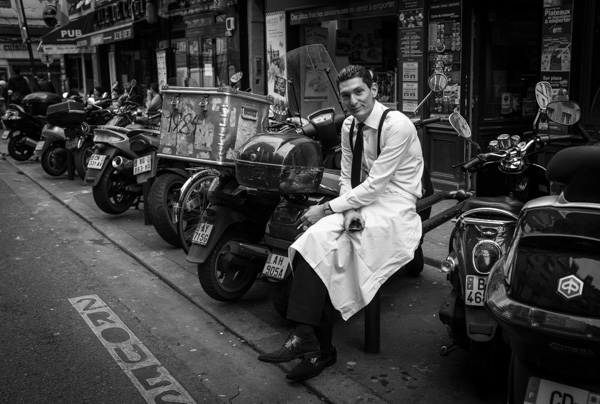
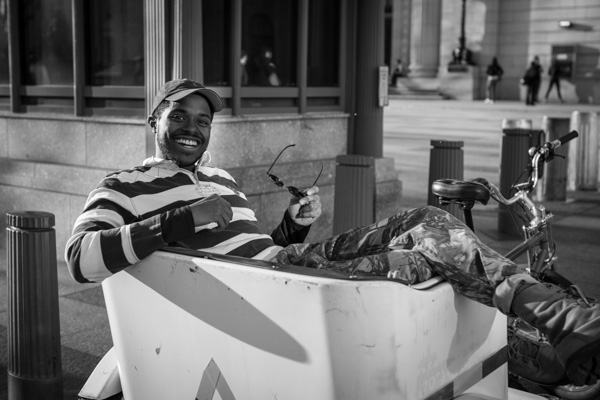
Once there is eye contact, just tell your subject why you want to take a picture. Here I saw a timeless black and white image and I had to ask! ©Valérie Jardin

Once there is eye contact, just tell your subject why you want to take a picture. Here I saw a timeless black and white image and I had to ask! ©Valérie Jardin

Step 2 – photograph a street performer

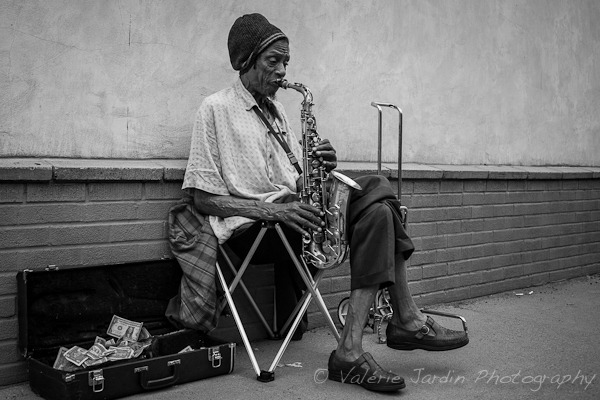
Another way to ease into it is by photographing street performers. They are there to be seen and they are easy subjects. Purists will tell you that they don’t count because they are too easy. As far as I know there is no authority or rules for street portraiture or street photography in general, so go ahead! Photograph a street performer and remember to leave a tip.

Step 3 – go with a friend

Having another person at your side will embolden you, and you will find it easier to approach a stranger if you’re not alone. The friend doesn’t even have to be a photographer.

Step 4 – don’t hide behind a long lens

Just like with candid street photography, the closer the better! Also, a smaller camera will be less intimidating for your subject.

Step 5 – be confident

Introduce yourself and tell them why you want to make a portrait of them. You’re not doing anything wrong, so don’t take the shot and run! If they ask you why you want to take their picture, simply explain that you are photographing strangers for a personal project and you found them quite interesting. Most people will be flattered.

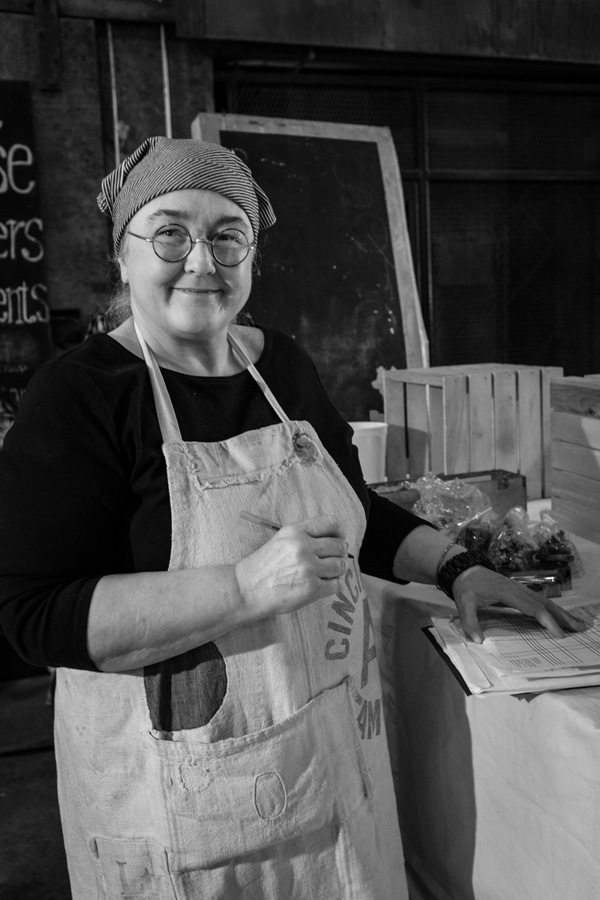
Most people are flattered that you want to make a portrait of them. ©Valérie Jardin

Most people are flattered that you want to make a portrait of them. ©Valérie Jardin

Step 6 – take your time

You asked for their permission to take the picture, so now it’s your responsibility to do a good job. The background may be distracting, or they may be squinting from the sun in their eyes. Ask them to move or even cross the street if the light is better. Take two or three shots until you are satisfied with the result. Make sure you thank them for their time before you part ways.

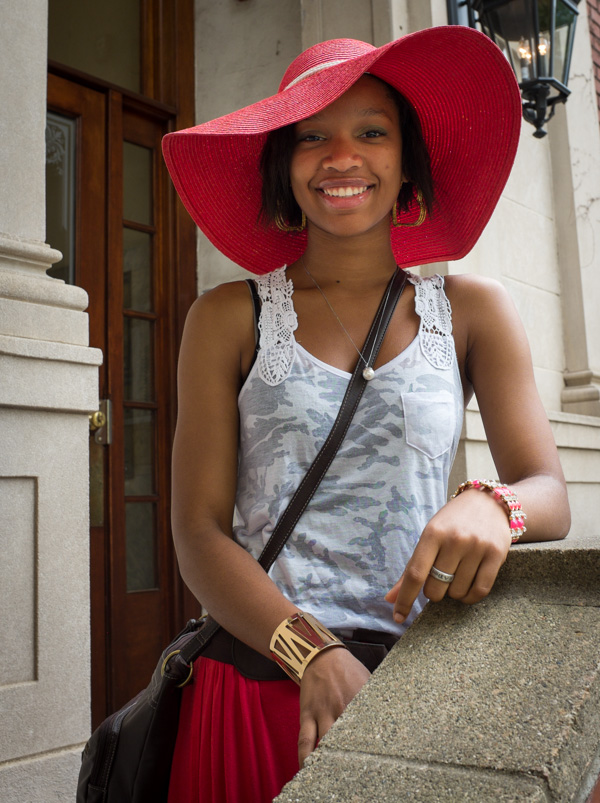
Once you have the permission to do a portrait, it's okay to ask your subject to move to a more pleasing background. This young woman was part of my ongoing 'Beautiful Smiles' blog series. ©Valérie Jardin

Once you have the permission to do a portrait, it’s okay to ask your subject to move to a more pleasing background. This young woman was part of my ongoing ‘Beautiful Smiles’ blog series. ©Valérie Jardin

Step 7 – enjoy the experience

Ask for their name, maybe you’ll even engage them in a conversation and find out some interesting things about their lives. Show them the picture on the back of the camera. Share email addresses and send them the best picture if they ask.

Step 8 – share your work

Those portraits are useless if they stay on your hard drive. Share them on a blog or social media network. The more you share, the better you will feel about your project and the more you’ll want to go out and shoot.

If you’ve never done this, why not make it a photographic goal for 2014? Good luck!

Next step . . .

Please share your experience with the dPS community. How did you start interacting with strangers to photograph them? Do you find it as addictive as candid street photography?

There are smiles that are irresistible! ©Valérie Jardin

There are smiles that are irresistible! ©Valérie Jardin

Post originally from: Digital Photography Tips.

Check out our more Photography Tips at Photography Tips for Beginners, Portrait Photography Tips and Wedding Photography Tips.

How to Make a Portrait of a Stranger in 8 Easy Steps

The post How to Make a Portrait of a Stranger in 8 Easy Steps by Valerie Jardin appeared first on Digital Photography School.


Digital Photography School

 
Comments Off on How to Make a Portrait of a Stranger in 8 Easy Steps

Posted in Photography


Start To See Photographically In Six Easy Steps

19 Nov

We are living in a time of unlimited free shutter clicks. This is both an advantage, and a disadvantage for you as a photographer. On one hand, the learning curve is faster, easier and definitely a lot cheaper. On the other hand, many photographers have a tendency to shoot without taking much care in their composition and rely on the occasional lucky shot.

Stop shooting randomly and start photographing with intent. Before you click that shutter, ask yourself: “What do I want to convey? What story do I want to tell?” There are many ways to achieve this, here are few easy steps to help you step up your game, no matter what camera or lens you use.

Six Steps to Start Seeing Photographically

1 – See the light

Play with light and shadows. Be aware of the quality of light around you (hard versus soft light) and its effect on objects, buildings, etc. The more aware you become of the quality and quantity of light, the better you will be at harnessing it and making it work for you, no matter the time of day.

See the light, its effect on building and objects around you.

See the light, its effect on buildings and objects around you ©Valérie Jardin

When you see light, any ordinary object will become a wonderful subject. ©Valérie Jardin

When you see light, any ordinary object will become a wonderful subject ©Valérie Jardin

2 – Express your vision with basic composition rules

There are many ways to express your vision and they all start with the decisions you make before you press the shutter.

Use focus point and depth of field

The obvious way to lead the eye of the viewer is by focussing on the subject and using the right depth of field so that there is no mistake as to where the eye should go. It only takes a fraction of a second to lock your focus and recompose. You have to put some thought into it and soon you will make quick decisions that will make your images stronger.

Use focus point and depth of field to lead the eye to your subject ©Valérie Jardin

Leading lines

Too often ignored, the use of lines is a powerful tool to lead the eye.

Use leading lines in your composition. ©Valérie Jardin

Use leading lines in your composition ©Valérie Jardin

The rule of thirds

Positioning your subject in your frame is one of the most important decisions you will make in regards to your composition. You cannot overuse the rule of thirds, but it’s okay to break it as long as it is done intentionally.

The rule of thirds works, use it! ©Valérie Jardin

The rule of thirds works, use it! ©Valérie Jardin

Break the rule of thirds as much as you want, as long as you know why you’re breaking it. ©Valérie Jardin

Using color

Just like using focus point to draw the eye, using color is another powerful compositional tool. Alternatively, because color draws the eye, it is also a reason to convert your color image into B&W to remove distracting colorful elements and make stronger images!

Negative space

The clever use of negative space makes stronger images as it puts more emphasis on the subject (positive space).

Use negative space to give more impact to your images. ©Valérie Jardin

Use negative space to give more impact to your images. ©Valérie Jardin

Patterns

See and use repeated patterns or, even better, look for breaks in the pattern!

See repeated patterns. Even better: a break in the pattern!  ©Valérie Jardin

See repeated patterns. Even better: a break in the pattern! ©Valérie Jardin

Soon you will see stronger images that incorporate several element such as repeated patterns, leading lines, rule of thirds and color that draws your eye to the main subject. Use focus point and depth of field to lead the eye to your subject. ©Valérie Jardin

Soon you will see stronger images that incorporate several elements such as repeated patterns, leading lines, rule of thirds and color that draws your eye to the main subject. ©Valérie Jardin

3 – Less is more

Learn to make stronger images by leaving unnecessary elements out of the frame. One thing I notice all the time when I look at my students’ work is that they tend to include too much in their frame. What you decide to leave out of the frame during your composition will make or break the image. Keep it simple. Learn to see and crop in camera.

You don't need the subject in it's entirety to have a strong image. Practice cropping in camera. The use of a fixed lens will help you! ©Valérie Jardin

You don’t need the subject in its entirety to have a strong image. Practice cropping in camera. The use of a fixed lens will help you! ©Valérie Jardin

Less is more, think minimalist and give more impact to your images! ©Valérie Jardin

4 – Get close and fill your frame

Objects, even the most ordinary ones, look more interesting if you frame them tight. Get close. You think you’re close enough? Now get closer!

Fill your frame! ©Valérie Jardin

Fill your frame! ©Valérie Jardin

Get close, and then get closer! ©Valérie Jardin

Get close, and then get closer! ©Valérie Jardin

5 – Work your frame

Try shooting from different perspectives, shoot high, shoot low. Tilt your camera for more dynamic images.

Work your frame: Shoot high, Shoot low... Things don't look very interesting at eye level. ©Valérie Jardin

Work your frame: shoot high, shoot low… things don’t look very interesting at eye level. ©Valérie Jardin

6- Watch your background!

It only takes a second to scan the edges of your frame and check your background for distracting elements. It also only takes a quick second to move one step in either direction to get rid of a distracting element or avoid a branch to stick out of someone’s ear.

This image would have been ruined had I not stepped slightly to the right to avoid the potted plant to be directly on top of the gentleman's head...  ©Valérie Jardin

This image would have been ruined had I not stepped slightly to the right to avoid the potted plant to be directly on top of the gentleman’s head… ©Valérie Jardin

Next time you go out with your camera, try to slow down and think more about what you want to convey with your images. Unless you are photographing birds, busy toddlers or action sports, try to make every shutter click count!

Soon these composition rules will become second nature. You will see them without having to even think about them, you will learn to see photographically, and your work will improve.

Have fun!

Post originally from: Digital Photography Tips.

Check out our more Photography Tips at Photography Tips for Beginners, Portrait Photography Tips and Wedding Photography Tips.

Start To See Photographically In Six Easy Steps

The post Start To See Photographically In Six Easy Steps by Valerie Jardin appeared first on Digital Photography School.


Digital Photography School

 
Comments Off on Start To See Photographically In Six Easy Steps

Posted in Photography


Get Started with the Beautiful World of Film Photography in 7 Easy Steps

27 Sep

Ahh, film photography.  The cool kid on the block.  The “old” thing that’s suddenly the “new” thing.  In recent years, it’s been popular opinion that it was an identifying trademark of hipsters, and only then for an artistic flair that digital photography has failed to capture for them.  The reason Instagram has been such an enormous success recently is our Continue Reading

The post Get Started with the Beautiful World of Film Photography in 7 Easy Steps appeared first on Photodoto.


Photodoto

 
Comments Off on Get Started with the Beautiful World of Film Photography in 7 Easy Steps

Posted in Photography


5 Steps to Building More Powerful Images

10 Aug

A Guest Contribution by Dan Bailey

We photographers seem to have it easy. Whereas most artists spend anywhere from hours, to months to years to manufacture their creations, we can simply point, press and be done. However, that kind of convenience doesn’t necessarily translate into great imagery.

Shooting powerful photos that have lasting visual appeal requires more than just pointing and clicking; it takes applying some fundamental compositional methods that are designed to simplify your compositions and actively engage your viewers. Here are five steps that will help you strengthen the visual impact of your imagery.

1. Use Awesome Light

Photography is all about light, and it’s the first thing that will make or break the shot. Not matter what you’re shooting, any and every subject will look better in great light. When we think of good light, we often think of Magic Hour, or the stretches of time during sunrise and sunset. As a general rule, shooting during these times will usually give excellent results.

However, be open to shooting at other times of the day, or even using other lighting sources. Fog, diffused window light or a camera flash can all make for compelling illumination. If you become proficient at wrangling the light, you can create great photos under any conditions.

NFLD HIK 100A

2. Have an Identifiable Main Subject

First and foremost, your image should have have a main subject. Period. It needs to be about something. The most powerful photographs are built around a single element that serves as the focal point of the shot. As a photographer, your job is to draw your viewer into the frame, and if you don’t give them something to lock onto, their eyes will wander aimlessly around your picture trying to figure out what they’re supposed to see. If you don’t know what your picture is about, then your viewer won’t either and they’ll just move on.

DSC8929

3. Use Relationships to Tell the Story

A powerful photograph tells a story, which essentially means that it communicates some specific message or invokes an emotional response from the viewer. The best way to do build this story is to establish relationships between your main subject and the other elements inside the frame.

The job of these secondary elements is to compliment, reinforce or contrast the main subject in some way. An effective secondary subject can be as simple as a strong, out of focus background that gives a sense of place, or it can be two or three other things in the photo that give your subject something to play off of and help to establish the narrative of how your subject “fits” within the world of your frame.

Adding strong secondary elements to your photo also gives your viewer something else to explore as their eyes scan the image, and more importantly, it gives them something to think about. Anytime you activate your viewer’s brain, you’ve gone a long way towards creating a compelling image.

UTH 100

4. Create Tension Through Framing

Depending on how you place your subjects in the frame, you determine the experience by which your viewer scans and respond to what’s in your photograph. The human eyes and brain are hard wired to see and recognize patterns, colors and imperfections in the world; it’s how we evolved to identify our surroundings and spot things like food and danger.

By using a mix of hot and cool colors and by placing your subjects in seemingly random areas in the frame, you cause an inherent uneasiness in your viewers. Their eyes will scan your image, trying to find patterns and that may not exist, and so they’ll keep looking, tracking back and forth between your different subject elements, and darting across broad patches of negative space in order to make sense of the photo. By contrast, if your composition is too perfect, or too balanced, your viewer will quickly spot this nice, easy pattern and move on. That’s not what you want.

DSF0787

5. Don’t Show Everything

A common mistake with beginning photographers is to try and show too much. This leads to cluttered, boring images that do little to engage the viewer’s brain. As I said in number 2 above, in order to create a powerful photo, you need a main subject. However, I didn’t say that you had to show the whole thing.

Abbreviating your subjects can be a very powerful method towards creating a compelling shot. Especially if I they’re things that we’re all familiar with. If you only show part of a subject, you automatically activate your viewer’s imagination as they try to picture the rest in their mind. Photography is a two way street: You have creator and viewer, and if you bring your audience into the process, you invite them to become more connected to your shot.

Remember, good photography isn’t about perfectly reproducing your subject, it’s about creating a visual representation that communicates the ideas or emotions that you had about the scene right when you pressed the shutter.

DSC2259

Further Reading

Makingcover125For more creative photography tips, I invite you to check out my eBook Making The Image – A Conceptual Guide to Creating Stronger Images. I’ll even give you a special price! Use discount code DPS you can get eBook for 50% off.

Dan Bailey is a full time professional outdoor, adventure and travel photographer based in Alaska. When he’s not off exploring in the mountains, writing about photography, or flying his little yellow bush plane, he can sometimes be found lurking in the forums right here at DPS.

Check out his blog and find him on Facebook and Google+.

Post originally from: Digital Photography Tips.

Check out our more Photography Tips at Photography Tips for Beginners, Portrait Photography Tips and Wedding Photography Tips.

5 Steps to Building More Powerful Images


Digital Photography School

 
Comments Off on 5 Steps to Building More Powerful Images

Posted in Photography


3 Steps to Gorgeous Landscape Images

01 Aug

A Guest Contribution by Todd Sisson – author of our brand new Landscape Photography eBook (currently 33% off).

During the writing of Digital Photography School’s latest eBook, Living Landscapes, I was forced to do some heavy thinking about how I approach creative landscape composition in the field. At this juncture, it is important to note that I avoid heavy thinking at all costs. Thinking truly is the hardest work, especially when you are attempting to simplify a process that is almost instinctual to you.

However, my fear of hard thinking is eclipsed by my fear of Editorial wrath, so I set aside a day, dusted off a tantric chants CD and retired to my sweat-lodge teepee for some quality time with sub-conscious me. Thirteen hours later I emerged, 12 kg lighter and armed with two revelations, the first; I approach landscape composition as a three step process. The second; my sub-conscious is a freaky place that is best avoided in the future.

Luckily for you, it is the brief overview of the first revelation that I shall share with you here today; the three component steps to creating a successful landscape image:

  • Choose a subject
  • Find the right light
  • Create a composition

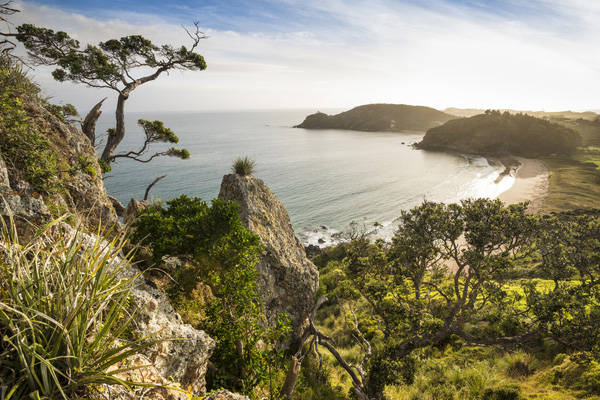
NZ NO Pataua South 4 1

Successful landscape images result from a combination of interesting subject matter, quality light and a strong composition. This particular image nicely illustrates the point that you don’t need towering mountain peaks, blazing sunsets and extraordinary foreground features to make a pleasing image.

Choosing a Great Subject

Not everything in nature is destined to make a great photo. It is our job as a photographer to sort the wheat from the chaff and identify subject matter that will translate beautifully into the two dimensional constraints of the photographic medium.

To my mind, the best landscape subjects convey visual themes such as ‘energy’, ‘grandeur’ and ‘tranquility’ to the viewer. Mountains, bodies of water and coastlines all make happy hunting grounds for photographers because, as viewers, we instinctively know how to interpret these scenes. We sub-consciously know that a snow covered mountain peak must be big, or that a wave crashing on rocks is imparting large amounts of energy, and we know, without thinking, that a reflection on a pond occurs only under calm conditions. In short, we can easily ‘read’ these types of photograph.

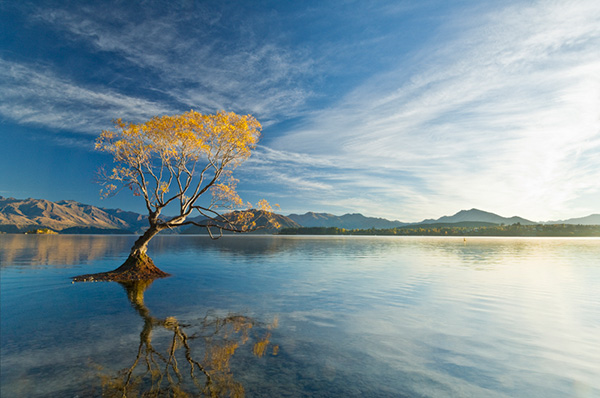
NZ WA Lake Wanaka Willow Reflection 01

The best photographic subjects communicate multiple visual themes and have a very broad appeal as a result. To me this scene speaks of tranquility (reflections), natural change (Fall color and the building cloud cover) and stoicism (the lone tree clinging to life on the outer limits of it’s natural environment). You may ‘read’ this scene quite differently depending upon your outlook on life – for example, a hardcore environmentalist may see no more than an introduced species of tree clogging a lake that has been flooded by unsustainable farming practices in the lake’s headwaters. Photography, and life for that matter, is a very subjective affair…

You don’t need to travel to Nepal (or New Zealand, for that matter, to find great photographic fodder. Sure, it is lot easier to make interesting landscape images when surrounded by Tolkien-esque mountains but subjects don’t need to be grand in scale to make great images, they just need to be visually interesting. Learn to seek form, patterns or color in a scene and you may well find a subject from which to create a landscape image.

Sisson Wanaka 29

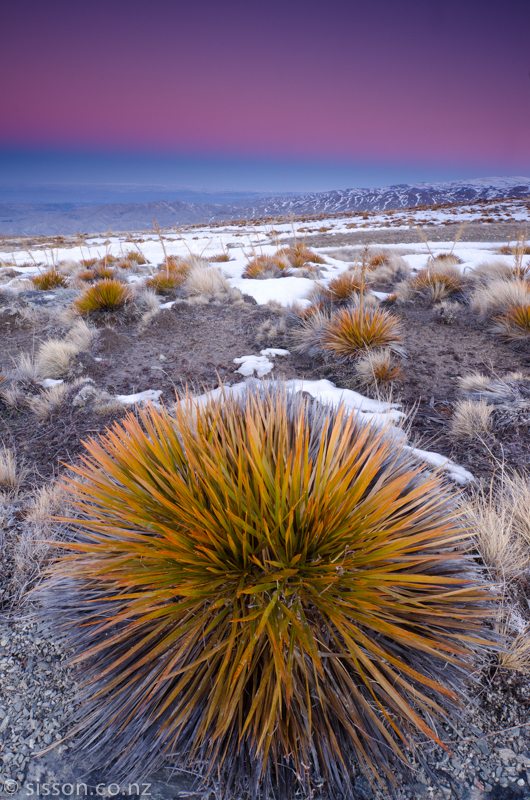
To me, this is a visually interesting image despite the absence of towering mountains, lightning bolts and grazing Unicorns. I was initially drawn by the beautiful evening pastels and the earth shadow (the blue line in the sky near the horizon) but I needed something to ‘anchor’ the shot. The strong geometric pattern and form of the Spaniard grass created a terrific foreground element for the composition. By getting low and getting close an ultrawide lens the grass gains ‘visual weight’ – compare it to the nearly identical grasses a couple of yards back.

Seek the Right Light

I would happily argue that great light is the single most important element in a successful landscape image. In fact, I dedicated a significant number of ePages in Living Landscapes to doing just that. Great light is truly transformative.

Fortunately, seeking great light doesn’t entail shooting only Ferrari-red sunsets. In fact, I will pull out the camera in almost any light if it complements a scene. The skill is learning to judge what constitutes the best possible lighting conditions for a given location – this is where you have to practice the art of observation and pre-visualization to judge how the sun will play out during the course of the day. I use digital tools to assist in this process, namely Focalware, which is a nifty little app that shows the arc of the sun and moon throughout the day with freakish accuracy.

Before after

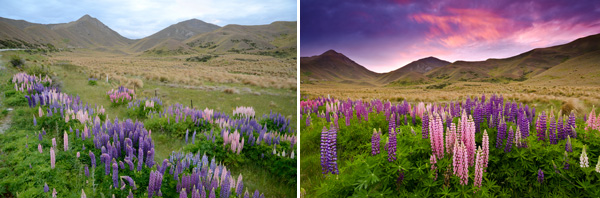
Great light is transformative. In Living Landscapes I detail the many steps and decisions that led from the scouting shot on the left to several portfolio-grade images of this scene.

Create a Composition

Composition is where it all comes together artistically. You may have lined up an amazing subject and be blessed with a veritable pyrotechnics show in the sky but if you combine these in a dreary, sloppy and uninspiring composition all is wasted.

I personally divide landscape compositions into two broad (and absolutely unscientifically defined) categories;

  • Dynamic landscape compositions
  • Static landscape compositions

Dynamic compositions are the show ponies of the landscape photography world. They employ a suite of visual ploys to imbue an image with an almost 3-D feel and/or impart a sense of dynamic energy. Dynamic compositions used to be difficult to create in ye olde film days but the learning curve is vastly accelerated by the digital workflow and easy access to educational information such as this dPS blog post written by yours truly.

NZ CO cathedral cove 6

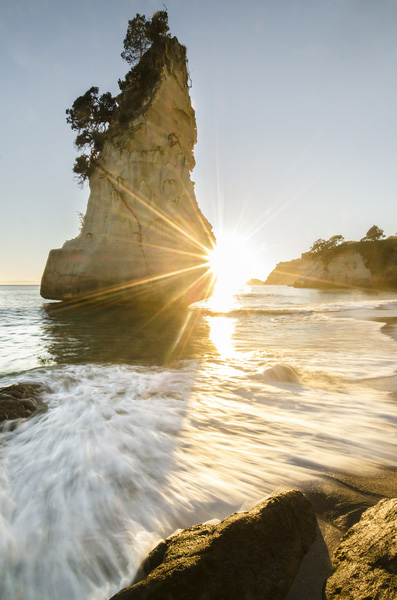
Show pony. Dynamic compositions employ techniques such as leading lines, motion blur and vivid colors to draw the viewer’s attention into the frame.

Static compositions subscribe to a more traditional photographic aesthetic and, I feel, are more faithful to the two-dimensional constraints of the art form – most of Ansel Adams’ images would be considered static as opposed to dynamic compositions. I have a personal preference for beautifully executed static compositions – probably because I am fairly ancient, in internet years at least…

Static compositions rely upon a more subtle repertoire of visual techniques to achieve a sense of drama. Successful static compositions use a combination of layers, contrast, texture, form, localized lighting and color to engage the viewer.

NZ WR Sunset Sheep

No place for show ponies. Static compositions such as this rely upon layers of visual interest, form and spot lighting to succeed.

Mixing it Up

It is important to note that there is no particular order for executing these three steps. I will often stumble across great light (always it seems when driving with a car full of tired & hungry kids ) and then have to find a subject and a composition to capitalize upon the situation. This is, of course, where strong craft and technical skills kick in – readers of Living Landscapes will know that I promote a policy of keeping it simple with regards to camera settings and technical considerations, this allows me to work fast and seek out compositions – even while being bombarded with requests for snacks from the back seat!

Todd & Sarah Sisson are full-time landscape photographers based in Central Otago New Zealand.

Their work can be found as fine art prints & canvas prints at www.sisson.co.nz  They can be found on Facebook, Google Plus and Twitter.

Post originally from: Digital Photography Tips.

Check out our more Photography Tips at Photography Tips for Beginners, Portrait Photography Tips and Wedding Photography Tips.

3 Steps to Gorgeous Landscape Images


Digital Photography School

 
Comments Off on 3 Steps to Gorgeous Landscape Images

Posted in Photography


Steps to Saving Space: 15 Compact Stair Designs for Lofts

22 Jul

[ By Steph in Design & Furniture & Decor. ]

Compact Loft Stairs Main
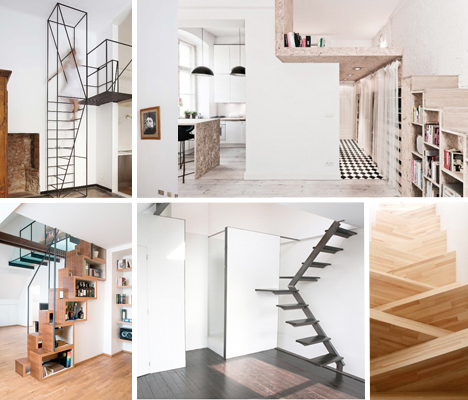
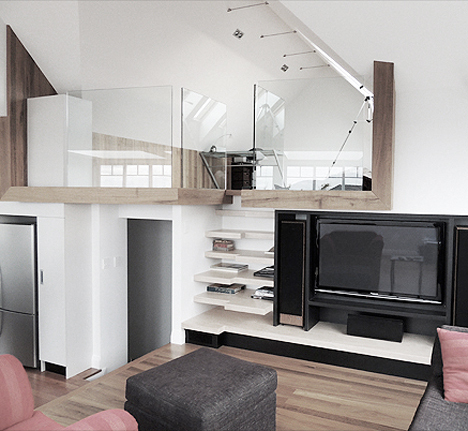
Alternating treads, ultra-narrow ladders, built-in storage and other tricks enable these 15 smart space-saving designs to fit into the smallest of apartments. Offering access to sleeping lofts, second stories or just elevated storage, these ultra-compact staircases avoid a large footprint through furniture integration, tight spirals, or – at times – clever solutions that wouldn’t really pass safety inspections in most places.

Stairs Integrated in Entertainment System

Compact Loft Stairs Entertainment System 1
Compact Loft Stairs Entertainment System 2

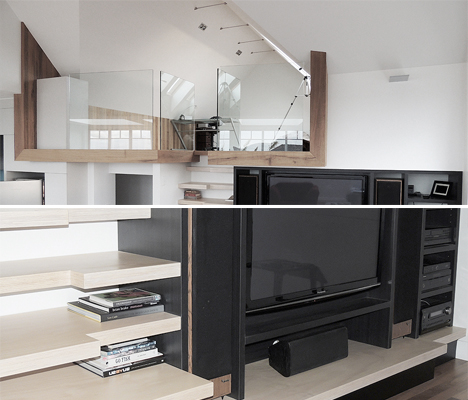
The steps to access a small glass-walled loft are barely noticeable in this contemporary renovation to a 1930s traditional English cottage-style home by Mark Frazerhurst Architect. They’re built right into the entertainment center, with alternating treads sticking out from a functional shelf.

Loft Bed/Ladder Combo

Compact Loft Stairs Bed Ladder Combo

An all-in-one kit from Sweden’s Compact-Living adds a loft with a wall-mounted ladder to any room with a high enough ceiling to accommodate it.

Minimalist Steel Rod Staircase

Compact Loft Stairs Minimalist Rod

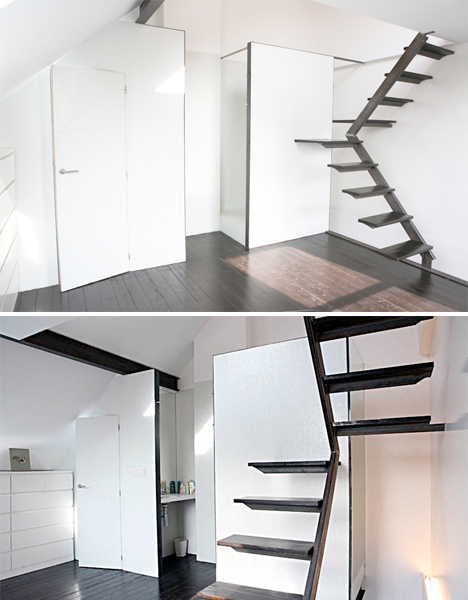
Designer Francesco Librizzi added this contemporary metal rod staircase to an original house in France built in 1900, saying “the only possible intervention was an almost 2D-frame, able to double the space in height and create new possibilities on other layers.”

Simple Staircase in Belgium Mini House

Compact Loft Stairs Belgium

These stairs take up very little space thanks to a pivoting design with a (very) small platform at the bend. Too bad staircases like this – lacking handrails – don’t typically pass code inspections in the United States.

Bookcase Stairs by WORKSTEAD

Compact Loft Stairs Bookcase Workstead

A bookshelf ladder by Brooklyn designers WORKSTEAD attaches a narrow metal ladder to a built-in bookcase, leading to a skylight and the rooftop above.

Next Page:
Steps To Saving Space 15 Compact Stair Designs For Lofts

Share on Facebook


[ By Steph in Design & Furniture & Decor. ]

[ WebUrbanist | Archives | Galleries | Privacy | TOS ]


WebUrbanist

 
Comments Off on Steps to Saving Space: 15 Compact Stair Designs for Lofts

Posted in Creativity


How To Improve an Image with 2 Steps in Photoshop Using Screen Mode

03 Jul

A Guest Post by Sergey Sus/

Before after

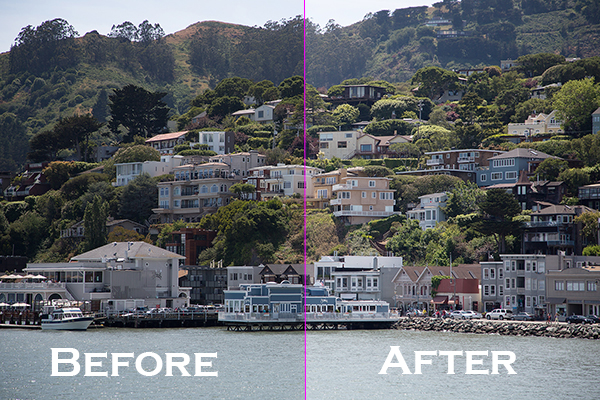
Wanted to share a very simple way for improving a photo without having to change the exposure. I use this method quite often and sometimes even after adjusting exposure.

The image is of a small hillside town in North California called Sausalito taken while on vacation.

Here the SOOC (straight out of the camera) image before any adjustments are applied or any cropping. It is just a bit under exposed and very flat looking.

Img sooc

Certainly there are many ways to brighten a photo in Photoshop like using Curves, Levels or Shadow layers. For this tutorial, we will be using a duplicate layer and then change the overlay to Screen mode to brighten up and give it a bit of a punch. I’ve seen many professional photo retouchers use this technique on both landscape and portrait photography as a starting point for retouching. This method works really well on jpgs as well!

1. Open image in Photoshop. Then duplicate layer by pressing Ctrl+J (Win) / Command+J (Mac)

Img dup layer

2. Change blend mode to Screen and and then set Opacity to 50%.

Img screen

Starting out with Opacity set to 50% and adjusting the slider for more or less brightness. For this image the opacity is about right at 50% for my eyes. See how this new layer in Screen mode added a subtle contrast and brightness.

Img ps screen

Give this technique a try even if the image is not under exposed as it will brighten up overall highlights and will slightly increase perceived contrast. Make sure to experiment with different opacity values for different looks. Here is the final image cropped and with a bit more processing – how I remember Sausalito looking that day.

Img final

Let me know in the comments how this has worked for you or if you have questions.

Sergey Sus is a Los Angeles based photographer telling telling real stories, individual, professional and family. Problem solver, artist and teacher. His work can be found on http://www.sergeys.us/.

Post originally from: Digital Photography Tips.

Check out our more Photography Tips at Photography Tips for Beginners, Portrait Photography Tips and Wedding Photography Tips.

How To Improve an Image with 2 Steps in Photoshop Using Screen Mode


Digital Photography School

 
Comments Off on How To Improve an Image with 2 Steps in Photoshop Using Screen Mode

Posted in Photography


How to create a reflection in Photoshop in 6 easy steps

21 May

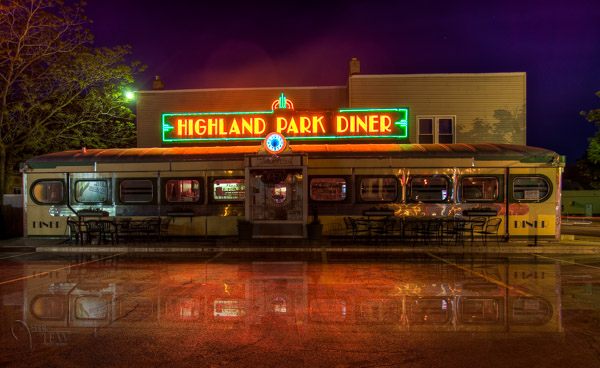
Creating a reflection using Photoshop is one of those things that at first glance looks really hard, but really isn’t, once you break down the steps (just light Light Painting which I covered in another two part series). In this article I’m going to demystify creating a reflection, a technique that works particularly well on images with open pavement, and HDR processed images which tend to make the pavement look wet already.

We’re going to learn how to go from this . . .
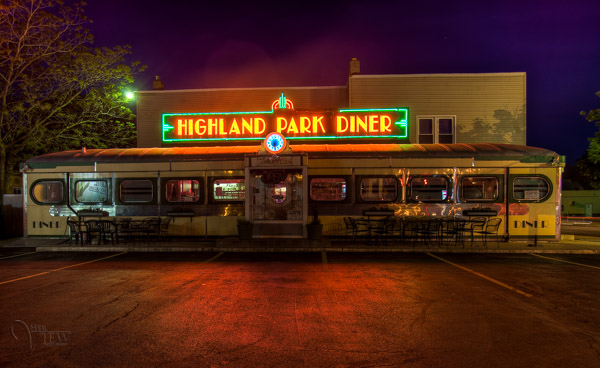
reflection-before

To this!

reflection-after-photoshop

In less than 10 minutes!

I recently showed one my HDR classes how to do this, and they all followed along with me step by step.  Some of them were using Elements (which works just fine, but you may find the menus and choices look slightly different), and this technique can be done using that program too, so if you use Elements, not to worry. Many of my students were also self proclaimed “Photoshop novices” and when I asked them if they thought they’d be able to this when I showed the before and after images, most said “no”!  But they all did, and we were done in less than 10 minutes. **Note that also included me going super slow to ensure each of the 12 people in the class were on the same page with me. I’m going to guess this will take less than 5 – ready GO!

Here are the six easy steps to follow in Photoshop.  This is the super condensed version for those quick readers and skimmers.

  1. copy a section of the image
  2. paste it as a new layer
  3. flip it
  4. position it
  5. change the layer blend mode
  6. mask it

That’s it! You want a few more details?
Let’s dive in a little deeper into each step

STEP ONE – COPY

Using the marque tool (“M” is the keyboard shortcut) draw a box around an area of your image that will become the reflection (see Figure #1 below). Make sure you go edge to edge on the sides, and get enough of the image vertically. If you grab more than you need that’s fine we’ll be moving it around and masking later anyway.
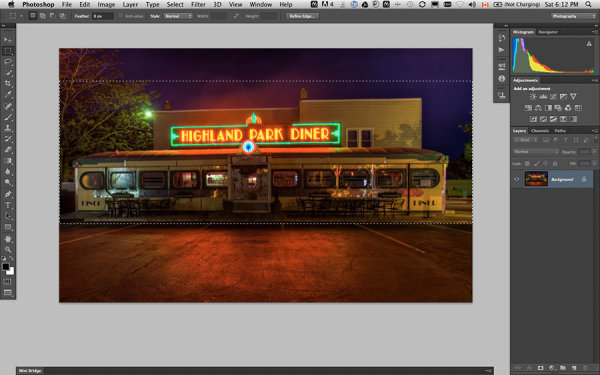
select-section

Figure #1 make a selection

Copy the selection as a new layer. You can do that a few ways.

  • right click on the image and from the menu that pops up choose “layer via copy” (see Figure #2 below)
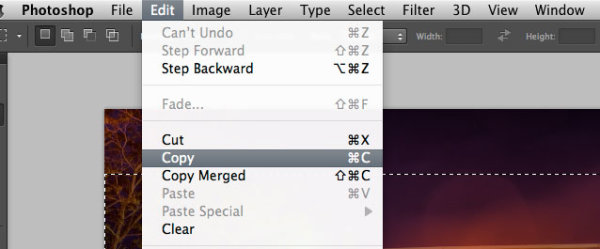
  • from the edit menu choose “copy” or using the keyboard shortcut “command/control+c”  (see Figure #3 below)
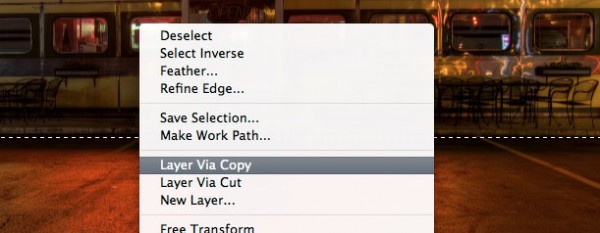
layer-via-copy2

Figure #2 right click>Layer Via Copy

Figure #3

Figure #3 Copy from Edit menu

STEP TWO – PASTE AS NEW LAYER

If you chose the “layer via copy” method above you already have the selection pasted as a new layer. If you haven’t already done that go ahead and paste either from the Edit>Paste menu option of the keyboard shortcut “command/control+v”. You will end up with something that looks like this, Figure #4 below.
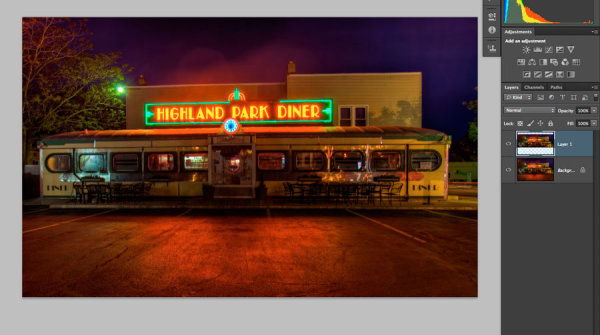
Figure #5

Figure #4 paste new layer

Doesn’t look much different right? Right! Because it’s basically on top of itself.  But look at your layers, it is there on a new layer and it only grabbed part of the image. Now the magic begins!

STEP THREE – FLIP IT

Next from your Edit menu choose “Edit>Transform>Flip vertical” to flip this new layer upside down. You should end up with something funny looking like Figure #5 below.
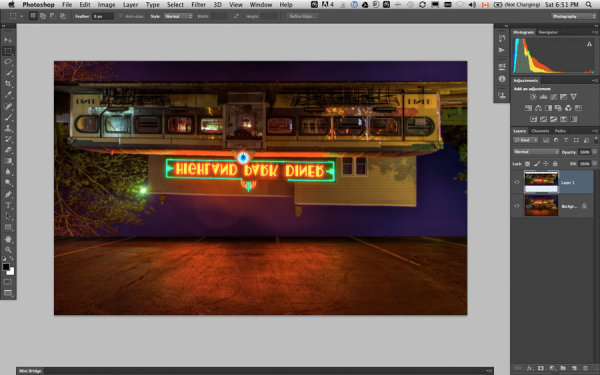
flip-layer

Figure #5 flip vertically

STEP FOUR – POSITION IT
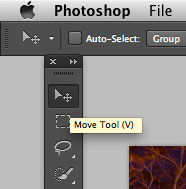
Figure #5 move tool

Figure #6 move tool

Next select your MOVE tool from your tool palette (see Figure #6 right – “v” is the keyboard shortcut) and grab the flipped layer and drag it down until the images start to line up where the reflection will begin. In my image I’m using the edge of the sidewalk in front of the diner. If it doesn’t line up perfectly don’t worry about it, you can mask any imperfect bits out later in step six.

Now you want to have something that looks like Figure #7 below. The reflection is in roughly the right position. Make sure you don’t move side to side, just down, otherwise you’ll have gaps on the edges of your reflection.

NOTE: once you’ve selected the Move Tool, you can also use the up and down arrows on your keyboard to move the layer up and down. This works great for smaller adjustments when you get it close to position.
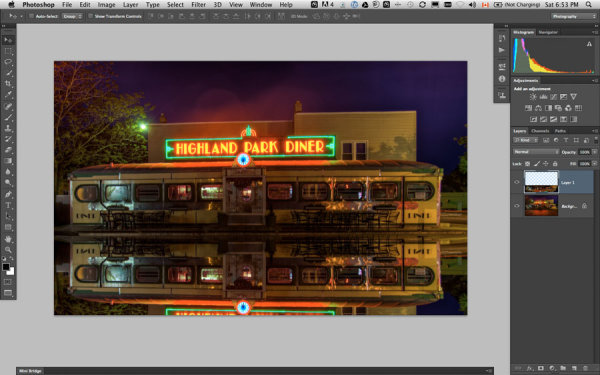
Figure #6

Figure #7 position the layer

STEP FIVE – CHANGE THE BLEND MODE
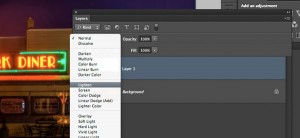
layer-blend-modes

Figure #8 Lighten blend modes

From your layers panel change the layer blend mode to one of the “lighten mode”.  You will find the layers blend modes near the top of your layers panel, next to “opacity”. By default the blend mode is “normal”.

The Lighten modes are the ones in the third section down (see Figure #8 right), they include: Lighten, Screen, Color Dodge, Linear Dodge, Lighter Color. Layer blend modes change how the selected layer interacts with the one below it (the original image). By selecting one of the options in this section it will only show areas of this layer that are lighter than the one below it, and any areas darker will not appear.  For reflections I usually choose Lighten or Screen, depends on the image. Try them all and choose the one that looks best for your image. For this example I’m using Screen mode.

Now I have something that looks a little closer to a real reflection  (see Figure #9 below).

Are you still with me!?  Do you have something reasonably similar?
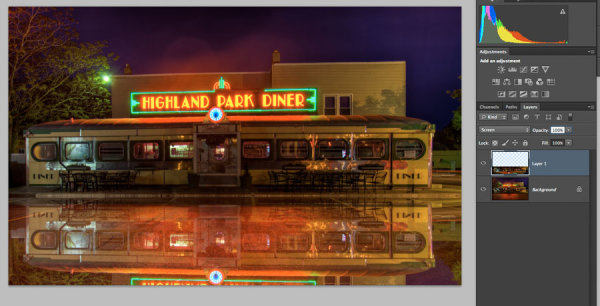
Figure #

Figure #9 change the layer blend mode

STEP SIX – MASK IT
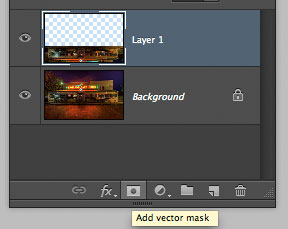
add-layer-mask2

Figure #10 add a layer mask

Okay we’re almost done and it’s looking pretty good. But in my image the neon sign in the reflection is too bright. It doesn’t look natural because reflections are usually darker than the original – so we’re going to tone it down using a mask and the gradient tool.

First, make a layer mask by clicking on the “add layer mask” icon at the bottom of your Layers Panel (Figure #10 right). You can also do it by going to the Layers menu>Layer mask>Reveal all.
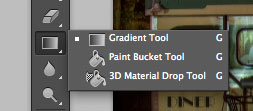
Figure #11 gradient tool
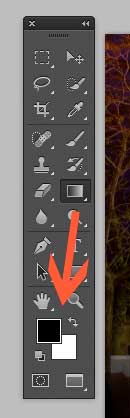
Figure #11 gradient tool

colors-foreground-background

Figure #12 foreground/background colors

Next select the Gradient tool from your tools panel. Keyboard shortcut is “g”  but make sure you have the gradient tool and not the paint bucket.  See Figure #11 above. Hit the “d” key on your keyboard to set your foreground/background colors to default, then hit “x” to switch them. Make sure you see black as your foreground color and white as the background color (see Figure #12 right).

Once you have your colors set to black and white, and your gradient tool selected and ready for use – make sure you are on the layer mask not the layer. You can tell because whatever is active has corner brackets around it. If you layer thumbnail is selected, just click on the white layer mask thumbnail to make it active. We need to make sure we are doing this on the mask, NOT the layer.

How masks work is that anything in white on the mask reveals the contents of the layer.  Where ever there is black on the mask it hides that area of the layer. So we want to hide the outer edges of this layer so it fades out gradually towards the bottom of the image and looks more natural.

With the gradient tool, by default it paints from the foreground color, to the background – fading from one to the other depending on how we create the gradient. Sometimes it takes a little experimenting to get it just right but you can always “undo” using the handy “command/control+z” shortcut on your keyboard and it goes back one step or undoes what you just applied.

NOTE:  ”undo” is your best friend in Photoshop, if you learn no other keyboard shortcuts, memorize this one!

So, to apply it to our reflection start with the cross hairs for the tool in the middle of your image, near the bottom.  TIP: holding the SHIFT key down will keep the gradient from applying at an angle, it will just go straight up. Click and drag the tool up (you’ll see a line drawing the gradient spread) and let go when you get near the top of your reflection. If it’s not exactly how you want it you may have to start a little more away from the bottom edge, or drag it up higher, or other variations.

NOTE: with the gradient tool on a mask you don’t actually even need to “undo” if you just drag another one overtop it replaces the first one. But it’s still good to know how to undo!

Here’s the image with my gradient applied to the layer mask.  Notice on the mask it goes from black to white? So it’s hiding the bottom area of this layer which is what we want. See Figure #13 below.
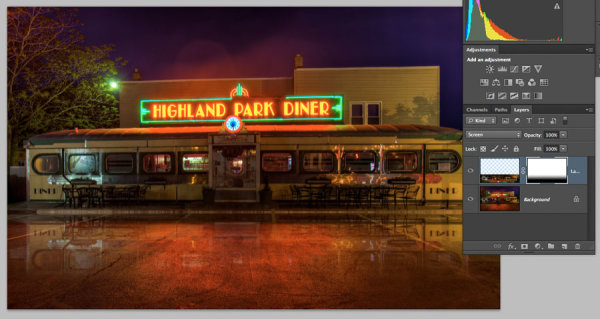
Figure #13 gradient applied to mask

Figure #13 gradient applied to the layer mask

OPTIONAL FINISHING TOUCHES

Now if you want to do any other masking to show or hide certain areas of the reflection just use your brush tool (“b” shortcut) at a lowered opacity (10-20%) and paint with black on the mask over areas you want to hide, and white on areas you want to show.  In this image I painted over the edges of the diner where I felt it was still a bit too bright. You can also change the opacity of your layer to adjust it that way too.

SeeFigure #14 below for my final version. Notice my mask where I painted a little up the sides to hide those areas just a little bit more.  You could also paint away a little in the middle of the reflection where the pavement is the darkest if you wanted. That’s the neat thing about photography – it’s all subjective!

It’s really easy to get upset or hurt feelings when someone else says something that we perceive as negative about one of our images, something we put blood, sweat and tears into, right!?   Well my personal opinion is that it is just their opinion, one person, and you don’t have to agree with them. If they have a valid, or constructive criticism YOU get to decide if you want to take it on board or, just agree to disagree and move on. Life is too short to worry about pleasing other people.

Do photography for you!  If other people like it, then great!

If not, oh well!  Move along and life goes on.
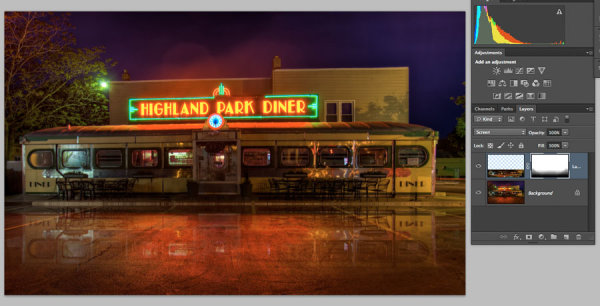
Figure #14

Figure #14

OKAY YOUR TURN!

So, think you can do this? Give it a try!

Here is my image to play with, in case you don’t have one that will work.  It’s 2000 pixels wide which is plenty big enough for this test.

Download diner image – just click on this link and save the image that opens in a new tab.

A few trivial things FYI about this image:

  • it was taken in Rochester, NY, USA when I was in the area and visited Eastman Kodak House. If you’re ever there, do go, it’s worth the trip to see where photography took roots and grew
  • it is a 5 image HDR, tone mapped in Photomatix and finished using LR4
  • during the longest exposure of my bracketed series a kid on a skateboard, carrying a goldfish in a bag skated right through the parking lot in front of me. Why didn’t he show up? Because my exposure was 30 seconds long and if you aren’t there for more than 1/2 the time you will not appear.

Okay, off you go and let’s see your results! 

Cheers Darlene


Post originally from: Digital Photography Tips.

Check out our more Photography Tips at Photography Tips for Beginners, Portrait Photography Tips and Wedding Photography Tips.

How to create a reflection in Photoshop in 6 easy steps


Digital Photography School
 
Comments Off on How to create a reflection in Photoshop in 6 easy steps

Posted in Photography


7 Easy Steps To Take Your Photography Career To New Heights

12 Apr

We all know that being a successful professional photographer requires a lot of hard work, dedication, and a little bit of luck. The advice I hear most often is don’t bother trying, do it as a hobby. But for some of us, taking photos is something we have to do because there’s nothing else we’d rather be doing. So we Continue Reading

The post 7 Easy Steps To Take Your Photography Career To New Heights appeared first on Photodoto.


Photodoto

 
Comments Off on 7 Easy Steps To Take Your Photography Career To New Heights

Posted in Photography


How To Approach Street Photography In 12 Easy Steps.

08 Jan

Many photographers are timid about “shooting strangers” on the street which keeps them from even trying.  Street photography is all about telling a story in a single frame and that’s a beautiful thing.  It’s normal to be reluctant or shy, but these 12 steps will gently ease you into the wonderful world of street photography that exists in your hometown or anywhere else your travels take you. There are lots of stories out there waiting to be told.  Get your camera and let’s go!

There are stories waiting to be photographed everywhere you go.

1- Do I need permission?

In most countries, as long as you are in a public place, it is perfectly legal to photograph people for either editorial or fine art purposes. However, if you intend to use any of those images for stock photography, meaning using that photograph in advertising, then you need the proper model release form signed. Each country has its own laws and regulations about this, so please do your research before you photograph strangers in the streets.

2- Hit the streets with a friend.

It’s generally better to shoot street photography on your own.  Why?  You are more invisible that way. But if going on your own is a bit intimidating at first, take a friend along. It will help emboldened you, but also surprise you at how differently two people see the world.

3- Start in a crowd.

In my workshops I encourage new street photographers to start with a busy public place such as a street market or an outdoor event as a comfortable start.  You are more invisible in a crowd and can more easily overcome your fear of photographing strangers. Street performers are excellent street photography subjects to start shooting. After all, they are there to be seen and are used to being photographed plus they are part of the culture of the place you are visiting. Buskers perform to make a few bucks, so shoot away, and be generous with what you toss in their hat!

4- Find a stage.

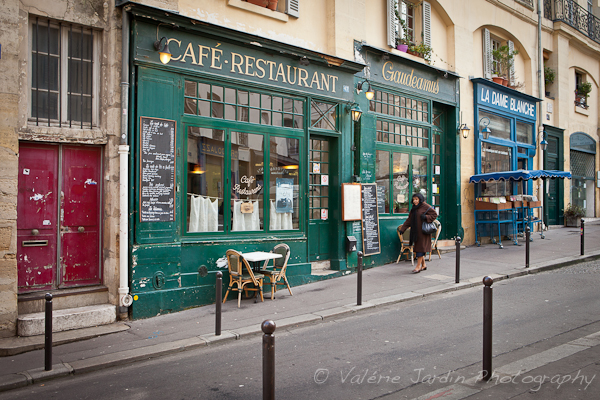
As much as I enjoy walking for hours searching for that special moment, I often do a lot of standing and waiting if I find a really compelling background to use as a stage.  Once you find your stage, be patient and eventually the right people will walk through your frame.  When I am traveling I like to add a sense of place by carefully selecting the architecture in the background or finding signage in the local language.

5- Don’t forget silhouettes

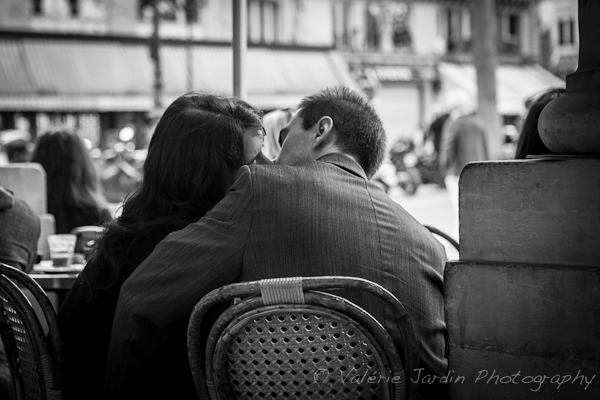
Silhouettes are interesting subjects only if they are easily recognized. There should be no doubt as to what the image is. People with umbrellas, bicyclists or lovers holding hands are terrific silhouette images.

6- Street portraitures

I love the thrill of engaging a subject in a conversation!  For some of you this may be more intimidating than shooting candidly. For others, you can get over the apprehension by asking permission to make a portrait, so they are more at ease with the process. If you ask permission and it is granted, take your time. Then show them the picture on the back of your camera. Tell them why they caught your attention. Everyone enjoys a compliment!

7- Photographing children.

Basically, if they are in a public place, you have just as much right to photograph children as anybody else. Even so, it’s a good idea to get the okay from a parent first. My way is to simply nod towards them, show my camera and wait for their nod back. For the times when no one is around to give you the okay, use your best judgement.

8- Should you give a copy of the photograph to your subject?

When I do candid shots, I occasionally interact with my subject after I make the photograph. But mostly I’m invisible and they never know I took a picture. When I make a street portrait I engage them in a conversation and show them the picture on the back of the camera. If they ask for a copy I give them my card so they can email me for a digital file of their portrait. That’s the least you can do to thank them for their time.

9- Be confident and respectful. 

You are not doing anything wrong, but if someone objects to having their picture taken, don’t shoot! It’s not worth an argument. You may be well within your legal rights, but the most important thing is to be respectful of others. I would also urge you to avoid photographing people in vulnerable or embarrassing situations. Put yourself in their shoes. Would you feel comfortable being photographed that way? If the answer is no, then use your common sense and move on.

10- Follow your gut instinct. 

That’s an important step towards making street photography an enjoyable experience and one I always teach my students right away. If the situation feels wrong or dangerous, then it probably is. Trust your gut.

11- Color or B&W? 

This is totally a personal choice. There is no right or wrong answer. I prefer to process my images in black and white for its timeless quality, but some images are better in color and sometimes the subject is color. Let your artistic eye guide this decision.   But I will say that another advantage of monochrome is its ability to remove any distracting colorful elements from the frame, allowing the viewer to the be more drawn to the subject.

12- It’s your vision. 

Don’t let anyone tell you what does or doesn’t qualify as street photography, or what camera you should use. There are no official rules here. Street photography is all about telling a story, communicating an emotion. Your camera is an extension of your own artistic vision. Be patient. Trust your gut. Go out there and have fun!


Finding a stage and waiting for the right person to walk through your frame is part of story telling with a sense of place.

Silhouettes are interesting subjects only if the action is easily recognized.

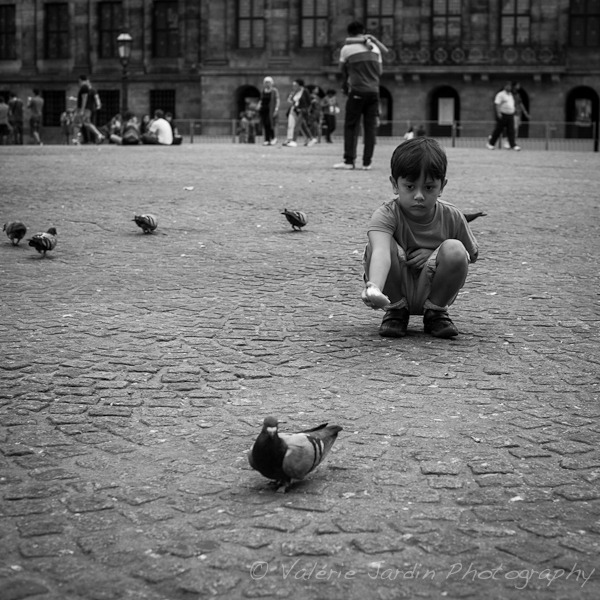
When photographing children, use your best judgement if a parent is not present.

Street photography is about gesture and expression.

Street performers are great subjects, especially when you first get started.

Sometime the subject is all about color!

Street portraits are also part of street photography. I walked by this gentleman and thought he looked cool and told him so. He gave me the ok to make a portrait.

Several stories can happen in one frame.

The only time I bother to carry a tripod to do street photography is to shoot long exposures for some motion blur.

Street photography is not only about people…

Are you currently a street photographer or aspire to become one? Please share your experience with the dPS readers.

Post originally from: Digital Photography Tips.

Check out our more Photography Tips at Photography Tips for Beginners, Portrait Photography Tips and Wedding Photography Tips.

How To Approach Street Photography In 12 Easy Steps.


Digital Photography School
 
Comments Off on How To Approach Street Photography In 12 Easy Steps.
Posted in Photography