RSS
 

Posts Tagged ‘Steps’

Five Steps to Benefiting From Social Media Networks for Your Photography

21 Aug

This article is about how I think you can use social media network sites for your best benefit. I am suggesting there is one single thing which you should concentrate on that you can get there with just five steps.

As I have already suggested, I do recommend photography-centric social media networking sites. The one I have used most is Flickr, but I am not endorsing that particular site. Search “social media networks photography” (or similar), and almost any of the sites found will do the job, in largely similar ways. Play around, you might find one which better suits your style, your way of thinking.

Five Steps to Benefiting From Social Media Networks

And much more!

WHAT DO YOU WANT?

This photograph has over 14,000 views and has been added as a favorite 600 times. It is my most viewed and most faved photograph on Flickr. How can that be? Really? What are its merits which cause it to be so lauded?

Five Steps to Benefiting From Social Media Networks

Girls of Bahrain.

The truth is that its photographic merits are VERY limited. I could give you an explanation of why this image has been such a success, but that is not important. What matters is that it helps make the point that “views” and “faves” and even casual comments such as “Great capture, cool shot” mostly mean very little whatsoever.

That is an extreme way of putting it but I’ll stick with it and avoid drawing it out and giving a long justification. However, I think those numbers below mean very little. Though it might have some interest, it is not what you would call a good photograph.

Five Steps to Benefiting From Social Media Networks
THIS IS WHAT YOU WANT!

I have never properly thanked the person concerned, maybe the mention in this article will make up for that.

King of the souq.

I shared this photograph. The comment I received was:

“Another very “Richard Messenger”ish shot. Do all your subjects coincidentally make the same expression, or do you somehow force it out of them? Haha. His somewhat-there-but-still-flat-sort-of-smile looks very familiar to previous portraits you’ve taken.”

I think I knew the truth pretty much straight away, but it took a little while longer to fully accept it. At some point I linked the comment with Rick Sammon’s adage that “The camera points both ways” and realized why too many of my subjects did, indeed, have that same expression. They were simply reflecting my expression.

It is very difficult to make that sort of realization on your own. People pay thousands of dollars to gain such insights. I had received the comment, and great insight, from an honest person, with clearly good intentions, who expressed themselves kindly AND who happened to be right. What more can you ask? Good comments are priceless.

Five Steps to Benefiting From Social Media Networks

Comments please.

What I want, and what I think will move your photography forward too, is comments. Receiving AND making comments has certainly helped me. Unfortunately, it is very unlikely that you can simply post your photographs, however stunning they may be, and expect people to start commenting. You will need to do a little work.

NEED RELIGION?

Five Steps to Benefiting From Social Media Networks

Do unto others.

The Golden Rule is among the values espoused by most religions and philosophies. Of the various versions, this seemed a good, simple way of expressing how to approach making comments.

“Try to treat others as you would want them to treat you.”

Or, on a perfect day, we could turn to Lou Reed.

“You’re going to reap just what you sow.”

However, you want to put it, in terms of religion, philosophy, or pop culture, it is a good principle to hold in mind when you are making comments.

STEP ONE – JUST TAKE A LOOK

Five Steps to Benefiting From Social Media Networks for Your Photography

Just look … think …

You might want to start on the nursery slopes for the first day or two, week or two even. There is a lot to be learned by looking at photographs and keeping the following in mind.

  • Why do you like a particular photograph?
  • How do you think it was taken?
  • What is it that appeals to you?
  • When was it taken?
  • Which equipment was used?
  • Why was it taken?
  • Where?
  • … and so on

STEP TWO – COMMENT!

Here’s the thing. I am not going to burden you with long paragraphs of explanation, give real world examples, or quote academic research. I am just going to tell you that the person making a comment often learns more than the one receiving the comment.

Five Steps to Benefiting From Social Media Networks for Your Photography

Will she? Won’t she?

When you are ready to abandon all buoyancy aids, this is where you jump into the swimming pool. You now begin to sow, so try to treat others as you would want them to treat you. Keeping in mind Kipling’s six mates, you now start to comment.

Just taking the example of Flickr, there are a massive number of groups, with all sorts of specialized interests. You will probably find it productive to browse around, join them, and start making comments within the different rules of each group. Nothing ventured, nothing gained!

My personal rule is that I do not hang around. If a thought does not start to form very quickly in respect of a photograph, I move on. It is, of course, totally up to you, but I suggest that you do not spend too much time scratching your head.

Five Steps to Benefiting From Social Media Networks for Your Photography

What can I say?

As many a politician would testify, “no comment” is better than a rubbish comment.

Then, as a guideline, you might follow a Rule of Threes. Start off by simply trying to say three things (even just two) which you like about the photograph. Three positive comments stating what you think of the scene, how it makes you feel, what you think the story might be, and what compositional aspects you like. You may find it best to stick to only positive comments for a week or two. It is possible that you will start to get reciprocal responses, but you cannot guarantee it.

(To avoid all sorts of complications, but not without some mild embarrassment, I am commenting on my own photographs).

Five Steps to Benefiting From Social Media Networks for Your Photography

River bed scavenger.

  • An unusual and very appealing photograph.
  • I get the impression that the woman is almost lost in what is a much bigger space.
  • The texture is amazing, and the limited color palette really helps draw attention to that.
  • I really like the way the two patches of dry land balance and seem to point to the solitary figure.
  • It is one of those photographs where you immediately start to wonder what the story is and ask what she is doing.

STEP THREE – GETTING TECHNICAL

Then the next step is to start making a comment or two on technical aspects that you think are good, and which you think contribute to the photograph.

Five Steps to Benefiting From Social Media Networks for Your Photography

Innocence captured.

  • This is a lovely picture of innocence.
  • The contrast between her smooth skin and the textures in the shot work well.
  • The muted colors enhance a mood of loneliness, maybe even sadness.
  • It is really effective to see how you have used the bars, and the shape of the doorway in the background to suggest a frame within a frame.
  • The depth of field seems to be perfect, throwing her face into the highlight, concentrating the viewer’s focus.
  • I would be really interested to know what you did in processing this shot.
  • The subject is central, but I think there is plenty happening around the frame to make the image dynamic enough.

STEP FOUR – THEM CHANGES

Finally, you might tentatively start to suggest things that you might change, or which you think might be helpful. Remember – do unto others!

Five Steps to Benefiting From Social Media Networks for Your Photography

Hey, did you happen to see…?

  • I have never seen this view of the Taj Mahal before. It remains instantly recognizable even though it occupies a very small part of the frame. You did really well to find the shot.
  • Having seen your photographs before, I know you do limited manipulation in processing, so very well done on capturing the bird in just the right place.
  • Lovely evening (?) light, with good exposure keeping just the right amount of detail in the right places.
  • I cannot see the EXIF data and would be very interested to know what focal length you used. It looks like a wide angle to get the tree in the frame, yet the Taj Mahal seems quite close.
  • Any suggestions regarding such a good photograph will necessarily be tiny details. If you had just dipped your knees even an inch, I think it would have been even more perfect to have a gap between the top of the right-hand minaret and the tree branch.
  • I wonder of a small crop, perhaps a sixth off the top and the left side, may have concentrated the view.

STEP FIVE – RESPOND

You can always hint, or just ask directly, “Can you please comment on my photos?”. However, my experience is that once you have commented on their photographs, people tend to feel inclined to comment back. Again, this is my personal rule, but I would strongly argue that it is a good one. I try to always respond, or at least acknowledge any comment.

Admittedly, I have not always taken criticism well, but I think I’ve learned to give it more credence, to encourage it. One example of this is if the person commenting suggests something that I can change … a crop, a processing adjustment, changing to black and white … whatever, just do it and post the result. If there is a way of tagging the person, that is likely to help sustain the conversation.

Without being religious or philosophical, can I just give the same advice again, in a different, rather parental way, PLAY NICELY! and remember to say Please and Thank You.

TAKE IT FURTHER

Five Steps to Benefiting From Social Media Networks for Your Photography
There are a quite a lot of places which are specifically aimed at giving a critique of photographs. As you might have spotted, these include the Digital Photography School Facebook group.

CONCLUSION

The single thing you should concentrate on is making and receiving comments. Getting worthwhile comments is your aim. Take some gentle steps, apply The Golden Rule, and you might just develop a good community. You really can benefit hugely from making and receiving worthwhile comments when it comes to social media networks.

The post Five Steps to Benefiting From Social Media Networks for Your Photography by Richard Messsenger appeared first on Digital Photography School.


Digital Photography School

 
Comments Off on Five Steps to Benefiting From Social Media Networks for Your Photography

Posted in Photography


Cull Your Photos Carefully – 5 Steps to Follow Before You Hit Delete

27 Jun

When to keep and when to hit delete on an image can be a tough decision to make sometimes. In this article I’ll give you five things you consider before you hit delete to help you with the process of how to cull your photos.

The emotional attachment lessens with time

I was shooting high on a mountain pass this past winter. Low clouds and scattered sun danced across the snow-covered slopes, blown by a chill wind from the north. The view below came and went as fog blew past, opening and closing the scene like curtains. Enthralled, I snapped photos, the stark mountains, the pale sun, the glowing patches of light on the snow. “These shots are going to be awesome.” I thought to myself.

Cull Your Photos Carefully - 5 Things to Consider Before You Hit Delete

A few hours later, I opened my computer and downloaded the images. And I could see then, that they were awesome. I sat and I stared, certain that these were some of the best of the trip. The way the light played across the mountains, the storm-light on the rock and snow slopes. Yeah, these were great.

A week later, as I was putting together images from the trip, I revisited those photos. Huh, I thought, I could have sworn those were better. I mean, they were decent, but not extraordinary. What happened?

Cull Your Photos Carefully - 5 Things to Consider Before You Hit Delete

I had distanced myself from the images for a time, and was able to separate myself emotionally from the experience of making them. I’d been able to view those shots almost as though someone else had made them. As a result, many more of those photos ended up in the delete pile than I would have expected at first glance.

But time away from your photos is just one thing to can do as you try to segregate the keepers from those to delete. Here are the five things to keep in mind as you cull and assess your images.

Cull Your Photos Carefully - 5 Steps to Follow Before You Hit Delete

Step #1 – Check the technical Details

After importing the photos of a recent shoot into my Lightroom Catalog, look at each image quickly, at full-screen size, and assess each for any technical faults.

Is the image out of focus (check at 100% or 1:1 view)? Is the composition obviously wonky? What about exposure, is the exposure so wrong that you can’t correct it? If the answer is “Yes” to any of these questions, immediately delete the image (or flag it as a reject by hitting X) and move on to the next.

Cull Your Photos Carefully - 5 Steps to Follow Before You Hit Delete

The trick in this first step is not to try and go beyond the technical details. This is not the time to try and gauge overall image quality. This is the time, merely to delete the obvious screw-ups.

Step #2 – The second round

If I’m eager to spend some time with my photos, or I’ve got a deadline, I’ll go back through them quickly a second time. Lightroom, and many other catalog programs, give you the ability to flag images with different colors, and/or rating codes.

Scrolling through the images, I’ll color code the good and bad standouts. Images that I like get coded green, purple or blue (the color relates to my own filing system), while images that I don’t particularly like, for one reason or another, get flagged red.

Cull Your Photos Carefully - 5 Steps to Follow Before You Hit Delete

Red flagged images are imperfectly sharp, have clear composition issues or other technical problems, while the green images are selects and the un-marked images are ones to hold onto for future consideration.

Some images do not get flagged at all. These are usually images to which I’m ambivalent. They are good enough not to get the dreaded red flag, but not so good that I want to highlight them immediately.

At this point, I’ll start post-processing my favorites, but I don’t delete anything. Not yet.

Cull Your Photos Carefully - 5 Steps to Follow Before You Hit Delete

A screenshot of my Lightroom Catalog after a shoot of this Rufescent Tiger Heron in Argentina. Of the 26 images, I selected two as keepers, one vertical, and one horizontal image.

Step #3 – Let them rest

Immediately following a shoot, we get emotionally caught up in our images, for better or for worse. If a shoot went well, like my experience on the mountain, you may have the feeling that your images are better than they actually are. If it went poorly, you may feel like they all suck, when in fact, they may not.

The solution is to give the images some space. Pull back for a few days, don’t look at them, don’t edit them. Put your new photos out of sight, and give yourself some emotional distance from the experience of making your images.

After a few days, a week, or even longer, you can have another go.

Step #4 – Consider how your images will be used

As you dive back into your collection, think for a moment about how an image will be put to use. If you are shooting for a client, then you may already have a good idea of the kind of images you needed to make. For example, the conservation groups I work for usually provide me a brief on the project. In that document, they will note specific types of images or video they need or want. As I’m pulling selections for them, I’ll consider their needs, and put special effort into finding and editing images that match.

Usually, there are no clients telling me which images are best. Without anyone guiding me, I lean toward variety.

Cull Your Photos Carefully - 5 Steps to Follow Before You Hit Delete

Variety includes more than framing, but also panoramic compositions like this one.

When I first started shooting seriously, I saved almost every image. I was too attached to each one. Later, as my image catalog and hard drives began to swell, I became heartless with images, deleting all but one or two from a series, even good alternatives to my selects. Now, I’ve settled somewhere in between because I don’t always know how an image will be put to use, so I like to have some variety available.

Magazine editors will often be looking for images with big areas of negative space which can be used for text placement. Large size wall prints require images that are immaculately sharp and high resolution. Illustrative shots, often sold for stock, or for small use in publications, need to be tight with only the bare minimum of room around the subject. While editing, I plan for these eventualities and select four or five images, in a variety of compositions, from any given scene, but not more.

Keep some variety of shots

As an example, below are my five selects from an encounter with a Brown Bear in southeast Alaska. Each of the five images have been published in national magazines. Each time, the editor wanted the image for a different layout, some involving text, some as a simple stamp-size illustration. The bottom line is you never know what is going to appeal to different viewers, so retain some diversity from within your shoots.

Cull Your Photos Carefully - 5 Steps to Follow Before You Hit Delete

Throw Away Your Photos Carefully - 5 Things to Consider Before You Hit Delete

Throw Away Your Photos Carefully - 5 Things to Consider Before You Hit Delete

Throw Away Your Photos Carefully - 5 Things to Consider Before You Hit Delete

Cull Your Photos Carefully - 5 Steps to Follow Before You Hit Delete

Don’t get caught up in what you think is the best image from a series. Rather, give thought to how you might want to use images from the shoot in the future. Red code (or however you tag your images) the faulty ones, or near-duplicates, but retain some variety.

Step #5 – The final cut

By this time, your collection of images will be a checkerboard of red and green. The red images flagged for deletion, the greens (and other colors) set aside as “keepers”. If you are like me, you’ve made enough duplicate, failures, and screw-ups that the reds wildly outnumber the greens and unlabeled images.

Throw Away Your Photos Carefully - 5 Things to Consider Before You Hit Delete

This image lay in my Lightroom for years before I finally noticed that it was pretty decent.

Before I hit delete, I give each image one more look, just to make sure I’m not cutting something that I might want to keep. Sometimes if an image is unique, even if it’s not what I think of as “good”, I’ll decide to hold onto it.

Throw Away Your Photos Carefully - 5 Things to Consider Before You Hit Delete

This image was taken Mexico in 2010. I found it a month ago, lingering on a hard drive. I had completely forgotten about that sunset over the Caribbean. Hard drive surprises can be great, but I recommend being more organized than I was at the time.

More than once, I’ve scrolled back through my Lightroom Catalog and stumbled on an image that, for one reason or another, I never gave a close look. At the time I created it, I must have considered it unremarkable, but didn’t consider it bad enough to delete. Years later, I’ve found some gems in those un-flagged images.

Bottom Line

Selecting keepers from a series of images is not always as straight forward as what is “good” and what is “bad”. Consider each image carefully, and use your delete key, but don’t get too enthusiastic pushing that button. Deleted images can never be recovered.

The post Cull Your Photos Carefully – 5 Steps to Follow Before You Hit Delete by David Shaw appeared first on Digital Photography School.


Digital Photography School

 
Comments Off on Cull Your Photos Carefully – 5 Steps to Follow Before You Hit Delete

Posted in Photography


6 Steps To Better Photography

19 May

A few weeks ago I received an email from a new photographer who asked, “How do I make my images better?” At first, I chuckled, realizing that question has resulted in the production of thousands of articles here at dPS, and uncountable books, websites, and magazines. There is just SO MUCH information on how to do better photography that it’s easy to get lost in the sea of advice, photo tips, and expert opinion.

better photography

In my response to that struggling photographer, I sketched out six things and quickly sent the email. My answer was off the cuff, but the more I thought about it, the more I realized that my advice was actually pretty darn good. These six things really will help you improve your photographs. Some are easy to accomplish and some reach to the core of the art of photography. All of them, however, will push you further into your process and lead you a bit closer to the images you’ve always wanted to create.

Better photography

Aerial image of the Hula Hula River in the Arctic National Wildlife Refuge, Alaska.

1. Know Your Camera

This is the easiest one to tackle. One of the places where I’ve noticed new photographers stumbling is having a poor understanding of their camera. Know what each setting means, what it does to your image, and how to quickly change from one to another. Know the five essential camera settings backward and forwards, how to set them, and what impact they will have on your final image.

Better photography

Understanding how bright, snowy conditions will impact your image, and your camera’s ability to meter correctly will allow you to quickly capture fleeting light like this, when others may stumble.

But don’t stop there. Spend some time in the menus and custom settings. Know things like focus and metering modes, and how those relate to different shooting situations.

I recently added a new camera system to my quiver (Panasonic Lumix) and am having to re-learn all these things for a new camera brand. It is daunting, but it is also extremely important. Get friendly with your camera until you understand it intimately. Then, when you are in the field and need to make changes quickly, you won’t have to think twice, or god-forbid, have to look it up while your opportunity slips away.

2. Learn the Rules

Better photography

Rule of thirds composition. It’s a “rule” because it usually works.

If you’ve spent much time reading about photography online, you’ll have read the words “Break the rules!” so often it’s become a platitude. Everyone is pushing you to break rules, but there is very little discussion about the rules themselves, what they mean, and why they should be broken. The fact of the matter is that the “rules” of photography are guidelines for a reason – they often work.

better photography

The “rule of thirds” for example, is effective because it results in a pleasing composition. (There is a mathematical reason for this, but a complete discussion of the topic is beyond the scope of this article.)

Proper focus, exposure, and color balance are all “rules” because they result in a pleasing image. Know how to effectively achieve these in your images again and again in a variety of shooting situations. Once you’ve mastered the “rules”, you can move beyond them (see #6 below).

3. Study Images Until You Know WHY They Work

As you are browsing through images on the internet, in magazines, or books, take a few minutes to study the photos that catch your eye and consider:

  1. What did you first see that captured your interest? Was there an action, color, or story that was compelling?
  2. How does your eye move through the image? At what point do you lose interest?
  3. What colors or points of contrast are interesting?
  4. Is there a story being told? What is it?
better photography

What about this image catches your eye? Is it something else that causes you to linger?

Images can be effective alone, in groups, or as part of a larger story being told in the surrounding text. Social media has a tendency to raise up stand alone images, but I encourage you to go farther. Good images are often a part of stories, and stories need to go somewhere. Sometimes that’s to the next photo in the series, sometimes it’s integrated into the text.

Successful photographers know this, and will cater their images to reflect the context. Magazines like National Geographic are very good at it, and many of the images in their pages do not stand alone well, but work beautifully within the context of the story being told.

better photography

Consider the images carefully, how they do, or do not integrate with their surroundings, and then try to reverse engineer them. How did the photographer create the photo? Is there artificial light? What exposure was likely used? Often there is a reason why successful photographer’s images look a certain way. See if you can suss that out by looking.

4. Make Lots and Lots of Photos

There is an old adage about becoming a good writer, “Write every day.” It’s no different with photography. Practice is vital. Make images, waste pixels. Delete lots, but make images, one way or another.

better photography

An atypical composition on a bright, flat-light day. The almost upside-down composition makes this image successful despite the poor light.

When you have successful images, study them as I recommended above in #3 to find out why they worked, and what you could have done to make them even better. Honest self-critique is tough. We can almost always find a way to justify our errors or to overlook the mistakes we make. We have a tendency to like our own images because they remind us of our experiences creating them, but our viewers don’t share those memories. The experience of viewing the images has to be sufficient.

Try to look at your photos as an outsider would, take note of the distracting elements, the clumsy balance, or off-kilter compositions. Consider would could be better, and work toward that goal your next time you’re out with your camera.

5. Travel

Getting away from our home environment is a great way to find inspiration. That can be a trip to some photogenic destination a world away, or simply driving to a different part of town. The trick is to break out of your rut, and make some new images.

better photography

When you come eye to eye with a grizzly bear, it’s easy to get overly excited and screw up your images. But, if you have the fundamentals of photography and your camera controls mastered, your odds of success improve dramatically.

New places also tend to inspire, but I caution you here. More than once, at a new place, I’ve been so enthusiastic to make images, oohing and aahing at the sights I’m seeing, that I failed to pay attention to the basics (See #1 and #2). I have utterly blown entire mornings of beautiful light because I was so caught up in the excitement that I didn’t notice my compositions were wonky, or my exposures were blown out.

Escape your normal routine, but always remember the fundamentals of photography.

6. Become Your Own Photographer

better photography

Storm light, shadows, and the sun, play across the northern foothills of Alaska’s Brooks Range. It isn’t a classic composition, yet I knew this image would work when I made it.

Much of the advice I’ve shared here relies on comparing your own work to that of others. This is a great way to learn, but eventually, you run the risk of stagnating, or worse, imitating others.

better photography

Every shooter is inspired by the work of other photographers. We all have gone through stages where we want to make similar images (or even identical) to what others have made. That’s why some sites are so famous: the Firefall in Yosemite, the bears catching salmon in Katmai National Park, the Tetons over the Snake River. Photographers crowd these locations, trying desperately to emulate, imitate, or re-create famous images they’ve seen before. This can be a great way to learn, but please don’t stop there.

better photography

Nothing about the lighting in this image follows the rules. It was blistering hot, midday, washout light. If I had followed the rules, I would never have lifted my camera.

Once you’ve mastered the basics and have a strong understanding of what makes an image succeed or fail, it’s time to break out on your own. Make images for yourself, compositions that are a-typical, weird, strangely composed and focused. Take the rules of composition, focus, and exposure and push their limits. Here is where the rules can be bent and broken. This is where you experiment, play, and most of the time – fail utterly.

But sometimes you won’t fail. Sometimes, that strange composition, that weird exposure, will work, and work beautifully.

better photography

Make images because they speak to you, not because you think your Instagram followers will like them. When you break away from what you think is expected, and to what you care about, your images will become your own. For me, this took a long time, but once I found my groove, my own style, I started enjoying the art of photography even more.

better photography

Caribou in winter on the arctic coastal plain of northern Alaska. Nothing typical about the lighting or composition of this image, yet it’s one of my favorite wildlife images. I’ve never seen another image like this, and that’s a big part of what I like about it.

Conclusion

Don’t try and please everyone. If you do, your work will appear generic and it will not push you to excel. In other words, be willing to fail. A willingness to fail will eventually lead to success.

Do you follow these six tips? Do you have any others that you would suggest to beginners to help them do better photography? Please share in the comments below.

The post 6 Steps To Better Photography by David Shaw appeared first on Digital Photography School.


Digital Photography School

 
Comments Off on 6 Steps To Better Photography

Posted in Photography


Fujifilm X100F steps up to 24.3MP, adds AF joystick

21 Jan

$ (document).ready(function() { SampleGalleryV2({“containerId”:”embeddedSampleGallery_7760545637″,”galleryId”:”7760545637″,”isEmbeddedWidget”:true,”standalone”:false,”selectedImageIndex”:0,”startInCommentsView”:false,”isMobile”:false}) });

Fujifilm is taking the wraps off the X100F, the fourth generation of its popular enthusiast-focused compact series. It updates the house that the X100 built with a 24.3MP X-Trans III APS-C sensor and X-Processor Pro image processor borrowed from the X-T2.

The number of autofocus points has been increased from 49 to 91, and Fujifilm claims an improved fastest AF acquisition time of 0.08 seconds. Fuji also claims faster overall performance for the X100F, quoting a startup time of 0.5 sec and 0.2 sec shutter release.

Changes can also be seen on the top and rear panels of the camera – notably, an AF joystick makes its first appearance on the X100 series. Other controls have been shifted to the right of the LCD, and up top the shutter speed dial has been modified to include ISO controls. A front control dial has also been added. The hybrid viewfinder has also been updated, and now offers image magnification when using the electronic rangefinder mode.

Other updates include the addition of a C setting on the exposure compensation dial, which enables adjustments using the command dial, expanding the range to +/- 5 stops. ACROS is can now be in the X100F’s roster of film simulation modes, as well. The WCL-X100 wide-angle and TCL-X100 tele-conversion lenses have also been updated to ‘Mark II’ versions. They offer electronic contacts so that the camera will automatically recognize the conversion lenses when they’re attached and apply distortion correction. 

The Fujifilm X100F will be available February 16th in black or silver for $ 1299/£1249.

Press release:

FUJIFILM ANNOUNCES NEXT GENERATION X100F FROM THE SERIES THAT STARTED A REVOLUTION

X100F features improved Advanced Hybrid Viewfinder and the latest 24.3MP sensor and processor

Valhalla, N.Y., January 19, 2017 FUJIFILM North America Corporation today announced the FUJIFILM X100F, the new premium rangefinder style compact digital camera featuring a unique Advanced Hybrid Viewfinder that allows users to switch between an optical viewfinder and electronic viewfinder. The new X100F is the fourth generation release from the series that introduced the first hybrid viewfinder camera for ultimate flexibility, style and premium image quality.

Featuring the latest 24.3MP X-Trans CMOS III APS-C image sensor, high-speed image processing engine and a high-performance FUJINON 23mm F2 lens, the X100F delivers outstanding color reproduction and gradation of tones in both stills and videos, while providing photographers with increased mobility and an unsurpassed user experience. 

Advanced Hybrid Viewfinder with Quick Response and Enhanced AF Performance

The FUJIFILM X100F uses an Advanced Hybrid Viewfinder that combines the features of an Optical Viewfinder (OVF) with an Electronic Viewfinder (EVF) for enhanced performance and convenience. While in Electronic Rangefinder mode, users can now change the magnification, shown as EVF in the optical viewfinder, for greater accuracy when checking focus. The small EVF window can display 100% field of view as well as 2.5x and 6x magnifications, and the EVF frame rate has been increased to 60 frames per second.

To provide users with perfect framing and focus while using the Manual Focus mode, the Real Time Parallax Correction function is applied to the focus area in addition to the guide frame. Photographers can also now check exposure and white balance in the EVF window, making it the ultimate viewfinder while providing all the benefits of the EVF while shooting through the OVF.

The new X100F has enhanced AF performance with improvements to basic response time specifications to ensure the camera operates exactly as the photographer intends. Making it perfect for quick snapshots, the X100F has a startup time of approximately 0.5 seconds, a shooting interval of 0.2 seconds, shutter release time lag of 0.01 seconds and AF speeds as fast as 0.08 seconds. The X100F gives users six AF modes including Single Point mode, Zone mode and Wide/Tracking mode for both AF-S for stationary subjects and AF-C for moving subjects. 

The number of focus points in the X100F has been dramatically increased to 91 (up to 325 points), up from 49 in previous models, with approximately 40% of the imaging area covered with phase detection to form a fast and precise AF area that can be used in a variety of scenes. By combining these features with a greater ability to autofocus on points of light and low contrast objects, the X100F captures beautiful detail in pictures with fine and delicate textures, helping to reproduce images just as photographers remember.

New ACROS Film Simulation

The Film Simulation function now features ACROS mode for even more artistic photos. Using X-Processor Pro’s advanced processing capability, the mode offers smooth gradation, deep blacks and beautiful textures to create stunning monochrome images. The X100F also features the Grain Effect function for reproducing distinctive graininess seen in photographs taken with film cameras. The function is available in a Strong and Weak setting, and can be combined with any of the Film Simulation modes. Photographers can now easily achieve the creative effect of film-based photos, notable especially when the image is printed out.

Sophisticated Camera Body with Intuitive Control and Superb Feel

To provide photographers with an extraordinary experience, the rear face of the FUJIFILM X100F has been redesigned to concentrate most of the frequently used functions on the right-hand side. This allows users to change camera settings quickly while holding the camera firmly and without having to take an eye off the viewfinder.

The Focus Lever positioned on the rear side of the camera allows users to use joystick-type operations in eight directions to easily select a focus area. The X100F also now features a built-in ISO Dial that is incorporated into the Shutter Speed Dial for further ease of use. This enables the user to easily check ISO and Shutter Speed, in addition to aperture and exposure compensation, from a glance without having to power on the camera. There is also a also features a Focus Lever on the rear of the camera body that to instantly move the focus area, and a completely silent electronic shutter capable of exposures up to 1/32000 seconds. The external surface of the X100F is finished with synthetic leather that provides high durability and excellent resistance to the elements while providing photographers with the benefit of slip resistance and a comfortable hold.

FUJIFILM X100F Key Features:  

  • 24.3MP APS-C size X-Trans CMOS III sensor
  • Advanced Hybrid Viewfinder (OVF / EVF) equipped with an Electronic Rangefinder
    • Intelligent Hybrid AF in 0.08 seconds
    • Fast start-up time of 0.5 seconds
    • Shutter time lag of 0.01 seconds
    • Shooting interval of 0.2 seconds
  • FUJINON 23mm (35mm in 35mm format Equivalent) F2 lens in 8 glass elements in 6 groups with FUJINON’s proprietary HT-EBC coating
  • ND filter equivalent to 3 stops of aperture
  • High-definition 1.04M-dot 3” LCD
  • NEW ‘ACROS’ film simulation mode
  • Focus Peaking function and Digital Split Image display even in the OVF
  • Extended full HD Video Recording
  • Full HD video can be recorded at 59.94 fps, 50 fps, 29.97 fps, 25 fps, 24 fps and 23.98 fps, and with Film Simulation effects
  • Six AF Modes
    • Single Point, Zone and Wide/Tracking for both AF-S for stationary, and AF-C for moving subjects
  • Intelligent Hybrid AF: switches between Phase Detection AF and Contrast AF according to scene
  • Digital Teleconverter function
    • Choose angles of view equivalent to 50mm and 70mm in addition to built-in lens’ 35mm
  • Advanced Filter Functions
    • Pop Color, Toy Camera, Miniature, Dynamic Tone, Partial Color, Soft Focus, High Key and Low Key
  • Interval Timer Shooting: available in intervals of one second to 24 hours with no limit on frames, for time lapse photography
  • Manual focus available during video recording
  • Free FUJIFILM Camera Remote application and Wireless Communication function allows users to remotely shoot images from smartphones and tablets via WiFi
  • Photos can be sent to the INSTAX Share Printer using the free INSTAX Share App (iOS and Android) SHARE Smartphone Printer
  • Output for Stereo Microphone
  • Interval timer shooting (1 second to 24 hours up to 999 frames)

FUJIFILM X100F Accessories:

  • Leather Case LC-X100F: user can change the battery and media card while the case is attached to the camera.
  • Wide Conversion Lens WCL-X100 II: dedicated wide conversion lens that multiplies the fixed focal length by approximately 0.8x, converting it to 23mm (35mm format equivalent) for capturing broader views when shooting in tight spots or landscapes.
  • Tele-Conversion Lens TCL-X100 II: dedicated tele-conversion lens for narrowing the field of view by multiplying the fixed focal length by approximately 1.4x, converting it to 50mm (35mm format equivalent) for shooting portraits or close-up photography from as close as approximately 5.5in / 14cm.

Availability and Pricing

The new FUJIFILM X100F Digital Camera (Black and Silver) will be available in February 2017 in the U.S. and Canada for USD $ 1,299.95 and CAD $ 1,699.99.

Fujifilm X100F specifications

Price
MSRP £1249
Body type
Body type Large sensor compact
Body material Magnesium alloy
Sensor
Max resolution 6000 x 4000
Image ratio w:h 1:1, 3:2, 16:9
Effective pixels 24 megapixels
Sensor size APS-C (23.6 x 15.6 mm)
Sensor type CMOS
Processor X-Processor Pro
Color space sRGB, Adobe RGB
Color filter array X-Trans III
Image
ISO Auto, 200-12800 (expands to 100-51200)
Boosted ISO (minimum) 100
Boosted ISO (maximum) 51200
White balance presets 7
Custom white balance Yes
Image stabilization No
Uncompressed format RAW
JPEG quality levels Fine, Normal
File format
  • JPEG (Exif v2.3)
  • RAW (RAF format)
Optics & Focus
Focal length (equiv.) 35 mm
Maximum aperture F2–16
Autofocus
  • Contrast Detect (sensor)
  • Phase Detect
  • Multi-area
  • Center
  • Single
  • Continuous
  • Face Detection
  • Live View
Autofocus assist lamp Yes
Digital zoom Yes (Digital Tele-Converter: 50mm, 70mm)
Manual focus Yes
Normal focus range 10 cm (3.94)
Number of focus points 325
Screen / viewfinder
Articulated LCD Fixed
Screen size 3
Screen dots 1,040,000
Touch screen No
Screen type TFT LCD
Live view Yes
Viewfinder type Electronic and Optical (tunnel)
Viewfinder coverage 92%
Viewfinder magnification 0.5×
Viewfinder resolution 2,360,000
Photography features
Minimum shutter speed 4 sec
Maximum shutter speed 1/4000 sec
Maximum shutter speed (electronic) 1/32000 sec
Exposure modes
  • Program AE
  • Shutter priority
  • Aperture priority
  • Manual exposure
Built-in flash Yes
Flash range 4.60 m (at ISO 100)
External flash Yes (hot-shoe)
Flash modes Auto, forced, suppressed, slow synchro, commander
Continuous drive 8.0 fps
Self-timer Yes (2 or 10 sec)
Metering modes
  • Multi
  • Center-weighted
  • Average
  • Spot
Exposure compensation ±3 (at 1/3 EV steps)
AE Bracketing ±2 (at 1/3 EV, 2/3 EV, 1 EV steps)
WB Bracketing Yes
Videography features
Resolutions 1920 x 1080 (60p, 50p, 30p, 25p, 24p)
Format H.264
Modes
  • 1920 x 1080 @ 60p / 36 Mbps, MOV, H.264, Linear PCM
  • 1920 x 1080 @ 50p / 36 Mbps, MOV, H.264, Linear PCM
  • 1920 x 1080 @ 30p / 36 Mbps, MOV, H.264, Linear PCM
  • 1920 x 1080 @ 25p / 36 Mbps, MOV, H.264, Linear PCM
  • 1920 x 1080 @ 23.98p / 36 Mbps, MOV, H.264, Linear PCM
  • 1280 x 720 @ 60p / 18 Mbps, MOV, H.264, Linear PCM
  • 1280 x 720 @ 50p / 18 Mbps, MOV, H.264, Linear PCM
  • 1280 x 720 @ 30p / 18 Mbps, MOV, H.264, Linear PCM
  • 1280 x 720 @ 25p / 18 Mbps, MOV, H.264, Linear PCM
  • 1280 x 720 @ 23.98p / 18 Mbps, MOV, H.264, Linear PCM
Microphone Stereo
Speaker Mono
Storage
Storage types SD/SDHC/SDXC
Connectivity
USB USB 2.0 (480 Mbit/sec)
HDMI Yes (micro-HDMI)
Microphone port Yes
Headphone port No
Wireless Built-In
Wireless notes 802.11b/g/n with smartphone control
Remote control Yes (via cable release or smartphone)
Physical
Environmentally sealed No
Battery Battery Pack
Battery description Lithium-Ion W126S rechargeable battery & charger
Battery Life (CIPA) 390
Weight (inc. batteries) 469 g (1.03 lb / 16.54 oz)
Dimensions 127 x 75 x 52 mm (5 x 2.95 x 2.05)
Other features
Orientation sensor Yes
Timelapse recording Yes
GPS None

Articles: Digital Photography Review (dpreview.com)

 
Comments Off on Fujifilm X100F steps up to 24.3MP, adds AF joystick

Posted in Uncategorized


Sci-Fi to Reality: Giant Manned Robot Method-2 Has Taken Its First Steps

03 Jan

[ By SA Rogers in Conceptual & Futuristic & Technology. ]

method-2-manned-robot-main

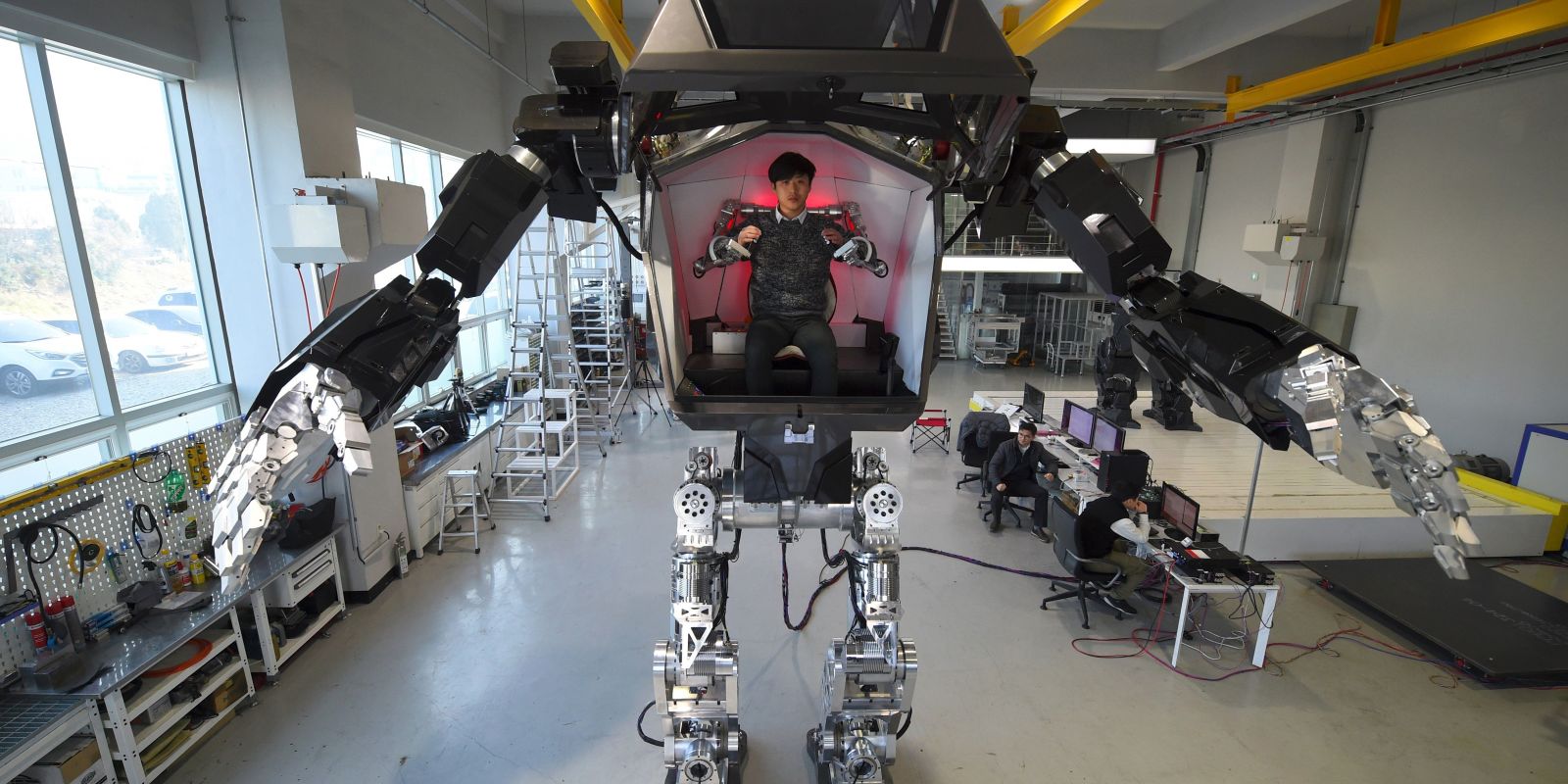
Looking and working remarkably like the robots in the 2009 movie Avatar, the 1.5-ton, 13-foot-tall ’METHOD-2’ by South Korean firm Hankook Mirae Technology has officially taken its first steps. Engineers and reporters watched the robot navigate the company’s facility on its massive mechanical legs, traversing about ten feet before reversing. It appears to be remote-controlled for this exercise, while previous videos have shown how it functions with a human ‘pilot’ sitting inside.

The idea is that METHOD-2 will be able to help people reach the kinds of hazardous destinations that are currently too unsafe to navigate, and it’s easy to imagine this thing walking down the street like a superhero after a disaster. It sounds like the company is currently working out the mechanics of the robot itself, and it’s unclear whether it’ll ultimately be able to climb over obstacles, negotiate uneven terrain or withstand harsh climates.

method-2-robot-gif

method-2-manned-robot-6

Its first planned expedition is into the space between North and South Korea known as the DMZ (demilitarized zone), the world’s most dangerous border, but it’s still got about a year of planning and tinkering to get it into shape. Right now, it requires a tether for power. Its arms weigh 300 pounds each and are controlled by the pilot’s own limb movements.

method-2-manned-robot-3

method-2-manned-robot-4

Unsurprisingly, the robot was designed by Vitaly Bulgarov, who previously worked on the Transformers films and helped design Boston Dynamics’ bipedal robots. Yang Jin-Ho, chairman of Hankook Mirae Technology, says the robot is still taking its ‘baby steps’ but ultimately aims to “bring to life what only seemed possible in movies and cartoons.”

method-2-manned-robot-5

method-2-manned-robot-7

METHOD-2 is already getting lots of interest from companies who want to purchase one, and the price tag is expected to run around $ 8.3 million. The final version is expected to be ready for potential buyers by the end of 2017.

Share on Facebook


[ By SA Rogers in Conceptual & Futuristic & Technology. ]

[ WebUrbanist | Archives | Galleries | Privacy | TOS ]


WebUrbanist

 
Comments Off on Sci-Fi to Reality: Giant Manned Robot Method-2 Has Taken Its First Steps

Posted in Creativity


5 Steps to Achieve the Look of Black and White Film Using Lightroom

10 Nov

As a hobbyist, amateur, or professional photographer, you may be interested in achieving the look and feel of black and white film without the hassle and investment in equipment and gear. You can edit a digital image using Lightroom with this goal without having your hands smell like rotten eggs (developing chemicals). If you shoot black and white film often, as I do, then you might actually love that smell. If not, then you might want to read on.

Look feel black white film Lightroom01

The feel of black and white film – research first

The objective here is to provide you with a few basic steps to get you started on the path to edit your digital images to look like they were shot on black and white film, without the mess. If you are not familiar with the qualities of film images or have not examined them closely, it would be a good idea to do so. Try to pick up and look closely at some actual prints on photographic paper. You might find these in your grandmother’s attic or your local museum. Photography books or online searches will yield many reprinted or scanned examples as well.

First, consider the subject of style as it relates to film photography. Film photographs generally have a certain nostalgic or vintage look and quality to them that distinguish them from the clarity and realistic look of a well-composed digital image. Film tends to render subjects and scenes in a more abstract manner. Although you can make tack sharp and very realistic looking images using today’s film and gear, that’s not really the role of film photography.

Look feel black white film Lightroom02

If you want clean, shoot digital. Film should look old, slightly out of focus, and definitely grainy. All film has some or a lot of grain and it is basically the equivalent of digital noise. While you may prefer some of your images to look super sharp and smooth, you may also find it pleasing to add a little (or a lot) of grain from time to time.

Film adds an air of mystery

You might want to experiment with this more abstract style or look of film that comes with a distinctive aesthetic. One advantage of presenting this style of image is that the viewer is given the task of filling in the blanks, so to speak. Subjects in your image that are not entirely in focus or even blurry can be representative of anything or anyone. Your image can be more open to interpretation by the viewer as compared to an image that was sharply composed with a subject that is obvious. In other words, you might want to leave some room for mystery in your images. Film photography, or working towards the look and feel of film, can do that for your images.

Look feel black white film Lightroom03

Like digital, film is really just another medium in which we can express ourselves as artists and photographers. I love many things about both film and digital and each has a place in my professional and personal photography life.

5 steps to getting the look and feel of film using Lightroom

If you shoot digital and are looking to achieve the look and feel of film, below are five easy steps using Lightroom.

1. Set your ISO high

ISO should be set to somewhere between 1600 and 6400. Digital noise is the modern day equivalent of the grain in film. The grain or digital noise creates atmosphere and the look or aesthetic that you are trying to emulate.

2. Make an image of something interesting

Look feel black white film Lightroom04

Choose a subject. Framing and composition should be pleasing, and be careful to avoid too many distractions. Emotion is usually a good idea to include if there are people or animals in your photo. Any additional compositional techniques can be applied to the image. The subject could be in focus or blurry. This is completely up to you and your vision.

3. Convert the image to black and white

To convert your image to black and white, press V or use another method for black and white conversion in Lightroom. You can stay in color, but the look and feel of color film is more difficult to achieve and will require some additional steps.

4. Open the Develop module in Lightroom

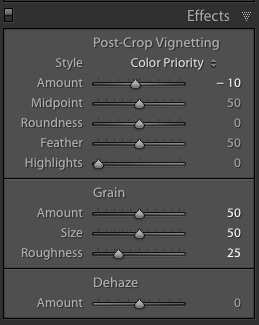
Look feel black white film Lightroom11In the bottom panel of the Develop module called Effects, make the following adjustments:

  • Using the sliders, set the Post-Crop Vignetting to -10. Older camera lenses tended to impart some vignetting onto the image. This will give the image an authentic older film quality to it. Ansel Adams famously burned (darkened) the edges to all of his prints.
  • Set the Grain Amount slider to 50.
  • Adjust the Grain Size to 50.
  • Set the Grain Roughness to 25.

5. Review your image and make the finishing touches

Adjust the sliders to increase or decrease the three Grain options to achieve your vision for the given image. You can also dial in or out the vignette as well. All images are different and all digital image files will respond differently to these adjustments based on the sharpness and ISO settings.

Look feel black white film Lightroom05

You may want to consider the following questions to evaluate your adjustments at this point. Do these edits help the image? Does it assist in the presentation of the image as more abstract so that it might connect better with the viewer? Did the adjustments achieve the look at feel of film that you were gong for? You can decide on the answers to these questions and make editing decisions as you see fit or recruit a friend to provide a critique.

If you like your results and would like to explore this topic further, there are free online software programs such as Analog Efex Pro that are part of Google’s Nik Collection. Presets are also available that will aid you in this process and even help you to achieve the look and feel of color film. You might want to consider making your own presets and applying them en masse to a given photo shoot or batch of images as well.

Look feel black white film Lightroom06

Below are a few images representing multiple genres that I made with a digital camera then edited to achieve the look I was going for using the settings in the Effects panel above.

Look feel black white film Lightroom07

Look feel black white film Lightroom08

Look feel black white film Lightroom09

Look feel black white film Lightroom10

Do you enjoy shooting film or reproducing the look of it using digital methods? Do you have a favorite way to achieve it? Please share in the comments below.

googletag.cmd.push(function() {
tablet_slots.push( googletag.defineSlot( “/1005424/_dPSv4_tab-all-article-bottom_(300×250)”, [300, 250], “pb-ad-78623” ).addService( googletag.pubads() ) ); } );

googletag.cmd.push(function() {
mobile_slots.push( googletag.defineSlot( “/1005424/_dPSv4_mob-all-article-bottom_(300×250)”, [300, 250], “pb-ad-78158” ).addService( googletag.pubads() ) ); } );

The post 5 Steps to Achieve the Look of Black and White Film Using Lightroom by Jeremy H. Greenberg appeared first on Digital Photography School.


Digital Photography School

 
Comments Off on 5 Steps to Achieve the Look of Black and White Film Using Lightroom

Posted in Photography


8 Steps to Getting Your Photography Business Noticed

19 Sep

Photographers, photographers everywhere! It seems in this social media age, new digital photographers flood the industry every day. These “professionals” boast low prices and high quality. There’s nothing wrong with that, but how do you get your work to stand out from the pack? What makes your images different than Johnny Photographer who was given a DSLR for Christmas along Continue Reading

The post 8 Steps to Getting Your Photography Business Noticed appeared first on Photodoto.


Photodoto

 
Comments Off on 8 Steps to Getting Your Photography Business Noticed

Posted in Photography


7 Steps to Capturing Truth in Your Portraiture

05 Sep

A stunning portrait, one that stops you in your tracks and demands attention, is a beautiful thing. There’s something magical when a portrait intrigues and connects with us. It’s not about celebrity or beauty; it’s about humanity. For my money, the moment you capture truth and humanity in your portraiture, is when photography and art collide.

DPS7

From the moment you raise a camera to take a photograph of someone, there are many variables to keep under control. It is easy to get lost and allow your focus to drift. This is the one time in photography when you need to be incredibly present.

Following this mini guide of seven steps, can help you to improve your portrait photography, and connect better with your subjects.

Step One: Photograph within your technical capabilities

The last thing you need to be worried about when you start a shoot is the technical side of things. Practice ahead of time and nail your technique. Get to know all of your equipment, and iron out any technical kinks before the day of the shoot. Your subject is bound to become nervous if you seem uneasy with your kit, or project any uncertainty. Things can still go wrong on the day, but the more relaxed you are overall, the more you will be able to handle it without panicking.

DPS2

Step Two: See images of your subject beforehand

It can be handy to see images of your subject ahead of shoot day. I like to ask clients to send me a picture of themselves which they really like. This is useful in several ways.

You can get a good idea of their skin tone and the planes of their face, which helps you to consider your lighting set up and any adjustments you will need to make. You also get a good idea of how the client wants to be perceived, and what they want an image to say about themselves.

This will not always balance with what you see in them, but herein lies the magic. As a photographer, you are seeing the subject in a new light. When you add that into the process, alongside trying to capture what they like about themselves, you make a unique portrait.

DPS1

Step Three: Have a plan

You absolutely must have a plan ahead of time. Use the what you’ve learned by having seen an image of your subject ahead of time, to help you plan your lighting and background choices. Obviously consider the weather if you are planning any natural light or outdoor shots.

It’s worth mentioning at this point that natural light doesn’t always mean you actually have to be outside. Being close to large windows or open doors can provide a beautiful light, but it absolutely depends on the weather. You should also plan what framing you might use. The goal is not to end up with a contrived shoot, it’s still important to stay in the moment. But, if session is slowing down, and you at least have some ideas in mind, you can refer back to your mental plan and get things going again by changing it up.

Author photo

Step Four: Take charge

When you lift that camera, you must take charge of your set. This is a collaborative process, but you are definitely in the driver’s seat. It’s up to you to be vocal with your subject, to keep their energy levels up, and to make sure they feel good about themselves. It’s no good just shouting out stage directions, “left a bit, chin down,”. You must encourage them, and keep them having fun, because tension is not your friend! No matter how many times your subject has been in front of a camera, each one is a new performance and needs to be directed as such.

Wherever your shoot is taking place, you are in charge of that space. Define the space in your mind, and remove as many distractions as possible. Obviously if you are shooting in a public place, a park for example, you can’t remove everything. But if you can choose an area away from the main pathways, that will make life easier.

DPS3

If you are indoors music is a must. It’s a great leveller, and helps everyone to relax. You can create a playlist specially for your shoots, include some cheesy music to put a smile on people’s faces. It’s a good idea to choose different genres/decades depending on your client’s age, style, etc.

Step Five: Learn to read people

Learning to read people is a skill you absolutely must acquire in order to progress as a people photographer. Try to connect with your subject and chat to them, tell stories – humanizing the experience is vital. The more they relax, the more you will get out of them, and the more authentic the photograph will be.

DPS5

You must learn to pick up on signs and signals: Are they losing focus? Change up the setting. Are they uncomfortable? Try standing or sitting instead. You don’t want to waste shots on unusable images, where the subject is not present or is clearly not in the zone.

Another way in which you can learn to read people has to do with their personality. Determining early on that they are nervous, might mean you tell some jokes, or explain the setup to put them at ease. A giggly, happy person definitely needs to be represented as such, but there is always room for a more serious look, which will be up to you to direct them towards.

DPS6

Step Six: Set the tone

So once you have gained control and confirmed that you are in charge, you must set the tone for the whole shoot. When you look at a portrait which you love, consider what you like about it and how you too can take this sort of image. Keeping in mind that any picture you take will have your own voice, and that develops over time. The connection or level of engagement in that photograph is entirely dictated by you, the photographer.

Your subject feeds off your energy and pace, so you must keep this in mind at all times. If they seem to be wilting, it’s your job to bring them back up to speed. Make sure to check your own performance so that you are giving out the right vibes.

DPS9

Step Seven: take your time

This last step has to be one of the most important – take your time! Please trust me on this one, slow down and keep your head in the game. A shoot can run away from you in no time, and the last thing you want is to look at back at your shots and discover you haven’t captured what you wanted. You may find that you have spent too long on one look or background, and not captured another enough. Just as you want your subject to take mini breaks to refocus themselves, you must take the opportunity too.

Personally, I know that if at the end of a shoot I don’t feel a bond with my client, I haven’t nailed it – I’ll have some great images of them but it won’t be what I set out to capture.

DPS4

Your turn

Do you do portraits? How do you inject some truth into your portraiture? Please share your tips and tricks in the comments below. If you have any questions I’ll try and answer them as well.

googletag.cmd.push(function() {
tablet_slots.push( googletag.defineSlot( “/1005424/_dPSv4_tab-all-article-bottom_(300×250)”, [300, 250], “pb-ad-78623” ).addService( googletag.pubads() ) ); } );

googletag.cmd.push(function() {
mobile_slots.push( googletag.defineSlot( “/1005424/_dPSv4_mob-all-article-bottom_(300×250)”, [300, 250], “pb-ad-78158” ).addService( googletag.pubads() ) ); } );

The post 7 Steps to Capturing Truth in Your Portraiture by Alex Lagarejos appeared first on Digital Photography School.


Digital Photography School

 
Comments Off on 7 Steps to Capturing Truth in Your Portraiture

Posted in Photography


8 Steps to Getting Your Photography Business Noticed

18 Aug

Photographers, photographers everywhere! It seems in this social media age, new digital photographers flood the industry every day. These “professionals” boast low prices and high quality. There’s nothing wrong with that, but how do you get your work to stand out from the pack? What makes your images different than Johnny Photographer who was given a DSLR for Christmas along Continue Reading

The post 8 Steps to Getting Your Photography Business Noticed appeared first on Photodoto.


Photodoto

 
Comments Off on 8 Steps to Getting Your Photography Business Noticed

Posted in Photography


Stopped Steps: 10 Declining Abandoned Escalators

18 Jul

[ By Steve in Abandoned Places & Architecture. ]

abandoned_escalator_8b

Well, that did NOT escalate quickly. These busted up and broken down abandoned escalators won’t be devouring any CROC plastic sandals anytime soon.

abandoned_escalator_8a

abandoned_escalator_8c

An outdoor escalator? In damp, rainy England? It’s more likely than you think, and most likely to be abandoned like this mossy ex-people-mover in Leeds. Snapped by Flickr user Paul Williams (Bluelemur), the long-neglected electric stairway once ferried shoppers from a pedestrian underpass up to a shopping mall. These images were taken in March of 2006; both the mall and its escalators were demolished shortly thereafter.

Somewhere Under The Rainbow

abandoned_escalator_3b

abandoned_escalator_3c

Think “La Rainbow Hotel” and a spectrum of brilliant colors come to mind. The above post-apocalyptic scene certainly wasn’t in the minds of those who named the long-abandoned hotel though it DOES display an impressive visual palette. Jordy Meow of Haikyo.org captured the former (1990-97) hotel’s silent, seized-up & spooky escalator in July of 2012.

Narrowed Down

abandoned_escalator_6a

abandoned_escalator_6b

abandoned_escalator_6c

When Hunter’s Point Naval Shipyard in San Francisco, CA closed in 1994, the “tallest industrial escalator” (according to Flickr user TunnelBug) closed along with it. We’re guessing it was the narrowest industrial escalator as well though no one to our knowledge has done a comparative survey. The images above date from 2006, 2005 and 2009 respectively.

Out Of Warranty

abandoned_escalator_7b

abandoned_escalator_7a

If Hyundai built this escalator as well as they build their current automobiles, it might still be working today. Instead, however, the abandoned mobile stairway in South Jakarta, Indonesia’s Tebet market dates from a time when Hyundai exported the infamous Pony and Stellar to unsuspecting North American shores… just typing those names evokes the aroma of cooked engine oil. Phew!

Next Page – Click Below to Read More:
Stopped Steps 10 Declining Abandoned Escalators

Share on Facebook


[ By Steve in Abandoned Places & Architecture. ]

[ WebUrbanist | Archives | Galleries | Privacy | TOS ]


WebUrbanist

 
Comments Off on Stopped Steps: 10 Declining Abandoned Escalators

Posted in Creativity