RSS
 

Posts Tagged ‘Started’

Posing Guide: 21 Sample Poses to Get You Started with Photographing Men

01 Aug

The post Posing Guide: 21 Sample Poses to Get You Started with Photographing Men appeared first on Digital Photography School. It was authored by Guest Contributor.

Posing Guide for taking Great Photos of Men

Previously we’ve created posing guides with suggested sample poses to help you get started posing women (also see part 2 for posing women), posing children, posing couples, posing groups, and posing weddings, so today let’s look at some sample starting poses for photographing men.

Men are usually less comfortable with being photographed, so it’s important to set them at ease with posing in order to get good results.

It is always a good idea to prepare before the photoshoot.

Just one more piece of advice: Involve your subject in the process!

He will feel more confident knowing the plan, what he has to “do,” and what kind of outcome is expected. Showing this kind of posing cheat sheet to your model is indeed a very good way to prepare your subject for a photoshoot and make him feel more relaxed and confident at the same time.

So, let’s look at some sample poses for men

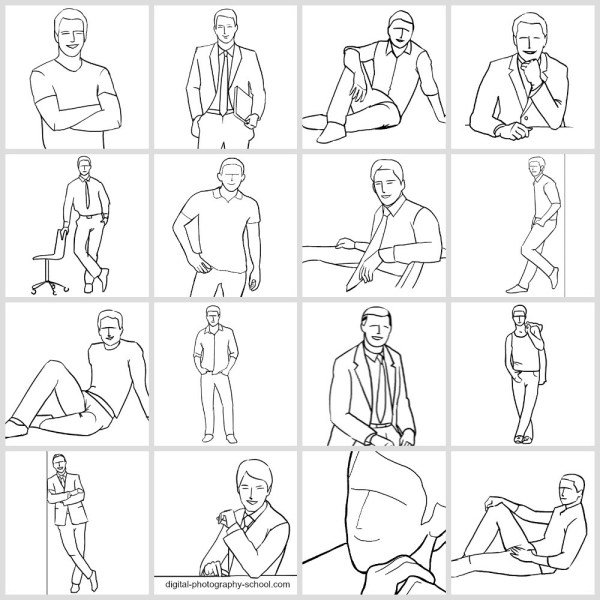
1. Very simple pose for a man’s portrait: An upper body shot with crossed arms.

Two things to take care of: Shoulders should be pulled back a little, stomach muscles kept in check.

Posing Guide for taking Great Photos of Men

2. Crossed arms work very well in full height shots as well. In addition, ask him to cross one leg in front of the other. But make sure the body weight is not supported equally on both legs; otherwise, that would look just awkward!

Posing Guide for taking Great Photos of Men

3. A recurring question from your subject might be “Where shall I put my hands?” The solution is actually quite simple. There are four places to keep in mind (mixed in any combination, utilizing both hands).

#1. Loosely by the side.

#2. On the hips.

#3. In the pockets.

#4. Both hands crossed on the chest.

And in addition, hands should always be relaxed, which means no muscle pressure, except when you are photographing a bodybuilder.

Posing Guide for taking Great Photos of Men

4. A casual pose for a man standing upright. Men indeed have a problem with placing their hands; by keeping them fully or partly in the side pockets, you have a sure way to achieve a natural and relaxed pose.

Posing Guide for taking Great Photos of Men

5. Just a slight variation on the previous pose. A piece of clothing over the shoulder, merely a thumb in the pocket, and legs crossed work very well.

Posing Guide for taking Great Photos of Men

6. For a sitting pose, putting the ankle of one leg onto the knee of the other looks relaxed and natural. Shoot slightly from above.

Posing Guide for taking Great Photos of Men

7. Leaning against a wall is just another variant for upright posing.

Posing Guide for taking Great Photos of Men

8. The sideways way of leaning against the same wall. Works very well for both casual and formal shots.

Posing Guide for taking Great Photos of Men

9. A very simple pose for a formal portrait. Items held in the hand (e.g. a laptop, books, or even tools) can work as indicators of the subject’s occupation.

Posing Guide for taking Great Photos of Men

10. Against common belief, it is absolutely fine to make shots of a man sitting partly on a desk. For formal portraits, such a pose might counteract rigidness.

posing-men-subjects10.png

11. A very simple pose for a portrait: A man sitting at a desk. To reveal the subject’s profession, place work-related items on the desk.

Posing Guide for taking Great Photos of Men

12. A slight variation of the previous pose. Very appropriate for formal portraits.

Posing Guide for taking Great Photos of Men

13. To show the work environment while removing the distance created by a foreground object like a desk, take your shot from the backside. The result will be formal but inviting at the same time.

Posing Guide for taking Great Photos of Men

14. A man supporting himself on a desk with arms crossed. Again, you could place work-related items on the desk to point to the subject’s profession.

Posing Guide for taking Great Photos of Men

15. Using a chair as a prop can make a portrait more engaging and interesting. Very suitable when introducing creative people in their work environment.

Posing Guide for taking Great Photos of Men

16. Sitting comfortably in a chair usually works for corporate and formal portraits.

Posing Guide for taking Great Photos of Men

17. An easy and natural pose with a man sitting on the ground. Try different shooting directions and angles.

Posing Guide for taking Great Photos of Men

18. Another variant of a man’s pose while sitting on the ground. Suitable for outdoor locations.

Posing Guide for taking Great Photos of Men

19. An easy and relaxed-looking pose for a sitting man.

Posing Guide for taking Great Photos of Men

20. Informal pose. The man is sitting on the ground resting his back against the wall or some object.

Posing Guide for taking Great Photos of Men

21. Finally, let your subject be the protagonist of your picture. Never be afraid to crop tightly around the model’s face.

Posing Guide for taking Great Photos of Men

That should offer a starting point. Again, remember that there are no absolutes; each sample pose might and should be adjusted depending on your shooting environment and scenario. There is no need to overdo anything.

In reality, all you need for good people portraits is simplicity:

Simple backgrounds, simple clothing, simple poses, and natural expressions.

Check out our other Posing Guides:

  • Posing Guide: Sample Poses for Photographing Women (Part 1)
  • Posing Guide: Sample Poses for Photographing Women (Part 2)
  • Posing Guide: Sample Poses for Photographing Children
  • Posing Guide: Sample Poses for Photographing Couples
  • Posing Guide: Sample Poses for Photographing Groups of People
  • Posing Guide: Sample Poses for Photographing Weddings

Grab Our Guide to Portrait Posing

Kaspars Grinvalds is a photographer working and living in Riga, Latvia. He is the author of Posing App where more poses and tips about people photography are available.

The post Posing Guide: 21 Sample Poses to Get You Started with Photographing Men appeared first on Digital Photography School. It was authored by Guest Contributor.


Digital Photography School

 
Comments Off on Posing Guide: 21 Sample Poses to Get You Started with Photographing Men

Posted in Photography


Posing Guide: 21 Sample Poses to Get You Started with Photographing Women – Part I

18 Jul

The post Posing Guide: 21 Sample Poses to Get You Started with Photographing Women – Part I appeared first on Digital Photography School. It was authored by Guest Contributor.

This is the first in a series of Posing Guides with suggested starting poses for photographing different subjects. We are starting with the female posing guide.

Also in the series check out our posing guides for posing children, posing couples, posing groups and posing weddings.

Sample Poses to Get You Started with Photographing Women

If you ever run out of ideas, get stuck in creativity or simply need some guidance when shooting female subjects, you may use following posing samples as a “posing cheat sheet”. Many pro photographers use such a technique when preparing for and during the photo shoot.

The poses in this article are selected as an initial reference. I would advise you to look at the poses together with your subject, especially if she’s inexperienced. During a photo shoot, don’t hesitate to discuss with the subject which pose is or isn’t working in any particular situation. It’s usually very productive and you both will feel more confident in what you are doing.

OK, let’s start, one by one.

posing-photographing-female-models01.png

1. Very simple portrait pose to start with. Have the model look over her shoulder. Note how unusual and interesting a portrait might look, if shot simply from a different angle.

posing-photographing-female-models02.png

2. In portrait photography, hands are usually not visible or at least not dominant. However, you might get creative by asking the model to play around with her hands trying different positions around her head or face. Keep in mind, though: No flat palms, and the hands should only show their sides!

posing-photographing-female-models03.png

3. You might be familiar with composition rules like the rule of thirds. In a similar way, pleasing effects can be created by using diagonals. Also remember that you don’t need to always hold your camera on a perfectly even level. Don’t be afraid to tilt it, you might achieve some interesting and unusual perspectives.

posing-photographing-female-models04.png

4. A really nice and lovely pose with a model sitting. The knees have to touch each other. Shoot slightly from above.

posing-photographing-female-models05.png

5. Another open and inviting pose with the model lying on the ground. Get down and take your shot nearly from the ground level.

posing-photographing-female-models06.png

6. Just a variation for a pose with the model lying on the ground. Both hands might as well be resting on the ground. Works very well outdoors, on the grass or in a wild flower meadow, for example.

posing-photographing-female-models07.png

7. A basic easy pose, yet looks absolutely stunning. Get down and shoot nearly from a ground level. Then try to move gradually around the model while making shots. Also ask your model to change head and hand positions.

posing-photographing-female-models08.png

8. Another easy yet gorgeous pose for all body types. Try different hand and leg positioning. And remember to focus on the model’s eyes!

posing-photographing-female-models09.png

9. A really lovely pose. Works well in different surface settings: The model, for example, might lie on a bed, on the ground, in the grass, or on a sandy beach. Shoot from a very low angle and focus on the eyes.

posing-photographing-female-models10.png

10. Gorgeous and easy pose for a model sitting on the ground.

posing-photographing-female-models11.png

11. Another simple and friendly pose for a model sitting on the ground. Try different directions and angles.

posing-photographing-female-models12.png

12. A wonderful way to demonstrate the beauty of a model’s physique. Works very well as a silhouette when shooting against a bright background.

posing-photographing-female-models13.png

13. A simple and casual looking pose. Lots of variations are possible. Ask the model to twist her body, experiment with hand positioning and try different head turns.

posing-photographing-female-models14.png

14. Another very simple and elegant pose. The model is turned slightly to the side, hands in back pockets.
posing-photographing-female-models15.png
15. Leaning slightly forward can be a very attractive gesture. It is a subtle way to emphasize upper body shapes.

posing-photographing-female-models16.png

16. A sensual pose. By holding the hands above the head body curves are emphasized. Works with fit body types.

posing-photographing-female-models17.png

17. Endless variations are possible for posing in full height. This pose is just the starting point. Ask the model to slightly turn her body, change hand positioning, change head and eye directions etc.

posing-photographing-female-models18.png
18. A relaxed pose with the model standing upright and supporting her back against a wall. Remember that the model may use a wall not only to support her back, but also to put her hands on, or resting a leg against it.

posing-photographing-female-models19.png

19. Note that full height settings are very demanding and work well only with slim to athletic body types. Posing guidelines are simple: The body should be arched in an S shape, hands should be relaxed, while the weight finds support on just one leg.

posing-photographing-female-models20.png

20. An exquisite pose for slim to athletic models. Many variations are possible. In order to find the best posture, tell the model to slowly move her hands and twist her body constantly. When you see a good variant, ask your model to hold still and take some pictures. Repeat for a full set.

posing-photographing-female-models21.png

21. An absolutely romantic and delicate pose. Any kind of cloth (even a curtain) can be used. Note that the back doesn’t need to be completely bare. Sometimes as little as a bare shoulder could work pretty well.

So, there’s something for you to start with. Hope you will find at least couple of poses to work with in different shooting scenarios! Keep in mind that each of the initial sample poses is meant to be only a starting point. Each pose has endless variations! Just be creative and adjust the pose as needed (for example, try different shooting angles and ask your subject to change hand, head and leg positioning etc.)

Check out our other Posing Guides:

  • Posing Guide: Sample poses for photographing Women Part 1
  • Posing Guide: Sample posees for photographing Women Part 2
  • Posing Guide: Sample poses for photographing Men
  • Posing Guide: Sample Poses for photographing Children
  • Posing Guide: Sample Poses for Photographing Couples
  • Posing Guide: Sample Poses for Photographing Groups of People
  • Posing Guide: Sample Poses for Photographing Weddings

Grab Our Guide to Portrait Posing

Posing Guide: 21 Sample Poses to Get You Started with Photographing Women – Part I

Kaspars Grinvalds is a photographer working and living in Riga, Latvia. He is the author of Posing App where more poses and tips about people photography are available.

The post Posing Guide: 21 Sample Poses to Get You Started with Photographing Women – Part I appeared first on Digital Photography School. It was authored by Guest Contributor.


Digital Photography School

 
Comments Off on Posing Guide: 21 Sample Poses to Get You Started with Photographing Women – Part I

Posted in Photography


Getting Started with Layers in Capture One Pro

25 Jun

The post Getting Started with Layers in Capture One Pro appeared first on Digital Photography School. It was authored by Darina Kopcok.

using layers in capture one pro

One reason that Capture One is such a versatile and efficient RAW editor is the ability it gives you to work in Layers. It combines the ease of working in Lightroom with the functionality of Photoshop Layers.

If you’re new to the software, learning to work with layers in Capture One will elevate your photos and help you in creating a more efficient workflow.

Getting Started with Layers in Capture One Pro

What are layers?

Layers help you make targeted adjustments to certain areas of a photo. They are similar to Local Adjustments in Lightroom. You can make tweaks to color, exposure, clarity and other adjustments you’d typically make in a RAW editor, as well as more complicated edits.

Capture One’s Layers tool enables you to combine brush adjustments, gradients, and repairs to masked areas using multiple layers.

How to get started with Layers

layers in Capture One

The Layers option is indicated by the + Plus Icon in the Layers panel under the Histogram, which can be found in the Exposure tab. Layers can also be found in the top of the screen in the menu bar and has its own dropdown. Click on the Plus icon to create a new layer.

layers in Capture One

When creating or working on multiple layers, it’s a good idea to name each layer in a way that tells you what adjustments you made to the layer. Double click the layer to rename it.

Getting Started with Layers in Capture One Pro

Notice that if you make a new layer and start making adjustments, nothing will happen to the image. You need to create a Mask to determine where on the layer the adjustments will be applied.

There are different ways to create masks: for this article, I’ll focus on the brush tool to brush in Masks. You can find the brush tool in the lower right of the Layers panel.

layers in Capture One

You can also use the shortcut B.

To change the settings on the brush, simply right-click on the photo.

Note that a soft brush is usually desired.

The mask can be seen in red and will, by default, only show when you’re actually brushing on the image.

layers in Capture One

The shortcut M will toggle this setting, to show or hide. You can also choose to keep your Mask on. Options for the Mask are available in the Brush Panel dropdown in the tools panel at the top of the Capture One workspace.

layers in Capture One

There is also a Layers panel in the Capture One Menu tab. The great thing about Capture One is that there are several places where you can access any given tool all from one workspace, instead of having to switch Modules, as you do in Lightroom.

layers in Capture One

If you select too much or spill over into an area that you don’t want included in the adjustment, you can select the Erase brush and subtract the area where you didn’t intend to brush. You can also use the shortcut E.

Getting Started with Layers in Capture One Pro

The square bracket keys [ ] on your keyboard will help you change the size of your brush quickly.

Once you have made an adjustment, toggle off the color so you can see the effect, and if you need to make any further adjustments. That’s why it’s a good idea to have the mask show only when you’re brushing over your image.

Notice that every time you brush over the same area, the effect is stronger.

Reduce the opacity if you want to lessen the effect.

Getting Started with Layers in Capture One Pro

Heal Layers

Another type of layer is a Heal layer, which can be used to cover or conceal objects in your photo. It’s a very useful tool when working with layers in Capture One.

Clone Layer will copy pixels from a source point to destination, however, it is not as efficient. The Heal layer is more dynamic; it will update according to changes made to the background layer or other layers.

You can use the Heal layer to fix blemishes by copying and pasting pixels from a different part of the images.

To start a new Heal layer, choose New Heal layer from the dropdown beside the Plus icon or choose it from the choices in the left-hand dropdown over where your named layers are located.

Getting Started with Layers in Capture One Pro

Using Healing requires you to create a source point.

Create source point by clicking Alt and then clicking once on the photo.

Heal layers will intelligently blend the area with surrounding pixels.

layers in capture one
Choose a source point to heal from.

Now brush on the photo.

It will take the area from the source point and cover the object or blemish.

If the appearance of the target area does not match the surrounding pixels, click on the source point and drag it anywhere within the same image in the Viewer.

layers capture one

Conclusion

Capture One is a powerful program that can help take your editing to the next level. The ability to work with layers in Capture One is one way to do that. If you’ve been on the fence about whether to make the switch from Lightroom, they have a free 30-day trial available for you to check out.

The post Getting Started with Layers in Capture One Pro appeared first on Digital Photography School. It was authored by Darina Kopcok.


Digital Photography School

 
Comments Off on Getting Started with Layers in Capture One Pro

Posted in Photography


Developing film at home: everything you need to know to get started

01 Apr

Introduction

If you’re lucky enough to have some free hours in these uncertain times, there are a lot of ways you could spend them. How about learning how to develop your own film? Or maybe developing film is an activity you tried long ago and one you’d like to jump back into. After all, the smell of fixer singeing the nostrils can be quite an intoxicating/nostalgic aroma (Please do not smell the fixer).

What follows is a quick and easy home developing guide that’ll cover everything from supplies, to chemistry dilutions, to proper cleanup. So turn down your record player and grab a good old fashioned pencil and paper to take notes [glances at the sun dial] – it’s developing time!

Reasons to develop at home

But first, if you still need convincing, here’s are some solid reasons to take the plunge into the wild DIY world of home developing:

1. It’s cheaper to set up a home developing kit than you may think. I was able to get everything I needed from a local brick and mortar store for ~$ 150. Obviously a lot of stores are closed right now, but you may pay even less sourcing items online, or second hand.

2. Home developing is a hands-on experience that makes you better appreciate both the magic of photography and the wonder of chemistry. There’s something really cool about seeing the image creation process from start to end. In short, you’ll feel a bit like a mad scientist.

3. If you are paying a lab to develop and scan your images right now, setting up a home lab can be a cheaper option in the long run. And even if labs are closed (as many are at the present time), you’ll still be able to process your own images.

4. It feels good to learn something new / do it yourself.

Best films to start with

For the sake of this article, we’ll concentrate on developing B&W film, as the process is easier to learn than it is for color. B&W film also tends to be more forgiving to exposure errors than color… not that you’ll make any!

Some good B&W films to start with include Kodak Tri-X, Kodak T-Max, Ilford HP-5 Plus and Ilford Delta 400. Be aware, there are B&W film stocks out there that are meant to be developed in color chemistry, like Ilford XP2. Avoid these.

Chemistry 101: The developing basics

The process of developing film is actually quite straightforward. We’ll go into more detail further into this article, but the basic steps go like this: Load your film into a lightproof tank and pour a series of chemicals in one after another, then wash, dry and scan.

The two main chemicals involved in the process are developer, which does exactly what it sounds like, and fixer, which stabilizes the film after development. A stop bath rinse is done between the developing and fixing stage and a water rinse is done at the end.

What you’ll need to assemble your home mini lab

Here’s what you’ll need to set up your home developing kit: Concentrated developer, fixer and stop bath (optional – plain old water also works). Liquid concentration is easier to work with than powder and is also safer as there’s no chance of particulate inhalation. You’ll also want a wetting agent like Kodak Photo-flo (this is also optional but I find it helps negatives dry without watermarks), a developing tank with reels*, several plastic bottles to mix your dilutions in, measuring beakers, a funnel, a thermometer, a stop-watch/timer and a film squeegee. Many photography stores carry all these items.

You’ll also want a light-proof bag to load your reels, as well as a bottle opener and a sharp pair of scissors. The former is to pry open the film canister the latter is to cut the film (both while in the bag). Film clips are great for drying, but clothespins work well too. You’ll also want plastic sleeves to store your negatives in once dried.

*For those wishing to avoid the developing tank, all-in-one options like the the Lab-Box, may be your cup of tea. We can’t vouch for its ease of use, but our pals over at Pop Photo seem to like it.

Loading film onto reels

There are a handful of companies that make film tanks and reels. In general though the plastic reels are MUCH easier to load than the metal ones. Of the popular plastic brands, I’ve found that Paterson Universal makes the easiest to load reels (avoid Omega brand reels).

Once you’ve got your tank, I recommend practicing loading your reel with the lights on. Yes you will need to sacrifice a roll of film to do this, but it’s worth it. Here are the basic steps/tips for loading:

1. Pop open your film canister from the bottom using a bottle opener. It should not take much to pry the bottom cap off.

2. Pull the film and spool out of the canister and trim off the film leader so that the roll ends in a straight cut line.

3. Insert the freshly-cut end of the film roll into the reel. On a Paterson Universal reel the side in which you load the film is flat and the side it feeds out of is rounded; this makes it easy to load correctly in the dark. Once inserted, hold each side of the reel in either hand and gently twist the opposite direction until the reel hits a stopping point, then twist back; this should advance the film onto your reel one frame at a time.

4. Count in your head how many times you do the above twisting action. When you get to 32 (assuming you’re loading a 36 roll frame) unroll the rest of the film from your spool and cut it free – there’s usually a small piece of tape attaching it.

5. Proceed to load the last of the film.

6. Insert the reel onto the tank’s center column. Remember if you’re only developing one reel to still use two reels in the tank with the loaded one on bottom.

The developing process – mixing up the chemistry

Mixing up photo chemistry requires very little knowledge of chemistry itself. If you can follow the directions required to bake a cake, you can certainly mix up these chemical dilutions with no trouble.

As mentioned, we recommend purchasing concentrated liquid chemicals and some plastic containers to store your dilution in (make sure the containers are photo chemical safe). Most chemistry comes with basic dilution guidelines printed on the bottle. For example I use Ilford Ilfotec DDX Developer, which requires a 1:4 dilution. Conveniently, this is the same dilution as the Ilford Rapid Fixer I use.

When mixing up chemistry I like to make 60 fl oz of diluted developer, fixer and stop bath. This is roughly 3x times the amount of each chemical I need to process two rolls in my Paterson tank. Because I don’t develop too often, I just pour the dilute chemistry back into its respective container after I’m done. The chemistry eventually expires, but it takes many rolls to get there. I also find it extremely helpful to write down the date and dilution of each chemical on its container.

Once you have all your chemicals mixed up and in separate jugs, it’s time to bust out the timer and get processing!

Developing, stopping, and fixing

Printed on the bottom of most film tanks is how much fluid is required, depending on the number and/or type of film you are processing. My tank requires about 22 fl oz for two 35mm rolls of film.

It’s also important to figure how long you’ll need to develop your film for. Many manufacturers include a list of developing agents and developing times on the inside of the film box. But if you tossed the box, worry not, the Massive Dev Chart is here to help. The temperature of the chemicals also affects developing time, so it’s good thing you got that thermometer!

Below are the basic steps for processing your roll:

1. Pre-wash: This isn’t completely necessary but there’s no harm in washing your film before moving on to the chemistry.

2. Developing time: Measure out your developer into a beaker and use the thermometer to find its temperature. The colder the developer, the longer the processing time. For instance if I’m processing a roll of Ilford HP-5 Plus in the aforementioned developer/dilution, I’m looking at nine minutes of developing time if the chemistry is 20 C / 68 F and closer to seven minutes if its 24 C / 75 F. Obviously if it’s warmer or colder than that range, you can estimate your development time accordingly.

3. Developing: Start your timer, pour in the developer, attach the tank’s cap and shake gently for 30 seconds. After the first 30 seconds let the tank sit on the table, then shake for ten seconds at the start of each minute of developing. Tap the tank on the table after shaking each time to ensure there are no air bubbles.

4. Stop-bath: Pour out your developer, pour in your stop bath dilution and replace the cap to the tank. Shake the tank for about ten seconds and then let it rest on the table for an additional 30 seconds (don’t forget to tap for air bubbles). Pour the stop bath out and pour in your fixer.

5. Fixer: Repeat the same shaking, tapping and resting process as you did with the developer for the fixer for 4-5 minutes. Then pour out the spent fixer and fill your tank with fresh water…

Washing, drying and storing negatives

6. Washing part 1: Once filled with fresh water, give the tank a good two minutes of shaking, then pour out the water. Repeat this process several times. Note: your film is fully-developed and light-safe at this point.

7. Washing part 2: Twist off the top of the tank and let water run into it for five to ten minutes.

8. Wetting agent: Dump out a little water, add a few drops of a wetting agent to the tank and screw the top back on (with cap attached). Shake for about five seconds and remove the screw top.

9. Removing the film and squeegeeing: Remove your reels from the center column of the tank and twist in the same way you did when loading them, but do so beyond the initial stopping point. This should allow you to pull either side apart. Grab one end of the film and run a wet squeegee over it once or twice.

10. Drying: Hang your film using clothespins or clips somewhere it won’t be disturbed. Give the negatives about 12 hours to dry before cutting and inserting it into plastic film sleeves.

Cleaning up

It probably goes without saying, but photo chemicals are toxic and you should avoid dumping them down the drain at all costs. Likewise, it’s important to keep your work space clean and tidy. I personally like to work on a piece of plywood on saw horses that I break down each time after I’m done processing. This avoids getting chemistry on my work desk or kitchen table.

Of the chemicals used for home developing, photo fixer presents the most environmental issues. Fortunately there are places happy to take it off your hands (for a small fee). Spent fixer contains valuable liquid silver which can be removed and recycled. Spent developer and stop bath can be taken to most household hazard waste processing locations. If you’re unsure of the best way to dispose of chemicals, contact a local photo lab and ask for their recommendations.

Scanning/digitizing

Once your negatives are dried it’s time to digitize them. There are numerous ways to scan film and varying opinions about which methods are best. I personally use an Epson V-series scanner that can do 12 frames of 35mm in one go. These scanners are reasonably-priced, fairly quick to scan and offer decent output – read our Epson V600 review.

Another fairly-easy scanning methods involves using a camera and macro lens, diffused light source and some sort of film holder like the Pixl-latr or Nikons’s ES-2.

Conclusion: Tips for success

As is the case with anything DIY, there’s going to be a large degree of trial and error involved in your process. I’ve tried my best to lay out all the basics that I’ve learned over the years, but it should got without saying that your mileage may vary.

That said, here’s a few final tips to help you succeed, based on my own trial and error:

1. Write down each step of the developing process as it pertains to your chemistry and the kinds of film you shoot. You’ll find yourself referencing this every time you go to develop.

2. Try your best to avoid getting finger prints on the film while loading and opt to load in a proper lightproof bag over a seemingly dark room.

3. Don’t be skimpy with the fixing time. If the film spends a little too much time in the fixer it won’t have any real negative impact, but too little will.

4. Give your film enough time to dry or it’ll get stuck in the plastic film sleeves.

5. Accept dust as a natural part of the life of a film shooter.

6. Consider wearing gloves unless you like the smell of fixer on your fingers for days (I do).

That pretty much sums up our home developing guide! If there’s something crucial you feel we’ve left out, or if you have any additional tips, feel free to mention them in the comments below. Happy developing!


Want more analog fun? Check out the DPReview Film Photography Forum.

Articles: Digital Photography Review (dpreview.com)

 
Comments Off on Developing film at home: everything you need to know to get started

Posted in Uncategorized


Getting Started with Off-Camera Flash in Photography: Equipment

29 Jan

The post Getting Started with Off-Camera Flash in Photography: Equipment appeared first on Digital Photography School. It was authored by Carl Spring.

off-camera-flash-in-photography

When you are just getting started with it, off-camera flash in photography can feel incredibly difficult. You then look at all the amazing work of others and begin to wonder why your photos never look like that.

In this short series, we will look at getting you started with off-camera flash. We’ll take you from a complete novice through to someone who will feel confident and able to get the most out of their flash.

Let’s start with the things that I will cover in this series:

  1. How off-camera flash works
  2. What gear you will need
  3. The technical bit
  4. Using modifiers
  5. Adding more flashes.
Off camera flash photography with a Hasselblad

Off-Camera flash in photography is something that can take your portraits to the next level. It is also not as scary as you might think.

The Gear

If you are getting into off-camera flash, you have several options. Some of you may have a flash for use on-camera, some of you may not. For this article, I will go through what you need.

If you are looking for a shopping list, it is as follows:

  • A flash
  • Flash triggers
  • A flash stand
  • Umbrella bracket
  • A flash modifier

I will then suggest a setup for those on a budget and a setup for those with a little more cash to spare.

As with all recommendations for gear, I am not paid by any brand to push their gear (I should really push this out with a plug shouldn’t I? hit me up camera companies!!) And they are my opinions, so please let’s not argue about this in the comments guys.

Right, Let’s go through each item one by one.

A Flash

Off camera flash in photography Vivitar 285 flash

The Vivitar 285Hv, AKA “The Tank.” Smashed, missing pieces and hit by skateboards. It still works fine. I even replaced the flash foot with a metal one when I snapped it.

This can be any flash. You can use an old manual flash bought for under $ 20 on eBay, through to the latest and greatest speedlite from your camera company, which will cost you over $ 400. Going even further, you could get a battery-powered studio strobe. What you need or want will depend on your budget and your needs.

There will be very little difference in these in terms of light quality. The difference will be in the ease of use and the power of the light.

The temptation may be to go with the same brand as your camera, but in all honesty, you can get much better value for money.

Now at the budget end, you can still get great mileage out of an old, fully-manual flash like the Vivitar 285. This flash is an ugly beast of a thing that is full manual. It doesn’t even have an LCD screen.

However, it is built like a tank, and you can buy it for around $ 20 to $ 30 on eBay. You can also get old flashes by Canon and Nikon for a little more. Remember, when using manual flash, you do not need to worry about which brand you are using. You can just as easily use a Canon flash on a Nikon camera and vice versa.

If you have more money to spend, then you really cannot look at flash these days without looking at the Godox brand. Godox produces a great range of flashes in all shapes and sizes. They also come with triggers built-in. This means you only need to buy a trigger for your camera and you are good to go.

By going with something like the Godox system, you also have the luxury of being able to change your flash power from the camera. This makes the process a lot easier, but it does come at a cost.

If you are buying a new flash from Godox or similar, make sure you invest in the flash specific to your camera brand.

A great mid-range flash would be the Godox 860II. This flash has Godox’s wireless system built-in and uses a Li-ion battery and recycles quickly even at full power. You also get a huge amount of flashes per charge (over 500) that will last even the most eager photographer for a full day of shooting.

From here, you can get bigger options with more power, but my honest recommendation is that, when starting out, you generally won’t really take advantage of what these units offer. Save your money and then invest in these later as you need them and, more importantly, once you know why.

Godox triggers for off camera flash

Two of the most popular flash triggers made by Godox. they are rebadged under several names. In this case, PixaPro.

Flash triggers

Okay, you have the flash, now you need to trigger them.

Flash triggers come in many varieties. From a super simple trigger and receiver, through to a controller with an LED screen that allows you to see exactly what setting your flash is on and change them remotely.

What you need here depends on the type of flash you have (or purchase). For the budget option – old school flash with no built-in trigger – we will stick with the basic, but functional, option.

You can get a set comprising of a receiver and two triggers for around $ 20. They are as basic as they sound; however, they generally do the job and are pretty reliable. There is no screen, and from past experience, you may need to carry both triggers even when using one flash as they can occasionally be temperamental. There is no control of the flash at all. If you need to change your flash power, you need to go to your flash and change it by hand. It does the job and does it well without any bells or whistles.

Stepping up, look at the Godox trigger.

When you add the Godox trigger to a Godox flash, you can change the power remotely, and as you get more advanced, you get to do other things such as change groups, and high-speed sync. Basically, this trigger will allow you complete control of your flash from wherever you are shooting.

You will expect to pay around $ 50 and up for the trigger. You won’t need a receiver in this setup as the flash has one built-in (one less thing to forget to put into your bag). Overall, you get much more control here.

The more you invest in a trigger system, the more reliable it will be. For an amateur, this isn’t a huge issue, but if you are doing paid work, it really is worth investing in a decent set of flash triggers.

Flash stand

Unless you have an understanding friend or family member, you need a stand to put your flash on. If you are doing this on a budget and already have a tripod, you can use that as an interim measure, but flash stands are cheap. You can get a flash stand for $ 15 to $ 20. When stepping up in price, the main things you gain are better build quality, better quality knobs, and air cushioning.

Air cushioning means, if you undo the stand, the light doesn’t simply drop, it is cushioned by air, reducing the risk of damage to your flash. However, this is designed more for larger, studio-style flashes, so there is not a huge benefit in this for a speedlite-style flash, especially if you are looking to save money.

A flash stand by a company such as Manfrotto will cost you in the region of $ 80-$ 100. However, these are a purchase for life. Unless something major happens, a good-quality flash stand will last you for years and never need software updates.

Umbrella brackets for off camera flash photography

Two different types of umbrella bracket. The metal cold shoe is the reason I had to put a new foot onto the Vivitar 285 you saw above.

Umbrella bracket

This is the key piece of equipment that allows you to fix your flash to your light stand. It also allows you to add modifiers to your flash, such as umbrellas and softboxes.

As with light stands above, the only difference with flash brackets is the build quality and the quality of the knobs.
A good umbrella bracket will cost around $ 20 to $ 30. I would suggest investing in this straight away. You can get cheaper, but not by much. It is worth the extra few dollars to buy a higher quality one.

A thing to remember here is that you may also need to buy a cold shoe for your umbrella bracket. This screws into the umbrella bracket via a spigot and has a shoe for your flash to mount to. These only run at a few dollars and some umbrella brackets have them built-in. Make sure you check and purchase as necessary as you may end up incredibly frustrated if your shiny new gear turns up, and you cannot connect your flash to your light stand. Trust me; I’m talking from experience here.

With a cold shoe, the main question is do you go for a metal or plastic one. Personally, I prefer plastic. The reason being that if your flash does happen to take a tumble and you are on a plastic cold shoe, it will usually snap. This may seem like a bad thing, but with a metal cold shoe, physics means it will snap at the weakest point. This is usually the base of the flashgun. Instead of snapping the cold shoe, you will snap the base of your flash off.

Now hopefully, your flashes never take a tumble, but I know mine definitely has. A gust of wind can come from nowhere. I have replaced several plastic cold shoes, but have luckily never snapped the base off a flashgun yet (touch wood, fingers crossed, etc.)

Off-camera flash in photography with a simple umbrella of a woman in a green coat at sunset

One of the first off-camera flash portraits I shot. Simple gear can create great results.

Modifiers

Softboxes, beauty dishes – there are many different modifiers, and the prices range from the insanely cheap through to the incredibly expensive.

I would always advise starting with umbrellas as a modifier as they are cheap, cheerful, and versatile. Also, learn one modifier inside and out before investing in more. When you know a modifier, you can use it in several ways and will allow you to create a variety of looks as you get used to working with it.

You can buy a 30” convertible umbrella for under $ 10 (you can shoot through it or shoot it reflectively). You will not get a better price-to-performance ratio from any other modifier.

It is tempting to buy a bucket load of modifiers if you have the money to invest, but what happens is, you become unfocused and try different modifiers, not really knowing the uses of each.

Buy one, learn it, then buy another. Don’t waste your money buying fancy gear just for the sake of it.

Extras

Please, please invest in (or make) a sandbag. A sandbag goes onto the bottom of your light stand and holds everything down, which means a minimal risk that your nice new equipment gets smashed on the floor.

You can make one of these incredibly cheaply, but they are worth their weight, literally. If you don’t have one (or have forgotten to get one), a camera bag will do in a pinch.

When using an umbrella outside, it is like having your flash gear attached to a kite. If you don’t weigh it down and the wind catches it, you may be picking your flash kit up in pieces.

Buy one and use it. If you don’t, don’t say I didn’t warn you.

So, how much are we talking about?

I have priced these beginner kits for those on a tight budget, and those with a bigger budget. Please note, I haven’t gone crazy with the larger budget. What you see here is what I truly believe to be the best beginner kit for getting started.

You will gain nothing from spending lots of money. The aim here is getting the gear to get started without over-complicating things.

The cheap and cheerful

Image: This shot was taken on a setup almost identical to the one below.

This shot was taken on a setup almost identical to the one below.

Flash: Vivitar 285HV from eBay: $ 30

Triggers: Alzo Trigger Set $ 21 (There are several weird and wonderful companies producing this type of trigger, check Amazon/eBay for them.)

Flash Stand:  $ 23

Umbrella Bracket: $ 10

Convertible Umbrella: $ 7.50

Sandbag: Use your camera bag

Total: $ 91.50

You read that right, $ 91.50. You can get started in off-camera flash for the price of a meal out.

A little to invest

Off-camera flash photography with one light and a reflector.

This portrait was taken with only one light and a reflector. There is so much to learn when getting started in off-camera-flash photography that adding more lights will add problems.

Flash: Godox 860ii: $ 179

Trigger: Godox XPro C: $ 69

Air Cushioned Flash Stand: $ 29.65

Umbrella Bracket: $ 29.48 plus cold shoe $ 9.95

Convertible Umbrella: $ 7.47

Sandbag:$ 21.95

Total: $ 346.50

What do you get for the extra cash?

More control.

You can control the flash output directly from the camera plus advanced features such as add groups when you add more flashes in the future. You also get a flash that will take a lot more shots and recycle much quicker between photos. Lastly, if you don’t get on with off-camera flash, you have an awesome flash to use on your camera.

Right, so now you have your shopping list for off-camera flash in photography, next up comes the science part. I’ve just got to go out and get myself a new lab coat, so enjoy this article and see you next time.

Is there a set up that you use for off-camera flash in photography? Please share with us in the comments.


You may also like

  • How to Use a Small Softbox With Your Flash to Transform Your Portraits
  • Why You Should Prioritize Spending on Experience Before Gear
  • Simple Tips to Improve Your Portrait Photography Immediately
  • Getting to Grips with Fill Light in Portrait Photography
  • 10 Tips to Create Emotive Portraits
  • What Size Beauty Dish is Right For Your Portrait Photography?
  • How to Use a Photography Ring Light in Unconventional Ways
  • Understanding Broad and Short Lighting in Photography

The post Getting Started with Off-Camera Flash in Photography: Equipment appeared first on Digital Photography School. It was authored by Carl Spring.


Digital Photography School

 
Comments Off on Getting Started with Off-Camera Flash in Photography: Equipment

Posted in Photography


How to Get Started With Your Photography Promotions

01 Jul

The post How to Get Started With Your Photography Promotions appeared first on Digital Photography School. It was authored by Darina Kopcok.

When it comes to the world of commercial photography, print is not dead. Although the Internet and your website are great tools to promote your photography, to really get noticed by agencies and other buyers of photography, you need to make printed promotional pieces, known in the industry as “promos.”

You can get really creative with promos, like sending them out with branded gifts, but this article will focus on printed promos.

Here are some tips on creating your photography promotions and sending them out into the world.

photography promotions 2

Create a marketing plan

Before you can send out promos, you need to know whom you’re sending them to.

This necessitates doing your research and coming up a list of targeted clients that you wish to work with.

If you haven’t already done this, know that this should be an ongoing process in your efforts to attract work. You must narrow down whom you want to work with and pursue those clients to get them to notice you. Printed promos are one way of doing this.

Find out the names and contact information for the people you want to send a promo to. Keep track of them in a spreadsheet or a client management tool aimed at creatives, like Nutshell or Dubsado.

This will help you stay organized and remind you of when you last contacted them and what the outcome was.

Decide on how many promos you want to send out. Fifty is a good number to start with. You may choose more or less, depending on your niche and target market and the realities of your budget.

Come up with a concept

Before you can design your promo, you’ll need to decide what form your promo will take. Will it be a magazine? A newspaper? A poster or postcard?

I generally don’t recommend postcard promotions because they often get thrown away. However, they can be used to augment your promotions, or you can send them to smaller clients that you would be open to working with.

Printing a promo can be a costly undertaking, so you don’t want to send them to leads that are not likely to pay off.

For example, as a food photographer, I might send a promo to high-end restaurants or restaurant chains that have a marketing person or PR agency because this signals that they have the budget to hire a good photographer. I can reserve the postcards to send to smaller restaurants, such as family-run businesses who might want to hire a photographer and are more likely to keep a postcard than an art director at an advertising agency.

Browse a few websites that print promos for photographers to see what the options are and how they might best represent your photography.

You can choose someone local in the city you live. Alternatively, search nationally or even internationally, depending on what you’re looking and the value provided.

For example, as a Canadian, I have some good choices in the city where I live. However, I also regularly seek out US Sites that can give me good results for a similar price, despite postage and exchange rates. Some good options are Paperchase Press, Next Day Flyers, and Newspaper Club.

photography promotions 3

What the promo should include

A promo is a visual calling card. It should include a bio or artist’s statement, your logo and contact information.

Depending on the niche, some photographers give their images titles or captions. If you’re an assignment photographer who is submitting collected images from a trip or assignment, you might want to preface the promo with a bit of a backstory.

A food photographer may include a short recipe with one of the images.

If you choose to include text, keep it brief. The point of the promo is to focus on your photography.

Get a great printer

Don’t make the mistake of taking the time and effort to design a great promo and then hire the wrong printer in order to save money. Your efforts will be wasted.

A promo is meant to showcase your work in the best possible light. A poorly printed piece degrades the quality of your photography.

If you’re in the commercial photography world, then promos should be an important part of your marketing strategy and require investment. There is no getting around investing in marketing to grow your business and appear as a professional.

Successful and established photographers with a regular client list still send out promos.

Research printers and their offerings as you would a potential client. You may want to seek out recommendations in forums or from other photographers you know and trust before you make your decision.

In Conclusion

Promos pay off, but sometimes it can take a bit of time. We live in a world saturated with information, so it can take a few attempts on your part to get the right people to notice you.

Be sure to send out a new promo 3-4 times a year to your contacts, and don’t overlook your current clientele. They should also know what you’ve been up to. Regular promos will keep you looking fresh and relevant and busy with other clients, which always reflects well on you and your photography business.

To see samples of a variety of promos, check out @photoeditor on Instagram by Rob Haggert, a former Director of Photography for Men’s Journal whose feed is dedicated to showcasing the various promos sent to him from photographers around the world.

Do you do promotions? Share any ideas with us in the comments below.


how to get started with your photography promotions

The post How to Get Started With Your Photography Promotions appeared first on Digital Photography School. It was authored by Darina Kopcok.


Digital Photography School

 
Comments Off on How to Get Started With Your Photography Promotions

Posted in Photography


OPPO has started mass production of 10x zoom smartphone camera module

27 Feb

OPPO has been teasing its periscope-design smartphone tele lens for two years now, but those who expected a product launch at MWC 2019 were disappointed once again. That said, we now at least know when a production device with the company’s 10x zoom system will be commercially available.

OPPO announced it has started mass production of the system and will launch a device with the 10x zoom camera in the second quarter of this year. There’s a slight caveat though: unlike most manufacturers, OPPO bases the zoom factor on the 16mm equivalent super-wide-angle. The tele lens comes with a 160mm equivalent focal length, hence a 10x zoom.

A rendered illustration from the above video showing the construction of the optical elements and sensor inside the periscope-style zoom lens.

Most other manufacturers don’t include the super-wide-angle in the zoom factor and instead use the primary camera, which on the OPPO model comes with a 48MP sensor and likely a 28mm focal length, as a reference.

The periscope design features a prism that reflects incoming light by 90 degrees and makes it possible to include such a ‘long’ lens in a thin smartphone body. The prism is also used for image stabilization. The primary comes with OIS as well and OPPO says the system is 73 percent more efficient than the previous iteration.

In addition the engineers have been able to maintain the dimensions of the older 5x prototype system, despite adding a super-wide-angle and using larger sensors.

Articles: Digital Photography Review (dpreview.com)

 
Comments Off on OPPO has started mass production of 10x zoom smartphone camera module

Posted in Uncategorized


Tips for Getting Started in Street Photography

27 Sep

This article will help you with those all important decisions for getting started in street photography. Including the best gear to use, settings to apply, and what to do about the tricky topic of photographing people in public.

Any image of a street that can be used to tell a story about the location it shot could be defined as a street photograph. It could be a large city or a small village.

Getting Started in Street Photography - artists in a street market

Gear

As a street photographer, you want to be able to blend into your surroundings. By blending in, you stand a better chance of going unnoticed and capturing candid moments. This means you will want to keep your gear small and light.

Camera

The big question these days is around the DSLR or mirrorless choice. My advice for street photography is the latter.

There is nothing wrong with using a DSLR if that is what you prefer or have already. However, mirrorless cameras will simply save you space and weight. Your street photography adventures will be much more enjoyable if you’re not arriving home to find one arm longer than the other after carrying around a DSLR all day.

Another benefit to mirrorless is that the electronic viewfinder (EVF) will provide you with an accurate representation of the exposure for your image before you even press the shutter.

If you find yourself without your camera and get the urge for street photography, there’s nothing wrong with using the camera on your phone.

Shot and edited on an iPhone - street photography

Shot and edited on an iPhone.

Lenses

If you’re getting started in street photography, you will want to use a zoom lens, rather than a prime. An 18-55mm kit lens (or similar) will be fine to start. I recommend planning to move to a prime lens once you have more experience.

The reason for this is that they are (usually) sharper than zoom lenses and shooting consistently at one focal length will help you to develop your own style.

When you’re ready to invest in a prime lens, you can look back at the metadata of all the street photos taken with your zoom lens and observe what focal length you used most often. This will help inform your decision making for which focal length to choose when buying a prime lens.

Settings

When shooting street photography, your camera should be ready to take the next shot at a moment’s notice. This means you’ll need to have your settings dialed in as much as possible.

I recommend starting in full Auto. This will allow you to concentrate on your surroundings and nail the composition. When you are more confident, you could move on to aperture priority.

Here’s some advice for when you start looking at those manual settings.

Aperture

The best street photos make use of the entire frame. This means you’ll want a good depth of field, which means that the image is in focus from the nearest point in the photograph to the furthest point. I recommend shooting between f/5.6-11.

Good depth of field street photography - people on a bridge

Shutter speed

For any kind of handheld photography, a good rule of thumb is to use a minimum shutter speed that is equal to or greater than one over your focal length. This is to avoid blurry photos caused by camera shake. For example, if you are shooting at 50mm, your shutter speed should be at least 1/50th of a second.

If you are including people in your photos, you have two options.

First, use a fast enough shutter speed to freeze their motion. Anything faster than 1/100th should do it, for walking pace. A faster shutter speed will be needed for joggers and cyclists and will vary depending on how fast they’re moving.

Freeze motion man riding a bike - street photography

Secondly, if you want to get creative and blur their motion slightly to project a sense of movement in your image, you can use a slightly slower shutter speed. But make sure you still use one that’s fast enough to avoid camera shake.

Sense of movement

ISO

Keep ISO as low as possible while still achieving the points mentioned above for aperture and shutter speed. This will reduce the amount of noise (grain) in your photos.

Focus

If your lens has a focus ring that stops at infinity, use it and switch your camera to manual focus. If not, you’ll need an autofocus setting that allows you to track your subject, as it’s likely to be moving if it’s a person.

Focus tracking man walking - street photography

Metering

When you’re first getting started with street photography, you’ll want to use a metering mode that measures the whole frame. This will help you to prevent under or overexposure. Different camera manufacturers have different names for this metering mode. For example, Nikon refers to it as “Matrix Metering” and Canon refer to it as “Evaluative Metering”.

Composition

The rules of composition are an article in themselves. You can read more about it in this article.

Good composition is one of the most important elements of any photograph, but try not to get too hung up on it. As mentioned a few times in this article, you don’t have long to see and capture an image when practicing street photography.

While I agree that you should always try to get things right in-camera, sometimes this just isn’t practical. It’s better to get the shot and crop it later if you need to, rather than not get the shot at all.

When looking around you, don’t forget to look up or down. You never know what opportunities you might be missing.

Looking up

Looking down

Blending In

At the beginning of this article, I talked about how important it is to blend into your surroundings. There are a couple of ways you can do this.

Environment

If you go to tourist hot spots for your street photography, you’ll just look like another tourist. This means that when you hold your camera up to look through the viewfinder, you’ll just be another person with a camera. It’ll be white noise to everyone around you so it’s a great place to start off with and build your confidence.

Tourists street photography

Camera Position

By holding your camera down by your side, or in front of your torso, you can make it look like you’re not even taking a photograph. It can be particularly helpful in this scenario if your camera has a tilting screen.

For this technique (called shooting from the hip), you’ll want to use a wide-angle lens to maximize your chances of capturing the shot. I took the shot below while continuing to walk and holding my camera by my side.

Camera by my side street photography

Clothing

Wearing bright clothes will instantly make you more noticeable so be sure to wear dark or neutral colored clothes.

Confrontation

One of the hot topics of street photography is how to avoid confrontation when photographing people in public. Or what to do if someone takes offense when you have just taken their photograph without permission.

This section is not intended to put you off, but prepare you in the event that you are confronted. It’s only ever happened to me once. A security guard asked me to move on, so I did.

Here’s a quick summary of the different kinds of confrontational situations you may find yourself in and what to do if they arise.

Authorities

A common experience for street photographers is being approached by security guards or the police, in particular when taking photographs of buildings in big cities. The bottom line in this situation is that you are in a public space and therefore are allowed to be there.

However, you’re not likely the first street photographer that security guard or police officer has encountered, and you’re even less likely to be the last. Don’t give street photographers a bad reputation by being difficult. No photograph is ever worth the aggravation. Just move on.

Members of the public

With the ubiquity of social media and people growing ever more aware of their privacy, you can understand if someone doesn’t like it when their photo is taken without permission. Particularly if they have no idea where that photo might end up.

I liked this pop of red in the shirt against the subdued tones of the building. Unidentifiable subject. 

The same rules apply here as in the previous section. If you and your subject are in a public place, you are within your rights to take their photograph. If a person confronts you and wants you to delete the photo you took of them, there’s a couple of ways you can approach it.

If they’re not a major part of the photograph, politely remind them of your rights. Inform them that they’re barely noticeable and you intend to keep the photograph. However, if you sense that they might turn aggressive, it’s always best to do as they ask. Again, it’s not worth the aggravation.

If the person that has approached you is a major part of the frame, it is best to respect their wishes and delete the photo.

Clearly identifiable subject.

Summary

Street photography is meant to be fun. Try not to get too hung up on gear and settings in the beginning and just enjoy yourself. Keep practicing and the ability to spot a photo opportunity developing in front of you will become instinctive.

Over to you. Let me know in the comments if you think there’s anything I missed or would like to know more about.

The post Tips for Getting Started in Street Photography appeared first on Digital Photography School.


Digital Photography School

 
Comments Off on Tips for Getting Started in Street Photography

Posted in Photography


How to do Gentle Posing: A Collection of Prompts to Get You Started

22 Mar

Let’s face it, getting in front of a camera feels uncomfortable to most people! As photographers, it’s our job to help guide the people in front of our cameras in ways that will allow them to feel more comfortable and also allow you to capture genuine emotion and interactions. In my experience, one really effective way to do this is through what I like to call “gentle posing”.

In other words, you give the people you’re photography some basic prompting that allows for emotions and interactions to unfold. This usually includes some posing instruction without being so specific that it starts to feel especially awkward and unnatural to them.

How to do Gentle Posing: A Collection of Prompts to Get You Started - portrait of a young man

In this article, I’m going to share some of my go-to prompts and gentle posing instructions for different ages and groupings. Obviously, you’ll want to tailor these to the people you’re photographing, not every suggestion will work for every family or child.

That said, this collection of prompts will definitely get you started thinking about how you can begin to incorporate these techniques with the people that you find in front of your lens!

Babies & Toddlers

Here are a few ideas to use with your younger subjects:

  • Ask the child, “Can you give mommy a snuggle?”
  • “Can you kiss daddy’s cheek?”
  • Have dad stand behind you and play peek-a-boo with their kiddo.
  • Have mom stand next to you and mime that she’s going to come tickle the child.
  • Start loudly singing a song from the child’s favorite movie or TV show (I usually ask parents about favorites in advance so I can look them up if needed).
  • Bring a bubble machine and set it off nearby.
  • Say, “Now everybody give Jane a kiss!” (using the child’s name)

Read more for other tips on photographing young kids here: 6 Simple Tips to Capture More Expressive Images of Your Children

How to do Gentle Posing: A Collection of Prompts to Get You Started - mom and baby

How to do Gentle Posing: A Collection of Prompts to Get You Started - parents and child

Children (Ages 3-10 ish)

Here are some suggestions for slightly older kits:

  • “Show me your best princess face! Great! Now show me your best monster face! Love it! Now show me your surprised face!”
  • Tell a knock-knock joke, then ask them to tell you one.
  • “Would you rather eat three worms, or a peanut butter and pickle sandwich?”
  • Spin around twice and then sit down as fast as you can.
  • Point to your camera lens, and ask them if they can see what color your eyes are through the lens.
  • Ask them to show you their best trick or dance move.
  • “Okay, whatever you do, DO NOT SMILE!”
  • “Your turn to choose – what do you want me to take a picture of you doing?”
  • For younger children, sometimes I’ll give them a “magic” rock or leaf and tell them that whenever they push it, the camera will take a picture. Invite them to try it out! (Make sure you have a hidden remote trigger to make this work.)
  • “What’s your favorite part of school? Can you tell me about the funniest thing that happened at school recently?”
  • “What’s the silliest song you know? Can you sing it for me?”

Also read: 5 Non-Posed Ideas For Photographing Kids

How to do Gentle Posing: A Collection of Prompts to Get You Started - young girl grinning with missing tooth

How to do Gentle Posing: A Collection of Prompts to Get You Started - portrait of a young girl

Teens and Tweens

This age group can get a bit tougher:

  • “Give me your best Smize/Blue Steel!” If they don’t know what either is, spend a minute showing them YouTube clips and then demonstrate it for them. Trust me, this is priceless!
  • “Who’s your favorite athlete/author/band? Great! Channel them for a minute and pose like they would for the cover of a magazine.”
  • “What do you think you want to do after high school?”
  • Ask them to give you their best Santa Claus laugh. Then demonstrate out loud with a hearty “Ho! Ho! Ho!”
  • Tell a really lame joke.
  • “Okay, start with your arms crossed in front of your body. Every time I say ‘Go!’, I want you to strike a different pose. Ready, go!”
  • Compliment them! Tell them that they look fantastic, or that you think their accomplishments/ambitions are so amazing. Make sure your words are genuine – kids are perceptive and can tell when you’re just giving them lip service. That said, this generation continually gives me hope for the future of our world, so it should be easy to find something to commend them for.
  • Joke around that when you’re photographing younger kids, this is usually when you break out into song, and start singing “Let it Go” or another popular children’s song.
  • “Your mom is hysterical. Tell me about the last thing she did that was hilarious.”
  • “What was the last book/TV show that made you laugh out loud? What was the last one that made you cry? What was the last one that you absolutely hated?”
  • “If you could get on a plane RIGHT NOW and go anywhere you wanted, where would you go?”
  • “What’s one thing you’re really proud of?”

Also read: Capturing Unenthusiastic Teens: Forget the Perfect Pose and Get Photos You Truly Love

portrait of a teenager - How to do Gentle Posing: A Collection of Prompts to Get You Started

a young man posing on a baseball field - How to do Gentle Posing: A Collection of Prompts to Get You Started

Families

  • “Group hug! Smush even closer! Closer! Get as close as you can! Now nobody fart, okay?”
  • “Everybody tickle John!”
  • “Okay, everybody look right here at me. Now, everybody look at the person that snores the loudest! Now everybody look at the person that burps the loudest!”
  • If the family has younger children, I’ll often have them play a game like Ring Around the Rosy or use a quilt like a parachute for the kids to run under.
  • Sometimes I’ll ask families to hold hands and run towards an object (this works best if they’re running in front of/behind one another rather than side-by-side)

Read more here: 8 Tips for Getting Great Expressions in Family Portraits

family portrait - How to do Gentle Posing: A Collection of Prompts to Get You Started

family photos - How to do Gentle Posing: A Collection of Prompts to Get You Started

Siblings

  • For siblings holding an infant, I often ask them to look at and/or touch a specific body part (i.e. “Do you see baby sister’s nose? Can you look at it?”
  • “Give each other the biggest bear hug you can!”
  • “Hold hands and look at each other. Now, look at me!”
  • “Can you tell your sister a secret?”

siblings - How to do Gentle Posing: A Collection of Prompts to Get You Started

young kids - How to do Gentle Posing: A Collection of Prompts to Get You Started

Couples

  • For couples, sometimes I’ll ask one person to use their nose to draw something on the second person’s cheek. The second person should close their eyes while the first person is drawing, and then has to guess what they drew.
  • “When I say go, I want Joe (the guy’s name) to whisper his favorite vegetable in Jane’s (the girl’s name) ear in his most seductive voice. Ready? Go!”
  • On occasion, I’ll have couples hold hands and walk towards me. If possible, I’ll secretly give one person instructions to use their hips to bump the other person as they walk.
  • Everybody say “Coffee!” (This usually gets a laugh from couples at morning sessions, but it also results in a more natural smile than asking someone to say “cheese”).
  • “What was your first dance song at your wedding? Hang on, let me find it on Spotify! We’re totally re-creating your first dance right now! Let’s see it!”
  • “Wrap this blanket around yourselves. Now, touch noses. NO KISSING!”

Read more here: 5 Tips for Creating Romantic Portraits of Couples

couples portraits - How to do Gentle Posing: A Collection of Prompts to Get You Started

couples portraits - How to do Gentle Posing: A Collection of Prompts to Get You Started

Other Groups

  • Some variation of “Sally, tell me the funniest story you know about Amy!” or “Joe, tell me about one time when Zack totally saved your butt!” are usually the best options for genuine reactions.
  • For wedding parties, I sometimes ask the bridesmaids to give me their best groomsman pose and vice versa.
  • I’ll often ask big groups to do a big group hug, and then tell them to get closer…and closer…and closer until they all can’t stop laughing.
  • “On the count of three, give me your best model pose!”

Read more here: How to Pose People for Group Portraits

wedding group photo - How to do Gentle Posing: A Collection of Prompts to Get You Started

wedding photos - How to do Gentle Posing: A Collection of Prompts to Get You Started

Conclusion

Whew, that was quite a list! Hopefully, it will give you some ideas of different ways to prompt the people you’re photographing that will elicit genuine emotions and expressions from them.

What about you? Do you have any go-t0 prompts for the people you’re photographing? If so, please chime in down below in the comments.

The post How to do Gentle Posing: A Collection of Prompts to Get You Started by Meredith Clark appeared first on Digital Photography School.


Digital Photography School

 
Comments Off on How to do Gentle Posing: A Collection of Prompts to Get You Started

Posted in Photography


3 Things You Need to Know to Get Started with Infrared Photography

05 Mar

An Introduction to Infrared Photography

Infrared light is not visible to human eyes. The light your eyes see is that within what is referred to as the “visible spectrum” and infrared (IR) lies beyond this band. Thus Infrared (IR) Photography requires special equipment beyond your standard camera, to tap into this “unseen” world.

Over the years, IR photography has not only become more accessible but is also less complicated with more inexpensive options. If you have been exposed to infrared images, you immediately notice how the look stands out. While some find it rather eerie, others are intrigued by the way the ordinary transforms.

An Introduction to Infrared Photography

In this article, we’ll look at a few things you need to know to get started with infrared photography.

1) What gear do you need to shoot IR?

Filters

If you are just starting to explore this haunting genre of photography, a filter is an easy addition to your gear list. It is least expensive and a good way to gauge how much further you want to delve into and invest in infrared photography.

Infrared filters allow infrared light to hit your camera’s sensor, while at the same time prevent visible light from doing so.

3 Things You Need to Know to Get Started with Infrared Photography

Most manufacturers offer infrared filters and they can range from screw-on to slide-in filter systems. The Hoya R72 is a popular screw-on infrared filter. Interestingly this filter allows just a little bit of visible light through as well, which makes it a nice introductory filter to the world of infrared.

If you already have or prefer to use slide-in systems, note that the infrared filter should be closest to the camera body, to avoid any unwanted visible light hitting your camera sensor.

Different brand filters render color differently as they may address specific ranges of the infrared spectrum. The plus side is that you can experiment with different filters until you find the one that suits your vision.

3 Things You Need to Know to Get Started with Infrared Photography

Converted Camera

If you are committed to doing infrared, a more permanent option is having a dedicated infrared camera body. When a DSLR camera is converted, the infrared blocking filter (that resides in front of your DSLR sensor) is removed. It is a more expensive option, but the benefits include using your camera similar to how you usually do, with normal exposure values.

Note: once a camera has been converted, its sole use is infrared photography – you cannot take “regular” images with it any longer.

3 Things You Need to Know to Get Started with Infrared Photography

Film

With film photography on the rise again, infrared film is readily available and relatively cheap. Developing this film though may nullify that cost-benefit, as you will have to find a lab that has the ability to process infrared.

3 Things You Need to Know to Get Started with Infrared Photography

2) Camera Settings

RAW and JPEG

Shoot both RAW and JPEG files in the beginning. As with any images taken with a DSLR, RAW gives you the most scope when processing. If you are just starting out with infrared photography though, you may be horrified when you look at the back of your camera and see a flat pinkish red image staring back at you.

The JPEG option allows you to see a little more differentiation and determine how to adjust your settings. Believe it or not, with time you will be able to look at those dull pinkish RAW files and be able to tell if they are good or not.

3 Things You Need to Know to Get Started with Infrared Photography

Exposure

If you are using infrared filters, you will need longer exposures when you block out the visible light. So on a bright sunny day, you can work with exposure times between 30-120 seconds, at f/8. Thus a tripod is a must!

If your camera is infrared converted, your settings will vary depending on the amount of light as with normal exposures. Using the sunny day example, your settings could be 1/125th or faster at f/8.

White Balance

A topic all of its own, white balance is important in infrared photography. Refer to your camera’s manual on setting custom white balance, as this is your friend when it comes to infrared.

3 Things You Need to Know to Get Started with Infrared Photography

3) Post-processing Infrared

Auto Tone

As previously mentioned, when you shoot RAW images your output is a dull pinkish red image as shown below.

3 Things You Need to Know to Get Started with Infrared Photography

Infrared RAW image straight out of the camera.

There are several methods to start your infrared file processing, including applying a DNG profile conversion tool. One of the more common ways is to import it into Photoshop and apply Auto Tone.

Note: You can also do both of these processes if you wish.

3 Things You Need to Know to Get Started with Infrared Photography

Auto Tone applied to an infrared image.

Channel Swap

Next, to get those blue skies you need to Channel Swap your colors. While channel swapping is an essential part of infrared photography processing, there are mixed views on which channels to swap to what values. The following are some of the values that are used. Experiment until you find which one works for you:

Changing the Red and Blue Channels only:

  • Red Channel: Red=0, Green=0, Blue=100
  • Blue Channel: Red=100, Green=0, Blue=0

Changing all the channels:

  • Red Channel: Red=0, Green=0, Blue=100
  • Blue Channel: Red=100, Green=0, Blue=0
  • Green Channel: Red=0, Green=100, Blue=0

or another option:

  • Red Channel: Red=0, Green=0, Blue=100
  • Blue Channel: Red=100, Green=100, Blue=-100
  • Green Channel: Red=0, Green=0, Blue=100
3 Things You Need to Know to Get Started with Infrared Photography

After Channel Swapping has been applied.

Final Processing

Final touches include adjusting your hue/saturation and your curves and levels adjustment in Photoshop. It all comes down to your personal taste. Then there is the whole other topic of black and white infrared photography. Read more on that here: How to Enhance your Black and White images with Infrared Photography.

3 Things You Need to Know to Get Started with Infrared Photography

Conclusion

Infrared photography is a small but growing niche of photography, that has evolved with time. It offers creative choices and opens a whole new dimension to explore. You can start off simple with filters and then graduate to converting your camera to be a full-time infrared camera in time.

If you have tried infrared photography please share your tips and images in the comments below. If you haven’t, please let me know if you have any other questions.

The post 3 Things You Need to Know to Get Started with Infrared Photography by Nisha Ramroop appeared first on Digital Photography School.


Digital Photography School

 
Comments Off on 3 Things You Need to Know to Get Started with Infrared Photography

Posted in Photography