RSS
 

Posts Tagged ‘Source’

Samsung releases source code for NX300 and NX2000 mirrorless cameras

29 May

samsung_nx300.png

Samsung has published the source code for its NX300 and NX2000 mirrorless cameras – the first attempt we’ve seen at offering public access to a mainstream camera’s operating system. The approach, which the company has previously used with its smartphones, stands in stark contrast to other camera manufacturers, which have not engaged with the community of programmers looking to enhance the capabilities of their cameras.

News: Digital Photography Review (dpreview.com)

 
Comments Off on Samsung releases source code for NX300 and NX2000 mirrorless cameras

Posted in Uncategorized


Warm Your Big Flash at the Source with Glass Shells

09 Apr

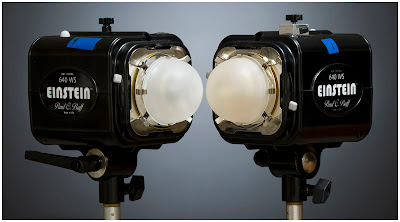
Remember when we talked about gelling your light mods, and how some almost aren't worth the trouble?

If you frequently light people with large soft boxes, you can choose to warm your light up right at the source. Read more ยป


Strobist

 
Comments Off on Warm Your Big Flash at the Source with Glass Shells

Posted in Photography


Computer History Museum shares original Adobe Photoshop source code

16 Feb

splashscreen.png

The source code of the original version of Adobe Photoshop has been made available by The Computer History Museum, based in California. Photoshop started off in the 1980s as a program called ‘Display’ written by Thomas Knoll, before being renamed ‘Photoshop’ in 1990 – the year that the first version of the software shipped to customers. The download, which is available for non-commercial use with the permission of Adobe, consists of around 128,000 lines of code. Click through for more details (and some nostalgia-inducing screenshots of Photoshop 1).

News: Digital Photography Review (dpreview.com)

 
Comments Off on Computer History Museum shares original Adobe Photoshop source code

Posted in Uncategorized


Connect: Using your tablet as a photographic light source

23 Oct

lightsource.png

Connect: when you’re not using it to browse the web, show-off your photos or check your e-mail, have you considered using your tablet computer as a light source for photography. It may not offer a high-speed sync mode but, with an inexpensive app, it can open up some creative opportunities.

News: Digital Photography Review (dpreview.com)

 
Comments Off on Connect: Using your tablet as a photographic light source

Posted in Uncategorized


Half life source : Beginning 3D Anaglyph

11 Sep

Half life source the beginning with highest 3D effect .3D Anaglyph (red , blue cyan ) glasses needed Half-Life: Source is a digitally remastered version of the critically acclaimed and best selling PC game half life (1998) , enhanced via Source technology to include physics simulation, enhanced effects, and more. The character is introduced as a theoretical physicist working at the Black Mesa Research Facility and involved in an experiment which accidentally opens an interdimensional portal, releasing confused, hostile beings into the complex. In the first Half-Life, the player, as Gordon Freeman, fights through the facility alongside fellow employees, engaging the aliens as well as a military unit sent in to contain the situation and silence any surviving witnesses. In its sequel, Half-Life 2, Gordon is introduced to a dystopian world years after the Black Mesa incident, along with an interdimensional imperial force known as the Combine that took advantage of the interdimensional portals and has established itself as the ruling force on Earth. Gordon joins the human resistance fighters and aids them in their struggle against their oppressors.
Video Rating: 4 / 5

 
Comments Off on Half life source : Beginning 3D Anaglyph

Posted in 3D Videos


Miscellaneous Software – Open Source Freeware to Encrypt Files

20 May

AxCrypt integrates with Windows Explorer, allowing you to encrypt and decrypt files that need to remain private.

If you need to distribute files with private information to areas where those not intended to view their contents might also have access, consider AxCrypt. AxCrypt is an open source application that allows you to encrypt individual files on a Windows machine with 128-bit key encryption.

Files can be encrypted via right-clicking in Explorer, choosing “AxCrypt”, then choosing to “Encrypt”, “Encrypt a copy”, or “Encrypt copy to EXE’. Passwords or keyfiles are supported for encryption, and if your computer is secure, you can choose to remember passwords so encrypted files are automatically decrypted when on your machine. Or, decrypting a file is as simple as double-clicking the newly encrypted file icon and entering decryption credentials….

Read more at MalekTips.
New Computer and Technology Help and Tips – MalekTips.Com

 
Comments Off on Miscellaneous Software – Open Source Freeware to Encrypt Files

Posted in Technology