RSS
 

Posts Tagged ‘Source’

Open source Raw processor Darktable gets substantial 3.2 update

13 Aug

Version 3.2.1 (3.2.0 was skipped from public release due to last minute bug fixes) of darktable, an open source raw photo developer available for many operating systems, is now available. This marks a major departure from the software’s typical annual release schedule. darktable’s team states, ‘The unfortunate state of global health has led to a marked increase in contributions and improvements. On top of that, version, 3.4 is still scheduled for Christmas 2020. 2020 will therefore be the first year in which the darktable team will have the pleasure to offer you two major versions.’ darktable version 3.0 was released around Christmas 2019.

There are numerous new features and upgrades in darktable 3.2.1. As soon as you launch the software, you will be met with a refined user interface, including a major overhaul to the lighttable, which is the software’s library and photo browser. There are a variety of new overlay modes on thumbnails, including quick access to organizational tools such as ratings, labels and more.

Digital asset management has been improved in the latest release. The metadata editor has been improved with a pair of additional fields: notes and version name. Further, users can expect improved tag management, seven new collection filters and additional image information in the information module.

darktable version 3.2 includes the new negadoctor module, designed to allow photographers to capture digital images of their film negatives and process them with many useful controls and settings. Image credit: darktable

For photographers who want to work with scanned film negatives, the old film negative invert module had a problem, it only worked on non-demosaiced image data. This means that it did not work with negatives scanned using a digital camera. Version 3.2.1 of darktable includes a new module, negadoctor, which is based on the Kodak Cineon sensitometry system developed in the 1990s. There is a lot to discuss when it comes to negadoctor, so if you are interested in using your digital camera to scan negatives, I recommend heading to darktable’s article about version 3.2.1 to read more about how the new module operators and what settings you will have access to when working on scanned image files.

With darktable 2.6, the team introduced filmic to improve color in scenes with wide dynamic range. The filmic module saw major improvements in version 3.0 and has been further improved with darktable 3.2.1. New color science has been implement for improved handling of highlights during editing.

The lighttable in darktable 3.2 includes improved performance, new visual options and a refined user interface. Image credit: darktable

In terms of image editing, the histogram in darktable incorporates a pair of major new features. First, you can now adjust the histogram height size. Secondly, there’s a new RGB parade mode. This displays waveforms that represent the levels of each of the red, green and blue layers. With this mode, you can better visualize the distribution of color components in your image. Although not visible, the histogram has been rewritten for better performance.

With respect to performance, Rico Richardson on YouTube has published a new hands-on video detailing the improvements in darktable 3.2.1 and he remarks that the software is quicker and smoother overall. You can see that video below. If you are interested in using the free, open source darktable software for your photo editing, I highly recommend visiting his channel for many tutorial videos.

There are a lot of new features in darktable 3.2.1. If you’d like to download the latest version or even try darktable for the first time, visit the installation page. Additional information about the darktable 3.2.1 release can be found on Github. User manuals, downloadable styles, a book on using darktable to process your photos and many tutorials can be found here.

Articles: Digital Photography Review (dpreview.com)

 
Comments Off on Open source Raw processor Darktable gets substantial 3.2 update

Posted in Uncategorized


Unsplash: The Perfect Source for Free Images?

14 May

Have you ever wanted to make your life simpler when it comes to finding stock photos, and by simpler I mean not dealing with confusing licenses, being afraid that one day an image you used may change its license, and not paying for subscriptions or collections of images? Well you are in luck as today I will be going into Continue Reading

The post Unsplash: The Perfect Source for Free Images? appeared first on Photodoto.


Photodoto

 
Comments Off on Unsplash: The Perfect Source for Free Images?

Posted in Photography


Redditor uncovers possible price of Sigma’s fp camera in product page source code

08 Oct

Sigma hasn’t officially revealed the pricing of its fp full-frame mirrorless camera, but a clever Redditor discovered what is believed to be the price by looking through the source code of the fp product page on Sigma’s website.

Though Sigma has corrected its mistake and removed the information from the source code of its website, Redditor u/jadware initially made the discovery and Redditor u/ForwardTwo captured the above screenshot showing the pricing information while it was still live on Sigma’s website. The information, which revealed the price to be $ 1,899, was previously visible under the meta property tag ‘og:price:amount’ when you searched for ‘1899’ within the source code of the website.

This information still isn’t definitive, but it seems like a reasonable price point for the camera and the fact all signs of the price have since been removed lend credence to the possibility of the Sigma fp costing $ 1,899. Nokishita has also published pricing information, which puts it around the $ 1,899 price point (h/t Mistral75). Previous rumors have suggested the Sigma fp will be released on October 20th, so it shouldn’t be much longer until we find out definitively.


Image credits: Screenshot by u/ForwardTwo, used with permission.

Articles: Digital Photography Review (dpreview.com)

 
Comments Off on Redditor uncovers possible price of Sigma’s fp camera in product page source code

Posted in Uncategorized


Video: How to upcycle old TVs and monitors into a natural-looking light source

16 Aug

Matt of YouTube channel DIY Perks has shared a video showing how old televisions and computer monitors can be repurposed to create a natural-looking light source that gives off a similar look to window light.

The 13-minute video walks through the entire process, with Matt taking the time to explain each step of the project and each element involved in upcycling an otherwise faulty display into a cheap, DIY light source.

A screenshot from the video showing the difference the fresnel lens panel makes in preventing light falloff.

One of the key components that makes the light coming from TV and monitor backlights look so natural is a fresnel lens. As Matt explains in the video, these fresnel lenses, combined with additional diffusers, helps to reduce the inverse square law.

The process itself is a bit cumbersome and will vary greatly from one TV/monitor to the next, but the basic principles seem to apply to most displays. You can either choose to re-wire the light source used in the original display or use Matt’s more convenient solution, which is to remove the original light source and put LED light strips in place so wiring and powering the setup is more convenient. Matt even links his preferred LED light strips, which have a decent CRI rating for the most natural-looking light.

A screenshot from the above video showing Matt reinstalling the diffusion panel in one of his upcycled light builds.

Unless you have the tools on hand, it isn’t likely an evening project, but it doesn’t appear to be too difficult either, especially considering similarly-sized light sources will come at a much higher cost than the DIY solution.

Of course, be sure to properly recycle any components not used in the rebuild to minimize waste.

Articles: Digital Photography Review (dpreview.com)

 
Comments Off on Video: How to upcycle old TVs and monitors into a natural-looking light source

Posted in Uncategorized


Open source image editing program digiKam now has video support, new export tools and more

22 Feb

digiKam is an open-source photo management application that runs on Linux, Windows, and MacOS platforms and comes with tools for importing, managing, editing, and sharing photos and raw files.

Now version 6.0.0 of digiKam has been released after a 2-year development phase and comes with a heap of new features and improvements.

The biggest news is that the software can now also handle video files, offering many of the importing, sharing and editing functions that are also available for still image. Videos can also be played back without the need for an external player.

In addition import/export web-service tools are now available across all modules in digiKam – LightTable, Image editor and Showfoto. The same is true for other tools, such as metadata and geolocation editors, allowing for a more seamless user experience.

There are also new tools to export your images directly to Pinterest as well as the Microsoft OneDrive and Box cloud storage services, and the Raw engine has been updated to process images from a long list of new cameras and smartphone.

In addition to the new features the digiKam team says it has been able to clean the applications code in order to simplify application compilation, packaging and maintenance for the future.

For a full list of new features and supported cameras, download links and more detail about the work that has gone into the update, head over to the digiKam website.

Articles: Digital Photography Review (dpreview.com)

 
Comments Off on Open source image editing program digiKam now has video support, new export tools and more

Posted in Uncategorized


SCL-OE-04: Cheap, Portable Outdoor Light Source

15 Sep

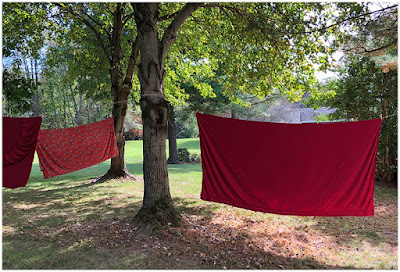
No matter how long you have been doing something, be it lighting or photography or, well, anything, you're never too old to be dumbstruck by a cool new idea.

Take the linens drying on the line above, for example. In the right frame of mind they are essentially super-portable outdoor light sources.

Read more »
Strobist

 
Comments Off on SCL-OE-04: Cheap, Portable Outdoor Light Source

Posted in Photography


Google just made the tech behind its ‘portrait mode’ open source

14 Mar

Semantic image segmentation is the task of categorizing every pixel in an image and assigning it a semantic label, such as “road”, “sky”, “person” or “dog”. And now, Google has released its latest image segmentation model as open source, making it available to any developers whose apps could benefit from the technology.

The function can be used in many ways. One recent application in the world of smartphones is the portrait mode on Google’s latest Pixel 2 devices. Here, semantic image segmentation is used to help separate objects in the foreground from the image background. However, you could also imagine applications for optimizing auto exposure or color settings.

This kind of pixel-precise labeling requires a higher localization accuracy than other object recognition technologies, but can also deliver higher-quality results. The good news is that Google has now released its latest image segmentation model, DeepLab-v3+, as open source, making it available to any developers who might want to bake it into their own applications.

Modern semantic image segmentation systems built on top of convolutional neural networks (CNNs) have reached accuracy levels that were hard to imagine even five years ago, thanks to advances in methods, hardware, and datasets. We hope that publicly sharing our system with the community will make it easier for other groups in academia and industry to reproduce and further improve upon state-of-art systems, train models on new datasets, and envision new applications for this technology.

If you are interested in finding out more about DeepLab-v3+, head over to the Google Research Blog for more details.

Articles: Digital Photography Review (dpreview.com)

 
Comments Off on Google just made the tech behind its ‘portrait mode’ open source

Posted in Uncategorized


Lytro might open source its light-field photo sharing platform

12 Dec

Last week, light-field photography pioneer Lytro announced that it would discontinue the pictures.lytro.com platform, which allowed Lytro users to share their refocusable ‘living’ light-field images with others online and through Facebook.

The move, which is a direct result of Lytro changing its focus from consumer products to the professional market, was not received well by existing owners of the original Lytro and the Lytro ILLUM cameras. This more or less made their images unsharable in their interactive form. All may not be lost, though.

It appears the company has received enough negative customer feedback to consider allowing the developer community to host its ‘living pictures’ online without its involvement. In other words: Lytro might open source the platform.

Lytro explained this potential move in a new announcement, which reads:

We are currently evaluating this request but have not yet reached a conclusion. Although we fully trust that the passionate community of developers around Light Field photography can come up with brilliant solutions, there are some challenges to resolve around intellectual property and we cannot promise that it is possible.

If you currently own a Lytro camera you can sign up here for email updates on the issue. No matter how the story ends, it is a sobering reminder that today’s complex imaging hardware can far too easily lose some—if not all—of its functionality once software support ends.

Articles: Digital Photography Review (dpreview.com)

 
Comments Off on Lytro might open source its light-field photo sharing platform

Posted in Uncategorized


Google Guetzli is an open source JPEG encoder that creates 35% smaller files

18 Mar
20×24 pixel zoomed areas from a picture of a cat’s eye. Uncompressed original on the left. Guetzli (on the right) shows less ringing artefacts than libjpeg (middle) without requiring a larger file size. Image and caption via Google 

Google has announced the open source release of Guetzli, a new JPEG encoder able to reduce a JPEG’s file size by up to 35%, without any significant loss of quality. Per a study detailing the algorithm, Guetzli ‘aims to produce visually indistinguishable images at a lower bit-rate than other common JPEG encoders,’ including libjpeg. However, the study goes on to caution that the compression tool is ‘currently extremely slow.’

Google announced the new encoder on Thursday, detailing it as a proof-of-concept that can be freely used by webmasters and others to reduce the size of JPEG image files. The algorithm merges ‘advanced psychovisual models with lossy compression techniques,’ according to the study, to produce high-quality compressed images. It’s a different approach than that taken by other Google projects we’ve looked at recently like RAISR. Google expresses a desire to see future compression research that is inspired by Guetzli’s own psychovisual underpinnings.

Though Google largely details Guetzli’s benefits as they pertain to webmasters (namely faster Web page loading), the algorithm is available for anyone to download and use via Github. Instructions for setting up and using the tool are provided on the Github page for multiple platforms, including Windows, macOS and Linux.

Via: Google Blog

Articles: Digital Photography Review (dpreview.com)

 
Comments Off on Google Guetzli is an open source JPEG encoder that creates 35% smaller files

Posted in Uncategorized


Crash drones over and over again with Microsoft’s open source simulator

17 Feb

Microsoft has released a free, open source simulator to help engineers test drones in a photo-realistic environment. The AirSim, as it’s called, offers a space for developers to run simulated flights again and again, gathering data and seeing how a drone’s onboard perception systems react to a complex environment. Naturally, that’s a lot cheaper and less time-consuming than studying repeated real-world drone crashes.

The cross-platform software supports manual or programmatically controlled flights, and thanks to its open source nature, data gathered from test flights can be easily used to create new algorithms to guide drone operation. There you have it – hundreds of simulated drone crashes aren’t just amusing to watch, they may be actually useful.

The code is available for download via GitHub.

Articles: Digital Photography Review (dpreview.com)

 
Comments Off on Crash drones over and over again with Microsoft’s open source simulator

Posted in Uncategorized