RSS
 

Posts Tagged ‘Smartphone’

HTC launches U11 flagship smartphone

17 May

Taiwanese manufacturer HTC today launched it latest flagship smartphone, the HTC U11. The new model’s stand-out features is called Edge Sense. It lets you squeeze the phone’s edge in order to execute specific actions, for example take a picture.

The main camera specification looks similar to the HTC 10 but the 12MP BSI CMOS sensor with 1.4 micron pixel size has been updated. Light is captured through a fast F1.7 aperture and optical image stabilization is available as well. The camera also features a dual-LED flash and 4K video recording. In video mode the U11 offers 3D audio recording which is powered by 4 microphones. The front camera comes with a 16MP sensor and F2.0 aperture. 

Images can be composed and viewed on a 5.5-inch QHD Super LCD 5 display that is covered with Gorilla Glass 5 for protection. The Android 7.1 OS is powered by a Snapdragon 835 chipset and 4GB of RAM. 64GB of on-board storage are expandable via a microSD-slot. The U11 comes with a 3,000 mAh battery, which supports Qualcomm’s Quick Charge 3.0 as well as a power saving mode. Unfortunately the new HTC has to make do without a 3.5mm headset jack, though. 

All the technology is wrapped up in a body with a reflecting glass back and IP67 certification for water and dust resistance. The new device will be available in Amazing Silver, Sapphire Blue, Brilliant Black, Ice White, and Solar Red worldwide from May 2017. In Europe the U11 will set you back €749 (US$ 825). No pricing information for the US has been released yet.

Key specifications:

  • 12MP BSI CMOS sensor with 1.4?m pixel
  • F1.7 aperture
  • Optical Image Stabilization (OIS)
  • Dual LED flash
  • 4K video recording with Hi-Res audio and 3D audio recording
  • Pro mode with manual control, 32 sec. long exposure, and RAW format support
  • Slow motion video (1080P@120 fps)
  • 16MP/F2.0 front camera
  • 5.5-inch QHD Super LCD display
  • Snapdragon 835 chipset
  • 4GB RAM / 64GB storage

Articles: Digital Photography Review (dpreview.com)

 
Comments Off on HTC launches U11 flagship smartphone

Posted in Uncategorized


Google software engineer shows what’s possible with smartphone cameras in low light

27 Apr
Image: Florian Kainz/Google

On a full moon night last year, Google software engineer Florian Kainz took a photo of the Golden Gate bridge and the City of San Francisco in the background with professional camera equipment: a Canon EOS-1D X and a Zeiss Otus 28mm F1.4 ZE lens. 

When he showed the results to his colleagues at Google Gcam, a team that focuses on computational photography, they challenged him to re-take the same shot with a smartphone camera. Google’s HDR+ camera mode on the Google Nexus and Pixel phones is one of Gcam’s most interesting products. It allows for decent image quality at low light levels by shooting a burst of up to ten short exposures and averaging them them into a single image, reducing blur while capturing enough total light for a good exposure. 

However, Florian being an engineer, wanted to find out what smartphone camera can do when taken to the current limits of technology and wrote an Android camera app with manual control over exposure time, ISO and focus distance. When the shutter button is pressed the app waits a few seconds and then records up to 64 frames with the selected settings. The app saves DNG raw files which can then be downloaded for processing on a PC. 

He used the app to capture several night scenes, including an image of the night sky, with a Nexus 6P smartphone, which is capable of shutter speeds up to 2 seconds at high ISOs. On each occasion he shot an additional burst of black frames after covering the camera lens with opaque adhesive tape. Back at the office the frames were combined in Photoshop. Individual images were, as you would expect, very noisy, but computing the mean of all 32 frames cleaned up most of the grain, and subtracting the mean of the 32 black frames removed faint grid-like patterns caused by local variations in the sensor’s black level.

The results are very impressive indeed. At 9 to 10MP the images are smaller than the output of most current DSLRs but the photos are sharp across the frame, there is little noise and dynamic range is surprisingly good. Getting to those results took a lot of post-processing work but with smartphone processing becoming even more powerful it should only be a question of time before the sort of complex processing that Florian did manually in Photoshop can be done on the device. You can see all the image results in full resolution and read Florian’s detailed description of his capture and editing workflow on the Google Research Blog.

 Image: Florian Kainz/Google

Articles: Digital Photography Review (dpreview.com)

 
Comments Off on Google software engineer shows what’s possible with smartphone cameras in low light

Posted in Uncategorized


Apple captures 79 percent of global smartphone profits with 14.5 percent market share

09 Mar

According to Flickr the iPhone is the most popular camera(s) in the world and even 10 years after the original model was launched, iPhone continues to generate enormous profits for Apple. According to research from Strategy Analytics, that was obtained by The Korea Herald, in 2016 the iPhone captured 79 percent of profits in the global smartphone market, at a market share of only 14.5 percent. In absolute numbers that is $ 44.9 billion out of a $ 53.7 billion total profit.

Apple’s biggest rival Samsung leads the market share ranking in front of Apple at 20.7 percent but only grabs 14.6 percent of the profit, amounting to $ 8.3 billion. This is a similar picture to previous years when, thanks to very high margins, Apple was able to claim a much bigger proportion of smartphone profits than its market share would suggest. 

With the upcoming iPhone 8 models expected to bring a range of innovative features at what are projected to be high price points, the situation is unlikely to change in 2017. If Apple continues to invest profits into camera development, we could all benefit from its success.

Articles: Digital Photography Review (dpreview.com)

 
Comments Off on Apple captures 79 percent of global smartphone profits with 14.5 percent market share

Posted in Uncategorized


Field Test: The Hasselblad True Zoom Camera and Moto Z Smartphone

09 Mar

It’s impossible to ignore the fact that camera phones are becoming increasingly better. With impressive image quality and the ability to add on and shoot with mobile phone lenses, the case for replacing your dedicated camera with your cell phone is becoming more compelling by the day. However, one aspect of camera phones really hasn’t seen much improvement: ergonomics. Shooting with a camera phone is for some still pretty awkward and difficult to get used to. Here’s where the Hasselblad True Zoom comes into play.

Below are some notes and observations from a week-long experiment of shooting with the Hasselblad True Zoom and Moto Z smartphone.

Field Test: The Hasselblad True Zoom Camera and Moto Z Smartphone

What is the Hasselblad True Zoom?

The Hasselblad True Zoom makes your smartphone feel and function like a point-and-shoot camera. It is one of many Moto Mods available to add extra features to Motorola Moto Z smartphones, so all mods are limited to use on the Moto Z phones only. All Moto Mods attach to the phone via extra strong magnets, and can easily be detached.

To be perfectly honest, the Moto Z smartphones have superb native cameras. The Moto Z Force Droid, in particular, is very impressive and it even outperforms the Apple iPhone 7. This is to say that image quality is great with or without the Hasselblad True Zoom mod, but it is certainly nice to have some of the mod’s extra features.

Field Test: The Hasselblad True Zoom Camera and Moto Z Smartphone

Hasselblad True Zoom Specs

  • Compatible phones: Moto Z Droid, Moto Z Force Droid, Moto Z Play Droid
  • Dimensions / Weight: 152.3 x 72.9 x 9.0 – 15.1 mm / 145g
  • Sensor resolution: 12MP
  • Video resolution: 1080p Full HD at 30fps
  • Sensor size / Pixel size: 1/2.3-inch / 1.55 um
  • Aperture: f/3.5-5.6
  • Zoom: 10x optical/4x digital
  • Flash: Xenon flash
  • Capture modes: Photo, panorama, video, professional, night landscape, night portrait, sports, day landscape, back light portrait
  • Storage Internal phone: 32GB-64GB microSD
  • Price: $ 250
  • Carrying case included

best smartphone photography camera

The good

By far the best part of about the Hasselblad True Zoom is the fact that it allows you to use a phone (somewhat) like a real camera!

Physical camera controls

For those of us who despise having to pinch to zoom on a mobile phone, the Hasselblad True Zoom is a welcome relief. The mod is complete with a physical shutter release button and a physical zoom switch to operate the mod’s 25-250mm-equivalent range. There’s also an on/off button to turn the camera off and on without having to first unlock the phone.

Field Test: The Hasselblad True Zoom Camera and Moto Z Smartphone

Ability to control the camera via a touchscreen

After the mod is attached, the phone’s stock camera app switches over to “Professional mode.” This mode allows for manual camera control via the phone’s touchscreen. While you don’t have true manual control over every aspect of the camera (more on that below), you can adjust certain features such as ISO, capture mode (e.g. Action, Portrait mode, etc.), and choose to shoot in RAW or JPG format.

Field Test: The Hasselblad True Zoom Camera and Moto Z Smartphone

Professional mode options.

Comes with a carrying case

While you can operate your phone as usual even with the mod attached, you’ll probably want to remove it occasionally. Luckily, a solid carrying case with a wrist strap is included so you can keep your mod safe when you aren’t using it.

What could be improved

For every positive feature listed above, there’s an aspect that could be improved.

Limited manual control

Manual camera control on the Hasselblad True Zoom mod is still pretty limited. While it’s nice to be able to adjust the ISO, it’s not possible to adjust aperture or shutter speed. It’s a real shame, considering the native f/3.5-5.6 aperture available.

Field Test: The Hasselblad True Zoom Camera and Moto Z Smartphone

Extra physical features missing

The addition of a physical shutter button and zoom toggle is very welcomed and makes it easier to operate your phone like a true camera. However, two key features are missing.

First is a wrist strap that attaches to either the phone or camera. Considering how expensive the devices are and how bulky they can get, a strap would add a sense of security.

Second is a tripod thread. Since you don’t have full manual control over the camera, many low lighting shots revert to settings with incredibly slow shutter speeds, resulting in blurry images when shot handheld. Also, trying to take advantage of the mod’s 10x zoom feature while also holding the camera steady is incredibly tricky. There are some sample images below that demonstrate these focusing problems. The ability to shoot with a tripod would greatly enhance the resulting images.

Field Test: The Hasselblad True Zoom Camera and Moto Z Smartphone

Size

It’s impossible to ignore the allure of being able to shoot and carry a Hasselblad camera that fits into your pocket. The only problem is this camera won’t quite fit in your pocket unless you’ve got exceptionally large ones. While the bare Moto Z phone is slim enough to be tucked into most pockets, the camera mod adds just enough bulk to make the device difficult to carry. The carrying case is nice for protecting the mod, but it’s an awkward size that won’t fit into most pockets or purses.

Uncertain future

Moto Mods are a brand new concept for Motorola, a company recently taken over by Lenovo. Thus, the future of the Moto Z phone line and Moto Mods as a whole is pretty uncertain. No one knows if the next generation of Moto Z phones will be compatible with the Hasselblad True Zoom, or if the Moto Z line will continue at all. As a result, this can be a risky investment.

In Conclusion

The Hasselblad True Zoom is a step in the right direction for mobile photography. Having physical controls to better control smartphone cameras are welcome additions, but there is certainly room for improvement in future iterations.

What do you think about the idea of the Hasselblad True Zoom? Would you pick one up to try for yourself?

Hasselblad True Zoom Sample Images

The post Field Test: The Hasselblad True Zoom Camera and Moto Z Smartphone by Suzi Pratt appeared first on Digital Photography School.


Digital Photography School

 
Comments Off on Field Test: The Hasselblad True Zoom Camera and Moto Z Smartphone

Posted in Photography


OPPO 5x smartphone zoom system sample images

01 Mar

Yesterday smartphone maker OPPO announced an innovative 5x zoom system for smartphone cameras that uses a dual-camera in combination with a prism and periscope-style lens design. It’s only 5.7mm tall, and therefore could fit into even the thinnest smartphones. Unfortunately, OPPO did not release too much technical information but there are a few prototype devices available to shoot with at the OPPO both at the Mobile World Congress. We gave the camera a quick try, and had a closer look at the sample images and embedded EXIF to find out more.

The camera app on the prototype phones is kept very simple, with the main feature being a big zoom button. One tap on the latter makes the camera jump from wide-angle to a 2x zoom factor; a second tap jumps to the full 5x magnification. There are no intermediate zoom settings. The sample images below were taken at those respective lens settings and show a well-illuminated test scene at the OPPO booth.

 Wide-angle, ISO 189, 1/189 sec
 2x zoom, ISO 115, 1/100 sec
 5x zoom, ISO 111, 1/50 sec

The camera produces 12MP images and in the EXIF data aperture at all zoom settings is reported as F2.0. At ISO 189, sensor sensitivity is the highest at the wide-angle setting. It decreases to ISO 115 at the 2x zoom setting and ISO 111 at the 5x setting. Shutter speed is reported at 1/100 sec at the wide-angle and 2x setting and 1/50 sec at the tele setting.

There is no way of knowing if the reported EXIF is accurate but, looking at the scene and considering the tele-portion of the lens construction is optically stabilized, it could well be the case that at the tele settings the light fall-off on the OPPO system is much less significant than on a conventional zoom with changing apertures. The image quality of the samples seems to support the ISO data, with the zoomed images not showing noticeably more image noise or less detail than the wide-angle shot.

Of course, we are looking at a prototype device here and the image output of an eventual production phone might look very different. Nonetheless, the sample images out of the prototype do look promising and we hope to see an OPPO device with the 5x zoom system being launched soon.

Articles: Digital Photography Review (dpreview.com)

 
Comments Off on OPPO 5x smartphone zoom system sample images

Posted in Uncategorized


Fancy is a pocketable smartphone gimbal

16 Feb

Smartphone stabilizers are a great tool for capturing professional-looking video footage on your mobile device and are getting more powerful with every new generation. However, most current models have one thing in common: they are not really pocketable, making them more of a dedicated tool for serious video shooters rather than an everyday item for the average consumer. 

The Fancy Stabilizer is now out to change this. It is an electronic smartphone gimbal that takes up less space than the smartphone it is attached to. The makers of the Fancy, Chinese company Wewow, is currently running an Indiegogo campaign to fund the production of the device and claims it is the currently smallest and lightest smartphone gimbal on the market.

With just 43.5mm (1.7 in) wide, about 118mm (4.4 in) tall and 23mm (0.9 in) thick in its folded state, the Fancy Stabilizer easily fits in any small bag or even jacket pocket when not in use. It weighs just 180 grams. The phone is attached via an adjustable clip and an electronic stabilization system keeps your smartphone steady while walking or otherwise moving. Thanks to a standard tripod mount the device can also be attached to selfie sticks or most other types of camera support. 

In addition, Fancy comes with a LED light for added illumination and a small selfie mirror on the back. The built-in battery provides energy for eight hours of stabilization or alternatively can charge your smartphone. If this all sounds interesting to you, you can now reserve a Fancy Stabilizer for $ 89 on Indiegogo. The retail price is expected to be $ 128.

Articles: Digital Photography Review (dpreview.com)

 
Comments Off on Fancy is a pocketable smartphone gimbal

Posted in Uncategorized


8 Ways to Use Your Smartphone for Photography

14 Feb

What’s the most useful camera gear you carry with you? This is the most common question asked of photographers. Many will say a tripod or perhaps a lens, but how many people would have answered a Smartphone? Well, I’m sure there were more than a few.

The moment I saw the potential of smart devices was years ago when traveling with a friend in Japan. He had just bought an iPod touch, and everywhere we went he could show people his photos. It formed a lasting impression, and it wasn’t long before I had an iPod touch of my own. Now, of course, there are a plethora of smart devices available, and you can use your Smartphone for photography in many ways.
8 Ways to Use Your Smartphone for Photography

The Smartphone is great for many photography-related tasks.

1 – Use your phone for light painting

This is a really great and creative way for you to use your phone for photography. Using a Smartphone for light painting is the subject of this article: How to do Light Painting with a Piece of Fruit and a Cell Phone, so there is no need to elaborate on it too much here. The flashlight that comes with all phones these days can be used to both light the subject, and to light paint in the background.

You will, of course, need a tripod, a darkened room, and a camera capable of long exposures to make this work. In addition to the flashlight, you can also use the screen for light painting as well. The simplest way of doing this is to download a flashlight app. Now you can customize your light painting almost as much as you can with the pixelstick! Once you have chosen your background color, use this to light paint a pattern in a darkened room.

8 Ways to Use Your Smartphone for Photography

This photo was taken with a dSLR, but all the light painting was done with an iPhone 4.

2 – Download apps for your photography

There are many apps available for download that will help your photography, some are obvious and some you might not have considered. Tablet devices have many of the same apps as a Smartphone, though a phone can be handier to carry around. Here is a selective list of apps you might consider downloading to help with your photography.

  1. Suncalc (iOS version) – This app shows you the direction of the sun, and how that changes through the year. This is vital information when planning a photograph (for Android users here).
  2. Easy release (iOS version) – Store your model releases on the go, this app is accepted by major stock photography sites such as Getty images (Android here).
  3. Weather underground (iOS version) – This or any of the other weather apps provides information about weather conditions by the hour. This is great to know when planning the day you wish to photograph (for Android here).
  4. Pocket light meter – Always useful to have this, especially if you’re using off-camera flash (for Android here).
  5. Simple DoF calculator – Having this information to hand on your phone is always useful (Apple only but there are other Android options available).
  6. My Tide Times (iOS version) – Anyone photographing a coastal area needs to know the times for high and low tide. This can literally be a life saver and will help you plan your time effectively (Android version here).

3 – Never forget a location
8 Ways to Use Your Smartphone for Photography

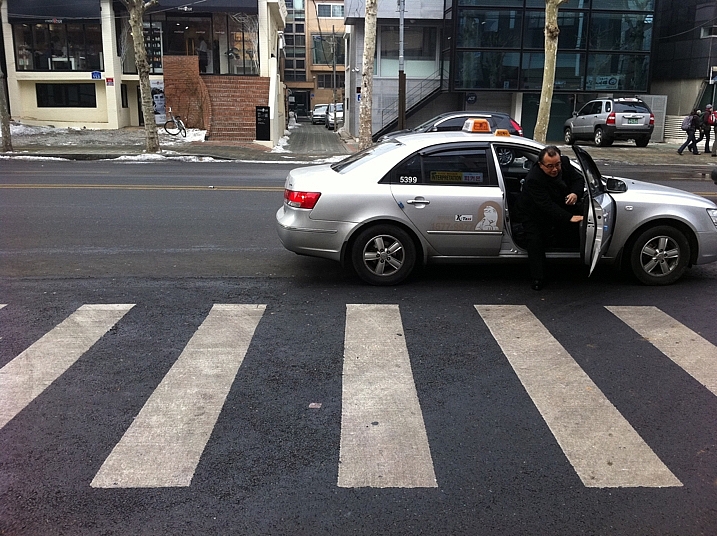
This photo was taken with an iPhone. The geotagging was used to return to the location later.

Location scouting is one of the most important things you can do as a photographer. This is a good practice to get into whether you’re a portrait or a landscape photographer. Having go-to locations is a must. It’s not always easy to remember locations, though, especially if the area is unfamiliar to you because you’re traveling. Fortunately, the map apps that come with or you download onto your Smartphone will help here. There are a couple of options for saving your locations.

  • Bookmark it – When standing at the place you want to return to simply bookmark it by dropping a pin at your current location, then leave a note for yourself about what to find there.
  • Photograph it – Your photographs taken on your Smartphone can be geotagged, so you can use this to help you both remember the place and what’s there to photograph. If you do this, remember to check that location services are turned on for your camera app.

8 Ways to Use Your Smartphone for Photography

The location for this music band shoot was scouted out before (see photo above). The photo was of course inspired by a famous music band from the UK.

4 – Share your photos in person, and on social media

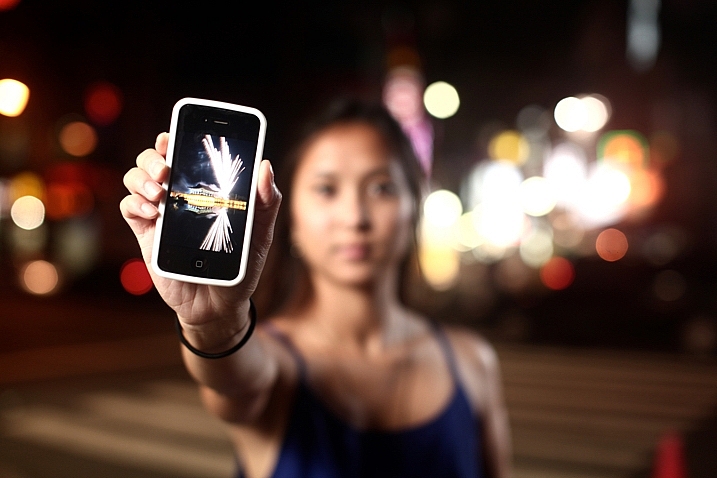
Taking your best photos with you to share with people is always smart, you never know who could be a future client. This is a great way to use your phone for photography as it often allows you build up a good rapport with other people. You should be prepared to look at their photos as well, remember most people have Smartphones these days.

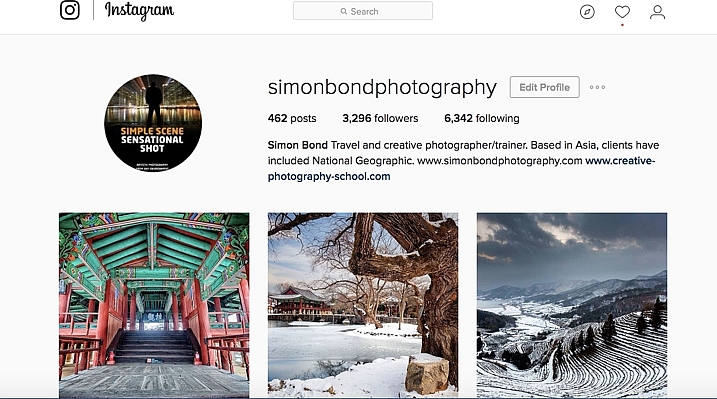
Of course, social media is a big player, and branching out of your geographical area is easier as a result. That means putting your very best photos on sites like Instagram, Facebook, and 500px. These sites are a vital part of getting yourself known as a photographer, and your Smartphone is at the center of that.
8 Ways to Use Your Smartphone for Photography

The use of social media sites like Facebook and Instagram to share your work is increasingly important.

5 – No external flash, no problem!

Photography is all about controlling the light, and a strobe or flash is a great tool for doing so. An alternative to a flash is your Smartphone in low light. This is because the flashlight on your phone can be used as a makeshift continuous studio light.

In order do this you will probably need to bump up your iso, and shoot with a large aperture. The use of multiple Smartphones will give you even more options. How about using one of them as a rim light?

8 Ways to Use Your Smartphone for Photography

The flashlight on Smartphones is great for lighting your subject.

6 – Use your phone for photography! It’s your second camera!

Having a second camera with you is never a bad idea, and if you’re doing commercial work it’s mandatory. A second DSLR camera body is heavy to carry, though, and if you’re out taking photos for your own pleasure not really necessary. Having a camera phone with you is often all the second camera you’ll need, you can do a lot with it. Why would you use your phone for photography when you already have a DSLR with you?

  • Fun shots: The biggest reason is for those informal behind the scenes photos with your friends.
  • Behind the scenes shots: You can use it to show the setup for your main photograph taken with your DSLR.
  • Second shots: When taking a photo with your main camera on a tripod, another photo opportunity presents itself. You don’t want to move your main camera, but a Smartphone photo will work.
  • Less intimidating: In street photography, a Smartphone is smaller and less intimidating.

8 Ways to Use Your Smartphone for Photography

This photo was taken with a Smartphone. It records a behind the scenes moment, while the main camera is on a tripod.

7 – Make lists, and store them

It’s said good photography happens when planning and spontaneity come together. There is a lot of preparation that goes into planning, and one of the best things you can do is make a list. The notes app on your Smartphone is another great way to use it for photography.

Making your pre-shoot list gives you a clear focus for your work. The really great thing about having that list with you is you can add to it on location. There will always be potential photos you could take in the future, which you will only see when you arrive. Note the new photo ideas down, and Geotag the location if needed as well. Evernote is another great app that works on any device, syncs with your home computer and you can access from anywhere with a web browser.

8 Ways to Use Your Smartphone for Photography

Make use of the notes function in your phone. You can note down ideas so you don’t forget them in the future.

8 – Use your phone . . . as a phone!

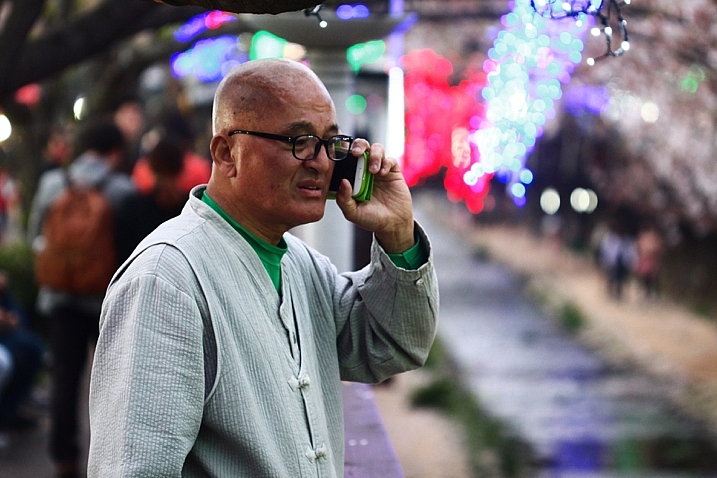
It’s easy to forget the primary function of your techno slab is to be a phone! That’s a mighty useful thing in photography for any business related activities. It goes without saying that your website, e-mail footer, and business cards, should all have your phone contact details included. Those opportunities to shoot commercially will improve you as a photographer as well, it will push you to deliver results. Even if you don’t have a photography business a phone is still great for contacting your photography friends! Your friends are always good to meet up with,

Even if you don’t have a photography business a phone is still great for contacting your photography friends! Your friends are always good to meet up with, collaborate, and bounce ideas off each other.
8 Ways to Use Your Smartphone for Photography

As stunning an idea as this may sound. You can use your phone to make phone calls!

The Smartphone, how will you use yours for photography?

The diversity of today’s Smartphones means they are so much more than just phones. As you can see, there are many ways you can use your phone to enhance your photography, we’d love to know how you use yours.

Are there any other ways in which you have used your phone, that aren’t mentioned here? The phone is a great device to have with you that takes up little space and doesn’t weigh you down. The chances are you have it with you anyway, so try out some of the ideas above.

googletag.cmd.push(function() {
tablet_slots.push( googletag.defineSlot( “/1005424/_dPSv4_tab-all-article-bottom_(300×250)”, [300, 250], “pb-ad-78623” ).addService( googletag.pubads() ) ); } );

googletag.cmd.push(function() {
mobile_slots.push( googletag.defineSlot( “/1005424/_dPSv4_mob-all-article-bottom_(300×250)”, [300, 250], “pb-ad-78158” ).addService( googletag.pubads() ) ); } );

The post 8 Ways to Use Your Smartphone for Photography by Simon Bond appeared first on Digital Photography School.


Digital Photography School

 
Comments Off on 8 Ways to Use Your Smartphone for Photography

Posted in Photography


Pixlplay turns a smartphone into a big, durable ‘camera’ for kids

11 Feb

A new Kickstarter project aims to make digital photography easily accessible to children, with a product that is relatively inexpensive and durable. Called Pixlplay, the device is essentially a smartphone case shaped like a classic 35mm film camera, and it includes moveable dials and knobs, as well as a functional shutter button.

The Pixlplay case features a pair of rubber handgrips, adjustable clamps for accommodating phones of various sizes, and a 3.5mm cable that plugs into the phone’s audio jack to power the case’s shutter button. Photos can be snapped through the phone’s built-in camera app using the shutter button, or by touching the phone’s screen (a touch-sensitive screen protector is built into the case). Camera settings can also be adjusted by touching the screen.

Pixlplay features child-resistant dual latches to help prevent children from removing the smartphone, which is offered some protection from drops and dirt while inside the case. Included activity sheets, meanwhile, teach kids the basics about photography, while a dedicated iOS photo editing app allows kids to add frames and silly stickers to their photos. There doesn’t seem to be an Android app, however the case itself can be used with Android and Windows phones.

The case’s maximum phone dimensions are 5.59 x 2.95 x 0.374 in / 142 x 75 x 9.5mm, making it suitable for the iPhone 7 and older models, as well as most Android smartphones. The product’s maker, Pixl Toys, is currently seeking funding for Pixlplay on Kickstarter, where it has raised about $ 13,000 of its $ 25,000 goal. A single Pixlplay camera is being offered to backers who pledge at least $ 25, with shipping estimated to start in June.

Via: VentureBeat

Articles: Digital Photography Review (dpreview.com)

 
Comments Off on Pixlplay turns a smartphone into a big, durable ‘camera’ for kids

Posted in Uncategorized


Sony shows off 3-layer stacked smartphone image sensor that can shoot 1000 fps at 1080p

08 Feb

Sony has today announced the development of a 3-layer stacked CMOS image sensor with DRAM for smartphones, making it possible to capture video at 1000 fps. The new chip comes with a DRAM layer in addition to the conventional 2-layer stacked CMOS structure with a back-illuminated layer of photo-sites and a circuit layer for signal processing. The DRAM acts as a temporary buffer for image data that is recorded at very high speeds, before it is put out at normal speed to a conventional image signal processor.

The new design results in very fast readout speeds of 1/120sec for a 19.3 MP image which is approximately 4x faster than conventional chips. Due to the reduction of time it takes to read each line of pixels, the so-called Jello-effect, which occurs when shooting fast-moving subjects on cameras without mechanical shutter, has been greatly reduced.  

The sensor has also been designed to keep noise generated between the circuits on each of the three layers at a minimum. Given the technology is currently still in development stage, there is no way of knowing when it will appear in any production devices. That said, looking at the quite impressive slow-motion footage in the sample video reel below, we sincerely hope it won’t be too long. 

Articles: Digital Photography Review (dpreview.com)

 
Comments Off on Sony shows off 3-layer stacked smartphone image sensor that can shoot 1000 fps at 1080p

Posted in Uncategorized


Selfly pocket-sized camera drone snaps to a smartphone when not in use

28 Jan

A new pocket-sized consumer camera drone has launched on the crowdfunding website Kickstarter, where the team behind it seeks $ 125k in funding. Called Selfly, this drone is dubbed a ‘smart flying phone case camera’ due to its unique storage design. When not in use, Selfly folds into a compact rectangular shape that can be attached to the back of an included smartphone case.

Selfly is a small autonomous camera drone that, when stored, folds into a 9mm phone case. When removed from the case, four rotors appear to automatically lift the drone into the air where it hovers by default. The related mobile app offers optional control modes, including ‘Stick Control,’ ‘Voice Control,’ and ‘Fly By Picture.’ 

The integrated camera features an 8MP sensor able to record video at 1080p/30fps; live video broadcasting is supported, though flight time tops out at only five minutes. The drone is compatible with all 4″ to 6″ smartphones via its Universal Flip Cover Case. Additionally, Selfly has dedicated phone cases for the iPhone 6/6 Plus/7/7 Plus, Galaxy S6/7 edge, Galaxy 7, and the Nexus 6.

Selfly is similar to the pocket-sized AirSelfie drone that launched on Kickstarter late last year. That drone’s campaign has ended after exceeding its funding goal; backers pledged more than €570,000.

Via: News Atlas

Articles: Digital Photography Review (dpreview.com)

 
Comments Off on Selfly pocket-sized camera drone snaps to a smartphone when not in use

Posted in Uncategorized