Samsung has started shipping its Wi-Fi-enabled DV150F dual-LCD and WB250F compact cameras at retail prices of $ 249.99 and $ 149.99 respectively. Announced at the CES 2013 tradeshow, the WB250F is an 18x, 24-432mm equiv compact superzoom with a 3.0″ touch screen and the company’s latest Wi-Fi implementation – dubbed ‘Smart 2.0.’ The DV150F is 16MP CCD with a 25-125mm equiv zoom and includes a 2.7″ LCD and a 1.5″ front LCD. UK and European pricing and availability have yet to be confirmed.
[ By WebUrbanist in Technology & Vehicles & Mods. ]
With prototypes set to hit the pavement in the Netherlands next year, these interactive interventions take innovation back from a focus on the car and put it right on the road.
Examples include: glow-in-the-dark paints that recharge by day and illuminate by night, wind-driven roadside lamps, energy-saving motion-sensor lights, temperature- and moisture-sensitive weather- and road-condition displays with color-changing paint to warn of icing, and even dedicated induction-priority lanes to magnetically recharge electric cars.
The Dutch Design Award-winning team behind these designs comes from Studio Roosegaarde and Heijmans Infrastructure. Their work spans green technologies and safety measures that will merge with real-life lanes, providing useful feedback and assistance to drivers.
“It’s about safety, creating awareness but also making roads energy-neutral in terms of lighting … and most of all: creating the experience of an icon, the Route 66 of the future.” While we may eventually see a future where cars drive themselves, for now we live in a world where high speeds bring real dangers, and invention has not matched the acceleration of actual drivers. Time and experiments will tell how well these ideas actually work when applied to asphalt.
Want More? Click for Great Related Content on WebUrbanist:
Best Print This: 12 High-Tech & 3D Printer Design Ideas
Concept designs that use coffee dregs or pencil stubs instead of ink, forgo paper altogether or even produce 3D objects bring printers into the 21st century.
Click Here to Read More »»
Gallery-Worthy Gadgetry: 10 Terrific High-Tech Art Projects
Technology makes our lives better, but it can also make the world a more beautiful place. These 10 art projects all use technology to create compelling images.
Click Here to Read More »»
[ By WebUrbanist in Technology & Vehicles & Mods. ]
The Apple iPhone kickstarted the smartphone era, and in the process, introduced a huge number of people to photography for the first time, through photo sharing and image manipulation apps. However, the advent of so-called ‘smart cameras’, which run mobile operating systems but feature much larger sensors and zoom lenses, could threaten Apple’s dominance in the field of mobile photography. As the line blurs further between phones and connected cameras, how will Apple respond? Click through for our take on the possibilities at connect.dpreview.com.
Lightroom has two types of collections: regular Collections and Smart Collections. Smart Collections are live and they are created as a result of filtering your photos according to rules that you write. You cannot add an image to a Smart Collection by dragging and dropping it into the collection. You can’t remove an image from a Smart Collection just because you don’t want it in there – it can only be removed if it fails to meet the criteria you set up for the collection.
Smart collections are a handy way to create collections and to manage your photos and here I’ll show you how to make use of them.
Shipped Smart Collections
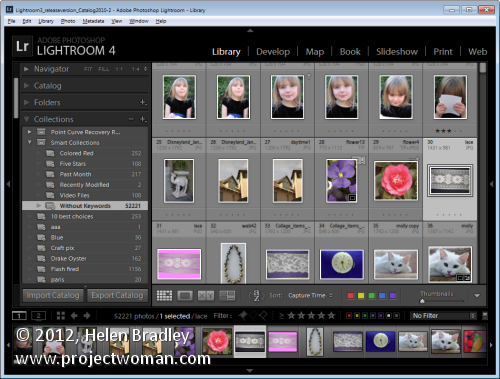
There are a few Smart Collections which ship with Lightroom. To find these, click the Collections panel in Lightroom and click on the Smart Collection Set. Click the Smart collection called Without Keywords. As its name suggests, this collection shows you all the images in your Lightroom catalog that do not have keywords associated with them.
If you’re like me you’ll want to close this one pretty quickly – it can be scary to see just how many images aren’t keyworded!
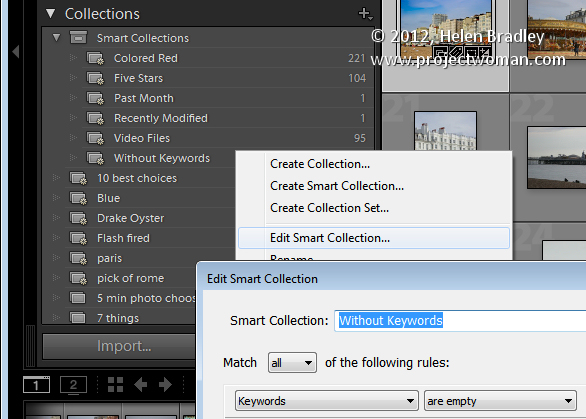
You can learn more about this collection by right clicking its name and choose Edit Smart Collection. You’ll see that the Smart Collection is configured to contain all those images for which the Keywords property is empty.
There are other collections which are shipped with Lightroom including Recently Modified which is a collection of images that have been edited recently.
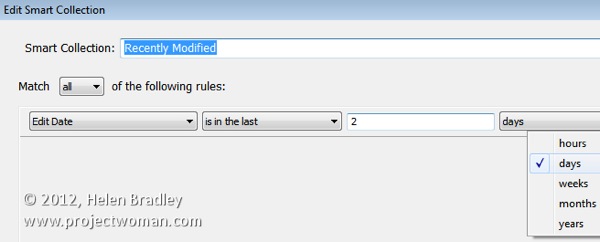
You can, if desired, change the Recently Modified Smart Collection to span a different number of days. Click this collection , right click and choose Edit Smart Collection. You can see that the collection criteria is set to be Edit Date > Is in the last
When you do so, Lightroom checks the images in your catalog to determine which images meet this criteria and it displays these in this Smart Collection.
Make your own Smart Collections
In addition to those shipped with Lightroom you can create your own Smart Collections. For example, if you color your images red meaning a certain thing you can create a Smart Collection that contains all the images which are colored red.
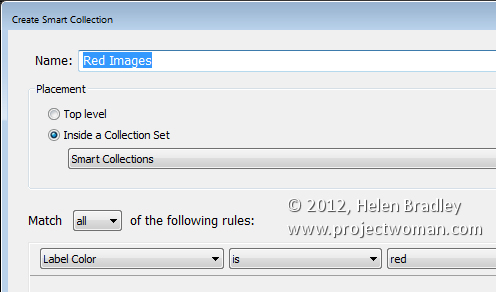
To do this, click to open the Collections panel, click the plus symbol and choose Create Smart Collection. Type a name for it such as Red Images, click Inside a Collection Set and choose to add it to the Smart Collections set. From the options below select Label color is red.
Click Create to create the collection – it will contain all images in your collection which have the red label color associated with them.
Remove an Image from a Smart Collection
The only way you can remove an image from a Smart Collection is to configure it so it no longer meets the criteria for the Smart Collection. For example an image will no longer appear in the Without Keywords collection if you add a keyword to it.
You can remove an image from the Red Images collection if you remove or change its color label. When it no longer has the red color label associated with it, it will no longer appear in the collection.
Similarly, if you apply the red color label to an image in Lightroom it will be automatically added to the Red Images Smart Collection.
One of the benefits of Smart Collections is that they’re continually updated by Lightroom. So Lightroom ensures that all the images which match the criteria you use to define the Smart Collection are in that collection.
How Smart Collections Differ from Regular Collections
Smart Collections behave differently to Regular Collections in a few key ways. One difference is that you cannot arrange images in a Smart Collection into your own custom order.
The collection order can only be set to one of the Lightroom default Sort Order options; Capture Time, Edit Order, Edit Time, Edit Count, Rating, Pick, Label Text, Label Color, File Name, File Extension, File Type and Aspect Ratio. Regular collections, on the other hand, can be sorted into User Order which is useful for slideshows and web pages for example.
You also cannot set a Smart Collection as the Target Collection because you cannot add images to a Smart Collection manually. It can only be added if it matches the criteria which describes that collection.
Over to you… Do you use Smart Collections in Lightroom and, if so, how do you use them? Do you use the shipped collections or make your own?
Post originally from: Digital Photography Tips.
Check out our more Photography Tips at Photography Tips for Beginners, Portrait Photography Tips and Wedding Photography Tips.
App-based smart camera trigger system ‘Triggertrap’ can now be used remotely if the user has two smart devices. The latest version of the mobile app, which allows a wide range of cameras to be triggered in response to a range of events or with sophisticated time-lapse functions, features a Wi-Fi mode. In Wi-Fi mode, a remote ‘master’ iOS device can be used to remotely configure and trigger a camera that is connected to a Tirggertrap mobile dongle and a second smart device (either an iOS or Android phone or tablet).
[ By Steph in Conceptual & Futuristic & Technology. ]
A heat-reactive metal sculpture at the Materials & Applications gallery in Los Angeles opens and closes according to environmental conditions, ‘breathing’ like human skin. ‘Bloom’ was designed by biologist-turned-architect Doris Kim Sung, who takes cues from our natural biological defenses to develop a zero-energy skin for buildings.
(top & above image via brandon shigeta)
The 20-foot-tall installation is made of thermo-bimetal, a material most often used for the coil in a thermostat. This metal is composed of two sheets of metal laminated together. It expands when heated, curling as the temperature rises and flattening when it cools. Sung says the material could be used as a shading device or for ventilation purposes.
The idea is that the canopy can curl shut when the sun is directly overhead, or vents can automatically open to let hot air escape. Sung has received grants to further her research with thermo-bimetal, and is working on ways to integrate it with standard building components. Possible applications include sandwiching it between layers of glass in windows, or incorporating it into bricks.
“For a long time, my work has examined why architecture is static and nonresponsive, and why it can’t be more flexible like clothing,” said Sung, assistant professor of architecture at the USC School of Architecture. “Why do we have to adapt to architecture rather than architecture responding to us? Why can’t buildings be animated? We have to rethink the way we build, and what we build with. If we don’t, our problems will only get worse. Being a researcher in smart materials and architecture right now is tremendously exciting. This is the time we’re going to change our future.”
Want More? Click for Great Related Content on WebUrbanist:
Architecture of WikiLeaks: Stockholm Cold War Bunker
Looking like the hidden lair of a James Bond villain, the Banhof data center housing two WikiLeaks servers is cutting-edge and inspired by science fiction.
3 Comments – Click Here to Read More »»
Housing for the Homeless: 14 Smart & Sensitive Solutions
These 14 concepts for homeless housing range from ideas that meet immediate needs for survival to those that take a more thoughtful and long-term approach.
4 Comments – Click Here to Read More »»
[ By Steph in Conceptual & Futuristic & Technology. ]
A five-story ‘veil’ of light situated along the river Main in Frankfurt, Germany billows and contracts according to users’ finger movements on their smart phones. ‘Photophore’ was installed at the Seven Swans restaurant, bar and hotel for the annual Luminale festival of light, inviting passersby to literally change the fabric of their urban environment.
A collaboration between Kollision, Martin Professional and light designers Katja Winklemann and Jochen Schröder, Photophore is an interactive media facade consisting of five illuminated panels mounted on the exterior of the building. It’s named for the light-emitting organ found within certain deep-water marine animals.
Onlookers scan a QR code on the side of the building, which accesses a website enabling them to control the installation. Swiping across the screen causes the ‘fabric’ to be pinched, pulled, pushed, poked and twisted.
See a video of Photophore in action at Vimeo.
Want More? Click for Great Related Content on WebUrbanist:
Abandonment Art: Deserted House Turned into Light Installation
A lonely abandoned house was turned in to a space filled with life and light for a temporary – but utterly moving – installation.
4 Comments – Click Here to Read More »»
Silly, Satirical, Sublime: Urban Street Art Installation Projects
Amazing but non-commercial forms of urban street art, from silly and creative projects to works both sublime and socially relevant.
19 Comments – Click Here to Read More »»
Samsung has announced UK residents can purchase its Android-based Galaxy Camera this week for £399. The device runs Android 4.1 and has 3G/4G connectivity as well as Wi-Fi. Though not a fully functional mobile phone, the Galaxy Camera can run applications such as Skype to make and receive voice calls. Its 16-megapixel camera has 21x optical zoom and comes with built-in “photo wizard” editing software.
DxO Labs has announced DxO Optics Pro 8 a major update of its image processing tool incorportating ‘DxO Smart Lighting.’ The company’s Smart Lighting tool influences both image brightness and contrast using a single slider and will attempt to recover both highlight and shadow detail. Meanwhile a selective tone tool makes it easy to apply different changes to the highlight, mid-tone and shadow regions of an image.The software also allows the configuration of multiple output options. It also gains more lens/body optical correction profiles, with DxO aiming to double the current 10,000 combinations by the end of 2013. The software comes with the customary introductory pricing valid until November 15th.