RSS
 

Posts Tagged ‘Smart’

Street Smart: Intelligent Motion-Activated Outdoor Lighting

05 Jan

[ By WebUrbanist in Gadgets & Geekery & Technology. ]

motion activated urban lights

While we are all familiar with motion-detection technology in controlled indoor environments, the technology problem is much more complex when you add stray animals, wind-blown trees, weather-strewn debris and other dynamic variables into the mix.

motion outdoor light sensors

This high-tech solution designed and developed by Tvilight involves eight sensors and includes recognition software that can distinguish people and cars from other environmental factors that would trigger normal detectors.

Recognition information is relayed between the various independent light posts to account for the trajectory and velocity of pedestrians and automobiles, allowing both reaction and anticipation. Fine-tuned control options allow off-hours intersections to have the lights turned down by 30%, and mostly-empty areas like parking lots to be dimmed up to 70%.

motion illumination public space

motion sensing street lamps

The statistics are staggering – cities, states and countries could save up to 50% on maintenance costs and 80% on energy by illuminating streets on an as-needed basis rather than continuously. In Europe, 40% of government energy spending is on street lighting, so cutting down the cost and pollution of lights can have an incredible impact.

motion pedestrian street experience

Engineer and entrepreneur Chintan Shah’s company developed this dynamic system such that it can be applied to street lamps of all kinds, both new and old, in various places – sensors can be added to existing lights with traditional or LED bulbs. Already active in Holland and Ireland, Tvilight is looking to expand into the German, Canada and the United States.

Share on Facebook


[ By WebUrbanist in Gadgets & Geekery & Technology. ]

[ WebUrbanist | Archives | Galleries | Privacy | TOS ]


WebUrbanist

 
Comments Off on Street Smart: Intelligent Motion-Activated Outdoor Lighting

Posted in Creativity


A smart camera gets smarter? Samsung NX30 first impressions review

03 Jan

NX30-and-18-55mm-1.png

The Samsung NX30 puts the NX300’s 20 megapixel APS-C sensor and Hybrid AF in a DSLR-like body. It also features a tilting electronic viewfinder and a fully articulated 3-inch AMOLED display, along with Samsung’s familiar suite of connectivity features. Built-in Wi-Fi is available, as is NFC to mediate faster connections with compatible smart devices. We spent a little time getting acquainted with a pre-production model, and have put together some quick first impressions.

News: Digital Photography Review (dpreview.com)

 
Comments Off on A smart camera gets smarter? Samsung NX30 first impressions review

Posted in Uncategorized


Glow in the Dark World: 12 Smart Illuminated Inventions

28 Oct

[ By Steph in Conceptual & Futuristic & Technology. ]

Glow in the Dark Tech Applications

Glow in the dark tech doesn’t have to be limited to novelties like glow sticks – it could be used to make the roads safer, provide illumination without the need for electricity, and allow surfers to see each other in dark waters. These 12 applications of luminescence include everything from clothing and pillows to cars and architecture.

Glow in the Dark VW Golf

Glow in the Dark VW Golf Car

Bright green luminescence ensures that nobody has any trouble seeing this VW Golf MK7 at night, which has been covered in a special phosphor-foil 3M wrap. Created by the tuners at Low-Car-Scene and Blackbox-Richter, this glow in the dark car looks white and pink during the day, and green and black at night.

Urban Dwelling by Jiri Prihoda

Glow in the Dark Urban Dwelling

This glow-in-the-dark urban structure is a two-story dwelling with a secret compartment hiding a pull-out bed. The installation, by Czech artist Jiri Prihoda, is built into a reclaimed railway yard and features an outer shell made of Corralit material, a luminescent substance that absorbs daylight and later glows for about eight hours. While this mini dwelling was installed in a very urban location, the idea is that it would make a tranquil place to stay in the woods or by the sea in more private surroundings.

Glow in the Dark Skate Park

Glow in the Dark Skate Park
This sculptural skate park located on Vassiviere Island in France solves a problem of keeping the surrounding woods natural and free of harsh lighting at night by glowing in the dark. Koo Jeong A and Belgian firm L’Escaut Architecture wanted a ‘dreamlike’ setting for skaters at night that would blend into the environment.

Solar Activated Glowing Bike by Pure Fix Cycles

Glow in the Dark Bicycle

Riding a bike at night can be a bit unsafe. ‘Kilo’, a light-activated glow in the dark bicycle frame from Pure Fix Cycles, fixes that problem with highly reflective paint that can be applied either to the frame or the wheels. In addition to being more visible to oncoming traffic, the glow illuminates the road a bit.

Next Page:
Glow In The Dark World 12 Smart Illuminated Inventions

Share on Facebook


[ By Steph in Conceptual & Futuristic & Technology. ]

[ WebUrbanist | Archives | Galleries | Privacy | TOS ]


WebUrbanist

 
Comments Off on Glow in the Dark World: 12 Smart Illuminated Inventions

Posted in Creativity


Using Smart Previews in Lightroom 5

10 Oct

Smart Previews in Lightroom opener

If you’ve ever encountered a “The Folder Could Not Be Found” message in the Lightroom Develop module or seen a question mark over a folder name in the Library module you’ll love the new Smart Previews in Lightroom 5.

Smart Previews are an editable preview image and they make working with Lightroom when you are using removable drives a cinch.

Here I’ll explain what smart previews are and why you might use them.

Understanding the problem
Lightroom can only work with images that have been imported into its catalog. When your import your images Lightroom notes where the images are on your disk so it can access them when you want to edit them.

As Lightroom doesn’t store the actual images you will encounter problems if the drive the images are stored on is not connected to your computer when you try to edit them. In this case, you will see a preview of the image in the Library module but if you select the image and open the Develop module you will see a message saying “The folder could not be found”. The editing tools are all disabled and you can’t proceed.

Lightroom 5 smart previews 2

If you look at that same folder of images in the Library, the folder name will appear in the Folders panel but with a question mark over it. This is because the folder is on a drive that is not currently attached to your computer.

Lightroom 5 smart previews 2

In earlier versions of Lightroom, the only solution for this issue was to reattach the drive so the original images would be available to Lightroom.

With Lightroom 5 the situation has changed to the extent that, with a little forethought and some spare disk space, you can edit images even if they are stored on a disk not attached to your computer. The solution is provided by the new Smart Previews feature.

What are Smart Previews in Lightroom?

Smart Previews are lossy DNG files which are a maximum size of 2540 pixels on their longest edge. They are created from the original raw files and they are stored in a folder in the same location as the Lightroom catalog.

You can use these Smart Previews if the original images are not available not only in the Library module but also in the Develop module.

If you have Smart Previews rendered for an images you will still see a question mark in the Library module indicating that the folder is not available but below the histogram there will be a small white icon indicating that a Smart Preview is available for this image. The Smart Preview can be edited in the Develop module just like the original image and it can be exported too.

Lightroom 5 smart previews 3

Smart Previews can be created for DNG and for Camera Raw images as well as for TIF and JPG. You can create them on import by selecting the Create Smart Preview checkbox in the Import dialog.
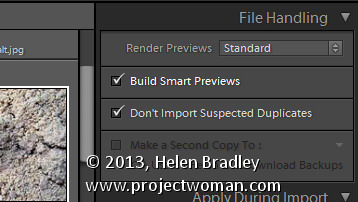
Lightroom 5 smart previews 4

You should note that Smart Previews and regular Previews are two different types of previews so you should continue to choose the same option in the Render Preview list that you have chosen in the past. So, I choose to Render Standard previews at a size appropriate for my monitor size – as well as rendering Smart Previews for those images I want to be able to edit even if the drive they are stored on is not connected.

You can also create Smart Previews at any time – provided the original images are available at the time you are making them – using a menu option in the Library module. To do this, select the images to build Smart Previews for and choose Library > Previews > Build Smart Previews. You’ll be prompted to build smart previews for all photos or just one. Select Build All to create smart previews for all the selected images.

Lightroom 5 smart previews 5

You can also build smart previews using an icon in the histogram. For example if you select either a folder of images or a selection of images in the Library module you can learn the smart preview status of those images by reading the information below the histogram. You’ll see the number of images without smart previews and the number with.
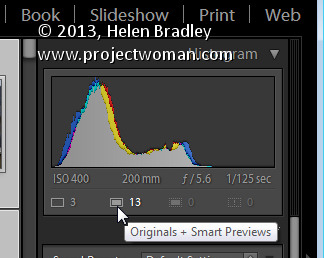
Lightroom 5 smart previews 6

Click the originals without smart previews box and you’ll be prompted to build smart previews for these images. There is a slight glitch with the numbering – if you have a large number of images selected then the actual numbers in the histogram won’t be correct but the process still works for all the selected images.
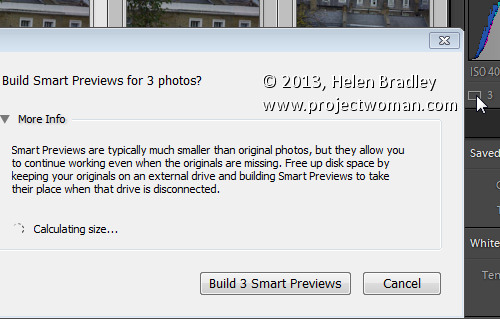
Lightroom 5 smart previews 7

If you have rendered Smart Previews for your images and if you later decide you no longer want them you can delete them by clicking the smart preview indicator below the histogram.

Editing Smart Previews

You can edit an image for which you have rendered a Smart Preview in the Develop module. The smart preview will only be used if the original image is not available. Any changes you make to the smart preview will be written back into the original image when it is next available in Lightroom.

In this case I am editing the Smart Preview as the original is not available:

Lightroom 5 smart previews 8

Here both the original and smart preview are available, so the original is being edited:
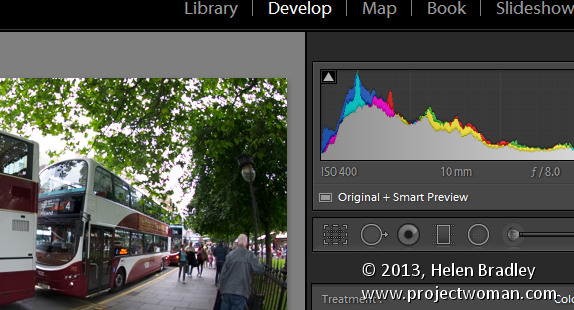
Lightroom 5 smart previews 9

In this case there is no smart preview available, the original is being edited and if it were not available, then editing would not be possible:

Lightroom 5 smart previews 10

If you store all your photos on the same drive as you store your Lightroom catalog then you may find you have no use for smart previews. However if you, like me, store your images or some of them on a drive other than the one on which your Lightroom catalog is stored then you’ll find that smart previews useful. Create smart previews for those images that are not stored on the same drive as your Lightroom catalog and you will have those images accessible and editable even when the originals are not available.

Post originally from: Digital Photography Tips.

Check out our more Photography Tips at Photography Tips for Beginners, Portrait Photography Tips and Wedding Photography Tips.

Using Smart Previews in Lightroom 5

The post Using Smart Previews in Lightroom 5 by Helen Bradley appeared first on Digital Photography School.


Digital Photography School

 
Comments Off on Using Smart Previews in Lightroom 5

Posted in Photography


They’re Finally Here!The Sony Smart Lenses – QX10 & QX100

25 Sep

Meet the Sony Smart Lenses, pro-quality lenses that are also full-fledged cameras!

These first-of-their-kind lens cameras use your smartphone as a viewfinder, settings panel and shutter release.

Plus, they connect wirelessly, so you can use them attached to your phone or totally off board to snap the perfect shot at any angle.

Get all the advantages of a DSLR – shallow depth of field, optical zoom, a 20 megapixel sensor that’s 4x the size of your iPhone’s! And, retain the ease of shooting and sharing on your phone.

*We are getting a limited supply and shipping them out first come, first serve.*

Learn More or Reserve Yours Now

 Tweet it!      Share

p.s. Want to see the QX10 in action? We will be demonstrating this innovative wonder on a live video stream *TODAY* (Wed. 9/25) at 9am PST (that’s noon to you, East Coasters). Head to our Ustream page to have all your burning questions answered!

Related posts:

  1. Attachable Lenses for Your Camera-Phone, Fisheye & Macro/Wide Angle Phone Lenses Extra photos for bloggers: 1, 2, 3 Camera-phones. They’re a…
  2. Better Lenses for Less Money: How To Use Vintage Lenses with Your DSLR Extra photos for bloggers: 1, 2 ~Have a cool photo…
  3. The iPhone Lens Wallet
    Keeps Your Cell Lenses in One Place Check out that sweet collection of lenses for your smarty-pants…


Photojojo

 
Comments Off on They’re Finally Here!The Sony Smart Lenses – QX10 & QX100

Posted in Equipment


Add-On Gadgets: 15 Cool Devices For Your Smart Phone

07 Aug

[ By Steph in Gadgets & Geekery & Technology. ]

Smartphone Gadgets Main

As smart phones become even more integral to our everyday lives, extra gadgets that increase their functionality just get cooler and cooler. These 15 add-ons for iPhone and Android handsets include arcade housings for gaming, home security devices, photo lenses, sound amplifiers and even wind meters.

Canary Home Security Device

Smartphone Gadgets Canary Security

A device the size of a soda can pairs up with your smart phone to keep your home more secure. Canary contains an HD camera with night vision, motion sensors, a microphone, an accelerometer and sensors for heat, humidity and carbon monoxide. In other words, if there’s anything weird going on at your house, you’ll be notified immediately, from intruders to electrical fires. As soon as the device senses that something is amiss, it’ll send you a message, with options like “make a call” or “trigger siren.” Set to retail for $ 199, the device soared past its Indiegogo funding goal and should begin production shortly.

iCade Jr. Turns Phone into a Mini Arcade

Smartphone Gadgets iCade Arcade

The iCade jr. brings the feel of a (teeny tiny) arcade game to your iPhone. Featuring a joystick and four front buttons, plus four rear trigger buttons, the little cabinet is as functional as it is a conversation piece.

iPhone Photo Lens Dial

Smartphone Gadgets iPhone Photo Lens Dial

An old-fashioned looking dial on a rugged case spins to offer three different camera lenses to iPhone photographers, including wide angle, fisheye and telephoto (plus a bonus macro lens on the iPhone 5 version.)

Fling Game Controller for Smart Phones

Smartphone Gadgets Game Controller

A pair of mini joysticks for iPhone, Android or the iPod touch makes gaming more fun and interactive. The Fling Mini gives games an analog feel, with clear components that won’t block visuals on the screen.

Vavuud Wind Meter

Smartphone Gadgets Wind Meter

Cyclists, surfers, boaters and people who rely on wind power should take an interest in Vavuud, a wind meter you plug into your smart phone to measure wind speed and wind direction. Made of weather-resistant plastic, it’s been tested and calibrated in a professional wind tunnel and has a range of 1 m/s to 25 m/s. It retails for $ 44.99.

Next Page:
Add On Gadgets 15 Cool Devices For Your Smart Phone

Share on Facebook


[ By Steph in Gadgets & Geekery & Technology. ]

[ WebUrbanist | Archives | Galleries | Privacy | TOS ]


WebUrbanist

 
Comments Off on Add-On Gadgets: 15 Cool Devices For Your Smart Phone

Posted in Creativity


Building Eraser: Smart Robot Scans & Deconstructs Concrete

17 Jul

[ By WebUrbanist in Conceptual & Futuristic & Technology. ]

building deconstructing robotic system

Whether the building is a bare-bones warehouse or five-star hotel, demolition is an equally messy business – but perhaps it does not have to be. What if demolition teams could precisely separate the component parts of the concrete forming the walls, floors and ceilings of a structure?

building erasing robot design

ERO is an award-winning robotic solution that strips concrete on-site and step-by-step, saving time, energy and copious amounts of water (used to reduce airborne particulates) in the deconstruction process. It parses the pieces back into cement, aggregate and water as it goes, literally erasing a building rather than demolishing it.

building demolition robot

The robot scans sections and identifies the best ways to break them down into constituent parts for reuse or recycling. This approach switches the literal sledgehammer with a proverbial scalpel – the latter taking the form of a concentrated high-pressure water jet that cracks the concrete and allows it to be more carefully removed.

building deconstruction smart system

In the end, the graywater is reused, the particulates turned into aggregate for fresh construction applications and the rebar cleaned and sorted as well. This systematic recycling saves materials not just for future uses but also reduces waste along the way by mitigating the need to actively blanket the building demo site with water and saves time in terms of sorting through the rubble.

building compact eraser robots

From the  2013 International Design Excellence Award (IDEA) awards page: “The challenge with this project was to separate materials concurrent with deconstruction. Concrete is usually reinforced with a metal mesh inside. Common techniques involve using brute force to pulverize the concrete, which creates a mixed mound of waste material that needs to be separated before it can be reused or sold as second-grade metal or as a filling material. In order to overcome later separation and ease the transport of materials, the process had to start with separation on the spot. It was a challenge to switch from brutal pulverizing to smart deconstruction.”

Share on Facebook


[ By WebUrbanist in Conceptual & Futuristic & Technology. ]

[ WebUrbanist | Archives | Galleries | Privacy | TOS ]


WebUrbanist

 
Comments Off on Building Eraser: Smart Robot Scans & Deconstructs Concrete

Posted in Creativity


Smart Glass: Flip a Switch to Make Opaque Turn Transparent

02 Jun

[ By WebUrbanist in Gadgets & Geekery & Technology. ]

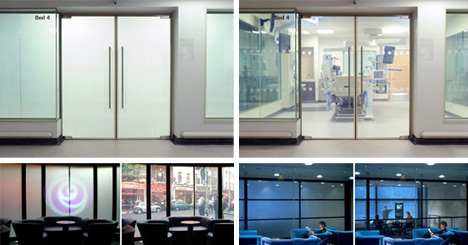
smart glass windows walls

Kiss curtains, blinds and shades goodbye – smart glass is not just an Xbox enhancement. Smart glass technology is evolving and faster than ever. It can shade rooms on demand, making them transparent and reduce thermal gain … all just by flipping a switch or even turning a key in a door.

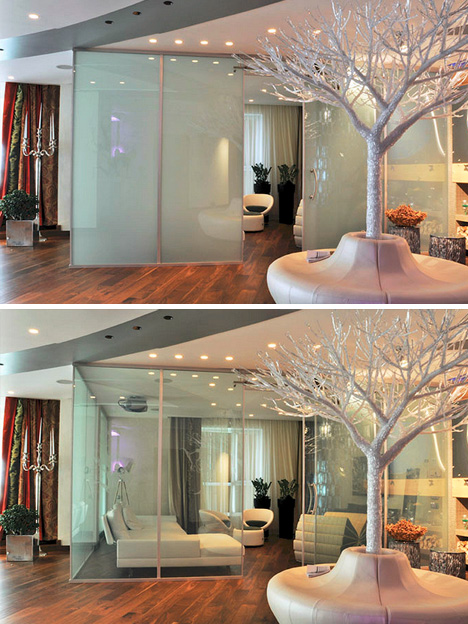
smart glass door handle activated

There are various methods employed to make the transition, but one of the most fascinating involves low-power electrochromatic devices that can be activated in a variety of clever ways.

smart glass on off

Essentially, a current is passed through the window panel to turn it from transparent to translucent then back again – the voltage does not need to be sustained in between.

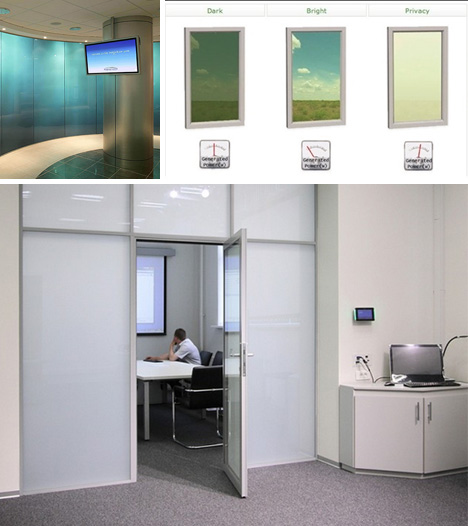
smart glass room examples

Aside from micro-blinds and mechanical smart windows, other variants on this technology include suspended-particle devices, which can be finely-tuned to allow in (and block out) desired levels of light, heat and glare.

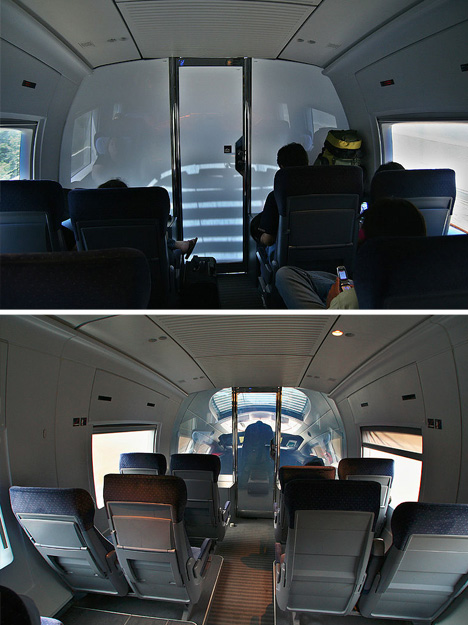
smart glass passenger train

Applications to date include commercial windows and doors in places ranging from private skyscraper offices and public restrooms to hospital rooms high-speed trains. Smart glass can also be found in luxury sunroofs, meeting spaces, projection screens and television studio surfaces. As it becomes easier and cheaper to produce, the applications are limitless (above images by Sebastian Terfloth).

Share on Facebook


[ By WebUrbanist in Gadgets & Geekery & Technology. ]

[ WebUrbanist | Archives | Galleries | Privacy | TOS ]


WebUrbanist

 
Comments Off on Smart Glass: Flip a Switch to Make Opaque Turn Transparent

Posted in Creativity


Satechi introduces BT Smart Trigger wireless shutter release for Canon

01 Mar

satechi_1.png

Accessory maker Satechi has announced the BT Smart Trigger, an iOS-controlled Bluetooth 4.0 shutter release for Canon DSLRs. It features multiple shooting modes including timelapse and long exposures, via the free Smart Trigger app. The trigger has a claimed battery life of up to 10 years and range of 50 feet. It is currently available for an introductory price of $ 44.99. An Android-compatible version will be available from March 2013.

News: Digital Photography Review (dpreview.com)

 
Comments Off on Satechi introduces BT Smart Trigger wireless shutter release for Canon

Posted in Uncategorized


Intelligent Interstates: 5 High-Tech ‘Smart Highway’ Systems

19 Feb

[ By WebUrbanist in Technology & Vehicles & Mods. ]

With prototypes set to hit the pavement in the Netherlands next year, these interactive  interventions take innovation back from a focus on the car and put it right on the road.

Examples include: glow-in-the-dark paints that recharge by day and illuminate by night, wind-driven roadside lamps, energy-saving motion-sensor lights, temperature- and moisture-sensitive weather- and road-condition displays with color-changing paint to warn of icing, and even dedicated induction-priority lanes to magnetically recharge electric cars.

The Dutch Design Award-winning team behind these designs comes from Studio Roosegaarde and Heijmans Infrastructure. Their work spans green technologies and safety measures that will merge with real-life lanes, providing useful feedback and assistance to drivers.

“It’s about safety, creating awareness but also making roads energy-neutral in terms of lighting … and most of all: creating the experience of an icon, the Route 66 of the future.” While we may eventually see a future where cars drive themselves, for now we live in a world where high speeds bring real dangers, and invention has not matched the acceleration of actual drivers. Time and experiments will tell how well these ideas actually work when applied to asphalt.

Share on Facebook


[ By WebUrbanist in Technology & Vehicles & Mods. ]

[ WebUrbanist | Archives | Galleries | Privacy | TOS ]


WebUrbanist

 
Comments Off on Intelligent Interstates: 5 High-Tech ‘Smart Highway’ Systems

Posted in Creativity