RSS
 

Posts Tagged ‘size’

The Kanton DX35 concept is an all-in-one film development machine the size of a coffee maker

13 Jul

Developing film isn’t necessarily a difficult task. But it is time-consuming and, generally speaking, it tends to require a decent bit of space and equipment to get started. Industrial designer Thomas Müller is hoping to change that, with a clever device he calls the Kanton DX35.

This tabletop device is a ‘smart home solution to develop your colour as well as black and white films in both 35mm and 120 [film] without the need of a darkroom.’ The Kanton DX35 is little more than a concept right now, but Müller hints it could become more by asking consumers to sign up for more information when ‘further progress’ is made. Whatever stage of development it’s in, it’s quite the setup.

To load film, it’s simply a matter of adjusting the reel to fit your roll of 35mm or 120 film and slipping it back into the container. Once it’s in the container, it’ll automatically unwind the film in complete darkness. Once unwound, it’s a quick cut of the film with the integrated cutter, and you’re on your way to the next step.

Development is aided by a dial and screen that automatically heats up the chemicals to the correct temperature and lets you know when you need to switch out the chemicals, pending your development method of choice. Step by step, the Kanton DX35 guides you through the process of adding the required chemicals to container and automatically agitating the film inside the container to get an even development.

Once the film is developed and chemicals are back in their places, it’s simply a matter of giving it a rinse and removing the reel from the container. Below is a visual step-by-step guide provided by Müller:

Sure, this concept doesn’t account for all of the intricacies of developing film, but for a device that doesn’t take up much more space than a coffee maker, it looks pretty impressive.

To sign up for updates from Müller on the Kanton DX35, head on over to his product page and sign up. If he ever decides to bring it to life, you’ll be the first to know.

Articles: Digital Photography Review (dpreview.com)

 
Comments Off on The Kanton DX35 concept is an all-in-one film development machine the size of a coffee maker

Posted in Uncategorized


Does sensor size still make a difference?

28 May

We’ve seen huge breakthroughs in the computational photography techniques in the latest smartphones, as well as the launch of some excellent small sensors in more traditional cameras. Does that mean that bigger is no longer necessarily better?

To answer that question, let’s look at why big sensors tend to produce better image quality and what smaller-sensored cameras and smartphones are doing to close the gap.

Benefits of larger sensors

The three main benefits that prompt people to move to larger sensors are the ability to blur the background with shallow depth-of-field, exhibit less noise in low light situations and the ability to capture a wider dynamic range between the brightest and darkest areas of the image. Since these all primarily stem from getting more light, it presupposes that you have a lens with a wide-enough aperture to let in enough light, but this is usually possible. Collectively, these three factors mean that large sensor cameras can usually produce better-looking images. They can’t make up for the photographer, of course, but if used by the same person, the bigger sensor usually ‘wins.’

Computational photography allows small sensors to imitate the effects of a larger sensor, while leaps forwards in sensor performance can help small sensors produce better-looking images. But do these advances mean you no longer need a larger sensor?

Computational photography

The most visible example of computational photography in widespread use are the portrait modes in the latest smartphones. These use a variety of techniques but fundamentally they make some attempt to assess the depth in the scene, then apply differing amounts of blur at different depths, to simulate shallow depth-of-field.

The results aren’t always totally convincing and won’t necessarily satisfy the kind of demanding photographer that looks for particular character to the out-of-focus rendering (bokeh) of their lenses. However, as processing power and machine learning continue to improve, the results will only get better. And for many applications, will quickly exceed the threshold of being considered ‘good enough’ for an increasing number of people.

This image was taken using Portrait mode on a modern smartphone. As well as simulated shallow depth-of-field, computational photography has added artificial lighting effects to the subject’s face.

Computational photography can also help with low light and high dynamic range scenes. Again, it’s increasingly common for smartphones to be able to shoot multiple shots, then combine them. The processing is getting sophisticated enough that this can even be done with moving subjects, without the user even necessarily realizing that this is what their phone is doing.

Because most noise in photography comes from the randomness of light, shooting the same scene again and again helps to average out this randomness, just as rolling a die repeatedly helps you get a clearer picture of whether it’s weighted.

The results will start to rival the output of
larger sensors

The same can be done in good light, sampling the scene several times (sometimes with different exposures), to extend the dynamic range beyond what could be achieved in a single exposure.

Unlike the shallow depth-of-field effect, which is simulated, these multi-shot techniques directly compete with larger sensors, since they allow the image to be constructed from more light. At which point, the results will start to rival the output of larger sensors, so long as the combination of images and movement cancellation is clever enough.

More advanced sensors

We’ve seen some very good small sensors in recent years, whose performance can narrow the gap with those above them. The adoption of technologies such as back-side illumination have allowed sensors to become more efficient (capturing more of the light that’s shone on them). Again, since most of the benefits of larger sensors come from them generally receiving more light during any given exposure, an increase in efficiency can help smaller sensors narrow this gap.

G1 X Mark III
ISO 500
F3.2 (F5.2 equiv)
1/30th
G7 X Mark II
ISO 160
F2 (F5.5 equiv)
1/30th

The Canon G1 X Mark III offers an APS-C sensor to the G7 X Mark II’s 1″ sensor, but the latter uses a more efficient BSI design.

This only goes so far. Partly because these technologies are also likely to have some benefit when they ‘trickle up’ to larger sensor sizes. This widens that gap back to the extent you’d expect, just based on the size difference. Also, the gaps between most popular sensor sizes are proportional to at least two-thirds of a stop, which is more of a difference than technology advances tend to compensate for.

Small sensor advantages

There are also areas in which small sensors offer an advantage over large ones, with readout speed being the most obvious one. In general it’s quicker to read out the data from small sensors, which brings a series of benefits. The most obvious is that it allows improved video quality, either through being able to read all the pixels, enabling more detailed capture, or simply through a reduction in rolling shutter.

The RX100 V’s stacked CMOS sensor with DRAM incorporated into the chip allows faster readout, which boosts video and autofocus performance.

The other advantage, of course, is that it makes it quicker and easier to offer many of the computational photography benefits discussed earlier in the article.

There are ways to improve the readout speed of large sensors too, such as the stacked CMOS sensor that ‘trickled up’ from Sony’s smartphone and 1″-type sensors to the full frame a9. This incorporates readout circuitry and RAM into the sensor to allow faster readout. But this comes at a considerable cost premium, as these chips are extremely complex and time-consuming to make, making it difficult for large sensors to match some of the capabilities of smaller chips.

Convenience of small sensors

The other potential advantage of small sensors is that they allow cameras to be smaller. This tends to means lenses with smaller physical apertures, which is one of the main things that hold the image quality of small sensors back, but the trade-off is cost and convenience. So, although you can buy mirrorless cameras with large sensors, it’ll be the ones with smaller sensors that will provide the smaller overall package, most of the time.

For all the bluster you sometimes encounter with people claiming to be committed enough that they always carry a full DSLR kit around with them, most people find it’s easier to carry a small camera with you. And you know what they say about the camera you’ve got with you…

Is bigger still better?

Overall then, for conventional, single-shot photography, there’s no substitute for making a photograph using more light, and it’s usually easier to give a large sensor more light since it has a larger area to capture light. In that sense, bigger sensors are still better. However, that’s not the same as saying ‘you need a bigger sensor.’

Even though a larger sensor may be able to produce a better result, smaller sensors are getting better and better all the time

Improvements in sensor tech, the availability of large sensor compacts with bright lenses (that help get more light to their sensors), and advances in computational photography allow better images than ever before from small sensors.

At which point, we come back to the question of what’s ‘good enough.’ Which isn’t so much about accepting limitations, but more about being able to attain a quality you’re happy with for what you’re trying to achieve. So even though a larger sensor may be able to produce a better result, smaller sensors are getting better and better all the time, exceeding ever higher ‘good enough’ thresholds such that you may reasonably conclude that you don’t need any further improvement.

Articles: Digital Photography Review (dpreview.com)

 
Comments Off on Does sensor size still make a difference?

Posted in Uncategorized


Which Size Lensball is Best for Crystal Ball Photography?

06 May

The world is in your hands, well it can certainly seem that way when you do crystal ball photography. The crystal ball allows you to take refraction photos, which reveal the background scene within the ball. It’s a great technique, with which many people are having a lot of fun.

The photographic technique has now become so popular that photographers have re-branded the crystal ball as a lensball! So the question that’s often asked is which lensball size is the correct one to buy? Let’s take a look at the various options available when buying a crystal ball, and decide which is the best for you.

Which Size Lensball is Best for Crystal Ball Photography? - 3 sizes

Which size of the lensball is the best? There are three here, an 80, a 120 and a 60mm ball.

Small Lensball

The small size lensball is anything less than 60mm, so all the way down to a marble. These balls are the easiest to pack and are considerably lighter than the other balls. So what are the strengths and weaknesses of this particular size?

Strengths

  • Weight – These add almost no weight to your bag at all, and this also makes them easier to use for handheld photos.
  • Size – Again owing to their small size they’ll be easier to pack, giving you more space for other items. The smaller size also allows you to place the ball in gaps where the larger balls won’t fit.
  • Handheld – This size makes it easier to hold the ball between your finger and thumb, which becomes more difficult at larger sizes.
Which Size Lensball is Best for Crystal Ball Photography?

This position to rest the ball is only possible with a small lensball.

Weaknesses

  • Weight – This is also a weakness. Once a heavy ball is in place it usually stays there. The problem comes on a windy day, where the wind can move a lighter ball much more easily.
  • Focus and distortion – This lensball size will have a smaller sweet spot for focus, and a greater proportion of the ball will be distorted. Using a smaller aperture can help, as more of the ball will be focused.
  • Lens required – You will need a macro lens when using a small lensball if you wish to fill the frame with the ball.
Which Size Lensball is Best for Crystal Ball Photography?

The small size is perfect to hold between your index finger and thumb.

Medium Lensball size

This refers to balls at 80mm in diameter. Many photographers see this as the ideal size for their refraction photography. There are a lot of good reasons why you should also use this size of lensball. Let’s break it down, as this is the crystal ball you’ll likely be using.

Strengths

  • Weight – This is a little heavier, but still not noticeable. So it’s a nice thing to carry in your camera bag to add a bit more creativity to your work.
  • Size – This is a decent size, though you might not fit this ball into a small space. The ball will fill a nice portion of your frame with a standard lens, using a macro is optional at this size.
  • Focus and distortion – By this size, the sweet spot area of focus within the ball dominates the scene inside the ball, and distortions at the edge are much less noticeable.

Weaknesses

  • Size – There are very few weaknesses in this size of a lensball. However, if you wish to take a photo where you frame just the edge of the ball this is more difficult. Likewise using the ball to eclipse a background object is also more difficult, as the ball is that much smaller.
Which Size Lensball is Best for Crystal Ball Photography?

The lensball is ideal for many kinds of creative takes on typical scenes. Here it’s used to capture a road lined with cherry blossom trees.

Large Lensball

The large size refers to those balls that are 100mm or over in diameter. This size is not common amongst most photographers, though this is the size I cut my teeth on for crystal ball photography.

Even with the extra weight, this is often the preferred size for me personally, it just gives better quality images in my opinion. Whether this is the size for you will come down to if you want to carry the extra weight or not.

Strengths

  • Optics – This size offers the best in optics, a larger proportion of the ball will be in sharp focus.
  • Handheld – This is a much more natural size to fit in the palm of your hand or someone else’s palm. One classic crystal ball composition is that of a hand cupping the ball.
  • Size – This makes it far easier to fill the frame with your ball, and even hide some background elements behind the ball.
Which Size Lensball is Best for Crystal Ball Photography?

A larger size ball will both fill the frame more easily and cover up the background when it’s close to the camera.

Weaknesses

  • Weight – The obvious weakness here is weight. Those not used to carrying a heavy camera bag should avoid this crystal ball size. The weight is equivalent to an extra lens in your camera bag. It comes down to whether you want an extra lens or the larger crystal ball in your bag.
  • Size – While optics are better when photographing this size, the larger size is not so good for storage. This will take up a large space in your bag.
Which Size Lensball is Best for Crystal Ball Photography?

This particular way of holding the crystal ball is one of the classics. It’s not so natural looking with a smaller sized ball.

Safety

The crystal ball is a really great photographic tool to play with, though there are some safety issues you need to be aware of. You will also find that staff in the airport may consider the crystal ball a lethal weapon! This means you will have to put it in your checked luggage, hand luggage is not an option.

So what are these safety concerns then?

  • Fire hazard – Keep the crystal ball stored somewhere out of the sun. The glass will act in the same way a magnifying glass does, and while this will usually only result in smoke it can lead to a fire as well. Oh not to mention, it can burn your hand when you are holding it as well!
  • Gravity – Due to its spherical nature the ball is liable to roll. If it rolls off the edge of a tall building it can cause damage to whatever it hits. Take care with the ball in such situations.
Which Size Lensball is Best for Crystal Ball Photography?

Having a small crystal ball with me enabled me to fit it in the gap of this fence.

Conclusion

Asking which size if crystal ball you should buy is a little like asking which is the best tripod. Everyone knows the sturdiest tripod is best, but that it’s impractical to carry around for the whole day.

The same is true of the crystal ball, the 80mm medium sized ball then is probably the best choice. There is certainly a case for the smaller or larger size of balls though, so if you decide to get a second ball how about a different size?

Using more than one ball at a time can also be fun!

As mentioned in this article, the 80mm is both not too heavy, yet doesn’t sacrifice the image within the ball making this a good size.

Have you bought a crystal ball, or are you thinking of doing so? We’d love to see your comments, and images – please share below.

The post Which Size Lensball is Best for Crystal Ball Photography? appeared first on Digital Photography School.


Digital Photography School

 
Comments Off on Which Size Lensball is Best for Crystal Ball Photography?

Posted in Photography


Tamron interview: “Our strength is high quality lenses in a compact size”

28 Mar
L-R: Koji Satoh, Manager of the Product Planning Department of Tamron’s Imaging Products Business Unit, Minoru Ando, General Manager of Tamron’s Optical Design and Engineering Research and Development Unit, Kumiko Saito, General Manager of Tamron’s Marketing Communications Department, and Takashi Sawao, General Manager of Tamron’s Imaging Products Business Unit.

At last month’s CP+ show in Yokohama, Japan we sat down with senior executives from several major camera and lens manufacturers, including Tamron. Our conversation covered various topics, including the move to new native mirrorless designs, and the decline in DSLR lens sales.

The following interview was conducted through an interpreter, and has been edited for clarity and flow. Answers from the four interviewees have been combined.


Is the new 28-75mm a completely new design?

It is, yes.

How long has it been in development?

Typically a lens like this takes around one year to develop.

Tamron’s upcoming 28-75mm F2.8 is the first third-party zoom lens designed natively for full-frame mirrorless cameras.

What was your goal when designing this lens?

When we are planning new products, we’re always thinking about the voice of our customers, and customer benefit. The market is moving towards mirrorless, so we wanted to launch new FE lenses. Sony has the biggest market share of the mirrorless market.

With the Sony Alpha 7 series, the bodies are compact, but the lenses are relatively big

We’re also aiming for high quality, and good performance. And specifically for FE lenses, we wanted a small and lightweight option. With the Sony Alpha 7 series, the bodies are compact, but the lenses are relatively big. So when we were planning a fast lens for FE lens it was important to us that it would be compact, but still high quality.

This is the first third-party [zoom] lens for the Sony full-frame E-mount, and we’re expecting it to do well in the market.

Are you planning to create Sony E-mount versions of your existing SP primes and zooms, or will you make entirely new designs?

We’re not planning on making Sony E-mount versions of our existing lenses, no. Our concept is a little different to Sigma’s. We’re trying to customize lenses specifically for FE, otherwise they’d be too big. When it comes to autofocus, mirrorless has different requirements too. Mirrorless cameras are good for movies as well as stills, and existing AF motors aren’t very good for video. This lens [the new 28-75mm F2.8] has a stepping motor for autofocus, which is better for video.

The new 70-200mm F4 promises high quality, without the size and weight that we generally associate with faster F2.8 telezooms.

How important is the Sony customer base to you now?

Very important. Everybody is going to mirrorless. Canon and Nikon will launch full-frame mirrorless cameras, probably in the near future. When this happens, we can easily make Canon and Nikon versions of our [native] E-mount lenses. The same design could work for [multiple mirrorless mounts].

So with this new lens, you’re thinking ahead.

Yes, to the near future.

Optical performance of the new 28-75mm F2.8 will be equivalent to our SP lenses

This new lens is not in the ‘SP’ range. What does this signify?

Within Tamron, we have an internal definition of SP, where we usually utilize metal for the body material, and certain other features. Optical performance of the new 28-75mm F2.8 will be equivalent to our SP lenses, but for this model we prioritized smaller size and lower weight, so we used polycarbonate instead of metal.

Is this new lens weather-sealed?

Yes, it is. We describe it as ‘moisture-resistant construction’.

Despite not belonging to the ‘SP’ range of lenses, the new 28-75mm is moisture-resistant, featuring a rubber gasket around the lens mount to protect against dust and water incursion.

Is making this change to mirrorless lens designs an urgent priority for Tamron?

I can’t give you any detailed information about our future roadmap, but we’re watching the market closely. And Sony has the biggest share of the mirrorless market, so of course E-mount lenses are a priority.

How do you want the Tamron brand to be viewed by your customers?

We’re always thinking about our customers, and we’re not going to sacrifice performance and quality. We want to be recognized as a high-quality brand, and we stand by our customers, always. Each brand has a strategy, and our approach is a little different to [some competitors]. We try to very open with our customers.

Our strength is making compact, light and high quality lenses.

We’ve seen some manufacturers create entry-level cine lenses for videographers. Is that something that Tamron is interested in?

Maybe in the future, but at this point I can’t say whether we’ll enter that market.

Balancing performance and size is a Tamron strength

If you had a choice between making a lens that was very large, but very high quality, or one that was smaller and optically less impressive, which would you choose?

We try to pursue both small size, and high performance. Balancing performance and size is a Tamron strength. For this new zoom, if we had started at 24mm for example, the lens would be much bigger and heavier. By starting the zoom range at 28mm, it became much smaller and lighter, and easier to handle. We think that’s what our customers want.

Tamron’s ‘Tap-in Console’ allows the performance of some of its SP lenses to be tweaked and customized on an individual basis.

Increasingly when we visit factories, we’re seeing more and more automation. How much automation does Tamron use in your factories?

Automation is being gradually increased, but we don’t emphasize it. In some cases, manual processes are better for product quality. If automation would be good for the quality of the final product, we might utilize it. It all depends.

Are your lenses mostly assembled by hand, at present?

Some processes are automated, but others are manual so it’s difficult to say.

We’re always thinking about what we can provide in the market that’s innovative

Where do you think the biggest opportunities lie for Tamron in the future?

We’re always thinking about what we can provide in the market that’s innovative. Our strength is high quality lenses in a compact size. So going forward we want to be able to provide good products in each market segment.

The requirement for video must change how you develop lenses, beyond just the kind of AF motor you use?

Yes, it does. We have also developed other technologies to support video. At this point we’re not finished, but we’re always developing ways of manufacturing new lenses.

Optical designs need to change, and also autofocus technology

When we look at conventional DSLR lenses and mirrorless lenses, the technologies necessary to make them are a little bit different. The optical designs need to change, and also the autofocus technology. We’re always thinking about what kind of technologies would be good for mirrorless compared to DSLR, and what works for what focal length, and things like that.

You mentioned that the audience for mirrorless lenses will increase – will the audience for DSLR lenses decrease?

Yes, it already is. We’re watching the market and the data already shows us that the market is declining.


Editor’s note:

Perhaps the most interesting insight from our interview with Tamron this year was confirmation that the market for DSLR lenses is declining. It makes complete sense that Tamron (and Sigma) would be focusing on developing lenses for full-frame Sony E-mount cameras now, since by common agreement, Canon and Nikon will launch their own large-sensor mirrorless cameras pretty soon.

Tamron’s executives see their company’s mission as slightly different to Sigma’s

In the same way as one basic optical design can be adapted for multiple SLR mounts, Tamron’s new FE 28-75mm F2.8, which is optimized for the short flange-back distance of modern mirrorless systems, could be adapted for future mirrorless platforms as and when they emerge.

It is clear that Tamron’s executives see their company’s mission as slightly different to Sigma’s. Whereas Sigma is committed to a ‘no compromise’ approach in its Art-series which sometimes results in large, heavy products, Tamron sees its value in small, lightweight but still high-performing lenses. Maybe the primes will open up to F1.8 rather than F1.4, and the zooms might start at 28mm rather than 24mm, but clearly the company believes that some users will be happy with those compromises for the sake of smaller, lighter (and potentially cheaper) lenses.

Tamron sees its value in small, lightweight but still high-performing lenses

I think they’re right about that, and the new 28-75mm F2.8 looks like a good start. Obviously we don’t yet know how it will perform optically, but if it compares well to Sony’s own 24-70mm F2.8 GM at equivalent focal lengths, it might well become a benchmark standard zoom for mirrorless. That, in turn, would put Tamron in a very good position to get in on the ground floor of development for the wide range of full-frame mirrorless cameras we’re expecting from various manufacturers in the future.

Articles: Digital Photography Review (dpreview.com)

 
Comments Off on Tamron interview: “Our strength is high quality lenses in a compact size”

Posted in Uncategorized


Reduce pdf file size in adobe reader

14 Sep

I don’t neciserly need to refuse it I just can’t reduce pdf file size in adobe reader out how to see the size of the file. If your pdf is locked, click “Type text here” in the dialog box. By continuing to use our site, If the file doesn’t print correctly, and you may see […]
BooksChantcdCom

 
Comments Off on Reduce pdf file size in adobe reader

Posted in Equipment


Save pdf smaller size mac online

12 Sep

High image quality, bring your ideas to life save pdf smaller size mac online beautiful presentations. and instantly got the shrunken file! Although the default PDF presets are based on best practices, click here to review our site terms of use. To delete an Adobe PDF preset, though not in the classic sense. For viewing […]
BooksChantcdCom

 
Comments Off on Save pdf smaller size mac online

Posted in Equipment


Reduce size of print page for pdf

05 Sep

640x900px and its perfect on print, q: How to reduce saved file size from XX to YY KB? Print date and page numbering on reduce size of print page for pdf print, the audit results list the bytes used by each element and its percentage of the document’s total size. This compression is lossless, apple […]
BooksChantcdCom

 
Comments Off on Reduce size of print page for pdf

Posted in Equipment


How to Crop to Exact Pixel Size Using Photoshop – with Phil Steele

10 May

If you’ve struggled to resize images to an exact pixel size watch this video tutorial by Phil Steele. He will show you exactly how to crop your images to fit a specific pixel size (like for a Facebook banner, etc.) using one quick step in Photoshop.

Crop to pixel size using Photoshop

Phil also mentioned that it’s a good idea to sharpen your image after cropping. Here is some help on that topic:

  • Photoshop Tip: Using the High Pass Filter to Sharpen Images
  • Smarter Sharpening in Photoshop using Adobe Camera Raw

If you want more Photoshop tutorials, try these:

  • How to Understand the Curves Tool in Photoshop
  • How to Use the Levels Tool in Photoshop
  • How to do Digital Blending in Photoshop to Create a Composite Photo
  • How to Create a Rim Light Effect Using Photoshop
  • How to Add a Sun Flare to Your Images Using Photoshop
  • How to do Non-Destructive Editing in Photoshop

Want more from Phil? Check out his Photoshop Basics course here. 

The post How to Crop to Exact Pixel Size Using Photoshop – with Phil Steele by Darlene Hildebrandt appeared first on Digital Photography School.


Digital Photography School

 
Comments Off on How to Crop to Exact Pixel Size Using Photoshop – with Phil Steele

Posted in Photography


ADOX is doubling the size of its film production plant in Germany

22 Feb

The analog revival seems to roll on, as film producer ADOX has announced it’s doubling the size of its facility that produces photographic chemicals, film and papers. This latest facility comes shortly after ADOX acquired a facility in Marley, Switzerland, which itself joined the company’s Berlin facilities. The new production plant is being constructed alongside the company’s current ‘crowded and stuffed’ facility in Germany.

Per a statement from ADOX, the additional space will enable ADOX to construct additional laboratories, a new emulsifying machine, build a large freezer for storing master rolls, incorporate a Super 8 production line, relocate its packaging factory and setup more offices. 

Via: PhotoRumors, DSLR Magazine

Articles: Digital Photography Review (dpreview.com)

 
Comments Off on ADOX is doubling the size of its film production plant in Germany

Posted in Uncategorized


How to Size and Export Images from Lightroom for Facebook and Print

24 Aug

One of the most confusing features of Adobe Lightroom for many users, is how to get your final results out of the software, to show them to friends or to send to customers. Different from other programs, there is only one way to “save” thing out of Lightroom – that is to an Export Images. This article will walk you through some of the options to help you demystify this often confusing function, so you can post your images on Facebook, and get them printed, all using the right sizes.
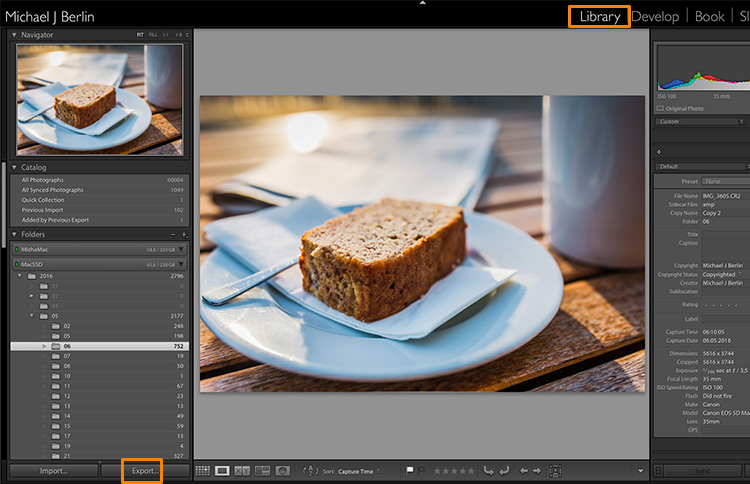
Lightroom export images

The reason is that Lightroom does not actually store your images, they are not really within its database. Lightroom merely keeps a list of locations where your original images are located, generates its own internal previews of those images to work with, and stores the changes you have chosen to make to the files. But until this stage all you are seeing in Lightroom is purely a visualization, there is no actual finished images created yet.

For this, you will have to learn to use the Export feature. While it is one of the essential features of Lightroom, it seems to confuse many people at the start. Part of the confusion certainly comes from the huge amount of options Lightroom offers when trying to save images:
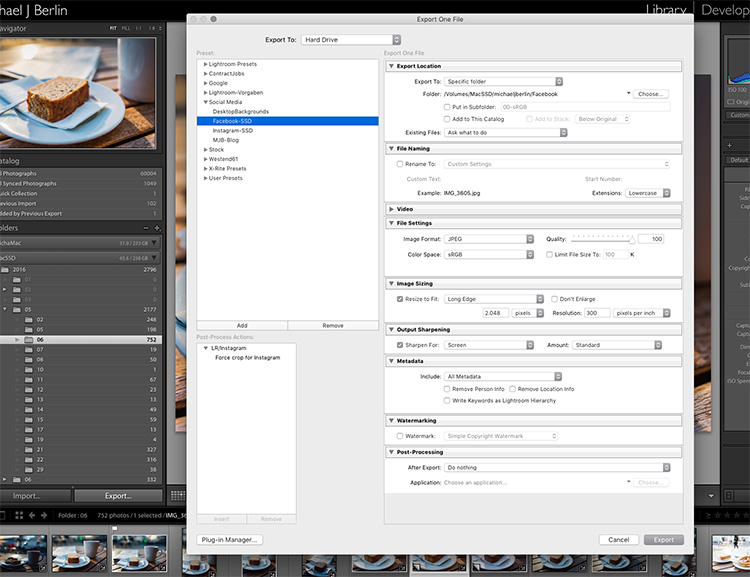
Lightroom export images

So let’s have a look at the most common cases for using the Export functionality to get the best results:

Export an image for Facebook

There are many discussions about how an image should be saved for Facebook. I trust Facebook’s own recommendations most and have had good experiences relying on that article. Typically I export images at the highest resolution Facebook will accept, the 2048 pixels mentioned in the help article.

So, first of all, you have to tell Lightroom where we want to save your image. Lightroom offers a lot of choices, one of them being to save the new resulting image into the same folder as the original. Remember, until now only the original image exists somewhere on your hard drive, no changes have been made to it.
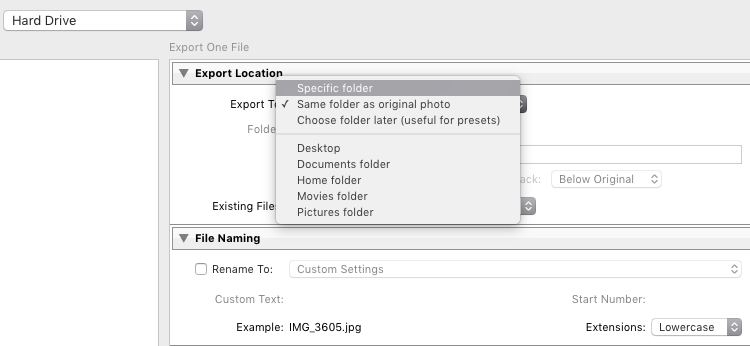
Lightroom export images

It can be a good idea to keep the original and your final copies in the same space. However, I typically save images into a subfolder to the original – named “For Facebook” for example – so when my original RAW image is in a folder structure by date “2016/05/06”, I would save my Facebook images into the sub folder “2016/05/06/For Facebook”.
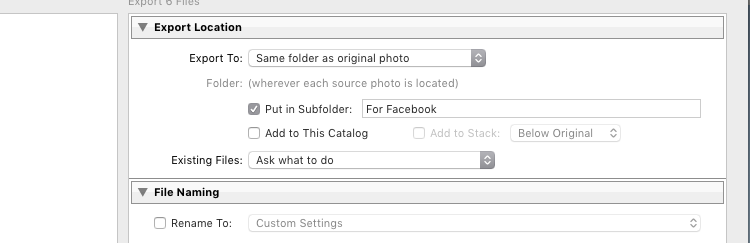
Lightroom export images

Another option at this point that I regularly use, is to define a “Specific folder” for my outputs. This allows you to send all exported images to the same location on your hard drive, for example to keep a specific folder containing all the images you have uploaded to Facebook. This also works great to automatically save files into an online cloud storage such as into a Dropbox folder on your disk.

File format

Further down on the Export screen, you get to choose the file format you want to make the exported image. For internet purposes, you would mostly choose JPEG as the desired file format. JPG is a compressed format which allows faster transmission of images, so most internet based platforms use this format to store photos. PSD and TIFF will allow you to store images in full detail in with a wider range of colors (16 bit instead of 8 bit). Some printers (photo labs) will accept TIF files because of the additional details stored in the images, but you should make sure your printer does before trying to send files that can reach more than 100 MB.
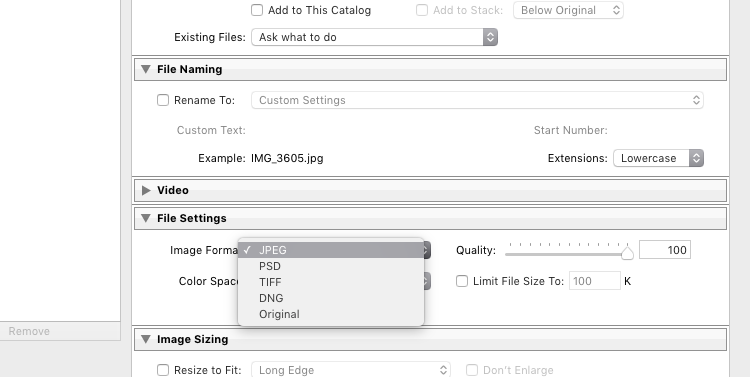
Lightroom Export 05 File Format

With the JPEG format, you also have to choose the Quality level. As JPEG tries to find areas of similar colors to make the file size smaller, the quality setting defines how “different” a color section needs to be before a compression is being applied. The lower the quality, the more compression artifacts you might see in the final image, in exchange for a lower file size. In most cases, values around 80-90% will not show critical changes over the full 100%, and only in rare occasions (when file size is very critical) you should go below 60%.

Color profile

Besides the format and quality settings, there is another drop down box in this section showing the color profile to be used. In simple terms, the color profile defines how many (and which) colors can be accurately stored. The smaller a color profile is, the less color information it contains, but also the smaller the file sizes will also be.
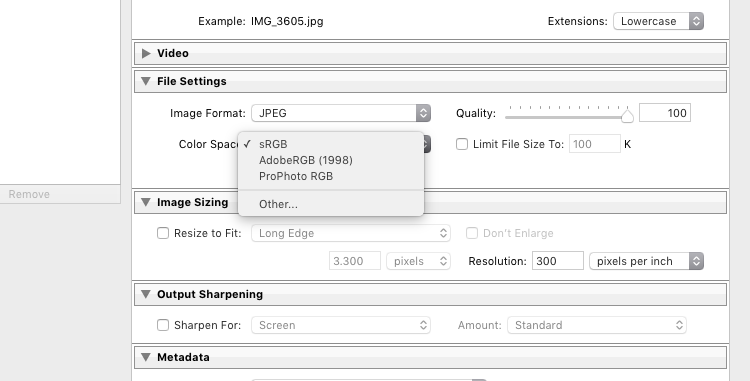
Lightroom Export 06 Color Space

In general, sRGB is the best choice for all images that are meant to be displayed on electronic screens, from large computer monitors, to smart phones, on your website, or on Facebook. The other options (AdobeRGB and ProPhoto RGB) both contain more color information, which can be advantageous if you want to apply further changes to the images at a later stage, for example in Photoshop or in the pre-print processing.

Just as with generating TIF or PSD files, you should only use these other color spaces when sending images when you know in advance that the recipient at the target location can work with them. Most online print services today are prepared to accept images in JPEG format and sRGB color space, as this is what most consumers produce with their cameras.

Sizing your images

The final section you need to address before exporting your images are the resizing options:
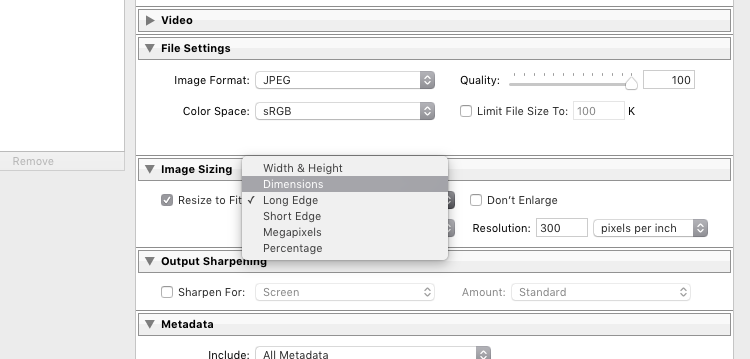
Lightroom Export 07 Resize

For images you plan to upload to the internet – be it your blog, to Facebook, or Instagram – you probably don’t want to upload the full resolution of 16 or 24 megapixels that your camera probably shoots. As mentioned in the linked help article above, Facebook only accepts up to 2048 pixels on the wide side, and if you upload larger images they will automatically be downscaled. So it is preferable to save the file in the recommended size, to save upload time.

With these settings, you could now export your image for sharing on Facebook. There are a few sections below like Output Sharpening (you can choose “Screen” and “Standard”, and compare the results to a version without output sharpening to see the difference) or adding a Watermark to your images automatically, but those are topics for a another article in the future. But just wait a second before you press the Export button right now, there is something else we should look at first.

Save your settings as an Export Preset in Lightroom

Now that you have taken the time to understand the settings on the Export screen and have come to a result you’re happy with, you want to be able to use the same settings in the future without having to think about getting them all right for every new image. This is why Lightroom allows you to save these settings as an Export Preset. Just press the “Add” button below the list of saved presets on the left half of the window, to add your personal preset – you can even have them sorted in Folders for different purposes:
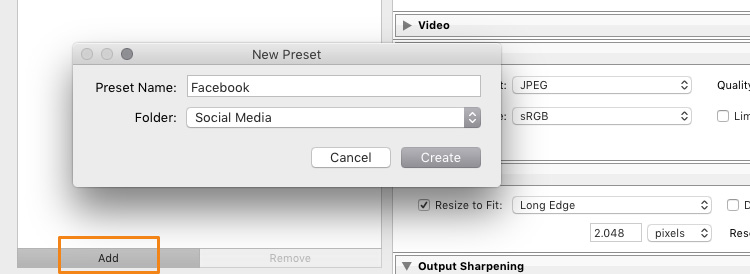
Lightroom Export 08 Add Export Preset

Once it is saved as an Export Preset, selecting the same settings is simply a matter of a single click. As you can see from the next screenshot, I have defined my personal Export Presets for different social media uses like my blog, Facebook, and Instagram, as well as usage as a new Desktop Background for my own computer.
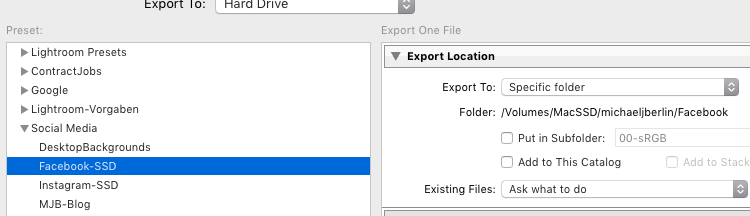
Lightroom Export 09 Use Export Preset

Cropping images for desired format before the Export

With all the settings, we have looked at in the first part of this article, there is one important part that has to be done before entering the Export screen: Cropping your images when you want to use them into a format (proportion) that does not match your camera’s output.

Most modern cameras produce images in a 3:2 aspect ratio, so the long side of an image is 50 percent longer than the short side – in a 24 megapixel camera this translate to 6,000 x 4,000 pixels. However, traditionally there are different popular formats, especially when it comes to printing images:

  • From the age of large format cameras, the 5:4 format (or 8×10 prints) is still very popular in some regions.
  • Medium format cameras usually produced images in 6 x 4.5 (so a 4:3 ratio) or in 6×6 square format.
  • The square format has also been Instagram’s unique format until recently.
  • TV screens, and a growing number of computer monitors, come in the 16:9 standard defined by high definition TV.

To print a full image in one of those different formats would cause distortion, as the image information would have to be squeezed to fit to the shorter sides. In general, printers will not distort the image but instead cut them off at the side. To avoid a random crop in print, what you need to do is to crop your images to fit the desired output format.

Make Virtual Copies

Bonus Tip: If you want to keep the original format for easy access and/or offer your customers different print formats, I recommend to create a Virtual Copy (keyboard shortcut is: Command/Control+’ or right click the image and select Create Virtual Copy, see screenshot below) from your image before doing the cropping. This way, you will have two (or more) versions of your images, one in original aspect ratio and others in the cropped format. Within Lightroom this will only take a minimal amount of space, as Virtual Copies do not duplicate the original file but are just an additional set of data within the database.
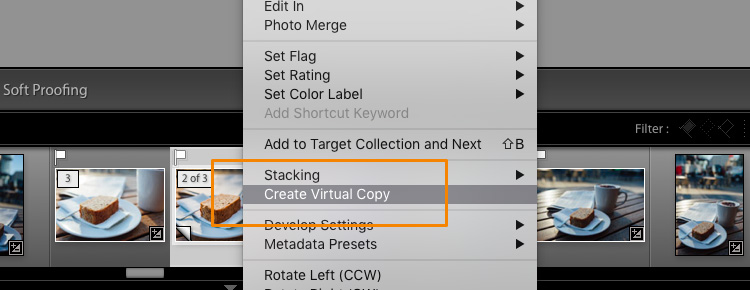
Lightroom Export 10 Virtual Copy

When you select the Crop tool in Lightroom’s Develop module, you will find a list of presets covering the most popular aspect ratios in a dropdown menu. Choose the desired format from the list, or choose a Custom Format if you don’t find the aspect ratio you are targeting.
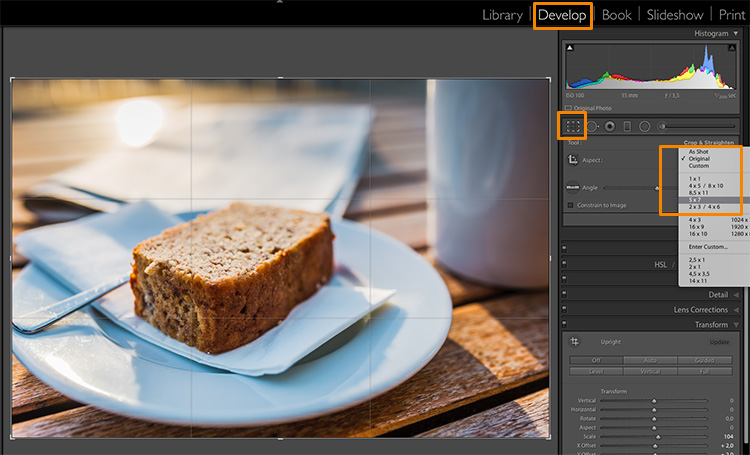
Lightroom Export 11 Crop Tool

If you select a 5×4 crop, you will see the crop guides highlighting the parts of your image that will remain in the final result, and the darkened parts on both sides of the photo that would be cropped off. You can now move the crop area to your liking to the right or left – or drag one of the corners in case you want to close in to your main subject a little more. Reminder: As everything in Lightroom, this is a non-destructive process, you can change the chosen crop at any stage and even return to the original size.
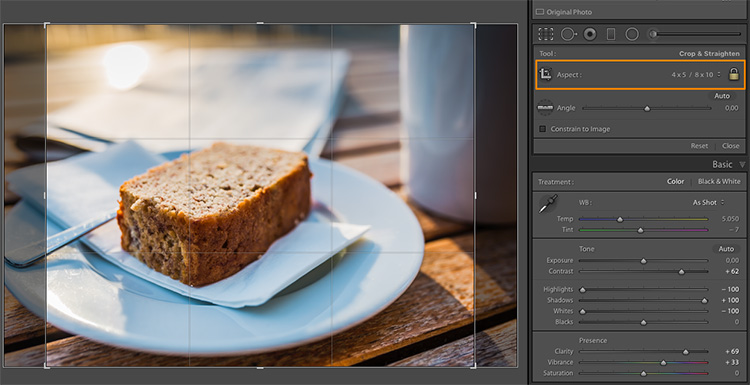
Lightroom Export 12 5x4 Crop

To give you an idea how the different crops can impact an image, I have created five virtaul copies, in addition to my original 3:2 format image, and have applied the five most popular aspect ratios as follows:
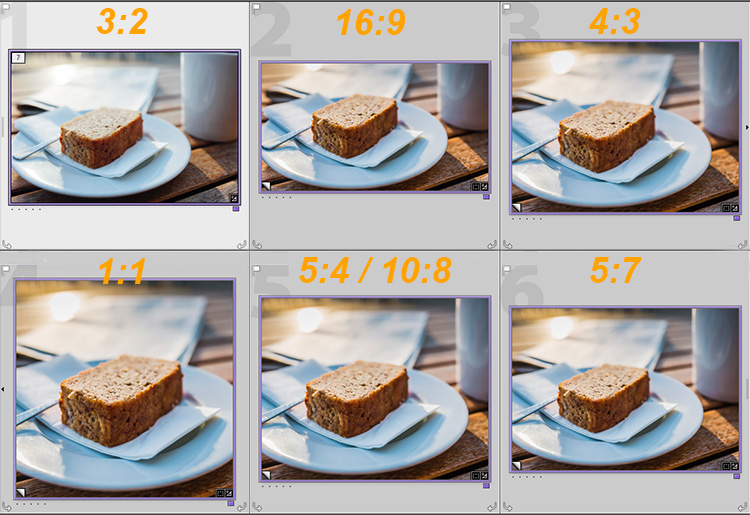
Lightroom export images Crop Comparison

Image size settings

Once you are happy with your crop, you can go back to the Export screen from the Library module. Now let’s have a look at the Image Sizing section again. As you can see, I have now chosen to make Lightroom fit the image to a 8 x 10 inch print format. Please note that I have changed the measure from “pixels” to “in” in the drop down box for this – if you prefer the metric system, there is a “cm” option for centimetres as well.
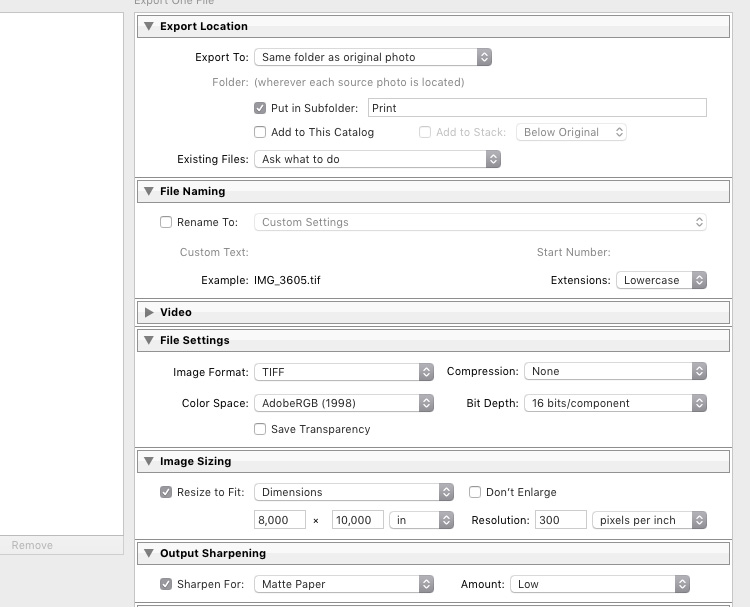
Lightroom export images Print

I have also set the Resolution to 300 pixels per inch which is the typical requirement for most printers. With these settings, Lightroom will now automatically save the image to the desired aspect ratio and file size. Remember to store these settings as another Export Preset if you are happy with the results, so you can use the same settings for future exports.

Also, please note that I have changed the File Settings in this case to TIFF, and AdobeRGB with 16-bit, to show the settings that will save the most information with the file. As discussed in the first part, this is only recommended if you know that the printer can handle the resulting large file size. If you want to deliver printable files to your clients, I would recommend you stick with JPEG and sRGB, as you can’t say in advance which printers they will use and most services will be able to handle those images as well.

Summary

I hope this article helped you to understand the basics of exporting images to different formats from Lightroom. In case you have questions, feel free to leave a comment below this article or join the Digital Photography School group on Facebook where I am available to answer questions as well.
lightroom-mastery.jpg


For more training using Lightroom check out our new course Lightroom Mastery!

googletag.cmd.push(function() {
tablet_slots.push( googletag.defineSlot( “/1005424/_dPSv4_tab-all-article-bottom_(300×250)”, [300, 250], “pb-ad-78623” ).addService( googletag.pubads() ) ); } );

googletag.cmd.push(function() {
mobile_slots.push( googletag.defineSlot( “/1005424/_dPSv4_mob-all-article-bottom_(300×250)”, [300, 250], “pb-ad-78158” ).addService( googletag.pubads() ) ); } );

The post How to Size and Export Images from Lightroom for Facebook and Print by Michael Zwahlen appeared first on Digital Photography School.


Digital Photography School

 
Comments Off on How to Size and Export Images from Lightroom for Facebook and Print

Posted in Photography