RSS
 

Posts Tagged ‘Single’

Telling a Story in a Single Image – Tips from a Photojournalist

16 Jan

Photography is visual communication medium. You can follow and use some rules, through composition and technique – but photojournalism takes it a step farther and states facts and gives information that is true and real. You need to follow two basic pillars to be an ethical photojournalist. Those principles are: you do not manipulate your scene, and the information you are photographing must be real.

The best recipe you can use for getting a good photo that tells a story is by combining good composition, action, and emotions. If you are able to engage with your subject mixing those three elements you will be able to get a good photograph.

As photojournalist you can display facts and affairs but you will level up your work if you are able to evolve those facts in something emotional and touching. Then is when you photo stars to tell a story.

FPC2841

Suruç hospital receives Kurdish fighters from Syria.

FPC1936

Kurdish women cry for the wounded, treated in Suruç hospital.

Both photos describe real facts, something that is going on. In the first one you see some action, and some mood in the people waiting for the wounded fighters. But in the second one, the emotion is stronger and you see the action coming out from the other women crying around them.

“If you want emotions in your photos you need people around”

Include people in your frame. Look for the faces, not for the backs, but understand that body language in human beings is another way of communication so a full body can also express emotions.

FPC3700

Ukrainian army enters the eastern city of Mariupol leaving civilians casualties as result of the attack.

Firefighters are in action, the fire inside the personal armoured carrier is action too and the whole scene makes the tension of a probable incoming explosion. You need to make the action evident, so you need to get close. The action needs a bigger space in your frame. For that, use your feet – they are your best zoom. You could step back ant shoot the armoured vehicle on fire from the distance, but the main characters of the photo will be lost and the man handling the water and the fire in the foreground is pure action.

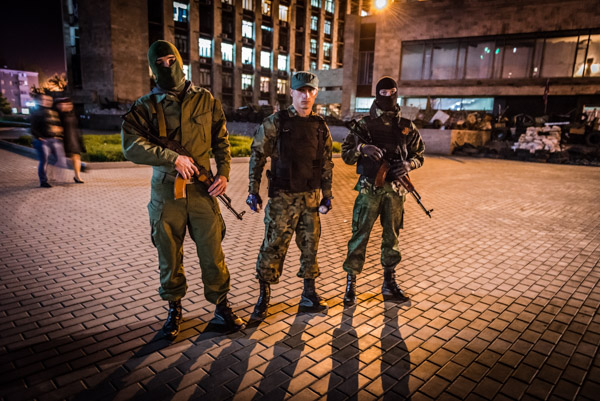
You can get a story going on in your photos too, if you are able to engage with your subject. A close portrait with the right attitude is it always good. In these photos you can see a little bit of action in the background but not much. However, you can replace that making a strong engagement with your subject. You can feel in these photos they are arrogant, they are proud of what they are, they stand up not ashamed, and look forward and straight into the camera and their body languages speaks for itself.

FPC4340

Pro-Russian sniper guards a checkpoint in Slaviansk, eastern Ukraine.

FPC3371

Pro-Russian militias patrol the main administrative building in Donetsk, eastern Ukraine.

When you look for a story in your photos try different angles, do not be afraid of watching things from a different perspective. Get low, as a photographer you need to change your point of view. When photographing kids and animals you always need to get to their level, at the same level you make them to stand up and you give them the major role in frame.

FPC3564

Pro-Russian militia Vostock Battalion celebrates the independency of the Donetsk People’s Republic.

As you can see in these examples the action and emotions are the key. There is no better way to find those emotions than looking forward and getting close to the principal characters of the events.

A good indicator of whether your photography is good is if you do not need to explain anything. A photograph telling a story does not need to be explained. If you want to make the story more complicated you will need to put more elements in harmony in your frame, it is more complicated but is a challenging experience.

How do you tell stories with your images? What can you learn from these tips that you can use in your own photography, even if you do not do true photojournalism?

googletag.cmd.push(function() {
tablet_slots.push( googletag.defineSlot( “/1005424/_dPSv4_tab-all-article-bottom_(300×250)”, [300, 250], “pb-ad-78623” ).addService( googletag.pubads() ) ); } );

googletag.cmd.push(function() {
mobile_slots.push( googletag.defineSlot( “/1005424/_dPSv4_mob-all-article-bottom_(300×250)”, [300, 250], “pb-ad-78158” ).addService( googletag.pubads() ) ); } );

The post Telling a Story in a Single Image – Tips from a Photojournalist by Felipe Passolas appeared first on Digital Photography School.


Digital Photography School

 
Comments Off on Telling a Story in a Single Image – Tips from a Photojournalist

Posted in Photography


Split & Slide: Modular Dividers Make 3 Rooms in Single Space

12 Nov

[ By WebUrbanist in Design & Fixtures & Interiors. ]

modular room system design

Complimenting a flexible open area on one side of this apartment are a series of suspended separators that provide storage but also move along rails, opening up a variety of additional functions on demand. If the system looks familiar: it is based on the sliding stacks often used to save space in libraries.

modular-osb-oriented-board

modular space kitchen view

modular space bedroom

modular bedroom configuration open

Designed by PKMN Architectures in Madrid, Spain (with images by Javier de Paz García), this cost-and-space-saving solution employs relatively cheap materials including engineered particle wood boards (composed of glued wooden flakes) and a ceiling-hung system of industrial rails.

modular living room space

modular room shuffle sliding

modular room system

modular osb oriented board

The three suspended sections offer shelves and cabinets and variously create a kitchen, dining or living room depending on how they are configured and positioned relative to the room and one another.

modular murphy folding bed

modular living room blackboard

modular apartment sliding rooms

modular cooking kitchen closeup

Fold-down tables and a fold-out bed are able to be accessed as needed while the walls are variously occupied by storage, openings or unique decorative, fun and functional touches (like a blackboard for sketching ideas during meetings).

modular room changing gif

Sliding panels can also provide privacy when desired, separating the more open space from the modular-room side of the apartment. The fixed-in-place spaces are reserved for open living and dining areas as well as a bathroom in one corner of the unit.

Share on Facebook


[ By WebUrbanist in Design & Fixtures & Interiors. ]

[ WebUrbanist | Archives | Galleries | Privacy | TOS ]


WebUrbanist

 
Comments Off on Split & Slide: Modular Dividers Make 3 Rooms in Single Space

Posted in Creativity


Tree of 40 Fruit: Single Plant Grown with Dozens of Grafts

08 Aug

[ By WebUrbanist in Art & Sculpture & Craft. ]

tree of 40 fruits

Giving the phrase ‘garden variety’ a fresh new meaning for urban gardeners, this amazing hybrid plant makes it possible to raise dozens of types of produce on a single tree using low-tech grafting techniques.

tree 40 fruit growing

A work of both art and science by Syracuse University art professor Sam Van Aken, the all-in-one Tree of 40 Fruit is the culmination of years spent experimenting with hybridized stone fruit trees that produce peaches, plums, peaches, apricots, nectarines, cherries and much more.

tree fruit growing experiments

Treating his work (with over 250 types of fruit) as a combination of farming and arborsculpture, Aken combines heirloom, antique, and native varieties, all set to bloom in seasonal sequences designed to create edible results as well as aesthetic effects throughout the year.

tree fruit before after

The custom-crafted hybrid looks like an ordinary fruit tree until it blossoms a key points through spring, summer and fall with its rich variety of flowers and fruits.

tree fruit peaches branch

Using a chip grafting process, Aken takes a sliver off of a tree and tapes it the growing hybrid, letting the pieces grow together over the winter then pruning them back as needed.

tree 40 fruit sites

The resulting trees of 40 fruit continue to be grown and dispersed around the country to museums, community gardens and other public spaces.

In an interview with Epicurious, Aken explains that “as the project evolved, it took on more goals. In trying to find different varieties of stone fruit to create the Tree of 40 Fruit, I realized that for various reasons, including industrialization and the creation of enormous monocultures, we are losing diversity in food production. In addition to maintaining these varieties in my nursery, I graft them to the Tree of 40 Fruit. Additionally … I go to local farmers and growers to collect stone fruit varieties and graft them to the trees. In this way they become an archive of the agricultural history of where they are located as well as a means to preserve antique and native varieties.”

Share on Facebook


[ By WebUrbanist in Art & Sculpture & Craft. ]

[ WebUrbanist | Archives | Galleries | Privacy | TOS ]


WebUrbanist

 
Comments Off on Tree of 40 Fruit: Single Plant Grown with Dozens of Grafts

Posted in Creativity


Single Image Star Trails – a Powerful Technique to Create Star Trails in Minutes Using Phototoshop

11 Jun

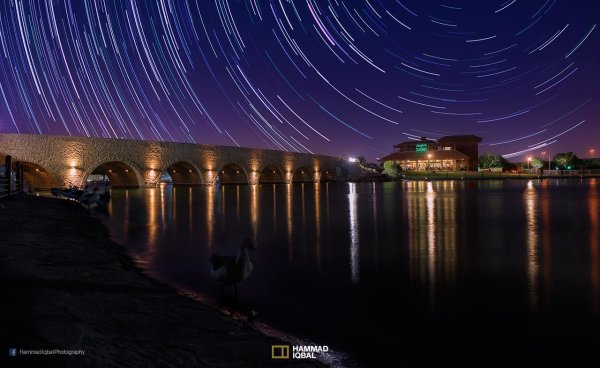
10258929_1466264890276738_7906982947618430010_o

If you are reading this, you must be among those who have a special place in their hearts for stars, galaxies and the wonders of the universe. With recent advancements in camera technology, many photographers have captured the beauty of the night sky in spectacular ways. The truth is that every photographer is fascinated by the glittering stars, and captivating night skies, that have the power to instantly teleport us to a world beyond our wildest imaginations. From a photographic perspective, star trails can add another dimension to an otherwise average shot and that is likely the primary reason for many photographers desire to learn how to capture star trails. If you are struggling to find out and learn about this rewarding effect, get your camera and computer ready. But before that, let me introduce you to star trails.
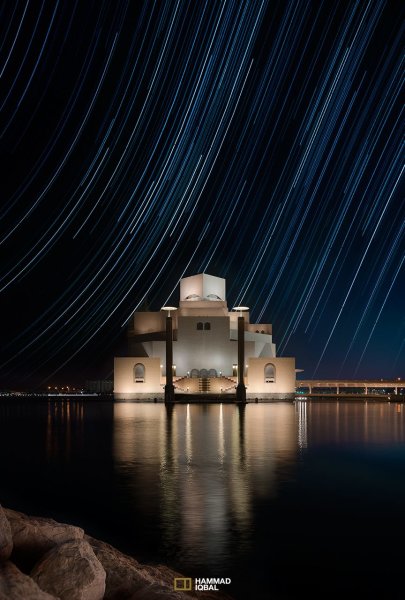
10373061_1472036406366253_4127720884282225109_oWhat are Star Trails?

Star trails is a photographic effect that gives an illusion of motion to the stars along a circular or an elliptical path. Technically, stars do not move when we observe them. They are quite stationary very much like our Sun. In reality, the circular motion of the stars we see in star trail images is a result of rotation of the Earth along its axis. For better understanding, please refer to the ‘equatorial grid’ figure under “Understanding Star Trails” section below.

How are Star Trails captured?

Traditionally, star trails are captured by taking multiple shots of the sky in succession over a period of many hours. Modern DSLR cameras also allow you to take a single exposure of an extended length of 30 minutes or more but many photographers prefer to take multiple shots at 30 seconds each and stack them together. Doing it this way eliminates any chances of shaky exposures that can occur due to wind or bumping into the setup while the shutter is open. If you are attempting to make almost a full circle star trails, then the number of shots required to create it can go in hundreds. Later, all those shots are stacked together in Photoshop or a free software such as StarStax to create a single image that shows the circular paths of the stars.

Photographers have been using this method for years with great results. But if you do not have the option to return to the same location again, then the conventional method would feel limited, as it requires you to stay in one spot for hours, thereby limiting your options to take multiple shots and capture a variety of angles on location in one night.

Understanding Star Trails
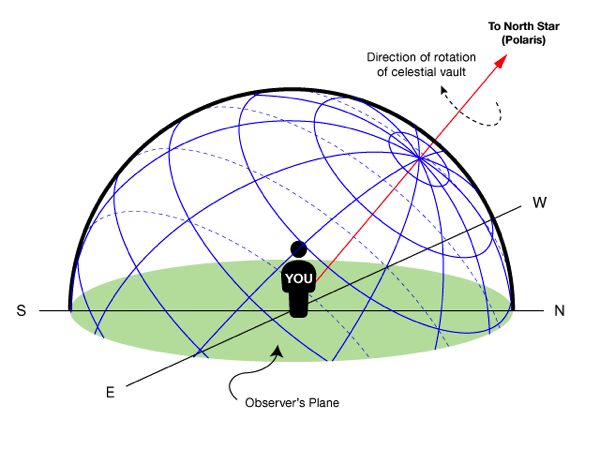
Equatorial grid

Equatorial grid from observer’s point of view

Imagine that ‘YOU’ are inside a giant sphere (see above diagram). Now, depending on the direction you look at, the effect of the star trails will be as follows:

Facing North: Star trails effect will appear to be circular with some stretching of the circular lines at the far edges of the frame.

Facing East: The trails will appear to be straight in the middle moving diagonally in an upward direction from bottom center to top center. They will also appear to be converging at both top left and bottom right at the far sides of your frame. See image below:
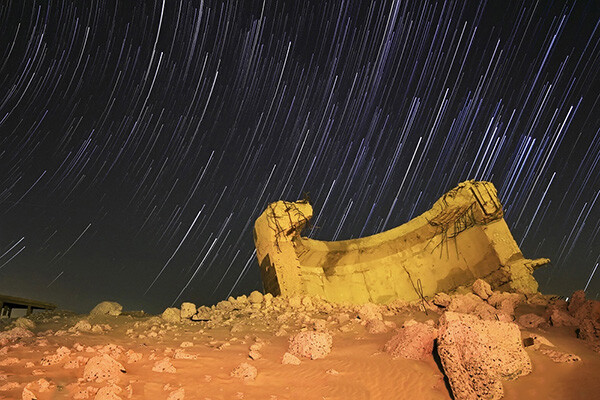
East West Trails Umm ul Aish Kuwait

Umm-ul-Aish, Kuwait – image shows the upward motion of East star trails

Facing West: In this direction, the trails will appear to be the exact opposite of what you see when looking towards the South. Moving downwards and to the right from top to bottom in a diagonal line, they will also appear to be converging at both bottom left and top right at the far edges of your frame.

Facing South: If you are facing South head-on, the star trails will appear to be moving from left to right in an upward curve.

One-shot Star Trails – the Technique

I have been developing a new method to create star trails in Photoshop. Unlike the ‘Star Trails’ Photoshop action that you might already be familiar with, this technique is much more than that. It eliminates all limitations associated with the traditional method of capturing star trails. Unlike the conventional method, this technique only requires a single shot, that’s right, only ONE shot of the night sky to create realistic star trails. Since this technique is a result of a joint effort between me and my friend Mobeen Mazhar, who is a great landscape photographer from Pakistan, we have named it the “HM technique” or “HM star trails”.

When implemented correctly, this technique will open endless possibilities for you in your star trail adventures and is sure to spark new hope among photographers for all levels of expertise. Now, let’s take a look at different types of star trails and how you can use this new technique to create them in Photoshop with just one shot.

Creating North Star Trails
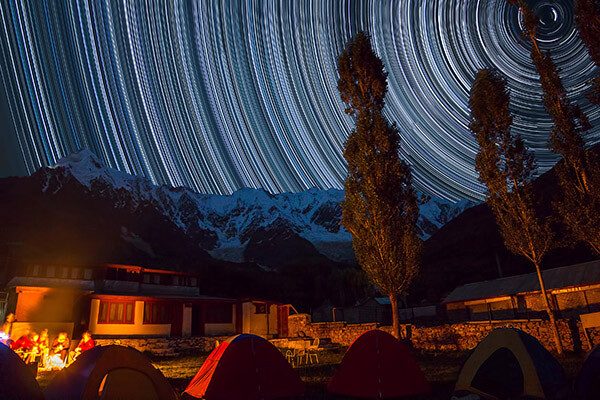
North Star Trails Nanga Parbat

Nanga Parbat-Trashing, Pakistan – North Star trails created with HM technique

This is the most common and simplest type of star trails. Traditionally, it can be achieved by pointing your camera towards North with the focus set to infinity and then taking consecutive long exposure shots (30 seconds) at high ISO settings. Since the North Star remains almost stationary, the final effect is circular with the stars seeming to revolve around a pivot point, which is the North Star. Then at the time of post-processing, all shots are stacked using Photoshop or StarStaX.

The downside to this approach is that it can take as many as 700 shots over a period of five to eight hours to get a full circle trail. Now watch the video below to learn to create North Star trails within minutes using just a single shot of the night sky.

Creating Meteor Shower Trails
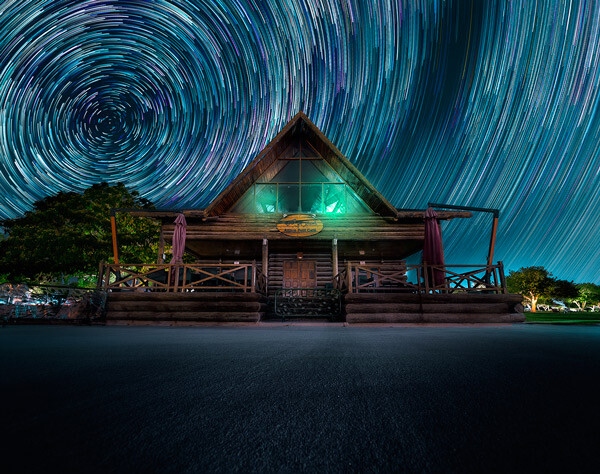
Meteor shower AspirePark

Aspire Park, Doha – meteor shower trails created with HM technique

Meteor shower trails is by no means an official name. This is fundamentally a beautiful variation of the North Star trails. Instead of a long continuous streak of light, the trails seem to disappear at the origin which gives it depth and dimension. There is also another variation of the meteor shower trails in which the tip of the trail is thicker, brighter and looks like a blob or droplet.

The underlying technique of the meteor shower trails is the same as shooting the North Star trails. The only difference is in post-processing. The meteor or comet effect is achieved by using the ‘Comet mode’ in StarStaX as shown below.

‘Comet Mode’ feature in StarStax

But regardless, the traditional method still requires that you spend hours on a single spot to take hundreds of consecutive shots. Now watch the video below to see how you can create amazing meteor shower trails in minutes, and once again, all you need is a single shot of the night sky.

Creating Vortex Star Trails
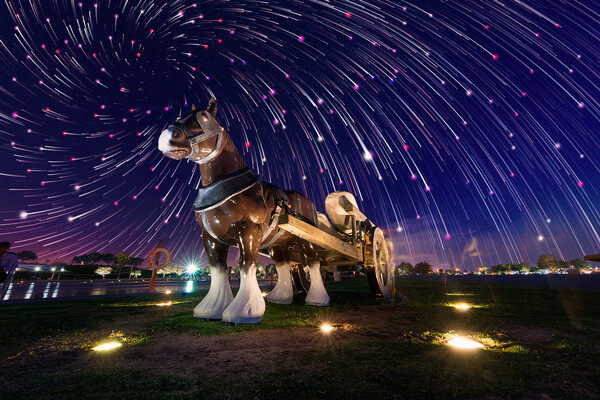
Vortex Aspire Park Doha

Aspire park, Doha – Vortex star trails created with HM technique

This is by far my favorite kind of star trails and is quite complex to achieve. Unlike the previous two types of trails, vortex star trails require special equipment which can be costly and may prevent most photographers from trying it. The vortex effect is achieved by zooming in or out on the lens during the long exposure. It may sound simple at first but the trick is to avoid vibrations as you zoom during the 30-second long exposure. Hence it makes it extremely difficult, if not impossible, to do it with bare hands without shaking the whole setup.

But if you have plenty of free cash to burn, you can get the tools which would include a geared ring that goes on the zoom ring of your lens, a motor and a wireless remote for controlling the motor. The setup is basically what DSLR filmmakers use for focus racking, that is a motorized follow focus system as shown below. The system is very useful if you shoot professional video with your DSLR but for photographers, the cost might not be justifiable.

Electronic follow focus

Wireless electronic follow focus kit v2 by Jag35

Do not worry because the following video will show you how to create vortex star trails in Photoshop. No cash required.

Conclusion

With the help of this powerful new technique, you will be able to maneuver on location, shift your focus towards making a variety of compositions, save countless hours, battery power and thousands of shutter actuations on your DSLR. Would you have thought that a single shot could give you such incredible flexibility in your star trail photography?

Tip: Just make a note of the direction your camera is facing to help you create star trails in relation to the reference direction.

I am sure that this tutorial will add a new skill to your photography arsenal. If you have any questions, post them in the comments below. Thank you.

Technique developed by Hammad Iqbal and Mobeen Mazhar

Mobeen Mazhar is a passionate traveler and has spent more than a decade exploring Pakistan and its natural beauty. Photography gives him a mode to express his love for nature and a medium to document his travel experiences. He is a landscape specialist, regular travelogue writer and travel expert for Pakistan. You can find his photographic work at Facebook, 500px and Flickr.

The post Single Image Star Trails – a Powerful Technique to Create Star Trails in Minutes Using Phototoshop by Hammad Iqbal appeared first on Digital Photography School.


Digital Photography School

 
Comments Off on Single Image Star Trails – a Powerful Technique to Create Star Trails in Minutes Using Phototoshop

Posted in Photography


firing multiple flash units with single receiver

08 Nov

Did you know that you can fire multiple flashes with one little receiver? In this video I show you how to use a Nikon SB-600 as a master flash that will trigger a Nikon SB-800 and an Alien Bee B1600.
Video Rating: 4 / 5

 
Comments Off on firing multiple flash units with single receiver

Posted in Nikon Videos


L’Arc~en~Ciel – Floods of Tears (single version)

18 Oct

Floods of Tears ~ single version ~
Video Rating: 4 / 5

 
Comments Off on L’Arc~en~Ciel – Floods of Tears (single version)

Posted in Nikon Videos


DepthQ 3D Single Projector Polarized Installation – Parsons Brinckerhoff, Seattle –

26 Aug

An overview of new 3D visualization lab at Parsons Brinckerhoff, Seattle. PB is one of the world’s leading planning, engineering, and construction management organizations. 3D equipment integration and installation by Lightspeed Design, Inc – DepthQ Stereoscopic: DepthQ Player, running crosstalk reduction code (ghost busting) — DepthQ Polarization Modulator Circular Small 80×86 mm — Stewart Filmscreen 150 rear projection polarization preserving screen — Da-Lite bounce mirror — ProjectionDesign F10 AS3D single lens 3D projector.
Video Rating: 5 / 5

 
Comments Off on DepthQ 3D Single Projector Polarized Installation – Parsons Brinckerhoff, Seattle –

Posted in 3D Videos


Tutorial: How to Make a 3D Anaglyph Image From a Single Photograph

27 Jan

Most 3D image tutorials show you how to make a 3D image out of two photos, so here is a quick tutorial on how to make a 3D image from a single photo. You’ll need Photoshop or something similar. Using this you can turn pretty much any image with good depth into a 3D one. The photo of Steve Aoki is by David Lang: davidlang.me
Video Rating: 4 / 5

 
5 Comments

Posted in 3D Videos