RSS
 

Posts Tagged ‘Should’

50mm f/1.4G AF-S Review – Which 50mm Nikkor should you buy?

20 Dec

google+ plus.google.com www.facebook.com Review of one of Nikon’s best bang for your buck prime lenses and a broader discussion on which 50 you should buy for your needs.

Yeah I got soaked. Merry Christmas. xoxo Subscribe. #wolf-pack heart.issy
Video Rating: 4 / 5


Thinking of Starting a Photo Community on the Web? Should You Do It on Flickr or Google+?

15 Dec

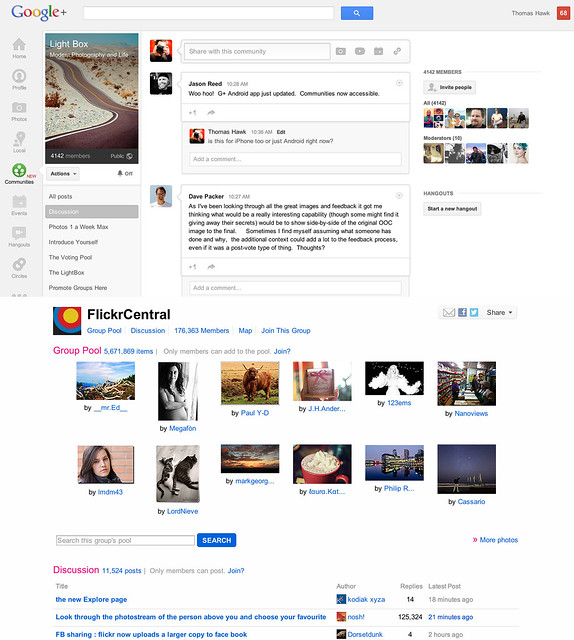
Google+ Communities vs Flickr Groups

Google+ launched their new communities last week and I’ve spent a lot of time exploring how they work since launch. I’ve also spent quite a bit of time super active over the past eight years in Flickr groups. Google+ communities are a lot like Flickr groups, but there are key differences, advantages and disadvantages to both. I thought I’d write a post comparing the two. I’ve long held that Flickr groups represent Yahoo’s best chance for social going forward.

So here’s the smackdown.

1. Thread bumping. Flickr wins. Probably the most significant problem with G+ communities is that they do not bump threads. With Google+’s new communities discussion topics are only shown by most recent post. Unfortunately the most recent post is not always the most interesting/engaging post. What’s more, because threads are not bumped upon a new comment, almost every thread over 24 hours in an active community on Google+ dies. Good conversations should last more than 24 hours. Flickr solves this problem by simply bumping each thread back to the top of the discussion forum anytime someone makes a comment on it. This is a far better way to keep a discussion forum active and engaged.

2. Muting discussions. Google+ wins. One of the problem with Flickr is that there is no way to screen out discussions that you are not interested in. If I don’t care about football, why should I have to see a thread about football in my favorite photography forum. At Google+ the answer is simple. Just go to the thread and choose to “mute this post.”

3. Photo pools. Flickr wins. At G+ you are forced to try to use typical discussion threads to post photos. Flickr, by contrast has a group photo pool that is associated with each group. Although it’s tempting to see photo pools as more of a photography niche feature, I’d argue that every community potentially has photos to share. Even if the photos are not artistic oriented photography, every group of people will potentially want to share photos with each other. Ideally, a group/community should be allowed to have more than one photo pool/album with settings to allow how content can be shared in those pools.

4. Community activity. Google+ wins. Even less than two weeks old, communities on Google+ are far more active than Flickr. Individuals are far more engaged and the rate of velocity around community conversations is much higher at Google+.

I started a new community called Light Box on Google+. It’s based on a voting game similar to voting groups I’d created on Flickr in the past. On Google+ the group already has over 4,000 members in less than a week. At Flickr it would take me months to build a group up that large. The G+ community is already 20x more active than any voting group/game I’ve ever seen on Flickr. When it comes to community velocity there is simply no comparison. Google+ communities are some of the most active I’ve ever seen anywhere on the web.

5. Invite process. Google+ wins. Google allows you to invite participants in circles up to around 195 people max. Sending out one invitation to 195 people is a lot easier than the way that Flickr allows you to invite people. On Flickr you can only invite a single member one by one by one by typing their individual name — wayyyyy too much work.

6. Sticky threads. Flickr wins. One of the thing Flickr allows a group owner/moderator to do is to make certain threads sticky so that they always stay at the top of the discussion threads. This is helpful if you have a group/community FAQ or other material that is important to stay prominent to the membership. At present you cannot make sticky threads at Google+.

7. Adult oriented communities. Flickr wins. Although there are some deep underground private communities on G+ focusing on nudes, G+ by TOS doesn’t allow nudity and this content is subject to being removed. On Flickr, they do allow nudity as long as it is properly flagged as nudity. In Flickr’s case this has resulted in both communities discussing artistic fine art nudes, but also a pretty seedy amateur underground porn network as well. Flickr routinely deletes many of the most offensive adult oriented communities, but if fine art nudes are your thing, you’re probably more likely to find these communities on Flickr than G+.

8. Moderating community membership. Flickr wins. It’s much easier to moderate community members in Flickr groups than in Google+ communities. On G+ you must scroll through an entire list of community members in order to find the person you wish upgrade to moderator or ban from your community — page after page after page after page. With any large community on G+ this is a very cumbersome process. Flickr by contrast has a powerful search tool which allows you to search for a member my name to upgrade or ban them.

9. Blocking members. Google+ wins. It cannot be overstated how important a good blocking tool is to community management. Inevitably some community members will not get along. Especially since Flickr allows obvious anonymous troll accounts to inhabit communities, users need some way to immediately protect themselves against bullying and harassment. Flickr’s community blocking tools are weak and non-existent. By contrast Google+ provides users a powerful blocking tool which turns anyone invisible that you choose to block.

Even more important than this user option is the tone that is set in communities because of it. When you know that you can be blocked by other people you are nicer and more polite. I wrote a post a while back about how Google+ is the nicer community for photographers on the web. Flickr groups are routinely full of trolls, jerks and assholes. Even the ones who are tolerable oftentime pride themselves on abusing other community members with their snide, disparaging comments. They think it’s cool to be “snarky.” On Google+ these people are routinely dismissed and blocked and the overall tone is far more positive.

10. Mobile tools. Google+ wins Earlier this week Flickr rolled out a new version of their iPhone app that has a simple thread reader for Flickr groups. The app is AWESOME by the way. When Google+ rolled out communities last week they did not have support for mobile, but today they added it for both iPhone AND Android. I would suspect that a group thread reader will be coming to a future Android app for Flickr.

11. Group/Community recommendation. Google+ wins. On Flickr I am recommended groups that are years old, super dead and with zero activity in them. These are old groups that some Flickr employee chose to highlight years ago. By contrast on G+ I’m recommended communities that really are personally directed and targeted towards me. These are communities that are thriving and active. I’m guessing that there may be some Google curation of these recommendations, but what I’m seeing feels much more algorithmically based and the algorithm recommending communities on G+ feels super smart and personalized to me.

12. Hangouts. Google+ wins. From time to time you will want to get more involved with the members of your community than just discussion threads. With Google+ you can hold a hangout and do live video/voice interaction with other members through Google’s hangout feature. Flickr doesn’t have anything like this.

13. SEO. Google+ wins. While both Google+ and Flickr offer you private communities with an option to not index the community for the web, both also allow public communities that can be indexed for the web. With any public community you will want to have your community index well in search on the web. Google promotes Google+ posts by the people that you follow — if you are searching for a group on the web, there is a much better chance that you will find groups by your friends on Google+. Already my new Light Box group indexes for the first page search results for Light Box when I search regular Google and am logged in. Personalized search gives your group an advantage for being found on Google by your contacts and friends.

The final verdict? Google+ communities win. In my opinion Google+ communities are far more engaging, active, positive places to hang out than Flickr groups. As much as I enjoyed Flickr groups in the past, I think all of my community time going forward will be happening on Google+ instead. While I’m optimistic that team Flickr can/should create a better group experience for users, it may be too little too late at this point.

While Flickr does have Google+ beat on some important features like thread bumping and photo pools, these features are not enough to make up for the current velocity and dynamic advantage that Google+ communities have. Social photographers have been leaving Flickr groups over the past few years as they’ve been setting up camp at G+. Now G+ gives them the one thing that they missed from Flickr, a solid community experience. I suspect that communities on G+ will only get better and better in the weeks ahead. Google+ tends to release things in beta form, bugs and all, and then iterate very rapidly. I’m confident that some of their limitations today will be improved in the future. Hopefully they even give us thread bumping and photo pools like Flickr. :)


Thomas Hawk Digital Connection

 
Comments Off on Thinking of Starting a Photo Community on the Web? Should You Do It on Flickr or Google+?

Posted in Photography


Nikon D600 vs D7000 – Should You Upgrade to FX?

06 Dec

With the recent release of the “cheaper” full frame D600 from Nikon, one has to wonder whether the D7000 is still a good choice as a DSLR when it doesn’t have the full frame sensor that the D600 does. Kai and Lok take a look at the two Nikon DSLRs in this video.

 
Comments Off on Nikon D600 vs D7000 – Should You Upgrade to FX?

Posted in Nikon Videos


Should you be shooting RAW?

07 Nov

You can find many articles online discussing the benefits of shooting in RAW and probably an equal number full of counter arguments stating that it is possible to obtain equally good results shooting in JPEG.  Whilst that is definitely true, I want to discuss the reasons that pushed me to exclusively use RAW in the hope that it can persuade others to do the same.

I liken RAW processing to taking the camera off ‘auto’ and shooting in ‘manual’ mode.  When people are starting out in digital photography, it can seem like another area full of technical jargon that forms a barrier preventing its uptake.  However, once you have an small understanding of the processes involved and how different settings can impact your results, you will find that letting your camera do the processing can be the limiting factor in achieving your photographic vision.

What is RAW?

A RAW file is an uncompressed image file that records the data from the sensor ‘as is’, with minimal processing.  Depending on your camera, this file will most likely contain either 12-bit or 14-bit data.  When shooting in JPEG, the camera will take the RAW file, process it with a number of generic actions (typically contrast/saturation adjustments, correcting for white balance and sharpening) before compressing the image down to an 8-bit JPEG file.

That difference in ‘bit depth’ is the key here.  The 12-bit image will contain 2^12=4096 tones per channel.  Given that there are three channels per pixel (red, green and blue), that equates to 4096x4096x4096= 69 billion possible tones per pixel.  If we compare that to the other bit depths, you will see the difference:

Bit depth

Tones per channel

Possible tones per pixel

8-bit

2^8 = 256

16.8 million

12-bit

2^12 = 4096

68.7 billion

14-bit

2^14 = 16384

4.4 trillion

Now those numbers are almost too large to comprehend, however it is quite simple to consider in context.  When you take a JPEG file from your camera into Photoshop to process, there are only 256 possible tones to define the colour for each red, green or blue channel, which means that when you start apply changes to contrast or brightness, there are a very limited number of possible tones for each pixel, which can result in obvious image degradation if pushed too far.  With a RAW image, the number of possible tones is that much greater that more significant changes to can be made without any impact on the final image quality.

This doesn’t come without a cost though.  Due to the increased bit depth of RAW files, they are anywhere from 2-6 times larger than the corresponding JPEG when recorded in camera.  This will make your vast memory card seem very limited.  Additionally, where as a JPEG is typically printer-ready straight out of the camera, a RAW file will need to be manually processed in your digital darkroom.  So, to answer the obvious question of ‘is it worth it?’, lets consider the benefits…

The benefits of RAW

As mentioned above, when shooting JPEG, the camera processes the image internally, before compressing it to a lower bit depth.  The processing applied by the camera is generic, and uniform across the entire image.  In contrast, when you capture RAW images, you have full control over how much processing is applied to an image, and where in that image you apply it.

Given the increased bit depth of the RAW files, any image you capture is much more forgiving than the corresponding JPEG would be.  For example, if you didn’t nail your exposure, and you over-exposed the sky of a landscape photograph, leaving it nearly white, you will be able to recover much more tonal data in the RAW file and potentially save what, otherwise, may be an image destined for the recycle bin.  Similarly for shadow data, much more information is retained meaning under-exposed regions of an image can be recovered to show detail that would otherwise have been lost.
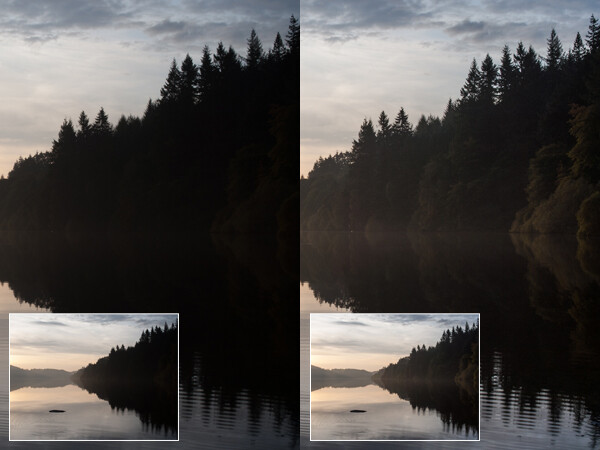
Shadow detail recovery when shooting RAW

On the left is the image presented straight out of camera. Exposing to contain the bright sky caused the trees to be under-exposed, and appear and a dense block of dark colour. The image on the right shows the same image processed to boost the shadows to reveal detail that may otherwise have been lost

Similarly, one image can contain enough tonal detail to create an HDR-style image from one file.  The exposure of the image can be increased/decreased during post processing to give 3 images, as if bracketed, and can be combined to give that effect of increased dynamic range, but all from just one image.

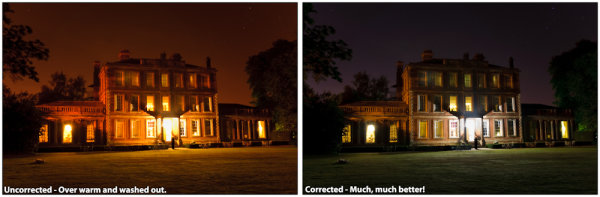
When shooting in RAW, you no longer need to set your white balance in camera.  The increased bit depth of RAW files means that the white balance can be defined, by precise colour temperature (in Kelvin), during post processing rather than by a limited number of defined presets in camera before the shutter is pressed.  Due to the increased bit depth, significant white balance shifts do not have a negative impact on the final image quality.  No longer do you fire off a few frames before remembering that you left the white balance on ‘incandescent’ even though you are now outdoors.
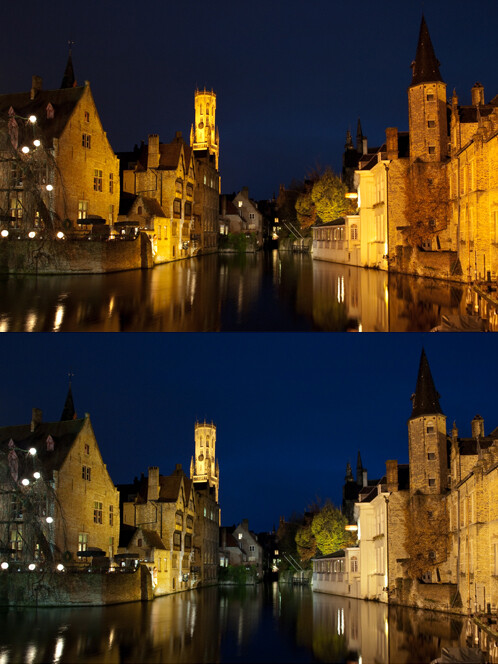
Colour temperature correction from RAW

The top image shows Bruges, captured at night, straight out of camera. The white balance of the bottom image has been processed to reduce the colour temperature in order to give a more realistic representation for the colour of the stone buildings, without any impact on the image quality.

Sharpening can be applied as much as you want and even where you want, without over-sharpening a pre-sharpened JPEG image.  This can be used to emphasise details in one section of an image, or just generally give you control over the final image output.

Selective sharpening of an image

This image on the left shows a cheetah that has undergone some sharpening to increase detail. The image on the right is the mask applied to the sharpening effect. Imagine that black and white image superimposed over the top of the cheetah; the area of white represents the portion of the image to which the sharpening effect has been applied and the area of black represents the portion of the image to which the sharpening effect is not applied. Therefore, in this instance, the sharpening has been applied only to the eyes/nose of the big cat, to further emphasise the sharp focus in this area, and increase the impact of the close portrait.

The added bonus

As if the above points weren’t enough, what has to be one of my favourite reasons for shooting in RAW is that all image editing is non-destructive.  Unlike a JPEG file, where any changes made to the image are permanent, all changes made to a RAW image are stored in a metadata file associated with the RAW file, leaving the original file untouched.  This means you can never irreparably ruin an image by saving some mistaken changes and also you can go back to an image a few weeks, months or years later and reprocess it, from the original RAW, as your processing skills improve.

Now, I would be lying if I said there was not a learning curve associated with RAW processing.  You will need dedicated RAW processing software to manipulate your images, but typically cameras that support shooting in RAW should ship with the manufacturers own software for doing so.  There are also a large number of alternative free programs out there, as well as software packages from well know image editing giants, such as Adobe.  With a little bit of research, you will see how easy it is to squeeze the most out of your images, and you will soon wonder why you weren’t shooting in RAW sooner.

Given that most cameras should give the option of shooting in ‘RAW+JPEG’, where the camera records both the RAW file and processed JPEG file to the memory card, you haven’t got an excuse to not give it a go the next time you are out with your camera.

Post originally from: Digital Photography Tips.

Check out our more Photography Tips at Photography Tips for Beginners, Portrait Photography Tips and Wedding Photography Tips.

Should you be shooting RAW?


Digital Photography School

 
Comments Off on Should you be shooting RAW?

Posted in Photography


Practical White Balance and Why You Should Learn It!

04 Nov

Why are Oranges … Orange ?

White balance can be a tricky subject to master and as a beginner I found both the concept and application difficult. Getting to grips with white balance was a landmark in my early learning, gone were the days of funky looking indoor shots and chilly looking portraits, from then on the world of warm sunsets and natural skin tones lay at my feet. It’s amazing how different an image can look with and without white balance correction applied and consequently the impact on your images can be profound. The basics of white balance adjustment are relatively simple, what takes more time is training your eye to know when you’ve got it right. In doing this you will not only improve the quality of your images but will also save a whole load of time. Here to help you is a basic run down of practical white balance.

What is White Balance?

Despite what we see the actual colour of light is hugely variable. The fact that we generally don’t perceive these shifts in daylight colour is testament to the incredible job the human eye and brain does in adjusting how we see. Our cameras on the other hand are at best dumb instruments and need to be told what colour the light we are shooting is. Ever take a shot of a landscape, but was disappointed to find that the final scene looked orange? Ever used some fill flash for a portrait only to discover the subject to has a blue cast? All of these problems can be fixed using good white balance correction.

Who is this Kelvin Dude?

The colour (sometimes called the ‘temperature’) of light is measured using the ‘Kelvin Scale’. The scale itself was discovered using clever physics experiments, which looked at the wavelengths of light produced by heating black objects to different temperatures. Its definitely useful to know that there is a scale for measuring white balance but all you really need to remember is that the lower numbers equal warmer or redder light with higher the numbers relating to cooler or blue light. Importantly you shouldn’t worry about remembering any of this, its useful knowledge to have but to date I have never needed to know the exact white balance setting of my camera so I doubt you will do either.

See the difference?

In Camera White Balance

The exact method for setting white balance varies from camera to camera but generally the fastest way to do this is by using one of the standard preset values. Simply dial in the white balance correction and hey presto your camera is instantly seeing in a different colour light.

You can pretty much set any specific white balance value you like however in the vast majority of situations the presets are more than adequate. Given that you can fix pretty much anything in post processing why bother doing anything in camera at all? You might be tempted to place your trust in your cameras ‘Auto White Balance’ feature and whilst its tempting, the applied white balance can shift noticeably from shot to shot and wont necessarily get it 100% right either. Imagine having to adjust the white balance on your whole set of holiday snaps, not great.

So now you’re convinced, here to help you is a run down of the major presets and when to use them:

  • Auto White Balance – Basically handing over the white balance correction to the computer in your camera.  In the main pretty good but is set each shot so can change from picture to picture.  Good to use if you are in a hurry.
  • Daylight – A nice mid temperature setting for use in normal daylight.  
  • Cloudy/Indoors – For use in slightly cooler conditions (e.g. an overcast day), has the effect of warming the image up just a bit.
  • Shade – For coller light than the cloudy setting (e.g. dusk or early mornings), warms up the image much more than either daylight or cloudy.  Can also be good for adding extra warmth to normal conditions.
  • Incandescent – Great for indoor shots under artificial lights (e.g. from non flourescent bulbs which can be very warm).  Cools down the image.
  • Fluorescent – For use under strip light conditions, will warm up the image to compensate for the cold and slightly green light produced by these sources.
  • Flash – Warms up light from flash guns which is cool but more blue than flourescent light.

Post Processing

The ability to accurately apply white balance correction is one the major advantages of shooting in RAW format. If you don’t know about or don’t shoot in RAW format, don’t worry you can still make adjustments to other image types albeit not with quite as much flexibility.

For RAW images you have the option to either select one of the available preset values (which will be the same as those available in your camera) or if you wish make a manual adjustment.

Manual White Balance Adjustments

Learning to manually adjust white balance is a great skill to practice as it’s probably the best way to train your eye to recognize the ‘right’ white balance value. The actual adjustment is fairly simple and uses only two controls (although the method for adjusting these will vary according to your post processing software):

  • Temperature – How warm or cold the image is, think of this as adding orange or blue to the shot.
  • Tint – Basically how much green or pink is in the image.

Here is a three step recommendation for manually adjusting white balance. Don’t forget you can select a preset value first and then ‘fine tune’ the result manually afterwards.

  1. Adjust the temperature of the shot, ask yourself is the image too warm or too cold and increase/decrease the temperature value accordingly.
  2. Adjust the image tint, does it look took green or too pink? Look for objects in the image to help you judge this. Good references are skin tones which can either look a bit flush or green round the gills if not corrected properly.
  3. Compare the before and after image (most software will let you turn the white balance correction on and off). Repeat if necessary.

Don’t forget there is no such thing as a right or wrong white balance, if the shot looks how you want it to then that’s good enough.

Generally white balance corrections can also be applied in batches so if you find a setting which works well and all the shots have been taken in the same light using the same settings you can save a lot of time by applying corrections in bulk.

Conclusion

No matter how you do it, making sure you pay attention and manage the final white balance of your shots is an incredibly powerful way to improve the feel and look of your photos. So much of the mood and drama of a photo is conveyed through the colour and quality of light captured and therefore taking those extra few moments to get it right is well worth the trouble. Despite what you may have been told you, getting this right either in camera or postproduction needn’t be a trauma. Hopefully the few hints and tips in this post should point you in the right direction and could make the difference between your next shot leaving you red faced or feeling blue.

Post originally from: Digital Photography Tips.

Check out our more Photography Tips at Photography Tips for Beginners, Portrait Photography Tips and Wedding Photography Tips.

Practical White Balance and Why You Should Learn It!


Digital Photography School

 
Comments Off on Practical White Balance and Why You Should Learn It!

Posted in Photography


How Avatar Should Have Ended – Behind The Scenes

26 Oct

From the HISHE Archives: This was my first Sketch of a Navi after we had decided to make the Avatar HISHE. This character is actually not even in the final short because it was created from thin air. Sort of practice, if you will. After seeing the movie several times and looking up tons more reference material, the characters were changed to look more like the ones of the film (tried to anyway) Hope you enjoy the screen capture vids and the tiny insight into the drawing side of HISHE. Don’t forget to give us some love by subscribing and hitting that like button! Leave a comment and let us know what you think! Be on the look out for new content every THURSDAY! Come back for behind the scenes, deleted clips, and more. Leave us a comment and spread the love by subscribing to our channel and/or give us a ‘thumbs up’! For more, go to www.howitshouldhaveended.com

 
Comments Off on How Avatar Should Have Ended – Behind The Scenes

Posted in Animation Videos


Experience Fashion Bridals the Way They Should Be – Epic Tulsa Wedding Photography

23 Oct

www.epicphotostulsa.com – If you would like to schedule a Fashion Bridal Session with Epic, or if you would just like more information about our Tulsa wedding photography services contact us today at 918-794-2659. At Epic Tulsa Wedding Photography we believe that you should never have to choose between quality & affordability. We know that you have your own unique love story and you definitely have your own style. You might like modern photography, you might like traditional photography with a minimalist approach to editing, or you might like a more photojournalistic style, but we know you won’t like a generic style for the most customized day of your life. Your wedding day should be all about you. Call Epic Tulsa Wedding Photography to schedule your FREE consultation today (and for a mountain of references from happy brides) With a photography team that has been voted by TheKnot.com as the “Best of Weddings” and leadership team that has been named by the US Chamber of Commerce as the “National Blue Ribbon Quality Award Winner” our team will capture the romance, joy, and emotion of your wedding day. Explore our website or call us today to discover the Epic Style that fits you and your personality best.

 
Comments Off on Experience Fashion Bridals the Way They Should Be – Epic Tulsa Wedding Photography

Posted in Photography Videos


Avatar – How It Should Have Ended

21 Oct

Although James Cameron’s Avatar was amazing, Jake Sully did forget to mention one important thing; his whole reason for being there. Hot blue girlfriend = forgotten diplomacy. 🙂 Get your HISHE shirts now: howitshouldhaveended.spreadshirt.com Check out our website for cool extras: www.howitshouldhaveended.com

 
Comments Off on Avatar – How It Should Have Ended

Posted in Animation Videos


How Underworld Should Have Ended

21 Oct

That dude’s head would never have just stayed in place that long in real life. www.howitshouldhaveended.com made this one purely to point out how long the beheading scene is…in real time. Get your HISHE shirts now howitshouldhaveended.spreadshirt.com
Video Rating: 4 / 5

 
Comments Off on How Underworld Should Have Ended

Posted in Animation Videos


Should You Consider an IR Remote?

16 Oct

Most people sync with a cord, radio or some version of a proprietary system—i.e., CLS or E-TTL. But infrared (IR) remotes are another, if much less used, option.

They are compact, cheap and wireless so there's a lot to like. But they also have some weaknesses. Today we'll be taking a look at whether an IR remote may be a good choice for you. Read more »


Strobist

 
Comments Off on Should You Consider an IR Remote?

Posted in Photography