RSS
 

Posts Tagged ‘Should’

8 Things You Should Know if You are Dating a Street Photographer

24 Sep

Let’s face it, photographers are a breed of their own. Street photographers may belong to an even more extreme category… so here are eight things you should know if you are dating a street photographer:

#1 You cannot walk where you want on your own

No matter which side of the street your favorite shops or restaurants are, you will be required to walk on the side that offers the best dappled light, long shadows, reflections, backdrops, etc. You may also occasionally be used as a decoy to approach a situation inconspicuously.
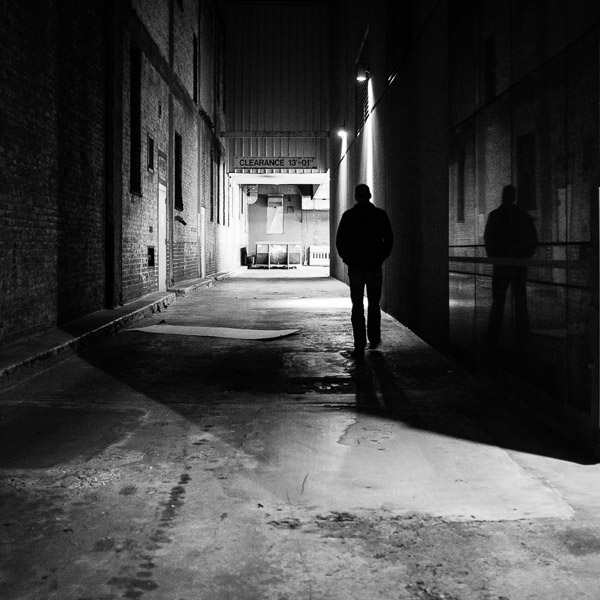
Date night often means going downtown and it's also my opportunity to explore areas I would go on my own. We have fun, even if I'm the only one with a camera! ©Valérie Jardin

Date night often means going downtown and it’s also my opportunity to explore areas where I would not go on my own. We have fun, even if I’m the only one with a camera!   ©Valérie Jardin

#2 You may visit a lot of back alleys

If you and your partner are on a shopping spree, you may often be required to exit a building through the back door. Back alleys hold secrets, interesting subjects and magical light that are too good to pass.

#3 Good luck having a romantic night just the two of you (without a camera)

Unless your street photographer date is blindfolded, you will rarely have a romantic night out in the city without a camera. Yes, we live and breathe street photography. The camera is an extension of ourselves. The temptation is too great and you might as well let us grab a shot or two to prevent mood-breaking frustration.

#4 Do not expect to have your date’s full attention

You will have a hard time spending an evening in public gazing into each other’s eyes. A street photographer is conditioned to be on constant alert to notice every gesture, expression and lighting in the immediate radius, with or without a camera. Hey, you knew all along you were dating a photographer…

#5 You can expect to meet lots of new people

Expect to stop often and talk with strangers of all walks of life, at any moment and on any given day. This can happen unexpectedly in the subway, at the bus stop, in the cab, at the coffee shop or while you are waiting to cross the street. Just know that the street photographer who shares your life has a keen eye at spotting interesting people from a mile away!

#6 You may temporarily lose your date at a moment’s notice
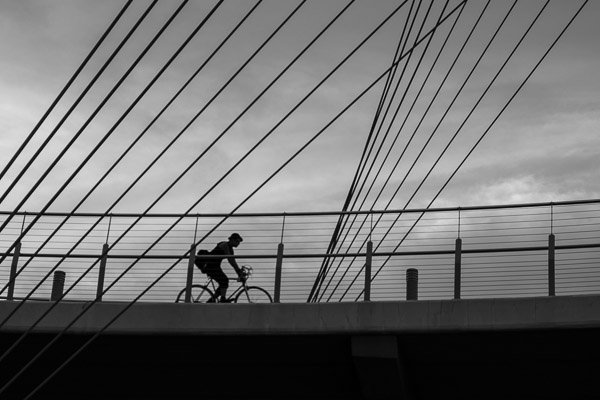
I must admit, I had an ulterior motive when I suggested that we go for an evening walk over a bridge, down next to a highway so I could get this shot... ©Valérie Jardin

I must admit, I had an ulterior motive when I suggested that we go for an evening walk over a bridge, down next to a highway so I could get this shot…   ©Valérie Jardin

Do not worry if your street photographer takes off in a hurry in the middle of a conversation. The right subject may be entering the perfect backdrop for the shot of a lifetime. Or maybe an interesting person just passed you on the sidewalk and your street shooter now needs to run the other direction, well ahead of the subject, to find the best way to frame the shot.

#7 You’ll need to have patience

Bring a book! Setting a stage and waiting for the story to develop may very well be your partner’s favorite pastime. This can take a few minutes, or a few hours…

#8 Your vacation destinations will be predetermined for you

If your significant other is a street photographer, do not be surprised if your next vacation destination has an ulterior motive. We much prefer to walk the streets of a large city than to lie on the beach of an exotic island.

Vacation on the beach? Sure, as long as it's not too isolated and there are people to photograph! ©Valérie Jardin

Vacation on the beach? Sure, as long as it’s not too isolated and there are people to photograph!   ©Valérie Jardin

Conclusion:

Street photographers are not the easiest people to live with. Honestly I’m not sure I’d want to live with me if I wasn’t a photographer. We require a lot of patience. If you love one, don’t think for a second that you will be able to keep him/her away from that camera for more than a few hours. Be generous, give the street photographer in your life some time to pursue their passion on their own or with like-minded people. After all, wouldn’t you rather do your own things too? Look at it this way: We are the way we are because we have a true passion for people, it’s not such a bad thing.

Blue hour by the lake? At the very least I'll get a shot of my drink, or his... Sometimes both.  ©Valérie Jardin

Blue hour by the lake? At the very least I’ll get a shot of my drink, or his… Sometimes both.
©Valérie Jardin

If you read this article, you’re probably a photographer. Please share with the non-photographer in your life. And if you plead guilty to any of the above, please share your experience.

The post 8 Things You Should Know if You are Dating a Street Photographer by Valerie Jardin appeared first on Digital Photography School.


Digital Photography School

 
Comments Off on 8 Things You Should Know if You are Dating a Street Photographer

Posted in Photography


10 Things Google Should Consider in Launching a Standalone Photo Sharing Service

02 Aug

Google used to have a standalone photo sharing service. It was called Picasa. I never really liked it. It wasn’t a very social site. I thought Flickr was a lot better.

Today’s news out of Bloomberg is that Google is looking to spin off Google Photos from Google+. Maybe it’s true, maybe it’s not. You never know. The timing of Friday afternoon stories and leaks always makes you wonder. Usually when companies want to push something they release it more like Tuesday mornings or make a big deal about it at I/O or something.

Whatever the case, photos has been one of the highlight use cases for G+. Many photographers have flocked to the site and I think it’s done a pretty good job with photos overall.

*If* Google is going to launch a standalone photo service though, they should really go all out. I worry that they’ll launch something less than fully baked — it will generate a bit of initial excitement and then lack stickiness.

With that in mind, here are 10 suggestions that I’d give Google in launching a standalone photo sharing service.

1. Flickr has raised the bar by giving everyone a full terabyte of high res photos. Flickr made one big mistake with this offering though. *Private* high res photos are of very little value to a photo social network. Public photos are *very* valuable to a photo social network. Public photos are worth more to a social network than the cost to store the photos. Flickr just gave everyone a terabyte without distinguishing the visibility of the photos. Google should offer at the launch either unlimited or 2TB of high res public photo storage with every account. This will get great press and attention.

Go big or go home I say. Nobody can maintain cheaper enterprise storage than Google, and it’s only going to get cheaper in the future. Don’t be blinded by the open-ended liability of high storage limits. Public photos on the web are only going to get more valuable in the future and storage is only going to get cheaper.

2. Partner with photographers to sell their photos. Flickr just leaked something like this earlier this week. Partnering with photographers to sell photos is not just about stock photos as revenue (although the stock photography market is in fact a multi-billion dollar market ripe for disruption). This is about attracting the sorts of high quality photographers to your network because they will be *paid* for participating through photo sales. By providing photographers an avenue to sell their stuff and make real money, you endear them to your network. Tie the visibility of their work, in part, to their level of activity on the network — not directly, but just float that out there so that photographers feel like the more active they are on the network, the more $ $ $ they may make.

3. Create a super light weight mobile client like Instagram. Make it so simple. Tap/tap to +1, like, fave, whatever. Really dumb it down. Just something to follow your friends’ stuff and favorite it without all the other clutter of G+/Facebook getting in the way.

4. Build an intelligent way to organize albums by keywords. Manual album management sucks big time. Let me build albums by keywords (this will also encourage more keywording which is valuable organizational metadata for Google to have). Study what Jeremy Brooks has done with SuprSetr and build something like that but even more intuitive and easy to understand and use.

5. Build intelligent groups for photographers to hang out in on the photo network. Unfortunately Google got one thing very wrong with communities in G+, which is why communities never took off. They refused to bump threads based on new comments. This ensures that all threads die quickly. It’s the longevity of conversations that fuel community interaction. Refusing to bump threads based on comments makes large groups completely chaotic and unusable. Why invest in a conversation that will be completely buried and dead in 24 hours and that I’ll never be able to find again? Let me mark conversations as favorites and feed all my favorite conversations to me in a feed ordered by recent comments/activity.

6. Go mosaic big time. On the web, give users a huge wall of photos with infinite scroll to just scroll through and +1. Code the site so that if you are hovering over any photo and press the “f” key it +1s it. Lubricate social activity on the web. Social activity begets social activity. The more you make it easy for people to like/fave/+1 stuff and the faster you make it, the more you get. The more people get, the better they feel about the network.

7. Spend some serious money the first year on community management / evangelism. Hire a whole bunch of photo community managers and partner with influencers all over the world. Require community managers to host at least 2 photowalks a month in their geographic region. Require them to spend 10 hours a week inside of social groups interacting with photographers on the new site. Bombard your users with interaction from Google Community Managers. Make sure Googlers are using the site to share their photos, especially visible senior management. Keep track of how many +1s, comments and other interactions Googlers have with photos on the network and make sure Googlers know that this matters.

8. Open some fine art physical galleries. These can be used to host meetups and gallery shows for G+ photographers. You can also sell physical prints and DVDs of photo series from these galleries. Social photographers love doing shows with their work. Digital displays make doing temporal shows easier than ever. The ego boost a photographer gets when they are showing their work in a group show is substantial. Capitalize on this to draw the finest photographers in the world to your network.

9. The Nik Software stuff from Google is really good. Snapseed is the best mobile photo editing software out there. Analog Efex Pro 2 really is some of the best photo processing software I’ve used in years. Google could create something as good as Lightroom, maybe even better. Build this into the site for processing but also give people the ability to download the software to their computers for when they don’t want to work in the cloud and want to work locally. Sell this software for $ 99 with a six week free trial. Users who upload at least 5 photos on different days to the new photo network for six weeks should be given a promotion code to get the software for free.

10. Prioritize Google Photos photographs in Google Image Search. Create a button that photo buyers can click in Google Image Search to show photos available for licensing. Leverage the power of Google Image Search to both drive traffic back to photos in the social network and sales through the social network.

That’s all for now.


Thomas Hawk Digital Connection

 
Comments Off on 10 Things Google Should Consider in Launching a Standalone Photo Sharing Service

Posted in Photography


What is equivalence and why should I care?

07 Jul

Equivalence, at its most simple, is a way of comparing different formats (sensor sizes) on a common basis. Sounds straightforward enough, but the concept is still somewhat controversial and not always clearly understood. We thought it was about time we explained – and demonstrated – what equivalence means and what it doesn’t. Learn more

related news: Digital Photography Review (dpreview.com)

 
Comments Off on What is equivalence and why should I care?

Posted in Uncategorized


50 Luxury Fashion Photography Portfolios You Should See

18 Apr

The world of couture and high fashion ?aptivates with its glamor and gloss. With its big audience, glamorous, international lifestyle and high price tags, fashion photography may seem to be one of the world’s most demanded professions. For each fashion photographer who makes it through the door of top magazines, many others find their niche in art photography, fashion advertising, Continue Reading

The post 50 Luxury Fashion Photography Portfolios You Should See appeared first on Photodoto.


Photodoto

 
Comments Off on 50 Luxury Fashion Photography Portfolios You Should See

Posted in Photography


8 Reasons You Should Organize Your Photo Collection

18 Mar

Editing and organizing our websites, print portfolios, business collateral and promotional material is something every professional photographer does at least once if not several times a year. It allows us to present the best possible vision of our work to our clients.

After a build-up of new work it was time for me to edit my portfolio as well. I’ve spent the last several weeks working on a vigorous edit in preparation for a large annual marketing and meeting push – and it occurred to me this would make a good post for dPS. While the purpose of my organizational edit is for business reasons, you don’t need to be a professional photographer to benefit from a good organization of your images. Every level of photographer will find something valuable in it.

Here are eight reasons why you should consider spending a bit of screen time and organize your photo collection.

Website Thumbnail Edit

1. Everything is easier to find

If you don’t have a good organizational system in place, there’s little that’s quite as droll as sifting through your images and key wording, tagging, starring, folder sorting, and/or color coding them. However you want to distinguish your files, it helps to find them in a pinch.

Without a good system how will you ever locate those photos of the Johnson family if they decide they actually want to buy some from you down the line? Or what about that shot you entered a year ago on a National Geographic forum… and now they want to publish it!

No matter what your system is, it’s important to develop one. Just know yours in and out, in case a cool or monetary opportunity arises in the future.

How could you find a file in this mess?

How could you find a file in this mess?

2. See how you’ve progressed

Sitting down and organizing your images from beginning to the present gives you a great overview of how you’ve progressed since first picking up a camera. You’ll notice not only the difference in content of what you’re photographing, but the quality of it as well. There’s nothing as bemusingly head-shake inducing as looking at some of the first images that came out of your camera. How could you possibly ever have been that bad?! Look back and see how far you’ve come and celebrate!

3. You’re forced to review the good with the bad

There are some valuable lessons to be learned in organizing your images, especially in recent ones. You’ll get a play-by-play look at the good images, along with the bad ones.

Sit down and really take some time to think about what it is that makes you admire certain images, but dislike others. What did you do right in those great ones? What did you do wrong in the poor ones? This critical review will help you develop your eye and create better images in the future.

4. It will teach you to avoid recurring mistakes

During any good review you’ll probably realize there are one, two or more mistakes you’re consistently making. You’ll find new ones every time you do this, and you’ll know what to avoid in the future.

During past reviews I found I used to slightly overexpose my images, or that I was lacking in night images with my travel shots. Taking the time to review allowed me to correct those mistakes and bolster the holes in my portfolio. I’m always finding something new to work on, and so will you. Learning from your mistakes is what makes you better.

5. Discover ideas you want to revisit

Perhaps a year or two or more ago you took a trip to the Grand Canyon or photographed a really fun concept, but realize now all the little things you missed or messed up on. Now that you’ve sat down to organize you remember that great idea you had – and with your new-found knowledge, it could be a great time to revisit the shoot and improve upon it.

There’s nothing wrong with revisiting a concept you’ve photographed before and working to improve it. Many professionals work on a project or series for years before they think it’s complete. Some scrub everything they’ve shot and re-start again on a concept they love, but want to tackle with a new execution. Consider it a challenge to re-invent something you’ve already done.

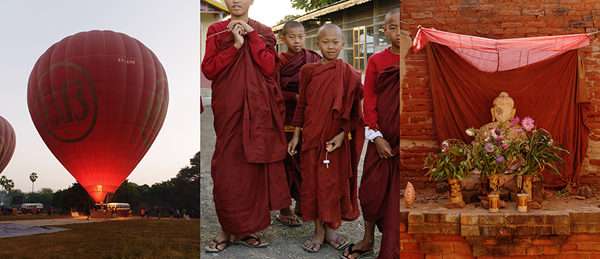
Color-Theme-MattDutile

6. Find themes and begin developing a vision

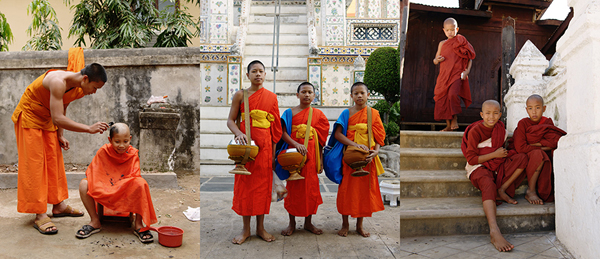
If you had your own website, or already do have one, how would you organize it? Would there be a portrait section? Or weddings and babies? Perhaps landscapes and still life? Or travel and lifestyle? Most professionals organize their images by subject, project or theme. Doing so in your own work can tell you a lot about what kind of photographer you think you are or want to become. What do you value and enjoy shooting?

Look for themes across your work other than simply subject. What you may notice appearing is your specific style or vision. After a great period of time every photographer begins developing a sense of style, but you may be able to notice the threads of it early. It’s a clue to what you value in your images and your unique perspective.

Monk-Theme-MattDutile

7. It’s easier for potential clients

If you have the desire to take your hobby professionally one day, organizing now and understanding how you would define your photography will make it easier for potential clients to identify what they like about your work ,or why they should hire you. The business of photography is defining what you bring to the market that’s different, and at what value. It’s answering the question, “Why should I work with you?”.

8. It just looks nice

The last reason is one of simple vanity. Organization, if done right, just looks pretty. I often enjoy in my spare time putting together different color arrangements, collages and themes. Some of them make their way into my marketing material if the idea turns out particularly good, others may entirely change the way I categorize my business, and still others go in the trash as a fun but failed experiment. Organization doesn’t just have to be a boring task though, it can fuel creative insight and help you develop your images.

The post 8 Reasons You Should Organize Your Photo Collection by Matt Dutile appeared first on Digital Photography School.

Digital Photography School

 
Comments Off on 8 Reasons You Should Organize Your Photo Collection

Posted in Photography


Why Lazy Photographers Should Use Lightroom Smart Collections

12 Feb

I never bother to keyword or tag my images. I often neglect putting my photos into organized collections. It takes too much time away from my workflow to bother with any of that – so how the heck do I find any of my images?

Lightroom Smart Collections

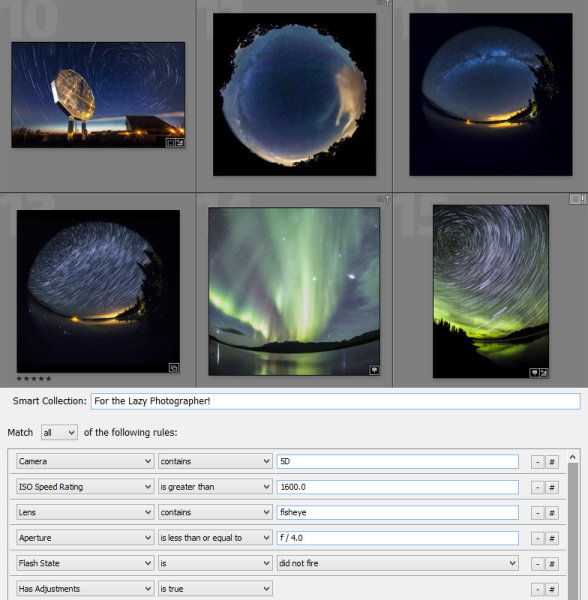
It’s easy to keep track of your images without painstakingly organizing them shot-by-shot. Lightroom Smart Collections allow you to filter and organize your images based on metadata contained within the images. Often times this metadata can be unique enough to sort your images based on subject, location, and genre.

smart-collections

Smart Collections allow you to define very specific criteria, and you can require many different criteria to be met before an image will be included in the collection. Common settings like ISO, shutter speed and aperture are available, but the options are endless. You can filter based on whether a flash was used, based on GPS data, file type, lens, focal length, capture date, the list goes on.

Below are a few examples where Smart Collections can define a specific type of image with only metadata:

Example 1: pan blurs

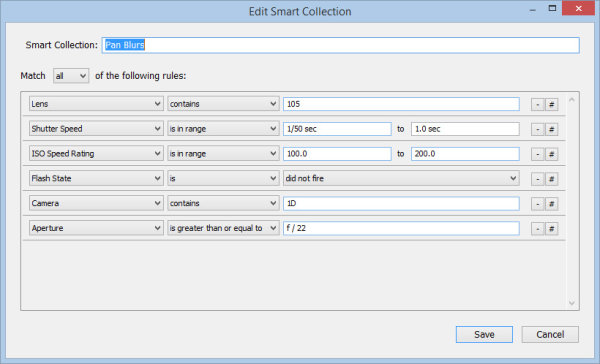
Some images can easily get lost amongst others, and pan-blur shots are one of them. I usually photograph these on a whim while shooting other subjects, but they all have something in common. I use a zoom lens with a very small aperture, in addition to a few other factors:

pan-blur-requirements

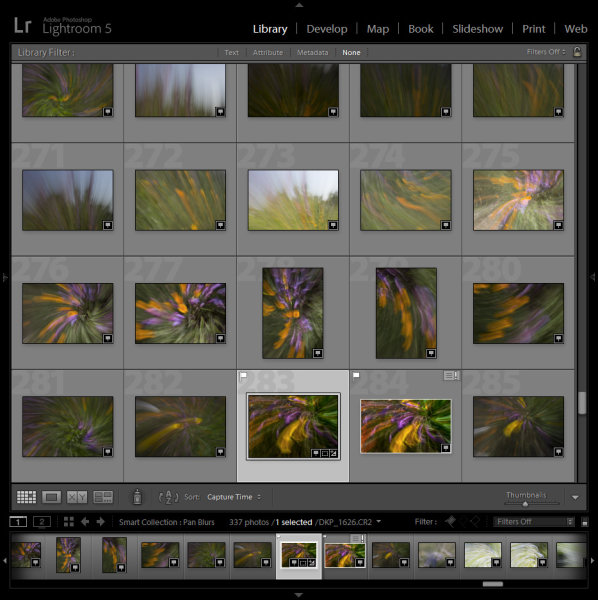
Slower shutter speeds are usually used, and typically only with one of my cameras. I built the above list of criteria or requirements which gives me a pretty good list of all the pan-blur abstract images I’ve ever taken:

pan-blur-library

There is always a chance that an unrelated shot might meet the same criteria and appear in the collection, so try to be as specific as possible and use as many defining conditions as you can.

Example 2: GPS data

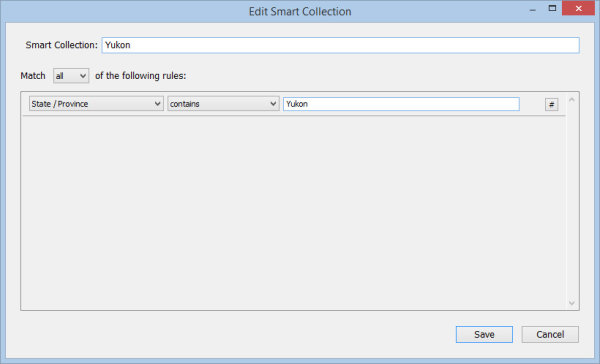
If you have a GPS unit for your camera (or have a GPS built-in), the extra metadata provided by your location can be invaluable to sorting your images. For example, I can easily specify that I want to create a collection of all images I’ve photographed in the Yukon Territory of Canada:

yukon-requirements

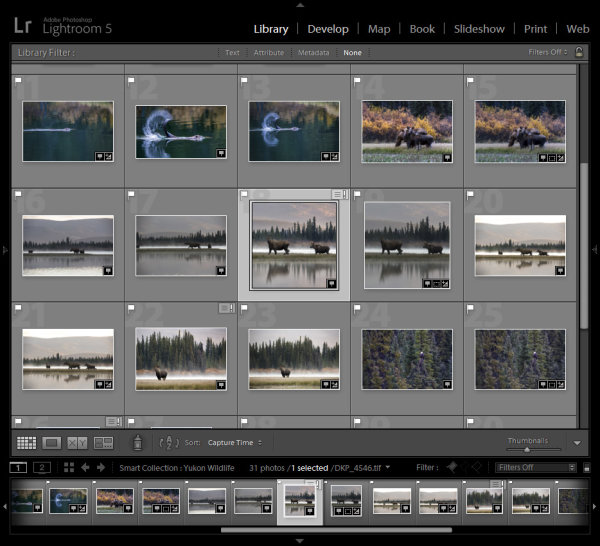
You could also further to showcase only the wildlife shots. Because I know that I would only have been using focal lengths longer than 200mm for wildlife, I can add that requirement to find only my wildlife images. A few other shots may sneak in, but it’s a great way to narrow things down:

yukon-library

Entire vacations or trips can be defined this way, and even specific client location shoots can be identified by this location metadata.

Example 3: snowflakes

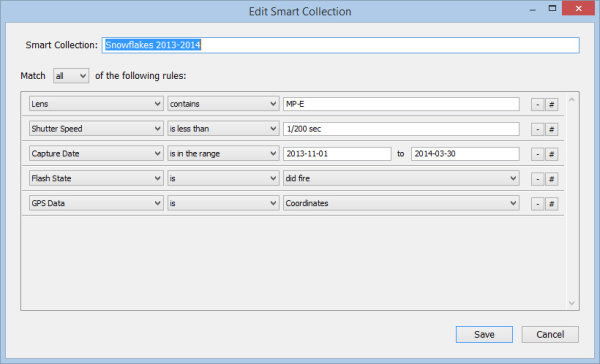
I shoot a TON of snowflake images each winter, and by looking at the common metadata for each image you can create a “fingerprint” that a Smart Collection can identify. The following Smart Collection will only show snowflake photographs:

snowflakes-requirements

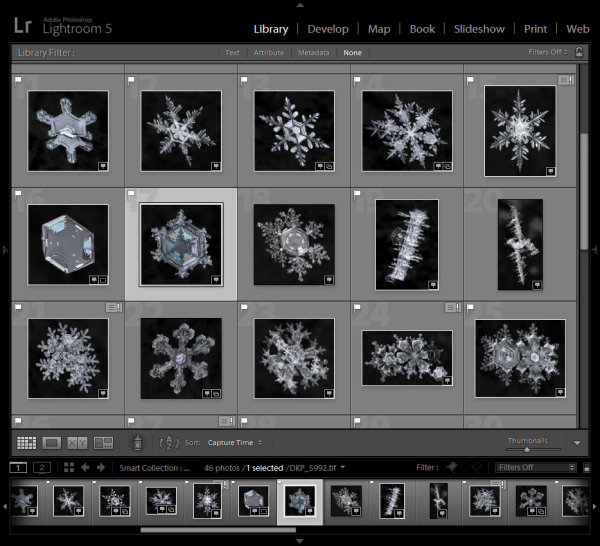
I can also create a collection of just my final print-ready files. As these images need to be edited in Photoshop as part of the required workflow, the final images would then all be TIF files. That requirement can be added to show only my completed images:

snowflakes-library

Conclusion:

Not every subject will have a “fingerprint” that can be defined by Lightroom Smart Collections, but with a bit of clever thinking you should be able to define a good number of your own. As new images are added to your Lightroom catalog that meet the criteria for inclusion in your new Smart Collections, they will automatically appear. The lazy efficient photographer’s dream come true!

The post Why Lazy Photographers Should Use Lightroom Smart Collections by Don Komarechka appeared first on Digital Photography School.

Digital Photography School

 
Comments Off on Why Lazy Photographers Should Use Lightroom Smart Collections

Posted in Photography


8 Types of Pictures so Amazing That All Photographers Should Master Them

17 Jan

What is your next step in photography? If you feel you are retaking the same picture over and over, a good idea is to take a break and look the other way. In photography, this is easy: We can change memory cards, try a different lens and shoot something new! Most importantly, cover your basics. Go over all the controls Continue Reading

The post 8 Types of Pictures so Amazing That All Photographers Should Master Them appeared first on Photodoto.


Photodoto

 
Comments Off on 8 Types of Pictures so Amazing That All Photographers Should Master Them

Posted in Photography


12 Photography Documentaries You Should Watch

14 Dec

Everyone loves well-made, interesting photography documentaries that share secrets and allow us to take a glance behind the scenes of famous, influential photographers of the past. Similar videos possess magic to impress and inspire a person to work toward his own achievements. Black-and-white film gives documentaries a special charm and makes us feel the spirit of days gone by. A Continue Reading

The post 12 Photography Documentaries You Should Watch appeared first on Photodoto.


Photodoto

 
Comments Off on 12 Photography Documentaries You Should Watch

Posted in Photography


Ten items you should have in your camera bag

04 Oct

Screen_Shot_2013-10-03_at_4.45.19_PM.png

What’s in your camera bag? A camera (hopefully) and maybe a lens or two, but that’s probably not everything that you need. In this article we’ll be looking at ten items that deserve a place in every photographer’s kit bag, whatever sort of photography you enjoy doing. Click through for the list.

News: Digital Photography Review (dpreview.com)

 
Comments Off on Ten items you should have in your camera bag

Posted in Uncategorized


60 Awesome Pinterest Boards Every Photographer Should Follow

24 Jul

If you’re a photographer you may think, why should I care about Pinterest? The answer is quite simple. Everyone who have risen to the top will tell you that it’s all about who you know and who knows you, just as much as it’s about talent. Pinterest is one of the fastest and influential social-media platforms today. It’s not just Continue Reading

The post 60 Awesome Pinterest Boards Every Photographer Should Follow appeared first on Photodoto.


Photodoto

 
Comments Off on 60 Awesome Pinterest Boards Every Photographer Should Follow

Posted in Photography