RSS
 

Posts Tagged ‘Shoot’

Shoot Your Own Frozen Flower Photos!

23 Apr

Spring is upon us. And it’s bringing a ton of flowers.

Now the only question is: whatcha gonna do with all those blooming beauties?

Ooh, we know! You should freeze ‘em, photograph ‘em, and then marvel at the gorgeous results.

Seriously, frozen floral photos are so pretty and unique that it’s almost unfair . So let us show you how to make them with this easy peasy (freezy) tutorial.

Freeze Flowers for Stunning Photos

Thanks for the inspiration Mo Devlin!
(…)
Read the rest of Shoot Your Own
Frozen Flower Photos! (508 words)


© Taylor for Photojojo, 2015. |
Permalink |
No comment |
Add to
Frozen Flower Photos!”>del.icio.us

Post tags:


Photojojo

 
Comments Off on Shoot Your Own Frozen Flower Photos!

Posted in Equipment


How to Shoot Panoramic Photos

23 Apr

Image stitching is not new, neither is panoramic photography. Since almost the beginning, photographers have been intrigued with providing a wider view of a given scene. The reason is that panoramic images provide context. In a normal frame of a large expansive scene, we only see a small part of the bigger picture. A panoramic image however, gives us a broader view, and a context for that image. The word panorama is derived from two greek words, “pan” which means everything and “horama” which means that which is seen or the view. So, panorama literally means – a view of everything.

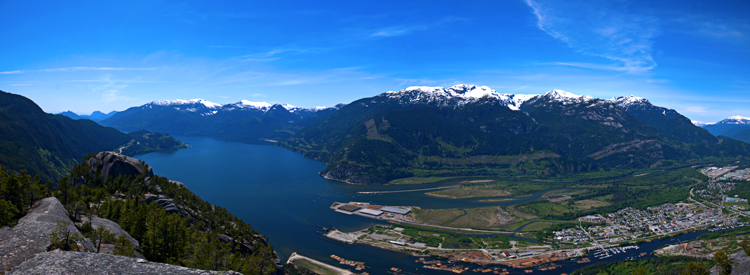
Stitched Panorama

A six image pano of Howe Sound, Squamish BC

Early on, photographers would make panoramics manually, by simply panning across a scene and taking sucessive images. Once the images were printed, they would manually stitch them by overlaying one image on top of the other, or even cutting them into place. This was a new way of viewing and capturing scenes. I saw my first panoramic image as a young boy. It was a huge scene of photographs that had been stuck together and overlaid. It was in a museum in the city where I grew up. I was intrigued, it gave me a view of the city I was living in, that I had never seen before. It gave me a whole new perspective on the place that I called home. I wasted many rolls of film as a youngster trying to do the same shots, but never managed to get it right.

One solution to this challenge was the panoramic camera. These cameras revolutionized panoramic photography. They were able to capture a panoramic scene of 180 degrees in a single shot. No more cutting and sticking photographs together. These rotating cameras captured great images of scenes and did it with ease. There were also wide-angle panoramic cameras that took in much more of a scene in a single image and again, changed the way we viewed images and scenes. These cameras changed the views, and contexts of many famous places. In their day, they were the pinnacle of technology.

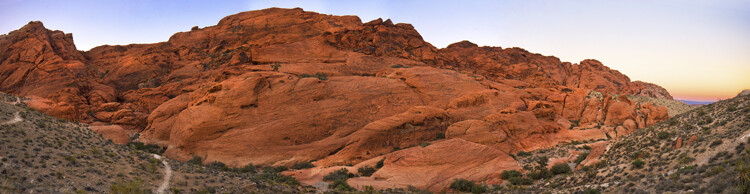
Stitched Panorama

Red Rock Canyon, Las Vegas

Once again, the wheel of progress turned and all of this changed when digital panoramics became possible. The photographer only had to pan across the scene and take successive images, as in the past, but now the stitching process in the computer gave a seamless result. The photographer simply dropped these images into a photo stitching tool and voila, an amazing panoramic image magically appeared. Well, that was the idea anyway, in practical terms it was not so easy.

1. How to shoot panoramic photos

Autopano giga is a standalone software tool that stitches your images together. There are a few guidelines to follow when you do a photostitch. By following these guidelines, you will be almost guaranteed that your image will stitch properly the first time.

A. Shoot in Manual mode

Expose for your scene manually and don’t change the exposure between shots. You may have to do a light meter reading for the brightest and darkest parts of your scene. Adjust your settings to make sure that you have good exposure throughout the images and then start shooting.

B. Overlap your shots by at least 30%

Overlap each image by at least 30% if you are shooting in landscape orientation and up to 50% if shooting in portrait. By overlapping you will have duplicates of parts of your scene, this will allow the software to stitch the images together better and adjust for the perspective distortion too.

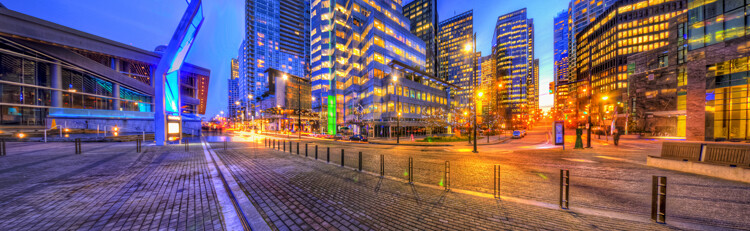
Stitched Panorama

Five images stitched, Jack Poole Plaza, Vancouver

C. Use a tripod

You can shoot handheld, but using a tripod will ensure that the images will be shot along the same horizontal plane. This can also help with the stitching process too.

D. Keep your aperture between f/8 and f/11

You will want to keep everything in focus, so be sure that your aperture is set to at least f/8. At f/2.8 your focal point may change and this could cause some parts of your image to be out of focus. It may also be a good idea to set your aperture to f/8, focus your camera, then switch to manual focus. That way your camera won’t be focusing on a different part of the scene in each image. At f/8 or f/11 the whole scene should be in focus.

Stitched Panorama

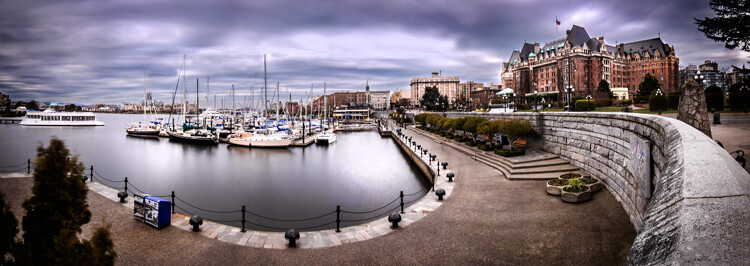
Six image Pano, Victoria Harbour on a snowy, windy day

Now the magic part, digitally stitching the images together. You can do this using Autopano Giga or Photoshop, my preference is Autopano Giga. To learn more about how to do this, take a look at these articles I wrote on image stitching: Walk Through and Review of Autopano Giga – Image Stitching Software and Step By Step How to Make Panoramic HDR Images.

Lets make this fun, upload some of your images that you have stitched, then tell us what software you used. Enjoy, happy shooting and stitching.

googletag.cmd.push(function() {
tablet_slots.push( googletag.defineSlot( “/1005424/_dPSv4_tab-all-article-bottom_(300×250)”, [300, 250], “pb-ad-78623” ).addService( googletag.pubads() ) ); } );

googletag.cmd.push(function() {
mobile_slots.push( googletag.defineSlot( “/1005424/_dPSv4_mob-all-article-bottom_(300×250)”, [300, 250], “pb-ad-78158” ).addService( googletag.pubads() ) ); } );

The post How to Shoot Panoramic Photos by Barry J Brady appeared first on Digital Photography School.


Digital Photography School

 
Comments Off on How to Shoot Panoramic Photos

Posted in Photography


How to Shoot a Star Trails Selfie

20 Apr

How I shot the star trails selfie

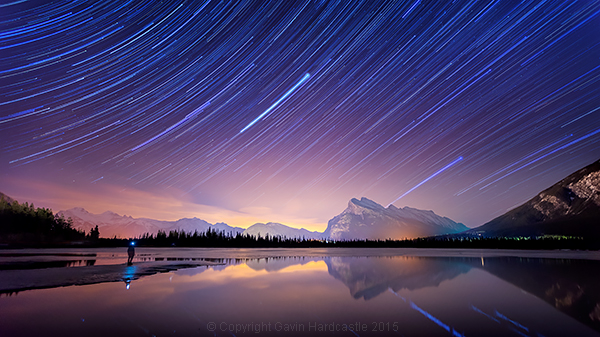
There are times when planning and patience can result in a killer shot. This nighttime star trails selfie (above) that I captured in the Canadian Rockies was one of those times. I’d planned to shoot star trails over Mount Rundle and the town of Banff, Alberta while hopefully capturing reflections in Vermillion Lake, surrounded by melting ice.

My initial vision was for a completely cloudless sky, but the small yet persistent low clouds ended up adding an ethereal quality to the shot I hadn’t expected.

When I looked back at my first 30 second exposure, I knew right away that this shot had some potential. All I had to do was set things up properly and then play the waiting game.

I’d like to share with you exactly how I shot and processed this image so that you too can try your hand at star trails, and maybe even a selfie like I did.

Required Gear

  • A digital camera with and intervalometer app
  • A sturdy tripod

Capturing the Shot

Step 1 – Location and conditions

In this case, my location was already set because I wanted Mount Rundle to be central in the composition. I needed a relatively clear night with good visibility of the stars. If it had been cloudy, I would have just stayed home. When planning a location, check the weather forecast and figure out which direction you’ll be facing to get an idea of the direction of the star trails. For more info on the movement of the earth and the direction of star trails read this article.

I was shooting the sunset earlier that evening so I had a good idea of how things were going to turn out. Here’s the bonus shot I captured while waiting for the stars to arrive.
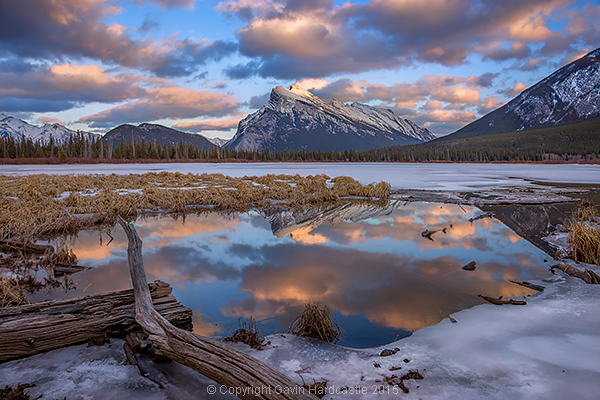
Vermillion Lakes, Banff - Mirror World by Gavin Hardcastle

Step 2 – Composing the shot

Whenever I shoot star trails it’s important to remember that I’ll need roughly 60-70% of the frame dedicated to a sky that probably isn’t doing much. I can’t see the star trails until I’ve finished processing your images and that means I have to imagine the trails and frame the composition accordingly.

Step 3 – Setting aperture, exposure and ISO

Night photography demands that we use much higher ISO settings than we would during daylight hours. It’s how we increase the cameras sensitivity to light. With this shot I was able to get away with ISO 2000 because there was a lot of light pollution from the towns of Banff and Canmore.

Using an aperture of f/2.8 meant that my lens was pulling in as much light as it could and with a 30 second exposure. I was happy with the brightness of the image, especially the stars.

Here’s one of the RAW frames before processing. Even with the haze and light pollution from Banff I could see that the stars were plenty bright enough to capture trails. You can even see a couple of amorous geese in the shot just in the reflection of Mount Rundle.
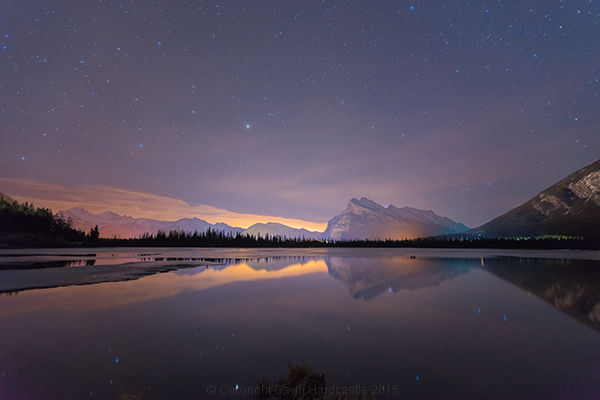
Star Trails RAW frame

Step 4 – Setting up my timelapse intervalometer

I shoot with the Sony A7R camera which has a cool timelapse app. This basically works the same way as a hardware intervalometer which you can get for pretty much any DSLR. It works by taking continuous shots at an interval that I set. I tell the app/intervalometer to take 120 exposures, and that I want them all to be 30 seconds long. I don’t want any gap between shots so that means the camera immediately takes one shot after another with no rest period.

When doing this, I make sure to switch off the cameras built-in noise reduction as this can mess up the timing of the intervalometer. In-camera noise reduction can take a long time to process so I don’t want my cameras memory buffer locked up and busy when it’s supposed to be taking the next exposure.

I’ll also want to use the fastest memory card I can afford.
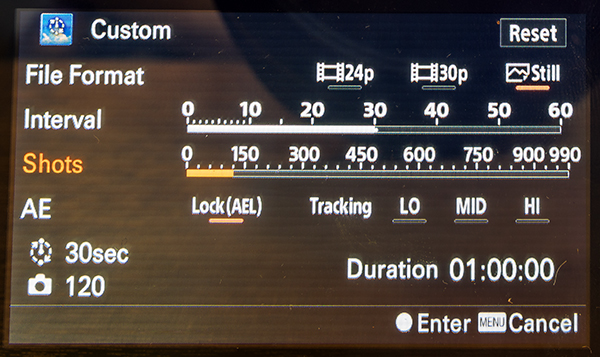
Sony Play Timelapse App

The Sony Timelapse App

Canon DSLR users will be delighted to learn that Magic Lantern has an intervalometer for timelapse shooting.

Step 5 – Final check and off we go

Before I commence shooting a lengthy timelapse I’ll do a final check of focus, make sure I’ve got plenty of battery power left, lots of memory, and that the tripod is stable and not likely to move during shooting. I’ve learned the hard way that these things can ruin an otherwise perfectly executed timelapse.

Step 6 – Begin shooting and ……. pose

Once you’ve started your timelapse you’ve now got to come to terms with your boredom. I didn’t plan to do a selfie, I actually wandered into the frame of my shot because I was just looking around at stuff. If you do plan on doing a selfie, just be sure to stand in place long enough for at least one of the exposures to capture you. To be on the safe side, try and stay in position for a full minute.

It might even be really cool if you stand in multiple positions to make it look like a crowd of identical models.
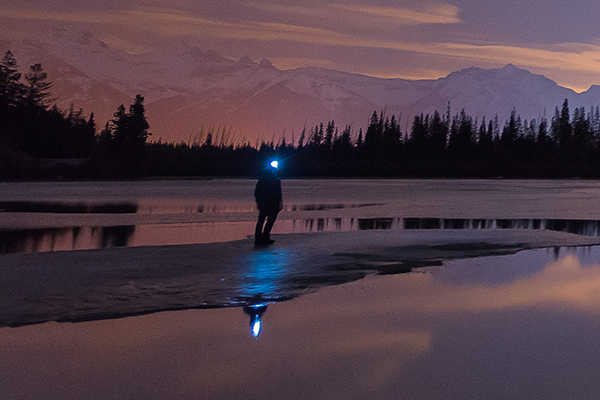
Posing for a selfie in Banff

Top Tip for shooting Star Trails or Timelapse

I highly recommend bringing a second camera so that you can carry on shooting while your A camera is tied up shooting the star trails. Not only does this alleviate crushing boredom, but it’s also great practice. You do practice right?

Step 7 – Check your shots before leaving

Once my timelapse has finished, I check the images on the camera before packing up and leaving. I have my camera set to play my images as I spin the jog wheel, kind of like a flip book animation. It’s great for checking how the movement of the stars worked out and I’m always amazed at the things the camera picked up that I didn’t see. I had lots of frisky geese swimming in and out of my shots as they went about their noisy geese business.

If I spot a disaster in the playback (let’s say a bug camped out on my lens) it’s time to start all over again. After an hour or so of waiting, I’ll be loath to start again, but sometimes you’ve just got to grin and bear it if you want that killer shot.

Processing the Shots

To process star trail images with this shooting technique, I used Adobe Bridge, Camera RAW and Photoshop.
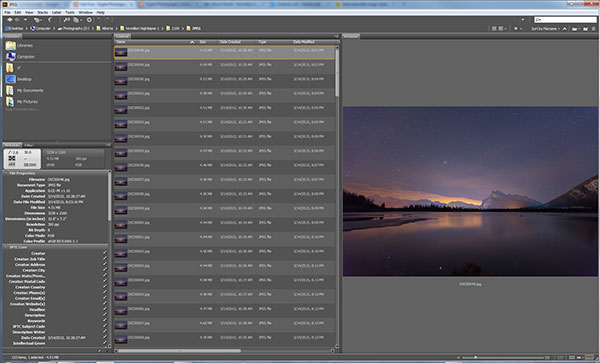
Adobe Bridge lets us quickly preview our star trails timelapse.

Adobe Bridge lets us quickly preview our star trails timelapse. Just hold down the bottom cursor key to flip through all of the frames and watch a rough animation.

Step 1 – Tweak the RAW files

In Adobe Bridge, I’ll select all 120 of my images, then right click and choose Open in Camera RAW. This loads the images into Adobe Camera RAW where I can reduce the noise, change the white balance and make any colour tweaks that I want. Here’s a list of what I tweaked.

  • Added sharpening
  • Changed White Balance to Auto
  • Added slight noise reduction
  • Increased Contrast
  • Boosted Shadows and Blacks
  • Increased Clarity and Vibrance
  • Reduced Highlights and Whites
  • Used Straighten Tool to fix horizon line

When I’m finished tweaking, I hit Select All, then click Synchronize so that the tweaks I made to my first RAW file get applied to all 120 images. Next I hit the Done button to take me back to Adobe Bridge where I can now see those ACR tweaks applied to all 120 image thumbnails.
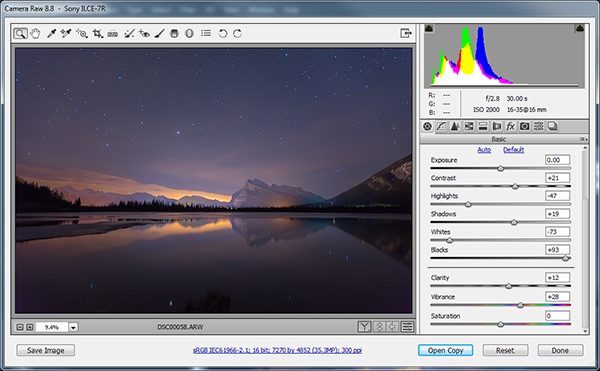
Adobe Camera Raw for processing star trails in Photoshop

I used Adobe Camera to make image corrections and then apply the same corrections to ALL of the frames.

Step 2 – Save as low resolution JPGs

This next step requires a lot of computer resources. My current PC only has 16 GB of RAM so I knew I’d have to make some low resolution versions of my RAW files in order to be able to load all 120 images into Photoshop layers. If I ever print this image, I’ll need to reprocess this image at full resolution which will require some major processing, but for web use I know I can get away with using smaller resolution JPEGS to create my final image.

To do this, I select all of my newly tweaked RAW files in Adobe Bridge once again. I then right click and choose Open in Camera RAW. I hit Select All, then choose Save Images in the bottom left. This opens a dialog box where I can specify a location, file format and most importantly, image resolution and size.

I choose JPEG and then specify a resolution of 72 pixels per inch and tell it to resize my images to a much smaller resolution that I know Photoshop can handle but will still look great for web use. Finally I click Save and go make some coffee while I wait for all 120 images to process.
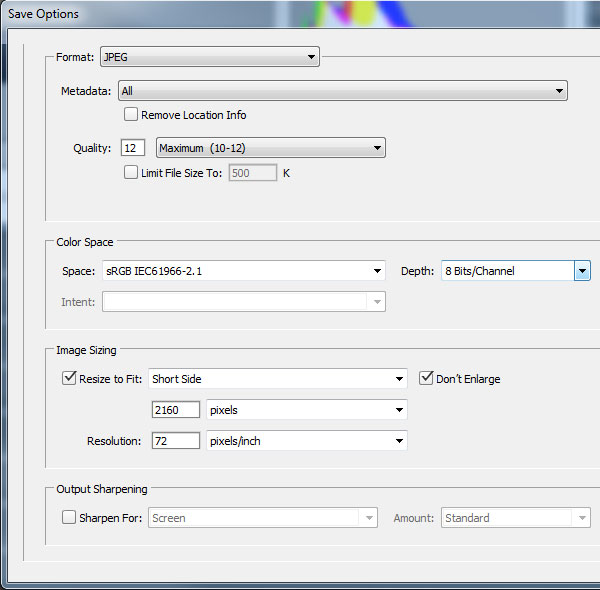
Adobe Camera Raw Save Options

Step 3 – Load the JPEGs into Photoshop layers

Back in Adobe Bridge I navigate to where I saved my low resolution JPEGs. It’s best to export these to a separate folder to keep things to tidy. Once again, I select all my JPEGs and then choose Tools > Photoshop > Load Files into Photoshop Layers.

This will take even longer than it took to export the JPEG’s so I’ll go downstairs and watch an episode of House of Cards.

Step 4 – Can you feel the magic?

This is where the magic happens and I finally get to see my star trails. With all of the 120 images loaded into Photoshop Layers, I go to the Layers panel to select ALL of my layers. This can be done by clicking on the top layer so that it’s highlighted in light blue, holding down shift and then clicking on the bottom layer – I need to scroll down to see all 120 layers.

With my 120 layers selected, I now change the Layer Blend Mode to Lighten and BAM – Star Trails!

Note: You could also use a free program like StarStax to put the trails together if you don’t have Photoshop.
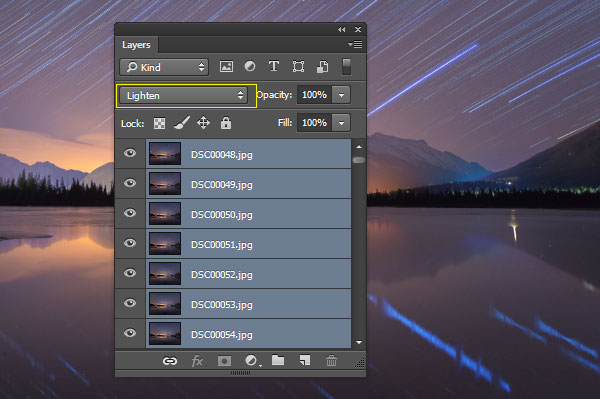
Make Star Trails with the Lighten Blend Mode

From this point on I can process the image with some final tweaks in Photoshop. To do that I’ll merge all layers down to one by pressing ctrl+E. Then I can change contrast, colour balance, crop, add a vignette and whatever else I think suites the composition.

My finished star trails selfie is done and ready to share with the world. I hope you like it.

How I shot and Processed a Star Trails Selfie

Why don’t you give it a try?

There is a much easier but somewhat less controlled method of getting a shot like this. Follow steps one to three and then simply use a remote shutter release while your camera is set to Bulb mode and take a very long exposure. You could leave the shutter open for an hour or two to capture the same effect. Just be careful that your lens doesn’t fog up while the camera heats up.

You won’t have the same pinpoint control over each exposure with this simpler method, but it’s a great way to get into shooting star trails if you don’t have the time to go through all of these post processing steps.

Editor’s note: caution – long exposures of this nature will cause your sensor to heat up potentially causing damage to it like stuck pixels or worse. Please do so at your own risk. 

If you prefer the more long winded method that I used, you’ll get the maximum image quality possible and if you do decide to do some selfie modelling, you can pick the exact exposure that captures you at your best. In my case, it was the back of my head.

googletag.cmd.push(function() {
tablet_slots.push( googletag.defineSlot( “/1005424/_dPSv4_tab-all-article-bottom_(300×250)”, [300, 250], “pb-ad-78623” ).addService( googletag.pubads() ) ); } );

googletag.cmd.push(function() {
mobile_slots.push( googletag.defineSlot( “/1005424/_dPSv4_mob-all-article-bottom_(300×250)”, [300, 250], “pb-ad-78158” ).addService( googletag.pubads() ) ); } );

The post How to Shoot a Star Trails Selfie by Gavin Hardcastle appeared first on Digital Photography School.


Digital Photography School

 
Comments Off on How to Shoot a Star Trails Selfie

Posted in Photography


Point & Shoot: 8-Bit Gameboy Gun Takes and Prints Pictures

02 Apr

[ By Steph in Gaming & Computing & Technology. ]

photo gun 1

This fun bit of retrofuturistic tech genius looks like an ‘80s designer’s idea of a high-tech camera smashed up with a toy gun, and it actually works, taking and printing photos. Russian artist Dmitry Morozov combined a GameBoy screen with an Arduino processor, a camera, optical relays and an original GameBoy thermal printer.

photo gun 2

The ‘gbg-8’ is attached to a plastic toy gun so you can literally ‘point and shoot.’ To take a photo, you pull the trigger (which might make selfies a bit… uncomfortable.)

photo gun 4

photo gun 3

As soon as the image is captured, the gadget prints out a streaky, blurry, pixelated image, just like we remember from the heyday of Nintendo. It may not be the greatest quality, but that’s hardly the point.

Share on Facebook


[ By Steph in Gaming & Computing & Technology. ]

[ WebUrbanist | Archives | Galleries | Privacy | TOS ]


WebUrbanist

 
Comments Off on Point & Shoot: 8-Bit Gameboy Gun Takes and Prints Pictures

Posted in Creativity


Weekly Photography Challenge – Shoot the Moon

28 Mar
Luz Adriana Villa

By Luz Adriana Villa

The image above and these other 25 images of the moon might give you a hint as to your challenge this week.

Night sky photography can be challenging and a lot of fun. Now’s the time to get out and try photographing the moon if you haven’t already.

We have several articles on the topic here on dPS if you need assistance:

  • 20 Dos and Don’ts for Shooting the Moon
  • Beyond Full Moon Photography
  • Moon Photography: 6 Tips for Better Moon Photos
  • Moon Photography Made Simple
Sam Javanrouh

By Sam Javanrouh

@lbyper

By @lbyper

Christian Ronnel

By Christian Ronnel

Dylan Toh

By Dylan Toh

Share your shoot the moon images here:

Simply upload your shot into the comment field (look for the little camera icon in the Disqus comments section) and they’ll get embedded for us all to see or if you’d prefer upload them to your favourite photo sharing site and leave the link to them. Show me your best images in this week’s challenge. Sometimes it takes a while for an image to appear so be patient and try not to post the same image twice.

googletag.cmd.push(function() {
tablet_slots.push( googletag.defineSlot( “/1005424/_dPSv4_tab-all-article-bottom_(300×250)”, [300, 250], “pb-ad-78623” ).addService( googletag.pubads() ) ); } );

googletag.cmd.push(function() {
mobile_slots.push( googletag.defineSlot( “/1005424/_dPSv4_mob-all-article-bottom_(300×250)”, [300, 250], “pb-ad-78158” ).addService( googletag.pubads() ) ); } );

The post Weekly Photography Challenge – Shoot the Moon by Darlene Hildebrandt appeared first on Digital Photography School.


Digital Photography School
 
Comments Off on Weekly Photography Challenge – Shoot the Moon

Posted in Photography


Shoot for the Light – Improve Your Composition

05 Feb

JB 1134 Edit

JB 2111

Here is one of my most valuable tips. The one I will offer to someone who comes to me, complaining that after 20 years of taking photos they can’t get out of their usual compositions, and want to get into a new level of creativity.

It may sound like something you have heard before. Yes, photography is all about light, and if there is a good light then there is a good photo.

But no, I am talking about something more specific.

JB 2548

Please note that I have always focused my photography, and my articles on travel photography, on people. So when reading this article, please think people photography (which also includes street photography).

In travel photography, most people tend to look for a good subject to photograph. Of course that means that this subject should be “sitting” in an appropriate light, with a good catchy background, something not too distracting. The problem with this approach, is that you might end up taking the same kind of compositions again and again. Framing your subject on the side, rule of thirds, looking into the photo, etc. As much as these are nice photos, you may feel the need to develop your creativity and come up with something different.

JB 1174

JB 2352

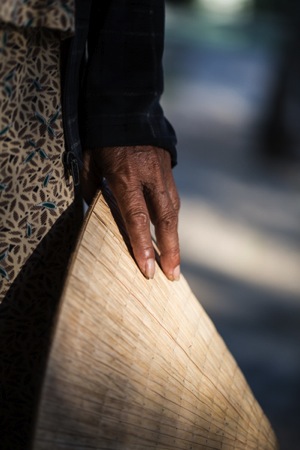
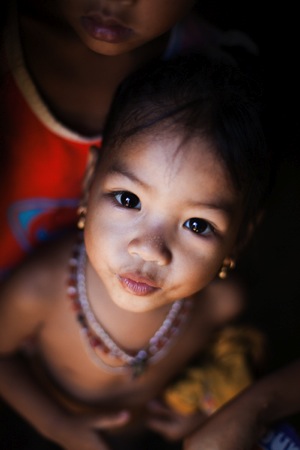
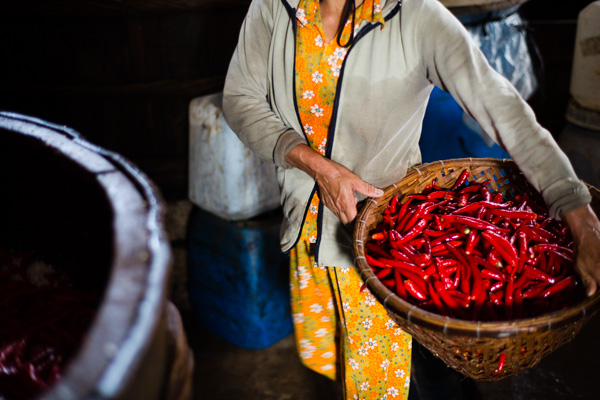
What I am telling you, is to completely not focus your attention on your subject. After all, your subject does not matter (unless you happen to meet the new “Afghan girl” of Steve McCurry, or the girl with green eyes of David Lazaar). No, believe me, as someone living in Vietnam: one old lady with a pointy hat looks the same as another old lady with a pointy hat.

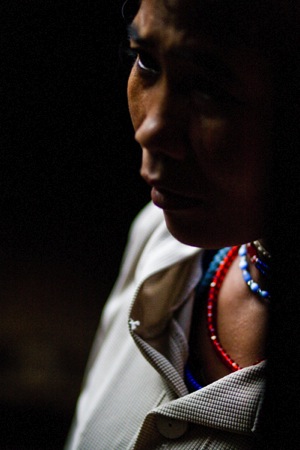
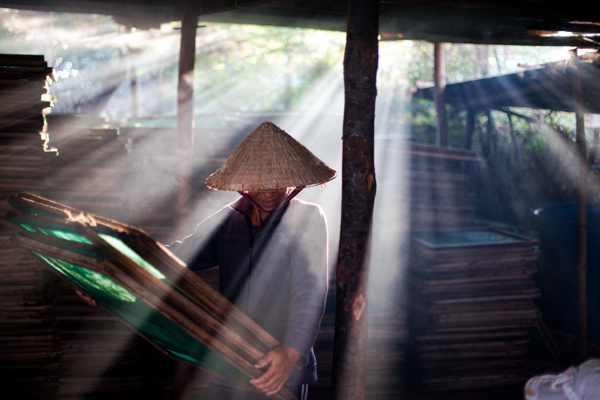
Instead of that, try and focus your entire attention on the light around you. Not the beautiful sunset light in the whole sky, but the little spots of golden light right there, on the floor next to you. Yes, can you see them? Well, there is your next photo my friend.

Yes, I hear you already, “What do you mean shooting light?! And what is my subject, what am I telling a story about?”. Well – now your job is to patiently wait for the right subject to walk into that light. But remember? Shoot the light.

JB 6808

IMG 6354

In the same way as we say “fill your frame” in photography. Keep things simple, only include elements which are relevant to the story you are telling. You can fill your frame with that sumptuous golden light you found on the floor. And that is what is going to lead you to a completely new level in composition and creativity. Because you are only shooting that piece of light, you are going to crop your subjects in way you would never have dared before. You are going to break all the rules you have carefully been following until now, and create something new.

IMG 3204

It will surely be beautiful, as your light will be stunning. You may miss a lot of photos, as you have to get used to getting that close to things and people in a light that can be quite full of contrasts and colors. But with time and a bit of practice, things will start to take shape. You will get used to such new ways of composing your image, and your results will become sharper over time. Until you are getting comfortable with this new idea, and start re-creating your templates that will allow you to be fast and efficient and not miss your images.

EJB 1426 IMG 1761

“Heresy!!!” I can already hear. Sorry? Which book are you talking about? Look at the results you are going to achieve with this technique, and tell me if does not make you think in a complete new way, bringing completely new styles of images. If you don’t like it, well go and try something different. But surely you would have learned something out of it.

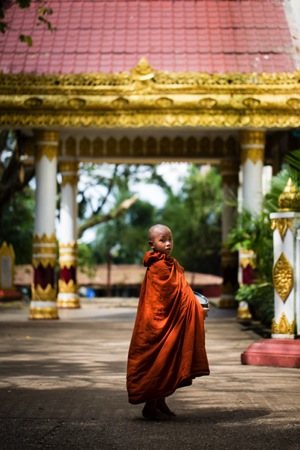
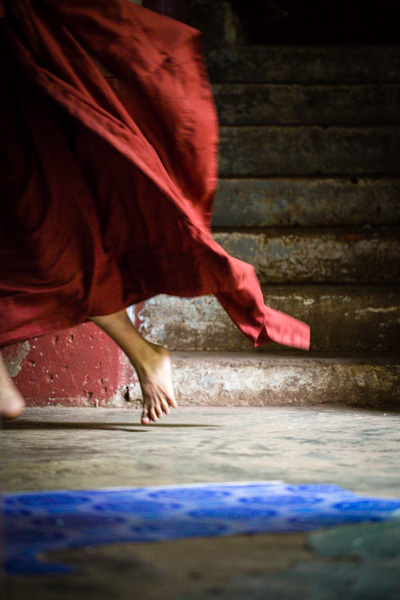
Last year, while running a photo workshop in Myanmar, I managed to capture this image using this exact technique. I could see the light on the floor, and the beautiful blue color next to it. I also knew that this monastery was quite busy, and if I waited long enough someone would walk into my frame.

EJB 1515

One of my students and I laid down on the floor. I switched from Aperture mode to Manual (making sure I would have the right exposure, as the situation had very strong contrasts). I did compose the photo, exactly the way I wanted to have it, and I waited. Surely, after half a minute, some novices went down the stairs. They did spot us, and feeling a little shy to be photographed, they ran through the corridor, laughing out loud.

Click – Click – Click

I did not expect them to run in the first place so my shutter speed was right enough to freeze my hand shakes, or someone walking. But it gave some blur to the novice’s robe, and I liked the shot even more like that. After all, most new things that were created on our planet are the result of accidents!

Go ahead, give it a try!

EJB 1830 IMG 8352

JB 6091

IMG 6605

IMG 4331

IMG 9911

googletag.cmd.push(function() {
tablet_slots.push( googletag.defineSlot( “/1005424/_dPSv4_tab-all-article-bottom_(300×250)”, [300, 250], “pb-ad-78623” ).addService( googletag.pubads() ) ); } );

googletag.cmd.push(function() {
mobile_slots.push( googletag.defineSlot( “/1005424/_dPSv4_mob-all-article-bottom_(300×250)”, [300, 250], “pb-ad-78158” ).addService( googletag.pubads() ) ); } );

The post Shoot for the Light – Improve Your Composition by Etienne Bossot appeared first on Digital Photography School.


Digital Photography School
 
Comments Off on Shoot for the Light – Improve Your Composition

Posted in Photography


Food Photography – How to Shoot A Beverage With Only Two Lights

30 Jan

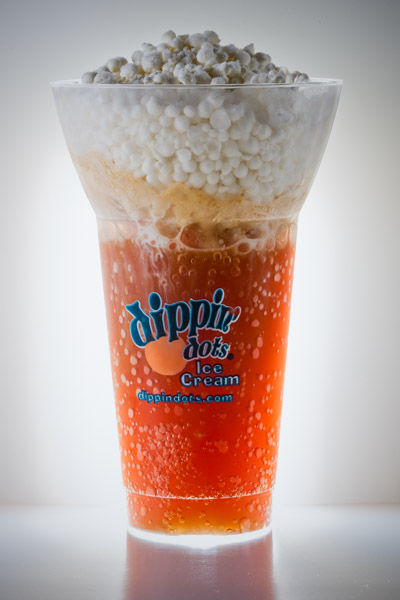
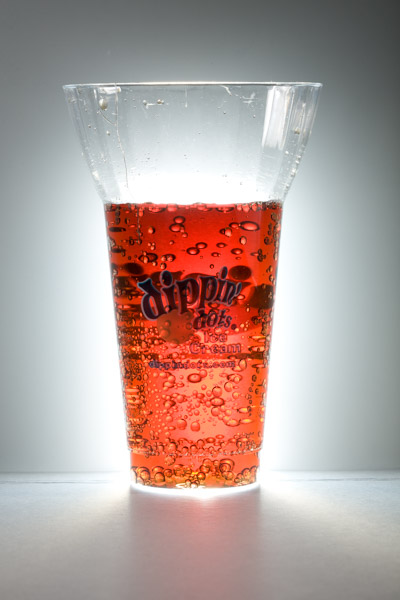
The wonderful thing about food photography is that you can easily turn your apartment, home, or garage into a studio. This image was shot for a local ice cream franchise that offers a different spin on the traditional root beer float. The set was constructed on a coffee table with common household items, and was lit with just two lights.

Final image with real ice cream

Final image

You might be thinking that the featured photo does not look like your normal, every-day root beer float, and you would be right. The ice cream pellets in the float were created by flash freezing ice cream mixed with liquid nitrogen.

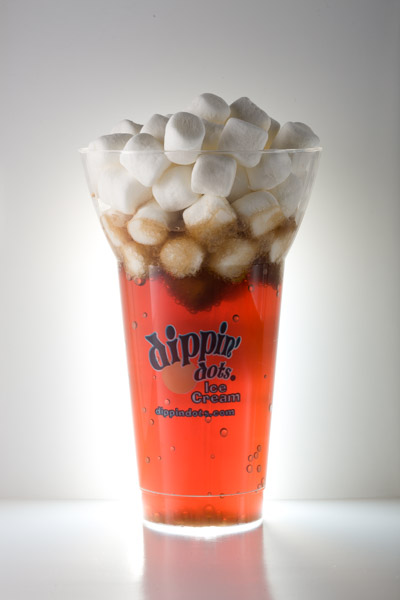
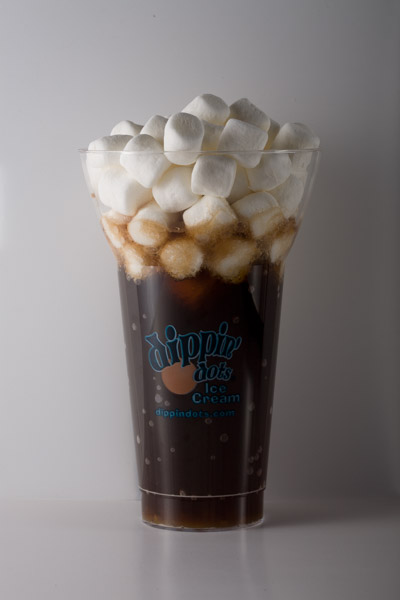
Because the ice cream was made up of these small pellets, it melted quickly, leaving little time to get the “money shot”. To solve this problem, I created a stand-in cup that was filled with soda and mini marshmallows. This stand-in allowed me to tweak my lights while the ice cream was safely stored in an ice chest filled with dry ice.

Marshmallow stand-in

Marshmallows used as stand-in for ice cream, during set up phase.

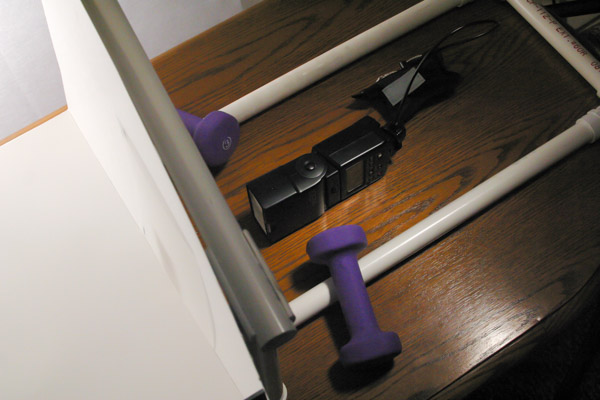
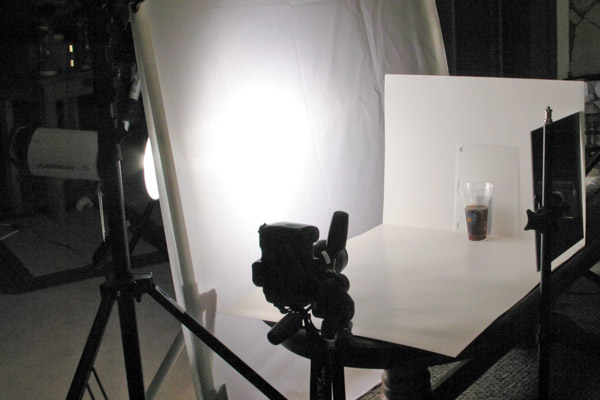
Two pieces of white poster board were used to construct the set. One for the floor and one for the background. The background piece was attached to sections of PVC tubing, which were re-purposed from homemade DIY light panel frames. Small one pound dumbbells were placed on top of the PVC frame to secure it and keep it from moving around.

Whenever you photograph beverages, it is important to backlight them in order to show the transparency of the container and/or liquid. That is what makes soda, iced tea and beer ads look so delicious.

For this shot, I decided to achieve the effect by creating a really tiny pseudo-softbox behind the glass of root beer. I started by cutting a rectangular hole in the back of the poster board. Careful attention was taken to insure that the hole was large enough to cover the entire lower portion of the glass, while still being hidden from the camera’s view.

A small off-camera flash fitted with a radio trigger was then placed behind the background. Since the hole and glass were tall and narrow, the strobe was placed on its side, to match.

View from behind background

View of PVC frame and hotshoe flash with radio receiver. Notice how flash is placed on its side, vertically.

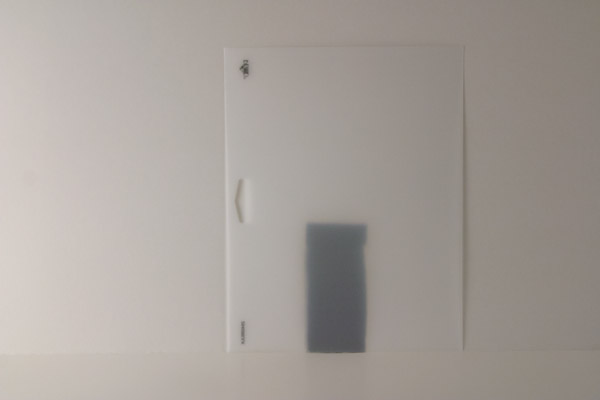
Next, a small sheet of frosted stencil paper purchased from a local hobby store was placed in front of the hole, to evenly diffuse the light across the opening. The translucent properties of the paper also created a soft falloff to the background, as if it were being lit from the front instead of the back.

frosted stencil paper

Frosted stencil paper was butted against the background, behind the glass, to evenly diffuse the light shining through the hole in the poster board. The sheet was moved so that the edges, logo and holes were not seen from the camera’s angle of view.

backlit root beer

First backlight test, before marshmallows were added.

Now that the liquid was backlit, we needed to add a light to illuminate the ice cream. To do this, a large piece of diffusion fabric attached to a PVC frame was placed just out of frame, towards camera left. A strobe light was then placed behind the panel. The diffusion fabric created a large source of illumination, which created a very soft transition from the highlights to the shadows.

float without backlight

Light shining through diffusion panel with back light turned off

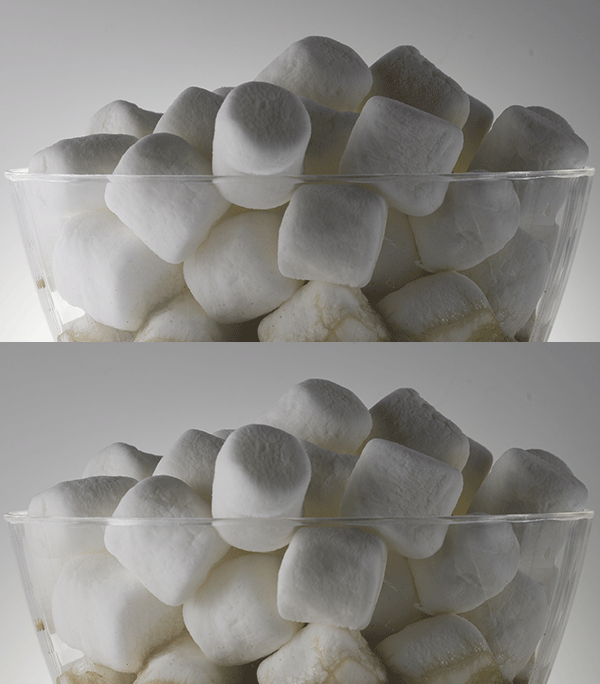
Finally, an acrylic mirror was attached to a light stand and placed just out of frame, towards camera right. The mirror reflected and bounced some of the light from the large panel back into the shadows.

Before and After of Mirror Fill

Mirror fill: Before and After

setup view

View of entire setup.

The final image was shot using a Canon EF 100mm f/2.8 Macro lens. The camera was set to f/14 at ISO 100.

Final image with real ice cream

Final image using real ice cream.

With a little imagination and ingenuity you too can create professional looking food images on a budget, with minimal equipment. In fact, here are a few cheaper alternatives that could have been used to create the image above:

CFL or LED Light Bulbs

The wonderful thing about still photography is that your subject is “still”. This means you can use regular household bulbs to light your scene if you do not have the money for strobes. All you have to do is lower and adjust the shutter speed of your camera, since the bulbs do not emit as much light as a strobe or off-camera flash. Experiment with different bulb wattages, or try alternating the amount of bulbs to create different lighting ratios. Just make sure you have the bulbs placed behind some source of diffusion. By diffusing the lights, you will create a single large light source; otherwise, you will create multiple shadows and weird reflections from the various sources of light.

White Twin Bed Sheet

A white bed sheet is an inexpensive and great form of diffusion. You can attach it to a PVC frame or stretch it between two light stands using spring clamps. The sheets are also great for portrait work. Need a GIANT softbox? Try a king size sheet!

googletag.cmd.push(function() {
tablet_slots.push( googletag.defineSlot( “/1005424/_dPSv4_tab-all-article-bottom_(300×250)”, [300, 250], “pb-ad-78623” ).addService( googletag.pubads() ) ); } );

googletag.cmd.push(function() {
mobile_slots.push( googletag.defineSlot( “/1005424/_dPSv4_mob-all-article-bottom_(300×250)”, [300, 250], “pb-ad-78158” ).addService( googletag.pubads() ) ); } );

The post Food Photography – How to Shoot A Beverage With Only Two Lights by Joel Dryer appeared first on Digital Photography School.


Digital Photography School
 
Comments Off on Food Photography – How to Shoot A Beverage With Only Two Lights

Posted in Photography


What to Wear for a Photo Shoot: Clothing for Portraits

09 Jan

What to wear? It’s an age old question. One that never goes away. And what to wear for a photo shoot even gets harder. Two weeks ago, Santa brought my oldest daughter, Zoe, ten BILLION outfits from across the globe. Knit sweaters, lace sweaters, casual sweaters, fringed sweaters…if there was a sweater being made, she got it, in addition to Continue Reading
The post What to Wear for a Photo Shoot: Clothing for Portraits appeared first on Photodoto.


Photodoto

 
Comments Off on What to Wear for a Photo Shoot: Clothing for Portraits

Posted in Photography


10 Essential Little Items To Help You Shoot On-Location

29 Dec

In the past, we have talked a lot about the big, important items of gear every photographer needs- like a Camera or a proper case to transport it. Today’s post however is dedicated to all the items that don’t seem like they can make a big difference. But trust me, they do. A Good Backpack I cannot stress enough about Continue Reading

The post 10 Essential Little Items To Help You Shoot On-Location appeared first on Photodoto.


Photodoto

 
Comments Off on 10 Essential Little Items To Help You Shoot On-Location

Posted in Photography


4 Killer Tips To Nail Your Next Portrait Shoot

10 Oct

If you’re a portrait photographer perhaps you’ve found yourself in the position of carrying bulky, heavy gear around. That’s unnecessary though. With these 4 easy tips you’ll be able to get the best results at your next portrait session without the hassle and the back pain afterwards. These tips also help you save a fair amount of money that you Continue Reading

The post 4 Killer Tips To Nail Your Next Portrait Shoot appeared first on Photodoto.


Photodoto

 
Comments Off on 4 Killer Tips To Nail Your Next Portrait Shoot

Posted in Photography