RSS
 

Posts Tagged ‘Setting’

3 Tips for Setting Boundaries to Avoid Burnout in Photography

11 Jan

Whether you’re a professional photographer or a hobbyist, there have likely been times when you’ve felt ready to throw in the towel and quit photography forever. Those feelings are normal and are usually the result of added stress from things like a looming deadline or a project that you don’t feel prepared to tackle.

Often, once the added stress subsides, so does the desire to quit photography. However, if that stress becomes chronic it can cause physical, emotional, and mental burnout that’s much more difficult to bounce back from.

3 Tips for Setting Boundaries to Avoid Burnout in Photography

One of the most effective things that photographers of all levels can do to prevent and avoid burnout is to set appropriate boundaries. In this article, we’ll discuss a few different boundaries that you may want to consider setting now in order to protect yourself from future burnout.

1. Set Office Hours

Between smartphones and wi-fi access, it’s easy to be available all the time. It’s easy to respond to a quick text while you’re on vacation. Replying to a midnight email when you’re already awake doesn’t seem like a big deal.

On one hand, being accessible to your clients (whether paid or unpaid) can make them feel appreciated and enhance the client experience. On the other hand, it can also lead to exhaustion and burnout because it always feels like you’re “on duty”.

It’s actually okay not to be available 24/7. In fact, it’s more than just okay. Setting boundaries in terms of availability is crucial to a healthy balance between your work and your personal life.

3 Tips for Setting Boundaries to Avoid Burnout in Photography

Consider setting business/office hours, and do your best to stick to them! The client experience is primarily driven by the quality of the service they receive rather than the speed with which they receive it. Most current or potential clients will be satisfied to receive a response within 24-48 hours.

Just because you happen to see a midnight email pop through doesn’t mean you need to respond to it right away! If you’ve always been immediately accessible and are concerned about making this transition, it’s easy to set an auto email or Facebook Messenger reply to let potential clients know that you’ve received their inquiry and when they can expect a response back from you.

3 Tips for Setting Boundaries to Avoid Burnout in Photography

2. Build in Downtime

I know as well as anyone that it can be really difficult to build downtime into your schedule because doing so often feels like you’re either losing opportunities or income. However, when you’re very busy with photography, it’s important to remember to schedule two kinds of downtime in order to prevent burnout – processing time, and days off.

In the spring, summer, and fall, it can be tempting to book photo sessions every night and weekend. It’s not a bad thing to fill your schedule, but don’t forget that your work generally isn’t done once you leave the session itself. Most sessions require some degree of processing time, which could include everything from culling, editing, social media posts, communication with your clients, and arranging for delivery.

When you’re creating your calendar of availability, don’t forget to factor in all the time you’ll spend after the actual session itself and build in that processing time (or plan to outsource it) accordingly.

3 Tips for Setting Boundaries to Avoid Burnout in Photography

In addition to processing time, I have discovered that there’s tremendous value in blocking out a day or two on my calendar as personal days, even during my busiest season. For me, this is so important both in terms of self-care and also in terms of prioritizing and preserving relationships with my family.

Although I started doing this in order to save my own sanity, I’ve discovered that setting and communicating boundaries in terms of my availability has been helpful in other ways as well. Potential clients tend to book more quickly than they used to because they know that my availability is limited. I also receive far fewer last minute requests to reschedule to a different date or time for the same reason.

3 Tips for Setting Boundaries to Avoid Burnout in Photography

3. Communicate Your Timeline

Another small thing that can greatly reduce your stress and frustration is to communicate your timeline with your clients up front and let them know what they can expect in regards to receiving their images.

Make sure that this timeline is realistic. Factor in all scheduled sessions, your post-session processing time, and your scheduled downtime. By doing so, you’ll be able to give clients a more realistic timeline for receiving their images, while also decreasing the number of all-night editing sessions for you.

3 Tips for Setting Boundaries to Avoid Burnout in Photography

Obviously, the timeline for a professional photographer with five weddings in their queue is going to be totally different than a hobbyist photographer taking photos of a friend’s children. However, you don’t know who a client has worked with in the past, or what their expectations are as they enter into a session, which is why it’s so important to clearly communicate your timeline from the beginning!

Conclusion

Do you have any other advice for setting boundaries to avoid burnout in photography? Have you experienced it? What did you do to prevent it from happening again? Please share your thoughts in the comments below!

The post 3 Tips for Setting Boundaries to Avoid Burnout in Photography by Meredith Clark appeared first on Digital Photography School.


Digital Photography School

 
Comments Off on 3 Tips for Setting Boundaries to Avoid Burnout in Photography

Posted in Photography


Avoid These 5 Common Camera Setting Mistakes Made By Beginners

31 May

Over the years, I’ve taught many new photographers and observed how they used their cameras. I have noticed a handful of common mistakes that many of them make. While there is a lot more to learn about photography, if you can avoid or fix these issues alone, you will find that your photographs will be much sharper and of much better quality.

Avoid These 5 Camera Setting Mistakes Typically Made By Beginners

1. Not raising the ISO high enough

It used to be commonly taught that you always needed to go as low as possible with the ISO for digital cameras. This was because early digital cameras had horrible noise at higher ISOs. These days, that has completely changed. Newer digital cameras can shoot with incredible quality at ISO 800, 1600, 3200, and even 6400 for higher end cameras. The noise is much less noticeable than it used to be, and it is much more pleasant looking.

Avoid These 5 Camera Setting Mistakes Typically Made By Beginners

This has changed how we can shoot. While your ISO should still be as low as possible when the camera is on a tripod when you’re shooting handheld you will often want to raise your ISO up much higher. Unless I am purposely shooting with a very large aperture such as f/2.8, I typically keep my ISO at 400 in sunlight, 800-1600 in light to dark shade, and 3200 and 6400 when handheld at dusk or at night. This allows me to use a faster shutter speed to offset handheld camera shake or motion in subjects, along with a decent depth of field. My shots are much sharper because of this.

Unless you are shooting in Manual Mode, I suggest taking your camera off of auto-ISO. You never want to let your camera choose two of the three settings (shutter, aperture, and ISO) because it will mess up your photographs a lot of the time. The camera should only be choosing one of those three settings for optimal use.

2. Using a shutter speed that’s too slow

Avoid These 5 Camera Setting Mistakes Typically Made By Beginners

To offset the handheld camera shake, the shutter speed always needs to be ONE over the focal length of your lens. So if you are shooting with a 50mm lens, your camera will need to be at 1/50th of a second (or faster) to make sure the image is sharp. This comes even more into play with a zoom lens because a 300mm lens will need a 1/300th of a second shutter speed in order for the image to not look blurry. This is because slight vibrations are much more noticeable when you magnify a small area in the distance. This is also why I will often raise my ISO when zooming at far distances.

For subjects in motion, you will need a fast enough shutter speed to freeze them. I prefer a minimum of 1/250th of a second to freeze people walking. You will need an even faster shutter speed as you get to subjects such as cars.

3. Not using exposure compensation (+/-) or the right meter mode

Avoid These 5 Camera Setting Mistakes Typically Made By Beginners

If you are using Aperture or Shutter Priority mode, Exposure Compensation is your best friend, particularly in scenes with tricky lighting. Your camera’s light meter is not creative – it wants to make everything look a neutral gray, but that is problematic in images with lots of dark or bright tones. Maybe you want those tones to look gray for creative purposes, but most likely, you will want them to be true to the scene. This is where Exposure Compensation (+/-) comes into play.

For instance, in scenes with lots of bright snow or a bright sky, this could trick the camera into thinking that it needs to overly darken the image to make those white areas look gray. Or if you are shooting at night, or in a dark alleyway, the camera’s light meter will try to make those dark tones look like a lighter gray, thus brightening the image too much. Similar problems can also appear when shooting in areas with both bright highlights and dark shadows, or if your subject is backlit.

On a related note, many photographers keep their camera on the wrong metering mode. There are three main metering modes; Evaluative, Center-weighted, and Spot metering. Evaluative will expose for the entire scene, Center-weighted will expose based on the spot that you focus on and an expanded area around it, and Spot metering will measure the light based on only the spot that you point to. I personally find Evaluative to be too broad and Spot to be too focused, so I mostly use Center-weighted metering mode.

Read more here: Cheat Sheet: Understand Metering Modes On Your Camera

4. Not getting the focus point right

Avoid These 5 Camera Setting Mistakes Typically Made By Beginners

Some photographers leave their focusing completely up to the camera. This is a terrible idea as the camera will often focus on the wrong point, ultimately ruining your image. You need to be in control of your focusing and put the focus on the most important subject in the image.

On a similar note, it is common for photographers to get that new 50mm f/1.8 or f/1.4 lens and immediately think that they need to shoot everything at f/1.4 because they can. Some situations will be good for f/1.4, but it’s important to realize how shallow the depth of field is at that aperture.

If you are shooting with a really shallow depth of field, the focus needs to be perfect and exactly right on the most important subject. If you are photographing a person and you put the focus point on the person’s ear or nose instead of their eyes, it will be noticeable and it will mess up the photograph. Often, I prefer to shoot portraits like this at f/4 instead of f/1.8 or f/2.8. There is still a beautiful background with bokeh, yet more of the person is in focus. This minimizes any focusing mistakes as well.

5. Using image stabilization when using a tripod

Avoid These 5 Camera Setting Mistakes Typically Made By Beginners

The image stabilizer in your lens or camera will make your photographs sharper when handheld. However, it can also create minor vibrations while keeping the camera steadier, and these vibrations can actually backfire when you are on a tripod. Sometimes they will introduce blur. So always make sure to turn the image stabilizer off when you are using a tripod. If you ever notice your photographs on a tripod are slightly blurry, this issue and wind are the most likely culprits.

Conclusion

There you have it. The bottom line is that if you can learn to conquer and avoid these five common beginner mistakes, you’ll be on your way to better photography.

The post Avoid These 5 Common Camera Setting Mistakes Made By Beginners by James Maher appeared first on Digital Photography School.


Digital Photography School

 
Comments Off on Avoid These 5 Common Camera Setting Mistakes Made By Beginners

Posted in Photography


Canon releases downloadable EOS-1D X Mark II AF Setting Guidebook

01 Feb

Canon has released a downloadable 100MB PDF guide book for the EOS-1D X Mark II camera’s AF system. According to the company, this guide ‘will clarify many of the details about’ this AF system, including menu settings, the effect of various AF Cases, and more.

Canon goes on to point out that most of the information found in this guide is also applicable to the Canon EOS 5D Mark IV camera’s 61-point AF system, which features the same AF sensor as the EOS-1D X Mark II. Canon says of the guide ‘We’re confident having access to this file, on your computer or in a mobile device will answer many of the questions which may arise as you use either of these cameras.’

The PDF can be downloaded directly here.

Via: CanonRumors

Articles: Digital Photography Review (dpreview.com)

 
Comments Off on Canon releases downloadable EOS-1D X Mark II AF Setting Guidebook

Posted in Uncategorized


The Importance of Setting Photography Goals for Yourself

23 Sep

A wiser person than myself once said that if someone does not know to which port they are sailing, no wind is favorable. I heard that advice early in my photographic journey and it has stuck with me throughout the years. Learning about photography is important. Developing your skills as photo maker is even more important.

However, one of the most important things that you can do in order to grow as an artist (and business person) is to recognize the importance of finding a direction, setting photography goals for yourself. Without a direction or goals, all the passion, skill, and creativity you possess will not be enough to help you reach your full potential as a photographer.

Direction

Finding your direction

That is the hard part. Figuring out which direction to focus your energy on can be frustrating and at times extremely confusing. There really are no shortcuts. The key is to shoot, shoot, and shoot some more. Shoot a lot. You won’t know what kind of photography you truly love until you let yourself go and become lost in your own work.

Don’t limit yourself to only one type of photo when you’re just starting out in the art; meaning don’t exclusively do street work or only shoot portraits. Make photographs of anything: people, landscapes, architecture, food, toasters – anything. You might find that your true passion strangely discovers you when you least expect it. The important thing is to keep shooting and keep yourself open to new opportunities.

Shoot

Bear in mind, however, that directions can and often do change. Even though you may be firmly set on the path you want to pursue with your photography remember that you are not confined to it exclusively. As you grow as a photographer so will your tastes and your inclinations may evolve. Again, keep your creative mind free and be willing to try something completely different if the muse strikes you to do so. You make the photograph…the photograph does not make you.

Applying your direction

For a moment let’s imagine that you have found your direction. You’re elated and you can’t describe how great it feels to have that overwhelming urge to create photographs. Now what? Do you just go out into the world and hope for the best? Of course not. Instead, take all of that excitement and artistic energy and channel it into something tangible.

Sample 1

In short, you must set clear goals for yourself as a photographer. Setting goals for your photography will help you immeasurably. There are so many things to consider when first starting out. At times it becomes shockingly easy to lose your focus which will lead to frustration. Developing goals will keep you grounded in your work and heading in the direction you have chosen. Not only will having clearly defined goals keep you focused but will also keep you motivated and make you more determined to accomplish what you have set out to do.

Learn to set goals which are realistic

No one that I know of ever had their first photograph published on the cover of National Geographic Magazine. If that’s your goal that’s great. But understand that while setting goals is essential to success, they must also be realistic goals.

Find goals for your work which are challenging but attainable. Examples of realistic goals could be learning a new technique or getting your work in a local gallery. Don’t set yourself up for disappointment because you set the bar unimaginably high. Success is a ladder that must be climbed one step at a time.

Acheive

Confidence

Gaining confidence is somewhat of a paradox because you need confidence in order to find it – think about that for a moment. Boosting your confidence level is perhaps the most important reward that will come out of setting goals for your photography.

Taken as whole, going from a beginner to a professional photo maker is a daunting task to say the least. There is just so much that can go wrong on the journey from point A to point B. Instead of attempting to cover the distance in a single leap, lay out achievable goals that will eventually take you where you want to go. Along the way, with each goal met and overcome, you will naturally build confidence. The next goal will be met and then the next and the next, and so on.

As you become more confident in your work and your abilities each new goal you set will be more and more ambitious. One day you will look back to see how far you’ve come and how much you’ve accomplished just by focusing on each step one at a time.

Steps

Be brave

You found the courage to follow your dreams and take up the mantle of “photographer”. It’s not always going to be an easy road, but by simply finding your direction and setting photography goals you will be able to achieve things you never thought were possible.

Learn to understand what it is that truly gives you a spark when you photograph, then develop a game plan by setting small goals to help you along your way. Those goals will be your signposts. With each goal you achieve you will build skill, confidence, experience, and knowledge. As you learn and grow you will undoubtedly change as an artist. Be mindful but don’t fight the natural current and healthy evolution of your own creativity.

Trees 1

Whether the goals you set are designed to facilitate a transition from hobbyist to pro photographer, or to just reach the next stage in your photographic journey, the important thing to remember is to never stop moving. Always strive to learn something new, set new goals, and reach new heights.

What are your photography goals? Please share in the comments below.

googletag.cmd.push(function() {
tablet_slots.push( googletag.defineSlot( “/1005424/_dPSv4_tab-all-article-bottom_(300×250)”, [300, 250], “pb-ad-78623” ).addService( googletag.pubads() ) ); } );

googletag.cmd.push(function() {
mobile_slots.push( googletag.defineSlot( “/1005424/_dPSv4_mob-all-article-bottom_(300×250)”, [300, 250], “pb-ad-78158” ).addService( googletag.pubads() ) ); } );

The post The Importance of Setting Photography Goals for Yourself by Adam Welch appeared first on Digital Photography School.


Digital Photography School

 
Comments Off on The Importance of Setting Photography Goals for Yourself

Posted in Photography


5 Tips for Setting the Focus in Your Landscape Photography

18 Jul

In many types of photography the question of where you should set your focus is pretty simple. For example, in portrait photography, there is one simple rule: focus on the eyes. When the eyes aren’t on the same plane of focus, focus on the near eye. End of story.

It is pretty simple with other types of photography as well. In wildlife photography you focus on the animal. In fact, in any type of photography where there is a clear subject, you always focus on that subject. That’s not to say it is always easy, but at least it isn’t difficult to figure out.

Mullaghmore

Foreground sharpness is paramount in many landscape photos.

But what about landscape photography where you are generally capturing more of a scene than a solitary subject? Where do you focus to ensure that everything in the scene is as sharp as possible? The answer isn’t always so clear. Therefore, in this article, we’ll cover some tips for helping you know where to set the focus.

Tip 1: Don’t Just Set the Focus at Infinity

Again, oftentimes in landscape photography, you are trying to capture a scene rather than a solitary thing. Many times, the scene you are trying to capture is far away from you. Most lenses have a range of focus values, and once you get beyond a certain distance (often 20-30 feet, or 8-10 meters) the focus is set at infinity. Everything beyond that point will just be infinity. Therefore, if you are taking a picture where most things in the frame are far away, it might seem that you should just set the focus at infinity. If you are using autofocus (and most of us are), you might be inclined to set the focus using something that is very far away from you.

If everything in the frame is truly at infinity, then setting the focus at its maximum distance is not a horrible idea. If there is nothing close to you, then there is just no need to do anything else, you don’t need to overly complicate things. But more commonly there are aspects of the scene that are closer to you than infinity. Where do you set the focus then?

Derryclare

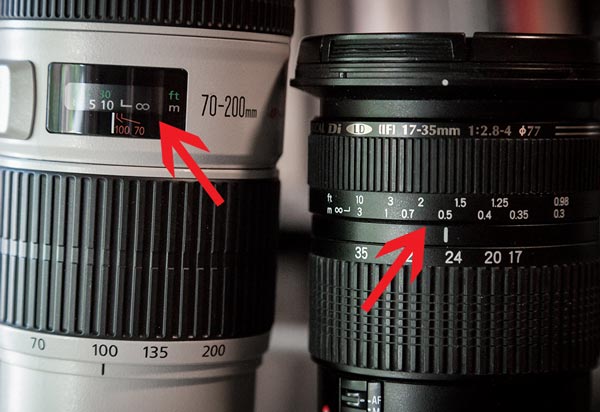
You can get into hyperfocal distance (we’ll talk more about that in a minute) and make this as technical as you want. But often your time is precious when you’re out shooting. The light is changing and things are moving. You can get a pretty good sense of things without resorting to calculations. As a result, consider this rule of thumb: set the focus at infinity and then just turn it back a little bit. The obvious question is what is, how do you define a little bit, and I’m afraid I don’t have a good answer for you. It will vary from lens to lens, but will usually be about a 5-10° turn or just to the highest distance number printed on the lens (if your lens has these numbers).

focus-ring-distance-600px

Why would you want to do that? Because of the depth of field that will be in your picture (more on depth of field below). Since you are taking an outdoor photo, you will probably not be shooting wide open, or even with a large aperture. So, there will likely be some depth depth of field involved. It doesn’t necessarily have to be a large depth of field, but the point is that it gives you some leeway. By pulling the focus forward, that leeway will still get everything out to infinity in focus. It will also get things a little closer in focus as well.

Tip 2: Try Focusing a Third of the Way into the Picture

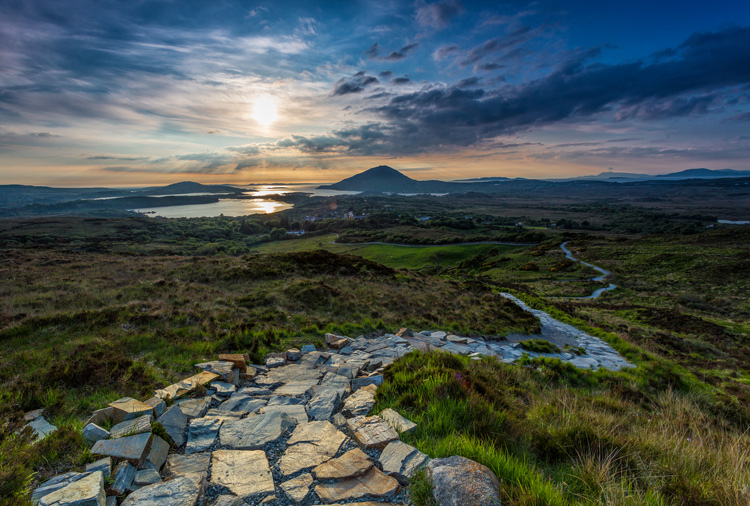
Many pictures are ruined because the foreground is not sharp. It happens all the time. Therefore, if you have something in your scene that is close to the camera, focus on it. If the ground is prominent in your picture, set your focus close to you. Make sure that foreground is in focus. Often you will set the focus only a few feet in front of you.

But wait a second, you might ask, what about my background? Won’t it be out of focus or blurry? Probably not. If you’re using your wide-angle lens (and if you are taking a outdoor photo that has a discrete foreground, then you probably are) you will have a wide depth of field, even at moderate to large apertures.

Connemara

A sharp foregound focus furthers the viewer’s sense that they can walk into the picture.

Tip 3: Focus on the Subject Matter

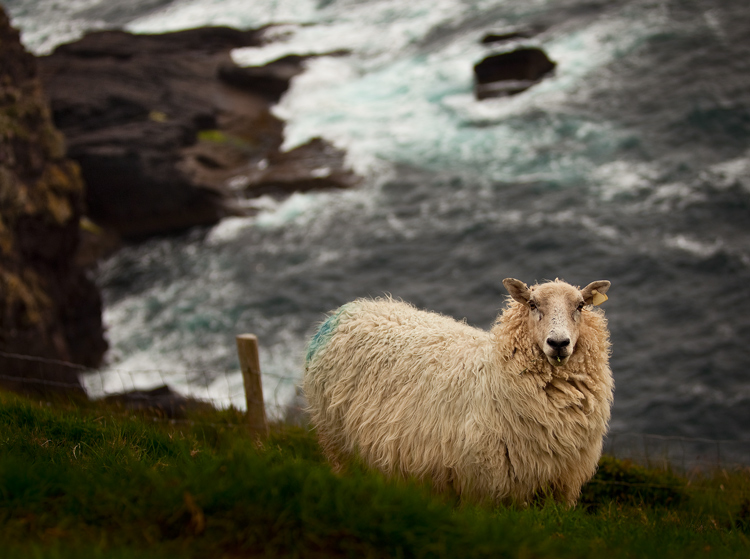
Let’s not lose sight of the obvious though. When you have a definite subject or center of interest in your photo, just focus on that. It is the most important part of your picture and you absolutely need it in focus. Don’t worry about your foreground, don’t worry about your background. Just make sure the subject is in focus. Frankly, if there is a little fall-off in sharpness from your subject, that will probably not be such a bad thing.

Dingle-Sheep

Sometimes you just want a definite subject in focus, and having the background start to blur out is just fine, as in this image of a sheep.

Tip 4: Watch the Aperture

There are no free lunches in photography. You probably already know that by using a smaller aperture to get a larger depth of field, it will cost you light. The smaller aperture lets in less light so you will have to use a longer shutter speed (risking blur if you aren’t using a tripod) or raise the ISO (risking digital noise in your picture). But the smaller aperture will also lead to something called diffraction, particularly in cameras with smaller digital sensors. Therefore, just using the smallest aperture possible isn’t always the answer. You cannot just set your focus anywhere and rely on a super-wide depth of field to save you.

There are two ways around this issue though, which we’ll talk about next.

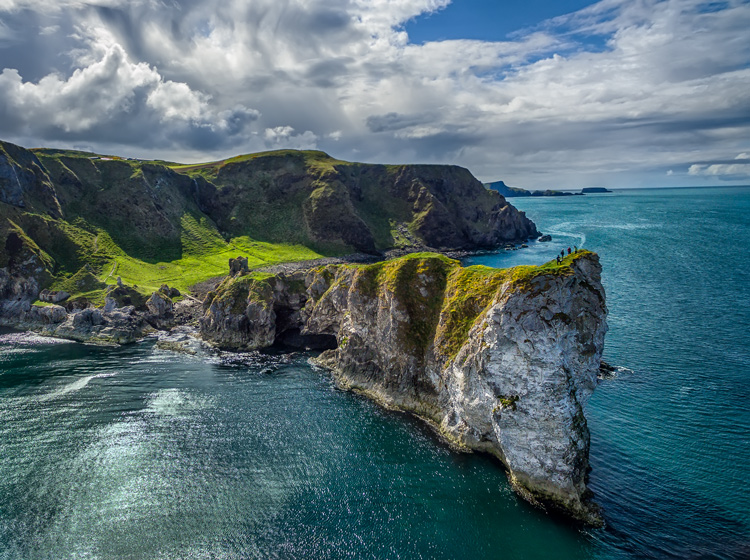
Kinbane-Head

With everything in the shot at a distance of infinity (30 feet or more), I did not need a wide depth of field to keep everything in focus.

Tip 5: Know Your Hyperfocal Distance

Hyperfocal distance is just a fancy name for determining how close you can set your focus, and still keep your background acceptably sharp. There are apps and calculators that will tell you this distance depending on your aperture, sensor size, and focal length. For a full explanation of hyperfocal distance along with some charts and links to apps that will calculate it for you, check out How to Find and Use Hyperfocal Distance for Sharp Backgrounds .

An example will illustrate the point made above about backgrounds tending to remain sharp when you are using wide angle lenses. If you’re using a 16mm lens on a full frame camera, and shooting at f/11, your hyperfocal distance is only 2.5 feet. That means you can set the focus on a point just in front of you, and keep everything behind that point sharp.

Knowing the hyperfocal distance will often liberate you to set the focus point quite close, in order to maintain sharp foregrounds in your picture. It also means you often don’t need to use the smallest aperture your lens offers, so you can avoid the effects of diffraction.

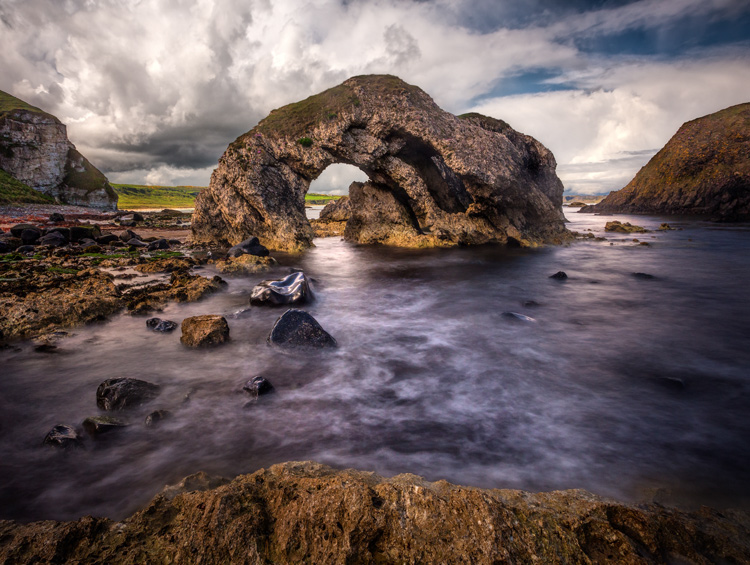
Ballintoy-Arch

Tip 6: Consider Focus Stacking

When the methods above won’t work for you, or you just need to make sure absolutely everything in the photo from front to back is tack sharp, you may want to consider focus stacking. Here you take multiple pictures of the same scene using different focus points.

Start by setting the aperture of your lens where it is sharpest (also called the sweet spot – if you don’t know, that is usually in the range of f/5.6 – f/8). Take a shot with the focus set close to you, then repeat the process, gradually setting the focus point farther and farther away with each shot. Later you blend your pictures in Photoshop (for more about how to do that check out Maximizing Depth of Field Without Diffraction).

This method is not a cure-all. It obviously won’t work with moving subject matter. In addition, it can be tedious, and you risk slightly moving the camera since you have to twist the focus ring between shots. Still it can be a powerful tool for maintaining focus and sharpness throughout your entire picture.

Setting the Focus Summary

No rule is going to cover every situation when it comes to focus. As with many aspects of photography, you’ll just have to use your own judgment in the field. Hopefully, as you do so, these tips will help you nail the focus and keep the picture tack sharp where it matters.

This week we are doing a series of articles to help you do better nature photography. See previous articles here:

  • 3 Habits Every Outdoor Photographer Should Develop to Avoid Missing Shots
  • 5 Tips for Better Nature Photography
  • 27 Serene Images of the Natural World
  • Weekly Photography Challenge – Nature
  • 10 Ideas for Photographing Nature in your Backyard
  • 6 Tips for Capturing Character and Personality in Wildlife Photography

googletag.cmd.push(function() {
tablet_slots.push( googletag.defineSlot( “/1005424/_dPSv4_tab-all-article-bottom_(300×250)”, [300, 250], “pb-ad-78623” ).addService( googletag.pubads() ) ); } );

googletag.cmd.push(function() {
mobile_slots.push( googletag.defineSlot( “/1005424/_dPSv4_mob-all-article-bottom_(300×250)”, [300, 250], “pb-ad-78158” ).addService( googletag.pubads() ) ); } );

The post 5 Tips for Setting the Focus in Your Landscape Photography by Jim Hamel appeared first on Digital Photography School.

Digital Photography School

 
Comments Off on 5 Tips for Setting the Focus in Your Landscape Photography

Posted in Photography


Setting new standards: Nikon D5 Review

02 Jun

Introduction

The Nikon D5 is the company’s flagship action-oriented DSLR, sporting a 20.8MP full-frame sensor, 153-point autofocus system and a full-size, double-grip chassis that is both tough as nails and exceedingly comfortable to use. Though the core build of this camera remains very similar to the D4S, the sensor and autofocus system are entirely new and – as we’d expect – designed with speed and reliability in mind.

Nikon D5 Key Specifications

  • All new Nikon-designed 20.8MP full-frame image sensor
  • Expeed 5 processor
  • All new 153-point phase detection autofocus system with 99 cross-sensors
  • Automated autofocus fine tune
  • Native ISO range now stretches from 100-102,400
  • 12fps continuous shooting with full autofocus and autoexposure
  • 4K video recording
  • Offered in dual CF and dual XQD memory card configurations
  • Touchscreen functionality during both stills and video shooting
  • CIPA rating of 3,780 shots per charge using the same EN-EL18a battery as D4S

Due to its large size and tip-top placement in Nikon’s lineup, the D5 originally struck me as a somewhat intimidating camera to put through a thorough review. But really, with a little bit of work to get it set up the way I like and the development of some muscle memory as to where all the proper buttons are, the D5 has proven to be one of the most reliable, and as such, one of the least stressful cameras I’ve ever had the pleasure of using. Of course, that doesn’t mean that it isn’t meant to be put through stressful situations. Quite the opposite.

Here’s a quick comparison of the key specs of the D4S, D5 and 1D-X II.

  Nikon D4S   Nikon D5  Canon 1D-X II
MSRP $ 6499 $ 6499 $ 5999
Sensor 16.2MP CMOS 20.8MP CMOS 20.2MP CMOS
ISO range
(native)
100-25,600 100-102,400 100-51,200
AF points 51 153 61
RGB metering sensor resolution 91k pixel 180k pixel 360k pixel
LCD 3.2″ 920k-dot 3.2″ 2.36M-dot touch-enabled 3.2″ 1.62M-dot touch-enabled
Burst rate 11 fps 12 fps 14 fps
Video 1080/60p 4K/30p 4K/60p
Battery life (CIPA) 3020 shots 3780 shots 1210 shots
Dimensions 160 x 157 x 91mm 160 x 159 x 92mm 158 x 168 x 83mm
Weight 1350 g 1405 g (XQD) 1530 g

Clearly, there are some exciting innovations hidden beneath the D5’s skin, but in the end, it’s likely not the most exciting camera to the average consumer. So in an age of decreasing camera sales, why does Nikon bother to continue producing such machines? Well, in the most extreme of situations, phones and lesser digital cameras will simply be unable to capture the same sorts of moments that flagship cameras like the D5 are, from the get-go, built to capture. 

2016 is an Olympic year, and it’s not a coincidence that this year has seen new flagship DSLRs from from both Canon and Nikon.

Of course, the D5 isn’t just for shooting the Olympics. Processed to taste from Raw. Photo by Carey Rose. Nikon 135mm F2D | F4 | 1/200 sec | ISO 400

Here is the beef

There’s no denying that the Nikon D5 is one beefy camera. Without a lens, it weighs 1405g, or just over three pounds. But there’s a good reason for that. The D5 is over-engineered on purpose – it’s built to take a knock, a drop or a flying rock kicked up from a dirt-bike. It might even take a bullet, but we’re not really allowed to test that. And with a properly sealed lens attached, the D5 should also stand up to a downpour and freezing conditions with ease. This camera comes with a tough magnesium-alloy shell, one that feels like you could pound nails with (we didn’t try).

The D5’s robustness means I can focus more on the action and less on whether or not I’m going to hurt the camera. Processed and cropped to taste in Adobe Camera Raw. Photo by Carey Rose. Nikon AF-S 300mm F4 PF | F4 | 1/2000 sec | ISO 200

Another contributor to the D5’s beefiness is its battery. It’s CIPA-rated to 3,780 shots, which not only promises an absurd amount of shooting between charges, but is also a sign of increased efficiencies within the camera. Despite more megapixels, a faster burst rate and a more computationally intensive autofocus system, the rating has increased compared to its predecessor, which uses the same battery pack. (Fun fact: to save you the trouble of opening your calculator app, the CIPA rating of 3,780 shots actually only translates to five minutes and fifteen seconds of shooting at its burst rate of 12fps.)

The Evolution

I’m a long-time Nikon shooter, but not one that’s personally invested in pro-level bodies from the Dx series. At first, if you’ve used even a semi-pro body from Nikon’s recent past, you’ll feel familiar with the D5. But when you get more familiar with the camera (and as we cover in detail on our ‘Body & Design’ page), Nikon’s made some changes to the button layout of the D5 that will have some users scratching their heads, and others praising the ergonomic improvements from the added level of button customization.

Streetlight-and-strobe-lit. Processed to taste from Raw. Photo by Carey Rose. Tamron 85mm F1.8 SP VC | F1.8 | 1/125 sec | ISO 12800

In summary, the D5 is a camera that will be lusted over by a lot of enthusiasts, but largely abused by its intended customer base – working professionals. These photographers will simply pick it up, do their best to re-assign all their buttons the way they had re-assigned them on their D4S’s, and get to work. For long-time sports shooters and wedding photographers, a more comprehensive rethink and redesign of cameras like this would probably not go over well.

Instead, the evolving Dx line continually provides meaningful updates that will make it easier for established pros to capture images that they already know how to take. In this vein, the D5 is indeed a worthy upgrade and successor to the D4S for a number of reasons. So without further ado, let’s take a closer look to find out why.

Articles: Digital Photography Review (dpreview.com)

 
Comments Off on Setting new standards: Nikon D5 Review

Posted in Uncategorized


How to Create and Use Hard and Soft Light in a Studio Setting

11 Oct

Hard light vs soft light craig wagner studio 3

When setting up your lights for studio photography, you first need to consider what lighting setup will create the look you are going for. Is your light going to fall into the category of hard light – or will it be soft? What’s the difference?

Let’s first look at the basic characteristics of hard and soft light sources, and the different feel each creates when shooting the same subject.

HARD LIGHT

Imac hard light example craig wagner

In general, a single-point light source, aimed from a distance is referred to as hard light, much like our sun on a clear day or a streetlight at night.

Hard light example levis jacket studio 3

This hard light source creates a high contrast look, where the transition between highlights and shadows is sharp and well-defined.

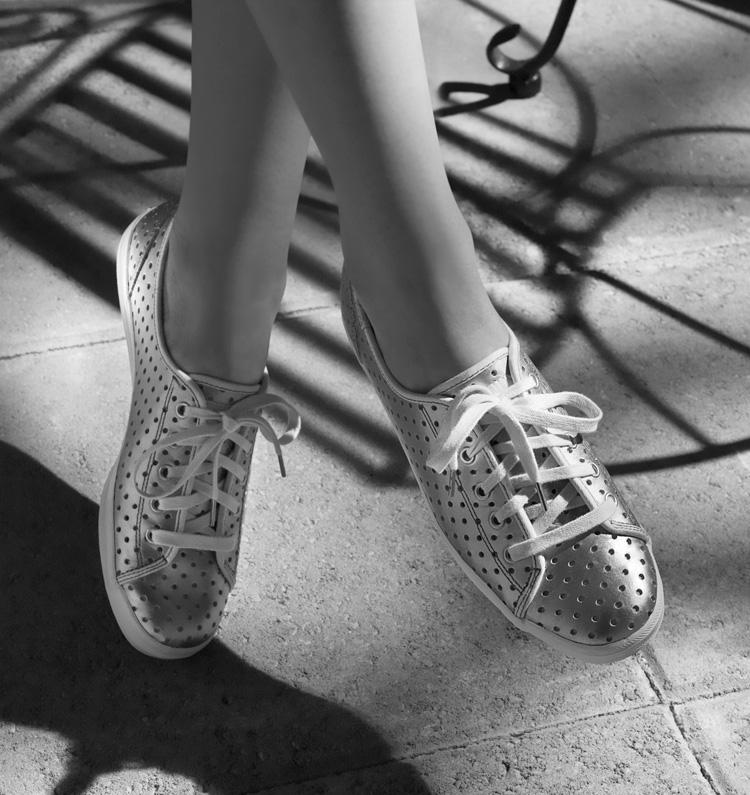
Keds shoes hard light example craig wagner

In some cases, this contrast can look harsh (and unwanted).

SOFT LIGHT

Imac soft light example craig wagner

On the other hand, a soft light source is a larger, broader, light placed relatively close to the subject. A cloud-covered or overcast day, where diffused sunlight reflects off a large concrete wall would be one example of a soft light source.

Breakfast oatmeal soft light example craig wagner

The light tends to be flatter in contrast, and the highlights hold more detail, with the shadow’s edges being soft and open.

Reverend nats hard cider soft light example studio 3

Generally this is a more pleasing light, but not necessarily the only light-source.

Many factors go into choosing light quality and the type of light source on set. One may be the direction given from an art director or client where you may be asked to match images from an existing campaign. They may want you to recreate a natural lighting condition (such as hot harsh desert sun on a pair of boots, or cool early morning light falling on a table setting).

The subject matter itself can also have a strong influence on your choice of light source. A highly reflective (like glass or chrome), or high-contrast product can be quite the challenge if you try lighting it with a hard light source. Fighting spectral highlights, or holding detail in the shadows and highlights, can be a pain if you have to use hard lighting alone.

If you’re lucky enough to be given creative freedom by the client, or working on a personal project, you might be illustrating a mood or an emotion and will use appropriate lighting needed to create it. Careful choice of lighting, and mixing your hard and soft light sources, will allow you to achieve that.

How to set up for a hard light shoot

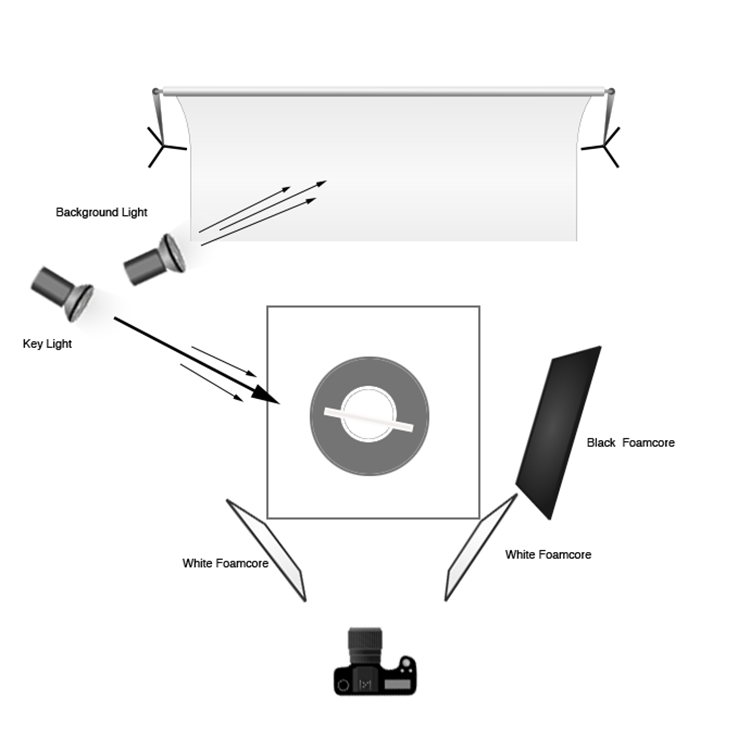
Hard lighting setup diagram craig wagner

Imac hard light example craig wagnerFor the studio hard-light set, place the key (main) light (a strobe head with a 12” modifier) to the left and slightly behind the subject. The initial beam may be too broad, so to concentrate the light you can add a 35-degree grid to the modifier.

For this setup, final adjustments to the height and position of the key light were made, in order to modify the angle and length of the shadows on the table and floor, as well as to illuminate the edges of the computer screen in a pleasing manner. A 4’x8′ sheet of black foamcore was placed to the right of the set to deepen the shadows and remove unwanted reflections. Two smaller sheets of white foamcore were set low, in front and to either side, to control the amount of detail in the front edge of the table and legs.

A second strobe head with a 7” grid modifier was set high, and to the back of the set. Its angle was adjusted to illuminate the upper right corner of the background, which you can see in the photo (right).

How to set up for a soft light shoot

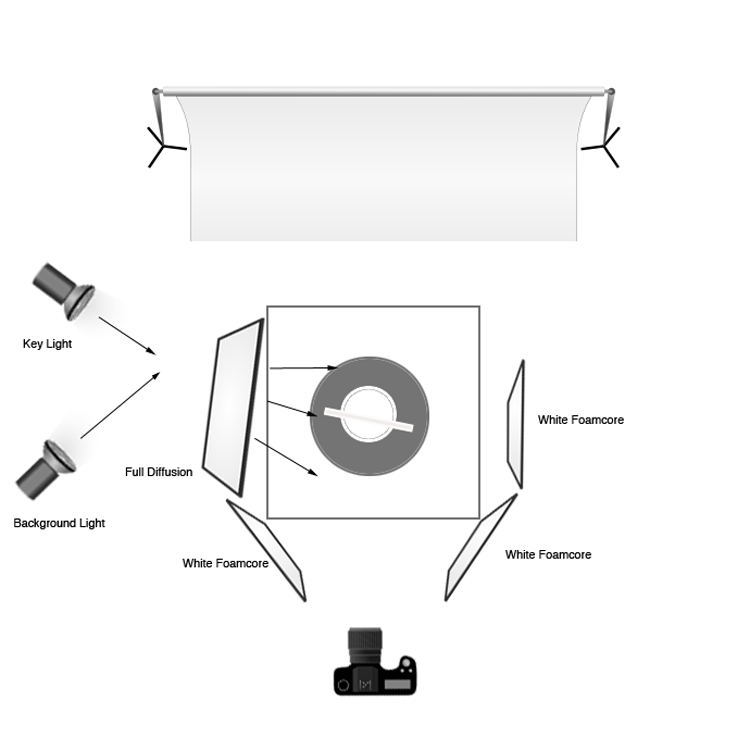
Soft lighting setup diagram craig wagnerImac soft light example craig wagnerTo create the soft-light look, the key light is set in the same place, but a 4’x4′ full diffusion panel is placed between the light and the subject, just out of the frame. Remove the grid from the key light to broaden the light. The black foamcore is replaced by a sheet of white to fill or open the shadows (but the two sheets out front remain). The background light is pulled back, the grid removed, and a diffusion disk added to soften the beam and cover the entire background. In this way the whole set appears bright and soft and with a lot of ambient light filling the image (left).

How to change a hard light source into a soft one

You may get into a situation where you’ve set up your light source and find you actually want to go the other direction with it. In this case, it is quite easy to change one type of light source into the other. You can diffuse a hard source into being soft, by placing diffusion material between the lighting and the subject, which allows you to control the angle and light gradient. You can also just attach a softbox to the light to soften the light and make it into a broader, even source. You can also take a soft source that you’ve set up and change its distance from the subject in order to make it a harder, more focused light. You can also bounce the light around more using reflectors, umbrellas, or a handy wall in order to soften it and make it less directional.

Combining hard and soft light

The ultimate tip for studio photography is to be flexible with your lighting setup regardless of your years of know-how. You may have an idea in mind for the final look you want for the photograph, but you may find that on set the product looks quite different under various lighting conditions. Be prepared to play around and try things – because often a mixture of both hard and soft light can show the product to its full advantage.

Stash tea flower teacups hard light example studio 3

Soft light example with a hard light rim (kicker or accent) light from behind. Notice the hard shadow on the table in front of the cups – that is created by the hard rim light.

Once you have a full understanding of hard and soft light sources, you can combine the two lighting techniques. For example, the set might have a general, overall softness to its light, but you might use a rim (or accent) light to give the shot more mood or dimension, or to accent certain elements of items in frame. Mastering both types of light allows you to have the ultimate control over your lighting, and the final image that comes out of the camera.

googletag.cmd.push(function() {
tablet_slots.push( googletag.defineSlot( “/1005424/_dPSv4_tab-all-article-bottom_(300×250)”, [300, 250], “pb-ad-78623” ).addService( googletag.pubads() ) ); } );

googletag.cmd.push(function() {
mobile_slots.push( googletag.defineSlot( “/1005424/_dPSv4_mob-all-article-bottom_(300×250)”, [300, 250], “pb-ad-78158” ).addService( googletag.pubads() ) ); } );

The post How to Create and Use Hard and Soft Light in a Studio Setting by Craig Wagner appeared first on Digital Photography School.


Digital Photography School

 
Comments Off on How to Create and Use Hard and Soft Light in a Studio Setting

Posted in Photography


5 Goal Setting Strategies for Photographers

07 Sep

We all have goals to achieve. But why are some people successful at achieving their goals while others only add new items to their to-do list day by day and year by year? In this post I collected some goal setting strategies to help you get your photography career and business on a fast track. A goal is not always Continue Reading

The post 5 Goal Setting Strategies for Photographers appeared first on Photodoto.


Photodoto

 
Comments Off on 5 Goal Setting Strategies for Photographers

Posted in Photography


Tips for Setting up a File Management System

23 Feb

As much as we love the art of photography, the organization of it is just as important. Yes, organization. It’s important that you have a system in place to access your photos when you need them. A few key things to consider are: date, genre, occasion, and subject. You also want to be careful of the locations that you are storing your images.

Save location

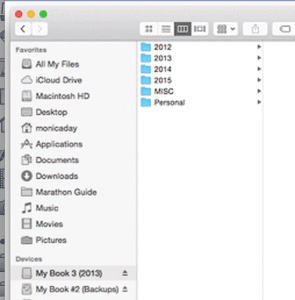
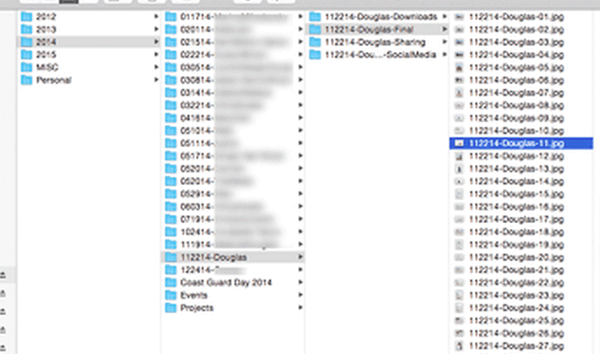
This is an example of a way to organize your photos. This is an external drive with various years. There is also a folder for miscellaneous photos and a folder for personal photos. Your system may not have as many years or may include different folders. It’s important to develop a system that works for you.

This is an example of a way to organize your photos. This is an external drive with various years. There is also a folder for miscellaneous photos and a folder for personal photos. Your system may not have as many years or may include different folders. It’s important to develop a system that works for you.

MDFileManagement-02 DayFileManagement-02

This is an example of a way to organize your photos. This is an external drive with various years. There is also a folder for miscellaneous photos and a folder for personal photos. Your system may not have as many years or may include different folders. It’s important to develop a system that works for you.

It’s important to have your image files saved in a safe place. You should consider using an external drive of some sort. External drives are ones that sit outside of your computer (some are portable for travelling), on which can store various amounts of data. Some people choose to store a backup of their files on their external drive, and a working copy on their computer hard drive. Either way is fine, just make sure you have your final copies saved and backed up in a safe place.

DayFileManagement-03

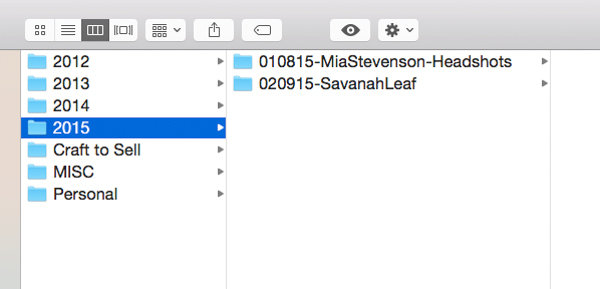
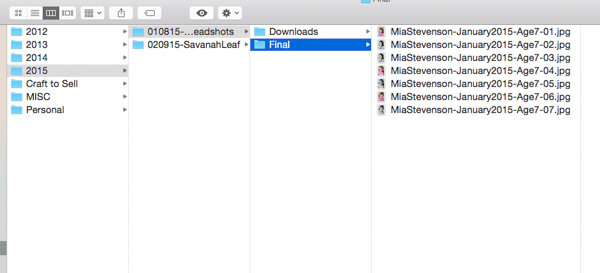
You’ll want to create a folder, or series of folders to save your photos. Your organization system should work for your specific needs. Start with a top level that describes your contents. For example, if you shoot fine art as well as portrait work, you might want to create two folders; one for your fine art work and another for your client work would be an option. Within those folders you could then sort your photos by year, then by project or client name. You’ll also want to create folders that represent the different states of your process. An example is to have a downloads folder, a retouched folder, a final images folder, and a blog folder.

File Naming

DayFileManagement-06

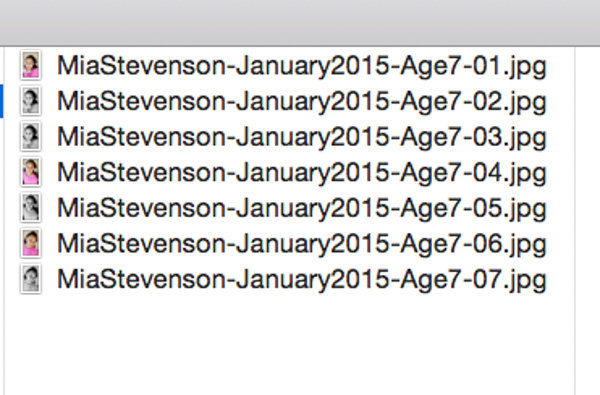
This is what the file structure looks like when open. This set of photos was shot in 2015. The date comes before the client name. There is also a designation that these are headshots. This makes it easy to find when looking at the folders. The term headshots was also used as a keyword during import. These images were being used to submit to a casting agency so the file name includes the description of the subject.

Your file names should be descriptive and concise. You want your filenames to be easy to read. A great file structure should include the name of your project, and the date it was shot. You can add any additional descriptive information if you think it’s needed. An example would be Wedding-Johnson-May2014.jpg or Johnson-51414.jpg (inside the Weddings folder). These are just examples. Take into consideration the order you like to view your files. Having the date at the front might be a better option for you if you like to see them in numerical order.

DayFileManagement-05

Keywording

You want to make sure to keyword your photos. This is usually done at import. Both Adobe Bridge and Lightroom have the option to keyword. Most file organization systems have a keyword feature, so familiarize yourself with that. This is an important part of the file organization process that is often overlooked. Your keywords should describe your images and any details you might want to reference later. Think about the types of photos you might be asked to submit, or even want to blog about. An example is using the keyword “sunshine” as part of your family portrait import. You might not immediately think that this is something you even care about, but it will be helpful when you’re ready to submit to a call for photos that show sunshine.

MDFileManagement-03

Here is an example of a complete set. Notice there are folders for the original images, final images, sharing, and social media. Each of these folders leads with the date and client name. The image filenames continue this pattern and are numbered.

File organization can be as simple or as complex as you want it. The important thing is to just have a system in place. You may not have a lot of shoots to sort through, but in time they will add up. Your system will make it easier to find what you’re looking for in the future.

googletag.cmd.push(function() {
tablet_slots.push( googletag.defineSlot( “/1005424/_dPSv4_tab-all-article-bottom_(300×250)”, [300, 250], “pb-ad-78623” ).addService( googletag.pubads() ) ); } );

googletag.cmd.push(function() {
mobile_slots.push( googletag.defineSlot( “/1005424/_dPSv4_mob-all-article-bottom_(300×250)”, [300, 250], “pb-ad-78158” ).addService( googletag.pubads() ) ); } );

The post Tips for Setting up a File Management System by Monica Day appeared first on Digital Photography School.

Digital Photography School

 
Comments Off on Tips for Setting up a File Management System

Posted in Photography


Setting up Lightroom Mobile for First Time Users

11 Jan

I laughed at Lightroom Mobile the first time I saw it. “Why would I ever want to use that stripped down gadget on a small screen?” And now, here I am about help you install and use it. Why is this?

It’s because I have found how totally useful the app is in sorting through hundreds or thousands of images from the world of “any time, any where”. Most notably, in a comfy chair with good light or on a weekly airplane flight. iPads also became lighter and iPhone screens larger.

Let’s start with how to set up Lightroom Mobile on your iPad or iPhone and then give some examples of how I find it useful in managing a huge library. I will be using a Collection of mine that is a work in progress to craft black and white images of the Himalayas.

Setting up Lightroom for mobile use

Connect Lightroom to your Adobe ID

The first step is to make sure you have the right version of Lightroom on your PC or Mac. You need to have version 5.4 or later, you can download the latest version from Adobe here. You also need an Adobe ID (free) for this to all work as it is the hub in the cloud that makes this all spin. If you don’t have one, sign up here.

With Lightroom open, you will notice in the upper left corner the phrase “Get started with Lightroom mobile”

1

Click the triangle next to the words and log in with your Adobe ID

2

You will then see that the top left of the screen has changed to the name you gave to Adobe upon creating your Adobe ID.

3

Great! Now let’s set up Collections to synchronize

Setting up Collections to sync

Lightroom Mobile will currently only work with Collections. If you need help setting up a Collection, the free Adobe video here will help. To enable a Collection for syncronization, simply right click on the Collection and choose “Sync with Lightroom mobile”. Pretty easy!

4

After clicking, you will notice a double arrow appears to the left of the Collection. This indicates the Collection will be syncing when sync is turned on.

5 copy

Now, up in the top left, Lightroom will let you know it is starting the sync of those images.

6

As a first pass, we are done! Simply repeat this process for Collections you have already created. Additionally, when creating a new Collection, there is a box that can be checked to automatically sync the new Collection. It looks like this:

7

Setting up your iPad or iPhone for use

This is the easy part. First, ensure your iPad/iPhone is connected to the Internet. Go to the App Store and search for Lightroom Mobile.

Peter-West-Carey-adobe2014-1217-0225

Install (it’s free) and then start the app.

Peter-West-Carey-adobe2014-1217-0229

You will be presented with an Adobe ID screen after paging through the first time introduction.

Peter-West-Carey-adobe2014-1217-0230

After signing in you will be taken to a page showing all the Collections you have set up to sync on the desktop version of Lightroom.

Peter-West-Carey-adobe2014-1217-0232

Tap the main image and you will be taken to the Collection itself. The first time you run through Lightroom Mobile it will give you helpful contextual hints.

Peter-West-Carey-adobe2014-1217-0233

Tap on any picture to edit it.

Peter-West-Carey-adobe2014-1217-0235

Quick filtering with Lightroom mobile

While there are a lot of features in Lightroom Mobile that make it useful for photographers, this post is going to concentrate on the basics to get you started.

Now that you have a Collection synced to your iPad/iPhone (note: it might take a while to fully sync a larger Collection), you can start filtering. For me, filtering is the best use of this app, currently. I enjoy being able to filter my images from the comfort of my living room or while traveling. I also do some basic edits to images but I usually leave the major edits to my desktop. To filter images, I use both the flags and stars features. You can switch between changing those features by tapping the icons in the bottom left corner.

Peter-West-Carey-adobe2014-1217-0238-2

Peter-West-Carey-adobe2014-1217-0238

When the flag icon is highlighted, as it is here, simply move your finger up or down on the screen to pick, unpick or reject images. These settings will then sync over to your desktop within seconds as long as Lightroom is open on the desktop.

Peter-West-Carey-adobe2014-1217-0237

Peter-West-Carey-adobe2014-1217-0239

I use these two features to sort images. Flags are images I especially like and I know I want to work on back at my desktop. I then use two stars to indicate the image should be used for my stock photography work (the scale then goes up to three stars once edits are done, four stars when title and keywords are done and five stars when completely finished).

There are a lot of editing options available in Lightroom Mobile that can be accessed from tapping the icons at the bottom of the screen on an individual image.

Peter-West-Carey-adobe2014-1217-0241

All of these features are best left for a future post.

Offline use

One last thing; Lightroom Mobile usually needs to ‘see’ your desktop’s version of Lightroom in order to show previews the first time and make edits. Therefor, once I have a Collection fully sync’d, I will then turn on Offline Editing which allows me freedom from wifi to make edits, knowing they will sync the next time I am online.

To do this, click on the three little dots on the bottom of the Collection image:

Peter-West-Carey-adobe2014-1217-0232-2

This brings up a menu with many options.

Peter-West-Carey-adobe2014-1217-0243

Choose to Enable Offline Editing and Lightroom Mobile will now bring across Smart Previews of the images to your mobile device.

Peter-West-Carey-adobe2014-1217-0242

How do you use Lightroom Mobile

Lightroom Mobile has a host of other features such as automatically uploading images shot on your iPhone/iPad into Lightroom on your desktop.

What about you? What have you found useful in Adobe Lightroom Mobile?

googletag.cmd.push(function() {
tablet_slots.push( googletag.defineSlot( “/1005424/_dPSv4_tab-all-article-bottom_(300×250)”, [300, 250], “pb-ad-78623” ).addService( googletag.pubads() ) ); } );

googletag.cmd.push(function() {
mobile_slots.push( googletag.defineSlot( “/1005424/_dPSv4_mob-all-article-bottom_(300×250)”, [300, 250], “pb-ad-78158” ).addService( googletag.pubads() ) ); } );

The post Setting up Lightroom Mobile for First Time Users by Peter West Carey appeared first on Digital Photography School.

Digital Photography School

 
Comments Off on Setting up Lightroom Mobile for First Time Users

Posted in Photography