RSS
 

Posts Tagged ‘sensor’

Sony develops sensor capable of rendering color images at 0.005 lux

27 Oct

Sony has introduced a new CMOS sensor, calling it the highest sensitivity sensor of its kind. Developed for automotive use, the new chip can capture color images in light conditions down to 0.005 lux. The sensor is 1/3-inch type with 1.27 effective megapixels, and supports a Wide Dynamic Range system that uses extended exposure times rather than using multiple exposures. Read more

Articles: Digital Photography Review (dpreview.com)

 
Comments Off on Sony develops sensor capable of rendering color images at 0.005 lux

Posted in Uncategorized


Relonch brings APS-C image sensor to the iPhone

18 Sep

The Relonch camera combines an APS-C sensor with an extremely simple UI and attaches to your iPhone, using your phone for display, image processing, storage, and sharing. A bright F2.0 lens ensures low-light performance. At an output resolution of only 1MP, it’s a niche product, but the concept is exciting. Click through to learn more.

Articles: Digital Photography Review (dpreview.com)

 
Comments Off on Relonch brings APS-C image sensor to the iPhone

Posted in Uncategorized


Leica introduces D-Lux 24-75mm equiv compact with Four Thirds sensor

17 Sep

Leica has announced the D-Lux (Typ 109), a compact camera with a 24-75mm equivalent, F1.7-2.8 zoom and a Four Thirds sensor. If those specifications sound familiar, it’s probably because they’re shared with the Panasonic LX100. The D-Lux will be available in November. A license for Adobe Photoshop Lightroom is included.

Articles: Digital Photography Review (dpreview.com)

 
Comments Off on Leica introduces D-Lux 24-75mm equiv compact with Four Thirds sensor

Posted in Uncategorized


Panasonic announces Lumix DMC-CM1 smartphone with 1-inch sensor

15 Sep

Panasonic has announced a smartphone with a 1 inch sensor. The Lumix DMC-CM1 comes with the largest imaging sensor we have seen on a smartphone – its 1-inch 20MP chip matching the sensors in premium compact cameras such as Sony’s RX100 and Nikon’s 1 series, being multiple times larger than the 1/3-inch sensors that are common on more conventional smartphones. The large sensor is coupled with an F2.8 Leica lens that offers an equivalent focal length of 28mm. Click through for more details. 

Articles: Digital Photography Review (dpreview.com)

 
Comments Off on Panasonic announces Lumix DMC-CM1 smartphone with 1-inch sensor

Posted in Uncategorized


How to Clean Your Camera Sensor in 3 Easy Steps

04 Sep

There is really nothing more frustrating for photographers than a camera sensor that is full of dust and specks. Dust on the sensor happens, it’s just a fact of digital photographic life. If you’re an outdoor photographer with a zoom lens, or one who changes lenses in the field, dust and particles will find a way onto your sensor on an almost regular basis. But even studio photographers experience the distress of a dirty sensor.

_2DS3368Wjpg

The world’s dirtiest camera sensor. Yuck.

A few weeks ago I was on a mountain photo tour, and was constantly changing lenses in the windy and dusty alpine weather. This is a photo taken to show you my sensor dust. All those black specks are fragments of airborne stuff that either gets sucked into your sensor when you use a zoom lens, or when you change your lens outdoors. The image above is the result.

There’s not too much you can do about it if you’re out on a shoot, other than know that there will be many hours spent on your computer editing out those miserable spots from your otherwise beautiful photos. However, you needn’t stress once you get back to your home base, where you can easily take care of cleaning the sensor and removing the smudges in three easy steps.

Is Your Sensor Dirty?

Check to make sure your sensor needs cleaning. It’s quite possible that it does, but you may not know it. If you shoot wide open, or at larger apertures (smaller f-stop number, such as f/2.8) you may not really see any sensor gunk on your images unless you view them at 100% on your monitor. But one day you’ll want, or need, to set your aperture to f/8, or f/16; then sensor dust will become visible, almost as if from nowhere, to torment you, frame by frame.

To see if you have sensor dust right now, so you won’t be surprised when you’re out in the field shooting, stop down to the smallest aperture on your lens (the largest f-stop number, f/32 for example) and take a photo of a white or light colored wall. What I do then, is open the image in Photoshop and click on Auto Tone (under the Images Menu item). Horrors! Do you see it? Hopefully your sensor dust won’t look as bad as mine, above. But if you see the dreaded black specs, read on.

Step 1) Using the Auto Clean Function

Many newer DSLRs have a special function for automatically cleaning the sensor.  Look for it in the Tools menu on your camera. When you use this tool, the camera gives the sensor a series of micro-vibrations that “shake” the dust loose, in theory anyway. You may have to repeat this process several times. But with some patience, and providing your sensor is not as bad as the example in my image above, you’ll be relatively free of most of your sensor dirt in a few minutes.
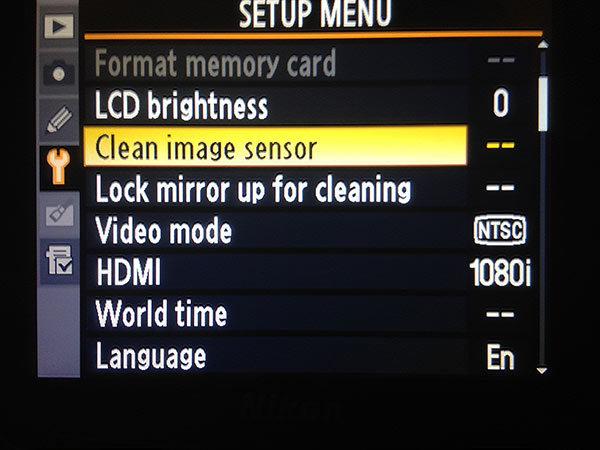
sensorclean-menu

If you don’t have this feature on your camera, don’t worry, there is a way to manually clean your sensor. Sooner or later, even those photographers with auto-clean cameras will have to wash their sensors using this manual method, Step 2 below.

Step 2) Using Sensor Swabs and Eclipse Fluid

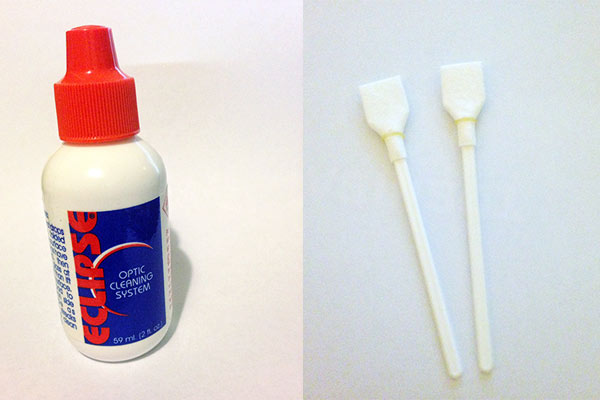
Sensor swabs are specially designed cleaning pads for camera sensors. Used with a few drops of Eclipse cleaning fluid they will wipe you sensor clean. Think of it as a tiny Swiffer for your sensor. You can get the swabs in exactly the right size for your sensor, so one swipe in each direction could be all you need.
comboW

The procedure is easy. You’ll simply put 2 drops of the fluid on a pad, and then gently wide the swab across your sensor ONCE, ONE WAY. Then change directions and swipe the other way. Throw that swab away. If you need to repeat the process, use a new swab.

Step 3) Power up, Mirror Up

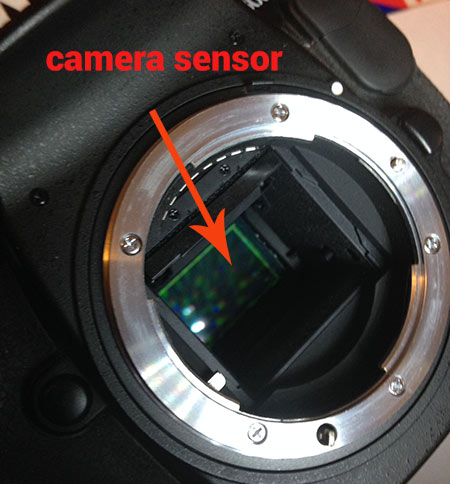
To use the swabs you’ll need to keep your mirror up to give you access to your sensor. This is the tricky part – you don’t want your mirror to come down while the swab is still inside your camera.

If you don’t have a setting for Lock Mirror Up for Cleaning, make sure your battery is fully charged, and set your camera exposure on Bulb. The Bulb setting will allow you to keep the mirror up until you release the shutter (use a locking shutter release to hold it not your finger). This way you can access the sensor, and do the quick sensor two-step, swipe left, swipe right.
sensor1W

Check your results: take another shot at the same stopped down aperture and take a look at the difference.

_2DS3392w

Image of sensor dust after using Sensor Swabs. The main culprits are gone.

There are still three spots but all the big blobs, and large dust particles are gone. Depending on your preferences, you may be happy with this knowing that it’s a few easy clicks of the clone tool to remove these small faint marks. Or you may want to give the sensor another round of swabbing. Either way the sensor is super clean compared to the initial test image.

Cleaning your sensor is not difficult, you do need to be careful but it’s very worth the effort. Your photographs will love you for it.

I’d love to see your sensor dust horror stories – post your before and after cleaning shots here.

Editor’s note of warning: if you are terrified of damaging your sensor (it is delicate) you can usually find a local camera store that offers this service. You will pay a lot more for it than doing it yourself, but if they damage it, they have to replace it for you. The camera that is! If you damage your sensor there is no going back. So do follow the directions exactly, and do be cautious. Perform this procedure in as dust-free, windless room as possible. And remember to NEVER, EVER touch your sensor with your fingers. The oil from your fingers will do more damage and is much harder to remove (i.e. you’ll likely be sending it to the manufacturer to get that off).

The post How to Clean Your Camera Sensor in 3 Easy Steps by Alex Morrison appeared first on Digital Photography School.


Digital Photography School

 
Comments Off on How to Clean Your Camera Sensor in 3 Easy Steps

Posted in Photography


Sony introduces QX1 with APS-C sensor and E-mount for smartphones

03 Sep

Sony has announced the QX1 and QX30, expanding its line of ‘lens-style’ cameras ready to be paired with a smartphone. The QX1 is an interchangeable lens model, containing a 20MP APS-C sensor and a Sony E-mount for use with lenses designed for Sony’s mirrorless interchangeable lens cameras. More like the existing QX10 and QX100, the QX30 is single unit containing a sensor and lens, providing a 20MP 1/2.3″-type sensor and a longer 30x optical zoom. Read more

Articles: Digital Photography Review (dpreview.com)

 
Comments Off on Sony introduces QX1 with APS-C sensor and E-mount for smartphones

Posted in Uncategorized


Sony expands image sensor production for mobile devices

25 Jul

Reuters has reported that Sony is planning to invest 35 billion yen (approximately US$ 345 million) to expand its manufacturing capacity of smartphone and tablet image sensors. Sony says the investment will allow for a 13 percent increase in production to 68,000 wafers per month in 2015. Sony leads the market for smartphone imaging sensors, and supplies the sensors for Apple’s iPhones and a large number of Android smartphones. Read more at connect.dpreview.com

Articles: Digital Photography Review (dpreview.com)

 
Comments Off on Sony expands image sensor production for mobile devices

Posted in Uncategorized


Panasonic announces Lumix DMC-FZ1000 with 1″ sensor and fast lens

12 Jun

fz1000_front.png

Panasonic has announced its Lumix DMC-FZ1000 superzoom camera, which features a 1″-type CMOS sensor and F2.8-4.0, 25-400mm equivalent lens. The sensor is not only the same size as on Sony’s Cyber-shot DSC-RX10 – it’s also the same resolution (20.1MP). The FZ1000 features both a fully articulating LCD as well as a high resolution OLED viewfinder. The FZ1000 is also capable of recording 4K video at a bit rate of 100Mbps, from which 8MP stills can be grabbed. The camera will be priced at $ 899 / £749.99.

News: Digital Photography Review (dpreview.com)

 
Comments Off on Panasonic announces Lumix DMC-FZ1000 with 1″ sensor and fast lens

Posted in Uncategorized


Nikon 1 J4 sports new sensor, improved AF system, and Wi-Fi

10 Apr

nikon_j4_03.png

Nikon’s recently announced flagship V3 1 System camera gave us a look at the latest technology the company has been working on, and many of those features have trickled down to the new, less-expensive J4. The camera features an 18MP CX-format sensor, an improved Hybrid AF system with phase detect points across nearly 100% of the frame, 20 fps burst shooting with continuous AF and, of course, Wi-Fi. Learn more about the Nikon 1 J4.

News: Digital Photography Review (dpreview.com)

 
Comments Off on Nikon 1 J4 sports new sensor, improved AF system, and Wi-Fi

Posted in Uncategorized


Samsung explains the Galaxy S5’s ISOCELL sensor

14 Mar

samsungisocell.jpg

Samsung revealed its innovative ISOCELL image sensor technology in September last year, but it has taken until now for the concept to be applied in a device. The Galaxy S5, announced at Mobile World Congress, is the first smartphone from the Korean manufacturer that comes with an ISOCELL camera. Check out the video from Samsung that explains the technology in more detail. See video

News: Digital Photography Review (dpreview.com)

 
Comments Off on Samsung explains the Galaxy S5’s ISOCELL sensor

Posted in Uncategorized