RSS
 

Posts Tagged ‘Scenes’

Behind the scenes: Garry Winogrand at work

16 Mar

13575701.jpg

Filmed as part of a larger documentary, Michael Engler’s ‘Contemporary Photography in the USA’ features photographer Garry Winogrand just two years before his death in 1984 at the age of 56. Although the Bronx-born photographer is often referred to as a street photographer – perhaps one of the best of his generation – he hated the expression, explaining in the video ‘I think it’s a stupid term. Street photographer. It doesn’t tell you anything about the photographer or [the] work.’ Watch video

News: Digital Photography Review (dpreview.com)

 
Comments Off on Behind the scenes: Garry Winogrand at work

Posted in Uncategorized


Humans of New York: Behind the scenes with Brandon Stanton

09 Feb

HONY.jpg

Photographer Brandon Stanton’s Humans of New York Project has been around for a few years now and has been featured in media quite a bit. The latest video of Stanton, made for Facebook’s 10th anniversary, is a revealing look at how he interacts with his subjects. He’s jovial. He’s conversational. But most of all, he’s human – and it shows through in his images. See video

News: Digital Photography Review (dpreview.com)

 
Comments Off on Humans of New York: Behind the scenes with Brandon Stanton

Posted in Uncategorized


Little People in Paris: 5 Tiny Street Art Scenes by Slinkachu

12 Nov

[ By WebUrbanist in Art & Street Art & Graffiti. ]

little art guard job

The tiny figures of Slinkachu play out surreal scenarios ranging from dramatic to comedic, all against the backdrop of life-sized props that seem giant by comparison. His latest set of little plays took place on the streets of Paris.

little business meeting group

little construction worker site

His Little People works hide in plain sight, almost too small to see unless spotted out of the corner of one’s eye. He was invited to France for “ReAct Paris, a conference organised by the European Parliament to tackle the problems of unemployment in Europe, particularly youth unemployment, which in some parts of Europe stand close to a miserable 30%.”

little scientist litter bag

little electrician and ladder

Fitting the theme, most of his installations this time around featured people hard at work, from miniature electricians to tiny scientists, group meetings around graphs and workers arranged on a horizontal I-beam (reenacting a classic New York City Photograph).

slinkachu miniature figure art

little people global cities

Previous Slinkachu series, like the Little People of London, has also been seen in galleries and on the streets of other major cities from New York to Beijing. His subjects often interact with everyday detritus in curious ways, finding their on way to work with whatever they encounter a local scale.

Share on Facebook


[ By WebUrbanist in Art & Street Art & Graffiti. ]

[ WebUrbanist | Archives | Galleries | Privacy | TOS ]


WebUrbanist

 
Comments Off on Little People in Paris: 5 Tiny Street Art Scenes by Slinkachu

Posted in Creativity


Behind The Scenes of Three of My Most Popular Landscape Photos

26 Sep

In the following post I’m not going to remind you again that you need to bring your tripod with you. I’m not here to warn you that weather is unpredictable and you should check the latest forecast before heading out the door.

Nope this post won’t cover the fact that you should bring a flashlight and a few other miscellaneous tools just in case something goes wrong. And of course I won’t be telling you that you should tell someone where you’re going and when you’ll be back incase you do get lost, hurt or otherwise incapacitated and need help getting home.

Instead of rehashing the basics or providing some motivational tips to get you off the couch I’m going to show you three ‘behind the camera’ photographs that I took with my iPhone, share the final shot, and talk a bit about how I made each image.

Sound good? Okay let’s start!

First Up – A Small Cascade Near Trap Falls in Ashby MA

IMG_1902

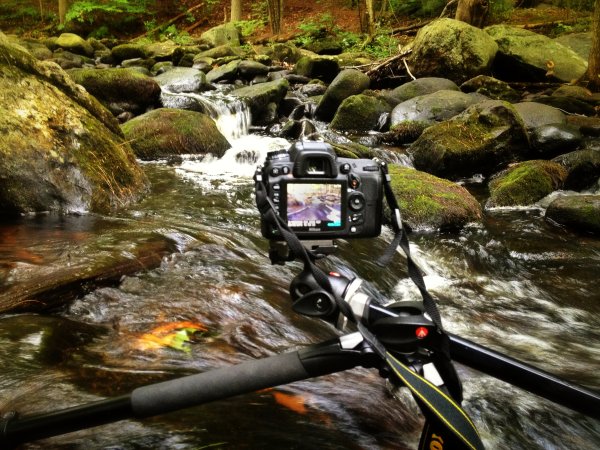
As you can see the camera was positioned as close to the water as I could comfortably get it – one wrong move and it’s all over for me and my love of photography.

So does the fear of putting my camera in the drink stop me from attempting to grab a photograph? Not in the least!

p1637190443-4-650x365

This shot was something I saw from 100 yards up the bank of the river. I noticed the cascade and knew that it’d be the perfect place to set up my D7000 and Tokina 11-16mm, but how was I going to get into the middle of the river?

As I got closer to the scene I noticed that there were a few wet stones no larger than an iPad leading out into the middle of the river – right where I wanted to be. All I needed was a little balance and some luck and both my camera and I would make it back to the shore dry and one ‘keeper’ richer.

Standing on a rock in the middle of the river the size of an iPad is no easy task and trying to fiddle with camera settings and frame a shot doesn’t make it any easier. I used the Manfrotto’s center-column design, which allows you to swing the center column out so that it is parallel to the ground, to get as close to the water as I could, and I used the live view feature on my DSLR to frame the shot and achieve perfect focus.

After taking a few test shots and fine tuning my exposure I settled on the following settings for the shot: ISO 100, 11mm, f/14, 13.0 seconds. (Note: There is also an ND filter in play here which allows for the longer exposure time).

Next Up – A Stunning Sunset at Stony Brook in Norfolk MA

IMG_1713

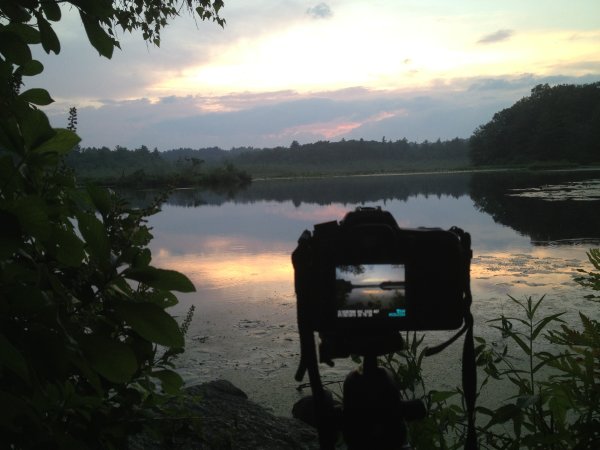
Okay so this photograph probably isn’t even close to as dramatic as the one above, but it is still able to show you a bit about my thought process when capturing photographs. I could have photographed this scene further back from a nice easily accessible lookout, but I clambered over rocks and got as close to the shore as I could.

By positioning the camera on the tripod I was freely able to adjust the settings and fine tune the exposure and composition of the shot. The settings I used here were: ISO 100, 36mm, f/10, 1/160.

sunset at stony brook

Finally – Capturing Lightning Out Of My Window

Here in south eastern New England we don’t get all that many storms and due to the tall trees and densely populated urban areas it’s not easy to get a clear view of the sky when they do occur.

After hearing my phone alert me to a sever thunderstorm watch that was in effect until well after dark and a quick look at the radar confirmed that it looked like it would pan out. I quickly decided to get a plan together to capture my first lightning bolts as a photographer.

IMG_1571

With a couple hours of notice I was able to get really creative with my set up. I found a piece of cardboard and some duct tape to make a makeshift shelter for my room and the rest of my camera. I knew I wanted to open the window and the screen to get as clear a sight line as possible, but I didn’t want the rain or mosquitos to get into the house. (If you’re curious I finished sealing the cardboard after I took this photo).

I made sure to set my focus while I still had daylight to work with as it would get difficult to do so when darkness hit. I used my ND filter to lengthen the shutter speed which would hopefully allow me better chances to capture bolts of lightning and locked down my settings as follows: ISO 100, 13mm, f/9.0, 20.0 seconds.

Once everything was set up all that was left to do was wait for the storm to get close. As soon as I heard the first crack of thunder I set the Nikon’s intervolometer to capture an image every 25 seconds for about an hour or so, turned out all the lights in my house, and went to bed.

A few hours later, after the storm had long passed, I woke up curious to see if my trap had worked. The end result was a handful of lightning bolts frozen in time – this is one of my favorites.

lightning photo

Do you have any behind the scenes stories to share?

Tell us about how you captured one of your favorite shots in the comments below!


Post originally from: Digital Photography Tips.

Check out our more Photography Tips at Photography Tips for Beginners, Portrait Photography Tips and Wedding Photography Tips.

Behind The Scenes of Three of My Most Popular Landscape Photos


Digital Photography School

 
Comments Off on Behind The Scenes of Three of My Most Popular Landscape Photos

Posted in Photography


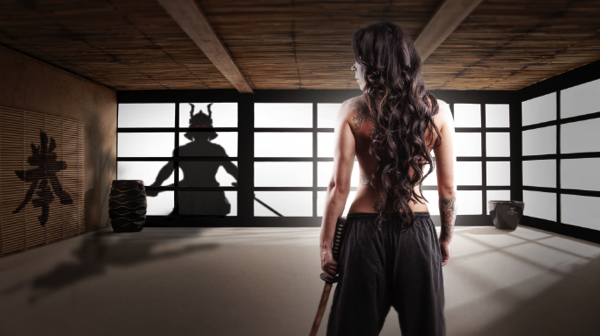
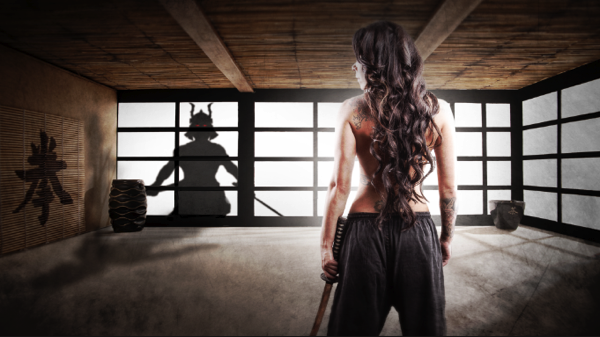
Samurai Girl Composite: Behind the Scenes Post Production Walk Through

29 Aug

by Tom Di Maggio

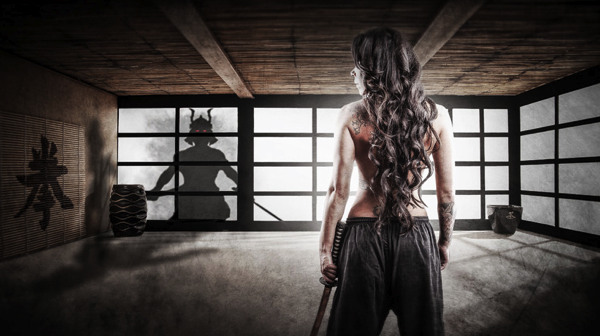
In this article I’ll show you how the “Samurai Girl” picture was done step by step. In addition there is a speed art video at the end of the article that shows the whole process from start to end in a 05:47 minutes Youtube video. It should make the whole process clearer.

Feel free to send me your questions via email at tom@purple-monkey.com

1 Base Image Jessica

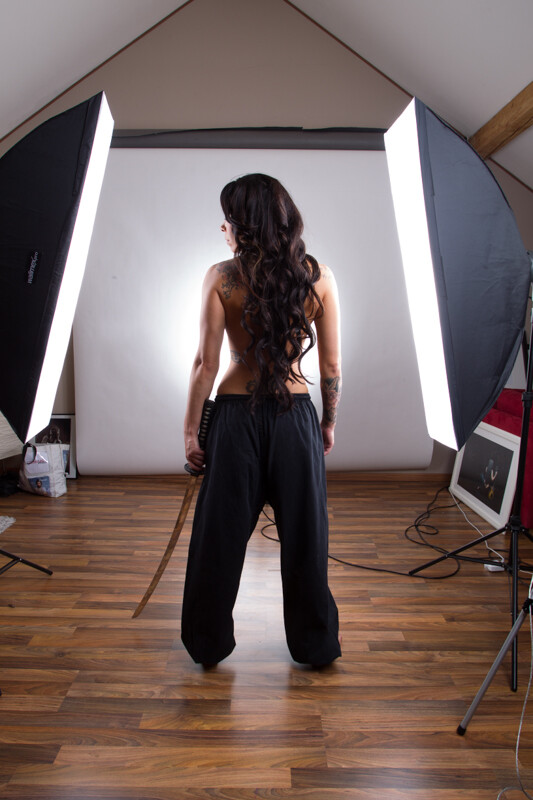
Here is the image as it was shot. Before I start to extract the subject I use a technique to create that look on my models that consists of 6 Layers. I will write a separate tutorial on that topic, as it will deviate too much from the point of this tutorial.

2 Model Liquify copy

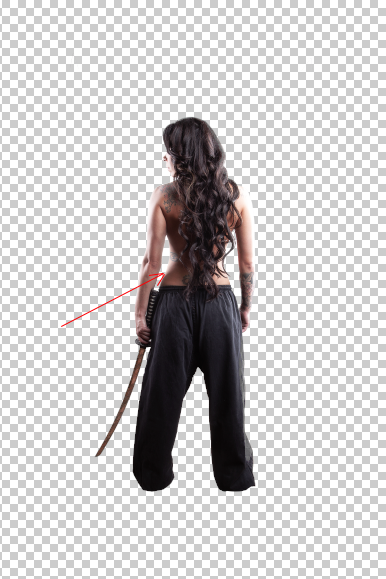
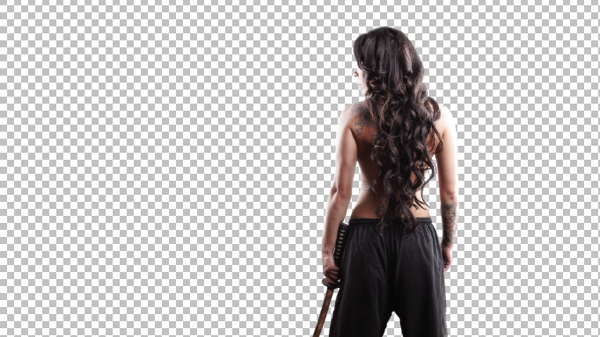
I started with cutting out Jessica from the background. When you know that you are going to extract the subject for a photo manipulation or composite, make sure you shoot them on a background that will create an nice contrast around the edges. It will make your life a lot easier for the extraction process. The method I use to extract my subjects varies a lot depending on the need and the situation. The tools I usually use are the Pen Tool, Brush, Refine Edge, Lasso, Quick Selection and the Blending Option effects. In this case I used a mixture of Pen Tool, Brush and Refine Edges.

3 Mask

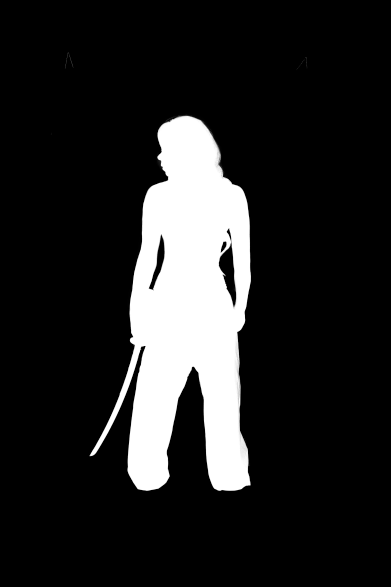
Here is a picture of the finished mask. I like to check the mask for imperfections by “Alt” clicking on the layer mask.. What I also do a lot is to check the mask against a white and a black background. I will usually show you all the imperfections on the mask especially fringing. If the extraction looks good against both backgrounds, then you can be sure that you won’t need many adjustments anymore against your final background.

4 Integrate into Image

I usually work on picture in the 16:9 format. Sometimes I quickly sketch my ideas on a piece of paper or on the iPad. I basically gives me an idea about the composition of the image. As soon as Jessica was extracted from the background I moved her over to the canvas using the move too. I scaled her down and positioned here approximately. I slightly corrected her position once the background was inserted.

5 Original BG

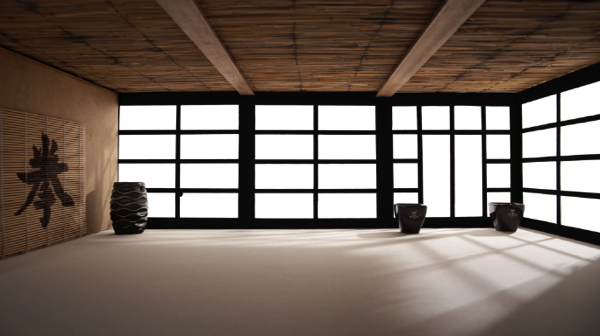
At this point I also imported my background in order to see what color corrections would be needed to integrate Jessica into it. When I opened the stock image for my background I saw some things that would need modification.

7 Corrected Bg

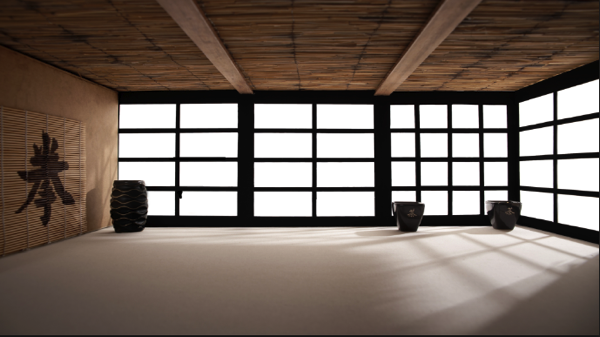
I didn’t like the doors on the right side as it would look weird when Jessica would be in position. So I just added some horizontal bars to solve that issue.

6 Gradient for Model

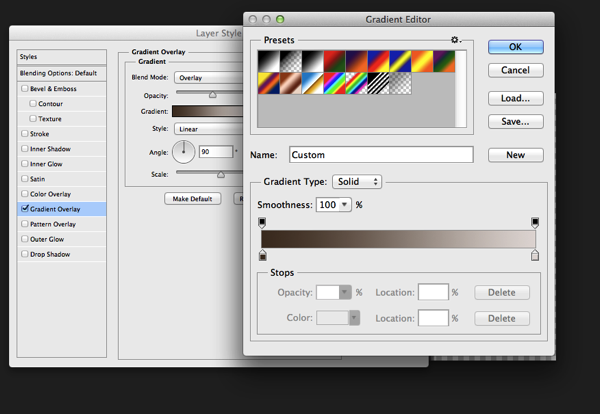
The first step I used to integrate Jessica was a Gradient map. The colors I used for the shadows was a sample of the wooden door frame (very dark brown) and for the highlights I used a sample of the Tatami. I lowered the opacity to about 45% to achieve an acceptable value. It’s important when you use this method that you use colors that are already present in the palette of the image.

8 Samurai

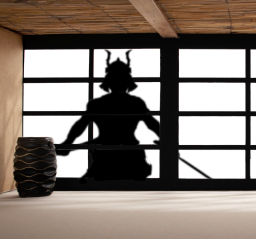
Next step was to integrate the Samurai. I’ve build the Samurai out of several stock photos and used an adjustment layer to darken it to complete black. I used a layer mask to hide the wooden frame of the window.

9 Samurai Eyes

In order to make it more realistic I’ve added a dirty texture on top of the Samurai with a blending mode Overly and I slightly blurred him, since what we actually see is a shadow on the fabric. I then added the eyes with the brush tool and some subtle outer glow effects.

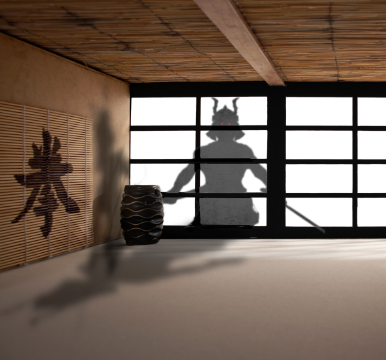
Next step was to create the shadows on the floor and the wall. I duplicate the Samurai Layer and used distort and warp to adjust it’s shape. I also painted the shadows onto the barrel, in the original picture the barrel was brightly lit from the right side. Since the Samurai is standing in front of it, the light source would be blocked.

13 Overlay Color

To blend everything together I use a simple technique that is not well known out there. I merge all the Layers together onto a new Layer ( Shift+Ctrl+Alt+E (PC) or Shift+Command+Option+E (Mac) ) and then use the Blur Average Filter. Switch the blend mode to overlay and reduce the opacity until the color matches. I then used the Tilt-Shift filter to align the average depth of field of Jessica to the background.

14 tilt Shift and Light

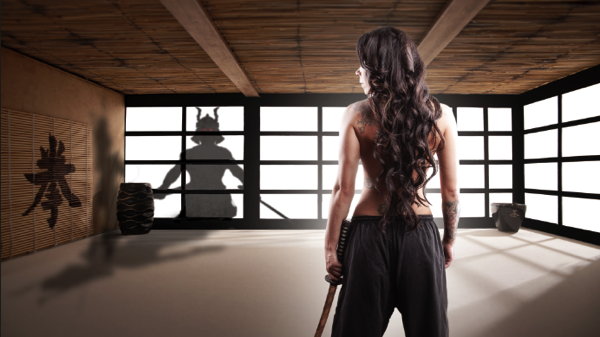
Finally I created a new layer on top of it change it’s blending mode to overlay and painted with a soft black brush around the samurai and around Jessica in order to direct the viewers eye through the picture. A last step was to lay a grungy texture in overlay over the whole image and reduce it’s opacity quite a bit.

15 Final

I try to do a maximum in Photoshop in terms of light and shadows. But when I finish an image I always have some fun in Lightroom with some presets or simply play around with the sliders. Some times I end up not using any of it, but most of the time I find some settings that adds value to the overall image. Now there is no secret to this, I just play around with Clarity, Blacks, Temperature, and Contrast until I see it going somewhere. In this case I added some contrast, quite a bit of Clarity and slightly desaturated the image.

16 Final LR

Here’s the video of the whole process dialed up to about 1000%

Check out more of Tom Di Maggio’s work at his websites at TomDiMaggio.com, Purple-Monkey.com” and on Facebook.

Post originally from: Digital Photography Tips.

Check out our more Photography Tips at Photography Tips for Beginners, Portrait Photography Tips and Wedding Photography Tips.

Samurai Girl Composite: Behind the Scenes Post Production Walk Through


Digital Photography School

 
Comments Off on Samurai Girl Composite: Behind the Scenes Post Production Walk Through

Posted in Photography


4 Scenes in 1 Photo: Illusion You Have to See to Disbelieve

17 Aug

[ By WebUrbanist in Art & Photography & Video. ]

4 scenes in 1

Without proof, it makes for a tough sell – what looks like four photographs arranged into a square is indeed a single shot, meticulously staged, as only accompanying images and videos will convince.

4 scenes 1 shot revealed

Bela Borsodi created and photographed the scene for use as an album cover. And while it is still hard to trick your mind into seeing the reality of the overlap, there are subtle cues – certain objects that span multiple quadrants and lead the eye between them. The animation below shows the stages of setup and construction in a kind of stop-motion animation format.

4 scenes detailed view

About the artist: “Bela Borsodi was born in Vienna 1966. After studying graphic design and fine art he started to work as a photographer. In 1992 Bela moved to New York and in 1999 he focused on still life photography, which is still the main direction of his work. Bela lives and works in New York.” He has worked for editorial clients including The New York Times and Wired Magazine and advertising clients including Hermes, Puma, Nike and Freitag.

Share on Facebook


[ By WebUrbanist in Art & Photography & Video. ]

[ WebUrbanist | Archives | Galleries | Privacy | TOS ]


WebUrbanist

 
Comments Off on 4 Scenes in 1 Photo: Illusion You Have to See to Disbelieve

Posted in Creativity


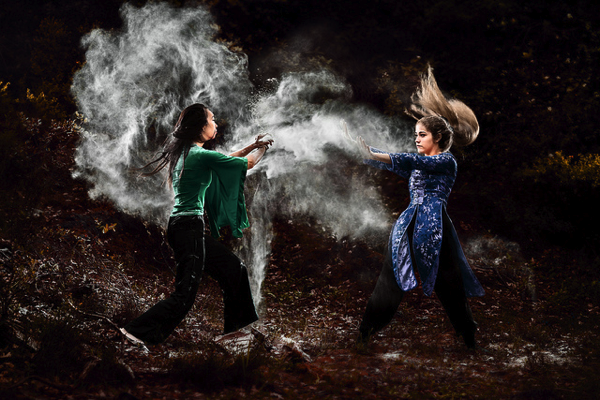
Dust and Fight: Behind the Scenes of This Spectacular Photo Series

06 Aug

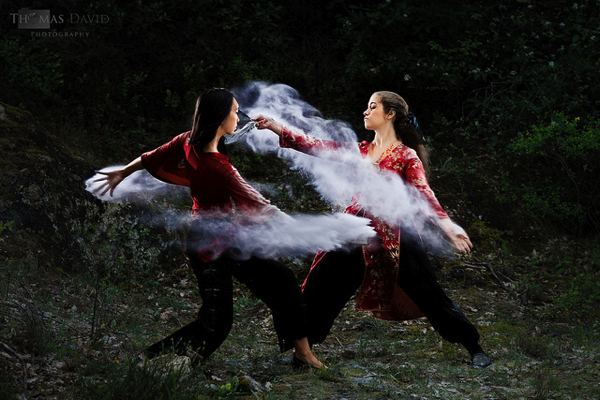
Last year we shared a behind the scenes video that showed some of what went into shooting this amazing ‘dust’ and ‘dance image’.

dust-dance.jpeg

Since then photographer Thomas David has shot another great series of dust photos – this series was shot outside and has more of a martial arts/fight theme.

NewImage

NewImage

See the full series of images here on Flickr.

And as with last time – here’s a behind the scenes video to show you a little more of how it was taken:

Behind the Scene video for the “Dust and Fight” photoshoot from Tom on Vimeo.

Update: check out this post at The PhoBlographer with a heap more information on how the series was shot.

Post originally from: Digital Photography Tips.

Check out our more Photography Tips at Photography Tips for Beginners, Portrait Photography Tips and Wedding Photography Tips.

Dust and Fight: Behind the Scenes of This Spectacular Photo Series


Digital Photography School

 
Comments Off on Dust and Fight: Behind the Scenes of This Spectacular Photo Series

Posted in Photography


Accidental Art: Apple Maps Glitches Create Surreal Scenes

27 Jun

[ By Steph in Art & Photography & Video. ]

Apple Maps Glitch Art 1

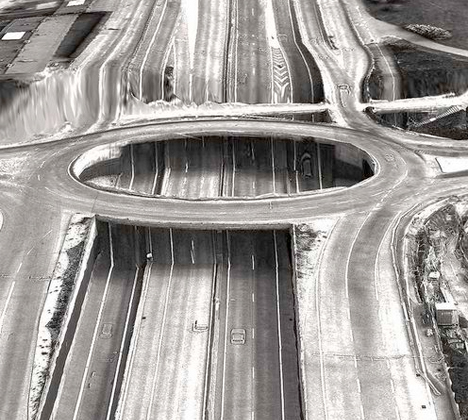
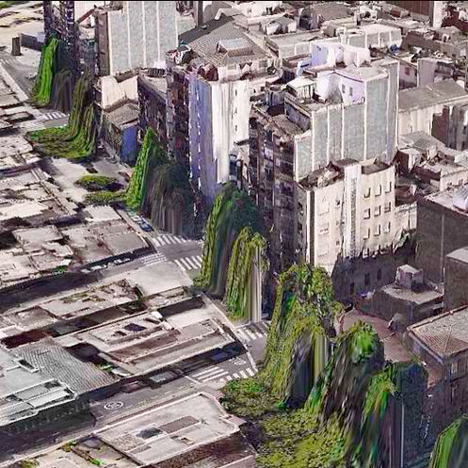
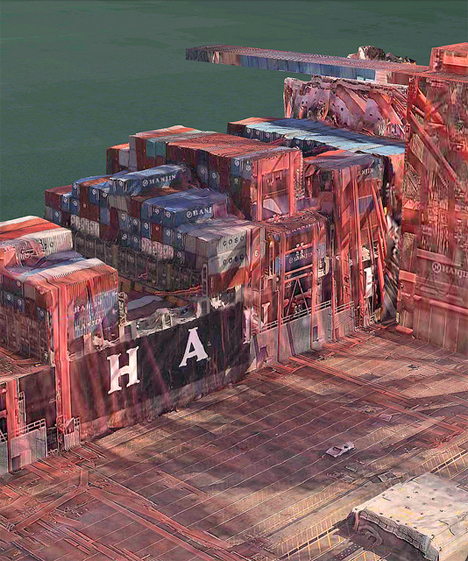
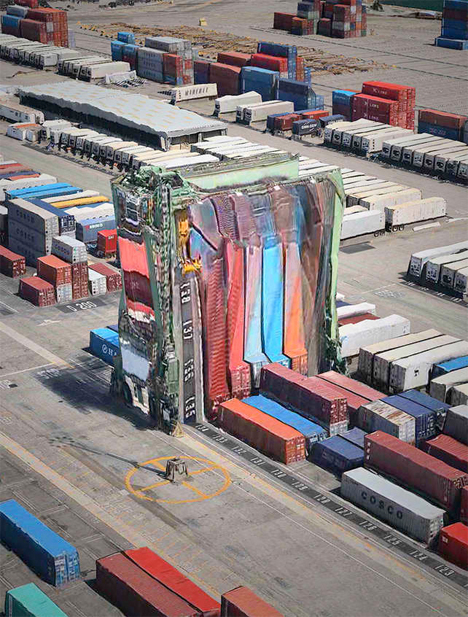
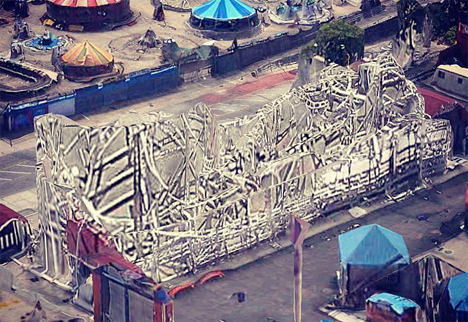
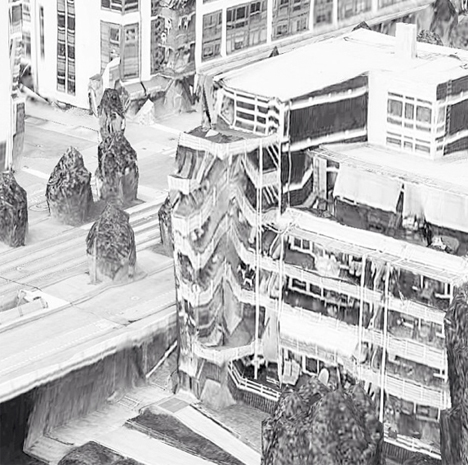
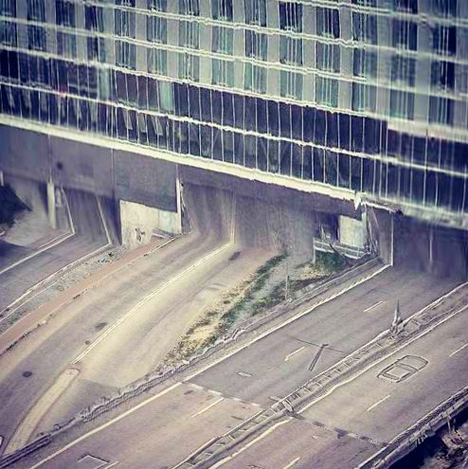
All of the notorious glitches on Apple’s Maps app make it incredibly frustrating to use for practical purposes, but it still has value – as accidental art. When two-dimensional images are incorrectly mapped onto three-dimensional topography, the results can be fascinating, creating landscapes and architecture that look alien and futuristic.

Apple Maps Glitch Art 2

Apple Maps Glitch Art 3

Peder Norrby, founder of graphics company Trapcode, has collected the many glitches on the Apple iOS Maps app into a trippy gallery on Flickr. Houses in Barcelona appear to be puking trees from their windows. A vortex has opened in the middle of a Stockholm highway. Skyscrapers and stacked shipping containers look like they’re melting.

Apple Maps Glitch Art 4

Apple Maps Glitch Art 5

In this parallel universe, the laws of physics have apparently been suspended. Norrby explains that some structures, like bridges, viaducts, tunnels and roller coasters, are too complex for the app’s algorithms to handle. While criticism of Apple’s Maps app has increased reliance on its competitors, Google Maps isn’t entire free of glitches, either.

Apple Maps Glitch Art 6

Apple Maps Glitch Art 7

The mesmerizing beauty of glitches has led to an entire genre of art revolving around reproducing their eerie effects on purpose. Glitch art creates digital or analog image errors by intentionally corrupting files, or mimicking their appearance in traditional artistic media like paintings and sculptures.

Share on Facebook


[ By Steph in Art & Photography & Video. ]

[ WebUrbanist | Archives | Galleries | Privacy | TOS ]


WebUrbanist

 
Comments Off on Accidental Art: Apple Maps Glitches Create Surreal Scenes

Posted in Creativity


The Yukon’s Northern Lights – Behind the Scenes

05 Jun

A guest post by Phil Hart – author of the Shooting Stars eBook (use code DPSTARS for a 25% discount).

My three favourite things in the world are mountains, aurora and snow. In early 2012 I got all three of them in spades when I spent nine weeks in the frozen north of Canada’s Yukon Territory.

With four cameras and dozens of lenses, tripods and a truck full of extreme cold weather gear, I journeyed across the Yukon and chased every gap in the clouds I could find. Three terabytes and a long learning curve later, this video is short, fast and high-impact two minute compilation of some of the best footage I captured during my aurora adventures.

In this post, let me share some of the ‘behind the scenes’ work that went into producing it. First the video, which you really do have to watch in full-screen with the lights down and the music up!

The Yukon’s Northern Lights from Phil Hart on Vimeo.

Camera Gear

Cameras: 2 * Canon 5D Mark II and a Canon 1100D (aka Rebel T3).

Lenses: Canon 24mm f1.4L (I & II) and 14mm f2.8L with the full-frame cameras and Canon 10-22mm f3.5-5.6 and 15-85mm f3.5-5.6 with the cropped sensor camera.

Tripods: Various Manfrotto and Induro tripods with mainly ball-heads. The grease in the Manfrotto heads froze at around -25 ºC (~15 ºF) but were still workable.

Remote Releases: I was using both programmable and simpler push-button cable releases. Most often I simply had the camera in Manual mode, set with a particular aperture, ISO and exposure duration. With the camera set to Continuous Shooting mode (aka Sports mode) I could lock the button down on the cable release and the camera would fire off a long sequence of images with the same setting (and almost no gap in between) until I came back to stop the sequence (or the battery ran flat).

Dew Heaters: Dew is a common problem for night sky photography, but in sub-arctic climates like that in the Yukon, the air is so dry that it is less of a problem (although it forms as frost, not dew with the temperature well below freezing). Some nights when the cameras were running on long sequences, I did need a little protection from frost on the lenses, and was generally using little 2-inch heater straps from from Dew-Not.

Power Supplies: 12 volt lithium-ion batteries to power dew-heaters, motion control (below) and also one of the cameras via a DC-power adapter for long all-night sequences. Lithium-ion is about the only type of widely available battery-chemistry that can cope with extremely cold temperatures. While their capacity did drop, I could still get 1 hour of continuous operation out of my Canon 5D Mark II even at temperatures down to -40 degrees and a very respectable 2 hours at milder temperatures of -15 ºC (~0 ºF).

Setting Up Gear in the Cold

Exposure Settings

The aurora can vary enormously in brightness. When it is quiet, it can be as faint or fainter than the Milky Way, requiring 30 seconds with a high ISO setting (~1600-3200) to capture it nicely (like the final aurora sequences in the video). However, when it is bright it can be as bright as the Full Moon. On those few nights of the greatest aurora storms (like the two main sequences in the video), exposures of just 2-4 seconds can be enough (still with the aperture wide open and a high ISO).

The other challenge with aurora is how fast it can move. Generally there is a balance here with the brightness. Faint aurora displays are usually also quiet in terms of movement, so longer exposures do not blur out too much of the movement. The fast moving auroras also tend to be bright, and the curtains and rays move rapidly, enough to cause them to blur significantly even in 8-10 second exposures. So it’s important to keep carefully balancing the trade-off in this regard. You get more experienced at this quite quickly, but fast lenses also help a lot, which is why I particularly valued the 24mm f1.4 lenses I was using extensively during this trip for images like this one:

Fast and Bright Aurora: 2 second exposure with 24mm lens at f1.4, ISO3200.

Focus

Focus at night is difficult already, but with timelapse you have the additional complexity of often incorporating some foreground elements without the daytime luxury of stopping the lens down to provide high depth-of-field. In most cases this can be avoided by trying to work with large foreground elements that can be kept a couple of meters away from the camera. Although focus on the stars and the foreground is not perfectly the same, at this distance the difference is not significant enough for most people to notice or object to. The eye is also a lot more forgiving of these kind of compromises in video than it is high with a large format still image.

Motion Control

Vixen Polarie: A compact little mount designed for taking tracked long-exposures of the stars but which can also be easily used as a simple panning mount when the motorized axis is pointed vertically.

Dynamic Perception Stage Zero Dolly: A six-foot long aluminium dolly rail with controller, used to provide the sliding sequences in the video. The LCD screen on this was very difficult to read and slow to update in extreme cold conditions.

Custom controller: Developed jointly with Fred Vanderhaven, this provided pan/tilt motion control and almost fully automated day-to-night twilight exposure control. It was only used for two of the clips in this video and the functionality in that case was similar to the Vixen Polarie.

One of the strongest sequences in the video (as the music really kicks in) has the camera moving in between two trees, with aurora on the left and moonrise on the right. Here is the scene as that sequence was being captured:

Dynamic Perception Dolly in Action

And here is a still from the resulting image sequence:

Still image from sequence captured on Dynamic Perception Dolly as shown in previous image

Image Processing and Video Editing

My workflow for editing timelapse video from the RAW image sequences has improved a lot, but it is still a very time-consuming process. And while I am very experienced at using Lightroom and Photoshop to process astrophotography images, I am still a relative beginner at video editing.

I do the most significant development of the RAW files in Lightroom, choosing one frame that is representative of the sequence and then sync the settings across all the images so that they have the same processing. In some cases, where there is a big change in brightness (which happens a lot with aurora) I use Gunther Wegner’s LRTimelapse software to interpolate development settings between keyframes in the sequence, to cope with large changes.

After saving the settings to the Metadata for the images, I then I import the sequences into Adobe After Effects, and use that to render the sequence of RAW files to a loss-less intermediate video file. One of the most common effects I apply in After Effects is to use the Neat Video noise reduction plug-in. This has a ‘neat’ temporal noise reduction algorithm which compares changes between frames to help reduce noise (which varies between frames) without smearing out real detail (which is constant, but perhaps moving between frames). The Neat Video plug-in makes a significant difference to the quality of the end-result.

The other plug-in that I made some use of is the Granite Bay Deflicker plug-in. This was essential for smoothing out flicker that is present in the evening and morning twilight sequences, and was also used in the moonset clip.

The final video was compiled from the individual sequences using Adobe Premier Pro.

Composition: Reflections and Mountains

Many classic and beautiful images of the northern lights involve reflections in the foreground. The problem for me was that there is very little open water anywhere in the Yukon in the back half of winter, with the temperature having dropped as cold as -40 ºC (~40 ºF). The only place I found was an artificial deep water outlet from Fish Lake, near the capital Whitehorse. The night that I was there the aurora was very quiet but I did manage to capture a short sequence late in the night.

Fish Lake Aurora Reflections

Aside from that, one of my favourite locations was along Annie Lake Road which offered a nice mix of trees, open areas and mountain views as well. In this image, the reflections are in some relatively clean flat ice that had been cleared of snow by wind and some early spring sunshine during the day.

Annie Lake Aurora Reflections in Ice

One of the reasons I was keen to be in the Yukon rather than the even more desolate and flat Northwest Territories (where the weather and aurora prospects may be better) is the more interesting terrain. However, with very few roads and even less open in winter getting access to interesting locations was quite a challenge.

The image below is the most spectacular mountain view I captured (technically in the northern part of British Columbia), looking south from the road between Haines Junction and Haines Alaska. However, except on the biggest storm nights, the aurora was generally viewed to the north. So I never saw aurora over these mountains but they did make for a great sunrise sequences to end the video with. Aside from that, my favourite mountain location was way up north in Tombstone Park, which you can see in the image of ‘fast and bright aurora’ above.

Mountains viewed from the Haines Alaska Road

Music

Timelapse videos without music can still be interesting to watch, but are hardly captivating. Good music brings them alive, although it’s hard to suit everyone’s tastes. There are several online sites offering stock audio clips, but the images and the story flow so much stronger with music that is composed and produced to match the visuals. In this case, I again set my talented friend Dean Roberts (of ‘The Dirt Floor‘) the challenge of recording music for the video. Aside from watching the video the previous day, he recorded and edited the track for this in one (long) day. I hope you enjoy the rockin’ soundtrack he came up with.

If you’ve read this far and not watched the video yet, have a look – I know you’ll enjoy it! And if you’ve got a taste for aurora, you can read more about my adventures in the Yukon and see more videos on my blog: philhart.com/tag/yukon-aurora

Post originally from: Digital Photography Tips.

Check out our more Photography Tips at Photography Tips for Beginners, Portrait Photography Tips and Wedding Photography Tips.

The Yukon’s Northern Lights – Behind the Scenes


Digital Photography School

 
Comments Off on The Yukon’s Northern Lights – Behind the Scenes

Posted in Photography


Civic photo diary ‘Snap/Shot Galleria’ features raw street scenes of L.A.

30 May

Screen_Shot_2013-05-28_at_9.49.18_AM.png

In this article, the founder of photo site Snap/Shot Galleria Kwasi Boyd-Bouldin explains why he wanted to create a platform for images true to the ‘experience’ of living in LA. The site features four core photographers who use mobile devices and more to capture city life as they see it, and their gritty visions of street-level Los Angeles highlight the gulf between entertainment industry glitz and everyday struggles. Learn more at connect.dpreview.com.

News: Digital Photography Review (dpreview.com)

 
Comments Off on Civic photo diary ‘Snap/Shot Galleria’ features raw street scenes of L.A.

Posted in Uncategorized