RSS
 

Posts Tagged ‘REVIEW’

Nikon Df review: A classic remade?

20 Dec

DSC01846.jpg

The Nikon Df is, at first appearance, the camera many people have been wanting for years – a classically styled DSLR with traditional external controls. A lot of what’s under the Df’s retro skin is pretty familiar with the 16MP full-frame D4 sensor and the AF system from the D610. But does the Df bring together the best of the old and the new for a compelling shooting experience? Find out. Read our full review

News: Digital Photography Review (dpreview.com)

 
Comments Off on Nikon Df review: A classic remade?

Posted in Uncategorized


“Photography Business Secrets” – A Review

19 Dec
"Photography Business Secrets," by Lara White is a great business resource for any photographer looking to grow their business.

“Photography Business Secrets,” by Lara White is a great resource for any photographer looking to grow their business.

With just a few weeks left before the end of the year, I find myself deep in my annual wrap-up ritual. I don’t like carrying stuff over from December into January if I can avoid it. I make sure that shoots are edited, albums and prints are ordered, contracts are signed, gear is cleaned and serviced, and any other loose ends are taken care of. Transitioning from one year to the next isn’t just a matter of getting my “stuff” in order, but it’s also about getting my head in the right place for whatever challenges– photographic, business, or personal– the coming year might have in store for me.

I don’t think I’m unique in this regard. I think the end of the year is a good time for everybody to look ahead, setting goals for themselves and charting a course for where their photography business is going to take them after January 1st. I think that this pause to reflect on the current and future health of our businesses is particularly important for those of us in creative fields, because so many of us are simply not hard-wired for business to the same extent as we are for photography. One of the best new tools I’ve found for helping with these tasks is “Photography Business Secrets,” by Lara White. A former wedding photographer,  White is a leading expert in the field of photography business education. As founder and operator of PhotoMint, an online business development resource for photographers, her words of wisdom have now been published in more than 70 magazines and professional photography blogs, including right here at Digital Photography School.

When you think of your photography business, have you ever figured out how much of it is “photography,” and how much is actually “business?” White has, and the numbers might surprise you. On average, 20% or less of your time is spent on actual photography. And that’s a good week! With numbers like that, it is essential to get a proper handle on the business end of things. After all, the term “starving artist” started somewhere, right? Passion alone isn’t going to cut it.

Ready to Give Up Your Day Job?

DSC_6591

If your photography plans for next year include ditching your 9-to-5, Section 1 of this book is absolutely required reading. In “Moving from a Hobby to a Business,” Lara walks you through three chapters full of the information you need, questions you need to ask, and steps you need to take before you even think about giving your two weeks notice. This is a big decision, with life-changing ramifications– especially if you have a family that enjoys eating and having a roof over their heads.

This is the perfect chance to get valuable advice from someone who has been where you are and lived to tell the tale. By giving readers a realistic view of some of the issues that can impact transitioning from a hobby to a career, readers are assured very early on that this book has their best interests at heart. Gaining the training and experience you need, as well as figuring out your market, are just a few of the key factors addressed.

Business School for Photographers

DSC_6602

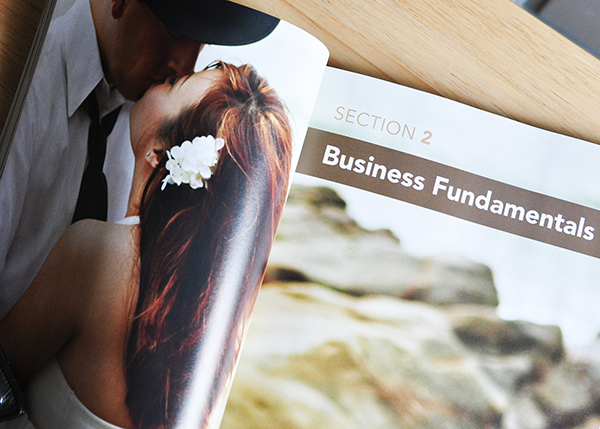
In my previous life as lawyer, my biggest complaint was that law school did nothing to prepare me for the actual day-to-day, nuts-and-bolts of practicing law. Becoming a professional photographer poses similar hurdles. Like any other profession, people tend to have a long list of preconceived notions of what it means to be a photographer. Remember that 80/20 time split I mentioned earlier? That’s just one of the things I’m talking about, and it’s why the seven chapters of “Business Fundamentals” make this such a valuable book–regardless of whether you are an emerging, struggling, or succeeding professional.

Section 2 takes you through the basics of drafting a business plan, calculating overhead, creating a budget, and more. Every journey starts somewhere, and yours as a professional needs to start with the steps that are designed to keep you both functional AND legal. Once those concerns have been addressed, you can move on to advanced business challenges like branding, pricing & products, customer service, and day-to-day operations.

I’m Up and Running. What’s Next?

DSC_6606

It’s a pretty basic premise that you’re in business to make money. I love being an artist, but just being an artist doesn’t pay for my son’s education or the insurance premiums on the studio equipment. As much as I may hate the prospect of being a “businessman,” if I’m not willing to take on that responsibility, I’m going to fail before I even start.

Section 3 answers questions revolving around sales and growth, since the two are inextricably linked. The bottom line is that sales means growth. Tips on getting and increasing sales range from the seemingly obvious (be prompt, creative, and attentive), to running promotions and overcoming shyness. Using these tips to increase your cash flow will help get you over the next hurdle.

The chapter on “Growing Your Business” guides you through the processes of outsourcing, hiring staff, adding new services, and raising your prices. Here, White offers three case studies, showing how actual photographers have dealt with these issues, clearly demonstrating that these are real-life concerns, and not just theoretical exercises.

Looking Ahead

DSC_6609

Sprinters can see the finish line within seconds of leaving the starting blocks. They go all out, giving it everything they’ve got, but they are going to run out of gas pretty quickly. Long-distance runners are in it for the long haul. It may sound like a cliché, but you want to run marathons, not 100-meter sprints. Learning to understand your clients, develop your style, and create marketing strategies isn’t something that comes naturally to most people. Here is your chance to learn those skills without having to reinvent the wheel.

The Bottom Line

A lot of photography books come across my desk. The best among them speak to a broad audience, and this is definitely one of them. It is entirely possible that not every aspect of this book will apply to you or your photography business, but if you find even just a few lessons here that increase your business stability– and therefore your profitability– it will be well worth the $ 20.00 investment.

“Photography Business Secrets: The Savvy Photographer’s Guide to Sales, Marketing, and More” is available at Amazon.com.

The post “Photography Business Secrets” – A Review by Jeff Guyer appeared first on Digital Photography School.


Digital Photography School

 
Comments Off on “Photography Business Secrets” – A Review

Posted in Photography


Sizing it up: Our Panasonic Lumix DMC-GM1 Review

19 Dec

gm1_2.jpg

We’ve just posted our full review of the Panasonic Lumix DMC-GM1. It underscores the ‘Micro’ in Micro Four Thirds as the smallest model in that class, with a 16MP Four Thirds sensor and a collapsible 12-32mm F3.5-5.6 kit lens. It offers many features that its bigger Lumix GX7 sibling does, starting with the sensor, but in a much smaller package. See how it measures up. Read the full review

News: Digital Photography Review (dpreview.com)

 
Comments Off on Sizing it up: Our Panasonic Lumix DMC-GM1 Review

Posted in Uncategorized


ATNX Photoshop Actions Review

17 Dec
"Photoshop Actions" from ATNX Digital provides an affordable, user-friendly actions alternative for Photoshop users.

“Photoshop Actions” from ATNX Digital provides an affordable, user-friendly actions alternative for Photoshop users.

Let’s face it– Photoshop is a beast, and a tough one to tame. There are at least half a dozen “right” ways to do just about everything, and I think it’s safe to say that most of us don’t use it to anywhere near its full potential. I’ve lost track of how long ago I started using PS (version 4, maybe?), and I’ve yet to unlock all its secrets– which I think is a good thing. For me, the best Photoshop work is that which my clients never even notice. To that end, I strive to get it right in the camera, and to the extent that post-processing is necessary, I try to keep it to a minimum. Smooth a little skin. Bump some contrast. Open up the shadows. Darken the highlights. A few simple tweaks to help make sure that people notice the photo– not the editing.

Keeping the edits simple, though, is not always an option. Try as I might, I’m not always going to get it right in the camera. Keeping the sky nice and blue when properly exposing for the ground isn’t always easy. And don’t even get me started on the myriad of ways to run a black & white conversion. Learning how to tackle some of these editing challenges can be slow, meticulous work, and it can often feel like you’re re-inventing the wheel for every photo. Who wants to spend that kind of time in front of the computer? This is where Photoshop Actions come in handy.

“I’m Still New to Photoshop. What’s an Action?”

A Photoshop action is basically a recorded set of steps which allows you to reduce any series of long, complicated, time-consuming steps to a single click of the mouse. What might ordinarily take minutes or even hours to achieve by going step-by-step, becomes a much more convenient, time-saving, automated process. Some actions provide a simple, global adjustment to the photo, while others will apply several customizable adjustment layers, allowing the user to fine-tune the action and target specific areas of the image.

While anyone can record their own actions in Photoshop, companies like Kubota Image Tools, Totally Rad Actions, MCP Actions, and others, have been creating action packs for years, allowing photographers to achieve editing results they might not otherwise have the time or Photoshop expertise to achieve on their own. Contrast adjustments, black & white conversions, sun flares, vintage filters– even teeth whitening– are all just a click or two away. Most action packs come with more than you will ever need (or want) to use, but if you’re lucky enough to find even just a few that help your workflow, you’ll find them to be well worth the cost.
atnx-actions-collage1

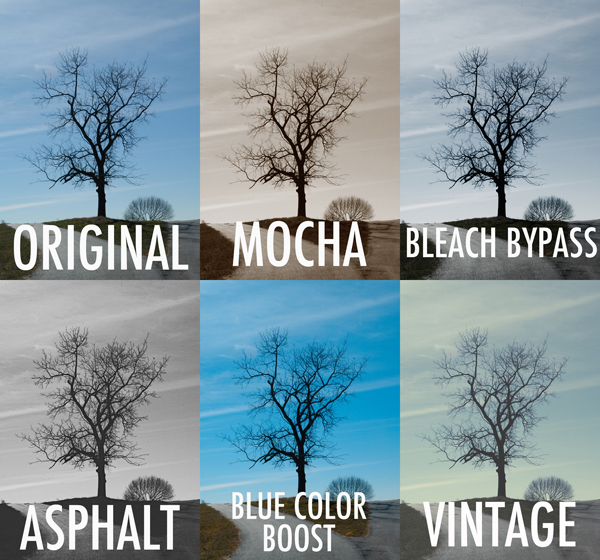
Set One – In this first set, “Lonely Tree” gets a sampling of actions from each of the four sets in the pack.

Photoshop Actions from ATNX Digital is a new option, providing users with 90 actions in four sets– Primary, Mono, Color, and Special.  The Primary set consists of 20 actions, helping to automate tasks like boosting contrast, dodge & burn, noise reduction, and soft focus. Mono– as the name implies– consists of 26 different black & white conversion tools, while the Color set goes the other direction, using actions like Bleach Bypass, Color Boost, and Custom Toning to make color adjustments you could never achieve in-camera (see image above). Finally, the Special set brings effects like center lighting, selective focus, light leaks, and 17 different textures to your digital palette.  It’s a pretty extensive selection, with a variety of options for many post-processing tasks.

First Impressions

What I like about these actions is that most are customizable and can be adjusted to the specific needs of the image. This is achieved in a variety of ways, depending on the selected action. Since most actions are applied by adding various types of adjustment layers, the original image (the Background layer) is left untouched on the bottom of the stack. By adjusting the opacity of the new layers, selecting which of them are even visible, or tweaking the layer masks, you open up a world of adaptable possibilities.

All of that sounds great, but it’s important to keep something in mind. The quality of any action is only as good as the Photoshop skills and aesthetic of the person who programmed it in the first place. Most actions are good starting points, but since every image– and every photographer– is different, you are hardly ever going to simply apply an action and walk away. You may have to tweak it, finesse it, and sometimes even bend it to get the right look. Hopefully, the structure of the action makes it easy– perhaps a final step in a relatively streamlined process. That’s why it’s so important to find actions that fit well with your workflow. If applying an action is only the first step of a 30-minute editing process, you’ve completely missed the point. They only save time and effort if you are off doing something else.

I haven’t tried all 90 of the actions yet, but I’ve gone through a good sampling from each set to have a pretty good feel for them. Of the 40 or 50 that I’ve put to the test, I’ve probably found five or six that I can see incorporating into my workflow. While that might sound like a bad review, I assure you that it’s actually pretty high marks coming from me. Of the hundreds of actions installed on my computer, I probably use a grand total of anywhere from six to ten of them with any regularity. While that may sound like a waste of money, if they get me away from my computer so I can spend more time with my family, it’s worth the price.

Examples

For purposes of this review, anything labeled “Original” is straight off the camera, with no edits other than resizing.  Anything labeled with an action name has had the action applied, with no additional editing of the image or tweaking of the action. See Set One examples above.

Not all actions are universal. What might work well with landscapes can fail miserably with portraits. Experimenting with how different actions affect different photos can lead to interesting and creative results.

Set Two- not all actions are universal. What might work well with landscapes can fail miserably with portraits. Experimenting with how different actions affect different photos can lead to interesting and creative results.

Easy on the Budget

Speaking of cost, this is where ATNX actions really shine. While some companies charge hundreds of dollars for smaller action packs, the complete set of 90 ATNX actions comes in at a very budget-friendly $ 25.00 (USD). This is particularly helpful for photographers who may be new to Photoshop actions and still aren’t quite sure how they’ll fit with their workflow. While you might hesitate to spend anywhere from $ 80.00 to $ 200.00 on a maybe from another company, at $ 25.00 you can afford to take a chance. That’s not to take anything away from higher priced sets, but if you’re still learning your way through the post-processing labyrinth and want to give actions a try, ATNX might just be a good place to start.

Wrap up

Anything negative that I might have to say would be based only on my own personal aesthetic, through no fault of the product. If an action’s initial output requires too much tweaking to get the look I want, then it’s not for me. Objectively speaking, though, Photoshop Actions from ATNX Digital combine strong, user-friendly editing tools with an affordable price tag– not an easy combination to find.

ATNX Digital Photoshop Actions are available for digital download on their website.

The post ATNX Photoshop Actions Review by Jeff Guyer appeared first on Digital Photography School.


Digital Photography School

 
Comments Off on ATNX Photoshop Actions Review

Posted in Photography


Review Canon Powershot S120 Digital Camera

16 Dec

Review Canon Powershot S120 Digital Camera

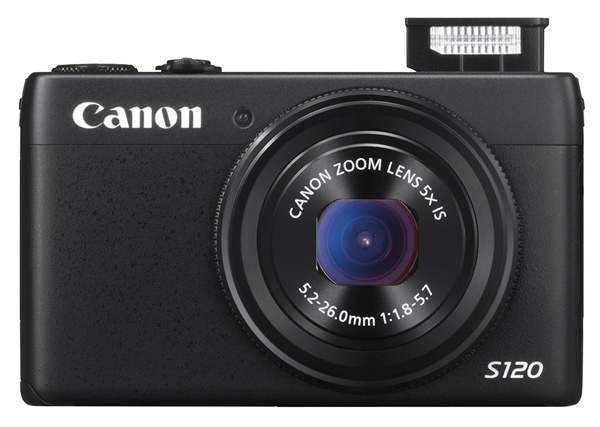
Canon S120 review Blk front 2

You could wonder at my bravado in reviewing this tiddler when all it seems to offer is a digicam with moderate specs and little else. Aah! But look further!

Features and Specs

Its story begins with Canon’s well-tried DIGIC 6 processor, along with a relatively large CMOS sensor. The maximum aperture is a generous, optically stabilized f/1.8, which does, quickly fall to f4 once you start zooming. However, it is the first S-series model to feature an f/1.8 lens and the 24mm wide end is extremely useful for tight interiors.

But the S120′s specs are well worth comparing to the highly regarded SX50 HS, which I reviewed a year ago, equipped with a powerful 50x optical zoom.

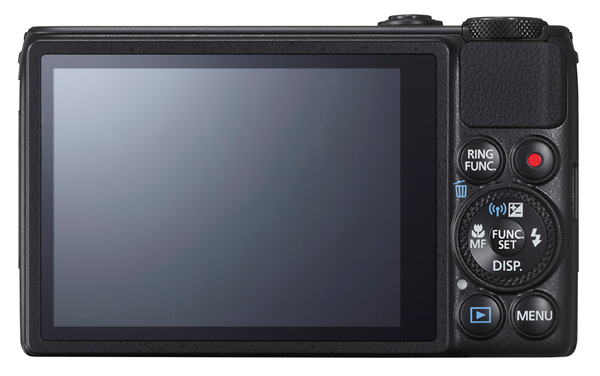
Canon S120 review Black Back

This one is a much less powerful beast optically, with a moderate 5x optical zoom, but it also has a larger CMOS sensor and a continuous shooting speed of up to 12fps. It’s also considerably smaller, more easily pocketable and easier to use.

Much like almost every camera offered in 2013, the S120 has inbuilt WiFi connectivity, so it can hook up directly to smart devices and social networks. Settings can be adjusted in a number of ways: through the dedicated control buttons, via the 7.5 cm touch screen or with the lens control ring. The camera also supports GPS tagging via a mobile, allowing location data to be added to shots using Canon’s dedicated app for smart phones/tablets.

Maximum image size is 4000×3000 pixels, leading to a final print size of 34x25cm print (13.4×9.8″) at 300 dpi.

Video can be shot in 1920×1080 Full HD quality MPEG4. If you shoot stills during a video record the latter stops.

A look around – physical features and controls

The camera is, as I have said, very pocketable and viewable, thanks to the 7.5cm LCD screen which does not, unfortunately, tilt. Oh well!

Top deck, at left is the tiny pop up flash; to the right is the power button and the shutter button that encircles the zoom lever; at the extreme right is the mode dial with positions for auto and hybrid auto shooting, P,A,S,M, custom settings, movie, camera effects (high dynamic range, fish eye, background defocus, mono etc) and scene effects (portraits, snow, starry skies, fireworks, time lapse etc).

You can adjust shutter speed or aperture — and manual — value by rolling the control dial to that setting (Tv, Av or M), then twirl a ring at the base of the lens. Simple! Just like a real camera!

There are plenty of people out there who will enjoy the easy access to the camera and scene effects offered by the camera and I wouldn’t mind betting there are plenty of newbie DSLR owners who still have no idea how to set the camera to handle these off-beat beat subjects.

The only flaw I found in the top deck layout was the difficulty of tapping the recessed power button. For the life of me, I can’t suggest an alternative arrangement!

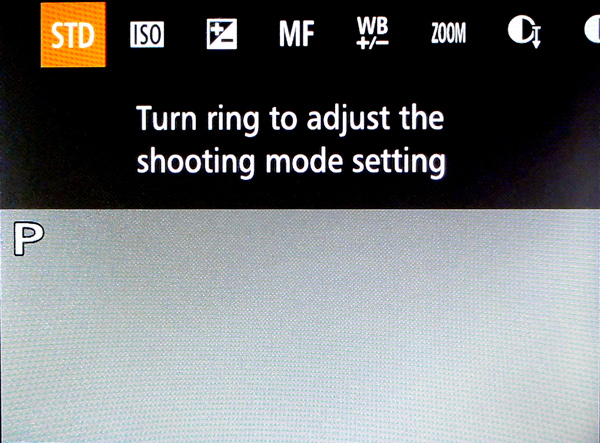
Canon s120 review Ring Function

Rear: at top right is the familiar red video record button and, to its left, is a button titled Ring Function which gives direct access to such things as ISO, exposure compensation, manual focus, white balance correction, dynamic range and shadow correction. The latter takes the S120 into a totally different area, with access to high control of your picture making. Worth some study. Lower, we find the control dial with settings for exposure correction, macro shooting, flash and display options.

Canon S120 reiew Menu

Beneath the dial are found the replay and menu buttons, with the latter offering a fairly extensive extensive list of options. Noteworthy also is the on screen level indicator, and that’s about it.

Sample images from the Canon S120

Canon s120 review Centre screen 1

Canon S120 review Decorations 2

Canon S120 review Flowers 2

Canon S120 review Parking 2

Startup time

It took two seconds from power on the first shot, then about a second between shots.

Distortion

There was a small amount of barrel distortion at the wide end of the zoom but no problems at the telephoto end.

ISO Tests

Canon PowerShot S120 ISO 100

Canon PowerShot S120 ISO 400

Canon PowerShot S120 ISO 800

Canon PowerShot S120 ISO 1600

Canon PowerShot S120 ISO 3200

Canon PowerShot S120 ISO 6400

Canon PowerShot S120 ISO 12800

Noise begins to creep in at ISO 3200. By ISO 6400 noise is up a little more but what is really noticeable is the fall off in definition, both of which factors make shooting at ISO 12,800 a none event, compounded by some ugly pixel clumping at that setting.

Overall comments

  • Quality: average
  • Why you’d buy the camera: small; a surprisingly generous list of picture control options; nice wide 24mm wide end of the zoom
  • Why you wouldn’t: zoom is not long enough for sports photography
  • It’s not a big deal, but the S120 is one of the few digicams that let you replay your images by tapping that button — and not needing to fire up the power button first

If you’re still using a simple digicam but have higher ambitions, shoot-wise, this would make an ideal bridge camera to sharpen your camera skills before you leap into the fast running waters that encircle a DSLR!

Good gear!

Specs

  • Image Sensor: 12.1 million effective pixels
  • Sensor: 15mm CMOS
  • Metering: Evaluative, centre-weighted, spot
  • Lens: f1.8-5.7/5.2-26mm (24-120mm as 35 SLR equivalent)
  • Exposure Modes: Auto, Program AE, shutter and aperture priority, manual
  • Shutter Speed: 15″-1/2000 second
  • Memory: SD/SDHC/SDXC (UHS Speed Class 1 compatible)
  • Image Sizes (pixels): Stills: 4000×3000 to 640×480
  • Movies: 1920×1080, 1280×720, 640×480
  • Continuous Shooting: 9fps
  • Viewfinder: 7.5cm LCD screen (922,000)
  • File Formats: RAW, JPEG, MPEG4
  • Colour Space: sRGB
  • ISO Sensitivity: Auto, 80 to 12,800
  • Interface: USB 2.0, HDMI mini, AV, WiFi, DC input
  • Power: Rechargeable lithium ion battery
  • Dimensions: 100x59x29 WHDmm
  • Weight: 217 g (inc. battery, card)
  • Price: Approximately $ 400 see Amazon
  • Web: Canon.com

DPS Rating: 3

The post Review Canon Powershot S120 Digital Camera by Barrie Smith appeared first on Digital Photography School.


Digital Photography School

 
Comments Off on Review Canon Powershot S120 Digital Camera

Posted in Photography


Accessory Review: Manfrotto 190 Carbon Fiber Tripod

13 Dec

Manfrotto-190-Feature.jpg

Lauded as a compact semi-professional model and constructed of cross-woven carbon fiber, the new 190 ($ 409.88 body only) would be an eye-catching addition to any camera kit. Manfrotto made several updates to the new model, but do they place it far enough beyond the old 190, which cost $ 259.95, to justify price hike? Find out in our review

News: Digital Photography Review (dpreview.com)

 
Comments Off on Accessory Review: Manfrotto 190 Carbon Fiber Tripod

Posted in Uncategorized


Review: The ONA Bowery Bag for Everyday Photography

06 Dec
Ona Bowery Camera Bag Review

The Bowery by ONA Bags

These days, no piece of photography equipment excites me more than a good camera bag.

Or even better, a practical, light, good-looking camera bag.

I’ve been a fan of ONA bags for over a year now and the Bowery is one of my favourites.  It’s small and made for traveling light.  I carry it around almost daily.

Well padded and well made, the bag has water resistant, waxed canvas (and believe me, I’ve tested the water-resistant part out), leather details, and beautiful brass hardware.

Ona Bowery Camera Bag Review

Perfect for sightseeing, everyday use, and street photography

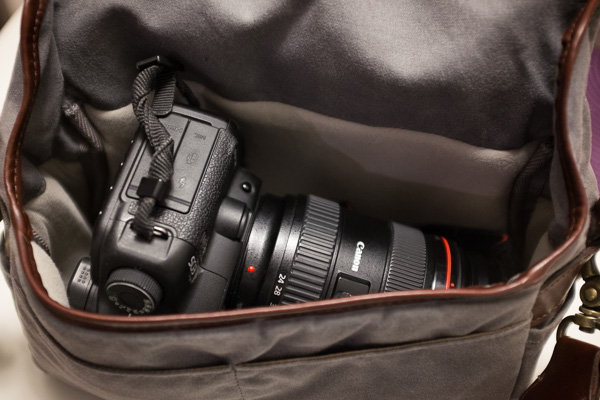
The bag is made for the smaller sized camera, such as a rangefinder, mirror-less, micro four thirds, or a point-and-shoot.  I use it primarily with my Fuji X100s, however, it fits my Canon 5D Mark II and monster 24-70mm lens, and I use it somewhat frequently with the 5D Mark II and light 28mm prime lens.  Remove the small divider and it can fit an iPad Mini.

ONA also describes the ONA Bowery Bag as an insert, which makes a lot of sense.  I recently took a trip where I flattened the bag into my luggage and used a larger camera bag to carry my equipment from place to place.  When I arrived, I popped the X100s and some batteries into the Bowery each day and it was a freeing experience for photography.

A freeing experience for travel.

A freeing experience for travel

At $ 119, the bag is not necessarily cheap, but it is more than a good deal for the quality and functionality.  And when you factor in the wear and tear saved on your joints, it could save you a lot down the road.

If your significant other lugs around too much equipment, then the ONA Bowery Bag is the perfect holiday gift to convince them to lighten the load.

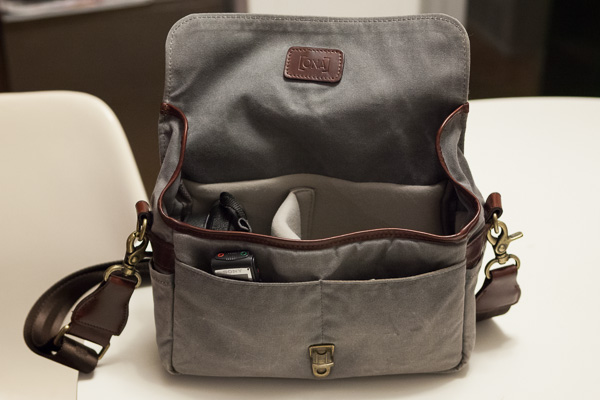
Ona Bowery Camera Bag Review, Interior Shot

Fuji X100s, Digital Recorder, and three extra batteries. Insert can be removed to fit an iPad Mini

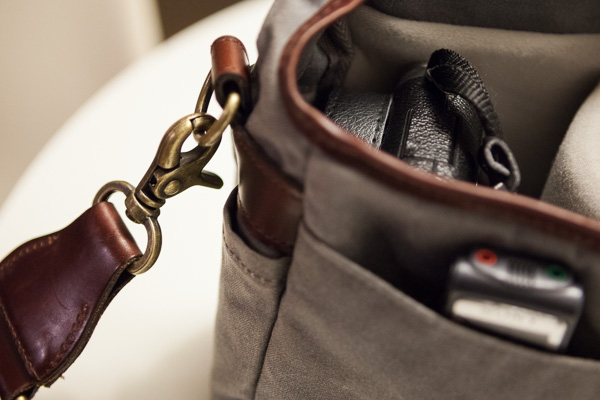
Padded, waxed canvas, leather details, and brass clasps.

Padded, waxed canvas, leather details, and brass clasps

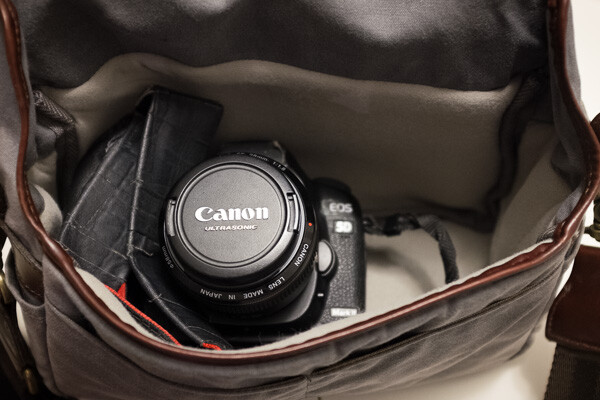
Fits a Canon 5D Mark II with 28mm lens.

Fits a Canon 5D Mark II with 28mm lens

If you are ambitious - 5D Mark II and 24-70mm EF lens.

If you’re ambitious – Canon 5D Mark II and 24-70mm EF lens

Post originally from: Digital Photography Tips.

Check out our more Photography Tips at Photography Tips for Beginners, Portrait Photography Tips and Wedding Photography Tips.

Review: The ONA Bowery Bag for Everyday Photography

The post Review: The ONA Bowery Bag for Everyday Photography by James Maher appeared first on Digital Photography School.


Digital Photography School
 
Comments Off on Review: The ONA Bowery Bag for Everyday Photography

Posted in Photography


Accessory review: SanDisk Connect wireless media drives

04 Dec

sandisk.JPG

Looking for an easy way to share your photos with nearby smartphone and tablet users? There are plenty of options, and SanDisk has a couple of their own in a new line of flash memory storage devices with built-in wireless that you can access from any device. We evaluate the devices from a photographer’s perspective on connect.dpreview.com.

News: Digital Photography Review (dpreview.com)

 
Comments Off on Accessory review: SanDisk Connect wireless media drives

Posted in Uncategorized


Capture PRO Camera Clip Review

02 Dec

A Better Way to Carry Your Camera?

The updated Capture PRO from Peak Design offers a secure, hands-free alternative to traditional camera straps.

The updated Capture PRO from Peak Design offers a secure, hands-free alternative to traditional camera straps.

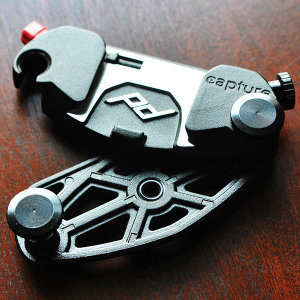
About a year and a half ago I posted a short review on Facebook of the original version of the Capture Camera Clip from Peak Design Ltd. Since getting my hands on it, Capture has become an integral tool for my location, event, and street photography, as well as a perfect solution for quick camera access while I’m teaching, either in the classroom or on location. That’s why I was so excited last August, when the San Francisco-based company launched two updated versions of Capture in what would end up being a wildly successful Kickstarter campaign. Going back to the community that helped make the original Capture such a popular accessory, the crowd-funded project raised $ 819,108 in just 54 days– crushing its goal of $ 100,00. With numbers like that, I had to find out how Capture Pro measured up to the original. You may have read Sime’s preview of the new versions before their release back in August, but now that I’ve had a chance to put Capture PRO through its paces for a few months, I figured it was time for an update.

What is Capture?

So, what is Capture? Imagine taking the quick-release assembly off your tripod and attaching it to your belt. Or your backpack strap. Or the shoulder strap from your camera bag. Or a climbing harness. Getting the idea? Simply put, the Capture Camera Clip allows you to use virtually any strap of almost any thickness to keep your camera close at hand and ready to go. I’ve never been a fan of traditional camera straps. Regardless of whether it is around my neck or over my shoulder, the weight is a strain and at least one hand is always on the camera, making sure it’s not bumping into anything or anyone. Sling straps are a great solution, but still get in the way when you are carrying a camera bag.  Capture not only allows me to “go strapless,” but also frees up my hands.

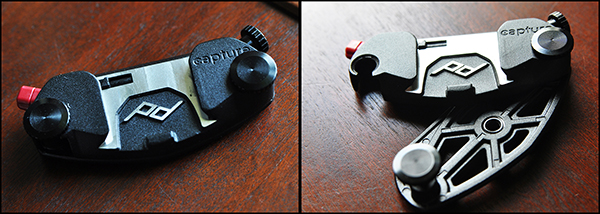
On the left, closed and locked. Sturdy-but-lightweight design makes sure Capture stays in place.

On the left, closed and locked. Sturdy-but-lightweight design makes sure Capture stays in place.

What’s New

As great as the original was, Version 1 was not without a few minor drawbacks, most notably its hard corners and uncomfortable screws. It’s always refreshing when companies take the time to not only listen to feedback from their customers, but to implement those suggestions into newer, better products. Constructed from die-cast aluminum, the clip is tightened into place with zinc-alloy clamping bolts. These bolts are what allows the clip to adjust to belts and straps of different thicknesses.  The new streamlined design is stronger and lighter, with a more narrow profile and smoother mechanics, while retaining all of the convenience and functionality of the original.

Zinc-alloy clamping bolts adjust to the thickness of the strap, and the standard ARCA Plate makes the unit compatible with a wide range of tripods.

Zinc-alloy clamping bolts adjust to the thickness of the strap, and the standard ARCA Plate makes the unit compatible with a wide range of tripods.

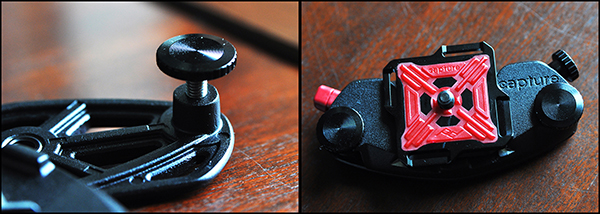
Perhaps the best added features however, are the mounting hole on the bottom for monopods and tripods (Pro version only), and the twisting safety lock on the quick release buttons for both Pro and V2.  The standard ARCA Plate is already compatible with ARCA-style tripod heads, but making the entire clip tripod-mountable adds a new facet of convenience that did not exist in the original.  While the original version had a twist lock for added security, both Capture PRO and Capture V2 have added an additional  safety lock to the quick release button, making sure that once latched, your camera isn’t going anywhere.  This comes in particularly handy for event photographers who have to navigate through large crowds. In one test, I had a group of friends try to strip my camera from the clip at my waist as I worked a crowd. All were unsuccessful.

The new tripod socket on the bottom and additional locking mechanism on the quick release button add functionality and security to the original design.

The new tripod socket on the bottom and additional locking mechanism on the quick release button add new levels of functionality and security to the original design.

Room for Improvement?

There is always room for improvement. No product is perfect, but any of the negative things I have to say about Capture are pretty minor– merely a matter of personal preference, and have no bearing on the quality of the product itself. For instance, I would have preferred for the quick-release button on the opposite side of the clip, but that doesn’t affect the quality of the build or the functionality of the device.

New Accessories

I prefer using Capture with lenses like the 24-70mm, the 35mm, or the 50mm. I wasn’t crazy about how Version 1 handled the extra weight and awkward movement of a larger lens, like the 70-200mm. With the new Capture PROpad, however, the developers and designers have gone a long way to solving this comfort and stability issue. The firm, compression-molded padding eases part of the load, redistributing some of the added weight of longer lenses.

Another new accessory– the POV Kit– turns the Capture Clip into a mount for any GoPro or small point-and-shoot camera. Getting POV photos or video from your backpack straps or similar vantage points has never been easier.

On the left, Capture attached to the shoulder strap of a Think Tank City Walker 30 camera bag. On the right, attached to a Think Tank Pro Speed Belt.

On the left, Capture attached to the shoulder strap of a Think Tank City Walker 30 camera bag. On the right, attached to a Think Tank Pro Speed Belt.

The Bottom Line

The Capture Camera Clip offers a great solution for photographers who don’t like traditional straps, but still want a well-made, safe, secure, hands-free way of carrying their camera.  One of the best things you can say about Capture– or any product for that matter– is that it does what it’s supposed to do and it does it well.  One of the great things about Capture is that you can expand its functionality by incorporating the Leash and Cuff camera straps, also from Peak Design.

The last two sentences of that Facebook review I wrote a year and a half ago are even more true now than they were when I first wrote them about the original Capture. “Every once in a while someone comes out with a piece of gear that leaves you scratching your head, wondering why you didn’t come up with the idea yourself.  This is one of them.”

Capture Pro and Capture V2, as well as the PROPad, POV Kit, Leash, and Cuff are all available on the Peak Design Wesbite.


Post originally from: Digital Photography Tips.

Check out our more Photography Tips at Photography Tips for Beginners, Portrait Photography Tips and Wedding Photography Tips.

Capture PRO Camera Clip Review

The post Capture PRO Camera Clip Review by Jeff Guyer appeared first on Digital Photography School.


Digital Photography School
 
Comments Off on Capture PRO Camera Clip Review

Posted in Photography


Camera review: Google turns its attention to imaging on new Nexus 5

29 Nov

nexus5.jpg

The Nexus 5 is Google’s latest showcase smartphone, bringing with it Android 4.4 (aka KitKat) and some new imaging features. This time around, Google is talking up the Nexus 5’s camera, highlighting its optical image stabilization and revamped HDR mode. We put the phone through its photographic paces to see how it holds up in the real world on connect.dpreview.com.

News: Digital Photography Review (dpreview.com)

 
Comments Off on Camera review: Google turns its attention to imaging on new Nexus 5

Posted in Uncategorized