RSS
 

Posts Tagged ‘REVIEW’

DxOMark Mobile Report added to our HTC One M8 review

26 Aug

With top-notch hardware and plenty of imaging features, the HTC One M8 presents a lot to like as a mobile photography tool. Unfortunately, its 4 megapixel camera just can’t keep up with other flagship phones and we were underwhelmed by its image quality when we reviewed it. Our collaborators at DxO have put the One M8 through their usual round of mobile imaging tests. See how it scored

Articles: Digital Photography Review (dpreview.com)

 
Comments Off on DxOMark Mobile Report added to our HTC One M8 review

Posted in Uncategorized


Quick Review: Zenfolio’s Photograher Central

22 Aug

Recently, Zenfolio announced its newest online venture, Photographer Central – an online directory of photographers. This website promises to bring customers in direct contact with local photographers while making the search free and easy to use. Does it live up to its claims? We took the service for a test spin. Read more

Articles: Digital Photography Review (dpreview.com)

 
Comments Off on Quick Review: Zenfolio’s Photograher Central

Posted in Uncategorized


Review of The Promote Control for Time Lapse and Focus Stacking

20 Aug

Want to take super sharp “focus stacked” photographs that boast corner to corner sharpness with perfect focus? Want to shoot spectacular ‘holy grail’ time lapse sequences that capture the change from day to night? How about advanced bracketing for HDR shooting? Do you fancy getting shots like this?

Horseshoe Bend Focus Stacked Gavin Hardcastle

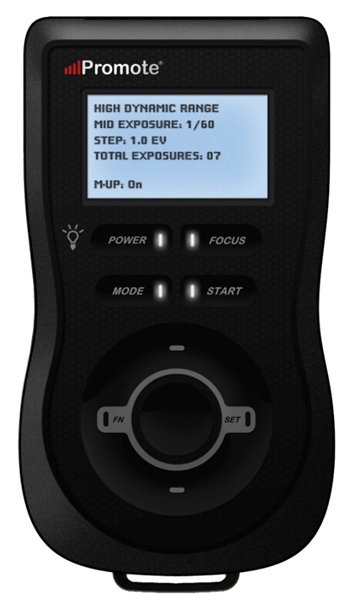
The Promote Control from Promote Systems delivers very precise control over DSLR cameras to open up new creative possibilities. Here’s a list of things that the Promote Control can do:
  • Promote Control ReviewHyperfocal Distance Calculator
  • Remote Shutter (One Shot)
  • Time Lapse Intervalometer
  • HDR Bracketing
  • BulB HDR Bracketing
  • Bulb Ramping for Time Lapse
  • Focus Stacking
  • Video Control
  • Manual Shutter for long Bulb Exposures

This device is like a Swiss Army Knife for photographers who want to get the most out of their DSLR cameras. Currently priced at $ 299, it’s an accessory that will appeal to the more hardcore shooters, but for those photographers that regularly need advanced HDR bracketing, focus stacking or bulb ramping, the Promote Control is worth every penny.

Rather than go into every single function of the Promote Control, I’m going to highlight its three most powerful features, which I believe merit the asking price themselves.

Focus Stacking

As a landscape shooter, I mostly want corner to corner sharpness in my images and sometimes I’ll use focus stacking to achieve maximum sharpness throughout the frame. This really only works when your static subjects are perfectly still, with little to no breeze. If you’ve ever tried focus stacking the manual way, you’ll know that there is some margin for error and it can take practice to do it well. The Promote Control takes all the guess work out of focus stacking by incrementally adjusting your focus from start and end points that you specify.

Once you’ve done this a couple of times you’ll never be able to go back to doing it manually. When you see the results of your focus stacked image and the lack of weird looking artifacts that can sometimes result from inaccurate focus adjustments done manually, you’ll be hooked.

Macro and small product photographers will love this feature.

Here’s an example of a focus stacked shot with corner to corner focus using a mid range aperture.

Focus Stacking with the Promote Control

Here’s a video demonstrating how this works with the Promote Control.

Bulb Ramping for day to night Time Lapse

If you’ve ever tried to shoot a time lapse sequence of the setting sun, you’ll know that there are only two ways to capture the correct exposures as the light changes. You either adjust the shutter speed manually while shooting (which introduces terrible flicker) or you use a bulb ramping device that can gradually and smoothly alter your shutter speed over time.

This technique is known as Bulb Ramping, and there really aren’t that many devices out there that do a good job. The Promote Control has become something of a “go to” bulb ramping solution for quite some time now, because it simply does such an excellent job of adjusting your DSLR camera’s shutter speed in tiny increments, over a set period of time. You tell the Promote Control how long you’d like to shoot, and when you’d like it to begin increasing or decreasing the exposure time.

Of course, it can’t know exactly when the changes in light occur, you have to know in advance by casing your location the night before, and making a note of the sunset time. The Promote  Control simply does what you tell it to do, and it does it well. Here’s a video of Joel Schat explaining how to achieve bulb ramping with the Promote Control.

HDR Bracketing

If three or five bracketed exposures simply aren’t enough to capture the dynamic range of your scene, how does 45 exposures sound? Simply tell the Promote Control what shutter speed to use for the middle (or correct) exposure, then tell it how many EV steps to use and the number of total exposures. The Promote Control will do the grunt work while you look around for the next shot.

A jack of all trades

Everything that the Promote Control does, it does well. I expect that most users will only use two to three of this device’s powerful features but at $ 299 it’s worth every penny.

Build quality
weather sealed promote control

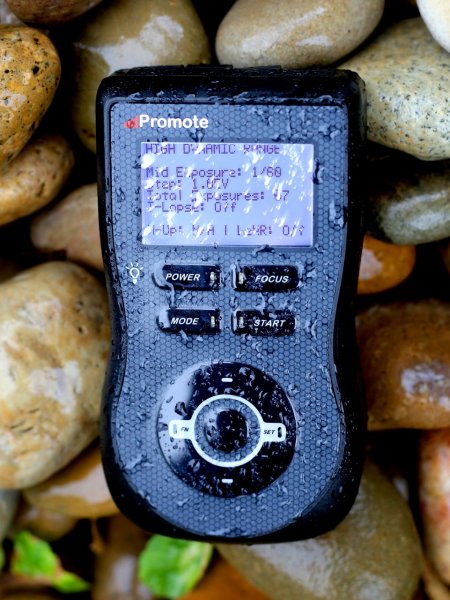
The Promote Control is very well built. It’s a solid little unit that’s about the same size as a Smartphone, but is just under an inch thick. The backlit LCD screen is easy to read and there are only eight buttons on the entire unit. It’s small enough to pack into any mid-sized camera bag, and comes with a tidy little carry case. It even comes with a lifetime warranty for manufacturing and workmanship defects. How often do you see that?

The device is powered by two AA batteries which last a long time. You can also power the Promote Control with an external DC power jack for taking super long exposures, or lengthy time lapse shoots.

What I’d like to see in the next update

To me, there is one glaringly obvious function that is missing from this device. HDR Focus Stacking. Why not combine the advanced HDR bracketing feature and the focus stacking feature? When I focus stack manually, I often have to bracket in order to capture the dynamic range. I can’t imagine why this feature is not available with this device.

My only two complaints

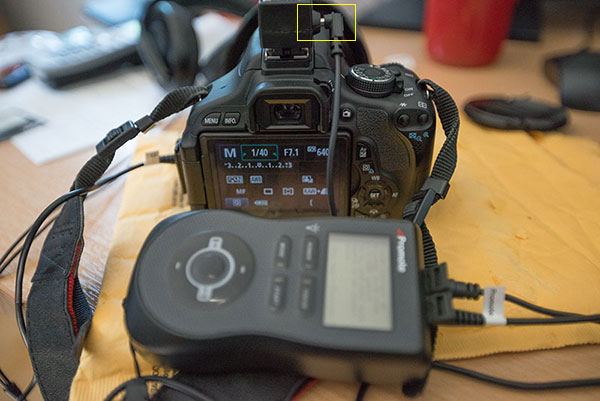
The Promote Control is such a simple little device that there’s not much to complain about, it either works or it doesn’t. My only gripe isn’t with the unit itself, but with the hotshoe attachment, required for bulb ramping when shooting time lapse sequences. I found that the cable fell out of the hotshoe attachment at the slightest nudge, not something I would trust out in the field when shooting a lengthy time lapse.
Hot Shoe Cable

I had problems with the cable that attaches to the hotshoe accessory.

My other complaint is that the Promote Control is not compatible with mirrorless cameras like my Sony A7R. Full compatibility only extends to Nikon and Canon, with limited compatibility for Sony and Sigma cameras. This is the only reason I decided not to buy the Promote Control. But if Promote Systems manages to catch up with the mirrorless movement, I’ll be unleashing the credit card.

I asked Promote Systems about it and this was their response:

We get a lot of requests for compatibility with the A7/A7R and we would love to support the cameras, but unfortunately Sony doesn’t make that possible. They implemented a tethering protocol on A7 cameras, but just as with earlier cameras, it refuses to save images on the card – you MUST pick them up and save them elsewhere, or all subsequent USB image acquisition commands will fail. Until Sony resolves the issues with not saving images on to the in-camera card when tethered, we can’t do much about it, unfortunately.

Why can’t my camera do all this?

When you look at what the Promote Control does and the results that it achieves, there’s obviously a demand for this level of functionality. There’s no reason why digital cameras can’t have all of this functionality built in, and with cameras like the Sony A7R able to run Apps that users install, it’s only a matter of time until all of this can be done in camera. Until then, Promote Systems are filling a gap in the market and they are doing it very well. I’m going to award the Promote Control 4 stars.

Would you buy this clever little device?

The post Review of The Promote Control for Time Lapse and Focus Stacking by Gavin Hardcastle appeared first on Digital Photography School.


Digital Photography School
 
Comments Off on Review of The Promote Control for Time Lapse and Focus Stacking

Posted in Photography


Sony Xperia Z2 camera review

19 Aug

The Xperia Z2 is Sony’s latest flagship Android smartphone and a solid upgrade to its predecessor, the Xperia Z1. Though the Z2 offers nearly identical camera specs to its predecessor, its 20.7MP 1/2.3-inch CMOS sensor is capable of recording 4K video, unlike the Z1. We’ve put the Sony Xperia Z2 through our usual testing routine to find how image quality compares to the preceding model, and how the new features perform in real-life shooting. Read more

Articles: Digital Photography Review (dpreview.com)

 
Comments Off on Sony Xperia Z2 camera review

Posted in Uncategorized


What’s NEX? Sony Alpha a5100 first impressions review

18 Aug

As Sony introduces the Alpha a5100 interchangeable lens camera, it officially leaves behind the NEX moniker its mirrorless line originated with. The a5100 picks up where the NEX-5 series leaves off, combining the 24.3 megapixel APS-C CMOS sensor of the a6000 and the more compact footprint of the NEX-5T. The a5100 also inherits many of the a6000’s good qualities, including its impressive autofocus system. The a5100 also one-ups its big brother by offering 1080/60p video at 50Mbps. We took a hands-on, preliminary look at the a5100. Read more

Articles: Digital Photography Review (dpreview.com)

 
Comments Off on What’s NEX? Sony Alpha a5100 first impressions review

Posted in Uncategorized


Accessory Review: Drobo Mini RAID

14 Aug

The Drobo Mini is a portable RAID storage solution with four HD bays, speedy Thunderbolt connectivity, and desktop-based monitoring software. Ideal for photography and videography, the Drobo Mini has many features that might make it attractive to enthusiast and professional photographers and videographers. See how the Drobo Mini fared in our review.

Articles: Digital Photography Review (dpreview.com)

 
Comments Off on Accessory Review: Drobo Mini RAID

Posted in Uncategorized


Part one: Panasonic Lumix DMC-GH4 / Sony Alpha 7S Comparative Review

04 Aug

Though they come with vastly different sensor sizes and price tags, the Panasonic Lumix GH4 and the Sony Alpha 7S are similar in spirit. They’re both meant for video recording as much as they are for stills. To that point, the 12.2MP full frame A7S and 16MP Micro Four Thirds GH4 are both capable of 4K video output and offer extensive video features. Our comparative review takes a detailed look at how these cameras perform in terms of video and stills, as well how they stack up against one another. Read part one

Articles: Digital Photography Review (dpreview.com)

 
Comments Off on Part one: Panasonic Lumix DMC-GH4 / Sony Alpha 7S Comparative Review

Posted in Uncategorized


Product Review – Dixie Grip: Rotating, handheld, or mounted hotshoe grip

29 Jul

What is it?

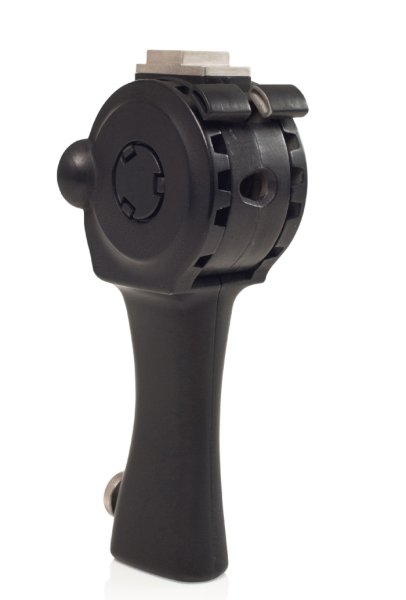
The Dixie Grip

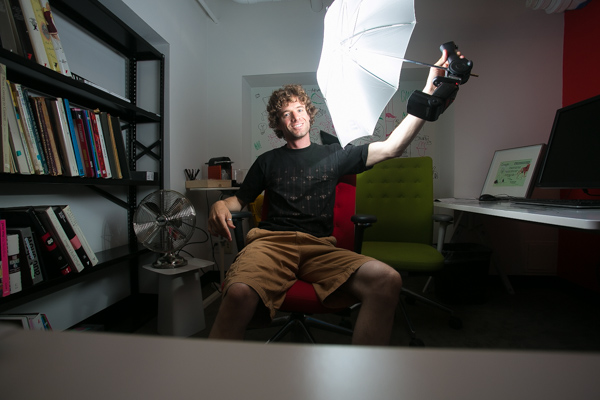
The Dixie Grip is a product that doesn’t exist yet. It’s a Kickstarter campaign product, and it fills a gap in the street portrait world that desperately needs filling – a handheld Speedlite grip.
Don’t believe there is a need for this kind of thing? Case in point: just days after trying the product out and thinking about whether I would have a need for it or not, I was walking with my mentor Payam in New York talking about photography. He was describing to me an engagement session he was shooting in Central Park. He was using a Canon Speedlite with a remote trigger, and his assistant had the flash on a monopod with a softbox mounted onto the unit. The reason for this crazy handheld setup is that having off-camera flash with a softbox is like having a portable studio wherever you go! And having an assistant hold it allows for great flexibility in movement. But there is a problem with this setup. It’s a workaround. The monopod is not an ideal piece of equipment for a Speedlite. It’s awkward, too long, and not ergonomically friendly. That’s where the Dixie Grip comes into play.

What does it do? What’s it good for?

This piece of equipment replaces the light stand with something much more flexible – your hands! Yes, you can mount the grip onto a light stand, but the best part is having the mobility and freedom of using it with your hands. As far as I know, there is no other thing out there that does that, exactly like this. And it holds an umbrella. It’s an ergonomic solution to the mobile problem of traveling light and easy. As my mentor was saying, his assistant was doing the same thing but with a monopod or a tripod, holding the whole awkward kit in their hands. That rig is unwieldy, heavy, and awkward. The Dixie Grip was created for exactly that situation, a light, perfectly sized grip for Speedlites. It’s so simple, it’s amazing it hasn’t been done before.The last part of the product which is pretty slick is that it is adjustable. You can “rotate” the head by simply squeezing these two units together and moving the Speedlite or umbrella up or down. This give you the ability to work with different angles.

How I used it

The Dixie Grip

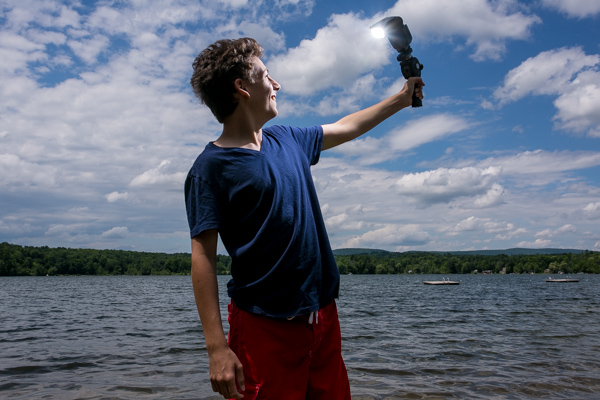
I brought the Dixie Grip with me to the lakeside with my cousin when I didn’t have an umbrella, and we played around with the equipment to get a feel for it. I made him the assistant and the model. The feel of it was easy enough to use, and since we were standing on sand we didn’t have to worry about getting sand on light stands or moving things around on uneven ground. He just got to hold the grip and it worked exactly as expected.

The Dixie Grip

I got back to the city and was able to use the Dixie Grip with an umbrella which is how it is best used. As you can see in the photos, the light looks great, it’s smooth, and best of all, we could shoot in very tight quarters without maneuvering an awkward tripod stand or monopod.

The Dixie Grip

The Dixie Grip

Summary

In conclusion, I would definitely recommend this product if you shoot on location in different conditions. I could see this being a tremendous asset to a wedding photographer who needs to run and gun with their bride and groom for a quick formal session. I could also see this on the streets of NY with a model in the city. There is no reason not to own one of these. It’s intuitive and easy and it works.

The only drawbacks I found were when I tried using my cheap Yongnuo triggers to fit into the hotshoe. They don’t have tightening rings and just sit on whatever they are attached to. The hotshoe mount on the Dixie Grip was a bit too large for the trigger, so the trigger would slide out easy (which isn’t great when the Speedlite is attached to it). But that was an easy fix with a couple of pieces of cardboard. Or just use normal equipment like a Pocket Wizard and you’ll be fine.

Adjusting the head by squeezing those two pieces together, and moving the Speedlite, was slightly awkward. It didn’t always click into place right away. But I was also using a prototype which I know has some kinks to be smoothed out yet. I expect that component to be rock solid when it comes to production. Which is where you come in!

Kick Starter Campaign for The Dixie Grip

This is the link to the product. The campaign ends July 28th, so help put this thing on the market, and be the very first person to own a Dixie Grip.

I give the Dixie Grip product 4.5 stars out of 5.

The Dixie Grip

The post Product Review – Dixie Grip: Rotating, handheld, or mounted hotshoe grip by Phillip VanNostrand appeared first on Digital Photography School.


Digital Photography School
 
Comments Off on Product Review – Dixie Grip: Rotating, handheld, or mounted hotshoe grip

Posted in Photography


Real-world & Studio Samples Added to Nikon D810 1st-impressions Review

24 Jul

Nikon’s new D810 consolidates the older D800 and D800E into a single body with no AA filter on its 36MP CMOS sensor. A few days ago we received a final production sample Nikon D810 and we’ve been shooting with it intensely ever since. As well as putting it through our initial studio testing, we’ve also taken a quick look at the effectiveness of the new electronic first-curtain shutter and created a gallery of real-world sample images to show what the camera can do. Click through for links.

Articles: Digital Photography Review (dpreview.com)

 
Comments Off on Real-world & Studio Samples Added to Nikon D810 1st-impressions Review

Posted in Uncategorized


Ready for its close-up: Panasonic Lumix DMC-FZ1000 Review

22 Jul

If the Sony Cyber-shot DSC-RX10 premium superzoom was a game-changer, the Panasonic Lumix DMC-FZ1000 changed the game yet again when it was introduced last month. With its 1″-type 20.1MP CMOS sensor and 25-400mm equiv. F2.8-4.0 lens it’s an ideal candidate for travel, offering a larger-than-average sensor and generous zoom range. With 4K video recording and a lower MSRP, it gave the already-impressive RX10 a run for the money. Read more

Articles: Digital Photography Review (dpreview.com)

 
Comments Off on Ready for its close-up: Panasonic Lumix DMC-FZ1000 Review

Posted in Uncategorized